FTXP50M2V1B - Air Conditioning DAIKIN - Free user manual and instructions
Find the device manual for free FTXP50M2V1B DAIKIN in PDF.


User questions about FTXP50M2V1B DAIKIN
0 question about this device. Answer the ones you know or ask your own.
Ask a new question about this device
Download the instructions for your Air Conditioning in PDF format for free! Find your manual FTXP50M2V1B - DAIKIN and take your electronic device back in hand. On this page are published all the documents necessary for the use of your device. FTXP50M2V1B by DAIKIN.
USER MANUAL FTXP50M2V1B DAIKIN
text_image
THE KEY FOR SMART INFORMATION Scan and find out moreOperation manual
R32 split series
natural_image
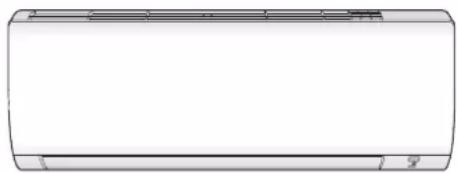
Front view of a rectangular air conditioner unit (no text or symbols visible)Operation manual R32 split series
2 About the system 2
2.1 Indoor unit 2
2.1.1 Indoor unit display.... 3
2.2 About the user interface 3
2.2.1 Components: User interface 3
2.2.2 Status: User interface LCD 3
2.2.3 To operate the user interface.... 4
3 Before operation 4
3.1 To fix the user interface to the wall.... 4
3.2 To insert the batteries.... 4
3.3 To switch between Fahrenheit and Celsius.... 4
3.4 To turn on the power supply.... 4
4 Operation 4
4.1 Operation range 4
4.2 When to use which feature.... 4
4.3 Operation mode and temperature setpoint.... 5
4.3.1 To start/stop operation and to set the temperature..... 5
4.3.2 Airflow rate.... 5
4.3.3 Airflow direction.... 5
4.3.4 Comfort airflow operation....6
4.3.5 Powerful operation....6
4.3.6 Econo operation.... 6
4.3.7 OFF/ON timer operation 7
5 Energy saving and optimum operation 7
6 Maintenance and service 8
6.1 Overview: Maintenance and service 8
6.2 To clean the indoor unit and user interface 8
6.3 To clean the front panel....9
6.4 To clean the air filters 9
6.5 To clean the titanium apatite deodorizing filter and the silver particle filter (Ag-ion filter) 9
6.6 To replace the titanium apatite deodorizing filter and the silver particle filter (Ag-ion filter) 10
6.7 To close the front panel.... 10
6.8 To take following items into account before a long idle period.. 10
7 Troubleshooting
10
7.1 Symptoms that are NOT system malfunctions 11
7.1.1 Symptom: A sound like water flowing is heard ..... 11
7.1.2 Symptom: A blowing sound is heard.... 11
7.1.3 Symptom: A ticking sound is heard.... 11
7.1.4 Symptom: A whistling sound is heard.... 11
7.1.5 Symptom: A clicking sound during operation or idle time is heard 11
7.1.6 Symptom: A clapping sound is heard 11
7.1.7 Symptom: White mist comes out of a unit (Indoor unit) 11
7.1.8 Symptom: The units can give off odours.... 11
7.1.9 Symptom: The outdoor fan rotates while the air conditioner is not in operation 11
7.2 Solving problems based on error codes.... 11
8 Disposal 11
1 About the documentation
1.1 About this document
Thank you for purchasing this product. Please:
- Keep the documentation for future reference.
Target audience
End users

INFORMATION
This appliance is intended to be used by expert or trained users in shops, in light industry, and on farms, or for commercial and household use by lay persons.
Documentation set
This document is part of a documentation set. The complete set consists of:
- General safety precautions:
- Safety instructions that you must read before operating your system
- Format: Paper (in the box of the indoor unit)
- Operation manual:
- Quick guide for basic usage
- Format: Paper (in the box of the indoor unit)
- User reference guide:
- Detailed step-by-step instructions and background information for basic and advanced usage
- Format: Digital files on http://www.daikineurope.com/support-and-manuals/product-information/
Latest revisions of the supplied documentation may be available on the regional Daikin website or via your installer.
The original documentation is written in English. All other languages are translations.
2 About the system

WARNING: FLAMMABLE MATERIAL
The refrigerant inside this unit is mildly flammable.
2.1 Indoor unit

CAUTION
Do NOT insert fingers, rods or other objects into the air inlet or outlet. When the fan is rotating at high speed, it will cause injury.

INFORMATION
The sound pressure level is less than 70 dBA.

WARNING
- Do not modify, disassemble, remove, reinstall or repair the unit yourself as incorrect dismantling or installation may cause an electric shock or fire. Contact your dealer.
- In case of accidental refrigerant leaks, make sure there are no naked flames. The refrigerant itself is entirely safe, non-toxic and mildly flammable, but it will generate toxic gas when it accidentally leaks into a room where combustible air from fan heaters, gas cookers, etc. is present. Always have qualified service personnel confirm that the point of leakage has been repaired or corrected before resuming operation.
2.1.1 Indoor unit display
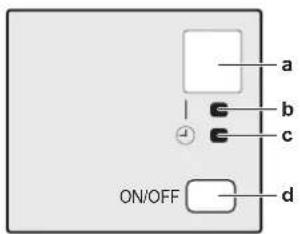
text_image
a b c ON/OFF da Signal receiver
b Operation lamp
c Timer lamp
d ON/OFF button
ON/OFF button
If the user interface is missing, you can use the ON/OFF button on the indoor unit to start/stop operation. When operation is started using this button, the following settings are used:
- Operation mode = Automatic
- Temperature setting = 25°C
- Airflow rate = Automatic
2.2 About the user interface
- Direct sunlight. Do NOT expose the user interface to direct sunlight.
- Dust. Dust on the signal transmitter or receiver will reduce sensitivity. Wipe off dust with a soft cloth.
- Fluorescent lights. Signal communication might be disabled if fluorescent lamps are in the room. In that case, contact your installer.
- Other appliances. If the user interface signals operate other appliances, move the other appliances, or contact your installer.
- Curtains. Make sure that the signal between the unit and the user interface is NOT blocked by curtains or other objects.

NOTICE
- Do NOT drop the user interface.
- Do NOT let the user interface get wet.
2.2.1 Components: User interface
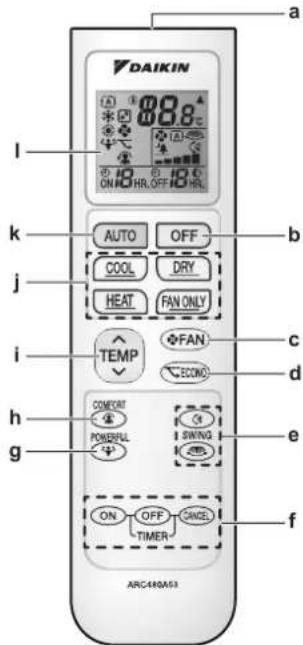
text_image
DAIKIN a 88.8°C ON HO HR, OFF HO HR. b AUTO OFF COOL DRY HEAT FAN ONLY TEMP FAN ECONO c d h G COMONT POWERFUL SWING ON OFF CANCEL TIMER f ARC480A53a Signal receiver
b OFF button
c Fan setting button
d Econo operation button
e Swing buttons
f Timer setting buttons (ON, OFF, cancel)
g Powerful operation button
h Comfort operation button
i Temperature adjustment button
J Operation mode buttons
k Automatic operation mode button
I LCD display
2.2.2 Status: User interface LCD
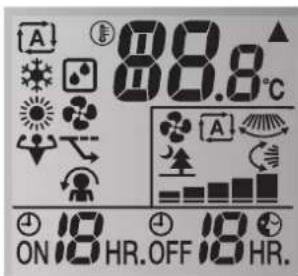
text_image
A 88.8°C ON 19 HR.OFF 19 HR.| Icon Description | |
| Operation mode = Automatic | |
| Operation mode = Drying | |
| Operation mode = Heating | |
| Operation mode = Cooling | |
| Operation mode = Fan only | |
| Powerful operation is active | |
| Econo operation is active | |
| ▲ | The indoor unit receives a signal from the user interface |
| 88.8c | Current temperature setting |
| Airflow rate = Automatic | |
3 Before operation
| Icon Description | |
| Airflow rate = Indoor unit quiet | |
| Airflow rate = High | |
| Airflow rate = Medium high | |
| Airflow rate = Medium | |
| Airflow rate = Medium low | |
| Airflow rate = Low | |
| Comfort operation is active | |
| Automatic vertical swing is active | |
| Automatic horizontal swing is active | |
| ON | ON timer is active |
| OFF | OFF timer is active |
2.2.3 To operate the user interface
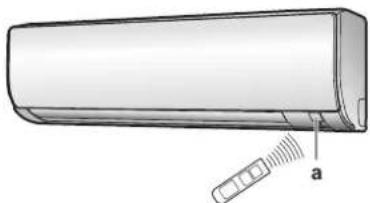
natural_image
Illustration of a car air conditioner unit with a sensor attached, labeled 'a' (no text or symbols on the device itself)a Signal receiver
1 Aim the signal transmitter at the signal receiver on the indoor unit (maximum distance for communication is 7 m).
Result: When the indoor unit receives a signal from the user interface, you will hear a sound:
| Sound Description | |
| Beep-beep Operation starts. | |
| Beep Setting changes. | |
| Long beep Operation stops. |
3 Before operation
3.1 To fix the user interface to the wall
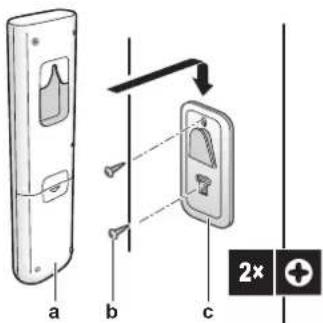
text_image
a b c 2xa User interface
b Screws (field supply)
c User interface holder
1 Choose a place where the signals reach the unit.
2 Attach the holder with screws to the wall or a similar location.
3 Hang the user interface on the user interface holder.
3.2 To insert the batteries
The batteries will last for about 1 year.
1 Remove the back cover.
2 Insert both batteries at once.
3 Put the cover back.
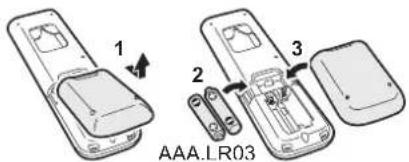
text_image
1 2 3 AAA.LR033.3 To switch between Fahrenheit and Celsius
Prerequisite: Change this setting only when the temperature is displayed.
1 Press and simultaneously for about 5 seconds.
Result: The setting changes.
3.4 To turn on the power supply
1 Turn the circuit breaker on.
Result: The flap of the indoor unit will open and close to set the reference position.
4 Operation
4.1 Operation range
| Operation mode | Operation range |
| Cooling^(a)(b) | Outdoor temperature: -10~46°CIndoor temperature: 18~32°CIndoor humidity: ≤80% |
| Heating^(a) | Outdoor temperature: -15~24°CIndoor temperature: 10~30°C |
| Drying^(a) | Outdoor temperature: -10~46°CIndoor temperature: 18~32°CIndoor humidity: ≤80% |
If operated outside the operation range:
(a) A safety device might stop the operation of the system.
(b) Condensation might occur on the indoor unit and drip.
4.2 When to use which feature
You can use the following table to determine which features to use:
| Feature | Tasks |
| Basic features | |
| To start/stop the system and to set the temperature:Heat up or cool down a room.Blow air in a room without heating or cooling.Decrease the humidity in a room.In Automatic mode, automatically select an appropriate temperature and operation mode. | |
| Feature Tasks | ||
 + +  flow direction flow direction | To adjust the airflow direction (swing or fixed position). | |
 A A  rate rate | To adjust the amount of air blown into the room.To run more quietly. | |
| Advanced features | ||
 E [YT40] E [YT40] | To use the system when you are also using other power-consuming appliances.To save energy. | |
 C [CDK9] irt C [CDK9] irt | To provide a comfortable airflow that does NOT come in direct contact with people. | |
 P P  ful ful | To cool down or heat up the room quickly. | |
 C [KAOZ] ter + OFF timer C [KAOZ] ter + OFF timer | To automatically turn ON or OFF the system. | |
Advanced features
4.3 Operation mode and temperature setpoint
When. Adjust the system operation mode and set the temperature when you want to:
- Heat up or cool down a room
- Blow air in a room without heating or cooling
- Decrease the humidity in a room
What. The system operates differently, depending on the user selection.
| Setting Description | |
[XSHV] A  atic atic | The system cools down or heats up a room to the temperature setpoint. It automatically switches between cooling and heating if necessary. |
[6A0D] Or  | The system decreases the humidity in a room without changing the temperature. |
| [WABB] He [4AAWH] | The system heats up a room to the temperature setpoint. |
| Cooling | The system cools down a room to the temperature setpoint. |
 E[HCZS] E[HCZS] | The system only controls the airflow (airflow rate and airflow direction). The system does NOT control the temperature. |
Additional info:
- Outside temperature. The system's cooling or heating effect decreases when the outside temperature is too high or too low.
- Defrost operation. During heating operation, frost might occur on the outdoor unit and decrease the heating capacity. In that case, the system automatically switches to defrosting operation to remove the frost. During defrosting operation, hot air is NOT blown from the indoor unit.
4.3.1 To start/stop operation and to set the temperature

Operation mode = Automatic

Operation mode = Drying

Operation mode = Heating

Operation mode = Cooling

Operation mode = Fan only

8.8°C
1 Start operation by pressing one of the following buttons.
| Mode Press Result | ||
| Automatic operation | AUTO | |
| Cooling operation | COOL | |
| Drying operation | DRY | |
| Heating operation | HEAT | The operation lamp lights up. |
| Fan only operation | FAN ONLY |
2 Press √ or ∧ on the button one or more times to set the temperature. You CANNOT adjust the temperature in drying or fan only operation mode.
| Cooling operation | Heating operation | Automatic operation | Drying or fan only operation |
| 18~32°C | 10~30°C | 18~30°C | — |
3 Press

stop operation.
Result: The operation lamp goes off.
4.3.2 Airflow rate
1 Press

choose:
| 5 airflow rate levels, from "☐ to " " | |
| Automatic operation | |
| Indoor unit quiet operation. When the airflow is set to "♠", the noise from the unit will be reduced. |

INFORMATION
- If the unit reach the temperature setpoint in cooling, heating or automatic mode. Fan will stop operating.
- When using drying operation mode, you CANNOT adjust the airflow rate setting.
To adjust the airflow rate
1 Press

change the airflow setting as follows:

4.3.3 Airflow direction
When. Adjust the airflow direction as desired.
What. The system directs the airflow differently, depending on the user selection (swinging or fixed position). It does so by moving horizontal blades (flaps) or vertical blades (louvers).
4 Operation
| Setting Airflow direction | |
 Vertical automatic swing Vertical automatic swing | Moves up and down. |
| Moves from side to side. | |
| [0KDS] airflow direction | Moves simultaneously up and down and from side to side |
| [—] Stays in a fixed position. | |

CAUTION
- ALWAYS use a user interface to adjust the position of the flaps and louvers. When the flaps and louvers are swinging and you move them forcibly by hand, the mechanism will break.
The movable range of the flap varies according to the operation mode. The flap will stop at the upper position when the airflow rate is changed to low during the up and down swing setting.
To adjust the airflow direction
1 To use auto swing, press.
Result: will appear on the LCD.
Result: The flap (horizontal blade) will begin to swing.
2 To use fixed position, press when the flap reaches the desired position.
Result: disappears from the LCD.
To adjust the louvers (vertical blades)
4.3.4 Comfort airflow operation
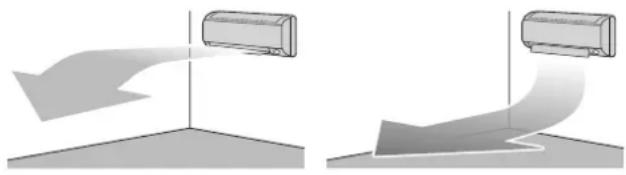
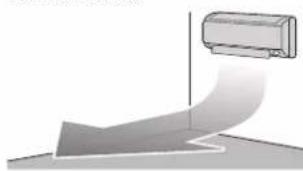
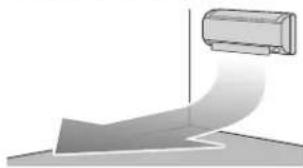
This operation can be used in heating or cooling operation mode. It will provide a comfortable wind that will NOT come in direct contact with people. The system automatically sets the fixed airflow position upward in Cooling and downward in Heating operation mode.
Cooling operation mode Heating operation mode
natural_image
Two identical diagrams showing airflow or fluid flow between a cylindrical object, with no text or symbols present.
INFORMATION
Powerful and Comfort airflow operation CANNOT be used at the same time. The last selected function takes priority. If the vertical automatic swing is selected, Comfort airflow operation will be cancelled.
To start/stop Comfort airflow operation
1 Press to start.
Result: The flap position will change, is displayed on the LCD, and the airflow rate is set to automatic.
| Mode Position of flap... | |
| Cooling/Drying | Up |
| Heating | Down |
2 Press to stop.
Result: The flap will return to the position from before the Comfort airflow mode; 📁 disappears from the LCD.
4.3.5 Powerful operation
This operation quickly maximizes the cooling/heating effect in any operation mode. You can get the maximum capacity.

INFORMATION
Powerful operation CANNOT be used together with Econo and Comfort airflow operation. The last selected function takes priority.
Powerful operation will NOT increase the capacity of the unit if it already operates at maximum capacity.
To start/stop Powerful operation
1 Press to start.
Result: 🖼 is displayed on the LCD. Powerful operation runs for 20 minutes; after that, operation returns to the previously set mode.
2 Press to stop.
Result: disappears from the LCD.
Note: Powerful operation can be set only when the unit is running. If you press OFF, operation will be cancelled; disappears from the LCD.
4.3.6 Econo operation
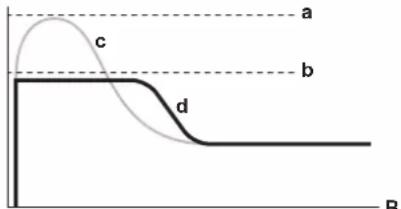
This is a function which enables efficient operation by limiting the maximum power consumption value. This function is useful for cases in which attention should be paid to ensure a circuit breaker will not trip when the product runs alongside other appliances.

INFORMATION
- Powerful and Econo operation CANNOT be used at the same time. The last selected function takes priority.
- Econo operation reduces power consumption of the outdoor unit by limiting the rotation speed of the compressor. If power consumption is already low, Econo operation will NOT further reduce power consumption.
To start/stop Econo operation
1 Press to start.
Result: is displayed on the LCD.
2 Press to stop.
Result: disappears from the LCD.
A
text_image
a b c d BA Running current and power consumption
B Time
a Maximum during normal operation
b Maximum during Econo operation
c Normal operation
d Econo operation
- The diagram can be used for illustrative purposes only.
- The maximum running current and power consumption of the air conditioner in Econo operation varies with the connected outdoor unit.
4.3.7 OFF/ON timer operation
Timer functions are useful for automatically switching the air conditioner on/off at night or in the morning. You can also use OFF timer and ON timer in combination.

INFORMATION
Program the timer again in case of:
- A breaker has turned the unit off.
- A power failure.
- After replacing batteries in the user interface.
To start/stop ON timer operation
Use this feature if the unit is NOT operating and you want to start operation after a certain time.
1 Press . ON
④
Result: ON is displayed on the LCD and the timer lamp lights up.
2 Press again if you want to change the time setting.

INFORMATION
Each time is pressed, the time setting advances by 1 hour. The timer can be set between 1 to 12 hours.
①
2
is set when the unit is NOT operating,
Example: If ON CHR. is set when the unit is NOT operating, operation will start after 2 hours.
3 To cancel the setting, press.
②
Result: 0 And the time setting disappear from the LCD and the timer lamp goes off.
To start/stop OFF timer operation
Use this feature if the unit is operating and you want to stop operation after a certain time.
1 Press . OFF
②
Result: OFF AND displayed on the LCD and the timer lamp lights up.
2 Press again if you want to change the time setting.

INFORMATION
Each time OFF is pressed, the time setting advances by 1 hour. The timer can be set between 1 to 12 hours.
①
C
[Non-Text]
Example: If OFF HR . is set when the unit is operating, operation will stop after 5 hours.
3 To cancel the setting, press.
①
Result: OFF and the time setting disappear from the LCD and the timer lamp goes off.

INFORMATION
Night set mode
When the OFF timer is set, the air conditioner automatically adjusts the temperature setting (0.5°C up in cooling, 2.0°C down in heating) to prevent excessive cooling/heating and ensure a comfortable sleeping temperature.
To combine OFF timer and ON timer
1 To set the timers, refer to "To start/stop OFF timer operation" on page 7 and "To start/stop ON timer operation" on page 7.
Result: OFF and ON are displayed on the LCD.
Example:
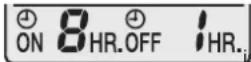
2 If ON HR.Off HR. is set when the unit is operating.
Result: Operation stops in 1 hour and then starts 7 hours later.
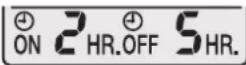
3 If ON HR.OFF HR. is set when the unit is NOT operating.
Result: Operation starts in 2 hours and then stops 3 hours later.
5 Energy saving and optimum operation

INFORMATION
- Even if the unit is turned OFF, it consumes electricity.
- When the power turns back on after a power break, the previously selected mode will be resumed.

CAUTION
NEVER expose little children, plants or animals directly to the airflow.

WARNING
Do NOT place objects below the indoor and/or outdoor unit that may get wet. Otherwise condensation on the unit or refrigerant pipes, air filter dirt or drain blockage may cause dripping, and objects under the unit may get dirty or damaged.

NOTICE
Do NOT use the system for other purposes. In order to avoid any quality deterioration, do NOT use the unit for cooling precision instruments, food, plants, animals, or works of art.

CAUTION
Do NOT operate the system when using a room fumigation-type insecticide. Chemicals could collect in the unit, and endanger the health of people who are hypersensitive to chemicals.

WARNING
Do NOT place a flammable spray bottle near the air conditioner and do NOT use sprays. Doing so may result in a fire.
Observe the following precautions to ensure the system operates properly.
- Prevent direct sunlight from entering a room during cooling operation by using curtains or blinds.
- Ventilate often. Extended use requires special attention to ventilation.
- Keep doors and windows closed. If the doors and windows remain open, air will flow out of your room causing a decrease in the cooling or heating effect.
- Be careful NOT to cool or heat too much. To save energy, keep the temperature setting at a moderate level.
- NEVER place objects near the air inlet or the air outlet of the unit. Doing so may cause a reduced heating/cooling effect or stop operation.
6 Maintenance and service
- Turn the breaker off when the unit is NOT used for longer periods of time. If the breaker is on, the unit consumes electricity. Before restarting the unit, turn the breaker on 6 hours before operation to ensure smooth running.
- Condensation may form if the humidity is above 80% or if the drain outlet gets blocked.
- Adjust the room temperature properly for a comfortable environment. Avoid excessive heating or cooling. Notice that it may take some time for the room temperature to reach the set temperature. Consider using the timer setting options.
- Adjust the air flow direction to avoid cool air from gathering on the floor or warm air against the ceiling. (Up during cooling or dry operation to the ceiling and down during heating operation.)
- Avoid direct air flow to room inhabitants.
- Operate the system within the recommended temperature range (26\~28°C for cooling and 20\~24°C for heating) to save energy.
6 Maintenance and service
6.1 Overview: Maintenance and service
The installer has to perform a yearly maintenance.
About the refrigerant
This product contains fluorinated greenhouse gases. Do NOT vent gases into the atmosphere.
Refrigerant type: R32
Global warming potential (GWP) value: 675

NOTICE
In Europe, the greenhouse gas emissions of the total refrigerant charge in the system (expressed as tonnes CO_2 equivalent) is used to determine the maintenance intervals. Follow the applicable legislation.
Formula to calculate the greenhouse gas emissions: GWP value of the refrigerant × Total refrigerant charge [in kg] / 1000
Please contact your installer for more information.

WARNING
The refrigerant inside the unit is mildly flammable, but normally does NOT leak. If the refrigerant leaks in the room and comes in contact with fire from a burner, a heater, or a cooker, this may result in fire, or the formation of a harmful gas.
Turn off any combustible heating devices, ventilate the room, and contact the dealer where you purchased the unit.
Do NOT use the unit until a service person confirms that the part from which the refrigerant leaked has been repaired.

WARNING
- Do NOT pierce or burn refrigerant cycle parts.
- Do NOT use cleaning materials or means to accelerate the defrosting process other than those recommended by the manufacturer.
- Be aware that the refrigerant inside the system is odourless.

WARNING
The appliance shall be stored in a room without continuously operating ignition sources (example: open flames, an operating gas appliance or an operating electric heater).

NOTICE
Maintenance MUST be done by an authorized installer or service agent.
We recommend performing maintenance at least once a year. However, applicable legislation might require shorter maintenance intervals.

DANGER: RISK OF ELECTROCUTION
To clean the air conditioner or air filter, be sure to stop operation and turn all power supplies off. Otherwise, an electric shock and injury may result.

WARNING
To prevent electric shocks or fire:
- Do NOT rinse the unit.
- Do NOT operate the unit with wet hands.
- Do NOT place any objects containing water on the unit.

CAUTION
After a long use, check the unit stand and fitting for damage. If damaged, the unit may fall and result in injury.

CAUTION
Do NOT touch the heat exchanger fins. These fins are sharp and could result in cutting injuries.

WARNING
Be careful with ladders when working in high places.
6.2 To clean the indoor unit and user interface

NOTICE
- Do NOT use gasoline, benzene, thinner polishing powder or liquid insecticide. Possible consequence: Discoloration and deformation.
- Do NOT use water or air of 40^ or higher. Possible consequence: Discoloration and deformation.
- Do NOT use polishing compounds.
- Do NOT use a scrubbing brush. Possible consequence: The surface finishing peels off.

DANGER: RISK OF ELECTROCUTION
Before cleaning, be sure to stop the operation, turn the breaker off or pull out the supply cord. Otherwise, an electric shock and injury may result.
1 Clean with a soft cloth. If it is difficult to remove stains, use water or a neutral detergent.
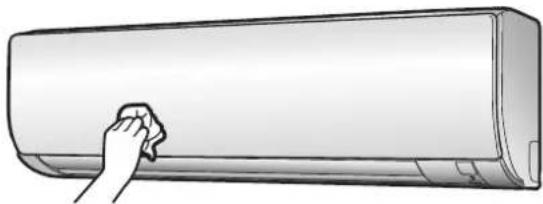
6.3 To clean the front panel
natural_image
Illustration of a hand cleaning a large air conditioner cover (no text or symbols)1 Clean the front panel with a soft cloth. If it is difficult to remove stains, use water or a neutral detergent.
6.4 To clean the air filters
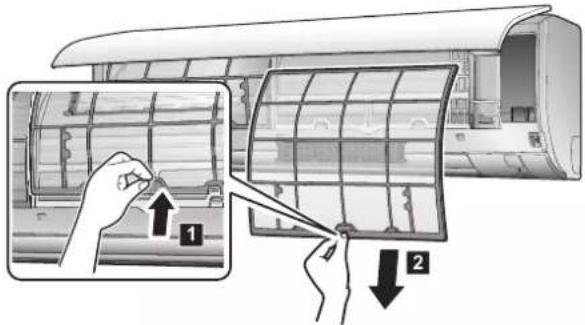
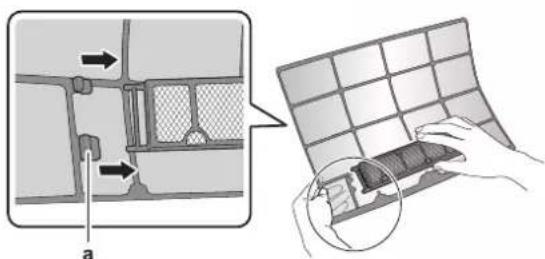
1 Push the tab at the centre of each air filter, then pull it down. 2 Pull out the air filters.
text_image
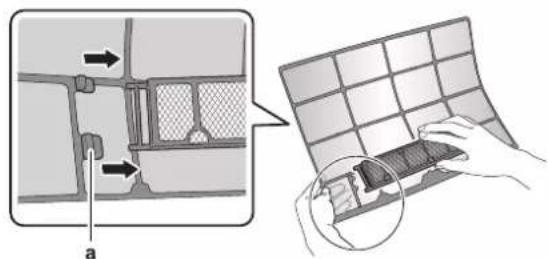
Diagram illustrating the installation of an air conditioner panel, showing step-by-step assembly and component positioning.3 Remove the titanium apatite deodorizing filter and silver particle filter from the tabs.
text_image
Diagram illustrating a mechanical assembly process with labeled components and a magnified view of the component being processed.a Tab
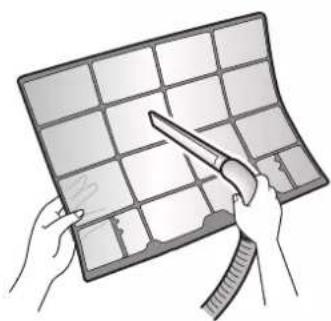
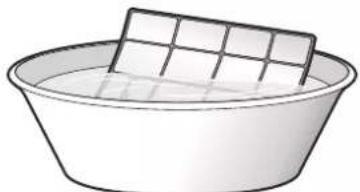
4 Wash the air filters with water or clean them with a vacuum cleaner.
natural_image
Illustration of hands holding a grid-based device with a tool, no text or symbols visible5 Soak in lukewarm water for about 10 to 15 minutes.
natural_image
Simple line drawing of a basin with a rectangular object on top (no text or symbols)
INFORMATION
- If the dust does NOT come off easily, wash the air filters with a neutral detergent diluted in lukewarm water. Dry the air filters in the shade.
- Be sure to remove the titanium apatite deodorizing and silver particle filters.
- It is recommended to clean the air filters every 2 weeks.
6.5 To clean the titanium apatite deodorizing filter and the silver particle filter (Ag-ion filter)

INFORMATION
Clean the filter with water every 6 months.
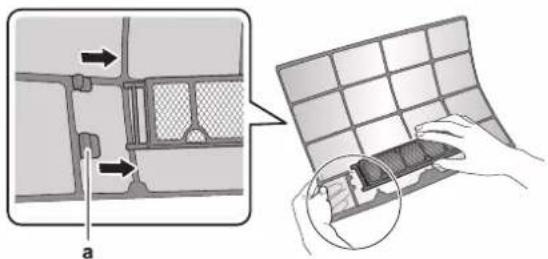
1 Remove the titanium apatite deodorizing and silver particle filters from the tabs.
text_image
Diagram illustrating a mechanical assembly process with labeled components and a magnified view of the component being processed.a Tabs
2 Remove the dust from the filter with a vacuum cleaner.
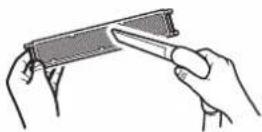
3 Soak the filter for 10 to 15 minutes in warm water. Do NOT remove the filter from the frame.
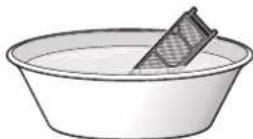
4 After washing, shake off remaining water and dry the filter in the shade. Do NOT wring out the filter when removing water.
7 Troubleshooting
6.6 To replace the titanium apatite deodorizing filter and the silver particle filter (Ag-ion filter)

INFORMATION
Replace the filter every 3 years.
1 Remove the tabs on the filter frame and replace the filter with a new one.
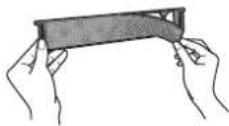

INFORMATION
- Do NOT throw away the filter frame, but use it again.
- Dispose of the old filter as non-flammable waste.
2 Remove the filter from the tabs and prepare a new filter.

INFORMATION
Dispose of the old filter as non-flammable waste.
6.7 To close the front panel
1 Gently press the front panel at both sides and at the center until it clicks.
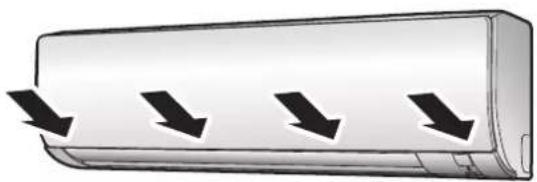
natural_image
Illustration of a car with three downward arrows indicating airflow or cooling direction (no text or symbols)6.8 To take following items into account before a long idle period
1 Set the mode to fan only by pressing button to dry the inside of the unit.
2 After operation stops, turn the breaker off.
3 Clean the air filters and replace them in their original position.
4 Remove the batteries from the user interface.

INFORMATION
It is recommended to have periodical maintenance performed by a specialist. For specialist maintenance, contact your dealer. Maintenance costs shall be borne by the customer.
In certain operating conditions the inside of the unit may get dirty after several seasons of use. This results in poor performance.
7 Troubleshooting
If one of the following malfunctions occur, take the measures shown below and contact your dealer.

WARNING
Stop operation and shut off the power if anything unusual occurs (burning smells etc.).
Leaving the unit running under such circumstances may cause breakage, electric shock or fire. Contact your dealer.
The system MUST be repaired by a qualified service person.
| Malfunction Measure | |
| If a safety device such as a fuse, a breaker or an earth leakage breaker frequently actuates or the ON/OFF switch does NOT properly work. | Turn OFF the main power switch. |
| If water leaks from the unit. Stop the operation. | |
| The operation switch does NOT work well. | Turn OFF the power supply. |
| If the user interface display indicates the unit number, the operation lamp flashes and the malfunction code appears. | Notify your installer and report the malfunction code. |
If the system does NOT properly operate except for the above mentioned cases and none of the above mentioned malfunctions is evident, investigate the system according to the following procedures.

INFORMATION
Refer to the user reference guide located on http://www.daikineurope.com/support-and-manuals/product-information/ for more troubleshooting tips.
If after checking all above items, it is impossible to fix the problem yourself, contact your installer and state the symptoms, the complete model name of the unit (with manufacturing number if possible) and the installation date (possibly listed on the warranty card).
7.1 Symptoms that are NOT system malfunctions
The following symptoms are NOT system malfunctions:
7.1.1 Symptom: A sound like water flowing is heard
- This sound is caused by the refrigerant flowing in the unit.
- This sound may be generated when water is flowing away from the unit during cooling or drying operation.
7.1.2 Symptom: A blowing sound is heard
This sound is generated when the direction of the refrigerant flow is changed (e.g. when switching from cooling to heating).
7.1.3 Symptom: A ticking sound is heard
This sound is generated when the unit slightly expands or contracts with changes in temperature.
7.1.4 Symptom: A whistling sound is heard
This sound is generated by the refrigerant flowing during defrost operation.
7.1.5 Symptom: A clicking sound during operation or idle time is heard
This sound is generated when the refrigerant control valves or electrical parts operate.
7.1.6 Symptom: A clapping sound is heard
This sound is generated when an external device sucks air out of the room (e.g. exhaust fan, extractor hood) while the doors and windows in the room are closed. Open the doors or windows, or turn off the device.
7.1.7 Symptom: White mist comes out of a unit (Indoor unit)
7.1.8 Symptom: The units can give off odours
The unit can absorb the smell of rooms, furniture, cigarettes, etc., and then emit it again.
7.1.9 Symptom: The outdoor fan rotates while the air conditioner is not in operation
- After operation has stopped. The outdoor fan continues to rotate for another 30 seconds for system protection.
- While the air conditioner is not in operation. When the outdoor temperature is very high, the outdoor fan starts to rotate for system protection.
7.2 Solving problems based on error codes
When a problem happens, an error code appears on the user interface. It is important to understand the problem and to take measures before resetting an error code. This should be done by a licensed installer or by your local dealer.
This chapter gives you an overview of all error codes and the content of the error code as it appears on the user interface.
For a more detailed troubleshooting guideline for each error, please see the service manual.
8 Disposal

NOTICE
Do NOT try to dismantle the system yourself: dismantling of the system, treatment of the refrigerant, oil and other parts MUST comply with applicable legislation. Units MUST be treated at a specialised treatment facility for reuse, recycling and recovery.
Inhaltsverzeichnis
text_image
A 88.8°C ON 18 HR.OFF 18 HR.natural_image
Illustration of a car air conditioner unit with a sensor attached to the side panel (no text or symbols)a Signalempfänger
GEFAHR: STROMSCHLAGGEFAHR
GEFAHR: STROMSCHLAGGEFAHR
natural_image
Illustration of a hand cleaning a large air conditioner cover (no text or symbols)text_image
Diagram illustrating the installation of an air conditioner panel with labeled steps 1 and 2, showing hand positioning and adjustment.text_image
Diagram illustrating a mechanical assembly process with labeled components and a magnified view of the component being handled.a Lasche
natural_image
Illustration of hands holding a grid-based device with scissors, no text or symbols visiblenatural_image
Simple line drawing of a basin with a tiled roof and a side dish (no text or symbols)
INFORMATION
text_image
Diagram illustrating a mechanical assembly process with labeled components and a magnified view of the component being processed.a Laschen
natural_image
Illustration of a car with four downward arrows indicating airflow or flow direction (no text or symbols)text_image
A 89.8°C ON 18 HR.OFF 18 HR.natural_image
Illustration of a car air conditioner unit with a sensor attached, labeled 'a' (no text or symbols on the device itself)text_image
a b c 2× +natural_image
Two 3D illustrations showing airflow or fluid dynamics between a rectangular object, with no visible text or symbols.
INFORMATIONS
natural_image
Illustration of a hand cleaning a large air conditioner cover (no text or symbols)text_image
Diagram illustrating the installation of an air conditioner panel, showing step-by-step assembly and disassembly.text_image
Diagram illustrating a mechanical or structural change with labeled components and a magnified view of the grid structure.a Languette
natural_image
Illustration of hands holding a grid-based object with a tool, no text or symbols presentnatural_image
Simple line drawing of a basin with a tiled roof and a rectangular basin (no text or symbols)
INFORMATIONS
text_image
Diagram illustrating a folding or reassembly process with labeled components and directional arrowsa Languettes
natural_image
Illustration of a cylindrical air conditioner with three downward arrows indicating airflow or cooling direction (no text or symbols)WAARSCHUWING: ONTVLAMBAAR MATERIAAL
text_image
89.8°C ON 18 HR.OFF 18 HR.natural_image
Illustration of a car air conditioner unit with a sensor attached to the side panel (no text or symbols)a Signaalontvanger
natural_image
Diagram showing airflow around a rectangular air conditioner unit (no text or symbols)Verwarmstand
natural_image
Diagram of a curved pipe or duct with a rectangular component above it, no text or symbols present.
INFORMATIE
natural_image
Illustration of a hand cleaning a large air conditioner cover (no text or symbols)text_image
Diagram illustrating the installation of an air conditioner panel with labeled steps 1 and 2, showing hand positioning and assembly instructions.natural_image
Illustration of hands using a tool to spread or sample a grid on a curved surface (no text or symbols)natural_image
Simple line drawing of a basin with a rectangular dish on top (no text or symbols)
INFORMATIE
natural_image
Illustration of a wall-mounted air conditioner unit with three downward arrows indicating airflow or cooling direction (no text or symbols)text_image
A 88.6°C ON 19 HR.OFF 18 HR.natural_image
Illustration of a cylindrical air conditioner with a sensor attached to the side panel (no text or symbols)a Receptor de señal
natural_image
Two identical illustrations of a car airfoil with airflow direction arrows, no text or symbols present.
INFORMACIÓN
natural_image
Illustration of a hand cleaning a large air conditioner cover (no text or symbols)text_image
Diagram illustrating the installation of a car air conditioner panel, showing step-by-step assembly and disassembly.text_image
Diagram illustrating a grid-based device with directional arrows and a magnified view of the component being handled.a Pestaña
natural_image
Illustration of hands holding a grid-based object with a tool, no text or symbols presentnatural_image
Simple line drawing of a basin with a rectangular object on top (no text or symbols)
INFORMACIÓN
text_image
Diagram illustrating a mechanical assembly process with labeled components and a magnified view of the component being processed.a Pestañas
natural_image
Illustration of a cylindrical air conditioner with three downward arrows indicating airflow or cooling direction (no text or symbols)text_image
88.8°C ON 19 HR.OFF 19 HR.natural_image
Illustration of a car air conditioner with a sensor attached to the side panel (no text or symbols)natural_image
Diagram showing a curved surface with a rectangular object above it, no text or symbols present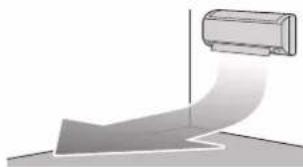
natural_image
Diagram of a curved pipe or duct with a cylindrical component above it, no text or symbols present
INFORMAZIONI
natural_image
Illustration of a hand cleaning a large air conditioner cover (no text or symbols)text_image
Diagram illustrating the installation of an air conditioner panel, showing step-by-step assembly and component positioning.text_image
Diagram illustrating a device's internal structure and assembly process, with labeled components and directional arrows.a Linguetta
natural_image
Illustration of hands holding a grid-based object with a tool, no text or symbols presentnatural_image
Simple line drawing of a basin with a rectangular object on top (no text or symbols)
INFORMAZIONI
text_image
Diagram illustrating a mechanical assembly process with labeled components and a magnified view of the component being processed.a Linguette
natural_image
Illustration of a car with three downward arrows indicating airflow or cooling direction (no text or symbols)text_image
A 88.6°C ON 19 HR.OFF 18 HR.natural_image
Illustration of a cylindrical air conditioner with a sensor attached to the side panel (no text or symbols)α Δέκτης σήματος
natural_image
Diagram showing a curved surface with a rectangular object above it, no text or symbols present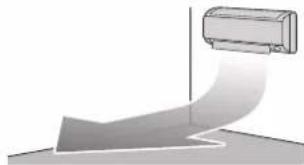
natural_image
Diagram of a curved pipe or duct with a cylindrical component inserted, no text or symbols present
ΠΛΗΡΟΦΟΡΙΕΣ
natural_image
Illustration of a hand cleaning a large air conditioner cover (no text or symbols)text_image
Diagram illustrating the installation of an air conditioner panel, showing step-by-step assembly and disassembly.text_image
Diagram illustrating a mechanical assembly process with labeled components and a magnified view of the component being processed.a Γλωττίδα
natural_image
Illustration of hands holding a grid-based object with scissors, no text or symbols presentnatural_image
Simple line drawing of a basin with a tiled roof and a side dish (no text or symbols)
ΠΛΗΡΟΦΟΡΙΕΣ
text_image
Diagram illustrating a mechanical assembly process with labeled components and a magnified view of the component being handled.a Γλωττίδες
natural_image
Illustration of a car with four downward arrows indicating airflow or cooling direction (no text or symbols)text_image
A 88.8°C ON 18 HR.OFF 18 HR.natural_image
Illustration of a cylindrical air conditioner with a sensor attached to the side panel (no text or symbols)a Receptor de sinal
natural_image
Two identical illustrations of a car airfoil being carried out, showing airflow direction (no text or symbols)
INFORMAÇÕES
natural_image
Illustration of a hand cleaning a large air conditioner cover (no text or symbols)text_image
Diagram illustrating the installation of an air conditioner panel with labeled steps 1 and 2, showing hand positioning and adjustment.3 Retire o filtro desodorizante de apatite de titânio e o filtro de partículas de prata das patilhas.
text_image
Diagram illustrating a mechanical assembly process with labeled components and a magnified view of the component being processed.a Patilha
natural_image
Illustration of hands holding a grid-based object with scissors, no text or symbols presentnatural_image
Simple line drawing of a basin with a tiled roof and a side dish (no text or symbols)
INFORMAÇÕES
text_image
Diagram illustrating a mechanical assembly process with labeled components and a magnified view of the component being handled.a Patilhas
natural_image
Illustration of a curved air conditioner with three downward arrows indicating airflow or cooling direction (no text or symbols)text_image
A 88.6°C ON 18 HR.OFF 18 HR.natural_image
Diagram of a cylindrical device with a sensor attached to its side, labeled 'a' (no text or symbols on the device itself)а Приемник сигналов
natural_image
Two identical illustrations of a car air conditioner unit with airflow arrows, shown from different angles (no text or symbols)
ИНФОРМАЦИЯ
natural_image
Illustration of a hand cleaning a large air conditioner cover (no text or symbols)text_image
Diagram illustrating the installation of an air conditioner panel with labeled steps 1 and 2, showing hand positioning and adjustment.text_image
Diagram illustrating a mechanical assembly process with labeled components and a magnified view of the component being handled.а Язычок
natural_image
Illustration of hands holding a grid-based device with a tool, no text or symbols visiblenatural_image
Simple line drawing of a basin with a tiled roof and a side dish (no text or symbols)
ИНФОРМАЦИЯ
text_image
Diagram illustrating a mechanical assembly process with labeled components and a magnified view of the component being processed.а Выступы
natural_image
Illustration of a curved air conditioner with four downward arrows indicating airflow or cooling direction (no text or symbols)text_image
A 89.8°C ON 18 HR.OFF 18 HR.natural_image
Diagram showing a gray arrow pointing toward a rectangular object on a vertical axis, with no visible text or symbols.Isıtma işletim modu
natural_image
Diagram of a curved pipe or duct with a cylindrical component above it, no text or symbols present
BİLGİ
natural_image
Illustration of a hand cleaning a large air conditioner cover (no text or symbols)text_image
Diagram illustrating the installation of an air conditioner panel, showing step-by-step assembly and disassembly.text_image
Diagram illustrating a mechanical assembly process with labeled components and a magnified view of the component being processed.a Tirnak
natural_image
Illustration of hands holding a grid-based object with a tool, no text or symbols presentnatural_image
Simple line drawing of a bowl with a rectangular object on top (no text or symbols)
BILGI
text_image
Diagram illustrating a mechanical assembly process with labeled components and a magnified view of the component being processed.a Tirnaklar
natural_image
Illustration of a car with four downward arrows indicating airflow or cooling direction (no text or symbols)natural_image
Blank grid paper with no text, numbers, or symbols

natural_image
Blank grid paper with no text, numbers, or symbols

natural_image
Blank grid paper with no text, numbers, or symbolsDAIKIN ISITMA VE SOĞUTMA SİSTEMLERİ SAN.TİC. A.Ş.
Küçükbakkalköy Mah. Kayışdağı Cad. No: 1 Kat: 21-22 34750 Ataşehir
İSTANBUL / TÜRKİYE
Tel: 0216 453 27 00