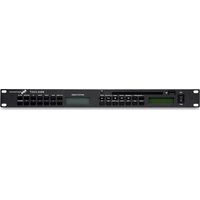
MS02 CD3/T - Hi-fi system FBT - Free user manual and instructions
Find the device manual for free MS02 CD3/T FBT in PDF.


| Product Type | Hi-fi system with FM tuner, CD/MP3 player, USB and SD card |
| Brand | FBT |
| Model | MS02 CD3/T |
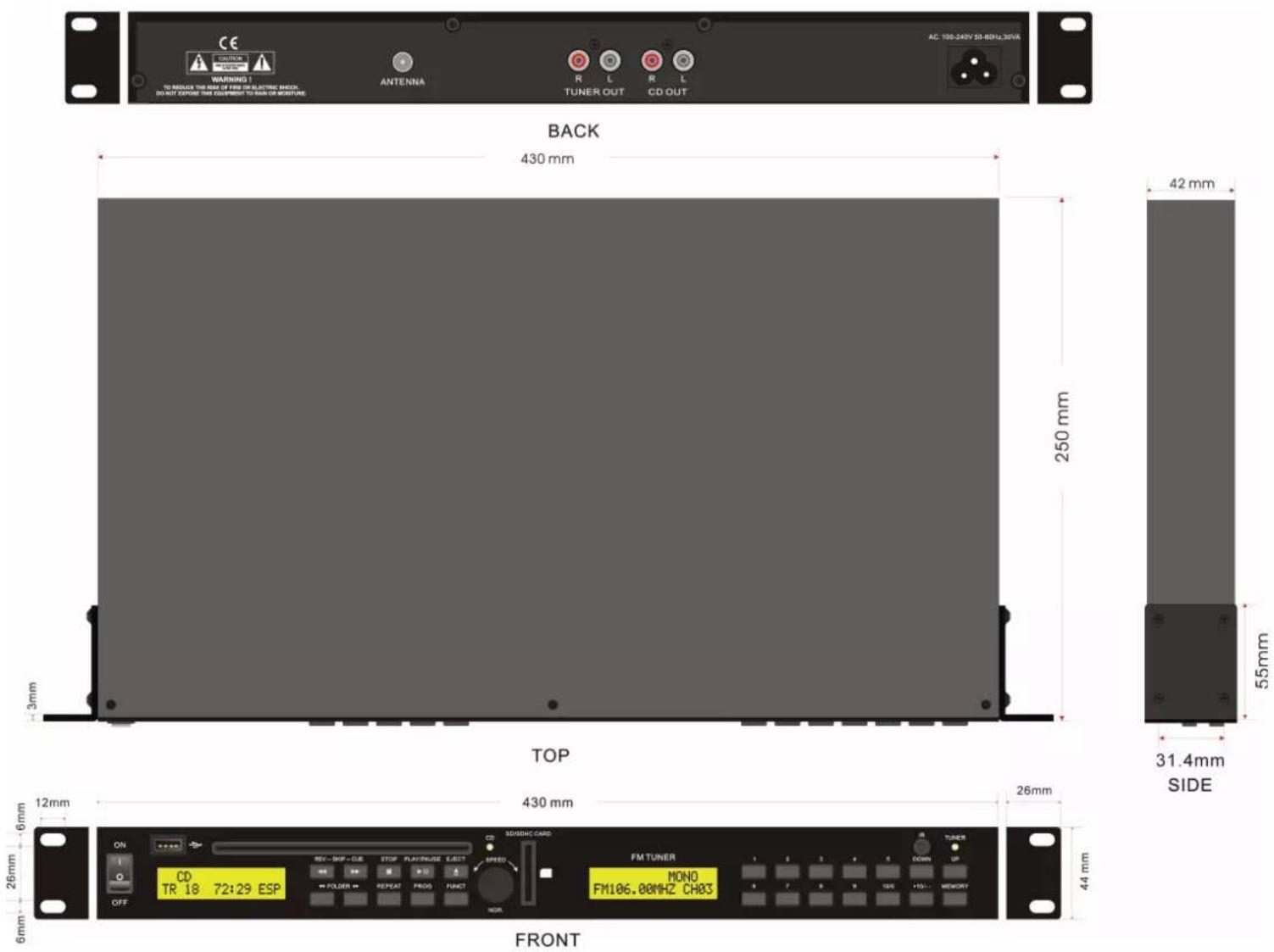
| Dimensions (W x H x D) | 482 mm x 44 mm x 250 mm |
| Weight | 4.2 kg |
| Power supply | 230 V AC, 50/60 Hz, 50 VA |
| FM range | 87.5 - 108 MHz |
| FM presets | 60 |
| Supported CD formats | CD, CD-R, MP3 |
| CD anti-shock (ESP) | Approximately 40 seconds |
| Inputs | FM antenna 75 Ω, USB, SD/MMC |
| Audio outputs | RCA (Tuner and CD) |
| CD output level | 1.2 V ± 2 dB (at 1 kHz, 0 dB) |
| CD signal-to-noise ratio | > 80 dB |
| CD total harmonic distortion | < 0.1 % |
| Main functions | CD, MP3, USB, SD card playback; FM tuner with RDS; programming; repeat; direct search; sleep; MUTE function |
| Remote control included | Yes |
| Cleaning | Dry cloth, do not use liquid products |
| Safety | Do not expose to rain or moisture; unplug during storms; use only approved accessories |
| Repairability | Have any repairs done by qualified personnel |
| Disposal | Do not dispose of with household waste, follow WEEE regulations |
Frequently Asked Questions - MS02 CD3/T FBT
User questions about MS02 CD3/T FBT
0 question about this device. Answer the ones you know or ask your own.
Ask a new question about this device
Download the instructions for your Hi-fi system in PDF format for free! Find your manual MS02 CD3/T - FBT and take your electronic device back in hand. On this page are published all the documents necessary for the use of your device. MS02 CD3/T by FBT.
USER MANUAL MS02 CD3/T FBT
natural_image
Black remote control device with red buttons and black numbers inside a circular frame (no text or symbols visible)


| I | Istruzioni d'uso |
| UK | Instructions for use |
| F | Manuel d'utilisation |
| D | Gebrauchsanleitung |
| E | Instrucciones de empleo |
ATTENZIONE
RISCHIO DI SHOCK ELETTRICO NON APRIRE

PER EVITARE IL RISCHIO DI SHOCK ELETTRICO
NON APRIRE IL COPERCHIO
DO NOT EXPOSE THIS EQUIPMENT TO RAIN OR MOISTURE
WHERE MARKED, THIS SYMBOL INDICATES A DANGEROUS NON-ISOLATED
IMPORTANT SAFETY INSTRUCTIONS
1) Read these instructions
2) Keep these instructions
3) Heed all warnings
4) Follow all instructions
5) Do not use this apparatus near water
6) Clean only with dry cloth
7) Do not block any ventilation openings. Install in accordance with the manufacturer's instructions.
8) Do not install near any heat sources, such as radiators, heat registers, stoves or other apparatus (including amplifiers) that produce heat
9) Do not defeat the safety purpose of the polarized or grounding-type plug. A polarized plug has two blades with one wider than the other. A grounding type plug has two blades and a third grounding prong. The wide blade or the third prong are provided for your safety. If the provided plug does not fit into your outlet, consult an electrician for replacement of the obsolete outlet.
10) Protect the power cord from being walked on or pinched particularly at plugs, convenience receptacles, and the point where they exit from the apparatus.
11) Only use attachments/accessories specified by the manufacturer.
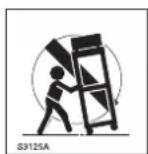
12) Use only with the cart, stand, tripod, bracket, or table specified by the manufacturer or sold with the apparatus. When a cart is used, use caution when moving the cart/apparatus combination to avoid injury from tip-over.
13) Unplug this apparatus during lightning storms or when unused for long periods of time.
14) Refer all servicing to qualified service personnel. Servicing is required when the apparatus has been damaged in any way, such as power-supply cord or plug is damaged, liquid has been spilled or objects have fallen into the apparatus, the apparatus has been exposed to rain or moisture, does not operate normally, or has been dropped.
THE DEVICE MUST BE CONSTANTLY CONNECTED TO THE MAINS THROUGH A PERFECTLY FUNCTIONING GROUNDING CONDUCTOR.
This device features a power outlet; install the device so that the socket for the power cord can be accessed easily.
INSTALLATION
^° When the unit is installed in a rack enclosure, the rack must have all the prerequisites required by the EN 60439-1 standard, in particular the rear part must be closed by means of suitable panels.
GENERAL
- Digital processing FM tuner.
2.60 preset memories for tuner.
3.CD with mechanic & electronic anti-shock, CD, CD-R, MP3, USB & CARD MP3 available.
4.Input/output
A.Input: FM 75 ohm unbalanced antenna terminals
USB port for memory stick.
SD/MMC card slot.
B. Output:
RCA audio output for FM Tuner
RCA audio output for CD player
- Power supply: 230V AC
- Power consumption: 50VA
- Weight:4.2kg
- Dimension: 482mm x 44mm x 250mm
- Operation performance
| Items Disc Specifications Note | |||
| Search time TCD-782 (A-BEX) Approx 6 seconds | From 1 track to 20 track | ||
| TOC read time TCD-782 | Approx 6 seconds | From turning on the power to playing "01" on LCD | |
| Ability to play with an eccentric disk | TCD-792R (A-BEX) | Should be played Without noise | |
| Ability to play with an interruption | TCD-725A 800 um (4 track) | Should be played Without noise | |
| Ability to play with a black dot | TCD-725A 800 um (9 track) | Should be played Without noise | |
| Ability to play with fingerprints | TCD-725A 65 um (13 track) | Should be played Without noise | |
- CD Electrical performance
| Items | Condition | Specifications |
| 1. Output level | 1kHz 0dB | 1.2V +/-2dB |
| 2. Output level difference between channels | 1kHz 0dB | Less than 2dB |
| 3. Frequency response (using 1KHz 0dB as reference) | 20Hz100Hz10kHz20kHz | +/- 3dB+/- 2dB+/- 2dB+/- 3dB |
| 4. Separation | 1kHz | More than 60dB |
| 5. THD | 1kHz | Less than 0.1% |
| 6. S/N ration | 1kHz | More than 80dB |
* Addition: Regarding items 4, 5 use 20KHz low-pass filter. Regarding item 6 use 20KHz low-pass filter and IHF-A curve filter.
- Function explanation
| Keys Explanation Panel | Remote | ||
| PLAY/PAUSE | When this key is pressed during CD stop, play will start after track search.When this key is pressed during CD is playing, then it is changed to pause.When this key is pressed during CD is pausing, then it is changed to play. | ✓ | ✓ |
| STOP When | CD is not stop, if this key is pressed then CD will stop. | ✓ | ✓ |
| UP/CUE | In stop mode:Change the starting play track (file) during stop mode, cyclic to the first track, if it is in the last track.In program entry mode:Change to the next track (file) for program select.In play mode, pause mode, program play mode, random play mode:Single pressed, skip the playing track (file) to next track (file) for normal play/pause mode, to next program index track (file) for program play/pause mode, to next random track (file) for random play /pause mode.Continue pressed, fast forward during play/pause when pressed more than 0.7sec. | ✓ | ✓ |
| DOWN/REV | In stop mode:Change the starting play track (file) during stop mode, cyclic to the last track, if it is in the first track.In program Entry mode:Change to the previous track (file) for program select.In play mode, pause mode, program play mode:Single pressed, skip the playing track (file) to precious track (file) for normal play/pause mode, to previous program index track (file) for program play/pause mode.Continue pressed, fast reverse during play/pause when pressed more than 0.7sec. | ✓ | ✓ |
| FOLDER -UP | In stop mode:Skip the starting play folder to next folder during stop mode, cyclic to the first folder if it is in the last folder.In normal play mode:Skip the playing file to the next folder's first file. | ✓ | ✓ |
| FOLDER -DOWN | In stop mode: Skip the starting play folder to previous folder during stop mode, cyclic to the last folder if it is in the first folder.In normal play mode:Skip the playing file to the previous folder's first file. | ✓ | ✓ |
3. Function explanation
| Keys Explanation Panel | Remote | ||
| REPEAT | In MP3 mode and in USB mode. If this key is pressed, PLAY mode is changed cyclically shown below. In CD mode If this key is pressed, PLAY mode is changed cyclically shown below In CD mode If this key is pressed, PLAY mode is changed cyclically shown below | √ | √ |
| EJECT | When this key is pressed, disc is moved out. | √ | √ |
| PROG | S1W  | √ | |
| MUTE | Wth  | √ | |
| FIND | Irl  | √ | |
| CD | W  | √ | √ |
| USB / CARD | W | √ | |
| DISPLAY | Ww 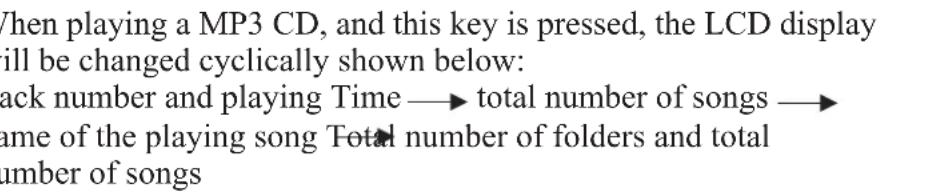 | √ | |
| ESP | Iris  0 0 | √ | |
| 0 - 9 | Y  | √ | |
TUNER SECTION
- Electrical performance
| Parameter Value Unit | ||
| Frequency range 87,5 - 108 MHz | ||
| Sensitivity 6 | uV emf | |
| AM Suppression | 38 | dB |
| Adjacent Channel Selectivity | 50 | dB |
| Image Rejection | 45 | dB |
| Audio Stereo Separation | 40 | dB |
| Audio Output | 400mV | mV RMS |
| Audio (S+N) / N | 50 | dB |
| Audio THD | 0,1 | % |
- Function explanation
| Keys Explanation | Panel | Remote | |
| 1 - 10 | When press these keys only, the tuner will jump to preset station 1~10. | √ | √ |
| DOWN | 1 press / 1 step tuning by" DOWN" "UP" key. When DOWN key is pressed for more than 1.5 seconds seek tuning is started. | √ | √ |
| UP | 1 press / 1 step tuning by" DOWN" "UP" key. When UP key is pressed for more than 1.5 seconds seek tuning is started. | √ | √ |
| MEMORY | This key can call and write in preset memory. The FM band have fixed preset memory 60 CH. The AM band have the fixed preset memory 40 CH.The memory mode is set, when MEMORY key was pressed.The memory mode is released automatically after 5 seconds.The "MEMO" mark is flashed in the memory mode.A receiving frequency is written in the fixed preset memory, when "MEMORY" key is pressed after number keys was pressed in the memory mode. | √ | √ |
| M-UP | When this key is pressed, the preset memory is increment. | √ | |
| M-DOWN | When this key is pressed, the preset memory is decrement. | √ | |
| SLEEP | When SLEEP key is pressed, the sleep function is set and the time is displayed for 2 seconds. The sleep time is changed as shown below, every pressing the SLEEP key during the sleep time is displayed.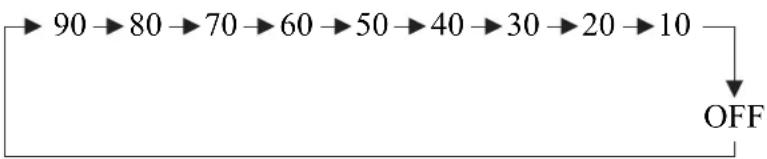 The sleep mark is on during the sleep function is set.The sleep function is cleared, if the SLEEP key was pressed when the sleep time is not displayed and sleep function is set.The power is automatically off fatter sleep time, when sleep function is set. The sleep mark is on during the sleep function is set.The sleep function is cleared, if the SLEEP key was pressed when the sleep time is not displayed and sleep function is set.The power is automatically off fatter sleep time, when sleep function is set. | √ | |
| + 10 | Press this key once the preset station number will add 10. | √ | √ |
| MO / ST | Press this key, the tuner change between stereo and mono mode. | √ | |
| ASM | This is Auto search and memory function. Press this key for more than 1.5 seconds, the tuner will search the station and store in memory automatically. | √ | |
| DIRECT | This is the direct search function. Press this key once, then use number key to input the station frequency, again press DIRECT key to confirm the frequency. The tuner jump to this station. If the input frequency is beyond the range, the tuner will display ERR. | √ | |
| CD / TUNER | Switch between CD and TUNER for remote control. | √ | |
ATTENTION
RISQUE DE CHOC ÉLECTRIQUE NE PAS OUVRIR

POUR ÉVITER LE RISQUE DE CHOC ÉLECTRIQUE
NE PAS OUVRIR LE COUVERCLE
IMPORTANT INFORMATION FOR CORRECT DISPOSAL OF THE PRODUCT IN ACCORDANCE WITH EC DIRECTIVE 2002/96/EC
This product must not be disposed of as urban waste at the end of its working life. It must be taken to a special waste collection centre licensed by the local authorities or to a dealer providing this service. Separate disposal of electric and/or electronic equipment (WEEE) will avoid possible negative consequences for the environment and for health resulting from inappropriate disposal, and will enable the constituent materials to be recovered, with significant savings in energy and resources. As a reminder of the need to dispose of this equipment separately, the product is marked with a crossedout wheeled dustbin.
All information included in this operating manual have been scrupulously controlled; however FBT is not responsible for eventual mistakes. FBT Elettronica S.p.A. has the right to amend products and specifications without notice.
Brand : FBT
Model : MS02 CD3/T
Category : Hi-fi system