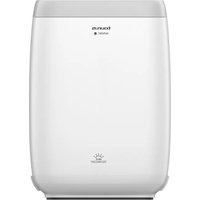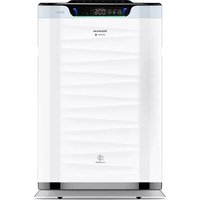
Landscapes Connect Pro - Air purifier TAURUS - Free user manual and instructions
Find the device manual for free Landscapes Connect Pro TAURUS in PDF.


| Product type | Air purifier |
| Brand | Taurus |
| Model | Landscapes Connect Pro |
| Maximum useful power | 75 W |
| Power supply | Mains (230 V ~ 50 Hz) |
| Net weight | 10.9 kg |
| Sound pressure level | < 32.9 to 69.5 dB(A) |
| Operating temperature | From -20 °C to 50 °C |
| Storage temperature | 25 °C to 35 °C |
| Connectivity | Wi-Fi 2.4 GHz, Taurus Connect app |
| Main functions | Air purification, negative ions, timer, auto mode, sleep mode, variable speed (6 levels), PM2.5 sensor, air quality color display (green, blue, yellow, red) |
| Filter type | Air filter (replaceable) |
| Filter replacement reminder | Every 1500 hours of operation (indicator light) |
| Safety | Thermal protection, child lock (button 5 seconds on device, 1 second on remote) |
| Maintenance and cleaning | Clean the exterior with a damp cloth and mild detergent. Do not immerse. Do not wash the filter, sterilize it in sunlight regularly. |
| Spare parts and repairability | Original accessories available (filters). Contact authorized distributors. Technical support via http://taurus-home.com/ |
| Warranty | Legal warranty in force. Contact authorized technical service. |
Frequently Asked Questions - Landscapes Connect Pro TAURUS
User questions about Landscapes Connect Pro TAURUS
0 question about this device. Answer the ones you know or ask your own.
Ask a new question about this device
Download the instructions for your Air purifier in PDF format for free! Find your manual Landscapes Connect Pro - TAURUS and take your electronic device back in hand. On this page are published all the documents necessary for the use of your device. Landscapes Connect Pro by TAURUS.
USER MANUAL Landscapes Connect Pro TAURUS
natural_image
Line drawing of a rectangular object with horizontal wavy lines and a top handle, no text or symbols present.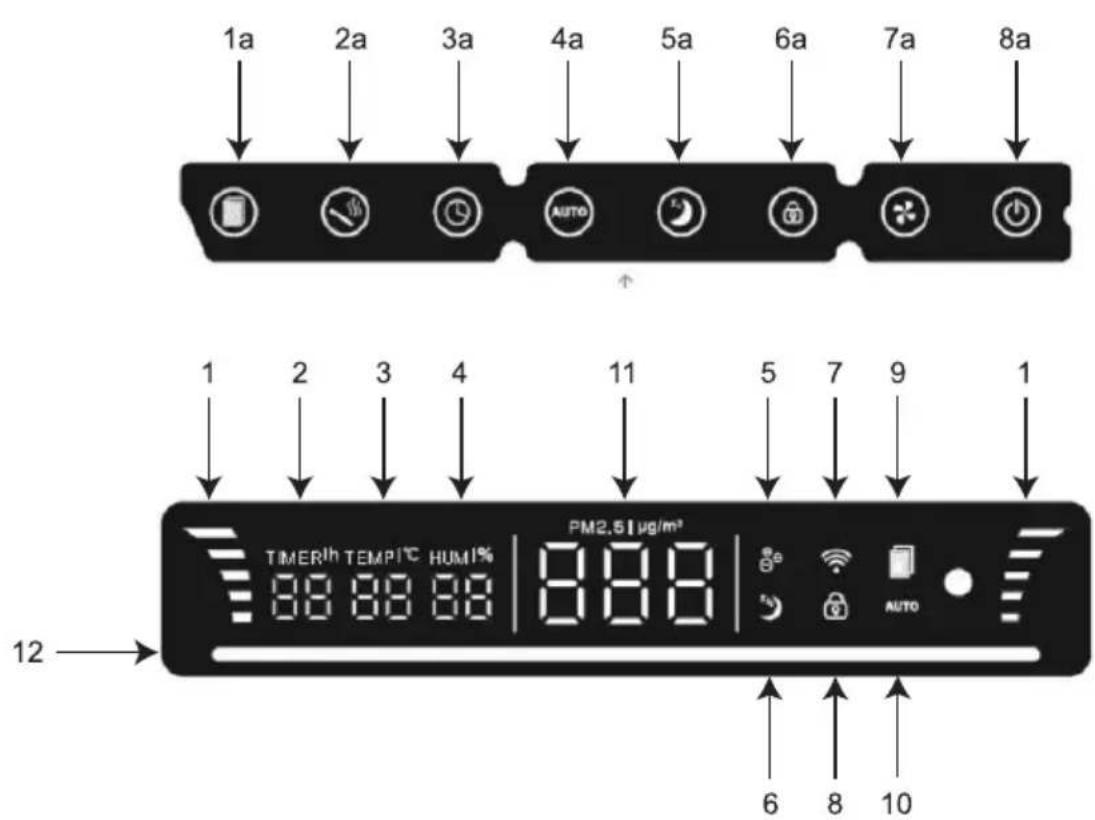
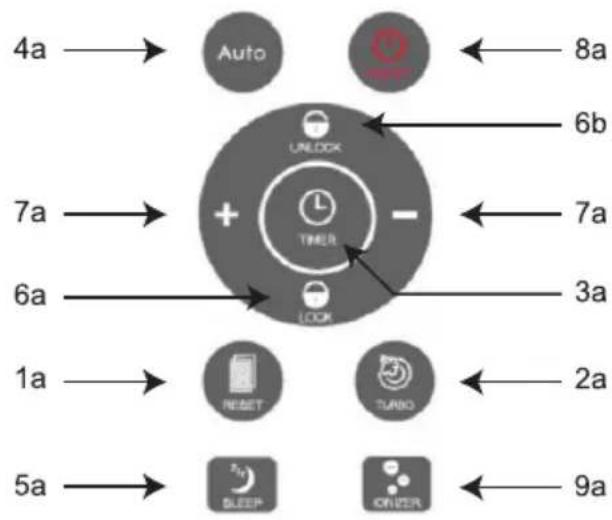
flowchart
graph TD
    A["4a"] --> B["Auto"]
    C["7a"] --> D["+"]
    E["6a"] --> D
    F["1a"] --> G["RESET"]
    H["5a"] --> I["BLEEP"]
    J["8a"] <--_K["UNLOCK"]
    L["6b"] <-- K
    M["7a"] <--_N["TIMER"]
    O["3a"] <-- N
    P["2a"] <--_Q["TURNO"]
    R["9a"] <--_S["ONION"]
natural_image
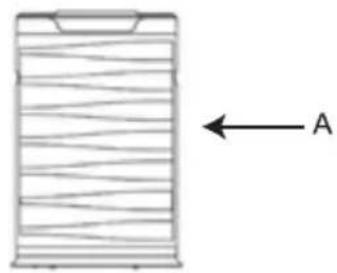
Diagram of a cylindrical object with horizontal wavy lines and an arrow labeled 'A' pointing left (no text or symbols on the object itself)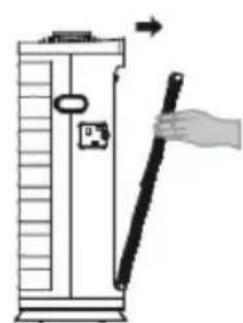
natural_image
Illustration of a hand holding a tool next to a vertical cylindrical device (no text or symbols visible)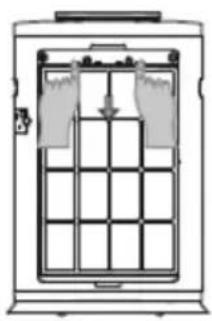
natural_image
Diagram of a cabinet with internal grid structure and hanging items (no text or symbols)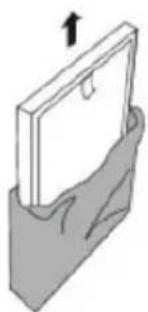
natural_image
Illustration of a mechanical component with an upward arrow, no text or symbols present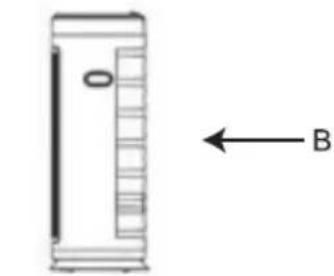
natural_image
Simple line drawing of a rectangular device with a vertical scale and an arrow labeled 'B' pointing to its side (no text or symbols on the device itself)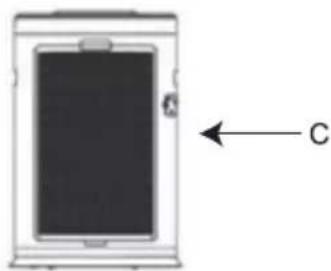
natural_image
Diagram of a smartphone with a labeled component 'C' and an arrow pointing to it (no text or symbols beyond the label)Fig 1
Español
Purificador de aire
High Landscapes Connect Pro
DESCRIPCIÓN
A Frontal
B Lateral
C Trasera
BOTONES
High Landscapes Connect Pro
DESCRIPTION
A Front
B Side
C Back
BUTTONS
1a Filter reset
2a High speed (smoke purification / turbo)
3a Timer
4a Auto mode
5a Sleep mode
6a Auto lock (6b unlock in remote control)
7a Fan speed (+- in remote control)
8a On/Off
DISPLAY
1 Wind speed
2 Timer
3 Temperature
4 Humidity %
5 Negative ions
6 Sleep mode
7 Wifi function
8 Child lock
9 Filter changing reminder
10 Auto mode
11 Pm2.5 display
12 Color air quality display bar
USE AND CARE:
- Do not operate appliance in a very dusty and/or humid place or in a location with fire hazards.
- Never insert objects into the appliance. Never place anything on the appliance or insert anything into it.
- Do not cover the air inlets or the outlet grid.
- Never allow any liquid to enter the appliance
- Do not touch appliance with wet hands.
- Never use the appliance in humid place.
- Never use the appliance close a heat source.
- Do not use appliance close to flammable objects or products (curtains, aerosols, solvents, etc.)
- Do not spray any flammable material such as insecticides or fragrance around the appliance. It may cause explosion or fire
- Do not drink the accumulated water, use to feed animals, nor to water plants. Empty the water tank, and pour the water down the drain.
- This appliance cannot replace normal ventilation, daily dust collection or oil pumping when cooking.
- Ensure that appliance is used in condition of a stable and horizontal surface.
- Leave at least 20 cm of space on the back and sides of the appliance, and at least 30 cm of space above the product when using.
- Fully extend the appliance's power cable before each use.
- Do not use the appliance without its filter(s) correctly in place.
- Do not use the appliance if its accessories are not properly fitted.
- Do not use the appliance if the parts or accessories are not properly fitted.
- Do not use the appliance if the accessories attached to it are defective. Replace them immediately.
- Do not use the appliance if the accessories or consumables attached to it are defective. Replace them immediately.
- Do not use the appliance if the on/off switch does not work.
- Do not move the appliance while in use.
- Use the appliance handle/s, to catch it or move it.
- Do not use the appliance if it is tipped up and do not turn it over.
- Do not turn the appliance over while it is in use or connected to the mains.
- Unplug the appliance from the mains before replacing any accessory.
- Unplug the appliance from the mains when not in use and before undertaking any cleaning task.
- Store this appliance out of reach of children and/or persons with physical, sensory or reduced mental or lack of experience and knowledge.
- Do not expose the appliance to extreme temperatures.
- Do not expose to extreme temperatures or strong magnetism.
- Keep the appliance in a dry, dust-free place, out of direct sunlight.
- Make sure that dust, dirt or other foreign objects do not block the fan grill on the appliance.
- Keep the appliance in good condition. Check that the moving parts are not misaligned or jammed and make sure there are no broken parts or anomalies that may prevent the appliance from operating correctly.
- Use the appliance and its accessories and tools in accordance with these instructions, taking into account the working conditions and the work to be performed. Use the appliance for operations different from those intended could result in a hazardous situation.
- Do not open the battery/ies under any circumstances whatsoever.
- When the battery/ies is not in use, keep it away from other metal objects like paper clips, coins, keys, screws ... that could connect a terminal to another.
- Do not short-circuit the battery terminals as this may cause an explosion or fire.
- The battery/ies should be stored at a temperature of below 40^ C.
- Never leave the appliance unattended while in use.
- Never leave the appliance connected and unattended if is not in use. This saves energy and prolongs the life of the appliance.
- Do not use the appliance to dry textiles of any kind.
- CAUTION: Water condensation may appear on the surfaces and objects around this appliance.
- Recharge the battery/ies only with the charger supplied by the manufacturer. A charger that is suitable for one type of battery may cause explosion or fire hazard when used with other battery/ies.
- Use the device only with the battery/ies for which has been specifically designed. The use of any other battery/ies can cause an explosion or fire hazard.
INSTALLATION
- Be sure to remove all packaging material from inside the appliance.
- Do not remove the support feet or wheels from the appliance.
- Respect the legal provisions concerning safety distances from other elements such as pipes,
electrical connections, etc.
- Ensure that the appliance is level with respect to the floor.
- The appliance requires suitable ventilation in order to work properly. Leave a space of 30 cm above the appliance, 20 cm behind the appliance, and 20 cm on either side.
- Do not cover or obstruct any of the openings of the appliance.
- The plug must be easily accessible so it can be disconnected in an emergency.
- To achieve the highest efficiency from the appliance it should be situated in a place where the atmospheric temperature is between 12 and 32°C.
- The appliance should be used with its wheels attached.
USE
BEFORE USE:
- Remove the appliance's protective film.
- Make sure that all the product's packaging has been removed.
- Some parts of the appliance have been lightly greased. Consequently, the first time the appliance is used a light smoke may be detected. After a short time, this smoke will disappear.
- To eliminate the smell given off by the appliance when used for the first time, it is recommended to have it on at full power for 2 hours in a well-ventilated room.
- Prepare the appliance according to the function you wish to use:
WIFI CONNECTION & DOWNOADING THE APP:
- To be able to use the thermal transmitter High Landscapes Connect from anywhere, the Taurus Connect App has to be downoalded.
SET UP:
- Download the Taurus Connect App form the App Store or Google Play.
- Sign up using your email address and password.
- Confirm the registration using the verification code that will be sent to your email account.
- Create your home, name it, establish the geographical location and select the room where you are going to place this smart appliance.
- Add High landscapes Connect by following the steps described in THE QUICK GUIDE.
IMPORTANT
- The device only supports 2.4GHz Wi-Fi network.
- If the connection fails again, check the following possible causes
- High Landscapes Connect is too far away from the router.
- The Wi-Fi password is incorrect.
- The Wi-Fi network is not 2.4GHz
USE:
- Extend the cable completely before plugging it in.
- Connect the appliance to the mains.
- Remove the protective plastic cover (Fig.1).
- Turn the appliance on, by using the on/off button (8A).
- Select the appliance function / speed desired.
- After the selected time the appliance will switch off automatically.
ELECTRONIC SPEED CONTROL:
- The speed of the appliance can be regulated by using the speed regulator control (7A). This function is very useful, as it makes it possible to adapt the speed of the appliance to the type of work that needs to be done.
TIMER FUNCTION:
- The appliance's operating time can be controlled.
- To program the operating time simply select it using the (3A) button.
- The time programmed or remaining time will appear on the display (2).
LOCKING BUTTON:
- To activate this function press button (6A)
- To deactivate this function, press (6A) or (6B) in remote control, during 5 seconds in product display or 1 second in remote control.
NEGATIVE IONS
- When the purifier is on, “Negative ion” is working (5).
HIGH SPEED SMOKE PURIFICATION
- Pressing speed smoke purification, the machine runs at the highest level (six) At
this time, the efficiency of purification is the greatest. Then press once more, will turn off the function.(the icon of the key button is lit when the function is working, and the icon is not bright when it is closed.)
FILTER RESET
- This machine has a filter timing reminding function, setting time for 1500 hours, when the machine runs to set time. the indicator light (9) on the panel will light up, reminding the user to replace the filter. The reset function of the button at this time is effective, touch this button (1A) to reset the timing and reopen the timing.
SLEEP MODE
- When the sleep function is opened (by pressing 5A) the machine screen closes and the whole light of the machine closes. The machine will work in the sleep mode, not controlled by the sensor. If the timing function is opened. The machine will work until the set time. And then will go into the standby state - Note: in automatic mode, when the light of the environment is less than 5-10 lms and the duration is up to 3 minutes the machine will automatically enter the sleep mode. When ambient light is greater than 10 lm during more than 5 minutes, the purifier will stop sleep mode.
AUTO MODE
- After press “Auto” button (4A) negative ion generator and auto icon (10) will light, and the gear will be changed according to sensor’s data. (The icon will stay on when the machine operates in auto mode, otherwise it will be off.) Attention: If users change “wind speed” under auto mode, the machine will quit this mode automatically.
PM 2.5 DISPLAY
- The PM2.5 display sensor (11) needs 1 minute to display the data, showing the data range of 1-500Ug/m3.
AIR QUALITY DISPLAY BAR (12)
- Green: very good quality.
- Blue: good quality.
- Yellow: general quality.
- Red: poor quality.
TIMER DISPLAY
- When the timing function is turned on, this area displays the time unit in hours, and displays "00" when there is no timing function.
ONCE YOU HAVE FINISHED USING THE APPLIANCE:
- Turn the appliance off, using the on/off button.
- Unplug the appliance from the mains.
- Clean the appliance.
CARRY HANDLE/S:
- This appliance has two handles on the sides of the body, which facilitates comfortable transport (B).
SAFETY THERMAL PROTECTOR:
- The appliance has a safety device, which protects the appliance from overheating.
- When the appliance switches itself on and off repeatedly, for reasons other than the thermostat control, check to ensure that there are no obstacles that impede correct air entry or expulsion.
- If the appliance turns itself off and does not switch itself on again, disconnect it from the mains supply, and wait for approximately 15 minutes before reconnecting. If the machine does not start again seek authorised technical assistance.
CLEANING
- Disconnect the appliance from the mains and allow it to cool before undertaking any cleaning task.
- Clean the electrical equipment and the mains connection with a damp cloth and dry. DO NOT IMMERSE IN WATER OR ANY OTHER LIQUID.
- Clean the equipment with a damp cloth with a few drops of washing-up liquid and then dry.
- Do not use solvents, or products with an acid or base pH such as bleach, or abrasive products, for cleaning the appliance.
- Do not let water or any other liquid get into the air vents to avoid damage to the inner parts of the appliance.
- Never submerge the appliance in water or any other liquid or place it under running water.
-
Do not wash the filter.
-
Do not use a vacuum cleaner to clean the filter.
- Sterilize the filter under sunlight regulatory.
- It is advisable to clean the appliance regularly and remove any food remains.
- If the appliance is not in good condition of cleanliness, its surface may degrade and inexorably affect the duration of the appliance's useful life and could become unsafe to use.
SUPPLIES
- Supplies can be acquired from distributors and authorised establishments (such as filters, etc.) for your appliance model.
- Always use original supplies, designed specifically for your appliance model.
- Only the following type of supplies must be used with the appliance.
- Filters
- These supplies are available in specialist shops.
SPECIFICATIONS:
• Maximum useful power: 75W
• Applied part type: BF
- Weight: 10.9
• Acoustic pressure level < 32.9 to 69.5 dB(A)
• Maximum weight: 10,9kgs
- Operating temperature: -20 to 50 C
• Storage temperature: 25-35 C
- Continuous operation with short-time loading
- Not suitable for use in presence of flammable anaesthetic mixture with air or with Oxygen or nitrous oxide
NB: These specifications are subject to change without notice of purpose of improvement.
- NB: By virtue of the conditions of fabrication of this product, the maximum absorbed power can differ from that specified.
- NB: By virtue of the conditions of fabrication of this product, the maximum used power can differ from that specified.
Français
Purificateur d'air
High Landscapes Connect Pro
DESCRIPTION
A Frontale
B Latérale
C Arrière
BOUTONS
High Landscapes Connect Pro
BESCHREIBUNG
A Vorderseite
B Seitlich
C Rückseite
TASTEN
High Landscapes Connect Pro
DESCRIZIONE
A Anteriore
B Laterale
C Posteriore
PULSANTI
High Landscapes Connect Pro
DESCRIÇÃO
A Frontal
B Lateral
C Traseira
BOTÕES
High Landscapes Connect Pro
DESCRIPCIÓ
A Frontal
B Lateral
C Posterior
BOTONS
High Landscapes Connect Pro
BESCHRIJVING
A Voorzijde
B Zijkant
C Achterzijde
KNOPPEN
1a Filter vervangen
ELEKTRISCHE SNELHEIDSCONTROLE:
UCHWYT/Y TRANSPORTOWE:
High Landscapes Connect Pro
ПЕРИГРАФН
Α Μπροστινό τμήμα
Β Πλαϊνό τμήμα
C Πίσω τμήμα
ΚΟΥΜΠΙΑ
High Landscapes Connect Pro
ОПИСАНИЕ
A Передняя сторона
В Боковая сторона
С Задняя сторона
КНОПКИ
INDICATOR LUMINOS WIFI
This product enjoys the recognition and protection of the legal guarantee in accordance with current legislation. To enforce your rights or interests you must go to any of our official technical assistance services.
You can find the closest one by accessing the following web link: http://taurus-home.com/
You can also request related information by contacting us.
You can download this instruction manual and its updates at http://taurus-home.com/
Français
GARANTIE ET ASSISTANCE TECHNIQUE
COUNTRY ADDRESS PHONE
| Algeria Zone d'Activite, N° 62, Constantine 213770777756 | ||
| Argentina Av. del Libertador 1298,(B1638BEY), Vicente López (Pcia. Buenos Aires) | 541153685223 | |
| Belgium Mariëndonkstraat 5, 5154 EG, Elshout 31620401500 | ||
| Bulgaria | 265,Okolovrasten Pat, Mladost 4, 1766, Sofia | 35929211120 / 35929211193 |
| Congo (Republic of) 98 Blvd General Charles de Gaulle, Pointe Noire 242066776656 | ||
| Cyprus 20, Bethlehem Str. / P.O.Box 20430, 2033, Strovolos | 35722711300 | |
| Czech Republic Milady Horakove 357/4, 568 02, Svitavy 420 461 540 130 | ||
| Equatorial Guinea | SN Av Patricio Lumumba y C/ Jesus B, Bata | 00240 333 082958 / 00240 333 082453 |
| Equatorial Guinea | Calle de las Naciones Unidas, PO box 762, Malabo | 240333082958 / 240333082453 |
| España | Avda Barcelona, S/N, 25790 Oliana (Lleida) atencioncliente@taurus.es | 902 118 050 |
| France | Za les bas musats 18, 89100, Malay-le-Grand | 03 86 83 90 90 |
| Ghana | Ederick Place, Accra-Ghana | 302682448 / 302682404 |
| Gibraltar | 11 Horse Barrack Lane, 54000, Gibraltar | 00350 200 75397 / 00350 200 41023 |
| Greece Sapfous 7-9, 10553, Athens +30 21 0373 7000 | ||
| Hong Kong | Unit H,13/F., World Tech Centre, Hong kong | (852) 2448 0116 / 9197 3519 |
| Hungary Késmárk utca 11-13, 1158, Budapest +36 1 370 4519 | ||
| India C-175, Sector-63, Noida, Gautam Budh Nagar - 201301, Delhi | (+91) 120 4016200 | |
| Ivory Coast 01 Rue Des Carrossiers-Zone 3, B.P 3747, Abidjan 01 (RCI) | 22521251820 / 225 21 353494 | |
| Luxembourg Mariëndonkstraat 5, 5154 EG, Elshout 31620401500 | ||
| Marruecos Big distribution society 4 Rue 13 Lot. Smara Oulfa, Casablanca | (+212) 522 89 40 21 | |
| Mauritania 134 Avenue Gamal Abdener Ilot D, Nouakchott 2225254469 / 2225251258 | ||
| Mexico Rosas Moreno N° 4-203 Colonia de San Rafael C.P. 06470 – Delegación Cuauhtémoc, Ciudad de México | (+52) 55 55468162 | |
| Montenegro Rastovac bb, 81400, Niksic +382 40 217 055 | ||
| Netherlands Mariëndonkstraat 5, 5154 EG, Elshout 31620401500 | ||
| Nigeria 8, Isaac; John Str,G.R.A Ikeja Lagos 23408023360099 | ||
| Paraguay | Denis Roa 155 c/ Guido Spano, Asunción | 21665100 |
| Peru | Calle los Negocios 428, Surquillo, Lima | (511) 421 6047 |
| Portugal Avenida Rainha D. Amélia, n°12-B, 1600-677, Lisboa | +351 210966324 | |
| Romania | Dudesti Pantelimon 23, 410554, Bucharest | 031.805.49.58 |
| Serbia | Rastovac bb, 81400, Niksic +382 40 217 055 | |
| Slovakia Milady Horakove 357/4, 568 02, Svitavy | 420 461 540 130 | |
| Southafrica | Unit 25 & 26, San Croy Office Park, Die Agora Road, Croydon, Kempton Park, 1619, Johannesburg | (+27) 011 392 5652 |
| Tunisia | 2, Rue de Turquie, Tunis | 21671333066 |
| Ukraine | Block 6, Ap Housing Estate Topol-2, B, 49000, Dnepropetrovsk | 380563704161 / 380563704161 |
| Uruguay | Luis Alberto de Herrera 3468, 11600, Montevideo | 598 2209 28 00 |
| Vietnam | Lot 7 Ind. Zone for, Ha Noi | 84437658111 / 84437658110 |
taurus
Avda. Barcelona, s/n
25790 Oliana
Spain