Axon 40 Pro - Mobile Phone ZTE - Free user manual and instructions
Find the device manual for free Axon 40 Pro ZTE in PDF.


| Brand | ZTE |
| Model | Axon 40 Pro |
| Product type | Mobile phone |
| Display | Touchscreen with integrated fingerprint sensor |
| Processor | Snapdragon® (Qualcomm) |
| Network | 5G NR, LTE, WCDMA, GSM; dual nano-SIM |
| Wireless connectivity | Wi-Fi 2.4/5 GHz (Wi-Fi 6), Bluetooth 5.2, NFC, GPS |
| Ports | USB Type-C / headphone jack |
| Battery | Integrated, non-removable; charging via power adapter |
| Power supply | ZTE-approved charger and USB Type-C cable |
| SAR (head) | 1.307 W/kg |
| SAR (body, 5 mm) | 1.467 W/kg |
| SAR (limbs, 0 mm) | 3.661 W/kg |
| Security | Facial recognition, under-display fingerprint, pattern/PIN/password |
| Operating temperature | -10 °C to +45 °C |
| Charging temperature | -10 °C to +40 °C |
| Certifications | CE, EU SAR, Wi-Fi CERTIFIED 6™, DTS:X Ultra |
| Environment | Do not dispose of in fire; recycle via WEEE |
| Maintenance and cleaning | Avoid contact with liquids; clean with a dry cloth |
| Spare parts and repairability | Non-removable battery; use only ZTE-approved accessories |
Frequently Asked Questions - Axon 40 Pro ZTE
User questions about Axon 40 Pro ZTE
0 question about this device. Answer the ones you know or ask your own.
Ask a new question about this device
Download the instructions for your Mobile Phone in PDF format for free! Find your manual Axon 40 Pro - ZTE and take your electronic device back in hand. On this page are published all the documents necessary for the use of your device. Axon 40 Pro by ZTE.
USER MANUAL Axon 40 Pro ZTE
Copyright © 2022 ZTE CORPORATION.
All rights reserved.
No part of this publication may be quoted, reproduced, translated or used in any form or by any means, electronic or mechanical, including photocopying and microfilm, without the prior written permission of ZTE Corporation.
Notice
ZTE Corporation reserves the right to make modifications on print errors or update specifications in this guide without prior notice.
We offer self-service for our smart terminal device users.
Please visit the ZTE official website (at https://ztedevices.com) for more information on user manual, self-service and supported product models. Information on the website takes precedence.
Disclaimer
ZTE Corporation expressly disclaims any liability for faults and damages caused by unauthorized modifications of the software.
Images and screenshots used in this guide may differ from the actual product. Content in this guide may differ from the actual product or software.
Trademarks
ZTE and the ZTE logos are trademarks of ZTE Corporation. Android™ is a trademark of Google LLC.
The Bluetooth ^® word mark and logos are registered trademarks owned by the Bluetooth SIG, Inc. and any use of such marks by ZTE Corporation is under license.

CERTIFIED
Wi-Fi CERTIFIED 6 ^™ and the Wi-Fi CERTIFIED 6 ^™ Logo are trademarks of Wi-Fi Alliance ^® .

Snapdragon
870 5G mobile platform
Snapdragon ^® is a product of Qualcomm Technologies, Inc. and/or its subsidiaries.
Snapdragon is a trademark or registered trademark of Qualcomm Incorporated.
licensed by
Qualcomm
This product implements certain patented technologies licensed by Qualcomm Incorporated.
Qualcomm is a trademark of Qualcomm Incorporated, registered in the United States and other countries.
The Licensed by Qualcomm logo is a trademark of Qualcomm Incorporated.

Qualcomm aptX
Adaptive
Qualcomm® aptX™ is a product of Qualcomm Technologies, Inc. and/or its subsidiaries.
Qualcomm is a trademark of Qualcomm Incorporated, registered in the United States and other countries. aptX is a trademark of Qualcomm Technologies International, Ltd., registered in the United States and other countries.

For DTS patents, see http://patents.dts.com. Manufactured under license from DTS Licensing Limited. DTS, the Symbol, & DTS and the Symbol together, DTS:X, the DTS:X logo, and DTS:X Ultra are registered trademarks or trademarks of DTS, Inc. in the United States and/or other countries. © DTS, Inc. All Rights Reserved.

Advance
Covered by one or more claims of the HEVC patents listed at patentlist.accessadvance.com
Other trademarks and trade names are those of their respective owners.
Getting to Know Your Phone
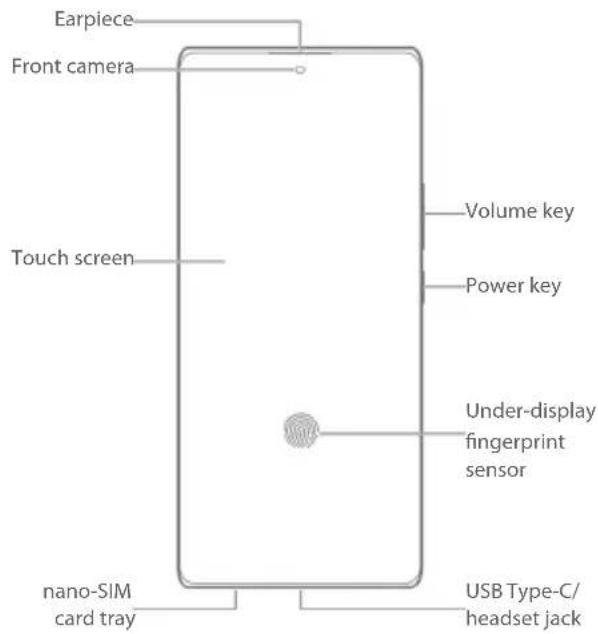
Your phone supports 2.4 GHz and 5 GHz Wi-Fi.
Setting Up Your Phone
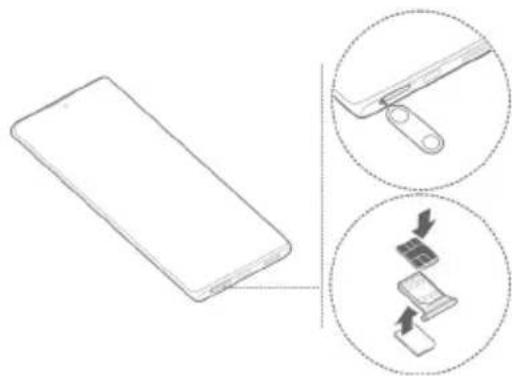
The nano-SIM card(s) can be installed or removed while the phone is turned on.
WARNING!
To avoid damage to the phone, do not use any other kind of SIM cards, or any non-standard nano-SIM card cut from a SIM card. You can get a standard nano-SIM card from your service provider.
- Insert the tip of the tray eject tool into the hole on the card tray.
- Pull out the card tray and install the nano-SIM card(s) into the card slot(s) as shown. Carefully slide the tray back into place.
natural_image
Diagram showing a smartphone with a close-up view of its internal components (no text or symbols present)CAUTION:
Never replace the included tray eject tool with sharp objects. Ensure that the tray eject tool is perpendicular to the hole. Otherwise, the phone may be damaged.
NOTE:
If two nano-SIM cards are installed, you can use either card for mobile data and that card can connect to the 5G network.
Charging the Phone
Your phone's battery should have enough power for the phone to turn on, find a signal, and make a few calls. You should fully charge the battery as soon as possible.
WARNING!
Use only ZTE-approved chargers and USB Type-C cables. The use of unapproved accessories could damage your phone or cause the battery to explode.
WARNING!
Do not remove the back cover. The battery is not removable. Removal may cause fire or explosion.
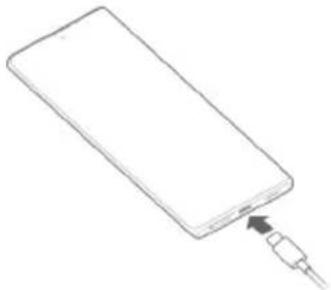
- Connect the adapter to the charging jack.
natural_image
Simple line drawing of a rectangular device with a plug inserted into its tip (no text or symbols)-
Connect the charger to a standard AC power outlet.
-
Disconnect the charger when the battery is fully charged.
NOTE:
If the battery is extremely low, you may be unable to power on the phone even when it is being charged. In this case, try again after charging the phone for at least 20 minutes. Contact the customer service if you still cannot power on the phone after prolonged charging.
Powering On/Off Your Phone
Make sure the battery is charged before powering on.
• Press and hold the Power key to turn on your phone.
- To power off, press and hold the Power key to open the options menu, and touch ⏻. ⏻

NOTE:
If the screen freezes or takes too long to respond, try pressing and holding the Power key for over 10 seconds to restart the phone.
Waking Up Your Phone
Your phone automatically goes into sleep mode when it is not in use for some time. The display is turned off to save power and the keys are locked to prevent accidental operations.
You can wake up your phone by turning on the display and unlocking the keys.
- Press the Power key to turn the screen on.
- Swipe up on the screen.

NOTE:
If you have set a face verification, a fingerprint, an unlock pattern, a PIN or a password for your phone, you'll need to use your face or fingerprint, draw the pattern, or enter the PIN/password to unlock your screen.
Product Safety Information
| Don't make or receive phone calls while driving. Never text while driving. | |
| Keep your phone at least 15 mm away from your body while making calls. | |
| Small parts may cause choking. | |
| Your phone can produce a loud sound. | |
| To prevent possible hearing damage, do not listen at high volume levels for long periods. Exercise caution when holding your phone near your ear while the loudspeaker is in use. | |
| Avoid contact with anything magnetic. | |
| Keep away from pacemakers and other electronic medical devices. | |
| Turn off when asked to in hospitals and medical facilities. | |
| Turn off when told to on aircraft and at airports. | |
| Turn off when near explosive materials or liquids. | |
| Don't use at gas stations. | |
| Your phone may produce a bright or flashing light. | |
| Don't dispose of your phone in fire. | |
| Avoid extreme temperatures. | |
| Avoid contact with liquids. Keep your phone dry. | |
| Do not attempt to disassemble your phone. | |
| Only use approved accessories. | |
| For pluggable equipment, the socket-outlet shall be installed near the equipment and shall be easily accessible. | |
| Don't rely on your phone as a primary device for emergency communications. |
EU Specific Absorption Rate (SAR)
Your mobile device is a radio transmitter and receiver. It is designed not to exceed the limits for exposure to radio waves recommended by international guidelines. These guidelines were developed by the independent scientific organization ICNIRP and include safety margins designed to assure the protection of all persons, regardless of age and health.
The guidelines use a unit of measurement known as Specific Absorption Rate, or SAR. For mobile devices, the SAR limit is 2 W/kg for the head and the body. The highest SAR value for this device when tested at the head was 1.307 W/kg*, and when tested at the body was 1.467 W/kg* with 5 mm distance. The limb (0 mm) SAR limit for mobile devices is 4 W/kg. The highest SAR value for this device when tested at the body with 0 mm distance was 3.661 W/kg*. As mobile devices offer a range of functions, they can be used in other positions, such as on the body as described in the user manual**.
As SAR is measured utilizing the device's highest transmitting power, the actual SAR of this device while operating is typically below that indicated above. This is due to automatic changes to the power level of the device to ensure it only uses the minimum power required to communicate with the network.
* The tests are carried out in accordance with IEC 62209-2/IEC 62479:2010/EN 50360, EN 50566, EN 50663, EN 62209-1 and EN 62209-2.
** Please see body worn operation in the user manual.
Specification
| EUT tested radios application | GSM 900/1800WCDMA Band 1,8FDD LTE Band 1,3,7,8,20,28TDD LTE Band 38,405G NR Band N1,3,7,28,38,40,41,78802.11a/b/g/n/ac/axBluetooth V5.2+BR/EDR/LENFCGPS |
| WCDMA Version Rel.9LTE Version Rel.15 | |
| Maximum RF output power | GSM 900: 33 dBmGSM 1800: 31 dBmWCDMA Band 1: 25.7 dBmWCDMA Band 8: 25.7 dBmFDD LTE Band 1: 25.7 dBmFDD LTE Band 3: 25.7 dBmFDD LTE Band 7: 25.7 dBmFDD LTE Band 8: 25.7 dBmFDD LTE Band 20: 25.7 dBmFDD LTE Band 28: 25.7 dBmTDD LTE Band 38: 25.7 dBmTDD LTE Band 40: 25.7 dBm5G NR Band N1: 24.5 dBm5G NR Band N3: 24.5 dBm5G NR Band N7: 24.5 dBm5G NR Band N28: 24.5 dBm5G NR Band N38: 24.5 dBm5G NR Band N40: 24.5 dBm5G NR Band N41: 24.5 dBm5G NR Band N78: 24.5 dBm802.11b/g/n/ax: 19.98 dBm802.11a/n/ac/ax: 19.27 dBmBluetooth BR/EDR: 9.35 dBmBluetooth LE: 8.34 dBmNFC: -25.796 dBmA/m@10mGPS (RX Only) |
CE Caution
Battery Caution
- There is a risk of explosion if battery is replaced by an incorrect type.
- Dispose of used batteries according to the instructions.
- Do not dispose of a battery into fire or a hot oven, or mechanically crush or cut a battery. Doing so can result in an explosion.
- Leaving a battery in an extremely high temperature surrounding environment can result in an explosion or the leakage of flammable liquid or gas.
- A battery subjected to extremely low air pressure may result in an explosion or the leakage of flammable liquid or gas.
USB Port
This product can be connected to a USB interface of version USB 3.1.
Proper Use
As described in this guide, your device can be used only in right location. If possible, please do not touch the antenna area on your device.
Do not expose your device to extreme temperatures lower than -10 °C and higher than +45 °C.
Charge your device only between -10 °C and +40 °C.
Disposal of Your Old Appliance
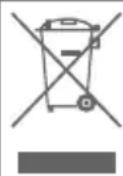
- When this crossed-out wheeled bin symbol is attached to a product, it means the product is covered by the European Directive 2012/19/EU.
- All electrical and electronic products should be disposed of separately from the municipal waste stream via designated collection facilities appointed by the government or the local authorities.
- The correct disposal of your old appliance will help prevent potential negative consequences for the environment and human health.
For this product's recycling information based on WEEE directive, please send an e-mail to weee@zte.com.cn
EU DECLARATION OF CONFORMITY

ZTE
Hereby, ZTE Corporation declares that the radio equipment type ZTE A2023G is in compliance with Directive 2014/53/EU. The full text of the EU declaration of conformity is available at the following Internet address: https://certification.ztedevices.com
The device is restricted to indoor use only when operating in the 5150 to 5350 MHz frequency range.
| AT BE BG HR CY CZ DK | |||||||
| EE FI | FR DE | EL HU IE | |||||
| IT | LV | LT | LU | MT | NL | PL | |
| PT RO SK SI | ES SE UK(NI) | ||||||
ErP Conformity
The external power supply of this product conforms to the Energy-related Product Directive (ErP) 2009/125/EC of the European Parliament and the Council. The detailed ErP information is available on ZTE website https://certification.ztedevices.com.
Copyright © 2022 ZTE CORPORATION.
870 5G mobile platform
natural_image
Diagram showing a smartphone with a close-up view of its internal components (no text or symbols present)
CAUTION:
natural_image
Simple line drawing of a smartphone with an attached cable (no text or symbols)Telif Hakki © 2022 ZTE CORPORATION.
870 5G mobile platform
Qualcomm aptX Adaptive
natural_image
Diagram showing a smartphone with a close-up view of its internal components (no text or symbols present)! DİKKAT:
natural_image
Simple line drawing of a smartphone with an attached cable (no text or symbols)Copyright © 2022 ZTE CORPORATION.
870 5G mobile platform
natural_image
Diagram showing a smartphone with a close-up view of its internal components (no text or symbols present)! PRECAUCIÓN:
natural_image
Simple line drawing of a rectangular device with a cable inserted into it (no text or symbols)Copyright © 2022 ZTE CORPORATION.
870 5G mobile platform
Qualcomm aptX Adaptive
natural_image
Diagram showing a smartphone with a close-up view of its internal components (no text or symbols present)ATTENTION :
natural_image
Simple line drawing of a smartphone with an attached cable (no text or symbols)DÉCLARATION DE CONFORMITÉ UE

Copyright © 2022 ZTE CORPORATION.
870 5G mobile platform
Qualcomm aptX Adaptive
natural_image
Diagram showing a smartphone with a separate close-up of its internal components, illustrating the process of inserting or removing a device (no text or symbols present)ATTENZIONE:
natural_image
Line drawing of a rectangular device with a plug inserted into it, no text or symbols presentCopyright © 2022 ZTE CORPORATION.
870 5G mobile platform
natural_image
Diagram showing a smartphone with a close-up view of its internal components (no text or symbols present)! PRZESTROGA:
natural_image
Line drawing of a smartphone with a cable inserted into the screen (no text or symbols)Copyright © 2022 ZTE CORPORATION.
Minden jog fenntartva.
870 5G mobile platform
natural_image
Diagram showing a smartphone with a close-up view of its internal components (no text or symbols present)! VIGYÁZAT:
natural_image
Line drawing of a smartphone with an inserted cable (no text or symbols)870 5G mobile platform
Snapdragon ^® je proizvod kompanije Qualcomm Technologies, Inc. i/ili njenih podružnica.
Snapdragon je žig ili registrovani žig kompanije Qualcomm Incorporated.
licensed by
Qualcomm
Ovaj proizvod primenjuje određene patentirane tehnologije koje je licencirala kompanija Qualcomm Incorporated. Qualcomm je žig kompanije Qualcomm Incorporated, registrovan u Sjedinjenim Američkim Državama i drugim zemljama.
Licencirani Qualcomm logotip je žig kompanije Qualcomm Incorporated.

Qualcomm ^* aptX ^- Adaptive
Qualcomm® aptX™ je proizvod kompanije Qualcomm Technologies, Inc. i/ili njenih podružnica.
Qualcomm je žig kompanije Qualcomm Incorporated, registrovane u Sjedinjenim Državama i drugim zemljama. aptX je žig kompanije Qualcomm Technologies International, Ltd., registrovane u Sjedinjenim Državama i drugim zemljama.

DTS patente potražite na lokaciji http://patents.dts.com. Proizvedeno pod licencom kompanije DTS Licensing Limited. DTS, Simbol i zajedno DTS i Simbol, DTS:X, DTS:X logotip i DTS:X Ultra su registrovani žigovi ili žigovi kompanije DTS, Inc. u Sjedinjenim Državama i/ili drugim zemljama. © DTS, Inc. Sva prava zadržana.

Advance ^TM
Pokriva jedan ili više zahteva HEVC patenata koji su navedeni na patentlist.accessadvance.com.