WXS2012 - Welding machine Weller - Free user manual and instructions
Find the device manual for free WXS2012 Weller in PDF.


User questions about WXS2012 Weller
0 question about this device. Answer the ones you know or ask your own.
Ask a new question about this device
Download the instructions for your Welding machine in PDF format for free! Find your manual WXS2012 - Weller and take your electronic device back in hand. On this page are published all the documents necessary for the use of your device. WXS2012 by Weller.
USER MANUAL WXS2012 Weller
natural_image
Illustration of a blue and black portable microwave oven with labeled ports (Weller, WXS) and ventilation grille (no text beyond branding)GB Translation of the original instructions
natural_image
Gray circular button with a black lowercase 'i' in the center, no additional text or symbols.

https://www.weller-tools.com/wxsmart
natural_image
Simple line drawing of an open box with a dotted arrow pointing upward (no text or symbols)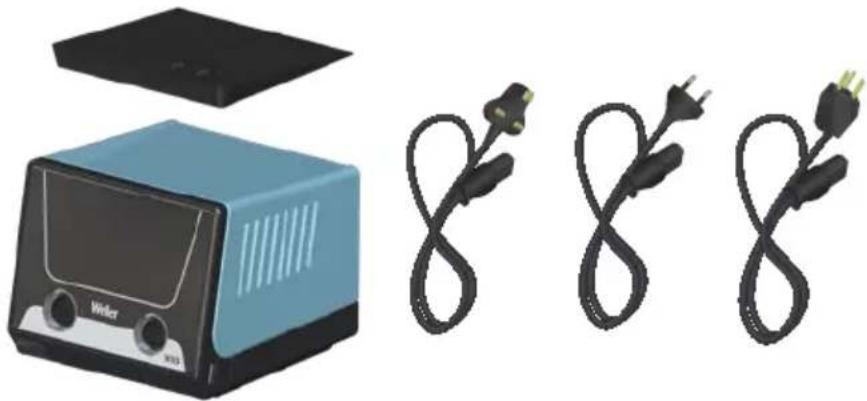
natural_image
Illustration of a blue toaster with open lid and two black electrical plugs (no text or symbols)
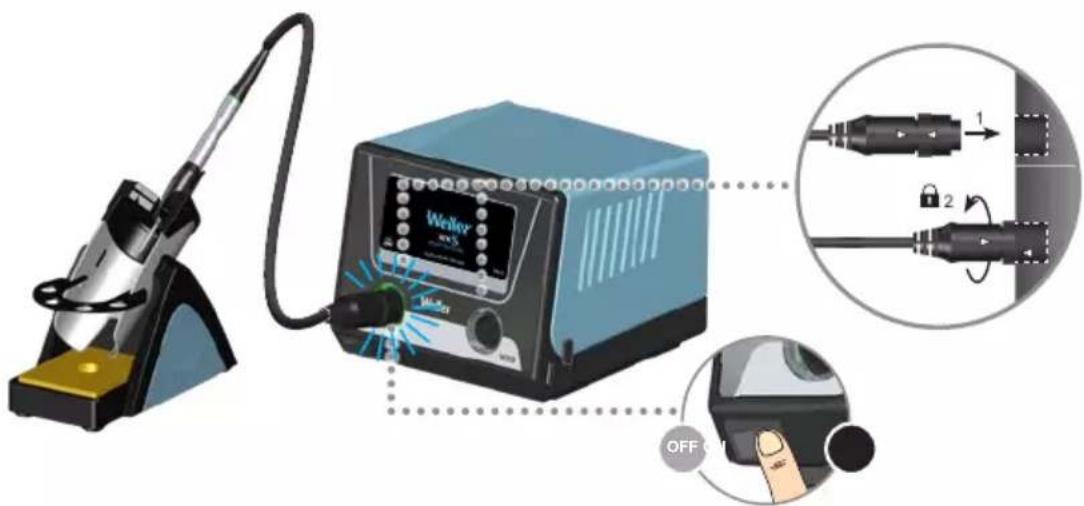
| DE Deutsch | Sicherheitshinweise | Bestimmungsgemäße Verwendung | Benutzergruppen | Pflege und Wartung | Garantie | Technische Daten | Symbole | Original Konformitätserklärung | 6 |
| EN English | Safety information | Specified Conditions Of Use | User groups | Care and maintenance | Warranty | Technical Data | Symbols | Original declaration of conformity | 10 |
| ES Español | Advertencias de seguridad | Aplicación De Acuerdo A La Finalidad | Grupo de usuarios | Cuidado y mantenimiento | Garantía | Datos Técnicos | Símbolos | Declaración de conformidad original | 14 |
| FR Français | Consignes de sécurité | Utilisation Conforme Aux Prescriptions | Groupes d'utilisateurs | Entretien et maintenance | Garantie | Caractéristiques Techniques | Symboles | Déclaration de conformité d'origine | 18 |
| IT Italiano | Avvertenze per la sicurezza | Utilizzo Conforme | Gruppi utenti | Cura e manutenzione | Garanzia | Dati Tecnici | Simboli | Dichiarazione di Conformità originale | 22 |
| PT Portugues | Indicações de segurança | Utilização Autorizada | Grupos de utilizadores | Conservação e manutenção | Garantia | Características Técnicas | Símbolos | Original da declaração de conformidade | 26 |
| NL Nederlands | Veiligheidsinstructies | Voorgeschreven Gebruik Van Het Systeem | Gebruikersgroepen | onderhouden | Garantie | Technische Gegevens | Symbolen | Origineel conformiteitsverklaring | 30 |
| SV Svenska | Säkerhetsanvisningar | Använd Maskinen Enligt Anvisningarna | Användarkategorier | skötsel och underhåll | Garanti | Tekniska Data | Symboler | Ursprunglig försäkran om överensstämmelse | 34 |
| DK Dansk | Sikkerhedsanvisninger | Tiltænkt Formål | Brugergrupper | Pleje og vedligeholdelse | Garanti | Tekniske Data | Symboler | Original overensstemmelseserklæring | 38 |
| FI Suomi | Turvallisuusohjeet | Tarkoituksenmukainen Käyttö | Käyttäjäryhmät | aseman hoito ja huolto | Takuu | Tekniset Arvot | Symbolit | Alkuperäinen vaatimustenmukaisuusvakuutus | 42 |
| GR Ελληνικα | Υποδείξεις ασφαλείας | Xρήση σύμφωνα με το σκοπό προορισμού | Ομάδες χρηστών | Φροντίδα και συντήρηση της συσκευής | Εγγύηση | Τεχνικά στοιχεία | Σύμβολα | Γνήσια Δήλωση πιστότητας | 46 |
| TR Türkçe | Güvenlik uyarıları | Kullanim | Kullanıcı grupları | temizliği ve bakımı | Garanti | Teknik Veriler | Semboller | Orijinal uygunluk beyanı | 50 |
| CZ Český | Bezpečnostní pokyny | Použití v souladu s určením | Uživatelské skupiny | Údržba a servisní práce ohledně | Záruka | Technické údaje | Symboly | Originální prohlásení o shodě | 54 |
| PL Polski | Bezpieczeństwo | Użytkowanie | Grupy użytkowników | Pielęgnacja i konserwacja urządzenia | Gwarancja | Dane Techniczne | Symbole | Oryginalna deklaracja zgodności | 58 |
| HU Magyar | Biztonsági utasítások | Rendeltetésszerű használat | Felhasználói csoportok | Ápolás és karbantar-tás | Garancia | Műszaki Adatok | Szimbólumok | Eredeti megfelelöségi nyilatkozat | 62 |
| SK Slovensky | Bezpečnostné pokyny | Použivanie v súlade s určeným účelom použitia | Skupiny používatelov | Ošetrovanie a údržba | Záruka | Technické údaje | Symboly | Originálne vyhlásenie o zhode | 66 |
| SL Slovenščina | Varnostna navodila | Uporaba v skladu s predpisi | Skupine uporabnikov | Nega in vzdrževanje | Garancija | Tehnični Podatki | Simboli | Originalna Izjava o skladnosti | 70 |
| EE Eesti | Ohutusjuhised | Kasutusotstarbele vastav käitamine | Kasutajarühmad | Hooldamine ja teenindami-ne | Garantii | Tehnilised Andmed | Sümbol | Originaal-vastavusdeklaratsioon | 74 |
| LV Lietuviškai | Saugos taisyklés | Naudojimas pagal paskirti | Naudotoju grupés | |prastinė ir techninė priežiūra | Garantija | Techniniai duomenys | Simboliai | Atitikties deklaracijos originalas | 78 |
| LT Latviski | Drošības norādes | Atbilstoša lietošana | Lietotāju grupas | Apkope un kopšana | Garantija | Tehniskie dati | Simboli | Originālā atbilstības deklarācija | 82 |
| BG Български | Инструкции за безопасна работа | Използване по предназначение | Потребителски групи | Обслужване и поддържане | Гаранция | Технически данни | Символи | Оригинална Декларация за съответствие | 86 |
| RO Român | Indicații de securitate | Utilizarea conformă cu destinața | Grupe de utilizatori | Îngrijirea și întreținerea curentă | Garantia pentru produs | Date tehnice | Simboluri | Declarație de conformitate originală | 90 |
| HR Hrvatski | Sigurnosna upozorenja | Namjenska uporaba | Skupine korisnika | Njega i servisiranje | Jamstvo | Tehnički podaci | Simboli | Originalna izjava o sukladnosti | 94 |
| RU Русский | Указания по технике безопасности | Использование по назначению | Группы пользователей | Уход и техническое обслуживание | Гарантия | Технические характеристики | Символы | Оригинальная декларация о соответствии | 98 |
| CN 中文 | 安全信息 | 规定的使用条件 | 用户群体 | 小心维护 | 保修 | 技术资料 | 符号/标志 | 102 |
| KO 한국어 | 안전정보 | 규정된 사용조건 | 사용자 그룹 | 관리 및 유지보수 | 보증 | 기술자료 | 표지 | 105 |
| JP 日本語 | 安全に関する情報 | 指定の使用条件 | ユーザーグループ | 保守及びメンテナンス | 保証規定証 | 仕様諸元 | シンボル | 109 |

Read these instructions and the safety guidelines carefully before starting up the unit and starting work.
Failure to observe the safety regulations results in a risk to life and limb.
Keep these instructions in a place that is accessible to all users. Please adhere to the operating instructions of the connected devices.
Safety information
For safety reasons, children and youths under the age of 16, as well as persons who are not familiar with these operating instructions, may not use the device. Children should be supervised in order to ensure that they do not play with the tool.
This appliance can be used by children aged from 8 years and above and persons with reduced physical, sensory or mental capabilities or lack of experience and knowledge if they have been given supervision or instruction concerning use of the appliance in a safe way and understand the hazards involved. Children shall not play with the appliance.
Cleaning and user maintenance shall not be made by children without supervision.
Keep other persons well away from your workplace.
Children and other unauthorized persons must stay clear of the work area. Never allow other persons to touch the soldering tool or cable.

WARNING
Electrical shock
Connecting the control unit incorrectly poses a risk of injury due to electric shock and can damage the device.
- Carefully read the attached safety information, the safety information accompanying these operating instructions as well as the operating instructions for your control unit before putting the control unit into operation and observe the safety precautions specified therein.
- Only connect WELLER tools.
If the device is faulty, active electrical conductors may be bare or the PE conductor may not be functional.
• Repairs must always be referred to a Weller-trained specialist.
- If the electrical tool's power supply cord is damaged, it must be replaced with a specially prefabricated power supply cord available through the customer service organization.
Protect yourself against electric shocks. The handles on soldering tools with an antistatic design are conductive.
- Avoid touching earthed objects such as pipes, heaters, cookers and refrigerators.
- Do not use the soldering tool in a damp or wet environment.
- Never work on voltage-carrying parts.

WARNING
Risk of burns
Risk of burns from the soldering tool while the control unit is operating. Tools may still be hot long after they have been switched off.
• Always place the soldering tool in the safety rest while not in use. Make sure the safety holder is stable.
- Only connect the vacuum and hot air at the designated points.
- Do not direct hot air soldering tools at people or inflammable objects.
- Only replace solder tips when cold
Risk of burning through liquid solder. Protect yourself against solder splashes.
- Wear appropriate protective clothing to protect yourself against burns. Protect your eyes by wearing eye protection.
- When working with adhesives, special attention must be paid to the warning information provided by the adhesive manufacturer.
Store your soldering tool in a safe place. When not in use, units and tools should be stored in a dry, high or locked area out of the reach of children. Make sure that unused soldering tools are free of voltage and de-pressurised.

WARNING | Fire hazard
Covering the soldering iron or the safety holder poses a fire hazard.
• Always keep objects well away from the soldering iron and safety holder.
- Keep all combustible objects, liquids or gases well away from the hot soldering tool.
The power cable must only be plugged into the power socket or adapter approved for this purpose. Check to see if the mains voltage matches the ratings on the nameplate. Make sure the machine is switched off before plugging in.
Do not use the cable for purposes other than those for which it is intended. Never carry the unit by the cable. Do not use the cable to pull the plug out of the socket. Protect the cable against heat, oil and sharp edges.
Be alert. Pay attention to what you are doing. Be smart when using the unit. Do not use the soldering tool if you are having difficulty concentrating.
Avoid abnormal posture. Arrange your work station in an ergonomically correct way. Avoid bad posture when using the unit, as this can lead to postural problems.
The soldering tool must be operated only in perfect technical working order. Safety devices must not be deactivated.
Faults and defects must be repaired immediately.
Before using the unit / tool, safety devices must be carefully checked to make sure that they are functioning properly and in the manner intended. Check that moving parts are functioning properly and are not sticking, and whether parts are damaged. All parts must be correctly fitted and must satisfy all the requirements necessary to guarantee troublefree operation of the unit.
Use the correct tool. Use only accessories or auxiliary devices which are included in the list of accessories or approved for use by the manufacturer. Use WELLER accessories or auxiliary devices on original WELLER equipment only. The use of other tools and other accessories can cause injury.
Secure the tool. Use clamping fixtures to hold the workpiece.
Use a solder fume extraction unit. If appliances for connecting solder fume extraction units are available, ensure that they are connected and used properly.
Specified Conditions Of Use
Supply unit for WELLER WX soldering tools. Use the soldering station / desoldering station / hot air station exclusively for the purpose indicated in the operating instructions of soldering and desoldering under the conditions specified herein.

WARNING
Flammable gases and liquids may not be extracted.
The device may only be used with correctly fitted and suitable filter cartridges.
Replace filter cartridges when full.
This device may only be used at room temperature and indoors. Protect against moisture and direct sunlight.
WXS Remote Control:
As soon as you have installed the Weller WXS app on your mobile device and have connected to the Weller WXS station, the remote control is activated via an app.
You can now perform the described device functions with your mobile device by using the app.
Note: Direct operation at the WXS station by a user does not have priority over access via the app.
Both options for operation have equal priority. Therefore, it must be ensured that any unintentional remote access via the app does not endanger the user or damage furnishings. Weller therefore recommends switching off the station via the ON/OFF switch before changing tools or tips, etc.
In general, the soldering tools must be placed in the associated safety holder when not in use. This will ensure that the tool does not pose a hazard.
User groups
Due to differing degrees of risk and potential hazards, several work steps may only be performed by trained experts.
| Work step User groups | |
| Default soldering parameters | Specialist personnel with technical training |
| Replacing electrical replacement parts | Electricians |
| Default maintenance intervals | Safety expert |
| Operation Filter change | Non-specialists |
| Operation Filter changeReplacing electrical replacement parts | Technical trainees under the guidance and supervision of a trained expert |
Care and maintenance
WARNING

Before doing any work on the machine, pull the plug out of the socket.
Clean the operator panel, if dirty, using a suitable cleaning cloth.
Seal ports which are not in use with covering caps.
Check all connected cables and hoses on a regular basis. If power tools are damaged, they must be immediately removed from use.
WARNING
Risk of burns
- Only replace solder tips when cold
- Replace and clean suction nozzles only when hot and using the suitable tool
- Only replace hot air nozzles using the suitable tool
- Only clean or replace solder collection tubes when cold
Filter change
Regularly check the main filter for vacuum, and replace it if necessary.
Contaminated filters must be treated as special waste. Dispose of replaced equipment parts, filters or old devices in accordance with the rules and regulations applicable in your country. Wear suitable protective gear.
Warning!
Working without a filter can result in irreparable damage to the vacuum unit.
Check before starting soldering whether a main filter is inserted.
Repairs must always be referred to a Weller-trained specialist.

Use original replacement parts only.
Warranty
Claims by the buyer for physical defects are time-barred after a period of one year from delivery to the buyer. This does not apply to claims by the buyer for indemnification in accordance with §§ 478, 479 BGB (German Federal Law Gazette).
We shall only be liable for claims arising from a warranty furnished by us if the quality or durability warranty has been furnished by use in writing and using the term „Warranty“. The warranty shall be void if damage is due to improper use and if the device has been tampered with by unauthorized persons.
For more information please visit www.weller-tools.com.
Symbols

Caution!

Warning! Risk of burns!

Read the operating instructions!


Before performing work of any kind on the unit, always disconnect the power plug from the socket.

ESD-compatible design and ESD-compatible workstation

Equipotential bonding

Soldering

Desoldering

Hot air

CE mark of conformity

British Conformity Mark

Fuse

Safety transformer
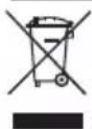
Disposal
Waste light sources have to be removed from equipment. Check with your local authority or retailer for recycling advice and collection point. According to local regulations retailers may have an obligation to take back waste electrical and electronic equipment free of charge. Your contribution to re-use and recycling of waste electrical and electronic equipment helps to reduce the demand of raw materials. Waste electrical and electronic equipment contain valuable, recyclable materials, which can adversely impact the environment and the human health, if not disposed of in an environmentally compatible manner. Delete personal data from waste equipment, if any.
Technical Data
| Soldering stationWXsmart | |||
| Dimensions L x W x H 173 mm x 153 mm x 142 mm6,81 inch x 6,02 inch x 5,59 inch | |||
| Weight 4,5 kg | |||
| Mains supply voltage 100 V AC / 50/60 Hz 120 V AC / 60 Hz 230 V AC / 50/60 Hz | |||
| Power consumption 300W | |||
| Safety class I, Supply unitIII, Soldering tool | |||
| Fuse 100 V / T6,3A 120 V / T5A 230 V / T3,15A | |||
| Temperature rangeTool dependent | 100 - 450°C (550°C)200 - 850°F (950°F) | ||
| Temperature accuracy ± 9 °C / ± 17 °F | |||
| Temperature stability ± 2 °C / ± 4 °F | |||
Subject to technical alterations and amendments.

Controle remoto WXS:
ENC declaration of conformity
We hereby declare that the products described herein comply with the following guidelines:
Philippe Buidin Managing director
Authorised to compile technical documentation.
EN UK declaration of conformity
We hereby declare that the products described herein comply with the following guidelines:
SI 2016 No.1101, SI 2016 No. 1091, SI 2008 No. 15972014/35/EU;

Besigheim, 2023-08-24
Philippe Buidin
Managing director
Authorised to compile technical documentation.
Apex Tool Group UK Ltd Registered in England, Company Number 14127816 Registered Office: 20 Farringdon Street, 8th Floor London, EC4A 4AB, United Kingdom
Product Registration
www.weller-tools.com/registration
GERMANY
Weller Tools GmbH
Carl-Benz-Straße 2
74354 Besigheim
Apex Tool Group B. V.
Apex Tool Group UK Ltd
Registered in England,
Company Number 14127816
Registered Office:
C/O TMF Group 13th Floor,
One Angel Court, London,
EC2R 7HJ, United Kingdom
USA
Apex Tool Group, LLC.
Weller Professional Tools Division
1000 Lufkin Road
Apex, NC 27539
+866-498-0484
MÉXICO
Apex Tool Group Manufacturing
© 2023, Apex Tool Group, LLC.
Weller is a registered Trademark and registered Design of Apex Tool Group, LLC.
Weller