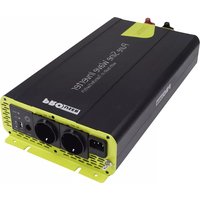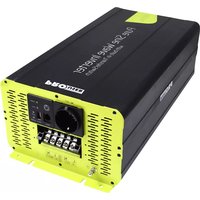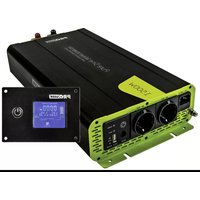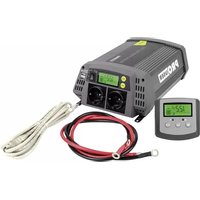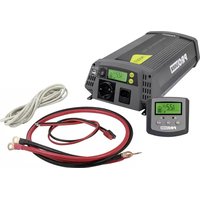
PSI1000TX - Electric converter Pro-User - Free user manual and instructions
Find the device manual for free PSI1000TX Pro-User in PDF.


User questions about PSI1000TX Pro-User
0 question about this device. Answer the ones you know or ask your own.
Ask a new question about this device
Download the instructions for your Electric converter in PDF format for free! Find your manual PSI1000TX - Pro-User and take your electronic device back in hand. On this page are published all the documents necessary for the use of your device. PSI1000TX by Pro-User.
USER MANUAL PSI1000TX Pro-User
Read this manual before using this product. Read this manual before using this product.
Failure to do so can result in serious injury. Failure to do so can result in serious injury.
CONTENTS
Introduction P.3
Important safety instructions P.3
General instructions P.6
Package contents P.6
Technical description P.7
Remote control P.10
Dipswitch settings (Hybrid only) P.11
ECO/UPS function P.11
Installation & operation P.12
Wiring scheme P.13
Troubleshooting P.15
Technical specifications P.19
Maintenance P.21
Warranty P.21
INTRODUCTION
The pure sine wave inverters are a member of the family of advanced mobile power inverters manufactured by Pro-User Electronics. Your Pro-User Electronics pure sine wave inverter enables you to generate a pure sine wave 230V AC 50Hz voltage from a 12V DC battery wherever your travels take you. As a bonus we built-in 1 USB-Port for powering or charging e.g. your sat nav, cell phone, tablet or any other USB device. Because of the high quality pure sine wave voltage and the excellent overload capabilities, even sensitive electronics will work flawlessly.
The wired remote control enables you to monitor and control your inverter in a convenient way.
We have taken numerous measures in quality control to ensure that your product arrives in top condition and will perform to your satisfaction.
Please carefully read and follow with the safety and properaging instructions. Not Noltofollhawing these instructions may result in serious incidents including damaged property, serious or even fall-injuries, if the devices passed on to another person, this than almost must also be handed over with it, also be handed over with it.
IMPORTANT SAFETY INSTRUCTIONS

CAUTION: Please assess each this is instructed from an available fully by beef on a tail, lying and starting up the device. Do not prepare either in water or water, you have fully read and understand all the provided information. If you are not considered working with 12V DC voltage on one source for what you are dealing, consider seek seek for help by a professional installed radioservice or you have listed manufacturer. Failure to observe these instructions may cause an effective abschokatafatal or serious injury, made all damage or impair the effort of the enterprise.
Pro-User Electronics accepts no liability for direct or indirect damage caused by faulty assembly or connection, a usage of damaged or altered products, a usage for purposes other than described and especially caused by failure to follow these instructions.
General:
- Electrical devices are not toys. Keep the product away from children.
- Only use the product as intended and for purposes described in the manual.
- After opening the package, examine all parts for visible damage. If you have found any damage, please contact the company you purchased this unit from.
- Always disconnect the power supply (including the connection to the battery and an optional solar panel) when working on the device.
- Use only approved accessories (especially all cables) or parts fully consistent with the requirements. The installer is responsible for ensuring that the correct cable and fuse sizes are used.
- The surface temperature can reach up to 65°C. Power-off and stop using the device immediately, if the unit is smoking or is showing any abnormal behaviour.
- This appliance is not intended for use by persons (including children) with reduced physical, sensory or mental capabilities, or lack of experience and knowledge, unless they are supervised or have been instructed on how to use the appliance by a person responsible for their safety. Children should be supervised to ensure that they do not play with the appliance.
- Installing the device, maintenance and repair work may only be carried out by qualified person who are familiar with the risks involved, the relevant regulations and with the guidelines and safety precautions to be applied.
- Do not disassemble the inverter, the internal circuit contains hazardous voltages. Attempting to service the unit yourself may result in electric shock or fire and will void the unit warranty.
- Always keep metal objects or other materials that can short circuit the terminals of the battery or the inverter securely away. A resulting spark or short-circuit may not only damage the device, but also cause an explosion and potentially produce a current high enough to weld a ring or the like to metal. Remove personal metal items such as rings, bracelets, necklaces and watches when working on the device or the battery.
- Operate the inverter only, if all cables and the housing are undamaged and all connections are tight and clean. Loose or dirty connections could result in overheating, electrical sparks and fire.
- Do not connect AC output terminals of the inverter to an incoming AC source (or the grid).
- Do not connect DC input terminals of the inverter to an incoming AC source.
- Never use the inverter on vehicles where the positive terminal of the battery is connected to the chassis.
- Never connect cables in reverse polarity or short-circuit connected cables. This may blow internal fuses and may damage the inverter permanently.
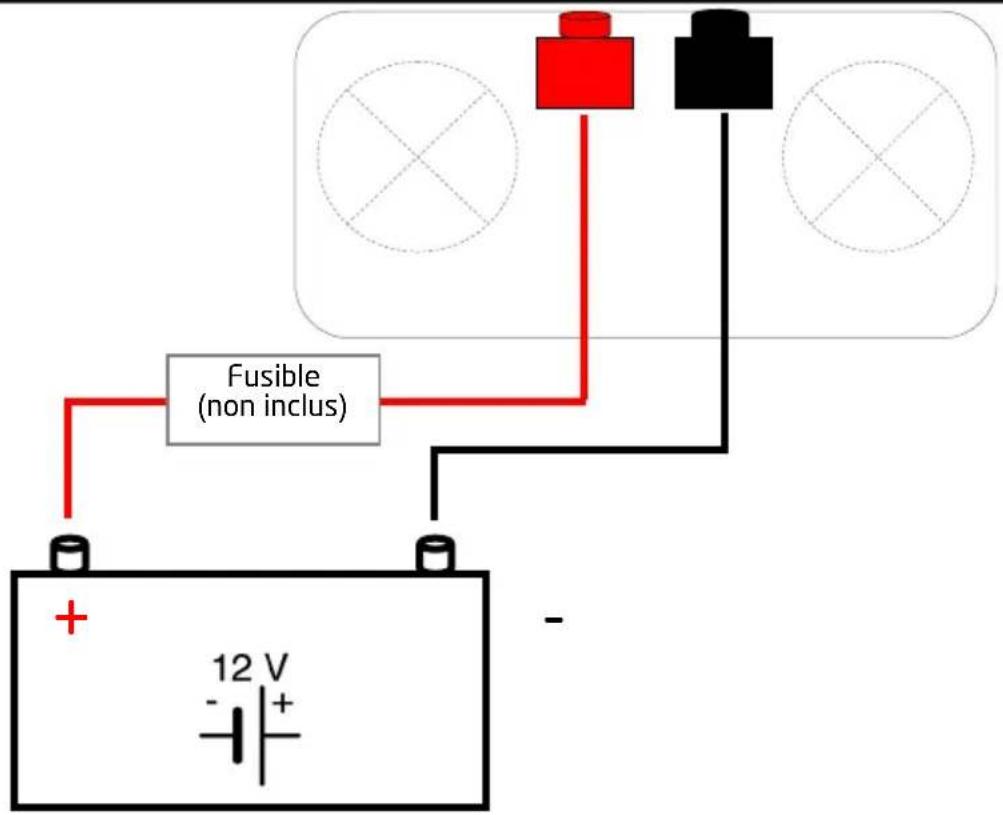
- A fuse should be provided at a distance of max. 30 cm from the battery's positive terminal. Failure to do so, may cause damage to the cabling or battery if a fault (e.g. over-current or short circuit) occurs. Only use high quality copper cable and keep the cable length short.
- Do not operate appliances that may feed AC main power back into the inverter. This might damage the inverter.
- Ensure the device is standing firmly. The device must be set up and fastened in such a way that it cannot tip over or fall down.
- Never connect devices that have a higher power requirement than the peak output power of the inverter. Note that some devices may require more starting current than the type plate of the device indicates.
Working with Batteries Working with Batteries
- Batteries can store large amounts of energy and improper handling can be dangerous. Never connect to a battery with an unsuited voltage or other unsuitable or damaged batteries.
- Keep children away from batteries and acid.
- Avoid getting electrolyte on your skin or clothes. It is acidic and can cause burns. If battery acid contacts skin or clothing, wash immediately with water. Baking soda neutralizes lead acid battery electrolyte. If electrolyte gets into your eyes, immediately flood your eyes with running cold water for at least 20 minutes and get medical attention immediately. Eye protection is therefore recommended.
- Always keep metal objects or other materials that can short circuit the terminals of the battery or the inverter securely away.
- Power-off the device before making or breaking the connections to the battery.
- Observe technical instructions of the seller or the manufacturer of your battery.
- Check if all connections are tight and clean. Loose or dirty connections could result in overheating, electrical sparks and fire. Use terminal grease where required.
- Never smoke or allow a spark or flame in vicinity of the battery.
- Never try to charge a damaged or frozen battery.
- Do not place the device directly on top of the battery or vice versa or on a surface constructed from combustible material.
- Read your car's owner's manual. Some vehicle manufacturers may have special requirements before charging or discharging the vehicle's battery (e.g. fuses that have to be removed or certain security demands).
EnvironmentEnvironment
- Only use the product in environments from 0^ 45^ .
- Do not operate the product in damp, wet or dusty environments: Never expose the inverter to rain or snow. Doing so may result in damage to the inverter or other equipment installed in the system or result in electric shock or fire. Do not operate the unit in explosive atmospheres, such as in the presence of flammable liquids, gases or dust. Do not put batteries, or anything that should be protected from sparks around the inverter. Doing so may result in fire or explosion.
- To avoid heat accumulation, do not cover the device. To prevent overheating, ensure that air inlets and ventilation is not obstructed. Do not expose the device to a heat source (such as direct sunlight or heating). Avoid additional heating of the device in this way.
Electrical Cables Electrical Cables
- If cables have to be fed through metal holes or other walls with sharp edges, use ducts or cable bushings to prevent damage.
- Do not lay cables which are loose or bent next to electrically conductive material (metal).
- Do not pull on the cables.
- Avoid to lay 230 V AC mains cable and 12 V DC cables in the same duct.
- Prevent all cables from being stepped on, tripped over, or being damaged by e.g. sharp edges or hot surfaces.
GENERAL INSTRUCTIONS
Intended useIntended use
The Pro-User Electronics pure sine wave inverter converts a 12V direct current voltage (e.g. a battery or another 12V source that can deliver the required current) into 200-240V 50Hz AC pure sine wave voltage. The built-in USB-port is intended to power or charge 5V USB devices (the maximum current delivery has to be kept in mind). The wired remote control enables the user to monitor and control the inverter in a convenient way.
Packaging materials Packaging materials
To avoid danger of suffocation, do not let children play with foils or other packaging materials. Remove all protective coverings before putting the device in operation.
StorageStorage
When not in use, store the inverter in a dry environment. Store the device in a safe place out of the reach of children. Protect the unit from direct sunlight, heat and moisture.
PACKAGE CONTENTS
• 1x Pro-User Electronics pure sine wave inverter
• 1x Remote control (600/1000/1500/2000/3000W)
• 1x Remote control wiring (600/1000/1500/2000/3000W)
- 1x Remote control surface mounting frame (600/1000/1500/2000/3000W)
- 1x Battery wiring set
• 1x 230V connection cable (1000/1500/2000W)
- 1x Operating manual
TECHNICAL DESCRIPTION
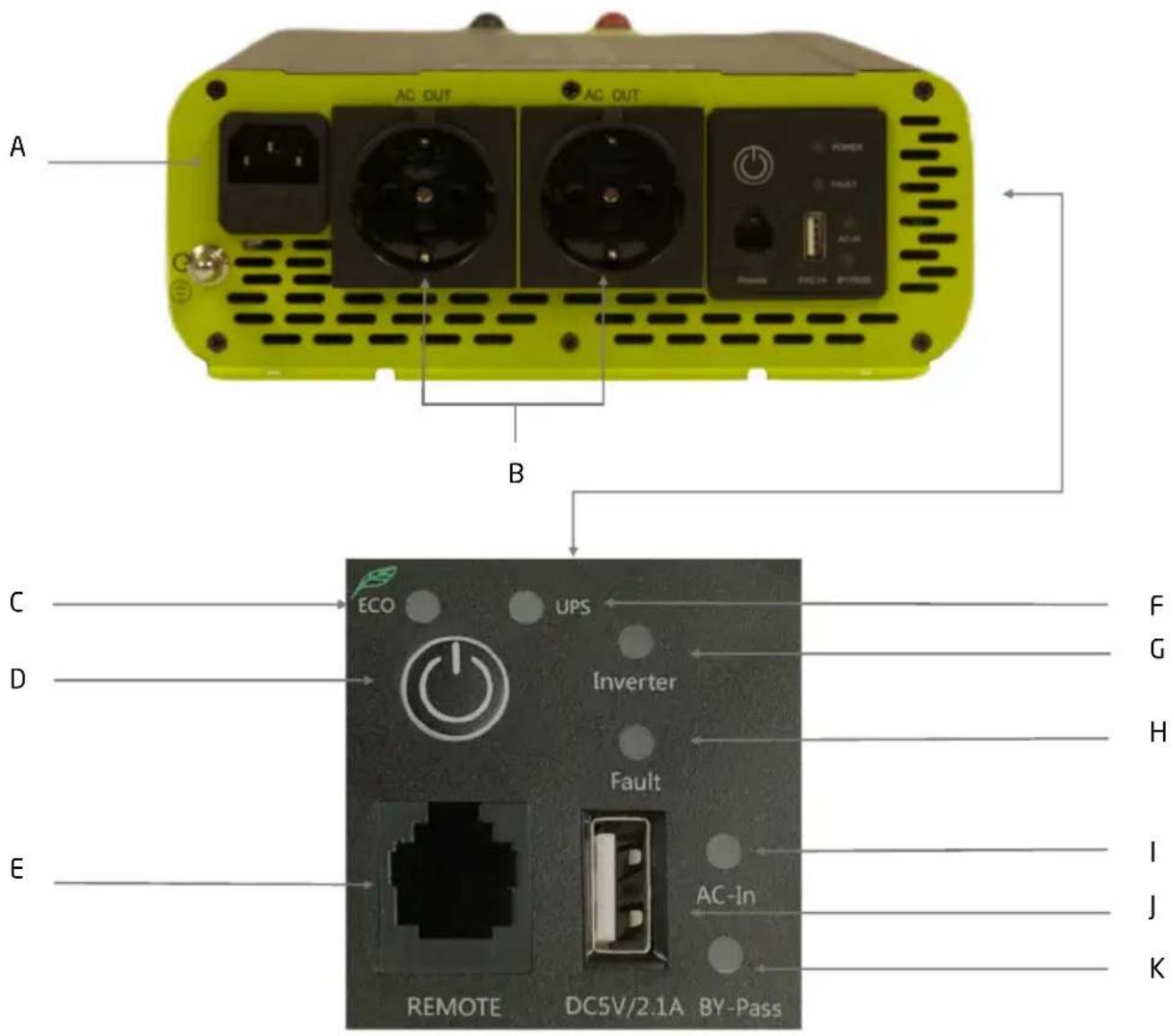
text_image
A AC OUT AC OUT B C ECO UPS F D Inverter H Fault E I J AC-In K REMOTE DC5V/2.1A BY-PassA) Incoming 230V AC connection (1000W / 1500W / 2000W)
B) Output 230V AC socket
C) ECO mode indication led (1000W / 1500W / 2000W / 3000W)
D) Power switch
E) Remote control wiring connection
F) UPS indication led (1000W / 1500W / 2000W / 3000W)
G) Inverter function indication led
H) Fault indication led
I) AC incoming indication led
J) USB output
K) BY-Pass indication led
TECHNICAL DESCRIPTION
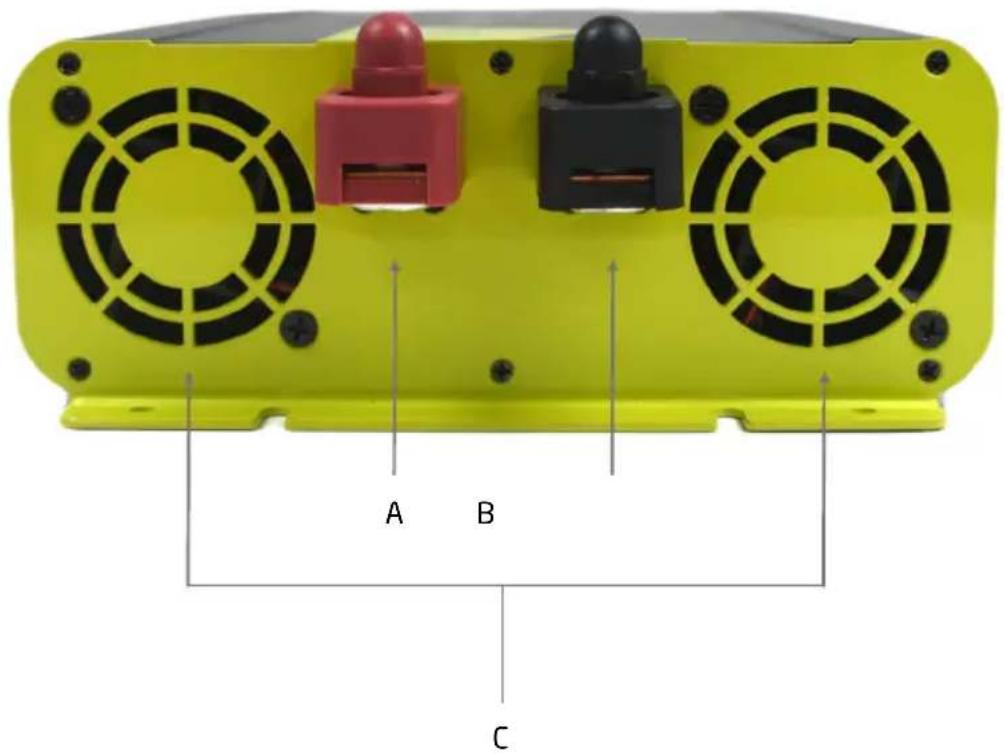
text_image
A B CA) Positive battery terminal (red / + )
B) Negative battery terminal (black / - )
C) Cooling vents
TECHNICAL DESCRIPTION 3000W & HYBRID PSI-SERIES

text_image
Solar Solar A L N G L N AC Output AC Input B C D E ECO UPS F Inverter Solar Fault Charge G H I J K L M N O AC-In REMOTE DC5V/2.1A BY-PassA) Solar panel input (MC4 Hybrid only)
B) Output 230V AC connections
C) Input 230V AC connection
D) Battery setup dipswitches (Hybrid only)
E) ECO mode indication led
F) Power switch
G) Remote control wiring connection
H) UPS indication led
I) Solar charge function indication led (Hybrid only)
J) Inverter function indication led
K) 230V AC charge function indication led (Hybrid only)
L) Fault indication led
M) AC incoming indication led
N) USB output
O) BY-Pass indication led
REMOTE CONTROL DISPLAY INVERTER MODE
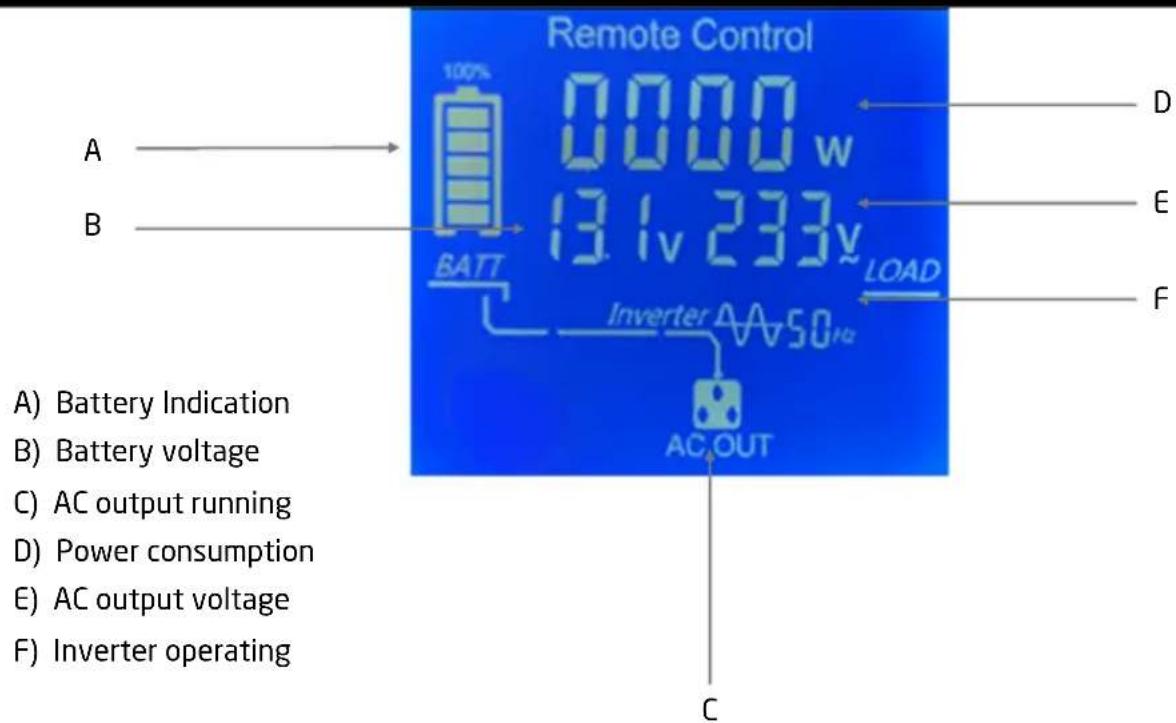
text_image
Remote Control 100% 0000 w 13.1v 233v LOAD BATT AC OUT A) Battery Indication B) Battery voltage C) AC output running D) Power consumption E) AC output voltage F) Inverter operating D E F CREMOTE CONTROL DISPLAY TRANSFERSWITCH MODE (1000W / 1500W /2000W /3000W)
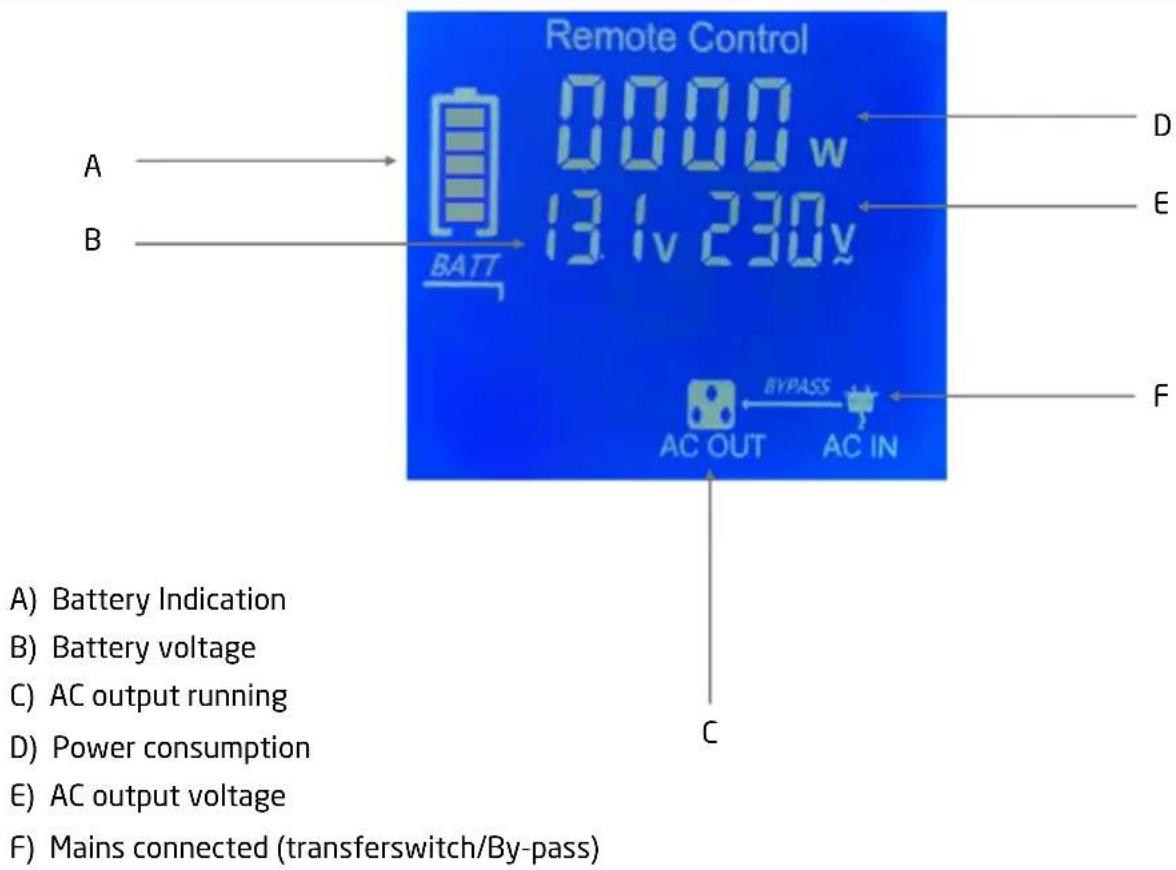
text_image
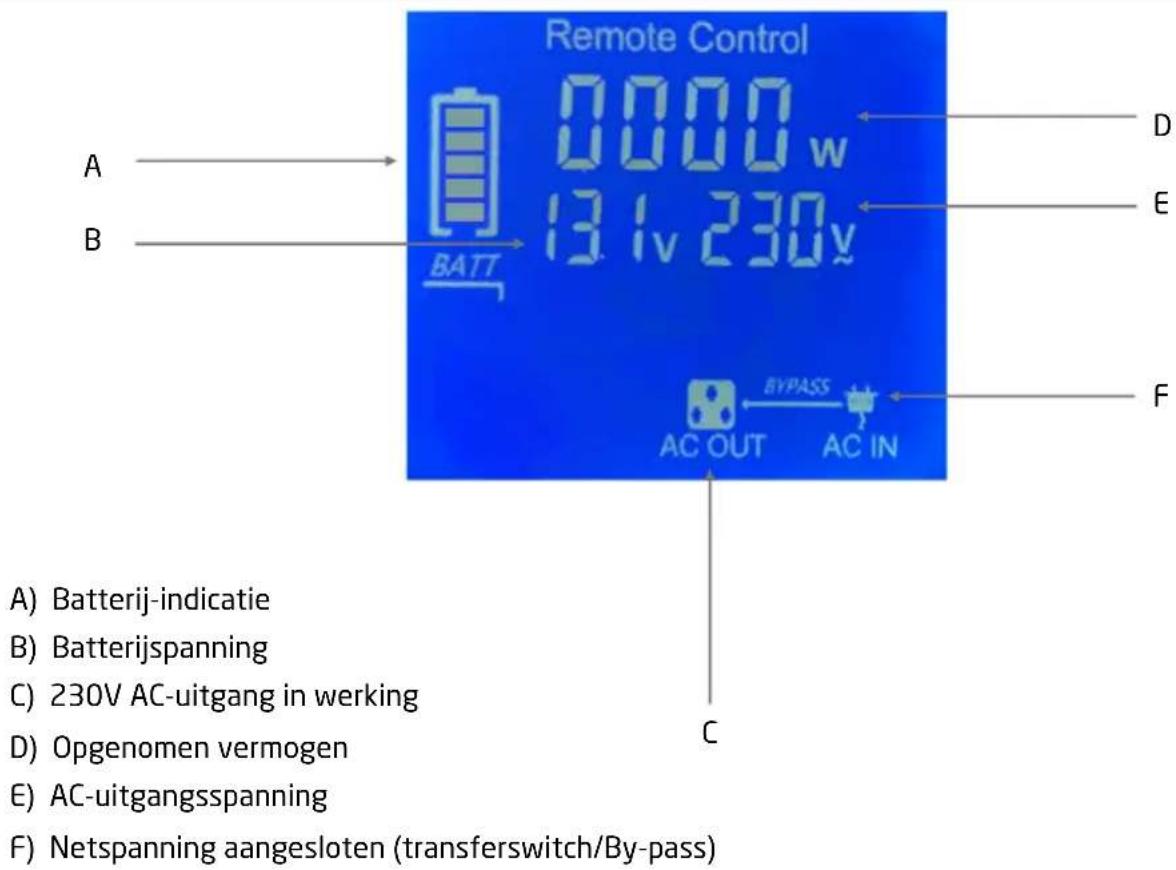
Remote Control 0000 w 131v 230v BATT A B D E F AC OUT BYPASS AC IN C A) Battery Indication B) Battery voltage C) AC output running D) Power consumption E) AC output voltage F) Mains connected (transferswitch/By-pass)REMOTE CONTROL DISPLAY MPPT SOLAR MODE (HYBRID ONLY)
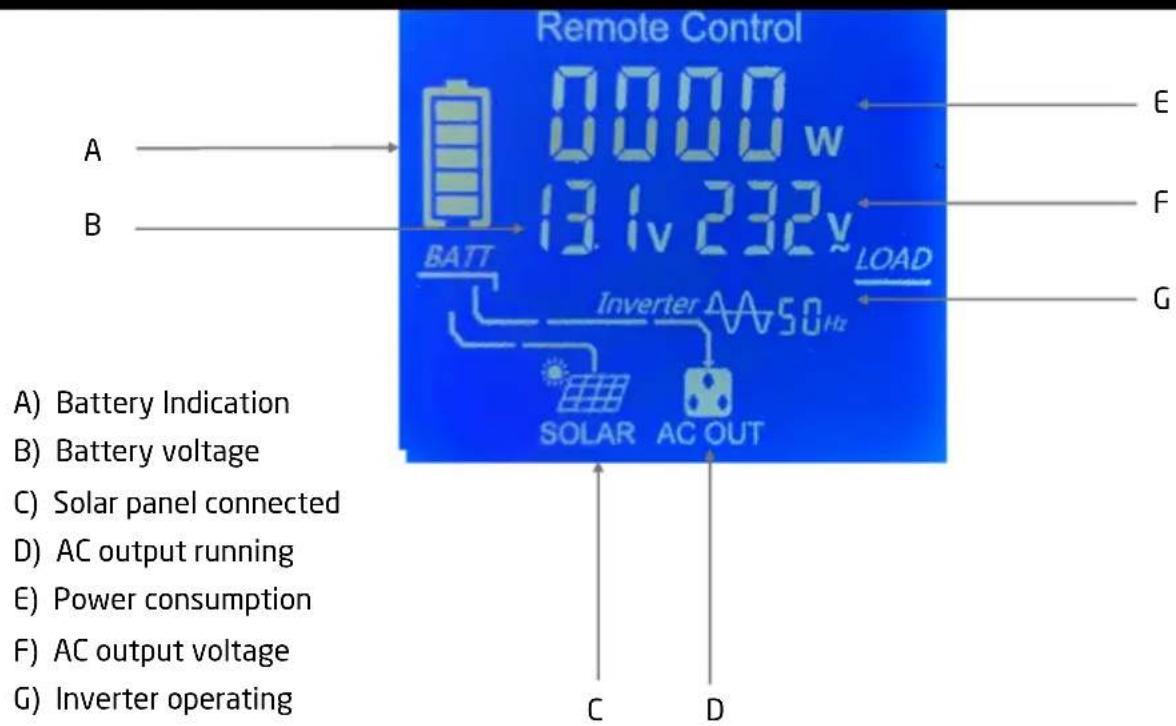
text_image
Remote Control 0000 w 13.1v 232v BATT LOAD Inverter A A50 Hz SOLAR AC OUT A) Battery Indication B) Battery voltage C) Solar panel connected D) AC output running E) Power consumption F) AC output voltage G) Inverter operating C D E F GDIPSWITCH SETTINGS (HYBRID ONLY)
The battery charger function is set using the dip switches on the side of the inverter. The diagram below shows how to set them. When in doubt about which setting you need, please contact your battery supplier.
| Setting | Dip switch | Bulk / Absorption | Float | Battery Type | |
| L | SW0 | 14.6V | LiFePO4 | ||
| S | SW1 | 14.8V | 13.8V | Flooded | |
| SW2 | 15.0V | 13.8V | Calcium | ||
| SW3 | 14.6V | 13.6V | AGM | ||
| SW4 | 14.4V | 13.4V | SLA | ||
| SW5 | 14.2V | 13.2V | GEL | ||
| Power Supply Mode, Constant Voltage Setting | |||||
| SW6 | 13.8V | ||||
| SW7 | 12.0V | ||||
ECO/UPS FUNCTION (1000/1500/2000/3000W)
The inverter is equipped with ECO (energy saving) and UPS setting. In ECO mode, consumption from the battery is preferred. This way, no external incoming voltage is applied as long as there is sufficient capacity from the battery. If you choose the UPS mode (default setting) then external incoming 230V AC voltage is preferred (bypass). In UPS mode, the battery is selected when no external incoming voltage is available.
To switch from UPS to ECO or vice versa, press and hold the power button for 2 seconds.
WARNING: Please read this is a structure from an animal carefully by before talking and starting up the device. Do not prepare the event in terms of you have already read and understand all the provided information of, you are confident and working with 12W DC voltage on an electronic food delivery to your reading inside the team seek for help by a professionalist at that location or you vehicle is a manufacturer. Failure to do these is a structure away from an athlete is a block of a total or serious injury, made it bad to manage the function of the enterter.

WARNING: Before installing the inverter plus ensure that the main switch is set to position Position Make sure the battery apple can be clear when connecting together terminals. Tighten then starts and drops to torque of 12133 Nm loose or dirty concretions may occur ever creating.

Risk of electrical shock operation of the event with two supra pro geoug ground connection may result in a lead to a safety bar batch system up to geoug ground connection is made during grid installation. Do not be versers the pelatgr Rev Resverging the polarity of the connection may cause seapak and the interfacuses.

Observe therelevant regglations and specific values of your country by trysomome country there might be deglagergaltation that are equivalent. RDE protection of AC output proportions of initial stabilization (RResidual-courenide devices, also known as RCCB/GFO). RDOsmay be fitted by licence deedectiniam initial substitutions.
Fasteinigthleinveeter
When selecting the installation location, observe the following instructions:
- The inverter can be mounted horizontally or vertically.
- The installation surface must be level and sufficiently sturdy.
- The inverter must be installed in a place that is protected from dirt, dust and moisture.
- The inverter may not be installed in the presence of flammable materials.
- The place of installation must be well-ventilated. A ventilation system must be present for installations in small, closed spaces.
- The minimum clearance around the inverter should be at least 25 cm.
- Do not block or cover the ventilation holes. Be sure to keep a distance (at least 1 inch) from surrounding objects.
Writing & Cable

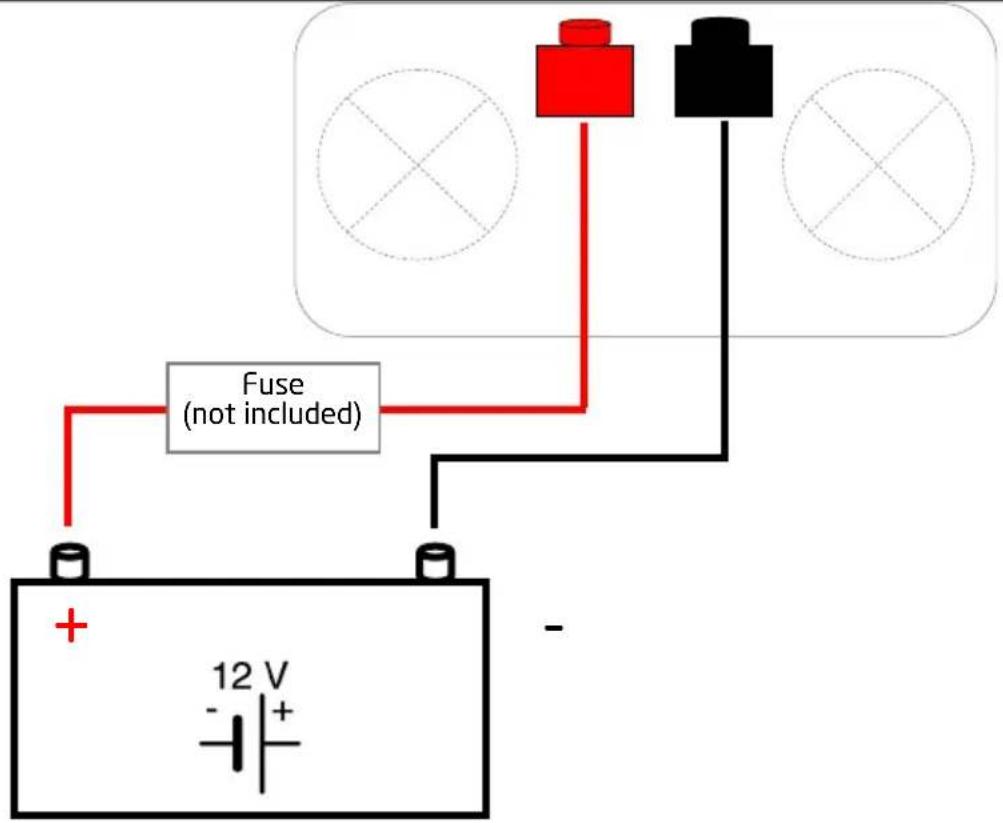
A fuse should be provided at a distance of max. 30 cm from the battery's positive terminal. Failure to do so, may cause damage to the cabling or battery if a fault (e.g. over-current or short circuit) occurs.
Reverse polarity connection may blow the internal fuse and may damage the inverter permantly.
WIRING SCHEME
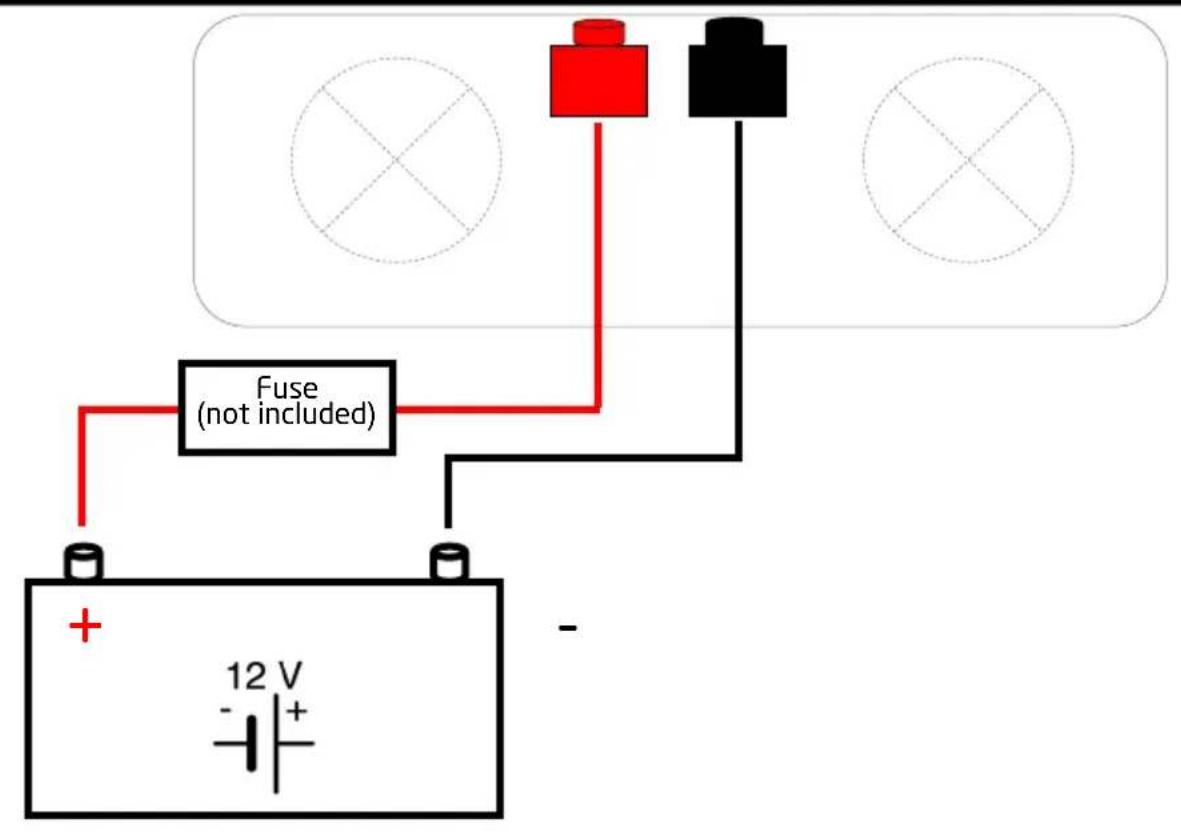
text_image
Fuse (not included) 12 V - +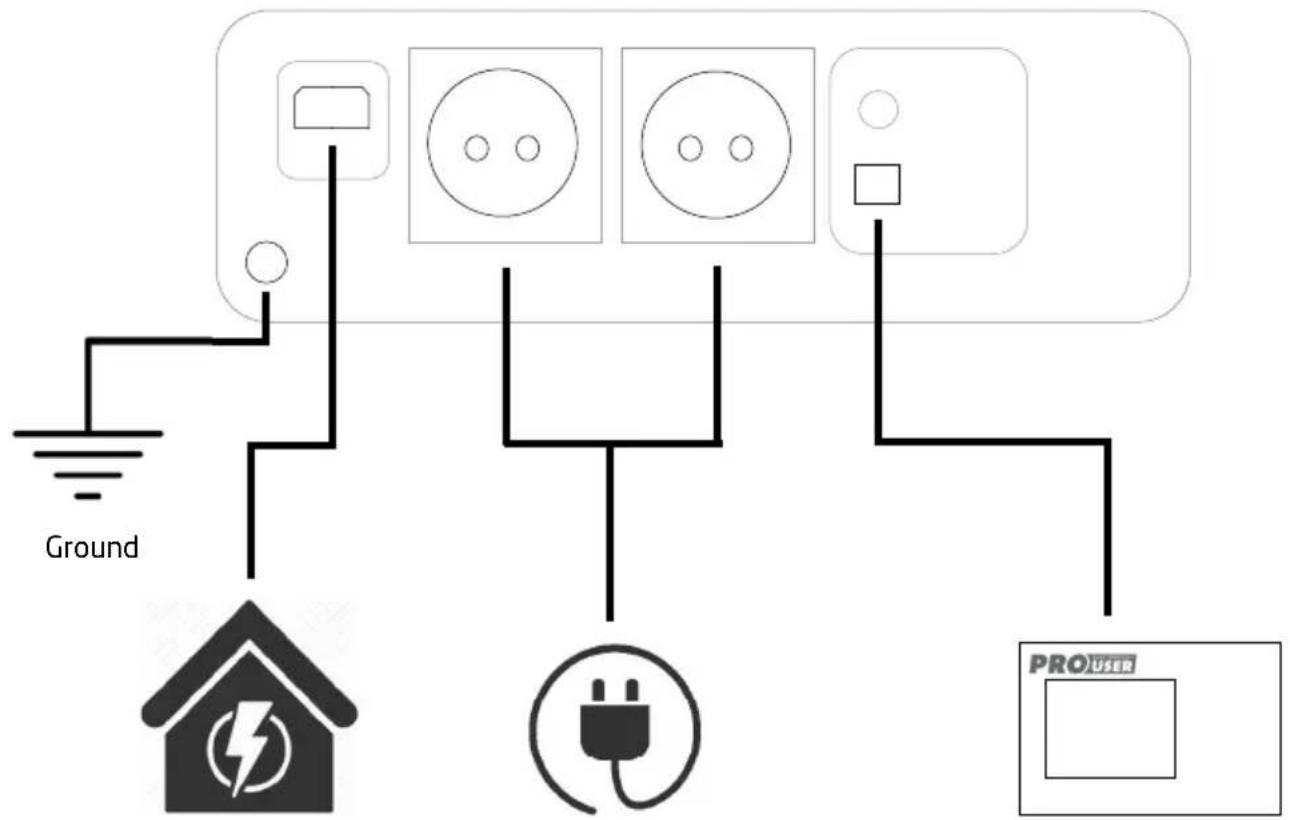
text_image
Ground PRO用户Input 230V AC
Output 230V AC
Remote control
(1000/1500/2000W)
(600/1000/1500/2000W)
WIRING SCHEME 3000W & HYBRID PSI-SERIES
text_image
Fuse (not included) 12 V - +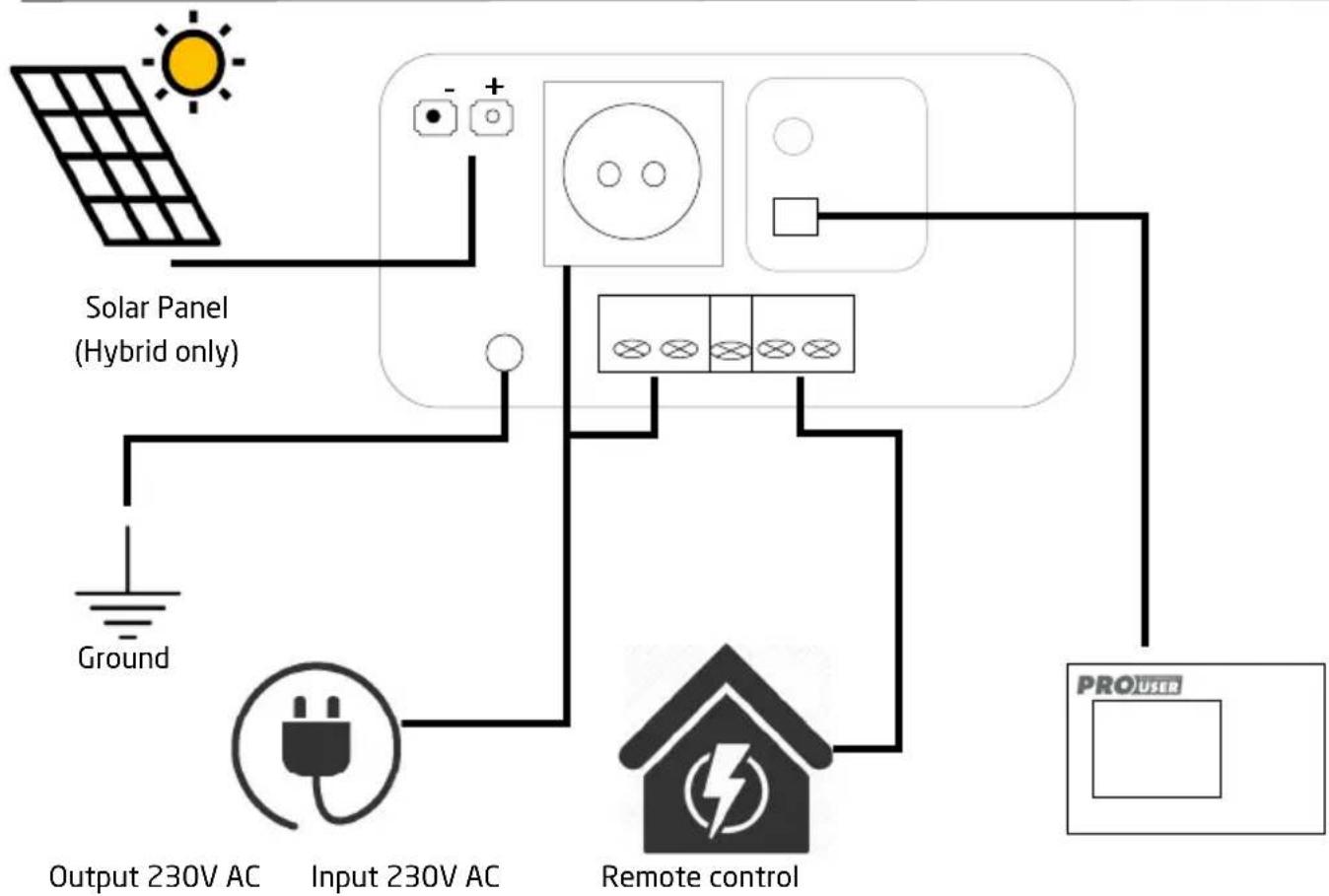
flowchart
graph TD
    A["Ground"] --> B["Solar Panel (Hybrid only)"]
    B --> C["Input 230V AC"]
    C --> D["Remote control"]
    D --> E["PROUSER"]
    style A fill:#f9f,stroke:#333
    style B fill:#ccf,stroke:#333
    style C fill:#cfc,stroke:#333
    style D fill:#fcc,stroke:#333
    style E fill:#cff,stroke:#333
SettingSepthe inverterup the inverter
To set up the inverter, use the appropriate cables to:
- connect the positive pole (usually marked with + or coloured in red) of the battery and the positive pole (coloured in red) of the inverter.
- connect the negative pole (usually marked with - or coloured in black) of the battery and the negative pole (coloured in black) of the inverter.
- Automatic Transfer Switch function (by-pass 1000/1500/2000/3000W only).
Connect the 230V AC incoming connection to the input connection using the supplied cable (not included with 3000W/Hybrid). The by-pass function will automatically take effect when a 230V AC external source is connected (UPS mode). When the external source fails, the inverter function switches on automatically.
Ensure to clamp all cables securely.Ensure to clamp all cables securely.
The Inverter is now ready to use: PhaHrtherbeis switcheadydo wasen the device. Please notice the device functions described in chapter "TECHNICAL DESCRIPTION"
NOTE: You can operate the inverter with try your bicicsteeging evening swing switched off. However, it is recommended to switch off the viautert which start tagging the biengine.
USB portUSB port
Connect the USB external appliance to the USB port and switch it on. The USB port on the power inverter provides a power supply of 5V DC for external USB devices.
Remote Port Remote Port
Connect the remote unit to the remote connection port.
Solar panel connection(MOC4 connector(s).sh) by bdrRS series is only.
Install your solar panel on the MC4 connectors. The system itself recognizes the connection and the charging function of the MPPT controller takes effect.
Battery dipswitches settings. Hybrid PSI series only. Battery dipswitches settings. Hybrid PSI series only. To optimally charge your batteries, the Hybrid inverter is equipped with dip switches. See chapter dipswitch settings for the correct settings for your battery.
TROUBLESHOOTING

WARNING! DomotopperpodiessaserbilthlevevertArtAmbipingitingservevibe the unit yourself may cause the risks faletricalshock fireiPleafofollow the safety instructions w/banworkikinggrothedevice.
If the device doesn't work at all, an internal fuse might be blown. This happens always for a reason. Maybe there has been a short circuit, when connecting the inverter in wrong polarity. Don't try to replace internal fuses yourself. The inverter has to be checked by the manufacturer or by an authorized service.
TROUBLESHOOTING
| Symptom Possible Cause Solutions | ||
| The main Switch is ON, but there is no 230V AC output or any LED indicator lights on. | There is no voltage at the DC input. | Check that the battery fuse is not blown and intact.Check that all the DC input connections are tight.Check the continuity of the DC input circuit.If using a lithium battery, check to see if it as gone into protection/safe mode, if so, please follow your battery manufacturer's instructions on how to reset the battery. |
| The polarity of the DC input has been reversed and blown the internal fuses.(NOTE: This may have caused permanent damage to the inverter, and void all warranty). | The inverter will need to be returned to Pro-User Electronics for further assessment. | |
| The inverter beeps once, Power LED indicator is green. But the connected AC appliance does not turn on. | Loose AC output connections.Short circuit of AC output wiring.The AC appliance is faulty.The AC appliance is switched off. | Double check that all AC output connections are tight and not loose (Consult a licensed electrician).Check for short circuits with your AC wiring.Test the AC appliance on a 230V AC socket.If there is still no output, contact Pro-User Electronics. |
TROUBLESHOOTING
| Symptom Possible Cause Solutions | ||
| The inverter beeps twice. Low DC input voltage warning. The voltage at the DC input is below 10.5 ± 0.5V DC. | Check that the battery is not flat and fully charged, recharge if low.Check that the battery cables are thick enough to carry the required current over the required length. Use thicker cable if required.Check for any loose connections on the DC input circuit. | |
| The inverter beeps three times, the red fault indicator LED illuminates and there is no AC output. | Low DC input voltage protected warning. The voltage at the DC input is below 10 ± 0.5 V DC. | Check that the battery is not flat and fully charged, recharge if low.Check that the battery cables are thick enough to carry the required current over the required length. Use thicker cable if required.Check for any loose connections on the DC input circuit. |
| The inverter beeps four times, the red fault indicator LED illuminates and there is no AC output. | Overvoltage detected on the DC input. When the voltage at the DC input is higher than 16 ± 0.5V DC the AC output will shut down. | Check that the voltage at the DC input terminals do not exceed 16.0V DC if so, attempt to lower the voltage of the battery and check battery charging voltages.Ensure that maximum charging voltage of any chargers (e.g. solar controller) connected to the battery are set below 16.0V DC. |
TROUBLESHOOTING
| Symptom Possible Cause Solutions | ||
| The inverter beeps five times, the red fault indicator LED Illuminates and there is no AC output. | The inverter is overheating. When the internal temperature exceeds 75°C the AC output will shut down. | Reset the inverter by turning it off and on again and check to see if the cooling fans are working (fans automatically turn on when the inverter is at 20% load or internal temperatures are at 45°C). If the cooling fans are not functioning, the inverter will need further assessment, please contact Pro-User Electronics.If the fans are functioning, check that all ventilation slots and fan openings are not obstructed. Also ensure that cool air is being circulated to the inverter and make sure ambient temperatures do not exceed 45°C. |
| The inverter beeps eleven times, the red fault indicator LED illuminates and the inverter shuts down. | The inverter has detected a short circuit at the AC output. | Please check that the connected device is not faulty and check if there are no short circuits in the AC circuit. |
| The inverter is beeping Continuously, the red fault indicator LED Illuminates and there is no AC output. | The inverter has shut down due to overload. Connected load has exceeded the surge rating of the inverter. | Disconnect the connected load.Reduce the connected load. |
TECHNICAL SPECIFICATIONS
Model PSI300 PSI400 PSI600 PSI1000TX
| Battery Voltage 10.5V - 16V 10.5V - 16V | 10.5V - 16V 10.5V - 16V | |||
| Standby Current <0.25A <0.35A <0.46A | <0.56A | - | - | |
| Recommended Battery Capacity | SLA/Gel/AGM: ≥40Ah | SLA/Gel/AGM: ≥50Ah | SLA/Gel/AGM: ≥100Ah | SLA/Gel/AGM: ≥160Ah |
| AC Output Voltage 230V 230V 230V 230V | ||||
| Frequency 50Hz | 50Hz | 50Hz | 50Hz | |
| Transferswitch | No | No | No | Yes |
| Rated Output Power | 300W | 400W | 600W | 1000W |
| Surge Power | 450W (10s) | 600W (10s) | 900W (10s) | 1500W (10s) |
| Peak Power | 600W (2s) | 800W (2s) | 1200W (2s) | 2000W (2s) |
| Efficiency | ≥90% | ≥90% | ≥90% | ≥90% |
| USB Output | 5V / 2.1A | 5V / 2.1A | 5V / 2.1A | 5V / 2.1A |
| Dimensions LxWxH | 165x150x75mm (housing)215x150x75mm (incl. terminals) | 185x150x75mm (housing)235x150x75mm (incl. terminals) | 215x150x75mm (housing)265x150x75mm (incl. terminals) | 355x150x75mm (housing)405x150x75mm (incl. terminals) |
| Weight | 1.4kg 1.6kg | 1.9kg | 2.8kg | |
| Operating | -15°C - 40°C -15°C - 40°C - 40°C - 40°C - 40°C - 40°C - 40°C - 40°C - 40°C - 40°C - 40°C - 40°C - 40°C - 40°C - 40°C - 40°C - 40°C - 40°C - 40°C - 40°C - 40°C - 45°C - 45°C - 45°C - 45°C - 45°C - 45°C - 45°C - 45°C - 45°C - 45°C - 45°C - 45°C - 45°C - 45°C - 45°C - 45°C - 45°C - 45°C - 45°C - 45°C - 40°C - 40°C - 40°C - 40°C - 40°C - 40°C - 40°C - 40°C - 40°C - 40°C - 40°C - 40°C - 40°C - 40°C - 40°C - 40°C - 40°C - 40°C - 40°C - 35°C - 35°C - 35°C - 35°C - 35°C - 35°C - 35°C - 35°C - 35°C - 35°C - 35°C - 35°C - 35°C - 35°C - 35°C - 35°C - 35°C - 35°C - 35°C - 35°C - 30°C - 30°C - 30°C - 30°C - 30°C - 30°C - 30°C - 30°C - 30°C - 30°C - 30°C - 30°C - 30°C - 30°C - 30°C - 30°C - 30°C - 30°C - 30°C - 30°C - 35°C - 35°C - 35°C - 35°C - 35°C - 35°C - 35°C - 35°C - 35°C - 35°C - 35°C - 35°C - 35°C - 35°C - 35°C - 35°C - 35°C - 35°C - 35°C - 40°C - 40°C - 40°C - 40°C - 40°C - 40°C - 40°C - 40°C - 40°C - 40°C - 40°C - 40°C - 40°C - 40°C - 40°C - 40°C - 40°C - 40°C - 40°C - 20°C - 20°C - 20°C - 20°C - 20°C - 20°C - 20°C - 20°C - 20°C - 20°C - 20°C - 20°C - 20°C - 20°C - 20°C - 20°C - 20°C - 20°C - 20°C - 20°C - 15°C - 15°C - 15°C - 15°C - 15°C - 15°C - 15°C - 15°C - 15°C - 15°C - 15°C - 15°C - 15°C - 15°C - 15°C - 15°C - 15°C - 15°C - 15°C - 15°C - 10°C - 10°C - 10°C - 10°C - 10°C - 10°C - 10°C - 10°C - 10°C - 10°C - 10°C - 10°C - 10°C - 10°C - 10°C - 10°C - 10°C - 10°C - 10°C - 10°C - 15°C - 15°C - 15°C - 15°C - 15°C - 15°C - 15°C - 15°C - 15°C - 15°C - 15°C - 15°C - 15°C - 15°C - 15°C - 15°C - 15°C - 15°C - 15°C - 20°C - 20°C - 20°C - 20°C - 20°C - 20°C - 20°C - 20°C - 20°C - 20°C - 20°C - 20°C - 20°C - 20°C - 20°C - 20°C - 20°C - 20°C - 20°C - 25°C - 25°C - 25°C - 25°C - 25°C - 25°C - 25°C - 25°C - 25°C - 25°C - 25°C - 25°C - 25°C - 25°C - 25°C - 25°C - 25°C - 25°C - 25°C - 25°C - 20°C - 20°C - 20°C - 20°C - 20°C - 20°C - 20°C - 20°C - 20°C - 20°C - 20°C - 20°C - 20°C - 20°C - 20°C - 20°C - 20°C - 20°C - 20°C - 10°C - 10°C - 10°C - 10°C - 10°C - 10°C - 10°C - 10°C - 10°C - 10°C - 10°C - 10°C - 10°C - 10°C - 10°C - 10°C - 10°C - 10°C - 10°C - 20°C - 20°C - 20°C - 20°C - 20°C - 20°C - 20°C - 20°C - 20°C - 20°C - 20°C - 20°C - 20°C - 20°C - 20°C - 20°C - 20°C - 20°C - 20°C - 30°C - 30°C - 30°C - 30°C - 30°C - 30°C - 30°C - 30°C - 30°C - 30°C - 30°C - 30°C - 30°C - 30°C - 30°C - 30°C - 30°C - 30°C - 30°C - 25°C - 25°C - 25°C - 25°C - 25°C - 25°C - 25°C - 25°C - 25°C - 25°C - 25°C - 25°C - 25°C - 25°C - 25°C - 25°C - 25°C - 25°C - 25°C - 15°C - 15°C - 15°C - 15°C - 15°C - 15°C - 15°C - 15°C - 15°C - 15°C - 15°C - 15°C - 15°C - 15°C - 15°C - 15°C - 15°C - 15°C - 15°C - 25°C - 25°C - 25°C - 25°C - 25°C - 25°C - 25°C - 25°C - 25°C - 25°C - 25°C - 25°C - 25°C - 25°C - 25°C - 25°C - 25°C - 25°C - 25°C - 30°C - 30°C - 30°C - 30°C - 30°C - 30°C - 30°C - 30°C - 30°C - 30°C - 30°C - 30°C - 30°C - 30°C - 30°C - 30°C - 30°C - 30°C - 30°C - 20°C - 20°C - 20°C - 20°C - 20°C - 20°C - 20°C - 20°C - 20°C - 20°C - 20°C - 20°C - 20°C - 20°C - 20°C - 20°C - 20°C - 20°C - 20°C - 40°C - 40°C - 40°C - 40°C - 40°C - 40°C - 40°C - 40°C - 40°C - 40°C - 40°C - 40°C - 40°C - 40°C - 40°C - 40°C - 40°C - 40°C - 40°C - 25°C - 25°C - 25°C - 25°C - 25°C - 25°C - 25°C - 25°C - 25°C - 25°C - 25°C - 25°C - 25°C - 25°C - 25°C - 25°C - 25°C - 25°C - 25°C - 35°C - 35°C - 35°C - 35°C - 35°C - 35°C - 35°C - 35°C - 35°C - 35°C - 35°C - 35°C - 35°C - 35°C - 35°C - 35°C - 35°C - 35°C - 35°C - 25°C - 25°C - 25°C - 25°C - 25°C - 25°C - 25°C - 25°C - 25°C - 25°C - 25°C - 25°C - 25°C - 25°C - 25°C - 25°C - 25°C - 25°C - 25°C - 10°C - 10°C - 10°C - 10°C - 10°C - 10°C - 10°C - 10°C - 10°C - 10°C - 10°C - 10°C - 10°C - 10°C - 10°C - 10°C - 10°C - 10°C - 10°C - 25°C - 25°C - 25°C - 25°C - 25°C - 25°C - 25°C - 25°C - 25°C - 25°C - 25°C - 25°C - 25°C - 25°C - 25°C - 25°C - 25°C - 25°C - 25°C - 40°C - 40°C - 40°C - 40°C - 40°C - 40°C - 40°C - 40°C - 40°C - 40°C - 40°C - 40°C - 40°C - 40°C - 40°C - 40°C - 40°C - 40°C - 40°C - 15°C - 15°C - 15°C - 15°C - 15°C - 15°C - 15°C - 15°C - 15°C - 15°C - 15°C - 15°C - 15°C - 15°C - 15°C - 15°C - 15°C - 15°C - 15°C - 35°C - 35°C - 35°C - 35°C - 35°C - 35°C - 35°C - 35°C - 35°C - 35°C - 35°C - 35°C - 35°C - 35°C - 35°C - 35°C - 35°C - 35°C - 35°C - 15°C - 15°C - 15°C - 15°C - 15°C - 15°C - 15°C - 15°C - 15°C - 15°C - 15°C - 15°C - 15°C - 15°C - 15°C - 15°C - 15°C - 15°C - 15°C - 30°C - 30°C - 30°C - 30°C - 30°C - 30°C - 30°C - 30°C - 30°C - 30°C - 30°C - 30°C - 30°C - 30°C - 30°C - 30°C - 30°C - 30°C - 30°C - 40°C - 40°C - 40°C - 40°C - 40°C - 40°C - 40°C - 40°C - 40°C - 40°C - 40°C - 40°C - 40°C - 40°C - 40°C - 40°C - 40°C - 40°C - 40°C - 30°C - 30°C - 30°C - 30°C - 30°C - 30°C - 30°C - 30°C - 30°C - 30°C - 30°C - 30°C - 30°C - 30°C - 30°C - 30°C - 30°C - 30°C - 30°C - 15°C - 15°C - 15°C - 15°C - 15°C - 15°C - 15°C - 15°C - 15°C - 15°C - 15°C - 15°C - 15°C - 15°C - 15°C - 15°C - 15°C - 15°C - 15°C - 40°C - 40°C - 40°C - 40°C - 40°C - 40°C - 40°C - 40°C - 40°C - 40°C - 40°C - 40°C - 40°C - 40°C - 40°C - 40°C - 40°C - 40°C - 40°C - | |||
TECHNICAL SPECIFICATIONS
| Model PSI1500TX PSI2000TX PSI3000TX PSI3000TX Hybrid | ||||
| Battery Voltage 10.5V | -16V 10.5V - 16V | 10.5V - 16V | 10.5V - 16V | |
| Standby Current <0.65A | <0.7A <1.2A | 1.2A _ | _ | _ |
| Recommended Battery Capacity | SLA/Gel/AGM: ≥250Ah | SLA/Gel/AGM: ≥320Ah | SLA/Gel/AGM: ≥480Ah | SLA/Gel/AGM: ≥480Ah |
| AC Output Voltage 230V | 230V | 230V | 230V | |
| Frequency | 50Hz | 50Hz | 50Hz | 50Hz |
| Transferswitch (by-pass) | Yes | Yes | Yes | Yes |
| Rated Output Power 1500W | 2000W | 3000W 3000W | ||
| Surge Power | 2250W (10s) | 3000W (10s) | 4500W (10s) | 4500W (10s) |
| Peak Power | 3000W (2s) | 4000W (2s) | 6000W (2s) | 6000W (2s) |
| Efficiency | ≥90% | ≥90% | ≥90% | ≥90% |
| USB Output | 5V / 2.1A | 5V / 2.1A | 5V / 2.1A | 5V / 2.1A |
| Dimensions LxWxH | 320x220x90mm (housing)380x220x85mm (incl. terminals) | 385x220x85mm (housing)440x220x85mm (incl. terminals) | 415x220x150mm (housing)510x220x150mm (incl. terminals) | 415x220x150mm (housing)515x220x150mm (incl. terminals) |
| Weight | 4.1kg 5.0kg | 7.6kg | 8.6kg | |
| Operating Temperature | -15°C - 40°C -15°C - 40°C - 40°C - 40°C - 40°C - 40°C - 40°C - 40°C - 40°C - 40°C - 40°C - 40°C - 40°C - 40°C - 40°C - 40°C - 40°C - 40°C - 40°C - 40°C - 40°C - 45°C - 45°C - 45°C - 45°C - 45°C - 45°C - 45°C - 45°C - 45°C - 45°C - 45°C - 45°C - 45°C - 45°C - 45°C - 45°C - 45°C - 45°C - 45°C - 45°C - 40°C - 40°C - 40°C - 40°C - 40°C - 40°C - 40°C - 40°C - 40°C - 40°C - 40°C - 40°C - 40°C - 40°C - 40°C - 40°C - 40°C - 40°C - 40°C - 35°C - 35°C - 35°C - 35°C - 35°C - 35°C - 35°C - 35°C - 35°C - 35°C - 35°C - 35°C - 35°C - 35°C - 35°C - 35°C - 35°C - 35°C - 35°C - 35°C - 30°C - 30°C - 30°C - 30°C - 30°C - 30°C - 30°C - 30°C - 30°C - 30°C - 30°C - 30°C - 30°C - 30°C - 30°C - 30°C - 30°C - 30°C - 30°C - 30°C - 35°C - 35°C - 35°C - 35°C - 35°C - 35°C - 35°C - 35°C - 35°C - 35°C - 35°C - 35°C - 35°C - 35°C - 35°C - 35°C - 35°C - 35°C - 35°C - 40°C - 40°C - 40°C - 40°C - 40°C - 40°C - 40°C - 40°C - 40°C - 40°C - 40°C - 40°C - 40°C - 40°C - 40°C - 40°C - 40°C - 40°C - 40°C - 50°C - 50°C - 50°C - 50°C - 50°C - 50°C - 50°C - 50°C - 50°C - 50°C - 50°C - 50°C - 50°C - 50°C - 50°C - 50°C - 50°C - 50°C - 50°C - 50°C - 40°C - 40°C - 40°C - 40°C - 40°C - 40°C - 40°C - 40°C - 40°C - 40°C - 40°C - 40°C - 40°C - 40°C - 40°C - 40°C - 40°C - 40°C - 40°C - 30°C - 30°C - 30°C - 30°C - 30°C - 30°C - 30°C - 30°C - 30°C - 30°C - 30°C - 30°C - 30°C - 30°C - 30°C - 30°C - 30°C - 30°C - 30°C - 25°C - 25°C - 25°C - 25°C - 25°C - 25°C - 25°C - 25°C - 25°C - 25°C - 25°C - 25°C - 25°C - 25°C - 25°C - 25°C - 25°C - 25°C - 25°C - 25°C - 20°C - 20°C - 20°C - 20°C - 20°C - 20°C - 20°C - 20°C - 20°C - 20°C - 20°C - 20°C - 20°C - 20°C - 20°C - 20°C - 20°C - 20°C - 20°C - 20°C - 25°C - 25°C - 25°C - 25°C - 25°C - 25°C - 25°C - 25°C - 25°C - 25°C - 25°C - 25°C - 25°C - 25°C - 25°C - 25°C - 25°C - 25°C - 25°C - 30°C - 30°C - 30°C - 30°C - 30°C - 30°C - 30°C - 30°C - 30°C - 30°C - 30°C - 30°C - 30°C - 30°C - 30°C - 30°C - 30°C - 30°C - 30°C - 20°C - 20°C - 20°C - 20°C - 20°C - 20°C - 20°C - 20°C - 20°C - 20°C - 20°C - 20°C - 20°C - 20°C - 20°C - 20°C - 20°C - 20°C - 20°C - 15°C - 15°C - 15°C - 15°C - 15°C - 15°C - 15°C - 15°C - 15°C - 15°C - 15°C - 15°C - 15°C - 15°C - 15°C - 15°C - 15°C - 15°C - 15°C - 15°C - 10°C - 10°C - 10°C - 10°C - 10°C - 10°C - 10°C - 10°C - 10°C - 10°C - 10°C - 10°C - 10°C - 10°C - 10°C - 10°C - 10°C - 10°C - 10°C - 10°C - 15°C - 15°C - 15°C - 15°C - 15°C - 15°C - 15°C - 15°C - 15°C - 15°C - 15°C - 15°C - 15°C - 15°C - 15°C - 15°C - 15°C - 15°C - 15°C - 20°C - 20°C - 20°C - 20°C - 20°C - 20°C - 20°C - 20°C - 20°C - 20°C - 20°C - 20°C - 20°C - 20°C - 20°C - 20°C - 20°C - 20°C - 20°C - 10°C - 10°C - 10°C - 10°C - 10°C - 10°C - 10°C - 10°C - 10°C - 10°C - 10°C - 10°C - 10°C - 10°C - 10°C - 10°C - 10°C - 10°C - 10°C - 25°C - 25°C - 25°C - 25°C - 25°C - 25°C - 25°C - 25°C - 25°C - 25°C - 25°C - 25°C - 25°C - 25°C - 25°C - 25°C - 25°C - 25°C - 25°C - 15°C - 15°C - 15°C - 15°C - 15°C - 15°C - 15°C - 15°C - 15°C - 15°C - 15°C - 15°C - 15°C - 15°C - 15°C - 15°C - 15°C - 15°C - 15°C - 25°C - 25°C - 25°C - 25°C - 25°C - 25°C - 25°C - 25°C - 25°C - 25°C - 25°C - 25°C - 25°C - 25°C - 25°C - 25°C - 25°C - 25°C - 25°C - 35°C - 35°C - 35°C - 35°C - 35°C - 35°C - 35°C - 35°C - 35°C - 35°C - 35°C - 35°C - 35°C - 35°C - 35°C - 35°C - 35°C - 35°C - 35°C - 25°C - 25°C - 25°C - 25°C - 25°C - 25°C - 25°C - 25°C - 25°C - 25°C - 25°C - 25°C - 25°C - 25°C - 25°C - 25°C - 25°C - 25°C - 25°C - 10°C - 10°C - 10°C - 10°C - 10°C - 10°C - 10°C - 10°C - 10°C - 10°C - 10°C - 10°C - 10°C - 10°C - 10°C - 10°C - 10°C - 10°C - 10°C - 20°C - 20°C - 20°C - 20°C - 20°C - 20°C - 20°C - 20°C - 20°C - 20°C - 20°C - 20°C - 20°C - 20°C - 20°C - 20°C - 20°C - 20°C - 20°C - 30°C - 30°C - 30°C - 30°C - 30°C - 30°C - 30°C - 30°C - 30°C - 30°C - 30°C - 30°C - 30°C - 30°C - 30°C - 30°C - 30°C - 30°C - 30°C - 40°C - 40°C - 40°C - 40°C - 40°C - 40°C - 40°C - 40°C - 40°C - 40°C - 40°C - 40°C - 40°C - 40°C - 40°C - 40°C - 40°C - 40°C - 40°C - 25°C - 25°C - 25°C - 25°C - 25°C - 25°C - 25°C - 25°C - 25°C - 25°C - 25°C - 25°C - 25°C - 25°C - 25°C - 25°C - 25°C - 25°C - 25°C - 40°C - 40°C - 40°C - 40°C - 40°C - 40°C - 40°C - 40°C - 40°C - 40°C - 40°C - 40°C - 40°C - 40°C - 40°C - 40°C - 40°C - 40°C - 40°C - 20°C - 20°C - 20°C - 20°C - 20°C - 20°C - 20°C - 20°C - 20°C - 20°C - 20°C - 20°C - 20°C - 20°C - 20°C - 20°C - 20°C - 20°C - 20°C - 40°C - 40°C - 40°C - 40°C - 40°C - 40°C - 40°C - 40°C - 40°C - 40°C - 40°C - 40°C - 40°C - 40°C - 40°C - 40°C - 40°C - 40°C - 40°C - 15°C - 15°C - 15°C - 15°C - 15°C - 15°C - 15°C - 15°C - 15°C - 15°C - 15°C - 15°C - 15°C - 15°C - 15°C - 15°C - 15°C - 15°C - 15°C - 35°C - 35°C - 35°C - 35°C - 35°C - 35°C - 35°C - 35°C - 35°C - 35°C - 35°C - 35°C - 35°C - 35°C - 35°C - 35°C - 35°C - 35°C - 35°C - 15°C - 15°C - 15°C - 15°C - 15°C - 15°C - 15°C - 15°C - 15°C - 15°C - 15°C - 15°C - 15°C - 15°C - 15°C - 15°C - 15°C - 15°C - 15°C - 30°C - 30°C - 30°C - 30°C - 30°C - 30°C - 30°C - 30°C - 30°C - 30°C - 30°C - 30°C - 30°C - 30°C - 30°C - 30°C - 30°C - 30°C - 30°C - 15°C - 15°C - 15°C - 15°C - 15°C - 15°C - 15°C - 15°C - 15°C - 15°C - 15°C - 15°C - 15°C - 15°C - 15°C - 15°C - 15°C - 15°C - 15°C - 40°C - 40°C - 40°C - 40°C - 40°C - 40°C - 40°C - 40°C - 40°C - 40°C - 40°C - 40°C - 40°C - 40°C - 40°C - 40°C - 40°C - 40°C - 40°C -15°C - 15°C - 15°C - 15°C - 15°C - 15°C - 15°C - 15°C - 15°C - 15°C - 15°C - 15°C - 15°C - 15°C - 15°C - 15°C - 15°C - 15°C - 15°C - 15°C -15°C - 15°C - 15°C - 15°C - 15°C - 15°C - 15°C - 15°C - 15°C - 15°C - 15°C - 15°C - 15°C - 15°C - 15°C -15°C - 15°C - 15°C - 15°C - 15°C - 25°C - 25°C - 25°C - 25°C - 25°C - 25°C - 25°C - 25°C - 25°C - 25°C - 25°C - 25°C - 25°C - 25°C - 25°C -25°C -25°C -25°C -25°C -25°C -25°C -25°C -25°C -25°C -25°C -25°C -25°C -25°C -25°C -25°C -25°C -25°C -25°C -25°C -25°C -25°C -25°C -25°C -25°C -25°C-25°C-25°C-25°C-25°C-25°C-25°C-25°C-25°C-25°C-25°C-25°C-25°C-25°C-25°C-25°C-25°C-25°C-25°C-25°C-25°C-25°C-25°C-25°C-25% | |||
MAINTENANCE
Make sure that the inverter is turned off while performing any maintenance. To keep your inverter operating properly, there is very little maintenance required. You should clean the exterior periodically with a dry cloth to prevent the build-up of dust and dirt. Also check and tighten the fasteners on the DC input terminals.
Warranty
Pro-User Electronics warrants this product for a period of 2 years from the date of purchase to the original purchaser. Warranty is not transferable. Warranty covers defect against workmanship and materials only. To obtain warranty service, please return the unit to the place of purchase or authorized Pro-User Electronics dealer together with your proof of purchase. The warranty is void if the product has been damaged or not used as described in this manual. Warranty is void if a non-authorized repair has been performed. Pro-User Electronics makes no other warranty expressed or implied. Pro-User Electronics is only responsible for repair or replacement of the defective product and is not responsible for any consequential damage or inconvenience caused by the defect.
Contact information:
Tradekar Benelux BV
Ohmweg 1
4104 BM Culemborg
The Netherlands
+31(0)345470990
Info@tradekar.com
Pro-User Electronics is part of Tradekar House of Leisure Brands
WWW.PROWUSER.COM

text_image
A AC OUT AC OUT B C ECO UPS F D Inverter H Fault E I J AC-In K REMOTE DC5V/2.1A BY-Passtext_image
Solar Solar A D B C E ECO UPS F Inverter Solar H I J K L M N O G Fault Charge AC-In REMOTE DC5V/2.1A BY-Passtext_image
A AC OUT AC OUT B C ECO UPS F D Inverter H Fault E I J AC-In K REMOTE DC5V/2.1A BY-Passtext_image
Solar Solar A L A N G L A N AC O U t p u t A C I n P u t B C D E E C O E C O U P S H I J K L M N O F Inverter Solar Fault Charge G AC-In REMOTE DC5V/2.1A BY-PassDISPLAY AFSTANDSBEDIENING TRANSFERSWITCH MODE (1000/1500/2000/3000W)
ECO/UPS FUNCTIE (1000/1500/2000/3000W)
Pro-User Electronics is onderdeel van Tradekar House of Leisure Brands.
WWW.PROWUSER.COMUSER.COM

Description technique P.67
Télécommande P.70
text_image
A AC OUT AC OUT B C ECO UPS F D Inverter H Fault E I J AC-In K REMOTE DC5V/2.1A BY-Passtext_image
Solar Solar A D L N G L N AC Output AC Input B C E ECO UPS F Inverter Solar Fault Charge G AC-In H I J K L M N O REMOTE DC5V/2.1A BY-Passtext_image
Fusible (non inclus) 12 V - +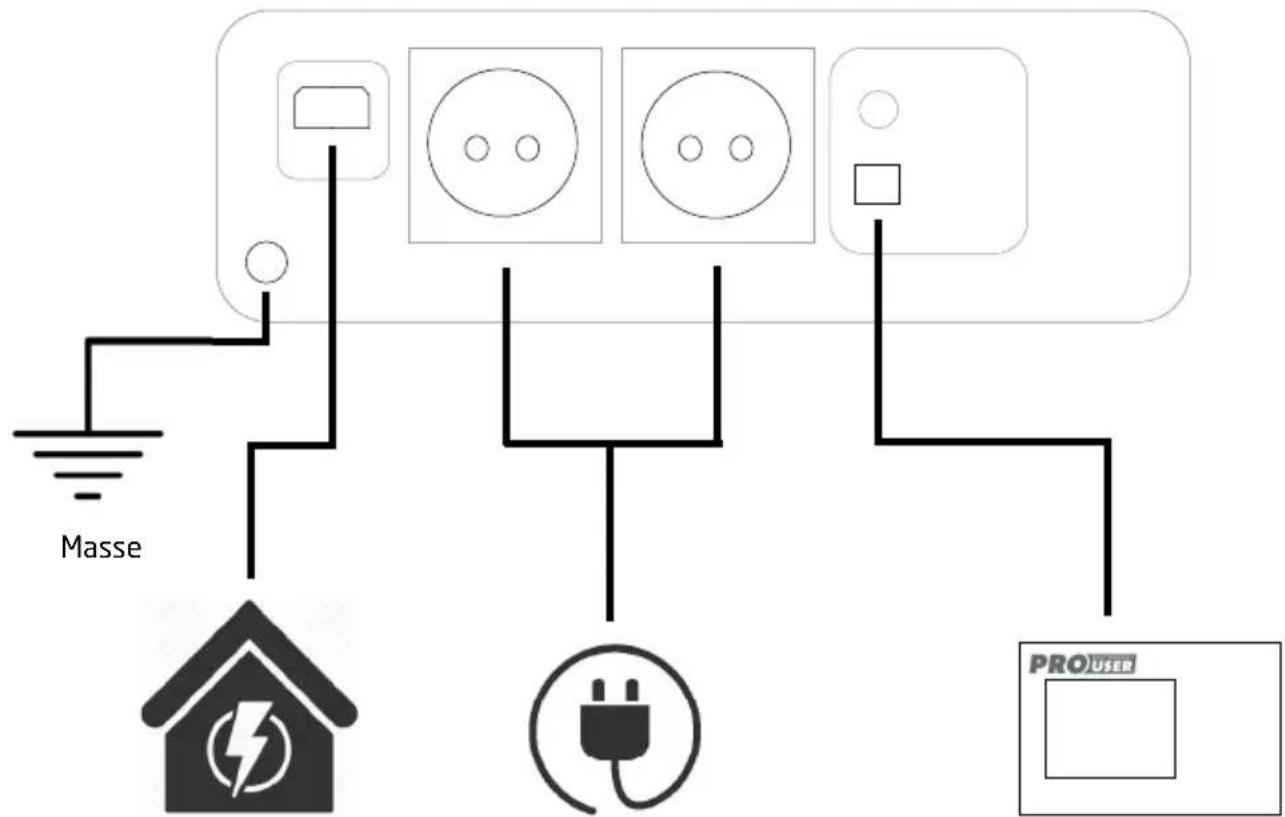
text_image
Masse PROUTREntrée 230V AC
Sortie 230V AC
Télécommande
(1000/1500/2000W)
(600/1000/1500/2000W)
SCHÉMA DE CÂBLAGE 3000W & HYBRID SÉRIE PSI
text_image
Fusible (non inclus) 12 V - +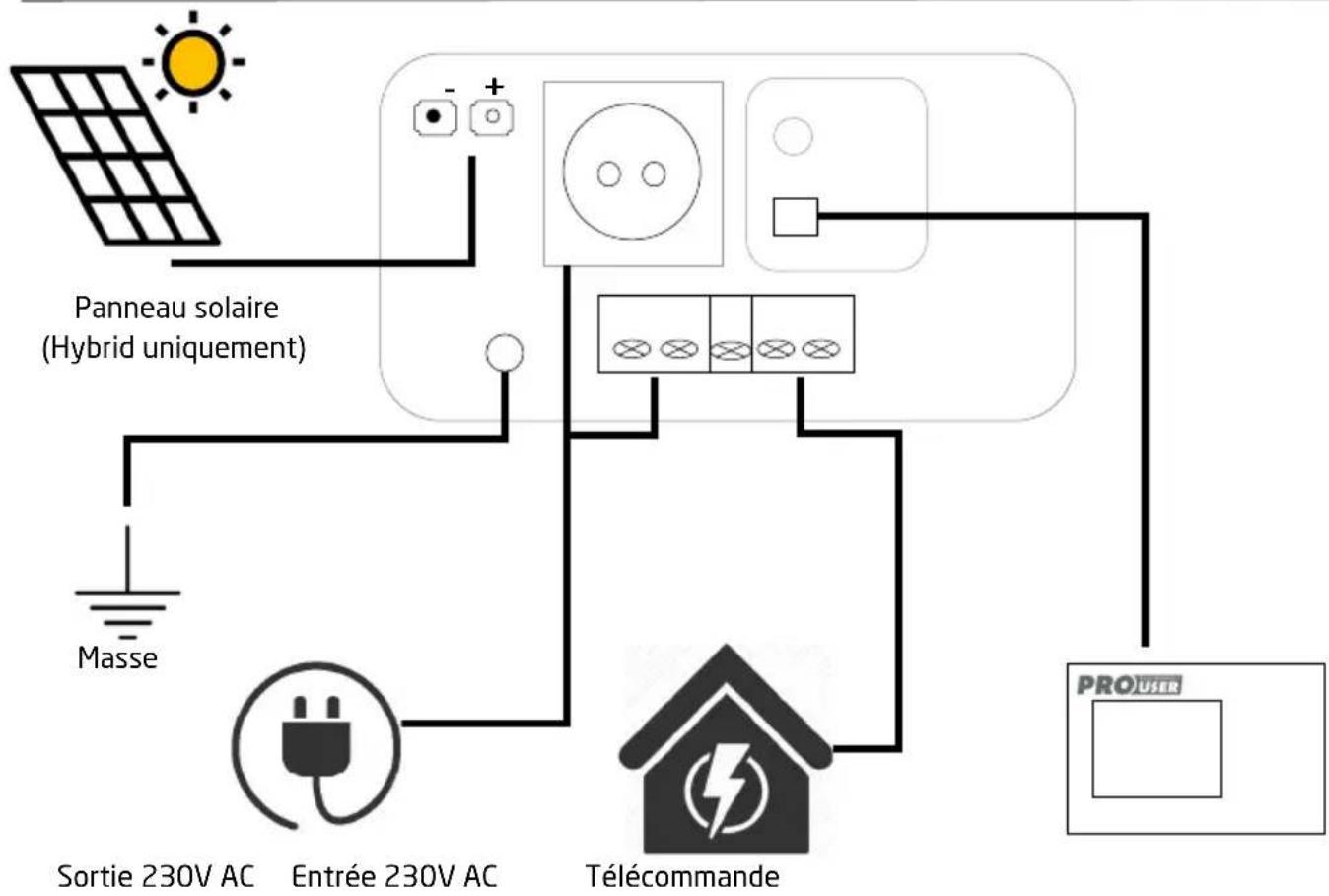
flowchart
graph TD
    A["Sun"] --> B["Panneau solaire (Hybrid uniquement)"]
    B --> C["Masse"]
    C --> D["Sortie 230V AC"]
    B --> E["Entrée 230V AC"]
    E --> F["Télécommande"]
    F --> G["PROUSER"]
    style A fill:#f9f,stroke:#333
    style B fill:#ccf,stroke:#333
    style C fill:#cfc,stroke:#333
    style D fill:#fcc,stroke:#333
    style E fill:#cff,stroke:#333
    style F fill:#ffc,stroke:#333
    style G fill:#fff,stroke:#333