
10057 - Electrical Transformer AEG - Free user manual and instructions
Find the device manual for free 10057 AEG in PDF.
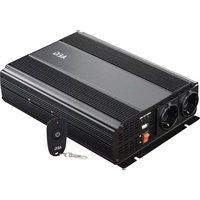


| Product type | Electrical transformer / Voltage converter |
| Brand | AEG |
| Model | 10057 |
| Input power supply | 12 V DC |
| Output voltage 230 V | 230 V AC / 50 Hz |
| USB output | 5 V DC / 2.1 A |
| Continuous power | 1000 W |
| Peak power | 2000 W (0.1 sec) |
| Waveform | Modified sine wave |
| Dimensions (L x W x H) | 320 x 200 x 70 mm |
| Weight | 2.25 kg |
| Input voltage range | 11 - 15 V DC |
| Overvoltage protection | Shutdown at 15.5 V ±0.5 V |
| Undervoltage protection | Shutdown at 10.0 V ±0.5 V |
| Overheating protection | Shutdown at <68°C, restart at <35°C |
| Short-circuit protection | Automatic shutdown |
| Overload protection | Automatic shutdown (1100 W ±100 W) |
| Operating temperature | 0°C to 30°C |
| Remote control frequency | 433.92 MHz |
| Package contents | Transformer, remote control module, 2 cables with eyelets/clamps, user manual |
| Intended use | Conversion of 12 V DC to 230 V AC for external devices, fixed installation in vehicles, caravans, boats |
| Maintenance | Clean with a damp cloth, do not use abrasives, store in a dry place |
| Safety | Integrated protections: overvoltage, undervoltage, short-circuit, overload, overheating |
| Fuses | 4 x 40 A (integrated) |
Frequently Asked Questions - 10057 AEG
User questions about 10057 AEG
0 question about this device. Answer the ones you know or ask your own.
Ask a new question about this device
Download the instructions for your Electrical Transformer in PDF format for free! Find your manual 10057 - AEG and take your electronic device back in hand. On this page are published all the documents necessary for the use of your device. 10057 by AEG.
USER MANUAL 10057 AEG
Read these instructions before using the charger. Follow all instructions and recommendations.
Connectable power sources....20
Connectable devices 20
Intended installation locations....20
Safety 20
Technical features....22
Product Overview....23
Technology....24
Installation & connection 24
Preparation....24
Voltage converter installation....24
Connection to the power source 24
To a car battery....25
Use 25
Troubleshooting 26
Cleaning, care and maintenance....27
Service 27
Disposal....27
Declaration of Conformity: 27
INTRODUCTION
Explanation of symbols and signal words used in these operating instructions and/or the device:

Follow instructions when using the machine.

Risk of bodily or fatal injury to children!

Follow warnings and safety instructions!

Only use device in locations protected from weather!

Consider the environment when disposing of the packaging!

This equipment complies with EU directives.

Danger!
Immediate danger to life or severe injuries

Warning!
Serious injuries, potentially life-threatening

Caution!
Light to moderate injuries
Attention!
Risk of property damage.
Note:
This operating manual also refers to the voltage converter as device.
This operating manual applies to the following products:
Voltage converter 1000 W
Voltage converter 1500 W
Normal use
The power inverter is intended to convert 12 V direct current voltage to
• alternating current voltage 230 V/50 Hz and/or - direct current voltage of 5 V/max. 2.1 A (2.0 USB).
The voltage converter is only intended for permanent installation.
This device is not intended for use by children or persons with limited mental capacity or lacking experience and/or lacking expertise. Children should be supervised to ensure they do not play with the device.
This device is not intended for commercial use.
Any other use or modification of the device is considered improper and involves significant risks. The manufacturer assumes no liability for damages due to improper use.
Contents
Check the package contents immediately after unpacking. Check the device and all parts for damage. Do not use a defective device or parts.
● Power inverter with 12 V connector - Cordless remote control module - 2 cables with ring lugs/clamps - operating instruction
Please include all relevant documentation to other users!
The operating instructions are also available at the following Internet address:
Connectable power sources
The voltage converter is intended for connection to power sources with 12V direct current. It must have sufficient capacity for the consumers connected to the converter.
To calculate the required capacity, divide the consumer load by the voltage.
Example: Consumer load 180 W : 12 V = 15 A
Connecting to power sources with an output voltage other than 12 V direct current is prohibited and improper.
Connectable devices
| Allowed Not allowed | |
| Devices with a total rated voltage1000 W (10057)< 1000 W1500 W (10058)< 1500 W(also see “Technical Data”). | Devices with a total rated voltage1000 W (10057)> 1000 W1500 W (10058)> 1500 W(also see “Technical Data”). |
Note:
The voltage converter provides a modified sinusoidal voltage. To prevent consequential loss, please verify the device to be powered is suitable (also see "Technology").
Intended installation locations
The voltage converter is intended for installation in:
Cars and lorries Caravans Boats
Do not place the power inverter:
near heat sources (radiators, direct sunlight), flammable materials, battery compartment or starter battery in damp locations or locations exposed to dripping or splashing water in explosive environments
SAFETY
General Safety Guidelines
Read all safety notes and instructions. Failure to observe the safety notes and instructions may result in electric shock, fire and/or serious injuries.
Please keep all safety notes and instructions for future reference.

Warning!
Risk of bodily or fatal injury to children! Risk of suffocation or strangulation! Keep the machine out of the reach of children. Children are unable to assess the risks associated with use of this product!

Danger!
Damaged leads may cause fatal electric shock. Discontinue use if leads are damaged.
The manufacturer is not responsible for damages caused by:
Improper connection and/or operation. External forces, damage to the device and/or damage to parts of the device due to mechanical impacts or overload. Any type of modifications to the device. Using the device for purposes not described in this operating manual.
Subsequent damages from improper and/or incorrect use and/or defective batteries.
Moisture and/or inadequate ventilation.
Unauthorized opening of the device.
Risk of fire and electric shock!
Failure to follow all instructions listed below may result in electric shock, fire, serious injury and damage to property.
Never use the cable to carry or pull the device.
Only unplug the cable from the outlet by the plug. The cable could be damaged.
If cables are to be routed through sharp-edged walls, e.g. metal walls, use empty tubes or cable ducts to avoid damaging the cables.
Do not route 230 V main cables and 12 V/24 DC cables in the same empty tube (cable duct).
Do not use the device if damaged. Damage to the device or the charging cable increases the risk of electrical shock.
Route the electrical cable so that it is not possible to trip over them and to prevent them being damaged.
Maintenance work must be done by qualified electricians.
Avoid pouring or dripping water or other liquids over it. If water penetrates electrical devices, the risk of electric shock increases.
Ensure that all plugs and cables are free of moisture. Never connect the device to the mains with wet or moist hands.
Only connect 230 V devices with permitted power plugs.
Never create a short circuit or bridge on the inputs and outputs of the power inverter using foreign objects.
Do not attempt to disassemble or repair the device. Immediately have the device repaired or replaced by a specialty shop if defective.
Do not cover the device as it may be damaged from extreme heating.
Immediately stop using the device if you notice smoke or an unusual odour.
Risk of injury!
Keep the device's cables away from the steering wheel, gearshift, and gas and brake pedals. Position the device so as not to hinder you in operating the vehicle.
Do not insert objects through the ventilation slots.
Please also note the operating instructions of connected devices.
TECHNICAL FEATURES
The power inverter is equipped with technical features to protect itself and/or connected external devices.
| Feature LED display Acoustic alarm Description | |||
| Overvoltage protection red LED lights up sounds | If the input voltage exceeds 15.5 V ± 0.5 Vthe power inverter will switch off.The voltage converter automatically switches on again when the input voltage reaches nominal voltage again. | ||
| Low-voltage protection(protection for the battery of the vehicle) | red LED lights up sounds | If the input voltage drops below 10.0 V± 0.5 V.When the input voltage returns to the rated voltage, the voltage transformer automatically switches back on. | |
| Short-circuit protection red LED lights up sounds | Automatic cut off | ||
| Overheat protection red LED lights up sounds | If the indoor temperature rises above approx. 68 °C the unit will automatically switch off.If the temperature drops below 35 °C, the voltage transformer automatically switches back on. | ||
| Overload protection red LED lights up sounds | The unit will automatically switch off. | ||
PRODUCT OVERVIEW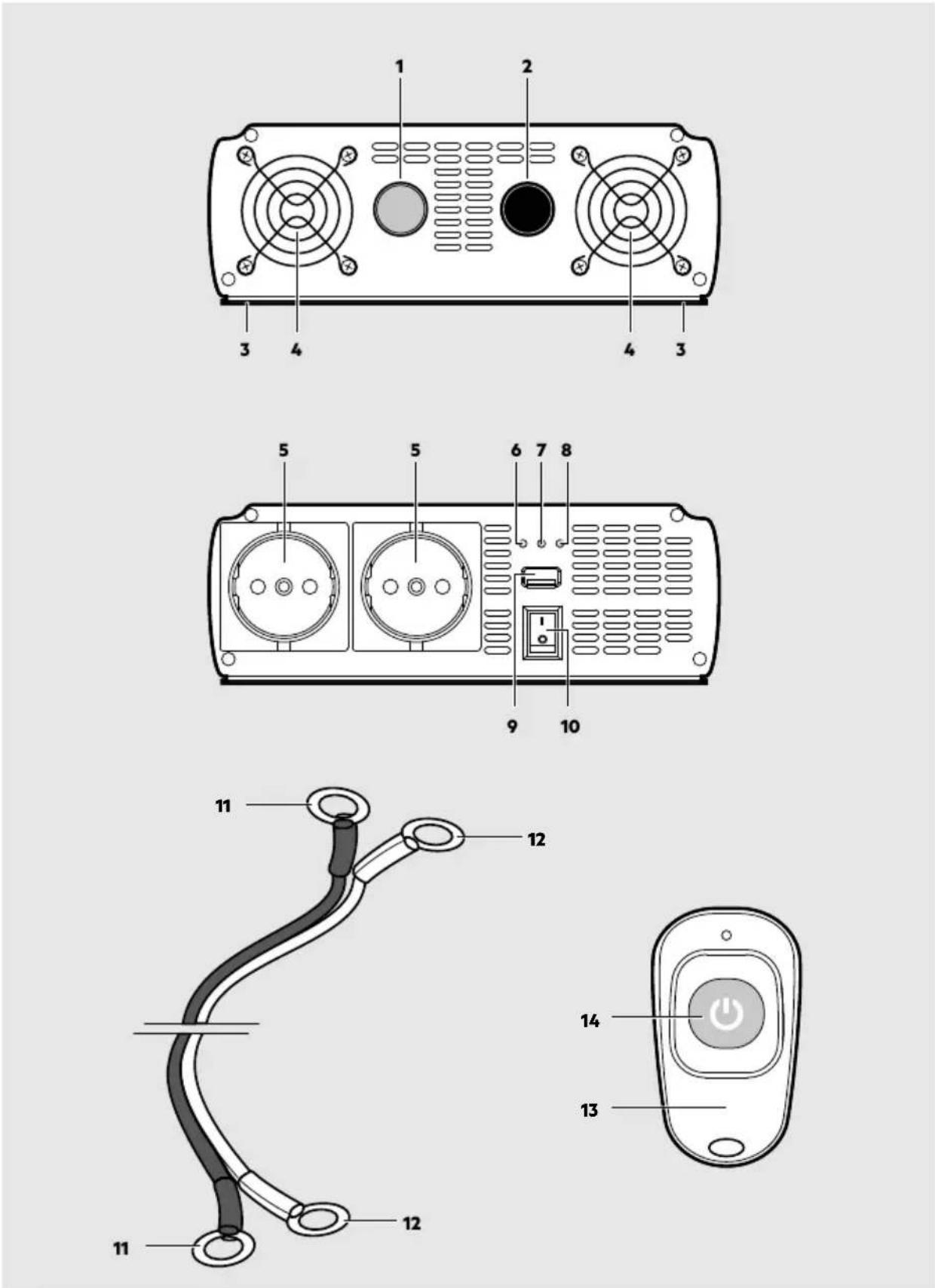
- Red connection (+)
- Black connection (-)
- Mounting rail
- Fan cover
- 230 V Socket
- Output socket LED, green
- Error LED, red
- Power LED, green
- USB port
- Power button
- Black cable with lugs (-)
- Red cable with lugs (+)
- Cordless remote control module
- On/Off button (cordless remote control module)
TECHNOLOGY
Attention!
Check the properties of the device to be powered before using the voltage converter to prevent consequential damage.
There are pure or modified sinusoidal wave voltage converters.
| Model for connecting (examples) | |
| Modified sinusoidal wave | 1000 W, 1500 WPower drillsComputersHobsLamps,Fans/ventsLawn mowers |
| Pure sinusoidal wave | - in addition to the modified sinusoidal wave examplesCoffee makersShaversAudio amplifiers |
INSTALLATION & CONNECTION
Preparation
Attention!
Before connecting the voltage converter you must check the terminals on the vehicle's battery. The voltage converter must not be used with vehicles where the positive terminal "+" is connected to a metal part of the vehicle.
Only use the included cables with lugs to connect to the 12 V direct current supply (e.g. automotive battery). If the cables included are too short you may also use insulated copper cables available from speciality retailers.
Keep the cable length as short as possible. The suitable cable diameter must be selected according to the length of the cable between the inverter and the power source. When in doubt please contact a speciality retailer.
Remember the vehicle's battery will be discharged when the vehicle is not running.
Voltage converter installation
Install the power inverter with suitable screws (not included):
in sturdy and even locations, on clean, dry and non-flammable surfaces, in well ventilated areas.
Please be sure not to cover the vents.
Connection to the power source
Caution!
We urgently advise having an electrically skilled person connect the cable to your vehicle's electrical system. Modern vehicles feature complex electrical components. Working with such connections can be dangerous for laymen. An incorrect connection can damage your vehicle and cause situations hazardous to you and other persons.
Once connected, the unit may sound an alarm, which is normal.
To a car battery
Warning!
Risk of short circuits! Always observe the correct polarity. Avoid short circuiting the battery poles.
- Unscrew the red and black terminal screws at the back of the device.
- Place the red cable with the lug (12) and the washer onto the red terminal (1) and screw tight with the red terminal screw.
- Place the black cable with the lug (11) and the washer onto the black terminal (2) and screw tight with the black terminal screw.
- Connect the red cable with clamp (12) to the positive battery terminal (marked "P" or "+").
- Connect the black cable with clamp (11) to the negative battery terminal (marked "N" or "-").
USE
Attention!
Some external devices, especially radios and/or other audio and chargeable devices, can damage the power inverter and/or the connected external appliance.
Check to see whether the external appliance connected to the power inverter "hums", overheats, or heats excessively up in the first few minutes. If this is the case, disconnect the external appliances and all cables immediately. In this case, the external appliances are incompatible and cannot be operated with each other. If anything should be unclear, consult the dealer of the external appliance.
You can use both 230 V sockets (5) and the USB port (9) simultaneously.
The total rated voltage for external devices connected to the 230 V socket and the USB port must not exceed the rated power of the voltage converter (see "Technical Data").
Note:
The power rating of an external device is indicated on the technical label which is affixed to the particular external device. External devices such as electric motors, e.g. drills, electric saws, refrigerators and music systems usually have a greater power rating at the start up than is specified on the technical label.
If the power rating is only given in Amps, simply multiply the A value by the factor 230 to obtain the equivalent in Watt.
For example: 0.4 A x 230 = 92 Watts
Remember the vehicle's battery will be discharged when the vehicle is not running.
Switching the voltage converter on/off
Set the On/Off switch (10) to ON.
If the green LED (8) lights up, the voltage converter is ready for use.
Using the 230 V socket
Only use external devices with Schuko plug or European cable connectors.
- Switch on the voltage converter.
- Connect the plug of an external device to the 230 V socket (5) on the voltage converter.
Using the 2.0 USB output socket
- Switch on the voltage converter.
- Plug an external USB device into the USB port (9).
The USB output on this power inverter provides a power supply of 5 V DC for external USB devices (e.g., lights, fans, radios).
Note:
The USB output on the power inverter is not designed for transferring data. Do not connect memory sticks, MP3 players, or similar data storage external appliances.
Using the cordless remote control module
You can control the voltage converter with the cordless remote control module (13).
- Press the On/Off switch (14) on the cordless remote control module (13) to switch off the sockets.
- Press the On/Off switch (14) again to switch the sockets on.
Note:
The voltage converter can only be controlled with the cordless remote control module (13) when the On/Off switch (10) is set to ON.
TROUBLESHOOTING
If the LED (7) lights up red, there is a malfunction. To prevent damage, the device will automatically switch off (also see "Technical features").
| Problem Possible cause Solution | ||
| Device isn't working. Battery voltage | lower than 10 V. Replace or charge | the battery. |
| The power draw of the connected device is too high. | Disconnect the external device.The maximum power draw should not exceed the power rating of the voltage converter. | |
| Device operation was interrupted by one of the safety systems. | See the relevant chapter (Technical Features). | |
| Low voltage alarm is always on. Voltage | or power are not sufficient to power the inverter. | Check connections and verify whether is a problem caused by cables (not clean or damaged) or the clips. |
| Low output voltage. Input voltage to low voltage | - Low voltage-protection. | Immediately switch off the voltage converter. |
| Check connection and recharge battery. | ||
| If voltage is higher than 11 V restart the power inverter. | ||
| Polarity, incorrect connections, short-circuit protection. | Switch off the power inverter immediately.Disconnect all external appliances. Check all connections, cables and external appliances.Adjust where necessary. | |
| Rated power above max. Rated power - overload protection. | Reduce the total power of connected devices to the max. power rating. | |
| TV operation and / or Audio systems and / or external appliancesSnow imageimage not steadyHumming, booming and whir-ring sound audible | TV interference. Place power inverter | as far away from TV set as possible.Check aerial connection and setting. Place aerial cable away from power inverter. Use a shielded aerial cable. |
CLEANING, CARE AND MAINTENANCE
Always disconnect the power inverter from the 12 V socket and the external appliance from the socket before starting any cleaning or maintenance. Clean clamps after every charging. To prevent corrosion, wipe off any battery fluid which may have come into contact with the clamps. Keep all air inlets and vents free of dirt and dust. Clean the power inverter with a moistened cloth. Do not use abrasive utensils for cleaning. Store the power inverter in a dry place.
Service
Should you have any questions regarding commissioning or operating in spite of studying these operating instructions, or if a problem should occur against all expectations, please get in contact with your specialist supplier.
Disposal
The packaging consists of non-contaminating materials that you can dispose of at your local recycling point.

Do not throw electrical appliances in with domestic waste!
In accordance with European Directive 2012/19/EC for waste electrical and electronic equipment (WEEE) and conversion to national law, used electrical appliances must be collected separately and taken to a recycling point. For ways to dispose of old electrical appliances please contact your community or city administration.
Declaration of Conformity:
MTS MarkenTechnikService GmbH & Co. KG hereby declares the radio equipment model 10057/10058 (Cordless remote control module) complies with Directive 2014/53/EU. For the full text of the EU declaration of conformity please visit: http://iuqr.de/KonformitaetserklaerungModifiedConverter
Illustrations may vary slightly from the product itself. We reserve the right to modify the product in accordance with technical advances. Decoration not included.
TABLE OF CONTENTS
Introduction 30
AEG is a registered trademark used under license from AB Electrolux (publ).
MTS MarkenTechnikService GmbH & CO. KG
Carl-Benz-Str. 2 • 76761 Rülzheim - Germany
www.mts-gruppe.com
Intertec Polska Sp. z o.o.
Stara Wies, ul. Grodziska 22 • 05-830 Nadarzyn - Poland
www.intertec-polska.pl
Tegro AG
Ringstr. 3 • 8603 Schwerzenbach - Switzerland
www.tegro.ch
www.aeg-automotive.com
AEG is a registered trademark used under license from AB Electrolux (publ).
- SAFETY
- TECHNICAL FEATURES
- PRODUCT OVERVIEW
- TECHNOLOGY
- INSTALLATION & CONNECTION
- USE
- TROUBLESHOOTING
- CLEANING, CARE AND MAINTENANCE
- INTRODUCTION
- NORMAL USE
- CONTENTS
- CONNECTABLE POWER SOURCES
- INTENDED INSTALLATION LOCATIONS
- GENERAL SAFETY GUIDELINES
- WARNING
- DANGER
- RISK OF FIRE AND ELECTRIC SHOCK
- RISK OF INJURY
- PREPARATION
- VOLTAGE CONVERTER INSTALLATION
- CONNECTION TO THE POWER SOURCE
- CAUTION
- TO A CAR BATTERY
- ATTENTION
- NOTE
- SWITCHING THE VOLTAGE CONVERTER ON/OFF
- USING THE 230 V SOCKET
- USING THE 2.0 USB OUTPUT SOCKET
- USING THE CORDLESS REMOTE CONTROL MODULE
- SERVICE
- DISPOSAL
- DECLARATION OF CONFORMITY
- TABLE OF CONTENTS
Brand : AEG
Model : 10057
Category : Electrical Transformer