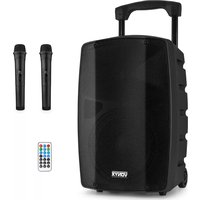
VSP200 - Loudspeaker Vonyx - Free user manual and instructions
Find the device manual for free VSP200 Vonyx in PDF.


| Product type | Portable active speaker with media player and wireless UHF microphones |
| Brand | Vonyx |
| Model | VSP200 |
| Mains power supply | 220-240 V~, 50 Hz |
| Internal battery | 12 V, 7,2 Ah, rechargeable |
| Battery life | Variable depending on usage, full charge recommended 12 h |
| Bluetooth connectivity | Yes, range approx. 10 m without obstacles |
| Media player | USB, SD card, AUX 3,5 mm jack |
| Microphone inputs | 2 XLR 6,35 mm balanced jacks |
| Wireless UHF microphones included | 2 UHF microphones, AAA batteries (not included) |
| Sound controls | Master volume, bass, treble, echo, mic/AUX volume |
| Special functions | Mic priority, USB/SD recording, repeat, preset equalizer |
| Outputs | Preamp (Pre Out) 6,35 mm jack for additional speaker |
| Protection | Mains fuse, grounding |
| Operating temperature | 5 °C to 35 °C |
| Cleaning | Dry cloth, no chemicals |
| Repairability | Original parts, repair by authorized technician only |
| Warranty | Subject to compliance with instructions |
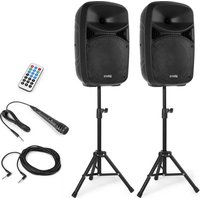
| Box contents | Speaker, power cable, UHF microphones, remote control, manual |
Frequently Asked Questions - VSP200 Vonyx
User questions about VSP200 Vonyx
0 question about this device. Answer the ones you know or ask your own.
Ask a new question about this device
Download the instructions for your Loudspeaker in PDF format for free! Find your manual VSP200 - Vonyx and take your electronic device back in hand. On this page are published all the documents necessary for the use of your device. VSP200 by Vonyx.
USER MANUAL VSP200 Vonyx
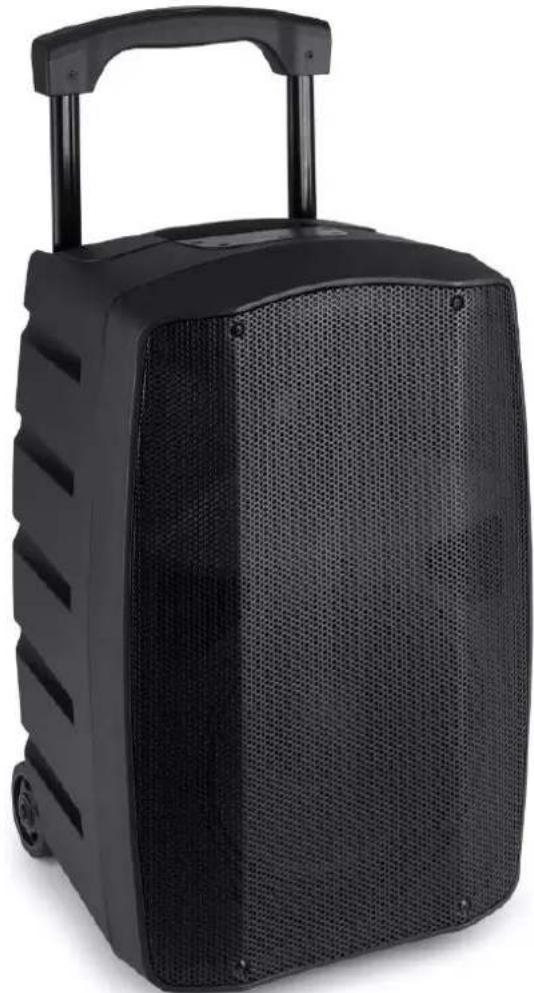
VSP200 Portable System
Ref. nr.: 174.030
natural_image
Black portable electronic device with mesh grille and handle, no visible text or symbolsINSTRUCTION MANUAL GEBRUIKSAANWIJZING GEBRAUCHSANLEITUNG MANUAL DE INSTRUCCIONES MANUEL D'INSTRUCTIONS INSTRUKCJA OBSŁUGI NÁVOD K POUŽITÍ
V1.0
ENGLISH
Congratulations to the purchase of this Vonyx product. Please read this manual thoroughly prior to using the product in order to benefit fully from all features.
Read the manual prior to using the product. Follow the instructions in order not to invalidate the warranty. Take all precautions to avoid fire and/or electrical shock. Repairs must only be carried out by a qualified technician in order to avoid electrical shock. Keep the manual for future reference.
- Prior to using the product, please ask advice from a specialist. When the product is switched on for the first time, some smell may occur. This is normal and will disappear after a while.
- The product contains voltage carrying parts. Therefore do NOT open the housing.
- Do not place metal objects or pour liquids into the product. This may cause electrical shock and malfunction.
- Do not place the product near heat sources such as radiators, etc. Do not place the product on a vibrating surface. Do not cover the ventilation holes.
- The product is not suitable for continuous use.
- Be careful with the mains lead and do not damage it. A faulty or damaged mains lead can cause electrical shock and malfunction.
- When unplugging the product from a mains outlet, always pull the plug, never the lead.
- Do not plug or unplug the product with wet hands.
- If the plug and/or the mains lead are damaged, they need to be replaced by a qualified technician.
- If the product is damaged to such an extent that internal parts are visible, do NOT plug the product into a mains outlet and DO NOT switch the unit on. Contact your dealer. Do NOT connect the product to a rheostat or dimmer.
- To avoid fire and shock hazard, do not expose the product to rain and moisture.
- All repairs should be carried out by a qualified technician only.
- Connect the product to an earthed mains outlet (220-240Vac/50Hz) protected by a 10-16A fuse.
- During a thunderstorm or if the product will not be used for a longer period of time, unplug it from the mains. The rule is: Unplug it from the mains when not in use.
- If the product has not been used for a longer period of time, condensation may occur. Let the unit reach room temperature before you switch it on. Never use the product in humid rooms or outdoors.
-
To prevent accidents in companies, you must follow the applicable guide lines and follow the instructions.
-
Do not repeatedly switch the product on and off. This shortens the life time.
- Keep the product out of the reach of children. Do not leave the product unattended.
- Do not use cleaning sprays to clean switches. The residues of these sprays cause deposits of dust and grease. In case of malfunction, always seek advice from a specialist.
- Do not force the controls.
- If this product is with speaker inside which can cause magnetic field. Keep the product at least 60cm away from computer or TV.
- If this product have a built-in lead-acid rechargeable battery. Please recharge the battery every 3 months if you are not going to use the product for a long period of time. Otherwise, the battery may be permanently damaged.
- If the battery is damaged please replace with same specifications battery. And dispose the damaged battery environment friendly.
- If the product has fallen, always have it checked by a qualified technician before you switch the product on again.
- Do not use chemicals to clean the unit. They damage the varnish. Only clean the product with a dry cloth.
- Keep away from electronic equipment that may cause interference.
- Only use original spares for repairs, otherwise serious damage and/or dangerous radiation may occur.
- Switch the product off prior to unplugging it from the mains and/or other equipment. Unplug all leads and cables prior to moving the product.
- Make sure that the mains lead cannot be damaged when people walk on it. Check the mains lead before every use for damages and faults!
- The mains voltage is 220-240Vac/50Hz. Check if power outlet match. If you travel, make sure that the mains voltage of the country is suitable for this product.
- Keep the original packing material so that you can transport the product in safe conditions.

This mark attracts the attention of the user to high voltages that are present inside the housing and that are of sufficient magnitude to cause a shock hazard.

This mark attracts the attention of the user to important instructions that are contained in the manual and that he should read and adhere to.
The product has been certified CE. It is prohibited to make any changes to the product. They would invalidate the CE certificate and their guarantee!
NOTE: To make sure that the product will function normally, it must be used in rooms with a temperature between 5°C/41°F and 35°C/95°F.

Electric products must not be put into household waste. Please bring them to a recycling centre. Ask your local authorities or your dealer about the way to proceed. The specifications are typical. The actual values can slightly change from one unit to the other. Specifications can be changed without prior notice.
Do not attempt to make any repairs yourself. This would invalid your warranty. Do not make any changes to the product. This would also invalid your warranty. The warranty is not applicable in case of accidents or damages caused by inappropriate use or disrespect of the warnings contained in this manual. Vonyx cannot be held responsible for personal injuries caused by a disrespect of the safety recommendations and warnings. This is also applicable to all damages in whatever form.
UNPACKING INSTRUCTION
CAUTION! Carefully unpack the box upon receipt. Check the contents to ensure that all parts are present and have been received in good condition. Notify the shipper immediately and retain packaging material if any parts appear damaged from shipping or the package itself shows signs of mishandling. Save the package and all packaging materials. If the product must be returned, it is important that the product is returned in the original factory box and packaging.
If the device has been exposed to drastic temperature fluctuation (e.g. after transportation), do not switch it on immediately. The arising condensation water might damage your device. Leave the device switched off until it has reached room temperature.
POWERSUPPLY
On the backside of the product is indicated on this type of power supply must be connected. Check that the mains voltage corresponds to this, all other voltages than specified, the device can be irreparably damaged. The product must also be directly connected to the mains and may be used. No dimmer or adjustable power supply.

Always connect the device to a protected circuit (circuit breaker or fuse). Make sure the device has an appropriate electrical ground to avoid the risk of electrocution or fire.
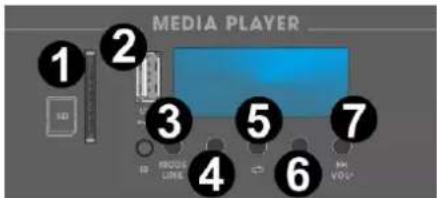
MEDIAPLAYER
- SD SLOT
You can play media files from a SD card by connecting the device to this slot -
USB SLOT
You can play media files from a USB device by connecting the device to this slot -
MODE/LINK
Press to change modes between playing AUX, USB, SD and BT
Press and hold in BT mode to initiate stereo pairing
- PLAY/PAUSE / REC
Press this button to start/resume or pause play in USB, SD or BT mode
Press and hold to enter recording mode
- REPEAT
Press to switch repeat modes
- PREVIOUS / VOL-
Press this button to go to the previous track. Press and hold to decrease the volume level
- NEXT / VOL+
Press this button to go to the next track. Press and hold to increase the volume level
REAR PANEL
- MIC 1 VOLUME LEVEL
Controls the microphone 1 volume level - MIC 2 / AUX VOLUME LEVEL
Controls the microphone 2 and auxiliary channel volume level -
MICROPHONE ECHO
Turn to adjust the microphone echo level -
ECHO ON/OFF
Press to turn the microphone echo effect on/off
- BASS CONTROL
Adjust the low frequencies
- TREBLE CONTROL
Adjust the high frequencies
- MASTER VOLUME
Turn to adjust the master volume level
- MICROPHONE 1 INPUT
XLR connector for balanced cabled microphone
- PRIORITY
Press to turn microphone 1 priority on/off. When turned on, the microphone signal will have priority, meaning that any music level will be lowered
- MICROPHONE 2 INPUT
XLR connector for balanced cabled microphone
- MODE
Press to switch between MIC2 and AUX modes. The chosen mode will be controllable by knob 2 (MIC 2 / AUX VOLUME LEVEL)
- AUX IN
Auxiliary 3.5mm input connector
- PRE OUT
6.3mm jack output to connect with another active speaker
- WIRELESS UHF A & B VOLUME LEVEL
Turn to adjust the wireless UHF channel A and B volume level
- WIRELESS UHF ON/OFF SWITCH
Press to turn wireless UHF microphone input ON/OFF
- INDICATOR LEDs
Clip-, charge- and power indicators
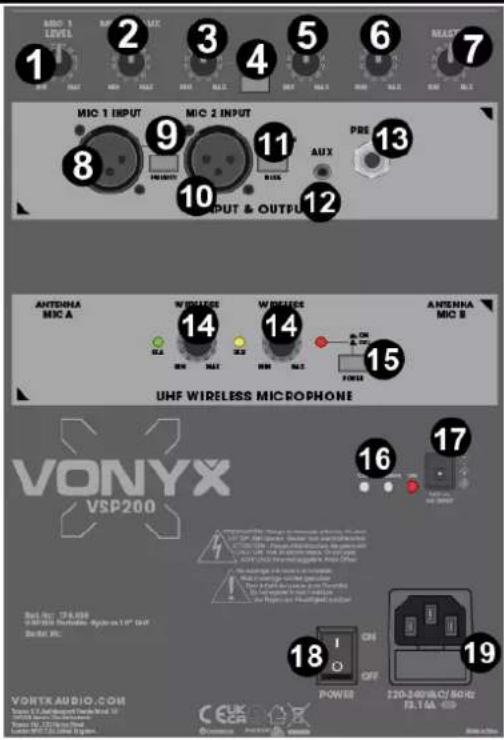
17. 12V DC INPUT
Connector for using 12V DC external power supply
18. POWER SWITCH
19. AC IN AND FUSE HOLDER
Socket for plugging in the supplied power cord. For instructions on how to change the fuse, see "REPLACING THE FUSE"
CONNECTING WITH BT

- Activate the BT-function on your device (Mobile phone, tablet etc.) from which you want to play the music. See the operating instructions for that device.
- Press the "MODE" button and activate BT-function.
- Select "VSP200" on your BT-device and make the BT-connection.
If password is required, you can enter "0000".
Attention: The BT distance is approx. 10 meter without any barrier.
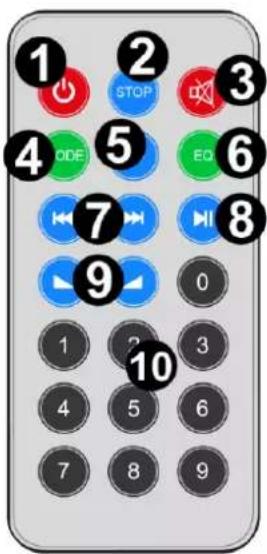
REMOTE CONTROL
1. POWER ON/OFF
Press to turn the device on/off
2. STOP
Press to stop playback
3. MUTE
Press to (un)mute the device
4. MODE
Press to change modes
5. REPEAT
Press to switch between different repeat modes
6. EQUALIZER
Press to change preset equalizer setting
7. PREVIOUS
Skip to the previous track
NEXT
Skip to the next track
8. PLAY / PAUSE
Press to switch between play and pause
9. VOLUME -
Press to decrease the volume
VOLUME +
Press to increase the volume
10. NUM PAD
Direct number input
UHF WIRELESS MICROPHONE
Insert the batteries into the wireless microphone (observe the polarity) and turn all volume controls down. Switch the system to 'ON' and the power led will light. Switch the microphone to 'ON' and set the volume knobs to the desired position.
Take care not to incur feedback from the speaker. Turn the echo and equalizer to a position in order to have the desired sound.
CHARGING BATTERY
Prior to use this system the internal 12V battery needs to be charged for 12 hours. If the power switch is in the 'OFF'-position and the system is connected to the mains, the battery will be (re)charged and the charge LED will light.
Note: Pull the plug from the mains outlet as soon as the battery is fully charged.
The battery should be regularly charged. For optimal battery life, the battery should be charged at least once a month. Please note that if you do not load within 6 weeks, the battery could become defective.
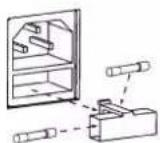
REPLACING THE FUSE
If the fuse is defective, replace the fuse with a fuse of the same type and value. Before replacing the fuse, unplug mains lead. Procedure:
Step 1: Open the fuse holder on the rear panel with a fitting screwdriver.
Step 2: Remove the old fuse from the fuse holder.
Step 3: Install the new fuse in the fuse holder.
Step 4: Replace the fuse holder in the housing.
UHF
No license required (excluding geographical restrictions)
| BE | DK | F | FI | DE |
| HU | IT | NL | NO | PL |
| PT | RO | SI | ES | SE |
| CH | GB | |||
Belgium (BE), Denmark (DK), France (F), Finland (FI), Germany (DE), Hungary (HU), Italy (IT), Netherlands (NL), Norway (NO), Poland (PL), Portugal (PT), Romania (RO), Slovenia (SI), Spain (ES), Sweden (SE), Switzerland (CH), Great Britain (GB)
NEDERLANDS
3.5mm AUX jack-ingang
13. PRE OUT
REPLACEMENT DU FUSIBLE
Belgium (BE), Denmark (DK), France (F), Finland (FI), Germany (DE), Hungary (HU), Italy (IT), Netherlands (NL), Norway (NO), Poland (PL), Portugal (PT), Romania (RO), Slovenia (SI), Spain (ES), Sweden (SE), Switzerland (CH), Great Britain (GB)
TECHNICAL SPECIFICATION / TECNISCHE SPECIFICATIE / TECHNISCHE DATEN / ESPECIFICACIONES TÉCNICAS / SPÉCIFICATIONS TECHNIQUES / SPECYFIKACJA TECHNICZNA/ TECHNICKÁ SPECIFIKACE
Playback options : BT 5.0 streaming, SD, USB
Output power: Max : 200W
Frequency response : 45Hz – 20KHz
Input connections : 3.5mm Jack, 6.3mm Jack, SD, USB, XLR (3-pin)
Output connections : 6.3mm Jack
Power supply : 100-240VAC 50/60Hz : 12VDC
Dimensions (L x W x H) : 325 x 360 x 565mm
Weight : 14,10 kg
The specifications are typical. The actual values can slightly change from one unit to the other. Specifications can be changed without prior notice.
The products referred to in this manual conform to the European Community Directives to which they are subject:
European Union
Tronios B.V.,
7602KR Almelo, The Netherlands
2014/35/EU
2014/30/EU
2011/65/EC
2014/53/EU

United Kingdom
Tronios Ltd.,
130 Harley Street,
London W1G 7JU, United Kingdom
S.I. 2016:1101
S.I. 2016:1091
S.I. 2012:3032
S.I. 2017:1206

Specifications and design are subject to change without prior notice.
www.tronios.com
Copyright © 2023 by TRONIOS the Netherlands

- VSP200 Portable System
- ENGLISH
- UNPACKING INSTRUCTION
- POWERSUPPLY
- MEDIAPLAYER
- REAR PANEL
- 12V DC INPUT
- POWER SWITCH
- AC IN AND FUSE HOLDER
- CONNECTING WITH BT
- REMOTE CONTROL
- POWER ON/OFF
- STOP
- MUTE
- MODE
- REPEAT
- EQUALIZER
- PREVIOUS
- NEXT
- PLAY / PAUSE
- VOLUME -
- VOLUME +
- NUM PAD
- UHF WIRELESS MICROPHONE
- CHARGING BATTERY
- REPLACING THE FUSE
- UHF
- NEDERLANDS
- PRE OUT
- REPLACEMENT DU FUSIBLE
- TECHNICAL SPECIFICATION / TECNISCHE SPECIFICATIE / TECHNISCHE DATEN / ESPECIFICACIONES TÉCNICAS / SPÉCIFICATIONS TECHNIQUES / SPECYFIKACJA TECHNICZNA/ TECHNICKÁ SPECIFIKACE
- European Union
- United Kingdom
Brand : Vonyx
Model : VSP200
Category : Loudspeaker