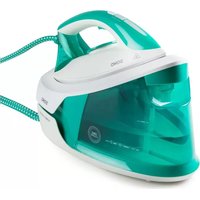
DO7118S - Iron DOMO - Free user manual and instructions
Find the device manual for free DO7118S DOMO in PDF.



| Brand | DOMO |
| Model | DO7118S |
| Product type | Steam generator (iron with steam base) |
| Water tank capacity | 1.5 L |
| Ironing functions | Dry ironing, continuous steam, vertical steam, steam burst (for stubborn creases) |
| Temperature setting | Rotary selector: SYNTHETICS, WOOL/SILK, COTTON, LINEN, SHOT |
| Indicator lights | Temperature and cleaning (CALC CLEAN) |
| Safety - Auto shut-off | Standby after 10 min, shut-off after 20 min |
| Iron lock on base | Yes, via lock button |
| Cleaning/descaling function | CALC CLEAN button with automatic reminder |
| Recommended water type | Tap water or mixture 50% tap water / 50% demineralized water (hard water) |
| Water to avoid | Softened or perfumed water |
| Soleplate cleaning | Damp cloth, non-abrasive detergent |
| Body cleaning | Soft damp cloth |
| Warranty | 2 years (accessories: 6 months) |
| Customer service | info@linea2000.be / +32 14 21 71 91 (Mon-Thu 8:30-17:00, Fri 8:30-16:30) |
| Vertical use | Yes, for curtains, clothes on hangers |
| Cord storage | Integrated cord storage |
| Transport lock | Yes, the iron locks onto the base |
| Instruction manual included | Yes, 76-page manual |
Frequently Asked Questions - DO7118S DOMO
User questions about DO7118S DOMO
0 question about this device. Answer the ones you know or ask your own.
Ask a new question about this device
Download the instructions for your Iron in PDF format for free! Find your manual DO7118S - DOMO and take your electronic device back in hand. On this page are published all the documents necessary for the use of your device. DO7118S by DOMO.
USER MANUAL DO7118S DOMO
natural_image
Green and white steam iron with visible branding (no text or symbols on body)DO7118S
| Handleiding Strijkijzer met stoomgenerator | |
| Mode d'emploi Fer à repasser avec centrale vapeur | |
| Gebrauchsanleitung Dampfbügelstation | |
| Instruction booklet Steam ironing station | |
| Manual de instrucciones Plancha con Generador de vapor | |
| Istruzioni per l'uso Ferro da stiro con caldaia a vapore | |
| Návod k použití Žehlička s parním generátorem | |
| Návod na použitie Žehlička s parným generátorom |

natural_image
Two black-and-white icons: a triangular warning symbol with an exclamation mark and a stack of open books (no text or symbols present)⚠PRODUCTSPECIFIEKE WAARSCHUWINGEN
natural_image
Close-up of a green, translucent mineral or crystal sample with a labeled point '1' (no other text or symbols)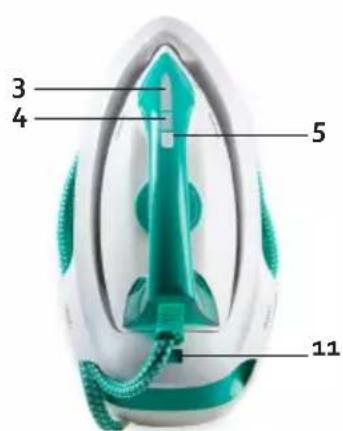
MET STOOM STRIJKEN
natural_image
Close-up of a white and teal mechanical device with a green handle and arrow indicator (no visible text or symbols)STRIJKTABEL
PROBLEEM EN OPLOSSING
natural_image
Recycling symbol icon with three chasing arrows forming a triangle (no text or labels)⚠ AVERTISSEMENTS SPÉCIFIQUES AU PRODUIT
natural_image
Close-up of a green translucent plastic object with a labeled point '1' (no text or symbols on the object itself)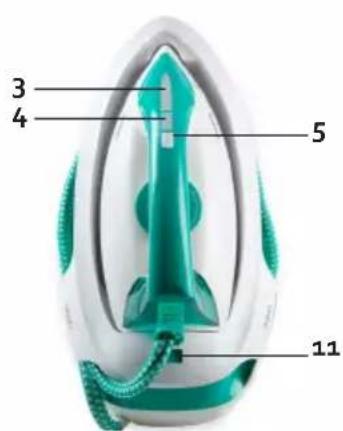
AVANT LA PREMIÈRE UTILISATION
REPASSAGE À LA VAPEUR
natural_image
Close-up of a white and teal mechanical device with a green handle and arrow indicator (no visible text or symbols)SYMBOLES DE REPASSAGE
natural_image
Recycling symbol icon with three chasing arrows forming a triangle (no text or labels)natural_image
Close-up of a green translucent plastic object with a labeled point '1' (no text or symbols on the object itself)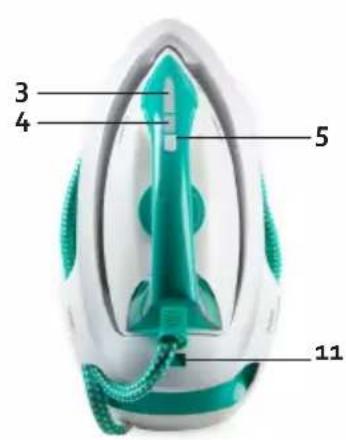
MIT DAMPF BÜGELN
natural_image
Close-up of a teal-colored medical device with a white cap and black arrow indicator (no visible text or symbols)BÜGELTABELLE
natural_image
Recycling symbol icon with three chasing arrows forming a triangle (no text or labels)All of our products are always submitted to a strict quality control before they are sold to you.
Should you nevertheless experience problems with your device, we sincerely regret this.
In that case, we kindly request you to contact our customer service.
Our staff will gladly assist you.

+32 14 21 71 91

info@linea2000.be
Monday – Thursday: 8.30 – 12.00 and 13.00 – 17.00
Friday: 8.30 - 12.00 and 13.00 - 16.30
This appliance has a two year warranty period. During this period the manufacturer is responsible for any failures that are the direct result of construction failure. When these failures occur the appliance will be repaired or replaced if necessary. The warranty will not be valid when the damage to the appliance is caused by wrong use, not following the instructions or repairs executed by a third party. The guarantee is issued with the original till receipt. All parts, which are subject to wear, are excluded from the warranty. If your device breaks down within the 2-year warranty period, you can return the device together with your receipt to the shop where you purchased it.
The guarantee on accessories and components that are liable to wear-and-tear is only 6 months.
The guarantee and responsibility of the supplier and manufacturer lapse automatically in the following cases:
· If the instructions in this manual have not been followed.
· In case of incorrect connection, e.g. electrical voltage that is too high.
· In case of incorrect, rough or abnormal use.
· In case of insufficient or incorrect maintenance.
· In case of repairs or alterations to the device by the consumer or non-authorised third parties.
- If the customer used parts or accessories that are not recommended or provided by the supplier / manufacturer.
SAFETY INSTRUCTIONS
When using electrical appliances, basic safety precautions should always be taken, including the following:
- Read all instructions carefully. Keep this manual for future reference.
- Make sure all packaging materials and promotional stickers have been removed before using the appliance for the first time. Make sure children cannot play with the packaging materials.
- This appliance is intended to be used in household and similar applications such as:
· staff kitchen areas in shops, offices and other working environments;
· farm houses;
- by clients in hotels, motels and other residential type environments;
· bed and breakfast type environments.
- Children should be supervised to ensure that they do not play with the appliance.
- This appliance can be used by children aged from 16 years and above and persons with reduced physical, sensory or mental capabilities or lack of experience and knowledge if they have been given supervision or instruction concerning use of the appliance in a safe way and understand the hazards involved.
· Children shall not play with the appliance.
- Cleaning and user maintenance shall not be made by children unless they are older than 16 or supervised.
- Keep the appliance and its cord out of reach of children younger than 16 years.
- All repairs should be carried out by the manufacturer or its aftersales service.
- Any injury or damage caused by failure to comply with these rules are at your own risk. Neither the manufacturer, importer, or the supplier may be held liable.
▲ELECTRICAL WARNINGS
- In order to avoid a hazard this appliance must not be supplied through an external switching device, such as a timer or a separate remote control, or connected to a circuit that is regularly switched on and off by the utility.
- The appliance must be disconnected from its power source when not in use, during service and when replacing parts. Allow to cool before putting on or taking off parts, and before cleaning the appliance. To disconnect, turn controls to “OFF” or “o” position, then remove the plug from the wall. Never pull the cord or appliance to remove the plug from the socket.
- Before use, check carefully that the electric tension and frequency of the power net at your home match the indications on the rating label of the appliance.
- The appliance must be plugged into an appropriate outlet that is installed and grounded in accordance with local installation regulations.
- Do not let the power supply cord hang over the edge of a counter, or touch hot surfaces.
- Keep the power cord away from hot parts and don't cover the appliance.
- Unwrap the cord completely to prevent overheating of the cord. Do not allow the power cord supply to run underneath or around the unit.
- Do not operate this appliance with a damaged cord or plug or in the event the appliance malfunctions or has been damaged in any manner. Return the appliance to the DOMO Service Department or its service agent for examination, repair, or electrical or mechanical adjustment. Do not try to repair the appliance yourself.
⚠️INSTALLATION
· Do not place near flammable materials, gases or explosives.
· Do not use or store this appliance outdoors.
· Always use the appliance on a steady, dry and level surface.
- Never place this appliance near a gas stove or electrical stove or in a place where it may come into contact with a warm appliance.
⚠ USE
· Do not use this appliance for other than intended use.
- Only use the appliance for domestic use. The manufacturer cannot be held responsible for accidents that result from improper use of the appliance or not following the instructions described in this manual.
· Never leave the appliance unattended while it is functioning.
· Do not operate the appliance with wet hands.
- The use of accessories that are not recommended or sold by the manufacturer can cause fire, electrical shock or injuries.
Only use the utensils delivered with the appliance.
⚠ CLEANING AND MAINTENANCE
- To protect against electrical shock or burns, do not immerse unit, cord, or plug in water or other liquid.
- Failure to maintain this appliance in a clean condition could adversely affect the life of the appliance and possibly result in a hazardous situation.
⚠️PRODUCT-SPECIFIC WARNINGS
- The iron must be used and rested on a flat, stable surface and resistant to heat and hot steam.
- The iron is not to be used if it has been dropped, if there are visible signs of damage or if it is leaking. Do not operate this appliance with a damaged cord or plug or in the event the appliance malfunctions or has been damaged in any manner.
Return the appliance to the DOMO Service Department or its service agent for examination, repair, or electrical or mechanical adjustment. Do not try to repair the appliance yourself.

The surface(s) marked with this symbol are liable to get hot during use. It is advised not to touch the surfaces of the appliance other than the handles to avoid burns.
- Do not move the iron while in use or when still hot. Allow to cool before moving the iron or before maintenance.
· Do not fill the water reservoir with any other liquid than water. - Make sure the appliance has cooled down before opening the boiler for cleaning. Make sure the bolt of the boiler is correctly and well fixed onto the appliance after maintenance.
SAVE THESE INSTRUCTIONS FOR FUTURE REFERENCE
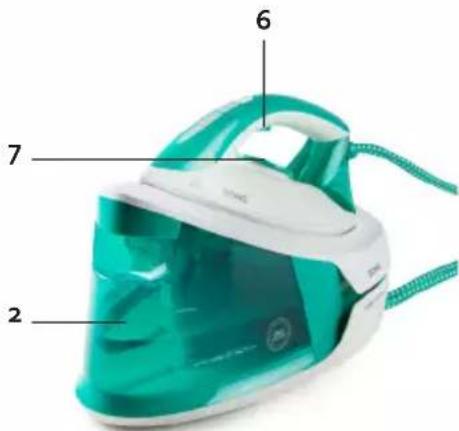
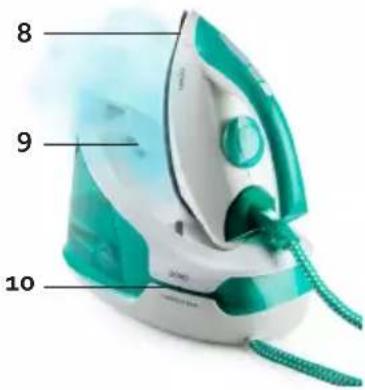
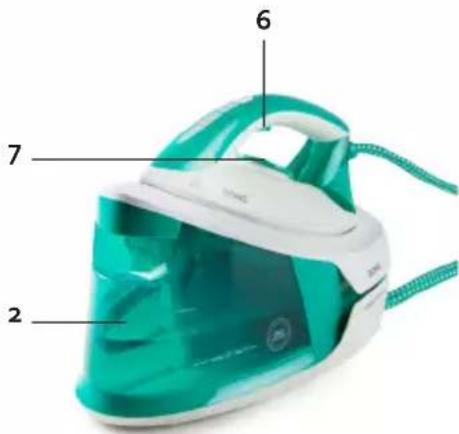
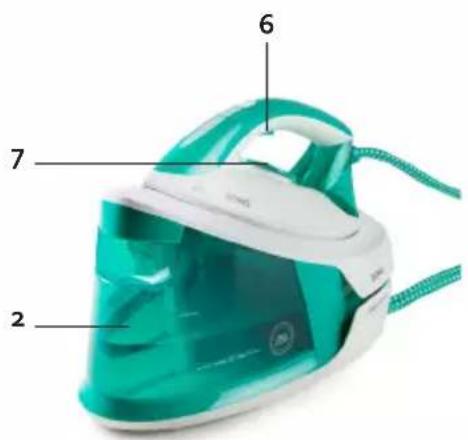
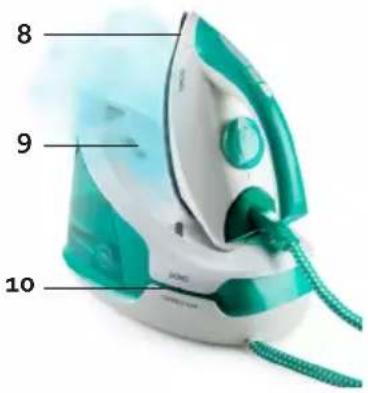
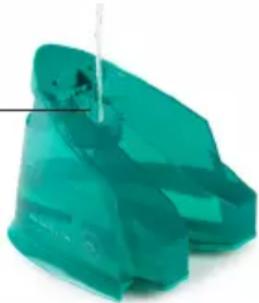
PARTS
- Filling opening
- Water tank
- Temperature indication light
- Cleaning button with indicator light CALC CLEAN
- On/off button
- Steam release button
- Temperature dial
- Soleplate
- Thermal insulation pads
- Cord storage
- Iron lock button
1
natural_image
Close-up of a translucent green mineral or rock fragment with no visible text or symbols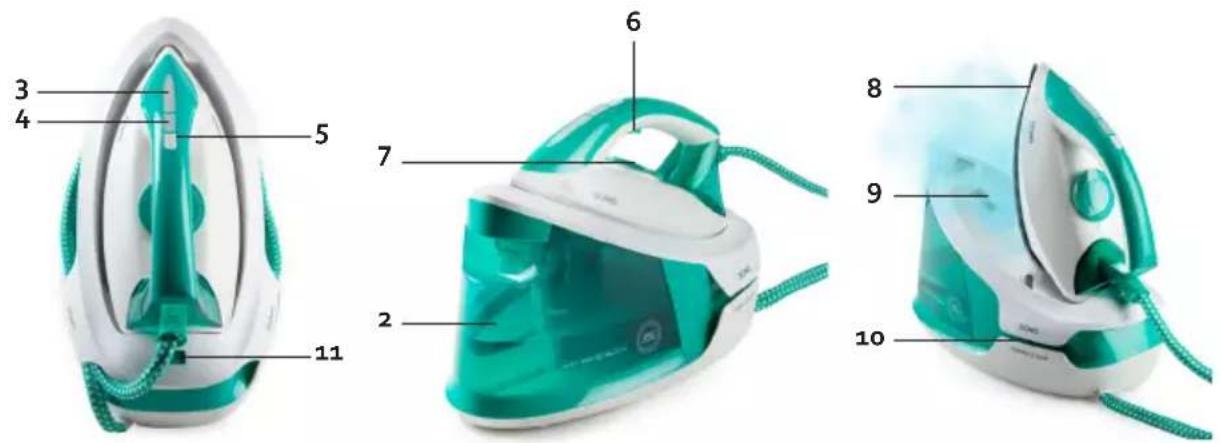
BEFORE THE FIRST USE
- Remove any stickers or protective foil from the soleplate.
- Heat up the iron until the maximum temperature and iron on a damp cloth during a couple of minutes to remove any possible residues from the soleplate.
CAUTION:
- Appliances are tested following production. It is thus perfectly normal if droplets of condensation have formed in the water tank.
- During the first use it is normal that a specific odour escapes from the appliance. This odour will disappear after a while.
- Some particles may come out of the soleplate during the first use. This is normal. The particles are harmless and will disappear after a while.
- When turning on the appliance, the steam generator may produce a pumping sound. This is normal. This sound indicates that water is pumped into the steam generator.
- While the soleplate is heating up, some steam will be released automatically. This is also normal and will last for about 3 seconds.
USE
This steam generator offers 2 options: dry ironing or steam ironing. Follow the instructions below. Also carefully read the ironing tips at the end of this section before using the appliance.
DRY IRONING
- Place the iron on the thermal insulation pads of the steam generator.
- Put the plug into the outlet and press the on/off button. The temperature indicator light will start to flash.
- Select the desired temperature with the temperature dial, according to the kind of fabric that needs to be ironed. The appliance will produce an audio signal, the temperature indicator light will start to flash and the iron will start to heat up.
- When the temperature indication light stays on, the selected temperature has been reached. You can now start ironing.
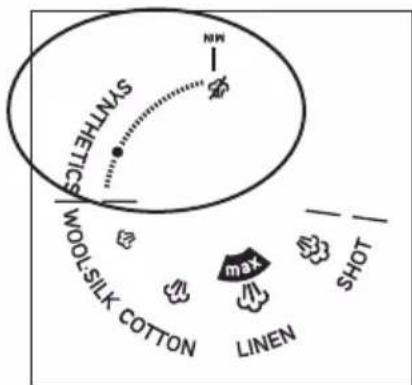
- After ironing, place the iron on the thermal insulation pads. Turn the temperature dial back to "MIN" to switch off the appliance. The appliance will produce an audio signal, the temperature indicator light will start to flash. Press the on/off button again to turn off the appliance. Pull the plug out of the power socket. Allow the appliance to cool down completely.
Caution: Never touch the hot soleplate!
STEAM IRONING
Caution: do not plug in the appliance yet at this point.
-
Fill the water tank with water. Make sure that you do not exceed the maximum level (1.5 L). Use only mains water or 50 % mains water and 50 % de-mineralised water if you have hard water.
-
Replace the water reservoir in the appliance.
-
Place the iron on the thermal insulation cushions.
-
Insert the plug into the power socket and press the on/off button Turn the temperature dial to the fabric you want to steam iron (Wool-Silk, Cotton or Linen). Each time you move the temperature dial, you will hear a signal. The temperature indicator light will start
to flash, to indicate that the appliance is heating up to the desired temperature.
Note: The temperature dial must be rotated to within the margins of the steam symbol, otherwise water droplets will emerge from the soleplate during ironing.
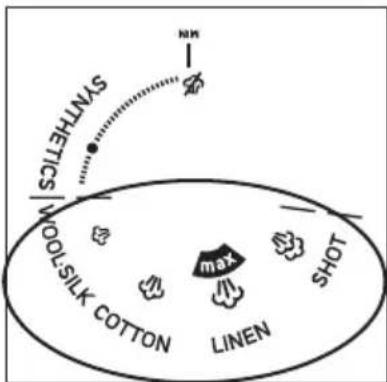
-
The appliance will start to heat up. Once the temperature indicator light stays on, you are ready to iron with steam.
-
To iron with steam, press the steam button on the inside of the iron's handle. A continuous flow of steam will come out of the sole. When you release the button, you will iron dry, without steam. You can also iron vertically to e.g. steam your curtains, clothes on a hanger, etc.
-
Use a steam boost to get rid of stubborn wrinkles. Press the steam button twice in rapid succession. There is a 15-second wait in order to use the steam boost a 2nd time. Note: this requires the temperature dial to be set to 'SHOT'.
Please note:
· Do not touch the hot sole of the iron!
· Never aim steam at people!
-
After ironing, place the iron on the thermal insulation pads. Turn the temperature dial back to "MIN". The appliance will produce an audio signal and the temperature indicator light will start to flash. Press the on/off button again to turn off the appliance. Pull the plug out of the socket. Allow the appliance to cool down completely.
-
If you do not use the steam button or temperature dial for 10 minutes, you will hear an audio signal and the indicator light will start to blink rapidly. The appliance is now in standby and will no longer heat up. If you press a button or set the temperature dial, the iron will stay at the right temperature. If you have not pressed a button after 20 minutes, the appliance will automatically switch off. This is a safety feature in case you forget to turn off the iron.
LOCKING AND UNLOCKING THE IRON ON THE BASE
- Place the iron on the base with the tip of the soleplate under the lock. Slide the lock button to the lock symbol to lock the iron onto the base. You can now easily move the iron together with the base.
- To unlock the iron from the base, slide the lock button to the open lock symbol. The lock button will come up. You can now take the iron off the base.
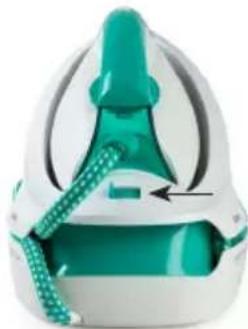
natural_image
Close-up of a teal-colored medical device with a white cap and black arrow indicator (no text or symbols)IRONING TABLE
Use the dial to select the correct temperature for the correct material.
| Temperature setting Fabric Symbol | ||
| SYNTHETICS Synthetic fabrics such as acetate, acrylic, nylon, polyamide |  | |
| WOOL/SILK Wool, viscose, polyester, silk | [TOW2] | |
| COTTON Cotton |  | |
| LINEN Linen |  | |
| SHOT / |  | |
IRONING TIPS
- Always check first if there is a label on the garment with instructions for ironing. If this is the case, then always follow these instructions.
- The iron heats up faster than it cools down. Therefore, always iron the garments that require the lowest temperature first, like synthetic fabrics.
- If a fabric contains several types of fibres, always choose the lowest temperature to iron the combination of these fibres.
- Silk and other shiny fabrics should be ironed inside-out.
- Velvet and other fabrics that easily become shiny should be ironing with slight pressure, in one direction. Always keep the iron moving.
- Never iron over zippers or other metal objects in a garment. This can damage the soleplate. Always iron around such objects.
Caution: if you iron woollen fabrics, the fabric may become shiny. That is why you should turn the garment inside-out for ironing.
CLEANING AND MAINTENANCE
· Unplug the appliance and let it cool down before cleaning it.
- Wipe residues from the soleplate with a damp cloth or with a non-abrasive (liquid) cleaner.
Caution: Do not use any chemical, steel, wooden or abrasive cleaners to scrape the soleplate.
- Clean the upper part of the iron with a soft, damp cloth.
· Wipe the water drops on the steam generator and the thermal insulation pads with a dry cloth.
- When not using the steam generator for a long time, pour out the water from the water tank and place the iron on the thermal insulation pads to store the appliance.
- Store the steam hose and the power cord in the storage area provided.
CAUTION: Only use tap water (or 50% tap water and 50% demineralized water in case of hard water) in your steam generator. Careful: De-scaled or de-mineralised water must never be used on its own, but must be combined with tap water. In case of use of a "softener" and/or perfumed water, brown stains could emerge, which would cause damage to the steam chamber.
CLEANING FUNCTION
The appliance will automatically remind you when it is time to descale. The associated indicator light will start to flash, in order to indicate that the appliance needs to be descaled. Descale the appliance regularly in order to extend its lifespan and to ensure it continues to work properly. In order to do this, follow the instructions below:
- Hold the iron over a sink.
- Fill the water tank up to the maximum indication with a mixture of 1/3 vinegar and 2/3 water.
- Insert the plug into the power socket, turn on the unit with the on/off button and turn the temperature dial to any position.
-
Press and hold the cleaning button for a few seconds. The appliance will produce an audio signal and the indicator light will flash during the descaling procedure.
-
The pump will allow water to flow through the iron, cleaning it itself. This will take about two minutes.
ATTENTION: do not come into contact with the hot steam otherwise you run the risk of severe burning!
-
When the descaling procedure is completed, the audio signal will stop and the cleaning light will stop flashing. Turn off the appliance using the on/off button.
-
Pull the plug out of the power socket. Wipe the appliance clean with a damp cloth and return the iron to the base.
PROBLEM AND SOLUTION
| PROBLEM SOLUTION | |
| Water droplets emerge from the ironing soleplate. | Turn the temperature dial within the margins of the steam symbol. |
| Brown water comes out of the soleplate. · Do not use perfumed or scented water in the water tank. Use tap water only (or 50% tap water and 50% demineralised water in case of hard water). · Carry out the cleaning procedure. | |
ENVIRONMENTAL GUIDELINES
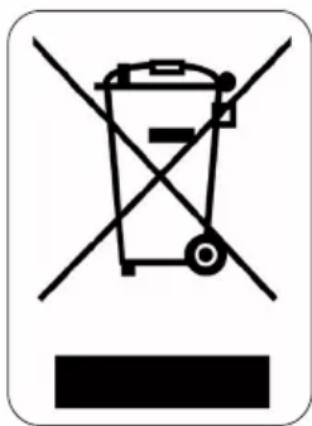
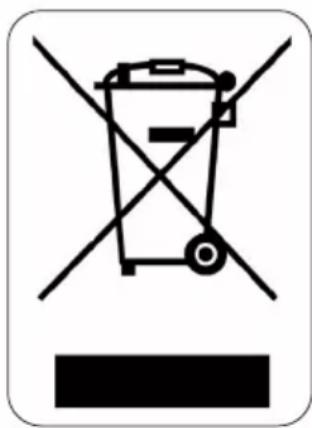
This symbol on the product or on its packaging indicates that this product may not be treated as household waste. Instead it must be brought to the applicable collection point for recycling of electrical and electronic equipment. By ensuring this product is disposed of correctly, you will help prevent potential negative consequences for the environment and human health, which could otherwise be caused by inappropriate waste handling of this product. For more detailed information about recycling of this product, please contact your local city office, your household waste disposal service or the shop where you purchased the product.
natural_image
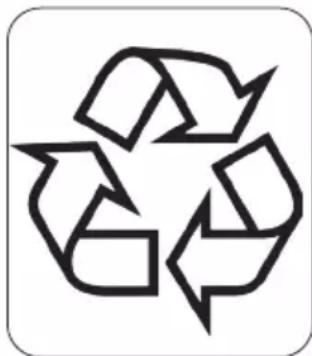
Recycling symbol icon with three chasing arrows forming a triangle (no text or labels)The packaging is recyclable. Please treat the packaging ecologically.
GARANTIA
natural_image
Close-up of a teal-colored plastic object with a labeled point '1' (no text or symbols on the object itself)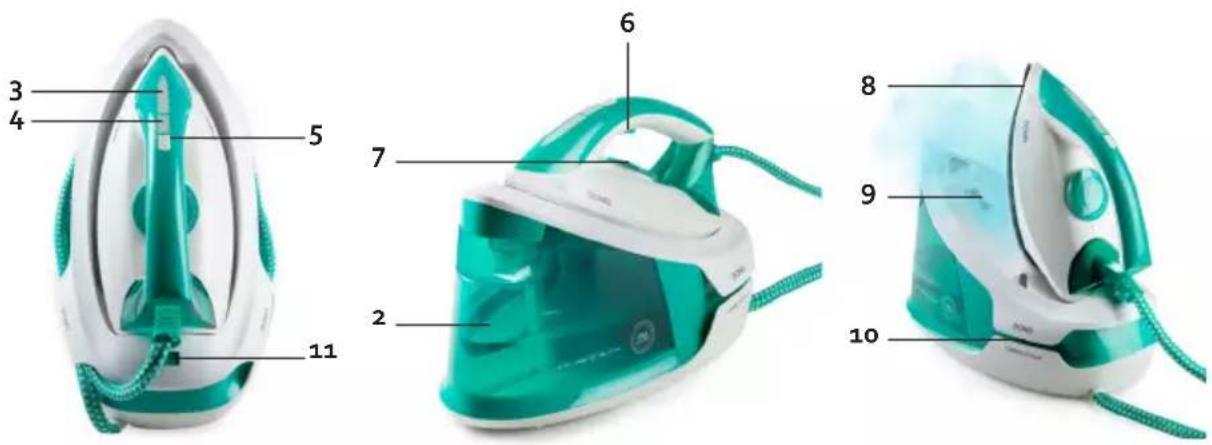
natural_image
Close-up of a white and teal handheld device with a green handle, showing internal components and a black arrow indicating rotation (no text or symbols visible)TABLA DE PLANCHADO
natural_image
Recycling symbol icon with three chasing arrows forming a triangle (no text or labels)natural_image
Close-up of a translucent green plastic object with a labeled point '1' (no text or symbols on the object itself)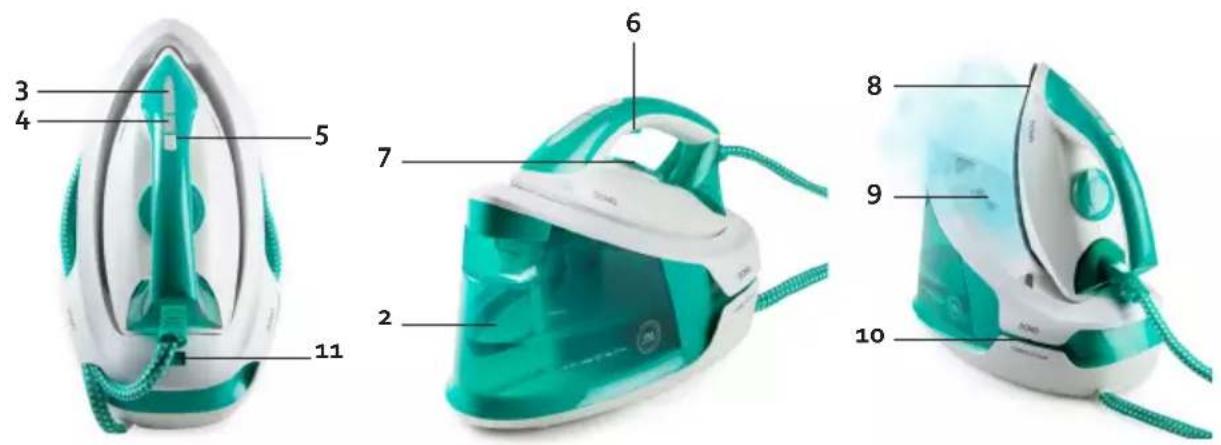
PRIMA DELL'USO
natural_image
Close-up of a white and teal mechanical device with a green handle and dotted pattern, no visible text or symbols.TABELLA STIRATURA
natural_image
Recycling symbol icon with three chasing arrows forming a triangle (no text or labels)natural_image
Close-up of a translucent green mineral or rock fragment (no text or symbols visible)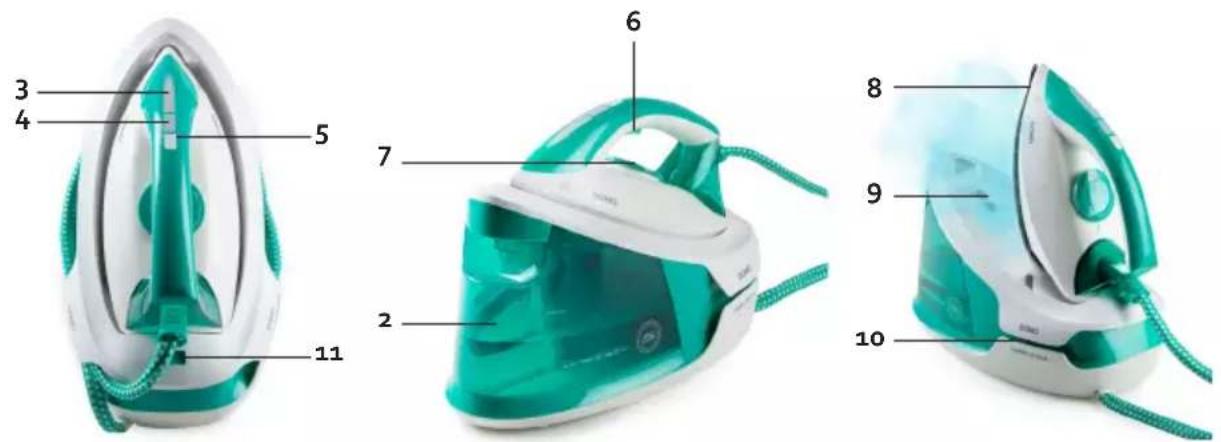
PŘED PRVNÍM POUŽITÍM
ŽEHLENÍ PÁROU
ZAMKNUTÍ A ODEMKNUTÍ ŽEHLIČKY NA ZÁKLADNĚ
natural_image
Close-up of a teal and white air purifier device with a handle, showing internal components and a directional arrow (no text or symbols visible)SYMBOLY ŽEHLENÍ
OHLED NA ŽÍVOTNÍ PROSTŘEDÍ
natural_image
Recycling symbol icon (three chasing arrows) inside a rounded square frame, no text or labels present.natural_image
Close-up of a transparent plastic bag with a numbered label pointing to the side (no text or symbols on the bag itself)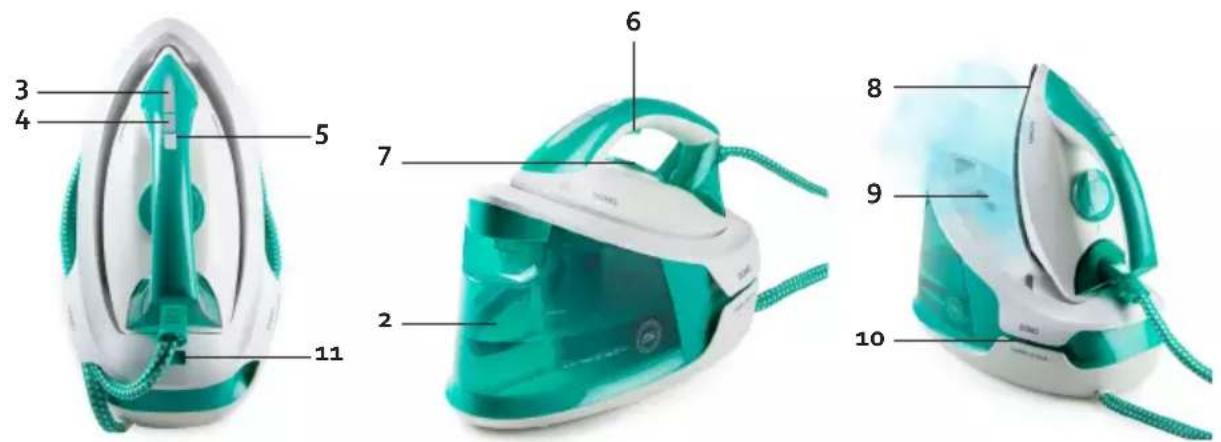
PRED PRVÝM POUŽITÍM
ZAMKNUTIE A ODOMKNUTIE ŽEHLIČKY NA ZÁKLADNE
natural_image
Close-up of a teal and white air purifier device with a handle, showing internal components and a black arrow indicating motion (no text or symbols visible)SYMBOLY ŽEHLENIE
natural_image
Recycling symbol icon with three chasing arrows forming a triangle (no text or labels)natural_image
Two cylindrical milk containers on a plain white surface (no text or symbols visible)
natural_image
Three product photos: square cards, a clear glass coffee maker, and a rectangular baking bowl (no text or symbols visible)of scan hier:
ou scannez ici:
oder hier scannen:
or scan here:



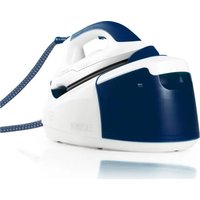
- DO7118S
- ⚠PRODUCTSPECIFIEKE WAARSCHUWINGEN
- MET STOOM STRIJKEN
- STRIJKTABEL
- PROBLEEM EN OPLOSSING
- ⚠ AVERTISSEMENTS SPÉCIFIQUES AU PRODUIT
- AVANT LA PREMIÈRE UTILISATION
- REPASSAGE À LA VAPEUR
- SYMBOLES DE REPASSAGE
- MIT DAMPF BÜGELN
- BÜGELTABELLE
- SAFETY INSTRUCTIONS
- ▲ELECTRICAL WARNINGS
- ⚠️INSTALLATION
- ⚠ USE
- ⚠ CLEANING AND MAINTENANCE
- ⚠️PRODUCT-SPECIFIC WARNINGS
- SAVE THESE INSTRUCTIONS FOR FUTURE REFERENCE
- PARTS
- BEFORE THE FIRST USE
- CAUTION:
- USE
- DRY IRONING
- STEAM IRONING
- LOCKING AND UNLOCKING THE IRON ON THE BASE
- IRONING TABLE
- IRONING TIPS
- CLEANING AND MAINTENANCE
- CLEANING FUNCTION
- ENVIRONMENTAL GUIDELINES
- GARANTIA
- TABLA DE PLANCHADO
- PRIMA DELL'USO
- TABELLA STIRATURA
- PŘED PRVNÍM POUŽITÍM
- ŽEHLENÍ PÁROU
- ZAMKNUTÍ A ODEMKNUTÍ ŽEHLIČKY NA ZÁKLADNĚ
- SYMBOLY ŽEHLENÍ
- OHLED NA ŽÍVOTNÍ PROSTŘEDÍ
- PRED PRVÝM POUŽITÍM
- ZAMKNUTIE A ODOMKNUTIE ŽEHLIČKY NA ZÁKLADNE
- SYMBOLY ŽEHLENIE
Brand : DOMO
Model : DO7118S
Category : Iron