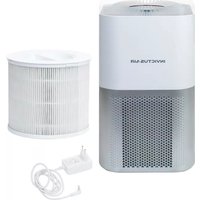
Invictus Air P5 - Odometer GENIUS - Free user manual and instructions
Find the device manual for free Invictus Air P5 GENIUS in PDF.


| Product type | Fan heater (air heater) |
| Model | Invictus Air P5 (H7) |
| Brand | Genius |
| Dimensions (L x W x H) | 230 x 230 x 630 mm |
| Weight | Approximately 4.8 kg |
| Power | 2000 W |
| Voltage / Frequency | 220-240 V ~ 50 Hz |
| Noise level | 46 dB |
| Recommended heating area | Up to 20 m² |
| Remote control battery | CR2025 battery (included) |
| Main functions | Heating, oscillation, timer (1-8 h), child safety, 2 speeds (unit), 3 heat levels (remote) |
| Display | Room temperature and settings |
| Controls | Control panel and remote control |
| Anti-tilt safety | Automatic shut-off in case of tipping |
| Overheat protection | Automatic shut-off in case of overheating |
| Automatic shut-off | After 24 hours of inactivity |
| Maintenance and cleaning | Wipe with a damp cloth, vacuum the air intakes/outlets, do not immerse |
| Kit contents | 1 fan heater, 1 remote control with CR2025 battery |
| Intended use | Domestic ambient air heating, stable and horizontal surface |
| Do not cover | Risk of overheating and fire |
Frequently Asked Questions - Invictus Air P5 GENIUS
User questions about Invictus Air P5 GENIUS
0 question about this device. Answer the ones you know or ask your own.
Ask a new question about this device
Download the instructions for your Odometer in PDF format for free! Find your manual Invictus Air P5 - GENIUS and take your electronic device back in hand. On this page are published all the documents necessary for the use of your device. Invictus Air P5 by GENIUS.
USER MANUAL Invictus Air P5 GENIUS
natural_image
Line drawing of a portable air purifier with a black cover and circular ports (no text or symbols)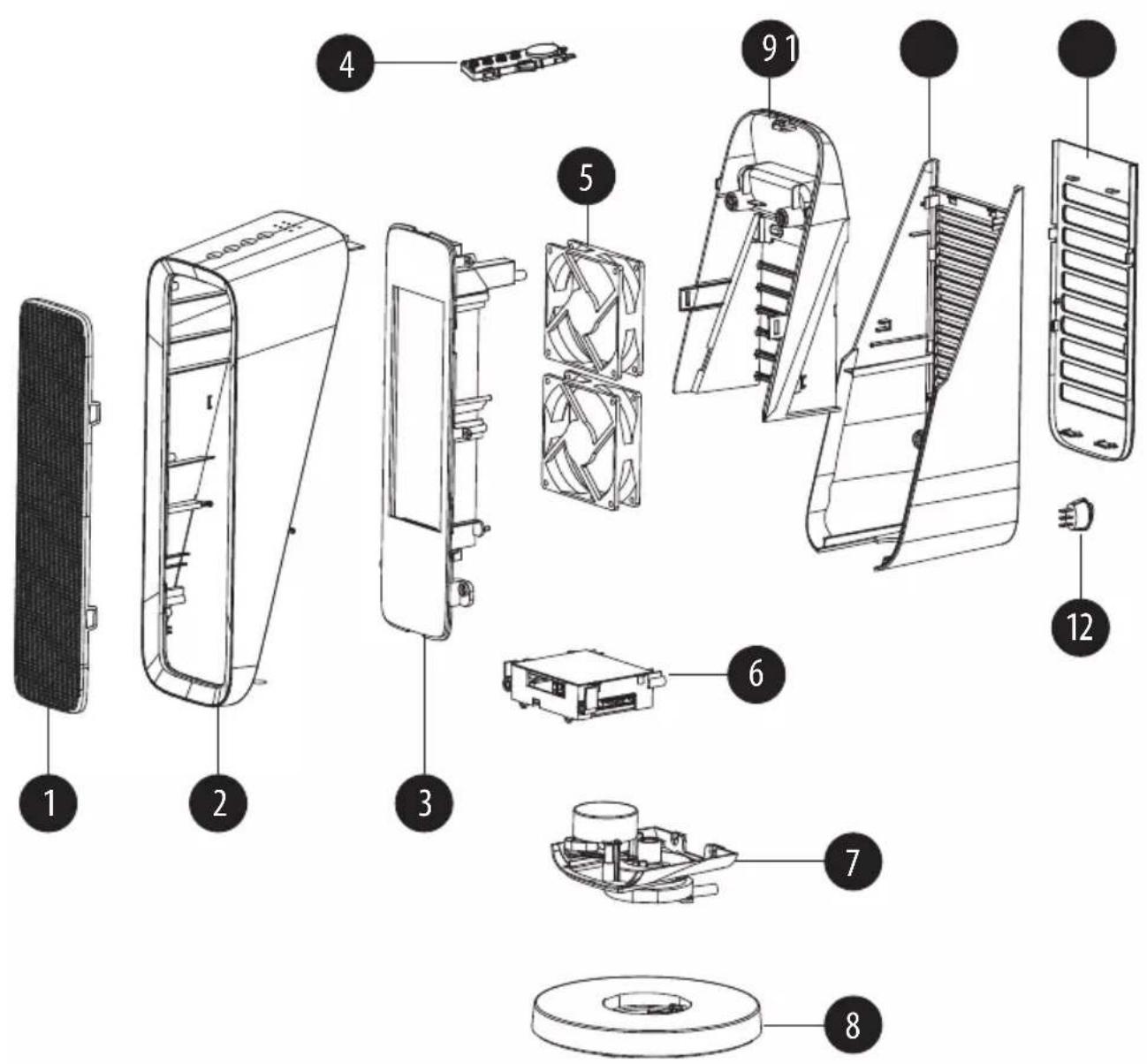
Inhalt
Produktkomponenten....3
Content
Product components....18
SAFETY INSTRUCTIONS AND WARNINGS ....19
Explanation of symbols 19
Proper use ....19
Safety instructions ....19
Before first use....25
Product overview 26
Use of the fan heater 27
Care and cleaning....28
Storage 29
Troubleshooting and fault rectification 29
Disposal 30
Technical data 30
Content of the set
1 x fan heater
1 x remote control
(The scope of delivery includes a 3 V battery type CR2025)
Please take the time to read these operating instructions carefully.
The section on safety notices and the warnings included in this document are particularly important for your own and other people's safety.
Keep the operating instructions in case you need to refer to them later on. If you give the appliance to another person, always make sure you include the operating instructions with it.
The illustrations in these operating instructions are intended as a guide to correct use. Some details may deviate from the original product.
Product components
1 Iron net
2 Front casing
3 Heating unit
4 Control unit
5 Motor
6 Power supply unit
7 Rotation unit
8 Socket
9 Handle
10 Rear housing
11 Filter
12 On and off switch
These operating instructions cover all available accessories for the appliance. The content of the set that you have purchased is indicated on the packaging or a separate insert. You can also purchase additional accessories which are not included in your set.
SAFETY INSTRUCTIONS AND WARNINGS
Explanation of symbols

WARNING!
Failure to follow these instructions may lead to serious injury or death.

CAUTION!
Failure to follow these instructions may lead to injury.

ATTENTION!
Damage to property could occur.
Proper use
The appliance is designed to heat the air in the room.
The appliance is suitable for household use only. It is not suitable for commercial or industrial use.
The appliance is not suitable for drying clothes or objects. Do not hang any clothes or other objects in front of the mesh grille.
Use the heater on a horizontal and stable surface.
Only use the appliance with original accessories, otherwise you will damage the appliance and impair the appliance's safety.
Only use the appliance as described in the instructions. Any further use is considered contrary to the intended purpose.
Safety instructions
WARNING! Risk of electric shock
Faulty electrical installation or excessive mains voltage can lead to electric shock.
Only connect the product if the mains voltage of the socket corresponds to the specification on the rating plate.
Only connect the product to an easily-accessible socket so that you can quickly disconnect the product from the mains in the event of a fault.
The product must not be placed directly below a wall socket.
Do not operate the product if it has visible damage or if the mains cable or plug is faulty.
the product's power cord is damaged, it must be replaced by the manufacturer, its after-sales service or a similarly qualified person.
Do not open the housing, but leave repairs to specialists. Contact a specialist workshop for this. Liability and warranty claims are excluded in the event of repairs carried out independently, improper connection or incorrect operation.
Only parts that correspond to the original unit data may be used for repairs. There are electrical and mechanical parts in this product which are essential for protection against sources of danger.
Do not immerse the product, network cable or mains plug into water or other fluids. Protect the product from dripping and splashing water.
Never touch the mains plug or the product with wet hands.
To avoid overheating, the heating unit must not be covered.
Never use the product in the immediate vicinity of a bathtub, shower or swimming pool.
Position the product so that switches and buttons cannot be touched by a person in the bath or shower.
Only use the product in indoor rooms. Never operate it in wet rooms or in the rain.
Never store the product so that it can fall into a tub or sink.
Never reach for an electronic device that has fallen into the water. In that instance, immediately disconnect the mains plug.
Never pull the mains plug out of the socket by the mains cable, always hold the mains plug.
Never use the mains cable as a carrying handle.
Keep the mains plug and the mains cable away from open flames and hot surfaces, e.g. the housing when operating the product.
Lay the mains cable so that it does not become a tripping hazard.
Do not bend the mains cable or place it over sharp edges.
Ensure that under no circumstances do children insert any objects into the product's housing.
When you are not using the product, during cleaning, or in the event of a fault, always turn the product off and remove the mains plug from the socket.
Unplug the mains plug from the protective contact socket if a thunderstorm is approaching.
To reduce the risk of fire, keep textiles, curtains or other combustible materials at least 1 m away from the air outlet.
the network cable is damaged, it must be replaced by a specific connection cable that is available from the manufacturer or their customer service.
To remove the mains plug from the socket, grasp the mains plug/network adapter and not the network cable. Do not pull on the cable.
Do not lay the mains cable over sharp metal edges, do not place heavy objects on it, and protect it from heat. Do not bend, twist or knot the mains cable. Do not let the mains cable hang down next to or in front of the work surface. Do not wrap the power cord around the unit.
Never immerse the device, the mains plug or the network cable in water or other fluids.
the device falls into water, unplug the mains plug immediately. Never try to pull the appliance out of the water while it is connected to the mains.
The appliance must always be switched off and disconnected from the mains power supply for inserting or removing accessories, when not in use, faulty during operation and for cleaning.
Keep sufficient distance from sources of heat (e.g. the hob or oven) and to open flames to avoid damage to appliances.
Keep sufficient distance from water in order to avoid the risk of eletrocution.
The device is not suitable for outdoor use.
Use and store the appliance only in dry indoor rooms.
Store the heater in a cool, dry place when it is not in use.
Do not use the appliance in rooms where highly flammable substances or toxic and explosive vapours are present.
Do not touch the device, the mains plug or the network cable with wet hands.
Do not cover the appliance during use to avoid the appliance catching fire. Ensure that the air intake and outlet is not blocked.
Make sure that no foreign objects fall into the appliance through the air outlet.
Do not spray flammable materials such as insect poisons or fragrances around the appliance.
Do not extinguish with water in case of fire! Smother flames with a fire blanket or
suitable fire extinguisher.
- Do not use the unit after using insect repellent incense or in places in which the air is polluted by oil residues, burning incense or chemical vapours.
Do not sit or stand on the device. Do not place any objects on the unit.
WARNING! Fire hazard
■Improper handling of the product may lead to fire in dwellings and buildings as well as danger to life and injury.
- Only place the product on an easily accessible, level, dry, heat-resistant and sufficiently stable surface.
- Avoid heat build-up by not positioning the product too close to a wall or directly under wall cabinets or similar. The high temperatures of the housing can cause furnishings and household objects to catch fire.
WARNING: DO NOT COVER. To prevent the product overheating, the product must not be covered.
- Do not operate the product near flammable liquids or in an explosive environment.
■The product must not be operated in the vicinity of flammable materials, e.g. cushions, newspapers, or curtains.
■Do not place the product near hot surfaces (e.g. hobs etc.). - Do not bring the mains cable into contact with hot parts, e.g. hot housing parts.
Never place the product on soft, deep-pile carpets.
■Cease to use the product if the plastic components are cracked, fissured or deformed. - Do not use the product with a programme switch, a timer, a separate remote control system or any other device that automatically switches the product on, as there is a risk of fire if the product is covered or incorrectly positioned.
Never leave the product unattended.
WARNING! Safety of particular groups
■The product can be used by children aged 8 years and above and those with reduced physical, sensory or mental capabilities or lack of experience and knowledge, provided they have been given supervision or instruction concerning use of the product in a safe manner and understand the hazards involved. Children must not play with the product. Cleaning and user maintenance must not be carried out by children without supervision.
- Keep children under the age of 3 away from the product and the connection cable
unless they are being constantly monitored.
Children about the age of 8 may only switch the product on and off when they are being supervised or have been instructed in safe use of the product and have understood the resulting dangers. The prerequisite is that the product is placed or installed in its standard usage position.
Children aged 3 years and under 8 years must not insert the plug into the socket, regulate the product, clean the product and/or carry out user maintenance.
■Do not leave the product unattended during operation.
- Do not let children play with the packaging film. Children may become caught in it while playing and suffocate.
- Do not allow your children to go near hot surfaces unsupervised.
WARNING! Safety while cleaning – danger of burning
■The product will become hot during operation. There is the danger of burning.
- Allow the product to fully cool down before cleaning.
Separate the device from the power grid before cleaning.
Clean the device in accordance with the cleaning and care guidelines, see „Care and Cleaning“ chapter.
WARNING! Safety during use – Risk of burning
During use, the product's housing will become very hot and may cause burns.
- Do not touch the hot components of the product during operation with your bare hands. Always use heat-insulated gloves or oven mitts to handle the product and its parts.
CAUTION — Some parts of the product may become very hot and cause burns. Particular care should be taken when children and persons in need of additional protection are present. Make other users aware of the risks.
Note that parts of the product are still very hot after switching off and may cause burns. Particular care should be taken when children and persons in need of additional protection are present.
■Do not use the product for drying laundry.
Never cover the air inlet or outlet.
Place the product at least 1 m away from furniture, cushions, bedding, paper, clothes, curtains and other combustible materials.
CAUTION! Risk of damage to materials, objects and devices Improper handling of the product may result in damage to the product.
Check the device for damage before every use. Do not use damaged products or damaged accessories.
Only use the device when it has been fully and correctly put together.
Do not use the product in locations in which there is a danger of tipping.
Always keep the product clean. Regularly clean the fan openings using a hoover.
Before cleaning, you must disconnect the product from the mains and let it cool down if necessary.
The product is only suitable for well-insulated rooms or for occasional use.
WARNING! Health hazard – Battery instructions
children or animals swallow batteries, there is an acute health hazard.
Store batteries so that they are inaccessible to children and animals. If you suspect that a battery has been swallowed, contact a doctor immediately.
Batteries may only be inserted or exchanged by adults.
Keep the remote control away from children if there is a battery in it
WARNING! Danger of explosion or leakage!
Improper handling of batteries leads to an increased risk of explosion.
Store batteries in a cool, dry location. Do not expose batteries to excessive heat (e.g. direct sunlight) and do not throw them into a fire.
Only use batteries of the correct type.
Make sure the polarity is correct when inserting the battery. This is stated in the battery compartment. Incorrect installation can damage the remote control.
Always ensure you use premium quality batteries. Poor quality batteries may run out and create damage.
Before inserting the battery, make sure that the contacts in the battery compartment and on the battery itself are clean and intact. Clean if required.
Remove the battery from the remote control unit when it is empty. Remove the battery even if you are not using the remote control for a long period of time. Otherwise, the battery may become flat and cause damage.
When the battery runs out, remove it right away to prevent damage to the remote control. Do not remove the battery with your bare hands and do not allow the battery fluid to come into contact with skin, eyes or mucous membranes. Wear
standard household gloves to do so. However, if your skin has come into contact with battery fluid, wash the affected areas immediately and consult a doctor if necessary.
Remove the batteries before disposing of the remote control.
Batteries must not be taken apart or short-circuited - risk of explosion!
Never expose batteries to extremely high temperatures or extremely low air pressure. This may result in an explosion or the escape of flammable liquid or gases.
Before first use

CAUTION!
Risk of suffocation from plastic sheeting and bags! Keep children and animals away from packaging material.
Check the product and scope of delivery
Check the set for completeness and any transport damage. You can find the delivery scope of the set you have purchased in the packaging, or in the separate insert. Please contact our customer service in the event of any complaints.
Danger of damage
If you open the packaging carelessly with a sharp knife or other pointed objects, the product can be damaged quickly.
Open the packaging very carefully.
- Remove the product from the packaging.
- Check whether the delivery is complete (see Product components).
- Check whether the product is damaged. If this is the case, do not use the product. Contact the manufacturer via the service address given.
Product overview
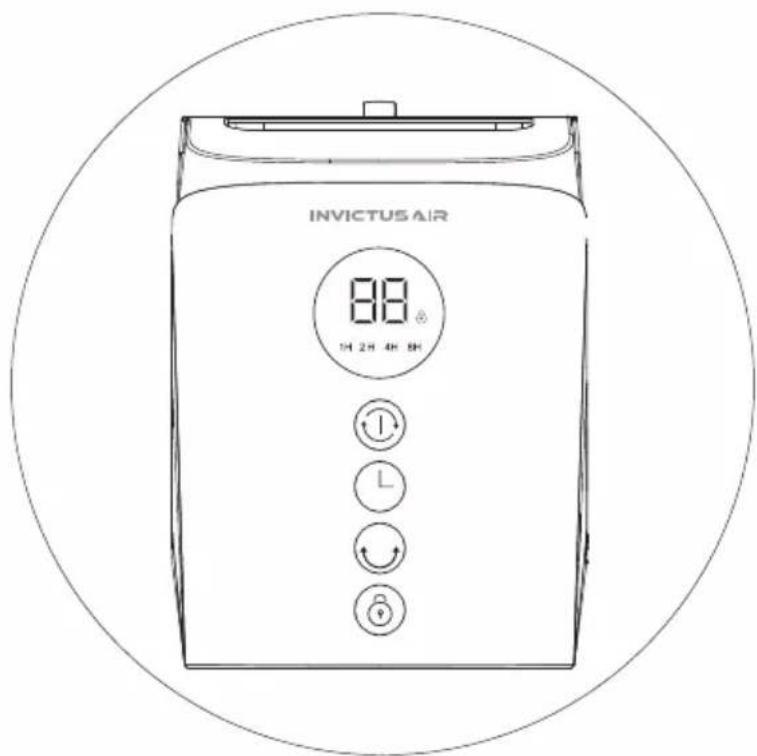
Control element product
 | Temperature and speed display | ||||
 | Child protection functionOn and off function for child safety | ||||
 | 1H |  |  |  | Timer function |
 | On and off button of the unitSpeed settings | ||||
 | Oscillation function | ||||
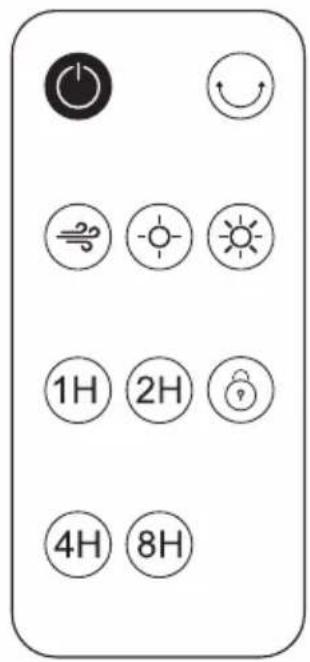
Control element remote control
 | On and off button of the unit | |
 | Oscillation function | |
   | Heat grade function (L: Natural – M: Warm – R: Hot) | |
    | Timer function | |
 | On and off function for child safety |
Changing the battery
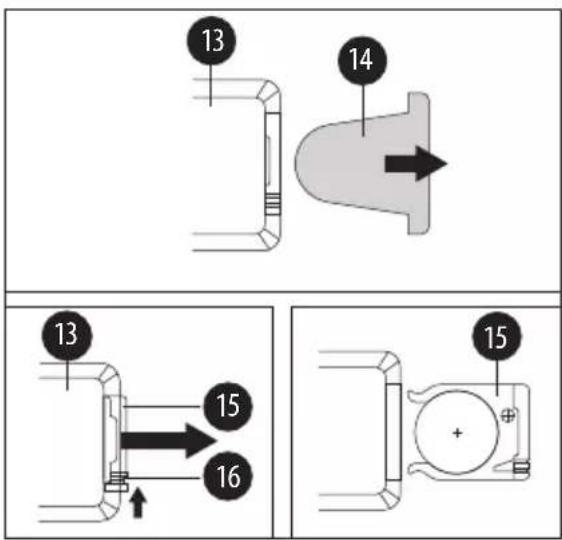
13 Remote control
14 Contact strips
15 Battery compartment
16 Lock
Use of the fan heater
Initial start-up
NOTE!
For optimum heating performance, close doors and windows.
Place the fan heater at a sufficient distance from the walls and ceiling.
Keep textiles and other flammable objects away from the air inlet and outlet.
Turning the product on and off
Place the product on a straight and firm surface so that it cannot fall down. Always hold the product by the carrying handle.
Insert the mains plug of the fan heater into the mains socket.
Flip the button on the lower back of the device.
Press the on/off button for a few seconds to switch on the fan heater. It starts in auto mode.
After a short measurement, the display shows the current room temperature.
Set the desired operating mode and speed using the buttons on the product or the remote control.
Press the on/off button for 3 seconds to switch off the unit. The unit switches off after 60 seconds.
After use, disconnect the appliance from the mains by flipping the switch on the bottom back panel.
Operation
The product can be operated either via the control panel or the remote control.
The display shows the current functions and settings during operation.
When operation is complete, the room temperature is displayed.
When operating by remote control, the remote control must be placed directly on the receiver (display). For better reception, avoid direct sunlight on the receiver, e.g. by drawing the curtains.
Before using the remote control for the first time, pull out the contact strip on the back of the remote control to put it into operation.
By pressing the mode button on the remote control you can switch between speed 1 - Low and speed 2 - High.
Timer function
The timer function allows you to programme the product to start or stop heating automatically after a time you set (1 to 8 hours).
You can interrupt the timer at any time and switch off the unit.
Setting the timer function via the appliance
Press the button until the desired number of hours flashes.
To turn off the timer, press and hold the button until the hour indicator on the display goes out.
Set the timer funciton via the remote control
Press the button on the remote control that indicates the desired time.
Child protection device
Press the ⏻ Key on the device or remote control for approx. 5 seconds until a tone is heard to activate the child lock. Now the control panel/remote control is no longer functional.
To deactivate the child lock, repeat this procedure until a tone is heard again.
Oscillation function
The oscillation function („swivel function“) serves to distribute the heat more evenly and can be switched on or off at any time during operation.
Press the ⓔ key to start the oscillation function.
The product begins to swivel to the left and right.
To stop the oscillation function, press the key again.
Turning off the product
To end a heating operation and enter stand-by mode, press the ⏻ button on the remote control or the ⏻ key on the device for approx. 5 seconds.
The flashing display indicates that the unit is switching to stand-by mode. This process lasts around 60 seconds
To disconnect the unit from the mains, flip the switch on the lower back of the unit.
Change the battery
To change the remote control battery, press the latch on the back of the remote control and pull out the battery compartment
Remove the old battery from the battery compartment and replace it with a new one of the same type. Pay attention to the correct polarity when inserting.
Anti-tip protection
The product is equipped with an anti-tip device that automatically switches the product off or prevents it from switching on if it is lifted or not in an upright position. The product switches to standby mode as soon as it is placed back on solid ground and returned to an upright position.
Overheating protection
The product contains overheating protection. This automatically switches the product off in case of overheating. As soon as the product has cooled off, it can be operated again.
Automatic switch-off function
The unit has an automatic switch-off function which activates itself after 24 hours of non-use and switches the unit to stand-by mode.
Care and cleaning

WARNING!
Risk of electric shock
Switch the unit off and disconnect it from the mains before cleaning or user maintenance. Allow the device to fully cool down before cleaning.
Never hold the device under running water or immerse it in water or other liquids as this may cause a short circuit.
Make sure that no water or other liquids get into the housing.
Clean the main device by wiping it with a slightly damp cloth. Allow all parts to dry fully.
Do not use aggressive cleaning agents or sharp or metallic cleaning objects such as knives, hard spatulas and so on. These may damage the surfaces.
Regularly vacuum the dust from the air inlets and outlets using a hoover. Proceed with caution and do not open the housing under any circumstances.
Storage
All parts must be fully dry before storage.
Allow the product to fully cool down before storage.
Always store the product in a dry location, ideally in the original packaging.
Protect the product from direct sunlight.
Store the product out of reach of children, securely closed and at a storage temperature between 5 °C and 20 °C (room temperature).
Troubleshooting and fault rectification

WARNING!
Risk of electric shock
Never try to repair the product yourself. There is a risk of electric shock.
Contact the customer service if you cannot correct a fault.
If the product is causing problems, first check this table to see what the problem is and what the solution is.
| Problem | Possible cause / solution |
| Device does not work | Check if the appliance is connected to a working electrical outlet. If the socket is defective, try another one. |
| The remote control is not working | Check that the battery has been correctly inserted into the remote control |
| The device does not heat up The target temperature is below the current room temperature. Select a higher target temperature. Dust has accumulated at the air inlet/air outlet. Remove the dust as set out in the „Cleaning“ chapter. | |

ATTENTION!
Never open the device! Only have the device serviced or repaired by a qualified technician.
Disposal
„Normal“ Products
In the event that the device and/or accessories can no longer be used, they should be disposed of in the household rubbish collected by municipal waste management services.
Packaging
The packaging material can be recycled. Dispose of the packaging in an environmentally friendly way and take it to your recycling site.
Electrical appliances
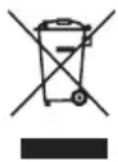
The symbol of a cross through a rubbish bin indicates that this product must not be disposed of with normal household waste. Please dispose of electrical and electronic devices via your local recycling site.
Further disposal and recycling information for this device can be obtained from your municipal recycling site, the shop where you purchased the product, or the manufacturer.
Technical data
| Model H7 | |
| Weight ca. 4.8 kg | |
| Dimensions ca. 230 x 230 x 630 mm | |
| Performance 2000 W | |
| Noise level 46 dB | |
| Room area 20 m^2 | |
| Voltage range 220-240 V | |
| Frequency 50 Hz | |
| Battery (remote control) CR2025 |
Customer service
If you have any questions about the device or spare parts/accessories, please contact your local retailer.