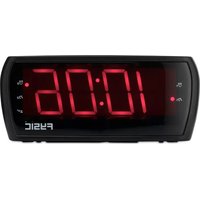
FK450 - Clock Fysic - Free user manual and instructions
Find the device manual for free FK450 Fysic in PDF.



| Product type | Clock radio |
| Brand | Fysic |
| Model | FK450 |
| Main power supply | 230 V AC, 50 Hz, 3 W |
| Backup power | 2 AAA batteries (not included) |
| FM frequency range | 87.5 – 108 MHz |
| Output power | 300 mW |
| Dimensions (approx.) | 200 x 120 x 60 mm |
| Weight (approx.) | 0.6 kg |
| Display | LED |
| Built-in speaker | Yes |
| Antenna | FM wire antenna |
| Number of alarms | 2 (independent, radio or buzzer) |
| Snooze function | Yes, 9 minutes |
| Sleep timer | 10 to 90 minutes |
| Station presets | Yes (presets) |
| Time setting | Manual (Hour/Min buttons) |
| Intended use | Household only |
| Maintenance | Slightly damp cloth |
| Safety | Do not open, keep out of reach of children |
| Repairability | Qualified personnel only |
Frequently Asked Questions - FK450 Fysic
User questions about FK450 Fysic
0 question about this device. Answer the ones you know or ask your own.
Ask a new question about this device
Download the instructions for your Clock in PDF format for free! Find your manual FK450 - Fysic and take your electronic device back in hand. On this page are published all the documents necessary for the use of your device. FK450 by Fysic.
USER MANUAL FK450 Fysic
Usage of controls or adjustments or performance of procedures other than those specified herein may result in hazardous radiation exposure.
This unit should not be adjusted or repaired by anyone except qualified service personnel.
KEEP THESE INSTRUCTIONS IN MIND:
- Do not use this device near water.
- Clean only with a slightly damp cloth.
- Do not cover or block any ventilation openings. When placing the device on a shelf, leave 5cm (2^ ) free space around the whole device.
- Install in accordance with the supplied user manual.
- Don't step on or pinch the power adaptor.
- Do not place heavy items on the power adaptor, which may damage it.
- Keep the entire device out of children's reach!
- Unplug this device during lightning storms or when unused for a long period.
- Keep the device away from external heat sources.
- Avoid using the device near strong magnetic fields.
- Warning! Never insert an object into the product through the vents or openings.
- Do not use in wet or moist areas such as bathrooms.
- This device must operate on a power source as specified on the specification label.
-
Always hold the plug when pulling it out of the main supply socket.
-
Although this device is manufactured with the utmost care and checked several times before leaving the factory, it is still possible that problems may occur. If you notice smoke, an excessive build-up of heat or any other unexpected phenomena, you should disconnect the plug from the main power socket immediately.
- This device is not intended for use by people (including children) with physical, sensory or mental disabilities, or a lack of experience and knowledge, unless they're under supervision or have received instructions about the correct use of the device by the person who is responsible for their safety.
- This product is intended for non professional use only and not for commercial or industrial use.
- Make sure the unit is adjusted to a stable position.
- Never place this apparatus on other electrical equipment.

Caution
Danger of explosion if battery is incorrect replaced.
Replace only with the same or equivalent type.
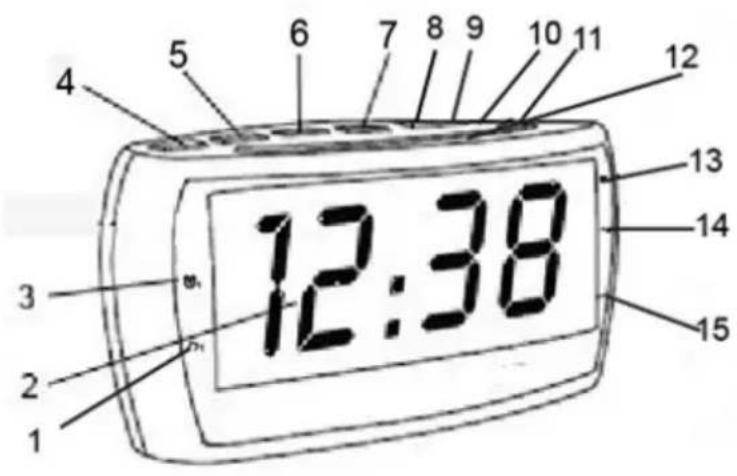
- Radio alarm indicator 1
- Led Screen
- Buzzer alarm indicator 1
- Sleep timer
- Set alarm 1 / volume -
- Set alarm 2 / volume +
- Timesettings
- Radio PRE/M+ memory
- Radio tuning - / Hours +
-
Radio tuning + / Minutes +
-
Alarm On / Stand by / Off
- Snooze
- Buzzer alarm indicator 2
- Radio alarm indicator 2
- Sleep indicator
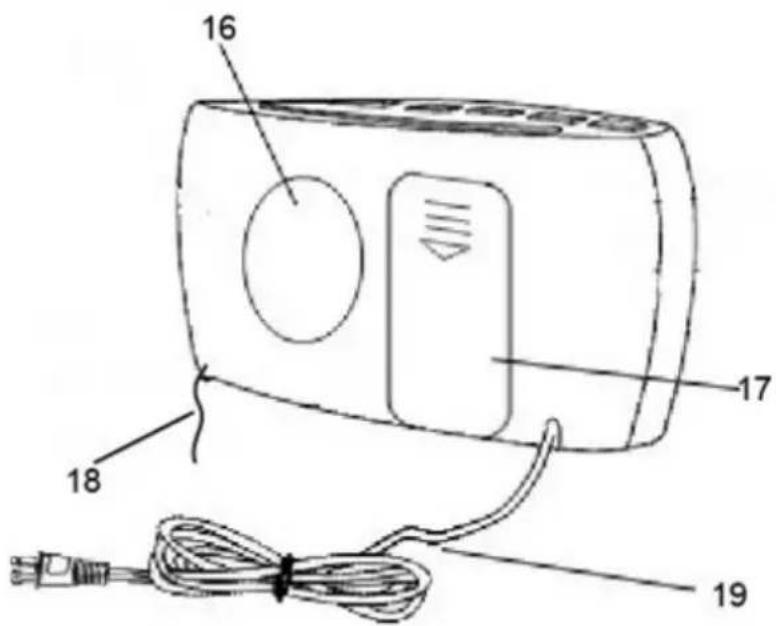
- Speaker
- Battery cover
- FM wire antenna
- AC-Power cord
RADIO
- Press the "ON/STANDBY/ALARM OFF" button to turn the clock radio on or off.
- Adjust the "TUNING+ or "TUNING- to select the desired station.
- Press the "VOLUME+" or "VOLUME-" button to adjust the volume.
- Press and hold the "PRE/M+" button until the preset memory display, for example "P01", is blinking. Then you can select the desired preset memory by "VOLUME+" or "VOLUME-" button and press "PRE/M+" button again to store the desired station.
- Now you can recall the preset station by pressing the "PRE/M+" button to select the preset memory.
SETTING THE ALARM
- You must switch off the radio before you set the alarm time.
- Press and hold the "ALARM 1" button until the Hour display begins to blink.
- You can set the alarm time: Press the "Hour" to adjust the hour and press "Minute" button to adjust the Minute.
- Press the "ALARM 1" button now to store the alarm time.
- Now you can enable the alarm and select to wake up by radio or buzzer by pressing "ALARM 1" in toggle.
The LED with music note logo and bell logo stands for waking up by radio or by buzzer respectively.
Both LEDs with music note logo and bell logo are off representing to disable the alarm.
- Use the same method to set Alarm 2.
CANCELING THE DAILY ALARM
Press the "ON/STANDBY/ALARM OFF" button to stop the alarm. The alarm will operate 24 hours later as per alarm time set.
DISABLING THE ALARM
Press the "ALARM 1" or "ALARM 2" button in toggle until both LEDs with music note logo and bell logo are off, the alarm is disabled now.
SETTING THE CLOCK
- You must switch off the radio before you set the clock time.
- Press and hold the "TIME" button until the display begins to blink, then release the button.
- Press the "HOUR" and "MINUTE" button to adjust the hour and minute.
- Press the "TIME" button to save time.
SETTING THE SLEEP TIME
Press the "SLEEP" button repeatedly to set the sleep time ( 90, 80, 70, 60, 50, 40, 30, 20, 10 min or OFF ). When the timer is up, radio will be off automatically.
SNOOZE
To use the snooze, press the "SNOOZE" bar when the alarm is sounding. The alarm will stop temporarily, but will resume sounding after 9 minutes.
SPECIFICATIONS
Frequency Range: FM 87.5-108 MHz
Power Source: AC 230V ~ 60 Hz, 6W
DC 2 x AAA batteries (For back-up)
Power Output: 300 mW
DISCARDING OLD EQUIPMENT
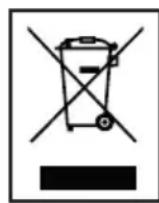
Old electric and electronic devices often contain valuable materials. However, they also contain harmful substances that were necessary for their functionality and safety. If these are placed with the non-recyclable waste or disposed of incorrectly, they can be harmful to human health and the environment. Never place your device with the non-recyclable waste.
DISCLAIMER
Updates to Firmware and/or hardware components are made regularly. Therefore some of the instruction, specifications and pictures in this documentation may differ slightly from your particular situation. All items described in this guide for illustration purposes only and may not apply to particular situation. No legal right or entitlements may be obtained from the description made in this manual.
WARRANTY
We provide a warranty of 24 months for this product. The warranty starts on the date of purchase and is intended for faults due to production or the used materials.
Your statutory warranty rights in accordance with 439 ff.
BGB-E will remain unaffected by this.
The warranty does not apply to damages as a result of improper
handling or use, nor to malfunctions that
only have a minor effect on the functionality or value of the product. Normal wear and tear, transport
damage, to the extent that we are not responsible for this, as
well as damages caused by repairs not
performed by us, are also excluded from the warrant.
This device is designed for household use and has the right performance levels.
Any use in commercial situations is only covered by the
warranty if the device is not put under a heavier
strain that in a household situation. The device is not intended for additional commercial use.
In the case of well-founded complaints, we will repair the
defective device at our discretion or replace it
with a device that shows no problems.
NEDERLANDS
LET OP:
DC 2 x AAA-batterijen (voor back-up)
AFVOER VAN HET OUDE APPARAAT