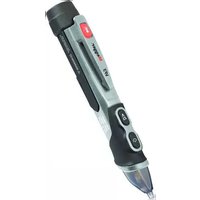
VF5 - Detector Megger - Free user manual and instructions
Find the device manual for free VF5 Megger in PDF.



| Product Type | Non-Contact AC Voltage Detector |
| Brand | Megger |
| Model | VF5 |
| Detection Range (Low Voltage Mode) | 12 V AC to 1000 V AC |
| Detection Range (Medium Voltage Mode) | 100 V AC to 1000 V AC |
| Frequency | 50/60 Hz |
| Power Supply | 2 AAA / LR03 1.5 V batteries |
| Auto Power Off | After approximately 5 minutes of inactivity |
| Protection Rating | IP67 (dust and watertight) |
| Operating Temperature | 0 °C to 50 °C |
| Storage Temperature | -10 °C to 60 °C |
| Maximum Relative Humidity | 80 % |
| Maximum Altitude | 2000 m |
| Pollution Degree | 2 |
| Safety Category | CAT IV 1000 V |
| Double Insulation | Yes |
| Indicators | Green LED (on), Red LED (voltage detected), Orange LED (low voltage mode), audible beep, vibration |
| Additional Functions | Flashlight, silent mode (disable beep and vibration) |
| Maintenance | Battery replacement (2x AAA), check operation before each use |
| Cleaning | Wipe with a damp cloth, do not use solvents |
| Available Spare Parts | AAA batteries (standard) |
| Warranty | Not specified, consult Megger |
| Country of Manufacture | China |
Frequently Asked Questions - VF5 Megger
User questions about VF5 Megger
0 question about this device. Answer the ones you know or ask your own.
Ask a new question about this device
Download the instructions for your Detector in PDF format for free! Find your manual VF5 - Megger and take your electronic device back in hand. On this page are published all the documents necessary for the use of your device. VF5 by Megger.
USER MANUAL VF5 Megger
AC voltage detector with flashlight
Quick start guide
EN - FR - ES - ESLT - DE
SAFETY WARNINGS
Read, understand and follow Safety Warnings and Operating Instructions in the manual before using this product.
The detector's safety features may not protect the user if not used in accordance with the manufacturer's instructions.
- Check on a known live source within the rated AC voltage range of the detector before use to ensure it is in working order.
■ Insulation type and thickness, distance from the voltage source, shielded wires, and other factors may affect reliable operation.
The VF5 may help in the indication of live AC circuits only and must not be used as verification of a de-energised circuit. This is not a Safety Test Lamp.
- Do not use if the detector appears damaged or if it is not operating property. If in doubt, replace the product.
■ Do not use on voltages that are higher than as marked on the VF5.
■ Use caution with voltages above 30 V AC as a shock hazard may exist.
■ Comply with all applicable safety codes. Use approved personal protective equipment when working near live electrical circuits—particularly with regard to arc-flash potential.
■ Do not operate detector if Low Battery warning occurs. Replace batteries immediately.
NOTE: The VF5 is unable to detect voltage on armoured or sheathed cable, or on cable in conduit, behind panels or in metallic enclosures.
CATIV Measurement category IV: Equipment connected between the origin of the low-voltage mains supply outside the building and the consumer unit.
CATIII Measurement category III: Equipment connected between the consumer unit and the electrical outlets.
CATII Measurement category II: Equipment connected between the electrical outlets and the user's equipment.
INTERNATIONAL SAFETY SYMBOLS :
⚠️ Potential danger. Indicates the user must refer to the manual for important safety information
Indicates hazardous voltages may be present
☐ Equipment is protected by double or reinforced insulation
CE Equipment complies with current EU directives
End of life disposal
Detector Description

-
Screw on battery cover
-
Torch
-
Torch button
-
12 ~V button
-
On/Off button
-
LED indicators
-
Detector tip
-
Work light
Operation
-
Turning the VF5 on: Momentarily press the detector ⏻ On/Off button. The sounder will beep once, vibrate once and the green LED will illuminate to indicate that the detector is on and ready for use.
-
Turning the VF5 off: Momentarily press the ⏻ On/Off button. The VF5 will beep twice, vibrate twice and the green LED will turn off.
-
Turning the Sounder off and Vibrating motor off: Turn the VF5 on as described above. The VF5 will now operate with both the sounder and the vibrating motor. To turn the sounder and vibrating motor off, press and hold the ⏻ On/Off button until the green LED flashes once. To turn the sounder and vibrating motor back on press and hold the ⏻ On/Off button until the green LED flashes, the sounder beeps and the unit vibrates.
-
Verify Operation: Before using VF5, (1) Make sure the green LED is glowing, (2) Check VF5 on a known live AC voltage that is within the defined detection range of the VF5.
-
Low Voltage Mode (12 V to 1000 V AC): Turn on the VF5. Press and hold the 12 V button. The green LED will change to orange to indicate the VF5 is in the low voltage mode. While pressing the 12 V button place the tip of the VF5 near an AC voltage. When AC voltage is detected the LED will turn red and flash, the sounder will beep and the detector will vibrate. The flash, beeping and vibration rate will increase as the VF5 gets closer to the voltage source. If the VF5 detects a medium voltage (100 V – 1000 V) it will automatically change over to the medium voltage mode, the red LED will change to a steady glow, the sounder will beep rapidly and the detector will vibrate constantly.
-
Medium Voltage Mode (100 V to 1000V AC): Place the tip of the VF5 near an AC voltage. If the VF5 detects voltage within the defined detection range the green LED will turn off, the red LED will turn on, the sounder will beep rapidly and the detector will vibrate constantly.
NOTE: The detector cannot determine the actual voltage. The voltage level where the detector switches from the low to medium voltage mode is affected by insulation type and thickness, distance from the voltage source, and other factors.
- Low Battery Indication: Replace the batteries if the green LED does not turn on. When the detector is on and the battery voltage is too low for reliable operation, the sounder will beep three times and the green LED will turn off indicating the detector is not operational. Replace the batteries to restore operation.
- Auto Power Off: To conserve battery life, the detector will automatically turn off after approximately 5 minutes of inactivity. When powering down the detector will beep twice and the green LED will turn off.
- Torch: Momentarily press the torch 📋 button to turn the torch on or off. To conserve battery life, the torch will automatically turn off after approximately 5 minutes.
NOTE: If the battery voltage is too low to operate the torch the detector will indicate this condition by beeping three times and the torch will turn off. The voltage detector has its own low battery threshold and may remain operational. Refer to Verify Operation (Step 4) in this guide before using detector.
Battery replacement
- Carefully unscrew battery cap at the rear (torch end) of the detector.
- Replace batteries with 2 x AAA 1.5V batteries. Observe polarity.
- Carefully align cap with detector as shown below.
- Screw cover onto the detector until it feels tight; do not use excessive force.
- Verify operation by using the detector on a known live AC voltage within the defined detection range of the detector.
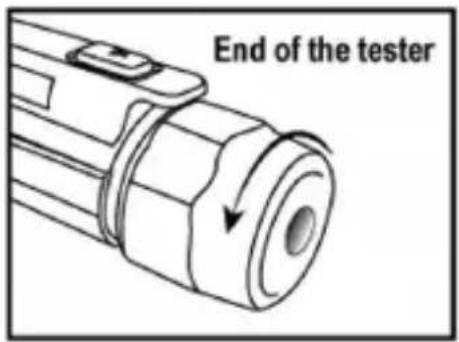
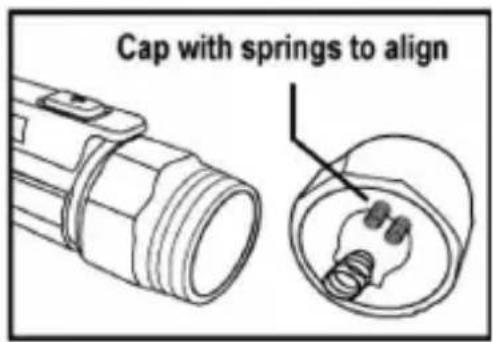
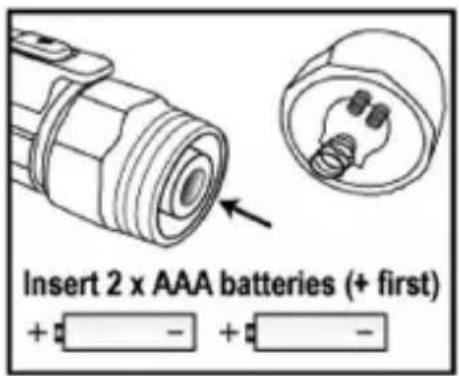

Note: When batteries are loaded for the first time, please remove the white rectangular security strip before installing.
When replacing the batteries, be sure to secure the cap firmly to maintain IP67 water and dust protection. A loose or over tightened battery cap may compromise water and dust protection.
Specifications
Detection voltage range 12 V AC to 1000 V AC, 100 V to 1000 V AC
Frequency range 50/60 Hz
Batteries 2 x AAA / LR03 1.5 V batteries
Ambient Operating temperature 0 °C to 50 °C (32 °F to 122 °F)
Storage temperature -10 °C to 60 °C (14 °F to 140 °F)
Humidity 80 % max.
Altitude 2000 metres
Pollution Degree 2
Safety Compliance CAT IV 1000 V
Auto Power Off 5 minutes
Ingress Protection Rating IP67
Megger.
Product manufactured in China
Note: For full details see the full VF5 User Guide at www.megger.com
Megger Limited
Archcliffe Road
Dover
Kent
CT17 9EN
Tel: +44 (0) 1304 502 101 Fax: +44 (0) 1304 207 342 www.megger.com
Megger®
VF5
Megger Instruments S.L. Nave 16,
Calle La Florida 1,
Parque Empresarial Villapark,

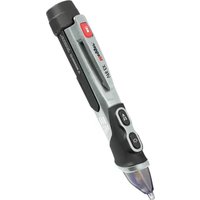
Brand : Megger
Model : VF5
Category : Detector