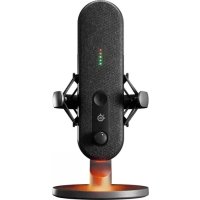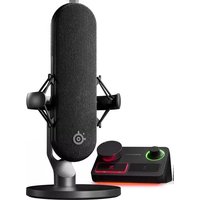
Alias Pro - Microphone STEELSERIES - Free user manual and instructions
Find the device manual for free Alias Pro STEELSERIES in PDF.



User questions about Alias Pro STEELSERIES
0 question about this device. Answer the ones you know or ask your own.
Ask a new question about this device
Download the instructions for your Microphone in PDF format for free! Find your manual Alias Pro - STEELSERIES and take your electronic device back in hand. On this page are published all the documents necessary for the use of your device. Alias Pro by STEELSERIES.
USER MANUAL Alias Pro STEELSERIES
natural_image
Line drawing of a vintage microphone with base and control panel (no text or symbols)ALIAS PRO
PRODUCT INFORMATION GUIDE
ASSUME YOUR ALIAS
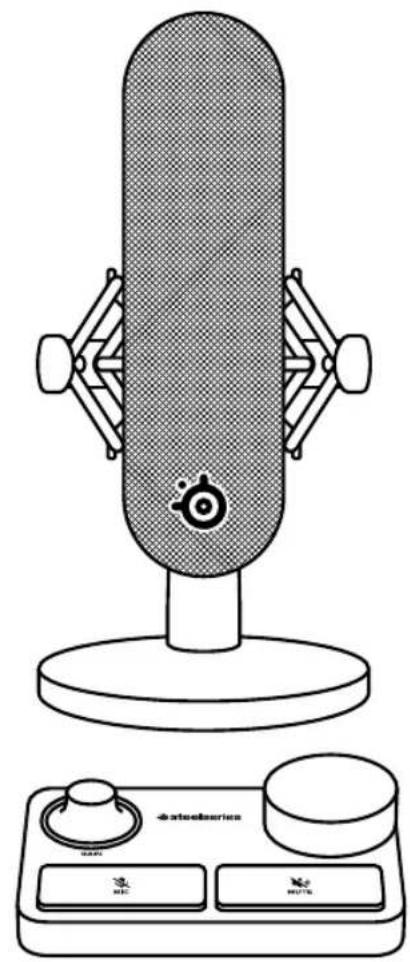
Aspiring streamers and veteran content creators alike pour countless hours and passion into producing ever-improving value for their audience. You've just taken an enormous step in raising the bar for your listeners, as the audio quality and features of the Alias Pro transmit your voice as it was meant to be.
Reach your listeners' ears and inspire them like never before with Alias Pro.
FOR GLORY
natural_image
Line drawing of a studio microphone with adjustable stand and control panel (no text or symbols)TABLE OF CONTENTS
General 5
Product Overview 7
Setup and Positioning 9
Attaching to a Boom Arm 12
Controls 14
Translations 15
Deutsch 15
Español 17
Français 19
Italiano 21
Polski 24
Português 26
日本語 28
简体中文 30
繁體中文 32
한국어 34
Regulatory 36
GENERAL
PACKAGE CONTENTS
| Alias Pro Microphone | XLR Cable |
| Alias Pro Stream Mixer | Power Adapter |
| Microphone Stand | Regional Power Adapter Clips |
| Boom Arm Adapter | Product Information Guide |
| 2× USB-C to USB-A Cable |
SYSTEM COMPATIBILITY
PC
SOFTWARE
text_image
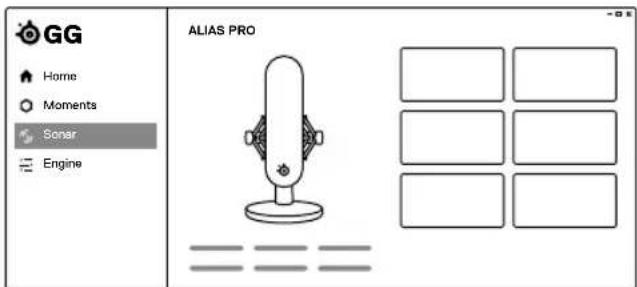
GG Home Moments Sonar Engine ALIAS PROUse Engine and Sonar inside GG to reveal the full power of your Alias Pro, including dual PC streaming audio support.
GG also includes a suite of other amazing apps like Engine, which allows you to manage your SteelSeries gear, and Moments to capture your most hype gaming clips.
Once you have installed Sonar, please enable Streamer mode for full Alias Pro functionality.

DOWNLOAD NOW FOR FREE
trysonar.gg/stream
MICROPHONE
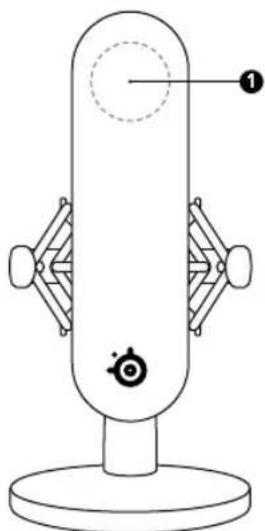
1 Microphone Capsule Area
2 Rear Venting Area
3 Shock Mount
4 Thumb Screw
5 XLR Port
6 Microphone Stand
natural_image
Line drawing of a vertical cylindrical device with labeled components and a base (no text or symbols)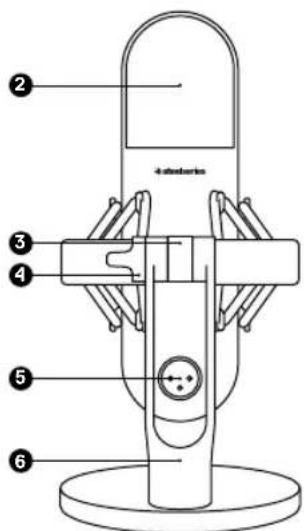
text_image
2 4-pin microphone 3 4 5 6STREAM MIXER
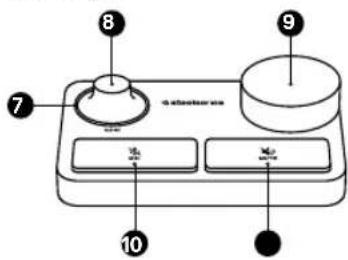
7 RGB Level Indicator Ring
8 Microphone Gain Dial
9 Programmable Volume Dial (default Headphone)
10 Microphone Mute Button
11 Programmable Mute Button (default Headphone)
12 +48V Phantom Power LED
13 XLR Port
14 USB-C Port 1
15 USB-C Port 2
16 Line Out (Please install GG/Sonar software to access this feature)
17 Power Button
18 Power Cable Port
19 3.5 mm Headphone Port
20 RGB Ambient Base Light
text_image
8 7 a selector box 9 10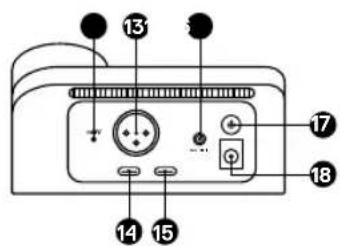
text_image
13 14 15 16 17 18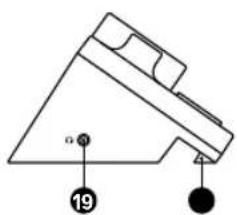
text_image
α 19* Find accessories and replacement parts at steelseries.com/gaming-accessories
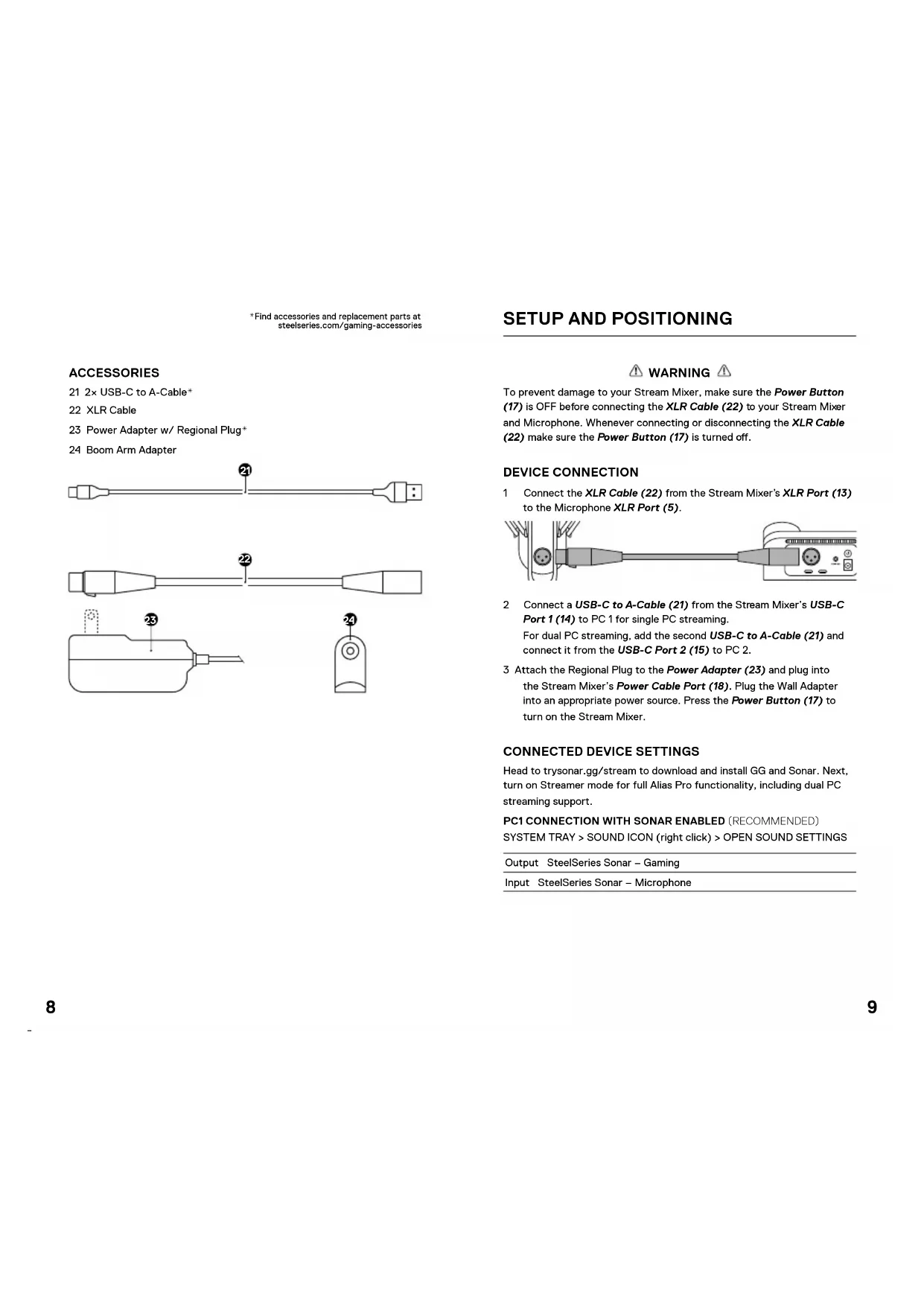
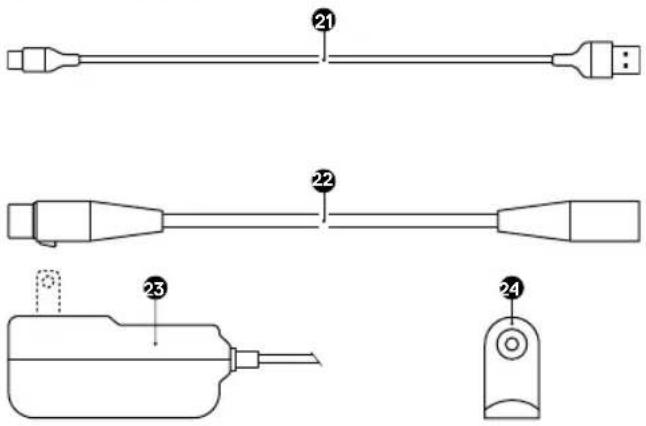
ACCESSORIES
21 2× USB-C to A-Cable*
22 XLR Cable
23 Power Adapter w/ Regional Plug
24 Boom Arm Adapter
text_image
Technical diagram showing labeled components of a mechanical or electrical component with numbered parts 21, 22, 23, and 24.SETUP AND POSITIONING
WARNING
To prevent damage to your Stream Mixer, make sure the Power Button (17) is OFF before connecting the XLR Cable (22) to your Stream Mixer and Microphone. Whenever connecting or disconnecting the XLR Cable (22) make sure the Power Button (17) is turned off.
DEVICE CONNECTION
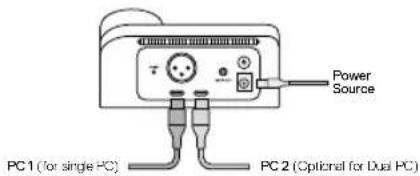
1 Connect the XLR Cable (22) from the Stream Mixer's XLR Port (13) to the Microphone XLR Port (5).

natural_image
Diagram of a cable connector with connectors and a device (no text or symbols visible)2 Connect a USB-C to A-Cable (21) from the Stream Mixer's USB-C Port 1 (14) to PC 1 for single PC streaming.
For dual PC streaming, add the second USB-C to A-Cable (21) and connect it from the USB-C Port 2 (15) to PC 2.
3 Attach the Regional Plug to the Power Adapter (23) and plug into the Stream Mixer's Power Cable Port (18). Plug the Wall Adapter into an appropriate power source. Press the Power Button (17) to turn on the Stream Mixer.
CONNECTED DEVICE SETTINGS
Head to trysonar.gg/stream to download and install GG and Sonar. Next, turn on Streamer mode for full Alias Pro functionality, including dual PC streaming support.
PC1 CONNECTION WITH SONAR ENABLED (RECOMMENDED)
SYSTEM TRAY > SOUND ICON (right click) > OPEN SOUND SETTINGS
Output SteelSeries Sonar - Gaming
Input SteelSeries Sonar - Microphone
PC1 CONNECTION WITHOUT SONAR ENABLED
SYSTEM TRAY > SOUND ICON (right click) > OPEN SOUND SETTINGS
Output SteelSeries Alias Pro Personal
Input SteelSeries Alias Pro Input
text_image
Power Source PC1 (for single PC) PC 2 (Optional for Dual PC)DESKTOP PLACEMENT
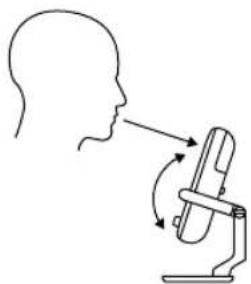
1 Place the Alias Pro Microphone on your desk facing your speaking position.
2 Tilt the Alias Pro Microphone until it reaches a perpendicular position to your face and align the Microphone Capsule Area (1) to your mouth.
natural_image
Diagram showing human head profile with a device interacting with a microphone (no text or symbols)3 Try to maintain a distance between 6" / 15 cm and 24" / 60 cm to the Microphone from your speaking position.
SET MIC LEVEL
1 While speaking into the Microphone from your regular seating position, turn the Microphone Gain Dial (8) on the Stream Mixer until the LED of the RGB Level Indicator Ring (7) turns green and with the LED turning Yellow for maximum speaking level.
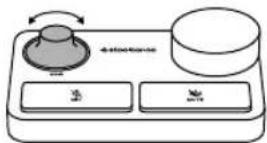
2 If the RGB Level Indicator Ring (7) turns red, decrease the Microphone Gain until the Level Indicator LEDs stay green. (The yellow LED Ring color is acceptable and a warning you are nearing maximum desired speaking level.)
MICROPHONE MUTE
Push the Microphone Mute Button (10) to mute the Microphone's input.
ATTACHING TO A BOOM ARM
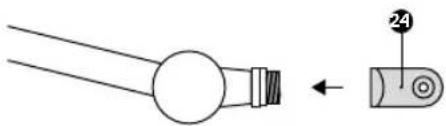
1 Secure the included Boom Arm Adapter (24) onto a Microphone Boom Arm (sold separately). The Boom Arm Adapter (24) supports 3/8" and 5/8" thread sizes.
natural_image
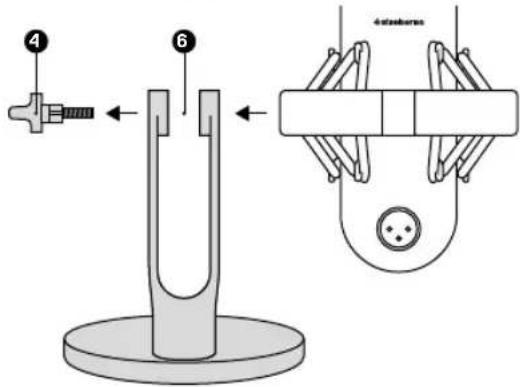
Pure mechanical component diagram showing a cylindrical shaft and a separate curved component with a numbered label (24), no text or symbols present.2 Remove the Thumb Screw (4) and Microphone Stand (6) from the Microphone. Note: The Shock Mount (3) should not be removed.
text_image
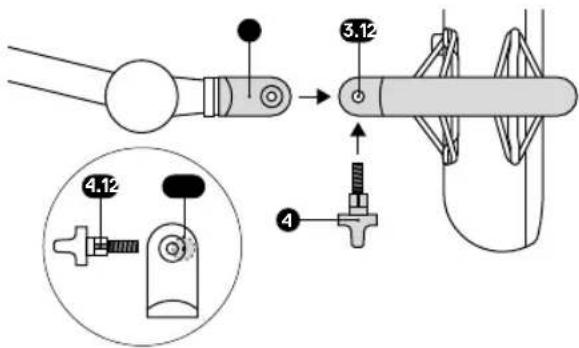
4 6 Autoshower3 Align the Boom Arm Adapter (24) with the Shock Mount Adapter Holes (3.1) and secure the Boom Arm Adapter (24) with the Thumb Screw (4). Make sure the Thumb Screw Insert Groove (4.1) lines up with the Boom Arm Adapter Hole Notch (24.1). Rotate the Thumb Screw (4) as needed to insert into the Boom Arm Adapter Hole.
text_image
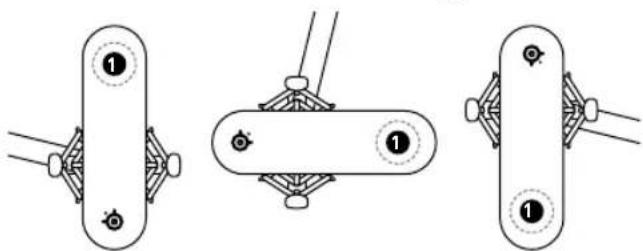
Technical diagram showing mechanical assembly with numbered components and a magnified inset view of a device component.4 Position your Boom Arm for use. For optimal performance, align the Microphone Capsule Area (1) to your speaking position. Note: Alias Pro can be rotated without affecting performance.
natural_image
Three mechanical linkage diagrams showing different configurations (no text or symbols)CONTROLS
To remap the programmable Dial and Mute and to change your RGB settings, use Engine/Sonar inside GG.
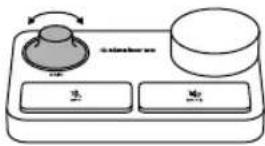
MICROPHONE GAIN
Turn the Microphone Gain Dial (8) clockwise to increase the Microphone Gain and counterclockwise to decrease it.
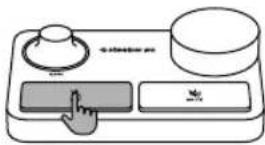
MICROPHONE MUTE
Press the Microphone Mute Button (10) to toggle Microphone Mute.
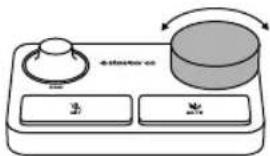
VOLUME DIAL
Turn the Programmable Volume Dial (9) clockwise to increase source volume and counterclockwise to decrease it (Default Headphone volume).
flowchart
graph TD
    A["Shin"] --> B["Cylinder"]
    C["Button 1"] --> D["Button 2"]
    E["Button 3"] --> F["Button 4"]
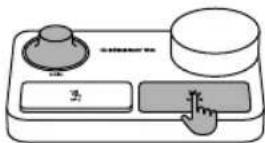
VOLUME MUTE
Press the Programmable Mute Button (11) to toggle Volume Mute. (Default Headphone mute).
TRANSLATIONS
DEUTSCH
ALLGEMEIN
LIEFERUMFANG
Alias Pro Mikrofon
XLR-Kabel
Alias Pro Stream Mixer
Netzteil
Mikrofonständer
Uscita Sonar SteelSeries - Gaming
Ingresso Sonar SteelSeries - Microfono
*在steelseries.com/gaming-accessories查找配件和替换件
设置和定位
*在steelseries.com/gaming-accessories查找配件和替换件
設定和定位
Europe – EU Declaration of Conformity
Hereby, SteelSeries ApS, declares that the equipment which is compliance with directive RoHS 2.0 (2015/863/EU), EMC Directive (2014/30/EU), and LVD (2014/35/EU) which are issued by the Commission of the European Community.
The full text of the EU declaration of conformity is available at the following internet address: https://support.steelseries.com/hc/en-us/categories/360001256111-Other-Stuff
SteelSeries ApS, hereby confirms, to date, based on the feedback from our suppliers indicates that our products shipping to the EU territory comply with REACH (Registration, Evaluation, Authorization, and Restriction of Chemicals - (EC) 1907/2006) compliance program. We are fully committed to offering REACH compliance on the products and posting accurate REACH compliance status for the all of products.

UK Declaration of Conformity
Hereby, SteelSeries ApS. declares that the following equipment which is compliance with Electromagnetic Compatibility Regulations 2016, Electrical Equipment (Safety) Regulations 2016 and The Restriction of the Use of Certain Hazardous Substances in Electrical and Electronic Equipment Regulations 2012 issued by the Department for Business, Energy & Industrial Strategy. The full text of the UK declaration of conformity is available at the following internet address: https://support.steelseries.com/hc/en-us/categories/360001256111-Other-Stuff

WEEE
This product must not be disposed of with your other household waste or treat them in compliance with the local regulations or contact your local city office, your household waste disposal service or the shop where you purchased the product.
Turkey RoHS Compliance
Republic of Turkey: In conformity with the EEE Regulation
Federal Communication Commission Interference Statement
This device complies with Part 15 of the FCC Rules. Operation is subject to the following two conditions:
- This device may not cause harmful interference, and
- this device must accept any interference received, including interference that may cause undesired operation.
This equipment has been tested and found to comply with the limits for a Class B digital device, pursuant to Part 15 of the FCC Rules. These limits are designed to provide reasonable protection against harmful interference in a residential installation. This equipment generates, uses and can radiate radio frequency energy and, if not installed and used in accordance with the instructions,
may cause harmful interference to radio communications. However, there is no guarantee that interference will not occur in a particular installation. If this equipment does cause harmful interference to radio or television reception, which can be determined by turning the equipment off and on, the user is encouraged to try to correct the interference by one of the following measures:
- Reorient or relocate the receiving antenna.
- Increase the separation between the equipment and receiver.
- Connect the equipment into an outlet on a circuit different from that to which the receiver is connected.
- Consult the dealer or an experienced radio/TV technician for help.
Industry Canada Statement
This device complies with RSS standards of the Industry Canada Rules. Operation is subject to the following two conditions:
- This device may not cause harmful interference, and
- this device must accept any interference received, including interference that may cause undesired operation.
This Class B digital apparatus complies with Canadian ICES-003.
The RoHS test method is based on the standards JIS C 0950 and CNS 15663.
| 原元Unit | 限用物質及其化学符號Restricted substances and its chemical symbols | |||||
| 鉛Lead(Pa) | 汞Mercury(Hg) | 銅Cadmium(Cd) | 六倍铬Hexavalent chromium(Cr+6) | 多溴聯苯Poly brominated biophenyls(PBB) | 多溴二苯醚Poly-brominated diphenyl ethers(PBDE) | |
| 塑膠部件Plastic | ○ | ○ | ○ | ○ | ○ | ○ |
| 電路板及元件PCBA | - | ○ | ○ | ○ | ○ | ○ |
| 線材Cables | - | ○ | ○ | ○ | ○ | ○ |
| 金屬部件Metal | - | ○ | ○ | ○ | ○ | ○ |
| 備考1 “評出0.1wt%”及“超出0.01wt%”條指限用物質之百分比含量超过百分比含量基本值。Note 1 “Exceeding 0.1 wt %” and “exceeding 0.01 wt %” indicate that the percentage content of the restricted substance exceeds the reference percentage value of presence condition.備考2 ○係指被項限用物質之百分比含量大超出百分比含量基準值。Note 2 ○indicates that the percentage content of the restricted substance does not exceed the percentage of reference value of presence.備考3 — 係指該項限用物質為期除項目。Note 3 — indicates that the restricted substance corresponds to the exemption | ||||||
| Region Address Telephone | |
| Asia亞洲 | 4F.-4, No. 186, Jian 1st Rd.,Zhonghe Dist., New Taipei City, Taiwan新北市中和區建一路186號4樓及4樓之4 |
| Europe Havncholmen 8, 1st Floor,2450 Copenhagen SV, Denmark | +45 702 500 75 |
| USA SteelSeries AoS.,656 W Randolph St., Suite 3E,Chicago, IL 60661, USA | +1 312 258 9467 |
More information and support from steelseries.com

ACMA Compliance
(Australia/New Zealand)

Direct Current
Product Name (產品名稱): Microphone with Mixer Box (麥克風與混音器)
Model No. (型號): M102
Rated (規格): 12V = 1.5A
Accessories information (配件資訊)
Product Name (產品名稱): AC/DC Adaptor (電源供應器)
Manufacturer (製造商): Shenzhen Simsukian Electronics Technology Co., Ltd.
(深圳市森树强电子科技有限公司)
Model No. (型號): SK02T-1200150Z
Rated (規格):
Input (输入): 100-240V\~50/60Hz 0.5A Max.
Output (輸出): 12V = 1.5A, 18W
Made in China /中國製造