Alias - Microphone STEELSERIES - Free user manual and instructions
Find the device manual for free Alias STEELSERIES in PDF.



| Brand | SteelSeries |
| Model | Alias |
| Product type | USB condenser microphone |
| System compatibility | PC (Windows, macOS) |
| Connectivity | USB-C to USB-A |
| Power supply | Via USB port (bus-powered) |
| Headphone output | 3.5mm jack with gain control |
| Lighting | RGB LED with level indicator and lighting zone |
| Mute button | Yes, touch |
| Control software | SteelSeries GG Engine (Sonar included) |
| Included accessories | USB-C to USB-A cable, stand adapter (3/8" and 5/8" threads), shock mount |
| Weight (estimated) | Approx. 1 kg (with stand) |
| Dimensions (estimated) | Height ~30 cm (on stand), diameter ~10 cm |
| Care and cleaning | Wipe with a soft, dry cloth; avoid liquids |
| Safety | Do not expose to moisture, extreme temperatures, or strong impacts |
| Spare parts available | USB cable, stand adapter, shock mount (at steelseries.com) |
| Repairability | Spare parts available; user repair not recommended |
Frequently Asked Questions - Alias STEELSERIES
User questions about Alias STEELSERIES
0 question about this device. Answer the ones you know or ask your own.
Ask a new question about this device
Download the instructions for your Microphone in PDF format for free! Find your manual Alias - STEELSERIES and take your electronic device back in hand. On this page are published all the documents necessary for the use of your device. Alias by STEELSERIES.
USER MANUAL Alias STEELSERIES
natural_image
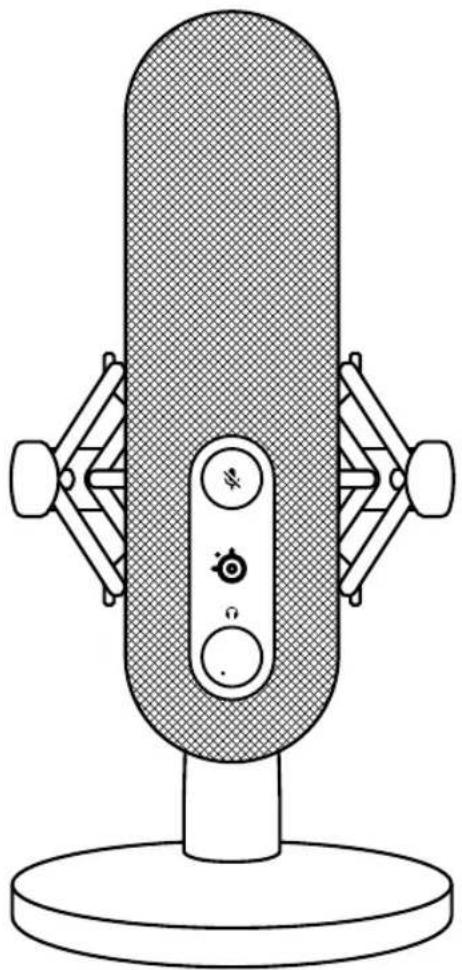
Line drawing of a classic desktop microphone with no text or symbolsALIAS
PRODUCT INFORMATION GUIDE
ASSUME YOUR ALIAS
Aspiring streamers and veteran content creators alike pour countless hours and passion into producing ever-improving value for their audience. You've just taken an enormous step in raising the bar for your listeners, as the audio quality and features of the Alias transmit your voice as it was meant to be.
Reach your listeners' ears and inspire them like never before with Alias.
FOR GLORY
natural_image
Line drawing of a vintage desktop microphone with adjustable knobs and a base (no text or symbols)TABLE OF CONTENTS
General 5
Product Overview 6
Setup and positioning 8
Attaching to a Boom Arm 10
Translations 12
Deutsch 12
Español 13
Français 14
Italiano 16
Polski 17
Português 19
日本語 20
简体中文 21
繁體中文 22
한국어 24
Regulatory 26
GENERAL
PACKAGE CONTENTS
Alias Microphone
Microphone Stand
Boom Arm Adapter
USB-C to USB-A Cable
Product Information Guide
SYSTEM COMPATIBILITY
PC
SOFTWARE
text_image
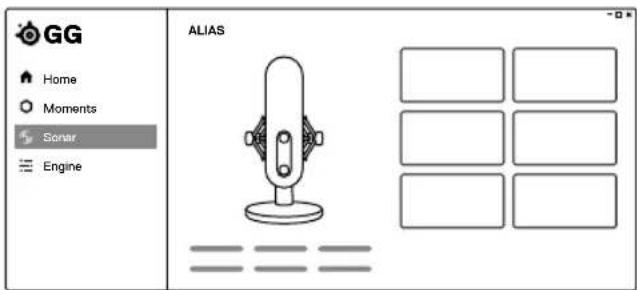
GG Home Moments Sonar Engine ALIASUse Engine inside SteelSeries GG to control your mic.
GG also has other amazing apps like Sonar, a breakthrough in gaming sound, that allows you to hear what matters most, through cutting-edge audio tools.

DOWNLOAD NOW
steelseri.es/gg
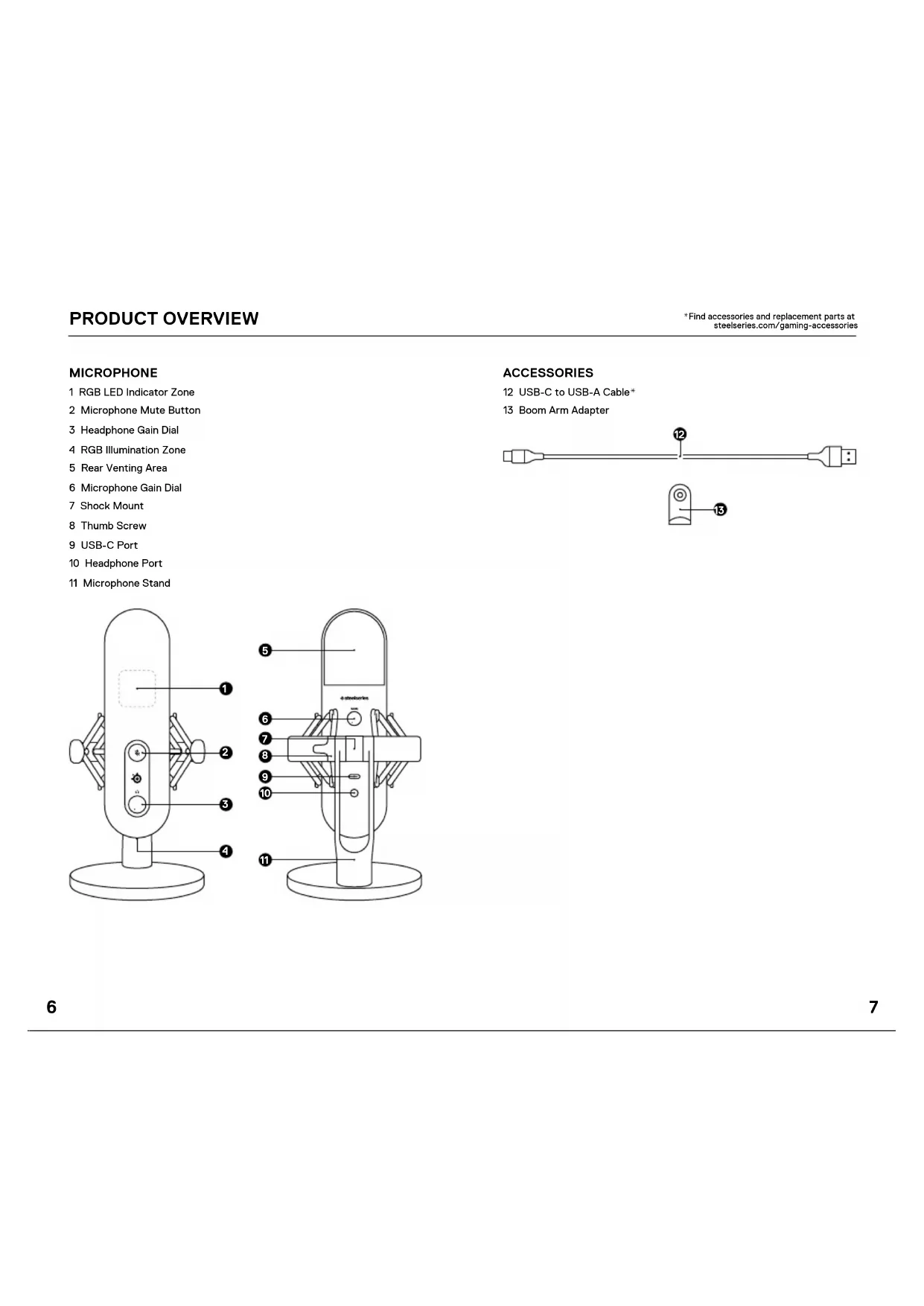
MICROPHONE
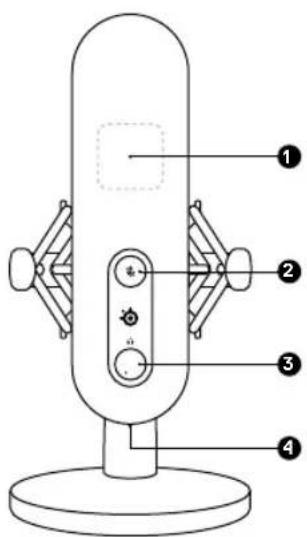
1 RGB LED Indicator Zone
2 Microphone Mute Button
3 Headphone Gain Dial
4 RGB Illumination Zone
5 Rear Venting Area
6 Microphone Gain Dial
7 Shock Mount
8 Thumb Screw
9 USB-C Port
10 Headphone Port
11 Microphone Stand
text_image
Diagram of a digital camera with numbered parts labeled 1 to 4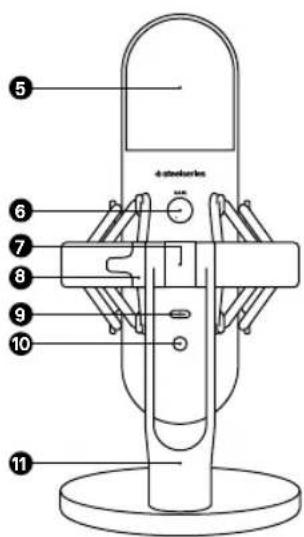
text_image
4-pin microphone 5 6 7 8 9 10 11ACCESSORIES
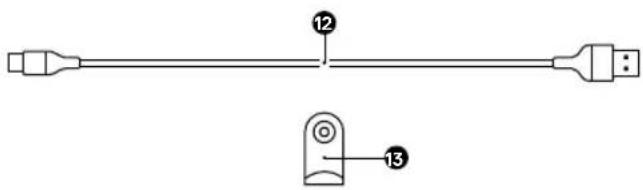
12 USB-C to USB-A Cable*
13 Boom Arm Adapter
text_image
Technical diagram showing a mechanical or electrical component with labeled parts 12 and 13, likely for assembly or labeling.DEVICE CONNECTION
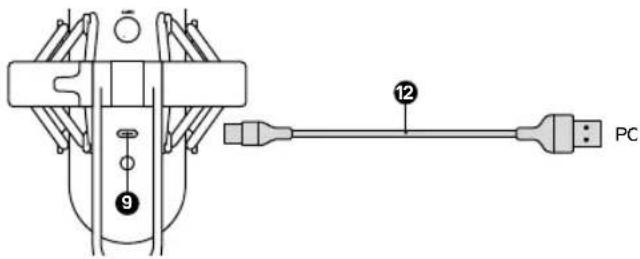
1 Connect the USB-C to A Cable (12) to the USB-C Port (9) on the Alias Microphone.
2 Connect the USB-C to A Cable (12) to your PC's USB-A Port.
text_image
9 12 PCPC Settings
SYSTEM TRAY > SOUND ICON (right click) > OPEN SOUND SETTINGS
Output SteelSeries Alias
Input SteelSeries Alias
HEADPHONE CONNECTION
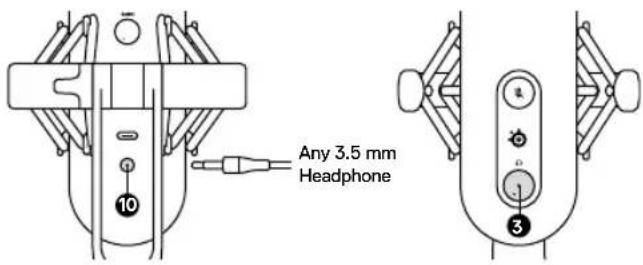
1 Connect your 3.5 mm Headphone Cable to the Headphone Port (10) on the Alias Microphone.
2 Turn the Headphone Gain Dial (3) on the front of the Microphone to increase / decrease the Headphone Output Level.
text_image
Any 3.5 mm HeadphoneDESKTOP PLACEMENT
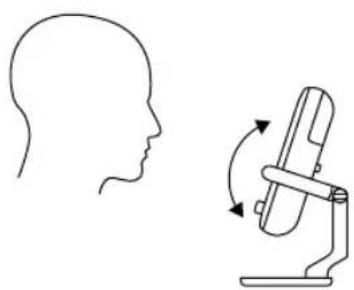
1 Place the Alias Microphone on your desk facing your speaking position.
2 Tilt the Alias Microphone until it reaches a perpendicular position to your face.
natural_image
Side-view line drawing of a human head profile alongside a simple diagram of a device with rotation arrows (no text or symbols)3 Try to maintain a distance within 24" / 60 cm from the Microphone to your speaking position.
SET MIC LEVEL
1 While speaking into the Microphone from your regular seating position, turn the Microphone Gain Dial (6) on the back of the Microphone until the Level Indicator LEDs of the RGB LED Indicator Zone (1) turn green and the fourth LED turns Yellow for maximum speaking level.
2 If the RGB LED Indicator Zone (1) turns red, decrease the Microphone Gain until the Level Indicator LEDs stay green. (The yellow LED above green is acceptable and a warning you are nearing maximum desired speaking level.)
MICROPHONE MUTE
Push the Microphone Mute Button (2) to mute the Microphone's input.
ATTACHING TO A BOOM ARM
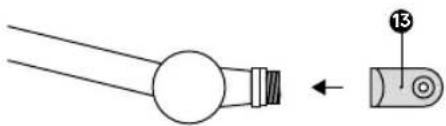
1 Secure the included Boom Arm Adapter (13) onto a Microphone Boom Arm. The Boom Arm Adapter (13) supports 3/8" and 5/8" thread sizes.
natural_image
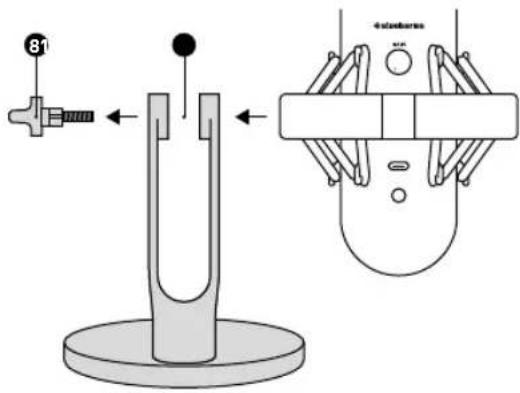
Pure diagram of two mechanical components with no text or symbols2 Remove the Thumb Screw (8) and Microphone Stand (11) from the Microphone.
text_image
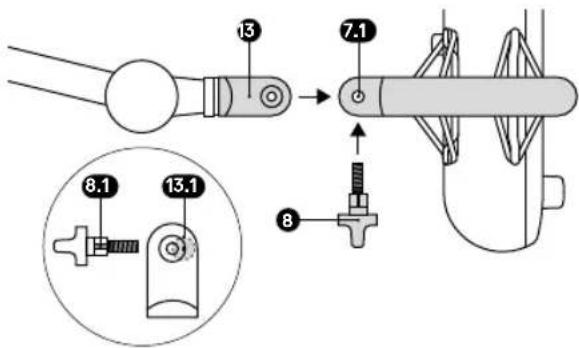
81 dual pendulum3 Align the Boom Arm Adapter (13) with the Shock Mount Adapter Holes (7.1) and secure the Boom Arm Adapter (13) with the Thumb Screw (8). Make sure the Thumb Screw Insert Groove (8.1) lines up with the Boom Arm Adapter Hole Notch (13.1). Rotate the Thumb Screw as needed to insert into the Boom Arm Adapter Hole.
text_image
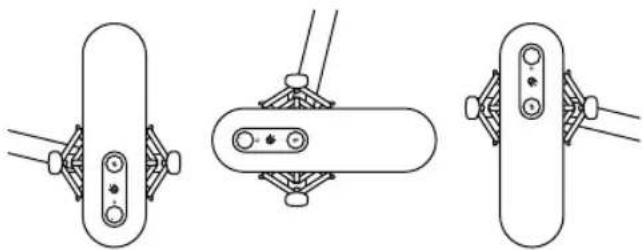
13 7.1 8.1 13.1 84 Position your boom arm for use. Note: Alias can be rotated without affecting performance.
natural_image
Three technical line drawings of mechanical clamping components (no text or symbols)TRANSLATIONS
DEUTSCH
ALLGEMEIN
LIEFERUMFANG
Alias-Mikrofon
Mikrofonständer
Schwenkarm-Adapter
Europe – EU Declaration of Conformity
Hereby, SteelSeries ApS, declares that the equipment which is compliance with directive RoHS 2.0 (2015/863/EU), EMC Directive (2014/30/EU), and LVD (2014/35/EU) which are issued by the Commission of the European Community.
The full text of the EU declaration of conformity is available at the following internet address: https://support.steelseries.com/hc/en-us/categories/360001256111-Other-Stuff SteelSeries ApS, hereby confirms, to date, based on the feedback from our suppliers indicates that our products shipping to the EU territory comply with REACH (Registration, Evaluation, Authorization, and Restriction of Chemicals - (EC) 1907/2006) compliance program. We are fully committed to offering REACH compliance on the products and posting accurate REACH compliance status for the all of products.

UK Declaration of Conformity
Hereby, SteelSeries ApS, declares that the following equipment which is compliance with Electromagnetic Compatibility Regulations 2016, Electrical Equipment (Safety) Regulations 2016, and The Restriction of the Use of Certain Hazardous Substances in Electrical and Electronic Equipment Regulations 2012 issued by the Department for Business, Energy & Industrial Strategy. The full text of the EU declaration of conformity is available at the following internet address: https://support.steelseries.com/hc/en-us/categories/360001256111 Other Stuff

WEEE
This product must not be disposed of with your other household waste or treat them in compliance with the local regulations or contact your local city office, your household waste disposal service or the shop where you purchased the product.
Turkey RoHS Compliance
Republic of Turkey: In conformity with the EEE Regulation
Federal Communication Commission Interference Statement
This device complies with Part 15 of the FCC Rules. Operation is subject to the following two conditions:
- This device may not cause harmful interference, and
- this device must accept any interference received, including interference that may cause undesired operation.
This equipment has been tested and found to comply with the limits for a Class B digital device, pursuant to Part 15 of the FCC Rules. These limits are designed to provide reasonable protection against harmful interference in a residential installation. This equipment generates, uses and can radiate radio frequency energy and, if not installed and used in accordance with the instructions, may cause harmful interference to radio communications. However, there is no guarantee that interference will not occur in a particular installation. If this equipment does cause harmful interference to radio or television reception, which can be determined by turning the equipment off and on, the user is encouraged to try to correct the interference by one of the following measures:
- Reorient or relocate the receiving antenna.
- Increase the separation between the equipment and receiver.
- Connect the equipment into an outlet on a circuit different from that to which the receiver is connected.
- Consult the dealer or an experienced radio/TV technician for help.
Industry Canada Statement
This device complies with Industry Canada license-exempt RSS standard(s). Operation is subject to the following two conditions:
- this device may not cause interference, and
- this device must accept any interference, including interference that may cause undesired operation of the device.
This Class B digital apparatus complies with Canadian ICES-003.
| Region Address Telephone | |
| Asia亞洲 | 4F and 4F.-4, No. 186, Jian 1st Rd., Zhonghe Dist., New Taipei City 235, Taiwan新北市中和區建一路186號4F及4F-4 |
| Europe Havncholmen 8, 1st Floor, DK-2450 Copenhagen SV, Denmark | +45 702 500 75 |
| USA SteelSeries AoS., 656 W Randolph St., Suite 3E, Chicago, IL 60661, USA | +1 312 258 9467 |
More information and support from steelseries.com

ACMA Compliance
(Australia/ New Zealand)

Direct Current

仅适用于海拔2000m以下地区安全使用
Model No. (型號/型号): M103
Rated (規格/規格): 5V = 200mA
Operating Temperature: 0 to +40°C
产品使用環境溫度: 0 - 40度