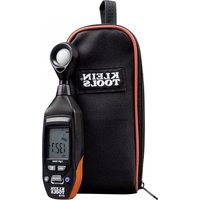
ET130 - Lux meter Klein Tools - Free user manual and instructions
Find the device manual for free ET130 Klein Tools in PDF.



| Product Type | Light Meter |
| Brand | Klein Tools |
| Model | ET130 |
| Measurement Range | 0 to 4,000 FC / 0 to 40,000 lux |
| Resolution | 0.01 FC / 0.1 lux |
| Accuracy | ±5% of reading + ±10 (at <10,000 lux); ±10% + ±10 (at >10,000 lux) |
| Repeatability | ±3% |
| Sampling Rate | 2 times per second |
| Sensor | Silicon photodiode with spectral response filter |
| Display | 3-3/4 digit LCD with bar graph |
| Functions | HOLD, MAX/MIN, backlight, auto power off, auto/manual ranging, FC/Lux selection |
| Power Supply | 9V battery |
| Dimensions | 206 x 54 x 36 mm |
| Weight | 156 g (with battery) |
| Operating Temperature | 0°C to 40°C |
| Storage Temperature | -10°C to 60°C |
| Relative Humidity | <80% (non-condensing) |
| Operating Altitude | 2000 m |
| Spectral Range | 400 to 760 nm |
| Tripod Mount | 1/4-20 UNC |
| Drop Protection | 1 m |
| Maintenance and Cleaning | Wipe with a lint-free cloth; do not use solvent |
| Safety | Do not touch live conductors; wear eye protection |
| Repairability | No user-serviceable parts |
Frequently Asked Questions - ET130 Klein Tools
User questions about ET130 Klein Tools
0 question about this device. Answer the ones you know or ask your own.
Ask a new question about this device
Download the instructions for your Lux meter in PDF format for free! Find your manual ET130 - Klein Tools and take your electronic device back in hand. On this page are published all the documents necessary for the use of your device. ET130 by Klein Tools.
USER MANUAL ET130 Klein Tools
• MEASUREMENTS IN FOOT CANDLES (FC) AND LUX
- DATA HOLD
• MAX/MIN
• BACKLIT
LCD SCREEN
text_image
FC/ LUX HOLD MAX/ MIN LCD I...... APO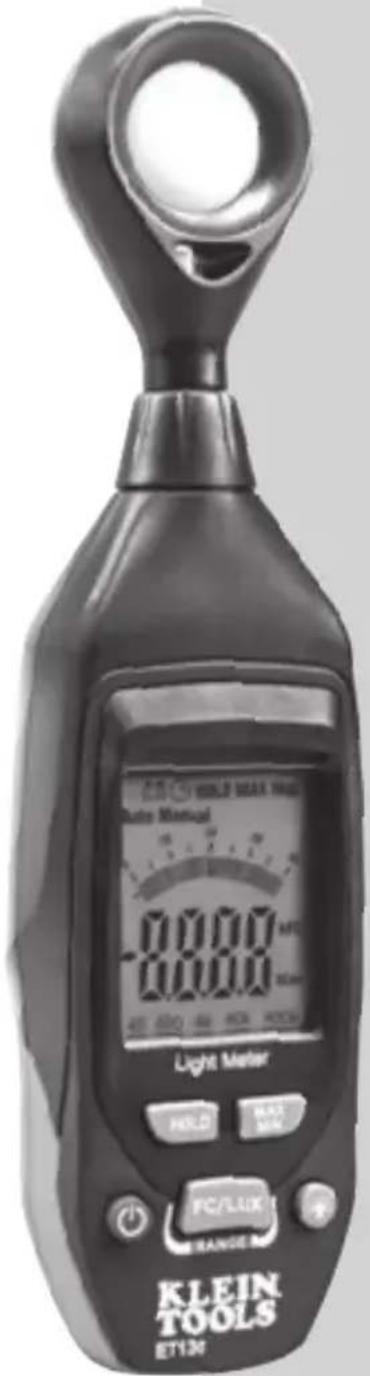
text_image
WABLE MAX METER Auto Manual 0000 0000 450 600 800 900 Light Meter HLD MAX MAX FC/LUX RANGE KLEIN TOOLS ET134ESPAÑOL pg. 7
FRANÇAIS pg. 13
ENGLISH
GENERAL SPECIFICATIONS
Klein Tools ET130 is an easy-to-use precision light meter that measures illuminance levels in both Foot Candles (FC) and Lux.
• Spectral Range: 400 to 760 nm; white light CIE standard
- Range: 0 to 4,000 FC; 0 to 40,000 Lux (1 FC = 10.76 Lux)
• Resolution: 0.01 FC / 0.1 Lux
- Repeatability: +/- 3%
- Accuracy: +/- 5% reading +/-10 digits @ <10,000 Lux +/- 10% reading +/-10 digits @ >10,000 Lux
• Sample Rate: 2 times per second
- Sensor: Silicon photodiode with spectral response filter
- Battery: 9V
• Operating Altitude: 6562 ft. (2000 m)
• Relative Humidity: <80% non-condensing
• Operating Temp: 32° to 104°F (0° to 40°C)
• Storage Temp: 14° to 140°F (-10° to 60°C)
- Dimensions: 8.1" x 2.1" x 1.4" (206 x 54 x 36 mm)
• Weight: 5.5 oz. (156 g) including batteries
- Tripod Mount: 1/4-20 UNC
• Calibration: Accurate for one year
- Drop Protection: 3.3 ft. (1m)
Specifications subject to change.
⚠️ WARNINGS
To ensure safe operation and service of the meter, follow these instructions. Failure to observe these warnings can result in severe injury or death.
- Read the instructions to ensure safe operation.
- Meter is NOT insulated. Avoid contact with areas where energized conductive elements may be present.
• Always wear approved eye protection.
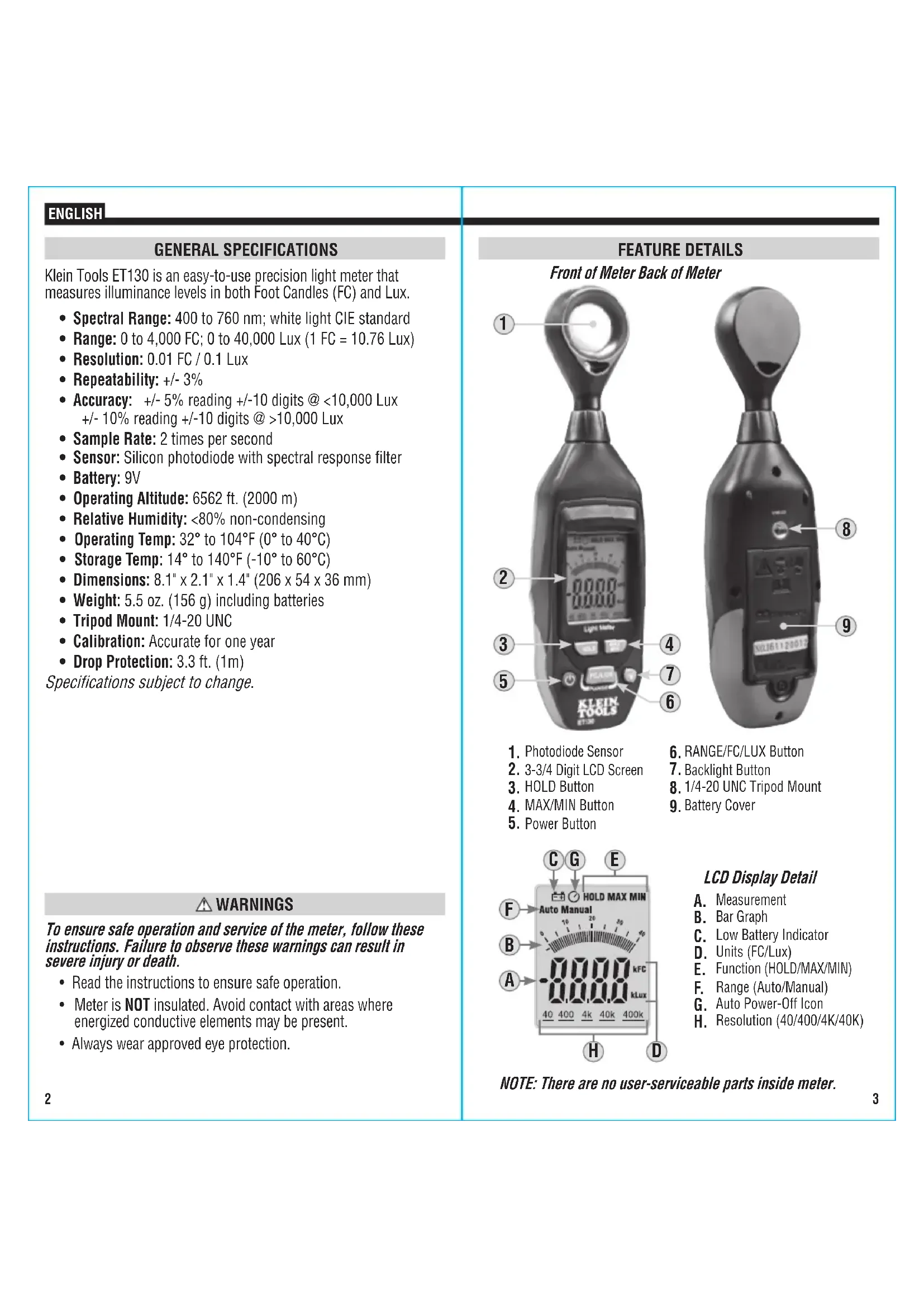
FEATURE DETAILS
Front of Meter Back of Meter
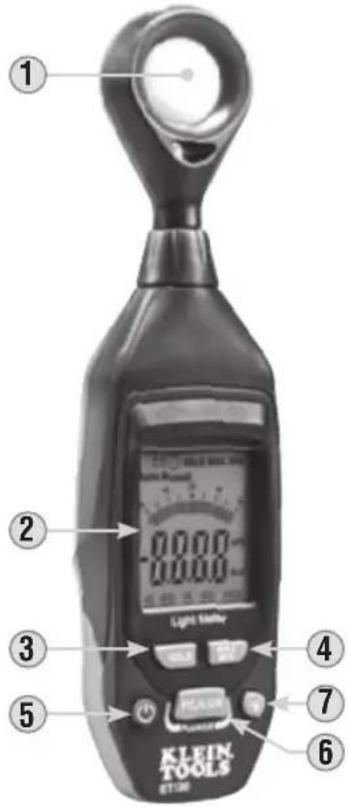
text_image
① ② 0.000 0.000 Light Satby ③ ④ ⑤ HEAVES 7 6 KLEIN TOOLS ET:30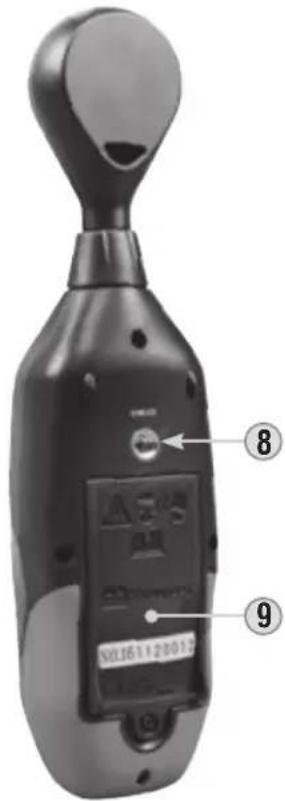
text_image
⑧ ⑨ XJ161120012- Photodiode Sensor
- 3-3/4 Digit LCD Screen
- HOLD Button
- MAX/MIN Button
-
Power Button
-
RANGE/FC/LUX Button
-
Backlight Button
-
1/4-20 UNC Tripod Mount
-
Battery Cover
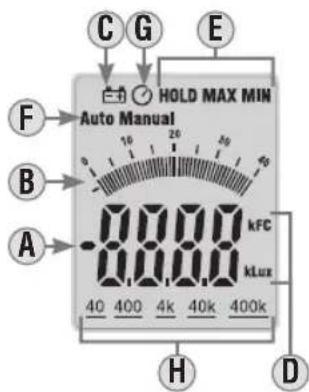
text_image
C G E HOLD MAX MIN Auto Manual F B A -8.88.8 kFC kLux 40 400 4k 40k 400k H DLCD Display Detail
A. Measurement
B. Bar Graph
C. Low Battery Indicator
D. Units (FC/Lux)
E. Function (HOLD/MAX/MIN)
F. Range (Auto/Manual)
G. Auto Power-Off Icon
H. Resolution (40/400/4K/40K)
NOTE: There are no user-serviceable parts inside meter.
ENGLISH
FEATURE DETAILS
SPECTRAL SENSITIVITY CHARACTERISTIC
The meter's spectral response aligns with the C.I.E. (International Commission of Illumination) standard.
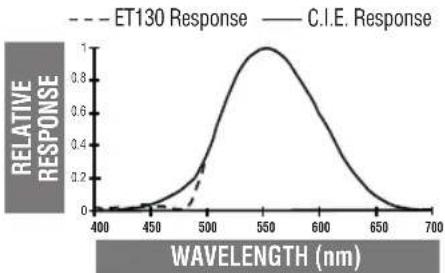
line
| Wavelength (nm) | ET130 Response | C.I.E. Response | | --------------- | -------------- | --------------- | | 400 | 0.0 | 0.0 | | 450 | 0.0 | 0.0 | | 500 | 0.2 | 0.6 | | 550 | 1.0 | 1.0 | | 600 | 0.6 | 0.8 | | 650 | 0.2 | 0.4 | | 700 | 0.0 | 0.0 |FUNCTION BUTTONS
ON/OFF
A short press of the Power Button ⑤ will power on and off the meter.
AUTO POWER-OFF
Auto Power-Off will automatically turn off the meter after 10 minutes of inactivity. When powered on, Auto Power-Off is enabled by default. A long press of the Power On/Off Button ⑤ for more than three seconds will disable the Auto Power-Off function, and the Auto Power-Off icon G will disappear from the display. A second long press will re-enable Auto Power-Off, and the Auto Power-Off icon will reappear.
BACKLIGHT
When powered on, the backlight is off by default. Press the Backlight button ⑦ to turn the backlight on or off. Backlight will remain on until it or the meter itself is turned off.
RANGE/FC/LUX
When powered on, the meter defaults to measuring in Foot Candles (FC). To switch to Lux, long-press the RANGE/FC/LUX button ⑥ for more than three seconds. A second long-press will switch back to FC. Note the Units icon D on the display.
Short presses of the RANGE/FC/LUX button will toggle the meter between Auto-ranging and Manual-ranging modes. Note the Range icon F on the display.
- When in Lux mode, short-pressing will toggle (in order) between Auto, Manual (400), Manual (4k) and Manual (40k).
- When in Foot Candle (FC) mode, short-pressing will toggle (in order) between Auto, Manual (40), Manual (400) and Manual (4k).
Note the measurement resolution icon(s) Ⓗ on the display when toggling between Manual modes.
DATA HOLD
Press the HOLD button ③ to hold the current measurement on the display. Press again to return to live measuring mode.
MAX/MIN
Short presses of the MAX/MIN button ④ will toggle (in order) between Maximum Value (MAX), Minimum Value (MIN) and Measurement mode.
OPERATING INSTRUCTIONS
- Power on the meter, then use the RANGE/FC/LUX to select FC or Lux and to select Auto or Manual range, as described in FUNCTION BUTTONS section.
- If desired, press the backlight button to turn on the display backlight, as described in FUNCTION BUTTONS section.
- Face the photodiode sensor horizontal to the light source, and read LCD display.
- If desired, use the function buttons to select HOLD or MAX/MIN, as described in FUNCTION BUTTONS section.
- If desired, the meter can be mounted to any standard 1/4-20 tripod via the tripod mount ⑧ on the back of the unit.
LIGHTING TYPE CORRECTION FACTORS
The meter is calibrated under a standard tungsten light source of 2856^ K. If the meter is to be used under a different type of light, the correction factors below should be applied for maximum accuracy:
| Incandescent 1.00 | Daylight fluorescent | 0.99 |
| Daylight 1.00 | Mercury Lamp | 1.14 |
| Metal Halide 1.00 | Sodium Lamp | 1.22 |
| White fluorescent 1.00 |
IES RECOMMENDED ILLUMINATION*
| Location Lux FC | |||
| Office Con | erence Room 200-750 18-70 | ||
| Office area 500-750 47-70 | |||
| Lobbies, lounges 100-200 9-18 | |||
| School | Auditorium, Gymnasium | 100-300 | 9-28 |
| Class room | 200-750 18-70 | ||
| Library, Drafting, Laboratory | 500-1500 | 47-140 | |
| Hospital | Rooms | 100-300 9-28 | |
| Emergency Room | 500-1000 | 47-93 | |
| Operating Room | 1000-2000 | 93-186 | |
| Factory | Packing work | 150-300 | 14-28 |
| Parts assembly | 1500 -3000 | 140-280 | |
| Inspection work | 750-1500 | 70-140 | |
| Store | Stairs, Corridor | 150-200 | 14-18 |
| Stockroom | 100-300 9-28 | ||
| Merchandising | 750-1500 | 70-140 | |
*The Lighting Handbook 10th Edition, Illuminating Engineering Society
NOTE: 1 Foot Candle (FC) = 10.76 Lux
ENGLISH
MAINTENANCE
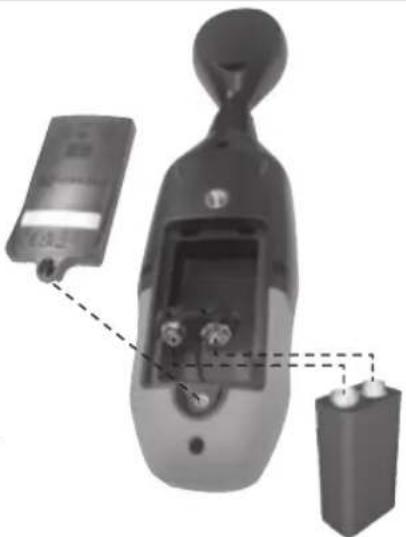
BATTERY REPLACEMENT
When the indicator is displayed on the LCD, the battery must be replaced.
- Remove screw and remove battery door ⑨.
- Remove and recycle spent 9V battery.
- Install new 9V battery.
- Replace battery door and fasten securely with screw.
natural_image
Diagram of a handheld device with labeled components, showing internal components and connections (no readable text or symbols)CLEANING
Be sure meter is turned off and wipe with a clean, dry lint-free cloth. Do not use abrasive cleaners or solvents.
STORAGE
Remove the battery when the meter is not in use for a prolonged period of time. Do not expose to high temperatures or humidity. After a period of storage in extreme conditions exceeding the limits mentioned in the General Specifications section, allow the meter to return to normal operating conditions before using.
WARRANTY
Do not place equipment and its accessories in the trash. Items must be properly disposed of in accordance with local regulations. Please see www.epa.gov/recycle for additional information.
CUSTOMER SERVICE
KLEIN TOOLS, INC.
450 Bond Street
Lincolnshire, IL 60069
1-800-553-4676
customerservice@kleintools.com
www.kleintools.com
ESPAÑOL
ET130
*The Lighting Handbook 10th Edition, Illuminating Engineering Society
NOTA: 1 pie-candela (fc) = 10,76 lux
ESPAÑOL
MANTENIMIENTO
REEMPLAZO DE LAS BATERÍAS
natural_image
Diagram of a digital device with labeled components, showing internal components and connections (no readable text or symbols)LIMPIEZA
MAINTIEN DES DONNÉES
*The Lighting Handbook 10th Edition, Illuminating Engineering Society
REMARQUE : 1 pied-bougie (FC) = 10,76 lux