HSF1630B - Fan HONEYWELL - Free user manual and instructions
Find the device manual for free HSF1630B HONEYWELL in PDF.



User questions about HSF1630B HONEYWELL
0 question about this device. Answer the ones you know or ask your own.
Ask a new question about this device
Download the instructions for your Fan in PDF format for free! Find your manual HSF1630B - HONEYWELL and take your electronic device back in hand. On this page are published all the documents necessary for the use of your device. HSF1630B by HONEYWELL.
USER MANUAL HSF1630B HONEYWELL
Model HTF1220 Series
16" OSCILLATING STAND FAN
Model HSF1630 Series
IMPORTANT SAFETY INSTRUCTIONS
READ AND SAVE THESE SAFETY INSTRUCTIONS BEFORE USING THIS FAN
When using electrical appliances, basic precautions should always be followed to reduce the risk of fire, electric shock, and injury to persons, including the following:
-
Use this fan only as described in this manual. Other use not recommended may cause fire, electric shock or injury to persons.
-
This product is intended for household use ONLY and not for commercial, industrial or outdoor use.
-
To protect against electric shock, DO NOT place fan in window, immerse unit, plug or cord in water or spray with liquids.
-
This appliance has a polarized plug (one blade is wider than the other). To reduce the risk of shock, this plug is intended to fit only one way in a polarized outlet. If the plug does not fit fully in the outlet, reverse the plug. If it still does not fit, contact a qualified electrician. DO NOT attempt to defeat this safety feature.
-
Close supervision is necessary when any appliance is used by or near children.
natural_image
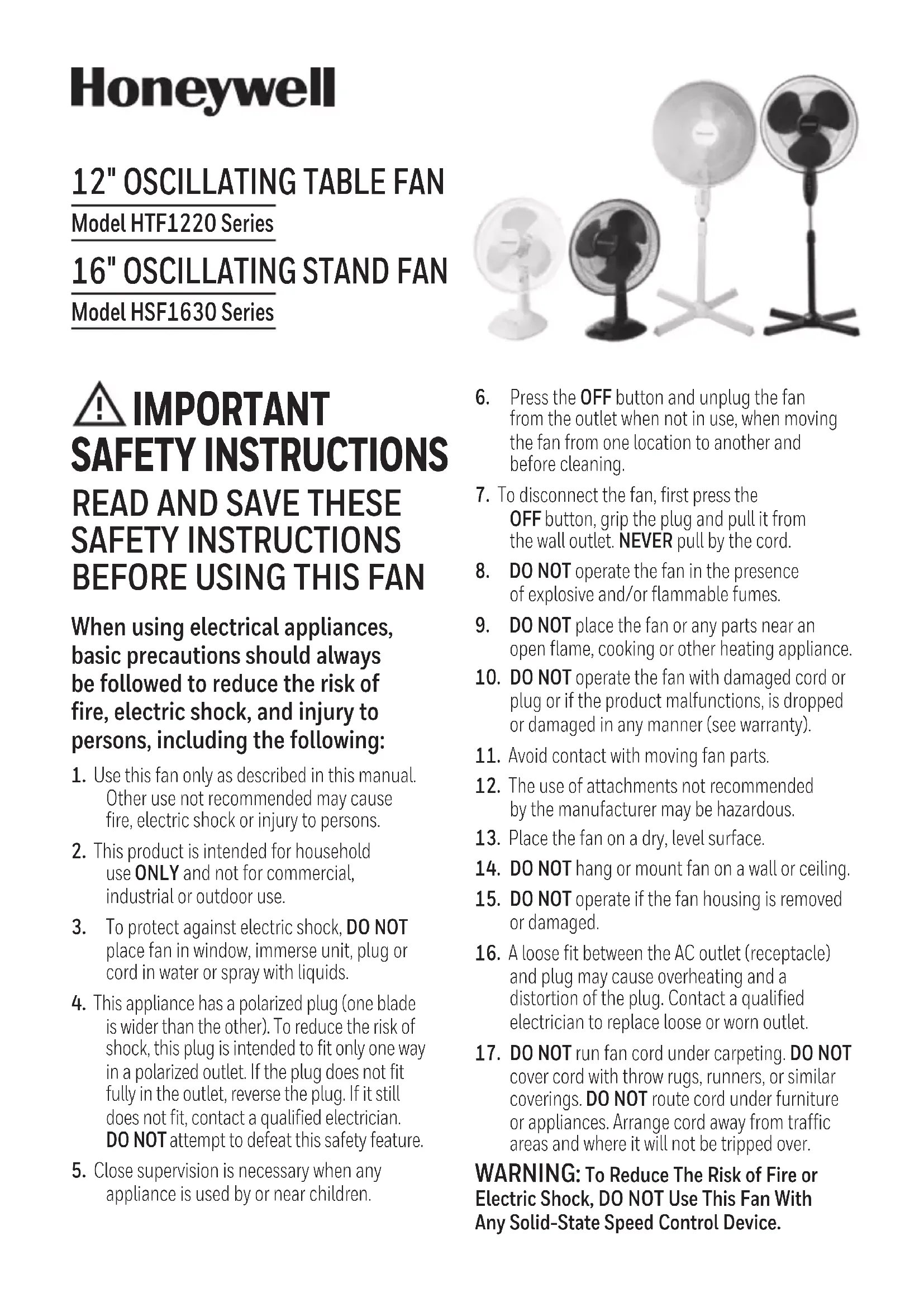
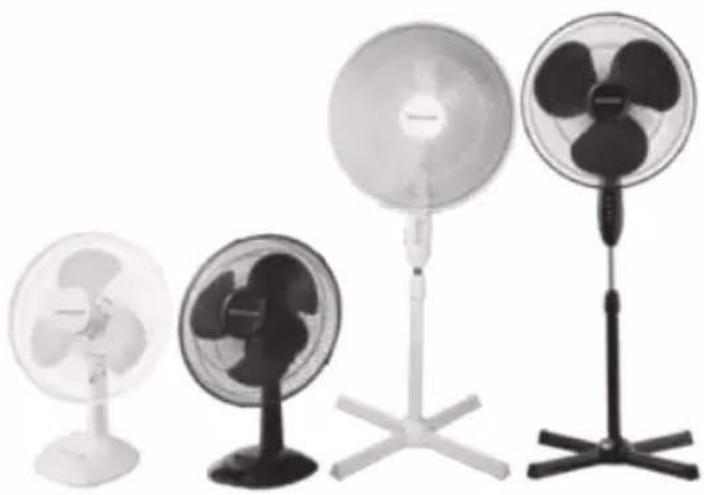
Four different electric fan models standing upright, each with a different blade and stand (no visible text or labels)-
Press the OFF button and unplug the fan from the outlet when not in use, when moving the fan from one location to another and before cleaning.
-
To disconnect the fan, first press the OFF button, grip the plug and pull it from the wall outlet. NEVER pull by the cord.
-
DO NOT operate the fan in the presence of explosive and/or flammable fumes.
-
DO NOT place the fan or any parts near an open flame, cooking or other heating appliance.
-
DO NOT operate the fan with damaged cord or plug or if the product malfunctions, is dropped or damaged in any manner (see warranty).
-
Avoid contact with moving fan parts.
-
The use of attachments not recommended by the manufacturer may be hazardous.
-
Place the fan on a dry, level surface.
-
DO NOT hang or mount fan on a wall or ceiling.
-
DO NOT operate if the fan housing is removed or damaged.
-
A loose fit between the AC outlet (receptacle) and plug may cause overheating and a distortion of the plug. Contact a qualified electrician to replace loose or worn outlet.
-
DO NOT run fan cord under carpeting. DO NOT cover cord with throw rugs, runners, or similar coverings. DO NOT route cord under furniture or appliances. Arrange cord away from traffic areas and where it will not be tripped over.
WARNING: To Reduce The Risk of Fire or Electric Shock, DO NOT Use This Fan With Any Solid-State Speed Control Device.
FUSED SAFETY PLUG - FOR US MODELS ONLY
This fan features a fused safety plug which is designed to cut off electric current to the fan if an electrical fault occurs. Please see below for more information on how to properly use your fan and replace the safety plug fuse, if needed.
USER SERVICING INSTRUCTIONS
- If your fan loses power and you suspect that the fuse on your fan has blown, grasp plug and remove from the receptacle or other outlet device. DO NOT unplug by pulling on cord.
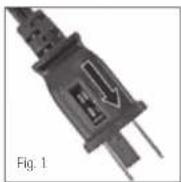
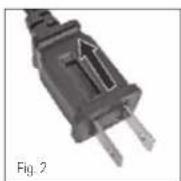
- Slide fuse cover, located on the top of the plug towards the prongs of the plug. (Fig. 1)
- Carefully remove the blown fuse and snap a new fuse into place. To Reduce the Risk of Fire, replace fuse only with 2.5 Amp, 125 volt fuse. Fully close the fuse door by sliding back into place. (Fig. 2) Discard the blown fuse. The plug should now be ready for normal use.
- To Reduce the Risk of Fire, DO NOT replace attachment plug. Contains a safety device (fuse) that should not be removed. Discard product if the attachment plug is damaged.
- If you need further information on how or when to replace the fuse in the safety plug, please contact Kaz Consumer Relations Department by visiting our website at www.honeywellpluggedin.com/fans or calling 1-800-477-0457.
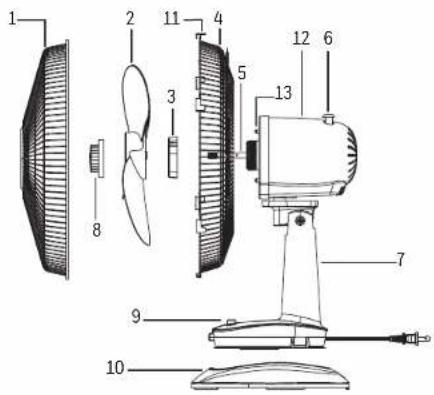
PART GUIDE - HTF1220 SERIES
- Front Grille
- Blade
- Plastic Nut
- Rear Grille
- Motor Shaft
- Oscillation Knob
- Fan Body
- Blade Nut
- Speed Control Buttons
- Base
- Grille Locking Clips
- Fan Head Assembly
- Prongs
text_image
Technical diagram of a fan-shaped device with numbered parts for identificationBASE ASSEMBLY - HTF1220 SERIES
- Insert the Fan Body assembly into the base until it clicks into place.
ASSEMBLY OF THE BLADE AND GRILLES - HTF1220 SERIES
- Unscrew the blade nut clockwise and the plastic nut counterclockwise and set aside.
- Position the rear grille onto the fan head assembly making sure the two alignment holes are aligned with the two prongs.
- Screw on plastic nut tightly clockwise to attach rear grille.
- Install the blade onto the shaft until the retaining pin fits into the notch on the blade.
- Screw blade nut to the motor shaft counterclockwise (tighten by turning to the left).
- Mount the front grille and secure using the locking clips.
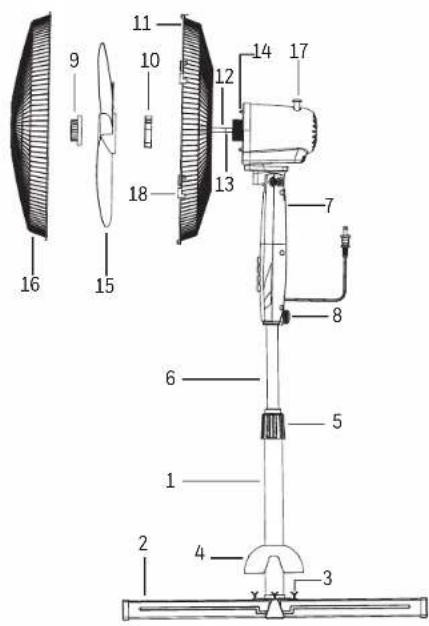
PART GUIDE - HSF1630 SERIES
- Main Pole
- Cross Base
- Cross Base Screws
- Base Sheath
- Pole Locking Nut
- Extension Pole
- Fan Head Assembly
- Locking Screw
- Blade Nut
- Plastic Nut
- Rear Grille
- Motor Shaft
- Alignment Holes
- Prongs
- Fan Blade
- Front Grille
- Oscillation Knob
- Grille Locking Clips
text_image
Technical diagram of a mechanical device with numbered parts for identificationBASE ASSEMBLY - HSF1630 SERIES
- Create an X with the 2 cross base pieces.
- Place the main pole onto the cross base, align with the four holes. Use the four screws provided to secure and tighten the pole to the cross base.
- Remove the pole locking nut and slide the base sheath over the main pole and onto the cross base, replace the pole locking nut.
- Loosen the pole extension locking nut around the top of the main pole and raise the chrome extension pole to its desired height. Tighten the pole extension locking nut.
- Position the fan head assembly onto the extension pole and tighten the locking screw.
ASSEMBLY OF THE BLADE AND GRILLES - HSF1630 SERIES
- Unscrew the blade nut clockwise and the plastic nut counterclockwise and set aside.
- Position the rear grille onto the fan head assembly making sure the two alignment holes are aligned with the two prongs.
- Screw on plastic nut tightly clockwise to attach rear grille.
- Install the blade onto the shaft until the retaining pin fits into the notch on the blade.
- Screw blade nut to the motor shaft counterclockwise (tighten by turning to the left).
- Mount the front grille and secure using the locking clips.
OPERATION
- Place your fan on a level and dry surface.
- Plug the power cord into a polarized 120 Volt AC wall outlet. Please make sure the speed control is in the off position.
Speed Control Speed is controlled by pressing the Control Pad button to the desired setting

Oscillation Control To make the fan oscillate, push down on the oscillation knob located on the top of the motor housing. To stop the fan from oscillating, pull up on the oscillation knob when the fan is in the desired position.
Tilt Control The airflow can be adjusted upward or downward by tilting the fan head as desired. To change the tilting angle of the fan head assembly, simply move the fan head to the desired angle.
Height Adjustment Turn the pole locking nut counterclockwise to loosen the pole. Adjust the pole to the desired height and firmly tighten the locking nut in a clockwise direction.
CLEANING AND STORAGE
• UNPLUG the fan before cleaning.
- Use only a soft, damp cloth to gently wipe the fan clean.
• DO NOT immerse the fan in water and NEVER allow water to drip into the motor housing.
• DO NOT use gasoline, paint thinner or other chemicals to clean the fan.
CLEANING AND STORAGE (CONTINUED)
Removal of the Front Grille for Cleaning
- UNPLUG the fan and remove the Front Grille by releasing the clips.
- Unscrew the Blade Nut by turning it CLOCKWISE (REVERSE THREAD).
- Pull the Fan Blade away from the Motor Housing.
- Gently wipe the Fan Blade and Grilles with a damp cloth.
- Re-assemble the fan by following the steps in ASSEMBLY OF BLADE AND GRILLE INSTRUCTIONS.
- For storage, disassemble and clean the fan carefully as instructed and store in its original box. You may leave the fan assembled and covered to protect it from dust. Store the fan in a cool dry place.
CONSUMER RELATIONS
CUSTOMER SERVICE
Questions or Comments
Call us toll-free at: 1-800-477-0457
E-mail: consumerrelations@kaz.com
Or visit our website at: www.HoneywellPluggedIn.com/fans
Please be sure to specify model number.
1 YEAR LIMITED WARRANTY
You should first read all instructions before attempting to use this product.
A. This 1 year limited warranty applies to repair or replacement of product found to be defective in material or workmanship. This warranty does not apply to damage resulting from commercial, abusive, unreasonable use or supplemental damage. Defects that are the result of normal wear and tear will not be considered manufacturing defects under this warranty. KAZ IS NOT LIABLE FOR INCIDENTAL OR CONSEQUENTIAL DAMAGES OF ANY NATURE. ANY IMPLIED WARRANTY OF MERCHANTABILITY OR FITNESS FOR A PARTICULAR PURPOSE ON THIS PRODUCT IS LIMITED IN DURATION TO THE DURATION OF THIS WARRANTY. Some jurisdictions do not allow the exclusion or limitation of incidental or consequential damages or limitations on how long an implied warranty lasts, so the above limitations or exclusions may not apply to you. This warranty gives you specific legal rights, and you also may have other rights which vary from jurisdiction to jurisdiction.
This warranty applies only to the original purchaser of this product from the original date of purchase.
B. At its option, Kaz will repair or replace this product if it is found to be defective in material or workmanship.
C. This warranty does not cover damage resulting from any unauthorized attempts to repair or from any use not in accordance with the instruction manual.
To register your product, please go to www.honeywellpluggedin.com/register to register your product under the Customer Care Center and receive product information updates and new promotional offers.
NOTE: IF YOU EXPERIENCE A PROBLEM, PLEASE CONTACT CONSUMER RELATIONS FIRST OR SEE YOUR WARRANTY. DO NOT RETURN THE PRODUCT TO THE ORIGINAL PLACE OF PURCHASE. DO NOT ATTEMPT TO OPEN THE MOTOR HOUSING YOURSELF, DOING SO MAY VOID YOUR WARRANTY AND CAUSE DAMAGE TO THE PRODUCT OR PERSONAL INJURY.
Honeywell
VENTILATEUR OSCILLANT DE TABLE, 30 CM
natural_image
Four different types of electric fans displayed on stands, no text or symbols visibletext_image
Technical diagram of an electric fan with numbered parts for identificationASSEMBLAGE DE LA BASE - SÉRIE HTF1220
text_image
Technical diagram of a fan or propeller assembly with numbered parts for identification8
ASSEMBLAGE DE LA BASE - SÉRIE HSF1630
natural_image
Four different types of electric fans displayed on stands, no text or symbols visibletext_image
Technical diagram of an air fan with numbered parts for identificationMONTAJE DE LA BASE - SERIES HTF1220
text_image
Technical diagram of a fan or fan assembly with numbered parts for identification14 15
MONTAJE DE LA BASE - SERIES HSF1630
Honeywell is a trademark of Honeywell International Inc., used under license by Helen of Troy Limited.
Honeywell International Inc. makes no representations or warranties with respect to this product.
© 2017 All rights reserved.
Kaz USA, Inc., a Helen of Troy Company
Marlborough, MA 01752
Imported and Distributed by: Kaz Canada Inc., a Helen of Troy Company
6700 Century Avenue, Suite 210, Mississauga, Ontario L5N 6A4
Contact us at 1-800-477-0457 or www.honeywellpluggedin.com/fans
For Responsible recycling, please visit:


NATION
www.RecycleNation.com
www.RecycleNation.com
Helen of Troy
CREATIVE DEPARTMENT ARTWORK SPECIFICATIONS
Brand: Honeywell
Category: Fans
Model: HSF1630 Series HTF1220 Series
Artwork Part #: A001849R2
Die Line Part #: N/A
Subject: Owners Manual
Region: US
Flat Size: IN: W11 x H8
Folded Size: IN: W5.5 x H8
Scale: 1/1
Material: 70g wood paper
Page count: 20
Revision: 1
Date: 29DEC17
Release Date: 24JAN18
Rerelease Date:
Colors:
Dielines (Do not print)
Black 100%

Coating: Overall Gloss
Special Instructions:
Quality Requirement of Artwork and Quality
Clarification Process of Artwork Printing:
Meet Eng-QS-06&02
Kaz USA, Inc., a Helen of Troy Company
Creative Services
Marlborough, MA 01752 USA
+1 508 490 7000