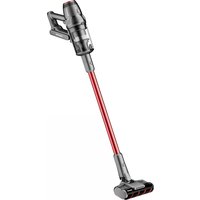
VC14 AEROMAX ELITE - Vacuum Cleaner HONEYWELL - Free user manual and instructions
Find the device manual for free VC14 AEROMAX ELITE HONEYWELL in PDF.

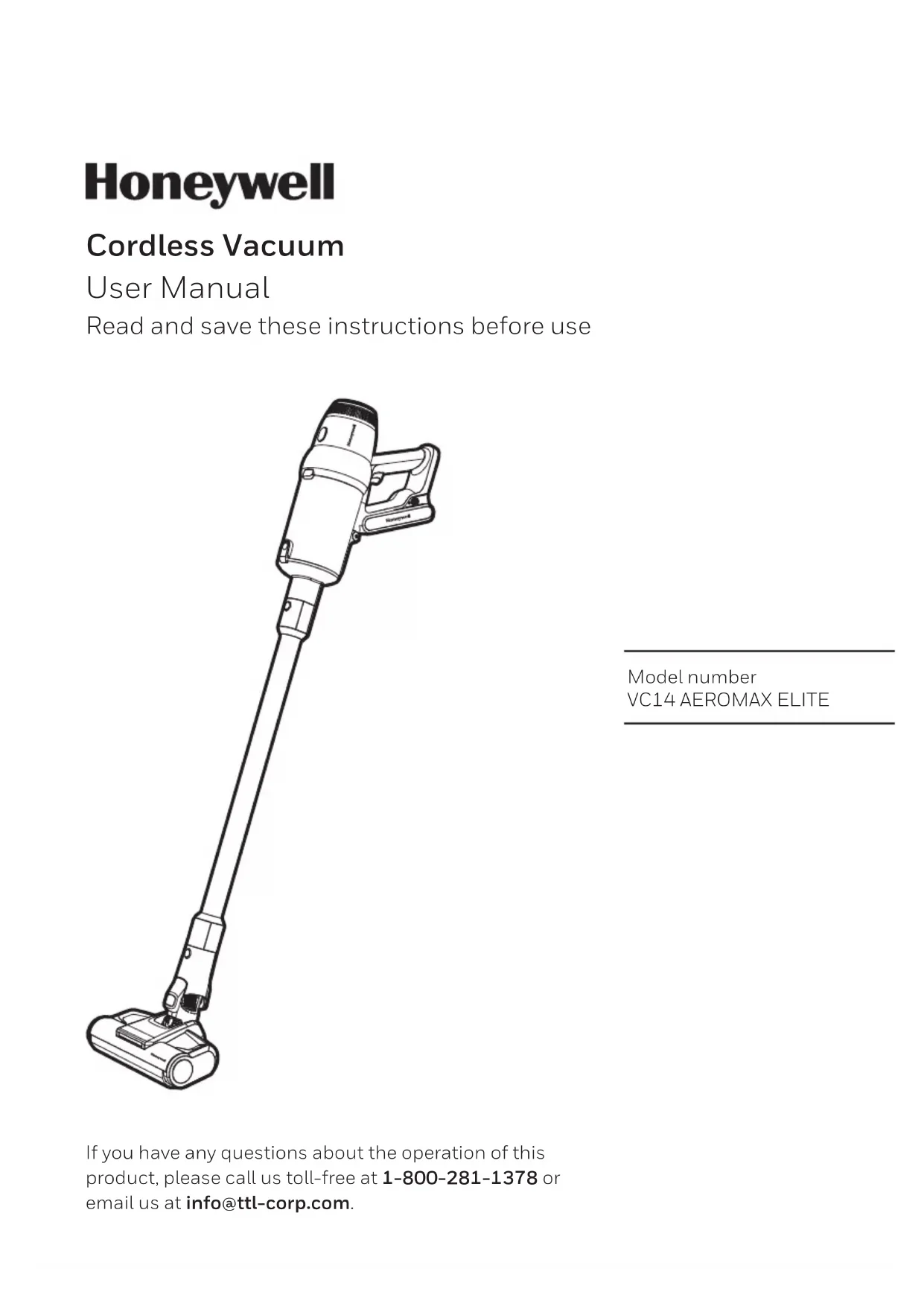


| Brand | Honeywell |
| Model | VC14 AEROMAX ELITE |
| Type | Cordless vacuum cleaner |
| Voltage | 28.8 V |
| Power | 630 W |
| Battery | Lithium-ion, 8 x 3000 mAh |
| Charging time | 3 hours and more |
| Estimated runtime | Up to 60 minutes |
| Suction modes | ECO, MID, MAX, AUTO |
| Display | LED screen with dust concentration indicator |
| Main brush | Soft motorized anti-tangle LED roller brush |
| Carpet brush | Motorized anti-tangle roller brush |
| Other accessories | Mini electric brush, 2-in-1 crevice tool, sofa brush, pet hair brush, etc. |
| Anti-tangle system | Yes |
| Filter | Washable and replaceable |
| Charger | High-end fast charger, 34.2V / 1600mA |
| Estimated weight | Approximately 3.2 kg |
| Warranty | 2-year limited |
| Usage | Domestic use only |
| Manufacturing | China |
| Customer service (USA) | 1 800 281-1378 or info@ttl-corp.com |
Frequently Asked Questions - VC14 AEROMAX ELITE HONEYWELL
User questions about VC14 AEROMAX ELITE HONEYWELL
0 question about this device. Answer the ones you know or ask your own.
Ask a new question about this device
Download the instructions for your Vacuum Cleaner in PDF format for free! Find your manual VC14 AEROMAX ELITE - HONEYWELL and take your electronic device back in hand. On this page are published all the documents necessary for the use of your device. VC14 AEROMAX ELITE by HONEYWELL.
USER MANUAL VC14 AEROMAX ELITE HONEYWELL
Read and save these instructions before use
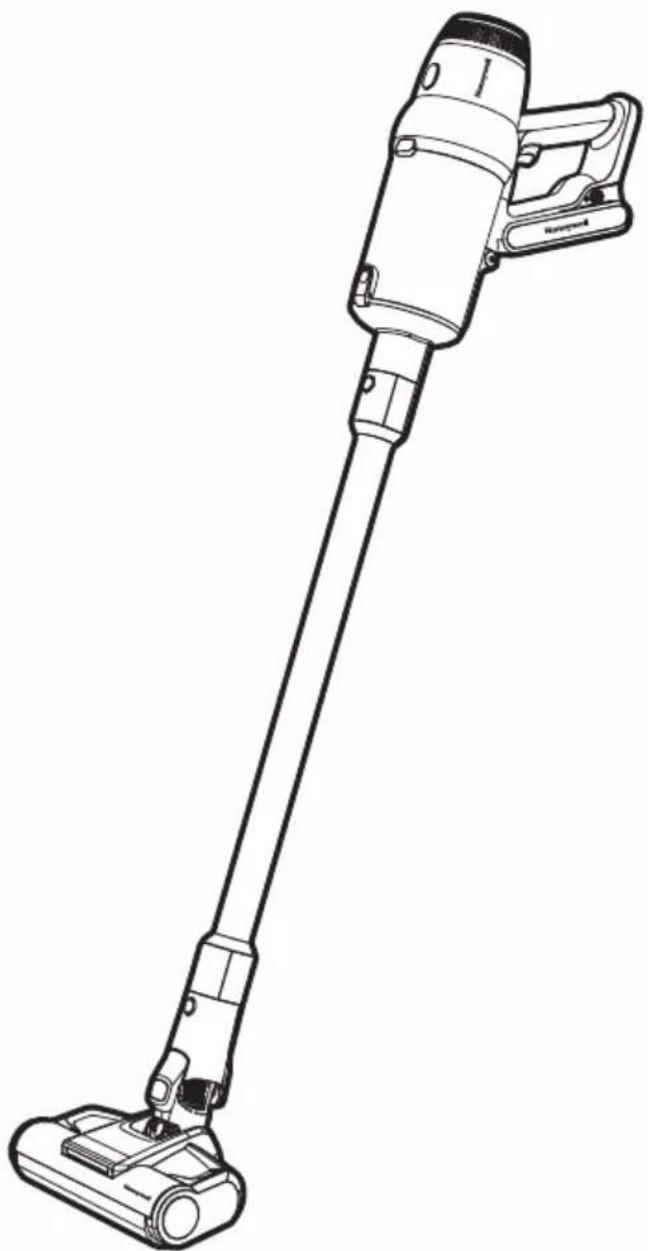
natural_image
Line drawing of a vacuum cleaner with long handle and black clip (no text or symbols)Model number
VC14 AEROMAX ELITE
If you have any questions about the operation of this product, please call us toll-free at 1-800-281-1378 or email us at info@ttl-corp.com.
IMPORTANT SAFETY INSTRUCTIONS
READ ALL INSTRUCTIONS BEFORE USING YOUR APPLIANCE.
When using an electrical appliance, basic precautions should be observed, including the following:
WARNING
TO REDUCE THE RISK OF FIRE, ELECTRIC SHOCK OR INJURY:
- This appliance has been designed for household use only, and not for commercial or rental services.
• FOR DRY LOCATIONS ONLY.
- DO NOT USE OUTDOORS OR ON WET SURFACES and should not be used to pick up any liquids, foaming detergents or other aqueous cleaning agents.
- This appliance must only be used in accordance with these instructions. The manufacturer will not be held responsible for any damage caused by improper or misuse of the appliance.
- The appliance is only to be used with the power supply unit provided with the appliance.
- If the battery pack needs to be replaced, please only use authorized Honeywell brand battery packs. Please Email: info@ttl-corp.com.
- Check that the voltage marked on the rating label matches your residence voltage.
- To remove battery, please make sure appliance is turned off and disconnected from the charger.
- The battery is to be disposed of safely.
- Keep hair, loose clothing, fingers, and all parts of body away from openings and moving parts.
- Turn OFF all controls before plugging or unplugging charger.
- Use extra care when cleaning on stairs.
- DO NOT use appliance in an enclosed space filled with vapors given off by oil-based paint, paint thinner, some
moth-proofing substances, flammable dust, or other explosive or toxic vapors.
- Always Turn OFF this appliance before connecting or disconnecting the motorized roller nozzle or any other tool or attachment.
- DO NOT incinerate the appliance even if it severely damaged. The batteries can explode in a fire.
- DO NOT pick up anything that is burning or smoking, such as cigarettes, matches or hot ashes.
- Turn OFF all controls, including the power switch and disconnect charger from electrical outlet, and remove the battery before making any adjustments, performing maintenance, troubleshooting, changing accessories or storing appliance. Such preventative safety measures reduce the risk of starting the appliance accidentally, damage or injury.
- Risk of injury from moving parts. Brush may start unexpectedly. Turn OFF before cleaning or servicing.
- DO NOT switch the appliance on if it can be detected that it is not operating correctly or if it has suffered any type of damage.
- DO NOT attempt to repair this product yourself.
- DO NOT use with a damaged main power cable or plug. If the main power cable is damaged it must be replaced by manufacturer, its service agent or similarly qualified person in order to avoid a hazard.
IMPORTANT SAFETY INSTRUCTIONS
(CONTINUED)
- Any type of repair work other than that stated in “Cleaning & Maintenance” must be done by a manufacturer service technician or an authorized repair center.
- This appliance is not intended for use by persons (including children) with reduced physical, sensory or mental capabilities, or lack of experience and knowledge, unless they have been given supervision or instruction concerning use of the appliance by a person responsible for their safety. Keep children and pets away from the appliance. Children should be supervised to ensure that they do not play with the appliance.
Caution for Operation & Vacuuming
- Empty the appliance after each use. Keep it free of dust, lint, hair, or anything that reduces airflow. Please store carefully.
- DO NOT allow to be used as a toy. Close attention is necessary when used by or near children or pets.
- DO NOT use for any purpose other than described in this user manual. Use only manufacturer's recommended attachments and/or replacement parts.
- DO NOT use appliance that is damaged or modified. Damaged or modified batteries may exhibit unpredictable behavior resulting in fire, explosion or risk of injury.
- DO NOT expose battery pack or appliance to fire or excessive temperature. Exposure to fire or temperature above 130°C/265°F may cause explosion.
- Have servicing performed by a qualified repair person using only identical
replacement parts. This will ensure that the safety of the product is maintained.
- DO NOT modify or attempt to repair the appliance except as indicated in the instructions for use or care.
- Follow all charging instructions and do not charge the appliance outside of the temperature range specified in the instructions. Charging improperly or at temperatures outside of the specified range may damage the battery and increase the risk of fire. Once fully charged, please fully disconnect from charger cable.
- DO NOT use wet hands when handling the appliance or plug.
- DO NOT use motorized roller on wet surfaces.
- Turn off and unplug the machine before checking for blockages. Always keep the openings clear and prevent dust or dirt from blocking the air passage.
- NEVER use the appliance without the filter or dust cup in place.
- DO NOT dismantle the appliance while the motor is still operating.
- DO NOT touch the rotating parts of power brush when in operation.
- DO NOT use with damaged cord or plug. If appliance is not working as it should, has been dropped, damaged, left outdoors, or dropped into water, return it to a service center.
- NEVER leave the appliance unattended while it is running.
- DO NOT unplug charger by pulling on cord. Unplug the charger by grasping the charger plug, not the cord.
- DO NOT use vacuum to pick up flammable materials such as gasoline, kerosene, lighter fluid, etc.
IMPORTANT SAFETY INSTRUCTIONS
(CONTINUED)
- DO NOT use vacuum to pick up toxic materials such as detergent, bleach, ammonia, solvents, acids, or flammable liquids. etc.
- DO NOT use vacuum to pick up sharp or hard objects such as broken glass, nails, screws, coins, etc.
- DO NOT use vacuum to pick up wet or damp ashes, dust, dirt, etc.
- DO NOT use vacuum cleaner to pick up cement, gypsum powder, wall powder and other powder or small particles, or large objects that may cause vacuum blockage and motor burn out.
- DO NOT use vacuum to pick up anything that may still be burning such as cigarette butts or ash/cinders.
- DO NOT point the Handheld Blower nozzle in the direction of people or pets.
- Keep the plastic film away from children to avoid danger of suffocation.
Caution for Li-ion batteries
- This product includes rechargeable Li-ion batteries. DO NOT disassemble, short circuit, apply heat, drop or strike the batteries, as they can cause electric shock or explode.
- If the battery is used incorrectly, liquid may leak out of the battery. AVOID touching the liquid. In the event of accidental contact, rinse the affected area with water. If the liquid comes into contact with the eyes, seek medical assistance. If battery liquid leaks, it can irritate or burn the skin.
- Recharge appliance only with the charger specified below in this manual. A charger that is suitable for one type of battery pack may create a risk of fire when used with another battery pack.
- For use only with Kingclean model
T-DC52D-SAM battery and E-TEK charger model ZD060A342160US.
- DO NOT incinerate the appliance even if it is severely damaged. The batteries can explode in a fire.
- Keep batteries out of reach of children.
- The battery must be removed from the appliance before it is scrapped.
- When battery pack is not in use, keep it away from other metal objects, like paper clips, coins, keys, nails, screws, or other small metal objects, that can make a connection from one terminal to another. Shorting the battery terminals together may cause burns or a fire.
Transportation information
- The Li-ion batteries in the appliance are subject to the requirements of dangerous goods legislation. The batteries can be transported by the user by road without any further requirements. In the event that they are shipped by a third party (e.g. transported by air or freight carrier), special requirements regarding packaging and identification must be met. In this case, a dangerous goods expert must be consulted when preparing the goods for dispatch.
Caution for Care & Storage
- Store the appliance indoors. Do not expose the appliance to outdoor weather conditions, moisture, rain, snow or heat. Do not use or store in temperatures below 41°F (5°C) or above 100°F (38°C). Ensure that the appliance is stored in room temperature before operating.
IMPORTANT SAFETY INSTRUCTIONS
(CONTINUED)
• DO NOT IMMERSE THE MOTOR HOUSING, MAIN POWER CABLE OR ADAPTER IN WATER OR ANY OTHER LIQUIDS.
- DO NOT leave the appliance close to heat sources such as ovens, heaters and radiators nor allow the cord to come into contact with hot surfaces.
- Clean the appliance only with a dry cloth. DO NOT use any lubricants, cleaning agents, polishes or air fresheners on any part of the appliance.
Disposal information
- The appliance, batteries, accessories and packaging should be recycled in an environmentally responsible manner.
- DO NOT dispose of the appliance or the batteries along with your normal household waste.
Packaging
- The packaging is designed to protect the appliance from being damaged in transit. Dispose of packaging that is no longer required at an appropriate recycling point.
- Please dispose of all packing material in a safe and environmentally friendly manner.
Old appliance
- Old appliances often still contain valuable materials. You should therefore take appliances that have reached the end of their service life to your dealer or a recycling center so that they can be recycled.
- Ask your dealer or your local council about current disposal methods.

WARNING
This product contains Lithium-Ion rechargeable batteries. DO NOT mix Lithium-Ion batteries with general household waste. According to Federal and State regulations, removal and proper disposal of Lithium-Ion batteries is required. For specific battery disposal instructions please contact Call2Recycle at 877-723-1297 or visit www.call2recycle.org.
SAVE THESE INSTRUCTIONS
THIS MODEL IS FOR HOUSEHOLD USE ONLY. COMMERCIAL USE OF THE PRODUCT VOIDS THE MANUFACTURER'S WARRANTY.
THANK YOU
Thank you for purchasing a Honeywell Cordless Vacuum Cleaner. This User Manual is intended to provide you with important information needed to set up, operate, maintain, use safely, and troubleshoot this product.
GETTING TO KNOW YOUR CORDLESS VACUUM
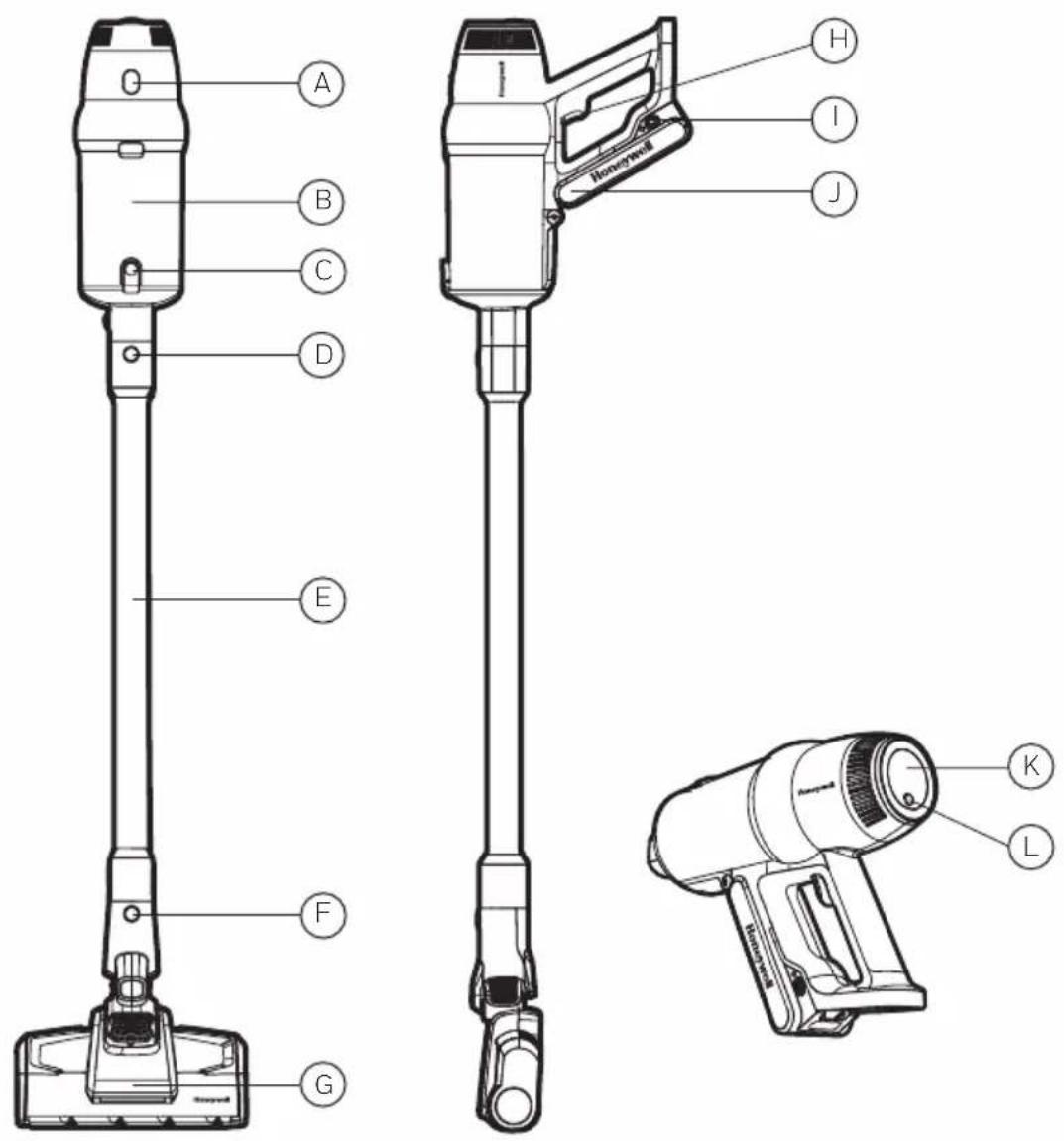
A. Tank Release Button
B. Dirt Tank
C. Dust Tank Release Button
D. Vacuuming Tube Release Button
E. Extension Tube
F. Floor Roller Release Button
G. Tangle-Resistant Motorized Soft Roller with Natural Brite White LED Lights
H. Power Button
I. Charger Port
J. Battery
K. LED Display
L. Power Mode Button
GETTING TO KNOW YOUR CORDLESS VACUUM
Included in Box
Open the package, remove the foam liner, take out all the built-in fittings and documents, grab the vacuum cleaner, take it out of the box and plastic bag. Save the outer packing for future use.
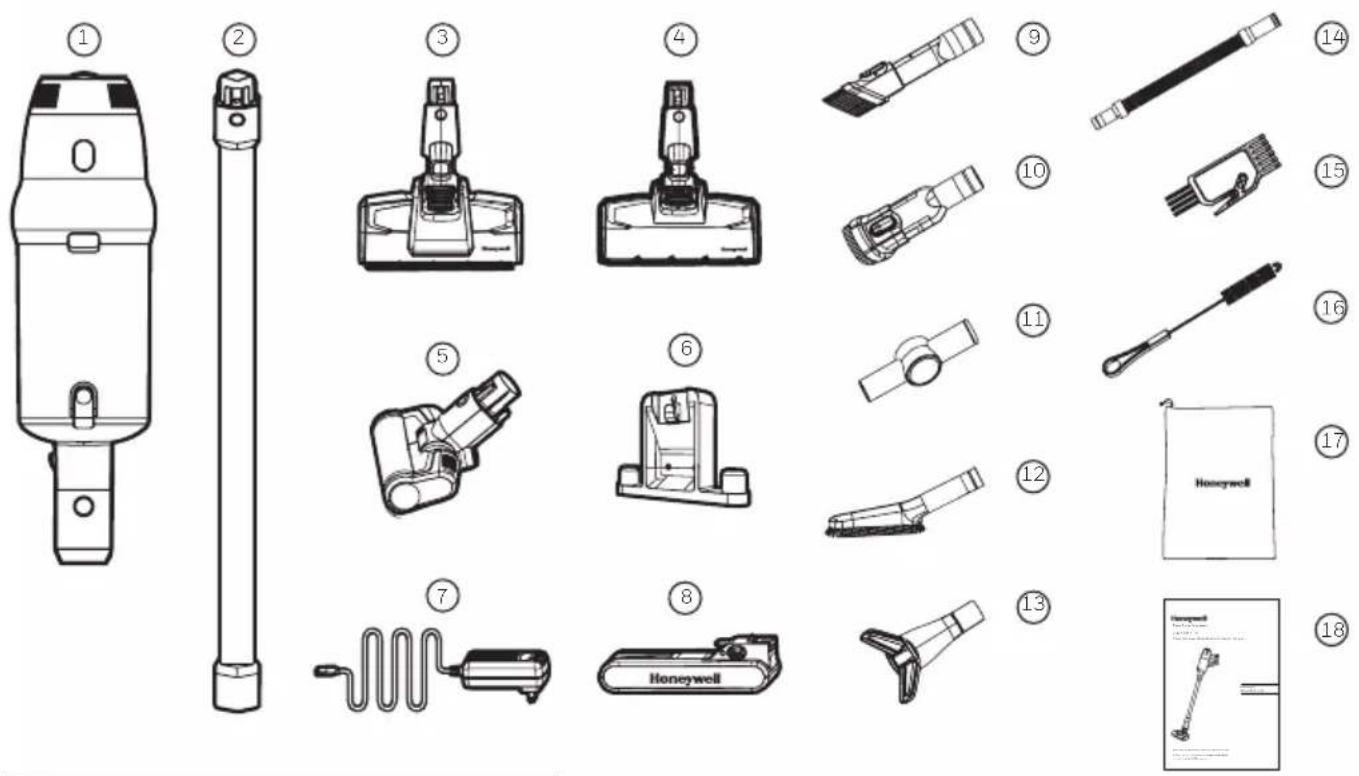
Other Components
Screw Plastic Anchor

X 3pcs X 3pcs
- Handheld Body
- Aluminum Extension Tube
- Tangle-Resistant Motorized Soft Roller with Natural Brite White LED Lights
- Tangle-Resistant Motorized Carpet Roller
- Mini Electric Brush
- Wall Mount Docking Station
- Premium Fast Charger
- Easy-Change, High-Capacity Battery Pack
-
Deluxe 2-in-1 Crevice Tool
-
Deluxe 2-in-1 Sofa Brush
- Bendable Connector
- Deluxe Soft Hairbrush
- Deluxe Pet Hair Removal Brush
- Flexible / Stretch Hose
- Short Cleaning Brush with Cutter
- Long Cleaning Brush with Bristles
- Accessory Storage Bag
- User Manual
GETTING STARTED
Parts & Components
This is a multi-function appliance supplied with a full set of accessories. Insert the tool accessory into the attachment or directly to the handheld body as shown in the figure below. Varies by accessory tool.
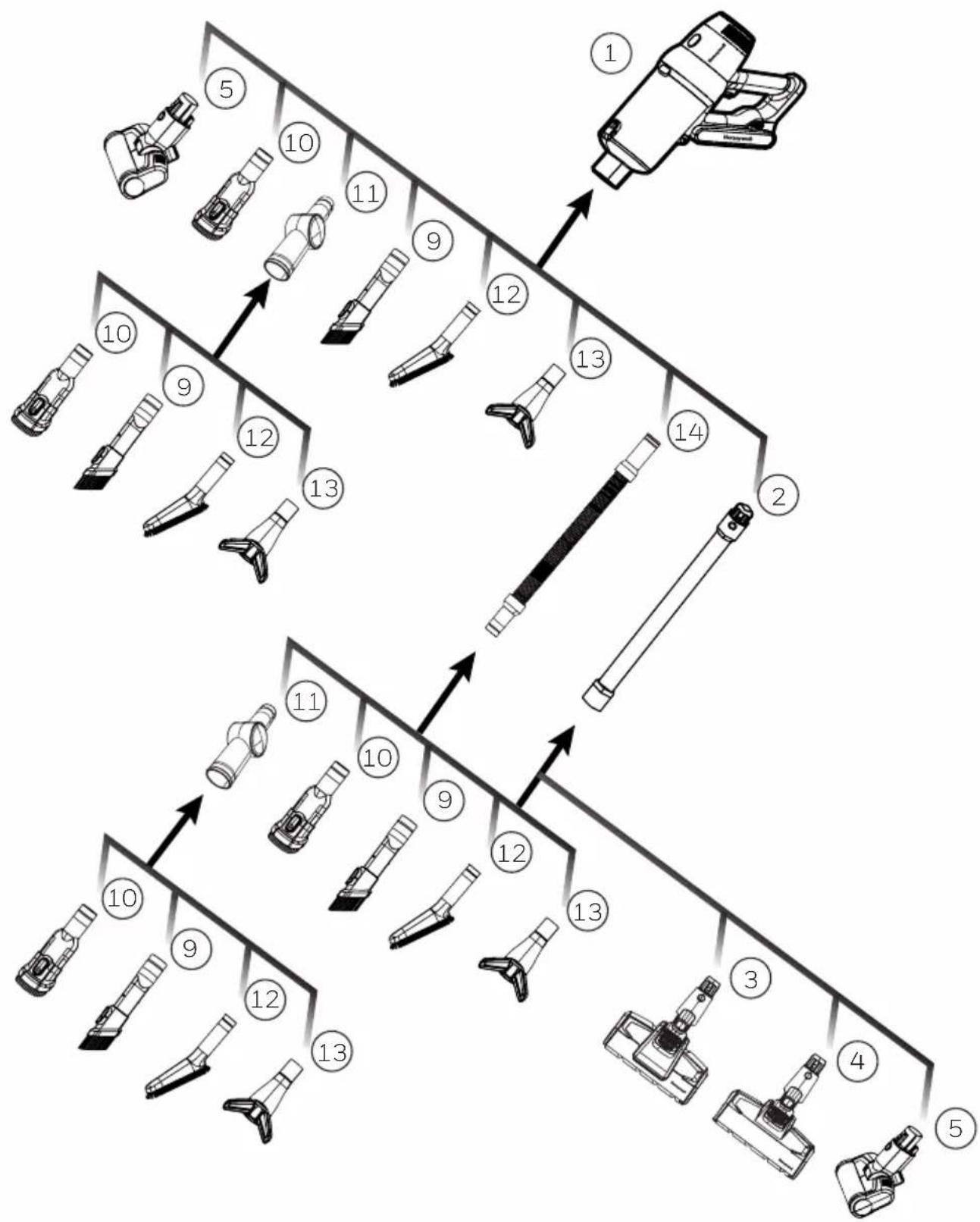
flowchart
graph TD
    A["1"] --> B["2"]
    B --> C["3"]
    C --> D["4"]
    D --> E["5"]
    A --> F["6"]
    F --> G["7"]
    G --> H["8"]
    H --> I["9"]
    I --> J["10"]
    J --> K["11"]
    K --> L["12"]
    L --> M["13"]
    M --> N["14"]
    N --> O["15"]
    O --> P["16"]
    P --> Q["17"]
    Q --> R["18"]
    R --> S["19"]
    S --> T["20"]
    T --> U["21"]
    U --> V["22"]
    V --> W["23"]
    W --> X["24"]
    X --> Y["25"]
    Y --> Z["26"]
GETTING STARTED (CONTINUED)
Assembly
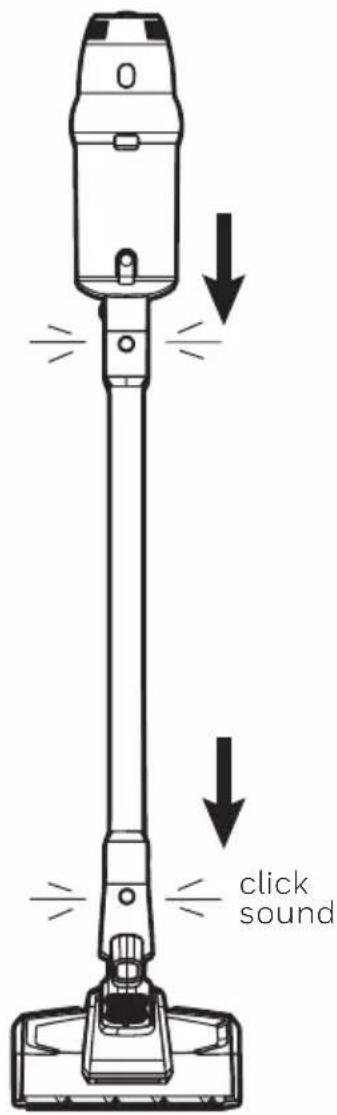
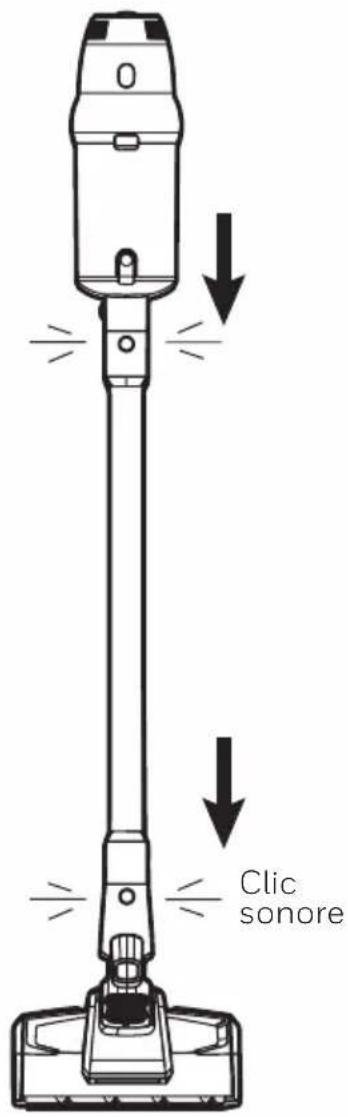
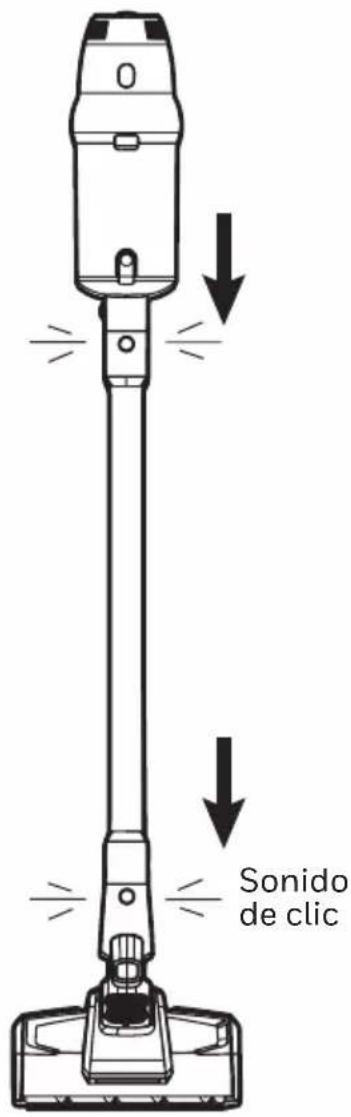
- Align the connector pins and socket and insert the extension tube to the Motorized Roller #3 or #4 until it clicks into place as shown in figure 1.
*To detach from the extension tube, press the release button.
Special Note:
- The Tangle-Resistant Motorized Soft Roller with LED (#3) can be used in all modes on hard/wood floors. When using on carpet, use ECO mode only.
-
The Tangle-Resistant Motorized Carpet Roller (#4) can be used on carpets or hard floors. Not for use on wood floors
• See page 14 of this user manual to learn more about modes -
Insert the handheld into the extension tube and floor roller until you hear a click (figure 1).
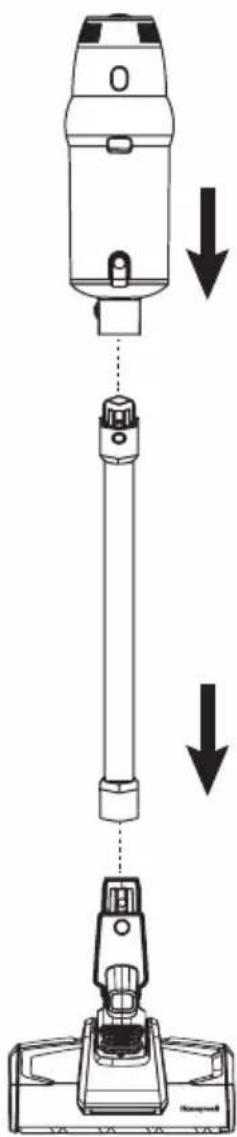
Figure 1
GETTING STARTED (CONTINUED)
Assembly (continued)
- Battery Installation. Align and insert the battery pack into the handheld as shown in the figure 2. Make sure before you use the vacuum cleaner that the battery is fully charged.
Note: Remove the battery, pack the machine and store in a cool, dry place when not using the machine for a long period of time. Do not store in direct sunlight or wet environment.
Figure 2
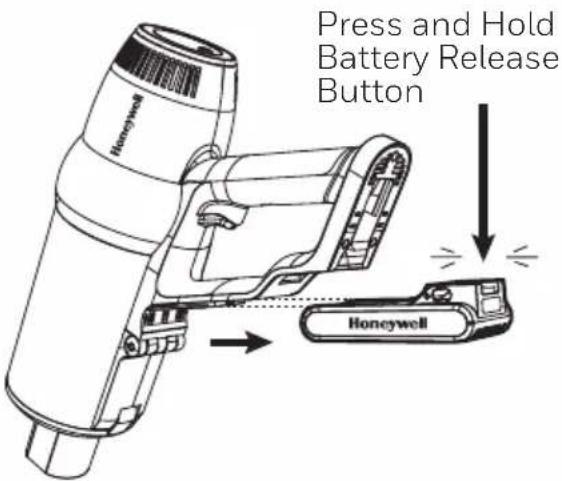
To remove, press and hold the battery release button, then slide out the battery.
1
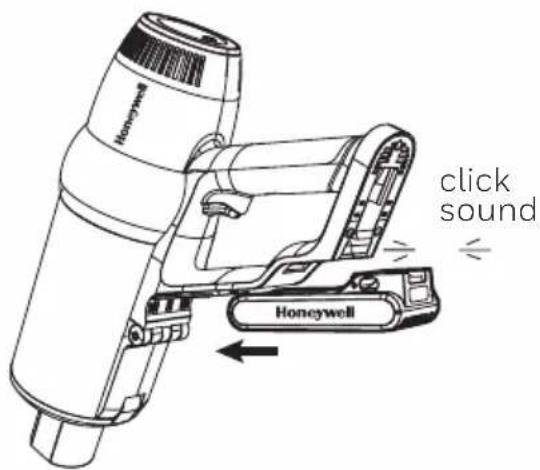
To, install, slide the battery into the slot in the back of the main body.
GETTING STARTED (CONTINUED)
Wall Mount Docking Station
Note: Care should be taken to ensure that there are no dangerous objects hidden beneath the wall surface (e.g. electrical wires, pipe, etc.)
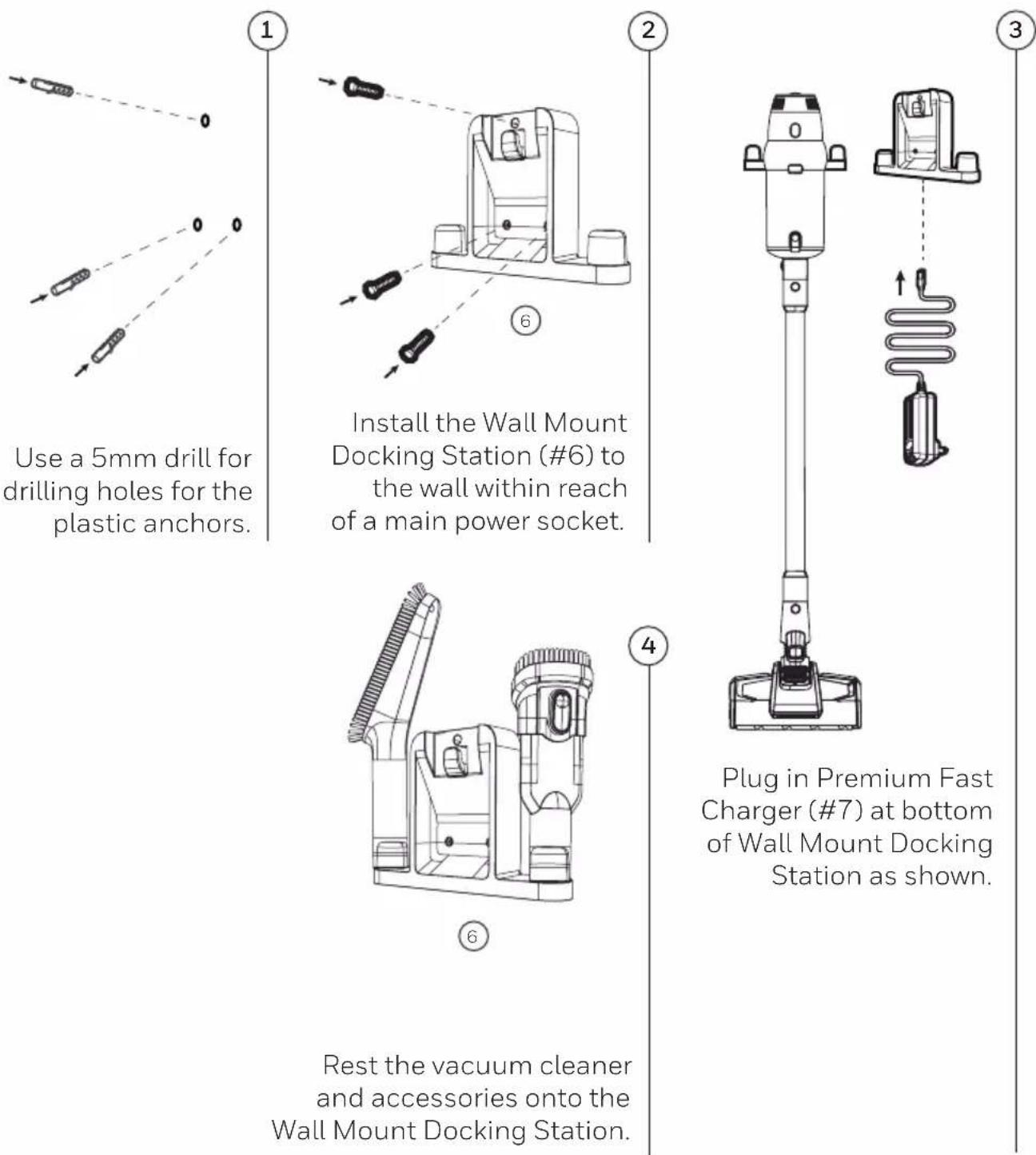
Use a 5mm drill for drilling holes for the plastic anchors.
Install the Wall Mount Docking Station (#6) to the wall within reach of a main power socket.
Rest the vacuum cleaner and accessories onto the Wall Mount Docking Station.
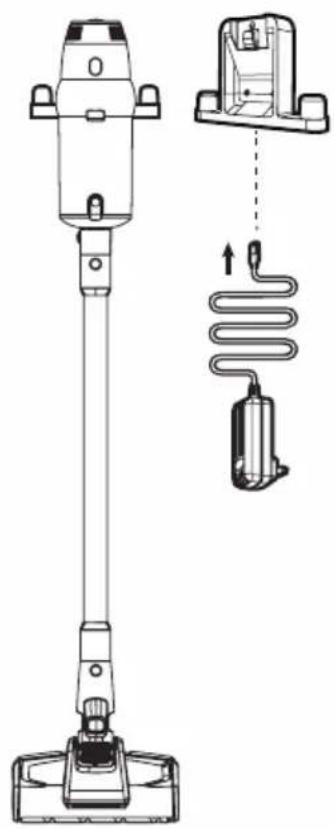
Plug in Premium Fast Charger (#7) at bottom of Wall Mount Docking Station as shown.
OPERATION
Charging the Battery
Fully charge the device before the first use. The normal charge time is 3+ hours approximately. When the battery is fully charged, unplug it.
Note: Advanced technology helps optimize run time. The device will automatically enter a lower consumption mode once the battery reaches \~20% or lower. It is recommended to charge the device when it reaches this percentage.
The battery can be charged one of three ways (see page 13 of this user manual for more details).
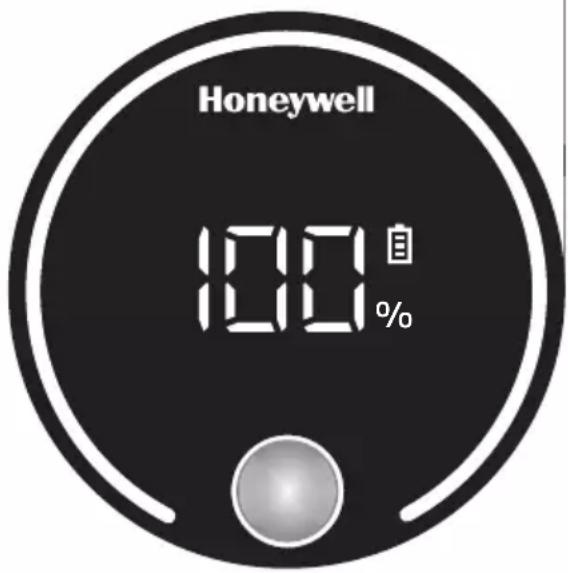
During charging, the charge light indicator will turn red and the display will show the current charge percentage. When the device is fully charged, the battery indicator will turn white and the display will show 100%.
Charging process 50%
Display Screen indicator
light is red
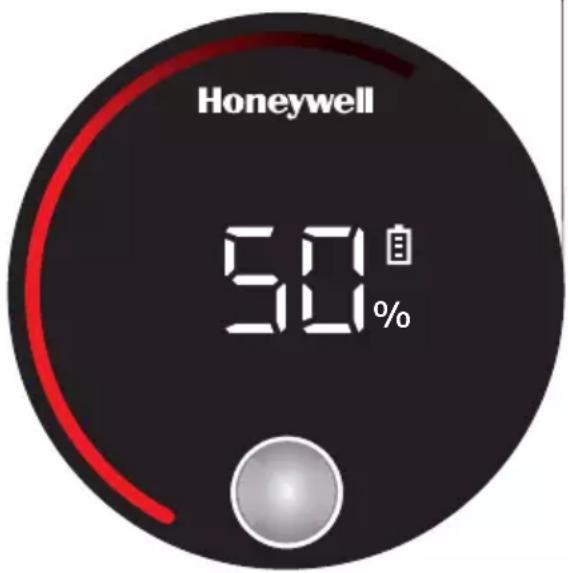
Fully charged 100%
Display Screen indicator
light is white
OPERATION (CONTINUED)
Charging Method
- Charging with the Wall Mount Docking Station. Make sure that the Wall Mount Docking Station is securely fixed on the wall*, place the vacuum cleaner on the Wall Mount Docking Station by putting the vacuum cleaner's charging terminals into contact with the charging base's (plastic tab).
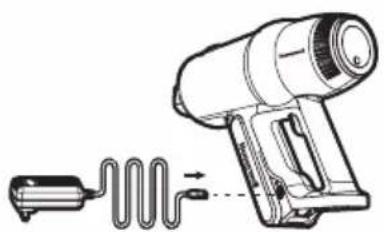
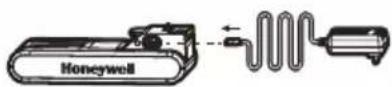
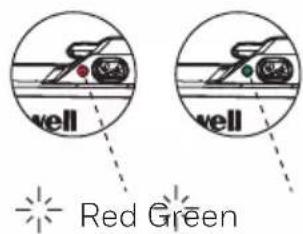
- Charging with the Handheld. The battery can also be charged without the Wall Mount Docking Station when the battery is installed in the device. Connect the adapter and connect the other end to the battery, paying attention to the direction. Once it is properly connected, the charge light indicator will turn on red and will turn green once the charge is completed.
- Charging with the Battery. Connect the adapter and connect the other end to the battery, paying attention to the direction. Once it is properly connected, the charge light indicator will turn on red and will turn green once the charge is completed.
* See page 11 for installation instructions
Charging with the Wall Mount Docking Station
natural_image
Technical line drawing of a handheld vacuum cleaner with a side-view inset showing internal components (no text or symbols)123
Charging with the Handheld
natural_image
Line drawing of a handheld electric heater with a coiled cable and power plug (no text or symbols)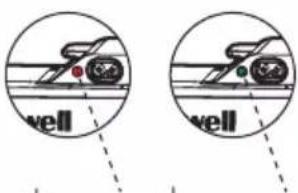
Red Green
Charging with the Battery
OPERATION (CONTINUED)
Usage of Handheld
-
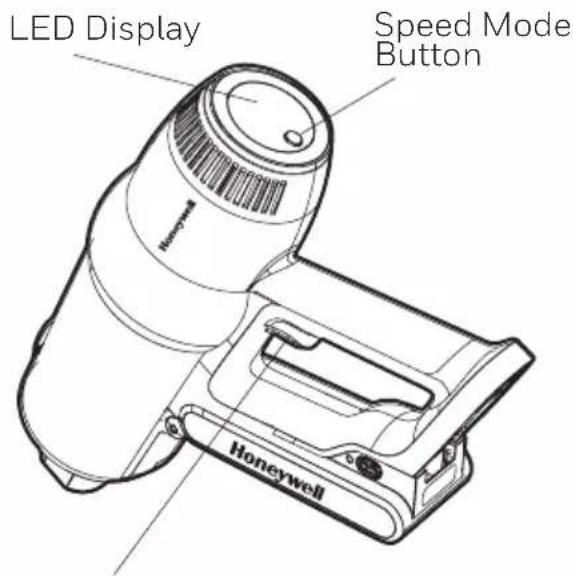
Press the On/Off button to turn ON the machine. Use the same button to turn OFF the machine. (Note: do not need to hold in place to operate)
-
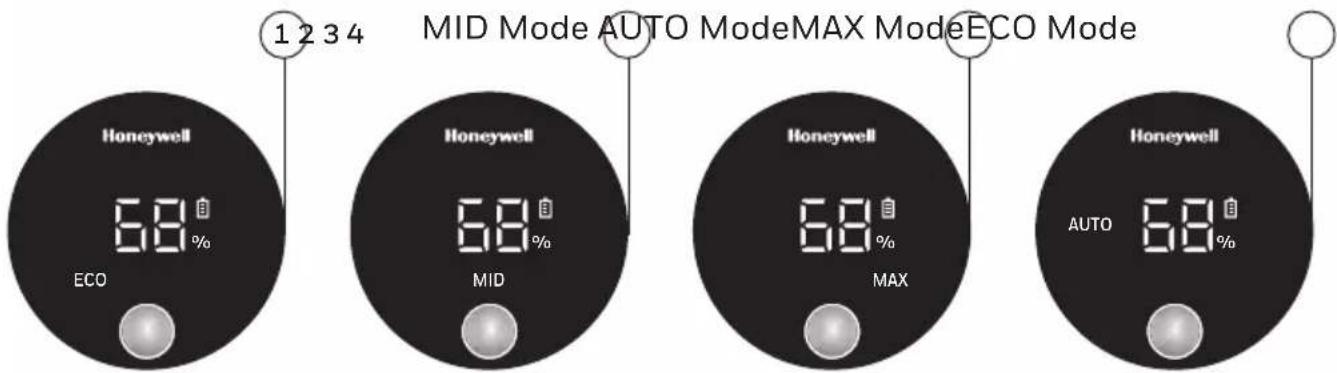
Press the Speed Mode to change the settings (ECO, MID, MAX, AUTO)
• (1) ECO – this is the default mode when the vacuum is turned on. This mode will provide the longest runtime.
• (2) MID – this mode provides a balance of increased suction power and slightly lower runtime.
• (3) MAX – this mode is for highest suction power and shortest runtime.
• (4) AUTO – this is the SMART mode in which the machine will auto adjust the suction power based on the degree of the dust that is being picked up.
On-Off Switch Button
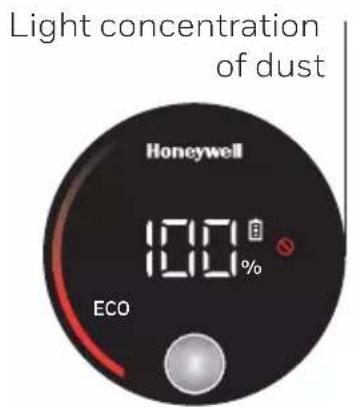
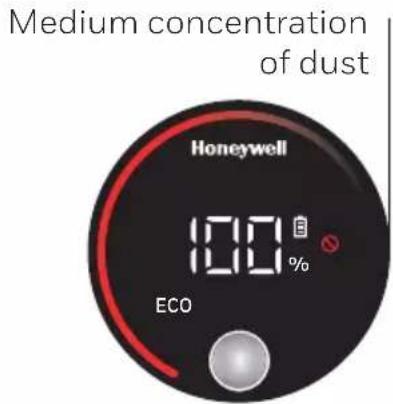
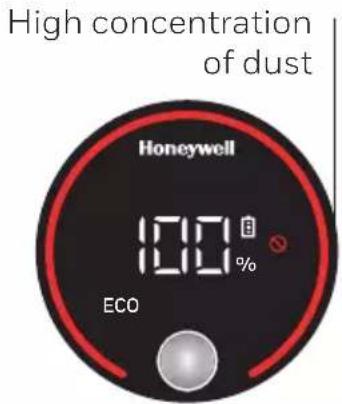
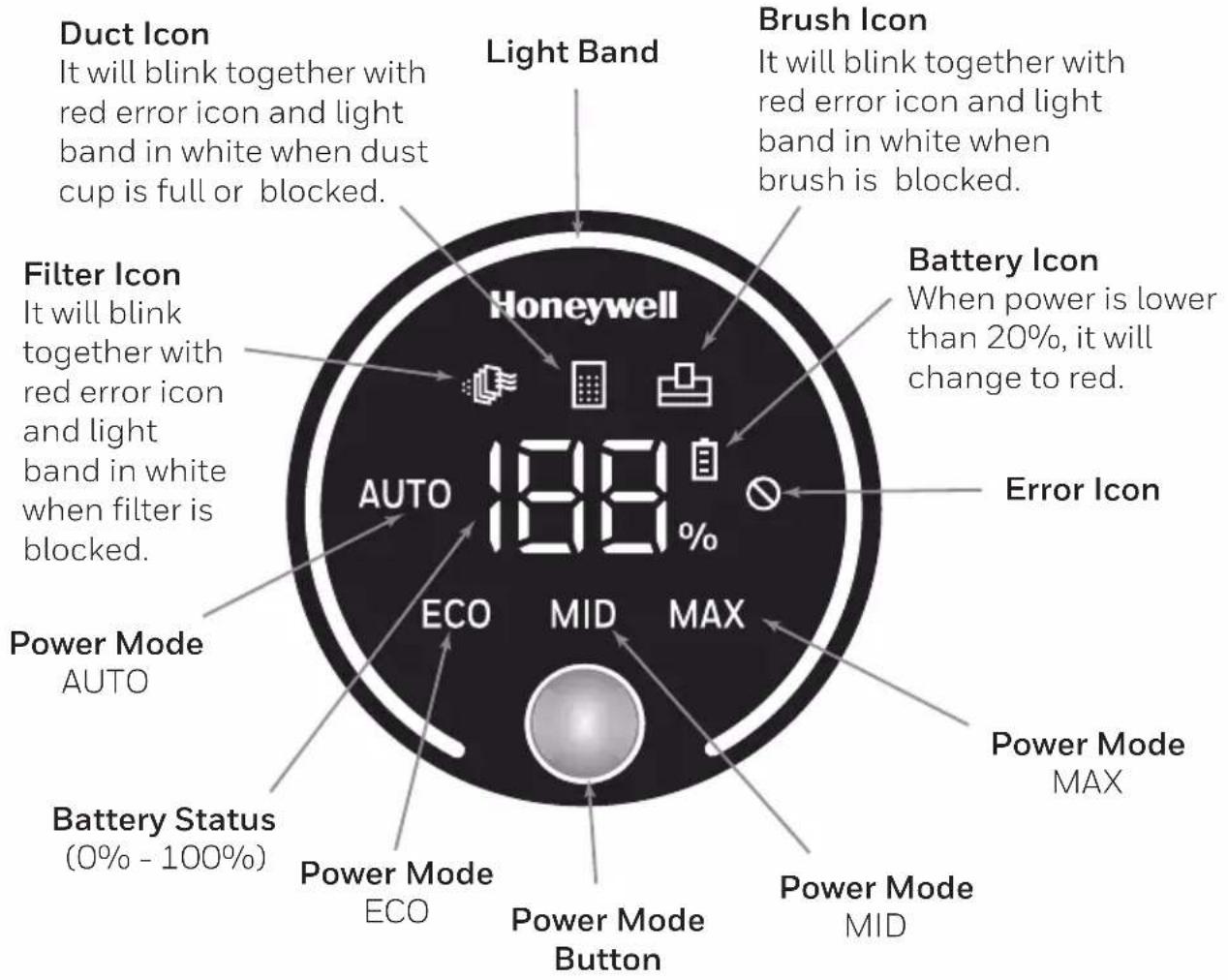
- The RED light band on the display shows the concentration of the dust being absorbed in the area being cleaned.
• 1/3 of the RED light band means light concentration of dust
• 2/3 of the RED light bands means medium concentration of dust
- A full RED light band means high concentration of dust
OPERATION (CONTINUED)
- When operating at high speed and the battery is 20% or lower, the device will automatically switch to medium speed in order to lengthen the battery life.
LED Display
CLEANING & MAINTENANCE
Any other servicing should be performed by an authorized service representative.
Cleaning the Roller Brush
Always turn off the unit, remove the battery, and detach the floor head before attempting to clean the roller brush.
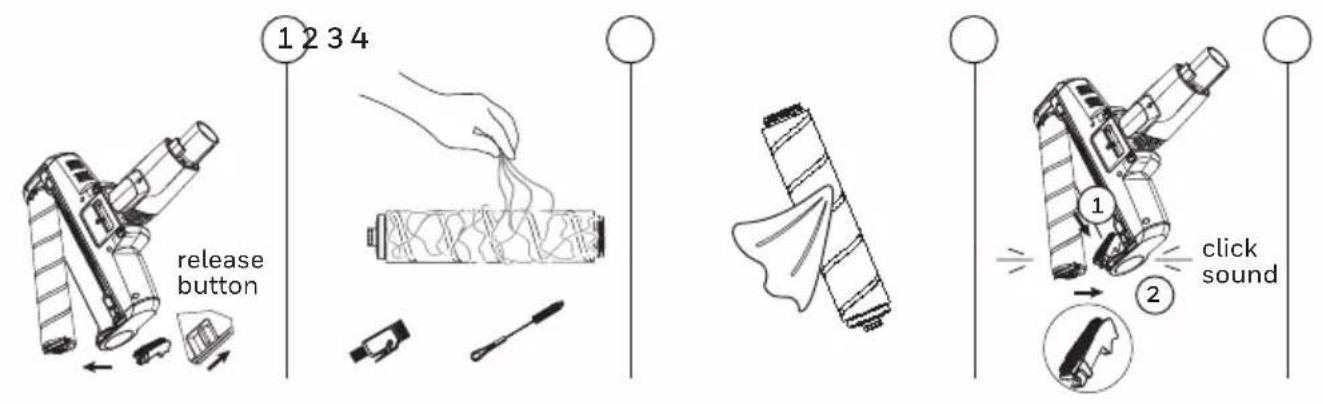
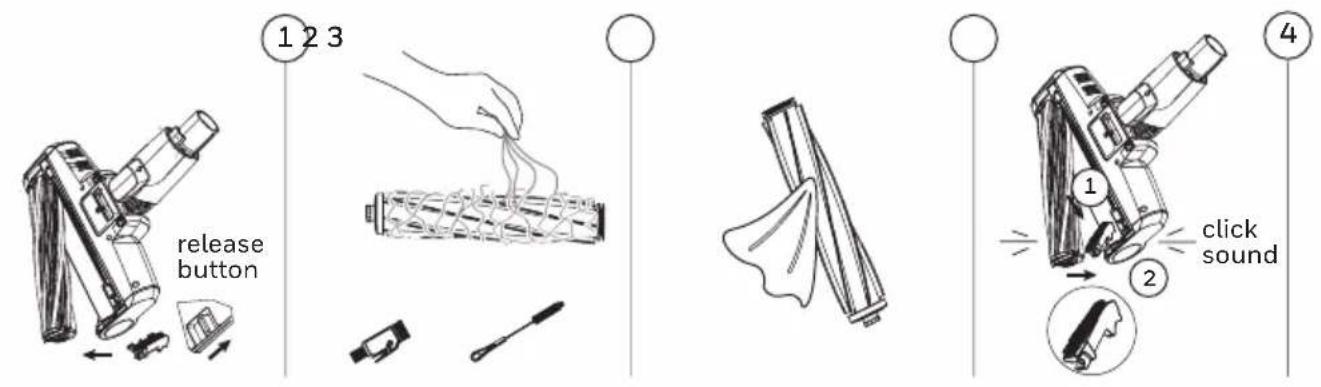
- Move the release button of the roller brush with your finger along the direction of the arrow, and take out the cover plate on one side of the roller brush. Take out one end of the rolling brush in the direction shown in the picture, and remove the rolling brush from the notch.
- Use the Short Cleaning Brush with Cutter (#15) to cut out any hair that may be entangled in the roller.
-
Gently wipe clean the roller with a dry cloth. If you use a damp cloth (not recommended) please ensure it is fully dry before re-installing.
-
Insert one end of the roller brush as shown in the picture and realign the other end. Re-attach the cover plate.
Tangle-Resistant Motorized Soft Roller with LED (#3)
Tangle-Resistant Motorized Carpet Roller (#4)
CLEANING & MAINTENANCE (CONTINUED)
Cleaning and Replacement of Components
- Air inlet filter is available at authorized vacuum cleaner vendors. Please only use manufacturer's replacement parts.
- It is recommended to clean the dust cup after each use. In case of blockage of filter caused by excessive dust accumulation, it needs to be cleaned or washed, and can be replaced if necessary.
- After the electric roller brush is used for a long time, its roller bristles may be entangled in debris such as hair, which needs to be cleaned in time so that the vacuum cleaner can work more effectively.
Cleaning the dust cup and filter system
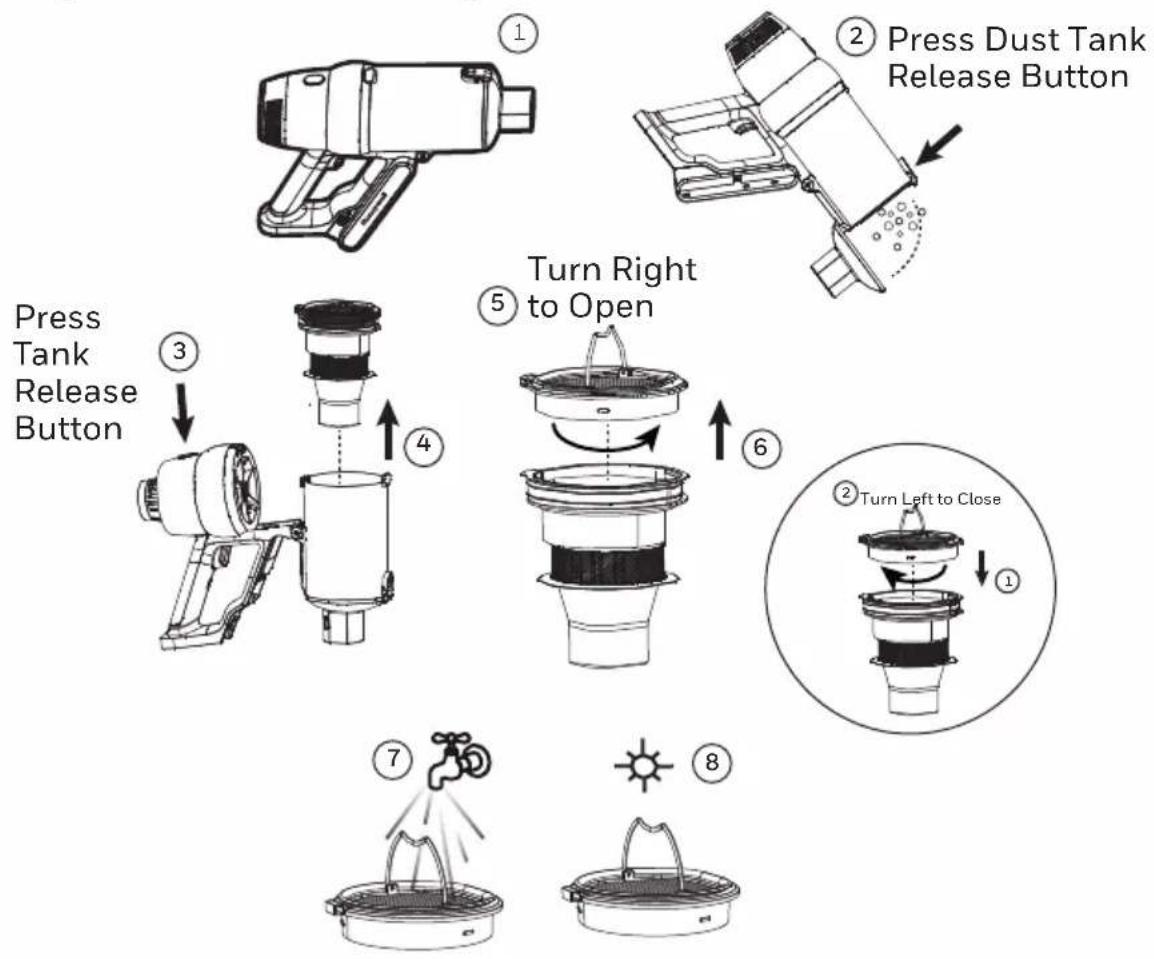
flowchart
graph TD
    A["Press Dust Tank Release Button"] --> B["Turn Right to Open"]
    B --> C["Turn Left to Close"]
    C --> D["Press Tank Release Button"]
    D --> E["Press Tank Release Button"]
- Store the appliance indoors. Do not expose the appliance to outdoor weather conditions, moisture, rain, snow or heat. Do not use or store in temperatures below 41°F (5°C) or above 100°F (38°C). Ensure that the appliance is stored in room temperature before operating.
- DO NOT IMMERSE THE MOTOR HOUSING, MAIN POWER CABLE OR ADAPTER IN WATER OR ANY OTHER LIQUIDS.
- DO NOT leave the appliance close to heat sources such as ovens, heaters and radiators nor allow the cord to come into contact with hot surfaces.
- Clean the appliance only with a dry cloth. DO NOT use any lubricants, cleaning agents, polishes or air fresheners on any part of the appliance.
TROUBLE SHOOTING
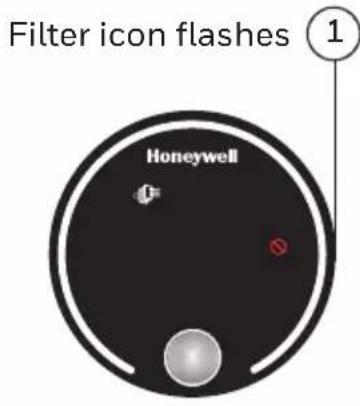
- When the filter is not installed properly in place or is missing, the filter icon flashes (flashing duration 10 seconds), and the filter icon goes out after it is installed. Follow the steps on page 17 of this user manual to re-insert the filter.
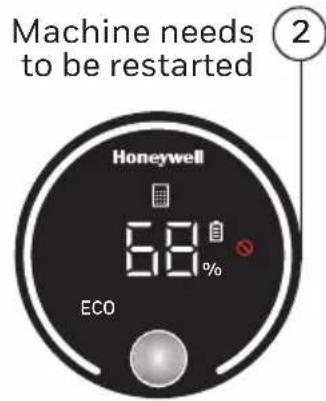
- When the air duct is blocked or the dust cup is full, the duct icon will always flash, and the battery icon will be displayed at the same time, and the light band will be all white. The dust cup needs to be cleaned, and the whole machine needs to be restarted. Follow the steps on page 17 of this user manual to clean the dust cup.
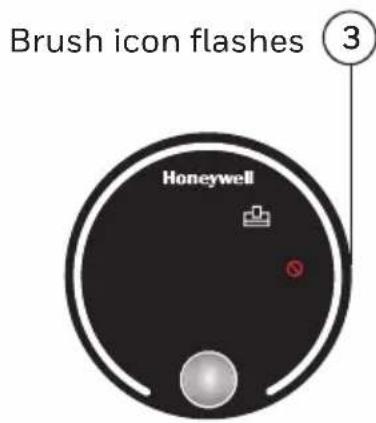
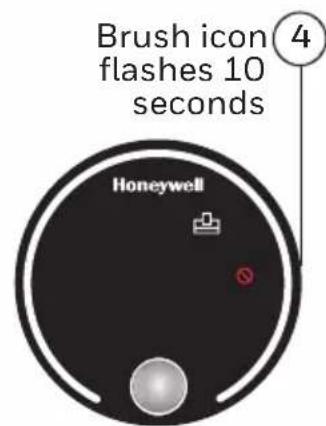
- If the brush needs to be cleaned, the brush icon will flash while running and the light band will be all white. It is necessary to check the condition of brush roll and restart the whole machine. Follow the steps on page 16 of this user manual to clean the roller brush.
- If the floor roller brush is blocked, the machine will stop running, the brush icon light will flash for 10 seconds, the other lights will be off, and the light band will be all white. Follow the steps on page 16 of this user manual to clean the roller brush.
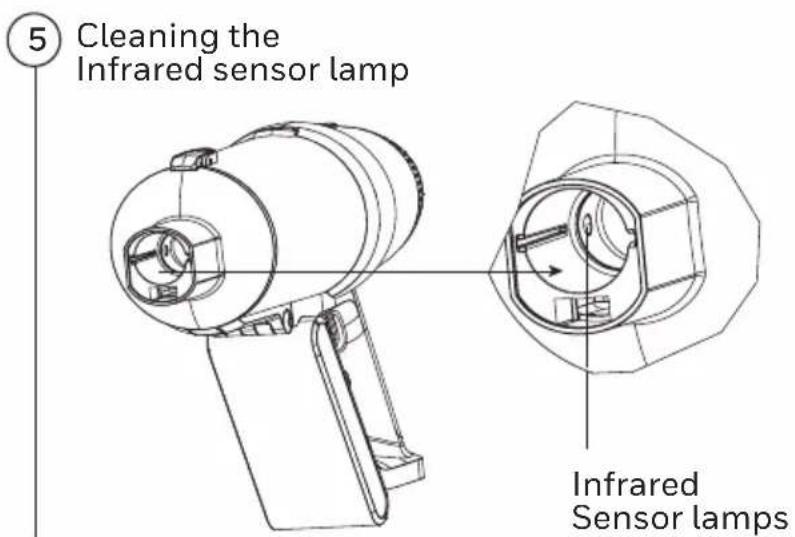
- If you turn on the machine in an area with a low concentration of dust, and the LED display always shows a full red light band which indicates a high concentration of dust, please wipe off the dust on the infrared sensor lamp.
PRODUCT SPECIFICATIONS
| Model VC14 Aeromax Elite |
| Voltage 28.8V |
| Power 630W |
| Adapter Input 100-240V ~ 50-60 Hz 1.5A |
| Adapter Output 34.2V 1600mA |
| Battery Capacity 8 x3000mAh Lithium-Ion |
| Charging Time 3H+ (with Premium Fast Charger) |
ENVIRONMENTAL PROTECTION
This product contains batteries or recyclable electronic waste, and the rechargeable battery contains substances that may pollute the environment. When disposing of the product, please do not place it with general household garbage, and hand it to the electronic waste collection point designated by the state. This is conducive to environmental protection.
WARRANTY CARD
Read all the instructions before attempting to use this product.
LIMITED TWO YEAR WARRANTY
This warranty is applicable for the VC14 Aeromax Elite in the U.S.A. only. This warranty gives you specific legal rights and you may also have other rights which may vary from state to state. If you need additional instructions regarding this warranty or have questions regarding what it may cover, please contact TALENTONE TECHNOLOGY LTD Customer Support by E-mail, telephone, or regular mail as described below. Subject to the *EXCEPTIONS AND EXCLUSIONS identified below, upon receipt of the product TALENTONE TECHNOLOGY LTD will repair or replace (with new, refurbished, lightly used, or remanufactured components or products), at TALENTONE TECHNOLOGY LTD's option, free of charge from the date of purchase by the original purchaser, for two years any defective or malfunctioning part.
See information below on "If your TALENTONE TECHNOLOGY LTD product should require service."
This warranty applies to product used for personal, and not commercial or rental service. This warranty does not apply to damage caused by blockages, external sources such as power surges and transits, or routine maintenance components such as filters, fans, batteries, bags, belts, rollers, or brushes. Damage or malfunction caused by negligence, abuse, neglect, unauthorized repair or any other use not in accordance with the User Manual is not covered.
This product is manufactured according to specifications of the country of sale. Any warranties accompanied with this product is only valid in the country of purchase. Please read the user manual carefully before setting up or using this product.
TALENTONE TECHNOLOGY LTD is not liable for incidental or consequential damages of any nature associated with the use of this product. TALENTONE TECHNOLOGY LTD's liability will not exceed the purchase price of the product.
IF YOUR TALENTONE TECHNOLOGY LTD PRODUCT SHOULD REQUIRE SERVICE:
CUSTOMER SUPPORT (USA):
TALENTONE TECHNOLOGY LTD
6574 N. STATE ROAD 7, #112
COCONUT CREEK, FL 33073 USA
TEL: (800) 281-1378 (US & CANADA)
EMAIL: INFO@TTL-CORP.COM
When contacting our Customer Support, please have the information below along with the proof of purchase. All warranty requests must be accompanied by a proof of purchase, which is a copy of the original receipt.
Product information
Model: VC14 AEROMAX ELITE
Date of purchase: ____
Purchased from:
*EXCEPTIONS AND EXCLUSIONS FROM THE TERMS OF THE LIMITED WARRANTY THIS WARRANTY IS EXCLUSIVE AND IN LIEU OF ANY OTHER WARRANTIES EITHER ORAL OR WRITTEN. ANY IMPLIED WARRANTIES WHICH MAY ARISE BY OPERATION OF LAW, INCLUDING THE IMPLIED WARRANTIES OF MERCHANTABILITY AND FITNESS FOR A PARTICULAR PURPOSE, ARE LIMITED TO THE TWO YEAR DURATION FROM THE DATE OF PURCHASE AS DESCRIBED ABOVE.
Some states do not allow limitations on how long an implied warranty lasts, so the above limitation may not apply to you.
Made in China
The Honeywell Trademark is used under license from Honeywell International Inc. Honeywell International Inc. makes no representations or warranties with respect to this product. This product is manufactured by Talentone Technology Limited, 30/F, Office Tower 1, Enterprise Square 5, 38 Wang Chiu Road, Kowloon Bay, Kowloon, Hong Kong.
TALENTONE TECHNOLOGY LTD
6574 N. STATE ROAD 7, #112
COCONUT CREEK, FL 33073 USA
TEL:(800)281-1378(US&CANADA)
EMAIL: INFO@TTL-CORP.COM
Honeywell
Aspirateur sans fil
natural_image
Line drawing of a vacuum cleaner with long handle and black clip (no text or symbols)Numéro de modèle
VC14 AEROMAX ELITE
Autres composants
Vis
Figure 1
COMMENCER (SUITE)
Assemblage (suite)
FONCTIONNEMENT (SUITE)
Méthode de charge
CARACTÉRISTIQUES DU PRODUIT
TALENTONE TECHNOLOGY LTD
6574 N. STATE ROAD 7, #112
COCONUT CREEK, FL 33073 ÉTATS-UNIS
TÉL.: 800 281-1378 (ÉTATS-UNIS ET CANADA)
COURRIEL: INFO@TTL-CORP.COM
TALENTONE TECHNOLOGY LTD
6574 N. STATE ROAD 7, #112
COCONUT CREEK, FL 33073
ÉTATS-UNIS
TÉL.: 800 281-1378
(ÉTATS-UNIS ET CANADA)
COURRIEL: INFO@TTL-CORP.COM
Honeywell
natural_image
Line drawing of a vacuum cleaner with long handle and black clip (no text or symbols)Número de modelo
VC14 AEROMAX ELITE
Otros componentes
Figura 1
natural_image
Diagram showing three pairs of elongated objects with dashed lines indicating direction (no text or symbols)natural_image
Technical line drawing of a mechanical device with lever and handle (no text or symbols)natural_image
Technical line drawing of a handheld vacuum cleaner with a side-view inset showing internal components (no text or symbols)123
1
2
3
4
TALENTONE TECHNOLOGY LTD
6574 N. STATE ROAD 7, #112
International Inc. Honeywell
International Inc. no
Technology Limited, 30/F,
Office Tower 1, Enterprise
Square 5, 38 Wang Chiu
Road, Kowloon Bay,
Kowloon, Hong Kong.
TALENTONE TECHNOLOGY LTD
6574 N. STATE ROAD 7, #112

- IMPORTANT SAFETY INSTRUCTIONS
- WARNING
- (CONTINUED)
- Caution for Operation & Vacuuming
- Caution for Li-ion batteries
- Transportation information
- Caution for Care & Storage
- Disposal information
- Packaging
- Old appliance
- SAVE THESE INSTRUCTIONS
- THANK YOU
- GETTING TO KNOW YOUR CORDLESS VACUUM
- Included in Box
- Other Components
- GETTING STARTED
- Parts & Components
- GETTING STARTED (CONTINUED)
- Assembly
- Special Note:
- Assembly (continued)
- Wall Mount Docking Station
- OPERATION
- Charging the Battery
- OPERATION (CONTINUED)
- Charging Method
- Usage of Handheld
- LED Display
- CLEANING & MAINTENANCE
- Cleaning the Roller Brush
- CLEANING & MAINTENANCE (CONTINUED)
- Cleaning and Replacement of Components
- TROUBLE SHOOTING
- PRODUCT SPECIFICATIONS
- ENVIRONMENTAL PROTECTION
- WARRANTY CARD
- Read all the instructions before attempting to use this product.
- LIMITED TWO YEAR WARRANTY
- CUSTOMER SUPPORT (USA):
- Product information
- Honeywell
- Aspirateur sans fil
- Autres composants
- COMMENCER (SUITE)
- Assemblage (suite)
- FONCTIONNEMENT (SUITE)
- Méthode de charge
- CARACTÉRISTIQUES DU PRODUIT
- Otros componentes
Brand : HONEYWELL
Model : VC14 AEROMAX ELITE
Category : Vacuum Cleaner