Soundweb London BLU-BIB - Processor BSS Audio - Free user manual and instructions
Find the device manual for free Soundweb London BLU-BIB BSS Audio in PDF.


| Product Type | Digital Audio Processor for Rack Mounting |
| Brand | BSS Audio |
| Model | Soundweb London BLU-BIB |
| Dimensions (W x D x H) | 483 x 200 x 44 mm (1U) |
| Weight | 2.5 kg |
| Power Supply | 100-240 V~, 50/60 Hz, 25 VA |
| Power Consumption | 25 VA |
| Main Functions | Input/output interface for Soundweb London system; 2 analog inputs, 8 analog outputs; configuration via software |
| Connectors | Inputs: XLR female; Outputs: XLR male; Power: IEC |
| Mounting | 19-inch rack, 1U |
| Maintenance and Cleaning | Disconnect the device before cleaning; use a dry cloth; do not use liquid products |
| Safety | Rack installation with access to the mains plug; mandatory grounding; do not open the device; indoor use only; do not block ventilation slots |
| Spare Parts and Repairability | No user-serviceable parts; refer all repairs to qualified personnel; opening voids warranty |
| General Information | Manufacturer: BSS Audio, 10653 S. River Front Parkway, Suite 300, South Jordan, Utah, USA; Complies with CE standards (2014/35/EU, 2014/30/EU) and FCC Part 15 |
| Operating Temperature | 0 to 40 °C |
Frequently Asked Questions - Soundweb London BLU-BIB BSS Audio
User questions about Soundweb London BLU-BIB BSS Audio
0 question about this device. Answer the ones you know or ask your own.
Ask a new question about this device
Download the instructions for your Processor in PDF format for free! Find your manual Soundweb London BLU-BIB - BSS Audio and take your electronic device back in hand. On this page are published all the documents necessary for the use of your device. Soundweb London BLU-BIB by BSS Audio.
USER MANUAL Soundweb London BLU-BIB BSS Audio
IMPORTANT SAFETY INSTRUCTIONS

CAUTION
RISK OF ELECTRIC SHOCK DO NOT OPEN

ATTENTION: RISQUE DE CHOC ELECTRIQUE - NE PAS OUVRIR
WARNING: TO REDUCE THE RISK OF FIRE OR ELECTRIC
SHOCK DO NOT EXPOSE THIS EQUIPMENT TO RAIN OR MOISTURE
ATTENTION: POUR RÉDUIRE LE RISQUE D'INCENDIE OU
D'ÉLECTROCUTION N'EXPOSEZ PAS CET APPAREIL À LA PLUIE OU L'HUMIDITÉ
The symbols shown above are internationally accepted symbols that warn of potential hazards with electrical products. The lightning flash with arrowpoint in an equilateral triangle means that there are dangerous voltages present within the unit. The exclamation point in an equilateral triangle indicates that it is necessary for the user to refer to the owner's manual.
These symbols warn that there are no user serviceable parts inside the unit. Do not open the unit. Do not attempt to service the unit yourself. Refer all servicing to qualified personnel. Opening the chassis for any reason will void the manufacturer's warranty. Do not get the unit wet. If liquid is spilled on the unit, shut it off immediately and take it to a dealer for service. Disconnect the unit during storms to prevent damage.
The following is indicative of low altitude use; do not use this product above 2000m.

U.K. MAINS PLUG WARNING
A molded mains plug that has been cut off from the cord is unsafe. Discard the mains plug at a suitable disposal facility.
NEVER UNDER ANY CIRCUMSTANCES SHOULD YOU INSERT A DAMAGED OR CUT MAINS PLUG INTO A 13 AMP POWER SOCKET.
Do not use the mains plug without the fuse cover in place.
Replacement fuse covers can be obtained from your local retailer. Replacement fuses are 13 amps and MUST be ASTA approved to BS1362.

If you want to dispose this product, do not mix it with general household waste. There is a separate collection system for used electronic products in accordance with legislation that requires proper treatment, recovery and recycling.
Private households in the 25 member states of the EU, in Switzerland and Norway may return their used electronic products free of charge to designated collection facilities or to a retailer (if you purchase a similar new one).
For Countries not mentioned above, please contact your local authorities for a correct method of disposal.
By doing so you will ensure that your disposed product undergoes the necessary treatment, recovery and recycling and thus prevent potential negative effects on the environment and human health.
WARNING FOR YOUR PROTECTION READ THE FOLLOWING:
READ THESE INSTRUCTIONS.
KEEP THESE INSTRUCTIONS.
HEED ALL WARNINGS.
FOLLOW ALL INSTRUCTIONS.
DO NOT USE THIS APPARATUS NEAR WATER.
CLEAN ONLY WITH A DRY CLOTH.
FOR INDOOR USE ONLY.
DO NOT BLOCK ANY OF THE VENTILATION OPENINGS. INSTALL IN ACCORDANCE WITH THE MANUFACTURER'S INSTRUCTIONS.
DO NOT INSTALL NEAR ANY HEAT SOURCES SUCH AS RADIATORS, HEAT REGISTERS, STOVES, OR OTHER APPARATUS (INCLUDING AMPLIFIERS) THAT PRODUCE HEAT.
ONLY USE ATTACHMENTS/ACCESSORIES SPECIFIED BY THE MANUFACTURER.
UNPLUG THIS APPARATUS DURING LIGHTNING STORMS OR WHEN UNUSED FOR LONG PERIODS OF TIME.
Do not defeat the safety purpose of the polarized or grounding-type plug. A polarized plug has two blades with one wider than the other. A grounding type plug has two blades and a third grounding prong. The wide blade or third prong are provided for your safety. If the provided plug does not fit your outlet, consult an electrician for replacement of the obsolete outlet.
Protect the power cord from being walked on or pinched particularly at plugs, convenience receptacles, and the point where they exit from the apparatus.
Use only with the cart stand, tripod bracket, or table specified by the manufacture, or sold with the apparatus. When a cart is used, use caution when moving the cart/apparatus combination to avoid injury from tip-over.

Refer all servicing to qualified service personnel. Servicing is required when the apparatus has been damaged in any way, such as power-supply cord or plug is damaged, liquid has been spilled or objects have fallen into the apparatus, the apparatus has been exposed to rain or moisture, does not operate normally, or has been dropped.
POWER ON/OFF SWITCH: The Power switch used in this piece of equipment DOES NOT break the connection from the mains.
MAINS DISCONNECT: The plug shall remain readily operable. For rack-mount or installation where plug is not accessible, an all-pole mains switch with a contact separation of at least 3 mm in each pole shall be incorporated into the electrical installation of the rack or building.
If connected to 240V supply, a suitable CSA/UL certified power cord shall be used for this supply.
This equipment is intended for rack mount use only.
IMPORTANT SAFETY INSTRUCTIONS
ELECTROMAGNETIC COMPATIBILITY
This device complies with part 15 of the FCC Rules and the Product Specifications noted on the Declaration of Conformity. Operation is subject to the following two conditions:
- this device may not cause harmful interference, and
- this device must accept any interference received, including interference that may cause undesired operation.
Operation of this unit within significant electromagnetic fields should be avoided.
- use only shielded interconnecting cables.
SAFETY INSTRUCTIONS
NOTICE FOR CUSTOMERS IF YOUR UNIT IS EQUIPPED WITH A POWER CORD.
WARNING: THIS APPLIANCE SHALL BE CONNECTED TO A MAINS SOCKET OUTLET WITH A PROTECTIVE EARTHING CONNECTION.
THE CORES IN THE MAINS LEAD ARE COLOURED IN ACCORDANCE WITH THE FOLLOWING CODE:
AS COLOURS OF THE CORES IN THE MAINS LEAD OF THIS APPLIANCE MAY NOT CORRESPOND WITH THE COLOURED MARKINGS IDENTIFYING THE TERMINALS IN YOUR PLUG, PROCEED AS FOLLOWS:
- THE CORE WHICH IS COLOURED GREEN AND YELLOW MUST BE CONNECTED TO THE TERMINAL IN THE PLUG MARKED WITH THE LETTER E, OR WITH THE EARTH SYMBOL, OR COLOURED GREEN, OR GREEN AND YELLOW.
- THE CORE WHICH IS COLOURED BLUE MUST BE CONNECTED TO THE TERMINAL MARKED N OR COLOURED BLACK.
- THE CORE WHICH IS COLOURED BROWN MUST BE CONNECTED TO THE TERMINAL MARKED L OR COLOURED RED.
THIS EQUIPMENT MAY REQUIRE THE USE OF A DIFFERENT LINE CORD, ATTACHMENT PLUG, OR BOTH, DEPENDING ON THE AVAILABLE POWER SOURCE AT INSTALLATION. IF THE ATTACHMENT PLUG NEEDS TO BE CHANGED, REFER SERVICING TO QUALIFIED SERVICE PERSONNEL WHO SHOULD REFER TO THE TABLE BELOW. THE GREEN/YELLOW WIRE SHALL BE CONNECTED DIRECTLY TO THE UNITS CHASSIS.
| CONDUCTOR | WIRE COLOR | ||
| Normal | Alt | ||
| L | LIVE | BROWN | BLACK |
| N | NEUTRAL | BLUE | WHITE |
| E | EARTH GND | GREEN/YEL | GREEN |
WARNING: IF THE GROUND IS DEFEATED, CERTAIN FAULT CONDITIONS IN THE UNIT OR IN THE SYSTEM TO WHICH IT IS CONNECTED CAN RESULT IN FULL LINE VOLTAGE BETWEEN CHASSIS AND EARTH GROUND. SEVERE INJURY OR DEATH CAN THEN RESULT IF THE CHASSIS AND EARTH GROUND ARE TOUCHED SIMULTANEOUSLY.
WARNING:
• APPARATET MÅ TILKOPLES JORDET STIKKONTAKT.
• APPARATEN SKALL ANSLUTAS TILL JORDAT UTTAG.
• LAITE ON LIITETTÄVÄ SUOJAKOSKETTIMILLA VARUSTETTUUN PISTORASIAAN.
• APPARATET SKAL TILSLUTTES JORDET STIKKONTAKT.
DECLARATION OF CONFORMITY
Manufacturer's Name: BSS Audio
Manufacturer's Address: 10653 S. River Front Parkway, Suite 300
South Jordan, Utah 84095, USA
declares that the product:
Product name: BSSBLU BIB
Note: Product name may be suffixed by a combination of the letters EU, M, or V.
Product option: None
conforms to the following Product Specifications:
Safety: IEC 60065 (8th Ed.)
EMC: EN 55022:2006
EN
55024:1998
FCC Part 15
Supplementary Information:
The product herewith complies with the requirements of the:
Low Voltage Directive 2014/35/EU
EMC Directive 2014/30/EU
RoHS Directive 2011/65/EU
WEEE Directive 2012/19/EU
With regard to Directive 2005/32/EC and EC Regulation 1275/2008 of 17
December 2008, this product is designed, produced, and classified as Professional
Audio Equipment and thus is exempt from this Directive.
C. Rex Reed
Director, Engineering
Signal Processing
10653 S. River Front Parkway, Suite 300
South Jordan, Utah 84095, USA
Date: August 22, 2016
European Contact:
Harman International
Salisbury House
London Wall
EC2M 5QQ
+44 207 562 9450
or
Harman Professional Inc.
10653 S. River Front Parkway, Suite 300
South Jordan, Utah 84095, USA
Ph: (801) 566-8800
Fax: (801) 568-7583
CONSIGNES DE SÉCURITÉ IMPORTANTES

CAUTION
RISK OF ELECTRIC SHOCK DO NOT OPEN

ATTENTION: RISQUE DE CHOC ELECTRIQUE - NE PAS OUVRIR
WARNING: TO REDUCE THE RISK OF FIRE OR ELECTRIC SHOCK DO NOT EXPOSE THIS EQUIPMENT TO RAIN OR MOISTURE
ATTENTION: POUR RÉDUIRE LE RISQUE D'INCENDIE OU D'ÉLECTROCUTION N'EXPOSEZ PAS CET APPAREIL À LA PLUIE OU L'HUMIDITÉ
DÉCLARATION DE CONFORMITÉ
Directive RoHS 2011/65/UE
Directive DEEE 2012/19/UE
10653 S. River Front Parkway, Suite 300
South Jordan, Utah 84095, ÉTATS-UNIS
Date : 22 août 2016
Harman Professional Inc
10653 S. River Front Parkway, Suite 300
South Jordan, Utah 84095, ÉTATS-UNIS
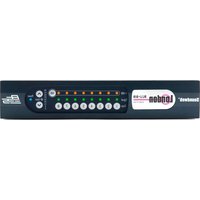
The +48V LED illuminates for each channel when the channel is selected.
Signal
The Signal LED illuminates for each channel where a signal is present.
dB Gain
The dB Gain LEDs indicate the gain setting for the selected channel.
Power
The Power LED illuminates when the BLU-BIB device is powered on. When a valid Digital Audio Bus connection is present, the Power LED will illuminate. When no valid Digital Audio Bus connections are present, the Power LED will flash on and off.
Channel Button
Each Channel Button can be pressed to select that channel.
48 Button
While in Edit Mode, this button enables/disables +48V phantom for the selected channel
dB Gain Up/Down Buttons
While in Edit Mode, pressing either button steps through the gain setting for the selected channel.
Rear panel
text_image
INPUTS 8 7 6 5 4 3 2 1BLU-BIB
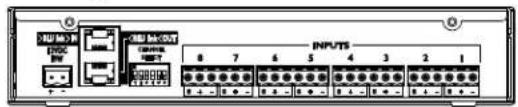
12VDC Power Adapter
The BLU-BIB Break-In Box input expanders are powered by a 12V DC adapter that is included with the device (part number: PS1225DC-S/T). Use only the adapter provided.
BLU link In/Out
The Soundweb London Digital Audio Bus (also known as "BLU link") is a high bandwidth, fault-tolerant bus of 256 channels at 48kHz and 128 channels at 96kHz. Devices are connected, using Cat 5e or Cat 6 cable, in a ring from the OUT connector of one device to the IN connector of the adjacent device. The distance between devices in the ring can be up to 100m on Cat 5e or Cat 6 or up to 10km on single mode fiber using the MC-1 fiber media converter. The ring topology allows any single cable fault without loss of channels. All devices within a given Digital Audio Bus ring must be configured for the same sample rate. The sample rate of the BLU-BIB device is automatically configured based on remotely configured devices within the Digital Audio Bus ring.
NOTE: BLU-BIBs with version numbers below v1.05 are not compatible with "pull-down" sample rates (i.e running 47.952kHz for system clock instead of 48kHz; or running 95.904kHz for system clock instead of 96kHz). Pull-down sample rates are occasionally required in video post-production environments in the United States. If the design requires pull-down and you have a pre v1.05 BLU-BIB, please contact Customer Service at bss.support@harman.com for guidance. BLU-BIBs with a sticker on the rear panel showing V1.05 or above are compatible with pull-down rates.
Channel Select
The BLU-BIB input channels are easily configured by six DIP switches located on the rear of the device, which select a range of 8 consecutive channels from the Digital Audio Bus. Input channel assignments are configured by DIP switch selection only. Do not give more than one BLU-BIB device within the same Digital Audio Bus ring the same DIP switch settings. Doing so will result in only one of the devices passing audio onto the Digital Audio Bus. Each BLU-BIB should have unique DIP switch settings. The BLU-BIB is not configured by HiQnet™ London Architect. To determine the DIP switch settings required for assignment to given channels on the Digital Audio Bus, see page 5. The same information is also available on the top lid of the BLU-BIB chassis.
Analog Input 1-8
The 8 analog mic/line level inputs utilize the same terminal block connectors (part number: 32-1226) as all other members of the Soundweb London family (except for BLU-100, BLU-101, and BLU-102, which require smaller connectors).

text_image
Soundweb™ London
text_image
Soundweb™ LondonInstalling BLU-BIB into a Rack
The BLU-BIB offers 8 channels of mic/line-level analog input expansion onto the Soundweb London digital audio bus (informally known as "BLU link"). The BLU-BIB requires the Rack-Mount Kit to mount it into a single 1U rack space (see "Using the Rack-Mount Kit" section for more info).
When installing a BLU-BOB2 or any combination of BLU-BIBs and/or BLU-BOB1s into a single rack space, it is recommended that one empty rack space is left above and below the devices. This allows heat to safely dissipate. See the below diagram for further clarification.
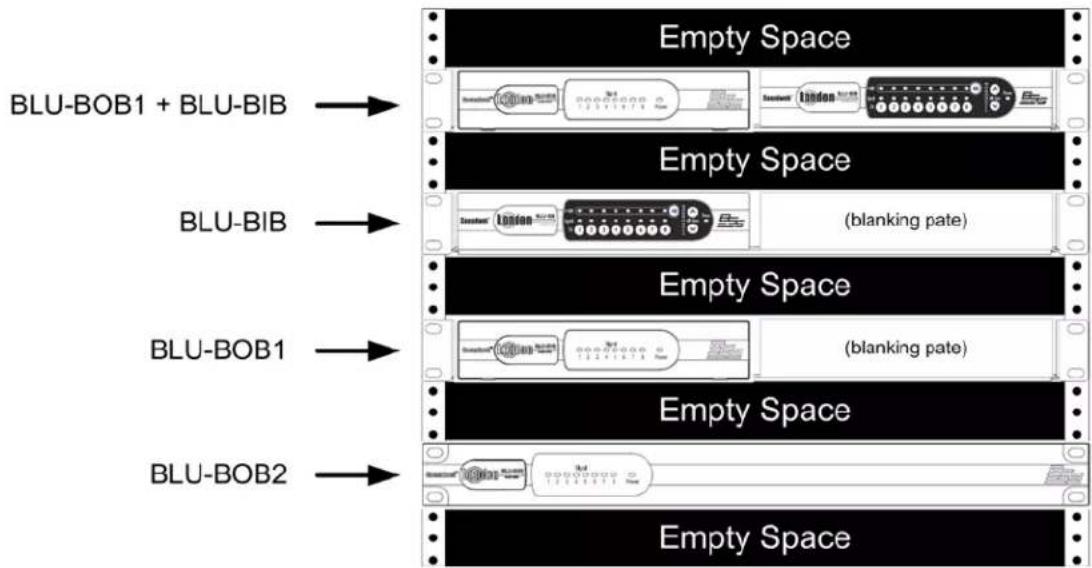
flowchart
graph LR
    A["BLU-BOB1 + BLU-BIB"] --> B["Empty Space"]
    C["BLU-BIB"] --> D["Empty Space"]
    E["BLU-BOB1"] --> F["Empty Space"]
    G["BLU-BOB2"] --> H["Empty Space"]
    I["BLU-BOB1 + BLU-BIB"] --> J["Empty Space"]
    K["BLU-BOB1"] --> L["(blanking pate)"]
    M["BLU-BOB2"] --> N["(blanking pate)"]

Using the Rack-Mount Kit (shipped separately)
The BSS Audio 1U Rack-Mount Kit (SKU: RACK MOUNT KIT) allows up to two half-rack Soundweb London devices—BLU-BIB and BLU-BOB1—to be mounted on a shelf occupying a single rack space. The 1U Rack-Mount Kit can accommodate one BLU-BIB device, one BLU-BOB1 device, two BLU-BIB devices, two BLU-BOB1 devices, or one of each device. With each device offering eight channels of analog I/O expansion, the 1U Rack-Mount Kit allows for higher I/O density (16 channels) in a single rack space.
For instances in which only one I/O expander is mounted, the half-rack blanking plate (included with the RACK MOUNT KIT) can be used to fill the blank space in the front of the rack.
Possible BLU-BIB / BLU-BOB1 Rack-Mount Positions
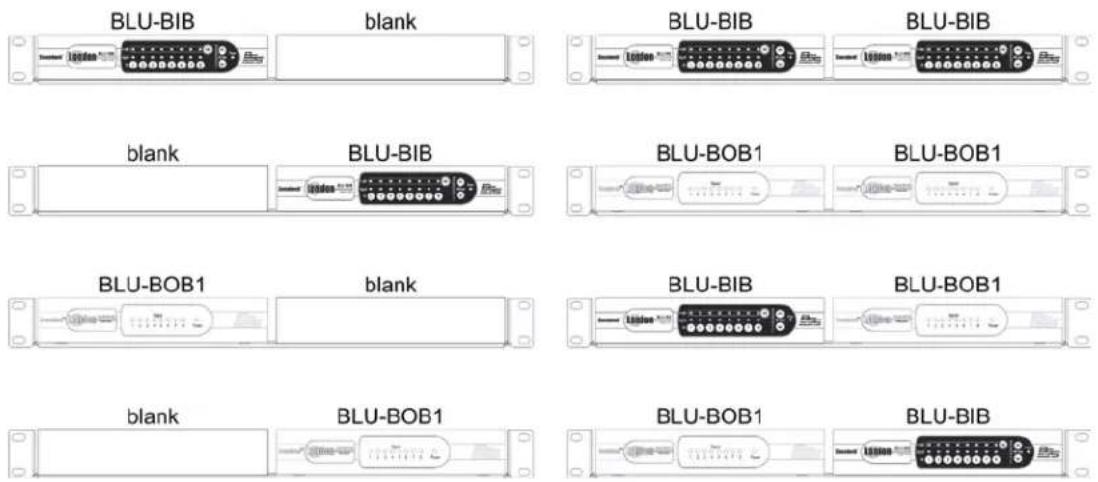
text_image
BLU-BIB blank BLU-BIB BLU-BIB blank BLU-BIB BLU-BOB1 BLU-BOB1 BLU-BOB1 blank BLU-BOB1 BLU-BOB1 BLU-BOB1 BLU-BOB1 BLU-BOB1 BLU-BIB BLU-BOB1 BLU-BOB1 BLU-BIB BLU-BOB1 BLU-BOB1 BLU-BIB BLU-BOB1 BLU-BOB1Securing a Device and Blanking Plate to the Shelf
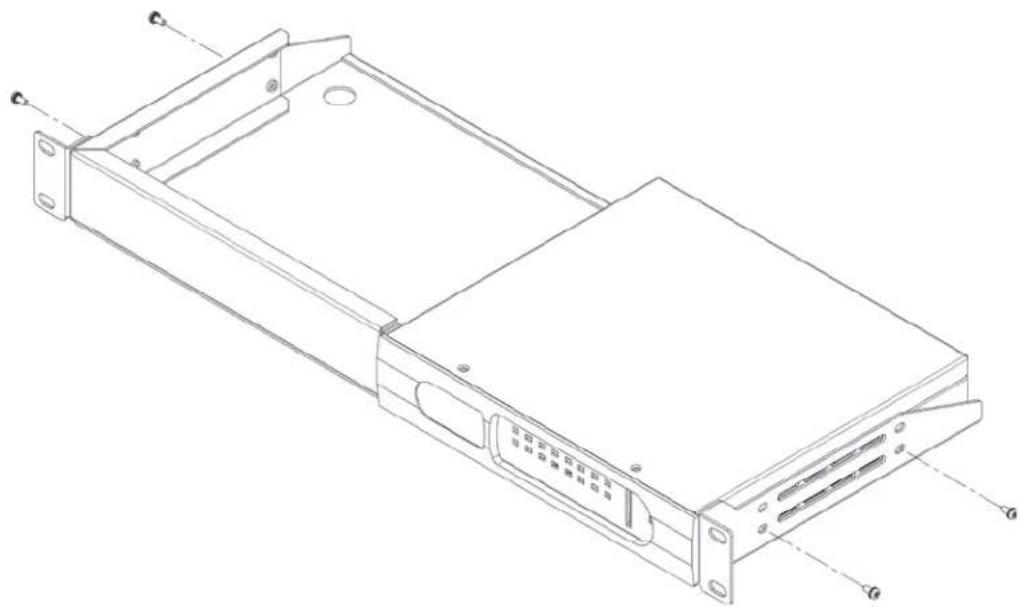
natural_image
Technical line drawing of a rectangular electronic device with mounting flanges and internal components (no text or symbols)
text_image
Soundweb™ London
Operating Instructions
The BLU-BIB operates in three different modes, which are accessed via the front panel controls.
Stealth Mode
Stealth Mode prevents the user from making any changes to the input gain and Phantom Power on any channels. Stealth Mode also prevents all LED's from illuminating (except for the Power LED), which is useful for installations that require low-profile operation of the BLU-BIB.
To Enter Stealth Mode (from Normal Mode):
- Hold Ch. Buttons 1 + 4 for three seconds
To Exit Stealth Mode (to Normal Mode):
- Hold Ch. Buttons 1 + 4 for three seconds
• The Signal LEDs blink YELLOW - Enter the lockout code: 1,2,3,4
- If the code is not entered within 30 seconds, the BLU-BIB will return to the regular operation of Stealth Mode
Normal Mode
Normal Mode prevents the user from making any changes to the input gain and Phantom Power on any channels. Normal Mode also provides indication of signal presence, applied input gain and Phantom Power.
To determine a channel's applied gain:
- Select a channel by pressing one of the Ch. Buttons (1 through 8)
- A GREEN LED will illuminate behind one of the gain level indicators (0, 6, 12, 18, 24, 30, 36, 42, 48)
Edit Mode
Edit Mode allows the user to adjust each channel's input gain and Phantom Power.
To adjust the applied gain or enable/disable Phantom Power on a given channel:
- Select a channel by pressing one of the Ch. Buttons (1 through 8)
- The Signal LED above that channel will blink YELLOW
- Use the Up / Down buttons to adjust gain
- Use the 48 Button to enable or disable Phantom Power
To enter Edit Mode (from Normal Mode):
- Hold Ch. Buttons 1 + 8 for one second
• The Signal LEDs flash GREEN twice
• After 60 seconds of inactivity, Normal Mode will automatically be entered
To exit Edit Mode (to Normal Mode):
- Hold Ch. Buttons 1 + 8 for one second
• The Signal LEDs flash RED twice
The following diagram shows the actions required to enter and exit the various modes of operation:


flowchart
graph LR
    A["Stealth Mode"] -->|Hold (1 + 4) for 3 seconds,
Then enter lockout code (1,2,3,4)| B["Normal Mode"]
    B -->|Hold (1 + 8) for 1 second| C["Edit Mode"]
    C -->|Hold (1 + 8) for 1 second| D["Stealth Mode"]
    D -->|Hold (1 + 4) for 3 seconds|
Assigning Channels with the DIP Switch
| Channel Assignment | ||||||
| CHANNELS DIP SWITCH SETTINGS CHANNELS DIP SWITCH SETTINGS CHANNELS DIP SWITCH SETTINGS CHANNELS DIP SWITCH SETTINGS | ||||||
| 1 to 8 | 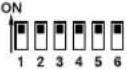 | 65 to 72 | 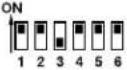 | 129 to 136 | 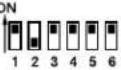 | 193 to 200 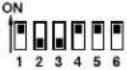 |
| 9 to 16 | 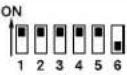 | 73 to 80 | 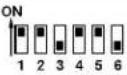 | 137 to 144 | 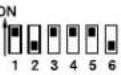 | 201 to 208 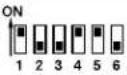 |
| 17 to 24 | 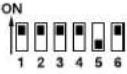 | 81 to 88 | 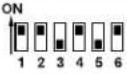 | 145 to 152 | 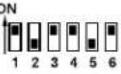 | 209 to 216 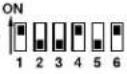 |
| 25 to 32 | 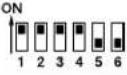 | 89 to 96 | 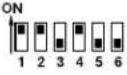 | 153 to 160 | 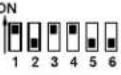 | 217 to 224 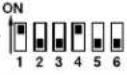 |
| 33 to 40 | 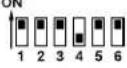 | 97 to 104 | 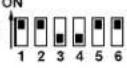 | 161 to 168 | 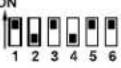 | 225 to 232 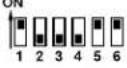 |
| 41 to 48 | 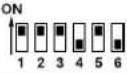 | 105 to 112 | 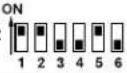 | 169 to 176 | 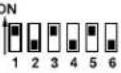 | 233 to 240 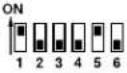 |
| 49 to 56 | 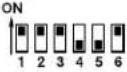 | 113 to 120 | 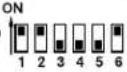 | 177 to 184 | 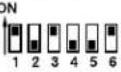 | 241 to 248 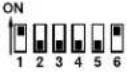 |
| 57 to 64 | 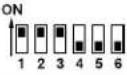 | 121 to 128 | 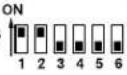 | 185 to 192 | 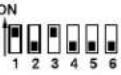 | 249 to 256 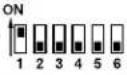 |
Note: Lowest channel of 8 channel range is always input 1 of BLU-BIB
Technical Specifications:
Front Panel LED Indicators:
Signal Preset/Clip (per input), 48V (per input), Gain
(0/6/12/18/24/30/36/42/48dB), and Power
Analog Inputs: 8 electronically balanced on Phoenix/Combicon removable screw connectors
Mic/Line Inputs: Nominal gain 0dB, electronically switchable up to +48dB, in 6dB steps
Input Impedance: 3.0kOhm
Maximum Input Level: +20dBu with 0dB input gain, +8dBu with 12dB gain
CMRR: >40dB at 1kHz
Input Noise (E.I.N.): <-123dBu typical with 150 Ohms source
Phantom Power: 48V nominal, selectable per input
A/D Latency 37/Fs [0.77ms@48k, 0.39ms@96k]
Digital Audio Bus:
Connectors: 2 x RJ45 Ethernet connectors
Maximum Cable Length: 100m/300ft on Category 5e cable between devices
Maximum Number of Nodes: 60
Latency: 4/Fs [0.08ms@48k, 0.04ms@96k]
Pass Through Latency: 2/Fs [0.04ms@48k, 0.02ms@96k]
Power and Dimensions:
Mains Voltage: 12V DC external power supply included
AC Power Input to Adapter: 19W
BTU Rating: <65 BTU/hr
Operating Temperature Range: 0° to 45°C (32° to 113°F)
Dimensions (H x W x D): 1.65" x 8.63" x 7.75" (42mm x 219mm x 197mm)
Weight: 2.96lbs / 1.34kg
text_image
Soundweb™ London
by HARMAN

text_image
BSS® by HARMANPhone: (801) 566-8800
Website: bssaudio.com
Support: bssaudio.com/en-US/support
BSS Audio is a registered trademark of HARMAN
© 2016 HARMAN
All rights reserved