
BLU-DAN - Processor BSS Audio - Free user manual and instructions
Find the device manual for free BLU-DAN BSS Audio in PDF.


| Product Type | Dante™/AES67 to BLU link Bridge (Audio Processor) |
| Brand | BSS Audio (HARMAN) |
| Model | BLU-DAN |
| Rack Size | 1U (1.75" / 45 mm) |
| Dimensions (W x D x H) | 8.625" x 13.5" x 1.75" (219 mm x 343 mm x 45 mm) |
| Weight | 5.3 lb (2.4 kg) |
| Power Supply | Universal switched-mode, 100-240 V AC, 50/60 Hz |
| Power Consumption | < 55 VA (< 188 BTU/hr) |
| Operating Temperature | 0° to 45° C (32° to 113° F) |
| Front Panel Indicators | COM (green/yellow), STAT (green/yellow/red), ERR (red), PWR (blue) |
| Audio Network (Dante/AES67) | 2 x RJ45 (Primary & Secondary); 64x64 ch @ 48 kHz or 32x32 ch @ 96 kHz |
| Audio Network (BLU link) | 2 x RJ45 (IN & OUT); 256 ch @ 48 kHz or 128 ch @ 96 kHz; daisy-chain or ring |
| Control Network (Ethernet) | 1 x RJ45; 100 m max cable length |
| RS232 Port | 1 x DB9; 3rd-party control |
| Locate Function | Rear button and software identification |
| Sample Rate Support | 48 kHz or 96 kHz (AES67 at 48 kHz only) |
| Maximum Nodes (BLU link) | 60 devices |
| Latency (Dante) | 0.15 ms – 5.0 ms |
| Latency (BLU link) | 11/Fs (0.23 ms @ 48 kHz, 0.11 ms @ 96 kHz); pass-through 4/Fs |
| Cooling | Mechanical fan; annual inspection recommended; replace after 6-10 years |
| Included Accessories | Power cord, rack ears with screws, rubber feet, install guide |
| Warranty | Register at bssaudio.com; warranty policy online |
Frequently Asked Questions - BLU-DAN BSS Audio
User questions about BLU-DAN BSS Audio
0 question about this device. Answer the ones you know or ask your own.
Ask a new question about this device
Download the instructions for your Processor in PDF format for free! Find your manual BLU-DAN - BSS Audio and take your electronic device back in hand. On this page are published all the documents necessary for the use of your device. BLU-DAN by BSS Audio.
USER MANUAL BLU-DAN BSS Audio
Soundweb™ London BLU-DAN / BLU-DA Installation Guide
5099141-00-A
Table of Contents
Product Registration/Warranty .... 1
Included Items....1
Mechanical Installation....1
Mounting The BLU-DA....2
Front Panel 3
COM (Communications) LED 3
STAT (Status) LED....3
ERR (Error) LED 3
PWR (Power) LED 3
Rear Panel 4
AC Mains....4
Dante™/AES67 4
BLU link 4
Locate 4
RS232 4
Ethernet....4
Technical Specifications....5
Product Registration/Warranty
To register your product, please visit http://bssaudio.com/en-US/support/warranty_registration. For warranty information, please visit http://bssaudio.com/en-US/support/warranty_policy.
Included Items
- BLU-DA Dante™/AES67 to BLU link Bridge
- Power Cord
- Rack Ears w/ 8 Rack Ear Mounting Screws (4 per side)
• 4 Rack Mount Screws & Washers - Rubber Feet
- Install Guide
Mechanical Installation
The BLU-DA must be installed according to the guidelines laid out in this document. Damage caused to the BLU-DA resulting from a failure to follow these guidelines is not covered by the warranty.
Mounting The BLU-DA
Rack Mounting
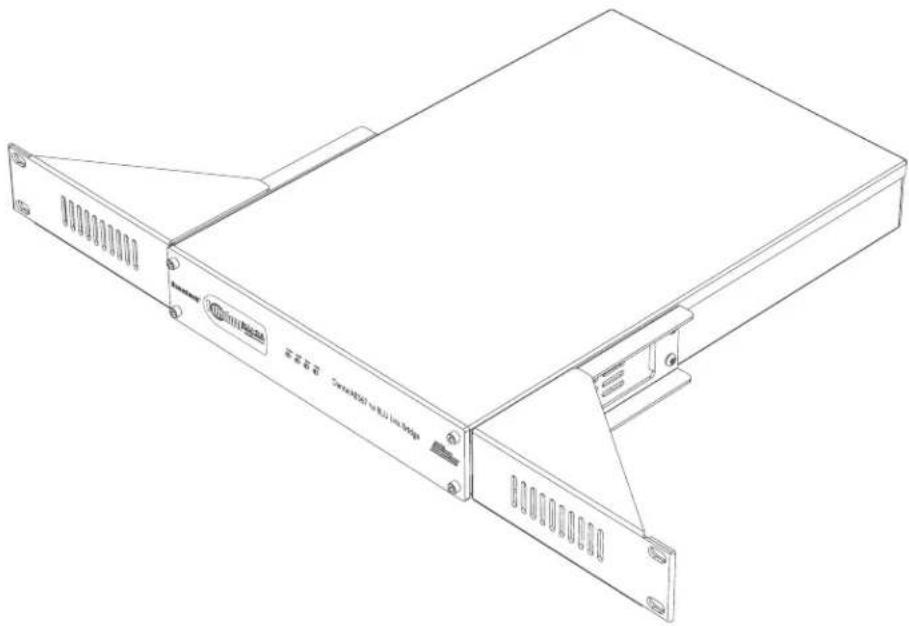
To rack mount the BLU-DA, first affix the rack ears (included) to both sides of the BLU-DA using four screws (included) per side. The BLU-DA can then be installed into a standard 1U rack space using four rack screws and washers (included).
natural_image
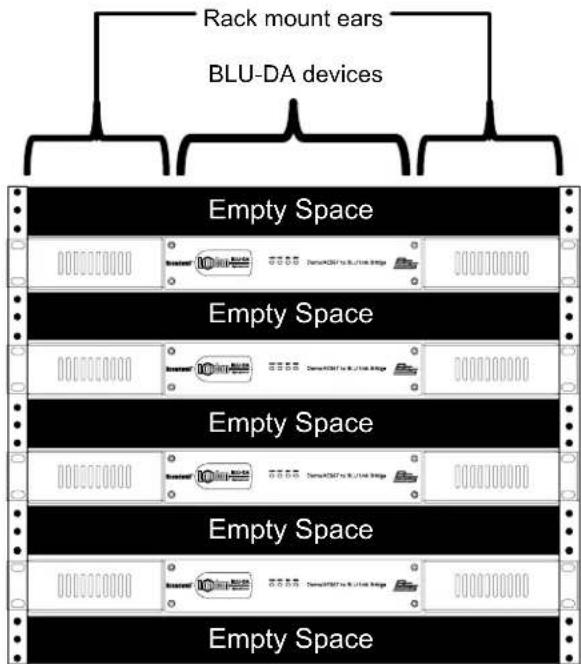
Line drawing of a server rack with ventilation slots and mounting bracket (no text or symbols)When installing the BLU-DA into a rack, it is recommended that one empty rack space is left above and below the device. This allows heat to safely dissipate. Furthermore, DO NOT attempt to install two BLU-DA devices side-by-side into the same 1U rack space – doing so will prevent heat from safely dissipating. See the below diagram for further clarification.

Front Panel
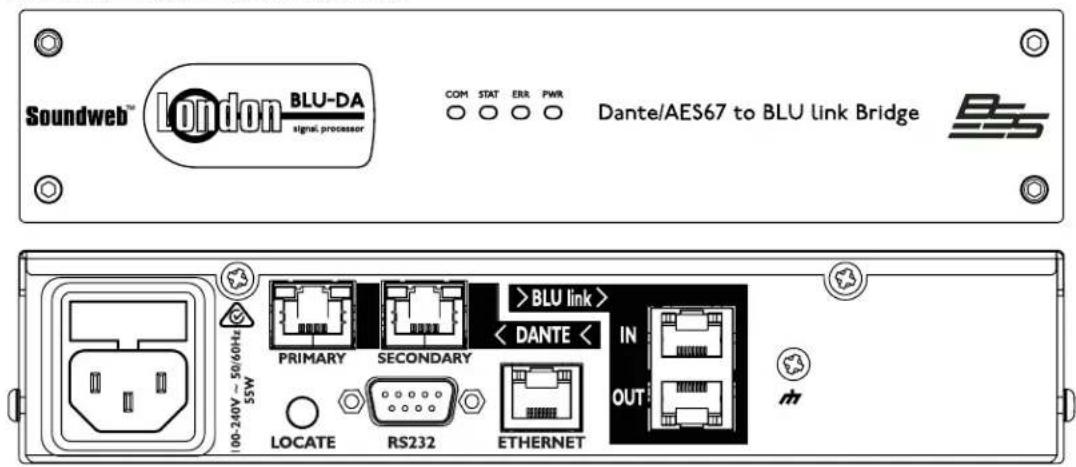
COM (Communications) LED
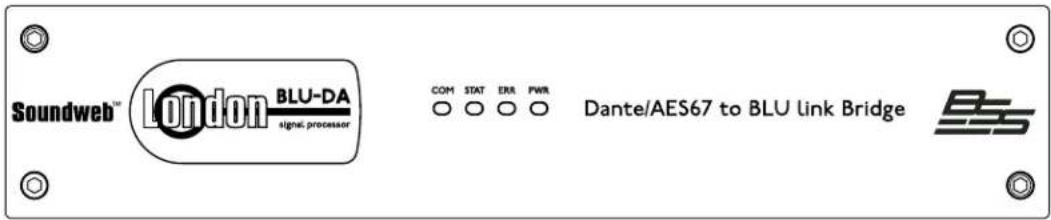
The COM LED turns green to indicate a normal linked condition. The COM LED blinks green if data is being transferred on the Ethernet or RS232 port. The LED turns yellow if a link is established but no IP address has been established.
STAT [Status] LED
The STAT LED turns green when a valid design file is loaded and running. The STAT LED turns yellow when the design is paused. The STAT LED turns red when the design is stopped.
ERR (Error) LED
The ERR LED is normally off. It turns red in the case of a critical or fatal error.
PWR [Power] LED
The PWR LED turns blue when the device is powered on. It blinks during locate operations (both when pressing the locate button on the rear of the device and also when locating the device from within the design software).
![BSS Audio BLU-DAN - PWR [Power] LED - 1](/content/2026/05/853726/images/6b16b3bcfe8ab3915f15a57b155d53bb5b90cad782b9d73bc90fc824146a3599.jpg)
Rear Panel
AC Mains
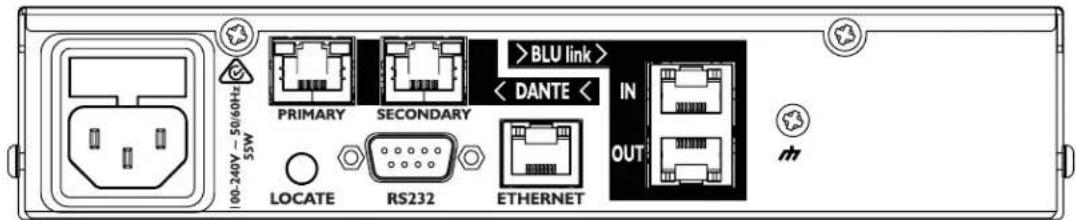
AC Mains input to the universal switched-mode power supply, operates over a wide range of AC input voltages from 100V to 240V, 50/60Hz.
Dante™/AES67
Dante is a licensed technology from Audinate®. It uses standard Internet Protocols over 100Mb and/or Gigabit Ethernet and is capable of transporting professional quality, low-latency audio. Dante runs on inexpensive off-the-shelf computer networking hardware and does not require dedicated network infrastructure; Ethernet switches transmit Dante digital media streams alongside ordinary data traffic. The module allows Soundweb London devices to send and receive up to 64X64 channels of audio at 48 kHz (up to 32X32 channels at 96 kHz) to and from other Dante-enabled devices.
The module offers a Primary and a Secondary Dante port. The Secondary port can be configured for Switched or Redundant operation using the Dante Controller software. When a device is set for Redundant operation, the device will duplicate Dante audio traffic to both Primary and Secondary Ethernet ports. When a device is set for Switched operation, the Secondary Ethernet port will behave as a standard switch port, allowing daisy-chaining through the device. The physical Dante connections must be made using Cat 5e or Cat 6 cables when using a Gigabit network (Cat 5 may be used for purely 100Mbps networks). AES67 audio transmission is achieved through the Dante ports on the BLU-DA. AES67 must be transmitted at 48kHz.
BLU link
The Soundweb London digital audio bus (also informally referred to as "BLU link") is a point-to-point digital audio bus with 256 audio channels at 48 kHz sample rate or 128 audio channels at 96 kHz sample rate. The physical connection is made with Cat 5e cable from the OUT port of one device to the IN port of another device. The devices are connected in a daisy chain fashion continuing with the OUT port of one device connected to the IN port of the next device. Redundancy can be provided by completing the loop and connecting the OUT port from the last device to the IN port of the first device in the chain. DO NOT connect BLU link ports to a hub, network switch, or router. All devices connected in the BLU link ring/chain must be configured for the same audio sample rate.
Locate
Pressing the Locate switch on the rear of the unit will flash the PWR LED on the front and identify the device within the design software. Similarly the switch will illuminate if the device is selected from within the design software.
RS232
The serial port allows 3rd-party control equipment to control and monitor the BLU-DA. The BLU-DA can also send custom serial strings (in Decimal, Hexadecimal, or ASCII format) through the serial port. Therefore, the BLU-DA can control virtually any device which has a serial port and a publicly available protocol guide.
Ethernet
The main connection for the proprietary system control network. The Ethernet port allows BLU-8v2's, BLU-10's, Contrio Ethernet wall controllers, the design software, iOS devices, and 3rd-party control devices to control and monitor the BLU-DA. The Ethernet port also allows the BLU-DA to send and receive design files to and from the design software. The BLU-DA can also send custom Ethernet messages (UDP or TCP; in Decimal, Hexadecimal, or ASCII format) through the Ethernet port. Therefore, the BLU-DA can control virtually any device which has an Ethernet port and a publicly available protocol guide.

Technical Specifications
FRONT PANEL LED INDICATORS
LEDS: Control link status and activity for Ethernet and RS-232 connections [COM], Device configuration status [STAT], Error [ERR], Power/Locate [PWR]
CONTROL NETWORK
CONNECTORS: RJ45 Ethernet connector
MAXIMUM CABLE LENGTH: 100m/328ft on Category 5 cable between device and Ethernet switch
BLU LINK AUDIO NETWORK
CONNECTORS: 2 x RJ45 Ethernet connectors
MAXIMUM CABLE LENGTH: 100m/328ft on Category 5e cable between devices
LATENCY: 11/Fs |0.23ms@48k, 0.11ms@96k|
PASS THROUGH LATENCY: 4/Fs [0.08ms@48k, 0.04ms@96k]
MAXIMUM NUMBER OF NODES: 60
DANTE/AES67 AUDIO NETWORK
CONNECTORS: 2 x RJ45 connectors
MAXIMUM CABLE LENGTH: 100m/328ft on Category 5 [100Mbps] or Category 5e/Category 6 [Gigabit] cable between devices
LATENCY: 0.15ms-5.0ms
POWER/TEMPERATURE
MAINS VOLTAGE: 100-240V AC, 50/60Hz
POWER CONSUMPTION: <55VA
BTU RATING: <188 BTU/hr
OPERATING TEMPERATURE RANGE: 0° to 45° C [32° to 113° F]
DIMENSIONS AND WEIGHT
DIMENSIONS: H|U| x W x D = 1.75" |1U| x 8.625" x 13.5" |45mm x 219mm x 343mm|
WEIGHT: 5.3 lbs [2.4 kg]
BSS Audio incorporates high quality mechanical fans in some products. All mechanical fans have a limited life expectancy. We recommend annual inspection of fans for dust occlusion and excessive noise. Fan assemblies should be replaced after six to ten years of use. Environmental factors such as elevated temperature, dust, and smoke can adversely affect fan life. Systems exposed to these conditions should be inspected more frequently. Fan replacement can be performed either at the factory or by an experienced technician in the field. Please contact BSS Technical Support for more information on purchasing replacement parts or product service.
BSS Audio has a policy of continued product improvement and accordingly reserves the right to change features and specifications without prior notice.

by HARMAN
Phone: (801) 566-8800
Website: bssaudio.com
Support: bssaudio.com/en-US/support
BSS Audio is a registered trademark of HARMAN
© 2018 HARMAN
All rights reserved
Printed in USA
- Soundweb™ London BLU-DAN / BLU-DA Installation Guide
- Table of Contents
- Product Registration/Warranty
- Included Items
- Mounting The BLU-DA
- Rack Mounting
- Front Panel
- COM (Communications) LED
- STAT [Status] LED
- ERR (Error) LED
- PWR [Power] LED
- AC Mains
- Dante™/AES67
- BLU link
- Locate
- RS232
- Ethernet
- Technical Specifications
- FRONT PANEL LED INDICATORS
- CONTROL NETWORK
- BLU LINK AUDIO NETWORK
- DANTE/AES67 AUDIO NETWORK
- POWER/TEMPERATURE
- DIMENSIONS AND WEIGHT
Brand : BSS Audio
Model : BLU-DAN
Category : Processor