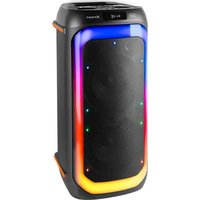
XF 780 KB - Loudspeaker Trevi - Free user manual and instructions
Find the device manual for free XF 780 KB Trevi in PDF.


| Product type | Portable speaker with microphone |
| Brand | Trevi |
| Model | XF 780 KB |
| Power supply | Built-in rechargeable battery + mains adapter |
| Inputs | 2 x microphone (6.35 mm jack), LINE IN (3.5 mm jack), USB, Micro SD |
| Wireless connectivity | Bluetooth 2.4 GHz, TWS (stereo pairing) |
| Radio | FM with automatic search and memory |
| Light effects | Adjustable disco LED |
| Equalizer | Presets: POP, ROCK, JAZZ, CLASSIC, COUNTRY, FLAT |
| Recording function | Voice recording to USB or Micro SD |
| Remote control | Yes, with advanced functions (mute, echo, tone, etc.) |
| Voice guide | Enable/disable |
| USB/SD playback | Standard audio formats (not specified) |
| Repeat | Single track (ONE) or all tracks (ALL) |
| Maintenance and cleaning | Soft, slightly damp cloth; avoid solvents and abrasives |
| Safety | Do not expose to moisture, magnetic fields, heat sources; avoid vibrations; maintain at least 5 cm ventilation |
| Spare parts and repairability | Consult a TREVI authorized service center |
| General information | Domestic use; environmental protection: separate collection |
Frequently Asked Questions - XF 780 KB Trevi
User questions about XF 780 KB Trevi
0 question about this device. Answer the ones you know or ask your own.
Ask a new question about this device
Download the instructions for your Loudspeaker in PDF format for free! Find your manual XF 780 KB - Trevi and take your electronic device back in hand. On this page are published all the documents necessary for the use of your device. XF 780 KB by Trevi.
USER MANUAL XF 780 KB Trevi
Listening at high volumes for a long time may damage your hearing.
This appliance is a high precision electronic instrument, therefore avoid using it in the following cases:
Near magnetic fields.
Near heat sources such as heaters and stoves.
- In very humid places such as bathrooms, swimming pools, etc...
In very dusty places.
In places subject to strong vibrations.
- Do not bring your ear close to the speaker during the adjustment and volume adjustment phases, and in particular to keep the volume to a minimum in the ignition phase.
- Position the appliance so that there is always enough space on its sides for the free circulation of air (at least 5cm ).
- If liquids penetrate inside the appliance, immediately disconnect the plug from the socket and take the appliance to the nearest authorized TREVI service center.
- Always check before recharging the appliance, that the power and connection cables are installed correctly.
- No naked flame sources, such as lighted candles, should be placed on the appliance.
- The appliance must not be exposed to dripping or splashing water and no objects filled with liquid, such as vases, must be placed on the appliance.
- Before turning on the appliance, always check that the power cable and the connection cable are installed correctly.
- The power adapter must be connected to an outlet near the device and must be easily accessible.
- If you notice excessive heat on the device or on the power adapter, immediately disconnect the plug from the main power socket.
- Do not pull on the power cable.
- Keep this manual for future reference.
CARE AND MAINTENANCE
For cleaning, we recommend the use of a soft, slightly moistened cloth. Avoid solvents or abrasive substances.
IMPORTANT
This device is designed for non-professional home use. The good construction of this appliance guarantees perfect operation for a long time. However, should any inconvenience arise, it is advisable to consult the nearest TREVI Authorized Service Center.

TREVI pursues a policy of continuous research and development. Therefore the products may have different characteristics from those described.
COMMANDS DESCRIPTION
ENGLISH
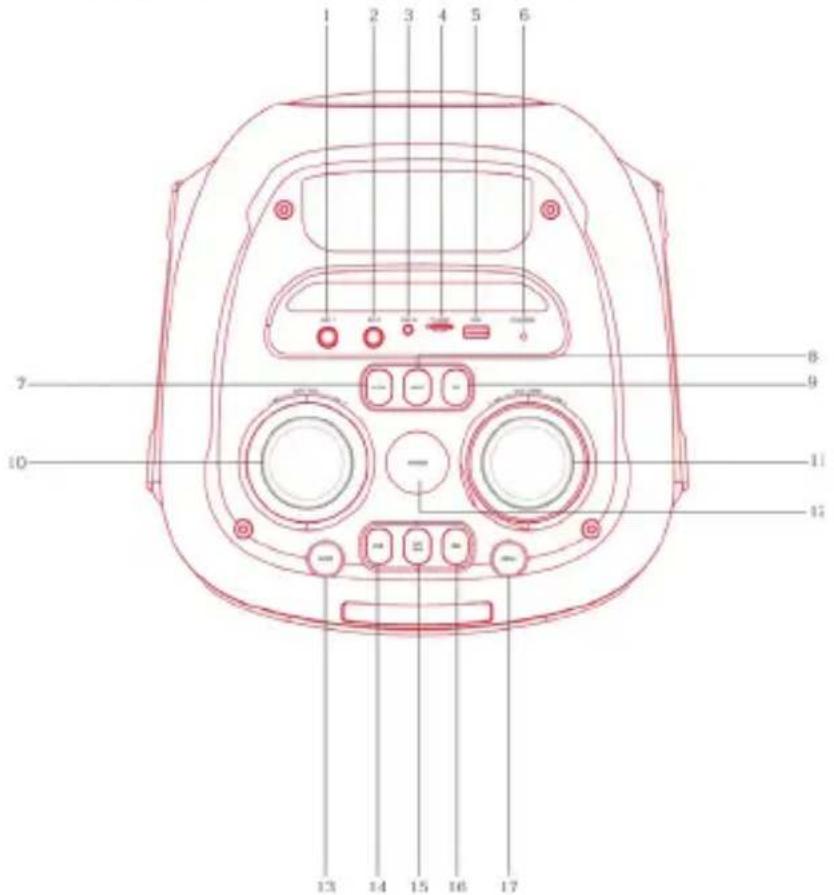
UNIT COMMANDS
I. Mic I input
2. Mic 2 input
3. LINE IN jack (3.5mm)
4. Micro SD memory slot
5. USB socket
6. LED charging indicator
7. M.PRI key, microphone priority
8. LIGHT button (Led disco light effects)
9. EQ key, audio equalization
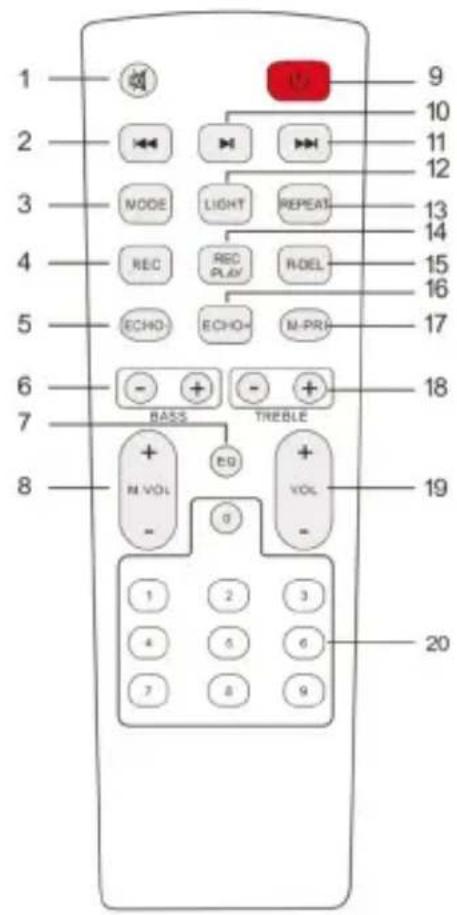
REMOTE CONTROL COMMANDS
I. MUTE function
2 Key, previous
3. MODE button
4. REC button
5. ECHO- button
6. Low tone adjustment keys
7. EQ button, predefined equalizations
8. Microphone volume adjustment keys
9. Power/ standby button
10. button, Play/ Pause
- MIC.VOL, microphone volume adjustment
I1. Volume adjustment - POWER key, on/off
- MODE key
- Key, previous
- key, Play/Pause + long press for TWS function
16.Key, next -
MENU key
-
Key , next
- LIGHT button (Led disco light effects)
- REPEAT button
- REC/ PLAY button
- REC DEL button
- ECHO + button
- M-PRI key, microphone priority
- Treble keys
- Volume adjustment keys
- Numeric keys
BATTERY RECHARGE
I. With the device off, connect the power cord to the socket located on the back of the device.
2. The Led indicator (6) will light up red;
3. When charging is complete, the Led indicator (6) will turn green;
4. With low battery, the last segment of the battery icon on the display will flash for a certain time, then the appliance will automatically go into standby mode.
Note:
- For a good battery life it is advisable to keep the device switched off during the recharging phase.
Unless otherwise noted, the commands described below apply to both the unit and the remote.
ON/OFF
- Press and hold the POWER on/off switch (12) for 5 seconds to turn the appliance on and off.
- Press the STANDBY(9) key on the remote control to put the unit in Stand-by mode; press it again to turn the unit back on.
VOLUME / MUTE / TONE / ECHO EFFECT ADJUSTMENT
I. Turn the Volume knob (11) clockwise/anticlockwise to increase/decrease the volume of the device. Press the MUTE(1) key on the remote control to immediately silence the device, press it again to return to normal listening;
2. Press the MENU(17) key and turn the knob (I I) to activate the adjustment of the high tones, low tones, echo effect;
3. Using the EQ(9) key it is possible to vary the audio dynamics by choosing from the pre-set ones: POP, ROCK, JAZZ, CLASSIC, FLAT.
GUIDE VOICE ACTIVATION/DEACTIVATION
Press and hold the MODE key (I3) on the unit for a few seconds to activate/deactivate the voice guide (in English).
FM RADIO
This device is equipped with FM radio:
- To scan and save the radio stations found, press the (15) button, wait for the scan to be carried out on the entire FM band, the radio stations found are saved automatically.
- To move from one radio saved in the memory to another, press keys (14) or (16), the display shows the P memory number you are listening to.
- To carry out a manual search, press and hold keys (14) or (16), the search stops on the first radio station found with a good signal.
I. Place the speaker near the Audio wireless device to pair and turn on the device;
2. Select the Audio wireless function using the MODE key (13), the flashing "BLUE" will appear on the display;
3. Follow the instructions of your external device to search for the speaker;
4. Search for the speaker named "XF 780 KB" and enter the PIN "0000" if required;
5. Once pairing has taken place, the word "BLUE" on the display will remain fixed.
Note:
- The Audio wireless speaker only works with one connection at a time, the connection cannot be interrupted during normal operation.
- The proximity of TV sets, neon lamps or other appliances can cause disturbances in reception, in this case move the appliance away.
COMMANDS AVAILABLE IN AUDIO WIRELESS MODE
- Start audio playback from your device.
- Press the (14) key once to go to the previous track,press the (16) key once to go to the next track.
- Press II (15) button to pause, press it again to resume playback.
TWS LINK
TWS technology allows the user to make a wireless connection between two speakers of the same model and compatible with the TWS function.
- Turn off the Audio wireless function on your phone or other Audio wireless device;
- Turn on both speakers and select "Audio wireless" mode on both;
- Press and hold for 3 sec. the key II (15) of one of the loudspeakers, after a few seconds the two loudspeakers will be paired (a beep will warn of successful pairing);
- Turn on Audio wireless on your phone or other device, search and pair the external device to the speaker. After connection, you will be able to play music with the TWS stereo-speaker system.
Adjustments on the main speaker will also be made simultaneously on the other speaker. For example, previous and next track selection, play and pause.
Note:
- If the 2 speakers fail to pair, turn off both devices and repeat steps 1, 2 and 3.
- The TWS function only works between the same speakers or with other speakers using the same micro processor or solution.
I. Insert a Micro SD card in the slot (4) or a USB stick in the socket (5) and turn on the device;
2. Playback will start automatically. Otherwise, press the MODE(14) key several times until USB or TF appears on the display;
3. Press the (14) key once to go to the previous track, press the (16) key once to go to the next track;
4. Press II (15) button to pause, press it again to resume playing;
5. Press and hold down key (14) or key (16) to fast forward or rewind in listening to the track, release the key to return to normal listening;
6. Using the REPEAT(9) key it is possible to activate the track repeat function (ONE=repeat a single track, ALL=repeat all the tracks present);
7. Use the number buttons on the remote control (20) for direct selection of a track.
LINE IN OPERATION
I. Connect any unit equipped with an audio output via the appropriate 3.5mm Jack cable to the LINE IN input (3), press the MODE key (13) several times until the wording "LINE" appears on the display;
2. Adjust the external device by your commands.
MOVING DISCO-LIGHT
To vary the Moving Disco-Light effects, press the LIGHT key (8) several times, the various light effects will be distinguished on the display with the numbers.
I. Plug the supplied microphone into the MIC1(1) or MIC2(2) jack;
2. Adjust the volume using the control (10) and the ECHO effect of the microphone using the ECHO - (5) and ECHO + (16) keys;
RECORD FUNCTION
It is possible to record only the speech of the microphone on the microSD/USB memory:
I. Insert a micro SD memory or a USB memory in the respective inputs;
2. Press the REC(4) button on the remote control to start recording; the message REC appears on the display followed by the recording start time;
3. Press the REC/PLAY(14) key to listen to the recording just made;
4. Press the R-DEL(15) key to delete the recording just made.
Note: When recording from the microphone, it is plausible that there is some background noise on the recording.
TECHNICAL FEATURES
Total power: 110W
Max wireless transmission power: 0.8mW
Wireless transmission frequency: 2.4GHz
FM frequency: 87.5MHz - 108.0MHz
Power supply: 230V~50Hz
7.4V = 3600mA lithium battery
Dimensions: 300 (L) x 300 (D) x 640 (H) mm
Weight: 6.8 kg
INFORMATION ON THE REMOVAL AND DISPOSAL OF BATTERIES
Warning: the removal and disposal operation is reserved exclusively for specialized technical staff!
- Remove the screws that secure the upper control panel;
- Extract the control panel;
- Locate and remove the battery from its compartment.
Whatever the type of exhausted battery, it must not be thrown into household waste, in fire or in water. Any type of exhausted battery must be recycled or disposed of at the specific dedicated collection centers.
WARNING FOR A CORRECT USE OF RECHARGEABLE BATTERY
- Recharge the battery in an ambient temperature between 5^ and 35^ .
- Don't recharge more than the suitable period to prevent the risk of overheating and burst.
- Recharging the battery over the suitable period or an extended period of inactivity may reduce battery duration.
- Rechargeable battery is liable to wear and tear and its performance will reduce gradually.
- To extend the duration of the battery use it when is completely charged up to the complete discharging, then recharge it fully before use it again. Recharge a battery not completely consumed, will result a reduced duration. In this case, repeat the full charging/discharging cycle many times.
- Avoid recharge the battery for the whole night.
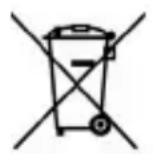
Precautions for correct disposal of the product.
The symbol shown on the equipment indicates that waste must be disposed of in "separate collection" and so the product must not be disposed of together with urban waste.
The user must take the product to special "separate waste collection centres" provided by local government, or deliver it to the retailer against the purchase of a new product.
Separate collection of waste and subsequent treatment, recycling and disposal operations promotes the production of equipment with recycled materials and limits negative effects on the environment and on health caused by improper handling of waste.
Illegal disposal of the product leads to the enforcement of administrative penalties.
NOTES D'UTILISATION
Frequence FM: 87.5MHz - 108.0MHz
Alimentation: 230V~50Hz
Batterie au lithium 7.4V = 3600mA
Dimensions: 300 (L) x 300 (P) x 640 (H) mm
Poids: 6,8 kg
INFORMATIONS SUR LE RETRAIT ET L'ELIMINATION DES PILES
SIMPLIFIED EU DECLARATION OF CONFORMITY
Hereby TREVI Spa declares that the radio equipment type XF 780 KB is in compliance with directive 2014/53/EU.
The full text of the EU declaration of conformity is available at the following internet address https://www.trevi.it/dms/zidi/TREVI/DOCXF780KB.pdf


- CARE AND MAINTENANCE
- IMPORTANT
- COMMANDS DESCRIPTION
- UNIT COMMANDS
- REMOTE CONTROL COMMANDS
- BATTERY RECHARGE
- ON/OFF
- VOLUME / MUTE / TONE / ECHO EFFECT ADJUSTMENT
- GUIDE VOICE ACTIVATION/DEACTIVATION
- FM RADIO
- COMMANDS AVAILABLE IN AUDIO WIRELESS MODE
- TWS LINK
- LINE IN OPERATION
- MOVING DISCO-LIGHT
- RECORD FUNCTION
- TECHNICAL FEATURES
- INFORMATION ON THE REMOVAL AND DISPOSAL OF BATTERIES
- Warning: the removal and disposal operation is reserved exclusively for specialized technical staff!
- WARNING FOR A CORRECT USE OF RECHARGEABLE BATTERY
- Precautions for correct disposal of the product.
- NOTES D'UTILISATION
- INFORMATIONS SUR LE RETRAIT ET L'ELIMINATION DES PILES
- SIMPLIFIED EU DECLARATION OF CONFORMITY
Brand : Trevi
Model : XF 780 KB
Category : Loudspeaker