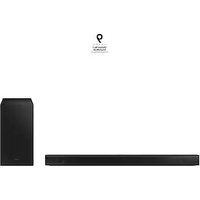
HW-B540 - Soundbar SAMSUNG - Free user manual and instructions
Find the device manual for free HW-B540 SAMSUNG in PDF.



| Product type | Soundbar |
| Brand | Samsung |
| Model | HW-B540 |
| Dimensions (W x H x D) | 860.0 x 59.4 x 75.0 mm |
| Soundbar weight | 2.1 kg |
| Subwoofer weight | 4.4 kg |
| Power supply | AC (24V DC adapter) |
| Nominal output power (soundbar) | 160 W (40 W x 4) |
| Nominal output power (subwoofer) | 200 W |
| Wireless connectivity | Bluetooth 5.0 (A2DP, AVRCP), Wi-Fi unspecified |
| Audio inputs | 1x optical (DIGITAL AUDIO IN), 1x HDMI IN, 1x HDMI TO TV (ARC), 1x USB (5V 0.5A) |
| Supported audio formats | LPCM 2ch, Dolby Digital, DTS, DTS Virtual:X |
| Sound modes | SURROUND SOUND, GAME, ADAPTIVE, DTS VIRTUAL:X, STANDARD |
| Special features | Bluetooth Power On, Multi-Bluetooth (2 devices), Auto Power Down, NIGHT, VOICE ENHANCE, Adjustable Audio Sync |
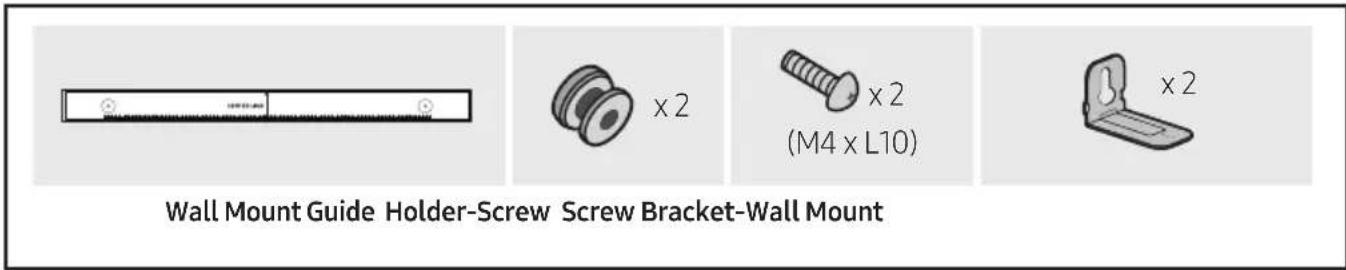
| Wall mount installation | Wall mount bracket provided, screws not provided (M5, length ≥ 35 mm) |
| Remote control batteries | 2 AAA batteries (not provided) |
| Operating temperature | +5°C to +35°C |
| Operating humidity | 10% ~ 75% |
| Standby power consumption | 2.0 W |
| Maintenance and cleaning | Unplug before cleaning, use a dry cloth, do not expose to water |
| Safety | Do not open, risk of electric shock; plug into a grounded outlet; do not expose to rain or moisture |
| Spare parts and repairability | No user-serviceable parts; contact qualified service personnel. Optional wireless rear speaker kit (SWA-9100S or SWA-9200S) |
Frequently Asked Questions - HW-B540 SAMSUNG
User questions about HW-B540 SAMSUNG
0 question about this device. Answer the ones you know or ask your own.
Ask a new question about this device
Download the instructions for your Soundbar in PDF format for free! Find your manual HW-B540 - SAMSUNG and take your electronic device back in hand. On this page are published all the documents necessary for the use of your device. HW-B540 by SAMSUNG.
USER MANUAL HW-B540 SAMSUNG
Thank you for purchasing this Samsung product.
To receive more complete service, please register
your product at www.samsung.com/register
SAFETY INFORMATION
SAFETY WARNINGS
TO REDUCE THE RISK OF ELECTRIC SHOCK, DO NOT REMOVE THE COVER (OR BACK).
NO USER-SERVICEABLE PARTS ARE INSIDE.
REFER SERVICING TO QUALIFIED SERVICE PERSONNEL.
Refer to the table below for an explanation of symbols which may be on your Samsung product.
 | CAUTIONRISK OF ELECTRIC SHOCK.DO NOT OPEN. |  |
 | This symbol indicates that high voltage is present inside. It is dangerous to make any kind of contact with any internal part of this product. | |
 | This symbol indicates that this product has included important literature concerning operation and maintenance. | |
 | Class II product: This symbol indicates that it does not require a safety connection to electrical earth (ground). If this symbol is not present on a product with a power cord, the product MUST have a reliable connection to protective earth (ground). | |
 | AC voltage: This symbol indicates that the rated voltage marked with the symbol is AC voltage. | |
 | DC voltage: This symbol indicates that the rated voltage marked with the symbol is DC voltage. | |
 | Caution, Consult instructions for use: This symbol instructs the user to consult the user manual for further safety related information. | |
CAUTION
WARNING
- To reduce the risk of fire or electric shock, do not expose this appliance to rain or moisture.
CAUTION
• TO PREVENT ELECTRIC SHOCK, MATCH WIDE BLADE OF PLUG TO WIDE SLOT, FULLY INSERT.
- This apparatus shall always be connected to a AC outlet with a protective grounding connection.
- To disconnect the apparatus from the mains, the plug must be pulled out from the mains socket, therefore the mains plug shall be readily operable.
- Do not expose this apparatus to dripping or splashing. Do not put objects filled with liquids, such as vases on the apparatus.
- To turn this apparatus off completely, you must pull the power plug out of the wall socket. Consequently, the power plug must be easily and readily accessible at all times.
PRECAUTIONS
- Ensure that the AC power supply in your house complies with the power requirements listed on the identification sticker located on the bottom of your product. Install your product horizontally, on a suitable base (furniture), with enough space around it for ventilation (7\~10 cm). Make sure the ventilation slots are not covered. Do not place the unit on amplifiers or other equipment which may become hot. This unit is designed for continuous use. To fully turn off the unit, disconnect the AC plug from the wall outlet. Unplug the unit if you intend to leave it unused for a long period of time.
- During thunderstorms, disconnect the AC plug from the wall outlet. Voltage peaks due to lightning could damage the unit.
- Do not expose the unit to direct sunlight or other heat sources. This could lead to overheating and cause the unit to malfunction.
-
Protect the product from moisture (i.e. vases), and excess heat (e.g. a fireplace) or equipment creating strong magnetic or electric fields. Unplug the power cable from the AC wall socket if the unit malfunctions. Your product is not intended for industrial use. It is for personal use only. Condensation may occur if your product has been stored in cold temperatures. If transporting the unit during the winter, wait approximately 2 hours until the unit has reached room temperature before using.
-
The battery used with this product contains chemicals that are harmful to the environment. Do not dispose of the battery in the general household trash. Do not expose the battery to excess heat, direct sunlight, or fire. Do not short circuit, disassemble, or overheat the battery.
CAUTION : Danger of explosion if the battery is replaced incorrectly. Replace only with the same or equivalent type.
CONTENTS
01 Checking the Components 6
02 Product Overview 7
Front Panel / Top Panel of the Soundbar 7
Bottom Panel of the Soundbar 8
03 Using the Remote Control 9
Inserting Batteries before using the Remote Control (AAA batteries X 2) ____ 9
How to Use the Remote Control ____ 9
Using the Hidden Buttons (Buttons with more than one function) ____ 13
Output specifications for the different sound effect modes 13
Adjusting the Soundbar volume with a TV remote control 14
04 Connecting the Soundbar 15
Connecting Electrical Power 15
Connecting the Soundbar to the Subwoofer 16
Connecting the Samsung Wireless Rear Kit to your Soundbar 18
05 Using a wired connection to the TV 19
Method 1. Connecting using an Optical Cable ____ 19
Method 2. Connecting a TV using an HDMI Cable ____ 20
06 Using a wireless connection to the TV 22
Connecting a TV via Bluetooth 22
07 Connecting an External Device 24
Method 1. Connecting using an Optical Cable ____ 24
Method 2. Connecting using an HDMI Cable ____ 25
08 Connecting a USB Storage Device 26
09 Connecting a Mobile Device 27
Connecting via Bluetooth ____ 27
10 Installing the Wall Mount 31
Installation Precautions ____ 31
Wallmount Components ____ 31
11 Software Update 33
How to check the Firmware version ____ 33
Update Procedure 34
If UPDATE is not displayed 34
12 Troubleshooting 35
13 Licence 37
14 Open Source Licence Notice 38
15 Important Notes About Service 38
16 Specifications and Guide 39
Specifications 39
01 CHECKING THE COMPONENTS
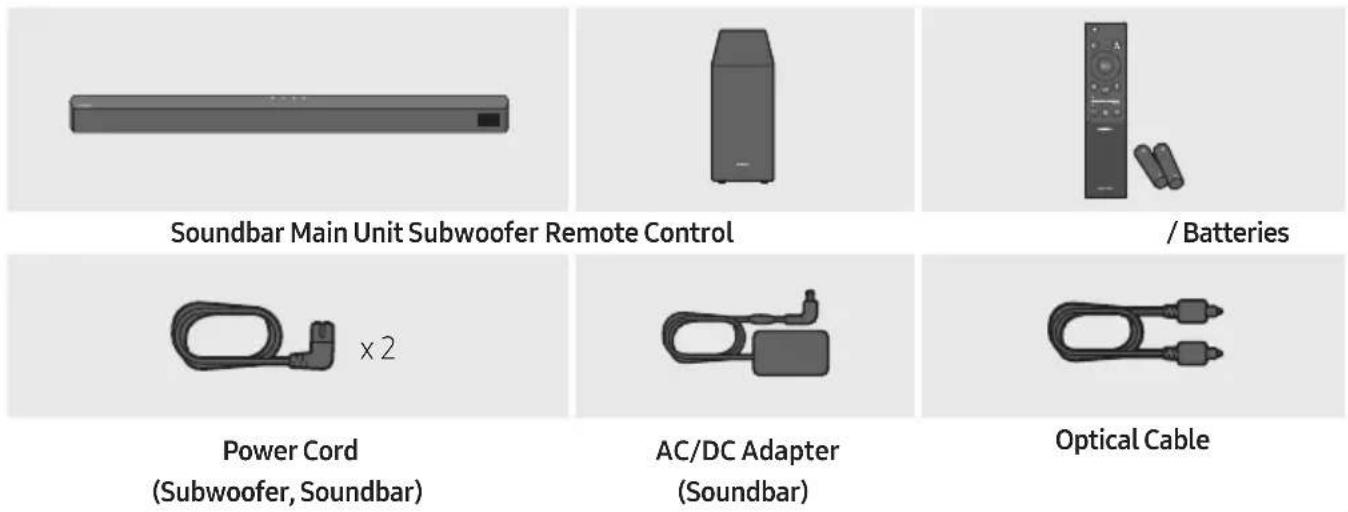
- For more information about the power supply and power consumption, refer to the label attached to the product. (Label: Bottom of the Soundbar Main Unit)
- To purchase additional components or optional cables, contact a Samsung Service Centre or Samsung Customer Care.
- Depending on the region, the appearance of the AC plug may differ from the plug displayed above, or it may be supplied integrated with the AC/DC adapter.
- The appearance of the accessories may differ slightly from the illustrations above.
- Design and specifications are subject to change without prior notice.
02 PRODUCT OVERVIEW
Front Panel / Top Panel of the Soundbar
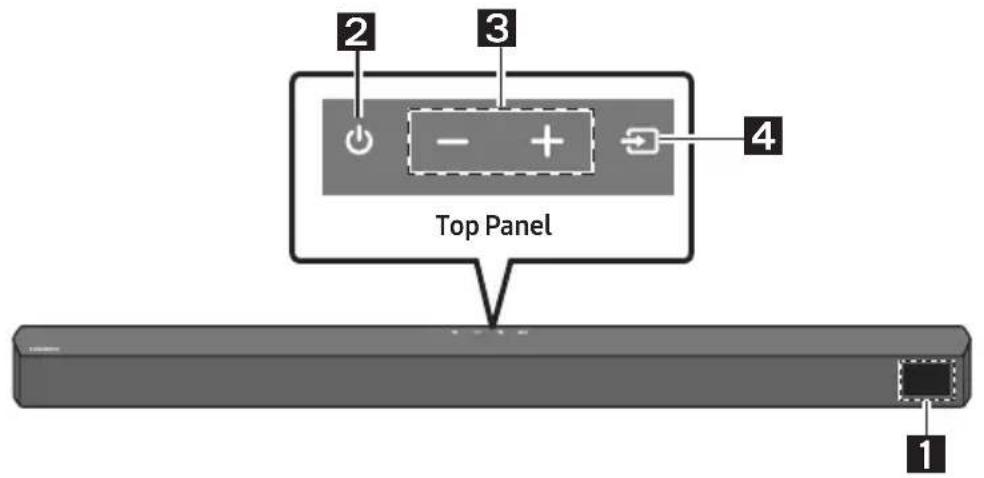
| 1 | DisplayDisplays the product's status and current mode. | |
| 2 | (Power) ButtonTurns the power on and off.Auto Power Down FunctionThe unit turns off automatically in the following situations:In D.IN / HDMI / BT / USB Mode : If there is no audio signal for 20 minutes. | |
| 3 | +(Volume) ButtonAdjusts the volume.When adjusted, the volume level appears on the Soundbar's front display. | |
| 4 | (Source) ButtonSelects the source input mode. | |
| Input mode Display | ||
| Optical Digital input D.IN | ||
| ARC (HDMI OUT) input | D.IN → TV ARC (Auto conversion) | |
| HDMI input HDMI | ||
| BLUETOOTH mode BT | ||
| USB mode USB | ||
| To turn on "BT PAIRING" mode, change the source to "BT" mode, and then press and hold the(Source) button for more than 5 seconds. | ||
- When you plug in the AC cord, the power button will begin working in 4 to 6 seconds.
- When you turn on this unit, there will be a 4 to 5 second delay before it produces sound.
- If you want to enjoy sound only from the Soundbar, you must turn off the TV's speakers in the Audio Setup menu of your TV. Refer to the owner's manual supplied with your TV.
Bottom Panel of the Soundbar
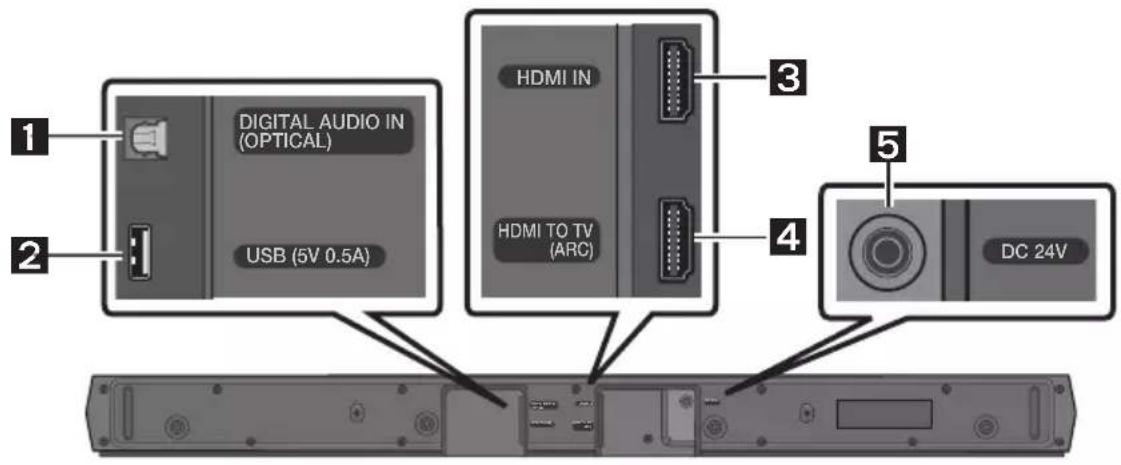
| 1 | DIGITAL AUDIO IN (OPTICAL)Connect to the digital (optical) output of an external device. |
| 2 | USB (5V 0.5A)Connect a USB device here to play music files stored on the USB device through the Soundbar. |
| 3 | HDMI INInputs digital video and audio signals simultaneously using an HDMI cable.Connect to the HDMI output of an external device. |
| 4 | HDMI TO TV (ARC)Connect to the HDMI (ARC) port on a TV. |
| 5 | DC 24V (Power Supply In)Connect the AC/DC power adapter. |
- When disconnecting the power cable of the AC/DC power adapter from a wall outlet, pull the plug. Do not pull the cable.
- Do not connect this unit or other components to an AC outlet until all connections between components are complete.
03 USING THE REMOTE CONTROL
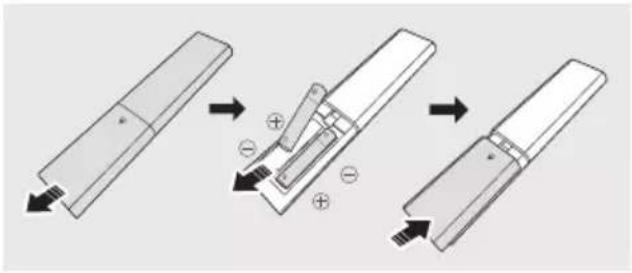
Inserting Batteries before using the Remote Control (AAA batteries X 2)
Slide the back cover in the direction of the arrow until it is completely removed.
Insert 2 AAA batteries (1.5V) oriented so that their polarity is correct. Slide the back cover back into position.
How to Use the Remote Control
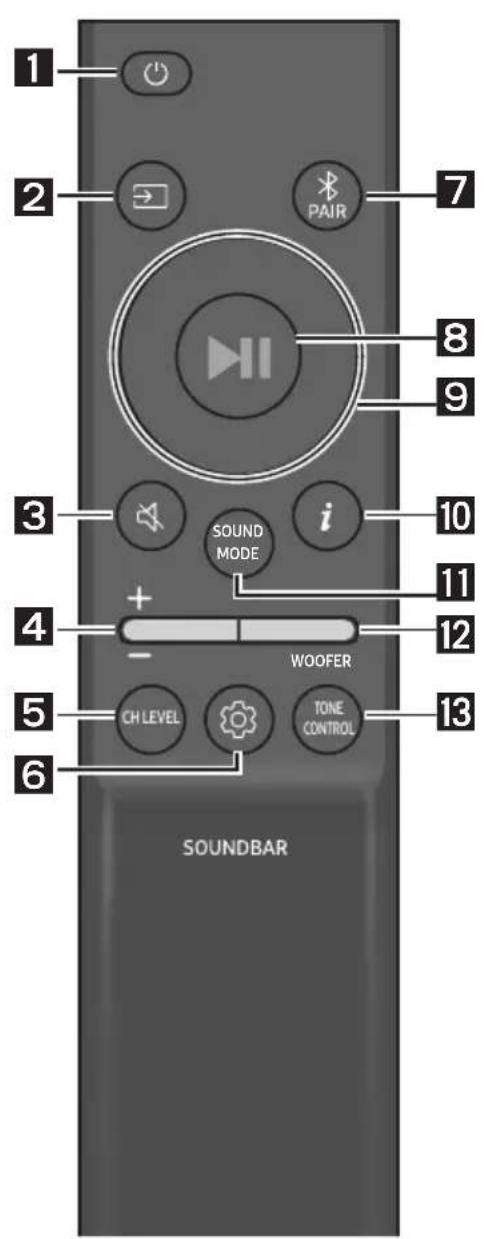
| 1 |  Power Power | Turns the Soundbar on and off. |
| 2 |  Source Source | Press to select a source connected to the Soundbar. |
| 3 |  Mute Mute | Press the (Mute) button to mute the sound. Press it again to unmute the sound. |
| 4 | 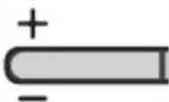 Volume Volume | 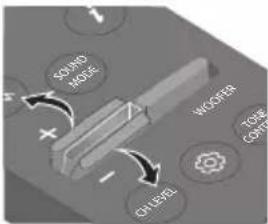 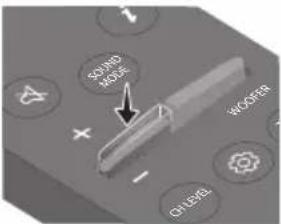 Push the button up or down to adjust the volume.• MutePress the Volume button in to mute the sound. Press it in again to unmute the sound. Push the button up or down to adjust the volume.• MutePress the Volume button in to mute the sound. Press it in again to unmute the sound. |
5
By pressing the button, you can adjust the volume of the each speaker.
CH LEVEL
- Press the button to select VIRTUAL CENTER LEVEL and then adjust the volume between -6\~+6 by using the Up/Down buttons.
- If the Rear Speakers (sold separately) are connected, the setting REAR LEVEL is supported. To adjust the volume of the REAR LEVEL between -6 to +6 by using the Up/Down buttons.
6
By pressing the button, you can set the audio function. The desired settings can be adjusted using the Up/Down buttons.
If the video on the TV and audio from the Soundbar are not synchronised, press the (Sound Control) button to select AUDIO SYNC and then set the audio delay between 0\~300 milliseconds by using the Up/Down buttons. (Not available in "USB" or "BT" mode.)
- NIGHT MODE ON/OFF
This mode is optimized for nighttime viewing with the settings adjusted to bring the volume down but keep the dialog clear.
This mode is makes it easier to hear spoken dialog in movies and TV.
- The NIGHT MODE, and VOICE ENHANCE audio function can be turned ON/OFF by using the Up/Down buttons.
- Press and hold the (Sound Control) button for about 5 seconds to adjust the sound for each frequency band. 150Hz, 300Hz, 600Hz, 1.2kHz, 2.5kHz, 5kHz, and 10kHz are selectable using the Left/Right buttons and each can be adjusted to a setting between -6 to +6 using the Up/Down buttons. (Make sure the Sound mode is set to "STANDARD".)
7
Switch the Soundbar to Bluetooth pairing mode.
Press the PAIR button and wait for the "BT PAIRING" screen to connect to a new Bluetooth device.
Bluetooth PAIR
8
You can also play or pause music by pressing the button.
Play / Pause
| 9 |  Up/Down/Left/Right Up/Down/Left/Right | 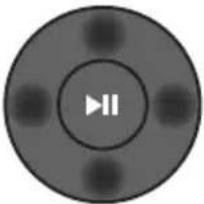 Press the indicated areas to select Up/Down/Left/Right.Press Up/Down/Left/Right on the button to select or set functions.RepeatTo use the Repeat function in "USB" mode, press the Up button.Music SkipPress the Right button to select the next music file. Press the Left button to select the previous music file.ID SETPress and hold the Up button for 5 seconds to complete ID SET (when connecting to a wireless subwoofer or wireless rear speakers). Press the indicated areas to select Up/Down/Left/Right.Press Up/Down/Left/Right on the button to select or set functions.RepeatTo use the Repeat function in "USB" mode, press the Up button.Music SkipPress the Right button to select the next music file. Press the Left button to select the previous music file.ID SETPress and hold the Up button for 5 seconds to complete ID SET (when connecting to a wireless subwoofer or wireless rear speakers). |
| 10 | iInfo | Press the button to display information about the current function. (See page 7.) |
| 11 | SOUND MODE | By pressing the button, you can select the desired sound mode.SURROUND SOUND → GAME → ADAPTIVE → DTS VIRTUAL:X → STANDARD– SURROUND SOUNDProvides a wider sound field than standard.– GAMEProvides stereoscopic sound to immerse you in the action while gaming.– ADAPTIVEAnalyzes the content in real time and automatically provides an optimal sound field based on the characteristics of the content.– DTS VIRTUAL:X Immersive 3D sound from any content.– STANDARDOutputs the original sound.• DRC (Dynamic Range Control)Lets you apply dynamic range control to Dolby Digital tracks. Press and hold the SOUND MODE button for more than 5 seconds while the Soundbar is powered off to turn DRC (Dynamic Range Control) on or off. With the DRC turned on, loud sound is reduced. (The sound may be distorted.)• Bluetooth PowerThis feature automatically turns the Soundbar on when it receives a connection request from a previously connected TV or Bluetooth device. The setting is On by default.– Press and hold the SOUND MODE button for more than 5 seconds to turn off the Bluetooth Power function. |
| 12 |  WOOFERWOOFER(BASS) LEVEL WOOFERWOOFER(BASS) LEVEL | 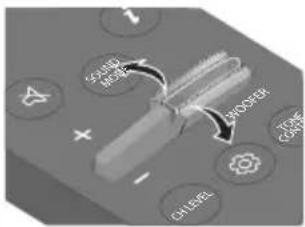 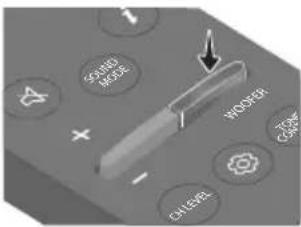 Push the button up or down to adjust the level of the woofer (bass) to -12 or between -6 to +6. To set the woofer (bass) volume level to 0 (Default), press the button. Push the button up or down to adjust the level of the woofer (bass) to -12 or between -6 to +6. To set the woofer (bass) volume level to 0 (Default), press the button. |
| 13 |  TONECONTROL TONECONTROL | By pressing the button, you can adjust the volume of the treble or bass sound.Press the button to select TREBLE or BASS and then adjust the volume between -6~+6 by using the Up/Down buttons. |
Using the Hidden Buttons (Buttons with more than one function)
| Hidden Button | Reference page | |
| Remote Control Button Function | ||
| WOOFER (Up) | TV remote control On/Off (Standby) | page 14 |
| Left | TV Auto connect On/Off (BT Ready) | page 23 |
| Up ID SET page 11 | ||
| (WXXT) (Sound Control) | 7 Band EQ page 10 | |
| SOUND MODE | DRC ON/OFF (Standby) page 11 | |
| Bluetooth Power page 11 | ||
| (DE4A) PAIR | Bluetooth Multi-connection On/Off (Standby) | page 30 |
Output specifications for the different sound effect modes
| Effect Input | Output | |||
| Without Wireless Rear Speaker Kit | With Wireless Rear Speaker Kit | |||
 SOUND MODE SOUND MODE | SURROUND SOUND | 2.0 ch | 2.1 ch 4.1 ch | |
| 5.1 ch 2.1 ch 4.1 ch | ||||
| GAME | 2.0 ch | 2.1 ch 4.1 ch | ||
| 5.1 ch 2.1 ch 4.1 ch | ||||
| ADAPTIVE | 2.0 ch | 2.1 ch 4.1 ch | ||
| 5.1 ch 2.1 ch 4.1 ch | ||||
| DTS VIRTUAL:X | 2.0 ch | 2.1 ch 4.1 ch | ||
| 5.1 ch 2.1 ch 4.1 ch | ||||
| STANDARD | 2.0 ch | 2.1 ch 2.1 ch | ||
| 5.1 ch 2.1 ch 2.1 ch | ||||
- The Samsung Wireless Rear Speaker Kit can be purchased separately. To purchase a Kit, contact the vendor you purchased the Soundbar from.
Adjusting the Soundbar volume with a TV remote control
Adjust the Soundbar volume using the TV's remote control.
- This function can be used with IR remote controls only. Bluetooth remote controls (remote controls that require pairing) are not supported.
-
Set the TV speaker to External Speaker to use this function.
• Manufacturers supporting this function: Samsung, VIZIO, LG, Sony, Sharp, PHILIPS, PANASONIC, TOSHIBA, Hisense, RCA -
Turn Off the Soundbar.
- Push up and hold the WOOFER button for 5 seconds.
Each time you push the WOOFER button up and hold it for 5 seconds, the mode switches in the following order: "OFF-TV REMOTE" (Default mode), "SAMSUNG-TV REMOTE", "ALL-TV REMOTE".
| Remote Control Button Display Status | ||
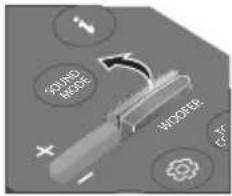  | (Default mode)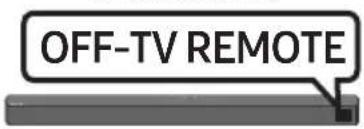 | Disable the TV remote control. |
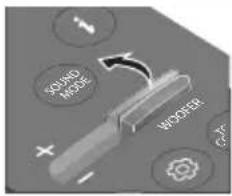  |  | Enable a Samsung TV's IR remote control. |
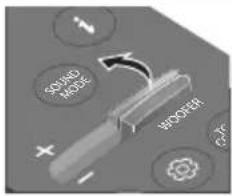 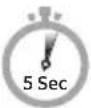 | 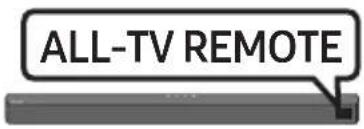 | Enable a third-party TV's IR remote control. |
04 CONNECTING THE SOUNDBAR
Connecting Electrical Power
Use the power components to connect the Subwoofer and Soundbar to an electrical outlet in the following order:
- Connect the power cord to the Subwoofer.
- Connect the power output cable to the power adapter, and then to the Soundbar.
- Connect the power cord to a wall socket.
See the illustrations below.
- For more information about the required electrical power and power consumption, refer to the label attached to the product. (Label: Bottom of the Soundbar Main Unit)
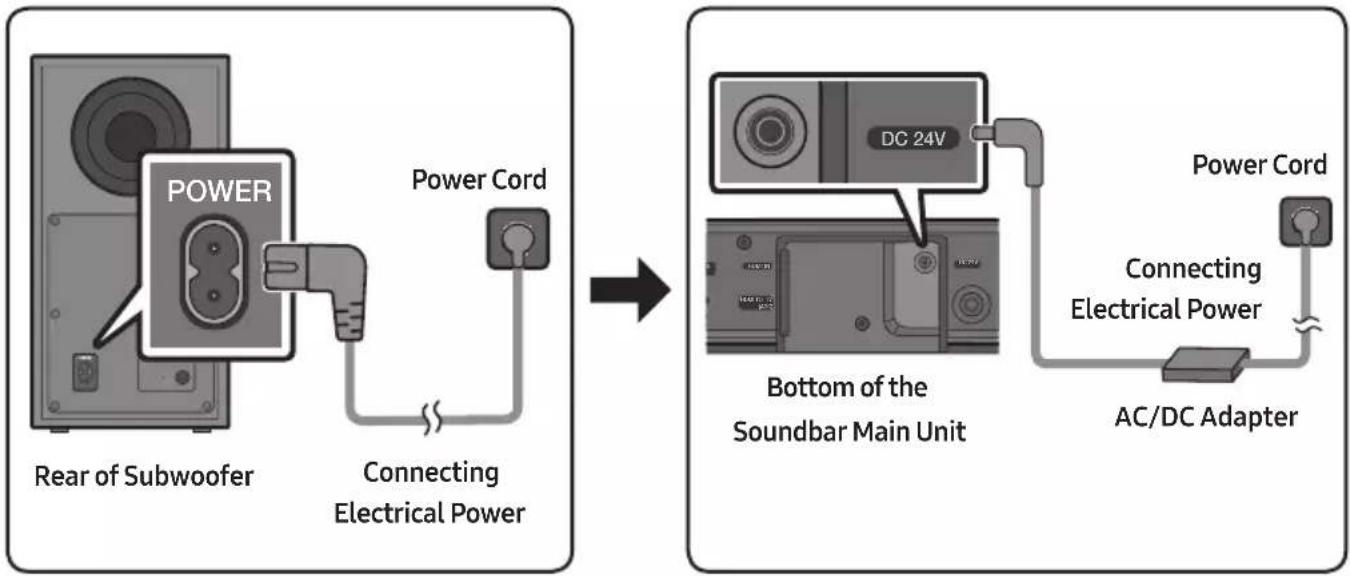
flowchart
graph LR
    A["Power Cord"] --> B["Rear of Subwoofer"]
    B --> C["Connecting Electrical Power"]
    C --> D["DC 24V"]
    D --> E["Bottom of the Soundbar Main Unit"]
    E --> F["AC/DC Adapter"]
    F --> G["Power Cord"]
    G --> H["Connecting Electrical Power"]
- Make sure to rest the AC/DC Adapter flat on a table or the floor. If you place the AC/DC Adapter so that it is hanging with the AC cord input facing upwards, water or other foreign substances could enter the Adapter and cause the Adapter to malfunction.
Connecting the Soundbar to the Subwoofer
When the subwoofer is connected, you can enjoy rich bass sound.
Automatic connection between the Subwoofer and the Soundbar
When you turn the power on after connecting the power cables to the Soundbar and subwoofer, the subwoofer is automatically connected to the Soundbar.
- When auto pairing is complete, the blue indicators at the rear of the subwoofer turn on.
LED Indicator Lights on the Rear of Subwoofer
| LED Status Description Resolution | |||
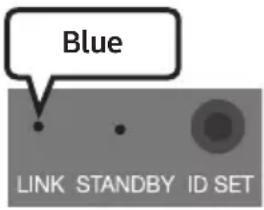 | On | Successfully connected (normal operation) | - |
| Blinking Re | recovering the connection | Check if the power cable attached to the main Soundbar unit is connected properly or wait about 5 minutes. If blinking persists, try manually connecting the subwoofer. See page 17. | |
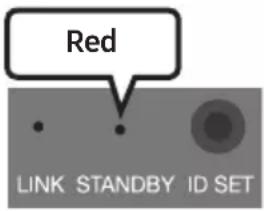 | On | Standby (with the Soundbar main unit turned off) | Check if the power cable attached to the main Soundbar unit is connected properly. |
| Connection failed | Connect again. See the instructions for manual connection on page 17. | ||
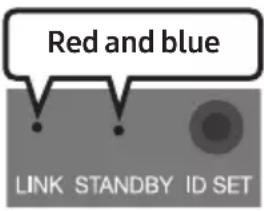 | Blinking Malfunction | See the contact information for the Samsung Service Centre in this manual. | |
Manually connecting the Subwoofer if automatic connection fails
Before performing the manual connection procedure below:
-
Check whether the power cables for the Soundbar and subwoofer are connected properly.
• Make sure that the Soundbar is turned on. -
Press and hold ID SET on the rear of the subwoofer for at least 5 seconds.
- The red indicator on the rear of the subwoofer turns off and the blue indicator blinks.
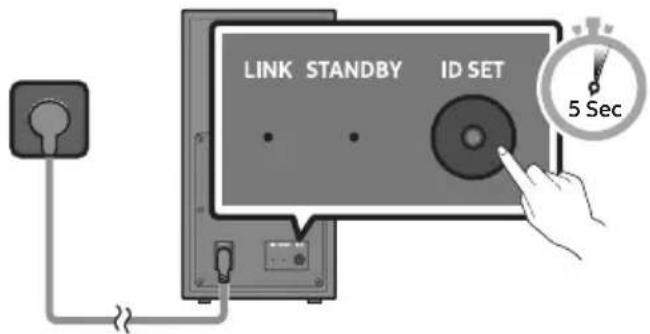
Rear of Subwoofer
-
Press and hold the Up button on the remote control for at least 5 seconds.
-
The ID SET message appears on the display of the Soundbar for a moment, and then it disappears.
- The Soundbar will automatically power on when ID SET is complete.
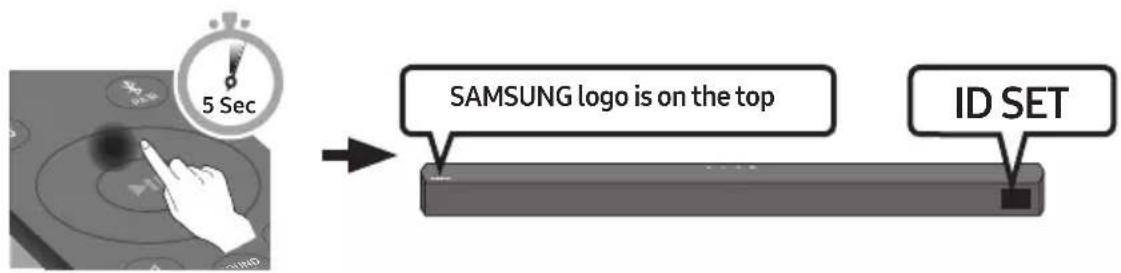
flowchart
graph LR
    A["Hand icon: 5 Sec"] --> B["SAMSUNG logo is on the top"]
    B --> C["ID SET"]
- Check if the LINK LED is solid blue (connection complete).
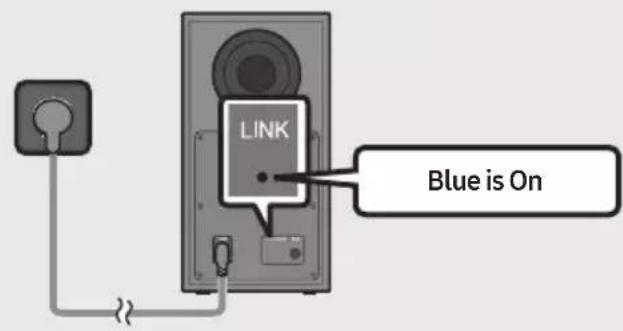
The LINK LED indicator stops blinking and glows a solid blue when a connection is established between the Soundbar and the Wireless Subwoofer.
NOTES
- Do not connect the power cord of this product or your TV to a wall outlet until all connections between components are complete.
- Before moving or installing this product, be sure to turn off the power and disconnect the power cord.
- If the main unit is powered off, the wireless subwoofer will go into stand-by mode and the STANDBY LED on the rear of the sub-woofer will turn red after blinking blue several times.
- If you use a device that uses the same frequency (5.8GHz) as the Soundbar near the Soundbar, interference may cause some sound interruption.
- The maximum transmission distance of the main unit's wireless signal is about 10 m, but may vary depending on your operating environment. If a steel-concrete or metallic wall is between the main unit and the wireless subwoofer, the system may not operate at all because the wireless signal cannot penetrate metal.
PRECAUTIONS
- Wireless receiving antennas are built into the wireless subwoofer. Keep the unit away from water and moisture.
- For optimal listening performance, make sure that the area around the wireless subwoofer and the Wireless Receiver Module (sold separately) is clear of any obstructions.
Connecting the Samsung Wireless Rear Kit to your Soundbar
Expand to true wireless surround sound by connecting the Samsung Wireless Rear Speaker Kit (SWA-9100S or SWA-9200S sold separately) to your Soundbar.
For detailed information on connections, see the Samsung Wireless Rear Speaker Kit manual.
05 USING A WIRED CONNECTION TO THE TV
Hear TV sound from your Soundbar through wired or wireless connections.
- When the Soundbar is connected to selected Samsung TVs, the Soundbar can be controlled using the TV's remote control.
- This feature is supported by 2017 and later Samsung Smart TVs that support Bluetooth when you connect the Soundbar to the TV using an optical cable.
- This function also allows you to use the TV menu to adjust the sound field and various settings as well as the volume and mute.
Method 1. Connecting using an Optical Cable
Pre-connection Checklist
- When both the HDMI cable and optical cable are connected, the HDMI signal is received first.
- When you use an optical cable and the terminals have covers, be sure to remove the covers.

natural_image
Diagram showing a mechanical component before and after assembly, with no visible text or symbols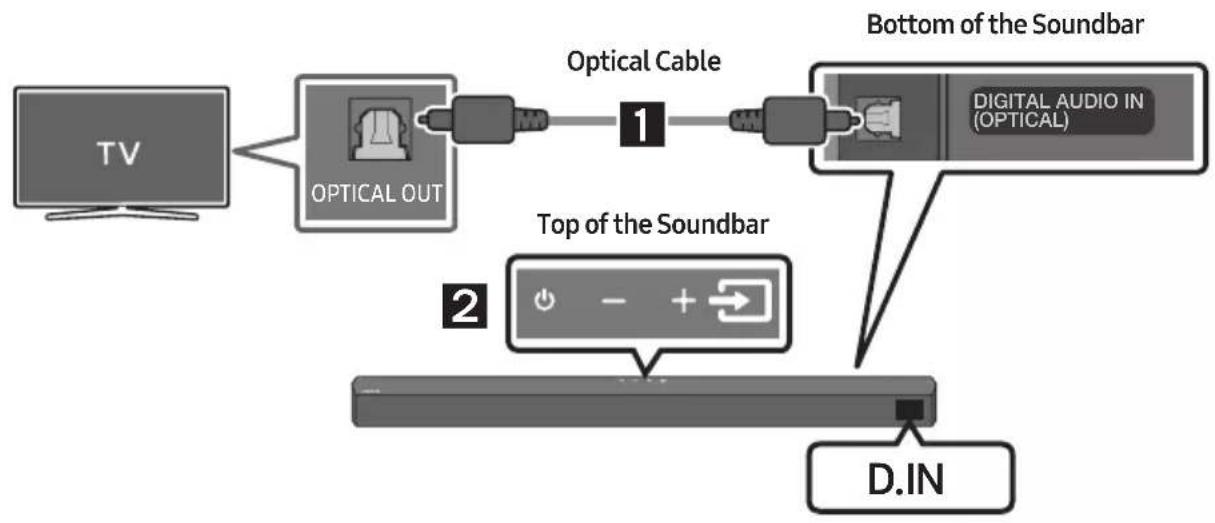
flowchart
graph LR
    A["TV"] --> B["OPTICAL OUT"]
    B --> C["Optical Cable 1"]
    C --> D["Bottom of the Soundbar"]
    D --> E["D. IN"]
    F["Digital Audio IN (OPTICAL)"] --> D
    G["Top of the Soundbar"] --> H["2"]
- Connect the DIGITAL AUDIO IN (OPTICAL) port on the Soundbar to the OPTICAL OUT port of the TV with a digital optical cable.
- Press the → (Source) button on the top panel or remote control, and then select the "D.IN" mode.
Method 2. Connecting a TV using an HDMI Cable

CAUTION
- When both the HDMI cable and optical cable are connected, the HDMI signal is received first.
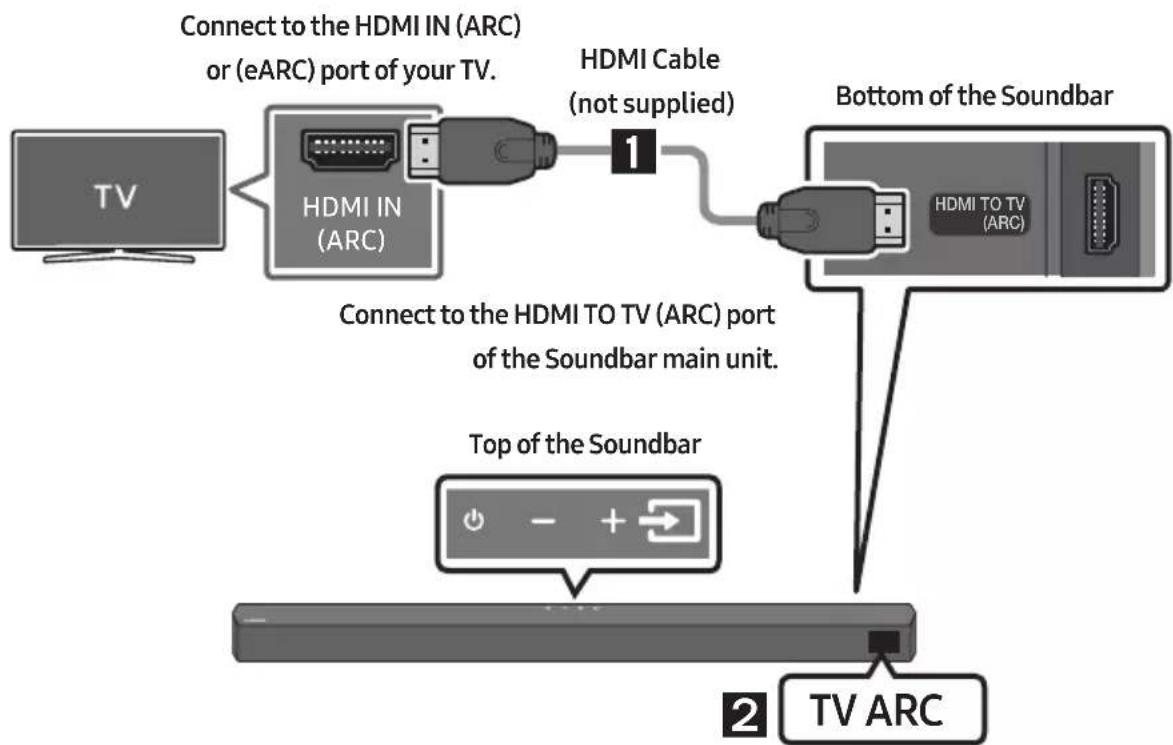
- To connect the HDMI cable between the TV and Soundbar, be sure to connect the terminals marked ARC. Otherwise, the TV sound may not be output.
- The recommended cable is High Speed HDMI Cable with Ethernet.
flowchart
graph TD
    A["TV"] --> B["HDMI IN (ARC)"]
    B --> C["Connect to the HDMI IN (ARC) or (eARC) port of your TV."]
    C --> D["HDMI Cable (not supplied)"]
    D --> E["Bottom of the Soundbar"]
    E --> F["HDMI TO TV (ARC)"]
    F --> G["Top of the Soundbar"]
    G --> H["TV ARC"]
- With the Soundbar and TV turned on, connect the HDMI cable (not supplied) as shown in the figure.
-
"TV ARC" appears in the display window of the Soundbar main unit and the Soundbar plays TV sound.
-
If TV sound is inaudible, press the → (Source) button on the remote control or on the top of the Soundbar to switch to "D.IN" mode. The screen displays "D.IN" and "TV ARC" in sequence, and TV sound is played.
- If "TV ARC" does not appear in the display window of the Soundbar main unit, confirm that the HDMI cable (not supplied) is connected to the correct port.
- Use the volume buttons on the TV's remote control to change the volume on the Soundbar.
NOTES
- HDMI is an interface that enables the digital transmission of video and audio data with just a single connector.
- If the TV provides an ARC port, connect the HDMI cable to the HDMI IN (ARC) port.
- We recommend you use a coreless HDMI cable if possible. If you use a cored HDMI cable, use one whose diameter is less than 14 mm.
- This function is not available if the HDMI cable does not support ARC.
- When the audio in a broadcast is encoded in Dolby Digital and the “Digital Output Audio Format” on your TV is set to PCM, we recommend that you change the setting to Dolby Digital. When the setting on the TV is changed, you will experience better sound quality. (The TV menu may use different words for Dolby Digital and PCM depending on the TV manufacturer.)
06 USING A WIRELESS CONNECTION TO THE TV
Connecting a TV via Bluetooth
When a TV is connected using Bluetooth, you can hear stereo sound without the hassle of cabling.
- Only one TV can be connected at a time.
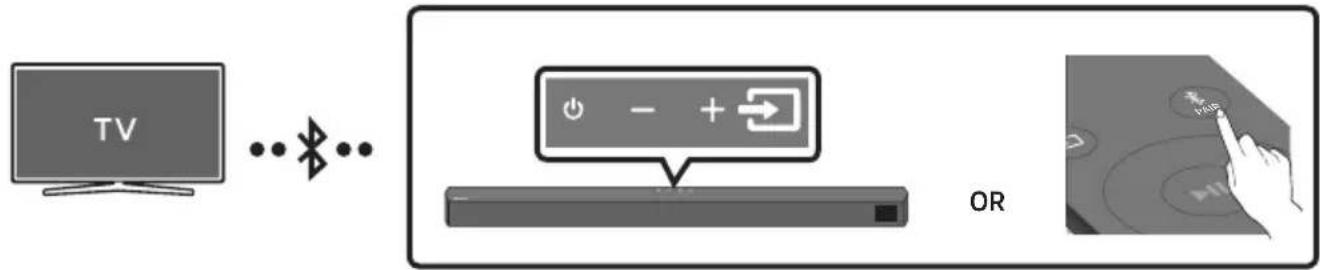
The initial connection
- Press the ✗PAIR button on the remote control to enter the "BT PAIRING" mode.
(OR) a. Press the → (Source) button on the top panel and then select "BT". "BT" changes to "BT PAIRING" in a few seconds automatically or changes to "BT READY" if there is a connect record. b. When "BT READY" appears, press and hold the → (Source) button on the top panel of the Soundbar for more than 5 seconds to display "BT PAIRING".
-
Select Bluetooth mode on the TV. (For more information, see the TV's manual.)
-
Select "[AV] Soundbar B5-Series" from the list on TV's screen. An available Soundbar is indicated with "Needs pairing" or "Paired" on the TV's Bluetooth device list. To connect the TV to the Soundbar, select the message, and then establish a connection.
-
When the TV is connected, [TV Name] → "BT" appears on the Soundbar's front display.
-
You can now hear TV sound from the Soundbar.
If the device fails to connect
- If a previously connected Soundbar listing (e.g. "[AV] Soundbar B5-Series") appears in the list, delete it.
- Then repeat steps 1 through 3.
NOTE
- After you have connected the Soundbar to your TV the first time, use the "BT READY" mode to reconnect.
Disconnecting the Soundbar from the TV
Press the → (Source) button on the top panel or on the remote control and switch to any mode but "BT".
- Disconnecting takes time because the TV must receive a response from the Soundbar. (The time required may differ, depending on the TV model.)
- To cancel the automatic Bluetooth connection between the Soundbar and TV, press the Left button on the remote control for 5 seconds with the Soundbar in "BT READY" status. (Toggle On → Off)
What is the difference between BT READY and BT PAIRING?
- BT READY : In this mode, you can search for previously connected TVs or connect a previously connected mobile device to the Soundbar.
- BT PAIRING : In this mode, you can connect a new device to the Soundbar. (Press the ✗PAIR button on the remote control or press and hold the ➕ (Source) button on the top of the Soundbar for more than 5 seconds while the Soundbar is in "BT" mode.)
NOTES
- If asked for a PIN code when connecting a Bluetooth device, enter <0000>.
- In Bluetooth connection mode, the Bluetooth connection will be lost if the distance between the Soundbar and the Bluetooth device exceeds 10 meters.
- The Soundbar automatically turns off after 20 minutes in the Ready state.
-
The Soundbar may not perform Bluetooth search or connection correctly under the following circumstances:
-
If there is a strong electrical field around the Soundbar.
- If several Bluetooth devices are simultaneously paired with the Soundbar.
- If the Bluetooth device is turned off, not in place, or malfunctions.
- Electronic devices may cause radio interference. Devices that generate electromagnetic waves must be kept away from the Soundbar main unit - e.g., microwaves, wireless LAN devices, etc.
07 CONNECTING AN EXTERNAL DEVICE
Connect to an external device via a wired connection or Bluetooth connection to play the external device's sound through the Soundbar.
Method 1. Connecting using an Optical Cable
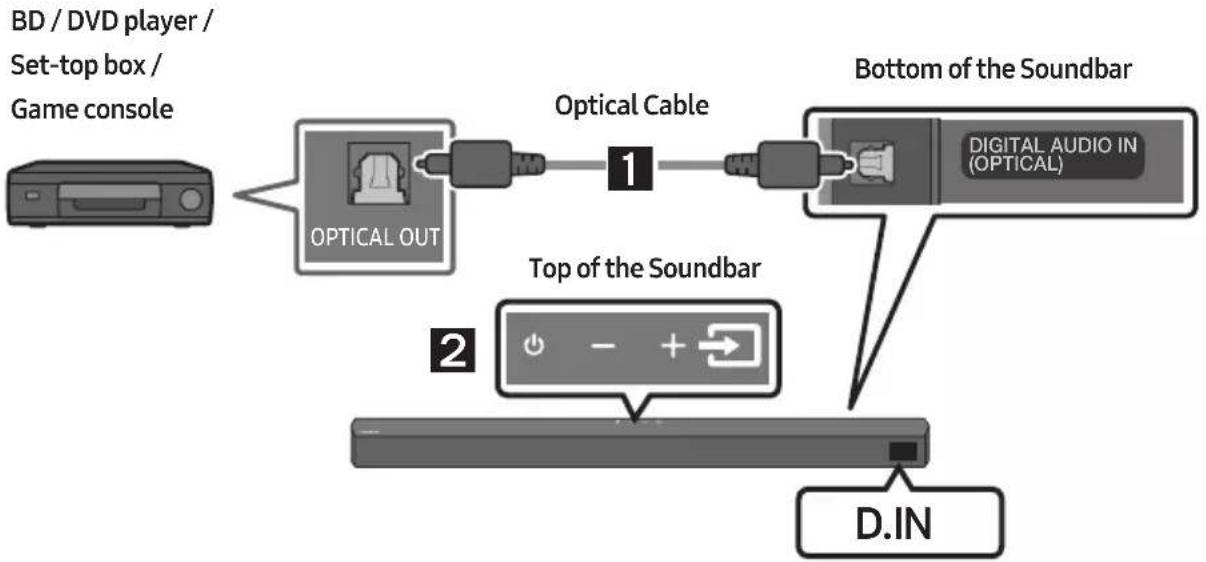
flowchart
graph LR
    A["BD / DVD player / Set-top box / Game console"] --> B["OPTICAL OUT"]
    B --> C["Optical Cable 1"]
    C --> D["Bottom of the Soundbar"]
    D --> E["D.IN"]
    F["Top of the Soundbar"] --> G["2"]
    G --> H["+ - +"]
- Connect DIGITAL AUDIO IN (OPTICAL) on the main unit to the OPTICAL OUT port of the Source Device using a digital optical cable.
- Select "D.IN" mode by pressing the → (Source) button on the top panel or on the remote control.
Method 2. Connecting using an HDMI Cable
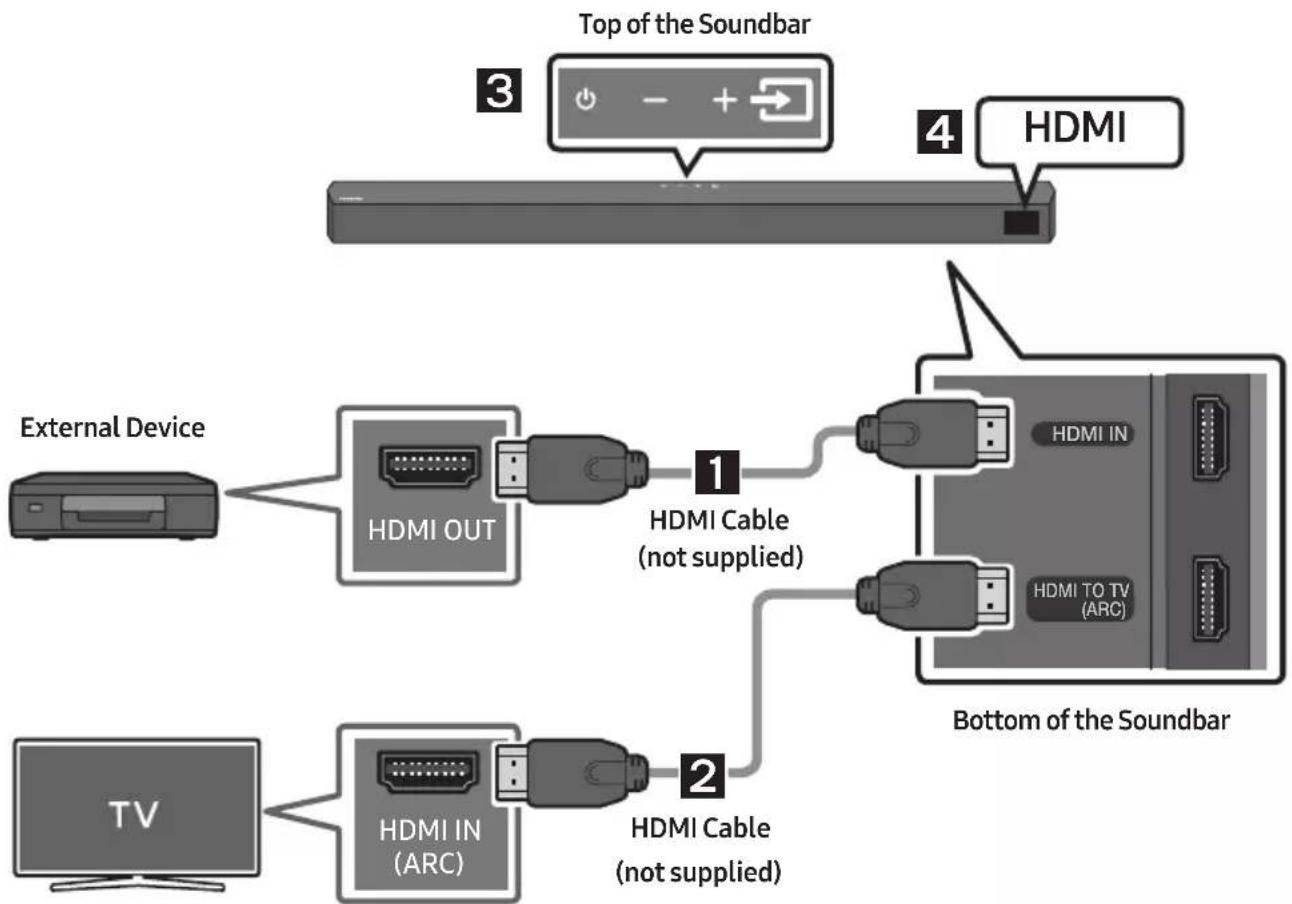
flowchart
graph TD
    A["Top of the Soundbar"] --> B["HDMI"]
    B --> C["Bottom of the Soundbar"]
    D["External Device"] --> E["HDMI OUT"]
    E --> F["1 HDMI Cable (not supplied)"]
    F --> G["HDMI IN"]
    G --> H["Bottom of the Soundbar"]
    I["TV"] --> J["HDMI IN (ARC)"]
    J --> K["2 HDMI Cable (not supplied)"]
- Connect an HDMI cable (not supplied) from the HDMI IN port on the bottom of the Soundbar to the HDMI OUT port on your digital device.
- Connect an HDMI cable (not supplied) from the HDMI TO TV (ARC) port on the bottom of the Soundbar to the HDMI IN port on your TV.
- Press the → (Source) button on the top panel or on the remote control, and then select "HDMI".
- "HDMI" mode is displayed on the Soundbar display panel and sound plays.
08 CONNECTING A USB STORAGE DEVICE
You can play music ☐les located on USB storage devices through the Soundbar.
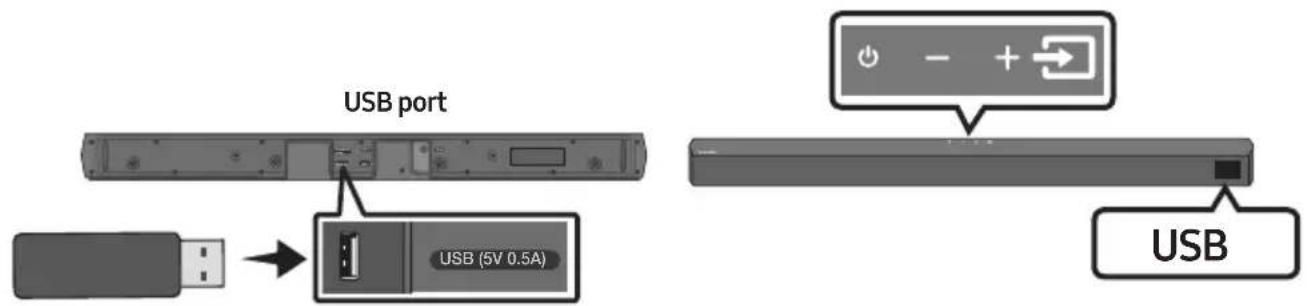
- Connect the USB device to the USB port on the bottom of the product.
- Press the → (Source) button on the top panel or on the remote control, and then select "USB".
- "USB" appears in the display screen.
- Play music Iles from the USB storage device through the Soundbar.
- The Soundbar automatically turns off (Auto Power Down) if no USB device has been connected for more than 20 minutes.
File Format Type Compatibility list
| Extension | Codec | Sampling Rate | Bit Rate |
| *.mp3 MPEG1 Layer2 32 | kHz ~ 48kHz 32kbps ~ 320kbps | ||
| MPEG1 Layer3 32kHz ~ 48kHz 32kbps ~ 320kbps | |||
| MPEG2 Layer3 | 16kHz ~ 24kHz | 8kbps ~ 160kbps | |
| MPEG2.5 Layer3 | 8kHz ~ 12kHz | 8kbps ~ 160kbps | |
| *.wma | WMA7/8/9 | 32kHz ~ 48kHz | 32kbps ~ 320kbps |
| *.ogg | Vorbis | 32kHz ~ 48kHz | 45kbps ~ 500kbps |
| *.aac *.m4a | AAC-LC (MPEG2/MPEG4 Audio Only) | 32kHz ~ 48kHz 32kbps ~ 320kbps | |
| *.wav | LPCM | 32kHz ~ 192kHz | 1,024kbps ~ 9,216kbps |
| *.flac | FLAC | 32kHz ~ 192kHz | 162kbps ~ 8,100kbps |
| *.aiff | AIFF | 32kHz ~ 192kHz | 1,024kbps ~ 9,216kbps |
- If there are too many folders (about 200) and ☐les (about 2000) stored on the USB device, it may take the Soundbar some time to access and play ☐les.
- The Soundbar only supports USB devices with FAT16 (\~2GB), FAT32 (\~2TB) or NTFS (\~2TB) file systems.
09 CONNECTING A MOBILE DEVICE
Connecting via Bluetooth
When a mobile device is connected using Bluetooth, you can hear stereo sound without the hassle of cabling.
- The connection is limited to one TV or two Bluetooth devices at the same time.
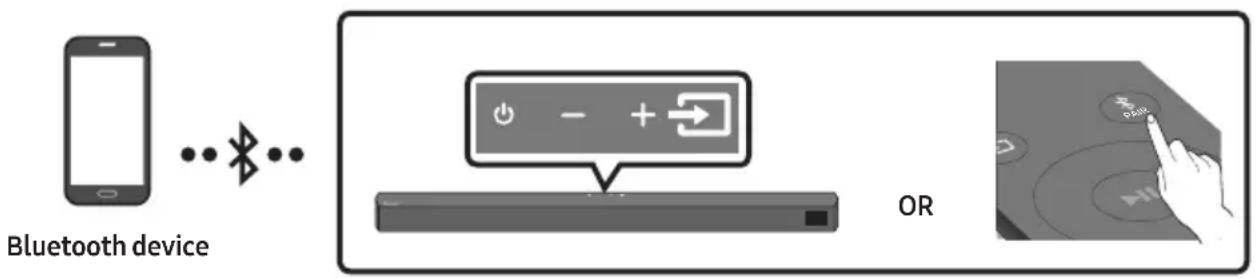
The initial connection
- Press the ✗PAIR button on the remote control to enter the "BT PAIRING" mode.
(OR) a. Press the → (Source) button on the top panel and then select "BT".
"BT" changes to "BT PAIRING" in a few seconds automatically or changes to "BT READY" if there is a connect record.
b. When "BT READY" appears, press and hold the →(Source) button on the top panel of the Soundbar for more than 5 seconds to display "BT PAIRING".
- On your device, select "[AV] Samsung Soundbar B5-Series" from the list that appears.
- When the Soundbar is connected to the Bluetooth device, [Bluetooth Device Name] → "BT" appears in the front display.
- Play music files from the device connected via Bluetooth through the Soundbar.
If the device fails to connect
- If a previously connected Soundbar listing (e.g. “[AV] Samsung Soundbar B5-Series”) appears in the list, delete it.
- Then repeat steps 1 and 2.
NOTE
- After you have connected the Soundbar to your mobile device the first time, use the "BT READY" mode to reconnect.
What is the difference between BT READY and BT PAIRING?
- BT READY : In this mode, you can search for previously connected TVs or connect a previously connected mobile device to the Soundbar.
- BT PAIRING : In this mode, you can connect a new device to the Soundbar. (Press the ✗PAIR button on the remote control or press and hold the ➞(Source) button on the top of the Soundbar for more than 5 seconds while the Soundbar is in "BT" mode.)
NOTES
- If asked for a PIN code when connecting a Bluetooth device, enter <0000>.
- In Bluetooth connection mode, the Bluetooth connection will be lost if the distance between the Soundbar and the Bluetooth device exceeds 10 m.
- The Soundbar automatically turns off after 20 minutes in the Ready state.
-
The Soundbar may not perform Bluetooth search or connection correctly under the following circumstances:
-
If there is a strong electrical field around the Soundbar.
- If several Bluetooth devices are simultaneously paired with the Soundbar.
-
If the Bluetooth device is turned off, not in place, or malfunctions.
-
Electronic devices may cause radio interference. Devices that generate electromagnetic waves must be kept away from the Soundbar main unit - e.g., microwaves, wireless LAN devices, etc.
• The Soundbar supports SBC data (44.1kHz, 48kHz). - Connect only to a Bluetooth device that supports the A2DP (AV) function.
- You cannot connect the Soundbar to a Bluetooth device that supports only the HF (Hands Free) function.
- Once you have paired the Soundbar to a Bluetooth device, selecting “[AV] Samsung Soundbar B5-Series” from the device’s scanned devices list will automatically change the Soundbar to “BT” mode.
- Available only if the Soundbar is listed among the Bluetooth device's paired devices.
(The Bluetooth device and the Soundbar must have been previously paired at least once.)
- The Soundbar will appear in the Bluetooth device's searched devices list only when the Soundbar is displaying "BT READY".
Bluetooth Power On (SOUND MODE)
If a previously paired Bluetooth device tries to pair with the Soundbar when the Bluetooth Power On function is on and the Soundbar is turned off, the Soundbar turns on automatically.
- Press and hold the SOUND MODE button for more than 5 seconds on the remote while the Soundbar is turned on.
- "ON-BLUETOOTH POWER" appears on the Soundbar's display.
Disconnecting the Bluetooth device from a Soundbar
You can disconnect a Bluetooth device from the Soundbar. For instructions, see the Bluetooth device's user manual.
• The Soundbar will be disconnected.
- When the Soundbar is disconnected from the Bluetooth device, the Soundbar will display "BT DISCONNECTED" on the front display.
Disconnecting the Soundbar from the Bluetooth device
Press the → (Source) button on the top panel or on the remote control, and then change to any mode except "BT".
- Disconnecting takes time because the Bluetooth device must receive a response from the Soundbar. (Disconnection time may differ, depending on the Bluetooth device)
- When the Soundbar is disconnected from the Bluetooth device, the Soundbar will display "BT DISCONNECTED" on the front display.
NOTES
- In Bluetooth connection mode, the Bluetooth connection will be lost if the distance between the Soundbar and the Bluetooth device exceeds 10 m.
- The Soundbar automatically turns off after 20 minutes in the Ready state.
More About Bluetooth
Bluetooth is a technology that enables Bluetooth-compliant devices to interconnect easily with each other using a short wireless connection.
- A Bluetooth device may cause noise or malfunction, depending on usage, if:
- A part of your body is in contact with the receiving/transmitting system of the Bluetooth device or the Soundbar.
- It is subject to electrical variation from obstructions caused by a wall, corner, or office partition.
- It is exposed to electrical interference from same frequency-band devices including medical equipment, microwave ovens, and wireless LANs.
- Pair the Soundbar with the Bluetooth device while they are close together.
- The further the distance between the Soundbar and Bluetooth device, the worse the quality is. If the distance exceeds the Bluetooth operational range, the connection is lost.
- In poor reception areas, the Bluetooth connection may not work properly.
- The Bluetooth connection only works when it is close to the unit. The connection will be automatically cut off if the Bluetooth device is out of range. Even within range, the sound quality may be degraded by obstacles such as walls or doors.
- This wireless device may cause electric interference during its operation.
Bluetooth Multi connection
The Soundbar can be connected to 2 Bluetooth devices at the same time.

Bluetooth device A Bluetooth device B
- Connect the Soundbar to up to two Bluetooth devices. (See page 27)
- Play music from one of the connected Bluetooth devices while two devices are connected.
- If music is played from the Bluetooth device "B" while playing from the device "A", the music is started playing on the device "B" and automatically being stopped/paused playback on the device "A".
- In versions prior to AVRCP V1.4, the switching time of the device playing music may be delayed.
Bluetooth Multi Pairing
How to pair multiple devices to the Soundbar
- Turn on the Soundbar.
- Only in "BT" mode, press and hold the (Source) button on the top of the Soundbar for more than 5 seconds for the Soundbar to go into "BT PAIRING" mode, then on the Bluetooth device side, switch Bluetooth on, and select the Soundbar from the list of available devices, the Soundbar will automatically connect to the Bluetooth device.
- A 2nd Bluetooth device can be paired and connected to the Soundbar using the same method. If you attempt to connect a 3rd device, a connected device that is not playing audio will lose its Bluetooth connection, but will still be paired with the Soundbar.
- Using the same method, you can pair up to 8 Bluetooth devices, but only the last 2 will stay connected to the Soundbar at the same time.
NOTES
- Only 1 Samsung TV, or 2 Bluetooth devices can be connected to the Soundbar at one time.
- The Soundbar will be disconnected from Bluetooth devices when it receives a connection request from a Samsung TV.
- The default of Soundbar is "ON-BT MULTI CONNECTION", but for restoration to non-multi connection mode from another mode, press and hold the ✗PAIR button on the remote control for more than 5 seconds in standby mode, until "OFF-BT MULTI CONNECTION" appears in the display.
10 INSTALLING THE WALL MOUNT
Installation Precautions
• Install on a vertical wall only.
- Do not install in a place with high temperature or humidity.
- Verify whether the wall is strong enough to support the product's weight. If not, reinforce the wall or choose another installation point.
• Purchase and use the fixing screws or anchors appropriate for the kind of wall you have (plaster board, iron board, wood, etc.). If possible, fix the support screws into wall studs.
• Purchase wall mounting screws according to the type and thickness of the wall you want to mount the Soundbar on.
- Diameter: M5
- Length: 35 mm or longer recommended.
- Connect cables from the unit to external devices before you install the Soundbar on the wall.
- Make sure the unit is turned off and unplugged from the power source before you install it. Otherwise, it may cause an electric shock.
Wallmount Components

Wall Mount Guide

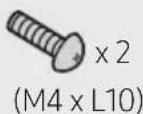
Holder-Screw Screw
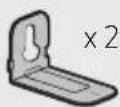
Bracket-Wall Mount
- Place the Wall Mount Guide against the wall surface.
• The Wall Mount Guide must be level.
- If your TV is mounted on the wall, install the Soundbar at least 5 cm below the TV.
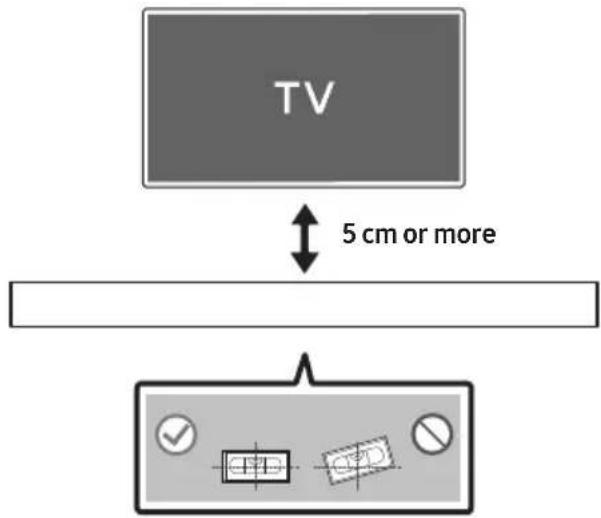
- Align the Wall Mount Guide's Centre Line with the centre of your TV (if you are mounting the Soundbar below your TV), and then fix the Wall Mount Guide to the wall using tape.
- If you are not mounting below a TV, place the Centre Line in the centre of the installation area.
- Push a screw (not supplied) through each Holder-Screw, and then screw each screw firmly into a support screw hole.
(Not supplied)
- Install the 2 Bracket-Wall Mounts in the correct orientation on the bottom of the Soundbar using 2 Screws.
Centre Line
-
Use a pen to mark the positions of the holes and remove the Wall Mount Guide.
-
Using an appropriately sized drill bit, drill a hole in the wall at each marking.
- If the markings do not correspond to the positions of studs, make sure you insert appropriate anchors into the holes before you insert the support screws. If you use anchors, make sure the holes you drill are large enough for the anchors you use.
- When assembling, make sure the hanger part of the Bracket-Wall Mounts are located behind the rear of the Soundbar.
Rear of Soundbar
Right end of Soundbar
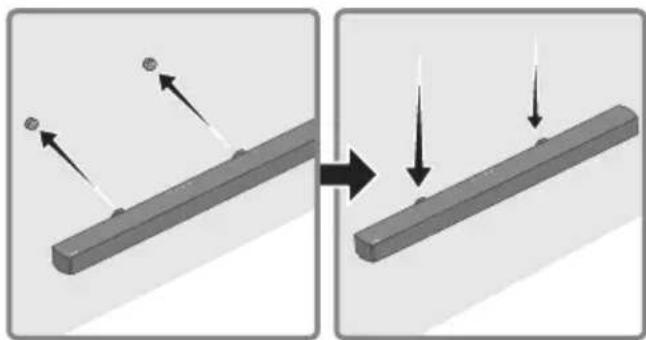
- Install the Soundbar with the attached Bracket-Wall Mounts by hanging the Bracket-Wall Mounts on the Holder-Screws on the wall.
natural_image
Diagram showing two states of a mechanical component before and after assembly, with arrows indicating direction (no text or symbols)- Slide the Soundbar down as shown below so that the Bracket-Wall Mounts rest securely on the Holder-Screws.
- Insert the Holder-Screws into the wide (bottom) part of the Bracket-Wall Mounts, and then slide the Bracket-Wall Mounts down so that the Bracket-Wall Mounts rest securely on the Holder-Screws.
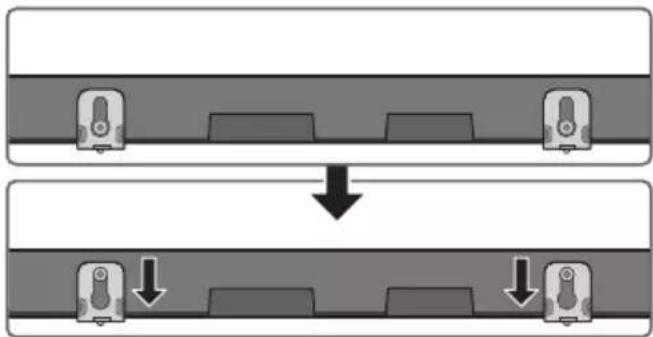
flowchart
graph TD
    A["Top: Device icon"] --> B["Downward arrow"]
    B --> C["Bottom: Device icon with downward arrows"]
11 SOFTWARE UPDATE
Samsung may offer updates for the Soundbar's system firmware in the future.
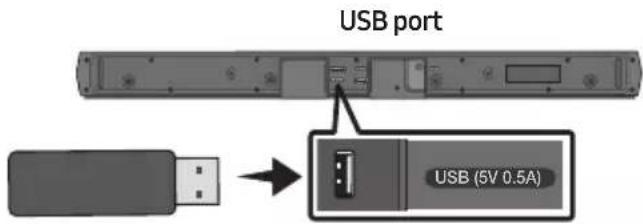
If an update is offered, you can update the firmware by connecting a USB device with the firmware update stored on it to the USB port on your Soundbar. For more information about how to download update files, go to the Samsung website at www.samsung.com → Support.
Then, select the product type or enter the model number of your Soundbar, select the Software & Apps option, and then Downloads. Note that the option names can vary.
How to check the Firmware version
- Turn off the Soundbar.
- Press and hold the ⚙️ (Sound Control) button for about 5 seconds on the remote control.
- Each version appears in the following order on the Soundbar display.
$$ (\text { Software version } \rightarrow \text { HDMI } \rightarrow \text { Tx } \rightarrow \text { Rx }) $$
- Tx: Wireless Tx module in the Soundbar.
- Rx : Wireless Rx module in the Subwoofer.
• R2 VERSION DISPLAY
- No connect rear R2---
- Connected rear R2xxx
Update Procedure
Important: The update function erases all user settings. We recommend you write down your settings so that you can easily reset them after the update. Note that updating the firmware resets the subwoofer connection too.
- Connect a USB thumb drive to the USB port on your computer.
Important: Make sure there are no music files on the USB thumb drive. This may cause the firmware update to fail. - Go to (samsung.com) → select Enter Model Number and enter the model of your Soundbar. Select manuals and downloads and download the latest software file.
- Save the downloaded software to a USB stick and select "Extract Here" to unzip the folder.
- Turn off the Soundbar and connect the USB stick containing the software update to the USB port.
- Turn on the Soundbar and change the source to "USB" mode. Within 3 minutes, "UPDATE" is displayed and the update begins. When the update is complete, the Soundbar turns off and then turns on automatically.
- Press the — + (Volume) button on the top panel for 5 seconds. "INIT" appears on the display and then the Soundbar turns off. The update is complete.
- This product has a DUAL BOOT function. If the firmware fails to update, you can update the firmware again.
- Restore your settings on the Soundbar.
If UPDATE is not displayed
- Turn off the Soundbar, disconnect and then reconnect the USB storage device that contains the update files to the Soundbar's USB port.
- Disconnect the Soundbar's power cord, reconnect it, and then turn on the Soundbar.
NOTES
- The firmware update may not work properly if audio files supported by the Soundbar are stored in the USB storage device.
- Do not disconnect the power or remove the USB device while updates are being applied. The main unit will turn off automatically after completing the firmware update.
- After the update is completed, the user setup in the Soundbar is Initialised so you can reset your settings. We recommend you write down your settings so that you can easily reset them after the update. Note that updating firmware resets the subwoofer connection too.
If the connection to the subwoofer is not re-established automatically after the update, refer to page 16.
If the software update fails, check if the USB stick is defective.
- Mac OS users should use MS-DOS (FAT) as the USB format.
- Updating via USB may not be available, depending on the USB storage device manufacturer.
12 TROUBLESHOOTING
Before seeking assistance, check the following.
Soundbar does not turn on.
→Check whether the power cord of the Soundbar is correctly inserted into the outlet.
Soundbar works erratically.
→After removing the power cord, insert it again.
→Power cycle the external device and try again.
→If there is no signal, the Soundbar automatically turns off after a certain period of time. Turn on the power. (See page 7.)
If the remote control does not work.
→Point the remote directly at the Soundbar.
→Replace the batteries with new ones.
Soundbar does not output any sound.
→The volume of the Soundbar is too low or muted. Adjust the volume.
→When any external device (STB, Bluetooth device, mobile device, etc.) is connected, adjust the volume of the external device.
→For sound output of the TV, select Soundbar. (Samsung TV: Home (
Menu → Settings ( Ⓞ→ All Settings ( )
→ Sound → Sound Output → Select Soundbar)
→The cable connection to the Soundbar may not be loose. Remove the cable and connect again.
→Remove the power cord completely, reconnect, and turn the power on.
→ Reset the product and try again.
(See page 34.)
Subwoofer does not output any sound.
→Check whether the LED indicator on the rear of the Subwoofer is on in blue.
Reconnect the Soundbar and Subwoofer if the indicator is blinking in blue or turned red. (See page 17.)
→You may experience an issue if there is an obstacle between the Soundbar and Subwoofer. Move devices to an area away from obstacles.
→Other devices sending radio frequency signals in proximity may interrupt the connection. Keep your speaker away from such devices.
→Remove and reconnect the power plug.
The Subwoofer volume is too low.
→The original volume of the content you are playing may be low. Try adjusting the Subwoofer level. (See page 12.)
→Bring the Subwoofer speaker closer to you.
If the TV is not connected via HDMI TO TV (ARC).
→Check whether the HDMI cable is correctly connected to the ARC terminal.
(See page 20.)
→Connection may not be possible due to the connected external device (set-top box, game machine, etc.). Directly connect the Soundbar.
→HDMI-CEC may not be activated on the TV. Turn on the CEC on the TV menu. (Samsung
TV: Home ( → Menu → Settings ( )
All Settings ( ➕ → Connection → External Device Manager → Anynet+ (HDMI-CEC) ON)
There is no sound in when connecting to the TV in HDMI TO TV (ARC) mode.
→Your device is unable to play the input signal. Change the TV's audio output to PCM or Dolby Digital.
(For a Samsung TV: Home ( → Menu → Settings ( → All Settings ( ) → Sound
→ Expert Settings → Digital Output Audio Format)
Soundbar does not connect via Bluetooth.
→When connecting a new device, switch to "BT PAIRING" for connection. (Press the
* PAIR button on the remote control or press the → (Source) button on the body for at least 5 seconds.)
→If the Soundbar is connected to another device, disconnect that device first to switch the device.
→Reconnect it after removing the Bluetooth speaker list on the device to connect.
(Samsung TV: Home ( → Menu →
Settings ( Ⓧ→ All Settings ( ) ➕ Sound
→ Sound Output → Bluetooth Speaker List)
→The automatic TV connection may be disabled. While the Soundbar is in "BT
READY", press and hold the Left button on the Soundbar remote control for 5 seconds to select ON-TV CONNECT. If you see OFF-TV CONNECT, press and hold Left button again for 5 seconds to switch the selection.
→Remove and reconnect the power plug, then try again.
→Reset the product and try again.
(See page 34.)
Sound drops out when connected via Bluetooth.
→If your device that is connected via Bluetooth moves too far away from the Soundbar, it may cause the sound to drop out. Move the device closer to the Soundbar.
→If a part of your body is in contact with the Bluetooth transceiver or the product is installed on metal furniture, sound may drop out. Check the installation environment and conditions for use.
Bluetooth multi connection does not work.
→When the TV is connected to the soundbar, Bluetooth multi connection may not operate. Disconnect the Soundbar from the TV and try again.
→Check whether the Bluetooth Multi connection setting is turned on.
(Refer to the "Soundbar does not connect via Bluetooth." section.)
→Disconnect the device currently playing, pair with the device that you want to connect, and reconnect the previous device.
→If the sound is inaudible even after connecting properly, refer to the "Sound drops out when connected via Bluetooth." section.
Soundbar does not turn on automatically with the TV.
→When you turn off the Soundbar while watching TV, power synchronization with the TV is disabled. First turn off the TV.
13 LICENCE
Dolby
AUDIO
Manufactured under license from Dolby Laboratories. Dolby, Dolby Audio and the double-D symbol are trademarks of Dolby Laboratories Licensing Corporation.

dts
2.0 Channel
dts
VIRTUAL

For DTS patents, see http://patents.dts.com. Manufactured under license from DTS Licensing Limited. DTS, the Symbol, DTS in combination with the Symbol, DTS and the Symbol together, Virtual:X, the DTS Virtual:X logo, and DTS 2.0 Channel are registered trademarks or trademarks of DTS, Inc. in the United States and/or other countries. © DTS, Inc. All Rights Reserved.
HIGH-DEFINITION MULTIMEDIA INTERFACE
The terms HDMI and HDMI High-Definition Multimedia Interface, and the HDMI Logo are trademarks or registered trademarks of HDMI Licensing Administrator, Inc. in the United States and other countries.

Bluetooth®
The Bluetooth® word mark and logos are registered trademarks owned by Bluetooth SIG, Inc. and any use of such marks by Samsung Electronics Co., Ltd. is under license. Other trademarks and trade names are those of their respective owners.

[ENERGY STAR]
ENERGY STAR qualified model only
- Your Samsung product is ENERGY STAR qualified in its factory default setting. Change to certain features, settings and functionality in this product can change the power consumption, possibly beyond the limits required for ENERGY STAR qualification.
- Environmental Protection Agency and Department of Energy. ENERGY STAR is a joint program of the Government agencies, designed to promote energy efficient products and practices.
Refer to www.energystar.gov for more information of the ENERGY STAR Program.
ENERGY STAR qualified model only (Applicable to Thin Client models only)
As an ENERGY STAR® Partner, SAMSUNG has determined that this product meets the ENERGY STAR® guidelines for energy efficiency.
- The ENERGY STAR Program has been to reduced greenhouse gas emissions and save energy through voluntary labeling.
- Power management setting of this product have been enabled by default, and have various timing setting from 1 minutes to 5 hours.
- The product can wake with a button press on the chassis from sleep mode.
ENERGY STAR qualified model only (The other models)
- As an ENERGY STAR Partner, Samsung has determined that this product or product models meets the ENERGY STAR guideline for energy efficiency.
14 OPEN SOURCE LICENCE NOTICE
To send inquiries and requests for questions regarding open sources, contact Samsung Open Source (http://opensource.samsung.com)
15 IMPORTANT NOTES ABOUT SERVICE
- Figures and illustrations in this User Manual are provided for reference only and may differ from actual product appearance.
- An administration fee may be charged if either
(a) an engineer is called out at your request and there is no defect with the product (i.e. where the user manual has not been read).
(b) you bring the unit to a repair centre and there is no defect with the product (i.e. where the user manual has not been read).
- You will be informed of the administration fee amount before a technician visits.
16 SPECIFICATIONS AND GUIDE
Specifications
| Model Name HW-B530 / HW-B540 | |
| USB 5V/0.5A | |
| Weight 2.1 kg | |
| Dimensions (W x H x D) 860.0 x 59.4 x 75.0 mm | |
| Operating Temperature Range +5°C to +35°C | |
| Operating Humidity Range 10% ~ 75% | |
| AMPLIFIER Rated Output power | 160W(40Wx4) |
| Supported play formats (DTS 2.0 and DTS Virtual:X sound are played in DTS format.) | LPCM 2ch, Dolby AudioTM (supporting Dolby® Digital), DTS, DTS Virtual:X |
| WIRELESS DEVICE OUTPUT POWER BT max transmitter power SRD max transmitter power | 100mW at 2.4GHz - 2.4835GHz 25mW at 5.725GHz - 5.825GHz |
| Subwoofer Name PS-WB55D | |
| Weight 4.4 kg | |
| Dimensions (W x H x D) 184.0 x 346.0 x 295.0 mm | |
| AMPLIFIER Rated Output power | 200W |
| WIRELESS DEVICE OUTPUT POWER SRD max transmitter power | 25mW at 5.725GHz - 5.825GHz |
| Overall Standby Power Consumption (W) 2.0W | |
| Bluetooth Port deactivation method | Press and hold the SOUND MODE button for more than 5 seconds to turn off Bluetooth Power function. |
NOTES
- Samsung Electronics Co., Ltd reserves the right to change the specifications without notice.
• Weight and dimensions are approximate.
Hereby, Samsung declares that this radio equipment is in compliance with Directive 2014/53/EU and the relevant UK statutory requirements.
The full text of the declaration of conformity is available at the following internet address:
http://www.samsung.com go to Support and enter the model name.
This equipment may be operated in all EU countries and in the UK.
[Correct disposal of batteries in this product]
(Applicable in countries with separate collection systems)
This marking on the battery, manual or packaging indicates that the batteries in this product should not be disposed of with other household waste at the end of their working life. Where marked, the chemical symbols Hg, Cd or Pb indicate that the battery contains mercury, cadmium or lead above the reference levels in EC Directive 2006/66.
If batteries are not properly disposed of, these substances can cause harm to human health or the environment.
To protect natural resources and to promote material reuse, please separate batteries from other types of waste and recycle them through your local, free battery return system.
Correct Disposal of This Product
(Waste Electrical & Electronic Equipment)
(Applicable in countries with separate collection systems)
This marking on the product, accessories or literature indicates that the product and its electronic accessories (e.g. charger, headset, USB cable) should not be disposed of with other household waste at the end of their working life. To prevent possible harm to the environment or human health from uncontrolled waste disposal, please separate these items from other types of waste and recycle them responsibly to promote the sustainable reuse of material resources.
Household users should contact either the retailer where they purchased this product, or their local government office, for details of where and how they can take these items for environmentally safe recycling.
Business users should contact their supplier and check the terms and conditions of the purchase contract. This product and its electronic accessories should not be mixed with other commercial wastes for disposal.
For information on Samsung's environmental commitments and product specific regulatory obligations e.g. REACH, WEEE, Batteries, visit:
www.samsung.com/uk/aboutsamsung/sustainability/environment/our-commitment/data/
COMMISSION REGULATION (EU) 2019/1782
Ecodesign requirements for external power supplies :
www.samsung.com/global/ecodesign_component
INFORMATIONS RELATIVES À LA SÉCURITÉ
AVERTISSEMENTS
natural_image
Three grayscale product photos: a rectangular remote control unit, a tall tower with a speaker, and a remote control unit with three remote devices (no text or symbols visible)natural_image
Three black plastic cable connectors with sizes and connectors, shown from different angles (no text or symbols)natural_image
Two identical black cable connectors shown side by side, no text or symbols present.Adaptateur CA/CC (Soundbar)
natural_image
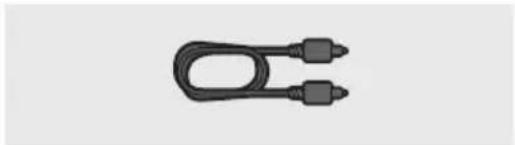
Simple black mechanical component with two connectors, no text or symbols visibleCâble optique

Guide del l'xation murale Vis del l'xation Vis
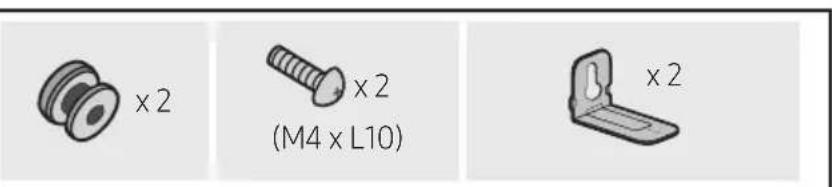
Support del l'axation murale
natural_image
Diagram showing a mechanical component before and after assembly, with no visible text or symbols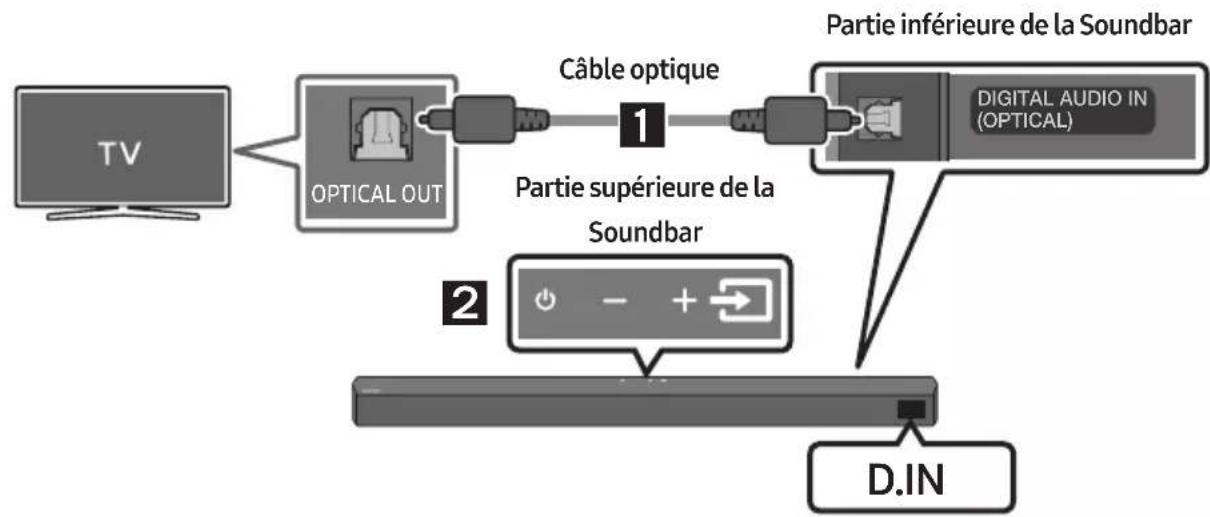
flowchart
graph TD
    A["TV"] --> B["OPTICAL OUT"]
    B --> C["Câble optique"]
    C --> D["Partie supérieure de la Soundbar"]
    D --> E["Partie inférieure de la Soundbar"]
    E --> F["D. IN"]
    D --> G["Digital Audio IN (OPTICAL)"]
Appareil Bluetooth A Appareil Bluetooth B
natural_image
Mechanical component with screw and adjustment knob, no visible text or symbolsnatural_image
Diagram showing two states of a mechanical component before and after assembly, with arrows indicating direction (no text or symbols)flowchart
graph TD
    A["Top: Device icon"] --> B["Down Arrow"]
    B --> C["Bottom: Device icon with downward arrow"]
11 MISE À JOUR DU LOGICIEL
Manufactured under license from Dolby Laboratories. Dolby, Dolby Audio and the double-D symbol are trademarks of Dolby Laboratories Licensing Corporation.

dts®
2.0 Channel
dts
VIRTUAL

For DTS patents, see http://patents.dts.com. Manufactured under license from DTS Licensing Limited. DTS, the Symbol, DTS in combination with the Symbol, DTS and the Symbol together, Virtual:X, the DTS Virtual:X logo, and DTS 2.0 Channel are registered trademarks or trademarks of DTS, Inc. in the United States and/or other countries. © DTS, Inc. All Rights Reserved.
HDMI ^TM
HIGH-DEFINITION MULTIMEDIA INTERFACE
The terms HDMI and HDMI High-Definition Multimedia Interface, and the HDMI Logo are trademarks or registered trademarks of HDMI Licensing Administrator, Inc. in the United States and other countries.

Bluetooth®
The Bluetooth® word mark and logos are registered trademarks owned by Bluetooth SIG, Inc. and any use of such marks by Samsung Electronics Co., Ltd. is under license. Other trademarks and trade names are those of their respective owners.

[ENERGY STAR]
ENERGY STAR qualified model only
- Your Samsung product is ENERGY STAR qualified in its factory default setting. Change to certain features, settings and functionality in this product can change the power consumption, possibly beyond the limits required for ENERGY STAR qualification.
- Environmental Protection Agency and Department of Energy. ENERGY STAR is a joint program of the Government agencies, designed to promote energy efficient products and practices.
Refer to www.energystar.gov for more information of the ENERGY STAR Program.
ENERGY STAR qualified model only (Applicable to Thin Client models only)
As an ENERGY STAR® Partner, SAMSUNG has determined that this product meets the ENERGY STAR® guidelines for energy efficiency.
- The ENERGY STAR Program has been to reduced greenhouse gas emissions and save energy through voluntary labeling.
- Power management setting of this product have been enabled by default, and have various timing setting from 1 minutes to 5 hours.
- The product can wake with a button press on the chassis from sleep mode.
ENERGY STAR qualified model only (The other models)
- As an ENERGY STAR Partner, Samsung has determined that this product or product models meets the ENERGY STAR guideline for energy efficiency.
14 AVIS DE LICENCE LIBRE
natural_image
Diagram showing a mechanical component before and after assembly, with no visible text or symbols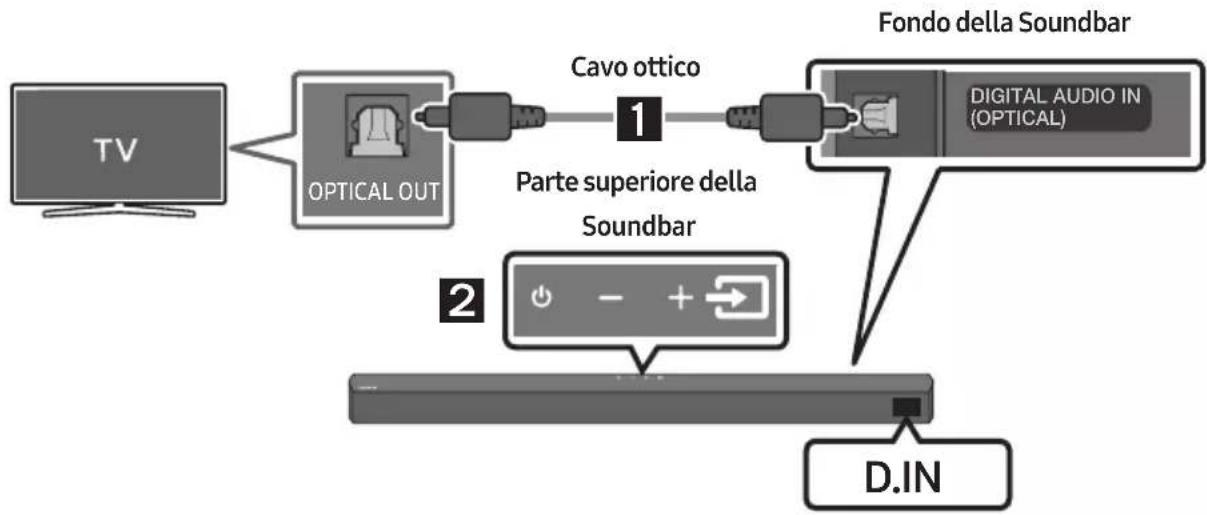
flowchart
graph TD
    A["TV"] --> B["OPTICAL OUT"]
    B --> C["Cavo ottico 1"]
    C --> D["Fondo della Soundbar"]
    D --> E["D.IN"]
    F["Parte superiore della Soundbar"] --> G["Digital Audio IN (OPTICAL)"]
Dispositivo Bluetooth A Dispositivo Bluetooth B
natural_image
Mechanical component diagram showing a screw being inserted into a housing with a bolt, no text or symbols presentnatural_image
Diagram showing two states of a mechanical component before and after cutting, with arrows indicating motion direction (no text or symbols)flowchart
graph TD
    A["Top: Device icon"] --> B["Downward arrow"]
    B --> C["Bottom: Device icon with downward arrow"]
11 AGGIORNAMENTO DEL SOFTWARE
Manufactured under license from Dolby Laboratories. Dolby, Dolby Audio and the double-D symbol are trademarks of Dolby Laboratories Licensing Corporation.

dts®
2.0 Channel
dts
VIRTUAL

For DTS patents, see http://patents.dts.com. Manufactured under license from DTS Licensing Limited. DTS, the Symbol, DTS in combination with the Symbol, DTS and the Symbol together, Virtual:X, the DTS Virtual:X logo, and DTS 2.0 Channel are registered trademarks or trademarks of DTS, Inc. in the United States and/or other countries. © DTS, Inc. All Rights Reserved.

The terms HDMI and HDMI High-Definition Multimedia Interface, and the HDMI Logo are trademarks or registered trademarks of HDMI Licensing Administrator, Inc. in the United States and other countries.

Bluetooth®
The Bluetooth® word mark and logos are registered trademarks owned by Bluetooth SIG, Inc. and any use of such marks by Samsung Electronics Co., Ltd. is under license. Other trademarks and trade names are those of their respective owners.

[ENERGY STAR]
ENERGY STAR qualified model only
- Your Samsung product is ENERGY STAR qualified in its factory default setting. Change to certain features, settings and functionality in this product can change the power consumption, possibly beyond the limits required for ENERGY STAR qualification.
- Environmental Protection Agency and Department of Energy. ENERGY STAR is a joint program of the Government agencies, designed to promote energy efficient products and practices.
Refer to www.energystar.gov for more information of the ENERGY STAR Program.
ENERGY STAR qualified model only (Applicable to Thin Client models only)
As an ENERGY STAR® Partner, SAMSUNG has determined that this product meets the ENERGY STAR® guidelines for energy efficiency.
- The ENERGY STAR Program has been to reduced greenhouse gas emissions and save energy through voluntary labeling.
- Power management setting of this product have been enabled by default, and have various timing setting from 1 minutes to 5 hours.
- The product can wake with a button press on the chassis from sleep mode.
ENERGY STAR qualified model only (The other models)
- As an ENERGY STAR Partner, Samsung has determined that this product or product models meets the ENERGY STAR guideline for energy efficiency.
14 AVVISO DI LICENZA OPEN SOURCE
http://www.samsung.com/it/aboutsamsung/sustainability/environment/our-commitment/data/
REGOLAMENTO (UE) 2019/1782 DELLA COMMISSIONE
natural_image
Diagram showing a mechanical component before and after assembly, with no visible text or symbols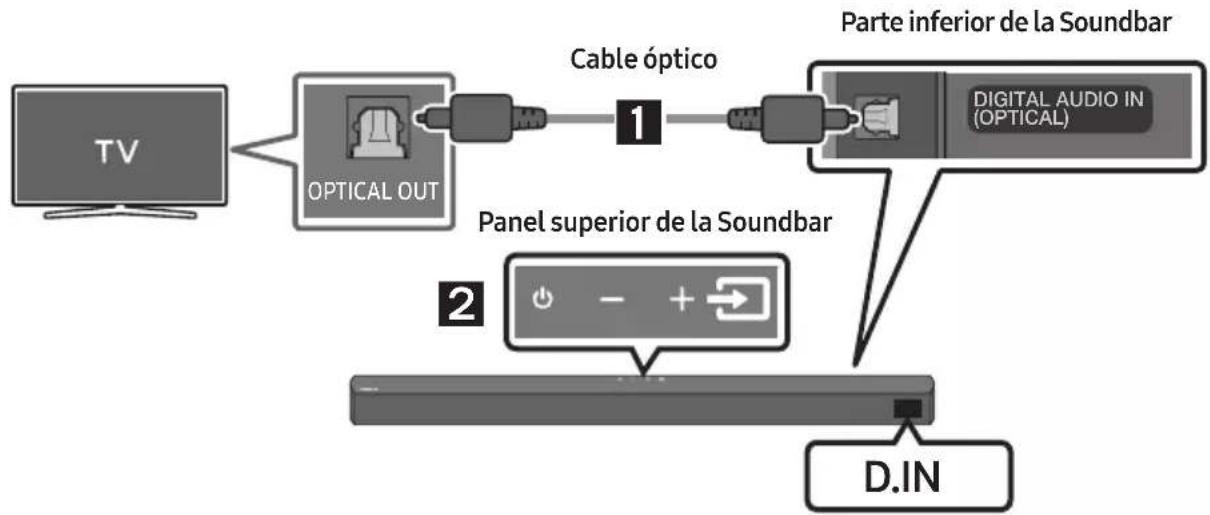
flowchart
graph TD
    A["TV"] --> B["OPTICAL OUT"]
    B --> C["Cable óptico"]
    C --> D["1"]
    D --> E["Parte inferior de la Soundbar"]
    E --> F["D.IN"]
    G["2"] --> H["Panel superior de la Soundbar"]
    H --> I["Digital Audio IN (OPTICAL)"]
Dispositivo Bluetooth A Dispositivo Bluetooth B
natural_image
Mechanical component with screw and adjustment knob, no visible text or symbolsnatural_image
Diagram showing two states of a mechanical component before and after assembly, with arrows indicating direction (no text or symbols)flowchart
graph TD
    A["Top: Device icon"] --> B["Down Arrow"]
    B --> C["Bottom: Device icon with downward arrow"]
Manufactured under license from Dolby Laboratories. Dolby, Dolby Audio and the double-D symbol are trademarks of Dolby Laboratories Licensing Corporation.

dts®
2.0 Channel
dts
VIRTUAL

For DTS patents, see http://patents.dts.com. Manufactured under license from DTS Licensing Limited. DTS, the Symbol, DTS in combination with the Symbol, DTS and the Symbol together, Virtual:X, the DTS Virtual:X logo, and DTS 2.0 Channel are registered trademarks or trademarks of DTS, Inc. in the United States and/or other countries. © DTS, Inc. All Rights Reserved.

The terms HDMI and HDMI High-Definition Multimedia Interface, and the HDMI Logo are trademarks or registered trademarks of HDMI Licensing Administrator, Inc. in the United States and other countries.

Bluetooth®
The Bluetooth® word mark and logos are registered trademarks owned by Bluetooth SIG, Inc. and any use of such marks by Samsung Electronics Co., Ltd. is under license. Other trademarks and trade names are those of their respective owners.

[ENERGY STAR]
ENERGY STAR qualified model only
- Your Samsung product is ENERGY STAR qualified in its factory default setting. Change to certain features, settings and functionality in this product can change the power consumption, possibly beyond the limits required for ENERGY STAR qualification.
- Environmental Protection Agency and Department of Energy. ENERGY STAR is a joint program of the Government agencies, designed to promote energy efficient products and practices.
Refer to www.energystar.gov for more information of the ENERGY STAR Program.
ENERGY STAR qualified model only (Applicable to Thin Client models only)
As an ENERGY STAR® Partner, SAMSUNG has determined that this product meets the ENERGY STAR® guidelines for energy efficiency.
- The ENERGY STAR Program has been to reduced greenhouse gas emissions and save energy through voluntary labeling.
- Power management setting of this product have been enabled by default, and have various timing setting from 1 minutes to 5 hours.
- The product can wake with a button press on the chassis from sleep mode.
ENERGY STAR qualified model only (The other models)
- As an ENERGY STAR Partner, Samsung has determined that this product or product models meets the ENERGY STAR guideline for energy efficiency.
14 AVISO SOBRE LICENCIA DE CÓDIGO ABIERTO
www.samsung.com/uk/aboutsamsung/sustainability/environment/our-commitment/data/
natural_image
Diagram showing a mechanical component before and after assembly, with no visible text or symbols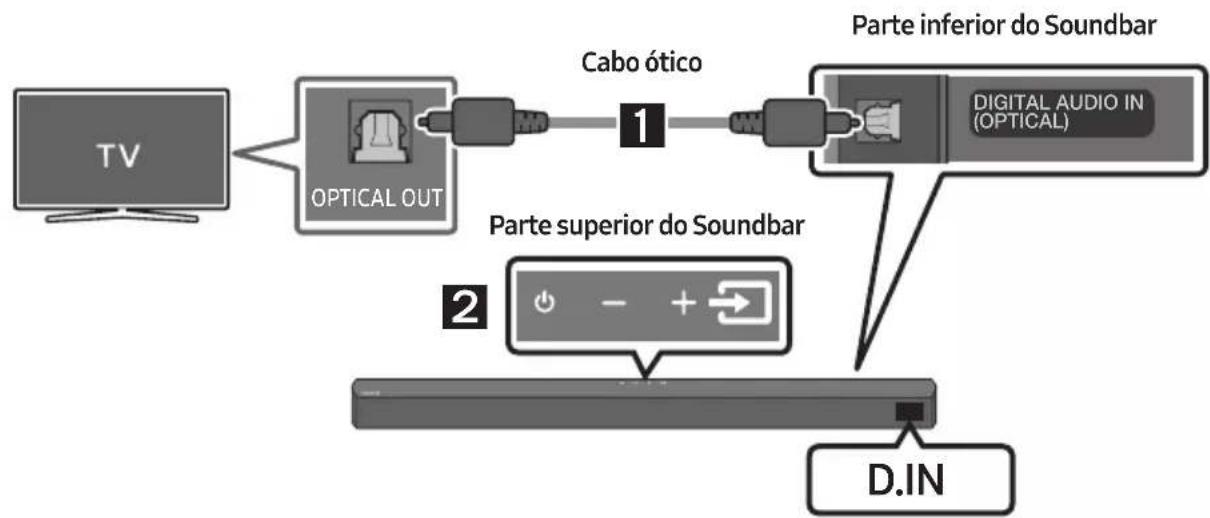
flowchart
graph LR
    A["TV"] --> B["OPTICAL OUT"]
    B --> C["Cabo ótico"]
    C --> D["1"]
    D --> E["Parte inferior do Soundbar"]
    E --> F["D.IN"]
    G["2"] --> H["+"]
    H --> I["-"]
    I --> J["+"]
    J --> K["+"]
    K --> L["D.IN"]
Dispositivo Bluetooth A Dispositivo Bluetooth B
natural_image
Mechanical component with screw and adjustment knob, no visible text or symbolsnatural_image
Diagram showing two states of a mechanical component before and after cutting, with arrows indicating direction (no text or symbols present)flowchart
graph TD
    A["Top: Device icon"] --> B["Downward arrow"]
    B --> C["Bottom: Device icon with downward arrow"]
Manufactured under license from Dolby Laboratories. Dolby, Dolby Audio and the double-D symbol are trademarks of Dolby Laboratories Licensing Corporation.

dts®
2.0 Channel
dts
VIRTUAL

For DTS patents, see http://patents.dts.com. Manufactured under license from DTS Licensing Limited. DTS, the Symbol, DTS in combination with the Symbol, DTS and the Symbol together, Virtual:X, the DTS Virtual:X logo, and DTS 2.0 Channel are registered trademarks or trademarks of DTS, Inc. in the United States and/or other countries. © DTS, Inc. All Rights Reserved.

The terms HDMI and HDMI High-Definition Multimedia Interface, and the HDMI Logo are trademarks or registered trademarks of HDMI Licensing Administrator, Inc. in the United States and other countries.

Bluetooth®
The Bluetooth® word mark and logos are registered trademarks owned by Bluetooth SIG, Inc. and any use of such marks by Samsung Electronics Co., Ltd. is under license. Other trademarks and trade names are those of their respective owners.

[ENERGY STAR]
ENERGY STAR qualified model only
- Your Samsung product is ENERGY STAR qualified in its factory default setting. Change to certain features, settings and functionality in this product can change the power consumption, possibly beyond the limits required for ENERGY STAR qualification.
- Environmental Protection Agency and Department of Energy. ENERGY STAR is a joint program of the Government agencies, designed to promote energy efficient products and practices.
Refer to www.energystar.gov for more information of the ENERGY STAR Program.
ENERGY STAR qualified model only (Applicable to Thin Client models only)
As an ENERGY STAR® Partner, SAMSUNG has determined that this product meets the ENERGY STAR® guidelines for energy efficiency.
- The ENERGY STAR Program has been to reduced greenhouse gas emissions and save energy through voluntary labeling.
- Power management setting of this product have been enabled by default, and have various timing setting from 1 minutes to 5 hours.
- The product can wake with a button press on the chassis from sleep mode.
ENERGY STAR qualified model only (The other models)
- As an ENERGY STAR Partner, Samsung has determined that this product or product models meets the ENERGY STAR guideline for energy efficiency.
14 AVISO DE LICENÇA DE OPEN SOURCE
Para enviar perguntas e pedidos de esclarecimento relativamente a fontes abertas, contacte a Samsung Open Source por e-mail (http://opensource.samsung.com)
15 NOTA IMPORTANTE SOBRE O SERVIÇO
www.samsung.com/uk/aboutsamsung/sustainability/environment/our-commitment/data/
natural_image
Diagram showing a mechanical component before and after assembly, with no visible text or symbols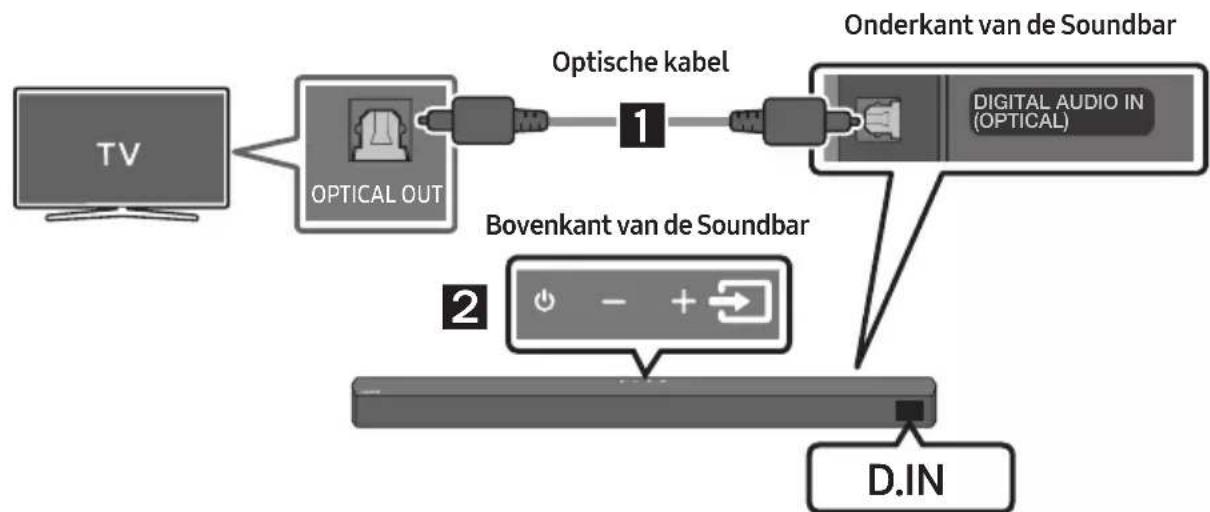
flowchart
graph LR
    A["TV"] --> B["OPTICAL OUT"]
    B --> C["Optische kabel 1"]
    C --> D["Onderkant van de Soundbar"]
    D --> E["D.IN"]
    F["Bovenkant van de Soundbar"] --> G["Digital Audio IN (OPTICAL)"]
Bluetooth-apparaat A Bluetooth-apparaat B
natural_image
Mechanical component diagram showing a screw being inserted into a housing with a circular base (no text or symbols)natural_image
Diagram showing two states of a mechanical component before and after assembly, with arrows indicating direction (no text or symbols present)flowchart
graph TD
    A["Top: Device icon"] --> B["Downward arrow"]
    B --> C["Bottom: Device icon with downward arrow"]
11 SOFTWARE- UPDATE
Manufactured under license from Dolby Laboratories. Dolby, Dolby Audio and the double-D symbol are trademarks of Dolby Laboratories Licensing Corporation.

dts®
2.0 Channel
dts
VIRTUAL

For DTS patents, see http://patents.dts.com. Manufactured under license from DTS Licensing Limited. DTS, the Symbol, DTS in combination with the Symbol, DTS and the Symbol together, Virtual:X, the DTS Virtual:X logo, and DTS 2.0 Channel are registered trademarks or trademarks of DTS, Inc. in the United States and/or other countries. © DTS, Inc. All Rights Reserved.

The terms HDMI and HDMI High-Definition Multimedia Interface, and the HDMI Logo are trademarks or registered trademarks of HDMI Licensing Administrator, Inc. in the United States and other countries.

Bluetooth®
The Bluetooth® word mark and logos are registered trademarks owned by Bluetooth SIG, Inc. and any use of such marks by Samsung Electronics Co., Ltd. is under license. Other trademarks and trade names are those of their respective owners.

[ENERGY STAR]
ENERGY STAR qualified model only
- Your Samsung product is ENERGY STAR qualified in its factory default setting. Change to certain features, settings and functionality in this product can change the power consumption, possibly beyond the limits required for ENERGY STAR qualification.
- Environmental Protection Agency and Department of Energy. ENERGY STAR is a joint program of the Government agencies, designed to promote energy efficient products and practices.
Refer to www.energystar.gov for more information of the ENERGY STAR Program.
ENERGY STAR qualified model only (Applicable to Thin Client models only)
As an ENERGY STAR® Partner, SAMSUNG has determined that this product meets the ENERGY STAR® guidelines for energy efficiency.
- The ENERGY STAR Program has been to reduced greenhouse gas emissions and save energy through voluntary labeling.
- Power management setting of this product have been enabled by default, and have various timing setting from 1 minutes to 5 hours.
- The product can wake with a button press on the chassis from sleep mode.
ENERGY STAR qualified model only (The other models)
- As an ENERGY STAR Partner, Samsung has determined that this product or product models meets the ENERGY STAR guideline for energy efficiency.
14 KENNISGEVING OPEN SOURCE- LICENTIE
www.samsung.com/uk/aboutsamsung/sustainability/environment/our-commitment/data/
VERORDENING (EU) 2019/1782 VAN DE COMMISSIE
natural_image
Three grayscale product photos: a rectangular remote, a cylindrical tower, and a remote control with three USB flash drives (no text or symbols visible)natural_image
Diagram showing a mechanical component before and after assembly, with no visible text or symbols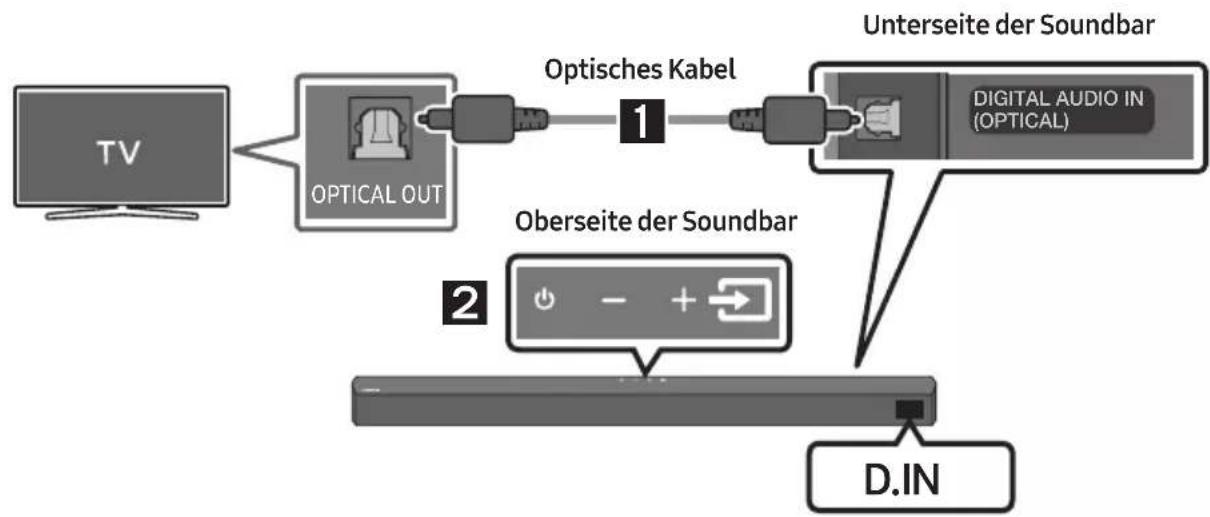
flowchart
graph LR
    A["TV"] --> B["OPTICAL OUT"]
    B --> C["Optisches Kabel 1"]
    C --> D["Unterseite der Soundbar"]
    D --> E["D. IN"]
    F["Digital Audio IN (OPTICAL)"] --> D
    G["Oberseite der Soundbar"] --> H["2"]
natural_image
Mechanical component with screw and adjustment knob, no visible text or symbolsnatural_image
Diagram showing two states of a mechanical component before and after cutting, with arrows indicating direction (no text or symbols present)Manufactured under license from Dolby Laboratories. Dolby, Dolby Audio and the double-D symbol are trademarks of Dolby Laboratories Licensing Corporation.

dts®
2.0 Channel
dts
VIRTUAL

For DTS patents, see http://patents.dts.com. Manufactured under license from DTS Licensing Limited. DTS, the Symbol, DTS in combination with the Symbol, DTS and the Symbol together, Virtual:X, the DTS Virtual:X logo, and DTS 2.0 Channel are registered trademarks or trademarks of DTS, Inc. in the United States and/or other countries. © DTS, Inc. All Rights Reserved.
HDMI ^TM
HIGH-DEFINITION MULTIMEDIA INTERFACE
The terms HDMI and HDMI High-Definition Multimedia Interface, and the HDMI Logo are trademarks or registered trademarks of HDMI Licensing Administrator, Inc. in the United States and other countries.

Bluetooth®
The Bluetooth® word mark and logos are registered trademarks owned by Bluetooth SIG, Inc. and any use of such marks by Samsung Electronics Co., Ltd. is under license. Other trademarks and trade names are those of their respective owners.

[ENERGY STAR]
ENERGY STAR qualified model only
- Your Samsung product is ENERGY STAR qualified in its factory default setting. Change to certain features, settings and functionality in this product can change the power consumption, possibly beyond the limits required for ENERGY STAR qualification.
- Environmental Protection Agency and Department of Energy. ENERGY STAR is a joint program of the Government agencies, designed to promote energy efficient products and practices.
Refer to www.energystar.gov for more information of the ENERGY STAR Program.
ENERGY STAR qualified model only (Applicable to Thin Client models only)
As an ENERGY STAR® Partner, SAMSUNG has determined that this product meets the ENERGY STAR® guidelines for energy efficiency.
- The ENERGY STAR Program has been to reduced greenhouse gas emissions and save energy through voluntary labeling.
- Power management setting of this product have been enabled by default, and have various timing setting from 1 minutes to 5 hours.
- The product can wake with a button press on the chassis from sleep mode.
ENERGY STAR qualified model only (The other models)
- As an ENERGY STAR Partner, Samsung has determined that this product or product models meets the ENERGY STAR guideline for energy efficiency.
14 BEKANNTMACHUNG ZU OPEN SOURCE LIZENZEN
www.samsung.com/uk/aboutsamsung/sustainability/environment/our-commitment/data/
VERORDNUNG (EU) 2019/1782 DER KOMMISSION
INNEHÅLLSFÖRTECKNING
01 Kontrollera komponenterna 6
natural_image
Diagram showing a mechanical component before and after assembly, with no visible text or symbols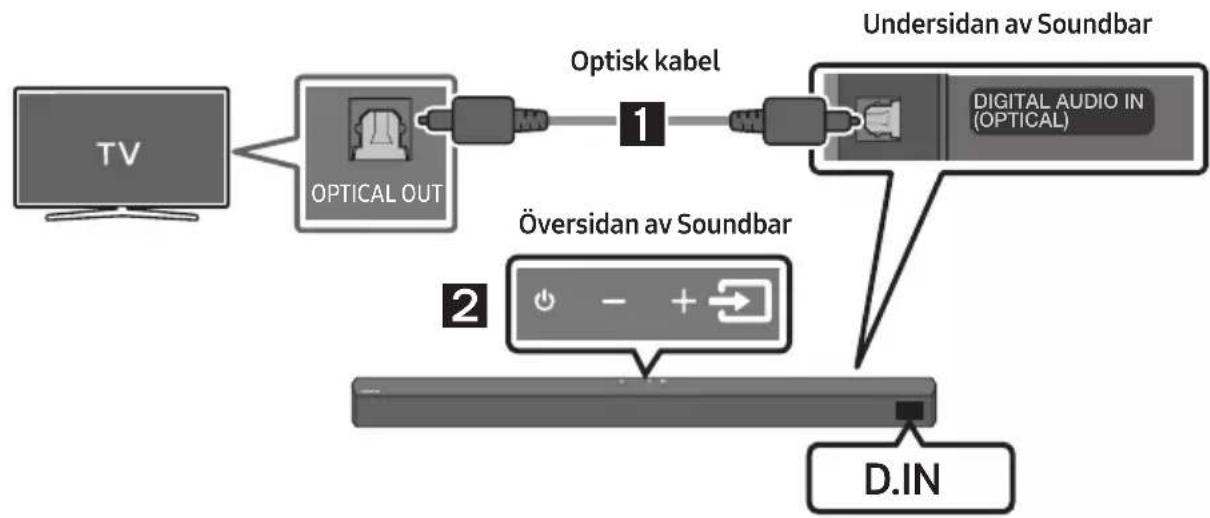
flowchart
graph LR
    TV["TV"] --> OpticalOut["OPTICAL OUT"]
    OpticalOut --> Optiskkabel["Optisk kabel"]
    Optiskkabel --> DigitalAudioIn["DIGITAL AUDIO IN (OPTICAL)"]
    DigitalAudioIn --> UndersidanavSoundbar["Undersidan av Soundbar"]
    UndersidanavSoundbar --> D.IN["D.IN"]
    OpticalOut --> OversidanavSoundbar["Översidan av Soundbar"]
Bluetooth-enhet A Bluetooth-enhet B
natural_image
Simple 3D illustration of a bracket with a hole and label 'x2' (no other text or symbols)Väggfäste
natural_image
Mechanical component diagram showing a screw being inserted into a housing, with no visible text or symbolsnatural_image
Diagram showing two states of a mechanical component before and after cutting, with arrows indicating direction (no text or symbols present)Manufactured under license from Dolby Laboratories. Dolby, Dolby Audio and the double-D symbol are trademarks of Dolby Laboratories Licensing Corporation.

dts®
2.0 Channel
dts
VIRTUAL

For DTS patents, see http://patents.dts.com. Manufactured under license from DTS Licensing Limited. DTS, the Symbol, DTS in combination with the Symbol, DTS and the Symbol together, Virtual:X, the DTS Virtual:X logo, and DTS 2.0 Channel are registered trademarks or trademarks of DTS, Inc. in the United States and/or other countries. © DTS, Inc. All Rights Reserved.

HIGH-DEFINITION MULTIMEDIA INTERFACE
The terms HDMI and HDMI High-Definition Multimedia Interface, and the HDMI Logo are trademarks or registered trademarks of HDMI Licensing Administrator, Inc. in the United States and other countries.

Bluetooth®
The Bluetooth® word mark and logos are registered trademarks owned by Bluetooth SIG, Inc. and any use of such marks by Samsung Electronics Co., Ltd. is under license. Other trademarks and trade names are those of their respective owners.

[ENERGY STAR]
ENERGY STAR qualified model only
- Your Samsung product is ENERGY STAR qualified in its factory default setting. Change to certain features, settings and functionality in this product can change the power consumption, possibly beyond the limits required for ENERGY STAR qualification.
- Environmental Protection Agency and Department of Energy. ENERGY STAR is a joint program of the Government agencies, designed to promote energy efficient products and practices.
Refer to www.energystar.gov for more information of the ENERGY STAR Program.
ENERGY STAR qualified model only (Applicable to Thin Client models only)
As an ENERGY STAR® Partner, SAMSUNG has determined that this product meets the ENERGY STAR® guidelines for energy efficiency.
- The ENERGY STAR Program has been to reduced greenhouse gas emissions and save energy through voluntary labeling.
- Power management setting of this product have been enabled by default, and have various timing setting from 1 minutes to 5 hours.
- The product can wake with a button press on the chassis from sleep mode.
ENERGY STAR qualified model only (The other models)
- As an ENERGY STAR Partner, Samsung has determined that this product or product models meets the ENERGY STAR guideline for energy efficiency.
14 LICENSMEDDELANDE FÖR OPEN SOURCE
www.samsung.com/uk/aboutsamsung/sustainability/environment/our-commitment/data/
KOMMISSIONENS FÖRORDNING (EU) 2019/1782
natural_image
Three-step diagram showing a mechanical component before and after assembly, with no visible text or symbols.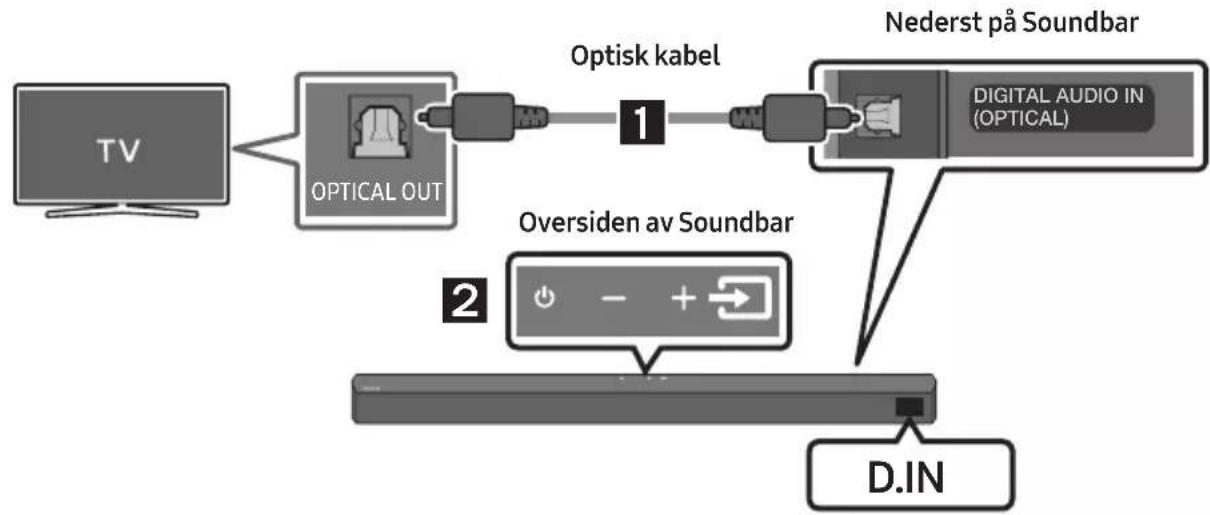
flowchart
graph LR
    TV["TV"] --> OpticalOut["OPTICAL OUT"]
    OpticalOut --> Optiskkabel["Optisk kabel"]
    Optiskkabel --> DigitalAudioIn["DIGITAL AUDIO IN (OPTICAL)"]
    DigitalAudioIn --> NederstPåSoundbar["Nederst på Soundbar"]
    NederstPåSoundbar --> D.IN["D.IN"]
    OversidenavSoundbar["Oversiden av Soundbar"]
- Koble DIGITAL AUDIO IN (OPTICAL)-kontakten på Soundbar til OPTICAL OUT-kontakten på TV-en med en digital optisk kabel.
- Trykk på knappen ➕ (Kilde) på toppanelet eller på fjernkontrollen, og velg deretter "D.IN"-modus.
Bluetooth-multitilkobling
Soundbar kan kobles til 2 Bluetooth-enheter samtidig.

Bluetooth-enhet A Bluetooth-enhet B
natural_image
Mechanical component diagram showing a screw being inserted into a housing with a circular base (no text or symbols)natural_image
Diagram showing two states of a mechanical component before and after cutting, with arrows indicating direction (no text or symbols present)flowchart
graph TD
    A["Top: Device icon"] --> B["Down Arrow"]
    B --> C["Bottom: Device icon with downward arrow"]
11 PROGRAMVARE- OPPDATERING
Manufactured under license from Dolby Laboratories. Dolby, Dolby Audio and the double-D symbol are trademarks of Dolby Laboratories Licensing Corporation.

dts®
2.0 Channel
dts
VIRTUAL

For DTS patents, see http://patents.dts.com. Manufactured under license from DTS Licensing Limited. DTS, the Symbol, DTS in combination with the Symbol, DTS and the Symbol together, Virtual:X, the DTS Virtual:X logo, and DTS 2.0 Channel are registered trademarks or trademarks of DTS, Inc. in the United States and/or other countries. © DTS, Inc. All Rights Reserved.

HIGH-DEFINITION MULTIMEDIA INTERFACE
The terms HDMI and HDMI High-Definition Multimedia Interface, and the HDMI Logo are trademarks or registered trademarks of HDMI Licensing Administrator, Inc. in the United States and other countries.

Bluetooth®
The Bluetooth® word mark and logos are registered trademarks owned by Bluetooth SIG, Inc. and any use of such marks by Samsung Electronics Co., Ltd. is under license. Other trademarks and trade names are those of their respective owners.

[ENERGY STAR]
ENERGY STAR qualified model only
- Your Samsung product is ENERGY STAR qualified in its factory default setting. Change to certain features, settings and functionality in this product can change the power consumption, possibly beyond the limits required for ENERGY STAR qualification.
- Environmental Protection Agency and Department of Energy. ENERGY STAR is a joint program of the Government agencies, designed to promote energy efficient products and practices.
Refer to www.energystar.gov for more information of the ENERGY STAR Program.
ENERGY STAR qualified model only (Applicable to Thin Client models only)
As an ENERGY STAR® Partner, SAMSUNG has determined that this product meets the ENERGY STAR® guidelines for energy efficiency.
- The ENERGY STAR Program has been to reduced greenhouse gas emissions and save energy through voluntary labeling.
- Power management setting of this product have been enabled by default, and have various timing setting from 1 minutes to 5 hours.
- The product can wake with a button press on the chassis from sleep mode.
ENERGY STAR qualified model only (The other models)
- As an ENERGY STAR Partner, Samsung has determined that this product or product models meets the ENERGY STAR guideline for energy efficiency.
14 LISENSMERKNADER OM ÅPEN KILDEKODE
www.samsung.com/uk/aboutsamsung/sustainability/environment/our-commitment/data/
KOMMISJONSFORORDNING (EU) 2019/1782
natural_image
Three-step diagram showing a mechanical component before and after assembly, with no visible text or symbols.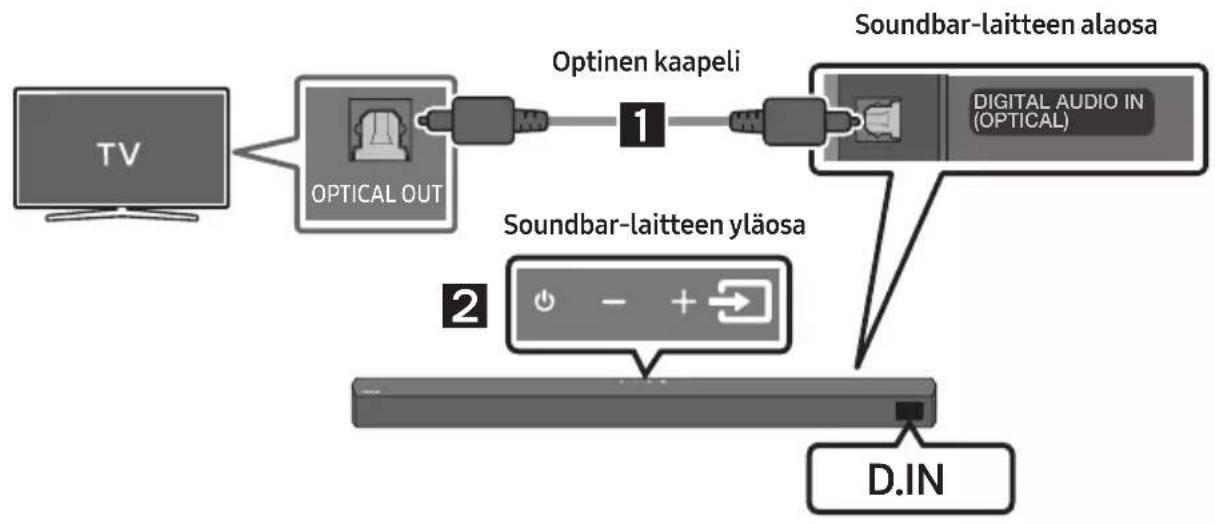
flowchart
graph LR
    TV["TV"] --> OpticalOut["OPTICAL OUT"]
    OpticalOut --> OptinenKaapeli["Optinen kaapeli"]
    OptinenKaapeli --> DigitalAudioIn["Digital Audio In (OPTICAL)"]
    DigitalAudioIn --> Soundbar-laitteenalaena["Soundbar-laitteen alaosa"]
    Soundbar-laitteenalaena --> DINA["D.IN"]
    Soundbar-laitteenalaena --> 2["2"]
Bluetooth-laite A Bluetooth-laite B
natural_image
Mechanical component with screw and adjustment knob, no visible text or symbolsnatural_image
Diagram showing two states of a mechanical component before and after assembly, with arrows indicating direction (no text or symbols present)Manufactured under license from Dolby Laboratories. Dolby, Dolby Audio and the double-D symbol are trademarks of Dolby Laboratories Licensing Corporation.

dts®
2.0 Channel
dts
VIRTUAL

For DTS patents, see http://patents.dts.com. Manufactured under license from DTS Licensing Limited. DTS, the Symbol, DTS in combination with the Symbol, DTS and the Symbol together, Virtual:X, the DTS Virtual:X logo, and DTS 2.0 Channel are registered trademarks or trademarks of DTS, Inc. in the United States and/or other countries. © DTS, Inc. All Rights Reserved.

HIGH-DEFINITION MULTIMEDIA INTERFACE
The terms HDMI and HDMI High-Definition Multimedia Interface, and the HDMI Logo are trademarks or registered trademarks of HDMI Licensing Administrator, Inc. in the United States and other countries.

Bluetooth®
The Bluetooth® word mark and logos are registered trademarks owned by Bluetooth SIG, Inc. and any use of such marks by Samsung Electronics Co., Ltd. is under license. Other trademarks and trade names are those of their respective owners.

[ENERGY STAR]
ENERGY STAR qualified model only
- Your Samsung product is ENERGY STAR qualified in its factory default setting. Change to certain features, settings and functionality in this product can change the power consumption, possibly beyond the limits required for ENERGY STAR qualification.
- Environmental Protection Agency and Department of Energy. ENERGY STAR is a joint program of the Government agencies, designed to promote energy efficient products and practices.
Refer to www.energystar.gov for more information of the ENERGY STAR Program.
ENERGY STAR qualified model only (Applicable to Thin Client models only)
As an ENERGY STAR® Partner, SAMSUNG has determined that this product meets the ENERGY STAR® guidelines for energy efficiency.
- The ENERGY STAR Program has been to reduced greenhouse gas emissions and save energy through voluntary labeling.
- Power management setting of this product have been enabled by default, and have various timing setting from 1 minutes to 5 hours.
- The product can wake with a button press on the chassis from sleep mode.
ENERGY STAR qualified model only (The other models)
- As an ENERGY STAR Partner, Samsung has determined that this product or product models meets the ENERGY STAR guideline for energy efficiency.
14 AVOIMEN LÄHDEKIELEN LISENSSI- ILMOITUS
www.samsung.com/uk/aboutsamsung/sustainability/environment/our-commitment/data/
KOMISSION ASETUS (EU) 2019/1782
Subwooferens bagside
natural_image
Diagram showing a mechanical component before and after assembly, with no visible text or symbols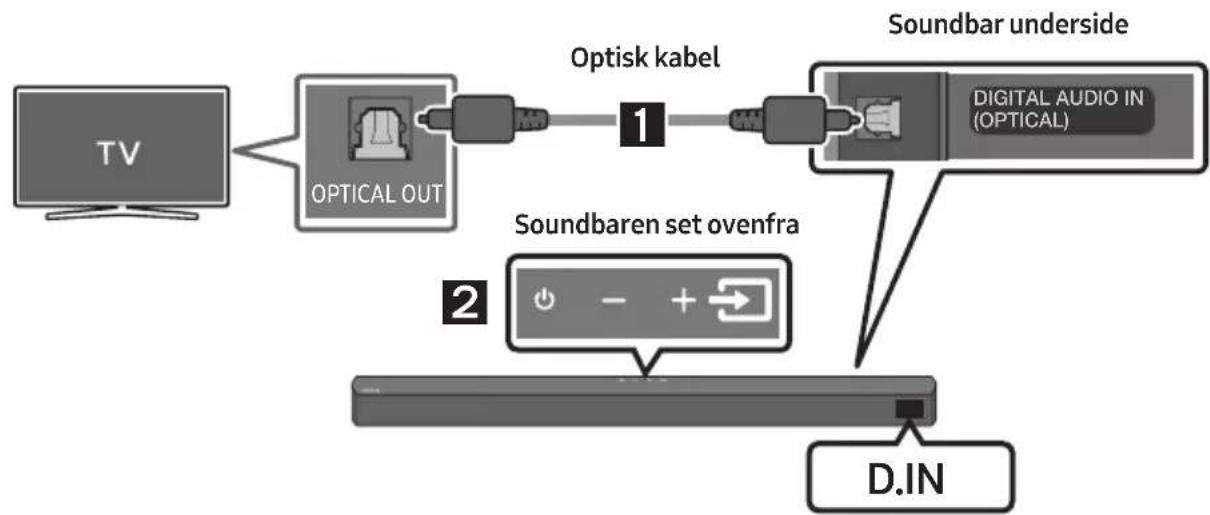
flowchart
graph LR
    TV["TV"] --> OpticalOut["OPTICAL OUT"]
    OpticalOut --> OptiskLabel["Optisk kabel"]
    OptiskLabel --> Soundbar["Soundbar underside"]
    Soundbar --> DigitalAudioIn["DIGITAL AUDIO IN (OPTICAL)"]
    Soundbar --> SoundbarenSetOvenfra["Soundbaren set ovenfra"]
    SoundbarenSetOvenfra --> DIN["D.IN"]
- Forbind stikket DIGITAL AUDIO IN (OPTICAL) på Soundbar til stikket OPTICAL OUT på tv'et via et digitalt optisk kabel.
- Tryk på knappen → (Kilde) på det øverste panel eller på fjernbetjeningen, og vælg derefter tilstanden "D.IN".
Bluetooth-enhed A Bluetooth-enhed B
natural_image
Mechanical component with screw and adjustment knob, no visible text or symbolsnatural_image
Diagram showing two states of a mechanical component before and after cutting, with arrows indicating motion direction (no text or symbols)Manufactured under license from Dolby Laboratories. Dolby, Dolby Audio and the double-D symbol are trademarks of Dolby Laboratories Licensing Corporation.

dts®
2.0 Channel
dts
VIRTUAL

For DTS patents, see http://patents.dts.com. Manufactured under license from DTS Licensing Limited. DTS, the Symbol, DTS in combination with the Symbol, DTS and the Symbol together, Virtual:X, the DTS Virtual:X logo, and DTS 2.0 Channel are registered trademarks or trademarks of DTS, Inc. in the United States and/or other countries. © DTS, Inc. All Rights Reserved.

The terms HDMI and HDMI High-Definition Multimedia Interface, and the HDMI Logo are trademarks or registered trademarks of HDMI Licensing Administrator, Inc. in the United States and other countries.

Bluetooth®
The Bluetooth® word mark and logos are registered trademarks owned by Bluetooth SIG, Inc. and any use of such marks by Samsung Electronics Co., Ltd. is under license. Other trademarks and trade names are those of their respective owners.

[ENERGY STAR]
ENERGY STAR qualified model only
- Your Samsung product is ENERGY STAR qualified in its factory default setting. Change to certain features, settings and functionality in this product can change the power consumption, possibly beyond the limits required for ENERGY STAR qualification.
- Environmental Protection Agency and Department of Energy. ENERGY STAR is a joint program of the Government agencies, designed to promote energy efficient products and practices.
Refer to www.energystar.gov for more information of the ENERGY STAR Program.
ENERGY STAR qualified model only (Applicable to Thin Client models only)
As an ENERGY STAR® Partner, SAMSUNG has determined that this product meets the ENERGY STAR® guidelines for energy efficiency.
- The ENERGY STAR Program has been to reduced greenhouse gas emissions and save energy through voluntary labeling.
- Power management setting of this product have been enabled by default, and have various timing setting from 1 minutes to 5 hours.
- The product can wake with a button press on the chassis from sleep mode.
ENERGY STAR qualified model only (The other models)
- As an ENERGY STAR Partner, Samsung has determined that this product or product models meets the ENERGY STAR guideline for energy efficiency.
14 BEMAERKNING VEDR. OPEN SOURCE-LICENS
www.samsung.com/uk/aboutsamsung/sustainability/environment/our-commitment/data/
KOMMISSIONENS FORORDNING (EU) 2019/1782
natural_image
Three grayscale product photos: a rectangular remote, a tower-mounted device, and a remote control with three batteries (no text or symbols visible)natural_image
Three black plastic cable connectors with sizes and connectors, shown from different angles (no text or symbols)Cablu de alimentare (Subwoofer, Soundbar)
Adaptor de c.a./c.c.
(Soundbar)
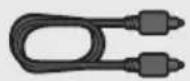
Cablu optic

Ghidaj de montare pe perete Şurub suport Şurub

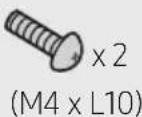
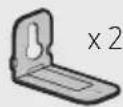
Suport de fixare pe perete
natural_image
Diagram showing a mechanical component before and after assembly, with no visible text or symbols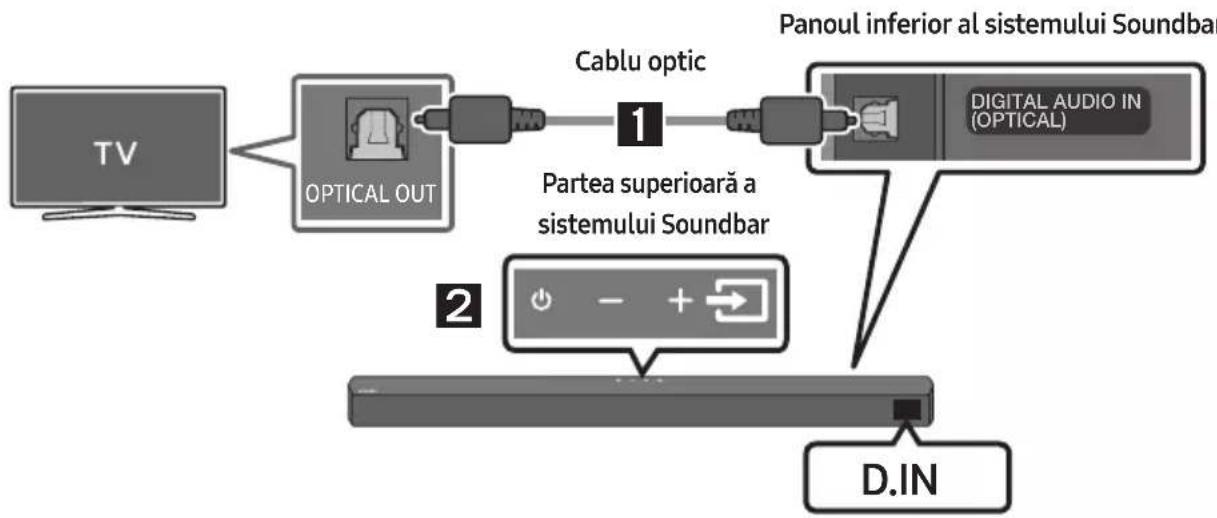
flowchart
graph TD
    A["TV"] --> B["OPTICAL OUT"]
    B --> C["Cablu optic"]
    C --> D["Partea superioară a sistemului Soundbar"]
    D --> E["D.IN"]
    F["Panoul inferior al sistemului Soundbar"] --> G["DIGITAL AUDIO IN (OPTICAL)"]
    G --> H["2"]
flowchart
graph LR
    A["TV"] -->|Wireless Signal| B["SAU"]
    B --> C["Device with +/- control icon"]
Conectarea inițială
Dispositiv Bluetooth A Dispositiv Bluetooth B
natural_image
Mechanical component with screw and adjustment knob, no visible text or symbolsnatural_image
Diagram showing two states of a mechanical component before and after assembly, with arrows indicating direction (no text or symbols present)Manufactured under license from Dolby Laboratories. Dolby, Dolby Audio and the double-D symbol are trademarks of Dolby Laboratories Licensing Corporation.

dts®
2.0 Channel
dts
VIRTUAL

For DTS patents, see http://patents.dts.com. Manufactured under license from DTS Licensing Limited. DTS, the Symbol, DTS in combination with the Symbol, DTS and the Symbol together, Virtual:X, the DTS Virtual:X logo, and DTS 2.0 Channel are registered trademarks or trademarks of DTS, Inc. in the United States and/or other countries. © DTS, Inc. All Rights Reserved.

HIGH-DEFINITION MULTIMEDIA INTERFACE
The terms HDMI and HDMI High-Definition Multimedia Interface, and the HDMI Logo are trademarks or registered trademarks of HDMI Licensing Administrator, Inc. in the United States and other countries.

Bluetooth®
The Bluetooth® word mark and logos are registered trademarks owned by Bluetooth SIG, Inc. and any use of such marks by Samsung Electronics Co., Ltd. is under license. Other trademarks and trade names are those of their respective owners.

[ENERGY STAR]
ENERGY STAR qualified model only
- Your Samsung product is ENERGY STAR qualified in its factory default setting. Change to certain features, settings and functionality in this product can change the power consumption, possibly beyond the limits required for ENERGY STAR qualification.
- Environmental Protection Agency and Department of Energy. ENERGY STAR is a joint program of the Government agencies, designed to promote energy efficient products and practices.
Refer to www.energystar.gov for more information of the ENERGY STAR Program.
ENERGY STAR qualified model only (Applicable to Thin Client models only)
As an ENERGY STAR® Partner, SAMSUNG has determined that this product meets the ENERGY STAR® guidelines for energy efficiency.
- The ENERGY STAR Program has been to reduced greenhouse gas emissions and save energy through voluntary labeling.
- Power management setting of this product have been enabled by default, and have various timing setting from 1 minutes to 5 hours.
- The product can wake with a button press on the chassis from sleep mode.
ENERGY STAR qualified model only (The other models)
- As an ENERGY STAR Partner, Samsung has determined that this product or product models meets the ENERGY STAR guideline for energy efficiency.
14 NOTIFICARE DE LICENȚĂ OPEN SOURCE
15 NOTĂ IMPORTANTĂ DESPRE SERVICE
natural_image
Diagram showing a mechanical component before and after assembly, with no visible text or symbols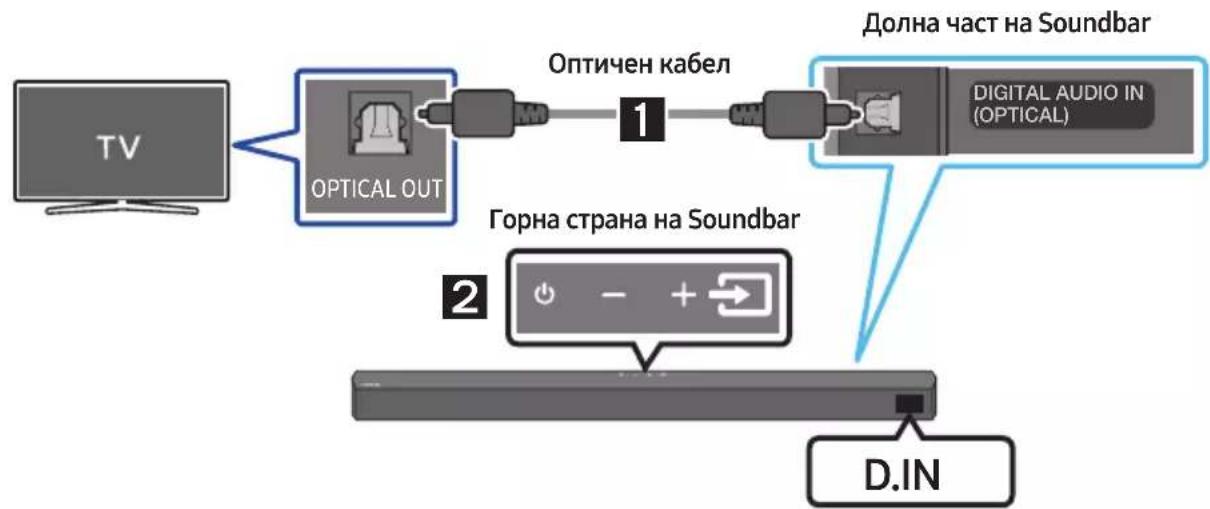
flowchart
graph LR
    A["TV"] --> B["OPTICAL OUT"]
    B --> C["Optичен кабел"]
    C --> D["1"]
    D --> E["Digital Audio IN (OPTICAL)"]
    F["D.IN"] --> G["2"]
    G --> H["Горна страна на Soundbar"]
    I["Долна част на Soundbar"] --> E
natural_image
Mechanical component diagram showing a screw being inserted into a housing, with no visible text or symbolsnatural_image
Diagram showing two states of a mechanical component before and after assembly, with arrows indicating direction (no text or symbols)flowchart
graph TD
    A["Top: Device icon"] --> B["Down Arrow"]
    B --> C["Bottom: Device icon with downward arrow"]
Manufactured under license from Dolby Laboratories. Dolby, Dolby Audio and the double-D symbol are trademarks of Dolby Laboratories Licensing Corporation.

dts®
2.0 Channel
dts
VIRTUAL

For DTS patents, see http://patents.dts.com. Manufactured under license from DTS Licensing Limited. DTS, the Symbol, DTS in combination with the Symbol, DTS and the Symbol together, Virtual:X, the DTS Virtual:X logo, and DTS 2.0 Channel are registered trademarks or trademarks of DTS, Inc. in the United States and/or other countries. © DTS, Inc. All Rights Reserved.

HIGH-DEFINITION MULTIMEDIA INTERFACE
The terms HDMI and HDMI High-Definition Multimedia Interface, and the HDMI Logo are trademarks or registered trademarks of HDMI Licensing Administrator, Inc. in the United States and other countries.

Bluetooth®
The Bluetooth® word mark and logos are registered trademarks owned by Bluetooth SIG, Inc. and any use of such marks by Samsung Electronics Co., Ltd. is under license. Other trademarks and trade names are those of their respective owners.

[ENERGY STAR]
ENERGY STAR qualified model only
- Your Samsung product is ENERGY STAR qualified in its factory default setting. Change to certain features, settings and functionality in this product can change the power consumption, possibly beyond the limits required for ENERGY STAR qualification.
- Environmental Protection Agency and Department of Energy. ENERGY STAR is a joint program of the Government agencies, designed to promote energy efficient products and practices.
Refer to www.energystar.gov for more information of the ENERGY STAR Program.
ENERGY STAR qualified model only (Applicable to Thin Client models only)
As an ENERGY STAR® Partner, SAMSUNG has determined that this product meets the ENERGY STAR® guidelines for energy efficiency.
- The ENERGY STAR Program has been to reduced greenhouse gas emissions and save energy through voluntary labeling.
- Power management setting of this product have been enabled by default, and have various timing setting from 1 minutes to 5 hours.
- The product can wake with a button press on the chassis from sleep mode.
ENERGY STAR qualified model only (The other models)
- As an ENERGY STAR Partner, Samsung has determined that this product or product models meets the ENERGY STAR guideline for energy efficiency.
14 БЕЛЕЖКА ЗА ЛИЦЕНЗА ЗА ОТВОРЕН КОД
natural_image
Diagram showing a mechanical component before and after assembly, with no visible text or symbols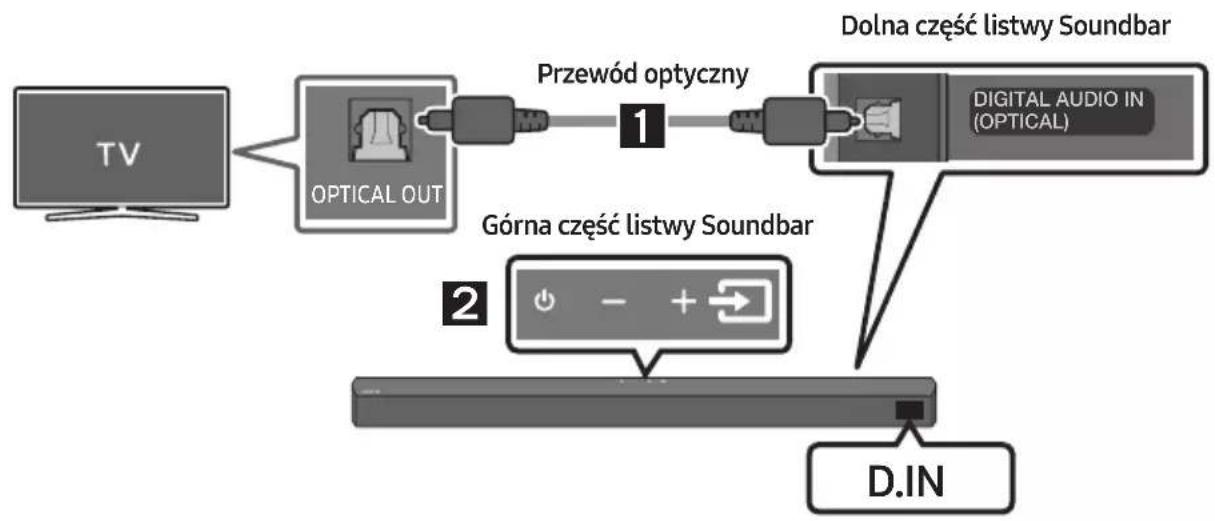
flowchart
graph LR
    A["TV"] --> B["OPTICAL OUT"]
    B --> C["Przewód optyczny"]
    C --> D["Dolna część listwy Soundbar"]
    D --> E["DIGITAL AUDIO IN (OPTICAL)"]
    B --> F["Górna część listwy Soundbar"]
    F --> G["D.IN"]
natural_image
Mechanical component diagram showing a screw being inserted into a housing, with no visible text or symbols.natural_image
Diagram showing two states of a mechanical component before and after assembly, with arrows indicating direction (no text or symbols)flowchart
graph TD
    A["Top: Device icon"] --> B["Downward arrow"]
    B --> C["Bottom: Device icon with downward arrows"]
11 AKTUALIZACJA OPROGRAMOWANIA
Manufactured under license from Dolby Laboratories. Dolby, Dolby Audio and the double-D symbol are trademarks of Dolby Laboratories Licensing Corporation.

dts®
2.0 Channel
dts
VIRTUAL

For DTS patents, see http://patents.dts.com. Manufactured under license from DTS Licensing Limited. DTS, the Symbol, DTS in combination with the Symbol, DTS and the Symbol together, Virtual:X, the DTS Virtual:X logo, and DTS 2.0 Channel are registered trademarks or trademarks of DTS, Inc. in the United States and/or other countries. © DTS, Inc. All Rights Reserved.

HIGH-DEFINITION MULTIMEDIA INTERFACE
The terms HDMI and HDMI High-Definition Multimedia Interface, and the HDMI Logo are trademarks or registered trademarks of HDMI Licensing Administrator, Inc. in the United States and other countries.

Bluetooth®
The Bluetooth® word mark and logos are registered trademarks owned by Bluetooth SIG, Inc. and any use of such marks by Samsung Electronics Co., Ltd. is under license. Other trademarks and trade names are those of their respective owners.

[ENERGY STAR]
ENERGY STAR qualified model only
- Your Samsung product is ENERGY STAR qualified in its factory default setting. Change to certain features, settings and functionality in this product can change the power consumption, possibly beyond the limits required for ENERGY STAR qualification.
- Environmental Protection Agency and Department of Energy. ENERGY STAR is a joint program of the Government agencies, designed to promote energy efficient products and practices.
Refer to www.energystar.gov for more information of the ENERGY STAR Program.
ENERGY STAR qualified model only (Applicable to Thin Client models only)
As an ENERGY STAR® Partner, SAMSUNG has determined that this product meets the ENERGY STAR® guidelines for energy efficiency.
- The ENERGY STAR Program has been to reduced greenhouse gas emissions and save energy through voluntary labeling.
- Power management setting of this product have been enabled by default, and have various timing setting from 1 minutes to 5 hours.
- The product can wake with a button press on the chassis from sleep mode.
ENERGY STAR qualified model only (The other models)
- As an ENERGY STAR Partner, Samsung has determined that this product or product models meets the ENERGY STAR guideline for energy efficiency.
14 INFORMACJA O LICENCJI OPEN SOURCE
www.samsung.com/uk/aboutsamsung/sustainability/environment/our-commitment/data/
ROZPORZĄDZENIE KOMISJI (UE) 2019/1782
natural_image
Diagram showing a mechanical component before and after assembly, with no visible text or symbols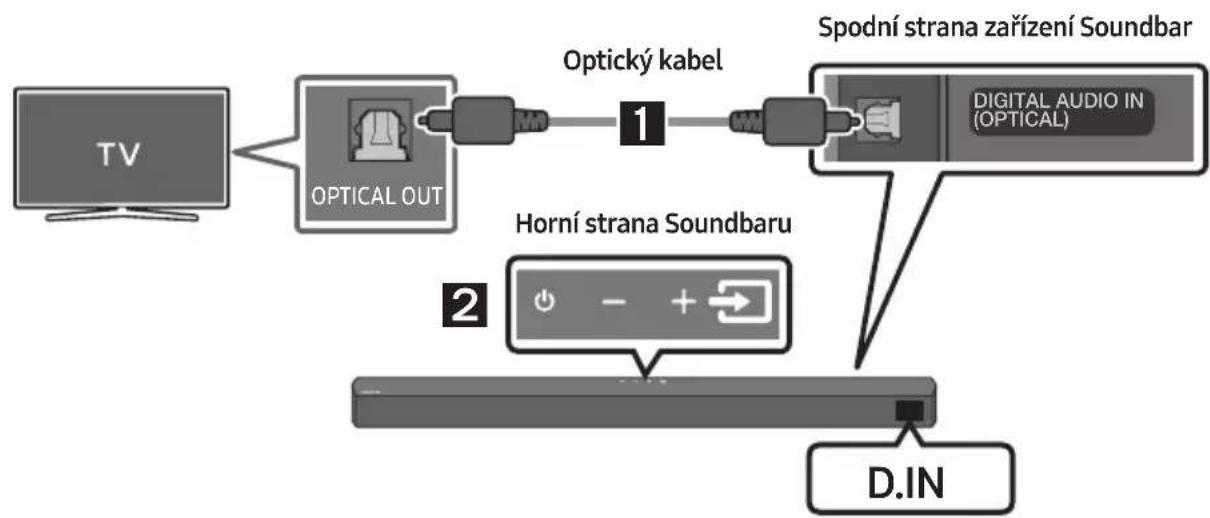
natural_image
Mechanical component diagram showing a screw being inserted into a housing, with no visible text or symbolsnatural_image
Diagram showing two states of a mechanical component before and after cutting, with arrows indicating direction (no text or symbols present)Manufactured under license from Dolby Laboratories. Dolby, Dolby Audio and the double-D symbol are trademarks of Dolby Laboratories Licensing Corporation.

dts®
2.0 Channel
dts
VIRTUAL

For DTS patents, see http://patents.dts.com. Manufactured under license from DTS Licensing Limited. DTS, the Symbol, DTS in combination with the Symbol, DTS and the Symbol together, Virtual:X, the DTS Virtual:X logo, and DTS 2.0 Channel are registered trademarks or trademarks of DTS, Inc. in the United States and/or other countries. © DTS, Inc. All Rights Reserved.

HIGH-DEFINITION MULTIMEDIA INTERFACE
The terms HDMI and HDMI High-Definition Multimedia Interface, and the HDMI Logo are trademarks or registered trademarks of HDMI Licensing Administrator, Inc. in the United States and other countries.

Bluetooth®
The Bluetooth® word mark and logos are registered trademarks owned by Bluetooth SIG, Inc. and any use of such marks by Samsung Electronics Co., Ltd. is under license. Other trademarks and trade names are those of their respective owners.

[ENERGY STAR]
ENERGY STAR qualified model only
- Your Samsung product is ENERGY STAR qualified in its factory default setting. Change to certain features, settings and functionality in this product can change the power consumption, possibly beyond the limits required for ENERGY STAR qualification.
- Environmental Protection Agency and Department of Energy. ENERGY STAR is a joint program of the Government agencies, designed to promote energy efficient products and practices.
Refer to www.energystar.gov for more information of the ENERGY STAR Program.
ENERGY STAR qualified model only (Applicable to Thin Client models only)
As an ENERGY STAR® Partner, SAMSUNG has determined that this product meets the ENERGY STAR® guidelines for energy efficiency.
- The ENERGY STAR Program has been to reduced greenhouse gas emissions and save energy through voluntary labeling.
- Power management setting of this product have been enabled by default, and have various timing setting from 1 minutes to 5 hours.
- The product can wake with a button press on the chassis from sleep mode.
ENERGY STAR qualified model only (The other models)
- As an ENERGY STAR Partner, Samsung has determined that this product or product models meets the ENERGY STAR guideline for energy efficiency.
14 POZNÁMKA K LICENCI OTEVŘENÉHO SOFTWARU
natural_image
Diagram showing a mechanical component before and after assembly, with no visible text or symbols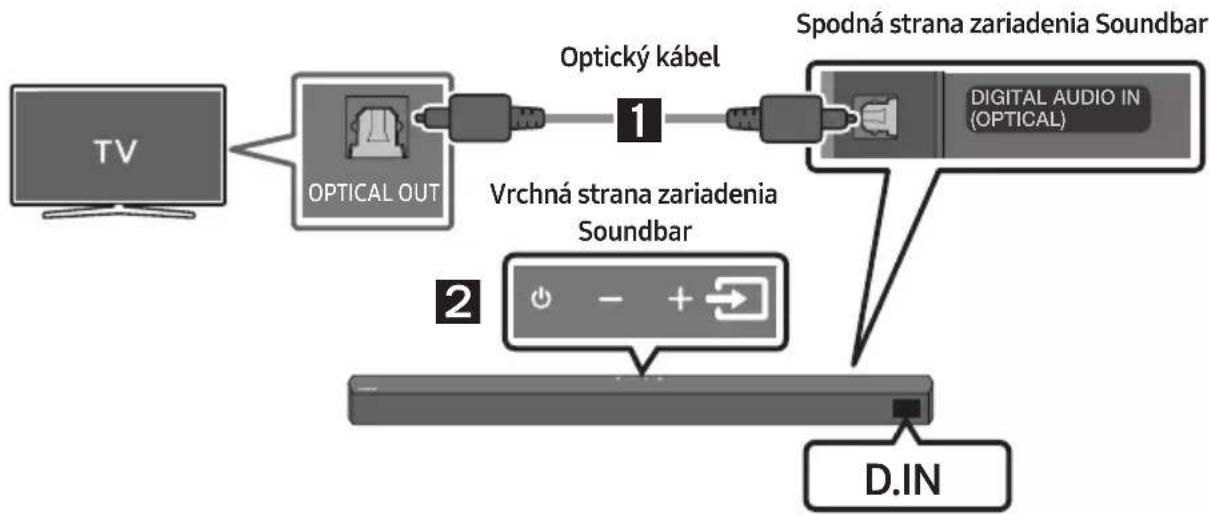
flowchart
graph TD
    A["TV"] --> B["OPTICAL OUT"]
    B --> C["Opticky kabel"]
    C --> D["Spodná strana zariadenia Soundbar"]
    D --> E["D.IN"]
    F["Vrchná strana zariadenia Soundbar"] --> G["2"]
    G --> H["+"]
    H --> I["-"]
    I --> J["D.IN"]
    K["DIGITAL AUDIO IN (OPTICAL)"] --> D
- Pomocou digitálneho optického kábla pripojte konektor DIGITAL AUDIO IN (OPTICAL) na zariadení Soundbar ku konektoru OPTICAL OUT na TV.
- Stlačte na hornom paneli alebo na dialkovom ovládaní tlačidlo (Zdroj) a vyberte režim „D.IN“.
Zariadenie Bluetooth A Zariadenie Bluetooth B
natural_image
Mechanical component diagram showing a screw being inserted into a housing with a circular base (no text or symbols)natural_image
Diagram showing two states of a mechanical component before and after cutting, with arrows indicating motion direction (no text or symbols)flowchart
graph TD
    A["Top: Device icon"] --> B["Down Arrow"]
    B --> C["Bottom: Device icon with downward arrow"]
11 AKTUALIZÁCIA SOFTVÉRU
Manufactured under license from Dolby Laboratories. Dolby, Dolby Audio and the double-D symbol are trademarks of Dolby Laboratories Licensing Corporation.

dts®
2.0 Channel
dts
VIRTUAL

For DTS patents, see http://patents.dts.com. Manufactured under license from DTS Licensing Limited. DTS, the Symbol, DTS in combination with the Symbol, DTS and the Symbol together, Virtual:X, the DTS Virtual:X logo, and DTS 2.0 Channel are registered trademarks or trademarks of DTS, Inc. in the United States and/or other countries. © DTS, Inc. All Rights Reserved.

HIGH-DEFINITION MULTIMEDIA INTERFACE
The terms HDMI and HDMI High-Definition Multimedia Interface, and the HDMI Logo are trademarks or registered trademarks of HDMI Licensing Administrator, Inc. in the United States and other countries.

Bluetooth®
The Bluetooth® word mark and logos are registered trademarks owned by Bluetooth SIG, Inc. and any use of such marks by Samsung Electronics Co., Ltd. is under license. Other trademarks and trade names are those of their respective owners.

[ENERGY STAR]
ENERGY STAR qualified model only
- Your Samsung product is ENERGY STAR qualified in its factory default setting. Change to certain features, settings and functionality in this product can change the power consumption, possibly beyond the limits required for ENERGY STAR qualification.
- Environmental Protection Agency and Department of Energy. ENERGY STAR is a joint program of the Government agencies, designed to promote energy efficient products and practices.
Refer to www.energystar.gov for more information of the ENERGY STAR Program.
ENERGY STAR qualified model only (Applicable to Thin Client models only)
As an ENERGY STAR® Partner, SAMSUNG has determined that this product meets the ENERGY STAR® guidelines for energy efficiency.
- The ENERGY STAR Program has been to reduced greenhouse gas emissions and save energy through voluntary labeling.
- Power management setting of this product have been enabled by default, and have various timing setting from 1 minutes to 5 hours.
- The product can wake with a button press on the chassis from sleep mode.
ENERGY STAR qualified model only (The other models)
- As an ENERGY STAR Partner, Samsung has determined that this product or product models meets the ENERGY STAR guideline for energy efficiency.
14 POZNÁMKA K LICENCII S OTVORENÝM ZDROJOVÝM KÓDOM
natural_image
Three-step diagram showing a mechanical component before and after assembly, with no visible text or symbols.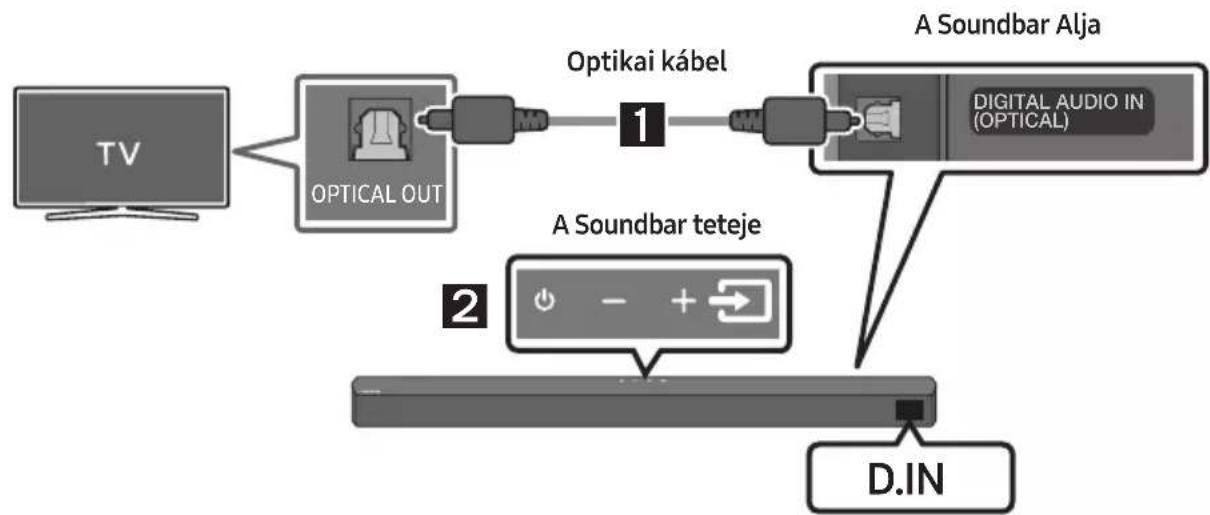
flowchart
graph LR
    TV["TV"] --> OpticalOut["OPTICAL OUT"]
    OpticalOut --> Optikaikabel["Optikai kabel"]
    Optikaikabel --> DigitalAudioIn["DIGITAL AUDIO IN (OPTICAL)"]
    DigitalAudioIn --> ASoundbarTeteje["A Soundbar teteje"]
    ASoundbarTeteje --> DINA["D.IN"]
natural_image
Mechanical component diagram showing a screw being inserted into a housing with a circular base (no text or symbols)natural_image
Diagram showing two states of a mechanical component before and after cutting, with arrows indicating direction (no text or symbols present)Manufactured under license from Dolby Laboratories. Dolby, Dolby Audio and the double-D symbol are trademarks of Dolby Laboratories Licensing Corporation.

dts®
2.0 Channel
dts
VIRTUAL

For DTS patents, see http://patents.dts.com. Manufactured under license from DTS Licensing Limited. DTS, the Symbol, DTS in combination with the Symbol, DTS and the Symbol together, Virtual:X, the DTS Virtual:X logo, and DTS 2.0 Channel are registered trademarks or trademarks of DTS, Inc. in the United States and/or other countries. © DTS, Inc. All Rights Reserved.
HDMI ^TM
HIGH-DEFINITION MULTIMEDIA INTERFACE
The terms HDMI and HDMI High-Definition Multimedia Interface, and the HDMI Logo are trademarks or registered trademarks of HDMI Licensing Administrator, Inc. in the United States and other countries.

Bluetooth®
The Bluetooth® word mark and logos are registered trademarks owned by Bluetooth SIG, Inc. and any use of such marks by Samsung Electronics Co., Ltd. is under license. Other trademarks and trade names are those of their respective owners.

[ENERGY STAR]
ENERGY STAR qualified model only
- Your Samsung product is ENERGY STAR qualified in its factory default setting. Change to certain features, settings and functionality in this product can change the power consumption, possibly beyond the limits required for ENERGY STAR qualification.
- Environmental Protection Agency and Department of Energy. ENERGY STAR is a joint program of the Government agencies, designed to promote energy efficient products and practices.
Refer to www.energystar.gov for more information of the ENERGY STAR Program.
ENERGY STAR qualified model only (Applicable to Thin Client models only)
As an ENERGY STAR® Partner, SAMSUNG has determined that this product meets the ENERGY STAR® guidelines for energy efficiency.
- The ENERGY STAR Program has been to reduced greenhouse gas emissions and save energy through voluntary labeling.
- Power management setting of this product have been enabled by default, and have various timing setting from 1 minutes to 5 hours.
- The product can wake with a button press on the chassis from sleep mode.
ENERGY STAR qualified model only (The other models)
- As an ENERGY STAR Partner, Samsung has determined that this product or product models meets the ENERGY STAR guideline for energy efficiency.
14 NYÍLT FORRÁSKÓDÚ LICENC MEGJEGYZÉS
natural_image
Three grayscale product photos: a rectangular remote, a vertical tower, and a remote control with two batteries (no text or symbols visible)Glavna jedinica Soundbar Subwoofer Daljinski upravljač / Baterije

natural_image
Three black plastic cable connectors with sizes and connectors, shown in side-by-side views (no text or symbols)Kabel za napajanje (Subwoofer, Soundbar)

natural_image
Two black plastic electronic components with leads, shown from different angles (no text or symbols)AC/DC adapter (Soundbar)

Zidni nosač
Kako upotrebljavati daljinski upravljač
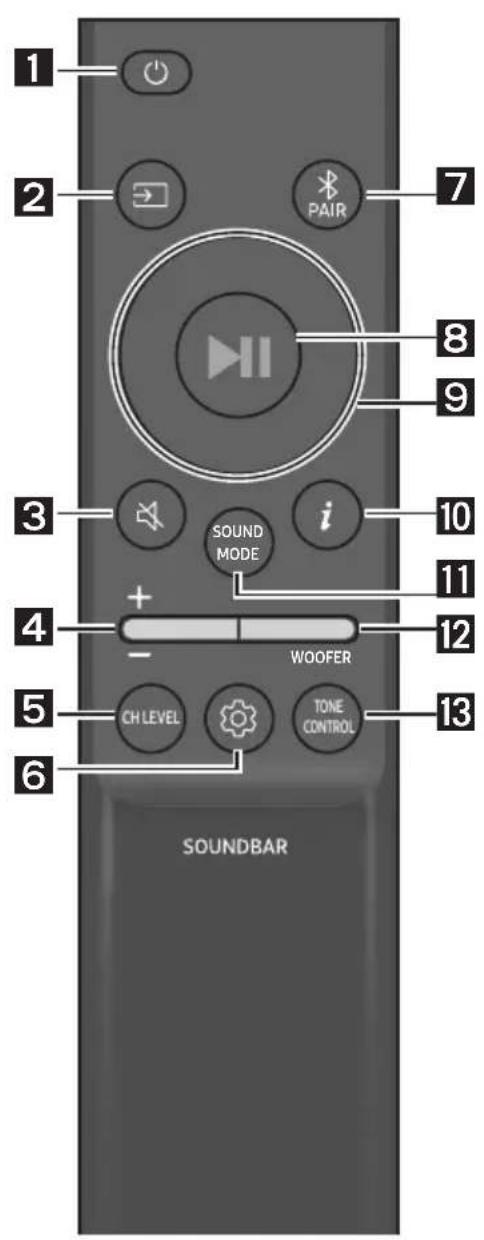
natural_image
Three-step diagram showing a mechanical component before and after assembly, with no visible text or symbols.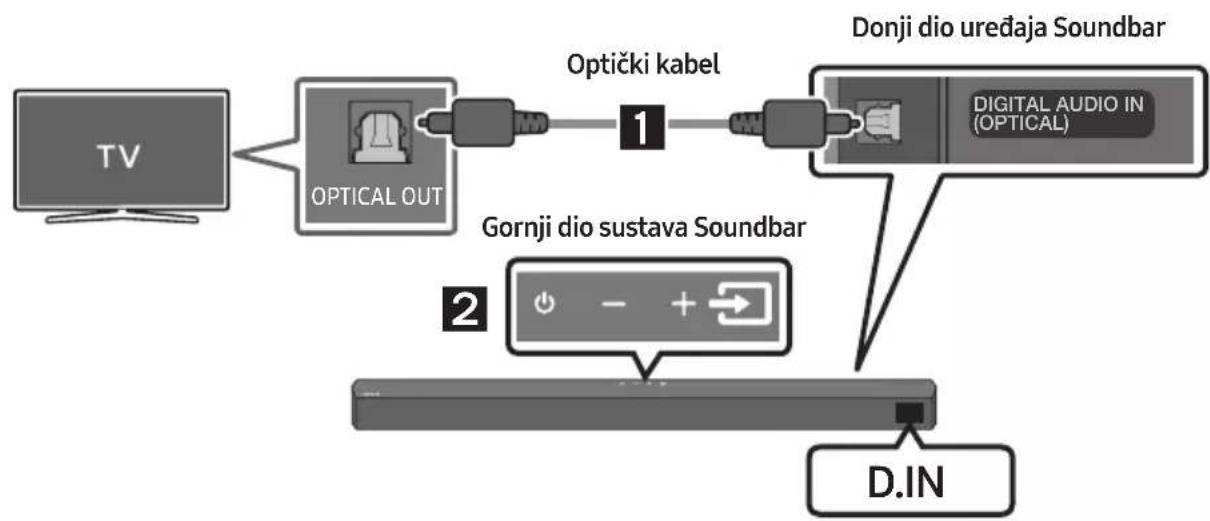
flowchart
graph LR
    TV["TV"] --> OpticalOut["OPTICAL OUT"]
    OpticalOut --> Optički1["Optički kabel"]
    Optički1 --> DigitalAudio["Digital Audio IN (OPTICAL)"]
    Optički1 --> GornjiDioSustavaSoundBar["Gornji dio sustava Soundbar"]
    DigitalAudio --> DonjiDio["Donji dio uređaja Soundbar"]
    GornjiDio --> D.IN["D.IN"]
- Spojite priključak DIGITAL AUDIO IN (OPTICAL) na uređaju Soundbar u priključak OPTICAL OUT televizora pomoću digitalnog optičkog kabela.
- Pritisnite gumb 📄 (Izvor) na gornjoj ploči ili na daljinskom upravljaču, a zatim odaberite način „D.IN”.
Metoda 2 Povezivanje televizora pomoću kabela HDMI

OPREZ
- Kada su i HDMI i optički kabel povezani, najprije se prima HDMI signal.
- Za spajanje HDMI kabela između televizora i sustava Soundbar, obavezno povežite priključke s oznakom ARC. U protivnom, možda se neće čuti zvuk televizora.
- Preporučeni kabel je High-Speed HDMI Cable with Ethernet.
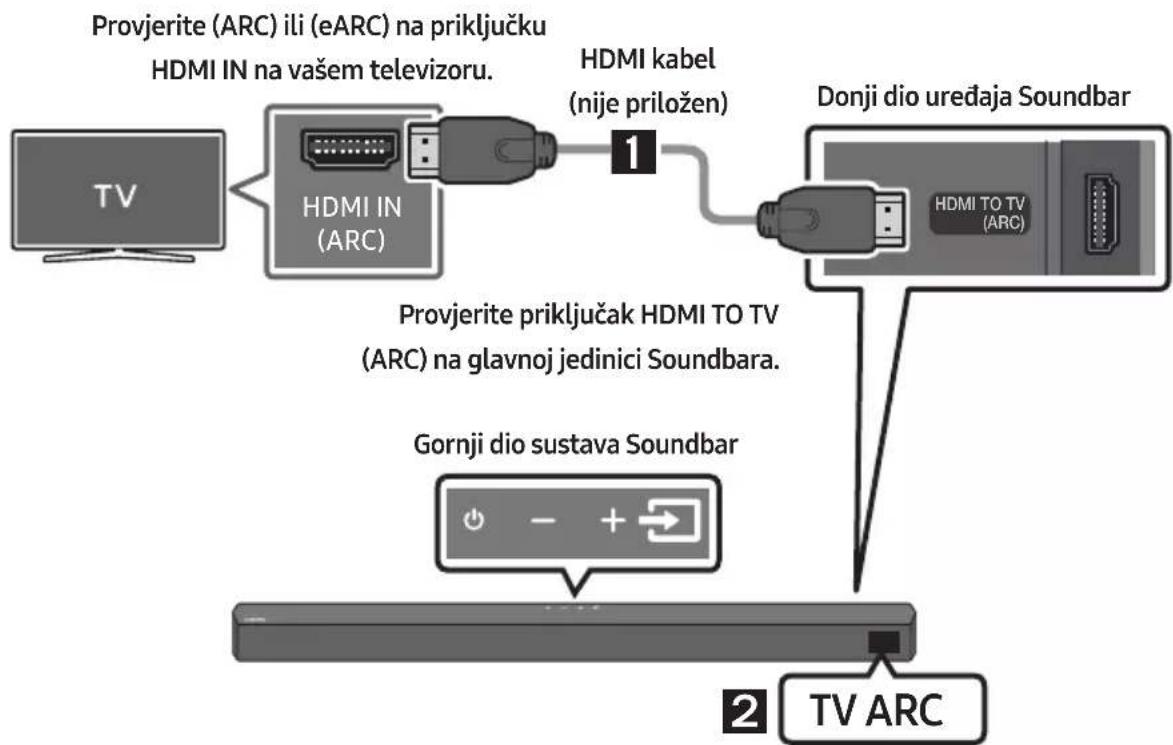
flowchart
graph TD
    A["TV"] --> B["HDMI IN (ARC)"]
    B --> C["1"]
    C --> D["Donji dio uređaja Soundbar"]
    D --> E["Gornji dio sustava Soundbar"]
    E --> F["TV ARC"]
    G["Provjere (ARC) ili (eARC) na priključku HDMI IN na vašem televizoru."] --> B
    H["Provjere priključak HDMI TO TV (ARC) na glavnoj jedinici Soundbara."] --> D
- S uključenim Soundbarom i TV-om priključite kabel HDMI (nije priložen) kao što je prikazano na slici.
- „TV ARC” se prikazuje u prozoru zaslona glavne jedinice Soundbar i zvuk televizora se reproducira pomoću Soundbara.
- Ako se zvuk televizora ne čuje, pritisnite gumb ➞ (Izvor) na daljinskom upravljaču ili na gornjem dijelu sustava Soundbar kako biste promijenili način u „D.IN”. Na zaslonu se prikazuju „D.IN” i „TV ARC” u nizu izvuk s televizora se reproducira.
- Ako se „TV ARC” ne prikaže u prozoru zaslona glavne jedinice Soundbar, provjerite je li HDMI kabel (nije priložen) priključen u odgovarajući priključak.
- Upotrijebite gumbe za prilagođavanje glasnoće na daljinskom upravljaču TV-a kako biste promijenili glasnoću na uređaju Soundbar.
NAPOMENE
Bluetooth uređaj A Bluetooth uređaj B
- Povežite sustav Soundbar najviše s dva Bluetooth uređaja. (Pogledajte stranicu 27.)
- Reproducirajte glazbu s jednog od povezanih Bluetooth uređaja dok su povezana dva uređaja.
- Ako se glazba reproducira s Bluetooth uređaja „B“ za vrijeme reprodukcije s uređaja „A“, glazba se počinje reproducirati na uređaju „B“ i automatski se zaustavlja/pauzira reprodukcija na uređaju „A“.
- U verzijama koje prethode verziji AVRCP V1.4 vrijeme prebacivanja uređaja koji reproducira glazbu može biti produljeno.
Uparivanje više Bluetooth uređaja
Kako upariti više uređaja sa sustavom Soundbar
- Uključite Soundbar.
- Samo u načinu rada „BT“ pritisnite i zadržite gumb ➞ (Izvor) na vrhu uređaja Soundbar više od pet sekundi kako bi Soundbar prešao u način „BT PAIRING“, zatim na Bluetooth uređaju uključite Bluetooth te odaberite Soundbar na popisu dostupnih uređaja. Soundbar će se automatski povezati s Bluetooth uređajem.
- Istom metodom može se upariti i povezati sa sustavom Soundbar i drugi Bluetooth uređaj. Ako pokušate povezati treći uređaj, povezani uređaj koji ne reproducira zvuk izgubit će Bluetooth vezu, ali će ipak ostati uparen sa sustavom Soundbar.
- Istom metodom možete upariti najviše osam Bluetooth uređaja, ali samo dva zadnja mogu istodobno ostati povezana sa sustavom Soundbar.
NAPOMENE
- Samo jedan Samsung TV ili dva Bluetooth uređaja mogu istodobno biti povezana sa sustavom Soundbar.
- Sustav Soundbar prekinut će vezu s Bluetooth uređajima kad primi zahtjev za povezivanje od Samsung TV-a.
- Zadana vrijednost za Soundbar je „ON-BT MULTI CONNECTION”, ali za vraćanje na način rada koji nema višestruku vezu s drugog načina rada, pritisnite i držite gumb ✝ PAIR na daljinskom upravljaču dulje od 5 sekundi u načinu rada na čekanju, sve dok se na zaslonu ne pojavi „OFF-BT MULTI CONNECTION”.
10 POSTAVLJANJE ZIDNOG NOSAČA
Mjere opreza prilikom postavljanja
• Postavite isključivo na okomiti zid.
- Ne postavljajte na mjesto s visokom temperaturom ili vlažnosti.
- Provjerite je li zid dovoljno čvrst za podržavanje težine proizvoda. Ako nije, ojačajte zid ili odaberite drugo mjesto za postavljanje.
- Kupite i upotrijebite vijke za učvršćivanje koji odgovaraju vrsti zida (gipsani, željezni, drveni itd.). Ako je moguće postavite vijke nosača u nosače zida.
- Kupite vijke za postavljanje na zid u skladu s vrstom i debljinom zida na koji želite postaviti Soundbar.
– Promjer: M5
natural_image
Mechanical component diagram showing a screw being inserted into a housing with a circular base (no text or symbols)natural_image
Diagram showing two states of a mechanical component before and after cutting, with arrows indicating direction (no text or symbols present)Manufactured under license from Dolby Laboratories. Dolby, Dolby Audio and the double-D symbol are trademarks of Dolby Laboratories Licensing Corporation.

dts®
2.0 Channel
dts
VIRTUAL

For DTS patents, see http://patents.dts.com. Manufactured under license from DTS Licensing Limited. DTS, the Symbol, DTS in combination with the Symbol, DTS and the Symbol together, Virtual:X, the DTS Virtual:X logo, and DTS 2.0 Channel are registered trademarks or trademarks of DTS, Inc. in the United States and/or other countries. © DTS, Inc. All Rights Reserved.

HIGH-DEFINITION MULTIMEDIA INTERFACE
The terms HDMI and HDMI High-Definition Multimedia Interface, and the HDMI Logo are trademarks or registered trademarks of HDMI Licensing Administrator, Inc. in the United States and other countries.

Bluetooth®
The Bluetooth® word mark and logos are registered trademarks owned by Bluetooth SIG, Inc. and any use of such marks by Samsung Electronics Co., Ltd. is under license. Other trademarks and trade names are those of their respective owners.

[ENERGY STAR]
ENERGY STAR qualified model only
- Your Samsung product is ENERGY STAR qualified in its factory default setting. Change to certain features, settings and functionality in this product can change the power consumption, possibly beyond the limits required for ENERGY STAR qualification.
- Environmental Protection Agency and Department of Energy. ENERGY STAR is a joint program of the Government agencies, designed to promote energy efficient products and practices.
Refer to www.energystar.gov for more information of the ENERGY STAR Program.
ENERGY STAR qualified model only (Applicable to Thin Client models only)
As an ENERGY STAR® Partner, SAMSUNG has determined that this product meets the ENERGY STAR® guidelines for energy efficiency.
- The ENERGY STAR Program has been to reduced greenhouse gas emissions and save energy through voluntary labeling.
- Power management setting of this product have been enabled by default, and have various timing setting from 1 minutes to 5 hours.
- The product can wake with a button press on the chassis from sleep mode.
ENERGY STAR qualified model only (The other models)
- As an ENERGY STAR Partner, Samsung has determined that this product or product models meets the ENERGY STAR guideline for energy efficiency.
14 OBAVIJEST O LICENCI ZA UPORABU SOFTVERA OTVORENOG KODA
Želite li poslati upite i zahtjeve u vezi sa softverom otvorenog koda, obratite se grupi Samsung Open Source (http://opensource.samsung.com)
15 VAŽNA NAPOMENA VEZANA UZ SERVIS
- Slike u ovom korisničkom priručniku služe kao samo kao referenca i mogu se razlikovati od stvarnog izgleda proizvoda.
- Moguća je naplata administrativne pristojbe u slučaju
www.samsung.com/uk/aboutsamsung/sustainability/environment/our-commitment/data/
UREDBA KOMISIJE (EU) 2019/1782
natural_image
Three grayscale product photos showing different devices: a rectangular remote, a tower-mounted tower, and a remote control with three buttons (no text or symbols visible)Glavni uređaj Soundbar Sabvufer Daljinski upravljač/baterije



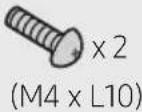
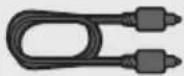
Vodica za montažu na zid Zavrtanj držača Zavrtanj
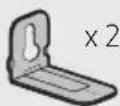
Nosača za montažu
na zid
- Više informacija u vezi sa napajanjem i potrošnjom energije potražite na nalepnici na proizvodu. (Oznaka : Donji deo Glavnog Uređaja Soundbar)
- Za kupovinu dodatnih komponenti ili opcionih kablova možete se obratiti servisnom centru ili korisničkoj službi kompanije Samsung.
- U zavisnosti od regiona, AC utikač može imati drugačiji izgled, odnosno može da se isporuči zajedno sa AC/DC adapterom.
- Dodatna oprema se može malo razlikovati od one prikazane na gornjim slikama.
- Dizajn i specifikacije mogu da se promene bez prethodnog obaveštenja.
02 PREGLED PROIZVODA
Prednji panel / gornji panel uređaja Soundbar
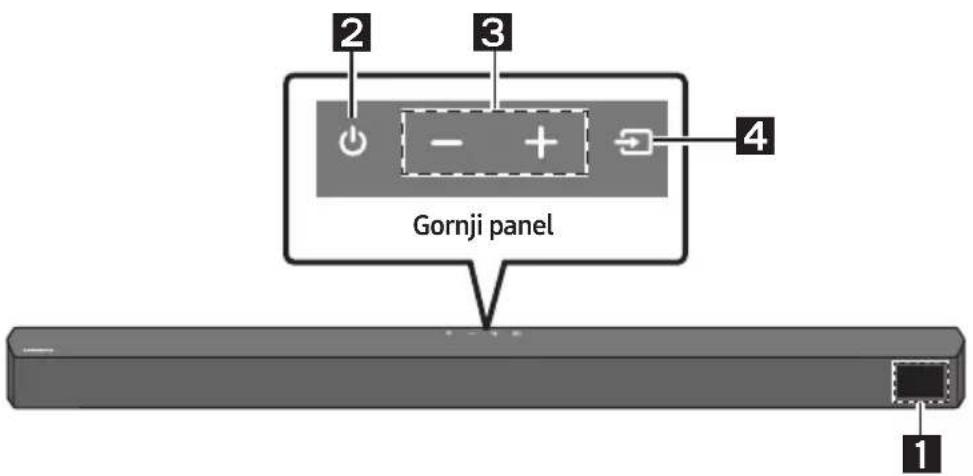
| 1 | EkranPrikazuje status proizvoda i trenutni režim. | |
| 2 | Dugme (napajanje)Uključuje i isključuje napajanje.Funkcija Auto Power DownUređaj se automatski isključuje u sledećim situacijama.- D.IN / HDMI / BT / USB režim : Ako nema zvučnog signala 20 minuta. | |
| 3 | Dugme (Jačina zvuka)Podešava jačinu zvuka.Kada se podesi, nivo jačine zvuka se prikazuje na prednjem ekranu uređaja Soundbar. | |
| 4 | Dugme (Izvor)Bira režim ulaza izvora. | |
| Režim ulaza Ekran | ||
| Optički digitalni ulaz D.IN | ||
| ARC (HDMI OUT) ulaz | D.IN → TV ARC (automatska konverzija) | |
| HDMI ulaz HDMI | ||
| BLUETOOTH režim BT | ||
| USB režim USB | ||
| Da biste uključili režim „BT PAIRING“, promenite izvor na režim „BT“, a zatim pritisnite i zadržite dugme (Izvor) duže od 5 sekundi. | ||
Kako da koristite daljinski upravljač
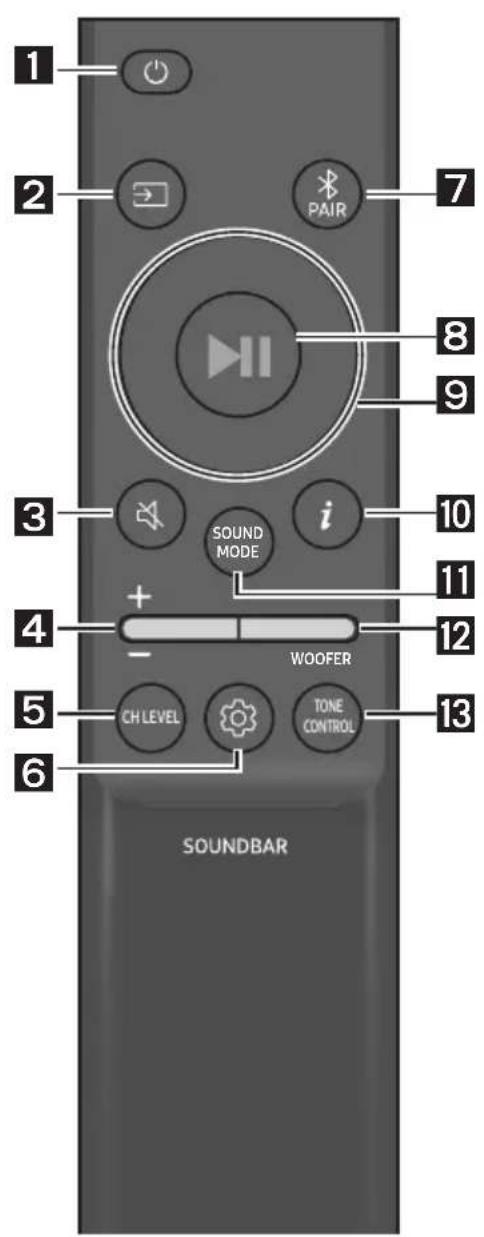
| 1 |  Napajanje Napajanje | Uključuje i isključuje uređaj Soundbar. | |
| 2 |  Izvor Izvor | Pritisnite da biste izabrali izvor povezan sa uređajem Soundbar. | |
| 3 |  Isključivanje zvuka Isključivanje zvuka | Pritisnite dugme (Isključivanje zvuka) kako biste isključili zvuk.Ponovo ga pritisnite da biste uključili zvuk. | |
| 4 |  Jačina zvuka Jačina zvuka | 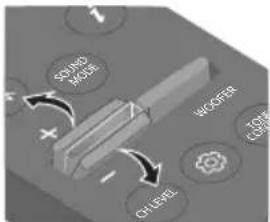 | 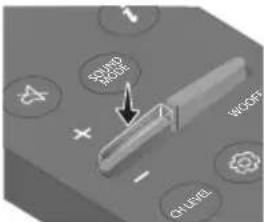 |
| Pritisnite dugme nagore ili nadole da biste prilagodili jačinu zvuka.• Isključivanje zvukaPritisnite dugme Jačina zvuka da biste isključili zvuk. Ponovo ga pritisnite da biste uključili zvuk. | |||
| 5 |  CH LEVEL CH LEVEL | Pritiskom na dugme možete podesiti jačinu zvuka svakog zvučnika.Pritisnite dugme da biste izabraliVIRTUAL CENTER LEVELi prilagodite jačinu zvuka između -6 i +6 pomoću dugmadi Gore/dole.Ako su povezani zadnji zvučnici (prodaju se odvojeno), podržana je postavkaREAR LEVEL. Da biste prilagodili jačinu zvuka delaREAR LEVELizmeđu -6 i +6, koristite dugmadNagore/Nadole. |
| 6 |  Kontrola zvuka Kontrola zvuka | Pritiskom na dugme možete postaviti audio funkciju. Željenu postavku možete da prilagodite pomoću dugmetaNagore/Nadole.AUDIO SYNC → NIGHT MODE ON/OFF → VOICE ENHANCE ON/OFF– AUDIO SYNCUkoliko slika na televizoru i zvuk sa uređaja Soundbar nisu sinhronizovani, pritisnite dugme(Kontrola zvuka) da biste izabraliAUDIO SYNC, a zatim podesite kašnjenje zvuka u rasponu od 0 do 300 milisekundi pomoću dugmadi zaNagore/Nadole.(Nije dostupno u režimima „USB“ ili „BT“).– NIGHT MODE ON/OFOvaj režim je optimizovan za gledanje noću jer su postavke prilagođene tako da je jačina zvuka mala, a dijalog jasan.– VOICE ENHANCE ON/OFFU ovom režimu lakše možete da čujete dijalog u filmovima i TV emisijama.Audio funkcijeNIGHT MODEi VOICE ENHANCEmoguće je postaviti naON/OFPomoću dugmadiNagore/Nadole.Pritisnite i držite dugme(Kontrola zvuka) oko 5 sekundi kako biste podesili zvuk za svaki frekventni opseg. Mogu se izabrati 150 Hz, 300 Hz, 600 Hz, 1,2 kHz, 2,5 kHz, 5 kHz i 10 kHz pomoću dugmadiNalevo/Nadesno, a svaka opcija se može podesiti na postavku između -6 i +6 pomoću dugmadiNagore/Nadole.(Uverite se da je režim zvuka podešen na „STANDARD“.) |
| 7 |  BluetoothPAIR BluetoothPAIR | Prebacuje Soundbar u režim za Bluetooth uparivanje.Pritisnite dugme *PAIRi sačekajte da se prikaže ekran „BT PAIRING“ da biste povezali novi Bluetooth uređaj. |
| 8 |  Reprodukcija /Pauza Reprodukcija /Pauza | Pritiskom na ovo dugme takođe možete pokrenuti reprodukciju muzike ili je pauzirati. |
| 9 |  Nagore/Nadole/Nalevo/Nadesno Nagore/Nadole/Nalevo/Nadesno | 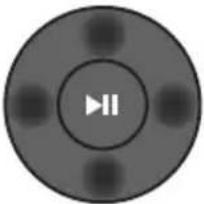 Pritisnite označene oblasti da biste izabrali Nagore/Nadole/Nalevo/Nadesno.Pritisnite Nagore/Nadole/Nalevo/Nadesno na dugmetu da biste izabrali ili podesili funkcije.PonoviDa biste koristili funkciju Ponovi u režimu „USB“, pritisnite dugme Nagore.Preskoči muzičku datotekuPritisnite dugme Nadesno da biste izabrali sledeću muzičku datoteku.Pritisnite dugme Nalevo da biste izabrali prethodnu muzičku datoteku.ID SETPritisnite i držite dugme Nagore 5 sekundi kako biste izvršili ID SET (prilikom povezivanja sa bežičnim sabvuferom ili bežičnim zadnjim zvučnicima). Pritisnite označene oblasti da biste izabrali Nagore/Nadole/Nalevo/Nadesno.Pritisnite Nagore/Nadole/Nalevo/Nadesno na dugmetu da biste izabrali ili podesili funkcije.PonoviDa biste koristili funkciju Ponovi u režimu „USB“, pritisnite dugme Nagore.Preskoči muzičku datotekuPritisnite dugme Nadesno da biste izabrali sledeću muzičku datoteku.Pritisnite dugme Nalevo da biste izabrali prethodnu muzičku datoteku.ID SETPritisnite i držite dugme Nagore 5 sekundi kako biste izvršili ID SET (prilikom povezivanja sa bežičnim sabvuferom ili bežičnim zadnjim zvučnicima). |
| 10 | iInformacije | Pritiskom na ovo dugme pojavljuju se informacije za svaki režim.(Pogledajte stranicu 7.) |
| 11 | SOUND MODE | Pritiskom na dugme možete izabrati željení režim zvuka.SURROUND SOUND → GAME → ADAPTIVE → DTS VIRTUAL:X → STANDARD– SURROUND SOUNDObezbeđuje šire zvučno polje od standardnog.– GAMEObezbeđuje stereoskopski zvuk da biste potpuno uronili u akciju tokom igranja.– ADAPTIVEAnalizira sadržaj u stvarnom vremenu i automatski obezbeđuje optimalno zvučno polje na osnovu karakteristika sadržaja.– DTS VIRTUAL:XSveobuhvatan 3D zvuk sa bilo kog sadržaja.– STANDARDReprodukuje originalni zvuk.DRC (Dynamic Range Control)Omogućuje vam primenu kontrole dinamičkog opsega na Dolby Digital numere.Pritisnite i zadržite dugme SOUND MODE duže od 5 sekundi dok je Soundbar isključen da biste uključili ili isključili DRC (Dynamic Range Control). Kada je DRC uključen, glasan se zvuk stišava. (Zvuk bi mogao da se izobliči.)Bluetooth PowerOva funkcija automatski uključuje uređaj Soundbar kada primi zahtev za povezivanjem sa prethodno povezanog TV ili Bluetooth uređaja. Podešavanje je podrazumevano uključeno.– Pritisnite i zadržite dugme SOUND MODE tokom više od 5 sekundi kako biste isključili funkciju Bluetooth Power. |
| 12 |  WOOFERWOOFER(BAS) NIVO WOOFERWOOFER(BAS) NIVO | 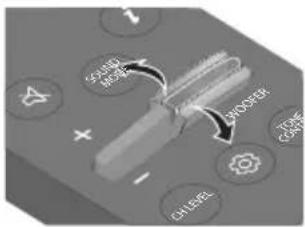 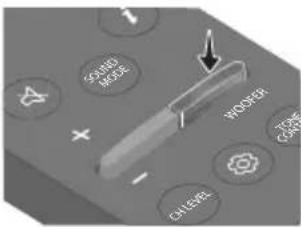 Pritisnite dugme nagore ili nadole da biste prilagodili jačinu zvuka vufera (basa) na -12 ili između -6 i +6. Da biste podesili jačinu zvuka vufera (basa) na 0 (podrazumevana vrednost), pritisnite dugme. Pritisnite dugme nagore ili nadole da biste prilagodili jačinu zvuka vufera (basa) na -12 ili između -6 i +6. Da biste podesili jačinu zvuka vufera (basa) na 0 (podrazumevana vrednost), pritisnite dugme. |
| 13 |  TONECONTROL TONECONTROL | Pritiskom na dugme možete podesiti jačinu zvuka visokih ili niskih tonova.Pritisnite dugme da biste izabrali TREBLE ili BASS i prilagodite jačinu zvuka između -6 i +6 pomoću dugmadi Nagore/Nadole. |
Korišćenje skrivenih dugmadi (dugmadi sa više funkcija)
| Skriveno dugme | Referentna stranica | |
| Dugme na daljinskom upravljaču Funkcija | ||
| WOOFER (Nagore) | Daljinski upravljač televizoraUključeno/isključeno (Pripravnost) | Stranica 14 |
| Nalevo | Automatsko povezivanje TV-a uključeno/isključeno (BT spremno) | Stranica 23 |
| Nagore ID SET Stranica 11 | ||
| (Kontrola zvuka) | 7-kanalni EQ Stranica 10 | |
| SOUND MODE | DRC ON/OFF (Pripravnost) Stranica 11 | |
| Bluetooth Power | Stranica 11 | |
| PAIR | Višestruka Bluetooth veza uključena/isključena (Pripravnost) | Stranica 30 |
Specifikacije izlaza za različite režime zvučnih efekata
| Efekat Ulaz | Izlaz | |||
| Bez kompleta bežičnih zadnjih zvučnika | Sa kompletom bežičnih zadnjih zvučnika | |||
| [SIGNATURE]SOUND MODE | SURROUND SOUND | 2.0 kanala | 2.1 kanala 4.1 kanala | |
| 5.1 kanala 2.1 kanala 4.1 kanala | ||||
| GAME | 2.0 kanala | 2.1 kanala 4.1 kanala | ||
| 5.1 kanala 2.1 kanala 4.1 kanala | ||||
| ADAPTIVE | 2.0 kanala | 2.1 kanala 4.1 kanala | ||
| 5.1 kanala 2.1 kanala 4.1 kanala | ||||
| DTS VIRTUAL:X | 2.0 kanala | 2.1 kanala 4.1 kanala | ||
| 5.1 kanala 2.1 kanala 4.1 kanala | ||||
| STANDARD | 2.0 kanala | 2.1 kanala 2.1 kanala | ||
| 5.1 kanala 2.1 kanala 2.1 kanala | ||||
natural_image
Three-step diagram showing a mechanical component before and after assembly, with no visible text or symbols.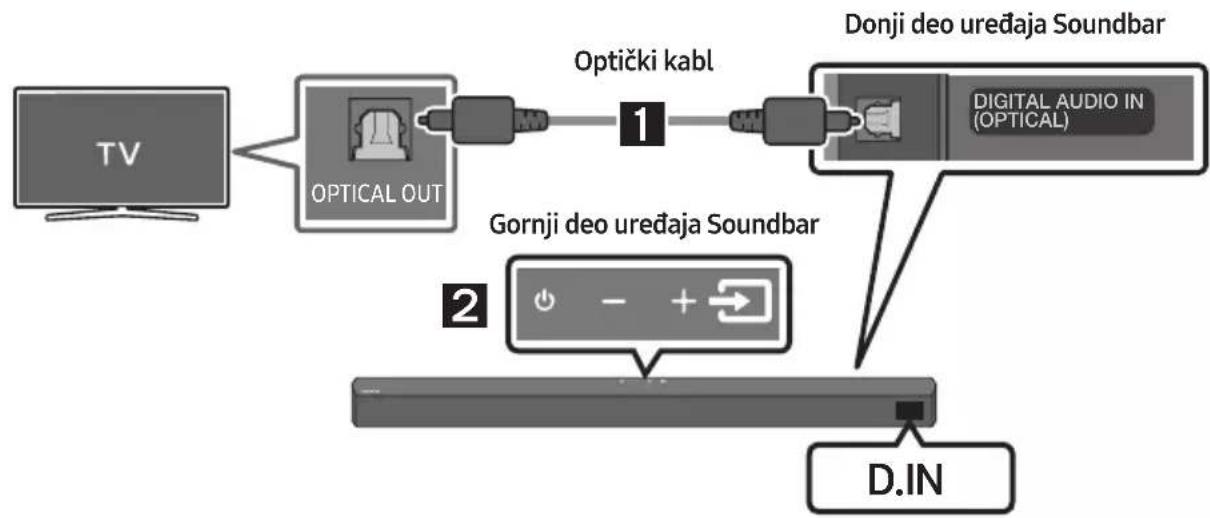
flowchart
graph LR
    A["TV"] --> B["OPTICAL OUT"]
    B --> C["Optički kabl"]
    C --> D["DONJI DEO UREDAJA SOUNDBAR"]
    D --> E["D. IN"]
    F["Gornji deo uređaja Soundbar"] --> G["2"]
    G --> H["D. IN"]
- Povežite konektor DIGITAL AUDIO IN (OPTICAL) na uređaju Soundbar sa konektorom OPTICAL OUT na televizoru koristeći digitalni optički kabl.
- Pritisnite dugme 📄 (Izvor) na gornjem panelu ili na daljinskom upravljaču i potom izaberite režim „D.IN“.
Metoda 2. Povezivanje televizora pomoću HDMI kabla

OPREZ
- Kada su i HDMI kabl i optički kabl povezani, HDMI signal se prvi prima.
- Da biste HDMI kablom povezali TV i Soundbar, obavezno ga priključite na priključke označene sa ARC. U suprotnom, TV možda neće emitovati zvuk.
- Preporučeni kabl je High-Speed HDMI Cable with Ethernet.
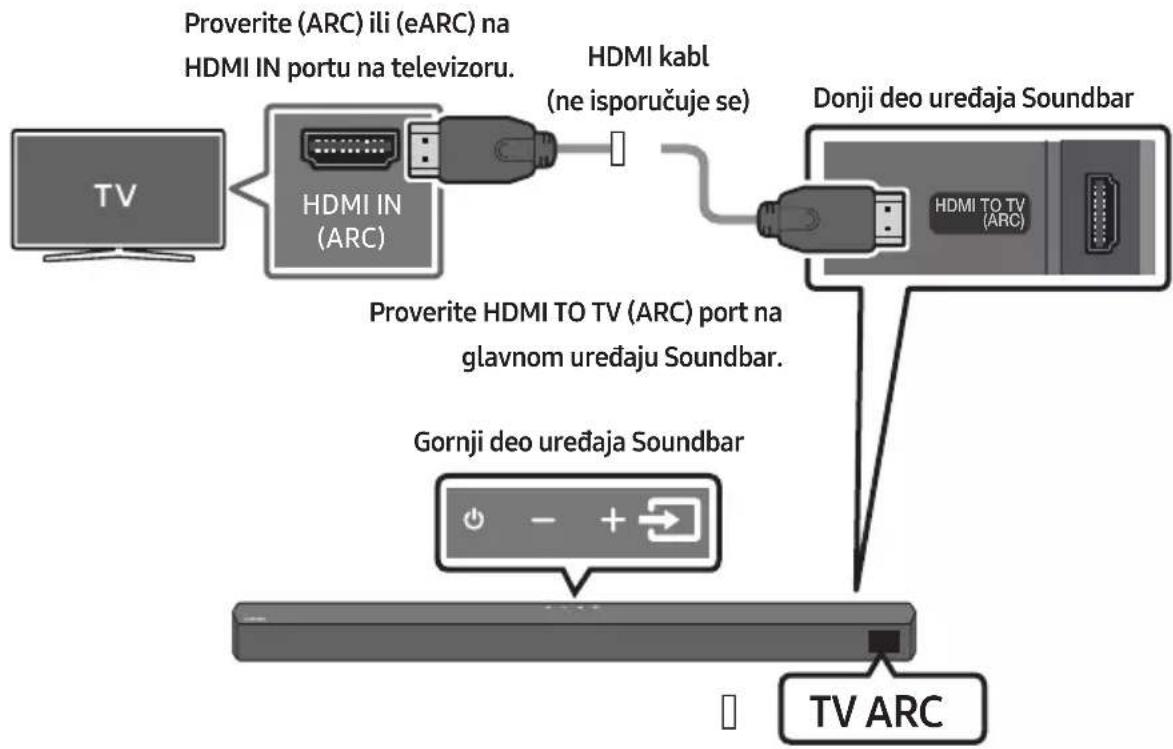
- Kada su uređaj Soundbar i televizor uključeni, povežite HDMI kabl (ne isporučuje se) kao što je prikazano na slici.
-
„TV ARC“ će se pojaviti u prozoru ekrana glavnog uređaja Soundbar i uređaj Soundbar će reprodukovati zvuk sa televizora.
-
Ako se zvuk televizora ne čuje, pritisnite dugme ➞ (Izvor) na daljinskom upravljaču ili na gornjem delu uređaja Soundbar da biste prešli u režim „D.IN“. Na ekranu se redom prikazuje „D.IN“ i „TV ARC“, a zvuk sa televizora se reprodukuje.
- Ako se „TV ARC“ ne prikazuje u prozoru ekrana glavnog uređaja Soundbar, proverite da li je HDMI kabl (ne isporučuje se) povezan sa odgovarajućim portom.
- Koristite dugmad za jačinu zvuka na daljinskom upravljaču televizora da biste promenili jačinu zvuka uređaja Soundbar.
NAPOMENE
- HDMI je interfejs koji omogućava digitalni prenos video i audio podataka samo sa jednim priključkom.
- Ako televizor poseduje ARC priključak, povežite HDMI kabl sa HDMI IN (ARC) priključkom.
- Preporučujemo da koristite HDMI kabl bez jezgra ako je moguće. Ako koristite HDMI kabl sa jezgrom, koristite onaj čiji je prečnik manji od 14 mm.
Bluetooth uređaj A Bluetooth uređaj B
natural_image
Mechanical component with screw and adjustment knob, no visible text or symbols- Prilikom sklapanja noseći delovi Nosač za montažu na zid treba da se nalaze sa zadnje strane uređaja Soundbar.
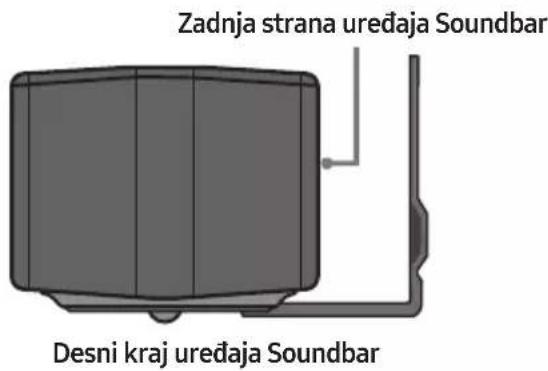
- Postavite uređaj Soundbar sa pričvršćenim Nosač za montažu na zid tako što ćete okačiti Nosač za montažu na zid na Zavrtanj držača na zidu.
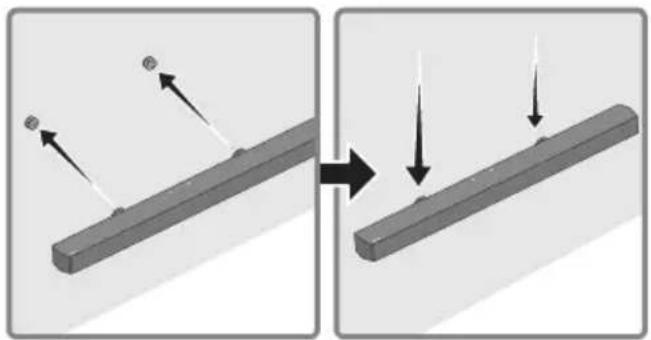
natural_image
Diagram showing two states of a mechanical component before and after assembly, with arrows indicating direction (no text or symbols present)Manufactured under license from Dolby Laboratories. Dolby, Dolby Audio and the double-D symbol are trademarks of Dolby Laboratories Licensing Corporation.

dts®
2.0 Channel
dts
VIRTUAL

For DTS patents, see http://patents.dts.com. Manufactured under license from DTS Licensing Limited. DTS, the Symbol, DTS in combination with the Symbol, DTS and the Symbol together, Virtual:X, the DTS Virtual:X logo, and DTS 2.0 Channel are registered trademarks or trademarks of DTS, Inc. in the United States and/or other countries. © DTS, Inc. All Rights Reserved.

HIGH-DEFINITION MULTIMEDIA INTERFACE
The terms HDMI and HDMI High-Definition Multimedia Interface, and the HDMI Logo are trademarks or registered trademarks of HDMI Licensing Administrator, Inc. in the United States and other countries.

Bluetooth®
The Bluetooth® word mark and logos are registered trademarks owned by Bluetooth SIG, Inc. and any use of such marks by Samsung Electronics Co., Ltd. is under license. Other trademarks and trade names are those of their respective owners.

[ENERGY STAR]
ENERGY STAR qualified model only
- Your Samsung product is ENERGY STAR qualified in its factory default setting. Change to certain features, settings and functionality in this product can change the power consumption, possibly beyond the limits required for ENERGY STAR qualification.
- Environmental Protection Agency and Department of Energy. ENERGY STAR is a joint program of the Government agencies, designed to promote energy efficient products and practices.
Refer to www.energystar.gov for more information of the ENERGY STAR Program.
ENERGY STAR qualified model only (Applicable to Thin Client models only)
As an ENERGY STAR® Partner, SAMSUNG has determined that this product meets the ENERGY STAR® guidelines for energy efficiency.
- The ENERGY STAR Program has been to reduced greenhouse gas emissions and save energy through voluntary labeling.
- Power management setting of this product have been enabled by default, and have various timing setting from 1 minutes to 5 hours.
- The product can wake with a button press on the chassis from sleep mode.
ENERGY STAR qualified model only (The other models)
- As an ENERGY STAR Partner, Samsung has determined that this product or product models meets the ENERGY STAR guideline for energy efficiency.
14 OBAVEŠTENJE O LICENCI OTVORENOG IZVORNOG KODA
Da biste poslali pitanja i zahteve u vezi sa softverom otvorenog koda obratite se grupi Samsung Open Source (http://opensource.samsung.com).
15 VAŽNA NAPOMENA O SERVISIRANJU
www.samsung.com/uk/aboutsamsung/sustainability/environment/our-commitment/data/
VARNOSTNI PODATKI
VARNOSTNA OPOZORILA
ZARADI NEVARNOSTI ELEKTRIČNEGA UDARA NE ODPIRAJTE ZADNJEGA (HRBTNEGA) POKROVA.
NAPRAVA NIMA DELOV, KI BI JIH LAHKO POPRAVIL UPORABNIK. SERVIS NAJ OPRAVI USTREZNO USPOSOBLJENA OSEBA.
flowchart
graph LR
    A["Hand at 5 Sec"] --> B["Device with a cursor pointing to the screen"]
    B --> C["Logotip SAMSUNG je na vrhu"]
    B --> D["ID SET"]
- Preverite, ali kazalnik LINK LED sveti modro (povezava končana).
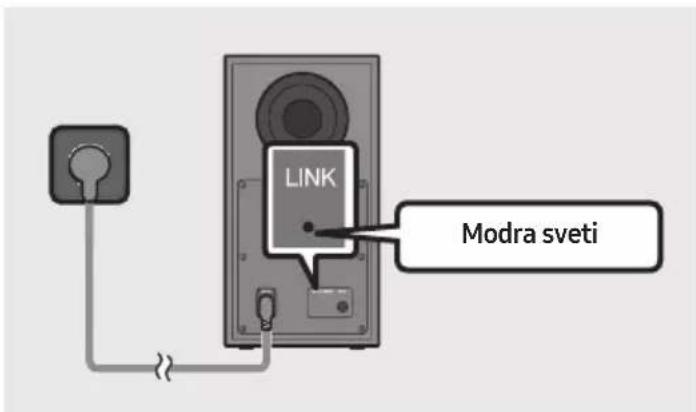
natural_image
Three-step diagram showing a mechanical component before and after assembly, with no visible text or symbols.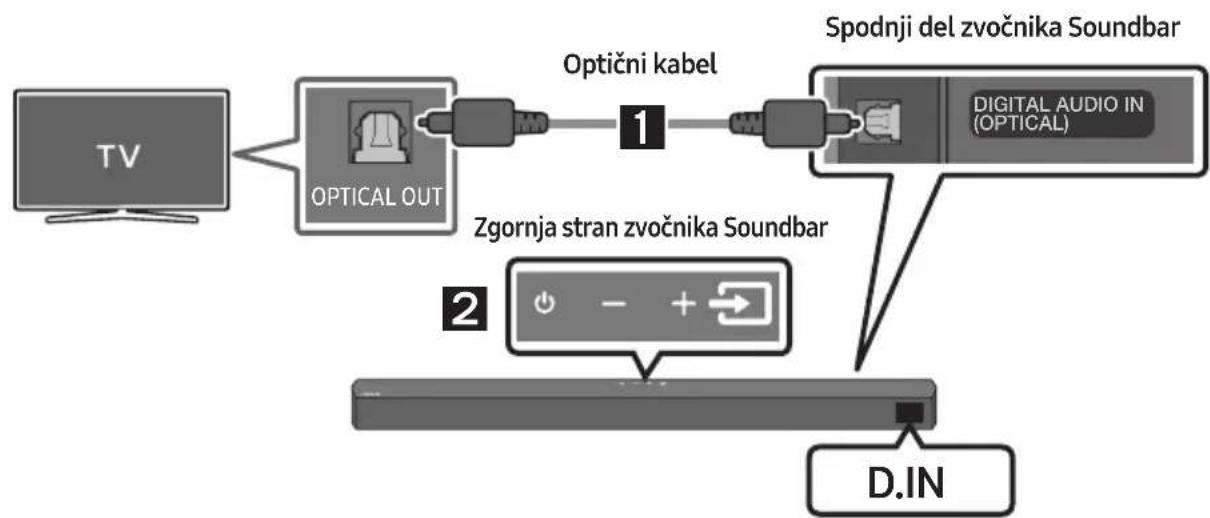
flowchart
graph LR
    TV["TV"] --> OpticalOut["OPTICAL OUT"]
    OpticalOut --> OptičniKabel["Optični kabel"]
    OptičniKabel --> DigitalAudioIn["DIGITAL AUDIO IN (OPTICAL)"]
    DigitalAudioIn --> SpodnjiDel["zspodnji del zvočnika Soundbar"]
    SpodnjiDel --> DigitalAudioIn
    DigitalAudioIn --> D.IN["D.IN"]
    ZgornjaStranz["zgornja stranz zvočnika Soundbar"] --> DigitalAudioIn
Naprava Bluetooth A Naprava Bluetooth B
natural_image
Mechanical component diagram showing a screw being inserted into a housing with a circular base (no text or symbols)natural_image
Diagram showing two states of a mechanical component before and after modification, with arrows indicating direction (no text or symbols present)- Zvočnik Soundbar potisnite dol, kot je prikazano spodaj, tako da se Stenski nosilci varno zasidrajo na Vijake nosilca.
- Vijake nosilca vstavite v širok (spodnji) del Stenskih nosilcev, nato pa Stenske nosilce potisnite navzdol, da se Stenski nosilci varno zasidrajo na Vijake nosilca.
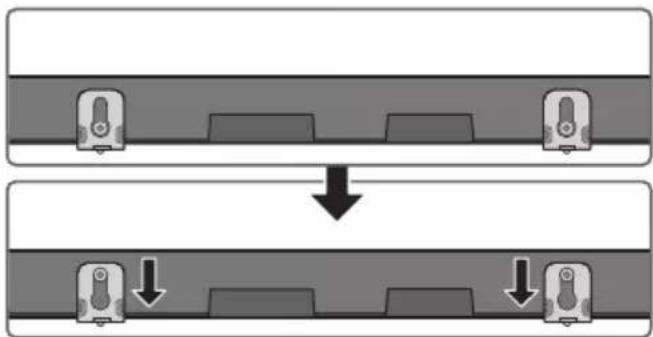
flowchart
graph TD
    A["Top: Device icon"] --> B["Down Arrow"]
    B --> C["Bottom: Device icon with downward arrow"]
11 POSODOBITEV PROGRAMSKE OPREME
Manufactured under license from Dolby Laboratories. Dolby, Dolby Audio and the double-D symbol are trademarks of Dolby Laboratories Licensing Corporation.

dts®
2.0 Channel
dts
VIRTUAL

For DTS patents, see http://patents.dts.com. Manufactured under license from DTS Licensing Limited. DTS, the Symbol, DTS in combination with the Symbol, DTS and the Symbol together, Virtual:X, the DTS Virtual:X logo, and DTS 2.0 Channel are registered trademarks or trademarks of DTS, Inc. in the United States and/or other countries. © DTS, Inc. All Rights Reserved.
HIGH-DEFINITION MULTIMEDIA INTERFACE
The terms HDMI and HDMI High-Definition Multimedia Interface, and the HDMI Logo are trademarks or registered trademarks of HDMI Licensing Administrator, Inc. in the United States and other countries.

Bluetooth®
The Bluetooth® word mark and logos are registered trademarks owned by Bluetooth SIG, Inc. and any use of such marks by Samsung Electronics Co., Ltd. is under license. Other trademarks and trade names are those of their respective owners.

[ENERGY STAR]
ENERGY STAR qualified model only
- Your Samsung product is ENERGY STAR qualified in its factory default setting. Change to certain features, settings and functionality in this product can change the power consumption, possibly beyond the limits required for ENERGY STAR qualification.
- Environmental Protection Agency and Department of Energy. ENERGY STAR is a joint program of the Government agencies, designed to promote energy efficient products and practices.
Refer to www.energystar.gov for more information of the ENERGY STAR Program.
ENERGY STAR qualified model only (Applicable to Thin Client models only)
As an ENERGY STAR® Partner, SAMSUNG has determined that this product meets the ENERGY STAR® guidelines for energy efficiency.
- The ENERGY STAR Program has been to reduced greenhouse gas emissions and save energy through voluntary labeling.
- Power management setting of this product have been enabled by default, and have various timing setting from 1 minutes to 5 hours.
- The product can wake with a button press on the chassis from sleep mode.
ENERGY STAR qualified model only (The other models)
- As an ENERGY STAR Partner, Samsung has determined that this product or product models meets the ENERGY STAR guideline for energy efficiency.
14 OBVESTILO O ODPRTOKODNIH LICENCAH
www.samsung.com/uk/aboutsamsung/sustainability/environment/our-commitment/data/
UREDBA KOMISIJE (EU) 2019/1782
natural_image
Diagram showing a mechanical component before and after assembly, with no visible text or symbols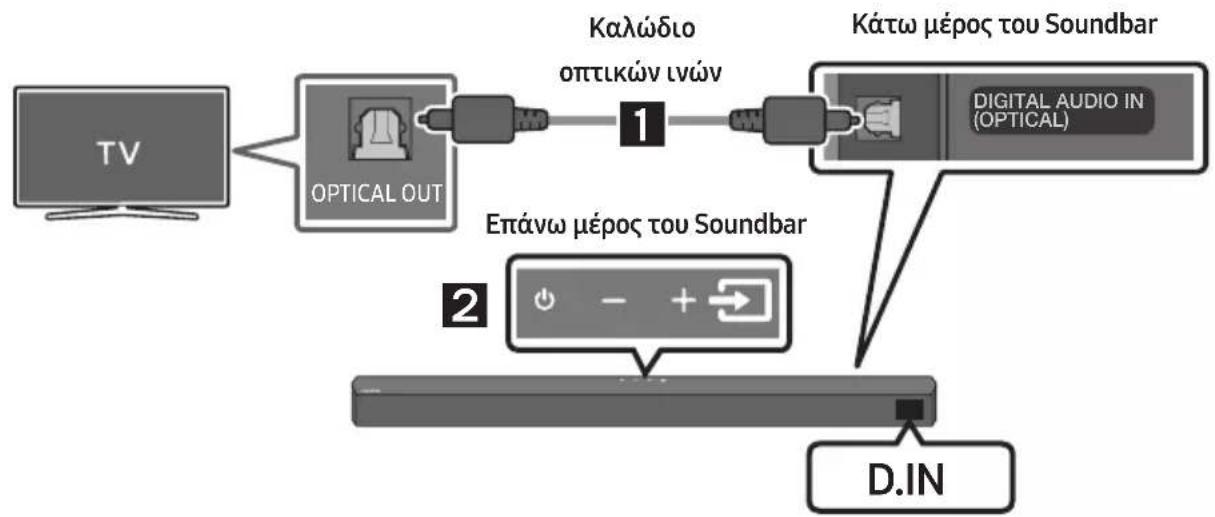
flowchart
graph LR
    A["TV"] --> B["OPTICAL OUT"]
    B --> C["1"]
    C --> D["Kátkw méros tou Soundbar"]
    D --> E["D.IN"]
    style A fill:#f9f,stroke:#333
    style B fill:#ccf,stroke:#333
    style C fill:#cfc,stroke:#333
    style D fill:#fcc,stroke:#333
    style E fill:#cff,stroke:#333
natural_image
Mechanical component diagram showing a screw being inserted into a housing, with no visible text or symbolsnatural_image
Diagram showing a mechanical component before and after cutting, with arrows indicating direction (no text or symbols)flowchart
graph TD
    A["Top: Device icon"] --> B["Downward arrow"]
    B --> C["Bottom: Device icon with downward arrows"]
Manufactured under license from Dolby Laboratories. Dolby, Dolby Audio and the double-D symbol are trademarks of Dolby Laboratories Licensing Corporation.

dts®
2.0 Channel
dts
VIRTUAL

For DTS patents, see http://patents.dts.com. Manufactured under license from DTS Licensing Limited. DTS, the Symbol, DTS in combination with the Symbol, DTS and the Symbol together, Virtual:X, the DTS Virtual:X logo, and DTS 2.0 Channel are registered trademarks or trademarks of DTS, Inc. in the United States and/or other countries. © DTS, Inc. All Rights Reserved.

HIGH-DEFINITION MULTIMEDIA INTERFACE
The terms HDMI and HDMI High-Definition Multimedia Interface, and the HDMI Logo are trademarks or registered trademarks of HDMI Licensing Administrator, Inc. in the United States and other countries.

Bluetooth®
The Bluetooth® word mark and logos are registered trademarks owned by Bluetooth SIG, Inc. and any use of such marks by Samsung Electronics Co., Ltd. is under license. Other trademarks and trade names are those of their respective owners.

[ENERGY STAR]
ENERGY STAR qualified model only
- Your Samsung product is ENERGY STAR qualified in its factory default setting. Change to certain features, settings and functionality in this product can change the power consumption, possibly beyond the limits required for ENERGY STAR qualification.
- Environmental Protection Agency and Department of Energy. ENERGY STAR is a joint program of the Government agencies, designed to promote energy efficient products and practices.
Refer to www.energystar.gov for more information of the ENERGY STAR Program.
ENERGY STAR qualified model only (Applicable to Thin Client models only)
As an ENERGY STAR® Partner, SAMSUNG has determined that this product meets the ENERGY STAR® guidelines for energy efficiency.
- The ENERGY STAR Program has been to reduced greenhouse gas emissions and save energy through voluntary labeling.
- Power management setting of this product have been enabled by default, and have various timing setting from 1 minutes to 5 hours.
- The product can wake with a button press on the chassis from sleep mode.
ENERGY STAR qualified model only (The other models)
- As an ENERGY STAR Partner, Samsung has determined that this product or product models meets the ENERGY STAR guideline for energy efficiency.
natural_image
Diagram showing a mechanical component before and after assembly, with no visible text or symbols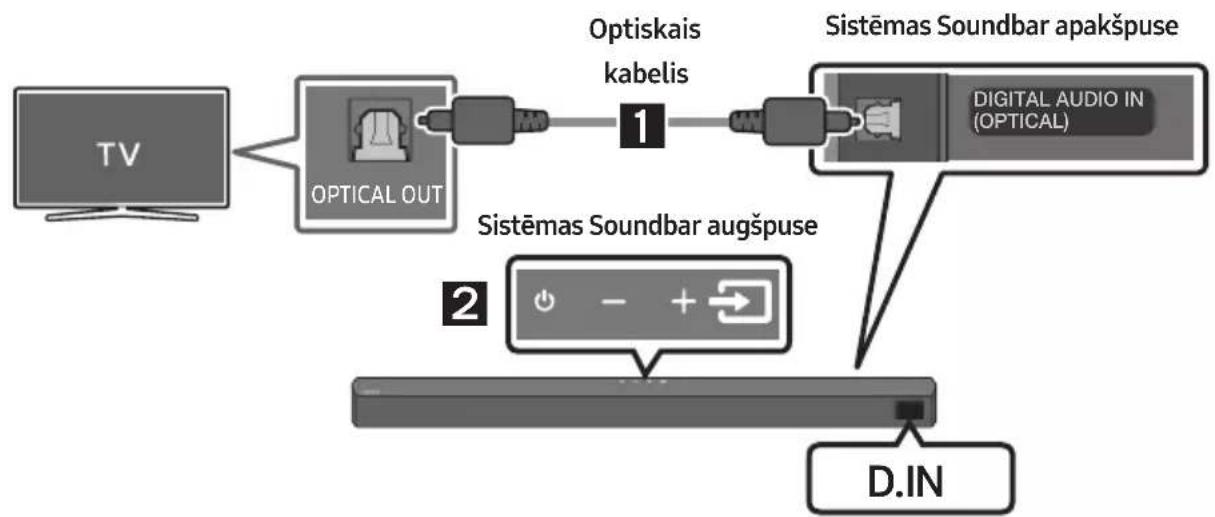
flowchart
graph LR
    TV["TV"] --> OpticalOut["OPTICAL OUT"]
    OpticalOut --> Optiskais1["Optiskais kabelis 1"]
    Optiskais1 --> SistemasSoundBarapakšpuse["Sistemas Soundbar apakšpuse"]
    SistemasSoundBarapakšpuse --> DigitalAudioIn["Digital Audio IN (OPTICAL)"]
    DigitalAudioIn --> D.IN["D.IN"]
Bluetooth ierice A Bluetooth ierice B
natural_image
Mechanical component diagram showing a screw being inserted into a housing with a base, no text or symbols presentnatural_image
Diagram showing two states of a mechanical component before and after cutting, with arrows indicating direction (no text or symbols present)flowchart
graph TD
    A["Top: Device icon"] --> B["Downward arrow"]
    B --> C["Bottom: Device icon with downward arrow"]
11 PROGRAMMATŪRAS ATJAUNINĀŠANA
12 PROBLÉMU NOVĚRŠANA
Manufactured under license from Dolby Laboratories. Dolby, Dolby Audio and the double-D symbol are trademarks of Dolby Laboratories Licensing Corporation.

dts®
2.0 Channel
dts
VIRTUAL

For DTS patents, see http://patents.dts.com. Manufactured under license from DTS Licensing Limited. DTS, the Symbol, DTS in combination with the Symbol, DTS and the Symbol together, Virtual:X, the DTS Virtual:X logo, and DTS 2.0 Channel are registered trademarks or trademarks of DTS, Inc. in the United States and/or other countries. © DTS, Inc. All Rights Reserved.

HIGH-DEFINITION MULTIMEDIA INTERFACE
The terms HDMI and HDMI High-Definition Multimedia Interface, and the HDMI Logo are trademarks or registered trademarks of HDMI Licensing Administrator, Inc. in the United States and other countries.

Bluetooth®
The Bluetooth® word mark and logos are registered trademarks owned by Bluetooth SIG, Inc. and any use of such marks by Samsung Electronics Co., Ltd. is under license. Other trademarks and trade names are those of their respective owners.

[ENERGY STAR]
ENERGY STAR qualified model only
- Your Samsung product is ENERGY STAR qualified in its factory default setting. Change to certain features, settings and functionality in this product can change the power consumption, possibly beyond the limits required for ENERGY STAR qualification.
- Environmental Protection Agency and Department of Energy. ENERGY STAR is a joint program of the Government agencies, designed to promote energy efficient products and practices.
Refer to www.energystar.gov for more information of the ENERGY STAR Program.
ENERGY STAR qualified model only (Applicable to Thin Client models only)
As an ENERGY STAR® Partner, SAMSUNG has determined that this product meets the ENERGY STAR® guidelines for energy efficiency.
- The ENERGY STAR Program has been to reduced greenhouse gas emissions and save energy through voluntary labeling.
- Power management setting of this product have been enabled by default, and have various timing setting from 1 minutes to 5 hours.
- The product can wake with a button press on the chassis from sleep mode.
ENERGY STAR qualified model only (The other models)
- As an ENERGY STAR Partner, Samsung has determined that this product or product models meets the ENERGY STAR guideline for energy efficiency.
14 PAZIÑOJUMS PAR ATVÉRTÃ PIRMKODA LICENCI
natural_image
Diagram showing three stages of a mechanical or electrical component with directional arrows indicating motion (no text or symbols)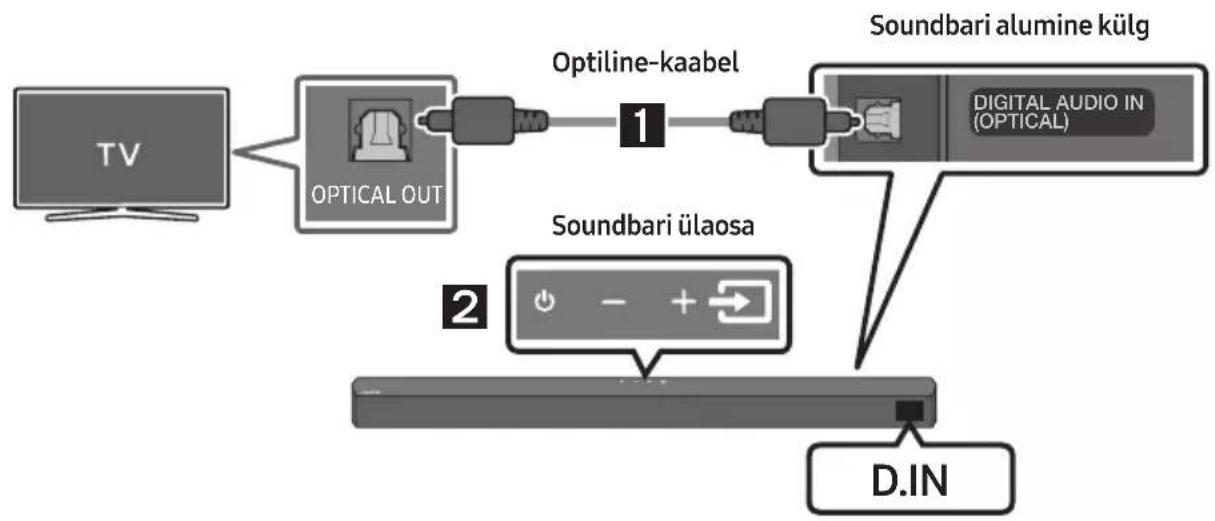
flowchart
graph LR
    TV["TV"] --> OpticalOut["Optical OUT"]
    OpticalOut --> OptilineKaabel["Optiline-kaabel"]
    OptilineKaabel --> DigitalAudioIn["Digital Audio In (OPTICAL)"]
    DigitalAudioIn --> SoundbariAlumine["kilg"]
    SoundbariAlumine --> SoundbariÜlaosa["Soundbari ülaosa"]
    SoundbariÜlaosa --> DIN["D.IN"]
Bluetooth-seade A Bluetooth-seade B
natural_image
Simple line drawing of a bracket with a cutout and 'x 2' label (no other text or symbols)Seinakinnituskronsteini
-
Asetage Seinakinnitusjuhik vastu seinapinda.
-
Seinakinnitusjuhik peab olema loodis.
- Kui teler on seinale kinnitatud, paigaldage Soundbar vähemalt 5 cm telerist allapoole.
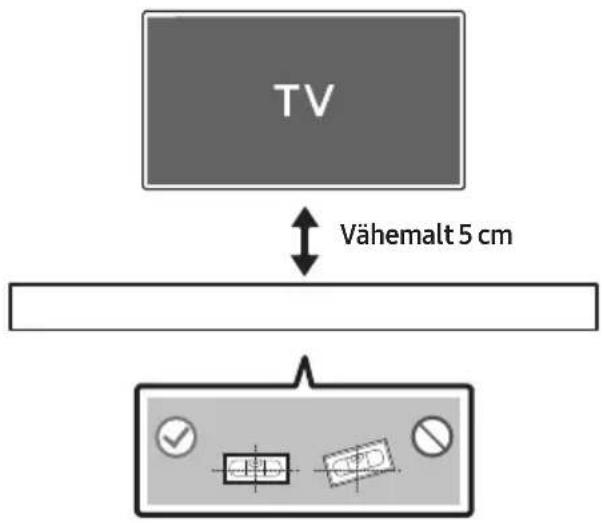
natural_image
Mechanical component with screw and adjustment knob, no visible text or symbols- Kokkupanekul veenduge, et Seinakinnituskronstein riputusosad jääksid Soundbari taha.
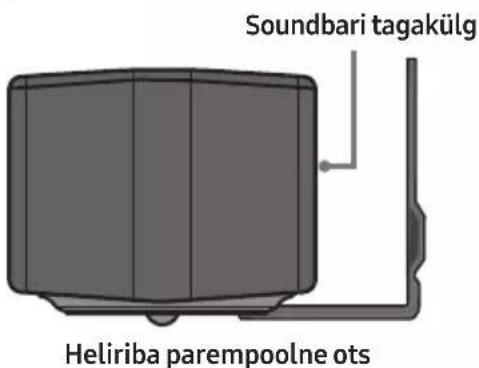
- Paigaldage Soundbar koos selle külge kinnitatud Seinakinnituskronstein, riputades Seinakinnituskronstein seinal olevatele Hoidikkruvi.
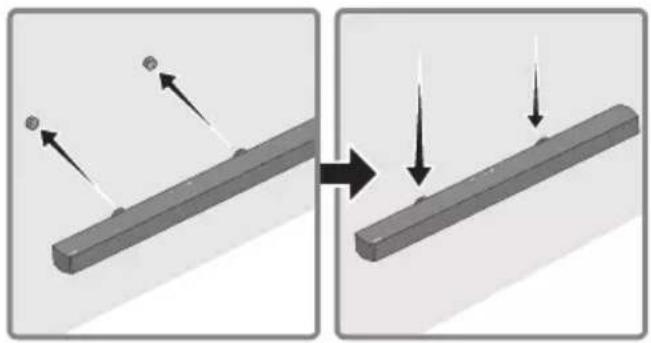
natural_image
Diagram showing two states of a mechanical component before and after cutting, with arrows indicating motion direction (no text or symbols)- Libistage Soundbari alla, nagu on allpool näidatud, nii et Seinakinnituskronstein toetuksid Kruvihoidikutele.
- Sisestage Kruvihoidikutele Seinakinnituskronstein laia (alumisse) ossa ja seejärel libistage Seinakinnituskronstein allapoole, nii et Seinakinnituskronstein toetuksid kindlalt Kruvihoidikutele.
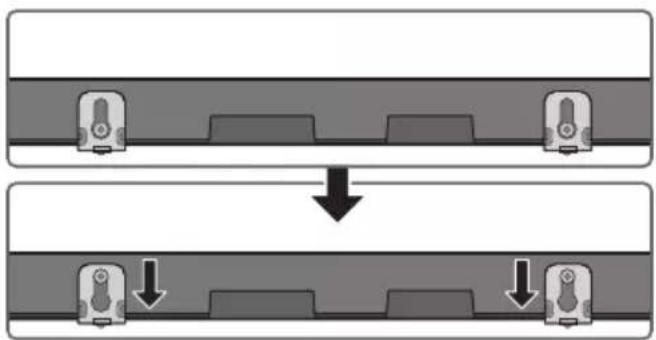
flowchart
graph TD
    A["Input"] --> B["Process Step"]
    B --> C["Output"]
11 TARKVARA- VÄRSKENDUS
Manufactured under license from Dolby Laboratories. Dolby, Dolby Audio and the double-D symbol are trademarks of Dolby Laboratories Licensing Corporation.

dts®
2.0 Channel
dts
VIRTUAL

For DTS patents, see http://patents.dts.com. Manufactured under license from DTS Licensing Limited. DTS, the Symbol, DTS in combination with the Symbol, DTS and the Symbol together, Virtual:X, the DTS Virtual:X logo, and DTS 2.0 Channel are registered trademarks or trademarks of DTS, Inc. in the United States and/or other countries. © DTS, Inc. All Rights Reserved.

HIGH-DEFINITION MULTIMEDIA INTERFACE
The terms HDMI and HDMI High-Definition Multimedia Interface, and the HDMI Logo are trademarks or registered trademarks of HDMI Licensing Administrator, Inc. in the United States and other countries.

Bluetooth®
The Bluetooth® word mark and logos are registered trademarks owned by Bluetooth SIG, Inc. and any use of such marks by Samsung Electronics Co., Ltd. is under license. Other trademarks and trade names are those of their respective owners.

[ENERGY STAR]
ENERGY STAR qualified model only
- Your Samsung product is ENERGY STAR qualified in its factory default setting. Change to certain features, settings and functionality in this product can change the power consumption, possibly beyond the limits required for ENERGY STAR qualification.
- Environmental Protection Agency and Department of Energy. ENERGY STAR is a joint program of the Government agencies, designed to promote energy efficient products and practices.
Refer to www.energystar.gov for more information of the ENERGY STAR Program.
ENERGY STAR qualified model only (Applicable to Thin Client models only)
As an ENERGY STAR® Partner, SAMSUNG has determined that this product meets the ENERGY STAR® guidelines for energy efficiency.
- The ENERGY STAR Program has been to reduced greenhouse gas emissions and save energy through voluntary labeling.
- Power management setting of this product have been enabled by default, and have various timing setting from 1 minutes to 5 hours.
- The product can wake with a button press on the chassis from sleep mode.
ENERGY STAR qualified model only (The other models)
- As an ENERGY STAR Partner, Samsung has determined that this product or product models meets the ENERGY STAR guideline for energy efficiency.
14 AVATUD LÄHTEKOODI LITSENTSI TEATIS
www.samsung.com/ee/aboutsamsung/sustainability/environment/our-commitment/data/
KOMISJONI MÄÄRUS (EL) 2019/1782
natural_image
Three-step diagram showing a mechanical component before and after assembly, with no visible text or symbols.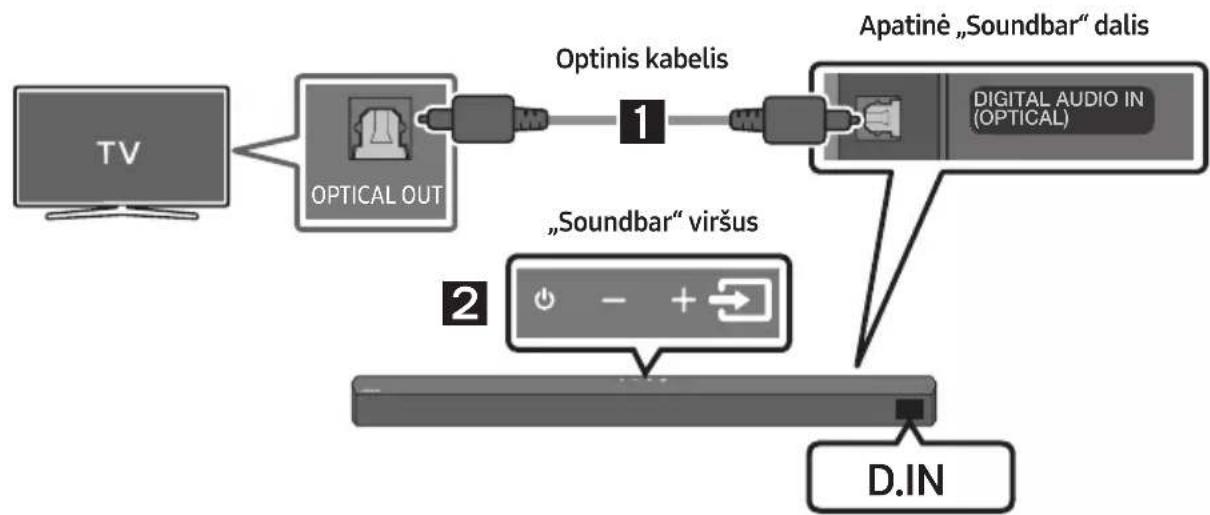
flowchart
graph LR
    TV["TV"] --> OpticalOut["OPTICAL OUT"]
    OpticalOut --> Optiniskabelis["Optinis kabelis"]
    Optiniskabelis --> DigitalAudioIn["DIGITAL AUDIO IN (OPTICAL)"]
    DigitalAudioIn --> Apatiné["Apatiné „Soundbar" dalis"]
    Apatiné --> D.IN["D.IN"]
    D.IN --> SoundBar["Soundbar" virius"]
natural_image
Mechanical component diagram showing a screw being inserted into a housing (no text or symbols)natural_image
Diagram showing two states of a mechanical component before and after assembly, with arrows indicating direction (no text or symbols present)Manufactured under license from Dolby Laboratories. Dolby, Dolby Audio and the double-D symbol are trademarks of Dolby Laboratories Licensing Corporation.

dts
2.0 Channel
dts
VIRTUAL

For DTS patents, see http://patents.dts.com. Manufactured under license from DTS Licensing Limited. DTS, the Symbol, DTS in combination with the Symbol, DTS and the Symbol together, Virtual:X, the DTS Virtual:X logo, and DTS 2.0 Channel are registered trademarks or trademarks of DTS, Inc. in the United States and/or other countries. © DTS, Inc. All Rights Reserved.
HDMI ^TM
HIGH-DEFINITION MULTIMEDIA INTERFACE
The terms HDMI and HDMI High-Definition Multimedia Interface, and the HDMI Logo are trademarks or registered trademarks of HDMI Licensing Administrator, Inc. in the United States and other countries.

Bluetooth®
The Bluetooth® word mark and logos are registered trademarks owned by the Bluetooth SIG, Inc. and any use of such marks by Samsung Electronics Co., Ltd. is under license. Other trademarks and trade names are those of their respective owners.

[ENERGY STAR]
ENERGY STAR qualified model only
- Your Samsung product is ENERGY STAR qualified in its factory default setting. Change to certain features, settings and functionality in this product can change the power consumption, possibly beyond the limits required for ENERGY STAR qualification.
- Environmental Protection Agency and Department of Energy. ENERGY STAR is a joint program of the Government agencies, designed to promote energy efficient products and practices.
Refer to www.energystar.gov for more information of the ENERGY STAR Program.
ENERGY STAR qualified model only (Applicable to Thin Client models only)
As an ENERGY STAR® Partner, SAMSUNG has determined that this product meets the ENERGY STAR® guidelines for energy efficiency.
- The ENERGY STAR Program has been to reduced greenhouse gas emissions and save energy through voluntary labeling.
- Power management setting of this product have been enabled by default, and have various timing setting from 1 minutes to 5 hours.
- The product can wake with a button press on the chassis from sleep mode.
ENERGY STAR qualified model only (The other models)
- As an ENERGY STAR Partner, Samsung has determined that this product or product models meets the ENERGY STAR guideline for energy efficiency.
14 ATVIROSIOS PROGRAMINĖS JRANGOS LICENCIJOS PRANEŠIMAS
www.samsung.com/uk/aboutsamsung/sustainability/environment/our-commitment/data/
KOMISIJOS REGLAMENTAS (ES) 2019/1782
© 2022 Samsung Electronics Co., Ltd. All rights reserved.
Contact SAMSUNG WORLD WIDE
If you have any questions or comments relating to Samsung products, please contact the SAMSUNG customer care Centre.
| Country | Samsung Service Centre | Web Site |
| ▪Europe | ||
| UK 0333 000 0333 | www.samsung.com/uk/support | |
| IRELAND (EIRE) 0818 717100 | www.samsung.com/ie/support | |
| GERMANY 06196 77 555 77 | www.samsung.com/de/support | |
| FRANCE 01 48 63 00 00 | www.samsung.com/fr/support | |
| ITALIA 800-SAMSUNG (800.7267864) | www.samsung.com/it/support | |
| SPAIN 91 175 00 15 | www.samsung.com/es/support | |
| PORTUGAL | 210 608 098Chamada para a rede fi xa nacionalDias úteis das 9h às 20h | www.samsung.com/pt/support |
| LUXEMBURG 261 03 710 | www.samsung.com/be_fr/support | |
| NETHERLANDS 088 90 90 100 | www.samsung.com/nl/support | |
| BELGIUM 02-201-24-18 | www.samsung.com/be/support (Dutch)www.samsung.com/be_fr/support (French) | |
| NORWAY 21629099 | www.samsung.com/no/support | |
| DENMARK 707 019 70 | www.samsung.com/dk/support | |
| FINLAND 030-6227 515 | www.samsung.com/fi/support | |
| SWEDEN 0771-400 300 | www.samsung.com/se/support | |
| POLAND | 801-172-678*(optata według taryfy operatora) | http://www.samsung.com/pl/support/ |
| HUNGARY | 0680SAMSUNG (0680-726-7864) | www.samsung.com/hu/support |
| AUSTRIA 0800 72 67 864 (0800-SAMSUNG) | www.samsung.com/at/support | |
| SWITZERLAND | 0800 726 786 | www.samsung.com/ch/support (German)www.samsung.com/ch_fr/support (French) |
| CZECH | 800 - SAMSUNG (800-726786) | www.samsung.com/cz/support |
| Country | Samsung Service Centre | Web Site |
| SLOVAKIA | 0800 - SAMSUNG (0800-726 786) | www.samsung.com/sk/support |
| CROATIA 072 726 | 786 | www.samsung.com/hr/support |
| BOSNIA | 055 233 999 | www.samsung.com/support |
| NORTH MACEDONIA | 023 207 777 | www.samsung.com/mk/support |
| MONTENEGRO | 020 405 888 | www.samsung.com/support |
| SLOVENIA | 080 697 267 (brezplačna številka) | www.samsung.com/si/support |
| SERBIA | 011 321 6899 | www.samsung.com/rs/support |
| KOSOVO | 038 40 30 90 | www.samsung.com/support |
| ALBANIA 045 620 | 202 | www.samsung.com/al/support |
| BULGARIA | 0800 111 31 - Безплатен за всички оператори*3000 - Цена на един градски разговор или според тарифата на мобилният оператор09:00 до 18:00 - Понеделник до Петък | www.samsung.com/bg/support |
| ROMANIA | 0800872678 - Apel gratuit*8000 - Apel tarifat în rețeaProgram Call CenterLuni - Vineri: 9 AM - 6 PM | www.samsung.com/ro/support |
| CYPRUS | 8009 4000 only from landline, toll free | www.samsung.com/gr/support |
| GREECE | 80111-SAMSUNG (80111 726 7864) only from land line(+30) 210 6897691 from mobile and land line | |
| LITHUANIA | 8-800-77777 | www.samsung.com/lt/support |
| LATVIA | 8000-7267 | www.samsung.com/lv/support |
| ESTONIA 800-7267 | www.samsung.com/ee/support |

- SAFETY INFORMATION
- SAFETY WARNINGS
- CAUTION
- WARNING
- PRECAUTIONS
- CONTENTS
- Checking the Components 6
- Product Overview 7
- Using the Remote Control 9
- Connecting the Soundbar 15
- Using a wired connection to the TV 19
- Using a wireless connection to the TV 22
- Connecting an External Device 24
- Connecting a USB Storage Device 26
- Connecting a Mobile Device 27
- Installing the Wall Mount 31
- Software Update 33
- Troubleshooting 35
- Licence 37
- Open Source Licence Notice 38
- Important Notes About Service 38
- Specifications and Guide 39
- CHECKING THE COMPONENTS
- PRODUCT OVERVIEW
- Bottom Panel of the Soundbar
- USING THE REMOTE CONTROL
- Inserting Batteries before using the Remote Control (AAA batteries X 2)
- How to Use the Remote Control
- 5
- CH LEVEL
- 6
- - NIGHT MODE ON/OFF
- 7
- Bluetooth PAIR
- 8
- Adjusting the Soundbar volume with a TV remote control
- CONNECTING THE SOUNDBAR
- Connecting Electrical Power
- Connecting the Soundbar to the Subwoofer
- Automatic connection between the Subwoofer and the Soundbar
- Manually connecting the Subwoofer if automatic connection fails
- Before performing the manual connection procedure below:
- NOTES
- Connecting the Samsung Wireless Rear Kit to your Soundbar
- USING A WIRED CONNECTION TO THE TV
- Method 1. Connecting using an Optical Cable
- Pre-connection Checklist
- Method 2. Connecting a TV using an HDMI Cable
- USING A WIRELESS CONNECTION TO THE TV
- Connecting a TV via Bluetooth
- The initial connection
- If the device fails to connect
- NOTE
- Disconnecting the Soundbar from the TV
- What is the difference between BT READY and BT PAIRING?
- CONNECTING AN EXTERNAL DEVICE
- Method 2. Connecting using an HDMI Cable
- CONNECTING A USB STORAGE DEVICE
- CONNECTING A MOBILE DEVICE
- Connecting via Bluetooth
- Bluetooth Power On (SOUND MODE)
- Disconnecting the Bluetooth device from a Soundbar
- Disconnecting the Soundbar from the Bluetooth device
- More About Bluetooth
- Bluetooth Multi connection
- Bluetooth Multi Pairing
- How to pair multiple devices to the Soundbar
- INSTALLING THE WALL MOUNT
- Installation Precautions
- Wallmount Components
- Centre Line
- SOFTWARE UPDATE
- How to check the Firmware version
- Update Procedure
- If UPDATE is not displayed
- TROUBLESHOOTING
- Soundbar does not turn on.
- Soundbar works erratically.
- If the remote control does not work.
- Soundbar does not output any sound.
- Subwoofer does not output any sound.
- The Subwoofer volume is too low.
- If the TV is not connected via HDMI TO TV (ARC).
- There is no sound in when connecting to the TV in HDMI TO TV (ARC) mode.
- Soundbar does not connect via Bluetooth.
- Sound drops out when connected via Bluetooth.
- Bluetooth multi connection does not work.
- Soundbar does not turn on automatically with the TV.
- LICENCE
- Dolby
- AUDIO
- Bluetooth®
- [ENERGY STAR]
- ENERGY STAR qualified model only
- ENERGY STAR qualified model only (Applicable to Thin Client models only)
- ENERGY STAR qualified model only (The other models)
- OPEN SOURCE LICENCE NOTICE
- IMPORTANT NOTES ABOUT SERVICE
- SPECIFICATIONS AND GUIDE
- [Correct disposal of batteries in this product]
- (Applicable in countries with separate collection systems)
- Correct Disposal of This Product
- (Waste Electrical & Electronic Equipment)
- COMMISSION REGULATION (EU) 2019/1782
- INFORMATIONS RELATIVES À LA SÉCURITÉ
- AVERTISSEMENTS
- MISE À JOUR DU LOGICIEL
- HDMI TM
- AVIS DE LICENCE LIBRE
- AGGIORNAMENTO DEL SOFTWARE
- AVVISO DI LICENZA OPEN SOURCE
- REGOLAMENTO (UE) 2019/1782 DELLA COMMISSIONE
- Dispositivo Bluetooth A Dispositivo Bluetooth B
- AVISO SOBRE LICENCIA DE CÓDIGO ABIERTO
- AVISO DE LICENÇA DE OPEN SOURCE
- NOTA IMPORTANTE SOBRE O SERVIÇO
- SOFTWARE- UPDATE
- KENNISGEVING OPEN SOURCE- LICENTIE
- VERORDENING (EU) 2019/1782 VAN DE COMMISSIE
- BEKANNTMACHUNG ZU OPEN SOURCE LIZENZEN
- VERORDNUNG (EU) 2019/1782 DER KOMMISSION
- INNEHÅLLSFÖRTECKNING
- Kontrollera komponenterna 6
- LICENSMEDDELANDE FÖR OPEN SOURCE
- KOMMISSIONENS FÖRORDNING (EU) 2019/1782
- Bluetooth-multitilkobling
- PROGRAMVARE- OPPDATERING
- LISENSMERKNADER OM ÅPEN KILDEKODE
- KOMMISJONSFORORDNING (EU) 2019/1782
- AVOIMEN LÄHDEKIELEN LISENSSI- ILMOITUS
- KOMISSION ASETUS (EU) 2019/1782
- BEMAERKNING VEDR. OPEN SOURCE-LICENS
- KOMMISSIONENS FORORDNING (EU) 2019/1782
- Conectarea inițială
- NOTIFICARE DE LICENȚĂ OPEN SOURCE
- NOTĂ IMPORTANTĂ DESPRE SERVICE
- БЕЛЕЖКА ЗА ЛИЦЕНЗА ЗА ОТВОРЕН КОД
- AKTUALIZACJA OPROGRAMOWANIA
- INFORMACJA O LICENCJI OPEN SOURCE
- ROZPORZĄDZENIE KOMISJI (UE) 2019/1782
- POZNÁMKA K LICENCI OTEVŘENÉHO SOFTWARU
- AKTUALIZÁCIA SOFTVÉRU
- POZNÁMKA K LICENCII S OTVORENÝM ZDROJOVÝM KÓDOM
- NYÍLT FORRÁSKÓDÚ LICENC MEGJEGYZÉS
- Kako upotrebljavati daljinski upravljač
- Metoda 2 Povezivanje televizora pomoću kabela HDMI
- OPREZ
- NAPOMENE
- Uparivanje više Bluetooth uređaja
- Kako upariti više uređaja sa sustavom Soundbar
- POSTAVLJANJE ZIDNOG NOSAČA
- Mjere opreza prilikom postavljanja
- OBAVIJEST O LICENCI ZA UPORABU SOFTVERA OTVORENOG KODA
- VAŽNA NAPOMENA VEZANA UZ SERVIS
- UREDBA KOMISIJE (EU) 2019/1782
- PREGLED PROIZVODA
- Prednji panel / gornji panel uređaja Soundbar
- Kako da koristite daljinski upravljač
- Metoda 2. Povezivanje televizora pomoću HDMI kabla
- OBAVEŠTENJE O LICENCI OTVORENOG IZVORNOG KODA
- VAŽNA NAPOMENA O SERVISIRANJU
- VARNOSTNI PODATKI
- VARNOSTNA OPOZORILA
- POSODOBITEV PROGRAMSKE OPREME
- OBVESTILO O ODPRTOKODNIH LICENCAH
- PROGRAMMATŪRAS ATJAUNINĀŠANA
- PROBLÉMU NOVĚRŠANA
- PAZIÑOJUMS PAR ATVÉRTÃ PIRMKODA LICENCI
- TARKVARA- VÄRSKENDUS
- AVATUD LÄHTEKOODI LITSENTSI TEATIS
- KOMISJONI MÄÄRUS (EL) 2019/1782
- ATVIROSIOS PROGRAMINĖS JRANGOS LICENCIJOS PRANEŠIMAS
- KOMISIJOS REGLAMENTAS (ES) 2019/1782
- Contact SAMSUNG WORLD WIDE
Brand : SAMSUNG
Model : HW-B540
Category : Soundbar