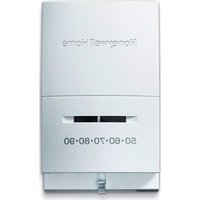
YCT50K1006 - Thermostat HONEYWELL - Free user manual and instructions
Find the device manual for free YCT50K1006 HONEYWELL in PDF.


User questions about YCT50K1006 HONEYWELL
0 question about this device. Answer the ones you know or ask your own.
Ask a new question about this device
Download the instructions for your Thermostat in PDF format for free! Find your manual YCT50K1006 - HONEYWELL and take your electronic device back in hand. On this page are published all the documents necessary for the use of your device. YCT50K1006 by HONEYWELL.
USER MANUAL YCT50K1006 HONEYWELL
text_image
Honeywell Auto Heat FAN Off 50·60·70·80·90 On CoolCT50 Series
Thermostat
Honeywell
Owner's Manual
English: Page 1
Mode d'emploi
Français : Page 6
Manual de Uso
Español: Página 11
Vertical Mount:
CT50 (24 Vac heating systems)
CT51 (24 Vac heating and cooling systems)
CT53 (750 mV or 12Vdc heating systems)
Horizontal Mount:
CT54 (24 Vac heating systems)
CT55 (24 Vac heating and cooling systems)
Temperature Control Range
• 45^-95^ ( 7^-35^ )
- 35°–85°F (2°–29°C); select models; for garages or other outbuildings.
Getting started
Check package contents:
- Thermostat
• Wall anchors & screws (2 each)
- Wire labels
Before you begin, make sure you have:
• No. 2 Phillips & small pocket screwdrivers
- Hammer
• Level (optional)
- Pencil
- Drill and bit (3/16" for drywall, 7/32" for plaster)
Remove your old thermostat

TURN OFF POWER at heating/cooling system (or fuse/circuit-breaker panel).
Remove cover and thermostat, but leave wallplate with wires attached.
Leave wallplate in place.
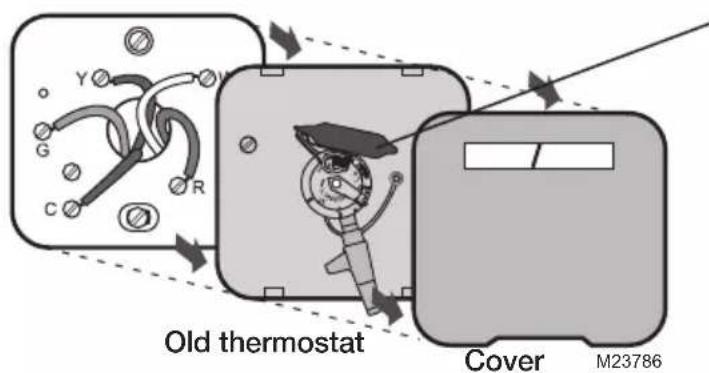
text_image
Old thermostat Cover M23786Is there a sealed tube containing mercury? If so, see mercury notice below.

MERCURY NOTICE
If your old thermostat contains mercury, contact your local waste management authority for proper disposal instructions.
® U.S. Registered Trademark. Patents pending.
Copyright © 2009 Honeywell International Inc.
All rights reserved.

text_image
Black and white barcode image with vertical lines and a small number '1' at the bottom right.69-2040EFS-01
Label wires and remove old wallplate
Use a screwdriver to disconnect wires one by one. As you disconnect each wire, wrap it with the label matching the letter on your old thermostat. (Adhesive labels are supplied in your thermostat package.)
Remove the old wallplate only after all wires are labeled. Be careful not to let loose wires fall into the wall opening.
Wrap supplied labels securely around each wire. Do not let wires fall into wall opening!
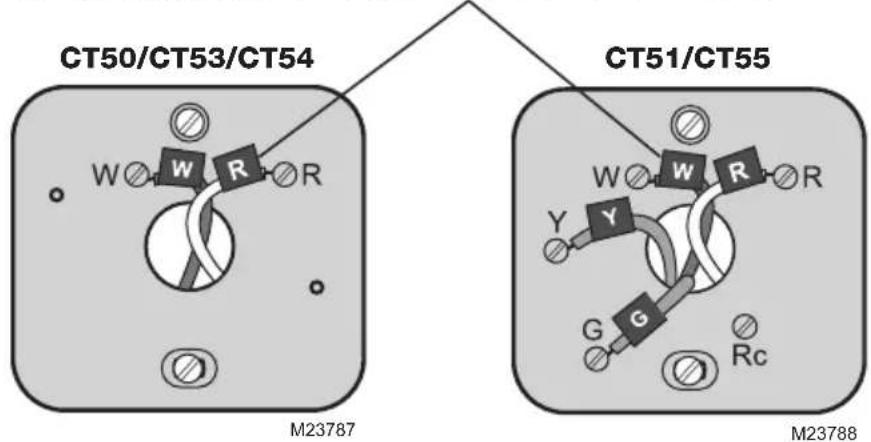
text_image
CT50/CT53/CT54 W W R R M23787 CT51/CT55 W W R R Y Y G G Rc M23788
IGNORE WIRE COLORS: Use only letter designations to identify wire types.

For CT50/CT53/CT54: If your old thermostat has 3 or more wires (not counting terminals C or C1), you may have purchased the wrong replacement thermostat. Stop now and call 1-800-468-1502 for advice.

For CT51/CT55: If your old thermostat has 7 or more wires (not counting terminals C or C1), you may have purchased the wrong replacement thermostat. Stop now and call 1-800-468-1502 for advice.
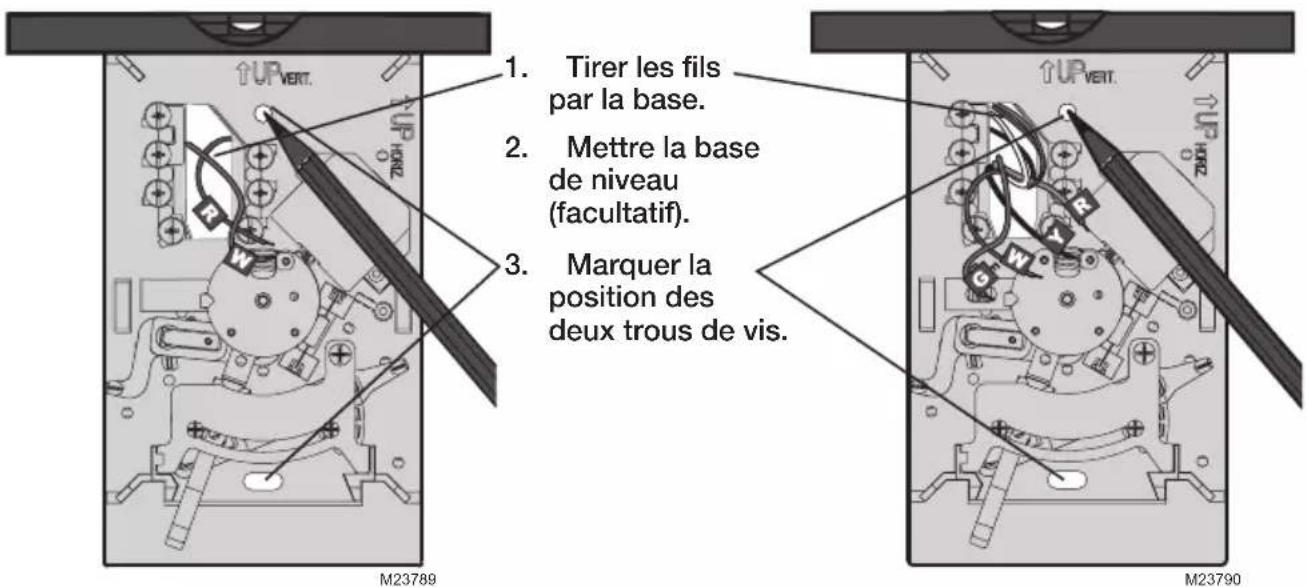
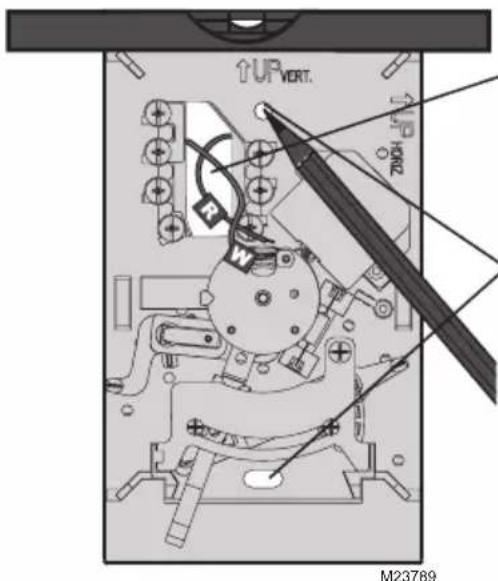
Mark mounting position
CT50/CT53/CT54 CT51/CT55
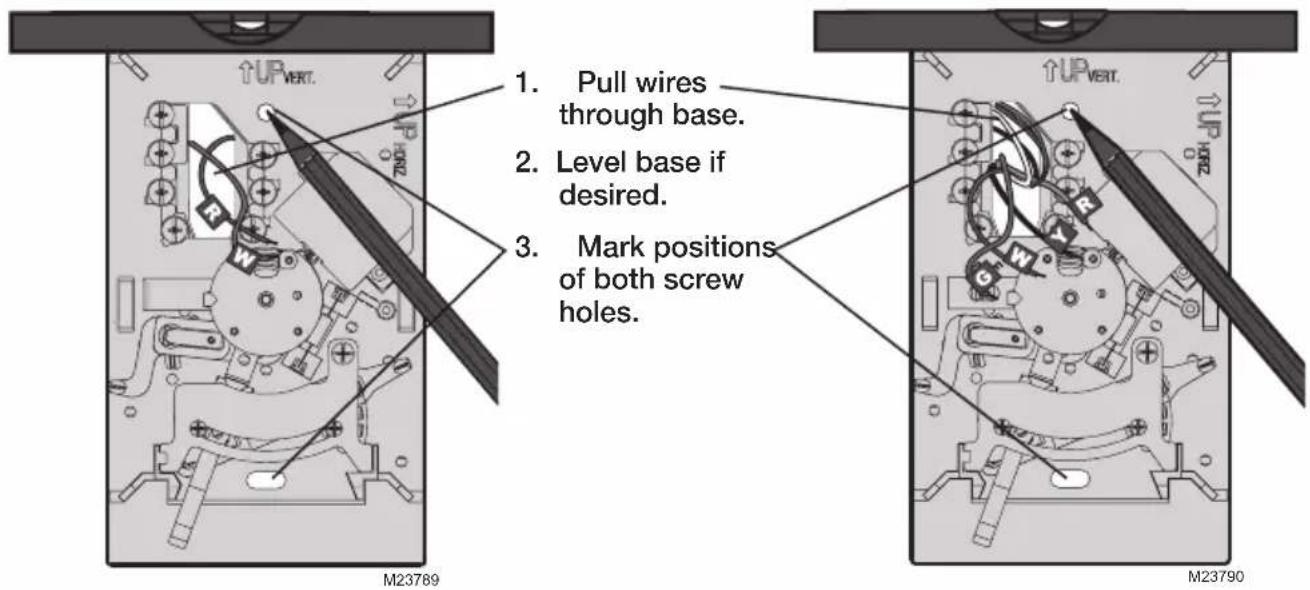
text_image
1. Pull wires through base. 2. Level base if desired. 3. Mark positions of both screw holes. M23789 M23790Mount thermostat base
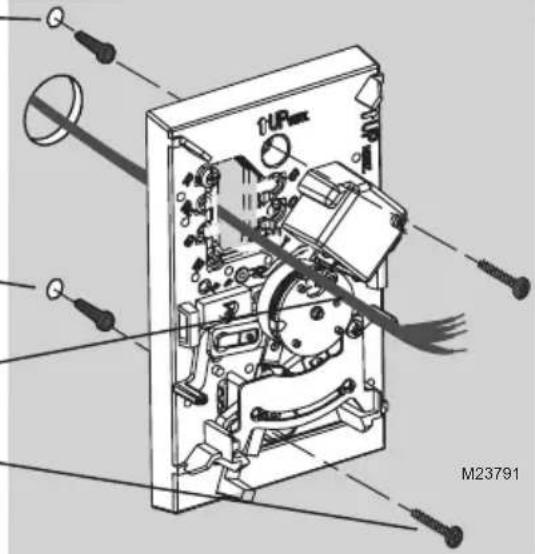
- Drill holes at pencil-marked locations (3/16" holes for drywall, 7/32" holes for plaster).
- Use hammer to tap anchors into holes until flush with wall.
- Pull wires through thermostat base and insert screws. Check level if desired, then tighten screws.
natural_image
Exploded view diagram of an electronic device showing internal components and wiring (no text or symbols)Connect wires
- Match each labeled wire with same-letter on terminal.
- Use a screwdriver to loosen screw terminals, insert bare wires beneath screws, then tighten screws.
- Push any excess wire back into the wall opening.
Labels don't match?
If labels do not match letters on thermostat, see table below.
Existing wires Connect to:
| R • RH • 4 • V | Terminal “R” | [1] |
| Rc Terminal “Rc” | [1] | |
| O | Terminal “O” | [2] |
| B | Terminal “B” | [2] |
| G • F | Terminal “G” | |
| W • W1 • H | Terminal “W” | |
| Y • Y1 • M | Terminal “Y” | |
| C • X • B | Do not use | [3] |
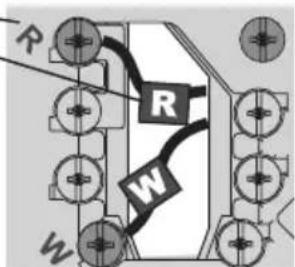
CT50/CT53/CT54
text_image
R R W WWiring CT50/CT53/CT54
• 2-wire heat-only system: Connect one wire to R terminal, one wire to W terminal.
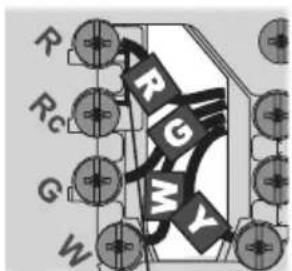
CT51/CT55
text_image
R Rc G W R G MWiring CT51/CT55
[1] If wires will be connected to both R and Rc terminals, remove the metal jumper.
[2] Do not connect both O and B if you have a heat pump. Connect only the O wire. Wrap B wire with electrical tape and do not use.
[3] Do not use C, X or B. Wrap bare end of wire with electrical tape.
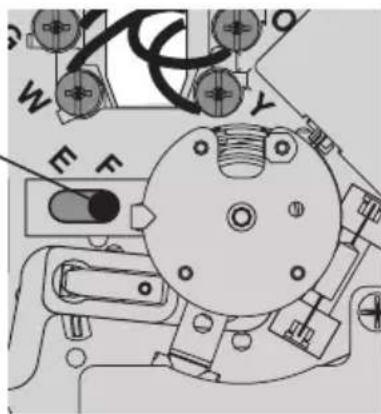
Set fan operation switch (CT51/CT55)
Move the switch to the proper setting for your system:
F: For gas or oil heating systems, leave the fan operation switch in this factory-set position (for systems that control the fan in a call for heat).
E: Change the switch to this setting for heat pump or electric heat systems. (This setting is for systems that allow the thermostat to control the fan in a call for heat, if a fan wire is connected to the G terminal.)
natural_image
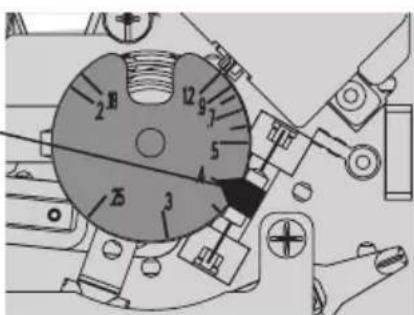
Technical line drawing of a mechanical assembly with no visible text or symbolsSet heat anticipator (select models)
Move the adjustment arrow to the proper setting for your system (see table below).
Your system Setting
| Steam 1.2 | |
| Hot water heat 0.8 | |
| Warm air (high efficiency) 0.8 | |
| Warm air (standard) 0.4 | |
| Electric heat 0.3 |
text_image
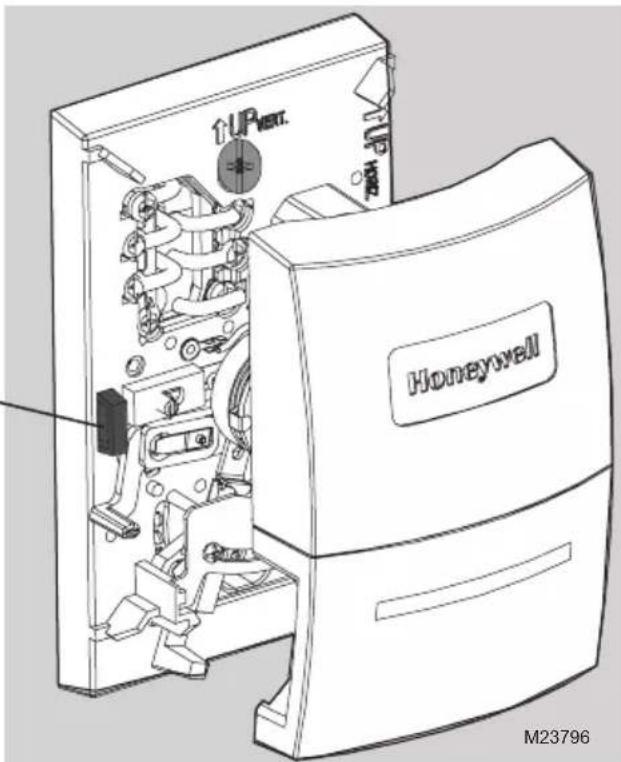
Technical diagram of a mechanical component with numbered parts, likely a dial indicator or gauge.Finish installation
- Align the slots on the cover with tabs on the sides of the base, then push gently until the cover snaps into place.
- Restore power at the heating/cooling system, or at the fuse/circuit-breaker panel.
Tab
text_image
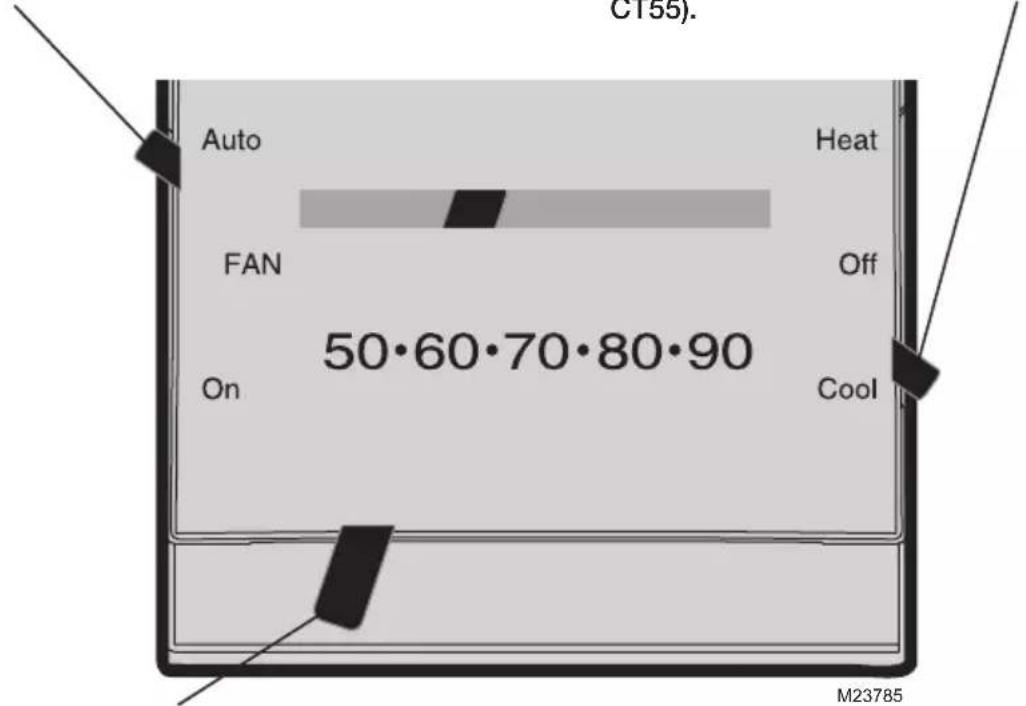
UPnet Honeywell M23796Operation
Fan switch (CT51/CT55)
• Auto: Fan runs only when heating or cooling system is on.
• On: Fan runs continuously.
System switch (select models)
• Heat: Controls the heating system.
• Off: All systems are off.
• Cool: Controls the cooling system (CT51/CT55).
text_image
C155). Auto Heat FAN Off 50·60·70·80·90 On Cool M23785Temperature setting
Adjust to set desired indoor temperature.

CAUTION: EQUIPMENT DAMAGE HAZARD (CT51/CT55).
Do not operate cooling system when outdoor temperature is below 50^ F ( 10^ C).
1-year limited warranty
Honeywell warrants this product to be free from defects in the workmanship or materials, under normal use and service, for a period of one (1) year from the date of purchase by the consumer. If at any time during the warranty period the product is determined to be defective or malfunctions, Honeywell shall repair or replace it (at Honeywell's option). If the product is defective,
(i) return it, with a bill of sale or other dated proof of purchase, to the place from which you purchased it; or
(ii) call Honeywell Customer Care at 1-800-468-1502. Customer Care will make the determination whether the product should be returned to the following address: Honeywell Return Goods, Dock 4 MN10-3860, 1885 Douglas Dr. N., Golden Valley, MN 55422, or whether a replacement product can be sent to you.
This warranty does not cover removal or reinstallation costs. This warranty shall not apply if it is shown by Honeywell that the defect or malfunction was caused by damage which occurred while the product was in the possession of a consumer.
Honeywell's sole responsibility shall be to repair or replace the product within the terms stated above. HONEYWELL SHALL NOT BE LIABLE FOR ANY LOSS OR
DAMAGE OF ANY KIND, INCLUDING ANY INCIDENTAL OR CONSEQUENTIAL DAMAGES RESULTING, DIRECTLY OR INDIRECTLY, FROM ANY BREACH OF ANY WARRANTY, EXPRESS OR IMPLIED, OR ANY OTHER FAILURE OF THIS PRODUCT. Some states do not allow the exclusion or limitation of incidental or consequential damages, so this limitation may not apply to you.
THIS WARRANTY IS THE ONLY EXPRESS WARRANTY HONEYWELL MAKES ON THIS PRODUCT. THE DURATION OF ANY IMPLIED WARRANTIES, INCLUDING THE WARRANTIES OF MERCHANTABILITY AND FITNESS FOR A PARTICULAR PURPOSE, IS HEREBY LIMITED TO THE ONE-YEAR DURATION OF THIS WARRANTY. Some states do not allow limitations on how long an implied warranty lasts, so the above limitation may not apply to you.
This warranty gives you specific legal rights, and you may have other rights which vary from state to state.
If you have warranty questions, please write Honeywell Customer Relations, 1985 Douglas Dr., Golden Valley, MN 55422 or call 1-800-468-1502. In Canada, write Retail Products ON15-02H, Honeywell Limited/Honeywell Limitée, 35 Dynamic Drive, Toronto, Ontario M1V4Z9.
text_image
Honeywell Auto Heat FAN °C Off 10 · 20 · 30 On CoolSérie CT50
Honeywell
Owner's Manual
English: Page 1
Mode d'emploi
Français : Page 6
Manual de Uso
Español: Página 11
Thermostat
© 2009 Honeywell International Inc.
text_image
CT50/CT53/CT54 CT51/CT55 W W R Y Y G G Rc M23787 M23788
CT50/CT53/CT54 CT51/CT55
natural_image
Technical diagram of an internal mechanical device with exploded view and wiring (no readable text or symbols)text_image
R Rc G W RG WCâblage CT51/CT55
natural_image
Technical line drawing of a mechanical assembly with no visible text or symbolstext_image
Technical diagram of a mechanical device with numbered components and directional arrows indicating motion or assembly.© 2009, Honeywell International Inc.
text_image
eco de la pared! CT50/CT53/CT54 CT51/CT55 M23787 W W R Y Y G R G Rc M23788
CT50/CT53/CT54 CT51/CT55
text_image
TUR VERT. M23789natural_image
Exploded view diagram of an electronic device showing internal components and wiring (no text or symbols)Conecte los cables
text_image
R Rc G W RG MYCableado CT51/CT55
natural_image
Technical line drawing of a mechanical assembly with no visible text or symbolstext_image
Technical diagram of a mechanical component with numbered parts and directional arrows indicating motion or assembly.text_image
Honeywell M23796For assistance with this product please visit
http://DIYthermostats.honeywell.com
or call Honeywell Customer Care toll-free at 1-800-468-1502
Besoin d'aide?
Automation and Control Solutions
Honeywell International Inc.
1985 Douglas Drive North
35 Dynamic Drive
Golden Valley, MN 55422
Toronto, Ontario M1V 4Z9
http://DIYthermostats.honeywell.com

Printed in U.S.A. on recycled paper containing at least 10% post-consumer paper fibers.