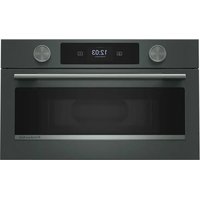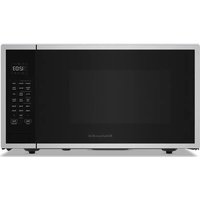
KMCS522P - Microwave Oven KITCHENAID - Free user manual and instructions
Find the device manual for free KMCS522P KITCHENAID in PDF.



User questions about KMCS522P KITCHENAID
0 question about this device. Answer the ones you know or ask your own.
Ask a new question about this device
Download the instructions for your Microwave Oven in PDF format for free! Find your manual KMCS522P - KITCHENAID and take your electronic device back in hand. On this page are published all the documents necessary for the use of your device. KMCS522P by KITCHENAID.
USER MANUAL KMCS522P KITCHENAID
For questions about features, operation/performance, parts, accessories or service, call: 1-800-422-1230,
or visit our website at www.kitchenaid.com.
In Canada, for assistance, installation and service, call: 1-800-807-6777,
or visit our website at www.kitchenaid.ca.
INSTALLATION INSTRUCTIONS....6
Unpacking 6
Location Requirements....6
Electrical Requirements 6
PARTS AND FEATURES ....7
Turntable....7
Grill Element....7
Convection Element and Fan....7
Keypad Instructions....10
MICROWAVE OVEN USE....13
Food Characteristics....13
Cooking Guidelines....13
Cookware and Dinnerware....14
Aluminum Foil and Metal 14
Cook....14
Popcorn....15
Reheat 15
Soften/Melt....15
Steam Clean....16
Keep Warm....16
Grill 16
Auto Defrost 16
Convection Bake/Roast 17
Air fryer....17
General Cleaning....18
TROUBLESHOOTING....19
ASSISTANCE OR SERVICE....20
In the U.S.A. 20
In Canada....20
Replacement Parts....20
Built-In Kits....20
SÉCURITÉ DU FOUR À MICRO-ONDES ......21
INSTRUCTIONS D'INSTALLATION....23
Déballage 23
Cancel (annulation)......25
Cook (cuisson)....33
Soften/Melt (Ablandar/Derretir)....54
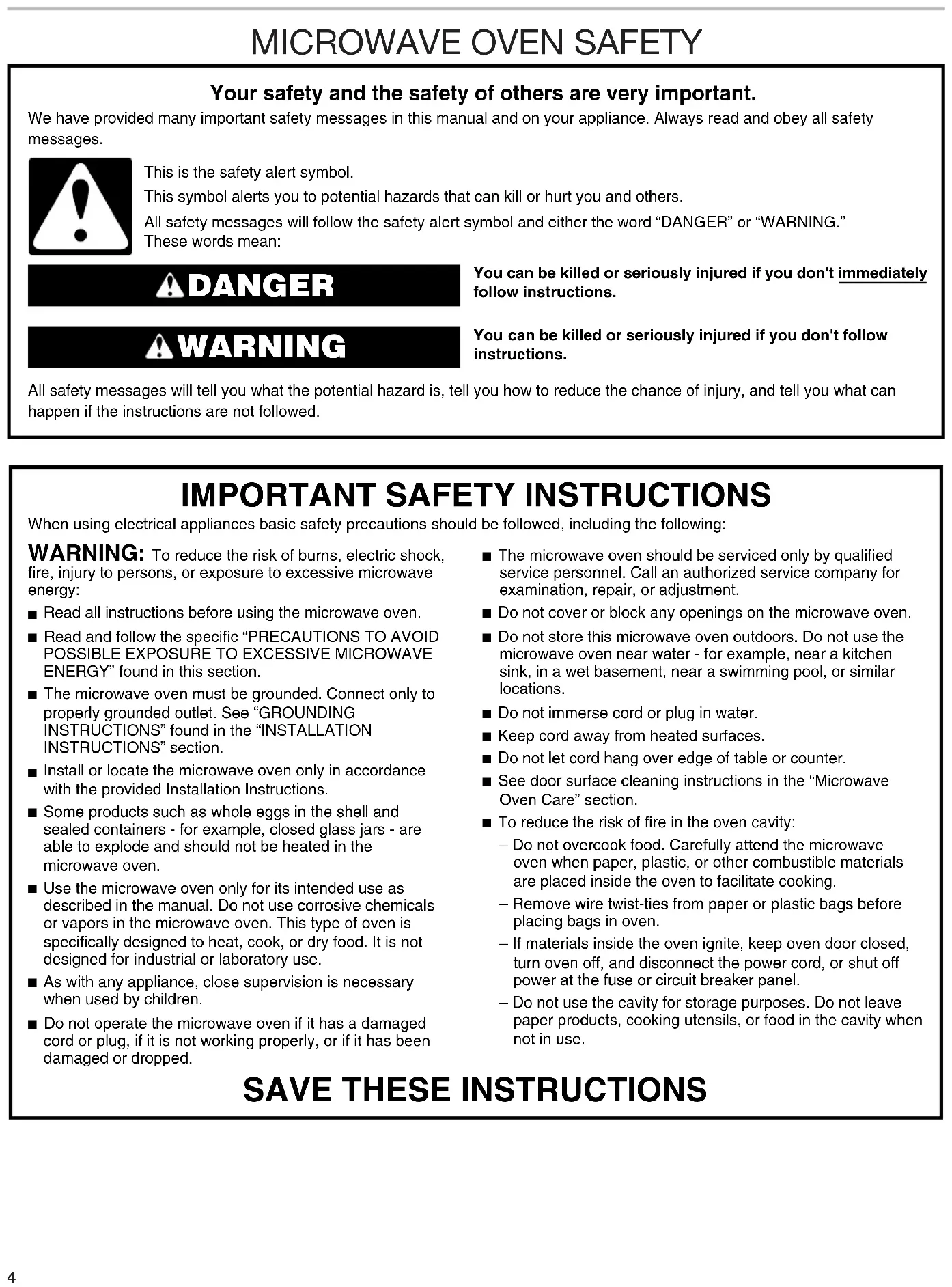
Your safety and the safety of others are very important.
We have provided many important safety messages in this manual and on your appliance. Always read and obey all safety messages.

This is the safety alert symbol.
This symbol alerts you to potential hazards that can kill or hurt you and others.
All safety messages will follow the safety alert symbol and either the word "DANGER" or "WARNING."
These words mean:
DANGER
You can be killed or seriously injured if you don't immediately follow instructions.
WARNING
You can be killed or seriously injured if you don't follow instructions.
All safety messages will tell you what the potential hazard is, tell you how to reduce the chance of injury, and tell you what can happen if the instructions are not followed.
IMPORTANT SAFETY INSTRUCTIONS
When using electrical appliances basic safety precautions should be followed, including the following:
WARNING: To reduce the risk of burns, electric shock, fire, injury to persons, or exposure to excessive microwave energy:
- Read all instructions before using the microwave oven.
- Read and follow the specific "PRECAUTIONS TO AVOID POSSIBLE EXPOSURE TO EXCESSIVE MICROWAVE ENERGY" found in this section.
■ The microwave oven must be grounded. Connect only to properly grounded outlet. See “GROUNDING INSTRUCTIONS” found in the “INSTALLATION INSTRUCTIONS” section.
■ Install or locate the microwave oven only in accordance with the provided Installation Instructions.
■ Some products such as whole eggs in the shell and sealed containers - for example, closed glass jars - are able to explode and should not be heated in the microwave oven.
■ Use the microwave oven only for its intended use as described in the manual. Do not use corrosive chemicals or vapors in the microwave oven. This type of oven is specifically designed to heat, cook, or dry food. It is not designed for industrial or laboratory use.
■ As with any appliance, close supervision is necessary when used by children.
■ Do not operate the microwave oven if it has a damaged cord or plug, if it is not working properly, or if it has been damaged or dropped.
■ The microwave oven should be serviced only by qualified service personnel. Call an authorized service company for examination, repair, or adjustment.
■ Do not cover or block any openings on the microwave oven.
■ Do not store this microwave oven outdoors. Do not use the microwave oven near water - for example, near a kitchen sink, in a wet basement, near a swimming pool, or similar locations.
■ Do not immerse cord or plug in water.
- Keep cord away from heated surfaces.
■ Do not let cord hang over edge of table or counter.
■ See door surface cleaning instructions in the "Microwave Oven Care" section.
■ To reduce the risk of fire in the oven cavity:
- Do not overcook food. Carefully attend the microwave oven when paper, plastic, or other combustible materials are placed inside the oven to facilitate cooking.
- Remove wire twist-ties from paper or plastic bags before placing bags in oven.
- If materials inside the oven ignite, keep oven door closed, turn oven off, and disconnect the power cord, or shut off power at the fuse or circuit breaker panel.
- Do not use the cavity for storage purposes. Do not leave paper products, cooking utensils, or food in the cavity when not in use.
SAVE THESE INSTRUCTIONS
IMPORTANT SAFETY INSTRUCTIONS
■ Liquids, such as water, coffee, or tea are able to be overheated beyond the boiling point without appearing to be boiling. Visible bubbling or boiling when the container is removed from the microwave oven is not always present. THIS COULD RESULT IN VERY HOT LIQUIDS SUDDENLY BOILING OVER WHEN THE CONTAINER IS DISTURBED OR A SPOON OR OTHER UTENSIL IS INSERTED INTO THE LIQUID.
To reduce the risk of injury to persons:
- Do not overheat the liquid.
- Stir the liquid both before and halfway through heating it.
- Do not use straight-sided containers with narrow necks.
- After heating, allow the container to stand in the microwave oven for a short time before removing the container.
- Use extreme care when inserting a spoon or other utensil into the container.
SAVE THESE INSTRUCTIONS
PRECAUTIONS TO AVOID POSSIBLE EXPOSURE TO EXCESSIVE MICROWAVE ENERGY
(a) Do not attempt to operate this oven with the door open since open-door operation can result in harmful exposure to microwave energy. It is important not to defeat or tamper with the safety interlocks.
(b) Do not place any object between the oven front face and the door or allow soil or cleaner residue to accumulate on sealing surfaces.
(c) Do not operate the oven if it is damaged. It is particularly important that the oven door close properly and that there is no damage to the:
(1) Door (bent),
(2) Hinges and latches (broken or loosened),
(3) Door seals and sealing surfaces.
(d) The oven should not be adjusted or repaired by anyone except properly qualified service personnel.
This device complies with Part 18 of the FCC Rules. This device complies with Industry Canada ICES-001.
INSTALLATION INSTRUCTIONS
Unpacking
- Empty the microwave oven of any packing materials.
- Clean the inside with a soft, damp cloth.
- Check for damage, such as:
■A door that is not lined up correctly,
■Damage around the door, or
■Dents on the interior or exterior of the microwave oven.
If there is any damage, do not operate the microwave oven until a designated service technician has checked it and made any needed repairs.
NOTE: To avoid damage to the microwave oven, do not remove microwave inlet cover. See the "Parts and Features" section.
Location Requirements
WARNING
Excessive Weight Hazard
Use two or more people to move and install microwave oven.
Failure to do so can result in back or other injury.
IMPORTANT: The control side of the microwave oven is the heavy side. Handle the microwave oven gently. The weight of the microwave oven is over 35 lbs (15.9 kg).
■Place the microwave oven on a cart, counter, table, or shelf that is strong enough to hold the microwave oven and the food and utensils you place inside it.
■The microwave oven should be at a temperature above 50^ F ( 10^ C) for proper operation.
NOTE: Some models can be built into a wall or cabinet by using one of the trim kits listed in the "Assistance or Service" section.
■ Install the microwave at a height of minimum 36" (91.4 cm) from floor.
■Do not block the exhaust vents or air intake openings. Allow a few inches of space at the back and side of the microwave oven where the exhaust vents are located. Blocking the exhaust vents could cause damage to the microwave oven as well as poor cooking results.
■Make sure the microwave oven legs are in place to ensure proper airflow. If vents are blocked, a sensitive thermal device may automatically turn the microwave oven off. The microwave oven should work properly once it has cooled.
Electrical Requirements
WARNING
Electrical Shock Hazard
Plug into a grounded 3 prong outlet.
Do not remove ground prong.
Do not use an adapter.
Do not use an extension cord.
Failure to follow these instructions can result in death, fire, or electrical shock.
Observe all governing codes and ordinances.
Required:
■A 120 V, 60 Hz AC only, 15 A or 20 A electrical supply with a fuse or circuit breaker.
Recommended:
■A time-delay fuse or time-delay circuit breaker
■A separate circuit serving only this microwave oven
GROUNDING INSTRUCTIONS
■ For all cord connected appliances:
The microwave oven must be grounded. In the event of an electrical short circuit, grounding reduces the risk of electric shock by providing an escape wire for the electric current. The microwave oven is equipped with a cord having a grounding wire with a grounding plug. The plug must be plugged into an outlet that is properly installed and grounded.
WARNING: Improper use of the grounding plug can result in a risk of electric shock. Consult a qualified electrician or serviceman if the grounding instructions are not completely understood, or if doubt exists as to whether the microwave oven is properly grounded.
Do not use an extension cord. If the power supply cord is too short, have a qualified electrician or serviceman install an outlet near the microwave oven. A short power supply cord is provided to reduce the risks resulting from becoming entangled in or tripping over a longer cord.
SAVE THESE INSTRUCTIONS
PARTS AND FEATURES
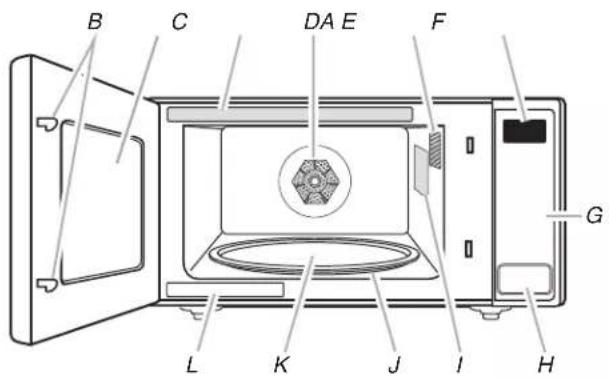
This manual may cover several different models. The model you have purchased may have some or all of the features shown here. The appearance of your particular model may differ slightly from the illustrations in this manual.
text_image
B C DA E F G L K J I HA. Door lock system
B. Window
C. Cooking guide label
D. Convection element and fan
E. Microwave oven light
F. Display
G. Control panel
H. Door open push button
I. Microwave inlet cover*
J. Removable turntable support
K. Glass turntable
L. Model and serial number plate
Parts and Features
Not Shown: Grill element (on cavity ceiling)
*NOTE: To avoid damage to the microwave oven,do not remove microwave inlet cover. See the "Parts and Features" section.
text_image
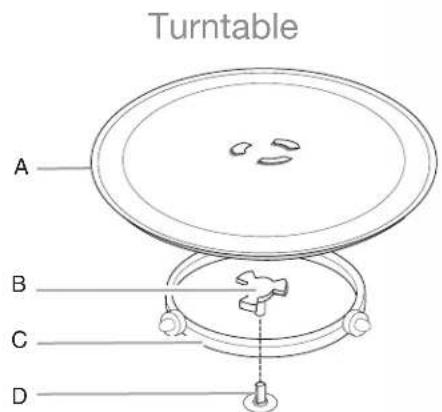
Turntable A B C DA. Turntable
B. Hub
C. Support
D. Shaft
The turntable can rotate in either direction to help cook food more evenly. For best cooking results, do not operate the microwave oven without having the turntable in place. See the "Assistance or Service" section to reorder any of the parts.
To Install:
- Place the support on the microwave oven cavity bottom.
- Place the turntable on the support.
Fit the raised, curved wedges in the center of the turntable bottom between the three spokes of the hub. The rollers on the support should fit inside the turntable bottom ridge.
Grill Element
The microwave oven uses a cal rod thermal element for grilling. The microwave oven cavity and door will become hot. The use of oven mitts is recommended.
Convection Element and Fan
The microwave oven's convection system is composed of a convection element which heats in conjunction with the convection fan for true convection cooking. The convection system is embedded in the wall of the microwave oven cavity, behind the screen. See the "Parts and Features" section. The microwave oven cavity and door will become hot. The use of oven mitts is recommended.
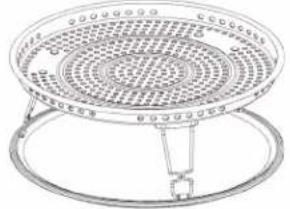
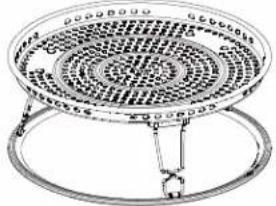
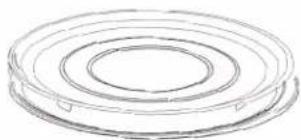
Grill and Convection Accessories
natural_image
Simple concentric oval diagram with no text or symbols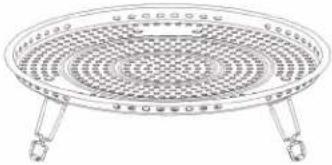
natural_image
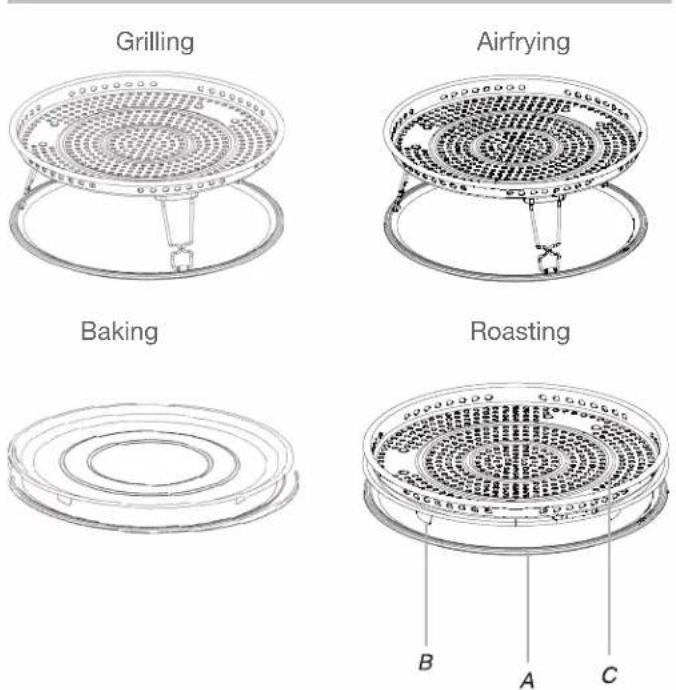
Line drawing of a circular fan or tray with three legs and a central grille (no text or symbols)Accessory Configurations
text_image
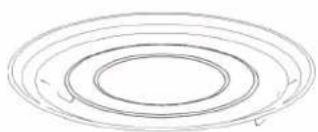
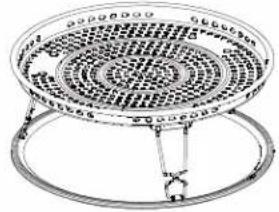
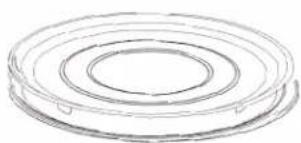
Grilling Airfrying Baking Roasting B A CA. Turntable
B. Baking Tray
C. Air Fryer (without flipping out the legs) and put on the top of baking tray
text_image
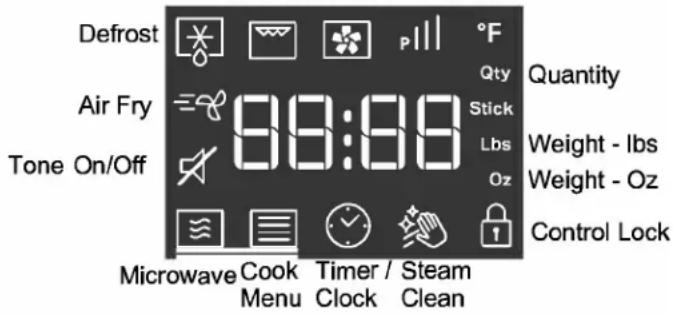
Grill Bake/Roast Power Defrost Air Fry Tone On/Off 99:99 Qty Stick Lbs Oz Quantity Weight - Ibs Weight - Oz Control Lock Microwave Cook Timer / Steam Menu Clock Clean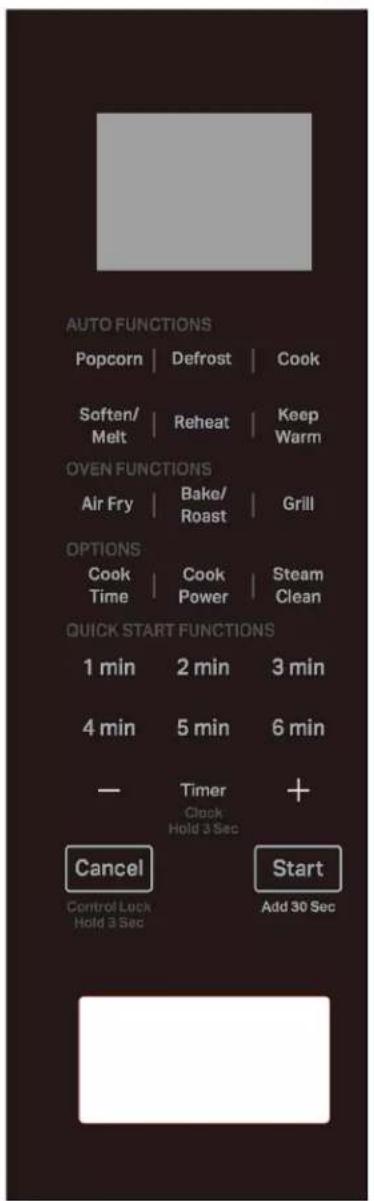
text_image
AUTO FUNCTIONS Popcorn | Defrost | Cook Soften/ Melt | Reheat | Keep Warm OVEN FUNCTIONS Air Fry | Bake/ Roast | Grill OPTIONS Cook Time | Cook Power | Steam Clean QUICK START FUNCTIONS 1 min 2 min 3 min 4 min 5 min 6 min — Timer Clock Hold 3 Sec + Cancel Start Control Lock Hold 3 Sec Add 30 SecDisplay
When power is first supplied to the microwave oven, "12Hr" will appear in the display. User can press Timer/Clock button or +/- button to toggle between 12Hr or 24Hr within 10 seconds.
Press Start button to confirm. If the "12:00" appears in the display at any other time, a power failure has occurred. Reset the clock if needed. See the "Clock" section.
Standby mode
When no functions are being used, the microwave oven will switch to Standby mode.
Start
The Start button begins any function. If non-sensor cooking is interrupted by opening the door, pressing Start button will resume the cycle.
NOTE: To avoid unintentional operation of the microwave oven, a cooking function cannot be started if the microwave oven door has been closed for about 1 minute. The word "door" will appear in the display until the door is opened and closed.
Quick start/Add 30 seconds
In standby mode, pressing Start automatically starts the microwave oven at 100% power for 30 seconds and adds 30 seconds of cook time, with each additional touch of the control. Time may be added to any manual cooking cycle in 30 second increments, at the moment power level, by pressing Start button during cooking.
Cancel
The Cancel button clears any incorrect command and Cancels any program during cooking. Press the Cancel button to Cancel the cycle. It will not erase the time of day.
The microwave oven will also turn off when the door is opened. Close the door and press Start to resume the cycle. The Cancel button is also used to lock and unlock the control panel. See the "Control Lock" section.
- Place food on the turntable and close the door.
- Touch desired menu control. The first programmed amount will appear in the display. Touch control keypad repeatedly or touch number keypads to change quantity.
- Touch Start. When the cycle ends, "End" will appear in the display and the end-of-cycle tone will sound.
- Touch Cancel or open the door to clear the display.
Clock
To Set:
The microwave oven must be in standby.
- Press Timer/Clock button for 3 seconds to enter clock setting. It will also appear every time the product is plugged into the power source, or power is back after a power fail.
- Press +/- button to set the hour.
- Press Start button to confirm.
- Press +/- button to set the minute.
- Press Start button to confirm the setting.
Tones ON/OFF
This function allows the user to activate/deactivate all the sounds played by the appliances, includes button press, warnings, alarm, even end audio feedback.
Press Steam Clean button and hold for 5 seconds to put into mute, hold the button again for 5 seconds to turn on the sound. "This function can operate at any time" in Tones on/off function.
To use Sensor Menu
(Reheat, Cook Menu)
- Place food on the turn table and close the door.
- Touch the desired menu control.
- Touch Start, the running segment animation will appear in the display. The microwave oven will start and sensor cooking will begin.
The running segment will remain in the display until the sensor has determined the remaining cook time.
- When the cycle end, "End" will appear in the display and the end-of-cycle tones will sound.
- Touch Cancel or open the door to clear the display.
(NOTE: Sauce, Soup and Beverage in Reheat Menu, Potato in Cook Menu without using Sensor cooking).
Timer
To Set:
- Press Timer/Clock button
- Press +/- button to enter desired time.
- Press Start button. When the set time ends, the end-of-timer
- When the Timer countdown is achieve in the display, tone will sound. Press Cancel to Cancel the timer.
NOTE: The Timer does not start or stop the microwave oven. The function can be set only in Standby mode.
Cooking End
When the cooking is finished, the display will show the text "End". A reminder acoustic beep will signal.
NOTE: If the cooking time is more than 2 minutes, after cooking end, the cooling fan and Forced Convection fan are ON for 3 minutes, cavity lamp is OFF, which is helping to cool down the component to have better quality.
Control Lock
The Control Lock disables the control panel keypads to avoid unintended use of the microwave oven.
To Lock/Unlock Control: The microwave oven must be OFF. Touch and hold Cancel button for about 3 seconds, until the tone sounds and the LOCK icon appears in the display. Repeat to unlock and clear the display.
If any cook function control is touched while the Control Lock is active, a tone will sound.
Keypad Instructions
| Keypad Feature Instructions | |
| Timer(Clock Hold3 Seconds) | Hold to Set the Clock To set the clock, follow the instructions below:1. Press Timer for 3 seconds to enter clock setting.2. Press the +/- button to set the hour, press Start button to confirm.3. Press the +/- button to set the minute.4. Press Start button.NOTE:The microwave oven must be in standby. It will also appearevery time the product is plugged into the power source, or power isback after a power fail.NOTE:When plug in, the screen shows“12Hr”(“12” flashing), use+/- to change 12 or 24 hour format, press Start to confirm; then thescreen shows “12:00”. |
| Timer(Clock Hold3 Seconds) | Set Kitchen Timer The kitchen timer functions like a stop watch. To set the kitchentimer, following the instructions below:1. Press Timer button.2. Press +/- button to enter desired time.3. Press Start button.NOTE:While the Timer countdown is active in the display, touchCancel to Cancel the Timer. The timer does not start or stop themicrowave oven. |
| StartAdd 30 seconds | Add 30 Seconds The button Start can be used in two ways:1. To start the microwave by cooking for 30 seconds with full powerin standby mode.2. To increase a cooking time using increments of 30 seconds. Eachpress adds 30 seconds. |
| StartAdd 30 seconds | Start Function Press the Start button to start any cooking function. If cooking isinterrupted by opening the door, touch the Start button after the dooris closed again to resume the cycle. |
| Cancel Microwave Oven Cancel The Cancel button stops any microwave oven function except for theclock and control lock.The microwave oven will also turn off when the door is opened. Whenthe door is opened, the element(s) will turn off, but the microwaveoven light will remain on. Close the door and touch the Start buttonto resume the preset cycle. | |
| Control Lock(Cancel Hold 3 Sec) | Activate Control Lock Activate Control Lock to avoid an unintended start.To activate, press and hold the Cancel button for 3 seconds until theCONTROL LOCKED icon appears on the display. Repeat to unlockcontrol. |
| 1 min-6 min Quick Start Default power is full in this function (P100).Press 1 min, 2 min.. or 6 min to start with the time mentioned on thebutton. | |
| Cook Time Set Manual Cooking Press “Cook Time” button to set manual cooking time. The defaultpower level is 100%. Press +/- button/1 min-6 min to set the cookingtime, follow the instruction below:1. Press “Cook Time” button, “0:15” will show on the display.2. Press +/- button/1 min-6 min to adjust the cooking time.3. Press Start button to start.NOTE:Press the “Power” button to increase /decrease power levelsin cyclic way P10 P20 P30......P100. | |
Keypad Feature Instructions
| Cook Power Set Manual Cooking Press “Power” button to set manual power. The default power level is 100%. Press the “Power” button or +/- button to change power level. For example, to set the time to 2:30 in 90% power: | |
| 1. Press “Power” button, P100 will show on the display. | |
| 2. Press - button to decrease power level to 90% (P90 on display). | |
| 3. Press Start button to confirm and jump to cooking time setting, default “0:15” will show on the display. | |
| 4. Press +/- button to adjust the cooking time to “2:30”. | |
| 5. Press Start button. | |
| Popcorn Popcorn To use the Popcorn preset, follow the instructions below: | |
| 1. Press “Popcorn” button repeatedly to select the bag size (3.0 or 3.5 oz). | |
| 2. Press Start button. | |
| Defrost Defrost Menu The Defrost function helps that frozen food. To defrost, follow the instructions below: | |
| 1. Press “Defrost” button, P1 will show on display. | |
| 2. Press “Defrost” button or +/- button to select Manual Defrost,or the desired food class. P1 ... P4. | |
| 3. Press Start button to confirm. | |
| P1-Manual Defrost: | |
| 4. Default time “0:30” will show on the display. | |
| 5. Press +/- button to adjust defrost cooking time. | |
| 6. Press Start button. | |
| P2-P4 Auto Defrost ( Poultry, Meat, Fish): | |
| 4. Display will show the default weight. | |
| 5. Press +/- button to adjust desired weight. | |
| 6. Press start button. | |
| Cook Auto Cook Menu To use the auto cook presets, follow the instructions below: | |
| 1. Press “Cook Menu” button, the “P1” will show on the display. | |
| 2. Use +/- button or “Cook Menu” to select a food category. | |
| 3. Press Start button. | |
| NOTE: See the Cook section in this guide for the food category or reference sticker on the front plate of the microwaves. | |
| 4. Sensor Cooking: A sensor in the microwave oven detects humidity released from the food as it heats and adjusts the cook time accordingly. (For non-sensor cooking, the display will show the default weight. Press +/- button to adjust desired weight. Press the Start button.) | |
| Soften/Melt Soften/Melt Menu The Soften / Melt function is used to soften/melt food. To use: | |
| 1. Press “Soften/Melt” button, the display will show “P1” | |
| 2. Use “Soften Menu” button or +/- button to select a food category, see the Soften Menu section in this guide for the food category or reference the sticker on the door of the microwave. Press Start button to confirm. | |
| 3. Use +/- button to adjust the quantity. | |
| 4. Press Start button. | |
| Reheat | Automatic Reheat To reheat using preset functions, follow the instructions below: |
| 1. Press the “Reheat Menu” button, the “P1” will show on the display. | |
| 2. Use +/- button or “Reheat Menu” to select a food category. See the REHEAT section in this guide for the food category or reference sticker on the front plate of the microwaves. | |
| 3. Press Start button. | |
| 4. Sensor Cooking (except Sauce, Soup and Beverage): a sensor in the microwave oven detects humidity released from the food as it heats and adjusts the cook time accordingly. (When selecting Sauce, Soup and Beverage the display will show the default weight. Press +/- button to adjust desired weight. Press the Start button.) | |
Keypad Feature Instructions
| Keep Warm Keep Warm The function allows to keep your dishes warm. To use: | |
| Air Fry Air Fry cooking(use Air Fry accessory) | 1. Press “Keep Warm” button, default time “30:00” will show on the display.2. Press “Keep Warm” or +/- button to select 15 min, 30 min, 45 min, or 60 min.3. Press Start button.NOTE:The Keep Warm cycle last for a duration of 15 minutes (default 30 minutes), the maximum time is 60 minutes.Each 15 minutes cycle, microwave will be turned on 1.5 minutes, then cavity lamp and fan are off, only the countdown time is shown.Using with the air fryer accessory, the function allows to have air fry cooking. To use:1. Press “Air Fry”, the display will show “P1”.2. Use “Air Fry” button or +/- button to select a food category, see the Air Fry section in this guide for the food category or reference the sticker the door of the microwave. Press Start button to confirm.P1-Manual Air Fry:3. Default temperature “400°F” will show on the display.4. Press +/- button to adjust cooking temperature.5. Press Start button to confirm, the display will show default time “00:30”.6. Press +/- button to adjust cooking time.7. Press Start button.P2-P8 Auto Air Fry Menu:3. Display will show the default weight/quantity.4. Press +/- button to adjust desired weight.5. Press Start button. |
| Bake/Roast Baking (use baking plate)/Roasting (use airfry accessory without flipping legs and put on the baking plate) | This function allows to have Bake/Roast cooking. To use:1. Press “Bake/Roast”, the display will show “P1”.2. Use “Bake/Roast” button or +/- button to select a food category, see the Bake / Roast section in this guide for the food category or reference the sticker on the door of the microwave. Press Start button to confirm.P1-Manual Bake, P-8 Manual Roast:3. Default temperature “400°F” will show on the display.4. Press +/- button to adjust cooking temperature. Press Start button to confirm. “Pre-heat” will display and flash on screen, waiting for the customer to confirm Pre-heating by pressing Start.P- E- HE AL5. After pressing Start to confirm, the animation will show on the display to indicate it is under Pre-heating.[IMAGE](NOTE: Customers can skip Pre-heating by pressing +/- key when “Pre-Heat” is flashing on the display, it will go to Cooking Time setting mode.)After the temperature is reached, the display will show “Add Food” to remind customers, after putting in the food and closing the door, the display will show the Cooking time mode.6. Press Start button to confirm, the display will show default time “00:30”.7. Press +/- button to adjust cooking time.8. Press Start button.P2-P7 Auto Bake Menu, P9-P12 Auto Roast Menu3. Display will show the default weight/quantity.4. Press +/- button to adjust desired weight.5. Press START button.Note:When ADD FOOD comes to display after preheating temperature is reached, if the door is not open, the machine will keep warm for 30 minutes before going back to IDLE state. If the door is open, the user has to put in the food within 1 minute or it will go to IDLE state. |
Keypad Feature Instructions
| Grill Grill cooking(use Air Fry accessory) | The function allows to grill cooking. To use:1. Press “Grill” button, default time “00:30” will show on the display.2. Press +/- button to adjust cooking time.3. Press Start button. |
| Steam Clean Auto cleaning cycle The cleaning cycle will help to clean the microwave oven cavity. | 1. Place 1 cup of water (~250mL) on the middle of the cavity.2. Press “Steam Clean” button, default “13:00” time will show on display.3. Press Start button to start the function.After finishing the heat-up water cycle (3 minutes),; the cavity lamp and fan will be off and display will show the countdown time. |
| NOTE: Please follow Tips and Suggestions in Steam Clean section.After heating up the water, cavity lamp and fan will be off and display will show the countdown time | |
| Tone On/Off Turn on or off beep sound The function allows to turn on or off the beep sound: | 1. Press Steam Clean button and hold for 5 seconds to put into mute, the Tone Off icon will be shown on display.2. Hold the button again for 5 seconds to turn on the sound. |
MICROWAVE OVEN USE
A magnetron in the microwave oven produces microwaves which reflect off the metal floor, walls, and ceiling and pass through the turntable and appropriate cookware to the food. Microwaves are attracted to and absorbed by fat, sugar, and water molecules in the food, causing them to move, producing friction and heat which cooks the food.
■To avoid damage to the microwave oven, do not lean on or allow children to swing on the microwave oven door.
■To avoid damage to the microwave oven, do not operate microwave oven when it is empty.
■Baby bottles and baby food jars should not be heated in microwave oven.
■Clothes, flowers, fruit, herbs, wood, gourds, and paper, including brown paper bags and newspaper, should not be dried in the microwave oven.
■Paraffin wax will not melt in the microwave oven because it does not absorb microwaves.
■Use oven mitts or pot holders when removing containers from microwave oven.
■Do not overcook potatoes. At the end of the recommended cook time, potatoes should be slightly firm. Let potatoes stand for 5 minutes. They will finish cooking while standing.
■Do not cook or reheat whole eggs inside the shell. Steam buildup in whole eggs may cause them to burst, requiring significant cleanup of microwave oven cavity. Cover poached eggs and allow a standing time.
Food Characteristics
When microwave cooking, the amount, size and shape, starting temperature, composition, and density of the food affect cooking results.
Amount of Food
The more food heated at once, the longer the cook time needed. Check for doneness and add small increments of time if necessary.
Size and Shape
Smaller pieces of food will cook more quickly than larger pieces, and uniformly shaped foods cook more evenly than irregularly shaped food.
Starting Temperature
Room temperature foods will heat faster than refrigerated foods, and refrigerated foods will heat faster than frozen foods.
Composition and Density
Foods high in fat and sugar will reach a higher temperature and will heat faster than other foods. Heavy, dense foods, such as meat and potatoes, require a longer cook time than the same size of a light, porous food, such as cake.
Cooking Guidelines
Covering
Covering food helps retain moisture, shorten cook time, and reduce spattering. Use the lid supplied with cookware. If a lid is not available, wax paper, paper towels, or plastic wrap approved for microwave ovens may be used. Plastic wrap should be turned back at one corner to provide an opening to vent steam. Condensation on the door and cavity surfaces is normal during heavy cooking.
Stirring and Turning
Stirring and turning redistribute heat evenly to avoid overcooking the outer edges of food. Stir from outside to center. If possible, turn food over from bottom to top.
Arranging
If heating irregularly shaped or different-sized foods, arrange the thinner parts and smaller-sized items toward the center. If cooking several items of the same size and shape, place them in a ring pattern, leaving the center of the ring empty.
Piercing
Before heating, use a fork or small knife to pierce or prick foods that have a skin or membrane, such as potatoes, egg yolks, chicken livers, hot dogs, and sausage. Prick in several places to allow steam to vent.
Shielding
Use small, flat pieces of aluminum foil to shield the thin pieces of irregularly shaped foods, bones and foods such as chicken wings, leg tips, and fish tails. See the “Aluminum Foil and Metal” section first.
Standing Time
Food will continue to cook by the natural conduction of heat even after the microwave cooking cycle ends. The length of standing time depends on the volume and density of the food.
Cookware and Dinnerware
Cookware and dinnerware must fit on the turntable. Always use oven mitts or pot holders when handling because any dish may become hot from heat transferred from the food. Do not use cookware and dinnerware with gold or silver trim. Use the following chart as a guide, then test before using.
| Material Recommendations | |
| Aluminum Foil, Metal | See the “Aluminum Foil and Metal” section. |
| Browning Dish Bottom must be at least 3/16" (5 mm) above the turntable. Follow manufacturer's recommendations. | |
| Ceramic Glass, Glass | Acceptable for use |
| China, Earthenware | Follow manufacturer's recommendations. |
| Melamine Follow manufacturer's recommendations. | |
| Paper: Towels, Dinnerware, Napkins | Use non-recycled and those approved by the manufacturer for microwave oven use. |
| Plastic: Wraps, Bags, Covers, Dinnerware, Containers | Use those approved by the manufacturer for microwave oven use. |
| Pottery and Clay Follow manufacturer's recommendations. | |
| Silicone Bakeware | Follow manufacturer's recommendations. |
| Straw, Wicker, Wooden Containers | Do not use in microwave oven. |
| Wax Paper Acceptable for use | |
To Test Cookware or Dinnerware for Microwave Use:
-
Place cookware or dinnerware in microwave oven with 1 cup (250 mL) of water beside it.
-
Cook at 100% cooking power for 1 minute.
Do not use cookware or dinnerware if it becomes hot and the water stays cool.
Aluminum Foil and Metal
Always use oven mitts or pot holders when removing dishes from the microwave oven.
Aluminum foil and some metal can be used in the microwave oven. If not used properly, arcing (a blue flash of light) can occur and cause damage to the microwave oven.
OK for Use
Racks and bakeware supplied with the microwave oven (on some models), aluminum foil for shielding, and approved meat thermometers may be used with the following guidelines:
■To avoid damage to the microwave oven, do not allow aluminum foil or metal to touch the inside cavity walls, ceiling, or floor.
■Always use the turntable.
■To avoid damage to the microwave oven, do not allow contact with another metal object during microwave cooking.
Do Not Use
Metal cookware and bakeware, gold, silver, pewter, non-approved meat thermometers, skewers, twist ties, foil liners such as sandwich wrappers, staples, and objects with gold or silver trim or a metallic glaze should not be used in the microwave oven.
For Use with Grill Element
Use the provided tall grill rack with an oven proof pan to catch the drippings.
For Use with Convection System
Use the provided short convection rack and an oven proof baking dish for convection baking.
Use the provided short convection rack and a microwave-safe, oven proof baking dish for convection roasting.
Cook
The microwave oven has been programmed with common microwave foods, their quantities, cook powers, and cook times. Use the following chart as a guide for preset cooking.
Item Food Category Quantity
| P1 Potato - LargeEnter 1-4 pieces, 8-10 oz(227-283 g) each. Pierce each potato several times with a fork. Place on paper towel on turntable center. Let stand 5min after cooking. | 1-4 pieces/1 piece |
| P2 Potato - SmallEnter 1-16 pieces, 3-5 oz(85-141 g) each. Pierce each potato several times with a fork. Place on paper towel on turntable center. Let stand 5min after cooking. | 1-16 pieces/1 piece |
| P3 Fresh VegetablesFrom room temperature.Put food into microwave safe dish.Add 2 tablespoons water to 1-2 cups, add 4 tablespoons water to 3-4 cups. Cover the dish, leaving an air ventilation. Stir and let stand 2-3 minutes after cooking. | 1-4 cups(Sensor cooking) |
| P4 Frozen VegetablesPlace in microwave-safe container and add 2-4 tbs water. Cover with plastic wrap and vent. Stir and let stand 2-3 minutes after cooking. | 1-4 cups(Sensor cooking) |
| P5 OatmealPlace in microwave-safe container and add water depends on package directions adds water cover with plastic wrap and fold back one edge about 1/4" (6 mm) to make a vent.Place container in the center of the oven. After cooking stir with spoon or whisk until uniform. | 1-4 cups/1 cup |
| P6 Frozen EntréeRemove entrée from package and loosen film covering on 3 sides of the container leaving one of the short sides still attached. Loosely cover with film.Allow the 10.5 and 20 oz (297 and 567 g) entrees to stand 3 minutes.Allow the 38 and 60 oz (1.1 and 1.7 kg) entrees to stand 5 minutes. | 10 oz, 20 oz, 40 oz, 60 oz(283 g, 567 g, 1.1 kg, 1.7 kg) |
Popcorn
3.0 or 3.5 oz bags.
- Do not use regular paper bags or glassware
– Pop only one package of popcorn at a time.
– Follow manufacturer's instructions when using a microwave popcorn popper. - Listen for popping to slow to one pop every 1 or 2 seconds, and then stop the cycle.
- Do not reppop unpopped kernels.
- For best results, use fresh bags of popcorn.
– Cooking results may vary by brand and fat content.
NOTE: Follow the instructions provided by the microwave popcorn manufacture.
Reheat
Times and cooking powers have been preset for reheating a number of food types. Use the following chart as a guide.
| Item Food Category Quantity | |
| P1 Dinner plate | 10-15 oz |
| Place food on plate. Cover with plastic wrap and vent. Let stand2-3 minutes after reheating. | (283-425 g)(Sensor Cooking) |
| P2 Sauce | 1-4 cups |
| Place in microwave-safe container. Cover with plastic wrap and vent. Stir and let stand 2-3 minutes after reheating. | |
| P3 Soup | 1-4 cups |
| Place in microwave-safe container. Cover with plastic wrap and vent. Stir and let stand 2-3 minutes after reheating. | |
| P4 Beverage | 1, 2, 3, 4 cups |
| Do not cover. | |
| P5 Reheat Pizza | 1-3 sliced,4 oz(113 g)per slice(Sensor cooking) |
| Place on paper towel lined microwave-safe plate. | |
Soften/Melt
Soften function may be used to soften your food. Times and cooking powers have been preset for a number of food types. Use the following chart as a guide.
| Item Food Category Quantity | |
| P1 Soften ButterUnwrap and place in microwave-safe container. | 0.5-2.0 sticks/0.5 stick |
| P2 Melt ButterUnwrap and place in microwave-safe container | 0.5-2.0 sticks/0.5 stick |
| P3 Soft Ice-creamPlace ice-cream container on turntable. | 16-64 oz/16 oz(454 g-1.8 kg/454 g) |
| P4 Soft Cream CheeseUnwrap and place in microwave-safe container. | 3 oz, 8 oz(85 g, 227 g) |
| P5 Soften Brown Sugarplace in microwave-safe container. | 3 oz, 8 oz(85 g, 227 g) |
| P6 Soften Frozen JuiceRemove lid. | 8 oz, 12 oz(227 g, 340 g) |
| P7 Soften Caramel DipRemove lid from caramel dip and place in center of microwave oven. | 8 oz, 16 oz(227 g, 454 g) |
| P8 Melt Chocolate ChipsPlace in microwave-safe container place in center of microwave oven. | 4-12 oz/4oz(113-340 g/113 g) |
| P8 Melt Cream CheeseUnwrap and place in microwave-safe container. | 8 oz, 16 oz (227 g, 454 g) |
| P8 Melt Caramel Dipplace in microwave-safe container. | 8 oz, 16 oz (227 g, 454 g) |
Auto Defrost
- For optimal result, food should be 0^ (-18°C) or colder when defrosting.
– Unwrap foods and remove lids (from fruit juice) before defrosting.
– Shallow packages will defrost more quickly than deep blocks. - Separate food pieces as soon as possible during or at the end of the cycle for more even defrosting.
- Foods left outside the freezer for more than 20 minutes or frozen ready-made food should not be defrosted using the Defrost feature but should be defrosted manually.
- Use small pieces of aluminum foil to shield parts of food such as chicken wings leg tips, and fish tails. See the “Aluminum Foil and Metal” section first.
– Times and cooking powers have been preset for defrosting a number of food types.
| Item | Food Category | Weight |
| P1 Poultry 0.5 lbs-6.6 lbs/0.1 lbs | ||
| P2 Meat 0.5 lbs-6.6 lbs/0.1 lbs | ||
| P3 Fish 0.5 lbs-6.6 lbs/0.1 lbs |
DEFROST PREPARATION CHART
| POULTRY | |
| Chicken: whole and cut up | Place in a microwave safe container, chicken breast side up. Remove giblets from whole chicken. |
| Cornish hens | |
| Turkey: breast | |
| MEAT | |
| Beef: ground, steaks, roast, stewLamb: stew and chopsPork: chops, ribs, roasts, sausage | The narrow or fatty areas of irregular-shaped cuts should be shielded with foil before defrosting.Do not defrost less than 1/4 lb (113 g) or two 4 oz (113 g) patties.Place all meats in a microwave-safe container. |
| FISH |
| Fillets, Steaks, Whole, Shellfish Place in a microwave-safe container. |
Steam Clean
This automatic cleaning cycle will help you to clean the microwave oven cavity and to remove unpleasant odors.
Before starting the cycle:
- Put 250 mL water into a container (see our recommendations in the below section "Tips and suggestions").
- Place the container directly on the middle of the cavity.
To Start The Cycle:
- Press the Steam Clean button, the cleaning cycle duration will be visible on the display.
- Press the Start button to start the function.
When The Cycle Is Finished:
- Press the Cancel button.
- Remove the container.
- Use a soft cloth or a paper towel with mild detergent to clean the interior surfaces.
Tips and suggestions:
For a better cleaning result, it is recommended to use a container with a diameter of 17-20 cm, and a height that is lower than 6.5 cm.
It is recommended to use a container of light plastic material that is suitable for the micro wave.
As the container will be hot after the cleaning cycle is completed, it is recommended to use a heat resistant glove when removing the container from the microwave.
For a better cleaning effect and removal of un pleasant odors, add some lemon juice or vine gar to the water.
Keep Warm
This function allows you to keep your dishes warm.
- Touch "Keep Warm" button.
- Press +/- button to select suitable time, then press Start button to start. Default time is 30 minutes, maximum time is 60 minutes.
| Food | Weight Container | Temperature Container |
| Tuna | 4 cups | 165°F (73.8°C) Microwave safe dish |
| Noodle | (880 g) | |
| Casserole |
Grill
The Grill function uses a cal rod thermal element that heats quickly to grill a variety of foods.
- Use the Airfry accessory to place food closer to the grill element for faster grilling.
- Oven cavity and door will become very hot during grill element use. The use of oven mitts is recommended.
- Use an oven proof pan to catch drippings.
- The Airfry accessory and pan will become very hot. Use oven mitts to grasp pan for removal. To avoid damage, do not place hot pan directly on heat-sensitive surfaces.
- The turntable must be in place when using the Airfry accessory.
- For best results, apply light amount of cooking oil to Airfry accessory.
Examples of Grill Times.
| Food Weight Container | Temperature | |
| Toast | ||
| Sirloin steak | 4 cups (880 g) | 165°F (73.8°C) |
To use:
- Place Airfry accessory securely on pan and place both on the turntable. Then position food on rack and close the door.
- Touch Grill. "00:30" will appear in the display. Enter the length of time to grill in minutes and seconds.
- Touch Start. Grill time will count down in the display. When the cycle ends, “End” will appear in the display and the End-of-cycle tones will sound.
- Touch Cancel or open the door to clear the display.
Convection Bake/Roast
The convection system circulates hot air through the microwave oven cavity with a fan. The constantly moving air surrounds the food to heat the outer portion quickly.
- The microwave oven cavity and door will become hot during the Convection Roast cycle. The use of oven mitts is recommended.
– Use the provided convection (short) rack. - Do not cover turntable or convection rack with aluminum foil as it interferes with the circulation of hot air.
- Do not use light plastic containers, plastic wrap, or paper products.
All oven proof cookware or metal utensils can be used with the Convection Bake function.
(Round pizza pans are excellent cooking utensils for many convection only items.) Metal utensils cannot be used with the Convection Roast function.
- No special techniques are needed to adapt standard oven recipes to convection cooking, although some temperatures might need to be reduced and some cooking times might need to be shortened. Using convection pan, Bake/Roast function may be used to have convection cooking. Times and cooking powers have been preset for a number of food types. Use the following chart as a guide.
| Item | Food Category | Quantity |
| P1 | Manual Bake(with preheat) Use baking tray for this function | |
| P2 | Thin Crust Frozen Pizza Remove frozen pizza from packaging, put the pizza into the center of baking tray. | 12 inch |
| P3 | Thick Crust Frozen Pizza Remove frozen pizza from packaging, put the pizza into the center of baking tray. | 12 inch |
| P4 | Sugar Cookies Put the cookies mix in the center of baking tray (6 pieces about 1 batch). | 1 batch |
| P5 | Muffins Put the muffin-mix in cups, put them in the center of baking tray (7 pieces about 1 batch) | 1 batch |
| P6 | Fruit Pie Remove fresh pie from packaging, put the pie into the center of baking tray | 1 batch |
| P7 | Layer Cake Put the cake mix with the container in the center of baking tray | 1 batch |
| P8 | Manual Roast (with preheat) Use your airfry basket (without flipping legs over) and having baking tray under it. | |
| P9 | Roast Whole Chicken Use your airfry basket (without flipping legs over) and having baking tray under it. Put salt and pepper inside of the chicken, add the bunch of thyme, halves of lemon, and garlic. Brush the surface of the chicken with the butter, salt and pepper. Place your favor veggies, like onions, carrots, etc in the air fry basket. Add salt, pepper, thyme, and olive oil, then place the chicken on top. | 2-6 lb/0.5 lb |
Item Food Category Quantity
| P10 Roast Pork LoinRub salt, pepper, garlic powder, onion powder, rosemary, paprika and thyme all over the pork loin.Put the Pork Loin into the airfry basket (without flipping legs over) and having baking tray under it; add your favor sauce, like honey, mustard, garlic, soy sauce, and olive oil, add vegetables, pumpkin, onion, pepper all around it. | 2-4 lb/0.5 lb |
| P11 Roast Pork TenderloinRoll a pork tenderloin in some salt and spices, or to create a paste of garlic and ginger to rub all over it.Put the Pork Tenderloin into the airfry basket (without flipping legs over) and having baking tray under it. | 1-2 lb/0.5 lb |
| P12 Beef RoastUse your favor seasoning and rub all over on the roll of beef.Cut onion and carrot and put on the airfry basket with a baking tray under it.Put the beef on top of the vegetables and go for cooking. | 2-4 lb/0.5 lb |
For Manual Bake, to use Preheat:
- After you select the temperature, the 'Pre-heat' on the display will start blinking, press Start to confirm, the machine will start Preheating, once the desired temperature is reached, the end-of-preheat tone will sound.
- Press +/- to set cooking time directly.
- Press Start, convection bake time will count down in the display. When the cycle ends, 'End' will appear in the display and the end-of-cycle tones will sound.
For Manual Bake, to use Preheat:
- After you select the temperature, the 'Pre-heat' on the display will start blinking, just press +/- will skip Pre-heat and go to set cooking time directly.
- Press Start, convection bake time will count down in the display. When the cycle ends, 'End' will appear in the display and the end-of-cycle tones will sound.
Air fryer
Using with the air fryer accessory, the function allows to have air fry cooking. Times and cooking powers have been preset for a number of food types. Use the following chart as a guide.
Item Food Category Weight
| P1 Manual Airfry 1-4 servings/1 serving (4 oz) | |
| P2 Roast Potatoes 1-4 servings/1 serving (5 oz) | |
| P3 Broccoli 1-4 servings/1 serving (3.3 oz) | |
| P4 Asparagus 1-4 servings/1 serving (4 oz) | |
| P5 Brussels Sprouts 1-4 servings/1 serving (4 oz) | |
| P6 Chicken Nuggets 6-18 oz/2 oz | |
| P7 Chicken Wings | 8-20 oz/2 oz |
| P8 French Fries | 1-4 servings/1 serving (2.5 oz) |
MICROWAVE OVEN CARE
General Cleaning
IMPORTANT: Before cleaning, make sure all controls are off and the microwave oven is cool. Always follow label instructions on cleaning products.
Soap, water, and a soft cloth or sponge are suggested unless otherwise noted.
To avoid damage to the microwave oven cavity, do not use soap-filled scouring pads, abrasive cleaners, steel-wool pads, gritty washcloths, or some recycled paper towels.
To avoid damage to stainless steel models, rub in direction of grain.
The area where the microwave oven door and frame touch when closed should be kept clean.
Average soil
■Mild, nonabrasive soaps and detergents:
Rinse with clean water and dry with soft, lint-free cloth.
Heavy soil
■Mild, nonabrasive soaps and detergents:
Heat 1 cup (250 mL) of water for 2 to 5 minutes in microwave oven. Steam will soften soil. Rinse with clean water and dry with soft, lint-free cloth.
Odors
■Lemon juice or vinegar:
Heat 1 cup (250 mL) of water with 1 tbs (15 mL) of either lemon juice or vinegar for 2 to 5 minutes in microwave oven.
Microwave Inlet Cover
To avoid arcing and microwave oven damage, the microwave inlet cover (see the "Parts and Features" section) should be kept clean.
■Wipe with wet cloth.
MICROWAVE OVEN DOOR AND EXTERIOR
The area where the microwave oven door and frame touch when closed should be kept clean.
■Mild, nonabrasive soaps and detergents:
Rinse with clean water and dry with soft, lint-free cloth.
■Glass cleaner and paper towels or nonabrasive plastic scrubbing pad:
Apply glass cleaner to towel, not directly to surface.
Stainless Steel (on some models)
To avoid damage to microwave oven door and exterior, do not use soap-filled scouring pads, abrasive cleaners, steel-wool pads, gritty washcloths, or some paper towels. Rub in direction of grain.
■Stainless steel cleaner (not included):
See "Assistance or Service" section to order.
■All-purpose cleaner: Rinse with clean water and dry with soft, lint-free cloth.
■Vinegar for hard water spots
CONTROL PANEL
■Sponge or soft cloth and water:
Dampen sponge with water and wipe panel. Dry with soft cloth.
■To avoid damage to the control panel, do not use chemical or abrasive cleansers.
TURNTABLE
Replace turntable immediately after cleaning. Do not operate the microwave oven without the turntable in place.
■Mild cleanser and scouring pad
■Dishwasher
AIR FRY ACCESSORY
Dishwasher cleaning is recommended. To avoid damage to the convection and grill racks, do not use abrasive cleansers or scrubbers.
■Mild soap, water, and washcloth.
TROUBLESHOOTING
First try the solutions suggested here. If you need further assistance or more recommendations that may help you avoid a service call, refer to the warranty or visit https://www.kitchenaid.com/service-and-support, or in Canada https://www.kitchenaid.ca/service-and-support.
Contact us by mail with any questions or concerns at the address below:
In the U.S.A.:
KitchenAid Brand Home Appliances
Customer eXperience Centre
553 Benson Road
Benton Harbor, MI 49022-2692
In Canada:
KitchenAid Brand Home Appliances
Customer eXperience Centre
220-6750 Century Ave.
Mississauga, Ontario L5N 0B7
Please include a daytime phone number in your correspondence.
If you experience Recommended Solutions
| Nothing will operate Check the following:■ Household fuse or circuit breaker: If a household fuse has blown or a circuit breaker has tripped, replace the fuse or reset the circuit breaker. If the problem continues, call an electrician. | |
| Microwave oven will not operate | Check the following:■ Magnetron: Try to heat 1 cup (250 mL) of cold water for 2 minutes at 100% cooking power. If water does not heat, try the steps in the bullets below. If microwave oven still does not operate, call for service.■ Door: Firmly close door. On some models, if a packaging spacer is attached to the inside of the door, remove it, then firmly close door.If a message about the door appears in the display, the door has been closed for 5 minutes or more without the microwave oven being started. This occurs to avoid unintended starting of the microwave oven. Open and close the door, then start the cycle.■ Control: Make sure control is set properly. Make sure Control Lock is OFF. Make sure Demo mode (on some models) is OFF. |
| Microwave oven makes humming noise | This is normal and occurs when the power supply in the magnetron cycles on. |
| Microwave oven door looks wavy | This is normal and will not affect performance. |
| Turntable will not operate | Check the following:■ Turntable: Make sure turntable is correct side up and is sitting securely on the turntable support.See the “Turntable” section.■ Turntable support: Remove turntable. Remove and clean turntable hub, support, and rollers. Replace hub, support, and turntable. Place 1 cup (250 mL) of water on the turntable, then restart microwave oven. If it still is not working, call for service. For information on warranty, please visit www.kitchenaid.com/service-and-support, or in Canadawww.kitchenaid.ca/service-and-support. Do not operate the microwave oven without turntable and turntable support working properly. |
| Turntable alternates rotation directions | This is normal and depends on motor rotation at the beginning of the cycle. |
| Display shows messages | A flashing “0:00” means there has been a power failure. Reset the clock. |
| Display shows time countdown, but the microwave oven is not operating | Check the following:■Timer: See the “Timer” section. |
| Tones are not sounding | Check the following:■Tones: See the “Tones” section. |
| Cooking times seem too long | Check the following:■ Cooking power: See the “Microwave Cooking Power” section.■ Amount of food: Larger amounts of food need longer cooking times.■ Voltage: Have a qualified electrician check the electrical system in the home. |
| Odor coming from microwave oven during convection and/or grill cooking | This is normal for the first few convection and/or grill cycles. The odor will dissipate with repeated use. |
If you experience Recommended Solutions
Radio, TV, or cordless phone interference
Check the following:
■ Proximity: Move the receiver away from the microwave oven or adjust the radio or TV antenna. If the microwave oven is plugged into the same outlet, try a different outlet for the electronic device.
■ Soil: Make sure the microwave oven door and sealing surfaces are clean.
■ Frequency: Some 2.4 GHz based cordless phones and home wireless networks may experience static or noise while microwave oven is ON. Use a corded phone, a different frequency cordless phone, or avoid using these items during microwave oven operation.
ASSISTANCE OR SERVICE
If you need service:
For information on warranty, please visit www.kitchenaid.com/service-and-support, or in Canada www.kitchenaid.ca/service-and-support.
If you need replacement parts:
If you need to order replacement parts, we recommend that you use only factory specified parts. These factory specified parts will fit right and work right because they are made with the same precision used to build every new KitchenAid® appliance.
To locate factory specified parts in your area, call us or your nearest KitchenAid ^® designated service center.
In the U.S.A.
Call the KitchenAid Customer eXperience Center toll-free:
1-800-422-1230 or visit our website at
www.kitchenaid.com.
Our consultants provide assistance with:
■Scheduling of service. KitchenAid ^® appliances designated service technicians are trained to fulfill the product warranty and provide after-warranty service anywhere in the United States.
■Features and specifications on our full line of appliances.
■Referrals to local KitchenAid ^® appliance dealers.
■Installation information.
■Use and maintenance procedures.
■Accessory and repair parts sales.
■Specialized customer assistance (Spanish speaking, hearing impaired, limited vision, etc.).
For further assistance:
If you need further assistance, you can write to KitchenAid with any questions or concerns at:
KitchenAid Brand Home Appliances
Customer eXperience Center
553 Benson Road
Benton Harbor, MI 49022-2692
Please include a daytime phone number in your correspondence.
In Canada
Call the KitchenAid Customer eXperience Center toll-free: 1-800-807-6777 or visit our website at www.kitchenaid.ca.
Our consultants provide assistance with:
■Scheduling of service. KitchenAid ^® appliances designated service technicians are trained to fulfill the product warranty and provide after-warranty service anywhere in Canada.
■Features and specifications on our full line of appliances.
■Referrals to local KitchenAid ^® appliance dealers.
■Use and maintenance procedures.
■Accessory and repair parts sales.
For further assistance:
If you need further assistance, you can write to KitchenAid with any questions or concerns at:
KitchenAid Brand Home Appliances
Customer eXperience Centre
200–6750 Century Ave.
Mississauga, Ontario L5N 0B7
Please include a daytime phone number in your correspondence.
Replacement Parts
Glass Turntable
Part Number W11664466
Turntable Support and Rollers
Part Number W11664467
Turntable Hub
Part Number W11664468
Baking Tray
Part Number W11664469
Air Fry
Part Number W11664470
Built-In Kits
This counter top microwave oven can be built in by using one of the following trim kits*. These kits are available from the dealer or can be ordered by kit model number. See the “Assistance or Service” section for the toll-free number.
Kit Size Kit Model Numbers/Color
27" (68.6 cm) MKC2157AS/Stainless
MKC2157AV/Black Stainless Steel
30" (76.2 cm) MKC2150AS/Stainless
MKC2150AV/Black Stainless Steel
*The built-in trim kits can be installed over any (electric or gas) built-in wall oven, up to 30" (76.2 cm).
SÉCURITÉ DU FOUR À MICRO-ONDES
natural_image
Simple concentric oval diagram with no text or symbols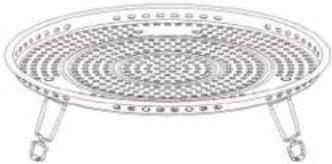
natural_image
Line drawing of a circular fan or tray with three legs and a central grille (no text or symbols)Configurations des accessoires
Cuisson au gril
natural_image
Technical line drawing of a circular perforated metal grate with a central stand (no text or symbols)Cuisson au four
Friture à air
natural_image
Top-down view of a circular fan or vent with concentric rings and a small handle, no visible text or symbols.Rôtissage
natural_image
Simple line drawing of a circular mechanical component with concentric rings (no text or symbols)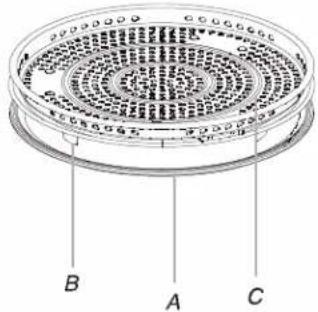
text_image
Technical diagram of a circular component with labeled parts A, B, and C, showing internal structure and mounting points.Grill Bake/Roast Power
text_image
Defrost Air Fry Tone On/Off 88:88 Microwave Cook Timer / Steam Menu Clock Clean Qty Stick Lbs Oz Quantity Weight - lbs Weight - Oz Control Lock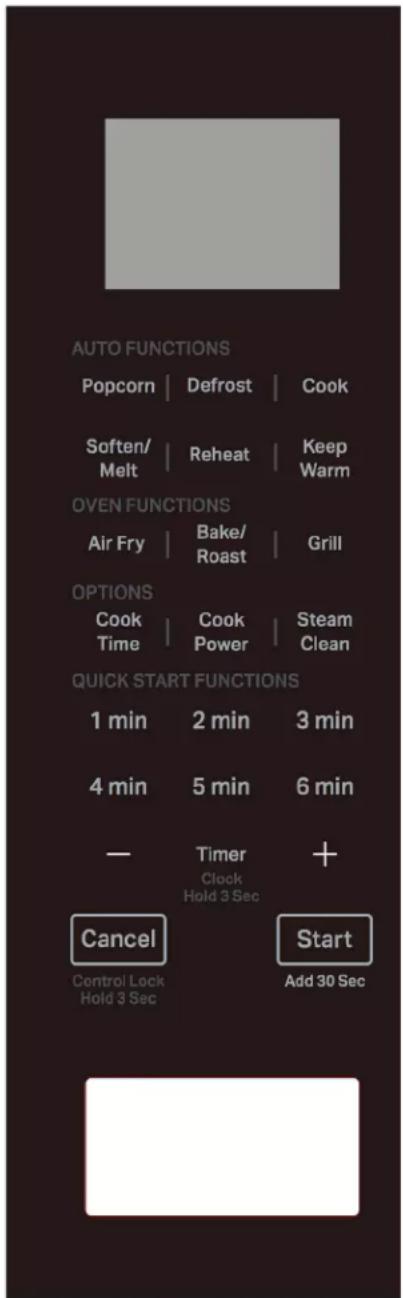
text_image
AUTO FUNCTIONS Popcorn | Defrost | Cook Soften/ Melt | Reheat | Keep Warm OVEN FUNCTIONS Air Fry | Bake/ Roast | Grill OPTIONS Cook Time | Cook Power | Steam Clean QUICK START FUNCTIONS 1 min 2 min 3 min 4 min 5 min 6 min — Timer Clock Hold 3 Sec + Cancel Start Control Lock Hold 3 Sec Add 30 SecAffichage
KitchenAid Brand Home Appliances
Customer eXperience Centre
553 Benson Road
Benton Harbor, MI 49022-2692
Au Canada :
KitchenAid Brand Home Appliances
Customer eXperience Centre
220-6750 Century Ave.
Mississauga, Ontario L5N 0B7
KitchenAid Brand Home Appliances
Customer eXperience Center
553 Benson Road
Benton Harbor, MI 49022-2692
KitchenAid Brand Home Appliances
Customer eXperience Centre
200–6750 Century Ave.
Mississauga, Ontario L5N 0B7
text_image
DA EC F B G L K J I Hnatural_image
Simple concentric oval diagram with no text or symbols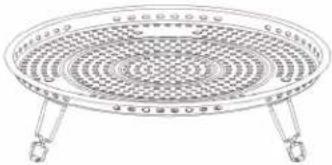
natural_image
Line drawing of a circular fan or tray with three legs and a central grille (no text or symbols)natural_image
Technical line drawing of a circular fan or vent with a central handle and base, no text or symbols present.Baking (Hornear)
Airfrying (Freír sin aceite)
natural_image
Technical line drawing of a circular fan or tray device with internal grid pattern and metal base (no text or symbols)Roasting (Rostizar)
natural_image
Simple line drawing of a circular mechanical component with concentric rings (no text or symbols)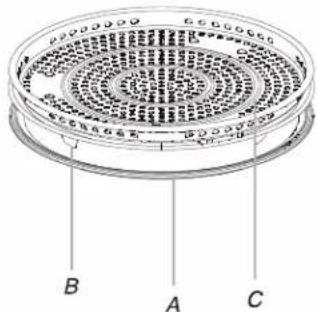
text_image
Technical diagram of a circular component with labeled parts A, B, and C, showing internal structure and mounting points.text_image
Grill Bake/Roast Power Defrost Air Fry Tone On/Off 98:98 Qty Stick Lbs Oz Quantity Weight - lbs Weight - Oz Control Lock Microwave Cook Timer / Steam Menu Clock Clean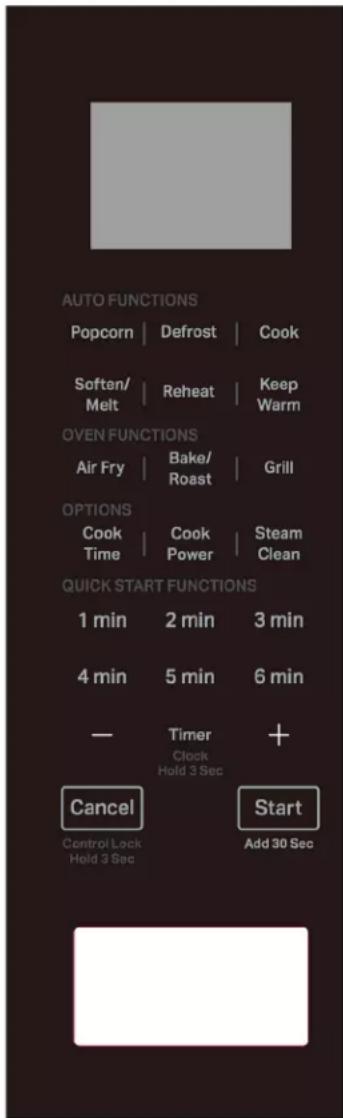
text_image
AUTO FUNCTIONS Popcorn | Defrost | Cook Soften/ Melt | Reheat | Keep Warm OVEN FUNCTIONS Air Fry | Bake/ Roast | Grill OPTIONS Cook Time | Cook Power | Steam Clean QUICK START FUNCTIONS 1 min 2 min 3 min 4 min 5 min 6 min — Timer Clock Hold 3 Sec + Cancel Start Control Lock Hold 3 Sec Add 30 SecPantalla
(Menú Reheat, Cook [Recalentar, Cocinar])
Soften/Melt (Ablandar/Derretir)
KitchenAid Brand Home Appliances
Customer eXperience Centre
553 Benson Road
Benton Harbor, MI 49022-2692
KitchenAid Brand Home Appliances
Customer eXperience Centre
220-6750 Century Ave.
Mississauga, Ontario L5N 0B7
KitchenAid Brand Home Appliances
Customer eXperience Center
553 Benson Road
Benton Harbor, MI 49022-2692
KitchenAid Brand Home Appliances
Customer eXperience Centre
200-6750 Century Ave.
Mississauga, Ontario L5N 0B7