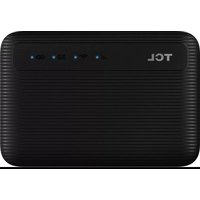
MW63 - Router TCL - Free user manual and instructions
Find the device manual for free MW63 TCL in PDF.



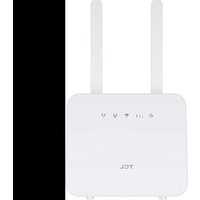
| Product Type | Mobile 4G Router (Mi-Fi) |
| Brand | TCL |
| Model | MW63 |
| Dimensions (approx.) | 105 x 65 x 15 mm |
| Weight (approx.) | 120 g |
| Power supply | 5 V / 1 A via micro USB port |
| Battery type | Rechargeable lithium-ion (non-removable) |
| Battery capacity | 2,600 mAh |
| Standby time | Up to 24 h |
| Supported mobile bands | UMTS B1/B3/B8 (2100/1800/900 MHz), LTE FDD B1/B3/B7/B8/B20 (2100/1800/2600/900/800 MHz), TDD LTE B38 (2600 MHz) |
| Wi-Fi | 802.11 b/g/n/ac, 2.4 GHz and 5 GHz, up to 867 Mbps |
| Ports / Interfaces | 1 micro USB port (charging), 1 nano-SIM slot, 1 reset button |
| Display / Indicators | 4 LEDs: signal, Wi-Fi, SMS, battery |
| Main functions | Wi-Fi hotspot, 4G tethering, SMS support |
| Management / Configuration | Web interface via browser (address indicated on the label) |
| Security | WPA/WPA2 encryption, default Wi-Fi password on the label |
| Maintenance and cleaning | Clean with a dry, soft cloth; do not use abrasive products |
| Spare parts / Repairability | Non-removable battery, no spare parts provided; repair by authorized center |
| General information | CE certified, compliant with directive 2014/53/EU, SAR: 1.56 W/kg (body) / 3.47 W/kg (limbs) |
Frequently Asked Questions - MW63 TCL
User questions about MW63 TCL
0 question about this device. Answer the ones you know or ask your own.
Ask a new question about this device
Download the instructions for your Router in PDF format for free! Find your manual MW63 - TCL and take your electronic device back in hand. On this page are published all the documents necessary for the use of your device. MW63 by TCL.
USER MANUAL MW63 TCL
CJB70M007AEA
V1.0 | MW63VK
Overzicht
Toetsen
①Signaal-led
flowchart
graph LR
    A["Device with battery icon"] --> B["Battery with up/down arrow"]
    B --> C["Device with down arrow"]
    C --> D["Download screen with arrow"]
Opmerking:
Specific Absorption Rate (SAR)
https://www.tcl.com/global/en/communication-privacy-policy
Disclaimer
CJB70M005AAA
V1.0 | MW63VK
Overview
Buttons
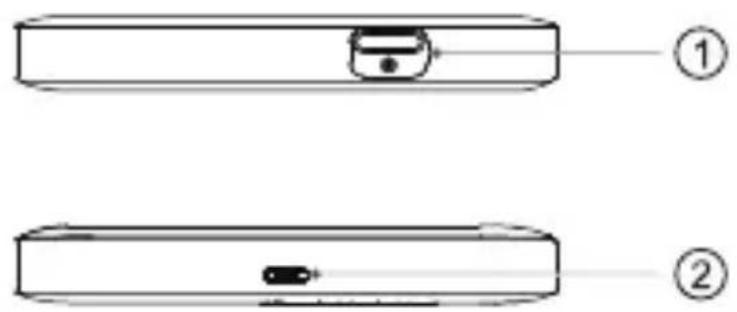
| 1 Power button | Press and hold for 3 seconds to power on or off your device.Press and hold for 10 seconds to reboot your device.NOTE If your device supports LED time-out control and this feature is activated, then short press power button to turn on LED indicators once they are turned off. |
| 2 Micro USB port | Connect to a power supply (5 V/1 A) using the provided USB cable.NOTE Bundled USB cable may not support data transfer. |
EN - 2
Status LED

| 1Signal Indicator | Solid blue: the device is connected to Internet.Solid red: Poor network coverage, SIM card or network service is not availableFlashing blue: the device is registered on the mobile network, but not connected to the Internet. |
| 2 Wi-Fi Indicator | Solid blue: Wi-Fi is enabled.Off: Wi-Fi is off. |
| 3 SMS Indicator | Solid blue: new message(s).Flashing blue: SMS inbox is full.Off: No new message. |
| 4 Battery Indicator | Solid blue: battery level: 21% - 100%Flashing blue: the device is chargingSolid red: battery level is low. |
②

| 1 Nano SIM card slot | Insert a nano SIM card into the slot. |
| 2 Reset button Use | a paperclip to press the button for 3 seconds to reset the device. |
EN - 4
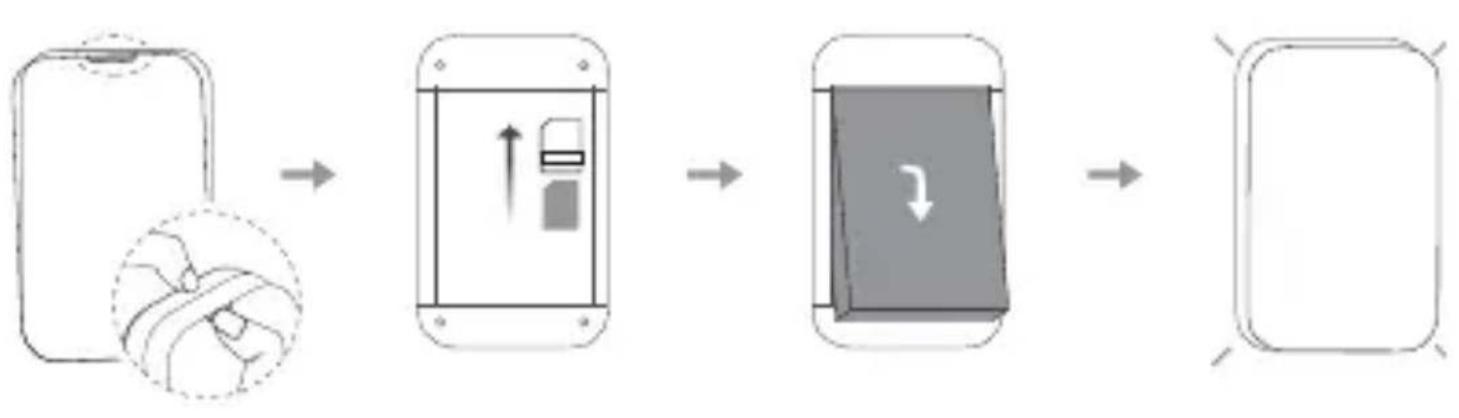
Insert the SIM Card & Battery
flowchart
graph LR
    A["Device with battery icon"] --> B["Battery with up/down arrow"]
    B --> C["Device with down arrow"]
    C --> D["Download screen with arrow"]
Note:
- Before inserting your SIM and battery, make a note of the default SSID and Wi-Fi password on the label inside your LinkZone.
- Heed the orientation of your SIM card. Make sure you align the SIM card with the slot and slide it into the slot until it sits properly.
Power On
Press and hold the power button for 3 seconds to turn on your LinkZone.

flowchart
graph TD
    A["3s"] --> B["End"]
    C["• ⊕ • ⊖ • △ • F"] --> D["End"]
EN - 6
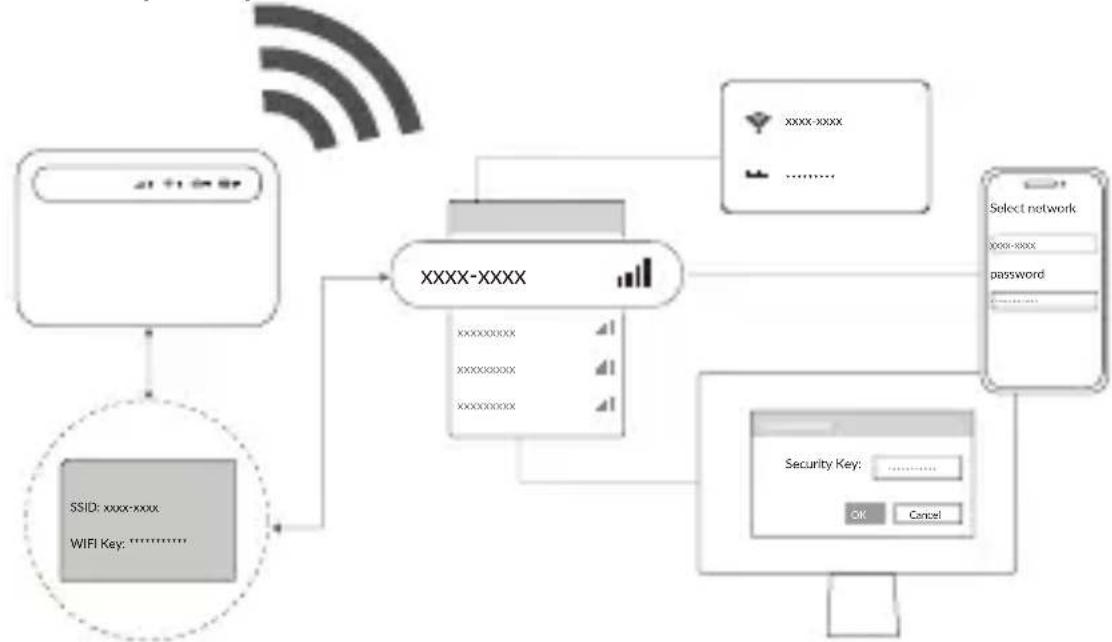
Connect to the Network
-
Make sure you've made a note of the Wi-Fi name (SSID) and password on the label underneath the battery.
-
Open the connection settings of the device to be connected, such as a PC, tablet, or smartphone, search for the Wi-Fi name (SSID) and click on it to connect to the Wi-Fi network. Enter the password from the label when prompted.
flowchart
graph TD
    A["WiFi Key: ⋯⋯⋯⋯"] --> B["XXXX-XXXX"]
    C["SSID: xxxx-xxxx"] --> B
    D["Select network"] --> E["xxxx-xxxx"]
    E --> F["password ⋯⋯⋯⋯"]
    B --> G["xxxxxxx"]
    B --> H["xxxxxxxxx"]
    B --> I["xxxxxxxxx"]
    B --> J["xxxxxxxxx"]
    B --> K["xxxxxxx"]
    B --> L["xxxxxxx"]
    B --> M["xxxxxxx"]
    B --> N["xxxxxxx"]
    B --> O["xxxxxxx"]
    B --> P["xxxxxxx"]
    B --> Q["xxxxxxx"]
    B --> R["xxxxxxx"]
    B --> S["xxxxxxx"]
    B --> T["xxxxxxx"]
    B --> U["xxxxxxx"]
    B --> V["xxxxxxx"]
    B --> W["xxxxxxx"]
    B --> X["xxxxxxx"]
    B --> Y["xxxxxxx"]
    B --> Z["xxxxxxx"]
    B --> AA["xxxxxxx"]
    B --> AB["xxxxxxx"]
    B --> AC["xxxxxxx"]
    B --> AD["xxxxxxx"]
    B --> AE["xxxxxxx"]
    B --> AF["xxxxxxx"]
    B --> AG["xxxxxxx"]
    B --> AH["xxxxxxx"]
    B --> AI["xxxxxxx"]
    B --> AJ["xxxxxxx"]
    B --> AK["xxxxxxx"]
    B --> AL["xxxxxxx"]
    B --> AM["xxxxxxx"]
    B --> AN["xxxxxxx"]
    B --> AO["xxxxxxx"]
    B --> AP["xxxxxxx"]
    B --> AQ["xxxxxxx"]
    B --> AR["xxxxxxx"]
    B --> AS["xxxxxxx"]
    B --> AT["xxxxxxx"]
    B --> AU["xxxxxxx"]
    B --> AV["xxxxxxx"]
    B --> AW["xxxxxxx"]
    B --> AX["xxxxxxx"]
    B --> AY["xxxxxxx"]
    B --> AZ["xxxxxxx"]
    B --> BA["xxxxxxx"]
    B --> BB["xxxxxxx"]
    B --> BC["xxxxxxx"]
    B --> BD["xxxxxxx"]
    B --> BE["xxxxxxx"]
    B --> BF["xxxxxxx"]
    B --> BG["xxxxxxx"]
    B --> BH["xxxxxxx"]
    B --> BI["xxxxxxx"]
    B --> BJ["xxxxxxx"]
    B --> BK["xxxxxxx"]
    B --> BL["xxxxxxx"]
    B --> BM["xxxxxxx"]
    B --> BN["xxxxxxx"]
    B --> BO["xxxxxxx"]
    B --> BP["xxxxxxx"]
    B --> BQ["xxxxxxx"]
    B --> BR["xxxxxxx"]
    B --> BS["xxxxxxx"]
    B --> BT["xxxxxxx"]
    B --> BU["xxxxxxx"]
    B --> BV["xxxxxxx"]
    B --> BW["xxxxxxx"]
    B --> BX["xxxxxxx"]
    B --> BY["xxxxxxx"]
    B --> BZ["xxxxxxx"]
    B --> CA["xxxxxxx"]
    B --> CB["xxxxxxx"]
    B --> CC["xxxxxxx"]
    B --> CD["xxxxxxx"]
    B --> CE["xxxxxxx"]
    B --> CF["xxxxxxx"]
    B --> CG["xxxxxxx"]
    B --> CH["xxxxxxx"]
    B --> CI["xxxxxxx"]
    B --> CJ["xxxxxxx"]
    B --> CK["xxxxxxx"]
EN - 7
Configure the Network
Note: For the default login information, refer to the label inside your LinkZone.
To configure the LINKZONE Wi-Fi network:
- Open a web browser on the device connected to the LINKZONE network.
- Go to the login website and follow the on-screen instructions. The login website can be found on the label underneath the battery.
Note: For a full user manual, check the Help section on the login website.
Safety and Use
Read all the safety information before using your device. Failure to follow these safety instructions could result in injury, or damage to your device or other property. The manufacturer disclaims any liability for damage, which may result as a consequence of improper use or use contrary to the instructions contained herein.
- Do not use the device in areas where wireless devices are prohibited.
- When the device is switched on, it should be kept at least 15 cm from any medical device such as a pacemaker, a hearing aid, or an insulin pump. Consult your physician and medical device manufacturer for information specific to your medical device.
- Do not let children use the device and its accessories without supervision.
- Always handle your device with care, and keep it in a clean and dust-free place.
- Do not attempt to repair the device yourself.
- Do not drop, throw, or bend your device.
- Do not dispose of the device and its accessories in a fire.
Power adapter
Charge your device with the supplied USB cable. Only charge with an adapter that is compliant with the applicable international and regional safety standards. The adapter shall be CE-approved. Using other adapters could cause damage to the device or pose a risk of injury or death. Keep the adapter in a well-ventilated area when it is plugged into an electrical outlet. Don't use damaged power adapters.
| Recommended adapter specifications | |
| Model | UC11 |
| Input voltage/AC frequency | 100~240 V, 50/60 Hz |
| Output voltage/current/power | 5.0 V/1.0 A/5.0 W |
| Average active efficiency | 73.8% |
| No-load power consumption | 0.08W |
EN - 10
Battery
CAUTION: RISK OF EXPLOSION IF BATTERY IS REPLACED BY AN INCORRECT TYPE. DISPOSE OF USED BATTERIES ACCORDING TO THE INSTRUCTIONS.
In accordance with air regulations, the battery of your product is not fully charged. Please charge it first.
- Do not attempt to open the battery (due to the risk of toxic fumes and burns).
- Do not puncture, disassemble, or short circuit the battery.
- The battery must be recycled or disposed of separately from household waste. Dispose of batteries according to your local environmental laws and guidelines.
- Replace the battery only with another qualified battery. Use of an unqualified battery may present a risk of fire, explosion, leakage, or other hazard.
- Do not use damaged battery.
Operating environment
Your device is designed to work best in ambient temperatures between 0 °C and 40 °C (32 °F and 104 °F), and should be stored in ambient temperatures between -10 °C and 70 °C (14 °F and 158 °F). Your device may malfunction if operated or stored outside of these temperature ranges. Avoid exposing the device to dramatic changes in temperature or humidity.
Compliance Information
Specific Absorption Rate (SAR)
This device meets international guidelines for exposure to radio waves.
The radio wave exposure guidelines use a unit of measurement known as the Specific Absorption Rate, or SAR. The SAR limit for mobile devices is 2 W/kg for body, and 4 W/kg for limb.
EN - 12
Maximum SAR for this model and conditions under which it was recorded
| Body-worn SAR (5 mm) | UMTS 1800MHz + Wi-Fi 2.4GHz | 1.56 W/kg |
| Limb SAR (0 mm) | LTE Band 7 + Wi-Fi 2.4GHz | 3.47 W/kg |
Frequency band
This product operates with the following frequency bands and maximum radio-frequency power:
| Frequency band Maximum radio-frequency power | |
| UMTS Band 1 (2100MHz) 24.5 dBm | |
| UMTS Band 3 (1800MHz) 24.5 dBm | |
| UMTS Band 8 (900MHz) 24.0 dBm | |
| LTE FDD B1/3/7/8/20(2100/1800/2600/900/800 MHz) | 23.5 dBm |
EN - 13
LTE TDD B38 (2600 MHz) 23.5 dBm
802.11 b/g/n 2.4GHz 19.43 dBm
802.11 a/n/ac 5150 - 5350 MHz 19.21 dBm
802.11 a/n/ac 5470 - 5725 MHz 19.04 dBm
802.11 a/n/ac 5725 - 5875 MHz 13.05 dBm
Restrictions:
This equipment may be operated in all European countries. The 5150-5250 MHz ^1 of Wi-Fi 5GHz can be used indoors and outdoors only when the equipment is not attached to a fixed installation or to the external body of road vehicles, a fixed infrastructure or a fixed outdoor antenna. The 5250-5350 MHz ^1 of Wi-Fi 5GHz can be used inside buildings only. The 5470-5725 MHz ^1 band of Wi-Fi 5GHz can't be used in road vehicles, trains, aircraft or UAS (Unmanned Aircraft System) scenarios for the following countries:
 | BE BG CZ DK DE EE IE EL ES | ||||||||
| FR | HR | IT | CY | LV | LT | LU | HU | MT | |
| NL AT PL PT RO SI SK FI SE | |||||||||
| NO IS LI CH TR UK | (NI) | ||||||||

EN - 15
Regulatory compliance
CE
Hereby, TCL Communication Ltd. declares that the radio equipment type TCL MW63VK is in compliance with the essential requirements and other relevant provisions of Directive 2014/53/EU. The full text of the EU declaration of conformity is available at: https://www.tcl.com/global/en/service-support-mobile/eu-doc.html
Waste disposal and recycling
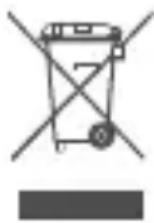
The device, accessory and battery must be disposed of in accordance with locally applicable environmental regulations.
This symbol on your device, the battery, and the accessories means that these products must be taken to:
- Municipal waste disposal centres with specific bins.
• Collection bins at points of sale.
They will then be recycled, preventing substances being disposed of in the environment.
In European Union countries: These collection points are accessible free of charge. All products with this sign must be brought to these collection points.
In non-European Union jurisdictions: Items of equipment with this symbol are not to be thrown into ordinary bins if your jurisdiction or your region has suitable recycling and collection facilities; instead they are to be taken to collection points for recycling.
General information
| Website www.tcl.com/global | |
| Hotline | https://www.tcl.com/global/en/mobile-support/hotline&service-center.html |
| Full user manual | Check the Help section on the login website. |
| Manufacturer TCL Communication Ltd. | |
| Address | 5/F, Building 22E, 22 Science Park East Avenue, Hong Kong Science Park, Shatin, NT, Hong Kong |
Software update
The connection costs associated with finding, downloading and installing software updates for your mobile device's operating system will vary depending on the offer you have subscribed to from your
EN - 18
telecommunications operator. Updates will be downloaded automatically but their installation will require your approval. Refusing or forgetting to install an update can affect your device's performance and, in the event of a security update, expose your device to security vulnerabilities. For more information about software update, please go to tcl.com
Privacy statement of device usage
Any personal data you shared with TCL Communication Ltd. will be handled in accordance with our Privacy Notice. You can check our Privacy Notice by visiting our website:
https://www.tcl.com/global/en/communication-privacy-policy
Disclaimer
There may be certain differences between the user manual description and the device's operation, depending on the software release of your device or specific operator services. TCL Communication Ltd. shall not be
EN - 19
held legally responsible for such differences, if any, nor for their potential consequences, which responsibility shall be borne by the operator exclusively.
Limited warranty
As the consumer You may have legal (statutory) rights that are in addition to those set out in this Limited Warranty offered by Manufacturer voluntarily, such as the consumer laws of the country in which You live (“Consumer Rights”). This Limited Warranty sets out certain situations when the Manufacturer will, or will not, provide a remedy for the TCL device. This Limited Warranty does not limit or exclude any of your Consumer Rights relating to the TCL device.
For more information about limited warranty, please go to
https://www.tcl.com/global/en/warranty
In case of any defect of your device which prevents you from normal use thereof, you must immediately inform your vendor and present your device with your proof of purchase.
TCL
| Site Web www.tcl.com/global | |
| Service client | https://www.tcl.com/global/en/mobile-support/hotline&service-center.html |
| Fabricant TCL Communication Ltd. | |
| Adresse | 5/F, Building 22E, 22 Science Park East Avenue, Hong Kong Science Park, Shatin, NT, Hong Kong |
- Overzicht
- Toetsen
- Opmerking:
- Specific Absorption Rate (SAR)
- Disclaimer
- Overview
- Buttons
- Insert the SIM Card & Battery
- Note:
- Power On
- Connect to the Network
- Configure the Network
- Safety and Use
- Power adapter
- Battery
- Operating environment
- Compliance Information
- Frequency band
- Restrictions:
- Regulatory compliance
- Waste disposal and recycling
- General information
- Software update
- Privacy statement of device usage
- Limited warranty
- TCL
Brand : TCL
Model : MW63
Category : Router