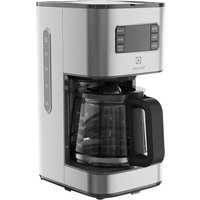
USER MANUAL Create 5 E5CM1-6ST ELECTROLUX
natural_image
Technical line drawing of a conical funnel with internal blades and a handle, labeled 'E' (no text or symbols on the diagram itself)
natural_image
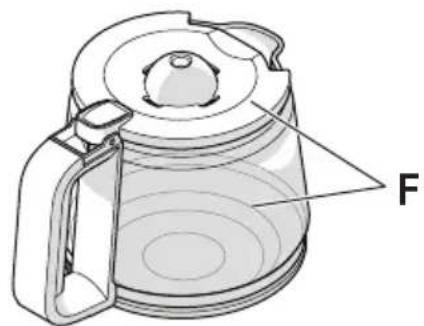
Technical line drawing of a coffee maker with labeled component 'F' (no text or symbols beyond label)

natural_image
Diagram of a medical or anatomical structure with a highlighted circular region, no text or symbols present
natural_image
Illustration of a coffee maker with a crossed-out rectangular block nearby (no text or symbols)
natural_image
Illustration of kitchen utensils including a faucet, kettle, and filter (no text or symbols)
electrolux.com/shop
 |  | [6856] |  | [2726] |
| Premium Coffee DescalerRef: EPD1PNC: 900923302 | Premium Cleaning TabletsRef: ECTPNC: 900168167 | Coffee machine water filterRef: MCFR3PNC: 900923618 | Pure AdvantageTM water filterRef: EPAF3PNC: 900167290 | Pure AdvantageTM water filterRef: EPAF6PNC: 900167291 |
CONTENTS
| ENGLISH 4-7 | HRVATSKI 30-32 | SRPSKI | 55-57 |
| FRANÇAIS 8-10 | MAGYAR 33-35 | PYCCKIЙ | 58-60 |
| عربي 11-13 | ITALIANO 36-39 | SVENSKA | 61-63 |
| ČEŠTINA 14-16 | LIETUVIŠKAI 40-42 | SLOVENŠČINA | 64-66 |
| DEUTSCH 17-20 | LATVIEŠU 43-45 | SLOVENČINA | 67-69 |
| DANSK 21-23 | NORSK 46-48 | TŸRKÇE | 70-73 |
| EESTI 24-26 | POLSKI 49-51 | УКРАÏНСЬКА | 74-76 |
| SUOMI 27-29 | ROMÂNĂ 52-54 | | |
WE'RE THINKING OF YOU
Thank you for purchasing an Electrolux appliance. You've chosen a product that brings with it decades of professional experience and innovation. Ingenious and stylish, it has been designed with you in mind. So whenever you use it, you can be safe in the knowledge that you'll get great results every time.
Welcome to Electrolux.
Visit our website to:

Get usage advice, brochures, trouble shooter, service information: www.electrolux.com

Register your product for better service: www.electrolux.com/productregistration

Buy accessories and consumables for your appliance: www.electrolux.com/shop
CUSTOMER CARE AND SERVICE
When contacting Service, ensure that you have the following data available:
- Model number
- PNC number
- Serial number
The information can be found on the rating plate.
ENGLISH
Thank you for choosing an Electrolux product. In order to ensure the best results, always use original Electrolux accessories and spare parts. They have been designed especially for your product. This product is designed with the environment in mind. All plastic parts are marked for recycling purposes.
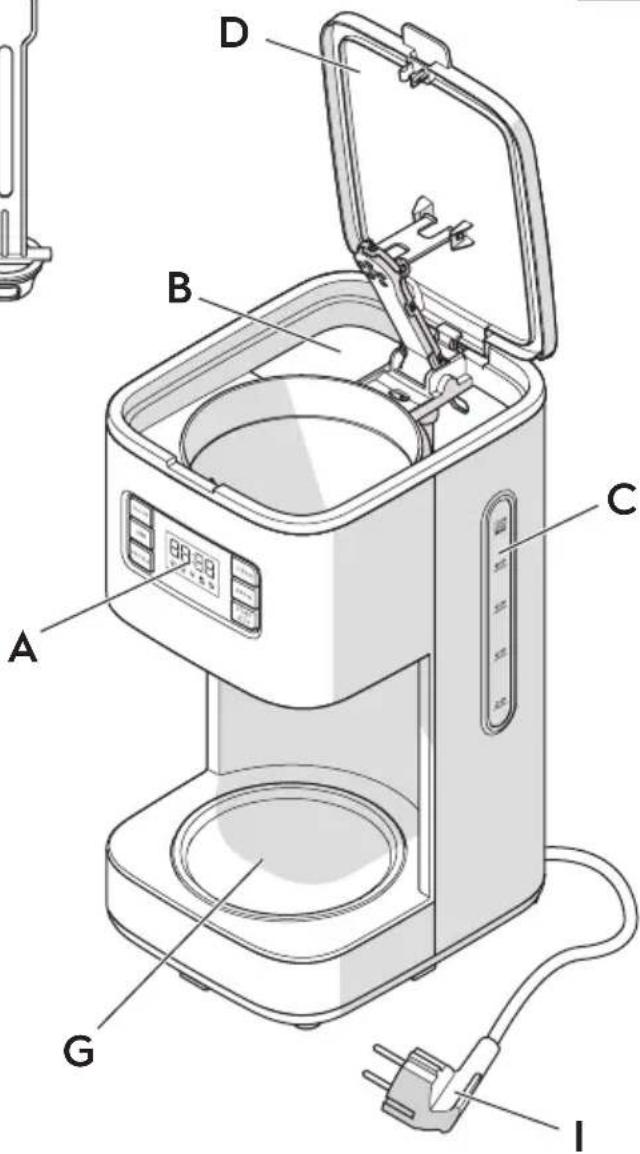
COMPONENTS (Picture page 2)
A. Control panel
B. Water tank
C. Water level indicator
D. Hinged lid
E. Filter holder with anti-drip valve
F. Coffee jug and jug lid
G. Warming plate
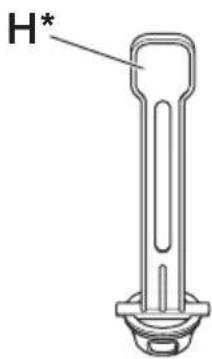
H. Electrolux PureAdvantage ^TM water filter*
I. Power cord and plug
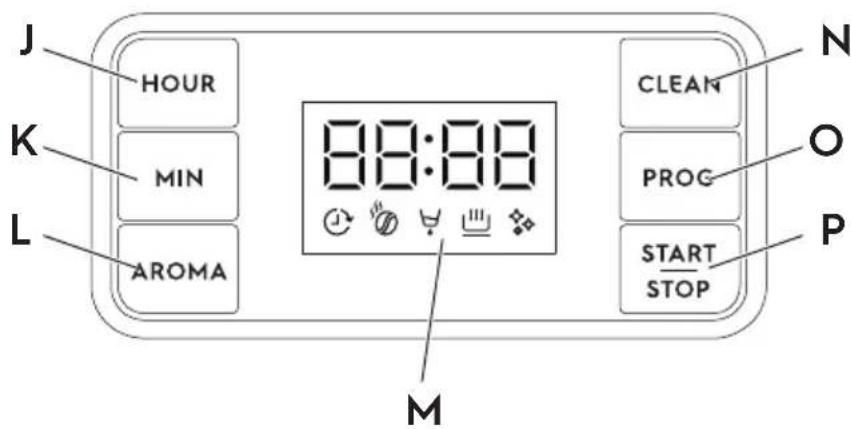
J. Hour button
K. Minute button
L. Aroma button
M. Display
N. Clean button
O. Program button
P. Start/stop button
* available in certain models only
SAFETY ADVICE
Read the following instructions carefully before using the appliance for the first time.
- This appliance can be used by children aged from 8 years and above and persons with reduced physical, sensory or mental capabilities or lack of experience and knowledge if they have been given supervision or instruction concerning use of the appliance in a safe way and understand the hazards involved.
- Appliances can be used by persons with reduced physical, sensory or mental capabilities or lack of experience and knowledge if they have been given supervision or instruction concerning use of the appliance in a safe way and if they understand the hazards involved.
• Children shall not play with the appliance.
- Cleaning and user maintenance shall not be made by children unless they are older than 8 and supervised.
- Keep the appliance and its cord out of reach of children less than 8 years old.
- The appliance may only be connected to a power supply whose voltage and frequency comply with the specifications on the rating plate!
- Never use or pick up the appliance if – the supply cord is damaged, – the housing is damaged.
- The appliance must only be connected to an earthed socket. If necessary, an extension cable suitable for 10 A can be used.
- If the appliance or the supply cord is damaged, it must be replaced by the manufacturer, its service agent or similarly qualified person, in order to avoid hazard.
• Always place the appliance on a flat, level surface.
- Never leave the appliance unattended while connected to the supply mains.
- The appliance must be switched off and the mains plug withdrawn each time after use, before cleaning and maintenance.
- The appliance and accessories become hot during operation. Use only designated handles and knobs. Allow to cool down before cleaning or storage.
- Do not immerse the appliance in water or any other liquid.
- Do not use or place the appliance on a hot surface or near source of heat.
- Warning: Avoid spillage on the connector.
- Attention: The heating element surface is subject to residual heat after use.
- The mains cable must not come into contact with any hot parts of the appliance.
- This appliance is intended for domestic use only. The manufacturer cannot accept any liability for possible damage caused by improper or incorrect use.
- Do not exceed the maximum filling volume as indicated on the appliance, as there is risk of water tank water overflow from the back hole.
- Never operate appliance with open lid.
• Power consumption in standby:0.5W
• Maximum time needed for the equipment to reach automatically the applicable low power mode: 40Min
This appliances is intended to be used in household and similar applications such as:
- staff kitchen areas in shops, offices and other working environments;
- farm houses;
- by clients in hotels, motels and other residential type environments;
- bed and breakfast type environments.
The surface with symbol Caution, hot surface are liable to get hot during use.
GETTING STARTED (Picture page 3)
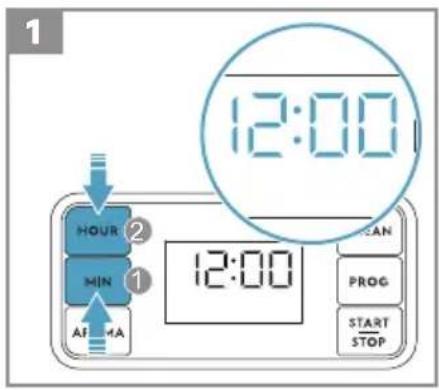
1 Setting/changing time. Plug in the machine, the display will flash the initial time showing: 12:00. Press the HOUR and MIN button to set the required time. Time can only be changed under standby mode, cannot be changed under program/working mode. Simply press the HOUR and MIN button, the time changes at once. Note: if you unplug the machine, the time needs so be set again.
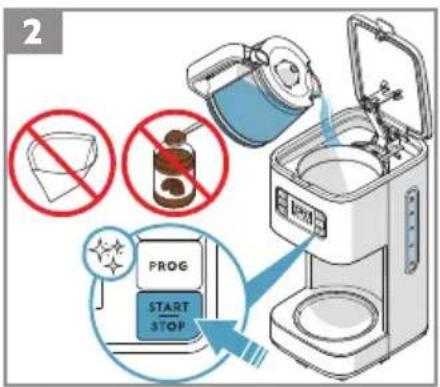
2 Place the machine on a flat surface. When starting the machine for the first time, fill the tank with cold water. Start the machine with the START/STOP button. Let a full tank of water pass through the machine once or twice to clean it, without using paper filter or coffee.
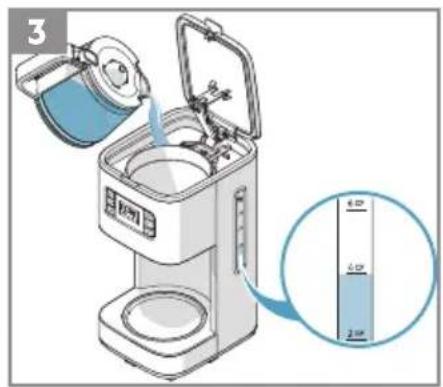
3 Making coffee: open the lid and fill the water tank with fresh cold water up to the desired level. There is a water level indicator on the water tank and on the coffee jug.
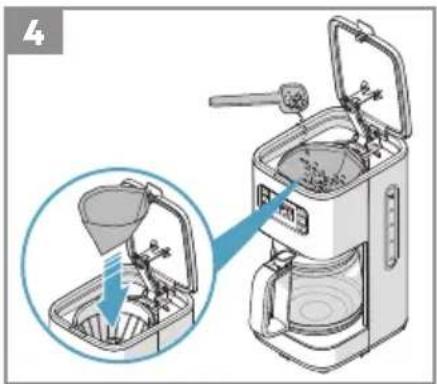
4 Insert a size 1x4 paper filter in the filter holder and fill it with ground coffee. For average strong coffee 6-7 g coffee powder per cup is sufficient. Close the water tank lid and place the jug back (complete with lid).
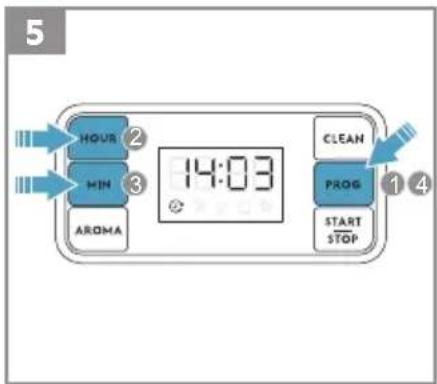
5 Setting/changing delay time. Press PROG button, the display will flash the initial time showing: 12:00 and a clock icon. Set hours by pressing the HOUR button. Then set minutes by pressing the MIN button. Press the PROG button again to confirm, the display will stop flashing time and clock icon. Clock icon is constant on and the display will go back to show the current time immediately. Note: If user don't press HOUR or MIN or PROG button again, the display will go back to show the current time after 5 seconds, and setting delay time is cancelled, clock icon will disappear.
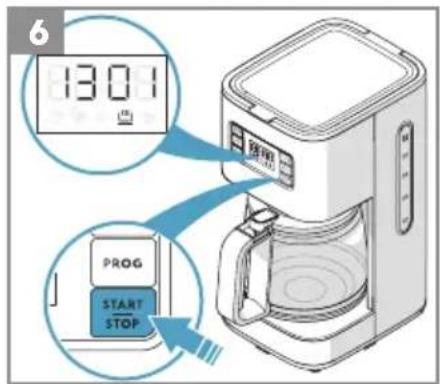
6 Start the machine with the START/STOP button. The power indicator light will come on and hot water will flow into the filter. If the machine is not turned off manually, the Safety Auto-Off function turns it off after 40 minutes.
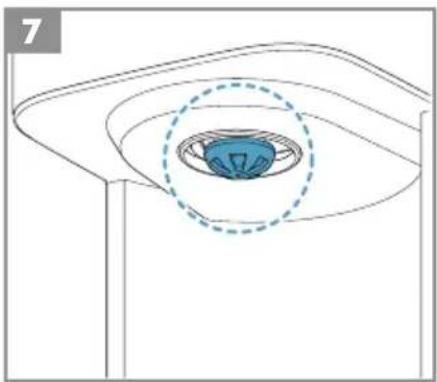
7 - If the jug is removed, the filter valve prevents coffee from dripping onto the warming plate. (While preparing coffee, the jug must not be removed for longer than 30 seconds or the filter will overflow.)
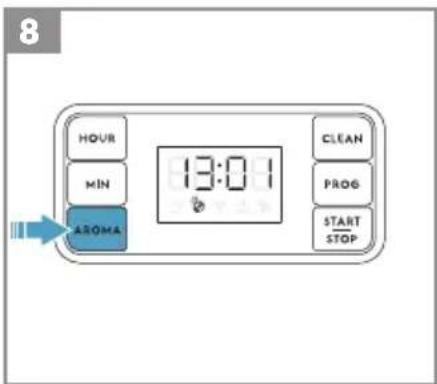
8 - The Aroma Selector extends the brewing time to maximize the flavour extraction and get a stronger coffee fee for a small number of cups (normally less than 6).
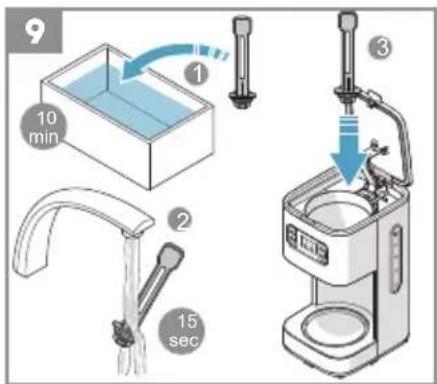
9 The machine is compatible with Electrolux PureAdvantage ^TM water filter. If you choose to use the water filter, it's recommended to change filter after 60 brew cycles. Before using the new filter, place the new filter into a container of clean cool water, and let soak for 10 minutes. Then rinse the filter for 10 to 15 seconds under the running tap water.
CLEANING AND CARE
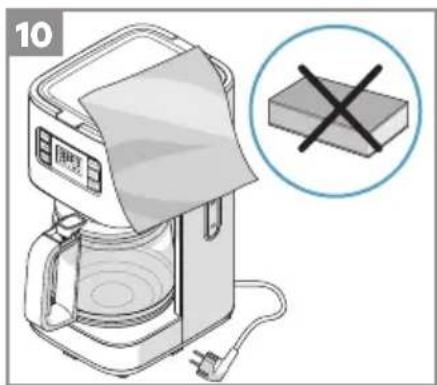
10 Turn the machine off and unplug the power cord. Wipe all outer surfaces with a damp cloth. Coffee jug and jug lid are dishwasher proof. Never use caustic or abrasive cleaners, and never immerse the machine in liquid!
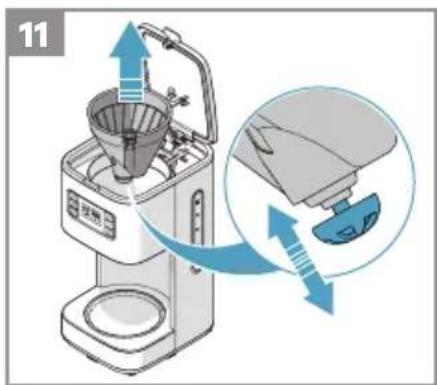
11 To clean the filter holder, lift it up by the handgrip and remove the filter holder. To clean the filter valve thoroughly, push it several times while it is being rinsed. The filter holder can also be washed in the dishwasher.
DECALCIFYING
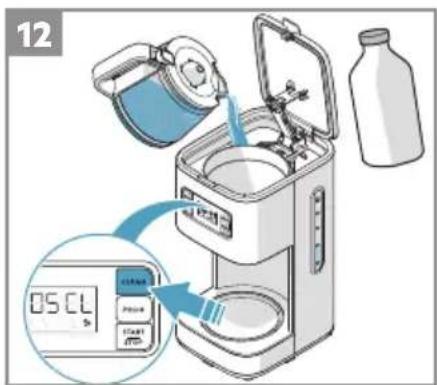
12 The display will show "DSCL" after 90 brew cycles. It's when we recommend descaling. Use only an environmentally friendly descaling agent and always follow the manufacturer's instructions.
a. First fill the water tank with water and then add the descaling agent (or fill in water and vinegar 1:1).
b. Place the coffee jug with the lid on the warming plate.
c. Press CLEAN button to start descaling process.
d. When it completes, START/STOP will turn off automatically.
e. Brew clean water 2-3 times before brewing coffee
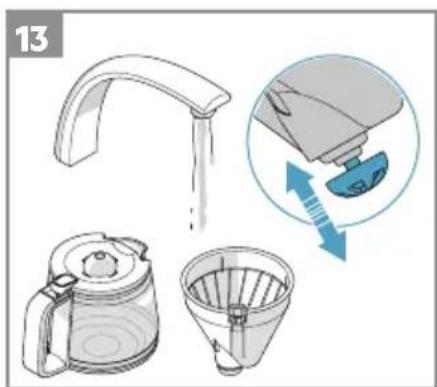
13 Rinse the coffee jug, jug lid and filter insert thoroughly under running water. Activate the anti-drip valve several times as it is rinsed.
Enjoy your new Electrolux product!
ENVIRONMENTAL CONCERNS
Recycle materials with the symbol 📄. Put the packaging in relevant containers to recycle it. Help protect the environment and human health by recycling waste of electrical and electronic appliances.
Do not dispose appliances marked with the symbol 📄 with the household waste. Return the product to your local recycling facility or contact your municipal office.
① For Switzerland:
Where should you take your old equipment?
Anywhere that sells new equipment or hand it in to official SENS collection points or official SENS recycling firms. The list of official SENS collection points can be found at www.erecycling.chseconds
Electrolux reserves the right to change products, information and specifications without notice.
FRANÇAIS
PRISE EN MAIN (IMAGE PAGE 3)
* available in certain models only
OHUTUSTEAVE
AVVIO (IMMAGINE A PAGINA 3)
COMPONENTĂ (IMAGINEA DE LA PAGINA 2)
A. Panou de comandă
B. Rezervor apă
RECOMANDARI PENTRU SIGURANTĂ
SĂ ÎNCEPEM (IMAGINEA LA PAGINA 3)
BİLEŞEN (RESIM SAYFA 2)
A. Kontrol paneli
B. Su tanki
ELECTROLUX APPLIANCES AB
BUSINESS SECTOR EMA-EMEA (SEE)
ST GÖRANSGATAN 143
SE-105 45 STOCKHOLM SWEDEN
TEL: +46 (8) 738 60 00
FAX: +46 (8) 738 63 35
www.electrolux.com
ithalatci:
Electrolux Dayanıklı Tüketim
Mamulleri San. ve Tic. AŞ.
TR-34435 Taksim-Beyoğlu-İstanbul
natural_image
Abstract geometric design with three white petal-like shapes on a black background (no text or symbols)
Share more of our thinking at www.electrolux.com
electrolux.com/shop

Electrolux Floor Care AB
S:t Göransgatan 143
S-105 45 Stockholm
Sweden