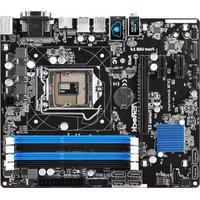
Z97M Anniversary - Motherboard ASROCK - Free user manual and instructions
Find the device manual for free Z97M Anniversary ASROCK in PDF.


User questions about Z97M Anniversary ASROCK
0 question about this device. Answer the ones you know or ask your own.
Ask a new question about this device
Download the instructions for your Motherboard in PDF format for free! Find your manual Z97M Anniversary - ASROCK and take your electronic device back in hand. On this page are published all the documents necessary for the use of your device. Z97M Anniversary by ASROCK.
USER MANUAL Z97M Anniversary ASROCK
Copyright ©2014 ASRock INC. All rights reserved.
Copyright Notice:
No part of this documentation may be reproduced, transcribed, transmitted, or translated in any language, in any form or by any means, except duplication of documentation by the purchaser for backup purpose, without written consent of ASRock Inc.
Products and corporate names appearing in this documentation may or may not be registered trademarks or copyrights of their respective companies, and are used only for identification or explanation and to the owners' benefit, without intent to infringe.
Disclaimer:
Specifications and information contained in this documentation are furnished for informational use only and subject to change without notice, and should not be constructed as a commitment by ASRock. ASRock assumes no responsibility for any errors or omissions that may appear in this documentation.
With respect to the contents of this documentation, ASRock does not provide warranty of any kind, either expressed or implied, including but not limited to the implied warranties or conditions of merchantability or fitness for a particular purpose.
In no event shall ASRock, its directors, officers, employees, or agents be liable for any indirect, special, incidental, or consequential damages (including damages for loss of profits, loss of business, loss of data, interruption of business and the like), even if ASRock has been advised of the possibility of such damages arising from any defect or error in the documentation or product.

This device complies with Part 15 of the FCC Rules. Operation is subject to the following two conditions:
(1) this device may not cause harmful interference, and
(2) this device must accept any interference received, including interference that may cause undesired operation.
CALIFORNIA, USA ONLY
The Lithium battery adopted on this motherboard contains Perchlorate, a toxic substance controlled in Perchlorate Best Management Practices (BMP) regulations passed by the California Legislature. When you discard the Lithium battery in California, USA, please follow the related regulations in advance.
"Perchlorate Material-special handling may apply, see www.dtsc.ca.gov/hazardouswaste/perchlorate"
ASRock Website: http://www.asrock.com
The terms HDMI^※ and HDMI High-Definition Multimedia Interface, and the HDMI logo are trademarks or registered trademarks of HDMI Licensing LLC in the United States and other countries.
HOMI
HIGH-DEFINITION MULTIMEDIA INTERFACE
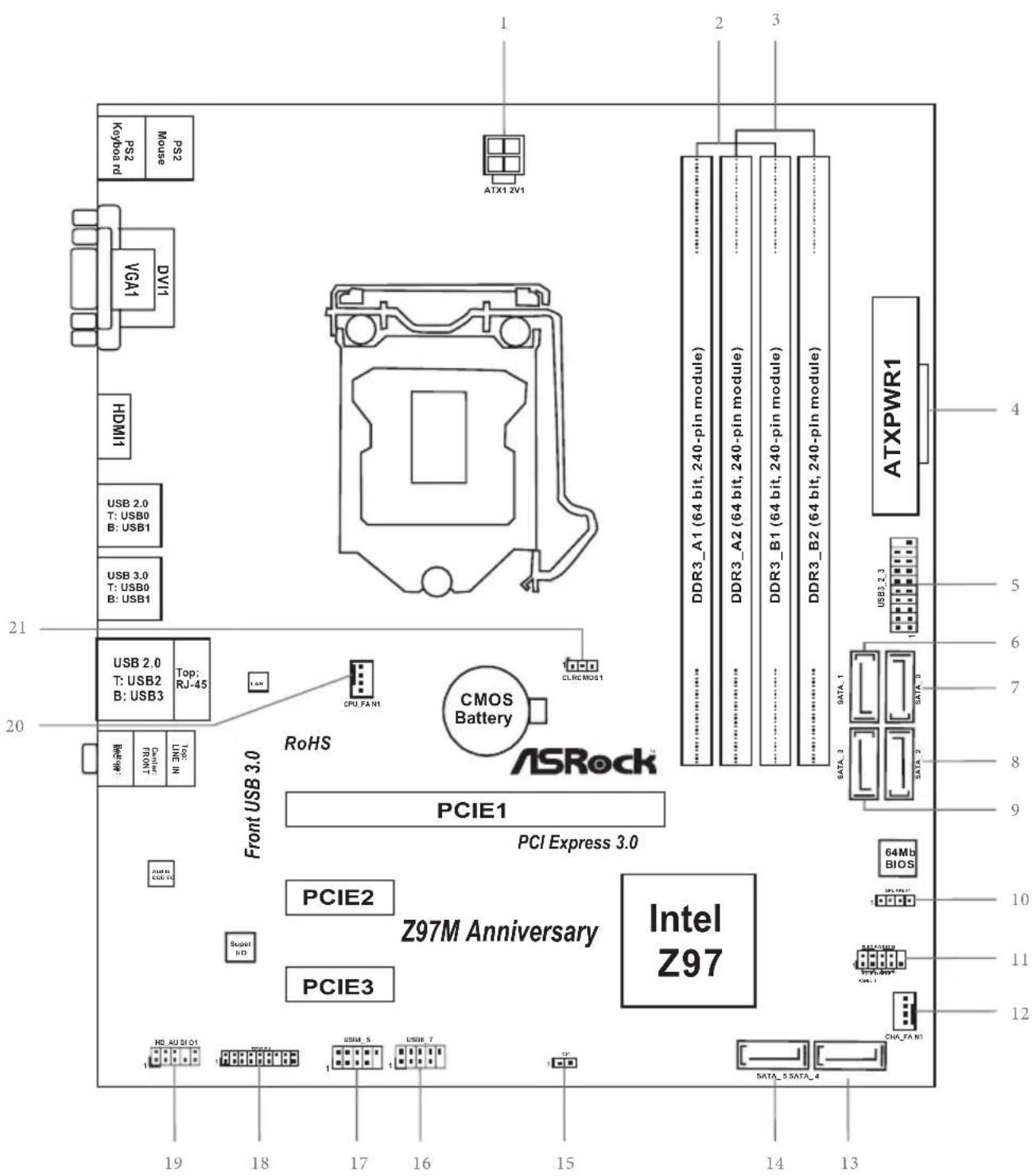
Motherboard Layout
No.Description
1ATX 12V Power Connector (ATX12V1)
2 2 x 240-pin DDR3 DIMM Slots (DDR3_A1, DDR3_B1)
32x240-pin DDR3 DIMM Slots (DDR3_A2, DDR3_B2)
4 ATX Power Connector (ATXPWR1)
5 USB 3.0 Header (USB3_2_3)
6 SATA3 Connector (SATA_1)
7 SATA3 Connector (SATA_0)
8 SATA3 Connector (SATA_2)
9 SATA3 Connector (SATA_3)
10 Chassis Speaker Header (SPEAKER1)
11 System Panel Header (PANEL1)
12 Chassis Fan Connector (CHA_FAN1)
13 SATA3 Connector (SATA_4)
14 SATA3 Connector (SATA_5)
15 Chassis Intrusion Header (CI1)
16 USB 2.0 Header (USB6_7)
17 USB 2.0 Header (USB4_5)
18 TPM Header (TPMS1)
19 Front Panel Audio Header (HD_AUDIO1)
20 CPU Fan Connector (CPU_FAN1)
21 Clear CMOS Jumper (CLRCMOS1)
I/O Panel
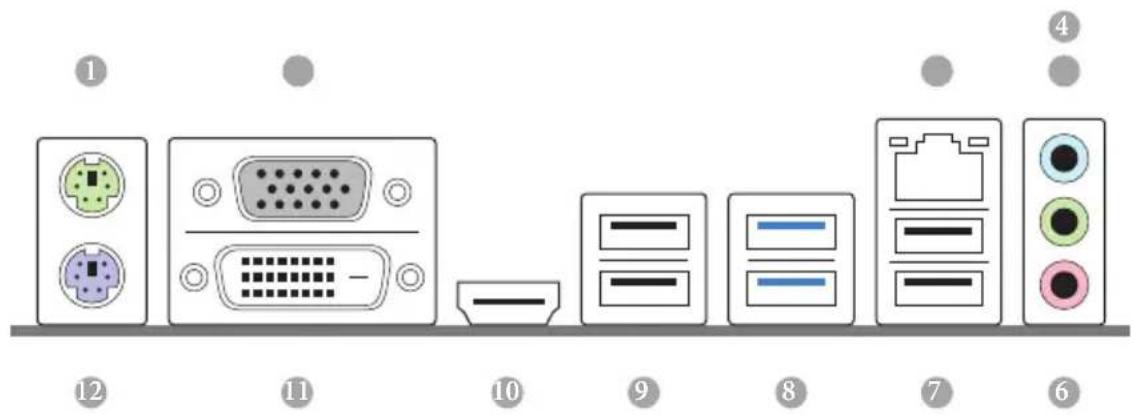
No. Description No. Description
1 PS/2 Mouse Port 7 USB 2.0 Ports (USB23)
2 D-Sub Port 8 USB 3.0 Ports (USB3_01)
3 LAN RJ-45 Port* 9 USB 2.0 Ports (USB01)
4 Line In (Light Blue) 10 HDMI Port
5 Front Speaker (Lime) 11 DVI-D Port
6 Microphone (Pink) 12 PS/2 Keyboard Port
- There are two LEDs on each LAN port. Please refer to the table below for the LAN port LED indications.
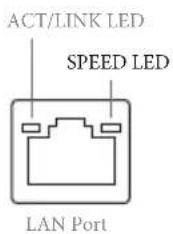
| Activity / Link LED | Speed LED | ||
| Status | Description | Status | Description |
| Off | No Link | Off | 10Mbps connection |
| Blinking | Data Activity | Orange | 100Mbps connection |
| On | Link | Green | 1Gbps connection |
Chapter 1 Introduction
Thank you for purchasing ASRock Z97M Anniversary motherboard, a reliable motherboard produced under ASRock's consistently stringent quality control. It delivers excellent performance with robust design conforming to ASRock's commitment to quality and endurance.

Because the motherboard specifications and the BIOS software might be updated, the content of this documentation will be subject to change without notice. In case any modifications of this documentation occur, the updated version will be available on ASRock's website without further notice. If you require technical support related to this motherboard, please visit our website for specific information about the model you are using. You may find the latest VGA cards and CPU support list on ASRock's website as well. ASRock website http://www.asrock.com.
1.1 Package Contents
ASRock Z97M Anniversary Motherboard (Micro ATX Form Factor)
ASRock Z97M Anniversary Quick Installation Guide
ASRock Z97M Anniversary Support CD
- 2 x Serial ATA (SATA) Data Cables (Optional)
- 1 x I/O Panel Shield
1.2 Specifications
Platform
- Micro ATX Form Factor
Solid Capacitor design
High Density Glass Fabric PCB
CPU
Supports 5^th Generation Intel® Core™ i7/i5/i3/Pentium®/ Celeron® Processors (Socket 1150)
Supports New 4^th and 4^th Generation Intel® Xeon®/Core™ i7/i5/i3/Pentium®/Celeron® Processors (Socket 1150)
Supports Intel Turbo Boost 2.0 Technology
Supports Intel® K-Series unlocked CPUs
Supports ASRock BCLK Full-range Overclocking
Chipset
Intel® Z97
Memory
Dual Channel DDR3 Memory Technology
- 4x DDR3 DIMM Slots
Supports DDR3 3100+(OC)/2933(OC)/2800(OC)/2400(OC)/ 2133(OC)/1866(OC)/1600/1333/1066 non-ECC, un-buffered memory
Max. capacity of system memory: 32GB (see CAUTION)
Supports Intel Extreme Memory Profile (XMP) 1.3 / 1.2
Expansion
- 1 x PCI Express 3.0 x16 Slot (PCIE1: x16 mode)
Slot
- 2 x PCI Express 2.0 x1 Slots
Graphics
- Intel® HD Graphics Built-in Visuals and the VGA outputs can be supported only with processors which are GPU integrated.
Supports Intel® HD Graphics Built-in Visuals : Intel® Quick Sync Video with AVC, MVC (S3D) and MPEG-2 Full HW Encode1, Intel® InTru™ 3D, Intel® Clear Video HD Technology, Intel® Insider™, Intel® HD Graphics 4400/4600 - Pixel Shader 5.0, DirectX 11.1
Max. shared memory 1792MB - Three graphics output options: D-Sub, DVI-D and HDMI Ports
Supports Triple Monitor
Supports HDMI with max. resolution up to 1920x1200 @ 60Hz
Supports DVI-D with max. resolution up to 1920x1200 @ 60Hz
Supports D-Sub with max. resolution up to 1920x1200 @ 60Hz
Supports Auto Lip Sync, Deep Color (12bpc), xvYCC and HBR (High Bit Rate Audio) with HDMI Port (Compliant HDMI monitor is required)
Supports HDCP with DVI-D and HDMI Ports
Supports Full HD 1080p Blu-ray (BD) playback with DVI-D and HDMI Ports
Audio
- 5.1 CH HD Audio (Realtek ALC662 Audio Codec)
Supports Surge Protection (ASRock Full Spike Protection)
ELNA Audio Caps
LAN
PCIE x1 Gigabit LAN 10/100/1000 Mb/s
Realtek RTL8111GR
Supports Wake-On-WAN
Supports Wake-On-LAN
Supports Lightning/ESD Protection (ASRock Full Spike Protection)
Supports LAN Cable Detection
Supports Energy Efficient Ethernet 802.3az
Supports PXE
Rear Panel I/O
- 1 x PS/2 Mouse Port
- 1 x PS/2 Keyboard Port
- 1 x D-Sub Port
- 1xDVI-D Port
- 1 x HDMI Port
- 4 x USB 2.0 Ports (Supports ESD Protection (ASRock Full Spike Protection))
- 2 x USB 3.0 Ports (Supports ESD Protection (ASRock Full Spike Protection))
- 1 x RJ-45 LAN Port with LED (ACT/LINK LED and SPEED LED)
- HD Audio Jacks: Line in / Front Speaker / Microphone
Storage
- 6 x SATA3 6.0 Gb/s Connectors, support RAID (RAID 0, RAID 1, RAID 5, RAID 10, Intel Rapid Storage Technology 13 and Intel Smart Response Technology), NCQ, AHCI and Hot Plug
Connector
- 1 x Chassis Intrusion Header
- 1 x TPM Header
- 1 x CPU Fan Connector (4-pin)
- 1 x Chassis Fan Connector (4-pin)
- 1 x 24 pin ATX Power Connector
- 1 x 4 pin 12V Power Connector
- 1 x Front Panel Audio Connector
- 2 x USB 2.0 Headers (Support 4 USB 2.0 ports) (Supports ESD Protection (ASRock Full Spike Protection))
- 1 x USB 3.0 Header (Supports 2 USB 3.0 ports) (Supports ESD Protection (ASRock Full Spike Protection))
BIOS
Feature
- 64Mb AMI UEFI Legal BIOS with multilingual GUI support
- ACPI 1.1 Compliant wake up events
SMBIOS 2.3.1 support - CPU, DRAM, PCH 1.05V, PCH 1.5V Voltage multi-adjustment
Hardware
Monitor
CPU/Chassis temperature sensing
CPU/Chassis Fan Tachometer
- CPU/Chassis Quiet Fan (Auto adjust chassis fan speed by CPU temperature)
CPU/Chassis Fan multi-speed control
CASE OPEN detection
Voltage monitoring: +12V, + 5V, + 3.3V CPU Vcore
os
- Microsoft Windows 10 64-bit / 8.1 32-bit / 8.1 64-bit / 8 32-bit / 8 64-bit / 7 32-bit / 7 64-bit
Certifica
FCC,CE,WHQL
tions
ErP/EuP ready (ErP/EuP ready power supply is required)

Please realize that there is a certain risk involved with overclocking, including adjusting the setting in the BIOS, applying Untied Overclocking Technology, or using third-party overclocking tools. Overclocking may affect your system's stability, or even cause damage to the components and devices of your system. It should be done at your own risk and expense. We are not responsible for possible damage caused by overclocking.

Due to limitation, the actual memory size may be less than 4GB for the reservation for system usage under Windows ^a 32-bit operating systems. Windows ^a 64-bit operating systems do not have such limitations. You can use ASRock XFast RAM to utilize the memory that Windows ^a cannot use.
Chapter 2 Installation
This is a Micro ATX form factor motherboard. Before you install the motherboard, study the configuration of your chassis to ensure that the motherboard fits into it.
Pre-installation Precautions
Take note of the following precautions before you install motherboard components or change any motherboard settings.
- Make sure to unplug the power cord before installing or removing the motherboard components. Failure to do so may cause physical injuries and damages to motherboard components.
- In order to avoid damage from static electricity to the motherboard's components, NEVER place your motherboard directly on a carpet. Also remember to use a grounded wrist strap or touch a safety grounded object before you handle the components.
- Hold components by the edges and do not touch the ICs.
- Whenever you uninstall any components, place them on a grounded anti-static pad or in the bag that comes with the components.
- When placing screws to secure the motherboard to the chassis, please do not overtighten the screws! Doing so may damage the motherboard.
2.1 Installing the CPU

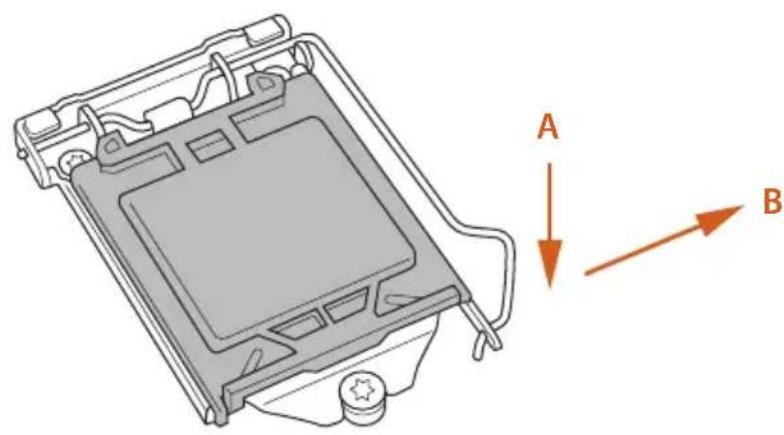
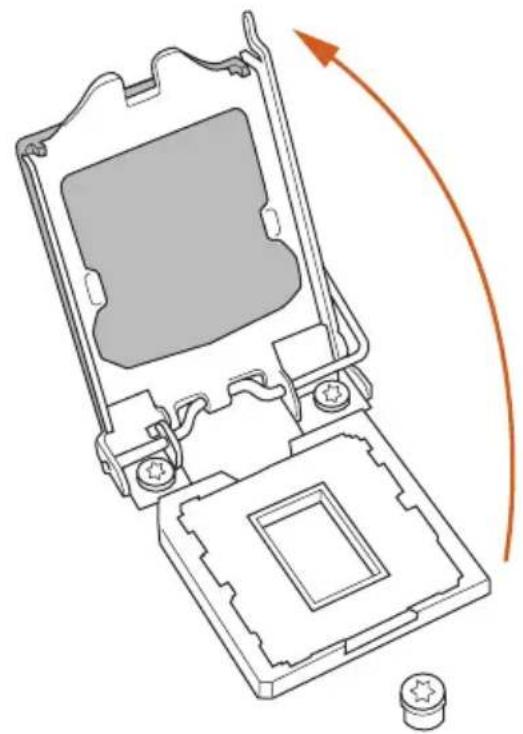
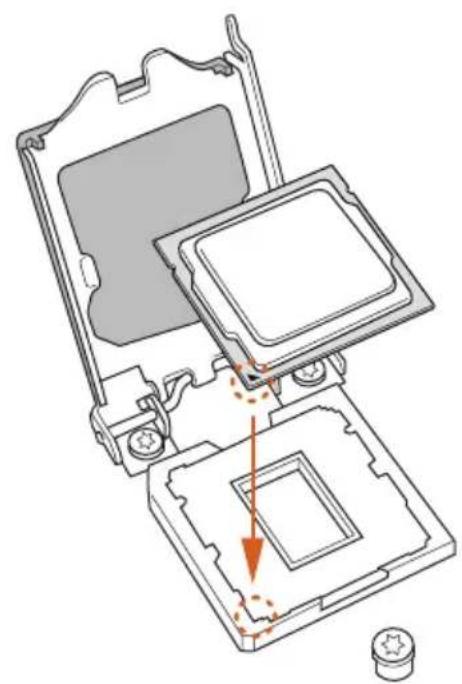
- Before you insert the 1150-Pin CPU into the socket, please check if the PnP cap is on the socket, if the CPU surface is unclean, or if there are any bent pins in the socket. Do not force to insert the CPU into the socket if above situation is found. Otherwise, the CPU will be seriously damaged.
- Unplug all power cables before installing the CPU.
1
2
3
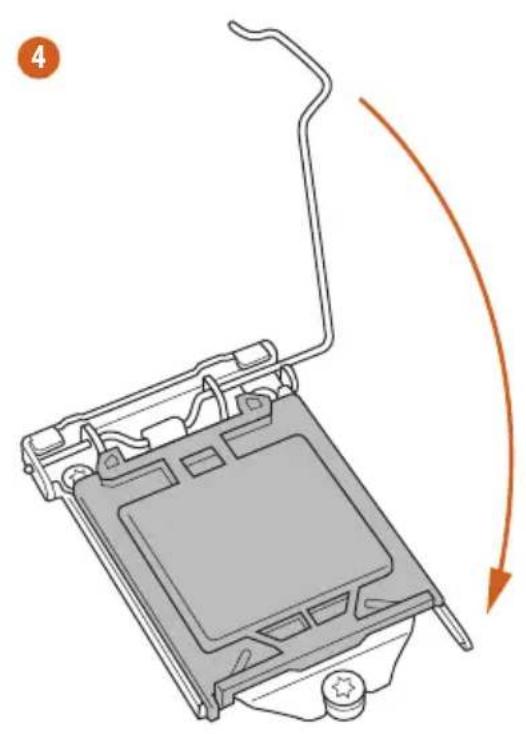
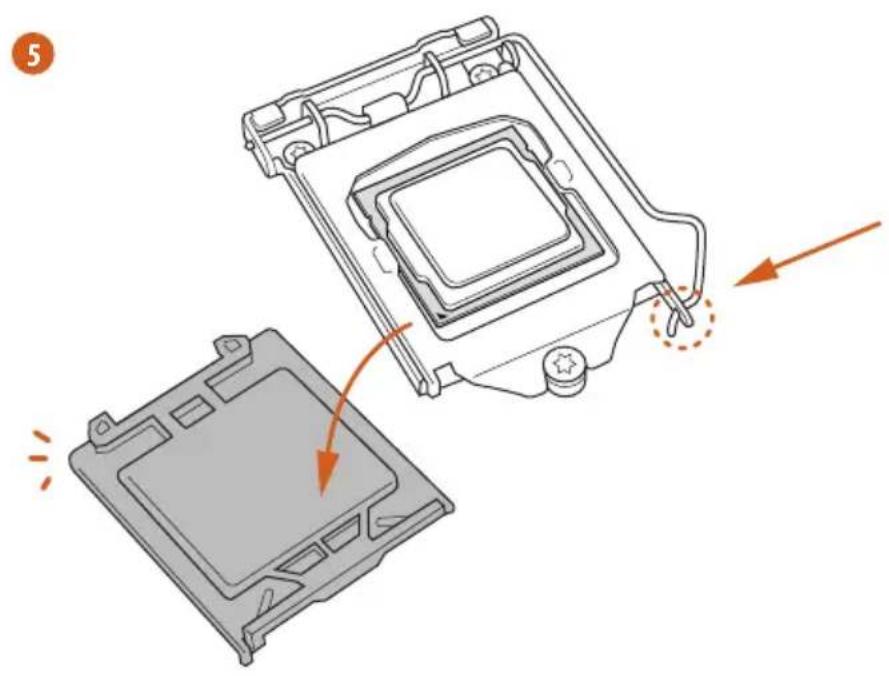

Please save and replace the cover if the processor is removed. The cover must be placed if you wish to return the motherboard for after service.
2.2 Installing the CPU Fan and Heatsink
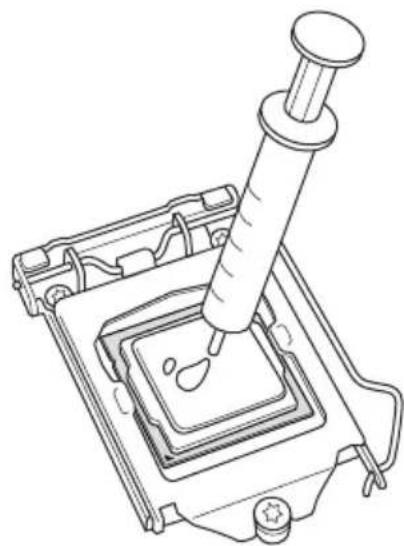
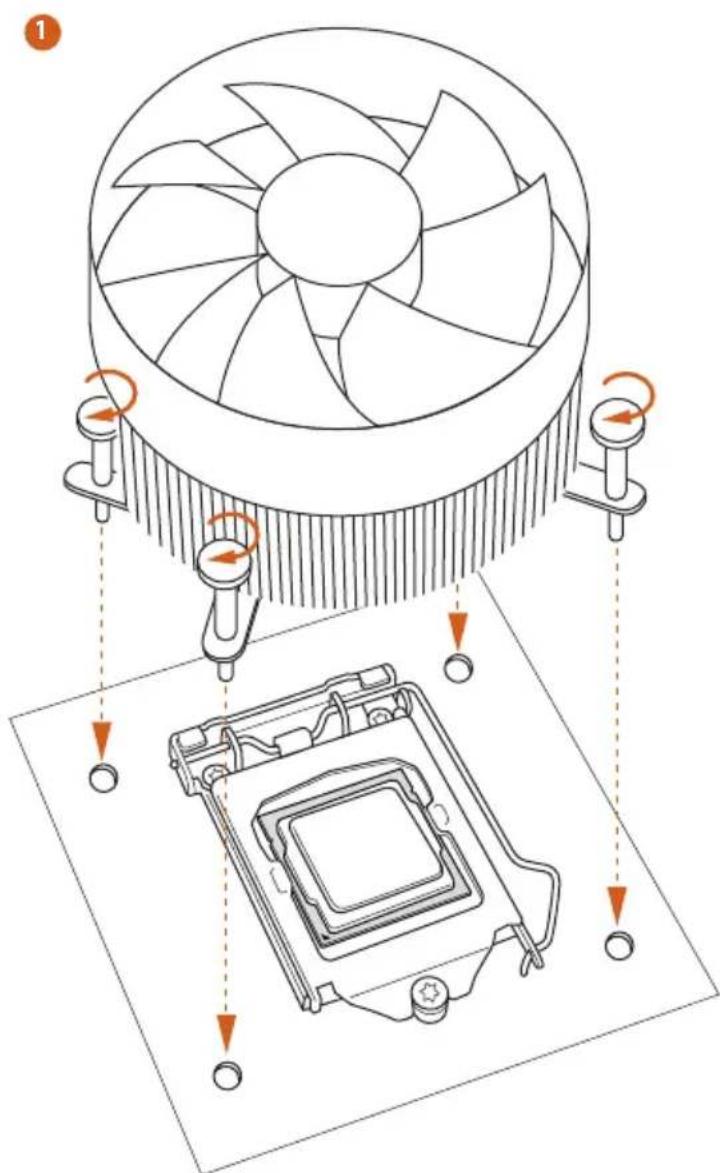
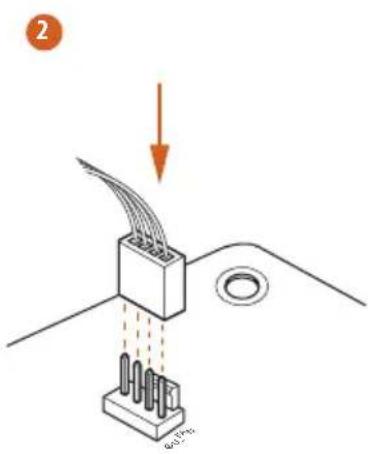
2.3 Installing Memory Modules (DIMM)
This motherboard provides four 240-pin DDR3 (Double Data Rate 3) DIMM slots, and supports Dual Channel Memory Technology.

- For dual channel configuration, you always need to install identical (the same brand, speed, size and chip-type) DDR3 DIMM pairs.
- It is unable to activate Dual Channel Memory Technology with only one or three memory module installed.
- It is not allowed to install a DDR or DDR2 memory module into a DDR3 slot; otherwise, this motherboard and DIMM may be damaged.
Dual Channel Memory Configuration
Priority DDR3_A1 DDR3_A2 DDR3_B1 DDR3_B2
| 1 Populated | Populated | ||
| 2 Populated | Populated | ||
| 3 Populated | Populated | Populated | Populated |

The DIMM only fits in one correct orientation. It will cause permanent damage to the motherboard and the DIMM if you force the DIMM into the slot at incorrect orientation.
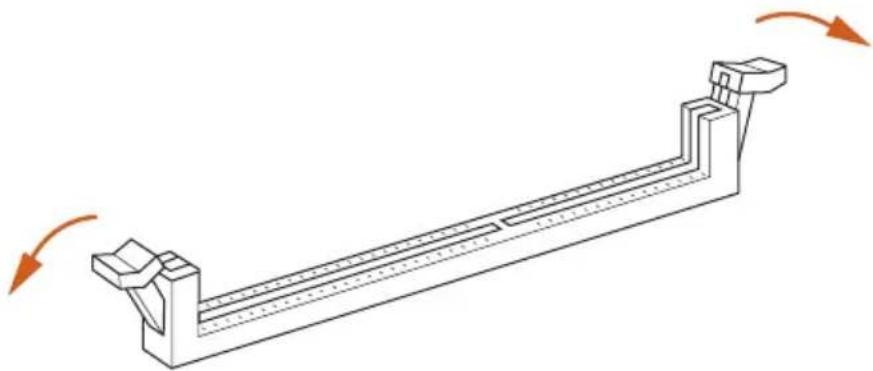
1
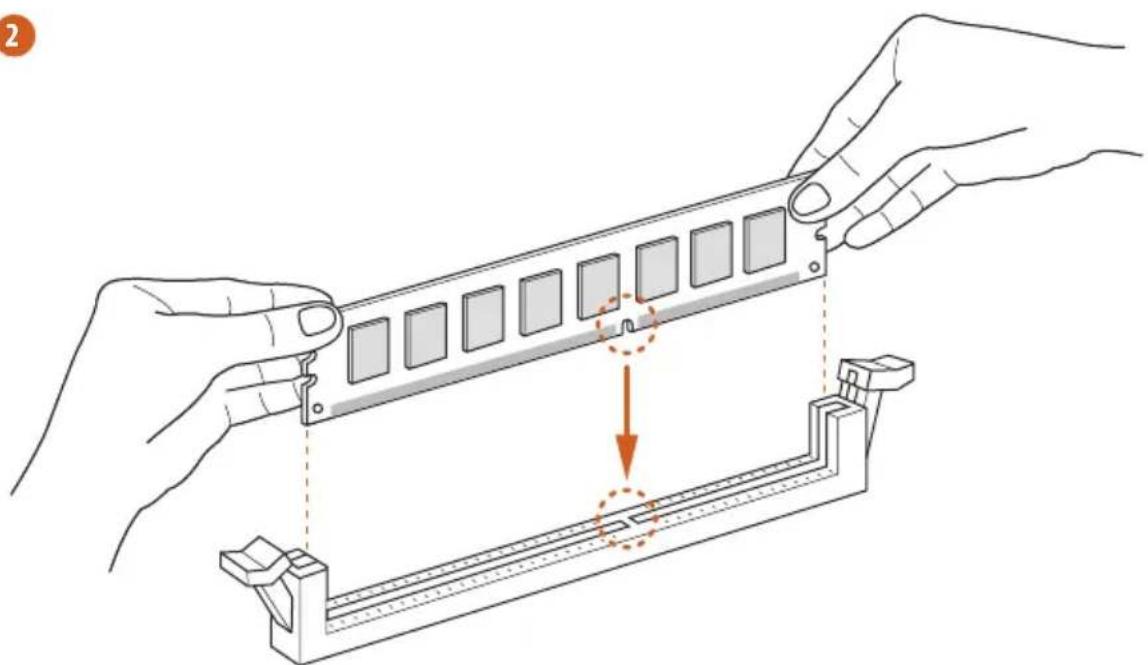
2
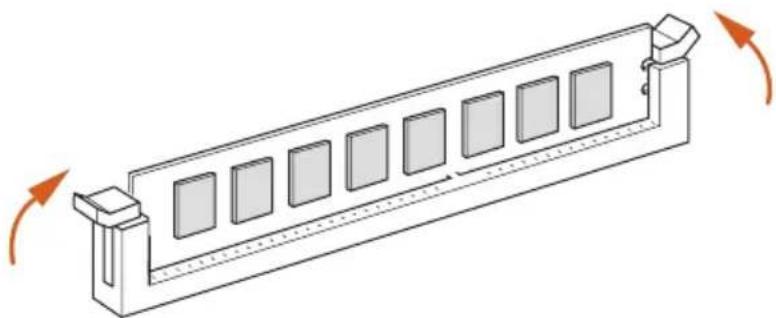
3
2.4 Expansion Slots (PCI Express Slots)
There are 3 PCI Express slots on the motherboard.

- Before installing an expansion card, please make sure that the power supply is switched off or the power cord is unplugged. Please read the documentation of the expansion card and make necessary hardware settings for the card before you start the installation.
- Due to the mechanical limitation, to install/uninstall the graphics card on PCIe1 slot, please find a thin tool, such as a pen to press the retaining clip to lock/unlock the PCIe slot.
PCIe slots:
PCIE1 (PCIe 3.0 x16 slot) is used for PCI Express x16 lane width graphics cards.
PCIE2 (PCIe 2.0 x1 slot) is used for PCI Express x1 lane width cards.
PCIE3 (PCIe 2.0 x1 slot) is used for PCI Express x1 lane width cards.
2.5 Jumpers Setup
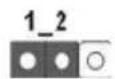
The illustration shows how jumpers are setup. When the jumper cap is placed on the pins, the jumper is "Short". If no jumper cap is placed on the pins, the jumper is "Open". The illustration shows a 3-pin jumper whose pin1 and pin2 are "Short" when a jumper cap is placed on these 2 pins.
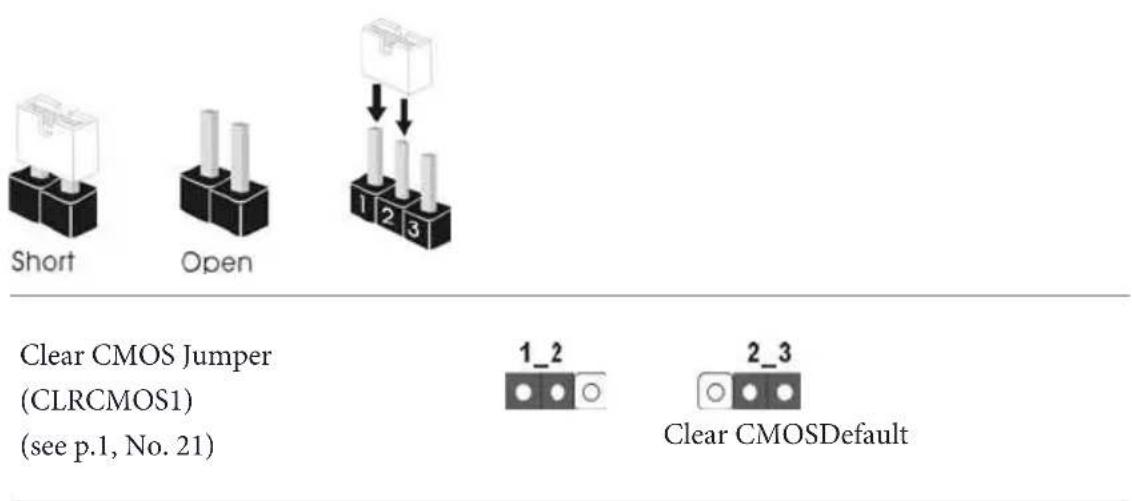
CLRCMOS1 allows you to clear the data in CMOS. To clear and reset the system parameters to default setup, please turn off the computer and unplug the power cord from the power supply. After waiting for 15 seconds, use a jumper cap to short pin2 and pin3 on CLRCMOS1 for 5 seconds. However, please do not clear the CMOS right after you update the BIOS. If you need to clear the CMOS when you just finish updating the BIOS, you must boot up the system first, and then shut it down before you do the clear-CMOS action. Please be noted that the password, date, time, and user default profile will be cleared only if the CMOS battery is removed.

2.6 Onboard Headers and Connectors

Onboard headers and connectors are NOT jumpers. Do NOT place jumper caps over these headers and connectors. Placing jumper caps over the headers and connectors will cause permanent damage to the motherboard.
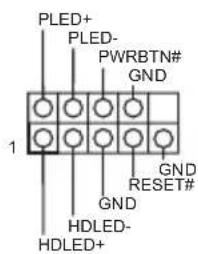
System Panel Header (9-pin PANEL1) (see p.1, No. 11)
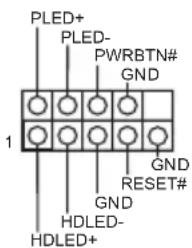
Connect the power switch, reset switch and system status indicator on the chassis to this header according to the pin assignments below. Note the positive and negative pins before connecting the cables.

PWRBTN (Power Switch):
Connect to the power switch on the chassis front panel. You may configure the way to turn off your system using the power switch.
RESET (Reset Switch):
Connect to the reset switch on the chassis front panel. Press the reset switch to restart the computer if the computer freezes and fails to perform a normal restart.
PLED (System Power LED):
Connect to the power status indicator on the chassis front panel. The LED is on when the system is operating. The LED keeps blinking when the system is in S1/S3 sleep state. The LED is off when the system is in S4 sleep state or powered off (S5).
HDLED (Hard Drive Activity LED):
Connect to the hard drive activity LED on the chassis front panel. The LED is on when the hard drive is reading or writing data.
The front panel design may differ by chassis. A front panel module mainly consists of power switch, reset switch, power LED, hard drive activity LED, speaker and etc. When connecting your chassis front panel module to this header, make sure the wire assignments and the pin assignments are matched correctly.
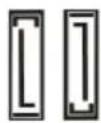
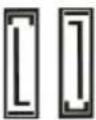
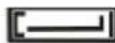
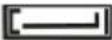
Serial ATA3 Connectors
(SATA_0:
see p.1, No. 7)
(SATA_1:
see p.1, No. 6)
(SATA_2:
see p.1, No. 8)
(SATA_3:
see p.1, No. 9)
(SATA_4:
see p.1, No. 13)
(SATA_5:
see p.1, No. 14)
SATA_5 SATA_4
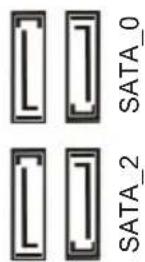
These six SATA3
connectors support SATA data cables for internal storage devices with up to 6.0 Gb/s data transfer rate.
USB 2.0 Headers
(9-pin USB4_5)
(see p.1, No. 17)
(9-pin USB6_7)
(see p.1, No. 16)
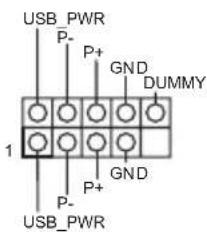
Besides four USB 2.0 ports on the I/O panel, there are two headers on this motherboard. Each USB 2.0 header can support two ports.
USB 3.0 Header
(19-pin USB3_2_3)
(see p.1, No. 5)
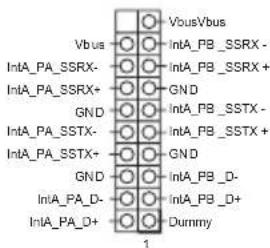
Besides two USB 3.0 ports on the I/O panel, there is one header on this motherboard. Each USB 3.0 header can support two ports.
Front Panel Audio Header
(9-pin HD AUDIO01)
(see p.1, No. 19)
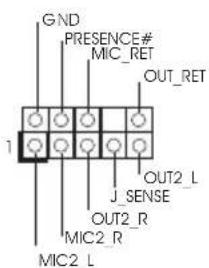
This header is for
connecting audio devices to the front audio panel.

- High Definition Audio supports Jack Sensing, but the panel wire on the chassis must support HDA to function correctly. Please follow the instructions in our manual and chassis manual to install your system.
- If you use an AC'97 audio panel, please install it to the front panel audio header by the steps below:
A. Connect Mic_IN (MIC) to MIC2_L.
B. Connect Audio_R (RIN) to OUT2_R and Audio_L (LIN) to OUT2_L.
C. Connect Ground (GND) to Ground (GND).
D. MIC_RET and OUT_RET are for the HD audio panel only. You don't need to connect them for the AC'97 audio panel.
E. To activate the front mic, go to the "FrontMic" Tab in the Realtek Control panel and adjust "Recording Volume".
Chassis Speaker Header (4-pin SPEAKER1) (see p.1, No. 10)
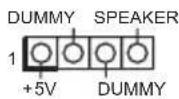
Please connect the chassis speaker to this header.
Chassis Fan Connector (4-pin CHA_FAN1) (see p.1, No. 12)
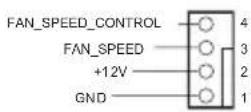
Please connect fan cable to the fan connector and match the black wire to the ground pin.
CPU Fan Connector (4-pin CPU_FAN1) (see p.1, No. 20)
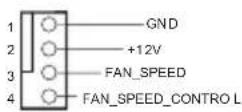
This motherboard provides a 4-Pin CPU fan (Quiet Fan) connector. If you plan to connect a 3-Pin CPU fan, please connect it to Pin 1-3.
ATX Power Connector (24-pin ATXPWR1) (see p.1, No. 4)
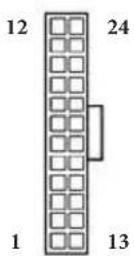
This motherboard provides a 24-pin ATX power connector. To use a 20-pin ATX power supply, please plug it along Pin 1 and Pin 13.
ATX 12V Power
Connector
(4-pinATX12V1)
(see p.1, No. 1)

Chassis Intrusion Header
(2-pin CI1)
(see p.1, No. 15)

Please connect an ATX 12V power supply to this connector.
This motherboard supports CASE OPEN detection feature that detects if the chassis cove has been removed. This feature requires a chassis with chassis intrusion detection design.
TPM Header
(17-pin TPMS1)
(see p.1, No. 18)
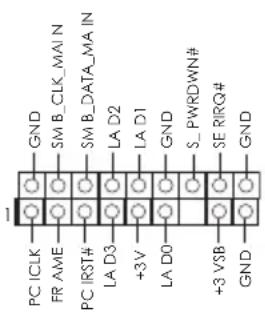
This connector supports Trusted Platform Module (TPM) system, which can securely store keys, digital certificates, passwords, and data. A TPM system also helps enhance network security, protects digital identities, and ensures platform integrity.
1 Einleitung
864-bit/732-bit/764-bit
Certifications

RAID 1, RAID 5, RAID 10, Intel Rapid Storage Technology 13 e Intel Smart Response Technology), NCQ, AHCI e Hot Plug
Connettore
Trusted Platform Module
Sync Video c AVC, MVC (S3D) n MPEG-2 Full HW Encode1,
Intel® InTru™ 3D, Intel® Clear Video HD Technology, Intel®
Insider™, Intel® HD Graphics 4400/4600
1792M6
pa3peiHneMdo1920x1200 np60T
1920x1200 np60 T
1920x1200 np60 T
HBR (High Bit Rate Audio) no HDMI (heo6xOIM HDMI-COBMeCTMnB MoHTOP)
Iepe3 IopTbDVI-DnHDMI
Ayno
ALC662)
(ASRockOT BbI6pocOB HaIIpeKeHnI)
JIBC
3JIeKtpuYeCTBa (IoiHnHa 3aHHTa (ASRock ot BbI6pocOB HaIIpyKeHnA))
NopTbI
BBOda-
BblBOda
Ha 3aDHei
nanei
3JIeKtpnuecTbA (IoiHaa 3aunTa (ASRock ot BbI6pocOB HaipjKeHna))
3JIeKtpnuecTbA (IoiHa 3aunTa (ASRock ot BbI6pocOB HaipjKeHna))
/MnKpOΦOH
3anomnhaoune yctpoictba
ГБ/c, пдержka Тхнологий RAID (RAID 0, RAID 1, RAID 5, RAID 10, Intel Rapid Storage Technology 13 и Intel Smart Response Technology), NCQ, AHCI и "торяbero" IIДКЛЮЧЕНИЗА
Pa3beMbl
2.0) (Полдержka 3aиntbI OTЭлктpoctaTnueckoro элктpruyectBa (Полная 3aиnta (ASRock ot Bb6pocOB haipxkeHna))
3.0) (Полдержka 3auntbI OT eJIeKtpocTaTnuecKOTo 3JIeKtpuYeCTBa (Поння 3aunTa (ASRock ot BbI6pocOB NaIIprJKeHnI))
Oco6eHHoCTN BIOS
TNI
ACPI 1.1
PCH1,5B
KoHTpOnb o6OpyDoBaHnIa
(c aBTOMaTHuecko peYnnpOBKo o6opOTOB IO TeMIIepaType IITI)
OC
864-bit/732-bit/764-bit
CepTuΦnKaUa
cooTBeTCTByIOUnn CTaHApTy ErP/EuP)
*Ia noyuhenra donoHumelbno uHphiopmauuu o6 u3deauu nocemume hau be6-caum: http://www.asrock.com

Cledyem yumtbabmb, umo paason npoueccopa, bknoaun3menehue hacmpoek BIOS, npumehene mexnozuu Untied Overclocking Technology u uonb30aue uncmpymenob pa2oHa he3abucumbix npou3bodumenei, conpken c onpehenbmu puckom. Pa2oH npoueccopa moxem noobnmb na cmaubnocmb cucmembu uduke npueecmu K nobpekdoe Hooe kOMnohehmou ycnpoucme. Bblinnaeme pa2oH npoueccopa ha bau co6cbennbu puk u 3a cboi cem. Mbl ne hecem ombemcmbeHHocmb 3a 803MOKnBu yuep6, b3BaHHbpa2oHm npouecoppa.

B c83u c oepanuenuem npu pa6ome nod 32-pa3pnoOC Windows' fakmueckn ouoem namru moem 6bmb Mehblue 4 I6aum. Jra 64-pa3pnoBC OC Windows" maux oxepanuenu hem. Jra uonob3oabua moa namamu, komopyo OC Windows* he moem uonob3oabmb, uonob3yume ASRock XFast RAM.
1.3 YcTaHOBka nepembIueK
YcTaHOBka IepeMbIyek IOKa3aHa Ha pncyHke. IIpn yctaHOBKe KOJIiauKOBOI IepeMbUKN Ha KOHTaKTbI IepeMbUkA «3aMKHyTa>. EcIN KOJIiauKOBAI IepeMbUHa Ka KOHTaKTbI He ycTaHOBHeHa, IepeMbUkA «pa3OMKHyTa>. Ha pncyHke IOKa3aHa 3-KoHTaKTHa IepeMbUkA c 3aMKHyTbIMN KOHTaKTaMn 1 n 2 IIpn yctaHOBKe Ha HIX KOJIiauKOBOI IepeMbUKN.
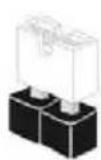
Short
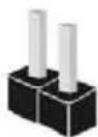
Open
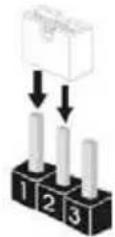
IepeMbYka c6poca HactpoeK CMOS
(CLRCMOS1)
(CM. cTp. 1, N21)
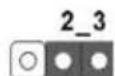
C6poc Hacrpoek CMOSno ymoJuaHnIO
CLRCMOS1 nIIOJIb3yETcI yIaJIeHnI IaHHbIX CMOS. YTo6bI c6pocHTb I O6HyIITb IIapamEtpbI CNCTeMbI Ha HAcTpoIKN IIO yMOJIaHnIO, BbIKIOUHTe KOMIIbIOTep I IN3BJIeKITE OTKIIIOHTe Ka6eIB IITaHnI OT NCTOuHNka IITaHnI. IIOJOKIITe 15 cekYHd I IepemblKoI 3AMKHITE KOHTaKTb 2 I 3 Ha CLRCMOS1 Ha 5 cekYHd. He c6paCbBaIte HAcTPOIKN CMOS cpa3y IocIe o6HOBJIeHnI BIOS. IIpn Heo6XoIMOCtN c6pocTb HAcTPOIKN CMOS cpa3y IocIe o6HOBJIeHnI BIOS cHaJaIa Ipe3aIpy3nte CNCTeMy, a 3aTeM BbIKIOUHTe KOMIIbIOTep IpeIc6pocom HAcTPOE K CMOS. YUHTte, YTO IIapoJIb, IaTa, BpeMn IIOpOJIb IIOJIb3OBaTeJI IIO yMOJIaHnIO c6paCbBAIoTcR ToJIbKO B TOM CJIyae, ecIN IIN3BJIeYb 6aTapeIO CMOS.

C6poc hacmpoek CMOS moKem npubecmu K onpeDeenu 8ckpbmuo Kopnyca. M06bI o6Hyumb 3anucb npdebyueo onpeDeenu 8ckpbmuu Kopnyca, ucnno3yume napamemp Clear Status (O6Hyumb ccomnue) BIOS.
1.4 Kolodkn pa3bembl, pacnoJooKeHHbIe Ha MaTePNHcKoI pIaTe

PacnoiokeHHbe Ha Mamepuncko nname KonoDku u pa3bEm npembuKamu HE aomc. HE ycmanabuaume Ha 3mu KonoDku u pa3bEm kuonnaKobble nepembu. YcmanOBka KonoaKobix nepmbuek Ha 3mu KonoDku u pa3bEm boMooem b3bamb Hecmpanumoe nopekendeHme Mamepuncko n lambl.
KoIOnKa cNCTeMHoH
IIaHEnI
(9-KoHTaKaTHaJa, PANEL1)
(CM. ctp. 1, N° 11)
ПОДКЛЮЧИТЕ
pacnoIOJxKeHHbIe HauKOpNyCe BbIKJIOuHaTe
ПИТаня,КНОПКY
Ipe3aRpy3KuN
INHINKATOP COCTOHN H CNTEMB K 3TOI KOIOI
B COOTBETCTBUN C
pacnpedeeneHneM
KOHTAKTOB,
IINBEeHHeMH HNeKe.
IpeepnoiknioueHneM ka6eien onpejeInTe
IIOJIOXHTeJIbHbI
IOPTpuIaTeIbHbI
KOHTaKTbl.

PWRBTN (Khonka numahan):
Iioeknouenue khonku numanua, pacnonoKeHHou na nepehneu naheu Kopnyca.
Mochno hampoumb npdoK bkyknoeue cucmemb cuonnb3obane mknunuma.
RESET (Khonka nepe3aepy3ku):
IodknoueHue Khonku nepe3a2py3ku cucmembi, pacnoonkeHHou Ha nepeohnnaeun Kopnyca. Haxmume Khonky nepe3a2py3ku, uMoobI nepe3anycmmb kOmnbomep, ecu OH 3abuc u HopmaNbbl 3anyck He603moKeH.
PLED (cbeodouodhbu unoukamopumanu cucmemb):
Iodknoeue undukamopa ccmohua, pacnooKeHHoHa nepeHnei naHEnu Kopnyca. Cbemoduohnui undukamop zopum, Kozda cucmema paobomaem. Kozda cucmema haxodumcB pexkume okuudanur S1/S3, cbemoduod muzaem. Kozda cucmema haxodumcB pexkume okuudanur S4 uuu bkychoea (S5), cbemoduod ne zopum.
HDLED (cbemoduodhui undukamop pa6omkuemko2o dka):
Iodknoeue cemoduodhozo undukamopa pabomkecmkoz ducka, pacnooxenno ha nepeheu naenu kopyca. Cemoduohb udukamop zopum, kozda kecmmui duck binnnme cmmbihaue uu sanucb dahbx.
Ipeodnnahe mb moem 6bmt pa3hoHa pa3hix Kopnycax. B ochobnnepeohnae naeh bKIOaem b c6ra KhoNky numanu, KhoNky nepe3a2py3ku, cbeodouohnu uDukamop numanu, cbeoDuOdbu undukamop paobm jecmko0 ducka, duhamuk u m. d. Ipu nooknoueenu nepednei naHtu Kmoi konodke npabunho nooknouaume npooba Kaonmakmam.
Pa3bembl Serial ATA3
(SATA_0:
cm. ctp.1, No 7)
(SATA_1:
CM.cTp.1,N6)
(SATA_2:
cm. cTp.1, No 8)
(SATA_3:
CM.cTp.1,N99)
(SATA_4:
CM.cTp.1,Ne 13)
(SATA_5:
CM.cTp.1,Ne 14)
SATA-1
SATAO
3
aannnnnne aannnnnne
SATA_5 SATA_4
3TNIeCTbpa3BeMa
SATA3 npeHa3NaueHbI
ДИ ПОДКЛЮЧЕНЯ
ka6eien SATA
BHyTpeHHnx
3aIOMMHaIOHIX
ycTpoIcTBIIJI IepeJaU
JaHHbIX CO CKOpocTbIO IO
6,0 6 / c
KoIooN USB 2.0.
(9-KoHTaKTHa,USB4_5)
(CM. ctp. 1, N° 17)
(9-KoHTaKTHa,USB6_7)
(CM. ctp. 1, N° 16)
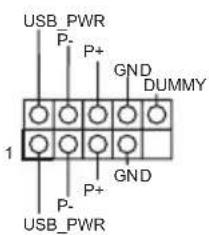
Kpome Yetbipex NopTOB
USB2.0HaNaHeINBBOJa
BbBOJa Ha MaTepHnckOJ
IIaTe TaKKe eCt b Ba
KoIOnKn.KaJna
KoIOJka USB 2.0 MoKeT
IIOJIepKINBaTb IBa
nopta.
KoIOJa USB 3.0
(19-KoHTaKTHaH,
USB3_2_3)
(CM. cTp. 1, N° 5)
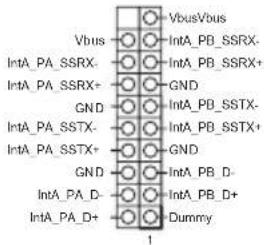
Kpome nBvX nOpTob USB
3.0HaIIaHeINBBOJa-
BbIBOJa Ha MaTepHcKoI
IIaTe TaKKe ecTb OHa
KoIOnKa.KaJaa
KoIOnKa USB 3.0 MoKeT
IIOJIepKINBaTbIbA
nopta.
Aynokonoka nepedne nnHei
(9-KoHTaKaTHaH, HD_
AUDIO1)
(CM. ctp. 1, N° 19)
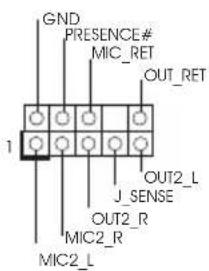
TaKoIOnKa
IpeHa3HaYeHa
ДИ ПОДКПОЕНЯ
aynooyctponCTB K
NepeHne ayDnOpaHeJI.
| 1. Ayduocumema високоуразецейнаддоржима ункшю раснодан разьема, по ддя有很大 ддя有很大 ддя有很大 ддя有很大 Корунca nodulechuban nepechaу сионов HDA. Исмчуши no усанов cucmembс m. 8 smom pykoobodcme u pykoobodcme ha kopnyc. 2. Пиу ушьзоганu ayduonahelu AC'97 nodulechumee ee к ayduokonoide nepehne naheu, кak уkasano danee: A. Пodeknounome Mic_IN (MIC) κ MIC2_L. B. Пodeknounome Audio_R (RIN) κ OUT2_R, Audio_L (LIN) κ OUT2_L. C. Пodeknounome npodod zasemlenu (GND) κ konmakey zasemlenu (GND). D. Конмпь Mic_RET u OUT_RET усньуомсma млько ддя ayduonanenu Бусокоуразецейн. Пиу ушьзоганu ayduonanenu AC'97 ux nodulechamb унжino. E.Чюбы akmueворамь nepehni мухрфон, nepeidume на владку FrontMic naneni ураленя Realtek u ompezyunupyime napamemp Recording Volume (Tpromkocmb 3anucu). | |
| Коложka dinhamika kopиuya (4-контauthа, SPEAKER1) (Cm.стp. 1, № 10) | DUMMY SPEAKER 1 DUMMY |
| Разьемы ддя ВеHTиЯTOPOВ кориya (4-контauthь, CHA_ FAN1) (Cm.стp. 1, № 12) | FAN SPEED_CONTROL FAN SPEED +12V GND 4 1 |
| Рazьемы BeHTиЯTOPOB IIII (4-контauthь, CPU_ FAN1) (Cm.стp. 1, № 20) | 1 GND 2 +12V 3 FAN SPEED 4 FAN SPEED_CONTROL |
ceTeBOI 6e3oPiacHOCTN,
3aIuuaeT uPobBie
IeHTnΦKaTOpbl
n o6ecIeunBaET
IIeIOCTHOCTb
IIaTΦOpMbI.
1 Introdução
| Conector de alimentação de 12V ATX (ATX12V1 de 4 pinos) (consultar p.1, N.° 1) | Ligue a fonte de alimentação ATX 12V;neste conector. | |
| Terminal de intrusão do chassis (CI1 de 2 pinos) (consultar p.1, N.° 15) | GND Signal | Esta placá principal suporta a função de detectação de ABERTURA da CAIXA que detecta se a tampa do chassisuíremovida.Esta função quer um chassis com design de detectação de intrusão. |
| Terminal TPM (TPMS1 de 17 pinos) (consultar p.1, N.° 18) | GND SM BCLK MAIN SM BCLK MAIN SM BCLK MAIN SM BCLK MAIN SM BCLK MAIN SM BCLK MAIN SM BCLK MAIN SM BCLK MAIN SM BCLK MAIN SM BCLK MAIN SM BCLK MAIN SM BCLK MAIN SM BCLK MAIN SM BCLK MAIN SM BCLK MAIN SM BCLK MAIN SM BCLK MAIN SM BCLK MAIN SM BCLK MAIN SM BCLK MAIN SM BCLK MAIN SM BCLK MAIN SM BCLK MAIN SM BCLK MAIN SM BCLK MAIN SM BCLKMAIN SM BCLK MAIN SM BCLK MAIN SM BCLK MAIN SM BCLK MAIN SM BCLK MAIN SM BCLK MAIN SM BCLK MAIN SM BCLK MAIN SM BCLK MAIN SM BCLK MAIN SM BCLK MAIN SM BCLK MAIN SM BCLK MAIN SM BCLK MAIN SM BCLK MAIN SM BCLK MAIN SM BCLK MAIN SM BCLK MAIN SM BCLK MAIN SM BCLK MAIN SM BCLK MAIN SM BCLK MAIN SM BCLK MAIN SM BCLK MAIN SM BCLK Main SM BCLK MAIN SM BCLK MAIN SM BCLK MAIN SM BCLK MAIN SM BCLK MAIN SM BCLK MAIN SM BCLK MAIN SM BCLK MAIN SM BCLK MAIN SM BCLK MAIN SM BCLK MAIN SM BCLK MAIN SM BCLK MAIN SM BCLK MAIN SM BCLK MAIN SM BCLK MAIN SM BCLK MAIN SM BCLK MAIN SM BCLK MAIN SM BCLK MAIN SM BCLK MAIN SM BCLK MAIN SM BCLK MAIN SM BCLK MAIN SM BCLK MAN SM BCLK MAIN SM BCLK MAN SM BCLK MAN SM BCLK MAN SM BCLK MAN SM BCLK MAN SM BCLK MAN SM BCLK MAN SM BCLK MAN SM BCLK MAN SM BCLK MAN SM BCLK MAN SM BCLK MAN SM BCLK MAN SM BCLK MAN SM BCLK MAN SM BCLK MAN SM BCLK MAN SM BCLK MAN SM BCLK MAN SM BCLK MAN SM BCLK MAN SM BCLK MAN SM BCLK MAN SM BCLK MAN SM BCLK MAN SM BCLK MAIN SM BCLK MAIN SM BCLK MAIN SM BCLK MAIN SM BCLK MAIN SM BCLK MAIN SM BCLK MAIN SM BCLK MAIN SM BCLK MAIN SM BCLK MAIN SM BCLK MAIN SM BCLK MAIN SM BCLK MAIN SM BCLK MAIN SM BCLK MAIN SM BCLK MAIN SM BCLK MAIN SM BCLK MAIN SM BCLK MAIN SM BCLK MAIN SM BCLK MAIN SM BCLK MAIN SM BCLK MAIN SM BCLK MAIN SM BCLK BASELINE S PWRDWN# S PWRDWN# S PWRDWN# S PWRDWN# S PWRDWN# S PWRDWN# S PWRDWN# S PWRDWN# S PWRDWN# S PWRDWN# S PWRDWN# S PWRDWN# S PWRDWN# S PWRDWN# S PWRDWN# S PWRDWN# S PWRDWN# S PWR DREAD# S PWR DREAD# S PWR DREAD# S PWR DREAD# S PWR DREAD# S PWR DREAD# S PWR DREAD# S PWR DREAD# S PWR DREAD# S PWR DREAD# S PWR DREAD# S PWR DREAD# S PWR DREAD# S PWR DREAD# S PWR DREAD# S PWR DREAD# S PWR DREAD# S PWWDRWN# S PWWDRWN# S PWWDRWN# S PWWDRWN# S PWWDRWN# S PWWDRWN# S PWWDRWN# S PWWDRWN# S PWWDRWN# S PWWDRWN# S PWWDRWN# S PWWDRWN# S PWWDRWN# S PWWDRWN# S PWWDRWN# S PWWDRWN# S PWWDRWN# S PwwDRWN# S PwwDRWN# S PwwDRWN# S PwwDRWN# S PwwDRWN# S PwwDRWN# S PwwDRWN# S PwwDRWN# S PwwDRWN# S PwwDRWN# S PwwDRWN# S PwwDRWN# S PwwDRWN# S PwwDRWN# S PwwDRWN# S PwwDRWN# S PwwDRWN#S PwwDRWN# S PwwDRWN# S PwwDRWN# S PwwDRWN# S PwwDRWN# S PwwDRWN# S PwwDRWN# S PwwDRWN# S PwwDRWN# S PwwDRWN# S PwwDRWN# S PwwDRWN# S PwwDRWN# S PwwDRWN# S PwwDRWN# S PwwDRWN# S PwwDRDN# S PwwDRDN# S PwwDRDN# S PwwDRDN# S PwwDRDN# S PwwDRDN# S PwwDRDN# S PwwDRDN# S PwwDRDN# S PwwDRDN# S PwwDRDN# S PwwDRDN# S PwwDRDN# S PwwDRDN# S PwwDRDN# S PwwDRDN# S PwwDRDN# S PwwwDRDN# S PwwDRDN# S PwwDRDN# S PwwDRDN# S PwwDRDN# S PwwDRDN# S PwwDRDN# S PwwDRDN# S PwwDRDN# S PwwDRDN# S PwwDRDN# S PwwDRDN# S PwwDRDN# S PwwDRDN# S PwwDRDN# S PwwDRDN# S PwwDRDN#S PwwDRDN# S PwwDRDN# S PwwDRDN# S PwwDRDN# S PwwDRDN# S PwwDRDN# S PwwDRDN# S PwwDRDN# S PwwDRDN# S PwwDRDN# S PwwDRDN# S PwwDRDN# S PwwDRDN# S PwwDRDN# S PwwDRDN# S PwwDRDN# S PwwDR DN# S PwwDR DN# S PwwDR DN# S PwwDR DN# S PwwDR DN# S PwwDR DN# S PwwDR DN# S PwwDR DN# S PwwDR DN# S PwwDR DN# S PwwDR DN# S PwwDR DN# S PwwDR DN# S PwwDR DN# S PwwDR DN# S PwwDR DN# S PwwDR DN# S PwwwDR DN# S PwwDR DN# S PwwDR DN# S PwwDR DN# S PwwDR DN# S PwwDR DN# S PwwDR DN# S PwwDR DN# S PwwDR DN# S PwwDR DN# S PwwDR DN# S PwwDR DN# S PwwDR DN# S PwwDR DN# S PwwDR DN# S PwwDR DN# S PwwDR DN#S PwwDR DN# S PwwDR DN# S PwwDR DN# S PwwDR DN# S PwwDR DN# S PwwDR DN# S PwwDR DN# S PwwDR DN# S PwwDR DN# S PwwDR DN# S PwwDR DN# S PwwDR DN# S PwwDR DN# S PwwDR DN# S PwwDR DN# S PwwDR DN# S PwwDRDN# S PwwDR DN# S PwwDR DN# S PwwDR DN# S PwwDR DN# S PwwDR DN# S PwwDR DN# S PwwDR DN# S PwwDR DN# S PwwDR DN# S PwwDR DN# S PwwDR DN# S PwwDR DN# S PwwDR DN# S PwwDR DN# S PwwDR DN# S PwwwDR DN# S PwwwDR DN# S PwwDR DN# S PwwDR DN# S PwwDR DN# S PwwDR DN# S PwwDR DN# S PwwDR DN# S PwwDR DN# S PwwDR DN# S PwwDR DN# S PwwDR DN# S PwwDR DN# S PwwDR DN# S PwwDR DN# S PwwDR DN# S PwwDR DN#S PwwDR DN#S PwwDR DN#S PwwDR DN#S PwwDR DN#S PwwDR DN#S PwwDR DN#S PwwDR DN#S PwwDR DN#S PwwDR DN#S PwwDR DN#S PwwDR DN#S PwwDR DN#S PwwDR DN#S PwwDR DN#S PwwDR DN#S PwwDR DN#S PwwDRDN#S PwwDR DN#S PwwDR DN#S PwwDR DN#S PwwDR DN#S PwwDR DN#S PwwDR DN#S PwwDR DN#S PwwDR DN#S PwwDR DN#S PwwDR DN#S PwwDR DN#S PwwDR DN#S PwwDR DN#S PwwDR DN#S PwwDR DN#S PwwDR DN#S PwwwDR DN#S PwwDR DN#S PwwDR DN#S PwwDR DN#S PwwDR DN#S PwwDR DN#S PwwDR DN#S PwwDR DN#S PwwDR DN#S PwwDR DN#S PwwDR DN#S PwwDR DN#S PwwDR DN#S PwwDR DN#S PwwDR DN#S PwwDR DN#S PwwDR DN#s PwwDR DN#S PwwDR DN#S PwwDR DN#S PwwDR DN#S PwwDR DN#S PwwDR DN#S PwwDR DN#S PwwDR DN#S PwwDR DN#S PwwDR DN#S PwwDR DN#S PwwDR DN#S PwwDR DN#S PwwDR DN#S PwwDR DN#S PwwDR DN#S PwwDR DM #S PwwDR DM #S PwwDR DM #S PwwDR DM #S PwwDR DM #S PwwDR DM #S PwwDR DM #S PwwDR DM #S PwwDR DM #S PwwDR DM #S PwwDR DM #S PwwDR DM #S PwwDR DM #S PwwDR DM #S PwwDR DM #S PwwDR DM #S PwwDR DM #S Pww DR DM #S Pww DR DM #S Pww DR DM #S Pww DR DM #S Pww DR DM #S Pww DR DM #S Pww DR DM #S Pww DR DM #S Pww DR DM #S Pww DR DM #S Pww DR DM #S Pww DR DM #S Pww DR DM #S Pww DR DM #S Pww DR DM #S Pww DR DM #S Pww DR DM #S S Pww DR DM #S Pww DR DM #S Pww DR DM #S Pww DR DM #S Pww DR DM #S Pww DR DM #S Pww DR DM #S Pww DR DM #S Pww DR DM #S Pww DR DM #S Pww DR DM #S Pww DR DM #S Pww DR DM #S Pww DR DM #S Pww DR DM #S Pww DR DM #S Pww DRDM #S Pww DR DM #S Pww DR DM #S Pww DR DM #S Pww DR DM #S Pww DR DM #S Pww DR DM #S Pww DR DM #S Pww DR DM #S Pww DR DM #S Pww DR DM #S Pww DR DM #S Pww DR DM #S Pww DR DM #S Pww DR DM #S Pww DR DM #S Pww DR DM #S Pwww DR DM #S Pww DR DM #S Pww DR DM #S Pww DR DM #S Pww DR DM #S Pww DR DM #S Pww DR DM #S Pww DR DM #S Pww DR DM #S Pww DR DM #S Pww DR DM #S Pww DR DM #S Pww DR DM #S Pww DR DM #S Pww DR DM #S Pww DR DM #S Pww DR DM #s Pww DR DM #s Pww DR DM #s Pww DR DM #s Pww DR DM #s Pww DR DM #s Pww DR DM #s Pww DR DM #s Pww DR DM #s Pww DR DM #s Pww DR DM #s Pww DR DM #s Pww DR DM #s Pww DR DM #s Pww DR DM #s Pww DR DM #s Pww DR DM #s Pww DR DN #s Pww DR DN #s Pww DR DN #s Pww DR DN #s Pww DR DN #s Pww DR DN #s Pww DR DN #s Pww DR DN #s Pww DR DN #s Pww DR DN #s Pww DR DN #s Pww DR DN #s Pww DR DN #s Pww DR DN #s Pww DR DN #s Pww DR DN #s Pww DR DN #s Pwww DR DN #s Pww DR DN #s Pww DR DN #s Pww DR DN #s Pww DR DN #s Pww DR DN #s Pww DR DN #s Pww DR DN #s Pww DR DN #s Pww DR DN #s Pww DR DN #s Pww DR DN #s Pww DR DN #s Pww DR DN #s Pww DR DN #s Pww DR DN #s Pww DR DN #S Pww DR DN #s Pww DR DN #s Pww DR DN #s Pww DR DN #s Pww DR DN #s Pww DR DN #s Pww DR DN #s Pww DR DN #s Pww DR DN #s Pww DR DN #s Pww DR DN #s Pww DR DN #s Pww DR DN #s Pww DR DN #s Pww DR DN #s Pww DR DN #s Pww DR DM #s Pww DR DM #s Pww DR DM #s Pww DR DM #s Pww DR DM #s Pww DR DM #s Pww DR DM #s Pww DR DM #s Pww DR DM #s Pww DR DM #s Pww DR DM #s Pww DR DM #s Pww DR DM #s Pww DR DM #s Pww DR DM #s Pww DR DM #s Pwww DR DM #s Pww DR DM #s Pww DR DM #s Pww DR DM #s Pww DR DM #s Pww DR DM #s Pww DR DM #s Pww DR DM #s Pww DR DM #s Pww DR DM #s Pww DR DM #s Pww DR DM #s Pww DR DM #s Pww DR DM #s Pww DR DM #s Pww DR DM #s Pww DR DM #S Pww DR DM #s Pww DR DM #s Pww DR DM #s Pww DR DM #s Pww DR DM #s Pww DR DM #s Pww DR DM #s Pww DR DM #s Pww DR DM #s Pww DR DM #s Pww DR DM #s Pww DR DM #s Pww DR DM #s Pww DR DM #s Pww DR DM #s Pww DR DN #s Pww DR DM #s Pww DR DM #s Pww DR DM #s Pww DR DM #s Pww DR DM #s Pww DR DM #s Pww DR DM #s Pww DR DM #s Pww DR DM #s Pww DR DM #s Pww DR DM #s Pww DR DM #s Pww DR DM #s Pww DR DM #s Pww DR DM #s Pwww DR DM #s Pwww DR DM #s Pwww DR DM #s Pwww DR DM #s Pwww DR DM #s Pwww DR DM #s Pwww DR DM #s Pwww DR DM #s Pwww DR DM #s Pwww DR DM #s Pwww DR DM #s Pwww DR DM #s Pwww DR DM #s Pwww DR DM #s Pwww DR DM #s Pwww DR DM #s Pwww DR DM #S Pww DR DM #s Pww DR DM #s Pww DR DM #s Pww DR DM #s Pww DR DM #s Pww DR DM #s Pww DR DM #s Pww DR DM #s Pww DR DM #s Pww DR DM #s Pww DR DM #s Pww DR DM #s Pww DR DM #s Pww DR DM #s Pww DR DM #s Pww DR DM #S Pww DR DN #s Pww DR DN #s Pww DR DN #s Pww DR DN #s Pww DR DN #s Pww DR DN #s Pww DR DN #s Pww DR DN #s Pww DR DN #s Pww DR DN #s Pww DR DN #s Pww DR DN #s Pww DR DN #s Pww DR DN #s Pww DR DN #s Pww DR DN #s Pwww DR DM #s Pww DR DM #s Pww DR DM #s Pww DR DM #s Pww DR DM #s Pww DR DM #s Pww DR DM #s Pww DR DM #s Pww DR DM #s Pww DR DM #s Pww DR DM #s Pww DR DM #s Pww DR DM #s Pww DR DM #s Pww DR DM #s Pww DR DM #s Pwww DR DM #S Pww DR DM #s Pww DR DM #s Pww DR DM #s Pww DR DM #s Pww DR DM #s Pww DR DM #s Pww DR DM #s Pww DR DM #s Pww DR DM #s Pww DR DM #s Pww DR DM #s Pww DR DM #s Pww DR DM #s Pww DR DM #s Pww DR DM #S Pww DR DM #s Pww DR DN #s Pww DR DN #s Pww DR DN #s Pww DR DN #s Pww DR DN #s Pww DR DN #s Pww DR DN #s Pww DR DN #s Pww DR DN #s Pww DR DN #s Pww DR DN #s Pww DR DN #s Pww DR DN #s Pww DR DN #s Pww DR DN #s Pww DR DM #s Pwww DR DM #s Pww DR DM #s Pww DR DM #s Pww DR DM #s Pww DR DM #s Pww DR DM #s Pww DR DM #s Pww DR DM #s Pww DR DM #s Pww DR DM #s Pww DR DM #s Pww DR DM #s Pww DR DM #s Pww DR DM #s Pww DR DM #s Pwww DR DM #s Pww DR DM #S Pww DR DM #s Pww DR DM #s Pww DR DM #s Pww DR DM #s Pww DR DM #s Pww DR DM #s Pww DR DM #s Pww DR DM #s Pww DR DM #s Pww DR DM #s Pww DR DM #s Pww DR DM #s Pww DR DM #s Pww DR DM #s Pww DR DM #S Pww DR DM #S Pww DR DM #s Pww DR DM #s Pww DR DM #s Pww DR DM #s Pww DR DM #s Pww DR DM #s Pww DR DM #s Pww DR DM #s Pww DR DM #s Pww DR DM #s Pww DR DM #s Pww DR DM #s Pww DR DM #s Pww DR DM #s Pww DR DN #s Pww DR DN #s Pww DR DM #s Pww DR DM #s Pww DR DM #s Pww DR DM #s Pww DR DM #s Pww DR DM #s Pww DR DM #s Pww DR DM #s Pww DR DM #s Pww DR DM #s Pww DR DM #s Pww DR DM #s Pww DR DM #s Pww DR DM #s Pwww DR DM #s Pww DR DM #s Pwww DR DM #s Pww DR DM #s Pww DR DM #s Pww DR DM #s Pww DR DM #s Pww DR DM #s Pww DR DM #s Pww DR DM #s Pww DR DM #s Pww DR DM #s Pww DR DM #s Pww DR DM #s Pww DR DM #s Pww DR DM #s Pww DR DM #S Pww DR DM #s Pww DR DM #S Pww DR DM #s Pww DR DM #s Pww DR DM #s Pww DR DM #s Pww DR DM #s Pww DR DM #s Pww DR DM #s Pww DR DM #s Pww DR DM #s Pww DR DM #s Pww DR DM #s Pww DR DM #s Pww DR DM #s Pww DR DM #s Pww DR DN #s Pww DR DM #s Pww DR DN #s Pww DR DM #s Pww DR DM #s Pww DR DM #s Pww DR DM #s Pww DR DM #s Pww DR DM #s Pww DR DM #s Pww DR DM #s Pww DR DM #s Pww DR DM #s Pww DR DM #s Pww DR DM #s Pww DR DM #s Pww DR DM #s Pwww DR DM #s Pwww DR DM #s Pww DR DM #s Pww DR DM #s Pww DR DM #s Pww DR DM #s Pww DR DM #s Pww DR DM #s Pww DR DM #s Pww DR DM #s Pww DR DM #s Pww DR DM #s Pww DR DM #s Pww DR DM #s Pww DR DM #s Pww DR DM #s Pww DR DM #S Pww DR DM #S Pww DR DN #s Pww DR DN #s Pww DR DN #s Pww DR DN #s Pww DR DN #s Pww DR DN #s Pww DR DN #s Pww DR DN #s Pww DR DN #s Pww DR DN #s Pww DR DN #s Pww DR DN #s Pww DR DN #s Pww DR DN #s Pww DR DN #s Pww DR DM #s Pww DR DN #s Pww DR DN #s Pww DR DN #s Pww DR DN #s Pww DR DN #s Pww DR DN #s Pww DR DN #s Pww DR DN #s Pww DR DN #s Pww DR DN #s Pww DR DN #s Pww DR DN #s Pww DR DN #s Pww DR DN #s Pww DR DN #s Pwww DR DN #s Pwww DR DN #s Pwww DR DN #s Pwww DR DN #s Pwww DR DN #s Pwww DR DN #s Pwww DR DN #s Pwww DR DN #s Pwww DR DN #s Pwww DR DN #s Pwww DR DN #s Pwww DR DN #s Pwww DR DN #s Pwww DR DN #s Pwww DR DN #s Pwww DR DN #s Pwww DR DN #S Pww DR DN #s Pww DR DN #s Pww DR DN #s Pwww DR DN #s Pwww DR DN #s Pwww DR DN #s Pwww DR DN #s Pwww DR DN #s Pwww DR DN #s Pwww DR DN #s Pwww DR DN #s Pwww DR DN #s Pwww DR DN #s Pwww DR DN #s Pwww DR DN #s Pwww DR DN #s Pwww DR DNA S F A C E C H E L A D A D A D A D A D A D A D A D A D A D A D A D A D A D A D A D A D A D A D A D A D A D A D A D A D A D A D A D A D A D A D A D A D A D A D A D A D A D A D A D A D A D A D A D A D A D A D A D A D A D A | |
1 Giris
RAID 5, RAID 10, Intel Rapid Storage Technology 13 ve Intel Smart Response Technology), NCQ, AHCI ve Tak Çikar destekler
Baglayici
864-bit/732-bit/764-bit
Belgeler
gereklidir)

PWRBTN (Güç Anahart):
i MaTBeBcEe4 CPU (Joo) K
KoTaKa Tae 3CPU 1-3
ATX封装工具
(24 号ATXPWR1)
(1.0i,4
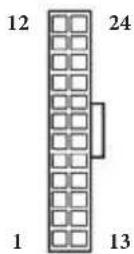
iATX
864-bit/732-bit/764-bit
认证
864-bit/732-bit/764-bit
Sertifikasi
Contact Information
If you need to contact ASRock or want to know more about ASRock, you're welcome to visit ASRock's website at http://www.asrock.com; or you may contact your dealer for further information. For technical questions, please submit a support request form at http://www.asrock.com/support/tsd.asp
ASRock Incorporation
2F., No.37, Sec. 2, Zhongyang S. Rd., Beitou District,
Taipei City 112, Taiwan (R.O.C.)
ASRock EUROPE B.V.
Bijsterhuizen 3151
6604 LV Wijchen
The Netherlands
Phone: +31-24-345-44-33
Fax: +31-24-345-44-38
ASRock America, Inc.
13848 Magnolia Ave, Chino, CA91710
U.S.A.
Phone: +1-909-590-8308
Fax: +1-909-590-1026