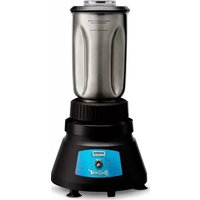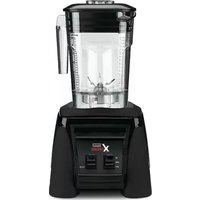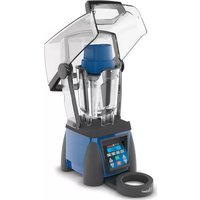
Ellipse MXE2000 - Blender Waring Commercial - Free user manual and instructions
Find the device manual for free Ellipse MXE2000 Waring Commercial in PDF.



User questions about Ellipse MXE2000 Waring Commercial
0 question about this device. Answer the ones you know or ask your own.
Ask a new question about this device
Download the instructions for your Blender in PDF format for free! Find your manual Ellipse MXE2000 - Waring Commercial and take your electronic device back in hand. On this page are published all the documents necessary for the use of your device. Ellipse MXE2000 by Waring Commercial.
USER MANUAL Ellipse MXE2000 Waring Commercial
For your safety and continued enjoyment of this product, always read the instruction book carefully before using.
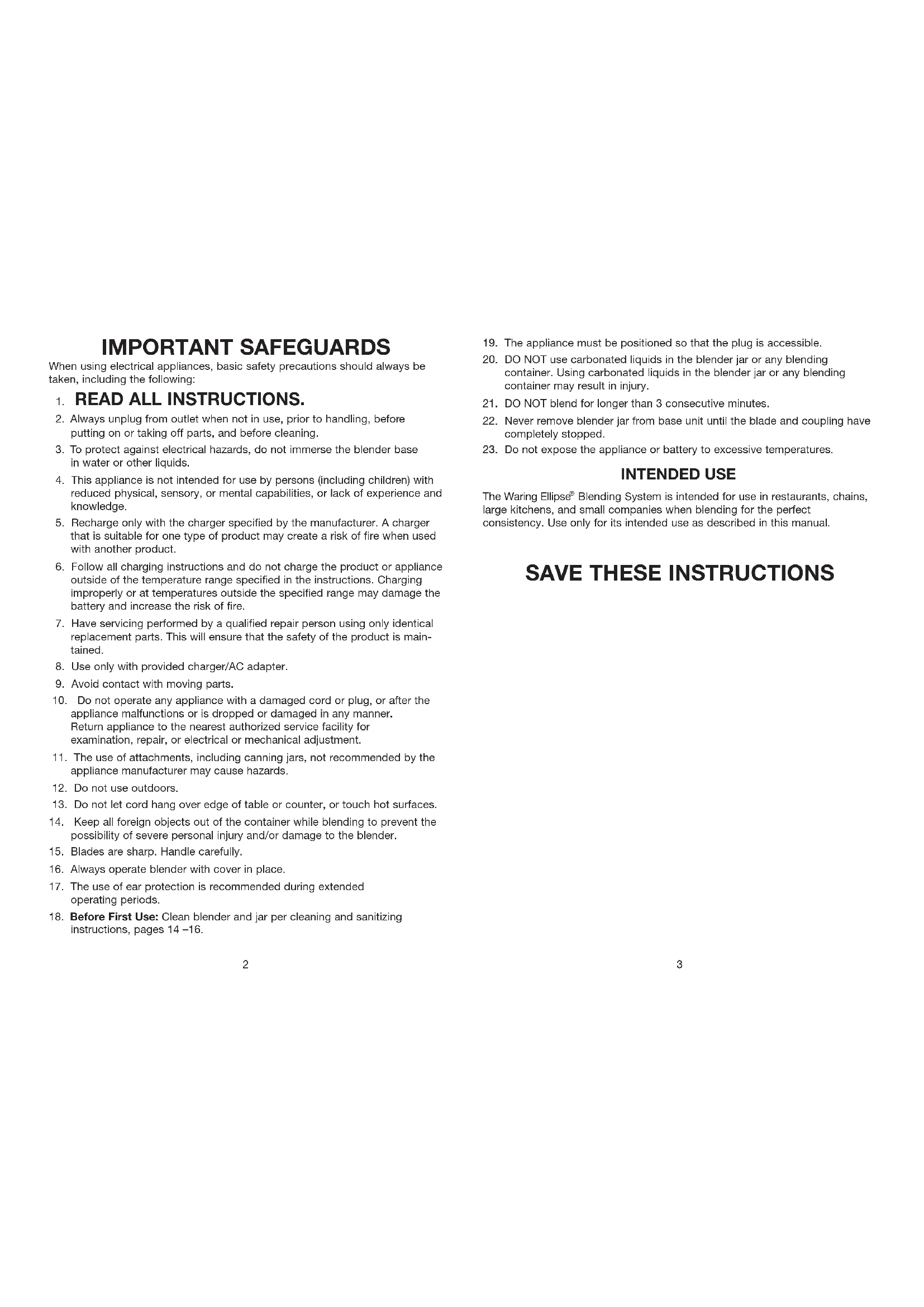
When using electrical appliances, basic safety precautions should always be taken, including the following:
1. READ ALL INSTRUCTIONS.
- Always unplug from outlet when not in use, prior to handling, before putting on or taking off parts, and before cleaning.
- To protect against electrical hazards, do not immerse the blender base in water or other liquids.
- This appliance is not intended for use by persons (including children) with reduced physical, sensory, or mental capabilities, or lack of experience and knowledge.
- Recharge only with the charger specified by the manufacturer. A charger that is suitable for one type of product may create a risk of fire when used with another product.
- Follow all charging instructions and do not charge the product or appliance outside of the temperature range specified in the instructions. Charging improperly or at temperatures outside the specified range may damage the battery and increase the risk of fire.
- Have servicing performed by a qualified repair person using only identical replacement parts. This will ensure that the safety of the product is maintained.
- Use only with provided charger/AC adapter.
- Avoid contact with moving parts.
- Do not operate any appliance with a damaged cord or plug, or after the appliance malfunctions or is dropped or damaged in any manner. Return appliance to the nearest authorized service facility for examination, repair, or electrical or mechanical adjustment.
- The use of attachments, including canning jars, not recommended by the appliance manufacturer may cause hazards.
- Do not use outdoors.
- Do not let cord hang over edge of table or counter, or touch hot surfaces.
- Keep all foreign objects out of the container while blending to prevent the possibility of severe personal injury and/or damage to the blender.
- Blades are sharp. Handle carefully.
- Always operate blender with cover in place.
- The use of ear protection is recommended during extended operating periods.
-
Before First Use: Clean blender and jar per cleaning and sanitizing instructions, pages 14-16.
-
The appliance must be positioned so that the plug is accessible.
- DO NOT use carbonated liquids in the blender jar or any blending container. Using carbonated liquids in the blender jar or any blending container may result in injury.
- DO NOT blend for longer than 3 consecutive minutes.
- Never remove blender jar from base unit until the blade and coupling have completely stopped.
- Do not expose the appliance or battery to excessive temperatures.
INTENDED USE
The Waring Ellipse® Blending System is intended for use in restaurants, chains, large kitchens, and small companies when blending for the perfect consistency. Use only for its intended use as described in this manual.
SAVE THESE INSTRUCTIONS
GETTING STARTED/CHARGING YOUR WARING ELLIPSE® DRIVE
CAUTION: Store the Waring Ellipse® chargers and Waring Ellipse® drive at room temperature only. Avoid exposure to high temperatures to prevent damage.
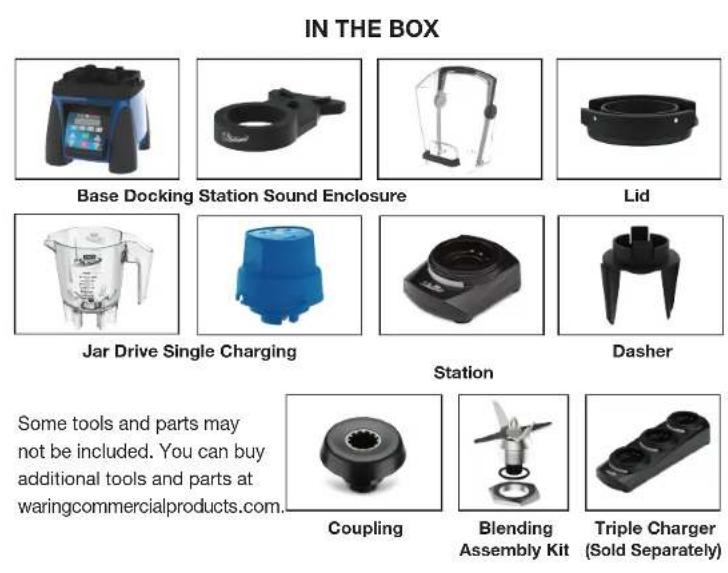
- Your Waring Ellipse Blending System comes with one single charging station. Please ensure you fully charge your Waring Ellipse drive before using it for the first time and after every service day.
- Connect cord to charging base and plug adapter into a wall outlet.
- Before first use, place your Waring Ellips drive on the charging station and charge for 3 hours. The LED will indicate your battery level.
a. Low battery (1 - 25%) = Blinking red
b. Medium battery (26 - 75%) = Blinking orange
c. High battery (76 - 99%) = Blinking green
d. Full battery (100%) = Solid green
4. Once your drive has reached the solid green stage, your Waring Ellips® drive is fully charged and ready to use.
NOTE: The drive can be used at any percentage level. For best results, fully charge your drive at the end of every service day.
OPERATING YOUR WARING ELLIPSE® DRIVE
- The Waring Ellipse drive can be activated automatically or manually:
Automaticactivation: Press and hold the AUTO START button for 3 seconds (Fig. 1). The green LED will blink, which indicates the drive is in Auto Start mode. The Waring Ellipse drive will start upon closing the sound enclosure, and it will run continuously for 30 seconds or until the sound enclosure is opened.
NOTE: To deactivate the Auto Start mode, press and hold the AUTO START button for 3 seconds. The green LED will stop blinking.
- Manual activation: Press one of the three time buttons on top of the drive (Fig. 2). The Waring Ellipse drive will start, and it will run continuously during the set time (10, 20 or 30 seconds).
NOTE: To pause or cancel the manual mode, press any of the time buttons again.
IMPORTANT: Never operate the unit without the dasher system.
- At the end of every service day, place the drive on the provided charging station to ensure it is fully charged for the next service day or shift.
NOTE: The Waring Ellipse drive will fully charge in 2 to 3 hours, depending on battery life. Each full charge can last up to 8 hours, depending on use.
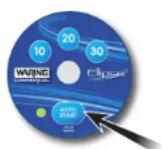
FIGURE 1
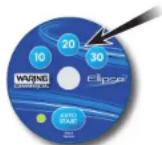
FIGURE 2
NOTE: Use a soft, damp cloth to clean the clear window of the Waring Ellipse drive. This will ensure the drive runs properly.
NOTE: Do not overcharge the Waring Ellipse drive. Waring Ellipse drive should not be left on charging station indefinitely. This will degrade the battery over time. To preserve battery life of the Waring Ellipse drive, only charge when needed.
- Please ensure the Waring Ellipse dasher and lid are in place before placing the drive on the jar.
NOTE: When blender is not in use, place Waring Ellipse drive on the docking station for easy access.
WARING ELLIPSE DASHER SYSTEM
- The Waring Ellips® dasher system is made up of two parts: the lid and the dasher. Each individual piece cannot operate without the other.
- Assembly: The dasher features two locking tabs on each of its sides. In order to properly assemble the dasher into the lid, insert the dasher into the bottom of the lid (as shown in the image to the right) until each of the locking tabs clicks into place. Once in place, the dasher is securely locked to the lid and can be placed on the Waring Ellipse jar.
- Disassembly: In order to disassemble the dasher from the lid, gently press inward on the two locking tabs. This will disengage the dasher from the lid. Gently press down on the locking tabs pushing through the lid using both thumbs.
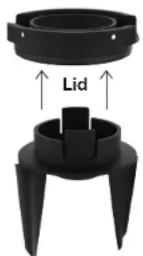
Dasher
NOTE: Please perform this operation over a sink or counter to prevent the dasher from falling and being damaged.
NOTE: The Waring Ellipse lid features two gaskets, one located on the inside of the lid and the second located around the outside of the lid. Both gaskets must be in place before running the Waring Ellipse system. Both gaskets must be removed and cleaned at the end of each service day or as needed.
WARING ELLIPSE DOCKING STATION
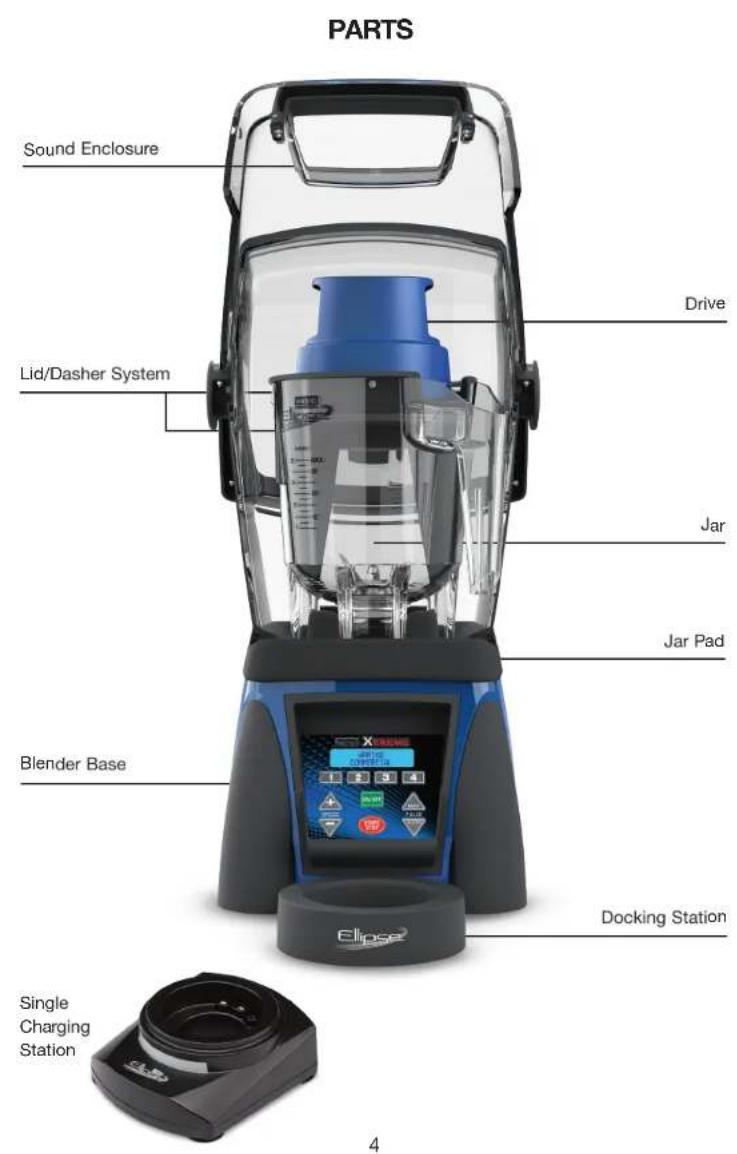
Your Waring Ellipse® blender comes with a docking station that functions as a storage option for your Waring Ellipse® drive. The docking station can be placed in front of your blender base or on the right or left side, depending on your storage and/or usage needs.
NOTE: The docking station is not a charging device. It will not charge your Waring Ellipse drive when in place.
BEFORE BLENDING
- Before starting, make sure that the blender is unplugged and container is not positioned on the blender.
- Put ingredients into container. Do not fill above MAX fill line.
- Place container on blender base. Be sure container is fully seated and that the drive coupling is properly engaged. Place the lid and dasher on the jar followed by the Waring Ellipse drive. Plug blender cord into outlet.
XTREME CONTROL SETTINGS
- The motor speed can be adjusted by pressing the or speed buttons. Speed ranges from 5% to 100% .
100% 20,000 RPM
50% 10,000 RPM
5% 1,000 RPM
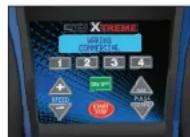
The Speed Up button will increase the motor speed display in 1% increments, and the Speed Down button will decrease the motor speed in 1% increments. Holding down either button will quickly scroll through speeds.
Using the Speed Up + and Speed Down · buttons, set desired motor speed. If no speed is selected, motor will default to 100% .
NOTE: The motor does not run at the newly set speed until the START/ STOP button is pressed. If START/STOP button is not pressed within 5 seconds, the new speed setting will be stored for next use and the blender will return to STANDBY mode; the display will read "PRESS ANY BUTTON TO BLEND."
2. Press START/STOP button to run the blender. Blender will run continuously at the set speed. The LCD will display the motor speed in percentage. Default speed (percentage) is at 100% . Motor speed can be changed while blender is running by simply pressing Speed Up or Speed Down button.
3. To stop continuous blending operation, press START/STOP button or press any of the program buttons.
PULSE FEATURES
Your unit comes equipped with two PULSE options: Normal Pulse and Maximum Pulse. Note: The Pulse buttons are momentary switches - once released, the unit will shut off.
- To use Max Pulse option, press the button. This will run the motor at 150% speed. The LCD will read "MAX PULSE SPEED: 150% ."
-
To use Normal Pulse option, press the button. This will run the motor at 100% speed. The LCD will read "NORM PULSE SPEED: 100% "
-
The blender allows you to set the Normal Pulse to your desired speed. While blending: Hold the Normal Pulse button and press Speed Up or Speed Down button to adjust the blending speed. The LCD will show the setting speed, and motor speed will change.
NOTE: The Normal Pulse speed can be set from 5% to 100% . Once the Normal Pulse button is released, the motor will shut off and the blender will return to STANDBY mode. The changed pulse speed will be stored in memory to replace the default speed of 100% .
REPROGRAMMABLE STATIONS
- There are 4 Program buttons for four reprogrammable beverage stations for easy operation and consistent results. The factory-set stations are programmed as listed below:

70% speed, 10 seconds blend time

70% speed, 15 seconds blend time

70% speed, 20 seconds blend time

70% speed, 25 seconds blend time
- To run any of the above preset programs, blender must be in STANDBY mode.
- Press desired Program button to start the blender. The motor will run at the preset speed within the preset blending time. The LCD will show time remaining. Once the blender counts down to 0, the motor will stop running and the blender will return to STANDBY mode and prompt "PRESS ANY BUTTON TO BLEND" to begin another function.
NOTE: To terminate a blending program, simply press START/STOP button or any of the Program buttons. After doing this, the blender will return to STANDBY mode and LCD will prompt "PRESS ANY BUTTON TO BLEND."
REPROGRAMMING BEVERAGE STATIONS
Users can add 4 new programs to meet their needs. A program can consist of several sections, each with a different speed and running time. For example, 1 can be replaced with a new program that has 3 sections, as shown below:
Section 1: speed = 75%; time = 30 seconds
Section 2: speed = 100%; time = 20 seconds
Section 3: speed = 50%; time = 20 seconds
The program has the following limitations:
Speed: 5% to 100%
Time: 5 to 90 seconds
Total running time in a program cannot exceed 90 seconds, i.e., sum of the sections cannot be longer than 90 seconds.
NOTE: The button will act as the enter key to proceed to the next step during the reprogramming process.
- To enter new program, press both Speed Up and Speed Down buttons simultaneously while unit is in STANDBY mode. The blender will enter new programming mode and the LCD will prompt "ADD NEW PROGRAM."
- Next, you will need to set values. Press the Program button you want to replace (e.g., 1-4). The LCD will prompt "USE UP/DOWN TO SET SPEED: 25% ."
NOTE: 25% is the default speed setting in the reprogramming mode. - Press Speed Up for Speed Down button to set the speed value. The increment is 1% (150 RPM). Press and hold the button to quickly scroll through speeds. The speed can be set between 5% and 100% .
- Once desired speed is reached, press button or wait 5 seconds to confirm setting. The LCD will now prompt "USE UP/DOWN TO SET TIME." NOTE: Five seconds is the default time setting in the reprogramming mode.
- Use Speed Up or Speed Down button to set the time value (up to 90 seconds). Once 90 seconds is reached, pressing Speed Up will not increase the value and the LCD will prompt "MEMORY LIMIT" for 2 seconds.
- Press button or wait 5 seconds to confirm the setting. When the blending time is confirmed, the LCD will prompt SELECT ANOTHER SPEED. Repeat steps 3-5 if additional processing is needed. NOTE: When pressing Speed Up or Speed Down buttons to set speed for next section, the LCD will prompt "USE UP & DOWN TO SET SPEED: 25% ."
- To save the new program settings, press both Speed Up and Speed Down buttons simultaneously. The LCD will prompt NEW PROGRAM (PROG #) SAVED for 5 seconds. The blender will return to STANDBY mode and the LCD will prompt "PRESS ANY BUTTON TO BLEND." NOTE: If no button is pressed within 60 seconds after prompt to "ADD NEW PROGRAM," the blender will exit NEW PROGRAM mode and will return to STANDBY mode. The new program will not be stored.
- To run new programs, simply press the desired Program button and the blender will run the program set by the user. The LCD will display NEW PROGRAM # and will count down the set time.
RESTORING FACTORY-SET BEVERAGE STATIONS
- To restore factory-set default beverage stations, press both Speed Up+ and Speed Down buttons. LCD will prompt "ADD NEW PROGRAM."
- Press button LCD will prompt "RESTORE DEFAULT PROGRAMS."
-
Press button to confirm and save. The LCD will display the logo for 3 seconds.
-
The unit will return to STANDBY mode and the LCD will prompt "PRESS ANY BUTTON TO BLEND."
NOTE: The START/STOP button will abort this process at any point before restoring default programs is confirmed.
DRINK COUNTER
Your reprogrammable blender is equipped with a drink counter to keep track of daily drink totals and total drink counts for your machine. To display the counts, hold program buttons 1 & 3 simultaneously for 3 seconds. Your display will read:
DAILY COUNT ###
TTL COUNT ###
Daily Count will display the number of drinks mixed per day. Total Count is the accumulation of all drinks made since first use of the blender. The Daily Count can be reset by holding in Program buttons 1 & 3 simultaneously for 3 seconds, then pressing ON/OFF button for 3 seconds. Daily Count will reset to zero and Total Count will remain unchanged.
If Total Count needs to be reset, call your nearest Waring authorized service facility for information.
NOTE: Use of the PULSE features will not add to the daily or total drink counts.
RESETTING THERMAL PROTECTION
- The blender you have purchased is equipped with an automatic reset switch to protect the motor from overheating.
- If your blender stops running under heavy use, turn the power switch to the STANDBY or OFF position and unplug the power cord. Empty the blender container of all its contents and allow approximately 5 minutes for the motor to cool down.
- Plug the power cord back into the outlet and continue blending.
READY TO BLEND
- Once your blender is properly programmed and your jar is placed on the blender base, place the Waring Ellipse® drive on top of the jar. Determine if you will be using the Waring Ellipse® drive in manual or auto mode. If manual mode is needed, press your desired timing. If AUTO START is needed, activate the drive by pressing the button for 3 seconds.
- Close the sound enclosure lid.
- Choose desired speed or press the applicable beverage station (1-4).
- Press START/STOP button.
IMPORTANT - HOT BLENDING INSTRUCTIONS
IMPORTANT: DO NOT USE THE WARING ELLIPSE® BLENDING SYSTEM WITH HOT MATERIALS.
INSTALLING THE SOUND ENCLOSURE
NOTE: Your Waring Ellipse blender comes with a sound enclosure.
The sound enclosure was designed to help reduce noise and vibration.
The sound enclosure will automatically activate the dasher system when closed in AUTO START mode.
1.TheWaring Ellipse base features three tabs that the sound enclosure will attach to. The three tabs are located on the left, right, and back of the jar pad.
2. Grab the bottom section of the rear sound enclosure housing. Align each tab on the blender base with the openings in the sound enclosure. You may need to pull the corners of the rear sound enclosure housing to fit it around the Waring Ellipse® base. This is normal in order to secure the enclosure around the tabs on the base.
3. Once attached, the sound enclosure should feel secure around the Waring Ellipse base.
REMOVING THE SOUND ENCLOSURE
To remove the sound enclosure, unplug your blender and follow these steps:
- Open the sound enclosure and remove the blending container if it is in place.
- Remove the rear housing from the tabs around the blender base. Gently pull the left and right corners to disengage from the base.
Whether your blender is in STANDBY mode, NEW PROGRAM mode, or the motor is running, pressing the ON/OFF button will stop the unit from running and will turn the power off. The LCD display will turn off.
NOTE: All programs and current settings will be restored next time you turn unit on.
CLEANING AND SANITIZING INSTRUCTIONS
THE WARING ELLIPSE® BLENDING SYSTEM PARTS MUST BE CLEANED AND DRIED AFTER EACH USE OF THE BLENDER ACCORDING TO THE FOLLOWING INSTRUCTIONS. FAILURE TO DO SO MAY ALLOW RESIDUE OF PROCESSED MATERIAL TO COLLECT ON THE INTERNAL SEALS OF THE BLADE ASSEMBLY, RENDERING THEM INEFFECTIVE.
WARING ELLIPSE DRIVE
- Always remove the Waring Ellipse drive before cleaning.
- Clean the Waring Ellipse drive with a soft damp cloth.
- Do not use any abrasive materials.
- DO NOT submerge the Waring Ellipse drive in water or other liquids.
WARING ELLIPSE DASHER SYSTEM
- The Waring Ellipse dasher system (lid and dasher) need to be disassembled and cleaned after every use. Both the lid and dasher are dishwasher safe.
NOTE: There are two rubber gaskets located on the lid that need to be removed and cleaned at the end of every service day or as needed. The first gasket is located around the outside of the lid and the second gasket is located underneath the lid. Both of the rubber gaskets are dishwasher safe.
2. Disassemble: In order to disassemble the dasher from the lid, gently press inward on the two locking tabs. This will disengage the dasher from the lid. Gently press down on the locking tabs pushing through the lid.
NOTE: Please perform this operation over a sink or counter to prevent the dasher from falling and being damaged.
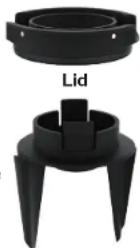
Dasher
WARING ELLIPSE JAR
- Wash, rinse, and dry container prior to initial use and after each use.
- Washing solutions based on non-sudsing detergents and chlorine-based sanitizing solutions having a minimum chlorine concentration of 100 PPM are recommended.
The following washing, rinsing, and sanitizing solutions, or their equivalents, may be used.
| SOLUTION | PRODUCT | DILUTION IN WATER | TEMPERATURE |
| Washing | International Products Corporation LF2100 Liquid Low-Foam Cleaner | 1%-2%: 1¼ - 2¾ ounces/gallon (lower dilution of 1% for normal cleaning and up to 2% for more stubborn soils) | Room temperature |
| Rinsing | Plain Water | Warm 95°F (35°C) | |
| Sanitizing | Clorox®Regular Bleach (8.25% hypochlorite concentration) | 2 teaspoons/gallon (alternately a bleach with 5.25% hypochlorite concentration can be used at dilution of 3 teaspoons/gallon) |
- In repetitive batch-processing applications, frequent cleaning of the container will prolong the life of the blade assembly. In no case should actual running time between cleanings exceed 12 hour.
- Do not use container to store processed foods or beverages.
TO WASH AND RINSE CONTAINER:
- REMOVE CONTAINER FROM MOTOR BASE. Remove Waring Ellipse dasher system (lid and dasher). Rinse container interior and lid under running water. Add washing solution to container. Scrub and flush out the container interior to dislodge and remove as much food residue as possible. Empty container.
- Wipe down exterior of container with a soft cloth or sponge dampened with washing solution. Fill container 14 full with fresh washing solution, cover (with lid only), place on motor base and run on the highest speed for two (2) minutes. Empty container.
- Repeat step 2 using clean rinse water in place of washing solution.
IMPORTANT
NOTE: IN ORDER TO MINIMIZE POSSIBILITY OF SCALDING, TEMPERATURE OF WASHING SOLUTION AND RINSE WATER MUST NOT EXCEED 115^ (46°C), AND QUANTITY USED MUST NOT EXCEED ¼ CONTAINER FULL.
TO SANITIZE AND DRY CONTAINER:
- Wipe down exterior of container with a soft cloth or sponge dampened with sanitizing solution.
- Fill container with sanitizing solution, cover, place on motor base, and run on high speed for two (2) minutes. Empty container. Dislodge any residual moisture from blade assembly by placing empty container on motor base and running on the highest speed for two (2) seconds.
- Sanitize lid by immersing in sanitizing solution for two (2) minutes.
- Do not rinse container or lid after sanitizing is completed. Allow parts to air-dry.
MOTOR BASE
- Clean and sanitize motor base prior to initial use and after each use.
- UNPLUG POWER CORD. Wipe down exterior surfaces of motor base with soft cloths or sponges dampened with washing solution, rinse water, and sanitizing solution. Prevent liquid from running into motor base by wringing all excess moisture from cloths or sponges before using them. DO NOT IMMERSE MOTOR BASE IN WASHING SOLUTION, RINSE WATER, OR SANITIZING SOLUTION.
- Allow motor base to air-dry before using.
Any other servicing should be performed by an authorized service representative.
WARING ELLIPSE BLENDER ACCESSORIES GUIDE
| MODEL DESCRIPTION | ||
| CAC119 | Retainer Ring Wrench for CAC93X & CAC95 (to remove blending assembly* from container) | |
| *Recommended Maintenance: To ensure proper performance, replace every 3 to 6 months. | ||
| CAC187 | Jar with Dasher, Lid, and Blade Assembly | |
| CAC187-10 | Jar with Dasher, Lid, and Blade Assembly (Purple) | |
| CAC188 | Jar with Blade Assembly | |
| CAC188-10 | Jar with Blade Assembly (Purple) | |
| CAC192 | Waring Ellipse® Dasher | |
| CAC192-10 | Waring Ellipse® Dasher (Purple) | |
WARING ELLIPSE BLENDER ACCESSORIES GUIDE
| MODEL DESCRIPTION | ||
| CAC193 | Waring Ellipse® Lid (includes gaskets) | |
| CAC193-10 | Waring Ellipse® Lid (includes gaskets) (Purple) | |
| CAC194 | Waring Ellipse® Blade Assembly | |
| SE1500 | Sound Enclosure Kit | |
| CAC197 | Waring Ellipse® Jar Pad | |
| CAC198 | Jar Pad & Adaptor Ring | |
| CAC190E/K | Complete Retrofittable Kit for MX Series Blender Bases | |
| CAC182 | Coupling | |
WARING ELLIPSE® BLENDER ACCESSORIES GUIDE
| MODEL DESCRIPTION | ||
| MXESD1 | Docking Station | |
| MXECHG1E/K | Single Charging Station | |
| MXECHG3E/K | Triple Charging Station | |
| MXEDR | Waring Ellipse® Drive | |
LIMITED THREE-YEAR BLENDER MOTOR WARRANTY LIMITED ONE-YEAR PARTS & LABOR WARRANTY
LIMITED WARRANTY: Coverage Conditions
Waring warrants every new Waring Ellipse ^ 念 Blending System to be free from defects in material and workmanship for a period of three years on the blender motor base and one year on all parts and labor. This warranty covers all cases of manufacturer's defect when used with foodstuffs, nonabrasive liquids (including detergents), and nonabrasive semi-liquids, providing it has not been subject to loads in excess of the indicated rating. The warranties contained herein apply only to the original end-user and are not transferable. To make a warranty claim, proof of purchase is required. Any warranty offered by Waring is only valid if the product is used in accordance with: a) the owner's manual that may also be accessed at www.waring.com; and b) any and all maintenance instructions regardless of when they are supplied. The warranty period will begin on date of sale, as per proof of purchase.
Under this warranty, Waring, at its sole discretion and during the warranty period, will repair or replace any part that, upon examination, is deemed defective in materials or workmanship, provided the product is delivered prepaid to any Waring Authorized Service Center. The Authorized Service Center list can be found at https://www.waringcommercialproducts.com/support/service.
Warning: This warranty is void if a) the appliance is used on direct current (D.C.); b) any component of an in-warranty piece of equipment or part has been modified, altered, "reconditioned," or repaired by persons other than Waring Corporate, an authorized Waring Service Center, or an authorized Waring distributor; c) any covered Waring component is used with a component not expressly authorized in writing by Waring; or d) any part of the blender is improperly installed, including but not limited to poor workmanship, and not following specifications provided.
The sole obligation of Waring under these warranties is to repair or replace the warranted part or parts as determined exclusively by Waring.
IN NO EVENT, WHETHER BASED ON CONTRACT, INDEMNITY, WARRANTY, TORT (INCLUDING NEGLIGENCE), STRICT LIABILITY, OR OTHERWISE, SHALL BEING BE LIABIBLE FOR ANY SPECIAL, INDIRECT, INCIDENTAL, OR CONSEQUENTIAL DAMAGES WHATSOEVER INCLUDING, WITHOUT LIMITATION, LOSS OF PROFIT OR REVENUE. THE ABOVE LIMITED WARRANTY IS YOUR EXCLUSIVE REMEDY, AND YOU AND WARING HEREBY EXPRESSLY DISCLAIM ALL OTHER WARRANTYES OR CONDITIONS, EXPRESS OR IMplied, STATUTORY OR OTHERWISE, INCLUDING ANY IMPLIED WARRANTY OF MERCHANTABILITY AND ANY IMPLIED WARRANTY OF FITNESS FOR A PARTICULAR PURPOSE, AND, WITHOUT LIMITING THE GENERALITY OF THE FOREGOING, YOU AND WARING HEREBY EXPRESSLY EXCLUDE, TO THE EXTENT PERMITTED BY LAW, THE APPLICATION OF ANY SALE OF GOODS LEGISLATION AND THE UNITED NATIONS CONVENTION ON CONTRACTS FOR THE INTERNATIONAL SALE OF GOODS, AS MAY BE APPLICABLE.
Some jurisdictions do not allow a limitation on implied warranties or on special, incidental, or consequential damages.
WHAT IS NOT COVERED UNDER WARRANTY (Coverage Exclusions):
These warranties do not include cosmetic changes that do not affect performance, such as discoloration or the effects of the use of washing machines, abrasive products or cleaners; staining; food buildup; damages resulting from regular maintenance, adjustments, consumable parts and their installation, and cleaning (including as outlined in the instruction manual); incidental or consequential damages of any kind related to, but not limited to:
A. Normal wear and tear
B. Abuse, misuse, negligent use, overloading, tampering
C. Alteration of the equipment including but not limited to the motor base, upper motor and battery, dasher system, gaskets, container, sound enclosure, and original rating label and/or data plate
D. Repairs or servicing by persons other than the Waring Corporate Service Center or a Waring Authorized Service Center
E. Exposure to extreme conditions
F. Improper installation of the equipment, including but not limited to poor workmanship, and/or not following specifications provided
G. Water and other liquid found inside the motor housings
H. Shipment
I. Floods, storms, and any other acts of nature
This warranty overrides all other warranties or guarantees of any kind, expressed or implied, including any implied warranty or merchantability or fitness for a particular purpose. In no event shall Waring be liable for any special, indirect, incidental, or consequential damages. Waring's liability under this warranty ends upon the expiration of the warranty period. The warranty shall constitute the sole liability of Waring and the exclusive remedy of the customer or user.
The warranty is applicable only to appliances used in the United States or Canada, and supersedes all other express product warranty or warranty statements. For Waring products sold outside the U.S. and Canada, the warranty is the responsibility of the local importer or distributor. This warranty may vary according to local regulations.
Repaired products may include new or factory-refurbished replacement parts. Replaced products may be new or manufactured from serviceable used parts. Any product under warranty to be submitted for review must (i) be accompanied by proof of original purchase; (ii) have a return authorization number ("RA") from a Waring customer service representative; and (iii) must be shipped prepaid to the address provided by a Waring customer service representative. Waring reserves the right to not accept returns unless accompanied by a valid RA. Shipments are sent via ground through the carrier of Waring's choice, unless other methods are arranged and paid for by the customer through contract or special request.
NOTE: Any items returned for service must be sterilized before being shipped for repair and clearly identified as such. Waring will not accept a delivery until it is identified as having been sterilized. Replacement parts for out-of-warranty repairs may be purchased at the address below and from our website.

a Ave.
790
DISPOSAL/RECYCLING OF BATTERIES
This product uses two Li-ion rechargeable and recyclable batteries. At the end of the batteries' useful life, they should be recycled. These batteries must not be incinerated or composted. Li-ion batteries should not be put in municipal waste systems. Contact your local waste collection agency for proper recycling and disposal information for your area. Please do not attempt to dismantle the Waring Ellipse® drive to replace these batteries on your own. Damage to the unit could result.
ACCESSIONS WARING ELLIPSE
ACCESSIONS WARING ELLIPSE
ACCESSIONS WARING ELLIPSE