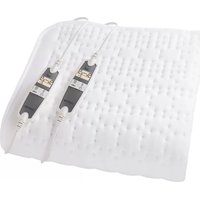
HN297V - Heated blanket/cushion INVENTUM - Free user manual and instructions
Find the device manual for free HN297V INVENTUM in PDF.



| Product type | Heating blanket / heating pad (for double bed) |
| Brand | Inventum |
| Model | HN297V |
| Power supply | 220-240 V ~ 50-60 Hz |
| Power | Approximately 150 W |
| Dimensions (approx.) | 160 x 140 cm (for 2 persons) |
| Weight (approx.) | 1.5 kg |
| Temperature adjustment | 9 levels per zone (body and feet), independent |
| Special functions | TURBO fast heating, automatic shut-off 1-12 h, anti-allergy level, kWh display, ECO mode, ISS safety system |
| Maintenance | Machine washable at 30 °C (wool program), max 5 washes, lay flat to dry, do not iron, do not bleach, do not dry clean |
| Safety | ISS anti-overheat safety system, automatic shut-off, double insulation (class II), CE certification, Oeko-Tex Standard 100, do not use folded/creased |
| Users | Suitable for adults and children >8 years under supervision. Not recommended for children 0-3 years and people insensitive to heat |
| Warranty | 2 years full manufacturer's warranty |
| Included accessories | Switch with display, power cable, mains plug |
| Spare parts | Switch not detachable, cable not user-replaceable |
| Repairability | Do not open or repair yourself. Contact Inventum customer service |
Frequently Asked Questions - HN297V INVENTUM
User questions about HN297V INVENTUM
0 question about this device. Answer the ones you know or ask your own.
Ask a new question about this device
Download the instructions for your Heated blanket/cushion in PDF format for free! Find your manual HN297V - INVENTUM and take your electronic device back in hand. On this page are published all the documents necessary for the use of your device. HN297V by INVENTUM.
USER MANUAL HN297V INVENTUM
natural_image
Two medical or laboratory probe devices with digital display screens, placed on a grid-patterned surface (no visible text or symbols)explanation of symbols page 14
1. safety instructions page 16
2. appliance description page 18
3. intended use page 18
4. operation page 18
5. cleaning & maintenance page 21
6. storage page 21
7.disposal page 22
8. problems & solutions page 22
general terms and conditions of service and warranty page 45
Deutsch

OPGELET
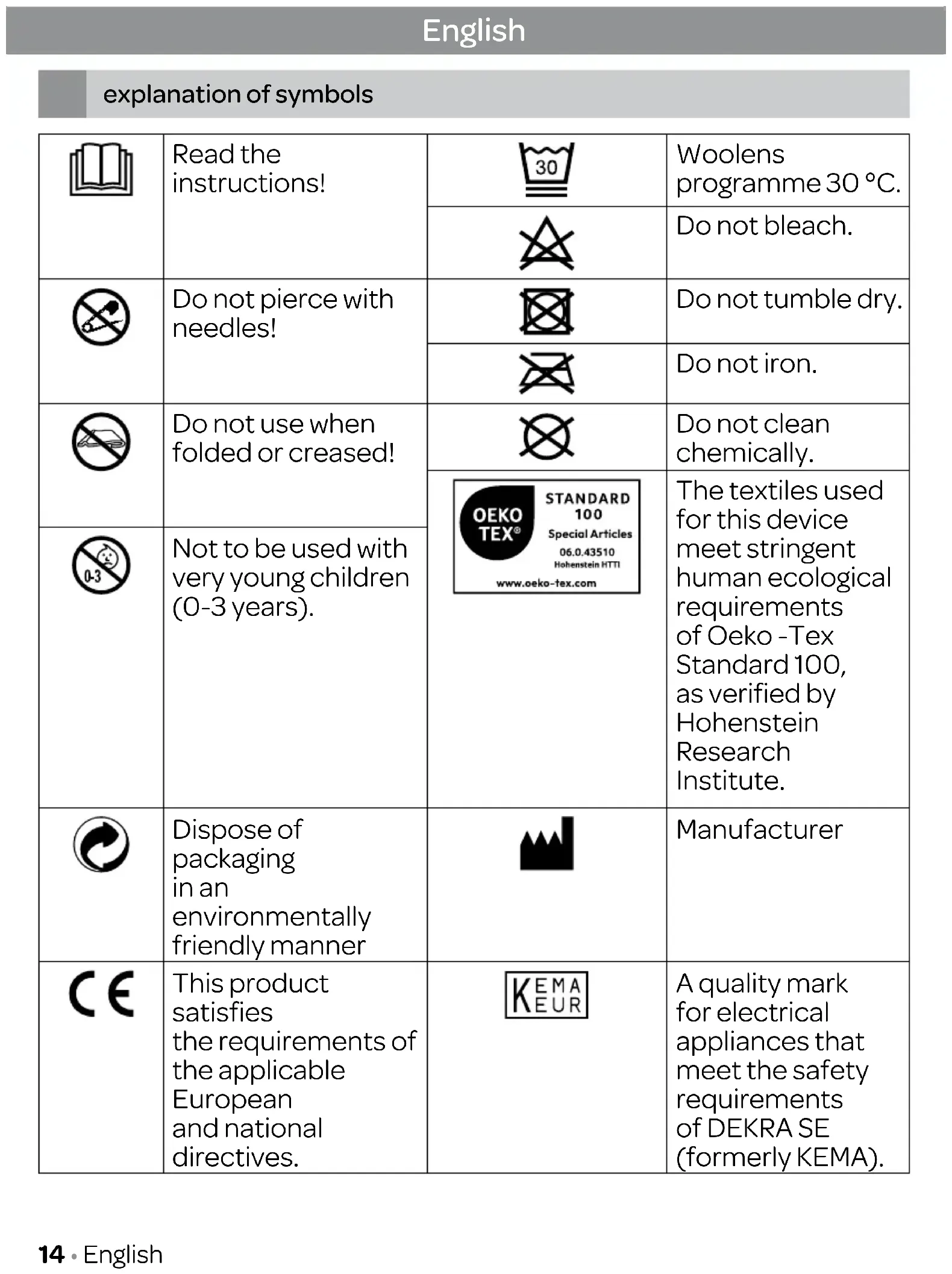
explanation of symbols
 | Read the instructions! |  | Woolens programme 30 °C. |
 | Do not bleach. | ||
 | Do not pierce with needles! |  | Do not tumble dry. |
 | Do not iron. | ||
 | Do not use when folded or creased! |  | Do not clean chemically. |
 STANDARD 100 Special Articles 06.0.43510 Hohenstein HTTI www.oeko-tex.com STANDARD 100 Special Articles 06.0.43510 Hohenstein HTTI www.oeko-tex.com | The textiles used for this device meet stringent human ecological requirements of Oeko -Tex Standard 100, as verified by Hohenstein Research Institute. | ||
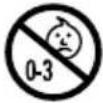 | Not to be used with very young children (0-3 years). | ||
 | Dispose of packaging in an environmentally friendly manner |  | Manufacturer |
 | This product satisfies the requirements of the applicable European and national directives. |  | A quality mark for electrical appliances that meet the safety requirements of DEKRA SE (formerly KEMA). |
 | The device has double protective insulation and therefore complies with protection class 2. | 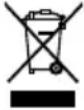 | Please dispose of the device in accordance with EC Directive – WEEE (Waste Electrical and Electronic Equipment). |
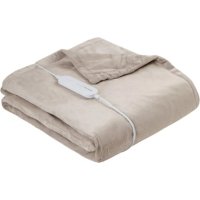
 | The electric blanket is suitable for 2 persons. | ||
 | WARNING; Warning of risk of injury or danger to your health. | ||
 | CAUTION; Safety information about possible damage to the device/accessories. | ||
 | NOTE; Refers to important information. | ||
1 safety instructions
Important safety instructions - read carefully and keep for later reference!

WARNING
- Non-observance of the following notes may result in personal injury or material damage (electric shock, skin burns, fire). The following safety and hazard information is not only intended to protect your health and the health of others, it should also protect the product. For this reason, pay attention to these safety notes and include these instructions when handing over the product to others.
- This heated underblanket must not be used by persons who are not sensitive to heat or by other vulnerable persons who may not be able to react to overheating (e.g. diabetics, people with skin alterations due to illness or scarred tissue in the application area, after taking pain relief medication or alcohol).
- This heated underblanket must not be used by very young children (0-3 years old) as they are unable to respond to overheating.
- The heated underblanket can be used by children older than 3 and younger than 8 years of age provided they are supervised. For this, the control must always be set to the minimum temperature.
- This heated underblanket may be used by children over the age of 8 and by people with reduced physical, sensory or mental skills or a lack of experience or knowledge, provided that they are supervised and have been instructed on how to use the heated underblanket safely, and are fully aware of the consequent risks of use.
• Children must not play with the heated underblanket. - Cleaning and user maintenance must not be performed by children unless supervised.
- This heated underblanket is not designed for use in hospitals.
- This heated underblanket is only intended for domestic/private use, not for commercial use.
- Do not insert needles.
- Do not use when folded or bunched up.
- Do not use if wet.
-
Before using it on an adjustable bed, check that the heated underblanket and the cables are not, for example, trapped in a hinge or bunched up.
-
This heated underblanket may only be used in conjunction with the control specified on the label.
- This heated underblanket must only be connected to the mains voltage that is specified on the label.
- The electrical and magnetic fields emitted by this heated underblanket may interfere with the function of a pacemaker. However, they are still well below the limits: electrical field strength: max. 5000 V/m, magnetic field strength: max. 80 A/m, magnetic flux density: max. 0.1 millitesla. Please therefore consult your doctor and the manufacturer of your pacemaker before using this heated underblanket.
- Do not pull, twist or make sharp bends in the cables.
- If the cable and control are not positioned properly, there may be a risk of becoming entangled in, being strangled by, tripping over, or stepping on the cable and control of the heated underblanket. The user must ensure that excess lengths of cable, and cables in general, are safely routed.
- Don't expose the controls and the cables to direct sunlight.
- Please check this heated underblanket frequently for signs of wear and tear or damage. If any such signs are evident, if the heated underblanket has been used incorrectly or if it no longer heats up, it must be checked by the manufacturer before being switched on again.
- Under no circumstances should you open or repair the heated underblanket (including the accessories) yourself because faultless functionality can no longer be guaranteed thereafter. Failure to observe this will invalidate the warranty.
- The appliance may not be used with an external timer or a separate remote control.
- If the mains connection cable of this heated underblanket is damaged, it must be disposed of. If it cannot be removed, the heated underblanket must be disposed of.
- When this heated underblanket is switched on:
- Do not place any sharp objects on it
- Do not place any heat sources, such as hot water bottles, heat pads or similar, on it
- The electronic components in the control warm up when the heated underblanket is in use. For this reason, the control must never be covered or placed on the heated underblanket when it is in use.
- It is essential to observe the information relating to the following chapters: Operation, Cleaning and maintenance, Storage.
- If you should have any questions about using our devices, please contact our Customer Services department.
2 appliance description

- Control
- Illuminated display
- Button for adjusting the body area temperature
- Button for setting the automatic switch-off time
- Button for adjusting the foot area temperature
- ON/OFF switch
- Button for displaying the kWh
- Plug-in coupling
- Supply plug
3 intended use

CAUTION
This electric underblanket is designed for warming beds, only.
4 operation
4.1 Safety

CAUTION
- This heated underblanket is equipped with the INVENTUM SAFETY SYSTEM (ISS). This sensor technology prevents the entire surface of the heated underblanket from overheating by automatically switching off the heated underblanket in the event of a fault. If the safety system has switched off the heated underblanket, the temperature setting is not illuminated any more even when the heated underblanket is switched on.
- Please note that the heated underblanket is not operable any more due to safety reasons in this case and has to be sent to the service address indicated.
- Do not connect the defective heated underblanket with another control of the same type. This would trigger a permanent switch off via the control's safety system.
4.2 Initial use
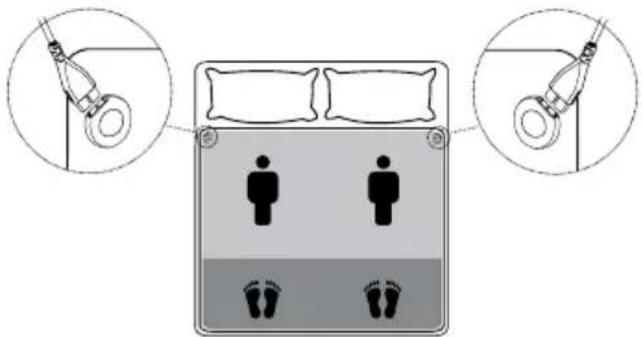
- Spread out the heated underblanket flat onto your mattress starting at the foot end. The electric blanket can be used on both sides.
• To operate the heated underblanket connect the Control to the heated underblanket by plugging in the connector. - Then plug in the supply plug into the mains outlet.
- Then put on your bedsheet in the usual manner so that the heated underblanket is between your mattress and the bedsheet.

CAUTION
Make sure that the underblanket is spread out entirely flat and that it will not rumple up or crease when in use. Check its position when making the bed.
4.3 Switching on
Slide the ON/OFF switch sideways to the ON (1) position to switch on the electric underblanket.
When switched on, the display lights up and at first displays all the segments for approx. 2
seconds. After that, the following basic settings are displayed:
Temperature setting for body area: 0
Temperature setting for foot area: 0
Automatic switch-off time: 1 h (= 1 hour)

NOTE
The illuminance level drops after approx. 5 seconds so that your sleep is not disturbed during the night.

NOTE
This electric underblanket has a rapid heating function, allowing for faster warming in the first 15 minutes. During this time, "Turbo" flashes on the display.
4.4 Selecting the temperature setting
Press the button (3) to select the temperature setting for the body area.
Press the button (5) to select the temperature setting for the foot area.
Level 0: OFF
Level 1: minimum heat
Level 2-8: individual heat
Level 9: maximum heat

NOTE
- Switching sequence of the temperature settings: 0-9-8-7-6-5-4-3-2-1-0-9...
- The quickest way to heat up the electric underblanket is to select the highest temperature setting of the control, first.
- We strongly recommend switching on the electric underblanket approx. 30 minutes before going to bed and covering it with the quilt to prevent the warmth from escaping.

CAUTION
If the heated underblanket is used continuously (for several hours) it is recommended to use the lowest setting (1) of the control to avoid the body overheating and thereby any potential burns to the skin or heat stroke.
4.5 Automatic switch-back

NOTE
This electric underblanket features an automatic switch-back for safety purposes. Temperature settings 9, 8 and 7 are automatically switched to temperature setting 6 after 3 hours.
4.6 Selecting the automatic switch-off time
- Press the button to set the automatic switch-off time. You can set the automatic switch-off time as 1, 2, 3, 4, etc. or 12 hours.

NOTE
Switching sequence of the automatic switch-off time:
1 h - 12 h - 11 h - 10 h - 9 h etc. 1 h - 12 h - 11 h etc. (time in hours).
If the time remaining is under an hour it is shown in minutes (e.g. 59 min.)
- The electric underblanket is automatically switched off once the set switch-off time has elapsed. The following is then shown in the display:
Temperature setting for body area: 0
Temperature setting for foot area: 0
Automatic switch-off time: "0 min" flashes
- To switch on the electric underblanket again, press either the button to set the temperature setting of the body area or of the foot area.
- If you do not want to use the electric underblanket beyond the selected switch-off time, slide the ON/OFF switch to the OFF (0) position to switch off the electric underblanket.
4.7 Switching off
Set the ON/OFF slider to the OFF (0) position to switch off the electric underblanket. After switching off the temperature setting is not illuminated anymore.

NOTE
If the electric underblanket won't be used for several days, set the slider for ON/OFF and temperature settings to the OFF (0) position and remove the mains plug from the socket.
4.8 ECO control
Temperature settings 1, 2, 3 and 4 are particularly energy-efficient. If these temperature settings have been selected, the "ECO" symbol is shown in the display.
4.9 kWh display
Press the "kWh" button to display the current power consumption in kWh. The power consumed since the last switch-on is displayed. Due to the low power consumption in the "ECO" temperature settings, the displayed value (power consumption in kWh) takes a while to change. If both zones are set to temperature setting '9', it will take approx. 8 minutes for the display to change from 0.00 kWh to 0.01 kWh.

NOTE
A healthy sleeping environment can be achieved by keeping the bedroom cool and pre-heating your bed shortly before going to bed. Lower heating costs for the bedroom also create further cost savings.
4.10 Anti-allergy temperature setting
Useful information
In recent years, the number of people allergic to domestic dust has risen sharply. Typical symptoms of this allergy are irritated eyes, sneezing fits, coughing fits and shortness of breath in the early morning. These reactions are triggered by proteins in the excrement of the house dust mite. Mites are almost always present in warm and humid microclimates, as are often found in beds. They feed mainly on human skin scales and mildew and can be found in every house. Even with regular and thorough cleaning, dust and skin cells continuously build up.
- With the anti-allergy temperature setting, you can fight back against the mite population and create a dry, mildew-free bed environment.
- For this, set the body and foot area temperatures to level 9 and the automatic switch-off time to 12 hours. "Anti-Allergy" is shown in the display.
• In order to prevent heat being lost, the electric underblanket must be completely covered by the duvet for this process. - This process dries out your mattress and thereby creates a hostile microclimate for the mites. We recommend regular use of the anti-allergy temperature setting. Ideally, the electric underblanket should be operated for the full 12 hours.
5
cleaning & maintenance

WARNING
Always remove the supply plug from the mains outlet and remove the control from the electric underblanket by disconnecting it at the connector. Otherwise there is a risk of an electric shock.

CAUTION
The control must never get in contact to water or other liquids. Otherwise, the control may be damaged.
- To clean the control, use a dry, lint-free cloth. Do not use any chemical or abrasive cleaning agents.
- Small marks on the electric underblanket can be removed with a damp cloth or sponge, or if necessary, with a little liquid detergent for delicate laundry.

CAUTION
The electric underblanket should not be dry cleaned, wrung out, dried in the machine, mangled or ironed. Otherwise the electric underblanket could get damaged.
- In case of heavier soiling, this electric blanket can be washed in a washing machine.
- Set the washing machine to a particularly gentle, 30 °C cycle (woolens programme). Use a wool laundry detergent and follow the manufacturer's instructions.

CAUTION
Note that excessive washing will wear out the electric blanket. For this reason, the electric blanket should only be machine-washed a maximum of 5 times throughout its entire life.
- While the electric blanket is still damp after washing, shape it to its original form and size and place it flat over a clothes drying rack to dry.

CAUTION
- Do not attach the electric underblanket to washing lines with washing pegs or similar. Otherwise the electric underblanket may be damaged.
- Only reconnect the control to the electric underblanket after the connector and the electric underblanket are completely dry. Otherwise the electric underblanket may be damaged.

WARNING
Under no circumstances switch on the electric underblanket to dry it. Otherwise, there is a risk of an electric shock.
Additional information:
The upper side of this electric underblanket (soft cotton side) is finished wit silver particles. This special finishing improves hygiene by reducing the building-up of odeur and bacteria. The underblanket can be washed as described and the finishing will not wash out.

6
storage
When not in use we recommend to store the electric underblanket in its original packaging. For this purpose, disconnect the control from the electric underblanket by unplugging the plug-in coupling.

CAUTION
- Please allow the electric underblanket to cool down first. Otherwise, the electric underblanket may be damaged.
- To avoid sharp folds in the electric underblanket, do not place any objects on top of it while it is being stored.
7
disposal
Legislation requires that all electrical and electronic equipment must be collected for reuse and recycling. Electrical and electronic equipment marked with the symbol indicating separate collection of such equipment must be returned to a municipal waste collection point.
8
problems & solutions
| Problem Cause Remedy | ||
| Display does not light up/no display. The mains plug is not connected to the socket and/or not switched on. | Connect the mains plug and switch on the electric underblanket. | |
| The safety system switches off the electric underblanket. | Send the electric underblanket to the Inventum customer service. | |
| “E1” appears on the display. The switch is not properly connected to the electric underblanket. | 1. Switch off.2. Connect the plug-in coupling correctly.3. Switch on. | |

ACHTUNG

ATTENTION
general terms and conditions of service and warranty
We do not need to remind you of the importance of service. After all, we develop our products to a standard so that you can enjoy them for many years, without any concerns. If, nevertheless, there is a problem, we believe you are entitled to a solution straight away. Hence our products come with an exchange service, on top of the rights and claims you are entitled to by law. By exchanging a product or part, we save you time, effort and costs.
2-year full manufacturer's warranty
- Customers enjoy a 2-year full manufacturer's warranty on all Inventum products. Within this period, a faulty product or part will always be exchanged for a new model, free of charge. In order to claim under the 2-year full manufacturer's warranty, you can either return the product to the shop you bought it from or contact the Inventum costumer service department via the form at www.inventum.eu/service-aanvraag.
- The 2-year warranty period starts from the date the product is bought.
- In order to claim under the warranty, you must produce a copy of the original receipt.
- The warranty applies only to normal domestic use of Inventum products within the Netherlands.
Breakdowns or faults outside the warranty period
- Breakdowns or faults in small or large domestic appliances outside the warranty period, can be reported to the costumer services department via the form at www.inventum.eu/service-aanvraag or by calling the costumer services department.
- The costumer services department may ask you to send the product for inspection or repair. The costs of dispatch will be at your expense.
- The inspection to establish whether repair is possible involves a charge. You need to grant your permission for this, in advance.
- In the event of a large domestic appliance, Inventum, at your request, can send out a service engineer. In that case, you will be charged the call-out costs, as well as parts and labour.
- In the event of an instruction to repair, the repair costs must be paid in advance. In the event of a repair by a service engineer, the costs of the repair must be settled with the engineer onsite, preferably by means of PIN payment.
Warranty exclusions
- The following is excluded from the aforesaid warranties:
• normal wear and tear;
- improper use or misuse;
• insufficient maintenance;
- failure to comply with the operating and maintenance instructions;
- unprofessional installation or repairs by third parties or the customer himself;
• non-original parts used by the customer;
- use for commercial or business purposes;
- removal of the serial number and/or rating label.
-
In addition, the warranty does not apply to normal consumer goods, such as:
-
dough hooks, baking tins, (carbon) filters, etc.;
- batteries, bulbs, carbon filters, fat filters etc.;
• external connection cables; -
glass accessories and glass parts such as oven doors;
• and similar items. -
Transport damage not caused by Inventum is also excluded. Therefore, inspect your new device before starting to use it. If you detect any damage, you must report this to the store where you purchased the product within 5 working days, or to the Inventum customer service department via the form at www.inventum.eu/service-aanvraag. If transport damage is not reported within this period, Inventum does not accept any liability in this respect.
-
The following are excluded from warranty and/or replacement: faults, loss of and damage to the device as a result of an event that is normally insured under the home contents insurance.
Important to know
- The replacement or repair of a faulty product, or a part thereof, does not lead to an extension of the original warranty period.
- If a complaint is unfounded, all costs arising from it will be at the customer's expense.
- Following expiry of the warranty period, all costs of repair or replacement, including administration costs, dispatch and call-out charges, will be charged to the customer.
- Inventum cannot be held liable for damage caused by external events, unless this liability arises from mandatory statutory provisions.
- These warranty and service provisions are governed by Dutch law. Disputes will be settled exclusively by the competent Dutch court.
instagram.com/inventum1908

facebook.com/inventum1908

youtube.com/inventum1908

- Deutsch
- OPGELET
- safety instructions
- Important safety instructions - read carefully and keep for later reference!
- WARNING
- appliance description
- intended use
- CAUTION
- operation
- Safety
- Initial use
- Switching on
- NOTE
- Selecting the temperature setting
- Automatic switch-back
- Selecting the automatic switch-off time
- Switching off
- ECO control
- kWh display
- Anti-allergy temperature setting
- Useful information
- 5
- cleaning & maintenance
- Additional information:
- 6
- storage
- 7
- disposal
- 8
- problems & solutions
- ACHTUNG
- ATTENTION
- general terms and conditions of service and warranty
- 2-year full manufacturer's warranty
- Breakdowns or faults outside the warranty period
- Warranty exclusions
- Important to know
Brand : INVENTUM
Model : HN297V
Category : Heated blanket/cushion