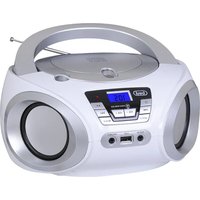
CMP 544 BT - Radio audio player Trevi - Free user manual and instructions
Find the device manual for free CMP 544 BT Trevi in PDF.

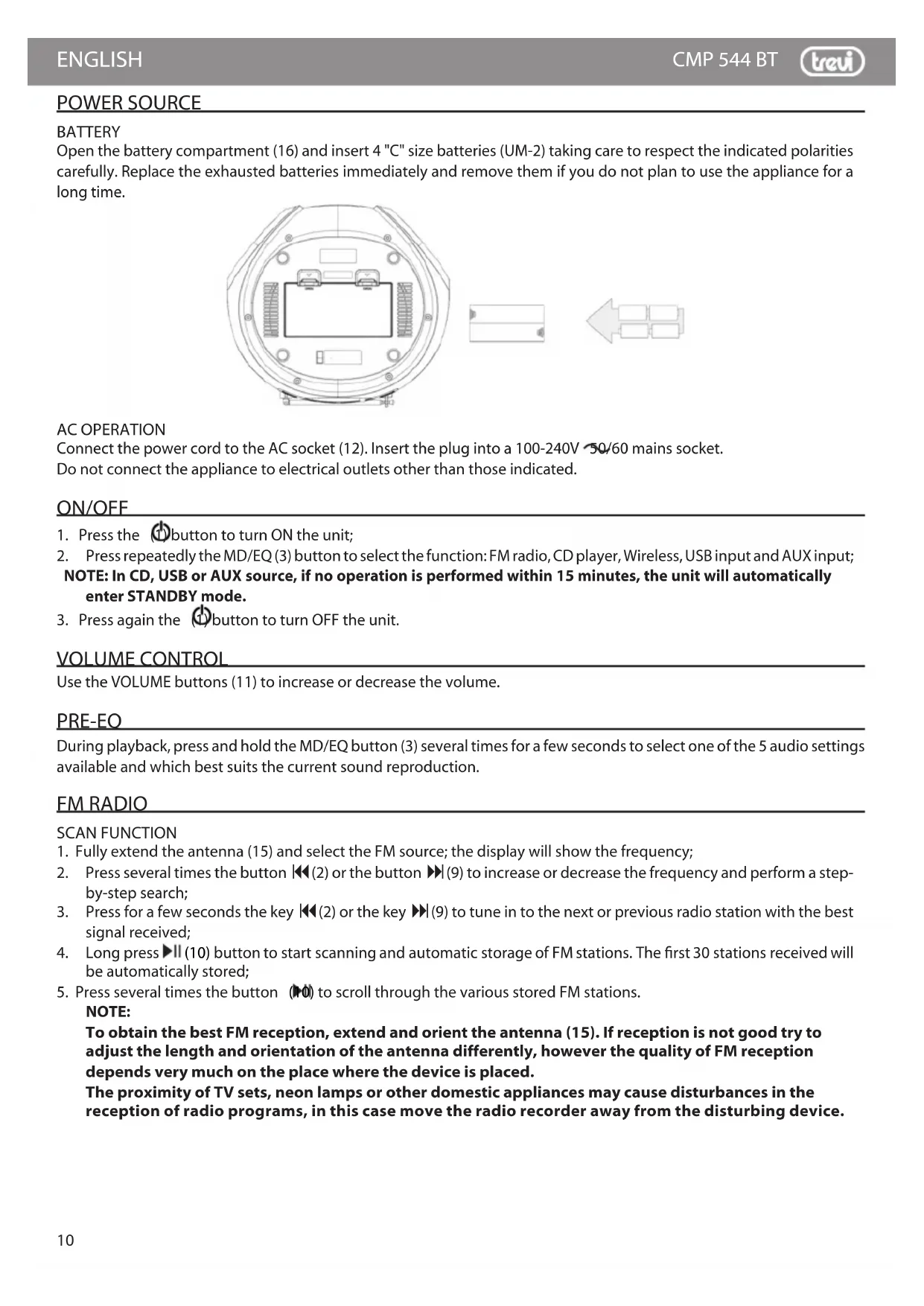


| Product type | Radio audio player with CD, MP3, USB, Bluetooth, FM radio player |
| Brand | Trevi |
| Model | CMP 544 BT |
| Mains power supply | 100-240 V ~ 50/60 Hz, 8 W (standby 0.3 W) |
| Battery power | 4 C-type batteries (UM-2) |
| Audio power | 2 x 2 W |
| FM band | 87.5 - 108 MHz |
| Bluetooth | Max power 0.8 mW, band 2.4 GHz |
| Supported formats | Audio CD, MP3 CD, USB files, Bluetooth streaming |
| Inputs | AUX IN (3.5 mm jack), USB, headphone jack |
| Radio functions | Auto search, memory 30 stations, step scanning |
| Playback functions | Repeat (track, all, folder), random, programming (20 CD tracks, 99 MP3) |
| Equalizer | 5 audio presets (MD/EQ) |
| Auto standby | After 15 min in CD, USB or AUX mode |
| Cleaning | Soft cloth slightly damp, avoid solvents and abrasives |
| Safety | Class 1 laser, do not open, avoid exposure to water and naked flames |
| After-sales service | Trevi authorized service center |
| Included accessories | Power cord, user manual |
Frequently Asked Questions - CMP 544 BT Trevi
User questions about CMP 544 BT Trevi
0 question about this device. Answer the ones you know or ask your own.
Ask a new question about this device
Download the instructions for your Radio audio player in PDF format for free! Find your manual CMP 544 BT - Trevi and take your electronic device back in hand. On this page are published all the documents necessary for the use of your device. CMP 544 BT by Trevi.
USER MANUAL CMP 544 BT Trevi
natural_image
Two blue and white portable radio enclosures with control knobs and a digital display (no visible text or symbols on devices)WARNING: DO NOT OPEN THE SET. NEITHER CONTROLS OR SPARE PARTS TO BE USED BY THE USER ARE TO BE FOUND INSIDE IT. APPLY TO AUTHORISED TREVI CENTERS FOR SERVICE OPERATIONS.
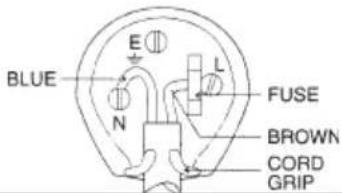
WIRES CONNECTIONS TO A UK THREE-PIN PLUG
The wires in this mains lead are coloured in accordance with the following wiring codes:
Blue: Neutral
Brown: Live
The wires in this mains lead must be connected to the terminals in the plug as follows:
Blue wire: N or Black
Brown wire:.....L or Red
Neither wire is to be connected to the earth (E or W) terminal of three-pin plug.
Should the fuse fail in the plug remove the plug form the wall socket and replace the fuse with a 3 Amp. ASTA approved BS 1362 fuse.

EN: If you will not find your language on the instruction manual, please go on our website www.trevi.it to find it
FR: Si vous ne trouverez pas votre langue sur le mode d'emploi, veuillez vous visiter sur notre site web www.trevi.it de le trouver
DE: Wenn Sie Ihre Sprache auf die Bedienungsanleitung nicht finden, gehen Sie bitte auf unsere webseite www.trevi.it zu finden
ES: Si no encuentras tu idioma en el manual de instrucciones, por favor vaya a nuestra página web www.trevi.it se encuentra
PT: Se você não vai encontrar sua língua sobre o manual de instruções, por favor, vá em nosso site www.trevi.it para encontrá-lo
natural_image
Technical line drawing of a circular mechanical component with internal components and an arrow indicating leftward motion (no text or symbols)RETE
 CAUTION CAUTION | DANGEROUS VOLTAGE | WARNINGS ON THE LASER |
| This symbol located on the back or bottom of the unit, is intended to alert the user to the presence of uninsulated "dangerous voltage" within the Product's enclosure that may constitute a risk of electric shock to person. | This symbol located on the back or bottom of the unit, is intended to alert the user to the presence of important operating and maintenance (servicing) instructions in the literature accompanying the appliance. | This product utilizes a Class 1 laser to read Compact Discs. This laser Compact Disc Player is equipped with safety switches to avoid exposure when the CD door is opened and the CD player's lid is damaged. Invisible laser radiation is present when the CD player is open and the system's interlock has failed or has been damaged. It is very important that you avoid direct exposure to the laser beam at all times. Please do not attempt to damage or bypass the safety switches. |
NOTES OF USE
Listen at high volume for long periods of time, may damage your hearing.
Avoid using it in the following cases:
- Near magnetic fields.
- Near heat sources such as radiators and stoves.
• In very humid places such as bathrooms, swimming pools, etc.
• In very dusty places.
• In places subject to strong vibrations. - Do not place the ear near the loudspeaker during the setting up and volume adjustments, and in particular keep the volume at minimum during the ignition phase.
- Position the appliance so that there is always enough space at its sides for free circulation of air (at least 5cm).
- If liquids penetrate inside the appliance, immediately disconnect the plug from the socket and take the appliance to the nearest authorized TREVI service center.
• Always check that the power cord is properly installed. - Use only accessories supplied in the package.
- No naked flame sources, such as lighted candles, should be placed on the appliance.
- The appliance must not be exposed to dripping or splashing water and no objects filled with liquids, such as vases, must be placed on the appliance.
- Keep this manual for future reference.
CARE AND MAINTENANCE
For cleaning we recommend the use of a soft, slightly damp cloth. Avoid solvents or abrasives.
IMPORTANT
The good construction of this machine guarantees the perfect functioning for a long time. However, should any problem arise, you should consult your nearest authorized service center.
TREVI pursues a policy of continuous research and development. Therefore, the products may have different features from those described.
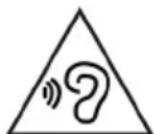
To avoid possible hearing damage, limit the time listening at high volumes
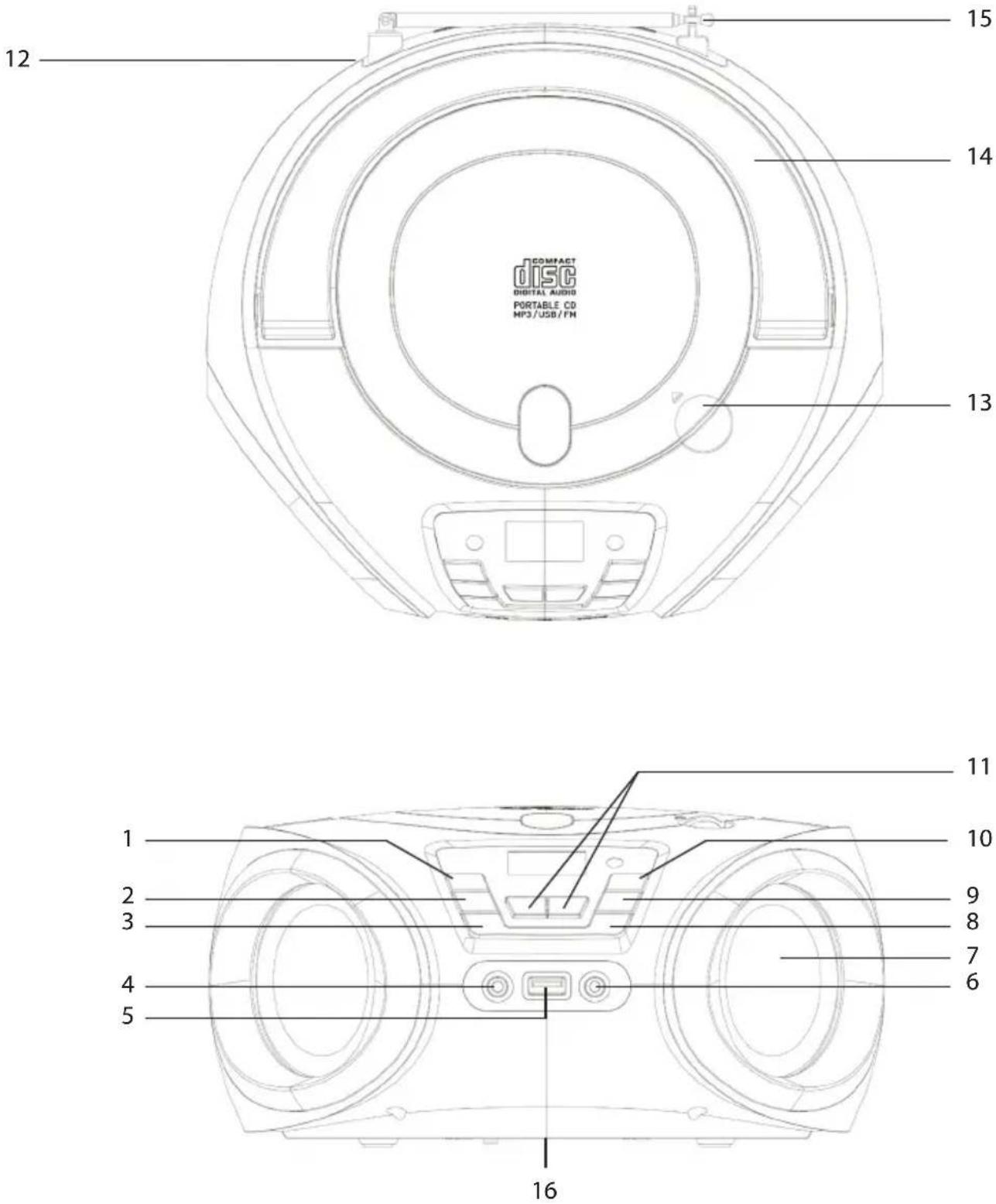
DESCRIPTION OF COMMANDS
- button
- ◀ button, Previous file/Station
- MD/EQ button
- AUX IN input
- USB input
- Headphone socket
- Speaker
-
/R/P button
-
▶▶ button, Next file/Station
- ▶ button
- VOLUME buttons
- AC outlet, mains power supply
- CD door
- Handle
- Antenna
- Battery compartment
POWER SOURCE
BATTERY
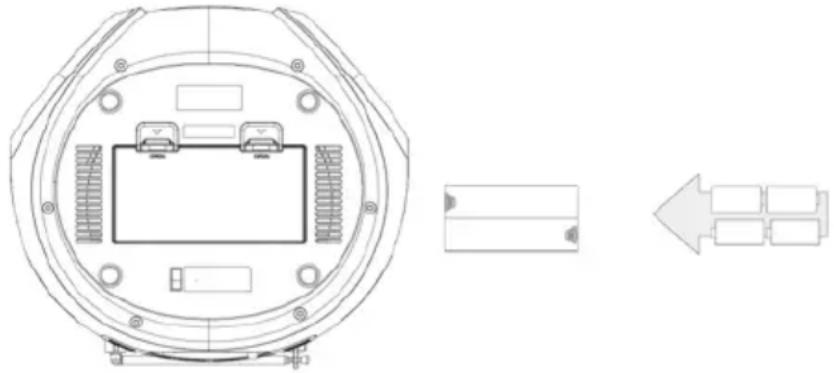
Open the battery compartment (16) and insert 4 "C" size batteries (UM-2) taking care to respect the indicated polarities carefully. Replace the exhausted batteries immediately and remove them if you do not plan to use the appliance for a long time.
natural_image
Technical line drawing of a circular mechanical component with internal components and an arrow indicating leftward motion (no text or symbols)AC OPERATION
Connect the power cord to the AC socket (12). Insert the plug into a 100-240V 50/60 mains socket.
Do not connect the appliance to electrical outlets other than those indicated.
ON/OFF
- Press the ⏻ button to turn ON the unit;
- Press repeatedly the MD/EQ (3) button to select the function: FM radio, CD player, Wireless, USB input and AUX input;
NOTE: In CD, USB or AUX source, if no operation is performed within 15 minutes, the unit will automatically enter STANDBY mode.
- Press again the (1) button to turn OFF the unit.
VOLUME CONTROL
Use the VOLUME buttons (11) to increase or decrease the volume.
PRE-EQ
During playback, press and hold the MD/EQ button (3) several times for a few seconds to select one of the 5 audio settings available and which best suits the current sound reproduction.
FM RADIO
SCAN FUNCTION
- Fully extend the antenna (15) and select the FM source; the display will show the frequency;
- Press several times the button ◀◀(2) or the button ▶▶(9) to increase or decrease the frequency and perform a step-by-step search;
- Press for a few seconds the key ◀◀(2) or the key ▶▶|(9) to tune in to the next or previous radio station with the best signal received;
- Long press ▶II (10) button to start scanning and automatic storage of FM stations. The first 30 stations received will be automatically stored;
- Press several times the button (P0) to scroll through the various stored FM stations.
NOTE:
To obtain the best FM reception, extend and orient the antenna (15). If reception is not good try to adjust the length and orientation of the antenna differently, however the quality of FM reception depends very much on the place where the device is placed.
The proximity of TV sets, neon lamps or other domestic appliances may cause disturbances in the reception of radio programs, in this case move the radio recorder away from the disturbing device.
STORING RADIO STATIONS
To store a radio station, do the following:
- Tune to the desired radio station;
- Press /MEP (8) button;
-
Use the buttons ◀◀ (2) or ▶▶(9) and select a memory location;
-
Press the /■P (8) button to confirm and save the radio station;
Repeat this for each radio station you want to save. 30 memory locations are available.
WIRELESS OPERATION
- Select the Wireless source. The word "bt" will appear;
- In Wireless mode, the display will start flashing, the system will automatically enter search;
- Activate the Wireless functionality on the external device to be paired;
- Start searching for devices. At the end select the device "CMP 544 BT";
- Enter the password "0000" if requested;
- From the external device select and start playing the file.
CD-MP3 PLAYER
PLAYING A DISC
- Select the CD source. The "Cd" will appear;
- Open the CD compartment and insert the disc with the written side facing up. Close the door carefully;
- After a few seconds the LCD display will show the number of tracks on the disc. Playback will start automatically;
- Press ▶II (10) button to activate the pause; "PAUS" will appear on the display. Press it again to resume the playback;
- Press /REP (8) button for a few seconds to stop playback permanently.
JUMP TRACE AND FORWARD/FAST BACK
- Press ◀◀(2) button or ▶▶(9) button to select the previous or next track;
- Press and hold the ◀◀(2) button or ▶▶(9) button while listening to fast-forward or rewind the track. Release the button to return to normal playback.
REPEAT OF SINGLE TRACE
- To play a single track continuously, press ■/REP (8) during playback, "ONE" will appears on the display. The CD player will continuously play the track shown on the display;
- To cancel uninterrupted playback of the single track, press ▪/REP (8) several times until "OFF" will appears on the display.
REPEAT DISK
- To continuously play all the tracks on the disc, press ■/REP (8) during playback until "ALL" appears on the display. The CD player will continuously play all the tracks on the disc;
- To cancel the uninterrupted playback of all tracks on the disc, press ▪/REP (8) button several times until "OFF" will appear on the display.
REPEAT FOLDER
NOTE: function valid only for MP3 CDs.
- To play all the tracks in a folder continuously, keep press ■/REP (8) button for a few seconds until "FLOD" appears on the display. The CD player will continuously play all the tracks in the folder;
- To cancel the uninterrupted playback of all the tracks in the folder, press /REP (8) button several times until "OFF" will appear on the display.
RANDOM FUNCTION
- To randomly play all the tracks on the disc, keep the ☐/REP (8) button pressed for a few seconds until "RAD" appears on the display. The CD player will randomly play all tracks on the disc;
- To cancel the random playback of all tracks on the disc, press ▪/REP (8) button several times until "OFF" will appear on the display.
PROGRAM
You can select the order in which the tracks are played.
- Press and hold /REP (8) button for a few seconds to stop playback;
- Press ▪/REP (8) button, the message "P-01" will appears on the display;
- Select the tracks with button ◀◀(2) or ▶▶| (9) button;
- Press ■/REP (8) button to confirm, the message "P-02" will appear on the display;
- Repeat steps 3 and 4 to store and play the tracks you want; for audio CDs a maximum of 20 tracks can be stored, while for MP3 CDs a maximum of 99 tracks can be stored;
- Press (10) button to start playback;
- Press and hold /REP (8) button for a few seconds to cancel the programming.
USB INPUT
PLAYBACK
- Connect a USB device to the USB input (5);
- Select the USB source. The "USB" will appear on the display;
- After a few seconds the LCD display will show the number of tracks on the disc. Playback will start automatically.
NOTE: Refer to the CD-MP3 PLAYER OPERATION paragraph for the rest of the functions.
AUX INPUT
REPRODUCTION
- Connect an external device to the AUX IN input (4);
- Select the AUX source. The "AUX" will appear on the display;
- Start playback of the external device. For all playback functions refer to the manual of the external device.
HEADPHONE
- Insert the headphones into the headphone jack (6);
- Start the desired playback and adjust the volume.
TECHNICAL FEATURES
GENERAL
Power and consumption: 100-240V \~ 50/60 (8W, Stand-by 0.3W)
4 x "C" batteries (UM2) not included
FM band reception: 87.5 - 108 MHz
Max power Wireless transmission: 0,8mW
Wireless transmission band: 2,4GHz
Power Audio: 2x 2W
Dimensions: 240x 220x 115mm

PRECAUTIONS FOR CORRECT DISPOSAL OF THE PRODUCT.
The symbol shown on the equipment indicates that waste must be disposed of in "separate collection" and so the product must not be disposed of together with urban waste.
The user must take the product to special "separate waste collection centres" provided by local government, or deliver it to the retailer against the purchase of a new product.
Separate collection of waste and subsequent treatment, recycling and disposal operations promotes the production of equipment with recycled materials and limits negative effects on the environment and on health caused by improper handling of waste.
Illegal disposal of the product leads to the enforcement of administrative penalties.
natural_image
Technical line drawing of a circular mechanical component with internal components and an arrow indicating leftward motion (no text or symbols)OPERATION AC
FONCTIONNEMENT WIRELESS
4 piles "C" (UM2) non fournies
Dimensions: 240x 220x 115mm

RECOMMANDATIONS POUR L'ÉLIMINATION CORRECTE DU PRODUIT.
natural_image
Technical line drawing of a circular mechanical component with internal components and an arrow indicating leftward motion (no text or symbols)AC-Betrieb
WIEDERHOLEN EINER SPUR
natural_image
Technical line drawing of a circular mechanical component with internal components and an arrow indicating leftward motion (no text or symbols)OPERACION AC
natural_image
Technical line drawing of a circular mechanical component with internal components and an arrow indicating left motion (no text or symbols)FUNCIONAMENTO CA
SIMPLIFIED EU DECLARATION OF CONFORMITY
Hereby TREVI Spa declares that the radio equipment type CMP 544 BT is in compliance with directive 2014/53/EU.
The full text of the EU declaration of conformity is available at the following internet address: https://www.trevi.it/dms/zidi/TREVI/DOCCMP544BT.pdf
- RETE
- NOTES OF USE
- CARE AND MAINTENANCE
- IMPORTANT
- DESCRIPTION OF COMMANDS
- POWER SOURCE
- BATTERY
- AC OPERATION
- ON/OFF
- VOLUME CONTROL
- PRE-EQ
- FM RADIO
- SCAN FUNCTION
- NOTE:
- STORING RADIO STATIONS
- WIRELESS OPERATION
- CD-MP3 PLAYER
- PLAYING A DISC
- JUMP TRACE AND FORWARD/FAST BACK
- REPEAT OF SINGLE TRACE
- REPEAT DISK
- REPEAT FOLDER
- RANDOM FUNCTION
- PROGRAM
- USB INPUT
- PLAYBACK
- AUX INPUT
- REPRODUCTION
- HEADPHONE
- TECHNICAL FEATURES
- GENERAL
- PRECAUTIONS FOR CORRECT DISPOSAL OF THE PRODUCT.
- OPERATION AC
- FONCTIONNEMENT WIRELESS
- RECOMMANDATIONS POUR L'ÉLIMINATION CORRECTE DU PRODUIT.
- AC-Betrieb
- WIEDERHOLEN EINER SPUR
- OPERACION AC
- FUNCIONAMENTO CA
- SIMPLIFIED EU DECLARATION OF CONFORMITY
Brand : Trevi
Model : CMP 544 BT
Category : Radio audio player