V226HQLH - Monitor ACER - Free user manual and instructions
Find the device manual for free V226HQLH ACER in PDF.



| Brand | Acer |
| Model | V226HQLH |
| Product Type | LCD Monitor |
| Screen Size | 21.5 inches (55 cm) |
| Maximum Resolution | 1920 x 1080 @ 100 Hz (HDMI) |
| Panel Technology | VA |
| Brightness | 200 cd/m² (typical) |
| Contrast Ratio | 3000:1 (typical) |
| Response Time | 4 ms (GTG) |
| Viewing Angles | 178° horizontal and vertical |
| Number of Colors | 16.7 million |
| Input Connectors | VGA, HDMI |
| Power Supply | External adapter 24 W |
| Power Consumption (On) | 14 W (typical) |
| Dimensions (W x H x D) | 493.1 x 406.0 x 179.9 mm |
| Net Weight | 2.3 kg |
| Tilt | -5° to 15° |
| Wall Mounting | VESA 100 x 100 mm compatible |
| Features | Brightness/contrast adjustment, preset modes, OSD lock |
| Maintenance | Clean with a soft cloth and solvent-free solution |
| Safety | Do not open, contact a certified technician |
| Operating Temperature | 0° to 40°C |
Frequently Asked Questions - V226HQLH ACER
User questions about V226HQLH ACER
0 question about this device. Answer the ones you know or ask your own.
Ask a new question about this device
Download the instructions for your Monitor in PDF format for free! Find your manual V226HQLH - ACER and take your electronic device back in hand. On this page are published all the documents necessary for the use of your device. V226HQLH by ACER.
USER MANUAL V226HQLH ACER
Acer LCD Monitor Quick Start Guide (QSG)
Important safety instructions
Please read the following instructions carefully.
-
To clean the LCD monitor screen:
-
Turn off the LCD monitor and unplug the power cord.
-
Spray a non-solvent cleaning solution onto a rag and clean the screen gently.
-
Do not place the LCD monitor near a window. Exposing the monitor to rain, moisture or sunlight can severely damage it.
- Do not apply pressure to the LCD screen. Excessive pressure may cause permanent damage to the display.
- Do not remove the cover or attempt to service this unit yourself. An authorized technician should perform servicing of any nature.
- Store the LCD monitor in a room with a temperature of -20irc to 60ircC (-4irc to 140ircF) . Storing the LCD monitor outside this range may result in permanent damage.
-
Immediately unplug your monitor and call an authorized technician if any of the following circumstances occur:
-
Monitor-to-PC signal cable is frayed or damaged.
- Liquid spills onto the LCD monitor or the monitor is exposed to rain.
The LCD monitor or case is damaged.
Package contents
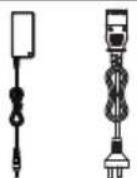
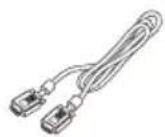
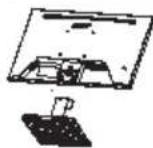
| LCD monitor Adapter/Power lineStand/Base | VGA/HDMI cable (Optional) | Quick start guide |
Installing monitor
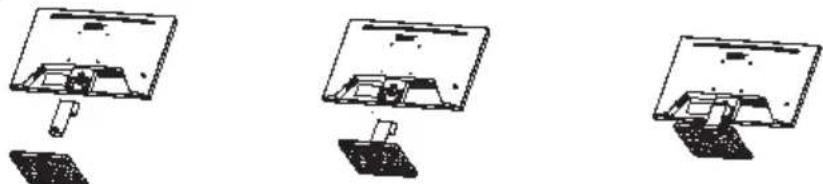
- Remove the monitor bracket and base from the packaging and place it on a stable and level workspace.
- Open or close the rear bracket. The viewing angle of the monitor can be adjusted using the stand. (As shown below)
- Support wall hanging function, VESA100100mm, M410 screws.
Connect the monitor to your computer
- Turn off the computer power and unplug the computer power cord.
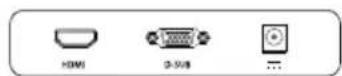
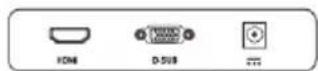
- Connect one end of the signal cable to the VGA/HDMI input jack on your monitor and the other end to the VGA/HDMI input jack on your computer's graphics card. Tighten the finger screws on the signal cable (VGA) connector.
- Plug the adapter power cord into the power port on the back of the monitor.
- Plug the computer power cord and monitor adapter into a nearby power outlet.

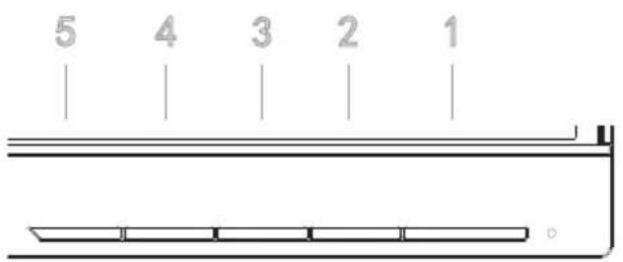
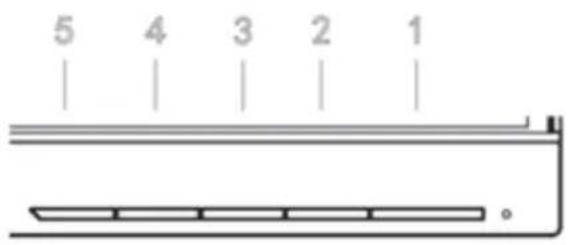
External controls
| 1 | Power Button | Power on/off the monitor. Green indicates that the power supply is turned on. Orange indicates that the device is in standby or energy saving mode. |
| 2 | Press to view OSD, and press again to access the OSD selection.MENU/ConfirmMENU | |
| 4/3 | Up/Down | When OSD is displayed, press the up or down button to switch OSD options. Adjust the OSD value.If the OSD mode is not displayed, press < to switch to the brightness mode, and press > to switch to the signal source. |
| 5 | Mode/ExitMode | Press this key to exit the OSD when the OSD mode is displayed. If OSD is not displayed, Mode options are displayed when you press this key. |
Regulations and safety notices
FCC notices
This device has been tested and found to comply with the limits for a Class B digital device pursuant to Part 15 of the FCC rules. These limits are designed to provide reasonable protection against harmful interference in a residential installation. This device generates, uses, and can radiate radio frequency energy and, if not installed and used in accordance with the instructions, may cause harmful Interference to radio communications. However, there is no guarantee that interference will not occur in a particular installation. If this device does cause harmful interference to radio or television reception, which can be determined by turning the device off and on, the user is encouraged to try to correct the interference by one or more of the following measures:
- Reorient or relocate the receiving antenna.
- Increase the separation between the device and receiver.
- Connect the device into an outlet on a circuit different from that to which the receiver is connected.
- Consult the dealer or an experienced radio/television technician for help.
CE declaration of conformity
Hereby, Acer Inc., declares that this LCD monitor is in compliance with the essential requirements and other relevant provisions of EMC Directive 2014/30/EU, Low Voltage Directive 2014/35/EU, and RoHS Directive 2011/65/EU and Directive 2009/125/EC with regard to establishing a framework for the setting of ecodesign requirements for energy-related product.
Notice: Shielded cables
All connections to other computing devices must be made using shielded cables to maintain compliance with EMC regulations.
Notice: Peripheral devices
Only peripherals (input/output devices, terminals, printers, etc.) certified to comply with the Class B limits may be attached to this equipment. Operation with non-certified peripherals is likely to result in interference to radio and TV reception.
Caution
Changes or modifications not expressly approved by the manufacturer could void the user authority, which is granted by the Federal Communications Commission, to operate this product.
Operation conditions
This device complies with Part 15 of the FCC Rules. Operation is subject to the following two conditions: (1) this device may not cause harmful interference, and (2) this device must accept any interference received, including interference that may cause undesired operation.
Notice: Canadian users
CANICES-3(B)/NMB-3(B)
Disposal of waste equipment by user in private household in the European Union

This symbol on the product or on its packaging indicates that this product must not be disposed of with your other household waste. Instead, it is your responsibility to dispose of your waste equipment by handing it over it a designated collection point for the recycling of waste electrical and electronic equipment. The separate collection and recycling of your waste equipment at the time of disposal will help to conserve natural resources and ensure that it is recycled in a manner that protects human health and the environment. For more information about where you can drop off your waste equipment for recycling, please contact your local city office, your household waste disposal service or the shop where you purchased the product.
*Acer monitor is purposed for video and visual display of information obtained from electronic devices.
Product Information for EU Energy
SPECIFICATIONS
| LCD Panel | Driving system TFT Color LCD | |
| Size 21.5"W (55cm) | ||
| Pixel pitch 0.2493(H) x0.241(V) mm | ||
| Brightness (cd/m2) 200 (Typ) | ||
| Contrast 3000:1 (Typ) | ||
| Viewable angle CR 10, 178°(H), 178°(V) | ||
| Response time 4ms (GTG) | ||
| Panel Type | VA Panel | |
| H-Frequency 30KHz-120KHz | ||
| V-Frequency 48Hz-100Hz | ||
| Display Colors 16.7M | ||
| Dot Clock 234MHz | ||
| Max. Resolution 1920 x 1080@100Hz (HDMI) | ||
| Plug & Play | VESA DDCCI/DDC2B | |
| Power consumption (at 200 nits) | On Mode 14W (typical) | |
| Sleep Mode | 0.5W (typical) | |
| Off Mode | 0.5W (typical) | |
| Input Connector | VGA/HDMI | |
| Maximum Screen Size | Horizontal | 487.456 mm |
| Vertical | 270.18 mm | |
| Power Source | Model: PG361-1202000DI (Pgtec) Input: 100-240V~50/60Hz 1.2A Output: 12V=2A,24W | |
| Environmental Considerations | Operating Temp: 0° to 40°C Storage Temp: -20° to 60°C Operating Humidity: 20% to 80% | |
| Dimensions (W x H x D) | 493.1x406.0x179.9 mm | |
| Weight (N.W.) | 2.3kg (net) | |
| Mechanism specifications | Tilt: -5° to 15° Pivot: No Swivel: No Detachable foot stand: No Height adjustment: No | |
| External Controls | Buttons | Power Button MENU/Exit UP/Down |
| Functions | Brightness Language Contrast OSD Lock Blue Light DDC/CI ACM Quick Start Mode Warm Over Drive Mode | |
| *All specifications are subject to change without notice. | ||
| Regulatory Compliance | ||
Find manuals and other documents for your Acer product on the official Acer support website.
Monitor LCD Acer QSG (Panduan Ringkas)
Petunjuk keselamatan penting
*Acer monitor is purposed for video and visual display of information obtained from electronic devices.
Product Information for EU Energy
SPESIFIKASI
| Panel LCD | Sistem Penggerak LCD Warna TFT | |
| Ukuran 21.5"W (55cm) | ||
| Pitch Pikel 0.2493(H) x0.241(V) mm | ||
| Kecerahan (cd/m²) 200 (Typ) | ||
| Kontras 3000:1 (Typ) | ||
| Sudut Pandang CR 10, 178°(H), 178°(V) | ||
| Waku Resp 4ms (GTG) | ||
| Tipe Panel Panel VA | ||
| Frekuensi H 30KHz-120KHz | ||
| Frekuensi V 48Hz-100Hz | ||
| Warna Tampilan 16,7 J | ||
| Jam Titik 234MHz | ||
| Resolusi Maks. 1920 x 1080@100Hz (HDMI) | ||
| Pasang & Pakai VESA DDCCI/DDC2B | ||
| Konsumsi Daya (pada 200 nit) | Mode Nyala | 14W (Umum) |
| Mode Tidur | 0,5 W (Umum) | |
| Mode Mati | 0,5 W (Umum) | |
| Konektor Input | VGA/HDMI | |
| Ukuran Layar Maksimum | Horizontal | 487.456 mm |
| Vertikal | 270.18 mm | |
| Sumber Daya | Model: PG361-1202000DI (Pgtec) Input: 100-240V~50/60Hz 1.2A Output: 12V=2A,24W | |
| Pertimbangan Lingkungan | Suhu Operasi: 0° hingga 40 C Suhu Penyimpanan: -20° hingga 60 C Kelembapan Operasi: 20% hingga 80% | |
| Dimensi (L x T x D) | 493.1x406.0x179.9mm | |
| Berat (Berat Bersih) | 2,3 kg (bersih) | |
| Spesifikasi Mekanismse | Miring: -5° hingga 15° Poros: Tidak Putar: Tidak Dudukan kaki yang dapat Penesuaian tinggi: TidakT dilepas: Tidak | |
| Kontrol Eksternal | Tombol | ombol Daya MENU/Keluar ATAS/Bawah |
| Fungsi | Kecerahan Bahasa Kontras Kunci OSD Cahaya Biru DDC/CI ACM Mode Mulai Cepat Hangat Super Cepat Mode | |
| * Semua speisifikasi dapat berubah tanpa pemberitahuan. | ||
| Kepatuhan terhadap Peraturan | ||
Product Information for EU Energy
TECHNISCHE DATEN
Product Information for EU Energy
ESPECIFICACIONES
Product Information for EU Energy
SPECIFICATIONS
Product Information for EU Energy
TEHNILISED ANDMED
Acer LCD Monitor Snelstartgids
Product Information for EU Energy
SPECIFICATIONS
Product Information for EU Energy
DANE TECHNICZNE
Product Information for EU Energy
ESPECIFICAÇÉS
BHHMaTeIbHo npOuHTaTte HAcToRsqne HnHCTpyKcN.
-
OuHCTKa 3KpaHa MOHITopa:
-
OTKJIIOHTe MOHHTOp N OTCOeINHHTe Ka6eJIb NITaHnA.
PaCnblnte qHCTaunpactbOp 6e3 pactbOpTeHaTKaHn aKKypaTHO npOTpNTe 3KpaH. -
He pacnonarate MOHITOP pAOM COKHOM. Bo3eJCTBNE DOXy, Bnarn nn CoNHeHybIX Lyye MoKet npNBecTn K HEnCnpabHOCTMOHITOPa.
- He npinaraTe ycnne K ekpaHy. Ype3mepHoe daBleHne Ha dinCnne MoKeT npnbecTu K cepbe3Homy noBpeKdEHHIO.
- He cHmMaIte KpbIiKy I He nbItaTecb BblOnHnTb Texo6CnyXuBaHHe yCTpoIcTB CaMOCTeJIbHO. JIO6oe Texo6CnyXuBaHne DOJIXe H BblOnHrB KBaIIHnCu npOBaHHb CNEuaJIInCT.
- XpaHHTe MOHTOp B nOMEUeHN C TempeAtpyoIOT-20°do 60°C (OT-4°do 140°F).XpaHeHne MOHTopaB NOMEUeHN BHe 3TOrO TEMpeAtpyHO Dnana3OHa MoKeT PnPBecTn K cepbe3HO HeNCpabHOCTn.
-
B cIeIyUOuNX Clyuayx HeMeIeHNO OTCoeDINHnTe Ka6eIb NITaHnN I Bb3OBnTe KBaIINΦnIpOBAHHORo TEXHnKa:
-
I3HOC nIIN NOBpeKdEHNHe Ka6eIa OT MOHHTopa K KOMNbIOTepy.
- PpOJIINAcB KxNkOCTb Ha MOHITOp HnN BO3DeIeCTBne DOXJIA.
-Повржден монитор пл erо корпс.
CopeKmoe ynaKOBKn
Product Information for EU Energy
CNEUΦHKAUIN
| Светонодая панень | Пробodyнaya | TFT Color LCD |
| Размер | 21.5"W(55cm) | |
| Шагниксяя | 0.2493 (Г) x 0.241 (В) мм | |
| Ярковь (сd/M²) | 200 (тп) | |
| КонTRACT | 3000:1 (тп) | |
| Угол обзORA | CR≥10, 178° (Г), 178° (В) | |
| Верma OTКИКа | 4MC (GTG) | |
| Тил панел | VA панел | |
| Г-часота | 30кГц - 120кГц | |
| В-часота | 48Гц - 100Гц | |
| Цбета диспег | 16.7M | |
| Toчесные часы | 234мц | |
| Мakсималове разшениe | 1920x 1080@ 100Гц (HDMI) | |
| «Покатони работай» | VESA DDCCI/DDC2B | |
| Знисторутpe6лениe (при 200 mlt) | РекIM ВКЛЮЧЕНИA | 14ВТ (тпунчны) |
| РекIM сha | 0.5ВТ (тпунчны) | |
| РекIM | 0.3ВТ (тпунчны) | |
| Разьем вхда | VGA/HDMI | |
| Мakсималови размер зараза | 487.456 MM | |
| ВерTKДALьнь | 270.18MM | |
| Источникпитаня | Мосяль: PG361-1202000DI (Pgtec) Вхд: 100-240B ~ 50/60Гц 1.2A Вьхд: 12B --- 2A,24Вt | |
| Зкалогчески соображениe | Равочая Temпера typa: 0° до 40°C Temпера typa xpanени: -20° до 60°C Равочая влajхость: 20% до 80% | |
| Размеры (LU x B x Г) | 493.1x406.0x179.9MM | |
| Вес(hetto) | 2.3Kr (hetto) | |
| Спесифikaши мөханizмa | Нakлон: -5° до 15° Oсb: Het Поворot: Het Сөмная Нөхняй поставka: Het PergunpoVBa Blycotb: Het | |
| Вөшөүүүүүүүүүүүүүүүүүүүүүүүүүүүүүүүүүүүүүүүүүүүүүүүүүүүүүүүүүүүүүүүүүүүүүүүүүүүүүүүүүүүүүүүүүүүүүүүүүүүүairie | ||
| Кнорки | Кнорка рпатлиа MEHIO/BbIXoD Верх/BиИЗ | |
| Фун�ш� | Ярковь Рэык Конtract Бл_OKювka оранноу мени Сини CBET DDC/CI ACM Ржим 6ьICTporo задуcka Төлbly Перergyзka Ржим | |
| *Все слушкоаши могут 6ыть изменихы 6e3 predecessor tellьного уveдомлени. Соовет靖ваеHopmatINBhIM Tpe6obAHYAM | ||
PykoOoCTBa nDpyrne DOKyMeNTbI dNBAuero npOdyKta Acer moxHn HaHTn Ha Be6-caTe cnJk6bl noepKKn Acer.
Snabbstartguide till Acer LCD-bildskärn
Viktiga sakerhetsinstruktioner
Product Information for EU Energy
SPECIFICATIONER
有关Waste from Electrical and Electronics Equipment (WEEE, 废弃电气和电气设备)的管
理规定,请访问:http://www.acer-group.com/public/Sustainability/
中国大陆RoHS
- 4.5.6.7.8.9.10.11.12.13.14.15.16.17.18.19.20.21.22.23.24.25.26.27.28.29.30.31.32.33.34.35.36.37.38.39.40.41.42.43.44.45.46.47.48.49.50.51.52.53.54.55.56.57.58.59.60.61.62.63.64.65.66.67.68.69.70.71.72.73.74.75.76.77.78.79.80.81.82.83.84.85.86.87.88.89.90.91.92.93.94.95.96.97.98.99.

外部コntロ一ル
Product Information for EU Energy
TECHNICKE UDAJE
Product Information for EU Energy
SPECIFIKÁCIÖK
Product Information for EU Energy
ПОДАГРАФЕЗ
Product Information for EU Energy
SPECIFIKACIJE
Product Information for EU Energy
SPECIFICATIONER
| LCD-panel | Køresystem | TFT Color LCD |
| Størrelse | 21.5"W (55cm) | |
| Pixelafstand | 0.2493(H) x0.241(V) mm | |
| Lysstyrke (cd/m2) | 200 (Typ) | |
| Kontrast | 3000:1 (Typ) | |
| Synlig vinkel | CR≥10, 178°(H), 178°(V) | |
| Responstid | 4ms (GTG) | |
| Paneltype | VA panel | |
| H-frekvens | 30KHz-120KHz | |
| V-frekvens | 48Hz-100Hz | |
| Display farver | 16.7M | |
| Punktur | 234MHz | |
| Maks. oplonsing | 1920 x 1080@100Hz (HDMI) | |
| Plug & Play | VESA DDCCI/DDC2B | |
| Strømforbrug (ved 200 nits) | Til tilstand | 14W (Typisk) |
| Sove mode | 0.5W (Typisk) | |
| Fra-tilstand | 0.3W (Typisk) | |
| Indgangsstik | VGA/HDMI | |
| Maksimal skærmstørrelse | Vandret | 487.456 mm |
| Lodret | 270.18 mm | |
| Strømkilde | Model: PG361-1202000DI (Pgtec) Indgang: 100-240V~ 50/60Hz 1.2A Udgang: 12V---2A,24W | |
| Miljøhensyn | Driftstemperatur: 0° až 40 °C Opbevaringstemperatur: -20° až 60 °C Driftsfugtighed: 20% až 80% | |
| Mål (B x H x D) | 493.1x406.0x179.9mm | |
| Weight(N.W.) | 2.3kg (netto) | |
| Mekanismespecifikationer | Vippe: -5° til 15° Pivot: Nej Drejelig: Nej Aftageligt fodstativ: Nej Højdejustering: Nej | |
| Ekstern kontrol | Knapper | Power knap MENU/Afslut Op/ned |
| Funktioner | Lysstyrke Sprog Kontrast OSD-lås Blåt lys DDC/CI ACM Hurtig starttilstand Varm Over Drive Mode | |
| *Alle specificationanalandresumenvorsel. | ||
| Overensstemmelseserklaering | ||
Besg Acers supportwebsted for at Finite manueral og anden dokumentation til dit Acer-product.
Product Information for EU Energy
TEHNILISED ANDMED
Product Information for EU Energy
SPESIFIKASJONER
| LCD-panel | Kjøresystem | TFT farge LCD |
| Størrelse | 21,5" B (55 cm) | |
| Bildepunktavstand | 0,2493 (H) x 0,241 (V) mm | |
| Lysstyrke (cd/m2) | 200 (Typ) | |
| Kontrast | 3000:1 (Typ) | |
| Synlig vinkel | CR≥10, 178° (H), 178° (V) | |
| Responstid | 4ms (GTG) | |
| Paneltype | VA Panel | |
| H-frekvens | 30KHz - 120KHz | |
| V-frekvens | 48Hz-100Hz | |
| Skjermvisningsfarger | 16.7M | |
| Punktklokke | 234MHz | |
| Maks. oppløsning | 1920x 1080@ 100Hz (HDMI) | |
| Plug & Play | VESA DDCCI/DDC2B | |
| Strømforbruk (ved 200 nits) | På modus | 14W (vanlig) |
| Sove modus | 0.5W (vanlig) | |
| Av-modus | 0.3W (vanlig) | |
| inngangskontakt | VGA/HDMI | |
| Maksimal skjermstørrelse | Horizontal | 487.456 mm |
| Vertikal | 270.18 mm | |
| Strømkilde | Modell: PG361-1202000DI (Pgtec) Inngang: 100-240V~50/60Hz 1.2A Utgang: 12V=2A,24W | |
| Miljøhensyn | Driftstemperatur: 0° til 40 °C Lagringstemperatur: -20° til 60 °C Driftsfuktighet: 20% til 80% | |
| Dimensjoner (B x H x D) | 493.1x406.0x179.9 mm | |
| Vekt(N.W.) | 2,3kg (netto) | |
| Mekanismespesifikasjoner | Vippe: -5° til 15° Pivot: Nei Sving: Nei Avtakbart fotstativ: Nei Høydejustering: Nei | |
| Eksterne Kontroller | Knuppen | På-knapp MENY/Avslutt Opp/ned |
| Functies | Lysstyrke Språk Kontrast OSD-lås Blålys DDC/CI ACM Hurtigstartmodus Varm Over Drive Modus | |
| * Alle spesifikasjoner kan endres uten varsel. | ||
| Overholdelse av regelverk | ||
Product Information for EU Energy
ÖZELLIKLER
Product Information for EU Energy
SPECIFICATII
LCD moHITop Acer, PbKOBOdCTBO 3a 6bp3 cTapT (P5C)
BaxHHHnHTpyKun 3a 6e3onacnoct
PpoetyeTBHMaTeJIHO CneHNHe HNCTpyKuIN.
-
NoucTbaHe Ha ekpaHa Ha LCD MoHHTopa:
-
N3KlHouTe LCD MOHHTopa n H3BaTe 3axpaHbauJn Ka6eJ.
-
HanpbckaKe npue nlat c nouictBaau npenapat, KOTo He CbDbpxka pa3TBOpnteHn BHHMaTeHNOUCTe ekpHa.
-
He nocTabrTe LCD MOHTopa B 6n30ct Do npo3opeu. N3naHTo Ha MOHTopa Ha IbXkD, Bnra HnCnBHeBa CBeTnHa MoKe da ro nobpeu.
- He npaxnbaTe HaTnck Bbpxy LCD ekpaha. IpeKaIeHO cnHnrt HaTnck MoKe da npuHn TpaHa nobpeDa Ha dnCnne.
- He maxaTe kanaKa n He ce onntBaIte da nonpaBRe npOdykTa camn. Camo OToPn3npaH TexHnK/cepBn3 Tp6Ba Da n3BbPwBa peMOHT, He3aBNCmO OT eCTCBTO Ha peMOHTa.
- CbxaHbAte LCD MOHTopa B cTae C TeMnepaTypa oT -20o do 60oC (-4o do 140oF). CbxaHbBaHeTo Ha LCD MOHTopa H3BbH Te3n NapaMeTpmoKe da doBeede do cepno3n nobpeu.
- He3a6BaHO n3KIOHcTe MOHToPA n Ce CbPKeTe C optOpn3npaH cepBn3/TexHnK, aKO HAcTbH N HKaroe OT cJeHNHe o6CToRrTeCTBA:
CunhaHnHrT Ka6eIOT MOHITOPa KbM KOMNHTbpa e CkBaCah IIN NOBpeH.
TeuHoc e pa3nra Ha LCD MOHTOPa nn MoHTOpbTe n3IOXKeHa dxbk.
LCDMOHITOpbTINKANAKBt e nobpehen.
CbDpKaHneHa nakeTa
| LCD monochrome | Стояka / База | Адалтер/AC зхранвац кабен | VGA/HDMI Кабен (no n360p) | Рьковские заSBуз стот |
| ucr USER GUIDE |
Product Information for EU Energy
TEXHnueCKXAPAKTEPNCNU
| LCD панел | Спстema за задвиквае | TFTцьетен LCD |
| Размер | 21.5"W (55cm) | |
| Сълka на пankселитe | 0.2493(H)x0.241(V) MM | |
| Ярковst (cd/m2) | 200 (тin) | |
| Конч pact | 3000:1 (тin) | |
| Видимъгл | CR≥10, 178°(H), 178°(V) | |
| Вре'mе за peakция | 4ms (GTG) | |
| Тин панел | VA панел | |
| H-честоа | 30KHz-120KHz | |
| V-честоа | 48Hz-100Hz | |
| Цbeltове на ekрана | 16.7M | |
| Точкова честоа | 234MHz | |
| Масимална розолюцnia | 1920 x 1080@100Hz (HDMI) | |
| Plug & Play | VESA DDCCI/DDC2B | |
| Консу мача на сөргий (nprn 200 рnta) | Вл升学ен реким | 14W (тлично) |
| Слаш реким | 0.5W (тлично) | |
| Изл升学ен реким | 0.3W (тлично) | |
| Вхodен коньтор | VGA/HDMI | |
| Масимален размер на ekрана | Хоризонтално | 487.456 MM |
| Веримално | 270.18 MM | |
| Източник на зхсанваhe | Мо德尔:PG361-1202000DI (Pgtec) Вхod:100-240V~50/60Hz 1.2A Изхod:12V==2A,24W | |
| Околна срeda | РавOT纳 Temпегатура:0°do 40°C Temпегатура на сыхсанно: -20°do 60°C РавOT纳 Влжноct:20%do 80% | |
| Размери (LUx B xД) | 493.1x406.0x179.9mm | |
| Тergл (нетно тergл) | 2,3 кг (нето) | |
| Мexанин салданфikaцinals | Нakлон: -5°do 15° 3авьразе: He Завьразе: He Побдижна с Todка за крака: He Perуларе на висуната: He | |
| Въшни контrolи | Бутони | Бутолда в领略вае MEHIO/Nзхов Harope на дoly |
| Функции | Ярков Конч pact Сири с Bretлina ACM Тогл Over Drive Pеким | |
| *Вс neuropс сецificаци полесат на пома на 6e3 predecessor. | ||
| Съотvetст因为我们 c chop matиньата урedinga | ||
IoceteTe ye6caTt 3a noDpBkKa Ha Acer, 3a da HamePte pBkoOCTBa n dpyra DokyMeHTaun 3a Baun npodykt Ha Acer.
Acer LCD monitori luhijuhend
Olulised ohutusjuhised
Lugege juhised hoolikalt libi.
Product Information for EU Energy
TEHNILISED ANDMED
Product Information for EU Energy
SPECIFIKACIJOS
Product Information for EU Energy
SPECIFIKACIJAS
Product Information for EU Energy
SPECIFIKACJE
| LCD ploča | Pogonski sustav | TFT LCD u boji |
| Veličina | 21.5"W (55cm) | |
| Slikovna točka | 0.2493(H) x0.241(V) mm | |
| Svjetlina (cd/m2) | 200 (Vrsta) | |
| Kostrast | 3000:1 (Vrsta) | |
| Kut gledanja | CR≥10, 178°(H), 178°(V) | |
| Vrijeme odgovora | 4ms (GTG) | |
| Ploča Vrsta | VA ploča | |
| H-Frekvencija | 30KHz - 120KHz | |
| V-Frekvencija | 48Hz-100Hz | |
| Boje prikaza | 16.7M | |
| Točkasti sat | 234MHz | |
| Maks. razlučivost | 1920 x 1080@100Hz (HDMI) | |
| Priključi i tokreni | VESA DDCCI/DDC2B | |
| Potrošnja energije (na 200 nita) | Način Uključeno | 14W (Tipicno) |
| Način spavanja | 0.5W (Tipicno) | |
| Način isključeno | 0.3W (Tipicno) | |
| Ulazni konektor | VGA/HDMI | |
| Maksimalna velićina zaslona | Vodoravno | 487.456 mm |
| Okomito | 270.18 mm | |
| Izvor napajanja | Model: PG361-1202000DI (Pgtec) Ulaz: 100-240V ~50/60Hz 1.2A Izlas: 12V=2A,24W | |
| Razmatranje okoliša | Radna temp: 0° do 40°C Temp. pohrane: -20° do 60°C Radna vražnost: 20% do 80% | |
| Dimenzije (Š x V x D) | 493.1x406.0x179.9mm | |
| Težina (Neto) | 2,3kg (neto) | |
| Specifikacion mehanizma | Nagib: -5° do 15° Okretanje: Ne Zakretni: Ne Odvojivo postolje sa stopom: Ne Podešavanje visine: Ne | |
| Vanjske kontrole | Gumbi | Gumb za paljenje IZBORNIK/Izlaz GORE/Dolje |
| Funkcije | Svjetlina Jezik Kontrast OSD zakljucavanje Plavo svjetlo DDC/CI ACM Način brzogPokretanja Toplo Preko pogona Način rada | |
| * Specifikacion se ijmenjau bez prethodne obavijesti. | ||
| Regulatorna sukladnost | ||
Product Information for EU Energy
SPECIFIKACIJE
| You can view LCD | You can view TV | You can view DVD | You can view VGA/HDMI (ohm units) | You can view USB |
门生
Product Information for EU Energy
y
| u###CD | ### | ###TFTLCD |
| ### | ###21.5###(55###) | |
| ### | 0.2493 (###) x 0.241 (###) ### | |
| ### | 200 (###) | |
| ### | 3000:1 (###) | |
| ### | CR≥10, 178° (###), 178° (###) | |
| ### | 4 ###/### (GTG) | |
| ### | ###VA | |
| ### | 30kHz - 120kHz | |
| ### | 48Hz-100Hz | |
| ### | ### | 16.7### |
| ### | ### | 234MHz |
| ### | ### | 1920x 1080@ 100Hz (HDMI) |
| ### | ### | VESA DDCCI/DDC2B |
| ### | ### | 14W (###) |
| ### | 0.5W (###) | |
| ### | 0.5W (###) | |
| ### | ### | VGA/HDMI |
| ### | ### | 487.456 mm |
| ### | 270.18 mm | |
| ### | ### | ###: PG361-1202000DI (Pgtec) ###: 100-240V~50/60Hz 1.2A ###: 12V==2A, 24W |
| ### | ### | ###: 0° # 40°C ###: -20° # 60°C ###: 20% # 80% |
| ### | ### | 493.1 x 406.0 x179.9 mm |
| ### | ### | 2.3 nn. (###) |
| ### | ### | ###: -5° # 15° ###: ### ### #######: ### |
| ### | ### | ###: ### ### ### #######: ### |
| ### | ###: ### ### ### ### | |
| ### | ###: OSD ###: DCC/CI ACM: ### ########## | |
| ### | ###: ### ### ### | |
| * ### | ### | ### |
Aauanrnnn Acer yannu Acer
Vodič za brzoPokretanje Acer LCD monitora
Product Information for EU Energy
SPECIFIKACIJE
| LCD ploča | Pogonski system | TFT u boji LCD |
| Veličina | 21.5" W(55cm) | |
| Slikovna tačka | 0.2493 (H) x 0.241 (V) mm | |
| Svjetlina (cd/m2) | 200 (Vrsta) | |
| Krontrast | 3000:1 (Vrsta) | |
| Ugao s mogućnošć pregleda | CR≥10, 178° (H), 178° (V) | |
| Vreme odgovora | 4ms (GTG) | |
| Ploča Vrsta | VA ploča | |
| H-Frekvencija | 30kHz - 120kHz | |
| V-Frekvencija | 48Hz-100Hz | |
| Boje prikaza | 16,7 M | |
| Tačkasti Časovnik | 234 MHz | |
| Maks. rezolucija | 1920x 1080@100Hz (HDMI) | |
| Priključi i tokreni | VESA DDCCI/DDC2B | |
| Potrošnja energije (na 200 nita) | Način Uključeno | 14 W (Tipično) |
| Način spavanja | 0,5 W (Tipično) | |
| Način isključeno | 0,3 W (Tipično) | |
| Ulazni konektor | VGA/HDMI | |
| Maksimalna velićina ekrana | Vodoravno | 487,456 mm |
| Okomito | 270,18 mm | |
| Izvor napajanja | Model: PG361-1202000DI (Pgtec) Ulaz: 100-240V~50/60Hz 1.2A Izlaz: 12V==2A,24W | |
| Razmatranje okoline | Delovna temperatura: 0° do 40 °C Temperatura shranjevanja: -20° do 60 °C Delovna vražnost: 20% do 80% | |
| Dimenzije (Š x V x D) | 493.1x406.0x179.9mm | |
| Težina (N.W.) | 2.3kg (neto) | |
| Specifikacja mehanizma | Nagib: -5° do 15° Okretanje: Ne Zakretni: Ne Odvojivo postolje sa stopom: Ne Podešavanje visine: Ne | |
| Vanjske kontrole | Dugmad | Dugme za paljenje MENI/Izlat GORE/Dole |
| Funkcjie | Svjetlina Jezik Kontrast OSD zakljucavanje Plavo svetlo DDC/CI ACM Način brzogPokretanja Toplo Preko pogona | |
| *Specifikacije se menjaju bez prethodne obavesti. | ||
| Regulatorna usklaDENOST | ||
Prirucnike i druge dokumente za svoj Acer proizvod pronadite na stranici firme Acer.
(QSG) Acer LCD
aL
yaiyaiyaiyaiyaiyaiyaiyaiyaiyaiyaiyaiyaiyaiyaiyaiyaiyaiyaiyaiyaiyaiyaiyaiyaiyaiyaiyaiyaiyaiyaiyaiyaiyaiyaiyaiyaiyaiyaiyaiyaiyaiyaiyaiyaiyai
:LCD 1
LCL
yaiyaiyaiyaiyaiyaiyaiyaiyaiyaiyaiyaiyaiyaiyaiyaiyaiyaiyaiyaiyaiyaiyaiyaiyaiyaiyaiyaiyaiyaiyaiyaiyaiyaiyaiyaiyaiyaiyaiyaiyaiyaiyaiyaiyaiyaiyaiyaiyaiyaiy
LCD 2
LCD 3
4
140 60 -20 5
LCD
ailllll 15 15 15 15 15 15 15 15 15 15 15 .6
1
LCD
LCD 15
8
50
α < 0,os α < 0, α > 0
1
(2015) VGA 4.5
HDMI




y
1 2
aaiie aiee eae ee eae
(olai coa a Ls)
M410 VESA 100100


1
y
yduallydaiall ylll lalldi,dydaallda
Jiau jia jia jia jia jia jia jia jia jia
ailll llll llll yllllllllllllll
4.2.1.1 C. y x2 - 1
EMC
a63 = a13 + 273
B aill 100
y j 1
y y
Ciiill lla y
y
Product Information for EU Energy
Cilwalgal
| العربية TFT LCD LED | العربية الحرفية | LCD |
| (العربية 55) بورا 21.5 | العربية | |
| مّل (عربية) 0.241 × (عربية) 0.2493 | سالم نزه | |
| (عربية) 200 | (2 مانير/امعه) | |
| (عربية) 3000:1 | العربية | |
| (عربية) 178 × (عربية) 178°CR≥10 | العربية الحرفية | |
| (GTG) ملاوي 4 | سالم نزه | |
| VA ملاوي | العربية | |
| العربية 120-العربية 530 | العربية | |
| العربية 100-العربية 48 | العربية | |
| M 16.7 | العربية الحرفية | |
| MHz234 | العربية الحرفية | |
| 1920x 1080@ 100Hz (HDMI) | العربية الحرفية | |
| VESA DDCCI/DDC2B | العربية | |
| (عربية) بورا 14 | سالم نزه | العربية الحرفية |
| (عربية) بورا 0.5 | سالم نزه | |
| (عربية) بورا 0.3 | سالم نزه | |
| VGA/HDMI | العربية | |
| م 487.456 | العربية | العربية |
| م 270.18 | العربية | |
| PG361-1202000DI (Pgtec) :العربية العربية 60/50 ~العربية 240-100 :العربية العربية 24, ملاوي 2 *** | العربية | |
| \( m^{\circ }{40} \) | \( {}^{* * } \) | |
| \( m^{\circ }{60} \) | \( {}^{* * } \) | |
| %80 | \( {}^{* * } \) | |
| \( m^{\circ }{179.9} \times {406.0} \times {493.1} \) | \( (\text{ص;}x\text{;}x\text{;}x\text{;}x\text{;}x\text{;}x\text{;}x\text{;}x\text{;}x\text{;}x\text{;}x\text{;}x\text{;}x\text{;}x\text{;}x\text{;}x\text{;}x\text{;}x\text{;}x\text{;}x\text{;}x\text{} ) \) | \( {}^{* * } \) |
| \( (\text{ص;}x\text{;}x\text{;}x\text{;}x\text{;}x\text{;}x\text{;}x\text{;}x\text{;}x\text{;}x\text{;}x\text{;}x\text{;}x\text{;}x\text{;}x\text{;}x\text{;}x\text{;}x\text{;}x\mathrm{)} \) | \( {}^{* * } \) | |
| \( (\text{ص;}x\text{;}x\text{;}x\text{;}x\text{;}x\text{;}x\text{;}x\text{;}x\text{;}x\text{;}x\text{;}x\text{;}x\text{;}x\text{;}x\text{;}x\text{;}x\text{;}x\text{;}x\text{;} x\text{;}x\text{;}x\text{;}x\text{;}x\text{;}x\text{;}x\text{;}x\text{;}x\text{;}x\text{;}x\text{;}x\text{;}x\text{;}x\text{;}x\text{;}x\text{;}x\text{;}x\text{;}x\text{;}x\text{;} x\text{;}x\text{} ) \) | \( {}^{* * } \) | |
| \( {}^{* * } \) | \( {}^{* * } \) | |
| \( {}^{* * } \) | \( {}^{* * } \) | |
| \( {}^{* * } \) | \( {}^{* * } \) | |
| \( {}^{* * } \) | \( {}^{* * } \) | |
| \( {}^{* * } \) | \( {}^{* * } \) | |
| \( {}^{* * } \) |
Product Information for EU Energy
ESPECIFICAções
Product Information for EU Energy
TEXHIUHI XAPAKTEPNUKU
to a more sustainable product
IT products are associated with a wide range of sustainability risks throughout their life cycle. Human rights violations are common in the factories. Harmful substances are used both in products and their manufacture. Products can often have a short lifespan because of poor ergonomics, low quality and when they are not able to be repaired or upgraded.
This product is a better choice. It meets all the criteria in TCO Certified, the world's most comprehensive sustainability certification for IT products. Thank you for making a responsible product choice, that help drive progress towards a more sustainable future!
Criteria in TCO Certified have a life-cycle perspective and balance environmental and social responsibility. Conformity is verified by independent and approved verifiers that specialize in IT products, social responsibility or other sustainability issues. Verification is done both before and after the certificate is issued, covering the entire validity period. The process also includes ensuring that corrective actions are implemented in all cases of factory non-conformities. And last but not least, to make sure that the certification and independent verification is accurate, both TCO Certified and the verifiers are reviewed regularly.
Want to know more?
Read information about TCO Certified, full criteria documents, news and updates at tcocertified.com. On the website you'll also find our Product Finder, which presents a complete, searchable listing of certified products.
EU Declaration of Conformity
We,
ACER Incorporated
8F,No.88,Sec.1,Xintai 5th Road,Xizhi,New Taipei City 221
And,
Acer Italy s.r.l.
Viale delle Industrie 1/A, 20044 Arese (MI), Italy
Tel: +39-02-939-921, Fax: +39-02 9399-2913
www.acer.it
Product: LCD Monitor
Trade Name: ACER
Model Number:
SKU Number:
V226HQL
V226HQLxxxxxxxx
(x ) = 0 9,a z,A Z, or blank)
We, ACER Incorporated., hereby declare under our sole responsibility that the product described above is in conformity with the relevant Union harmonization legislations as below Directive and following harmonized standards and/or other relevant standards have been applied:
EMC Directive: 2014/30/EU
EN55032:2015+All:2020
EN55035:2017+A11:2020
ENIEC61000-3-2:2019+A1:2021
EN61000-3-3:2013+A2:2021
LVD Directive: 2014/35/EU
EN 62368-1:2014+A11:2017
RoHS Directive: 2011/65/EU
ENIEC63000:2018
ErP Directive: 2009/125/EC
(EU) 2019/ 2021; EN 50564:2011
Year to begin affixing CE marking: 2022
8F,No.88,Sec.1,Xintai 5th Road,Xizhi,New Taipei City 221
Und
Acer Italy s.r.l.
Viale delle Industrie 1/A, 20044 Arese (MI), Italy
Tel: +39-02-939-921 Fax: +39-02 9399-2913
www.acer.it
Produkt:
LCD Monitor
Handelsbezeichnung:
ACER
Modellnummer:
V226HQL
Artikelnummer:
V226HQLxxxxxxxx
x = 0 9,a z,A Z, or blank)
RU Jan / Sr. Manager ACER Incorporated (NewTaipei City)
Dec. 7, 2022
Datum
8F,No.88,Sec.1,Xintai 5th Road,Xizhi,New Taipei City 221
Y,
Acer Italy s.r.l.
Viale delle Industrie 1/A, 20044 Arese (MI), Italy
Tel: +39-02-939-921, Fax: +39-02 9399-2913
www.acer.it
Producto:
Nombre commercial:
Número de modelo:
RU Jan / Sr. Manager ACER Incorporated (NewTaipei City)
Dec. 7, 2022
Fecha
8F,No.88,Sec.1,Xintai 5th Road,Xizhi,New Taipei City 221
Et,
Acer Italy s.r.l.
Viale delle Industrie 1/A, 20044 Arese (MI), Italy
Tel: +39-02-939-921, Fax: +39-02 9399-2913
www.acer.it
Produit :
LCD Monitor
ACER
Nom commercial :
V226HQL
Numero de modulo:
V226HQL xxxxxx
Numéro SKU :
x 0 9,a z,A Z, or blank)
RU Jan / Sr. Manager
ACER Incorporated (NewTaipei City)
Dec. 7, 2022
Date
8F,No.88,Sec.1,Xintai 5th Road,Xizhi,New Taipei City 221
E,
Acer Italy s.r.l.
Viale delle Industrie 1/A, 20044 Arese (MI), Italy
Tel: +39-02-939-921, Fax: +39-02 9399-2913
www.acer.it
Prodotto:
LCD Monitor
RU Jan / Sr. Manager
ACER Incorporated (NewTaipei City)
Dec. 7, 2022 Data
8F,No.88,Sec.1,Xintai 5th Road,Xizhi,New Taipei City 221
En, Acer Italy s.r.l.
Viale delle Industrie 1/A, 20044 Arese (MI), Italy
Tel: +39-02-939-921 Fax: +39-02 9399-2913
www.acer.it
Product:
LCD Monitor
Handelsnaam:
ACER
Modelnummer:
V226HQL
SKU-number:
V226HQLxxxxxx
x = 0 9,a z,A Z, or blank)
RU Jan / Sr. Manager ACER Incorporated (NewTaipei City)
Dec. 7, 2022
Date
8F,No.88,Sec.1,Xintai 5th Road,Xizhi,New Taipei City 221
E,
Acer Italy s.r.l.
Viale delle Industrie 1/A, 20044 Arese (MI), Italy
Tel: +39-02-939-921, Fax: +39-02 9399-2913
www.accr.it
Produco:
Regulatory Compliance










R38023 RoHS



Product Information for EU Energy
Barcode
352-1021**BR
- Acer LCD Monitor Quick Start Guide (QSG)
- Important safety instructions
- Package contents
- Installing monitor
- Connect the monitor to your computer
- Regulations and safety notices
- FCC notices
- CE declaration of conformity
- Notice: Shielded cables
- Notice: Peripheral devices
- Caution
- Operation conditions
- Notice: Canadian users
- Disposal of waste equipment by user in private household in the European Union
- Monitor LCD Acer QSG (Panduan Ringkas)
- Petunjuk keselamatan penting
- Acer LCD Monitor Snelstartgids
- Snabbstartguide till Acer LCD-bildskärn
- Viktiga sakerhetsinstruktioner
- 中国大陆RoHS
- 外部コntロ一ル
- LCD moHITop Acer, PbKOBOdCTBO 3a 6bp3 cTapT (P5C)
- BaxHHHnHTpyKun 3a 6e3onacnoct
- CbDpKaHneHa nakeTa
- Acer LCD monitori luhijuhend
- Olulised ohutusjuhised
- 门生
- Vodič za brzoPokretanje Acer LCD monitora
- (QSG) Acer LCD
- aL
- y
- to a more sustainable product
- Want to know more?
- EU Declaration of Conformity
Brand : ACER
Model : V226HQLH
Category : Monitor