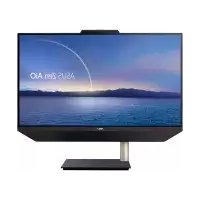
Zen AiO M5401 - Desktop computer ASUS - Free user manual and instructions
Find the device manual for free Zen AiO M5401 ASUS in PDF.


User questions about Zen AiO M5401 ASUS
0 question about this device. Answer the ones you know or ask your own.
Ask a new question about this device
Download the instructions for your Desktop computer in PDF format for free! Find your manual Zen AiO M5401 - ASUS and take your electronic device back in hand. On this page are published all the documents necessary for the use of your device. Zen AiO M5401 by ASUS.
USER MANUAL Zen AiO M5401 ASUS
natural_image
Line drawing of a computer monitor with the brand 'ASUS' on the front panel (no text or symbols beyond the label)Série A5401/M5401
PC All-in-One ASUS 15
Vue avant ....15
Côté gauche....19
Vue arrière ....23
Allumer le PC All-in-One ASUS....31
Placer votre PC All-in-One ASUS .... 33
Directive Ecodesign....73
natural_image
Line drawing of a flat-screen computer monitor with no text or symbols on the screen or stand
natural_image
Simple line drawing of a cable with a rectangular connector (no text or symbols)
natural_image
Line drawing of a flexible cable or connector with two connectors (no text or symbols)natural_image
Line drawing of a standard computer keyboard (no text or symbols)
text_image
Technical diagram of a device with numbered components, showing a vertical panel and labeled parts.text_image
Diagram of a door panel with labeled parts including buttons, switches, and indicators1
natural_image
Technical line drawing of a mechanical assembly with a grid-patterned panel and a blue arrow indicating a component (no text or symbols present)natural_image
Technical line drawing of a kitchen appliance with a gridded metal tray and control panel (no text or symbols)text_image
Technical diagram showing assembly of an ASUS device with labeled components and directional arrows indicating assembly steps.text_image
Diagram showing a hand inserting a device into a computer monitor, with an inset highlighting the component's insertion.natural_image
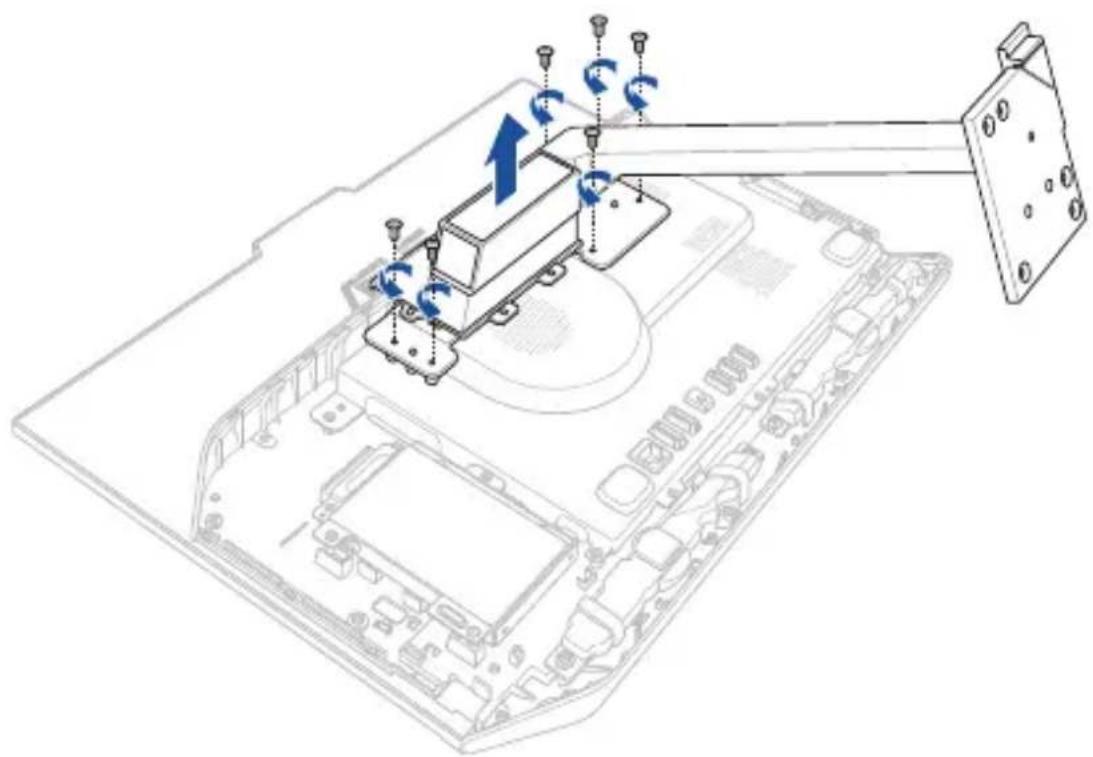
3D diagram of a device with directional arrows indicating motion, no text or symbols present- Retirez les vis fixant le socle sur PC All-in-One ASUS.
- Retirez le socle.
natural_image
Technical line drawing of a device with labeled components and directional arrows, no readable text or symbols present.natural_image
3D technical illustration of a mechanical device with no visible text or symbolsnatural_image
Line drawing of a hand pointing at a screen on a flat-screen device (no text or symbols)text_image
Hand interacting with a touchscreen displaying a video interface and app icons, likely for mobile app engagement or interaction.text_image
40-PI German requirements allowed top to the Enatural_image
Hand icon pointing at a digital interface with a circular loading symbol, set against a blue background (no text or symbols)text_image
Illustration of a hand pointing at a digital interface with menu options and a laptop displaying 'Open' and 'Close' text.text_image
ASUS Zanbook UC305 Hot Products ASUS Chromebook C308 11.2" Chromatography 3x 90000000 WvsMini UN62 Performance with Apple UNa-Complex Linux Mini Wits3.5 interface for New Event New Event Search for new producttext_image
Beautiful. ASUS ZenBook VR65 Hot Prod ASU C30 RT-AC3200 WI-F Smart Wireless Revisitedtext_image
ASUS Zanbook UC306 Hot Products ASUS C308 11.27 Desimmoor: 100g up to 50 hours of day/week UG New Eventnatural_image
Hand cursor clicking on a tablet screen with arrows and icons (no readable text)text_image
Get Started Welcome to Windows 10 Home Apps Games Search Big Business Deluxe Calendar New Business File Inventory Share View Quick access Desktop Downloads Documents Pictures Music Video OneDrive This PC 22 items Frequent folders (5) Desktop This PC Downloads Documents This PC Pictures Music Video This PC 22 itemsnatural_image
Underwater scene with a diver swimming near the seabed, no visible text or symbolstext_image
Action center Settings Get Insider buffer Tractor buffer settings need attention Wi-Fi Wi-Fi sense requires attention. Top to be it Dietal mode Content Home cell settings vPU Bluetooth GPS Cust hours Locationtext_image
Settings Find a loading Settings Spikes Displays, notifications, apps, power Devices Bluetooths, printers, mouse Network & Internet VR/FL, amplification mode, VPN Personalization Background, lock screens, colors Accounts Your account, sync settings, work, family Time & language Speech, region, date Ease of Access Navigator, magnifiers, high accessort Privacy Location, other Update & security Windows Update, backup, backuptext_image
Settings UPDATE & SECURITY Windows Update Windows Defender Backup Recovery Activation For developers Reset this PC If your PC isn't running well, resetting it might help. This lets you choose to keep your files or remove them, and then reinstalls Windows. Get started Go back to an earlier build If this build isn't working for you, try going back to an earlier one. When the next build is ready, we'll install it. Get started Advanced startup Start up from a device or disc (such as a USB drive or DeVD), change your PC's remote settings, change Windows startup settings, or restore Windows from a system image. This will restart your PC. Restart nowAnnexes
Notices
Rapport de la Commission Fédérale des Communications (FCC)
text_image
Symbolic diagram showing a triangular shape with a curved line inside, resembling a sound wave or signal icon.
Per FCC Part 2 Section 2.1077

Responsible Party: Asus Computer International
Address: 48720 Kato Rd., Fremont, CA 94538
Phone/Fax No: (510)739-3777/(510)608-4555
hereby declares that the product
Product Name : ASUS All-in-One PC/Zen AiO
Model Number : A5200WF, A5200WFA, A5200WFP, E5200WF,
E5200WFA, E5200WFP, A5400WF, A5400WFA,
E5400WF, E5400WFA, A5400WFP, E5400WFP
compliance statement:
This device complies with part 15 of the FCC Rules. Operation is subject to the following two conditions: (1) This device may not cause harmful interference, and (2) this device must accept any interference received, including interference that may cause undesired operation.
Ver. 180620