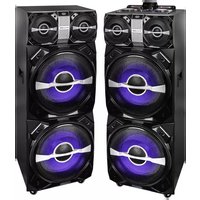
XF 4800 RAVE - Loudspeaker Trevi - Free user manual and instructions
Find the device manual for free XF 4800 RAVE Trevi in PDF.



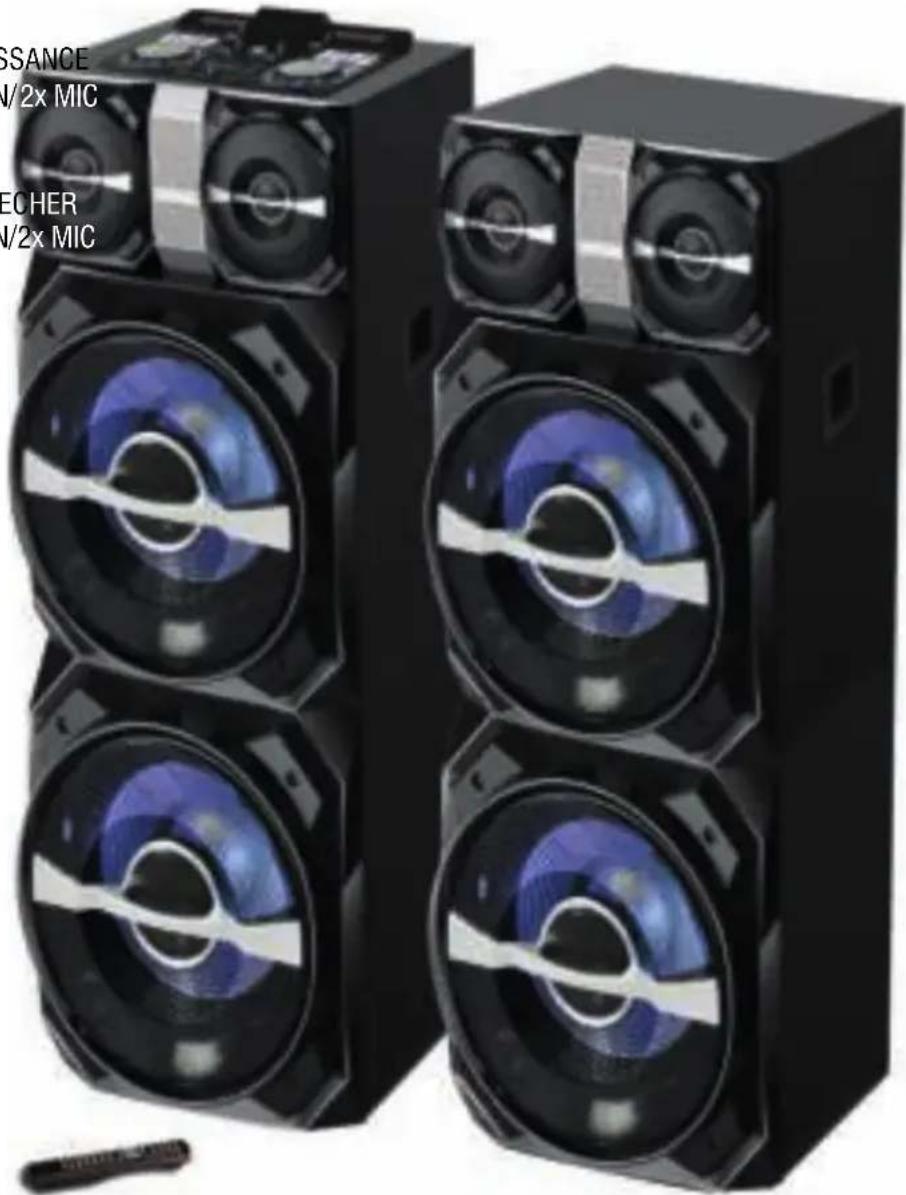
| Product type | Amplified speaker with console and satellite |
| Brand | Trevi |
| Model | XF 4800 RAVE |
| Power supply | 230 V ~ 50 Hz |
| Maximum consumption | 500 W |
| Maximum audio power | 600 W (300 W x 2) |
| Bluetooth transmission | 2.4 GHz band, peak power 1 mW |
| Main unit dimensions | 400 x 390 x 1060 mm |
| Secondary unit dimensions | 400 x 390 x 1030 mm |
| Main unit weight | 25.2 kg |
| Secondary unit weight | 21 kg |
| Connectivity | Bluetooth, USB, SD card, LINE IN input (3.5 mm jack), microphone input (MIC1/MIC2) |
| Playback functions | Bluetooth, USB, SD, Line-in, with playback controls (play, pause, next, previous), repeat (ONE/ALL) |
| Equalizer | 6 EQ presets + manual frequency adjustment (63 Hz, 1 kHz, 6 kHz, 12 kHz) |
| Lighting effects | Disco-Light LED on the speakers, automatic activation based on volume |
| Settings | Channel A/B volume, balance (FADER), microphone volume, echo, bass, treble |
| Care and cleaning | Soft cloth slightly damp, avoid solvents and abrasives |
| Safety | Do not use near heat sources, in humidity or dust; leave a 5 cm space for ventilation; avoid splashes; do not place objects filled with liquid on it |
| Spare parts and repairability | Contact the nearest authorized TREVI service center for any repairs |
| General information | Non-professional domestic use; subject to modifications due to ongoing research |
Frequently Asked Questions - XF 4800 RAVE Trevi
User questions about XF 4800 RAVE Trevi
0 question about this device. Answer the ones you know or ask your own.
Ask a new question about this device
Download the instructions for your Loudspeaker in PDF format for free! Find your manual XF 4800 RAVE - Trevi and take your electronic device back in hand. On this page are published all the documents necessary for the use of your device. XF 4800 RAVE by Trevi.
USER MANUAL XF 4800 RAVE Trevi

WARNING: DO NOT OPEN THE SET. NEITHER CONTROLS OR SPARE PARTS TO BE USED BY THE USER ARE TO BE FOUND INSIDE IT. APPLY TO AUTHORISED TREVI CENTERS FOR SERVICE OPERATIONS.
ACHTUNG
WIRES CONNECTIONS TO A UK THREE-PIN PLUG
The wires in this mains lead are coloured in accordance with the following wiring codes:
Blue: Neutral
Brown:......Live
The wires in this mains lead must be connected to the terminals in the plug as follows:
Blue wire: N or Black
Brown wire: L or Red
Neither wire is to be connected to the earth (E or W) terminal of three-pin plug.
Should the fuse fail in the plug remove the plug form the wall socket and replace the fuse with a 3 Amp. ASTA approved BS 1362 fuse.
NOTE D'USO
TRASPORTO
This is a precision electronic appliance; avoid using it in the following cases:
- Listening to high volume for a long time could damage your hearing.
- Do not close the ear to the loudspeaker during step setting and volume adjustments, and in particular keep the volume down at the ignition.
- Near strong heat sources, such as central heating plants or stoves.
• In very humid places such as bathrooms, swimming pools, etc...
• In very dusty places.
• In places subject to strong vibrations. - Position the appliance in such a way that there is always enough room for free air circulation (at least 5 cm).
- Do not block the air inlets.
- If any liquid enters the appliance, unplug it immediately from the socket and take it to the nearest TREVI authorised service centre.
- Before switching on the appliance, always check that the power cable and the connection cable are properly installed.
- The apparatus shall not be exposed to dripping or splashing water. No objects filled with liquid, such as vases, should be placed on the unit.
- No naked flame sources, such as lighted candles, should be placed on.
- Keep this manual.
To avoid possible hearing damage, limit the listening time to high volumes.
CARE AND MAINTENANCE
Use a slightly damp soft cloth for cleaning. Do not use solvents and abrasive substances.
IMPORTANT
This device is designed for home use (not professional use). This appliance has been carefully built to ensure long-lasting perfect performance. However, should any inconvenience occur, please contact your local authorised TREVI Service Centre.
TREVI follows a policy of ongoing research and development. Therefore products may have different features from those described.
BACK PANEL
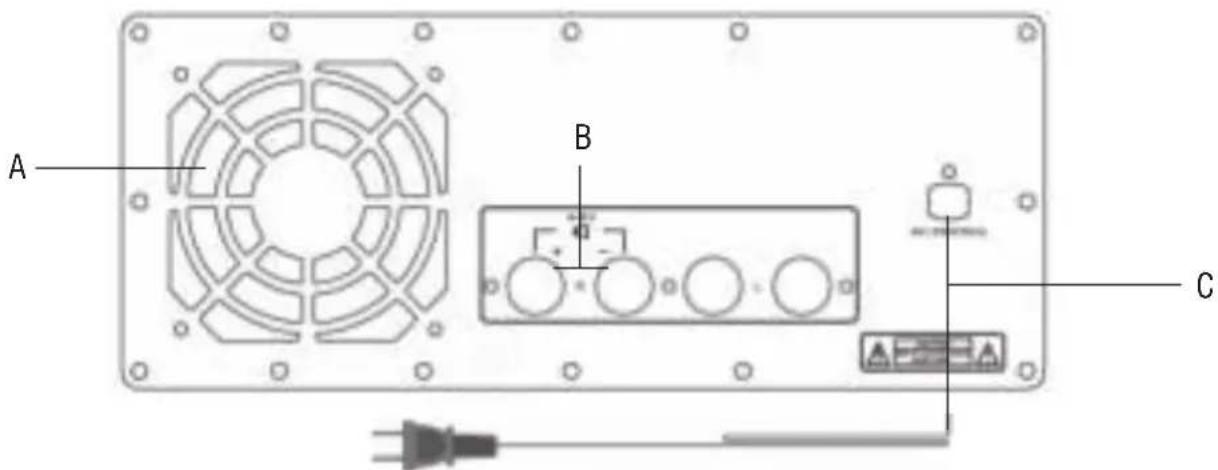
A. Cooling fan.
B. Speaker connection.
C. Power cord.

Caution:
• The complete system is an amplified speaker with console and a second speaker.
OVERVIEW OF THE MAIN UNIT
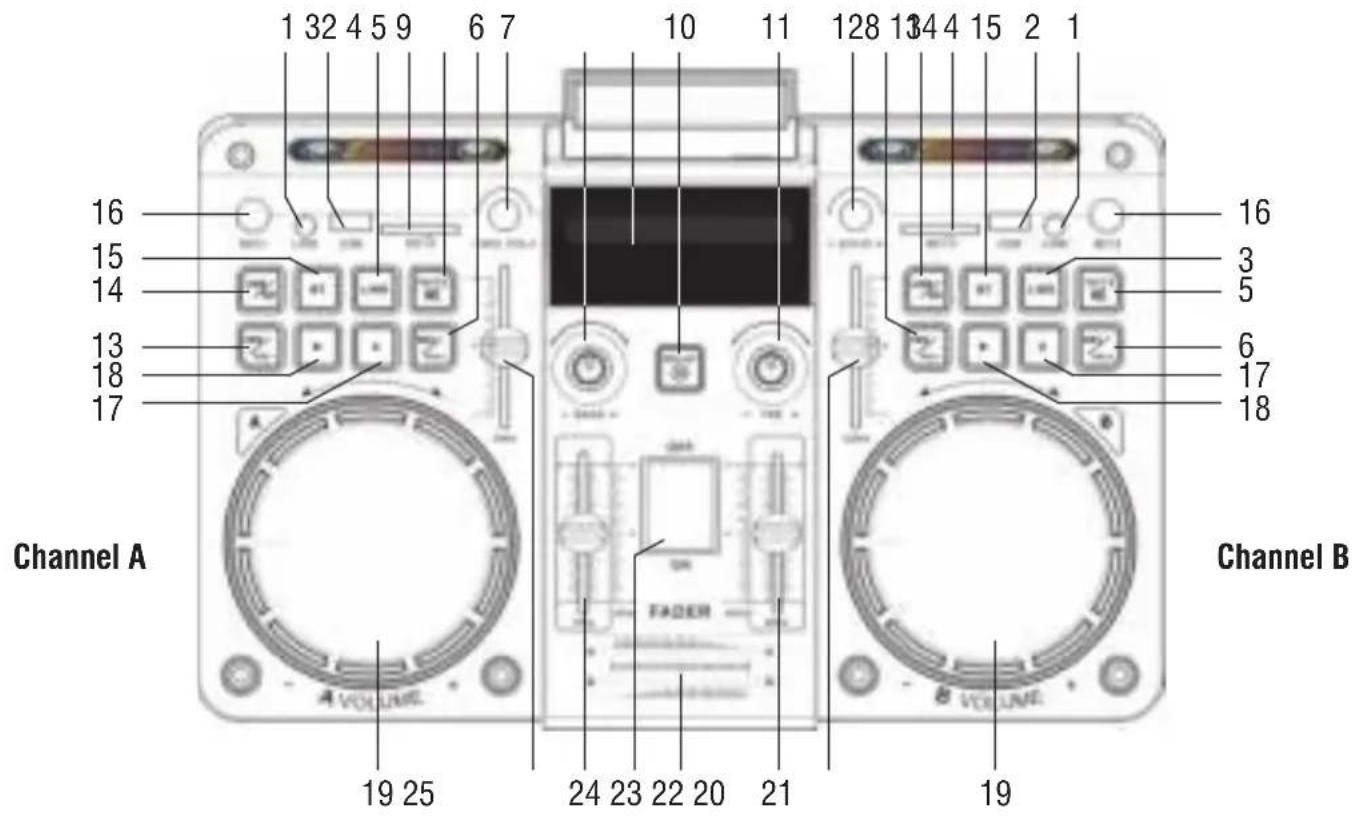
- A/ B System LINE input slot.
- A/ B System USB input slot.
- A/ B System LINE input key.
- A/ B System SD Card input slot.
- A/ B System MUTE volume key.
- A/ B System ▶I/Vol + next key, long press for volume increase.
- Microphone Volume increase/ decrease.
- Bass increase/weakers.
- A System / B System LED Display.
- RELAY button, mute of whole unit.
- TREBLE increase/weakers.
- Microphone ECHO increase/ decrease.
-
A/ B System ◀◀/Vol- previous key, long press for volume decrease.
-
A/ B System USB/SD card input key.
-
A/ B System BT input key.
-
MIC 1/2 input slot.
-
A/ B System II, pause key.
-
A/ B System ▶, play key.
-
A/ B System Volume control knob.
-
Equalizer 12KHz frequency.
-
Equalizer 6KHz frequency.
-
A B System FADER.
-
Power ON/OFF.
-
Equalizer 1KHz frequency.
-
Equalizer 63Hz frequency.
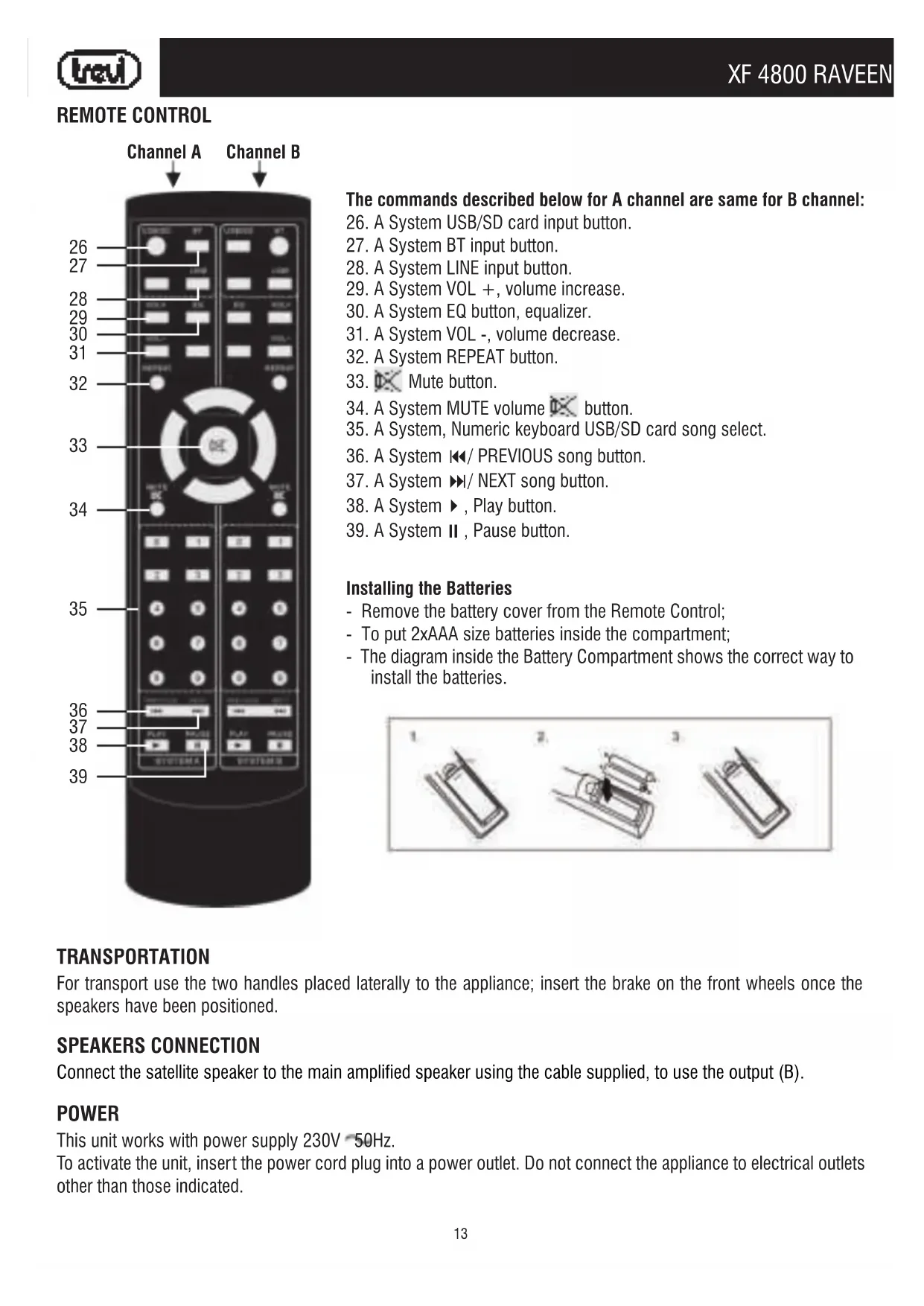
REMOTE CONTROL
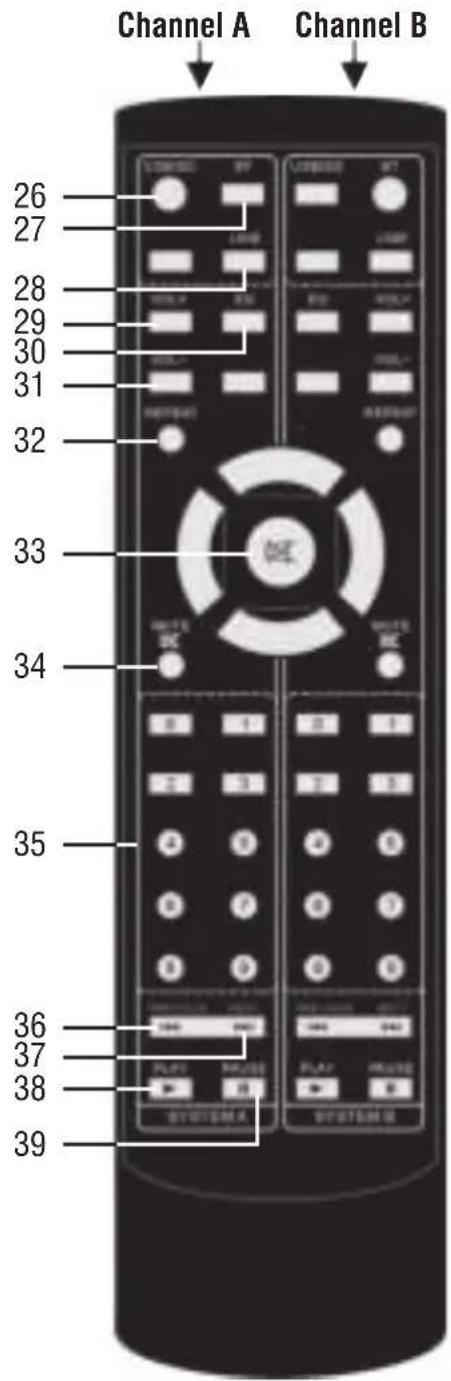
The commands described below for A channel are same for B channel:
-
A System USB/SD card input button.
-
A System BT input button.
-
A System LINE input button.
-
A System VOL +, volume increase.
-
A System EQ button, equalizer.
-
A System VOL -, volume decrease.
-
A System REPEAT button.
-
Mute button.
-
A System MUTE volume ✗ button.
-
A System, Numeric keyboard USB/SD card song select.
-
A System ◀◀/ PREVIOUS song button.
-
A System ▶/ NEXT song button.
-
A System ▶, Play button.
-
A System II, Pause button.
Installing the Batteries
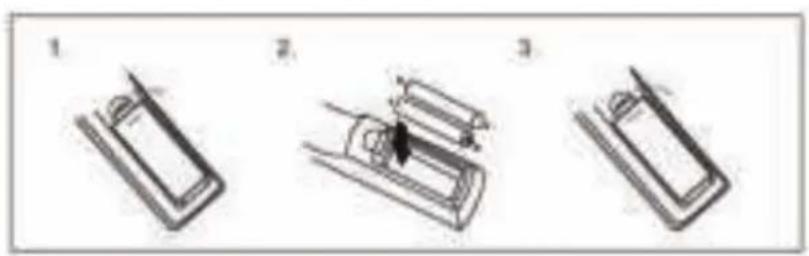
- Remove the battery cover from the Remote Control;
- To put 2xAAA size batteries inside the compartment;
- The diagram inside the Battery Compartment shows the correct way to install the batteries.
TRANSPORTATION
For transport use the two handles placed laterally to the appliance; insert the brake on the front wheels once the speakers have been positioned.
SPEAKERS CONNECTION
Connect the satellite speaker to the main amplified speaker using the cable supplied, to use the output (B).
POWER
This unit works with power supply 230V 50Hz.
To activate the unit, insert the power cord plug into a power outlet. Do not connect the appliance to electrical outlets other than those indicated.
BASIC FUNCTIONS
POWER ON/OFF
- To switch on the appliance, press the main POWER ON/OFF switch (23) to the "ON" position;
- To switch off the appliance, press the main POWER ON/OFF switch (23) to the "OFF" position.
SELECTION A AND B CHANNEL
A and B channel have the same functions.
To activate A channel move the FADER balance control (22) to the left; to activate B channel move the FADER balance control (22) to the right; by acting on the balance it is possible to have a mixing of the two channels.
VOLUME CONTROL
Depending on the channel used, turn the corresponding VOLUME knob (19) on the unit, or use the (29) and (31) keys on the remote control.

Caution:
- The two settings add up, therefore, to have the maximum volume, both settings must be at most, while if the mumble of the VOLUME (19) is at minimum, increasing that of the remote control will not change.
PRESET EQ AND SETTING EQUALIZER
This set has a pre-set audio equalizer system, these are enabled in the Bluetooth, USB and SD Card functions:
- Press the EQ button (30) on the remote control several times to select one of the 6 audio equalizers available and that best suits the current sound reproduction.
For all functions is possible to regulate 4 frequency ranges (20, 21, 24, 25) present on the unit acting directly on certain frequencies, so as to always have the best equalization according to the music playback.
DISCO-LIGHT EFFECTS
The unit is equipped with LED lights (Disco-Light) on the speakers which create a luminous effect following the music; these are activated automatically by increasing the volume of the channel used.

Note:
- You can not turn off the Disco-Light effect, if not by lowering the volume of the playback channel.
- In some cases may be necessary to increase more the volume before it is activated.
BLUETOOTH FUNCTION
FOR A AND B CHANNEL
- Switch on the unit and move the FADER balance control (22) to the channel to be used;
- Press the BT button (15) on the unit or the BT button (27) on the remote control and select the bluetooth function; the word "Blue" will appear on the display and the system will automatically enter pairing mode;
- Activate the Bluetooth functionality on the external device to be paired;
- Start the device search. At the end select the "XF 4800 RAVE A" device if you are using A channel, or "XF 4800 RAVE B" if you are using B channel;
- Enter the password "0000" if required;
- Start playback from the paired external device;
- Press the II button (17) on the unit or the II button (39) on the remote control to pause playback; press ▶ button (18) on the unit or ▶ button (38) on the remote control to resume normal playback;
- Use the ◀◀/Vol- (13), ▶◀/Vol+ (6) buttons on the unit, or the ◀◀(36), ▶◀(37) buttons on the remote control to select tracks.
PLAY ON USB INPUT
FOR A AND B CHANNEL
- Switch the appliance on and move the FADER balance control (22) to the channel to be used;
- Insert a USB memory in the corresponding inputs (2): for channel A and for channel B;
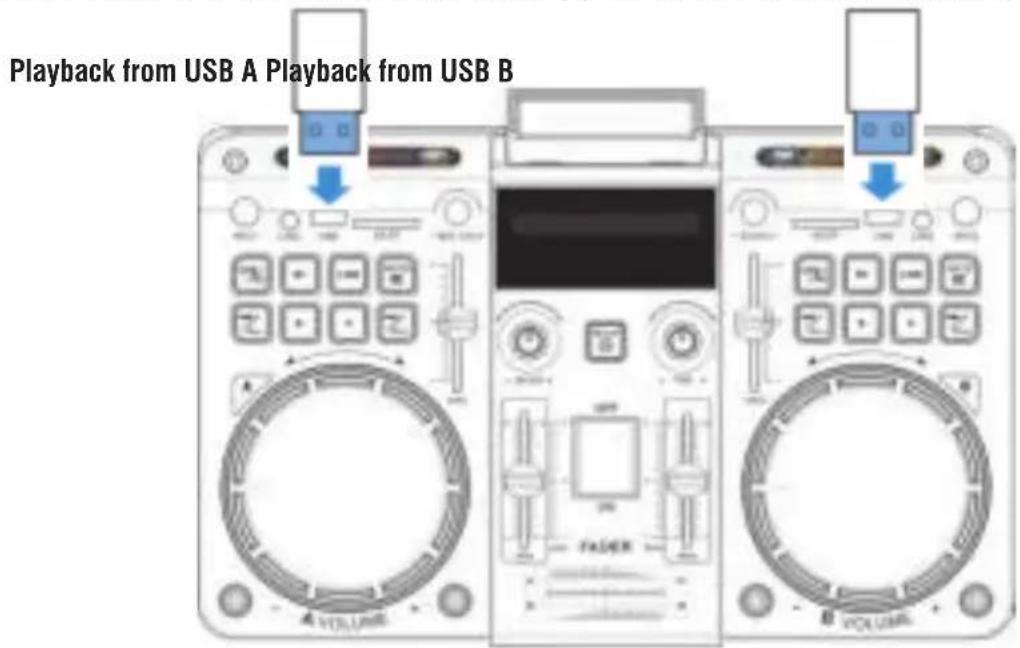
- Playback will start automatically; if it does not, press the ▶ button (18) on the unit or the ▶ button (38) on the remote control;
- Press II button (17) on the unit or II button (39) on the remote control to pause playback, press ▶ button (18) on the unit or ▶ button (38) on the remote control to resume normal reproduction;
- Use the ◀/Vol- (13), ▶/Vol+ (6) buttons on the unit, or the ◀(36), ▶(37) buttons on the remote control to select the tracks you want to play. You can also directly enter the track number to be played using the numeric keypad (35) on the remote control.
- Press the REPEAT (32) key on the remote control once, the display will show "ONE", to continuously reproduce the same track; press it a second time, the word "ALL" will appear on the display, to continuously play all the tracks in the folder or USB device.

Note:
• The player may not support some USB devices, this is due to the incompatibility of some processors.
- To avoid harmful interference, always connect USB devices directly to the unit, do not use extension cords.
• From the computer, format the USB memories in FAT (16 or 32).
PLAY ON SD CARD
FOR A AND B CHANNEL
Refer to the previous paragraph "Playback on USB inputs"; the commands and functions are the same as described above.
LINE-IN
FOR A AND B CHANNEL
- Connect any unit with audio output through the appropriate 3.5mm jack cable to the LINE IN (1) input of channel A or channel B;
-
Switch the appliance on and move the FADER balance control (22) to the channel to be used;
-
Press the LINE key (3) on the unit or the LINE key (28) on the remote control;
- Adjust the external device from your commands.
- Connect the microphone with cable (NOT supplied) to the MIC1 or MIC2 socket (16);
- Turn on the microphone;
- Adjust the microphone input volume using the Volume control (7) on the unit and adjust the ECHO using the command (12).
TROUBLESHOOTING
If a problem occurs, follow the steps in the table below.
If the problem still can't be solved, please contact your retailer.
| Problem Possible cause Solution | ||
| No response from the unit P | Power cable disconnected or not connected properly | Disconnect and reconnect the AC power plu, then turn on the unit again |
| No sound when power is turned ON | 1. No input sound source comes2. Volume knob in the lowest position3. USB not plugged | 1. Input AUX signal2. Adjust volume3. Plug USB, play MP3 |
| Distorted sound 1. Volume | is too loud2. Audio file error | 1. Turn the volume down2. Check and change the audio file |
| No sound from the mi-crophone | 1. Microphone socket may not be plugged properly.2. Microphone switch may not be on.3. Microphone volume is on lowest mode. | 1. Ensure the microphone is correctly plugged into the socket.2. Turn on the microphone3. Adjust the microphone volume |
| No sound comes after inserting USB | 1. Incorrect file format2. USB may not be plugged properly | 1. File format should be MP32. Plug USB correctly |
| Remote control does not work | 1. The source has not been selected.2. The remote control is very far from the unit.3. The batteries have not been inserted correctly.4. Low batteries.5. The remote control receiver on the unit is covered or unable to receive the signal properly. | 1. Before you press any function button, first select the correct source with the remote control instead of the main unit.2. Reduce the distance between the remote control and the unit.3. Insert the batteries with their polarities (+/- signs) aligned as indicated.4. Replace the batteries.5. Aim the remote control directly at the sensor on the front of the main unit. |
| If Speaker makes loud noises | 1. Microphone switched on but may too close to the speaker2. Microphone switched on but is not being used3. Microphone volume may be too loud4. Mobile phone is being used too close to the speaker5. Other wireless equipment may be placed very close to the speaker | 1. Keep the microphone 2 meters away from the speaker2. Turn off microphone if not in use.3. Adjust microphone volume to lower mode4. Keep mobile away from the speaker whilst a ending a call.5. Keep the speaker away from other wireless equipment |

INFORMATION TO USERS
pursuant to Legislative Decree No. 49 of March 14, 2014
"Implementation of Directive 2012/19/EU on Waste Electrical and Electronic Equipment (WEEE)"
This wheeled bin symbol on the product indicates that at the end of its life must be collected separately from other waste. The user must, therefore, take the remote control integrates the essential components that got to its life to the appropriate differentiated collection centers for electronic and electro-technical waste, or return it to the dealer when purchasing a new appliance of equivalent type, in terms of one to one, or one to zero for equipment having longer side of less than 25 cm. Appropriate separate collection for the decommissioned equipment for recycling, processing and environmentally compatible disposal helps prevent negative impact on the environment and human health and promotes recycling of the materials making up the product. Illegal dumping of the product by the user entails the application of administrative sanctions stated in Legislative Decree n. Legislative Decree No. 49 of March 14, 2014.
TECHNICAL SPECIFICATIONS
Power Supply: 230V ∼ 50Hz
Power consumption: Max 500W
Output Audio power: 600W (300Wx2)
Bluetooth peak transmission power: 1mW
Band transmission Bluetooth: 2,4GHz
Dimensions:
Main unit: 400x390x1060mm
Second speaker: 400x390x1030mm
Weight:
Main unit: 25,2 Kg
Second speaker: 21 Kg
NOTES D'EMPLOI
TRANSPORT
TRANSPORT
TRANSPORTE
https://www.trevi.it/dms/zidi/TREVI/DOCXF4800RAVE.pdf
Simplified EU Declaration Of Conformity
Hereby TREVI S.p.a declares that equipment type
"High power portable speaker" model XF 4800 RAVE
is in compliance with Directive 2014/53/EU.
The full text of the EU declaration of conformity is available at the following internet address
https://www.trevi.it/dms/zidi/TREVI/DOCXF4800RAVE.pdf
EN If you will not find your language on the instruction manual, please go on our website www.trevi.it to find it


- WIRES CONNECTIONS TO A UK THREE-PIN PLUG
- NOTE D'USO
- TRASPORTO
- CARE AND MAINTENANCE
- IMPORTANT
- BACK PANEL
- REMOTE CONTROL
- THE COMMANDS DESCRIBED BELOW FOR A CHANNEL ARE SAME FOR B CHANNEL
- INSTALLING THE BATTERIES
- TRANSPORTATION
- SPEAKERS CONNECTION
- POWER
- BASIC FUNCTIONS
- POWER ON/OFF
- SELECTION A AND B CHANNEL
- VOLUME CONTROL
- CAUTION
- PRESET EQ AND SETTING EQUALIZER
- DISCO-LIGHT EFFECTS
- NOTE
- BLUETOOTH FUNCTION
- FOR A AND B CHANNEL
- PLAY ON USB INPUT
- PLAY ON SD CARD
- LINE-IN
- TROUBLESHOOTING
- INFORMATION TO USERS
- PURSUANT TO LEGISLATIVE DECREE NO. 49 OF MARCH 14, 2014
- IMPLEMENTATION OF DIRECTIVE 2012/19/EU ON WASTE ELECTRICAL AND ELECTRONIC EQUIPMENT (WEEE)
- TECHNICAL SPECIFICATIONS
- NOTES D'EMPLOI
- TRANSPORT
- TRANSPORTE
- SIMPLIFIED EU DECLARATION OF CONFORMITY
Brand : Trevi
Model : XF 4800 RAVE
Category : Loudspeaker