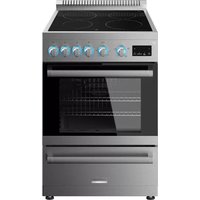
FT24N62R-SS - Cooker Furrion - Free user manual and instructions
Find the device manual for free FT24N62R-SS Furrion in PDF.

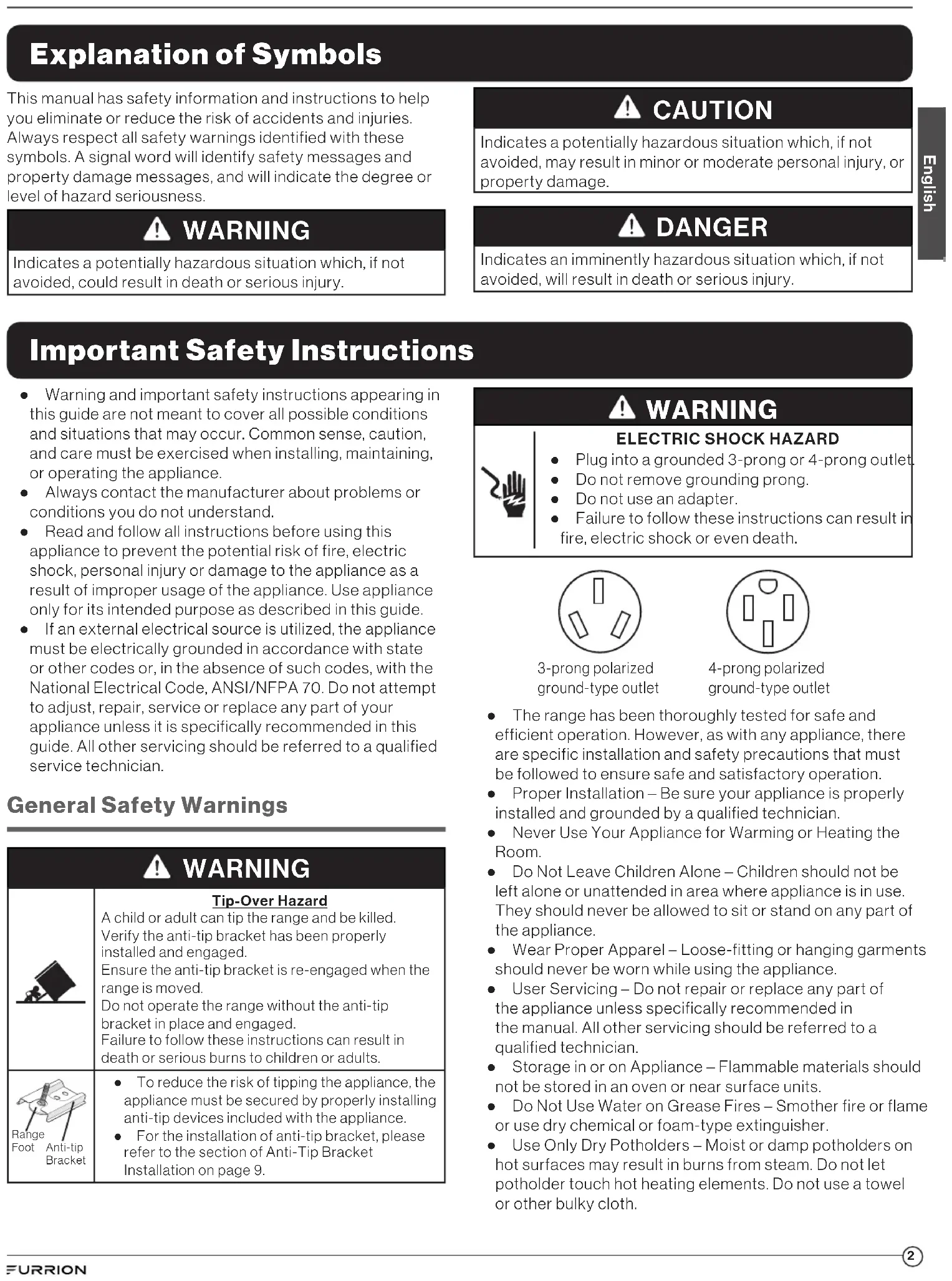


| Product Type | 4-Element Electric Range with Grill and Rotisserie |
| Brand | Furrion |
| Model | FT24N62R-SS |
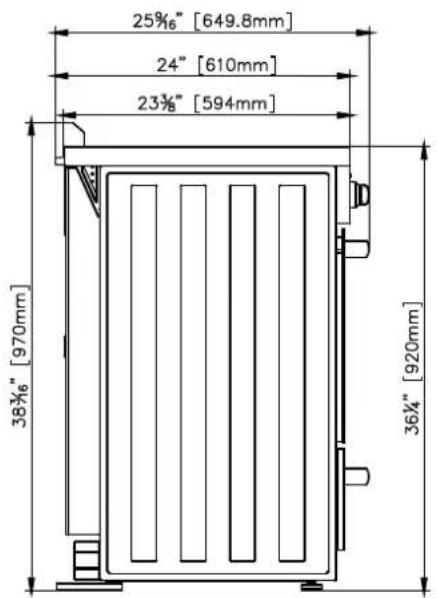
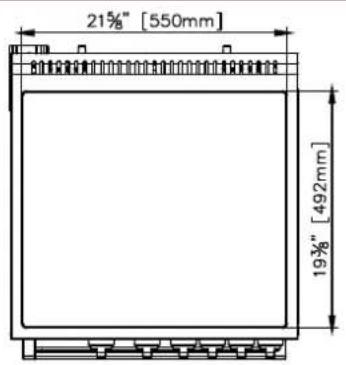
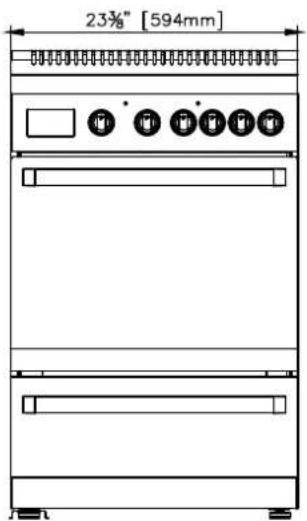
| Dimensions (W x H x D) | 594 mm x 970 mm x 649.8 mm (23 3/4 in x 38 3/16 in x 25 9/16 in) |
| Supply Voltage | 208 V AC / 240 V AC |
| Total Power | 7060 W (208 V) / 9400 W (240 V) |
| Current | 34 A (208 V) / 39 A (240 V) |
| Oven Capacity | 2.68 ft³ (76 L) |
| Surface Elements | 4 ceramic glass zones: front left (1800 W), rear left (1200 W), front right (1200 W), rear right (1800 W) |
| Oven Elements | Broil (2000 W), Bake (1500 W), Convection (1300 W) |
| Cooking Modes | Bake, Broil, Convection Bake, Convection Broil, Rotisserie |
| Safety | Anti-tip device, mandatory grounding, automatic element shutdown |
| Control Panel | Digital display, adjustment keys, timer, clock, oven light |
| Oven Racks | 2 sliding racks with safety stops |
| Rotisserie | Spit included, rotating motor |
| Oven Light | Halogen bulb 25 W, G9, replaceable |
| Surface Material | Ceramic glass |
| Cleaning | Ceramic glass surface: razor scraper + special cleaner; removable oven door; interior: soapy water or baking soda |
| Included Parts | Backsplash, oven racks (x2), rotisserie, anti-tip kit, manual, warranty booklet |
| Repairability | Oven lamp replaceable by user; other repairs by qualified technician |
Frequently Asked Questions - FT24N62R-SS Furrion
User questions about FT24N62R-SS Furrion
0 question about this device. Answer the ones you know or ask your own.
Ask a new question about this device
Download the instructions for your Cooker in PDF format for free! Find your manual FT24N62R-SS - Furrion and take your electronic device back in hand. On this page are published all the documents necessary for the use of your device. FT24N62R-SS by Furrion.
USER MANUAL FT24N62R-SS Furrion
Thank you for purchasing this Furrion® product. Before operating your new appliance, please read these instructions carefully. This instruction manual contains information for safe use, installation and maintenance of the appliance.
Please keep this instruction manual in a safe place for future reference. This will ensure safe use and reduce the risk of injury. Be sure to pass on this manual to new owners of this appliance.
The manufacturer does not accept responsibility for any damages due to not observing these instructions.
Table of Contents
Table of Contents 1
Explanation of Symbols 2
Important Safety Instructions 2
General SafetyWarnings 2
CooktopWarnings 3
Oven SafetyWarnings 3
Grounding Instructions 4
Environmental Protection and Disposal. 4
Product Overview 5
Cooktop 5
Oven 5
Range 5
Control Panel. 6
Installation 7
What's in the Box. 7
Tools You Will Need (Not Provided) 8
Cabinet Constructing Instructions 8
Anti-Tip Bracket Installation 9
Electric Connection 9
Range Installation 11
Operation 12
General Operation. 12
Using the Cooktop 13
Using the Oven. 13
Care and Maintenance. 15
General Cleaning. 15
Cleaning Your Oven Door. 16
Cleaning the Storage Drawer 17
Replacing the Oven Light 17
Troubleshooting 17
Specification 18
Explanation of Symbols
This manual has safety information and instructions to help you eliminate or reduce the risk of accidents and injuries. Always respect all safety warnings identified with these symbols. A signal word will identify safety messages and property damage messages, and will indicate the degree or level of hazard seriousness.

WARNING
Indicates a potentially hazardous situation which, if not avoided, could result in death or serious injury.

CAUTION
Indicates a potentially hazardous situation which, if not avoided, may result in minor or moderate personal injury, or property damage.

DANGER
Indicates an imminently hazardous situation which, if not avoided, will result in death or serious injury.
Important Safety Instructions
- Warning and important safety instructions appearing in this guide are not meant to cover all possible conditions and situations that may occur. Common sense, caution, and care must be exercised when installing, maintaining, or operating the appliance.
- Always contact the manufacturer about problems or conditions you do not understand.
- Read and follow all instructions before using this appliance to prevent the potential risk of fire, electric shock, personal injury or damage to the appliance as a result of improper usage of the appliance. Use appliance only for its intended purpose as described in this guide.
- If an external electrical source is utilized, the appliance must be electrically grounded in accordance with state or other codes or, in the absence of such codes, with the National Electrical Code, ANSI/NFPA 70. Do not attempt to adjust, repair, service or replace any part of your appliance unless it is specifically recommended in this guide. All other servicing should be referred to a qualified service technician.
General SafetyWarnings

WARNING
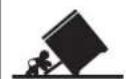

Range
Foot
Anti-tip
Bracket
Tip-Over Hazard
A child or adult can tip the range and be killed. Verify the anti-tip bracket has been properly installed and engaged.
Ensure the anti-tip bracket is re-engaged when the range is moved.
Do not operate the range without the anti-tip bracket in place and engaged.
Failure to follow these instructions can result in death or serious burns to children or adults.
- To reduce the risk of tipping the appliance, the appliance must be secured by properly installing anti-tip devices included with the appliance.
- For the installation of anti-tip bracket, please refer to the section of Anti-Tip Bracket Installation on page 9.

WARNING
ELECTRIC SHOCK HAZARD

- Plug into a grounded 3-prong or 4-prong outlet
- Do not remove grounding prong.
- Do not use an adapter.
- Failure to follow these instructions can result in fire, electric shock or even death.
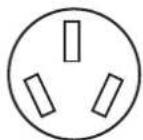
3-prong polarized ground-type outlet
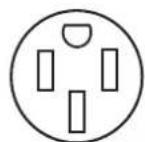
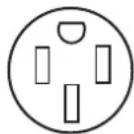
4-prong polarized ground-type outlet
- The range has been thoroughly tested for safe and efficient operation. However, as with any appliance, there are specific installation and safety precautions that must be followed to ensure safe and satisfactory operation.
- Proper Installation - Be sure your appliance is properly installed and grounded by a qualified technician.
- Never Use Your Appliance for Warming or Heating the Room.
- Do Not Leave Children Alone - Children should not be left alone or unattended in area where appliance is in use. They should never be allowed to sit or stand on any part of the appliance.
- Wear Proper Apparel – Loose-fitting or hanging garments should never be worn while using the appliance.
- User Servicing - Do not repair or replace any part of the appliance unless specifically recommended in the manual. All other servicing should be referred to a qualified technician.
- Storage in or on Appliance - Flammable materials should not be stored in an oven or near surface units.
- Do Not Use Water on Grease Fires - Smother fire or flame or use dry chemical or foam-type extinguisher.
-
Use Only Dry Potholders - Moist or damp potholders on hot surfaces may result in burns from steam. Do not let potholder touch hot heating elements. Do not use a towel or other bulky cloth.
-
If the user of this appliance fails to maintain it in the condition in which it was shipped from the factory or if the appliance is not used solely for its intended purpose or if appliance is not maintained in accordance with the instructions in this manual, then the risk of a fire which can cause personal injury, property damage or loss of life.
- DO NOT operate the appliance if it is damaged or not working properly.
Use your appliance only for its intended use. - DO NOT use an extension cord to connect this appliance. If the power supply cord is too short, have a qualified electrician or serviceman install an outlet near the appliance.
- Do not remove permanently affixed labels, warnings, or plates on the appliance, otherwise which may void the warranty.
- Please observe all local and national codes and ordinances.
IMPORTANT: This range is designed and manufactured solely for household cooking only and CANNOT be used in a commercial environment or the warranty will be void.
CooktopWarnings
- Use Proper Pan Size - This appliance is equipped with one or more surface units of different size. Select utensils having flat bottoms large enough to cover the surface unit heating element. The use of undersized utensils will expose a portion of the heating element to direct contact and may result in ignition of clothing. Proper relationship of utensil to burner will also improve efficiency.
- Never Leave Surface Units Unattended at High Heat Settings - Boilover causes smoking and greasy spillovers that may ignite.
- Make Sure Reflector Pans or Drip Bowls Are in Place
- Absence of these pans or bowls during cooking may subject wiring or components underneath to damage.
- Glazed Cooking Utensils - Only certain types of glass, ceramic, earthenware, or other glazed utensils are suitable for range-top service without breaking due to the sudden change in temperature.
- Utensil Handles Should Be Turned Inward and Not Extend Over Adjacent Surface Units - To reduce the risk of burns, ignition of flammable materials, and spillage due to unintentional contact with the utensil, the handle of a utensil should be positioned so that it is turned inward, and does not extend over adjacent surface units.
- Do Not Soak Removable Heating Elements - Heating elements should never be immersed in water.
-
DO NOT TOUCH SURFACE UNITS OR AREAS NEAR UNITS - Surface units may be hot even though they are dark in color. Areas near surface units may become hot enough to cause burns. During and after use, do not touch, or let clothing or other flammable materials contact surface units or areas near units until they have had sufficient time to cool. Among these areas are (identification of areas - for example, the cooktop and surfaces facing the cooktop).
If the surface of cooktop exceed high temperature 122ircF (50ircC) , the icon on the surface of cooktop will display in red. -
Do Not Cook on Broken Cooktop - If cooktop should break, cleaning solutions and spillovers may penetrate the broken cooktop and create a risk of electric shock. Contact a qualified technician immediately.
- Clean Cook - Top With Caution - If a wet sponge or cloth is used to wipe spills on a hot cooking area, be careful to avoid steam burn. Some cleaners can produce noxious fumes if applied to a hot surface.
Oven SafetyWarnings
WARNING
FOOD POISONING HAZARD
Do not let food sit in oven more than one hour before or after cooking, doing so can result in food Poisoning sickness.
- Use Care When Opening Door - Let hot air or steam escape before removing or replacing food.
- Do Not Heat Unopened Food Containers - Build-up of pressure may cause container to burst and result in injury.
- Placement of Oven Racks - Always place oven racks in desired location while oven is cool. If rack must be moved while oven is hot, do not let potholder contact hot heating element in oven.
- Protective Liners - Do not use aluminum foil to line surface unit drip bowls or oven bottoms, except as suggested in the manual. Improper installation of these liners may result in a risk of electric shock, or fire.
- Keep your arms and face away from being directly above the cooking area while operating the appliance.
Always cook with the oven door closed. - DO NOT TOUCH HEATING ELEMENTS OR INTERIOR SURFACES OF OVEN - Heating elements may be hot even though they are dark in color. Interior surfaces of an oven become hot enough to cause burns. During and after use, do not touch, or let clothing or other flammable materials contact heating elements or interior surfaces of oven until they have had sufficient time to cool. Other surfaces of the appliance may become hot enough to cause burns - among these surfaces are (identification of surfaces - for example, oven vent openings and surfaces near these openings, oven doors, and windows of oven doors).
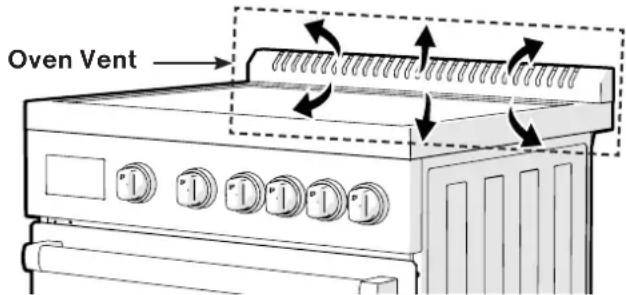
- DO NOT touch the outer surface of the oven door or the oven vent while the oven is in use. These areas may become hot enough to cause burns. During and after use, do not let clothing or other flammable materials contact these areas until they have had sufficient time to cool.
- DO NOT use oven as a storage area.
- Keep Oven Vent Ducts Unobstructed.
Grounding Instructions

WARNING
Improper use of the grounding plug can result in a risk of electric shock.
This appliance must be grounded. In the event of an electrical fault, grounding reduces the risk of electric shock by providing a short circuit path for the electric current. The plug must be plugged into an outlet that is properly installed and grounded.
Consult a qualified electrician or serviceman if the grounding instructions are not completely understood or if doubt exists as to whether the appliance is properly grounded.
- If you have any questions about the grounding or electrical instructions, consult a qualified electrician or service person.
- Neither Furrion nor the dealer can accept any liability for damage to the oven or personal injury resulting from failure to observe the electrical connection procedures.
Environmental Protection and Disposal
After the electric range has been unpacked, check if there are damages in the appliance and the oven door can open and close normally. Any problems or doubts, please do not use the appliance and consult your dealer or qualified personnel. Packaging materials (for example, plastic bags, polystyrene foam, nails, packing straps, etc.) should not be left around within easy reach of children, as which may cause serious injuries.
Those packaging materials are recyclable and marked with the recycling symbol
- Before disposing the appliance you decide not to use any more, it is suggested that the appliance should be treated to be unserviceable in accordance with health and environmental regulations. And make sure all of the parts with potential hazards should be treated to be harmless, especially with which children would play.
- Remove the door before disposal to prevent children getting trapped.
- Ensure all the control knobs are in OFF position after use.
- Do not line the oven walls top and bottom with aluminium foil. Do not place shelves, pans, baking trays, broil trays or other cooking utensils on the base of the oven chamber.
Save these instructions for future reference!
Product Overview
English
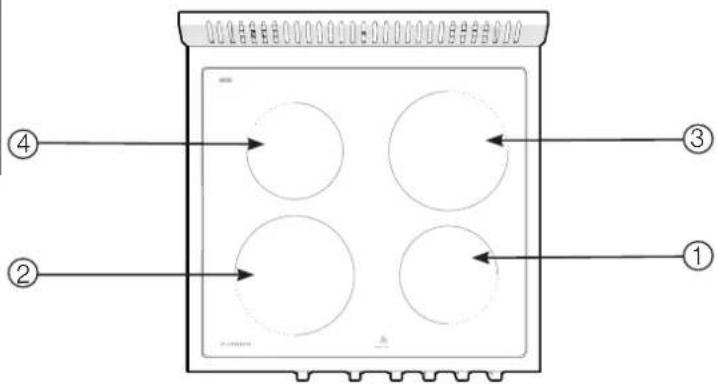
Cooktop
| Item | Element Location Heat Element Size Rating Power | |
| ① | Front right 6½" (165mm) 1200W | |
| ② | Front left 7¾" (200mm) 1800W | |
| ③ | Rear right 7¾" (200mm) 1800W | |
| ④ | Rear left 6½" (165mm) 1200W | |
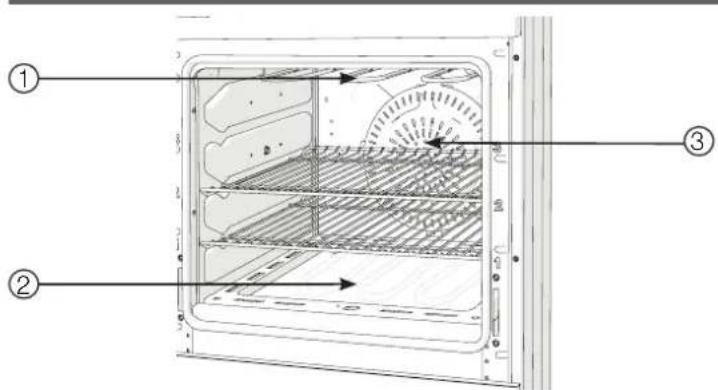
Oven
Your oven is designed with three different heating elements:
| Item | Element Location Rating Power | |
| ① | Broil Element (Upper heating element) | 2,000W |
| ② | Bake Element (Lower heating element) | 1,500W |
| ③ | Convection Element (Back heating element) | 1,300W |
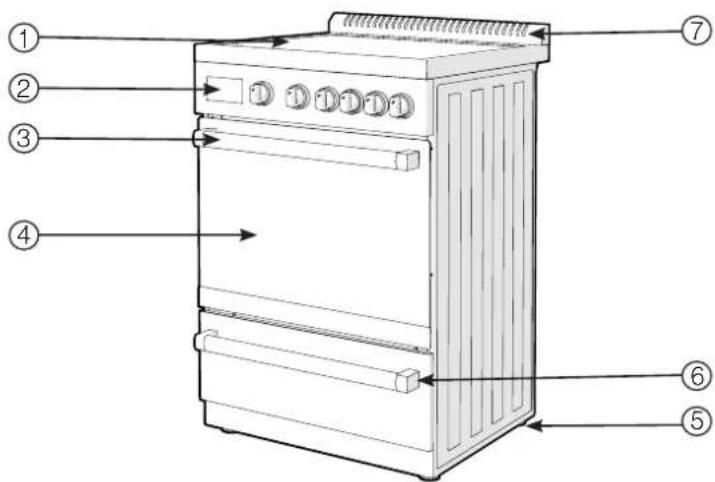
Range
| Item Description | |
| ① | Ceramic Glass Cooktop |
| ② | Control Panel with Digital Display |
| ③ | Oven Door Handle |
| ④ | Oven Door |
| ⑤ | Leveling Legs (4) |
| ⑥ | Storage Driver with Handle |
| ⑦ | Backsplash with Integrated Oven Vents |
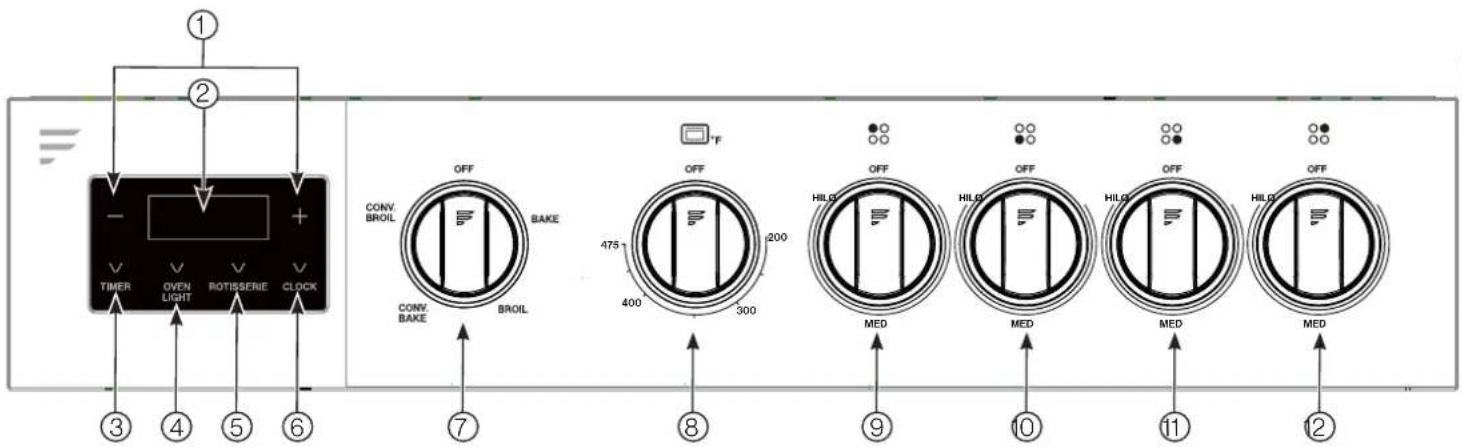
Control Panel
us|6u3
| No. | Button Description | |||
| ① | -/+ Touch to decrease or increase time setting. | |||
| ② | Display Area Displays the time or timer function. | |||
| ③ | Timer button Touch to turn ON/OFF the timer function. | |||
| ④ | Oven light button Touch to turn ON/OFF the oven light. | |||
| ⑤ | Rotisserie control Touch to activate the rotisserie function, the rotating motor will turn on, press again to turn off. | |||
| ⑥ | Clock button Touch to set the clock. | |||
| ⑦ | Oven function control knob | Rotate to select the heating mode among OFF, BAKE, BROIL, CONV. BAKE and CONV. BROIL. | OFF | Turn all heating elements off. |
| BAKE | Bottom heater will be turned on. | |||
| BROIL | Top heater will be turned on. | |||
| CONV. BAKE | Bottom heater, circulate fan and rear heater will be turned on. | |||
| CONV. BROIL | Top heater, circulate fan and rear heater will be turned on. | |||
| ⑧ | Oven temperature control knob | This knob is to turn OFF/ON the Oven, and to select the temperature setting in the Oven for different cooking purpose. | ||
| ⑨ | Rear left burner control knob | Turn on/off the cooktop rear left burner; Choose the power output rating from LO to HI. | ||
| ⑩ | Front left burner control knob | Turn on/off the cooktop front left burner; Choose the power output rating from LO to HI. | ||
| ⑪ | Front right burner control knob | Turn on/off the cooktop front right burner; Choose the power output rating from LO to HI. | ||
| ⑫ | Rear right burner control knob | Turn on/off the cooktop rear right burner; Choose the power output rating from LO to HI. | ||
Installation

WARNING
Installation of this appliance must be made in accordance by a qualified technician with the instructions provided in this manual. No agent, representative or employee of Furrion or other persons have the authority to change, modify or waive any provision of the instructions contained in this manual.

WARNING
EXCESSIVE WEIGHT HAZARD
In order to avoid back or other injuries while moving the range, two or more persons should be utilized to move and install the range.

WARNING
| Tip-Over Hazard A child or adult can tip the range and be killed. Verify the anti-tip bracket has been properly installed and engaged. Ensure the anti-tip bracket is re-engaged when the range is moved. Do not operate the range without the anti-tip bracket in place and engaged. Failure to follow these instructions can result in death or serious burns to children or adults. | |
| Range Foot Anti-tip Bracket | • To reduce the risk of tipping the appliance, the appliance must be secured by properly installed anti-tip devices packed with the appliance. • For the installation of anti-tip bracket, please refer to the section of Anti-Tip Bracket Installation in page 9. |

WARNING
ELECTRIC SHOCK HAZARD
- Plug into a grounded 3-prong or 4-prong outlet
- Do not remove grounding prong.
- Do not use an adapter.
- Disconnect power before servicing.
- Replace all parts and panels before operating.
- Failure to follow these instructions can result in fire, electric shock or even death.
Observe all governing codes and ordinances. The installation must conform with local codes or in the absence of such codes, refer to the latest edition of:
- In the U.S.A., the installation must conform with ANSI/NFPA70.
- In Canada, the installation must conform with: C22.1-18, Canadian Electrical Code, Part I.
If Manufactured home installations, please follow ANSI A 225.1/NFPA 501A or local codes.
What's in the Box

WARNING
SUFFOCATION HAZARD
- Dispose packaging material or keep from reach of small children.
- Failure to follow instruction could lead to serious injury or death.

WARNING

Always wear protective gear such as gloves, eyewear and clothing to avoid injuries during installation of the product.
Remove product from packaging and make sure you have the following list of items included. If any item is damaged or missing, contact your Furrion dealer.
| Part Description Quantity | ||
| 24" Electric Range 1 | ||
| Backsplash Assembly (Backsplash and six screws M4x12mm) | 1 | |
| Oven Racks 2 | ||
| Rotisserie 1 | ||
| Anti-tip Bracket (Set) • Screw (M5x30mm) x 2 • Washer x 2 • Anti-bracket x 1 | 1 | |
| User Manual | 1 | |
| Warranty Manual | 1 | |
Tools You Will Need (Not Provided)
| Part Description | |
| Electric Drill (Drill bit diameter for the anchor is 5/16" 8mm). | |
| Safety Goggles | |
| Gloves | |
| Adjustable Wrench | |
| Tape Measure | |
| Pencil | |
| Phillips Screwdriver (M4, +Type Head) | |
| Flat Blade Screwdriver | |
| Cutting Knife | |
| Level | |
| (UL Listed 50 AMP) 4-Wire Cord 6' long OR 3-Wire Cord 6' long | |
| Mounting Anchors for masonry/cement floors. | |
Cabinet Constructing Instructions
- For proper operation of your range, the cabinets must be properly constructed and squared with respect to the counter top and the cabinet face.
- For proper operation of these units, the cabinet must be level and the bottom of the range must be supported. Use an insulated pad or 14 (64mm) plywood under the range if installing the range over carpeting.
NOTE: When planning the location, consider curtains or other combustible materials installed around the appliance so as not to create a fire hazard.
- All openings in the counter or floor where the range is to be installed must be sealed.
- The floor anti-tip bracket must be installed properly. To install the anti-tip bracket shipped with the range, refer to "Anti-Tip Bracket Installation" section for the detail installation instructions of the anti-tip bracket shipped with the range.
- Grounded electrical supply is required. Refer to "Electric Connection" section.
Maximum allowable wood cabinet temperatures of 194ircF (90ircC)
Cabinet Installation
- The minimum horizontal distance(s) from sides and top of appliance to adjacent vertical combustible walls extending above the top panel. (Fig. 1)
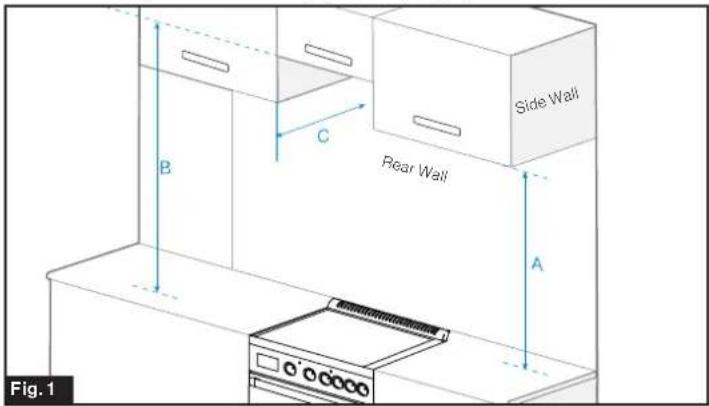
| Item Dimension | ||
| A | The minimum vertical distance to combustible material to the side the range cooking surface. | 18" 457mm |
| B | The minimum vertical distance to the combustible distance over the range. NOTE: 24" (610 mm) minimum when bottom of wood or metal cabinet is covered by not less than 1/4" (64mm) flame retardant millboard covered with not less than No. 28 MSG sheet steel, 0.015" (0.4mm) stainless steel, 0.024" (0.6mm) aluminum or 0.020" (0.5mm) copper. | 30" 762mm |
| CMaximum upper cabinet depth. | 15" 381mm | |
NOTE: If installing a range hood or microwave hood combination above the cooking surface, follow the range hood or microwave hood combination installation instructions for dimensional clearances above the cooking surface.
Counter Cutout Dimensions (Fig. 2)
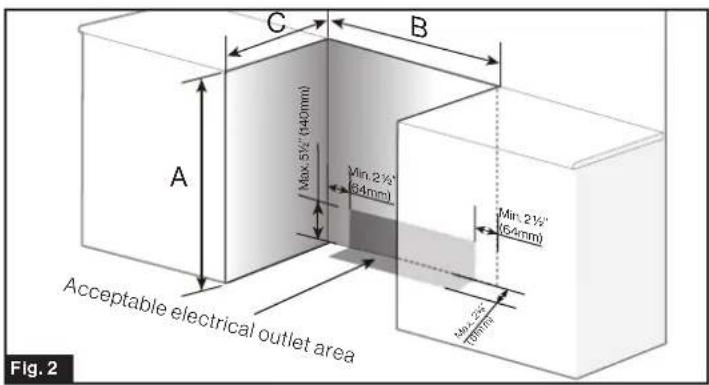
| ABC | ||
| 36" Recommended 914mm Recommended | Min. 23%"(600mm) | Min. 24" (610mm) |
Anti-Tip Bracket Installation

WARNING
To reduce the risk of tipping of the appliance, the appliance must be secured by properly installing anti-tip devices.
To check if the devices are installed properly, remove the storage drawer and verify that the anti-tip devices are engaged into the bracket.
The anti-tip bracket must be properly installed to reduce the risk of tipping due to abnormal use or improper oven door loading. Always follow instructions below to install the anti-tip bracket.
- Position the anti-tip bracket against the wall on the floor in the cutout area, make sure the U-notch is facing inward and the U-notch center is 10% (260.5mm) distance to the cutout centerline. (Fig. 3)
NOTE:
The anti-tip bracket can be installed either on the left or right side of the cutout.
-If the range is not pushed against the wall then the bracket may need to be adjusted forward to ensure the foot is locked into the bracket.
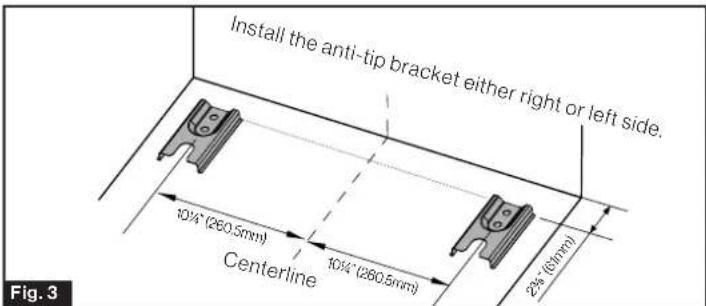
- Determine and mark the drilling position through the two mounting holes in the bracket.
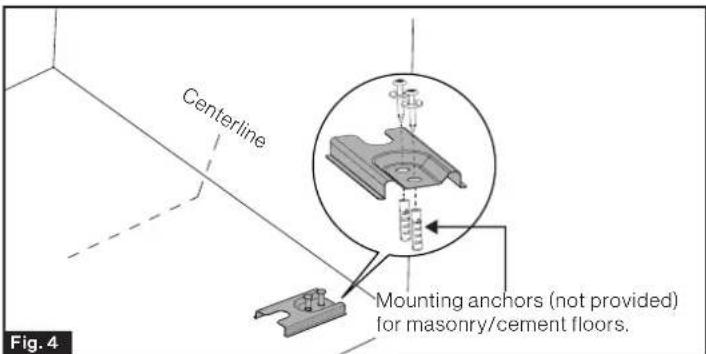
- Fix the two mounting bolts into the floor. (Fig. 4) NOTE: If install on concrete floors. Take the length of the provided mounting bolts as a reference and drill two holes on the floor using a masonry drill in proper depth. Insert the mounting anchor (not provided) into the 2 drilled holes, insert the 2 bolts through the anti tip bracket and into the anchors.
Electric Connection

WARNING
ELECTRIC SHOCK HAZARD

- Disconnect electrical power before servicing.
- Replace all parts and panels before operating.
- Failure to do so can result in death or electrical shock.
BEFORE MAKING THE ELECTRICAL CONNECTION, MAKE SURE THAT:
- Do not use an extension cord.
- Check with a qualified electrician or service technician if you are in doubt as to whether the appliance is properly grounded. Don't modify the power supply cord plug. If it will not fit the outlet, have a proper outlet installed by a qualified electrician.
- This range must be supplied with the proper voltage and frequency as specified on the rating label which is located on the oven door of the appliance (Fig. 5). And connected to an individual properly grounded branch circuit, protected by a circuit breaker or fuse having amperage as specified on the rating label. The rating label is located on the oven door of the appliance.
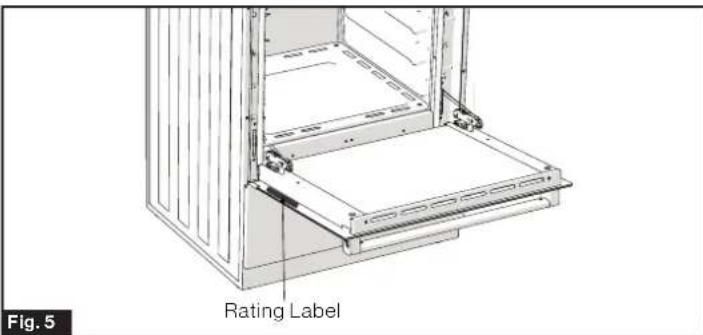
- The safety circuit-breaker and the electrical system are able to withstand the load of the appliance. Refer to the rating label of the range in case you need to verify any of the electrical requirements.
- The manufacturer is not liable for any direct or indirect damage caused by faulty installation or connection. It is therefore necessary that all installation and connection operations are carried out by qualified personnel complying with local codes and regulations.
Ensure the 50-amp circuit is installed before connecting electric to the range.
Electric connection for U.S.A market, because range terminals are not accessible after range is in position, flexible service conduit or cord must be used, please see the section of Electrical Connection USA Installations (FT24N62R-SS).
Electric Connection for Canadian market, please see the section of Electrical Connection for Canada Installations (FT24N62C-SS).
Electrical Connection for USA Installations

WARNING
ELECTRICAL SHOCK HAZARD
- Ensure the wires are connected to the proper terminal block.
- Failure to follow these instructions can result in electrical shock, severe personal injury or death.
4-Wire Conduit Installation (Recommended)
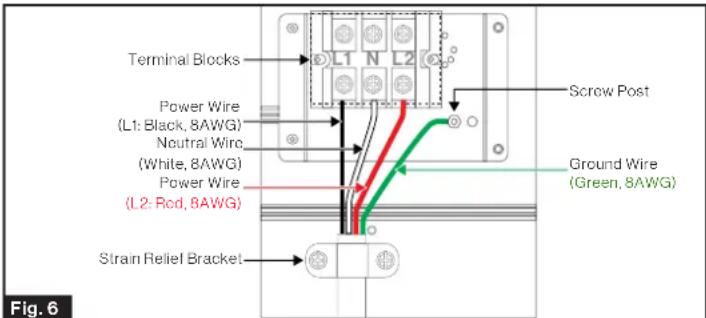
Refer to Fig. 6 for 4-wire connection guidance.
3-Wire Power Cordor Conduit Installation
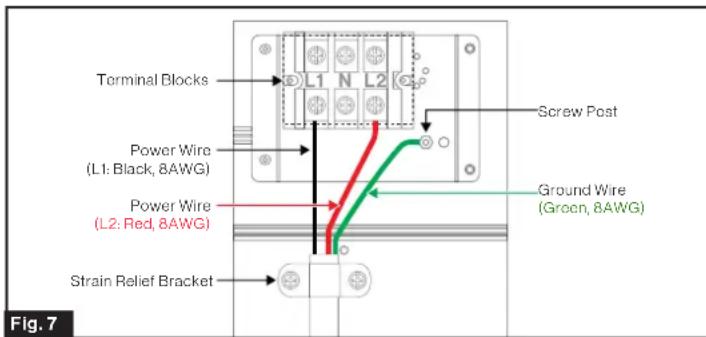
Refer to Fig. 7 for 3-wire connection guidance.
| Wall Receptacle for Power Cord | |
| 4 Wire receptacle (NEMA 14-50R) | |
| 3 Wire receptacle (NEMA 10-50R) | |
4-Wire Power Cord Installation (Recommended)
- Remove the terminal box cover on the back of the range by removing the 1 screw using a Phillips screwdriver. Keep the screw for later use.
- Loosen the 2 screws of strain relief bracket using a Phillips screwdriver.
- Strip off % (15mm) of the insulation layer from the end of the four power cords.
- Insert the 4-Wire power cord through the strain relief bracket and tighten. Allow enough slack to easily attach the power cord terminals to the terminal blocks.
- Loosen the terminal block screws and insert the power wires into the proper terminal as following instruction: -L1 is the Black Power wire. Attach to the L1 terminal. -L2 is the Red Power wire. Attach to the L2 terminal. -Neutral is the White power wire. Attach to the middle (N) terminal. -Ground is the Green power wire. Attach to the screw post (See Fig 6).
- Tighten all of the terminal block screws (maximum torque is 6Nm
- Replace the terminal box cover and tighten with the 1 screw.
- Refer to Fig. 6 for 4-Wire connection guidance.
3-Wire Power Cord Installation
- Remove the terminal box cover on the back of the range by removing the 1 screw using a Phillips screwdriver. Keep the screws for later use.
- Loosen the 2 screws of strain relief bracket using a Phillips screwdriver.
- Strip off 5 % "(15mm) of the insulation layer from the end of the three power cords.
- Insert the 3-Wire power cord through the strain relief bracket and tighten. Allow enough slack to easily attach the power wire terminals to the terminal blocks.
- Loosen the terminal block screws and insert the power wires into the proper terminal as following instruction: -L1 is the Black Power wire. Attach to the L1 terminal. -L2 is the Red Power wire. Attach to the L2 terminal. -Ground is the Green power wire. Attach to the screw post (See Fig 7).
- Tighten all of the terminal block screws (maximum torque is 6Nm
- Replace the terminal box cover and tighten with the 1 screw.
- Refer to Fig. 7 for 3-Wire connection guidance.
Electrical Connection for Canada Installations
- The electrical connection must be carried out in accordance with local codes and regulations.
- Plug the power cord from the range into a dedicated 50 amp 4-prong polarized grounded type outlet.
Range Installation
Backsplash Installation
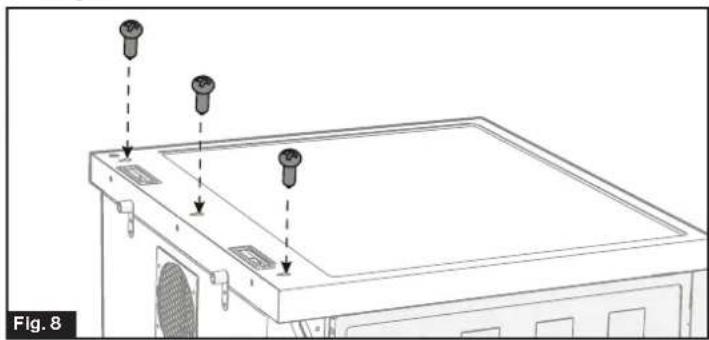
- Have three screws (M4 12mm included) pre-installed at the rear side of the range and leave 3mm untightened. (Fig.8)
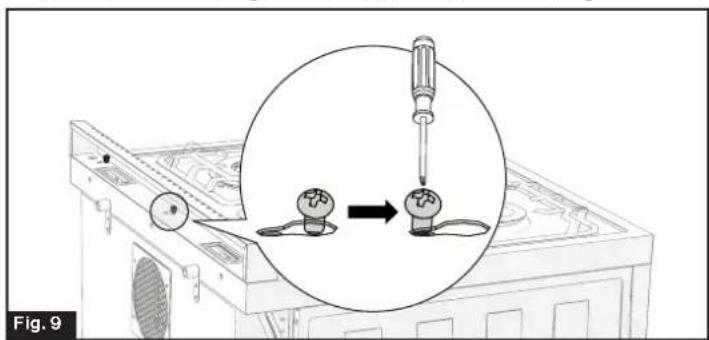
- Attach the backsplash into the pre-installed screws at the bottom and pull inward until stopped. Turn the backplash to the front then tighten these three screws. (Fig. 9)
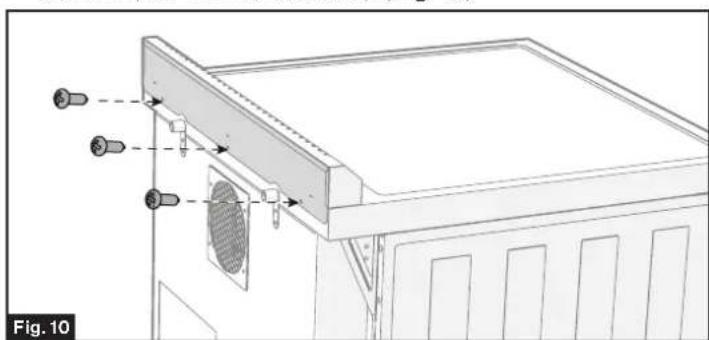
- Reinforce the backsplash at the back with extra three screws (M4*12mm, included). (Fig. 10)
Leveling the Range
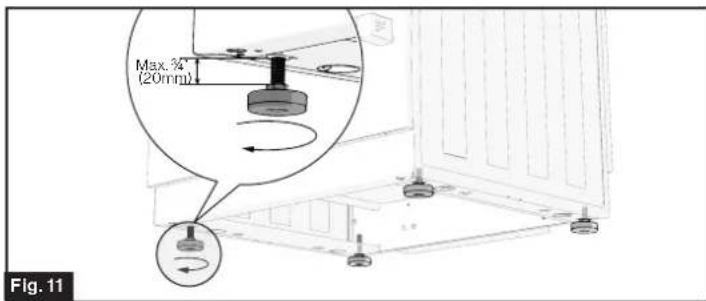
The range must be level for satisfactory baking performance. Your Furrion range is designed with four adjustable leveling legs at the bottom of the range, user can reach to any leg to adjust to make it level.
NOTE: A level maybe required to assist you to check the range levelness.
Check the levelness by placing a level on a flat surface of the range, such as the oven rack or the top of cooktop. Adjust the leveling legs until the range is level by hand. (Fig. 11)
Slide the Range into the Cabinet
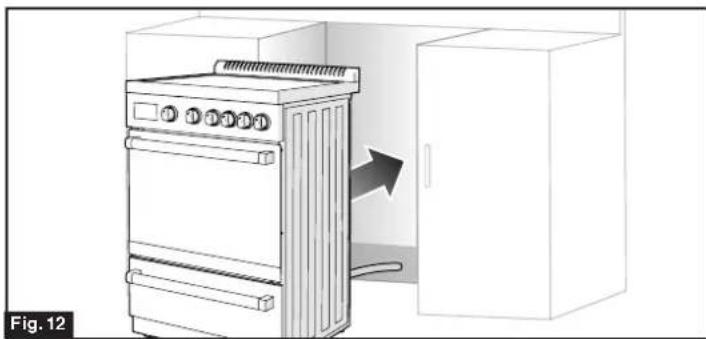
- Move the range close enough to the cutout to allow proper electrical connections. See "Electrical Connections" section for detail. (Fig. 12)
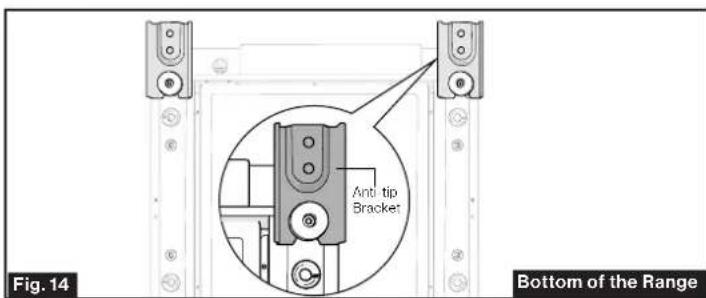
- Slide the range into the cutout until the rear leg engaged into the pre-installed anti-tip bracket. Care should be taken to avoid rubbing and damaging the wire during moving. (Fig. 13 & Fig. 14)
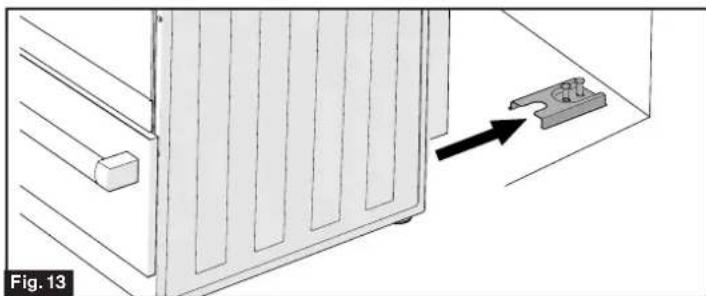
NOTE: If range is relocated, the bracket must be removed and installed in the new location.
Verify Anti-Tip Bracket Is Installed and
Engaged
Always verify that the range is secured by the anti-tip bracket.
- Method 1: Place your feet in the front of the drawer and grab the lower left side of the vent as shown. Slowly attempt to tilt the range forward. If the back of the range lifts more then 12 off the floor and there is no resistance, stop lifting and set the range back on the floor. The anti tip bracket and range foot are not engaged correctly. (Fig. 15) NOTE: If the range is loose in the position, then reinstall as part of Anti-Tip Bracket Installation.
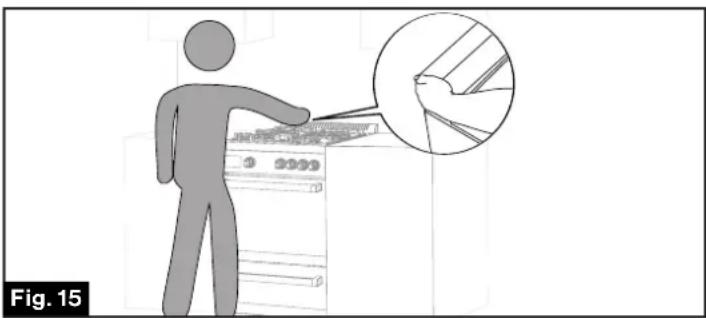
-
Method 2: To check if the range is engaged properly into the anti-tip bracket, look through the underneath of the range. If an underneath inspection is unaccessible, try the following to remove the storage to drawer to check the anti-tip bracket engagement.
-
Pull the storage drawer outwards all the way.
- Remove the storage drawer from the range. See "Remove the Storage Drawer" section.
- Look through the drawer cavity of the range rear leg. A flashlight maybe required.
- Visually check that the rear leg is engaged into the U-notch of the anti-tip bracket. See Fig 14.
- If leg is not engaged into the bracket, please adjust the bracket as necessary to fully engage the range leg.
Operation
General Operation

WARNING
BURN HAZARD
- When range is in use the entire cooktop area may become hot.
- During and after use, do not touch, or let clothing or other flammable materials contact surface units or areas near units until they have had sufficient time to cool.
Before Using for the First Time
- The oven heating elements have a protective coating, which must be burned off before use. To do this, close the oven door and rotate the temperature control knob to the maximum temperature setting. Turn the function selector to the Bake element and the Broil element separately for approximately 15 minutes. It is important to ensure adequate ventilation during this period.
- After use, ensure that the knobs are turned to the OFF position.
To Set the Timer
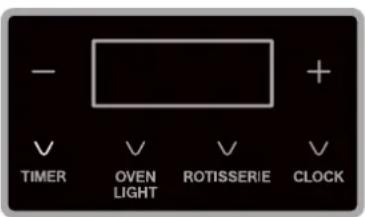
The timer is not used to control the oven operations. The maximum setting on the timer is 12 hours and 59 minutes. Timer default is 00:00.
- Press once the button, the LED display will be lit on and blink.
- Press the + or - button until the amount of time desired displays.
NOTE: The maximum time that allowed to set is 59 minutes, time exceeds 59 minutes will be shown as hours and minutes format.
- Press and hold the button for 2 seconds to save the timer setting. The time will start counting down.
NOTE: The display will not change until one minute has passed. - When the time reaches 00:00, the timer will beep until the button is pressed to stop.
To Set the Clock
To use the timer function, the clock should be set to the correct time. The maximum setting on the clock is 12 hours and 59 minutes. Clock default is 12:00.
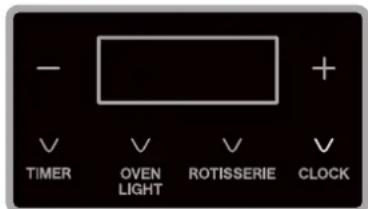
- Touch the button for and hold for 2 seconds until the display begins to blink.
- Touch the "+" or "-" button to adjust the time.
- Press and hold the for approximately 2 seconds to save the clock setting.
Using the Cooktop

CAUTION
- A burner surface stays red for a long time indicating the bottom of the pan is not flat enough or is too small for the burner. Prolonged usage of incorrect utensils could result in damage to the cookware, cooktop, wiring and surrounding areas.
- To prevent damage use correct utensil, start cooking on "HI" position and turn control down to continue cooking.
- Never leave an empty utensil, or one which has boiled dry, on a hot surface unit. The utensil could overheat and damage the utensils or surface unit.
Make sure that the handles of cookware do not stick out over the edge of the range to avoid being knocked over by accident. This also makes it more difficult for children to reach the cooking pots/pans.
Choosing the Right Cookware
- Only use cookware with a base suitable for electric cooking.
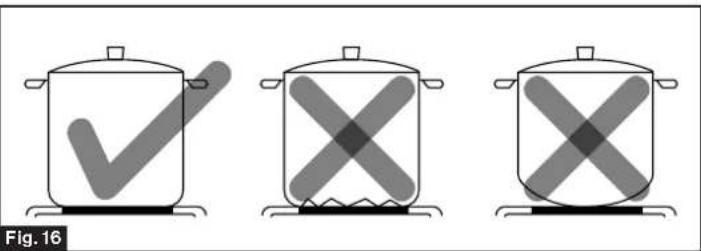
Cookware made from the following materials is not suitable: aluminum or copper without a magnetic base, glass, wood, porcelain, ceramic, and earthenware. - Do not use cookware with jagged edges or a curved base. Make sure that the base of your pan is smooth, sits flat against the glass. (Fig. 16)
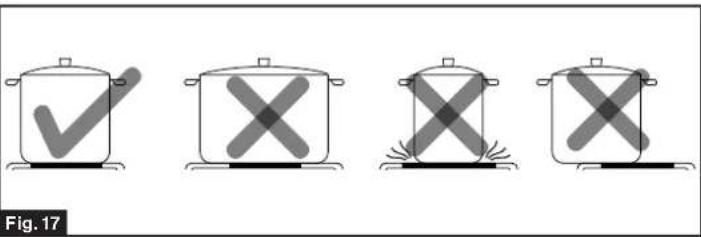
- Use pans whose diameter is as large as the graphic of the zone selected. A slightly larger pan covers the entire element and prevents spillovers from contacting the heat surface and burning in. If you use smaller pot efficiency could be less than expected. Always center your pan on the cooking zone. (Fig. 17)
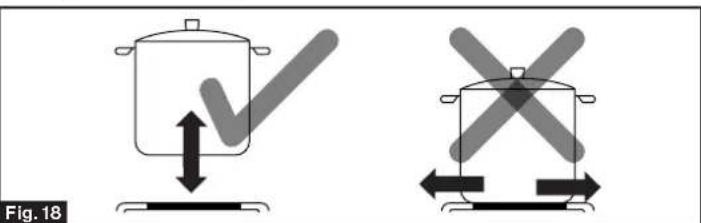
- Always lift pans off the electric hob - do not slide, or they may scratch the glass. (Fig. 18)
Start Cooking
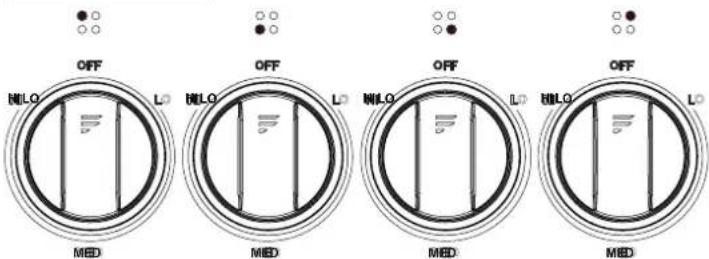
Your range is equipped with four surface cooktops of two different sizes, each of them has a corresponding control knob with heating levels from "LO" to "HI".
- Place a suitable pan on the cooking zone that you wish to use. Make sure the bottom of the pan and the surface of the cooking zone are clean and dry.
- Push in and rotate the corresponding control knob to select the heating level you want.
IMPORTANT: To switch on, always lightly press the control knob inwards then rotate.
- When the cooking is done, rotate the control knob to OFF position. Always make sure that all control knobs are turned to the "OFF" position and the Blue LED lights are OFF when you are not cooking.
- Wipe spills off the cooktops with a damp cloth as soon as they have cooled down. Be sure the control is in OFF position.
Using the Oven

WARNING
BURN HAZARD
- Keep children well out of reach.
- Use the door handle to open and close the door.
- The oven door becomes hot during operation. Always wear protective gloves while placing in or taking out food.
Always wear suitable protective gloves while inserting or removing the broiler pan, shelves, pans and other cooking utensils from the oven.
Oven Cooking
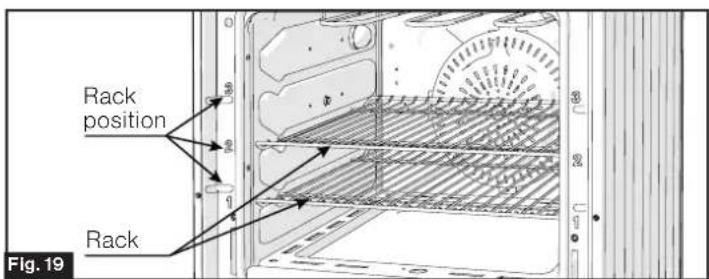
IMPORTANT: To avoid possible burns during cooking, place all the oven racks in the desired position before turning on the oven. Refer to "Oven Rack" section to position or remove the oven rack from the oven. (Fig. 19)
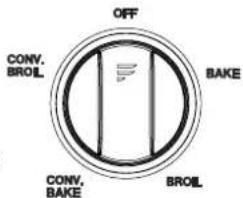
Always follow the steps below to bake or broil food:
- Pull the handle to open the oven door and place food into the center of the oven rack.
NOTE: Oven preheating is necessary for good results when baking cakes, cookies, pastries and breads. Rotate the oven temperature control knob to correct temperature, normally 10-15 minutes before placing food into the oven. - Rotate the oven function control knob to choose a desired cooking mode.
- Rotate the oven temperature control knob to set the cooking temperature. Refer to "Oven Temperature Control" section to get more detail.
- Set the cooking time. See "To Set the Timer" section for instructions to set the time.
NOTE: Timer does not turn off oven.
5. When the cooking is finished, turn the oven control knob and thermostat control knob to the OFF position.
Oven Temperature Control
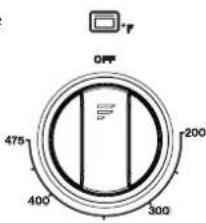
The numbers around the oven temperature control knob indicating the allowed oven temperature setting.
To regulate the temperature, rotate the temperature control knob to desired level.
NOTE: When the range is not being used, return the temperature control knob to the OFF position.
Oven Rack
The rack is designed with stop locks so that when it is placed correctly on the rack position, it will stop before completely coming out from the oven and not tilt while removing food or placing food on it. (Fig. 20)
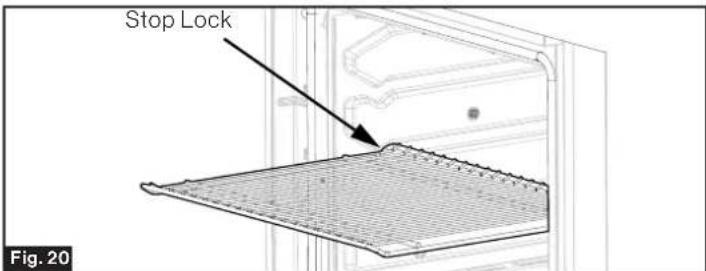
- When placing cookware on the rack, pull the rack out to the bump on the rack position. Place the cookware on the rack, then slide the rack back into the oven.
- To remove the rack from the oven, pull it outwards until being stopped by the stop locks, tilt the front end upward to release it from the lock.
Pan Placement Advice
Baking results will be better if the food is centered in the oven as much as possible. Pans should not touch each other or the walls of the oven. If you need to use two oven racks, stagger the pans so one is not directly above the other. Leave approximately 112 between pans and from the front, back and sides of oven wall.
Rotisserie Function
- Rotisserie cooking is reserved for meat, but anything from vegetables to fish can be cooked rotisserie style. To prepare a traditional meat dish marinate the meat or cover it in spices.
NOTE: When skewering the meat, ensure that the meat is properly balanced on the skewer so that it does not stress the motor.
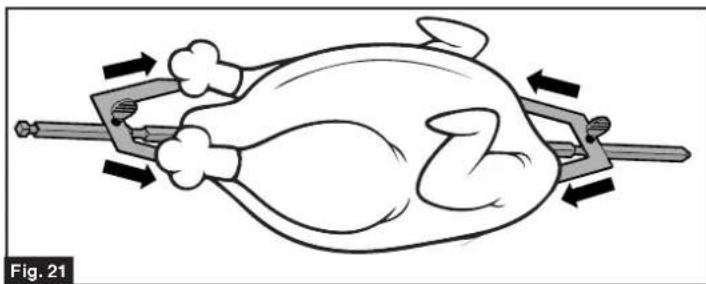
- Simply push the meat through the point end of the skewer and hold into place with the prong/fork on each side. (Fig 21)
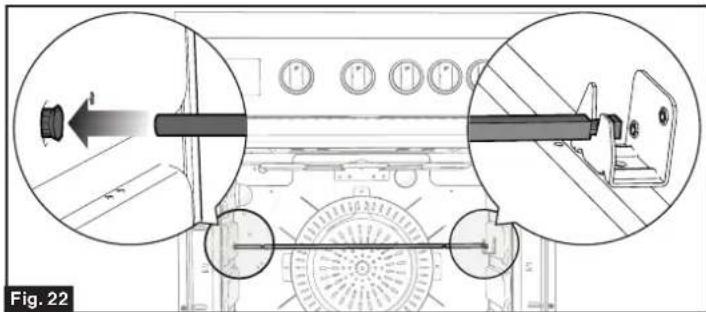
- Insert the rotisserie into the hole on the left side of oven, and set the right side with the notch in the rotisserie skewer into the bracket. (Fig 22)
- Rotate the oven function control knob to desired mode.
- Rotate the oven temperature control knob to desired temperature setting.
- Touch the ROTISSERIE key to start rotisserie cooking.
NOTE: During cooking, you can use the timer function for monitoring the cook time.
Care and Maintenance
General Cleaning

WARNING
Electric Shock Hazard

- Disconnect electrical power before servicing.
- Replace all parts and panels before operating.
-
Failure to do so can result in death or electrical shock.
-
Clean the interior surface by using a soft cloth with lukewarm water.
It is advisable to clean when the appliance is cold, especially for cleaning the enameled parts. - Avoid leaving alkaline or acidic substances (lemon juice, vinegar, etc.) on the surfaces.
- Avoid using cleaning products with a chlorine or acidic base.
Cleaning Cooktops and Enameled Parts
- Turn all control knobs to OFF position.
- Clean the cooktops and enameled parts with a sponge and soapy water only or other non-abrasive detergent.
- Dry preferably with a chamois leather.
NOTE: If acid substances such as lemon juice, tomato conserve, vinegar etc. are left on the enamel for a long time, enameled parts can get etched and opaque.
Stainless Steel Parts
Stainless steel parts must be rinsed with water and dried with a soft and clean cloth or with a chamois leather.
For difficult dirt, use a specific non-abrasive detergent available commercially or a little hot vinegar.
NOTE: Please clean and wipe the stainless steel parts along their grain direction. Regular use could cause discoloring around the burners, because of the high flame temperature.
Cleaning Inside of the Oven
The oven interior must be cleaned regularly. Wipe the inside walls with a clean and soft cloth soaked in very hot soapy water or another suitable product.
- Wash the inside surfaces with a warm water and baking soda solution. The solution should be about 2 tablespoons of baking soda to a quart of water.
- Wash the oven rack with a mild detergent solution.
- The outside of the range should be cleaned with mild detergent and warm water.
- Wring excess water out of the sponge or cloth when cleaning areas around the controls, or any electrical parts.
- Wash the outside cabinet with warm water and mild liquid detergent. Rinse well and wipe dry with a clean soft cloth.
- Do not use steel wool or steel brush on the cooktop.
Oven Racks Installation and Removal
- Open the oven door.
- Insert the oven racks to a proper cooking level.
- Close the oven door.
-
To remove the oven racks, please repeat following three steps in proper order.
-
Open the oven door.
- Remove the oven racks from the range.
- Close the oven door.
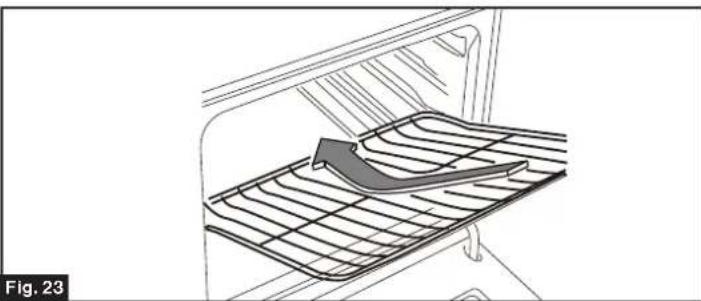
NOTE: The oven racks is provided with a security block to prevent accidental extraction.
Keep attention to insert the shelves correctly. (Fig. 23)
Heavy, Burned-On Residue
- Allow your range to cool.
- Use a single-edge razor blade scraper at approximately 45irc against the glass surface and scrape the soil. It will be necessary to apply pressure to the razor scraper in order to remove the residue. (Fig. 24)
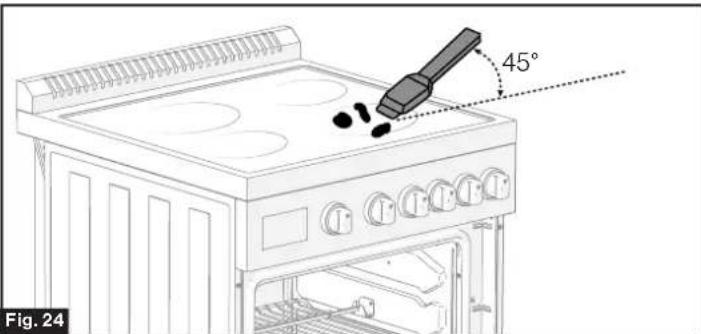
- After scraping with the razor scraper, spread a few drops of Ceramic Cooktop Cleaner on the entire burned residue area. Use a Cleaning Pad to remove any remaining residue.
- For additional protection, after all residue has been removed, polish the entire surface with Ceramic Cooktop Cleaner and a paper towel.
Cleaning Your Oven Door

WARNING
BURN HAZARD
Make sure oven is cooled down before removing the door. Failure to do so could result in burns.

WARNING
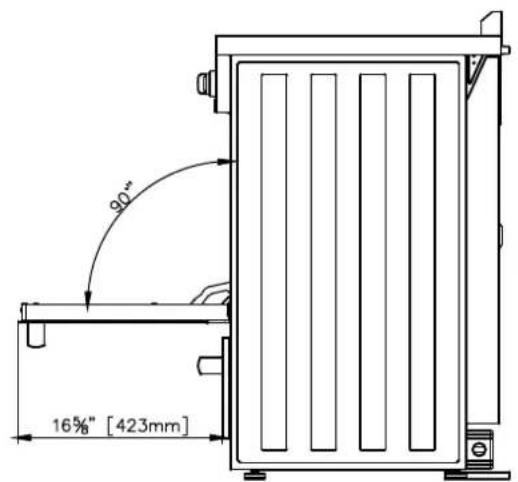
Do not place excessive weight on an open oven door or stand on an open oven door as, in some cases, it could cause the range to tip over, break or damage the door to the extent that the range would be unsafe to use. Failure to follow these instructions can result in death or serious injuries to the user.
Clean the glass by using a sponge or soft cloth with soapy water or proper detergent, then wipe it dry. To facilitate oven cleaning, it is possible to remove the door Please follow the instructions carefully:

CAUTION
- The oven door is heavy and fragile. Use both hands to remove the oven door. The door front is glass. Handle carefully to avoid breaking.
- Grasp only the left and right sides of the oven door. Do not grasp the handle as it may swing in your hand and cause damage or injury.
- Failure to grasp the oven door firmly and properly could result in personal injury or product damage.
-
To avoid injury from the hinge bracket snapping closed, be sure that both levers are securely in place before removing door (Fig. 26). Also, do not force door open or closed - the hinge could be damaged and injury could result.
Hold firmly, the door is heavy. -
Be sure to read the above WARNING and CAUTION before attempting to remove oven door.
- Open the door to its fully open position. (Fig. 25)
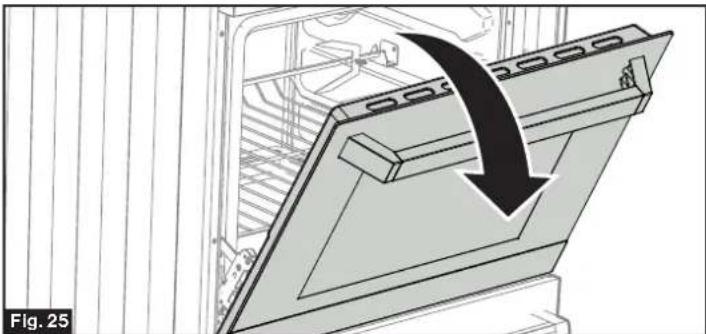
- Rotate the Hinge (one on each side) toward you to buckle the lever. (Fig. 26)
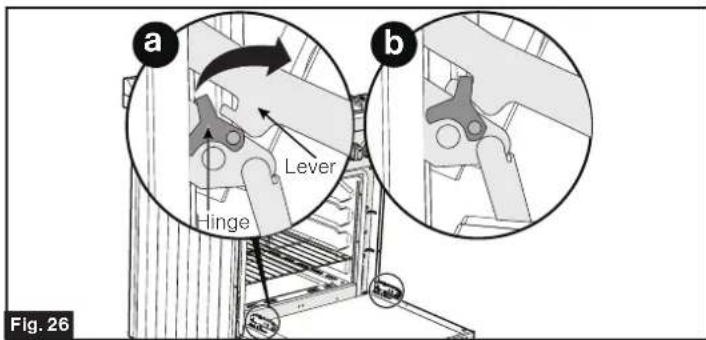
- Close the door until it stops. (Fig. 27)
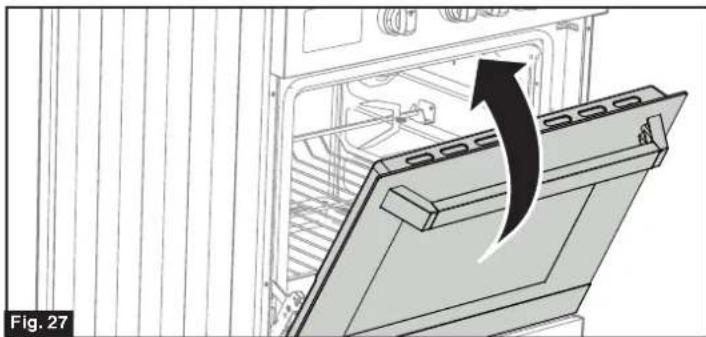
- Holding the door firmly on the left and right sides using both hands, pull the door straight out of the hinge slots. (Fig. 28)
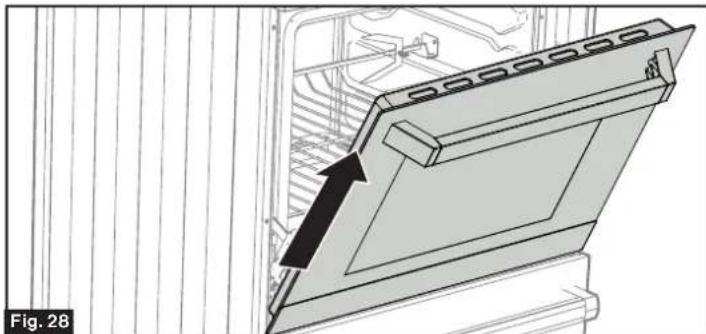
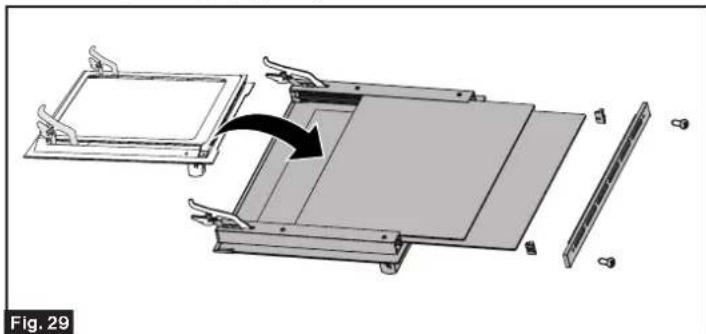
- Place the door on a protected flat place so that the glass door will not be damaged. The internal glass of the oven door can be easily removed for cleaning by unscrewing the two lateral fixing screws. Clean the glass by using a sponge or soft cloth with soapy water or proper detergent, then wipe it dry. (Fig. 29)
- Follow the steps below to re-attach to the oven door (Fig. 30):
-Insert the hinge into the top slot as shown in Fig 30.
- Open the door to its fully open position as shown
in Fig 30 Ensure the hinge buckle has released from the lever as shown in Fig 30
Fig.30
Cleaning the Storage Printer
- Lift the left small hook upward, at the same time, push the right small hook downward. (Fig. 31)
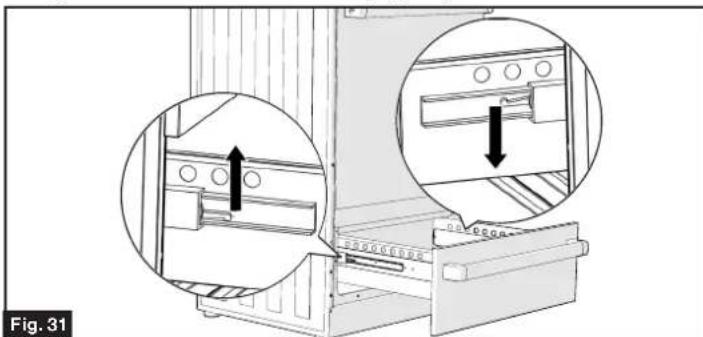
- Pull the drawer out.
- To replace the drawer, align the drawer with the rails and push inward.
NOTE: Do not store flammable material in the oven or in the bottom drawer.
Replacing the Oven Light

WARNING
ELECTRIC SHOCK HAZARD

- Disconnect electrical power before servicing.
- Replace all parts and panels before operating.
-
Failure to do so can result in death or electrical shock.
-
Let the oven cavity and broil burner cool down.
- Switch off the electric supply.
- Remove the light cover by rotating to the left. (Fig. 32)
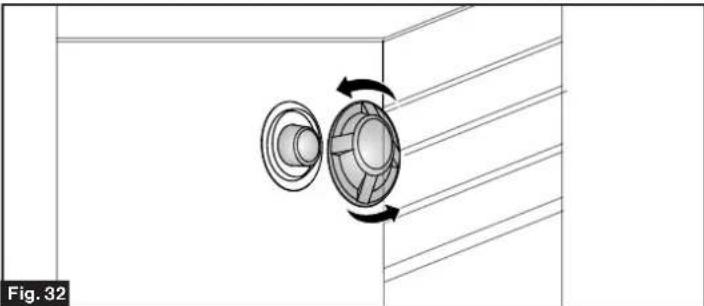
- Unscrew and replace the halogen bulb with a new one suitable for high temperature (300ircC 570ircC) having the same specifications: 240V60Hz, 25W, G9 .
- Replace the protective cover.
NOTE: Oven bulb replacement is not covered by your guarantee.
Troubleshooting
| Problem Possible Cause | |
| Surface units will not maintain a rolling boil or frying rate is not fast enough | You must use pans that are absolutely flat. Pan bottoms should closely match the diameter of the surface unit selected. The control knob is to low of setting. |
| Surface units do not operate | You have blown a household fuse or tripped a circuit breaker. You have not set the control knobs correctly. |
| Control knobs will not turn | If it is a surface unit control knob, you are not pushing in before turning. If it is oven control knob, you are trying to turn the knob in the wrong direction. |
| Oven light does not work | Light bulb is loose or has burned out. Oven function knob was set to OFF. |
| Oven does not work | You have blown a household fuse or tripped a circuit breaker. You have not set the control knobs correctly: -Oven function knob was set to OFF. Select the light function on the control panel. -Oven thermostat knob was set to OFF. |
| Food does not broil properly | ·The oven control knob is not set properly. ·Improper rack position being used. Relocate rack to a higher position. ·Cookware is not suited for broiling. |
| Food does not bake properly | ·The oven control knob is not set properly to the bake function. ·Rack position is incorrect. ·Incorrect cookware or cookware of improper size is being used. |
Specification
| Technical Specifications | |
| Oven Capacity | 2.68 cu. ft. |
| Voltage | 208V AC / 240V AC |
| Wattage Rating | 7060W / 9400W |
| Amperage | 34 Amp / 39 Amp |
| Product Dimensions (W x H x D) | 23½" x 38¾" x 25¾" 594mm x 970mm x 649.8mm |
RISQUE DE SUFFOCATION
Furrion Innovation Center & Institute of Technology
52567 Independence Ct., Elkhart, IN 46514, USA • Toll free:1-800-789-3341
- Email: support@furrion.com
©2007-2020 Furrion Ltd. Furrion® and the Furrion logo are trademarks licensed for use by Furrion Ltd.
and registered in the U.S. and other countries.

- Table of Contents
- Explanation of Symbols
- WARNING
- CAUTION
- DANGER
- Important Safety Instructions
- General SafetyWarnings
- Tip-Over Hazard
- ELECTRIC SHOCK HAZARD
- CooktopWarnings
- Oven SafetyWarnings
- FOOD POISONING HAZARD
- Grounding Instructions
- Environmental Protection and Disposal
- Save these instructions for future reference!
- Product Overview
- Control Panel
- Installation
- EXCESSIVE WEIGHT HAZARD
- What's in the Box
- SUFFOCATION HAZARD
- Tools You Will Need (Not Provided)
- Cabinet Constructing Instructions
- Cabinet Installation
- Counter Cutout Dimensions (Fig. 2)
- Anti-Tip Bracket Installation
- NOTE:
- Electric Connection
- BEFORE MAKING THE ELECTRICAL CONNECTION, MAKE SURE THAT:
- Electrical Connection for USA Installations
- ELECTRICAL SHOCK HAZARD
- 4-Wire Conduit Installation (Recommended)
- 3-Wire Power Cordor Conduit Installation
- 4-Wire Power Cord Installation (Recommended)
- 3-Wire Power Cord Installation
- Electrical Connection for Canada Installations
- Range Installation
- Backsplash Installation
- Leveling the Range
- Slide the Range into the Cabinet
- Verify Anti-Tip Bracket Is Installed and
- Engaged
- Operation
- General Operation
- BURN HAZARD
- Before Using for the First Time
- To Set the Timer
- To Set the Clock
- Using the Cooktop
- Choosing the Right Cookware
- Start Cooking
- Using the Oven
- Oven Cooking
- Oven Temperature Control
- Oven Rack
- Pan Placement Advice
- Rotisserie Function
- Care and Maintenance
- General Cleaning
- Cleaning Cooktops and Enameled Parts
- Stainless Steel Parts
- Cleaning Inside of the Oven
- Oven Racks Installation and Removal
- Heavy, Burned-On Residue
- Cleaning Your Oven Door
- Cleaning the Storage Printer
- Replacing the Oven Light
- Troubleshooting
- RISQUE DE SUFFOCATION
- Furrion Innovation Center & Institute of Technology
Brand : Furrion
Model : FT24N62R-SS
Category : Cooker