SPK110 - Fan BROAN - Free user manual and instructions
Find the device manual for free SPK110 BROAN in PDF.


| Product type | Fan with built-in Bluetooth speaker |
| Brand | Broan |
| Model | SPK110 |
| Power supply | 120 VAC, 60 Hz |
| Duct diameter | 4 in (10 cm) round |
| Installation | Up to 12/12 (45°) sloped ceiling |
| Usage | General ventilation only |
| Wireless technology | Bluetooth, identifier "Sensonic™ Vent Fan" |
| Bluetooth range | Up to 33 ft (10 m) |
| Cleaning | Vacuum with dusting brush |
| Motor maintenance | Permanently lubricated, no oiling needed |
| Replacement parts | Fan assembly (motor + wheel), speaker |
| Warranty | 3 years |
| Certifications | FCC Part 15 Class B, IC RSS-210 |
| Safety | Ground fault circuit interrupter recommended for installation above bathtub/shower |
| Control | On/off switch (do not use solid-state speed control) |
| Grounding | Required |
| Mounting | Joists, roof trusses, I-joists or QTHB1 suspension bars (optional) |
Frequently Asked Questions - SPK110 BROAN
User questions about SPK110 BROAN
0 question about this device. Answer the ones you know or ask your own.
Ask a new question about this device
Download the instructions for your Fan in PDF format for free! Find your manual SPK110 - BROAN and take your electronic device back in hand. On this page are published all the documents necessary for the use of your device. SPK110 by BROAN.
USER MANUAL SPK110 BROAN
To register this product visit:
www.broan.com
READ AND SAVE THESE INSTRUCTIONS
WARNING

TO REDUCE THE RISK OF FIRE, ELECTRIC SHOCK, OR INJURY TO PERSONS, OBSERVE THE FOLLOWING:
- Use this unit only in the manner intended by the manufacturer. If you have questions, contact the manufacturer at the address or telephone number listed in the warranty.
- Before servicing or cleaning unit, switch power off at service panel and lock the service disconnecting means to prevent power from being switched on accidentally. When the service disconnecting means cannot be locked, securely fasten a prominent warning device, such as a tag, to the service panel.
- Installation work and electrical wiring must be done by a qualified person(s) in accordance with all applicable codes and standards, including fire-rated construction codes and standards.
- Sufficient air is needed for proper combustion and exhausting of gases through the flue (chimney) of fuel burning equipment to prevent backdrafting. Follow the heating equipment manufacturer's guideline and safety standards such as those published by the National Fire Protection Association (NFPA), and the American Society for Heating, Refrigeration and Air Conditioning Engineers (ASHRAE), and the local code authorities.
- When cutting or drilling into wall or ceiling, do not damage electrical wiring and other hidden utilities.
- Ducted fans must always be vented to the outdoors.
- Acceptable for use over a tub or shower when connected to a GFCI (Ground Fault Circuit Interrupter) - protected branch circuit (ceiling installation only).
- This unit must be grounded.
CAUTION

- For general ventilating use only. Do not use to exhaust hazardous or explosive materials and vapors.
- This product is designed for installation in ceilings up to a 12/12 pitch (45 degree angle). Duct connector must point up. DO NOT MOUNT THIS PRODUCT IN A WALL.
- To avoid motor bearing damage, noisy and/or unbalanced impellers, or speaker damage, keep drywall spray, construction dust, etc. off power unit and speaker diaphrams.
- Please read specification label on product for further information and requirements.
CLEANING & MAINTENANCE
For quiet and efficient operation, long life, and attractive appearance - lower or remove grille and vacuum interior of unit with the dusting brush attachment. Be careful vacuuming around speakers. The motor is permanently lubricated and never needs oiling. If the motor bearings are making excessive or unusual noises, replace the blower assembly (includes motor and impeller).
OPERATION
Use an on/off switch to operate this ventilator. Do not use a solid-state speed control with this Speaker Fan. See "Connect Wiring" for details.
The Bluetooth ^® word mark and logos are registered trademarks owned by Bluetooth ^® SIG, Inc. and any use of such marks by Broan-NuTone LLC is under license. Other trademark and trade names are those of their respective owners.
NOTE: This equipment has been tested and found to comply with the limits for a Class B digital device, pursuant to Part 15 of the FCC Rules. These limits are designed to provide reasonable protection against harmful interference in a residential installation. This equipment generates, uses and can radiate radio frequency energy and, if not installed and used in accordance with the instructions, may cause harmful interference to radio communications. However, there is no guarantee that interference will not occur in a particular installation. If this equipment does cause harmful interference to radio or television reception, which can be determined by turning the equipment off and on, the user is encouraged to try to correct the interference by one or more of the following measures:
- Reorient or relocate the receiving antenna.
- Increase the separation between the equipment and receiver.
- Connect the equipment into an outlet on a circuit different from that to which the receiver is connected.
- Consult the dealer or an experienced radio/TV technician for help.
This device complies with Part 15 of the FCC Rules and RSS-210 of Canada. Operation is subject to the following two conditions:
(1) This device may not cause interference, and (2) this device must accept any interference received, including interference that may cause undesired operation. FCC ID: 2ADLL-99528551 IC: 2143B-99528551
This Bluetooth ^® wireless technology enabled Speaker complies with FCC radiation exposure limits set forth for an uncontrolled environment. End users must follow the specific operating instructions for satisfying exposure compliance. This speaker must not be co-located or operate in conjunction with any other antenna or transmitter.
Changes or modifications not expressly approved by the party responsible for compliance could void the user's authority to operate the equipment.
INSTALL SPEAKER INTO HOUSING
Video instruction for speaker installation are also available at: www.broan.com
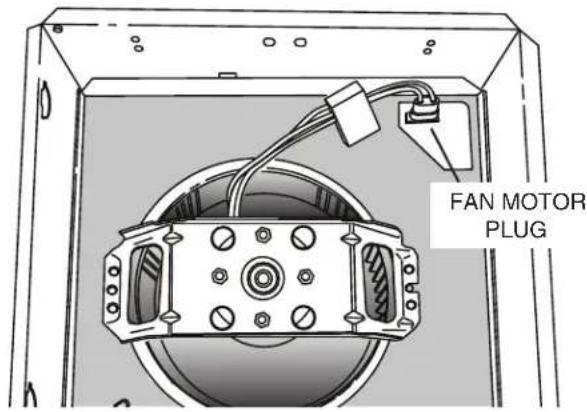
- Disconnect FAN MOTOR PLUG.
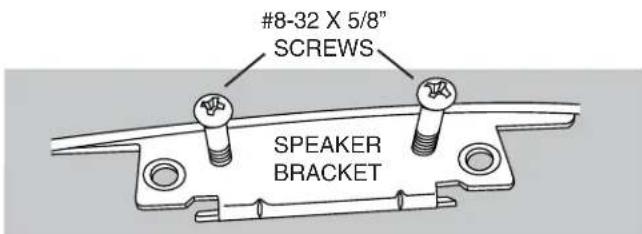
- Partially install (2) #8-32 x 5/8 screws (Included in parts bag - discard short screws and metal bracket) into threaded holes in SPEAKER BRACKET - only so ends of screws are flush with bottom surface of speaker bracket. Note: Installing screws below flush will make the next couple of steps difficult.
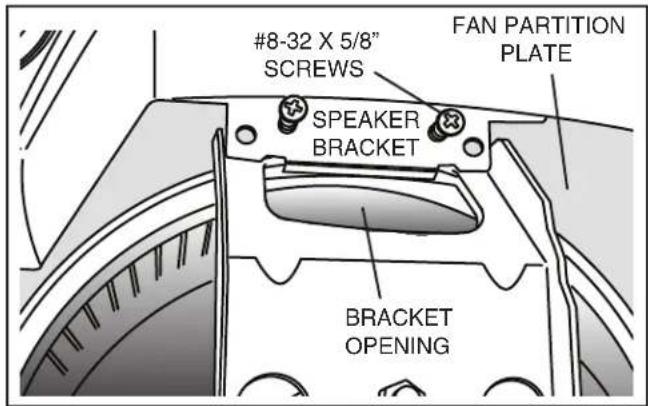
- Insert speaker into fan housing. Make sure SPEAKER BRACKET hooks over edge of BRACKET OPENING.
- Make sure rear surface of speaker is located as close to wall of fan housing as possible.
- Turn #8-32 X 5/8" SCREWS (partially installed in Step 2) until they make contact with FAN PARTITION PLATE. Alternately tighten both screws. DO NOT OVERTIGHTEN.
NOTE: Screws are designed to raise and tighten speaker bracket against motor bracket. Screw heads may or may not contact speaker bracket when tight.
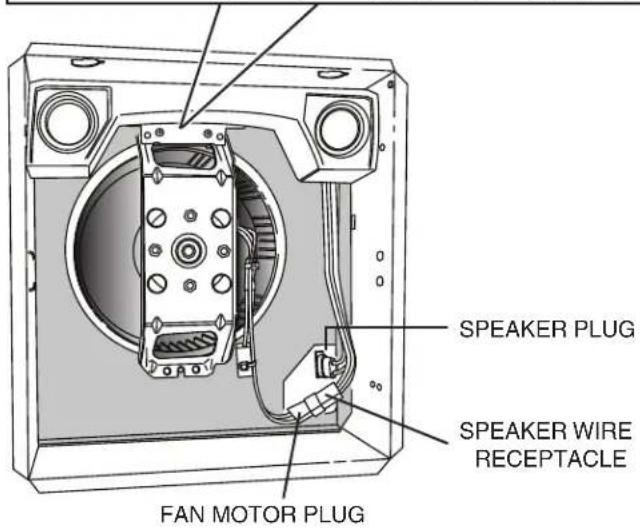
- Insert SPEAKER PLUG into power receptacle where motor plug was disconnected.
- Connect FAN MOTOR PLUG into SPEAKER WIRE RECEPTACLE.
TYPICAL INSTALLATIONS
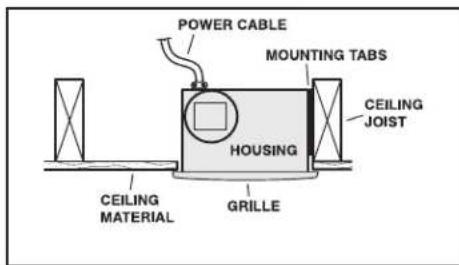
Housing mounted to joists.
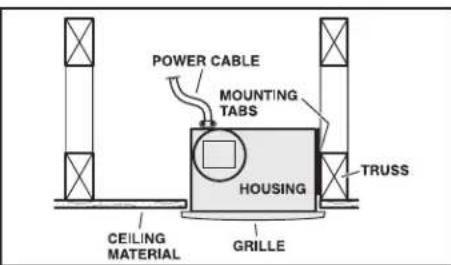
Housing mounted to truss.
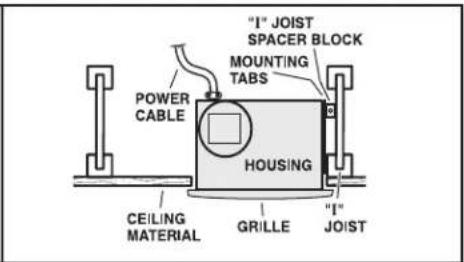
Housing mounted to I-joists.
Use I-joist spacer block (provided).
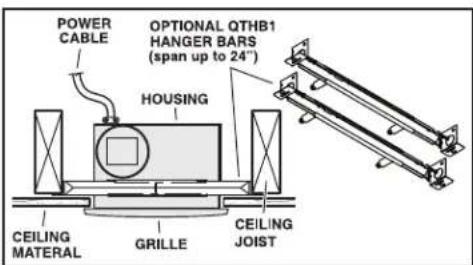
To mount housing anywhere between joists, i-joists or trusses, use optional hanger bar kit QTHB1 (sold separately). Follow mounting instructions included with kit.
PLAN THE INSTALLATION
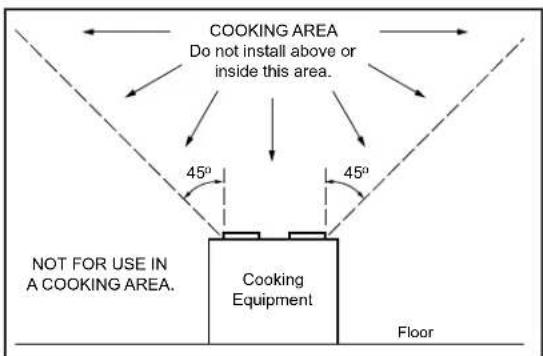
The ducting from this fan to the outside of the building has a strong effect on the air flow, noise and energy use of the fan. Use the shortest, straightest duct routing possible for best performance, and avoid in-
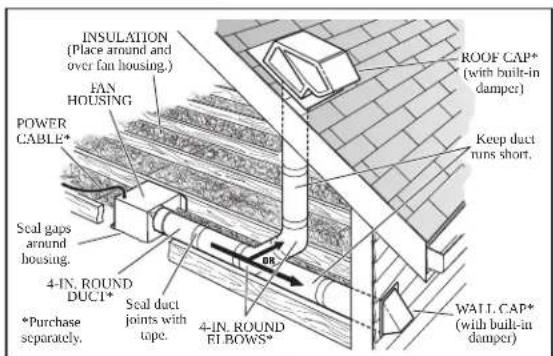
stalling the fan with smaller ducts than recommended. Insulation around the ducts can reduce energy loss and inhibit mold growth. Fans installed with existing ducts may not achieve their rated airflow.
INSTALL HOUSING & DUCT
- Use a pliers to bend housing TABS out to 90°.
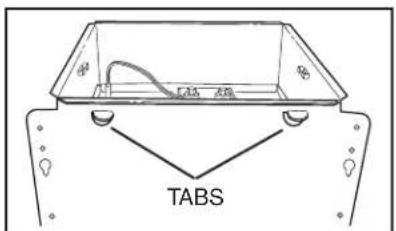
- Hold housing in place so that the housing tabs contact the bottom of the joist. The housing mounts with four (4) screws or nails. Screw or nail housing to joist through lowest holes in each mounting flange, then through highest holes. NOTE: Mounting to I-JOIST
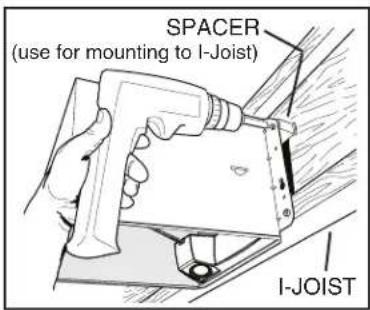
(shown) requires use of SPACERS (included) between the highest hole of each mounting flange and the I-joist.
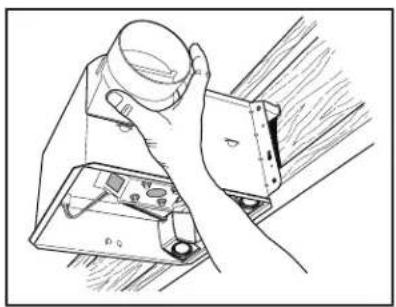
- Snap damper / duct connector onto housing. Make sure connector is flush with top of housing and damper flap falls closed.
natural_image
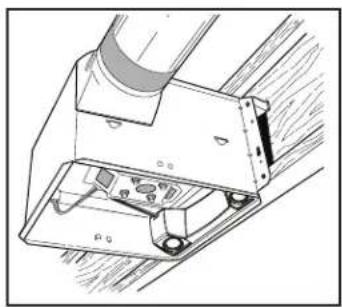
Hand holding a small object above a device with a close-up view (no text or symbols visible)- Connect 4-inch round ductwork to damper / duct connector. Run ductwork to a roof cap or wall cap. Tape all ductwork connections to make them secure and air tight.
natural_image
Technical line drawing of a mechanical assembly with no visible text or symbolsCONNECT WIRING
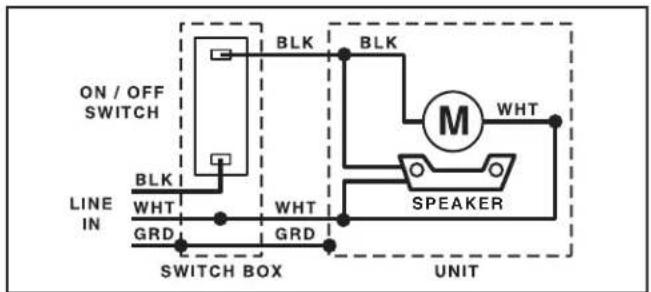
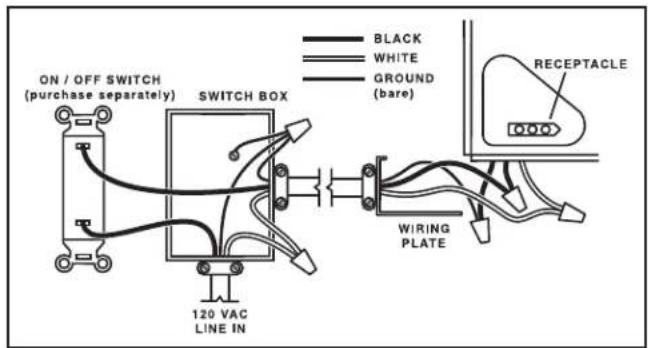
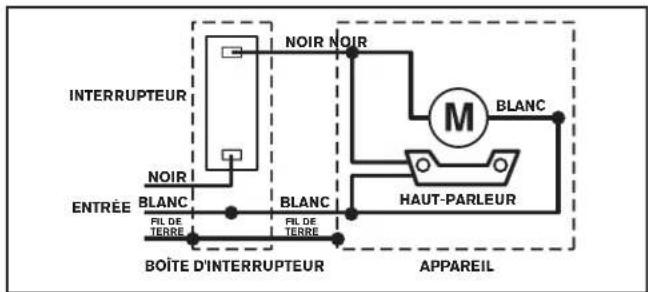
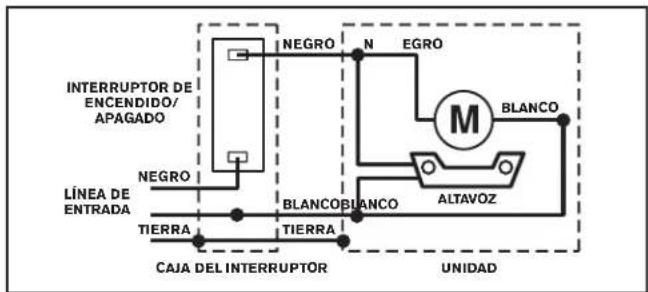
- Run 120 VAC house wiring to installation location. Use proper UL approved connector to secure house wiring to wiring plate. Connect wires as shown in wiring diagrams.
FINISH CEILING & INSTALL GRILLE

BEFORE FINISHING CEILING:
To avoid motor bearing damage, noisy and/or unbalanced impellers, or speaker damage - you may want to cover
the housing opening - to keep drywall spray, construction dust, etc. off power unit and speaker diaphragms.
- Install ceiling material. Cut out around housing.
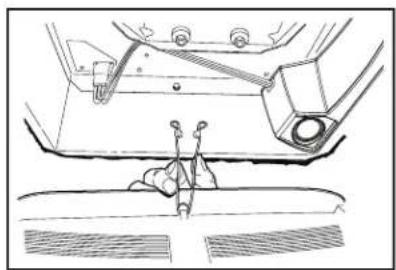
- Squeeze grille springs and insert them into slots on each side of housing.
natural_image
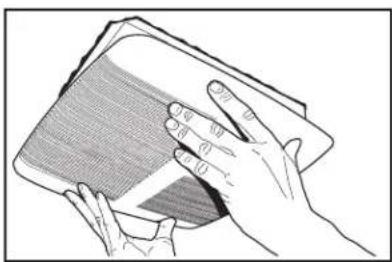
Technical line drawing of a mechanical assembly with no visible text or symbols- Push grille against ceiling.
natural_image
Illustration of two hands holding a closed book (no text or symbols visible)- Turn on power to fan.
- Go to Bluetooth ^® Speaker Operation section for Bluetooth ^® speaker operating instructions.
SERVICE NOTES
To remove Blower Assembly:
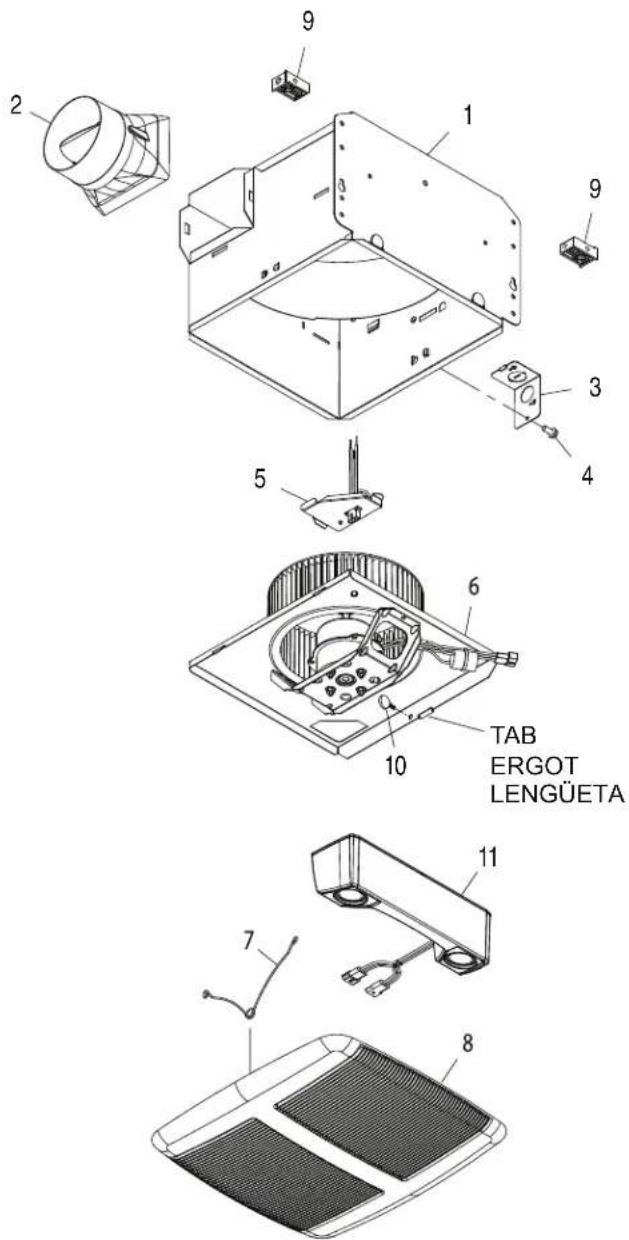
Remove speaker assembly. Unplug motor. Remove thumbscrew (10) from motor plate flange Find the single TAB on the motor plate (located next to the receptacle). Push up near motor plate tab while pushing out on side of housing. Or insert a straight-blade screwdriver into slot in housing (next to tab) and twist screwdriver.
To remove Speaker Assembly:
Unplug motor from speaker wiring. Unplug speaker wiring from wire panel. Remove (2) screws from speaker bracket. Unhook speaker bracket from motor bracket and remove speaker.
Bluetooth® wireless technology SPEAKER OPERATION
To connect to the Broan-NuTone Bluetooth® wireless technology Speaker for the first time:
- To play your personal music or audio files, you need a Bluetooth wireless technology enabled Smart Phone, Tablet, or any other such device.
- Set your device to a low-to-midrange volume before connecting to the speaker.
- Make sure Fan is ON and Bluetooth® wireless technology enabled device is located within 10 meters (approximately 33 feet) of the Speaker/Fan.
- Pairing your Bluetooth ^® wireless technology enabled device with the Speaker:
a. For iPad/iPhone/iPod touch:
i. From your iPad/iPhone/iPod touch home page, tap Settings.
ii. From Settings, tap General (if you have iOS 7 or greater, you can skip this step).
iii. From General, tap Bluetooth.
iv. Move the Bluetooth ^ Slider to ON/green (if it isn't ON already). When you do this, a list of discoverable Bluetooth ^ wireless technology devices will appear.
v. The Broan-NuTone Speaker has the Bluetooth ^® identifier "Sensonic™ Vent Fan". This identifier should be in the list of Discoverable Devices. If not, turn the Fan OFF, then ON, then turn Bluetooth ^® OFF, then ON.
- If “Sensonic™ Vent Fan” is still not on the list, consult with the owner’s manual for your device and follow the procedure for Pairing/Connecting a Bluetooth ^® wireless technology device.
vi. Tap on "Sensonic™ Vent Fan" to complete the pairing of the Bluetooth® wireless technology Speaker with your Apple device.
b. For Android Phone/Tablet:
i. From your smart phone/tablet home page, tap Settings.
ii. From the Settings menu, go to Wireless & Controls, Wireless & Networks, or something similar.
iii. Find Bluetooth ^® , Bluetooth ^® Settings or something similar and tap Bluetooth ^® or move Bluetooth ^® Slider to ON (if it isn't on already).
iv. On the Bluetooth ^® screen, tap “Scan for Devices”, “Search for Devices” or something similar.
v. The Broan-NuTone Speaker has the Bluetooth ^® identifier “Sensonic™ Vent Fan”. This identifier should show up in the list of Available Devices. If not, turn Fan OFF, then ON, and repeat pairing procedure.
- If “Sensonic™ Vent Fan” is still not on the list, consult with the owner’s manual for your Android device and follow the procedure for Pairing/Connecting a Bluetooth ^® device.
vi. Tap on "Sensonic™ Vent Fan" to complete the pairing of the Bluetooth® wireless technology Speaker with your Android device.
c. For all other Bluetooth ^® wireless technology enabled devices:
i. Follow the instructions that came with your Bluetooth ^® wireless technology enabled Phone, Tablet or Pad device to set it to search for Bluetooth ^® wireless technology accessories.
ii. Most Bluetooth ^® wireless technology enabled devices will require you to go to the “Paired Devices” (or similar) screen and SELECT “Search for Devices” or something similar.
iii. The Broan-NuTone Speaker has the Bluetooth ^® identifier "Sensonic™ Vent Fan". This identifier should show up in the list of Available Devices, Discoverable Devices or similar. If not, turn Fan OFF, then ON, and repeat pairing procedure.
-
- Open up the audio program on your device and play your music or other audio files. The audio file should play over the Bluetooth® Fan Speakers.
-
- When done playing/listening to your audio files, disconnect from the Speaker by either turning OFF the fan, disconnecting Bluetooth® wireless technology from your device (Smart Phone, Tablet, etc) or simply walking away. The Bluetooth® wireless technology will automatically disconnect when the device is out of range of the Speaker, which should occur when device is approximately 10 meters (33 feet) away from the Speaker.
To connect to the Bluetooth® wireless technology Speaker each subsequent time (after initial connection is made):
- The Sensonic™ Speaker can only play audio files from one Bluetooth® wireless technology device at a time, therefore one device must be DISCONNECTED (but not necessarily UNPAIRED) before using the Speaker with another device.
- If your Bluetooth® wireless technology device was DISCONNECTED but not UNPAIRED from the Speaker last time it was used, then it should automatically connect next time the device is within range of the Speaker, unless the Speaker is already CONNECTED to another device.
a. If your device does not CONNECT automatically with the Speaker, then find your "Paired Devices" or similar list and TAP on "Sensonic Vent Fan" to reconnect with the Sensonic™ Speaker.
- If your Bluetooth® wireless technology device was UNPAIRED from the Speaker after the last time it was used, you must follow the connection procedure in the previous section for PAIRING your device with the Speaker.
- Open up the audio program on your device and play your music or other audio files. The audio file should play over the Bluetooth® wireless technology Fan Speakers.
- When done playing/listening to your audio files, disconnect from the Speaker by either turning OFF the fan, disconnecting Bluetooth ^® wireless technology from your device (Smart Phone, Tablet, etc) or simply walking away. The Bluetooth ^® wireless technology will automatically disconnect when the device is out of range of the Speaker, which should occur when device is approximately 10 meters (33 feet) away from the Speaker.
Limited Warranty
Warranty Period and Exclusions: Broan-NuTone LLC (the "Company") warrants to the original consumer purchaser of its product ("you") that the product (the "Product") will be free from material defects in the Product or its workmanship for a period of three (3) years from the date of original purchase.
The limited warranty period for any replacement parts provided by the Company and for any Products repaired or replaced under this limited warranty shall be the remainder of the original warranty period.
This warranty does not cover speed controls, fluorescent lamp starters, tubes, halogen and incandescent bulbs, fuses, filters, ducts, roof caps, wall caps and other accessories for ducting that may be purchased separately and installed with the Product. This warranty also does not cover (a) normal maintenance and service, (b) normal wear and tear, (c) any Products or parts which have been subject to misuse, abuse, abnormal usage, negligence, accident, improper or insufficient maintenance, storage or repair (other than repair by the Company), (d) damage caused by faulty installation, or installation or use contrary to recommendations or instructions, (e) any Product that has been moved from its original point of installation, (f) damage caused by environmental or natural elements, (g) damage in transit, (h) natural wear of finish, (i) Products in commercial or nonresidential use, or (j) damage caused by fire, flood or other act of God. This warranty covers only Products sold to original consumers in the United States by the Company or U.S. distributors authorized by the Company.
This warranty supersedes all prior warranties and is not transferable from the original consumer purchaser.
No Other Warranties: This Limited Warranty contains the Company's sole obligation and your sole remedy for defective products. The foregoing warranties are exclusive and in lieu of any other warranties, express or implied. THE COMPANY DISCLAIMS AND EXCLUDES ALL OTHER EXPRESS WARRANTIES, AND DISCLAIMS AND EXCLUDES ALL WARRANTIES IMPLIED BY LAW, INCLUDING WITHOUT LIMITATION THOSE OF MERCHANTABILITY AND FITNESS FOR A PARTICULAR PURPOSE. To the extent that applicable law prohibits the exclusion of implied warranties, the duration of any applicable implied warranty is limited to the period specified for the express warranty above. Some states do not allow limitations on how long an implied warranty lasts, so the above limitation may not apply to you. Any oral or written description of the Product is for the sole purpose of identifying it and shall not be construed as an express warranty.
Whenever possible, each provision of this Limited Warranty shall be interpreted in such manner as to be effective and valid under applicable law, but if any provision is held to be prohibited or invalid, such provision shall be ineffective only to the extent of such prohibition or invalidity, without invalidating the remainder of such provision or the other remaining provisions of the Limited Warranty.
Remedy: During the applicable limited warranty period, the Company will, at its option, provide replacement parts for, or repair or replace, without charge, any Product or part thereof, to the extent the Company finds it to be covered by and in breach of this limited warranty under normal use and service. The Company will ship the repaired or replaced Product or replacement parts to you at no charge. You are responsible for all costs for removal, reinstallation and shipping, insurance or other freight charges incurred in the shipment of the Product or part to the Company. If you must send the Product or part to the Company, as instructed by the Company, you must properly pack the Product or part—the Company is not responsible for damage in transit. The Company reserves the right to utilize reconditioned, refurbished, repaired or remanufactured Products or parts in the warranty repair or replacement process. Such Products and parts will be comparable in function and performance to an original Product or part and warranted for the remainder of the original warranty period.
Exclusion of Damages: THE COMPANY'S OBLIGATION TO PROVIDE REPLACEMENT PARTS, OR REPAIR OR REPLACE, AT THE COMPANY'S OPTION, SHALL BE YOUR SOLE AND EXCLUSIVE REMEDY UNDER THIS LIMITED WARRANTY AND THE COMPANY'S SOLE AND EXCLUSIVE OBLIGATION. THE COMPANY SHALL NOT BE LIABLE FOR INCIDENTAL, INDIRECT, CONSEQUENTIAL OR SPECIAL DAMAGES ARISING OUT OF OR IN CONNECTION WITH THE PRODUCT, ITS USE OR PERFORMANCE.
Some states do not allow the exclusion or limitation of incidental or consequential damages, so the above limitation or exclusion may not apply to you. This warranty gives you specific legal rights, and you may also have other rights, which vary from state to state.
This warranty covers only replacement or repair of defective Products or parts thereof at the Company's main facility and does not include the cost of field service travel and living expenses.
Any assistance the Company provides to or procures for you outside the terms, limitations or exclusions of this limited warranty will not constitute a waiver of such terms, limitations or exclusions, nor will such assistance extend or revive the warranty.
The Company will not reimburse you for any expenses incurred by you in repairing or replacing any defective Product, except for those incurred with the Company's prior written permission.
How to Obtain Warranty Service: To qualify for warranty service, you must (a) notify the Company at the address or telephone number stated below within seven (7) days of discovering the covered defect, (b) give the model number and part identification and (c) describe the nature of any defect in the Product or part. At the time of requesting warranty service, you must present evidence of the original purchase date. If you cannot provide a copy of the original written limited warranty, then the terms of the Company's most current written limited warranty for your particular product will control. The most current limited written warranties for the Company's products can be found at www.broan.com.
Broan-NuTone LLC 926 West State Street Hartford, WI 53027
www.broan.com 800-637-1453
VENTILATEUR À HAUT-PARLEUR MODÈLE SPK110
natural_image
Illustration of a hand holding a cup over a device with a small inset showing internal components (no text or symbols)natural_image
Technical line drawing of a mechanical assembly with mounting bracket and clamping mechanism (no text or symbols)CÂBLAGE
natural_image
Technical line drawing of a mechanical component with no visible text or symbolsnatural_image
Illustration of hands holding a rectangular object with textured surface (no text or symbols)natural_image
Illustration of a hand holding a cup over a device with a small inset showing internal components (no text or symbols)natural_image
Technical line drawing of a mechanical assembly with no visible text or symbolsCONEXIÓN ELÉCTRICA
natural_image
Technical line drawing of a mechanical assembly with no visible text or symbolsnatural_image
Illustration of two hands holding a closed book (no text or symbols visible)Broan-NuTone LLC 926 West State Street Hartford, WI 53027
www.broan.com 800-637-1453
SERVICE PARTS / PIÈCES DE RECHANGE / PIEZAS DE SERVICIO
| Key No. Part No. DescriptionRepère N° de pièce DescriptionClave N.° N.° de pieza Descripción | ||
| 1 | 97016466 | HousingBoîtierCubierta |
| 2 97016449 | Duct Connector - 4”Raccord de conduit de 10 cm (4 po)Conector de conductos, 10 cm (4 pulg.) | |
| 3 98010102 | Wiring PlatePlaque de câblagePlaca de cableado | |
| 4 99170245 | Screw, #8-18 X .375Vis, r° 8-18 x 0,375Tornillo, #8-18 x 0.375 | |
| 5 | 97018010 | Wire Panel/Harness AssemblyPanneau de câblage / faisceau de filsConjunto del panel de cableado/arnés |
| 6 | 97020053 | Blower AssemblyEnsemble de ventilateurConjunto del ventilador |
| 7 99140199 | Grille Spring (2 req’d)Ressort de grille (2 requis)Resorte de la rejilla (se requieren 2) | |
| 8 97016497 | Grille Assembly (includes key no. 7)Ensemble de grille (comprend repère n° 7)Conjunto de la rejilla (incluye la clave n. ° 7) | |
| 9 97018014 | Spacer (2 supplied)Cales (2 fournies)Separador (se suministran 2) | |
| 10 99420665 | Thumbscrew, #8-18 x .375Vis à oreilles, n° 8-18 x 0,375Tornillo de apriete manual, #8-18 x 0.375 | |
| 11 | SPKACC | SpeakerHaut-parleurAltavoz |
| * | 97019751 | Parts Bag Assembly(use 2 #8-32 x 5/8” screws - discard short screws and bracket)Sachet de pièces (utiliser les deux vis n° 8-32 x 5/8 po - jeter les vis courtes et le support)Conjunto de la bolsa de piezas(use 2 tornillos #8-32 x 5/8 pulg. - descarte los tornillos cortos y el soporte) |
* Not shown.
Order service parts by "Part No." - not by "Key No."
* Non illustré.
Veuillez commander les pièces par n° de pièce - et non par numéro de repère.
* No se muestra.
Al hacer el pedido de una pieza de servicio se debe especificar el número de la pieza (no el número de la clave).
Replacement parts can be ordered on our website.
Please visit us at www.broan.com
Les pièces de rechange peuvent être commandées sur notre site Web.
Visitez notre site à www.broan.com
Se pueden hacer los pedidos de las piezas de repuesto en nuestro sitio web. Visítenos en www.broan.com.