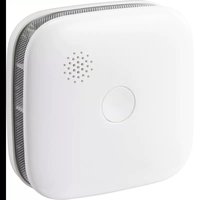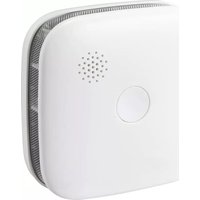
SY-4966400 - Smoke detector Sygonix - Free user manual and instructions
Find the device manual for free SY-4966400 Sygonix in PDF.



| Product Type | Photoelectric Smoke Detector |
| Brand | Sygonix |
| Model | SY-4966400 |
| Dimensions (L x H x D) | 76 x 29 x 76 mm |
| Weight (product + mounting plate + battery) | 83 g |
| Power Supply | Lithium battery 3 V CR123A (1400 mAh) |
| Battery Life | Approximately 2 years |
| Standby Consumption | < 9 μA |
| Audible Alarm | ≥ 85 dB at 3 m |
| Detection Type | Photoelectric |
| Connectivity | Wi-Fi 2.4 GHz, IEEE 802.11 b/g/n |
| Wireless Range | 100 m |
| Operating Temperature | 0 to +55 °C |
| Operating Humidity | ≤ 95 % RH |
| Package Contents | Detector, CR123A battery, double-sided adhesive tape, 2 screws, 2 wall plugs, user manual |
| Main Functions | Alarm test, pause mode (9 min), push notification via Smart Life app |
| Maintenance and Cleaning | Clean with a dry lint-free cloth or a vacuum cleaner with a soft brush; do not use chemicals |
| Safety | Use only non-rechargeable batteries, observe polarity, avoid humidity and extreme temperatures |
| Repairability | Do not repair yourself; contact customer service in case of defect |
| Standards | EN 14604:2005/AC:2008 |
Frequently Asked Questions - SY-4966400 Sygonix
User questions about SY-4966400 Sygonix
0 question about this device. Answer the ones you know or ask your own.
Ask a new question about this device
Download the instructions for your Smoke detector in PDF format for free! Find your manual SY-4966400 - Sygonix and take your electronic device back in hand. On this page are published all the documents necessary for the use of your device. SY-4966400 by Sygonix.
USER MANUAL SY-4966400 Sygonix
natural_image
White electronic device with a circular button and a dot pattern, shown in two views: one side with labeled points 123 and 4, the other with a textured surface (no readable text or symbols)natural_image
Technical diagram showing a device with mounting hardware and wiring, no text or symbols presentnatural_image
Illustration of three hands holding a device with a magnified inset showing the top view (no text or symbols)Voraussetzungen:
Copyright by Conrad Electronic SE.
*2483200_V1_0522_dh_mh_de 18014398929079307-1 I3/O1 en
1 Intended use
The product is a photoelectric smoke alarm. If smoke in the room reaches a certain concentration, the alarm will activate and trigger sound and light warnings.
The product is intended for private use only.
Not approved for installation into leisure accommodation vehicles (e.g., caravans).
The product is intended for indoor use only. Do not use it outdoors.
Contact with moisture must be avoided under all circumstances.
If you use the product for purposes other than those described, the product may be damaged.
Improper use can result in short circuits, fires, or other hazards.
The product complies with the statutory national and European requirements.
For safety and approval purposes, you must not rebuild and/or modify the product.
Read the operating instructions carefully and store them in a safe place. Make this product available to third parties only together with the operating instructions.
All company names and product names are trademarks of their respective owners. All rights reserved.
2 Delivery contents
Product
1x CR123A (pre-installed in product)
■ Double-sided adhesive tape
2x screws
2x dowels
Operating instructions
3 Latest product information
Download the latest product information at www.conrad.com/downloads or scan the QR code shown. Follow the instructions on the website.
4 Symbols in this document

The symbol warns of hazards that can lead to personal injury. Read the information carefully.

The symbol warns of dangerous voltage that can lead to personal injury by electric shock. Read the information carefully.
5 Safety instructions

Read the operating instructions carefully and especially observe the safety information. If you do not follow the safety instructions and information on proper handling, we assume no liability for any resulting personal injury or damage to property. Such cases will invalidate the warranty/guarantee.
5.1 General
The product is not a toy. Keep it out of the reach of children and pets.
Do not leave packaging material lying around carelessly. This may become dangerous playing material for children.
If you have questions which remain unanswered by this information product, contact our technical support service or other technical personnel.
- Maintenance, modifications and repairs must only be completed by a technician or an authorised repair centre.
5.2 Handling
- Handle the product carefully. Jolts, impacts or a fall even from a low height can damage the product.
5.3 Operating environment
Do not place the product under any mechanical stress.
- Protect the appliance from extreme temperatures, strong jolts, flammable gases, steam and solvents.
■ Protect the product from high humidity and moisture.
- Protect the product from direct sunlight.
5.4 Operation
If it is no longer possible to operate the product safely, take it out of operation and protect it from any accidental use. DO NOT attempt to repair the product yourself. Safe operation can no longer be guaranteed if the product:
- is visibly damaged,
– is no longer working properly,
– has been stored for extended periods in poor ambient conditions or
– has been subjected to any serious transport-related stresses.
5.5 Battery safety information
■ Never place rechargeable batteries in the smoke detector.
Use only non-rechargeable batteries to ensure a safe and the longest possible operation.
- Keep batteries out of the reach of children.
Do not leave batteries lying around, as they constitute a choking hazard for children and pets. Seek immediate medical attention if a battery is swallowed.
When handling leaking or damaged batteries, always use suitable protective gloves to avoid burning your skin.
- Batteries must never be short-circuited, disassembled, or thrown into the fire. This may cause an explosion!
■ Never attempt to recharge non-rechargeable batteries, as this may cause an explosion.
- Ensure that the batteries are inserted in the correct polarity (observe the plus/+ and minus/- signs).
5.6 Limitations of smoke alarms
Smoke alarms have sensing limitations, and it is important to consider some points for maximum protection. For example:
- Ionization sensing alarms may detect invisible fire particles (e.g., fast flaming fires) sooner than photoelectric alarms.
- Photoelectric sensing alarms may detect visible fire particles (e.g., slow, smouldering fires) sooner than ionization alarms.
Consult an expert when in doubt about the operation, safety or connection of the product.
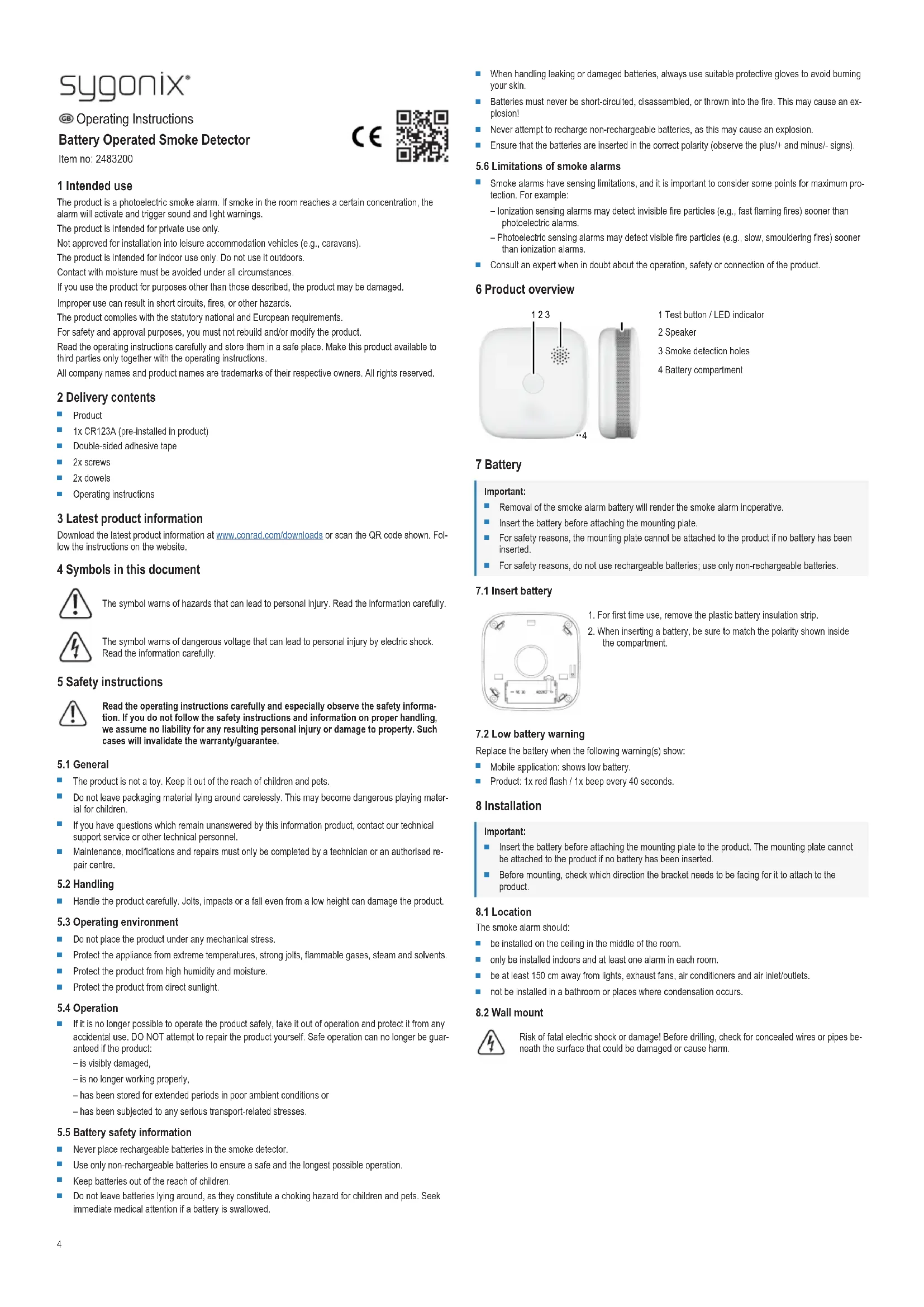
6 Product overview
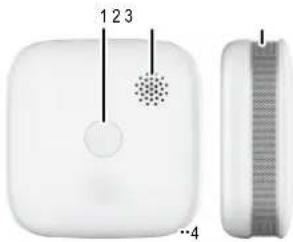
natural_image
White electronic device with a circular button and a perforated sensor, shown alongside a side view of its internal structure (no text or symbols visible)1 Test button / LED indicator
2 Speaker
3 Smoke detection holes
4 Battery compartment
7 Battery
Important:
Removal of the smoke alarm battery will render the smoke alarm inoperative.
- Insert the battery before attaching the mounting plate.
For safety reasons, the mounting plate cannot be attached to the product if no battery has been inserted.
For safety reasons, do not use rechargeable batteries; use only non-rechargeable batteries.
7.1 Insert battery
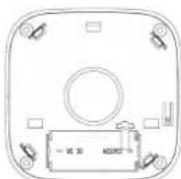
- For first time use, remove the plastic battery insulation strip.
- When inserting a battery, be sure to match the polarity shown inside the compartment.
7.2 Low battery warning
Replace the battery when the following warning(s) show:
■ Mobile application: shows low battery.
Product: 1x red flash / 1x beep every 40 seconds.
8 Installation
Important:
- Insert the battery before attaching the mounting plate to the product. The mounting plate cannot be attached to the product if no battery has been inserted.
Before mounting, check which direction the bracket needs to be facing for it to attach to the product.
8.1 Location
The smoke alarm should:
be installed on the ceiling in the middle of the room.
■ only be installed indoors and at least one alarm in each room.
be at least 150 cm away from lights, exhaust fans, air conditioners and air inlet/outlets.
■ not be installed in a bathroom or places where condensation occurs.
8.2 Wall mount

Risk of fatal electric shock or damage! Before drilling, check for concealed wires or pipes beneath the surface that could be damaged or cause harm.
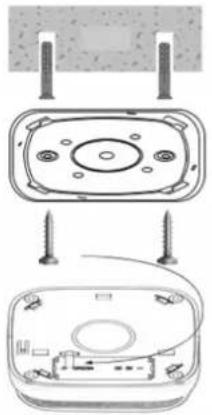
natural_image
Diagram showing three views of a device with screw fasteners and a cable, no text or symbols present.8.3 Adhesive
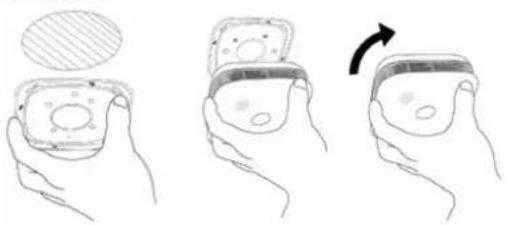
natural_image
Illustration of three hands holding a device with a circular inset showing a magnified view (no text or symbols)Preconditions:
√ The mounting surface is dry, level, non-porous and free from debris.
1. Remove the adhesive backing tape and attach it to the wall.
2. Gently press the mounting bracket against the tape and hold for approx. 30 secs.
3. Align the holes on the smoke alarm with the holes on the bracket.
4. Lock the product to the bracket by rotating it clockwise.
5. Make sure the product is securely mounted before letting go.
9 Operation
9.1 Alarm test
Important:
Due to the loudness ( ≥ 85 decibels) of the alarm, always stand an arms-length away from the product when testing.
Test the alarm weekly to ensure correct operation.
- Alarms failing an alarm test, or not operating normally, must not be used.
Short press the "test" button to test the alarm. If the alarm is working correctly, the following sound and light signals will activate then switch off:
Continuous red flash
3x beep sounds
9.2 Normal operation
The product is functioning normally when the following sound and light signals show:
1x red flash every 40 seconds.
9.3 Smoke alarm triggered
When the smoke alarm is triggered the following warnings show:
Continuous red flash + continuous beeping sound + app alert
9.4 Low battery
Replace the battery when the following warning(s) show:
■ Mobile application: will show the battery status icon.
Product: 1x red flash / 1x beep every 40 seconds.
9.5 Product fault
If the product is not functioning correctly remove it from use. The following sound and light signals will show:
2x red flash / 2x beep sound every 40 seconds.
9.6 Hush mode
Important:
This should only be used to silence an alarm (nuisance alarm) that has been triggered by a known to be non-hazardous condition (e.g., smoke from cooking).
If a nuisance alarm has been triggered:
Press and hold the "test" button to silence the alarm for 9 minutes.
■ After 9 minutes, if the smoke concentration is still above the alarming point, the alarm will trigger again.
10 Application "Smart Life - Smart Living"
Important:
- The product is compatible with 2.4 GHz networks.
- Enter the exact network name (case sensitive).
- Connect the mobile device to the same Wi-Fi network the product will connect to.
- If you are giving the product to a third party you did not "Share Device" with, you may need to "Remove Device" through the application before they can link it to their account.
10.1 Features
Low battery warning.
■ Push notification for smoke detected.
- Check battery level and status record.
10.2 Download application
Compatible Android ^™ and iOS apps are available from their respective app stores.
Search for "Smart Life - Smart Living".
10.3 Product to application pairing
■ Connection pathway: Sensor → Smoke detector (Wi-Fi)
Available pairing methods are as follows:
| Connection method Available | |
| QR code No | |
| AP mode Yes | |
| EZ mode Yes |
10.4 Wi-Fi connection status
Notes:
After successfully connecting to the network, short press the "test" button and then wait approximately 10 seconds.
The app will display "caution, smoke inspected" to indicate that the product is functioning normally.
10.4.1 Product connected to Wi-Fi
The product is connected to a Wi-Fi network if the red LED flashes slowly:
■ After pressing and holding the test button for >5 seconds.
For a short duration after the power has been switched ON.
10.4.2 Product not connected to Wi-Fi
The product is not connected to a Wi-Fi network if the red LED flashes quickly:
■ After pressing and holding the test button for >5 seconds.
For a short duration after the power has been switched ON.
10.4.3 Network error
A Wi-Fi network fault is indicated by: 3x red flash / 3x chirp sounds every 40 seconds.
Check your Wi-Fi network is functioning correctly and then try to reconnect.
11 Troubleshooting
| Problem Possible cause Suggested solution | ||
| Alarm sounds immediately after power on. | A lot of smoke indoors. Power on the device again after smoke removed. | |
| Internal circuit damaged. Remove product from use.Contact customer service. | ||
| 1x beep every 40 seconds after power on. | Low battery. Replace the battery. | |
| 2x beep every 40 seconds after power on. | Internal circuit damaged. Remove product from use.Contact customer service. | |
| No alarm sound when performing an alarm test. | Battery installed incorrectly. Reinstall the battery, observe the correct polarity. | |
| Low battery. Replace the battery. | ||
12 Cleaning and care
Important:
- Do not use aggressive cleaning agents, rubbing alcohol or other chemical solutions. They damage the housing and can cause the product to malfunction.
- Do not immerse the product in water.
-
Replace the battery after approx. 2 yrs
-
Carefully remove the product from the wall mount.
- If needed, use a vacuum cleaner with soft brush tip to remove any dirt before wiping. Pay particular attention to the smoke detection holes.
- Clean the product with a dry, fibre-free cloth. Take care not to push any dirt into any openings on the product, especially the smoke detection holes.
- After cleaning, reinstall the product and perform an alarm test.
13 Declaration of Conformity (DOC)
Conrad Electronic SE, Klaus-Conrad-Straße 1, D-92240 Hirschau hereby declares that this product conforms to the 2014/53/EU directive.
- Click on the following link to read the full text of the EU declaration of conformity: www.conrad.com/downloads
Enter the product item number in the search box. You can then download the EU declaration of conformity in the available languages.
14 Disposal
14.1 Product

This symbol must appear on any electrical and electronic equipment placed on the EU market. This symbol indicates that this device should not be disposed of as unsorted municipal waste at the end of its service life.
Owners of WEEE shall dispose of it separately from unsorted municipal waste. Spent batteries and accumulators, which are not enclosed by the WEEE, as well as lamps that can be removed from the WEEE in a non-destructive manner, must be removed by end users from the WEEE in a non-destructive manner before it is handed over to a collection point.
Distributors of electrical and electronic equipment are legally obliged to provide free take-back of waste. Conrad provides the following return options free of charge (more details on our website):
in our Conrad offices
at the Conrad collection points
at the collection points of public waste management authorities or the collection points set up by manufacturers or distributors within the meaning of the ElektroG
End users are responsible for deleting personal data from the WEEE to be disposed of.
It should be noted that different obligations about the return or recycling of WEEE may apply in countries outside of Germany.
14.2 (Rechargeable) batteries
Remove batteries/rechargeable batteries, if any, and dispose of them separately from the product. According to the Battery Directive, end users are legally obliged to return all spent batteries/rechargeable batteries; they must not be disposed of in the normal household waste.

Batteries/rechargeable batteries containing hazardous substances are labelled with this symbol to indicate that disposal in household waste is forbidden. The abbreviations for heavy metals in batteries are: Cd = Cadmium, Hg = Mercury, Pb = Lead (name on (rechargeable) batteries, e.g. below the trash icon on the left).
Used (rechargeable) batteries can be returned to collection points in your municipality, our stores or wherever (rechargeable) batteries are sold. You thus fulfil your statutory obligations and contribute to environmental protection.
Batteries/rechargeable batteries that are disposed of should be protected against short circuit and their exposed terminals should be covered completely with insulating tape before disposal. Even empty batteries/rechargeable batteries can contain residual energy that may cause them to swell, burst, catch fire or explode in the event of a short circuit.
15 Technical data
15.1 Product
Power supply.... 3 V CR123A lithium battery (1400 mAh)
Battery life.... Approx. 2 yrs
Standby current .... <9 μA
Alarm alerts .... sound + light + app notification
Alarm sound ≥85 dB @ 3 m
Low battery warning .... <2.7 V
Smoke detection..... Photoelectric
15.2 Wireless module
Wireless frequency 2.412 to 2.484 GHz
Wireless range 100 m
Wireless transmission power 20 dBm
Standard..... IEEE 802.11 b/g/n
15.3 Others
Operating temperature 0 to +55 °C
Operating humidity .... ≤95 % RH
Storage temperature ....-10 to +55 °C
Storage humidity .... ≤95 % RH
Dimensions (W x H x D) (approx.) ..... 76 x 29 x76 mm
Weight (approx.).... 83 g (product + mounting plate + battery)


1008
1008-CPR-MC 69266125 0001
22
DC 3 V (CR123A/2 years)
Test the alarm for correct operation using
the test facility, whenever the battery is
replaced.
Wireless protocol: Wi-Fi
Smoke Alarm
ZR150SW
Distributed by Conrad Electronic SE,
Tested according to:
EN 14604:2005
EN 14604: 2005/AC:2008

WEEE-Reg.-Nr.:
DE28001718
This is a publication by Conrad Electronic SE, Klaus-Conrad-Str. 1, D-92240 Hirschau (www.conrad.com).
All rights including translation reserved. Reproduction by any method (e.g. photocopying, microfilming or the capture in electronic data processing systems) requires prior written approval from the editor. Reprinting, also in part, is prohibited. This publication reflects the technical status at the time of printing.
Copyright by Conrad Electronic SE.
*2483200_V1_0522_dh_mh_en 18014398929079307-2 I3/O1 en
natural_image
White electronic device with a circular button and a dotted pattern on the left side, alongside a side-view of its textured surface (no text or symbols visible)8.2 Suspension murale

natural_image
Diagram showing three views of a device with screw fasteners and a cable, no text or symbols present.natural_image
Illustration of three hands holding a small object, showing a change in the shape and rotation direction (no text or symbols)3 V CC (CR123A/2 years)
natural_image
Diagram of a white electronic device with labeled components and a side view showing internal structure (no text or symbols)natural_image
Diagram showing three views of a device with screw fasteners and a cable, no text or symbols present.natural_image
Illustration of three hands holding a small object, showing a change in the shape and rotation direction (no text or symbols)Voorwaarden:
Stand-by-stroom....<9 μA
Alarmwaarschuwingen .... geluid + licht + app-notificatie
Alarmgeluid.....≥85 dB @ 3 m
Copyright by Conrad Electronic SE.
*2483200_V1_0522_dh_mh_nl 18014398929079307-4 I3/O1 en