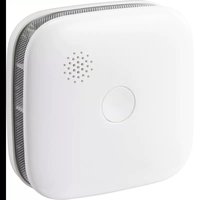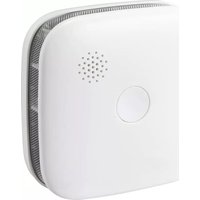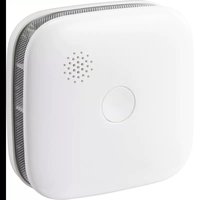
SY-5040174 - Smoke detector Sygonix - Free user manual and instructions
Find the device manual for free SY-5040174 Sygonix in PDF.



| Product type | Wireless smoke detector |
| Brand | Sygonix |
| Model | SY-5040174 |
| Dimensions (L x W x H) | 76 x 76 x 28.5 mm |
| Weight (without batteries) | 68 g |
| Power supply | 3 V, CR123A battery (1400 mAh) |
| Average power consumption | < 20 μA |
| Frequency band | 868.267 ~ 868.3892 MHz |
| Max transmission power | 10 mW |
| Free field range | > 100 m |
| Alarm volume | ≥ 85 dB at 3 m |
| Ambient temperature | -10 °C to +55 °C |
| Ambient humidity | 0 % to 95 % RH (non-condensing) |
| Battery life | Approx. 5 years |
| Standard | EN 14604:2005 + AC:2008 |
| Max. number of networked detectors | Up to 24 |
| Detection principle | Photoelectric (scattered light) |
| Intended use | Dry, dust-free indoor rooms |
| Package contents | Detector, mounting hardware, CR123A battery, user manual |
| Product lifespan | 8 years (recommended replacement) |
| Function test | Press Test button: 3 beeps twice + red LED flashes |
| Pause mode (silence) | 9 minutes by holding Test button |
| Replaceable batteries | Yes (CR123A) |
| Repairability | Not user-repairable (replace after 8 years) |
Frequently Asked Questions - SY-5040174 Sygonix
User questions about SY-5040174 Sygonix
0 question about this device. Answer the ones you know or ask your own.
Ask a new question about this device
Download the instructions for your Smoke detector in PDF format for free! Find your manual SY-5040174 - Sygonix and take your electronic device back in hand. On this page are published all the documents necessary for the use of your device. SY-5040174 by Sygonix.
USER MANUAL SY-5040174 Sygonix
text_image
Diagram of a smart speaker with labeled components including a speaker grille, speaker grille, and speaker bladenatural_image
Illustration of three-step hand-drawn steps showing a device being handled, with one step showing the blade and arrow indicating rotation (no text or symbols)natural_image
Diagram showing three views of a device with screw fasteners and mounting holes (no text or symbols)GB Operating instructions
Wireless smoke detector
Item no. 2520087
1 Intended use
The smoke detector uses the scattered light principle and detects even the smallest smoke particles that penetrate its housing.
The appealing design fits harmoniously into any interior environment. This battery of the detector will last up to 5 years due to low power consumption.
The smoke detector may only be installed and operated in dry and dust-free interior environments where no vapour or smoke is generated under normal conditions.
The wireless smoke detector early detects smoke in residential living rooms and bedrooms and emits a loud, high-pitched sound when smoke is detected to timely warn the occupants.
An integrated wireless transmitter/receiver allows networking up to 24 identical wireless smoke detectors. If one of the wireless smoke detectors triggers an alarm as it senses smoke, all other wireless smoke detectors will trigger an alarm.
Always observe the safety information in these instructions! Read the operating instructions carefully and store them in a safe place. Only make this product available to third parties together with its operating instructions.
Any use other than that described above will lead to damage to this product and will expose you to additional risks, such as short circuits, fire, etc. The product must not be modified or reassembled!
This product complies with statutory, national and European regulations. All company and product names contained herein are trademarks of their respective owners. All rights reserved.
2 Delivery content
Wireless smoke detector
Installation material
CR123A battery
Operating instructions
3 Latest product information
Download the latest product information at www.conrad.com/downloads or scan the QR code shown. Follow the instructions on the website.
4 Symbols in this document

This symbol warns of hazards that can lead to personal injury. Read the information carefully.

The arrow symbol indicates special information and advice on operation.
5 Safety information

Damage caused due to failure to observe these instructions will void the warranty. We shall not be liable for any consequential damage!
We shall not be liable for damage to property or personal injury caused by incorrect handling or failure to observe the safety information! Such cases will void the warranty/guarantee!
5.1 General information
The unauthorised conversion and/or modification of the product is prohibited for safety and approval reasons.
The product is not a toy and should be kept out of the reach of children!
Do not use this product in hospitals or medical institutions. Although the product only emits relatively weak wireless signals, these may lead to the malfunction of life-support systems. The same may apply in other areas.
The product must not get damp or wet!
Never cover the product with any materials such as wallpapers, paints and lacquers!
Do not use the product in rooms that are under adverse environmental conditions, where combustible gases, vapours or dust are or may be present! This may cause an explosion!
Do not expose the product to extreme temperatures, strong vibrations or mechanical stress.
Do not leave the packaging material lying around carelessly as it may become a dangerous plaything for children.
■handle the product with care. Jolts, impacts or a fall even from a low height may damage the product.
5.2 Battery safety information

Never place rechargeable batteries in the smoke detector.
Use only non-rechargeable batteries to ensure a safe and the longest possible operation.
Keep batteries out of the reach of children.
Do not leave batteries lying around, as they constitute a choking hazard for children and pets. Seek immediate medical attention if a battery is swallowed.
When handling leaking or damaged batteries, always use suitable protective gloves to avoid burning your skin.
Batteries must never be short-circuited, disassembled or thrown into the fire. This may cause an explosion!
Never attempt to recharge non-rechargeable batteries, as this may cause an explosion.
■ Ensure that the batteries are inserted in the correct polarity (observe the plus/+ and minus/- signs).
6 Selecting the installation location
6.1 General information
What makes the fire so dangerous is the toxic smoke produced during combustion rather than the flame in the first place. A few breaths, especially while asleep, can render a person unconscious. That is why the installation site must be chosen carefully.
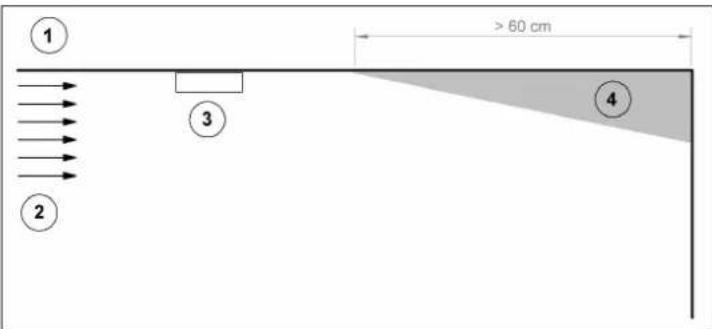
6.2 Recommended installation sites for smoke detectors
text_image
① ② ③ ④ > 60 cm- Ceiling 3. Ideal site to install the smoke detector
- Heat, fire, smoke 4. Corner (dead space, never install here!)
text_image
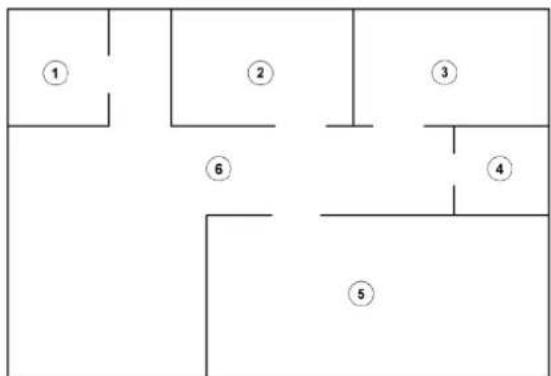
① ② ③ ④ ⑤ ⑥Living space
Examples
Installation place for minimum protection:
- Kitchen (no smoke detector)
- Bedroom
- Bedroom / other living space (e.g. children's room)
- Bathroom (no smoke detector)
- Bedroom / other living space (e.g. office)
Installation place for maximum protection:
- Kitchen (no smoke detector)
- Bedroom
- Bedroom / other living space (e.g. children's room)
- Bathroom (no smoke detector)
- Bedroom / other living space (e.g. office)
- Living room
Installation place for minimum protection:
- Bedroom
- Bedroom / other living space (e.g. children's room)
Installation place for maximum protection:
- Bedroom
- Hallway
- Bedroom / other living space (e.g. children's room)
- Staircase
- Living room
- Staircase
Smoke detectors should be installed in every room for maximum protection. Do not install them in kitchens, bathrooms or other premises where vapour is generated.
Install smoke detectors near bedrooms. Also, plan for escape routes from bedrooms; those rooms are usually the farthest from the exit. If there is more than one bedroom, install an additional smoke detector in every bedroom.
This also extends to other rooms with sleeping facilities (such as children's room, guest room, etc.).
Provide additional smoke detectors to protect stairways, which can act like chimneys for smoke and fire and may contribute to their spread.
Install at least one smoke detector on each floor level.
locate a smoke detector in every room where there are electrical appliances or equipment (e.g., a TV set in the living room). Often those devices, in particular, pose a risk of heavy, toxic smoke formation.
It is recommended to install two or more smoke detectors in larger rooms.
Smoke and other combustion residues rise to the ceiling and spread horizontally. Mount the smoke detectors on the ceiling in the centre of the room, this place is the nearest to all other points in the room.
Ceiling mounting is recommended in conventional residential buildings. In caravans or mobile homes mounting on a vertical wall is required instead to prevent a thermal barrier that may form at the ceiling.
When installing the smoke detector on the ceiling, ensure a free space of at least 50 cm from the sidewall and 60 cm from each corner.
Install the smoke detector as close to the centre of the ceiling as possible.
The smoke detector should be attached to a brace suspending from the ceiling or similar spots. Ensure to maintain the minimum distances to corners and walls. In rooms with sloped ceilings (top floor), a separate smoke detector should preferably be installed on each slope.
A minimum free space of 150 cm should be provided between the smoke detector and lights, exhaust fans, air conditioners and air inlet/outlet openings.
6.3 Unfavourable installation sites for smoke detectors
The following installation sites should be avoided:
Kitchen/bathroom and WC: The cooking fumes or water vapours present in these rooms may trigger a false alarm.
Garages: A vehicle's exhaust fumes may trigger a false alarm in garages.
Near heaters or air conditioners.
Near (<1.5 m) fluorescent lights.
Rooms where the temperature may fall below +5 °C or rise above +38 °C.
Sable roof: Hot air (e.g. in summer or when heating the room) may accumulate here, which would prevent the fumes of a dangerous smouldering fire from reaching the smoke detector.
Ceilings in caravans or similar: The sun heats the room ceiling and hence the air in the upper part of the caravan. The hot air keeps the fumes of a dangerous smouldering fire from reaching the smoke detector.
Stationary walls in residential buildings: Here the smoke is detected very late, which causes a delayed alarm.
Corners in buildings: Here the smoke is detected very late, which causes a delayed alarm.
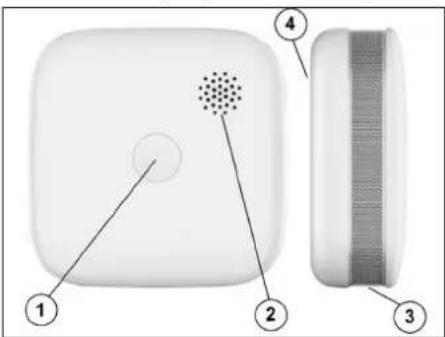
7 Controls
- "Test" button with red LED
- Beeper opening (sound outlet)
- Smoke sensor
- Battery compartment
text_image
Diagram of a smart speaker with labeled components including a microphone and screen7.1 Installing & inserting batteries
The wireless smoke detector cannot work without batteries or when batteries are empty.
For safety reasons, do not use rechargeable batteries; use only non-rechargeable batteries.
For safety reasons, the wireless smoke detector cannot be attached to the mounting plate when no batteries are inserted.
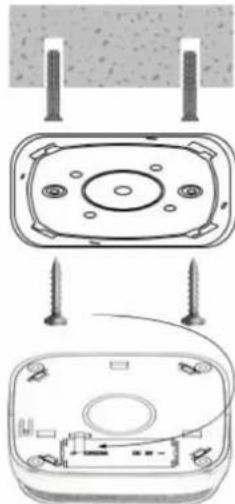
Turn the upper part of the wireless smoke detector to the left (counter-clockwise) to detach it from the mounting plate.
Use the mounting plate as a template and mark the holes to be drilled in the two outer recessed openings.
Fasten the mounting plate with suitable screws; use dowels, if necessary. Ensure you do not damage any wires or pipes during fastening or drilling.
Because the product is heavy, we do not recommend using adhesive pads for the installation safety reasons.
natural_image
Diagram showing two views of a device with screw fasteners inserted, no text or symbols present■ Ensure the correct polarity when inserting. Note the polarity markings inside the battery compartment.
Put the wireless smoke detector on the mounting plate and lock it in place by turning its upper part to the right (clockwise).
natural_image
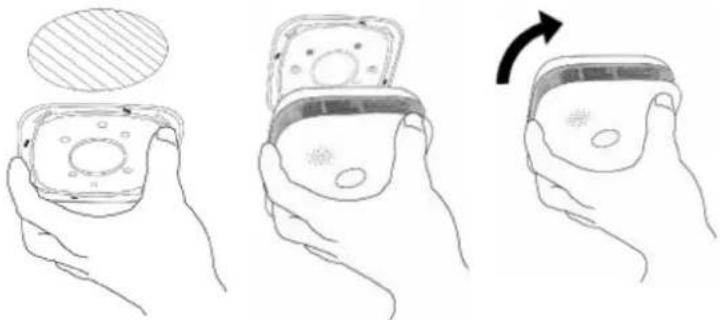
Illustration of three hands holding a small electronic device with a magnified inset showing internal components (no text or symbols)After installation, check the wireless smoke detector for functionality by briefly pressing the "Test" button in the centre of the wireless smoke detector. The wireless smoke detector will beep twice, and the button will start to flash red. Also, see chapter "Function test".
7.2 Battery replacement
When the battery is empty, the red LED flashes twice every 40 seconds. Two short beeps are emitted at the same time. In that case, replace the flat battery with a new one.
Check the wireless smoke detector once a week and after every battery change by briefly pressing the "Test" button in the centre of the wireless smoke detector. The wireless smoke detector will beep twice, and the button will start to flash red. Follow the instructions in the chapter "Function test".
Proceed as follows:
Turn the upper part of the smoke detector to the left (counter-clockwise) to detach it from the mounting plate.
- Replace the battery. Insert a new battery with the correct polarity. Note the polarity markings inside the battery compartment.
Put the smoke detector on the mounting plate and lock it in place by turning its upper part to the right (clockwise). For safety reasons, the smoke detector cannot be attached to the mounting plate when no batteries are inserted.
7.3 Programming multiple smoke detectors
Several identical wireless smoke detectors can be networked. When one of the wireless smoke detectors triggers an alarm, all other detectors will do so as well (if they are within the range). For example, when one wireless smoke detector triggers an alarm as it detects smoke in the living room, all other networked wireless smoke detectors in the entire flat are triggered as well.
Proceed as follows:
To start the networking procedure, remove the wireless smoke detector from the ceiling if already mounted there. Put this wireless smoke detector near the other wireless smoke detectors to be registered.
- Press and hold down the "Test" button for approx. 8 seconds. Wait until the red LED in the centre of the "Test" button starts to flash. This means the alarm is in programming mode.
- Repeat step (1) for another wireless smoke detector.
- Briefly press the "Test" button on either of the two wireless smoke detectors to connect to the network. After successful connection, the red LED stops flashing on the wireless smoke detector whose button was not pressed. Perform steps 1 to 3 within 2 minutes.
If the button is not pressed for 2 minutes, the programming mode will be disabled!
Repeat steps 1 to 3 to network a third wireless smoke detector. Up to 24 identical wireless smoke detectors can be linked together.
7.4 Any wireless smoke detector can be unlinked as follows:
Press and hold down the "Test" button for approx. 8 seconds until the LED starts to flash.
Then briefly release the "Test" button.
Then press the "Test" button and hold until the LED goes off and the wireless smoke detector emits a beep confirming that it has been disconnected.
7.5 Function test
Under normal operation, the red LED near the "TEST" button flashes briefly every 40 seconds.
Briefly press the "TEST" button to check the alarm tone. The wireless smoke detector will emit three beeps twice, and the button will start to flash red. This indicates that the wireless smoke detector and batteries are functioning correctly. When no alarm tone sounds or the LED does not flash, batteries may be empty. Replace the batteries and perform a new function test. If this does not help, replace the wireless smoke detector.
With multiple wireless smoke detectors networked, they all will beep during the function test. In this case, the networked wireless smoke detectors emit beeps for a longer time so that you have plenty of time to check the alarm function of all installed units for functionality. If you could not check all units in all rooms due to lack of time, use the "Test" button on another wireless smoke detector again.
If an alarm tone seems too loud or too unpleasant to your ear, use hearing protection during the function test! It is better when a real alarm sounds loud such that even a sleeping person or the one with impaired hearing can hear an alarm.

It is strongly recommended that you check the wireless smoke detector weekly to ensure proper operation. Wireless transmission can be checked by blowing cigarette smoke into the wireless smoke detector. Accessory retailers offer special test sprays for smoke detectors. In this case, all wireless smoke detectors must trigger an alarm.

7.6 Modes of operation
7.6.1 Normal operation
Under normal operation, the red LED flashes once every 40 seconds.
7.6.2 Alarm mode
When the smoke concentration reaches the alarm point, the red LED starts to flash, and the wireless smoke detector beeps.
7.6.3 Test mode
When you briefly press the "Test" button, the red LED starts to flash, the alarm emits three beeps twice and stops automatically.
7.6.4 Battery too weak
When the battery is empty, the red indicator flashes twice every 40 seconds. Two short beeps are emitted at the same time. In that case, replace the flat battery with a new one.
7.6.5 Device error
The red LED flashes twice every 40 seconds and the alarm beeps twice every 40 seconds.
7.6.6 Standby mode
You can switch the wireless smoke detector from the alarm mode to the standby mode (alarm off) by pressing and holding the "Test" button on the wireless smoke detector. If the smoke concentration is still too high during the standby mode that remains active for 9 minutes, the wireless smoke detector triggers an alarm.

If the wireless smoke detector signals an alarm, check whether the seat of fire does exist. If fire or smoke is detected, alert your family, and everyone must leave the building. Call the fire department. If there is no fire or smoke, check the device for functionality. Refer to the chapter "What to do in case of an alarm?" and "Nuisance alarm".
8 Troubleshooting
| Fault Possible cause | Remedy | |
| Immediate alarm after switching on | Too much smoke Remove | the battery and re-insert it when the smoke has cleared |
| Internal circuit is damaged (device is defective) | Replace the wireless smoke detector | |
| Smoke detector beeps every 40 seconds after switching on | Low battery voltage (weak battery) | Replace the battery |
| Two beeps are emitted every 40 seconds after switching on | Internal circuit is damaged (device is defective) | Replace the wireless smoke detector |
| No alarm during testing | Battery inserted incorrectly | Re-insert the battery, observing the correct polarity |
| Low battery voltage (weak battery) | Replace the battery | |
| Internal circuit is damaged (device is defective) | Replace the wireless smoke detector | |
| No alarm or very quiet alarm | Low battery voltage (weak battery) | Replace the battery |
| Alarm transmitter is defective | Replace the wireless smoke detector |
When other problems/faults occur, remove the battery and re-insert it correctly after a short time (approx. 1 minute) and then check that the wireless smoke detector functions correctly.
If you cannot solve the problem yourself, do not disassemble the wireless smoke detector! Contact your local dealer or manufacturer for more information.
9 Sketching an escape plan and performing an emergency drill
Sketch a plan of your flat or house that shows all doors and windows and at least two escape routes for each room. A rope ladder may be necessary for windows on the second floor.
- Discuss the escape plan with your family and explain what should be done in the event of fire or smoke.
Designate a meeting spot outside of your home.
Show everyone how the wireless smoke detector sounds when it triggers an alarm. Everyone must be sure to leave the house immediately when they hear that sound.
Perform the smoke/fire alarm drill at least every 6 months. Drills will help you to put your evacuation plan to the test before an actual emergency may arise. It may happen that you cannot reach your children in a case of fire. They must know too what to do and how to behave.
10 What to do in case of an alarm?
If one of the wireless smoke detectors senses smoke, they all will trigger a loud alarm tone.

The alarm stops when the air is free from smoke again.
If an alarm sounds, leave your flat or house immediately according to the agreed escape plan. Every second counts; do not waste time getting dressed or trying to take your valuables with you.
Before opening any door, check if it is hot. If the door is hot, or if you see smoke coming in from under the door, do not open the door! Use the alternative escape route instead. If the door is cool, press your shoulder against it, open the door slightly and be ready to slam it back again if heat and smoke penetrate from the room behind it.
If the air is full of smoke, stay low to the floor. Breathe through a cloth (if possible) moistened with water.
Once you have made your way out of the flat or house, proceed to the previously agreed meeting spot and ensure everybody is there.
Call the firefighters from your neighbour's house, not your own!
Do not return to your flat or house until you have been told it is safe by the fire service.
11 Nuisance alarm
Cigarette smoke or vapour from cooking can activate the wireless smoke detector. Nuisance alarms are also possible in case of exposure to dust when grinding (e.g. when renovating a room) and if too much hair spray/deodorant is sprayed in a room or similar.

Normally, smoking cigarettes in the room will not trigger the wireless smoke detector unless the smoke is blown directly into the sensor.
If the wireless smoke detector signals an alarm, check whether the seat of fire does exist. If fire or smoke is detected, alert your family, and everyone must leave the building. Call the fire department. If there is no fire or smoke, check whether the alarm could have been triggered due to the above-mentioned reasons.
12 Cleaning and maintenance
Apart from the occasional battery change, the product is maintenance-free.
Clean the outside of the product with a soft, clean, dry cloth.
Dust can be easily removed from the wireless smoke detector with a soft, clean, long-haired brush or a vacuum cleaner. In especially dusty environments such as bedrooms, this should be done at least once a year.
Do not use aggressive cleaning agents or chemical solutions since these can damage the housing or impair functioning.
For safety reasons, the wireless smoke detector should be replaced every 8 years.
13 Range

This range only applies in ideal conditions with no obstructions (i.e. a direct field of view between the transmitter and receiver without interference).
In practice, however, there may be walls, ceilings and other obstacles between the transmitter and the receiver, which will reduce the range accordingly.
Different objects have a different impact on the range; therefore, no specific range can be guaranteed. The range should be sufficient for use in a detached house.
Sometimes the range can be considerably reduced due to:
– Walls, reinforced concrete ceilings and metal-framed drywalls
– Coated/metallised insulated glass
– Proximity to metal and conductive objects (e.g. radiators)
– Proximity to human bodies
- Other devices on the same frequency (e.g., wireless headphones, wireless speakers)
– Proximity to electric motors/appliances, transformers, power supplies, computers
14 Disposal
14.1 Product

All electrical and electronic equipment placed on the European market must be labelled with this symbol. This symbol indicates that this device should be disposed of separately from unsorted municipal waste at the end of its service life.
Owners of WEEE shall dispose of it separately from unsorted municipal waste. Spent batteries and accumulators, which are not enclosed by the WEEE, as well as lamps that can be removed from the WEEE in a non-destructive manner, must be removed by end users from the WEEE in a non-destructive manner before it is handed over to a collection point.
Distributors of electrical and electronic equipment are legally obliged to provide free take-back of waste. Conrad offers the following free return options (further information is available on our website):
At our Conrad stores
At the Conrad collection points
At the collection points of public waste disposal agencies or at the collection systems set up by manufacturers and distributors in accordance with the German Electrical and Electronic Equipment Act.
The end user is responsible for deleting personal data from the WEEE to be disposed of.
It should be noted that different obligations about the return or recycling of WEEE may apply in countries outside of Germany.
14.2 (Rechargeable) batteries
Remove batteries/rechargeable batteries, if any, and dispose of them separately from the product. According to the Battery Directive, end users are legally obliged to return all spent batteries/rechargeable batteries; they must not be disposed of in the normal household waste.

Batteries/rechargeable batteries containing hazardous substances are labelled with this symbol to indicate that disposal in household waste is forbidden. The abbreviations for heavy metals in batteries are: Cd = Cadmium, Hg = Mercury, Pb = Lead (name on batteries/rechargeable batteries, e.g. below the trash icon on the left).
Used batteries/rechargeable batteries can be returned free of charge to local collection points, our stores or battery retailers. You thus fulfil your statutory obligations and contribute to environmental protection.
Batteries/rechargeable batteries that are disposed of should be protected against short circuit and their exposed terminals should be covered completely with insulating tape before disposal. Even empty batteries/rechargeable batteries can contain residual energy that may cause them to swell, burst, catch fire or explode in the event of a short circuit.
15 Declaration of Conformity (DOC)
Conrad Electronic SE, Klaus-Conrad-Straße 1, D-92240 Hirschau, hereby declares that this product conforms to Directive 2014/53/EU.
Click on the following link to read the full text of the EU declaration of conformity: www.conrad.com/downloads
Enter the product item number in the search box. You can then download the EU declaration of conformity in the available languages.
16 Technical data
Power supply ....3 V, CR123A (1400 mA)
Average current consumption ....<20 μA
Frequency band 868,267 - 868,3892 MHz
Transmission power.....max. 10 mW
Range ....>100 m (see chapter "Range")
Alarm volume ____>=85 dB/3 m
Ambient conditions ......temperature -10 °C to 55 °CHumidity 0% to 95% relative, non-condensing
Battery life ....approx. 5 years
Standard EN 14604:2005 + AC:2008
Dimensions (L x W x H) 76 x 76 x 28.5 mm
Weight 68 g (without batteries)


1008
1008-CPR-MC 69266125 0001
22
DC 3 V (CR123A/5 years)
Test the alarm for correct operation using
the test facility, whenever the battery is
replaced
Wireless distance: >100 m (open field)
Wireless frequency: 868.3 MHz
Smoke Alarm
ZR150SR
Distributed by Conrad Electronic SE,
Tested according to:
EN 14604:2005
EN 14604: 2005/AC:2008

WEEE-Reg.-Nr.:
DE28001718
F Mode d'emploi
text_image
Diagram of a device with labeled parts, showing a central dot pattern and two adjacent rectangular components.natural_image
Diagram showing two views of a device with screws and wiring, no text or symbols presentnatural_image
Illustration of three hands holding a device with a magnified inset showing internal components (no text or symbols)3 V CC (CR123A/5 years)
text_image
Diagram of a smart speaker with labeled parts including a sensor icon and two adjacent componentsnatural_image
Diagram showing two views of a device with screw fasteners and mounting holes (no text or symbols)natural_image
Illustration of three hands holding a device with a patterned lid, showing a change in the interior (no text or symbols)Voeding....3V, CR123A (1400 mA)