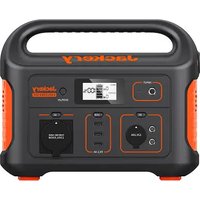
Explorer 500 - Generator Jackery - Free user manual and instructions
Find the device manual for free Explorer 500 Jackery in PDF.

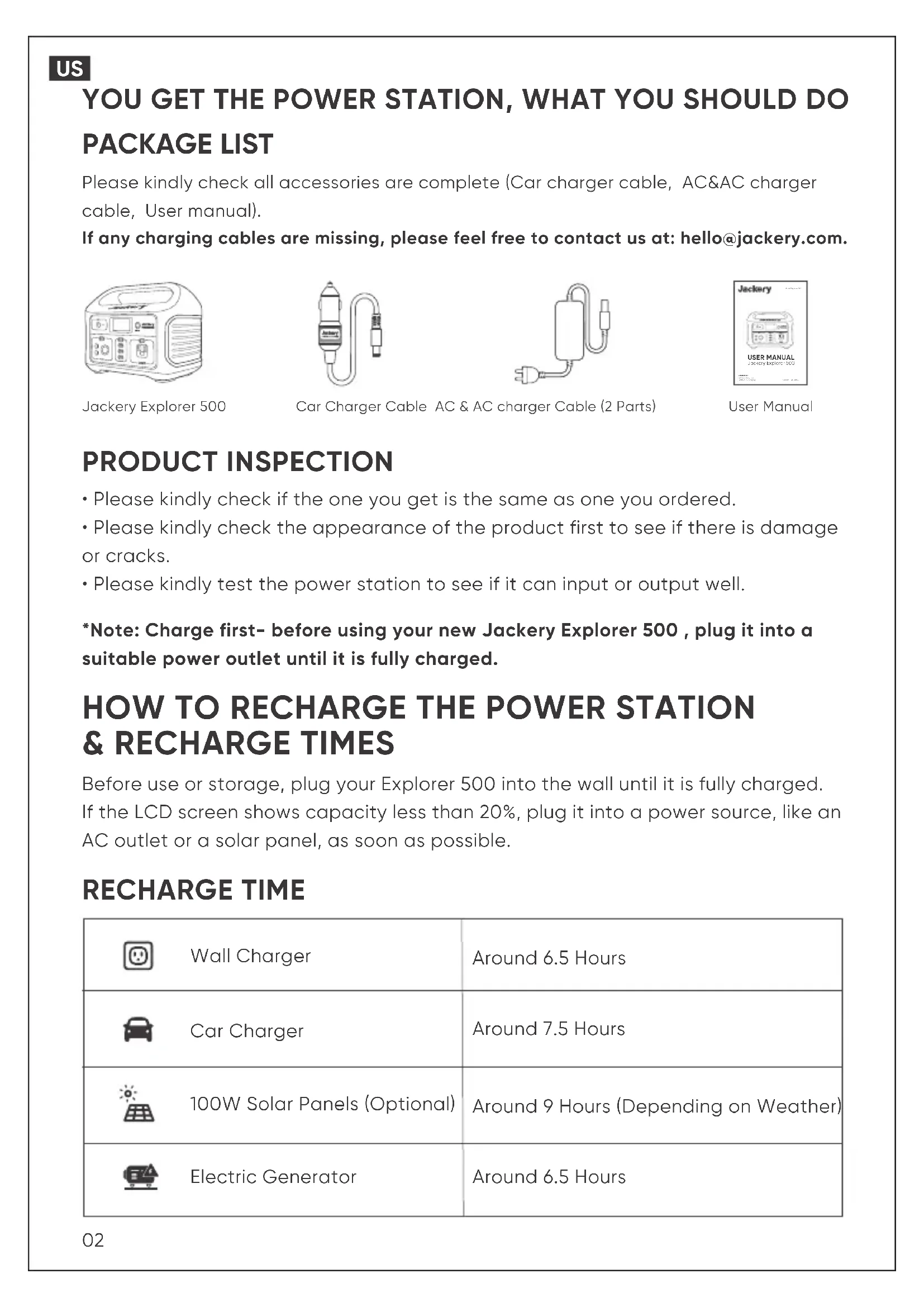


| Product type | Portable generator |
| Brand | Jackery |
| Model | Explorer 500 |
| Battery capacity | 518.4 Wh (24 Ah / 21.6 V) |
| Weight | 6 kg |
| Dimensions | 30 × 19.2 × 24.2 cm |
| Battery technology | Lithium-ion |
| Continuous power | 500 W |
| Peak power | 1,000 W |
| AC output | 110 V, 60 Hz, 4.54 A |
| USB-A output | 3 ports, 5 V / 2.4 A (total 30 W) |
| DC output | 2 ports, 12 V / 7 A (total 120 W with cigarette lighter) |
| DC input | 12-15 V = 7 A ; 15-30 V = 3.75 A |
| Cigarette lighter input | 12 V = 10 A |
| AC charging time | Approximately 6.5 hours |
| Car charging time | Approximately 7.5 hours |
| Solar panel charging time (100 W) | Approximately 9 hours |
| MPPT support | Yes |
| Life cycles | 800 cycles at 80% capacity |
| Discharge temperature | -10 °C to 40 °C |
| Charge temperature | 0 °C to 40 °C |
| Display | LCD screen with percentage and power |
| Protections | Under voltage, over voltage, over current, short circuit, overheat, overload |
| Warranty | 24 months (36 months after registration) |
| Certifications | UN38.3, CAN ICES-003(B)/NMB-003(B) |
| Included accessories | Cigarette lighter cable, AC-AC charger cable, user manual |
Frequently Asked Questions - Explorer 500 Jackery
User questions about Explorer 500 Jackery
0 question about this device. Answer the ones you know or ask your own.
Ask a new question about this device
Download the instructions for your Generator in PDF format for free! Find your manual Explorer 500 - Jackery and take your electronic device back in hand. On this page are published all the documents necessary for the use of your device. Explorer 500 by Jackery.
USER MANUAL Explorer 500 Jackery
| Capacity | 518.4Wh (24Ah/21.6V) |
| Weight | 6kg / 13.3 lbs |
| Dimensions | 30 x 19.2 x 24.2cm (11.8 x 7.6 x 9.5in) |
| DC Input | 12-15V=7A; 15-30V=3.75A |
| Car Port | 12V=10A |
| Battery | Lithium-ion |
| AC Output | 110V~ 60Hz, 4.54A, 500W max continuous, 1000W surge peak |
| USB-A Output | 3 x USB-A Output: 5V=2.4A (Total 30W max) |
| DC Output | 2 x DC Output: 12V=7A(2 x DC Output+Car Port: Total 120W) |
| Management System | Under Voltage ProtectionOvervoltage ProtectionOvercurrent in Charge/Discharge ProtectionShort-circuit in Charge/Discharge ProtectionOvertemperature in Charge/Discharge ProtectionOvercharging Voltage Protection |
| Cycle Life | 800 cycles to 80%+ capacity |
| MPPT | Support Solar Panel MPPT Charging |
| Technical Support | Lifetime |
| Discharge Temperature | -10°C~40°C (14°F~104°F) |
| Charge Temperature | 0°C~40°C (32°F~104°F) |
Certifications


UN38.3
CAN ICES-003(B)/NMB-003(B)

801937

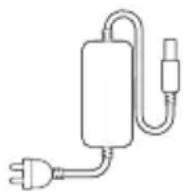
Please kindly check all accessories are complete (Car charger cable, AC&AC charger cable, User manual).
If any charging cables are missing, please feel free to contact us at: hello@jackery.com.

Jackery Explorer 500

Car Charger Cable AC & AC charger Cable (2 Parts)
User Manual
PRODUCT INSPECTION
- Please kindly check if the one you get is the same as one you ordered.
- Please kindly check the appearance of the product first to see if there is damage or cracks.
- Please kindly test the power station to see if it can input or output well.
*Note: Charge first- before using your new Jackery Explorer 500, plug it into a suitable power outlet until it is fully charged.
HOW TO RECHARGE THE POWER STATION & RECHARGE TIMES
Before use or storage, plug your Explorer 500 into the wall until it is fully charged. If the LCD screen shows capacity less than 20%, plug it into a power source, like an AC outlet or a solar panel, as soon as possible.
RECHARGE TIME
 | Wall Charger | Around 6.5 Hours |
 | Car Charger | Around 7.5 Hours |
 | 100W Solar Panels (Optional) | Around 9 Hours (Depending on Weather) |
 | Electric Generator | Around 6.5 Hours |
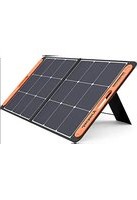
HOW TO USE THE SOLARSAGA 100 TO CHARGE THE E500
Jackery recommends Best Match: Use one Jackery SolarSaga 100 solar panels to charge the E500.
Solar recharging steps:
A. Find the DC interface on the back of SolarSaga 100;
B. Connect the DC interface of SolarSaga 100 with the DC input of Explorer 500.
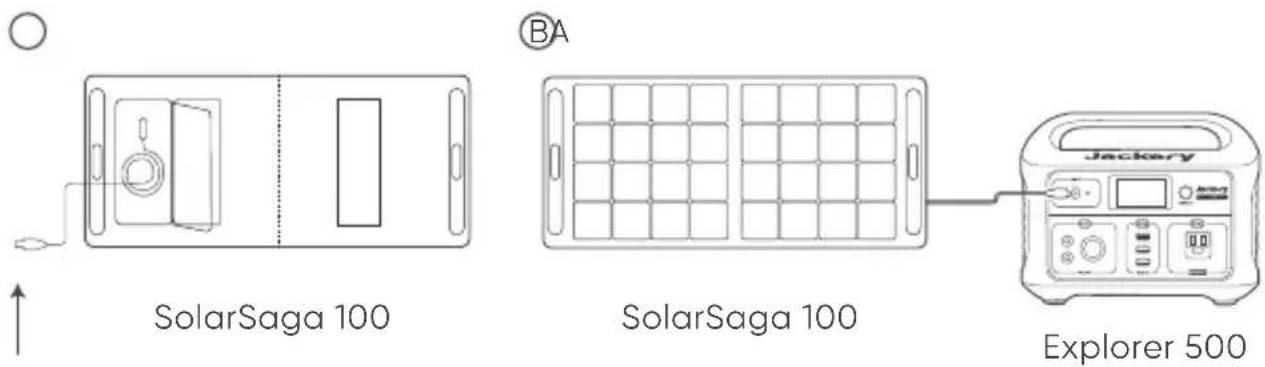
DC interface
How to check the E500 is full charged?
The display screen shows 100% when fully recharged.
HOW TO USE THE POWER STATION?
Start use the Explorer 500
•Power
LCD Screen Button
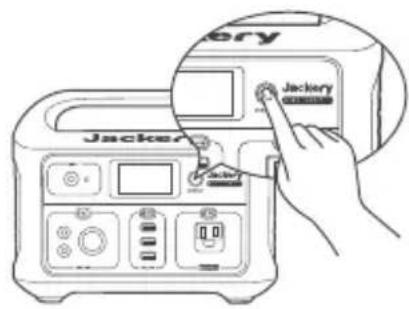
Press the power button to check the remaining battery.
AC Button / DC 12V Button / USB Button
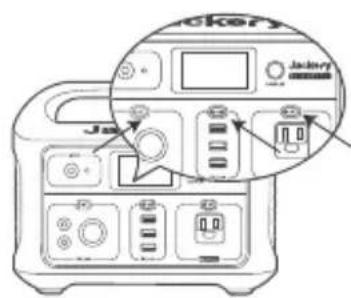
Turn off each output by pressing its power button, also turn off as it will not turn off automatically or it will drain the battery out.
Note: For power saving, Explorer 500 portable power station will be turned off automatically in 12 hours when being drawn under 10W power.
•LCD Screen
Power Level Percentage
Check the battery level by pressing the display button before use. If battery is at a low level, charge first.LCD screen flickers around 10 times when the battery capacity falls to 20% to 10%.
Power of Input Output (W)
Please ensure that power consumption is less than 500W, then press the power button. If the Jackery Explorer's total output exceeds 500W, it will shut off.
Low & High Temperature Alarm
The E500 can power your devices at temperatures ranging from -10\~40°C. If your working temperature is outside this range, the unit may stop working.
•Other
How to reset the Explorer 500
Please try to hold the display power button for 8s to reset the battery.
When should we need to reset the power station?
When the power station can't work properly, you can choose to reset the battery to trouble shoot.
Fan Operating Principle
E500 uses intelligent temperature control. When the AC is turned on, the fan does not turn on. Only when the temperature rises to a certain degree then the fan starts to turn on.
- Attention
Input Power
Output Power

Power Display
If you operate the power station in improper way, there will be appearing symbols on LCD screen.

Battery has been drain out
It shows that the battery has been drain out. Please kindly charge it to 100% and then use it. A warming tip: It's suggested to recharge the battery before the power drops below 15%. Please don't drain out the battery.

Battery was overcharged
It shows that the battery was overcharged.
Please try to hold the display power button for 8s to reset the battery and try to charge to see.

High Temperature

Low Temperature
It shows that the battery is used in a high or low temperature. Please charge, use and store the E500 within a ambient temperature 0-40°C (32-104°F).

Over-loaded
It shows that the power station is over-loaded, please kindly check the power of your device and hold the display power button for 8s to reset the battery and try to charge to see.
GIVE YOUR APPLIANCES MORE RUN TIME
Note: The running time of the E500 for the following equipment are tested in the laboratory, which has strict controls on temperature, the working hours can also be affected by many other factors. The actual working time = 518Wh* 0.85 / operating power of your device.
CHARGING

Drone
(90W max)
RUN TIME
About 10 Recharges

Motion Camera
(5W max)
RUN TIME
About
95 Recharges

12"Mac book
(30W)
RUN TIME
About
7.5 Recharges

Smartphone
(18W max)
RUN TIME
About
53 Recharges

32"TV
(60W)
RUN TIME
About
8 Hours

Car Fridge
(60W)
RUN TIME
About
39 Hours
For inductive load devices:
• What is the inductive load device?
Inductive Loads, also called Lagging Loads or Inductive Load Banks or Inductive Reactive Loads or Power Factor Loads, are AC loads that are predominantly inductive in nature so that the alternating current lags behind the alternating voltage when the current flows into the load.
- The inductive load device has an instant start power when the it runs. Typically starting power is 3 times the amount of power to run the application.
- When you check if the E500 can run the device, please kindly check if there is an instant start power.
TROUBLESHOOTING
PROBLEM WITH INPUT (AC/DC)
When the power station has something wrong with input by using AC charger cable :
- Check if the charger cable and the power station are reliably connected; whether the charger indicator light is on.
- Check if the original charger is used.
- Whether the charging indicator of the power station power supply is on and whether the screen displays the charging power.
- Please try to use the provided car charging cable to charge to see. This troubleshooting is also fit for DC input failure.
US
PROBLEM WITH SOLAR CHARGING
Using Jackery solar panel to charge the E500:
- Please kindly check if all connections are ok.
- Please use the provided AC charger to charge to see.
- Please use a soft cloth to remove the dust and dirt on the surface.
- Please test under midday strong sunlight. Connect the solar panel, make sure there is no shadow cast on the panel. You can unplug and plug for several times to see.
Using other brand solar panel to charge the E500:
- Please kindly check if all connections are ok.
- Please use the provided AC charger to charge to see.
- Please use a soft cloth to remove the dust and dirt on the surface.
- Please test under midday strong sunlight. Connect the solar panel, make sure there is no shadow cast on the panel. You can unplug and plug for several times to see.
If E500 can be recharged by AC charger well, it shows that there is nothing wrong with the E500 and please check if there is a problem with the solar panel.
Problem with Output (AC/DC/USB)
When the power station has something wrong with AC/DC/USB Output, please hold the display power button and USB button simultaneously for 8S above to reset the battery.
Problem With LCD Screen
If the LCD screen can't work, or the shown input or output number is inaccurate, please try to hold the display power button for 8s to reset the battery and try to charge to see.
Customer Support:
If there are some problems with the power station, please feel free to contact us at hello@jackery.com. Please send the messages according to the template to move forward your issue faster. Amazon order number/ Web order number + issue + S/N code + Pictures / video if needed
Product Guidelines
- Please recharge it every 3-month to keep the battery power above 50% if you don't use it.
- It's suggested to recharge the battery before the power drops below 15%
- Only charge the E500 within a ambient temperature 0–40°C (32–104°F), discharge temperature is -10–40°C and Storage temperature is -20\~25°C.
- Please keep the battery laid flat during use, charging, and store.
FAQ
Q1: What devices can Explorer 500 power?
A: Please note that the AC output port can only charge/power devices that operate at less than total 500 Watt.
Q2: Can the Explorer 500 be charged while using?
A: Yes, Explorer 500 supports pass-through charging. But we don't suggest, it will cause damage to battery life.
Q3: Can the E500 be used as UPS?
A: No, the E500 can't be used as UPS, need to press the power button to turn on the AC/USB /DC output, so it can't turn on and off automatically.
Q4: How to know the working times for my device?
A: Working time = 518Wh* 0.85 / operating power of your device.
Q5: Does Explorer 500 include a built-in MPPT controller?
A: All Jackery power stations have a built-in MPPT controller.
Q6: How do I know the E500 is charged?
A: To check the charge level of the Explorer 500, refer to the LCD Battery Display.
Q7: Can I keep this charged up by keeping it plugged in all the time in case of power outage?
A: Yes, you can keep the battery plugged in to charge. Keeping it plugged in won't cause damage to the battery.
Q8: Can I use it indoors?
A: Yes, the E500 is safe to use indoors.
Q9: Why it takes so long to charge the power station from 99% to 100%?
A: When the power station is charged at a low power (constant current stage), the charging power is the largest. With the increase of the power, the internal battery pack voltage of the energy storage gradually increases to the charging limit voltage and then enters the constant current stage (the charging power gradually decreases to full). In the later stage of charging, the charging power gradually decreases. Please kindly take a long time to charge to 100%.
Q10: Can I find any video about recharging the E500?
A: Please kindly check the video in the following instructions:
- Go to jackery.com
- Click the "Support", and then choose "FAQ"
- Check "Product Video"
Q11: Are the output ports regulated, and if so, which ones are regulated?
A: All output ports of Jackery power stations are regulated. The voltage won't change when the battery power decreases.
Q12: Can the battery inside be replaceable?
A: No, the batteries inside of Jackery power station can't be replaceable.
More questions, please kindly find the answer in the following way:
- Go to jackery.com
- Click the "Support", and then choose "FAQ"
WARRANTY
Note: We only provide the warranty for the buyer who purchased on Amazon (Jackery Inc.) or Jackery website.
Limited Warranty
Jackery Inc. warrants to the original consumer purchaser that the Jackery product will be free from defects in workmanship and material under normal consumer use during the applicable warranty period identified in the 'Warranty Period' section below, subject to the exclusions set forth below. This warranty statement sets forth Jackery's total and exclusive warranty obligation. We will not assume, nor authorize any person to assume for us, any other liability in connection with the sale of our products.
Warranty Period
The warranty period for Jackery power products is 24 months. In each case, the warranty period is measured starting on the date of purchase by the original consumer purchaser. The sales receipt from the first consumer purchase, or other reasonable documentary proof, is required in order to establish the start date of the warranty period.
Exchange
Jackery will replace (at Jackery's expense) any Jackery product that fails to operate during the applicable warranty period due to defect in workmanship or material. A replacement product assumes the remaining warranty of the original product.
Limited to Original Consumer Buyer
The warranty on Jackery's product is limited to the original consumer purchaser and is not transferable to any subsequent owner.
Exclusions
Jackery's warranty does not apply to:
- Misused, abused, modified, damaged by accident, or used for anything other than normal consumer use as authorized in Jackery's current product literature.
- Attempted repair by anyone other than an authorized facility
- Any product purchased through an online auction house.
- Jackery's warranty does not apply to the battery cell unless the battery cell is fully charged by you within seven days after you purchase the product and at least once every 3 months thereafter.
Customer Support : hello@jackery.com
To obtain warranty service, contact our customer service team at hello@jackery.com.
How to Register the Item and Get the Warranty?
- Go to jackery.com
- Click the "Support", and then choose "Register Product"
- Fill in the information form, and then submit
- You will get a 36 month warranty in total when you finished
CUSTOMER SUPPORT: hello@jackery.com


www.jackery.com hello@jackery.com 1-888-502-2236
Mon-Fri 9:00AM - 6:00PM (PST)
jackeryusa Jackery Inc.jackery.in
Please kindly contact us at hello@jackery.com in the follow way:
- Go to jackery.com
- Click the "Contact", and then choose Support Email: hello@jackery.com
- Please send the messages according to the template to move forward your issue faster.
| WARRANTY | |
| Contact Info | |
| Email address | |
| Buyer Name | |
| Order Details | |
| Order ID | |
| Serial Number | |
| Issue Details | |
| Upload proof of purchase & photos of the device itself with Jackery logo showing (Max 10MB) | |
INSTRUCTIONS PERTAINING TO RISK OF FIRE, ELECTRIC SHOCK, OR INJURY TO PERSONS
IMPORTANT SAFETY INSTRUCTIONS
WARNING-When using this product, basic precautions should always be followed, including the following:
a) Read all the instructions before using the product.
b) To reduce the risk of injury, close supervision is necessary when the product is used near children.
c) Do not put fingers or hands into the product.
d) Use of an attachment not recommended or sold by power pack manufacturer may result in a risk of fire, electric shock, or injury to persons.
e) To reduce risk of damage to the electric plug and cord, pull the plug rather than the cord when disconnecting the power pack.
f) Do not use a battery pack or appliance that is damaged or modified. Damaged or modified batteries may exhibit unpredictable behavior resulting in fire, explosion or risk of injury.
g) Do not operate the power pack with a damaged cord or plug, or a damaged output cable.
h) Do not disassemble the power pack, take it to a qualified service person when service or repair is required. Incorrect reassembly may result in a risk of fire or electric shock.
i) To reduce the risk of electric shock, unplug the power pack form the outlet before attempting any instructed servicing.
j) When charging the internal battery, work in a well ventilated area and do not restrict ventilation in any way.) Under abusive conditions, liquid may be ejected from the battery; avoid contact. If contact accidentally occurs, flush with water. If liquid contacts eyes, additionally seek medical help. Liquid ejected from the battery may cause irritation or burns.
k) Under abusive conditions, liquid may be ejected from the battery; avoid contact. If contact accidentally occurs, flush with water. If liquid contacts eyes, additionally seek medical help. Liquid ejected from the battery may cause irritation or burns.
I) Do not expose a power pack to fire or excessive temperature. Exposure to fire or temperature above 130° C may cause explosion. The temperature of 130° C can be replaced by the temperature of 265° F.
m) Have servicing performed by a qualified repair person using only identical replacement parts. This will ensure that the safety of the product is maintained.
SAVE THESE INSTRUCTIONS OPERATING INSTRUCTIONS
- Use and store the unit only in a clean and dry environment. DO NOT use and store in dusty and wet environment.
- Check the unit prior to every use. DO NOT use the unit if it is damaged, broken.
- If rust, peculiar odors, overheating or other abnormal circumstances are observed, stop using the unit immediately and contact the dealer or our customer service center.
- Make sure that the unit is properly secured when transporting it in a motor vehicle.
- Switch the unit off immediately if it has accidentally fallen, was dropped or was exposed to vibrations.
- DO NOT use the unit if the power cord is damaged or broken.
- Keep the unit away from children. DO NOT let children use the power supply unit. Keep this product away from pets.
US
- DO NOT use the unit in an area or environment with high temperature.
- Should fluid from inside of the unit come in contact with your skin or clothing, wash the affected areas with tap water.
- In a storm, unplug the power cord from the socket.
- DO NOT place the unit on its side or upside down while in use or storage.
- DO NOT use accessories for other usage.
- Make sure that the device you are connecting is switched off before you connect it.
- DO NOT expose a power pack to fire or excessive temperature. Exposure to fire or temperature above 130°C may cause explosion.
- Solar charge times depend on weather conditions, place your solar panel where it will get as much direct sunlight as possible.
- DO NOT place the power pack on the floor, or at a height less than 457 mm (18 inches) above the floor, during use in a repair facility.
WARNING: Do not remove the battery pack without permission, If you need to repair the battery pack, contact your local manufacturer as soon as possible.
DANGER: This device is for indoor use only (e.g. RV/tent/off-grid cabin, etc.). Do not use outdoors under any circumstances (e.g. where exposed to rain or snow or use it in wet environments by the sea or waterways).
INFORMATION SUR LE PRODUIT IMAGE DES PORTS D'ENTRÉE ET DE SORTIE

LCD
Lampe de poche LED
Entrée CC
Bouton CC
Bouton USB
Sortie CC (6,5 × 1,4mm)
Abri de voiture
Bouton d'écran LCD
Bouton CA
Sortie CA
Sortie USB
CARACTÉRISTIQUES
Jackery Explorer 500

Câble allume-cigare
INSPECTION DU PRODUIT
PROBLÈME AVEC L'ENTRÉE (CA/CC)
LCD
Jackery Explorer 500
Pantalla de energía
PROBLEMA CON LA ENTRADA (CA/CC)
Jackery Explorer 500

Cabo de Carga do Carro
Visor de energía
PROBLEMA COM A ENTRADA (CA/CC)
- PRODUCT INSPECTION
- HOW TO RECHARGE THE POWER STATION & RECHARGE TIMES
- HOW TO USE THE SOLARSAGA 100 TO CHARGE THE E500
- HOW TO USE THE POWER STATION
- LCD SCREEN
- POWER LEVEL PERCENTAGE
- POWER OF INPUT OUTPUT (W)
- LOW & HIGH TEMPERATURE ALARM
- OTHER
- HOW TO RESET THE EXPLORER 500
- WHEN SHOULD WE NEED TO RESET THE POWER STATION
- FAN OPERATING PRINCIPLE
- ATTENTION
- BATTERY HAS BEEN DRAIN OUT
- BATTERY WAS OVERCHARGED
- HIGH TEMPERATURE
- LOW TEMPERATURE
- OVER-LOADED
- GIVE YOUR APPLIANCES MORE RUN TIME
- CHARGING
- FOR INDUCTIVE LOAD DEVICES
- TROUBLESHOOTING
- PROBLEM WITH INPUT (AC/DC)
- WHEN THE POWER STATION HAS SOMETHING WRONG WITH INPUT BY USING AC CHARGER CABLE
- US
- PROBLEM WITH SOLAR CHARGING
- USING JACKERY SOLAR PANEL TO CHARGE THE E500
- USING OTHER BRAND SOLAR PANEL TO CHARGE THE E500
- PROBLEM WITH OUTPUT (AC/DC/USB)
- PROBLEM WITH LCD SCREEN
- CUSTOMER SUPPORT
- PRODUCT GUIDELINES
- FAQ
- Q1: WHAT DEVICES CAN EXPLORER 500 POWER
- WARRANTY
- LIMITED WARRANTY
- WARRANTY PERIOD
- EXCHANGE
- LIMITED TO ORIGINAL CONSUMER BUYER
- EXCLUSIONS
- CUSTOMER SUPPORT : HELLO@JACKERY.COM
- HOW TO REGISTER THE ITEM AND GET THE WARRANTY
- CUSTOMER SUPPORT: HELLO@JACKERY.COM
- PLEASE KINDLY CONTACT US AT HELLO@JACKERY.COM IN THE FOLLOW WAY
- INSTRUCTIONS PERTAINING TO RISK OF FIRE, ELECTRIC SHOCK, OR INJURY TO PERSONS
- IMPORTANT SAFETY INSTRUCTIONS
- SAVE THESE INSTRUCTIONS OPERATING INSTRUCTIONS
- INFORMATION SUR LE PRODUIT IMAGE DES PORTS D'ENTRÉE ET DE SORTIE
- INSPECTION DU PRODUIT
- PROBLÈME AVEC L'ENTRÉE (CA/CC)
- PROBLEMA CON LA ENTRADA (CA/CC)
- PROBLEMA COM A ENTRADA (CA/CC)
Brand : Jackery
Model : Explorer 500
Category : Generator