Explorer 160 - Generator Jackery - Free user manual and instructions
Find the device manual for free Explorer 160 Jackery in PDF.


| Product Type | Portable Power Station (Generator) |
| Brand | Jackery |
| Model | Explorer 160 |
| Battery Capacity | 167 Wh (Lithium-ion) |
| AC Output | 110V / 100W (120W peak) or 220V / 100W depending on region |
| DC Output | 12V / 10A (car port) |
| USB Output | 2 x USB-A (2.4A each), 1 x USB-C (PD 30W) |
| Solar Input | Up to 60W (via optional SolarSaga panel) |
| Charging Time (AC Adapter) | ~5 hours |
| Charging Time (Solar 60W) | ~5 hours (under direct sunlight) |
| Dimensions | 7.8 x 5.5 x 4.3 in (198 x 140 x 109 mm) |
| Weight | 2.6 kg (5.73 lbs) |
| Operating Temperature | 0°C to 40°C (32°F to 104°F) |
| Display | LCD screen showing battery level, input/output wattage, and status |
| Safety Features | Overload protection, short circuit protection, over-temperature protection, low voltage cutoff |
| Maintenance | Keep dry and clean; recharge every 3-6 months when not in use |
| Warranty | 24 months limited warranty |
| Repairability | Battery pack replaceable by authorized service center |
| Included Accessories | AC adapter, car charging cable, user manual |
Frequently Asked Questions - Explorer 160 Jackery
User questions about Explorer 160 Jackery
0 question about this device. Answer the ones you know or ask your own.
Ask a new question about this device
Download the instructions for your Generator in PDF format for free! Find your manual Explorer 160 - Jackery and take your electronic device back in hand. On this page are published all the documents necessary for the use of your device. Explorer 160 by Jackery.
USER MANUAL Explorer 160 Jackery
natural_image
Outdoor camping scene with a pickup truck, two people relaxing on chairs, and solar panels in a wooded area (no text or symbols visible)Please kindly check all accessories are complete (Car charger cable, AC&AC charger cable, User manual).
If any charger cables missing, please feel free to contact us at: hello@jackery.com.

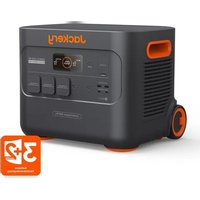
Jackery Explorer 160

Car Charger Cable

AC & AC charger Cable(2 Parts)

User Manual
Product Inspection
- Please kindly check if the one you get is the same as one you ordered.
- Please kindly check the appearance of the product first to see if there is damage or cracks.
- Please kindly test the power station to see if it can input or output well.
*Note: Charge first- before using your new Jackery Explorer 160, plug it into a suitable power outlet until it is fully charged.
PRODUCT INFO
Pic of Input & Output Ports
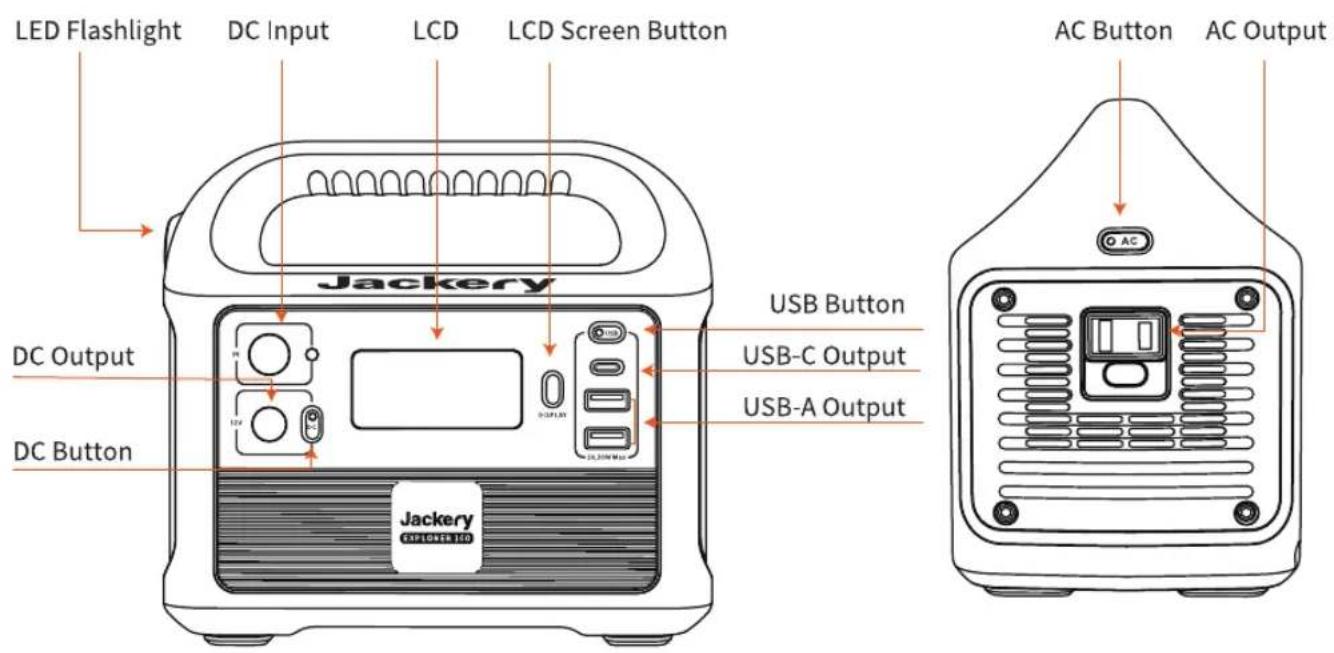
Specifications
 Capacity Capacity | 11.6Ah/14.4V(167Wh) |  Weight Weight | 1.8kg / 3.9lbs |  Dimensions Dimensions | 18.8 x 11.7 x 17.1cm7.4 x 4.6x 6.7in |
 DC Input DC Input | 12V==3.5A(Support 12-30V) |  AC Output AC Output | 110V~ 60Hz, 0.9A100W max continuous150W surge peak |  DC Output DC Output | 12V==7A |
 USB Output USB Output | 2 x USB-A Output: 5V==2.4AUSB-C Output: 5V==3A(30W max) |  Battery Battery | Lithium-ion |  Lifecycles Lifecycles | ≥ 500 |
 Management System Management System | Under voltage ProtectionOver voltage ProtectionOver current in Charge/Discharge ProtectionShort Circuit in Charge/ Discharge ProtectionOver temperature in Charge/Discharge ProtectionOvercharging Voltage Protection |  MPPT MPPT | SupportSolar Panel MPPTCharging |  Technical Support Technical Support | Lifetime |
 Certifications Certifications | RoHS UN38.3FC ⚫ WARNING |  Operating Temperature Operating Temperature | -10~40°C | [70K4]Recharging Temperature | 0~40°C |
HOW TO RECHARGE THE POWER STATION & RECHARGE TIMES
Before use or storage, plug your Explorer 160 into the wall until it is fully charged.
If the LCD screen shows less than 20% capacity, plug it into a power source, like an AC outlet or a solar panel, as soon as possible.
Recharge Time
| [8V/XT] Wall Charger | [4237] Car Charger | [1X/SD] 60W Solar Panels(Optional) | [5X/84] Electric Generator |
| Around 3 Hours | Around 5 Hours | Around 5 Hours(Depending on Weather) | Around 3 Hours |
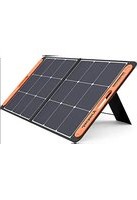
How to Use the Saga 60W to Charge the E160
Jackery recommends Best Match: Use one Jackery SolarSaga 60W solar panels to charge the E160.
Solar recharging steps:
A. Find the DC interface on the back of SolarSaga 60W;
B. Connect the DC interface of SolarSaga 60W with the DC input of Explorer 160.


hello@jackery.com
How to check the E160 is full charged?
The display screen shows 100% when fully recharged.
HOW TO USE THE POWER STATION?
Start use the Explorer 160
Power
LCD Screen Button

Press the power button to check the remaining battery.
AC Button / DC 12V Button / USB Button


Turn off each output by pressing its power button, also turn off as it will not turn off automatically or it will drain the battery out.
Note: For power saving, Explorer 160 portable power station will be turned off automatically in 6 hours when being drawn under 10W power.
© LCD Screen
Power Level Percentage
Check the battery level by pressing the display button before use. If battery is at a low level, charge first.LCD screen flickers around 10 times when the battery capacity drains to 20% to 10%.
Power of Input Output (W)
Please ensure that power consumption is less than 200W, then press the power button. If the Jackery Explorer's total output exceeds 200W, it will shut off.
Low & High Temperature Alarm
The E160 can power your devices at temperatures ranging from -10\~40°C. If your working temperature is outside this range, the unit may stop working.
Other
How to reset the Explorer 160
Please try to hold the display power button for 8s to reset the battery.
When should we need to reset the power station?
When the power station can't work properly, you can choose to reset the battery to trouble shoot.
Fan Operating Principle
E160 uses intelligent temperature control. When the AC is turned on, the fan does not turn on. Only when the temperature rises to a certain degree then the fan starts to turn on.
- Attention
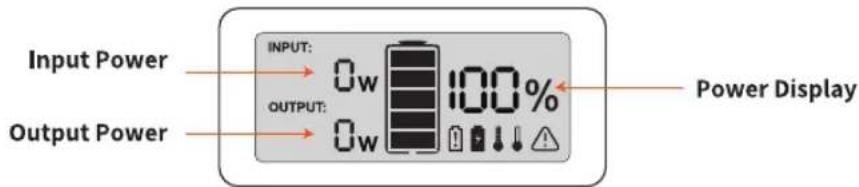
If you operate the power station in improper way, there will be appearing symbols on LCD screen.

Battery has been drain out
It shows that the battery has been drain out. Please kindly charge it to 100% and then use it.
A warming tip: It's suggested to recharge the battery before the power drops below 15%. Please don't drain out the battery.

Battery was overcharged
It shows that the battery was overcharged. Please try to hold the display power button for 8s to reset the battery and try to charge to see.

High Temperature

Low Temperature
It shows that the battery is used in a high or low temperature. Please charge, use and store the E160 within a ambient temperature 0-40°C (32-104°F).

Over-loaded
It shows that the power station is over-loaded, please kindly check the power of your device and hold the display power button for 8s to reset the battery and try to charge to see.
GIVE YOUR APPLIANCES MORE RUN TIME
Note: The running time of the E160 for the following equipment are tested in the laboratory, which has strict controls on temperature, the working hours can also be affected by many other factors. The actual working time = 167Wh* 0.85 / operating power of your device.
Charging
 |  |  | (WC32) | (8642) | |
| Drone (90W max) | Motion Camera (5W max) | 12” Mac book (30W) | Smartphone (18W max) | LED Light (5W) | |
| RUN TIME | About 3 Recharges | About 29 Recharges | About 2 Recharges | About 16 Recharges | About 14 Hours |
For inductive load devices:
• What is the inductive load device?
Inductive Loads, also called Lagging Loads or Inductive Load Banks or Inductive Reactive Loads or Power Factor Loads, are AC loads that are predominantly inductive in nature so that the alternating current lags behind the alternating voltage when the current flows into the load.
- The inductive load device has an instant start power when the it runs. Typically starting power is 3 times the amount of power to run the application.
- When you check if the E160 can run the device, please kindly check if there is an instant start power.
Troubleshooting
Problem With Input (AC/DC)
When the power station has something wrong with input by using AC charger cable :
- Check if the charger cable and the power station are reliably connected; whether the charger indicator light is on.
- Check if the original charger is used.
- Whether the charging indicator of the power station power supply is on and whether the screen displays the charging power.
- Please try to use the provided car charging cable to charge to see.
This troubleshooting is also fit for DC input failure.
Problem With Solar Charging
Using Jackery solar panel to charge the E160:
- Please kindly check if all connections are ok.
- Please use the provided AC charger to charge to see.
- Please use a soft cloth to remove the dust and dirt on the surface.
- Please test under midday strong sunlight. Connect the solar panel, make sure there is no shadow cast on the panel. You can unplug and plug for several times to see.
Using other brand solar panel to charge the E160:
- Please kindly check if all connections are ok.
- Please use the provided AC charger to charge to see.
- Please use a soft cloth to remove the dust and dirt on the surface.
- Please test under midday strong sunlight. Connect the solar panel, make sure there is no shadow cast on the panel. You can unplug and plug for several times to see. If E160 can be recharged by AC charger well, it shows that there is nothing wrong with the E160 and please check if there is a problem with the solar panel.
Problem with Output (AC/DC/USB)
When the power station has something wrong with AC/DC/USB Output, please try to hold the display power button for 8s to reset the battery and try to charge to see.
Problem With LCD Screen
If the LCD screen can't work, or the shown input or output number is inaccurate, please try to hold the display power button for 8s to reset the battery and try to charge to see.
Customer Support:
If there are some problems with the power station, please feel free to contact us at hello@jackery.com. Please send the messages according to the template to move forward your issue faster.
Amazon order number/ Web order number + issue + S/N code + Pictures / video if needed
Product Guidelines
- Please recharge it every 3-month to keep the battery power above 50% if you don't use it.
- It's suggested to recharge the battery before the power drops below 15%
- Only charge the E160 within a ambient temperature 0-40°C (32-104°F), discharge temperature is -10-40°C and Storage temperature is -20-45°C.
- Please keep the battery laid flat during use, charging, and store.
FAQ
Q1: What devices can Explorer 160 power?
A: Please note that the AC output port can only charge/power devices that operate at less than total 100 Watt.
Q2: Can the Explorer 160 be charged while using?
A: Yes, Explorer 160 supports pass-through charging. But we don't suggest, it will cause damage to battery life.
Q3: Can the E160 be used as UPS?
A: No, the E160 can't be used as UPS, need to press the power button to turn on the AC/USB /DC output, so it can't turn on and off automatically.
Q4: How to know the working times for my device?
A: Working time = 167Wh* 0.85 / operating power of your device.
Q5: Does Explorer 160 include a built-in MPPT controller?
A: All Jackery power stations have a built-in MPPT controller.
Q6: How do I know the E160 is charged?
A: To check the charge level of the Explorer 160, refer to the LCD Battery Display.
Q7: Can I keep this charged up by keeping it plugged in all the time in case of power outage?
A: Yes, you can keep the battery plugged in to charge. Keeping it plugged in won't cause damage to the battery.
Q8: Can I use it indoors?
A: Yes, the E160 is safe to use indoors.
Q9: Why it takes so long to charge the power station from 99% to 100%?
A: When the power station is charged at a low power (constant current stage), the charging power is the largest. With the increase of the power, the internal battery pack voltage of the energy storage gradually increases to the charging limit voltage and then enters the constant current stage (the charging power gradually decreases to full). In the later stage of charging, the charging power gradually decreases. Please kindly take a long time to charge to 100%.
Q10: Can I find any video about recharging the E160?
A: Please kindly check the video in the following instructions:
- Go to jackery.com
- Click the "Support", and then choose "FAQ"
- Check "Product Video".
Q11: Are the output ports regulated, and if so, which ones are regulated?
A: All output ports of Jackery power stations are regulated. The voltage won't change when the battery power decreases.
Q12: Can the battery inside be replaceable?
A: No, the batteries inside of Jackery power station can't be replaceable.
More questions, please kindly find the answer in the following way:
1.Go to jackery.com
2. Click the "Support", and then choose "FAQ"
WARRANTY
Note: We only provide the warranty for the buyer who purchased on Amazon (Jackery Inc) or Jackery website.
Limited Warranty
Jackery Inc. warrants to the original consumer purchaser that the Jackery product will be free from defects in workmanship and material under normal consumer use during the applicable warranty period identified in the 'Warranty Period' section below, subject to the exclusions set forth below.
This warranty statement sets forth Jackery's total and exclusive warranty obligation. We will not assume, nor authorize any person to assume for us, any other liability in connection with the sale of our products.
Warranty Period
The warranty period for Jackery power products is 24 months. In each case, the warranty period is measured starting on the date of purchase by the original consumer purchaser. The sales receipt from the first consumer purchase, or other reasonable documentary proof, is required in order to establish the start date of the warranty period.
Exchange
Jackery will replace (at Jackery's expense) any Jackery product that fails to operate during the applicable warranty period due to defect in workmanship or material. A replacement product assumes the remaining warranty of the original product.
Limited to Original Consumer Buyer
The warranty on Jackery's product is limited to the original consumer purchaser and is not transferable to any subsequent owner.
Exclusions
Jackery's warranty does not apply to:
- Misused, abused, modified, damaged by accident, or used for anything other than normal consumer use as authorized in Jackery's current product literature.
- Attempted repair by anyone other than an authorized facility
- Any product purchased through an online auction house.
- Jackery's warranty does not apply to the battery cell unless the battery cell is fully charged by you within seven days after you purchase the product and at least once every 3 months thereafter.
Customer Support : hello@jackery.com
To obtain warranty service, contact our customer service team at hello@jackery.com.
How to Register the Item and Get the Warranty?
- Go to jackery.com
- Click the "Support", and then choose "Register Product"
- Fill in the information form, and then submit
- You will get a 36 month warranty in total when you finished
CUSTOMER SUPPORT: hello@jackery.com

www.jackery.com

hello@jackery.com

1-888-502-2236 Mon-Fri 9:00AM - 6:00PM (PST)

jackeryinc

jackery.inc

jackeryusa

Jackery Inc.
- Product Inspection
- PRODUCT INFO
- HOW TO RECHARGE THE POWER STATION & RECHARGE TIMES
- Recharge Time
- How to Use the Saga 60W to Charge the E160
- HOW TO USE THE POWER STATION?
- © LCD Screen
- Power Level Percentage
- Power of Input Output (W)
- Low & High Temperature Alarm
- Other
- How to reset the Explorer 160
- When should we need to reset the power station?
- Fan Operating Principle
- - Attention
- Battery has been drain out
- Battery was overcharged
- High Temperature
- Low Temperature
- Over-loaded
- GIVE YOUR APPLIANCES MORE RUN TIME
- For inductive load devices:
- Troubleshooting
- Problem With Input (AC/DC)
- Problem With Solar Charging
- Problem with Output (AC/DC/USB)
- Problem With LCD Screen
- Customer Support:
- Product Guidelines
- FAQ
- WARRANTY
- Limited Warranty
- Warranty Period
- Exchange
- Limited to Original Consumer Buyer
- Exclusions
- How to Register the Item and Get the Warranty?
- CUSTOMER SUPPORT: hello@jackery.com
Brand : Jackery
Model : Explorer 160
Category : Generator