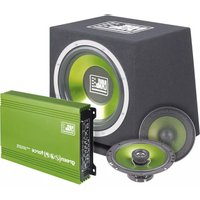
Green Force II - Car radio Raveland - Free user manual and instructions
Find the device manual for free Green Force II Raveland in PDF.




| Product type | Built-in HiFi module (amplifier, subwoofer, satellite speakers) |
| Brand | Raveland |
| Model | Green Force II (Power Package 2) |
| Category | Car radio (car audio amplification system) |
| Power supply | 12 V DC (vehicle electrical system, negative ground) |
| Output power (amplifier) | 4 x 250 W max |
| Speaker impedance | 2 ohms min (stereo), 4 ohms min (bridged) |
| Frequency response (amplifier) | 10 Hz – 50,000 Hz |
| Active crossover filter | Low pass 50-250 Hz, high pass 80-2000 Hz |
| Bass Boost | 0 / 6 / 12 dB (rear channels) |
| Subwoofer | 30 cm, bass reflex, impedance 4 Ω, power handling 500 W max, sensitivity 95 dB, dimensions 360x385x345 mm |
| Satellite speakers | 3-way system 165 mm, impedance 4 Ω, power handling 200 W max, sensitivity 91 dB, mounting diameter 156 mm, mounting depth 58 mm |
| Fuses | 2 flat blade fuses for car 20 A |
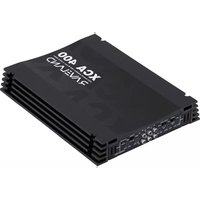
| Amplifier dimensions | 240 x 50 x 320 mm |
| Inputs | 4 RCA inputs (front + rear) |
| Outputs | 4 speaker outputs (front + rear, bridgeable) and RCA outputs for daisy chaining |
| Protections | Short circuit, overheating, turn-on delay |
| Installation | Amplifier in trunk or under seat, ventilation 5 cm around |
| Maintenance | Regular check of cables, casing; replace fuses with identical type |
| Compliance | National and European standards |
| Support contact | 0892 897 777 (France), 0848/80 12 88 (Switzerland) |
Frequently Asked Questions - Green Force II Raveland
User questions about Green Force II Raveland
0 question about this device. Answer the ones you know or ask your own.
Ask a new question about this device
Download the instructions for your Car radio in PDF format for free! Find your manual Green Force II - Raveland and take your electronic device back in hand. On this page are published all the documents necessary for the use of your device. Green Force II by Raveland.
USER MANUAL Green Force II Raveland
CONRAD IM INTERNET http://www.conrad.com

BEDIENUNGSANLEITUNG

NOTICE D'EMPLOI

OPERATING INSTRUCTIONS

GEBRUIKSAANWIJZING
Version 05/09

Impressum
© Copyright 2009 by Conrad Electronic SE.

Legal notice
These operating instructions are a publication by Conrad Electronic SE, Klaus-Conrad-Str. 1. D-92240 Hirschau (www.conrad.com). All rights including translation reserved. Reproduction by any method, e.g. photocopy, microfiling, or the capture in electronic data processing systems require the prior written approval by the editor. Roprinting, also in part, is prohibited.
These operating instructions represent the technical status at the time of printing. Changes in technology and equipment reserved.
© Copyright 2009 by Conrad Electronic SE.

Information légales
© Copyright 2009 by Conrad Electronic SE.

Colofon
© Copyright 2009 by Conrad Electronic SE.
01_0509_01

Raveland Power Package 2
Seite 2 - 21

Raveland Power Package 2
Page 22 - 41

Raveland Power Package 2
Page 42 - 61

Raveland Power Package 2
Pagina 62 - 81
natural_image
Technical diagram of a mechanical assembly with suspended components and mounting holes (no text or symbols)Table of contents GB
Page
- Introduction ...... 23
- Intended use 24
- Explanation of symbols 24
- Safety instructions 24
- Product description 26
- Connections and control elements ...... 27
- Mechanical installation 28
a) Amplifier 28
b) Subwoofer 29
c) Satellite loudspeakers 29
- Connecting the power supply 30
- Connecting the amplifier inputs 32
- Connecting the amplifier outputs ...... 33
a) Connecting the speaker inputs 33
b) Connecting the RCA outputs 34
- Operation 35
a) The active switch of the amplifier 35
b) The bass boost switch of the amplifier 36
c) Setting up the device 36
- Handling 37
- Maintenance 38
- Troubleshooting 39
- Disposal 40
- Specifications 41
1. Introduction
Dear Customer,
Thank you for purchasing this product.
This product complies with the national and European legal requirements. We kindly request the user to follow the operating instructions, to preserve this condition and to ensure safe operation!
These operating instructions relate to this product. They contain important information concerning commissioning and handling. Please bear this in mind when passing on the product to a third party. Keep these operating instructions for future reference!
All company names and product names are trademarks of the respective owner. All rights reserved.

Fon. +49 9604 / 40 88 80
Fax +49 9604/40 88 48
e-mail: tkb@conrad.de
Mon to Thurs 8.00am to 4.30pm
Fri 8.00am to 2.00pm
2. Intended use
The Raveland Power Package 2 is intended to amplify and play low-level audio signals in motor vehicles.
It may only be connected to the 12V direct current on-board supply system with the negative terminal of the battery connected to the car body. It may only be installed and used in cars with this on-board supply system.
The loudspeakers may only be connected to the loudspeaker outputs of audio devices.
Do not connect any of the devices to the 230 V mains supply.
When installing the components, the user has to ensure that they are protected against moisture and dampness.
Any use other than that described above can lead to damage to the components and also involves the risk of short-circuits, fire, electric shock etc.
The components may not be modified or converted. Do not open the casing!

Please note all safety instructions and installation notes in this manual!
3. Explanation of symbols

The exclamation mark symbol indicates that the user must read and observe these operating instructions before using the product.

The hand symbol indicates special tips and operating information.
4. Safety instructions

The guarantee/warranty will be void if damage is incurred resulting from non-compliance with the operating instructions. We assume no liability for any consequential damage!
Nor do we assume liability for damage to property or personal injury caused by improper use or failure to observe the safety instructions. In such cases the warranty is voided!
Dear Customer, the following safety instructions are intended not only for the protection of the device but also for the protection of your health. Please read through the following points attentively:

- The unauthorized conversion and/or modification of the product is inadmissible for safety and approval reasons.
- Anyone operating, installing, setting up, or servicing this set must be trained and qualified accordingly and observe these operating instructions.
- The device may only be powered by the 12 V DC vehicle power supply (with the negative terminal of the battery connected to the body of the vehicle). Never connect the amplifier to any other voltage supply.
- Make sure that the devices are put into operation properly. Observe these operating instructions.
- Never pour liquids on electrical devices and do not place any containers filled with liquids (e.g. vases) on them. This poses a serious risk of fire or electric shock. If such a case does occur, disconnect the power supply immediately and consult a specialist.
- Do not expose the devices to high temperatures, dripping or spray water, strong vibration or heavy mechanical stress.
- Do not place open sources of fire such as burning candles on the devices.
- Consult an expert when in doubt about the mode of operation, safety or connection of the devices.
- This product is not a toy and should be kept out of the reach of children! Children cannot judge the dangers involved when handling electrical devices.
- Do not leave packaging material lying around unattended. It may become a dangerous toy for children.
- Never leave the devices unsupervised during operation.
- Only use the devices in a moderate climate, and avoid a tropical environment.
- Also observe the safety and operating instructions of any other devices connected.
- Observe the additional safety instructions in each individual section of these instructions.
- If you are not sure about the correct connection or if questions arise which are not covered in these operating instructions, please do not hesitate to contact our technical support or another specialist.
5. Product description
The Raveland Power Package 2 consists of a high-performance amplifier, a subwoofer and a satellite loudspeaker system.
An additional car radio, preferably with a CD player or a CD changer, is enough to complete your car hi-fi system which you can further extend anytime.
The individual components have the following features:
Amplifier
•MOSFET switching power supply
• 4, 3 or 2-channel operation
- Bass boost circuit
- Protective circuit to prevent short-circuits at the loudspeaker outputs or overheating
• 2-ohm steady loudspeaker outputs
- Separately activatable active switch
- Remote-controlled via the car radio
- Switch-on delay to suppress noise when device is switched on
Subwoofer
- 30 cm subwoofer chassis
- Bass reflex system
- Casing with carpet lining
Satellite loudspeaker system
- 165 mm 2-way system with large membrane surface for a powerful bass
• High load capacity
6. Connections and control elements

(1) REAR HPF control
(3) REAR LPF control
(5) REAR GAIN control
(7) REAR OUT connection
(9) FRONT GAIN control
(11) FRONT HPF control
(13) PROTECTION indicator
(2) REAR frequency crossover switch
(4) SUPER BASS switch
(6) REAR IN connection
(8) FRONT IN connection
(10) FRONT frequency crossover switch
(12) POWER indicator

(14) Power terminal
(16) SPEAKER FRONT terminal
(15) FUSE (fuses)
(17) SPEAKER REAR terminal
7. Mechanical installation

Modifications to the vehicle necessary to install the amplifier, the loudspeakers or other components have to be carried out so that neither traffic safety nor the structural stability of the car is impaired. With many cars, the operating licence will lapse if a part of sheet metal is cut out.
If you are in doubt as to the place of installation, consult your car dealer.
As the amplifier generates heat, the place of installation must not be sensitive to heat.
To ensure proper ventilation, keep a distance of 5 cm around the casing of the amplifier. In addition, air circulation must not be obstructed by objects such as magazines, blankets, covers, or similar.
Before drilling attachment holes, make sure that no electric cables, brake lines, the fuel tank or similar are damaged.
When you use tools to install your car hi-fi components, observe the manufacturer's safety instructions.
When installing the car hi-fi system, bear in mind that torn-off pieces may pose a risk of accident. Therefore, fasten each part securely in a location where it will not pose a risk to the passengers.
a) Amplifier
Select a suitable place of installation for the amplifier.
A suitable place of installation has the following features:
• dry
• as dust-free as possible
- little vibration
- good air circulation
- an environment which is not sensitive to heat
The boot or the space under the seats are a good place of installation. Make sure that the car amplifier remains accessible so that it can be connected to the electrical system.

A suitable place of installation is the dividing wall between the boot and the cabin. Install the device so that the cooling fins of the casing are in a vertical position. This ensures better air circulation around the casing.
- Mark the screw holes at the place of installation. You can use the device as a stencil.
- Drill the screw holes.
- Screw the amplifier tight using suitable screws.
b) Subwoofer
- Attach the subwoofer with straps or similar fasteners. The fasteners must be designed to bear the load of the subwoofer in case of an emergency braking or an accident.
• The boot is a suitable place of installation.
c) Satellite loudspeakers
- Look for a suitable place of installation for the satellite loudspeakers.
- Make sure that the space behind the installation surface provides the required installation depth. If you install the loudspeakers in the door, consider the space required by the windows when they are completely lowered.
- The installation surface must be sturdy enough to provide a safe installation. In some cases, it can be reinforced with a wooden board or similar.
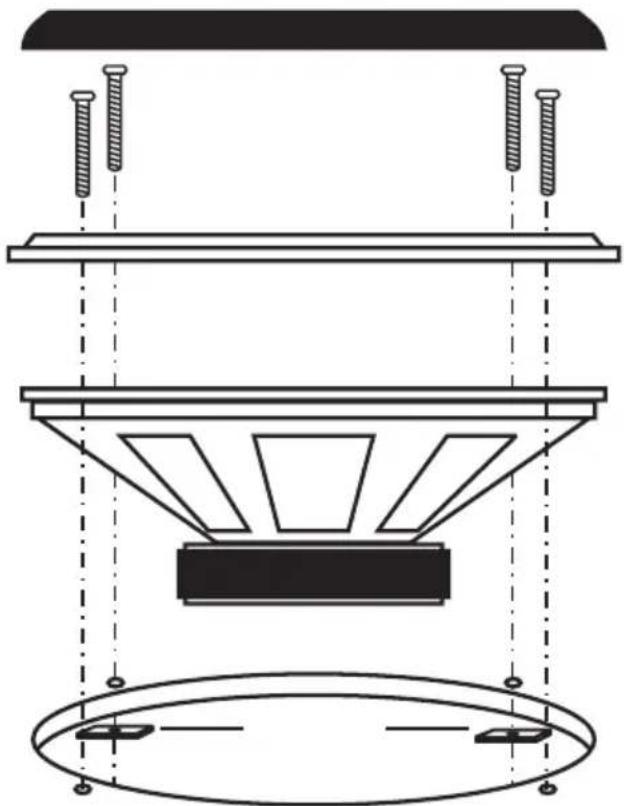
• After you have chosen the place of installation, cut out the installation openings for the loudspeakers.
Install the loudspeakers as illustrated below:
natural_image
Technical diagram of a mechanical or electrical component with suspended parts and mounting holes (no text or symbols)8. Connecting the power supply

The electrical connection should be done by a specialist.
To avoid short-circuits and any resulting damage to the device, the negative terminal (earth) of the car battery has to be disconnected when connecting the power supply.
Only connect the negative terminal of the battery, when you have connected the devices completely and have checked the connection.
You should only use a voltmeter or a diode test lamp for checking the voltage on the on-board cables as normal test lamps consume excessive currents and can thus damage the electrical system of the vehicle.
When installing the cables, make sure that they are not squeezed or worn by sharp edges. Use rubber grommets at cable feedthroughs.
In order to reduce parasitic induction of the generator or other electric installations of the vehicle, the amplifier should be directly powered by the car battery. No other electrical loads such as the fan, the windscreen washer etc. may be supplied with power by the same cable as the car amplifier.
Use connecting cables with a cross-section as big as possible when connecting the power supply and the earth of the amplifier. The required cross-section of the cable depends on the power requirement of the connected components (recommendation for sole operation of the set: 16 mm 2 ).
If the cross-section is too small, the cable might char through. Moreover, the increased resistance reduces performance unnecessarily.
An additional fuse for the positive connection of the amplifier is absolutely required (fuse holder is not included in delivery). The fuse should be placed as close as possible to the battery (max. distance 20 cm). In case of a short-circuit (e.g. if the connecting cable is worn through), the fuse will disconnect the positive line to avoid damage to the battery and prevent the supply cable from burning.
The strength of the fuse depends on the power consumption of the connected devices of the car hi-fi system.
- Connect the +12 V connection of the power terminal (14) directly to the positive terminal of the car battery.
- Connect the REM connection of the power terminal (14) to the remote control connection or the aerial control output of the car radio.

The amplifier will be switched on via this input if a voltage of +12 V is supplied.
Nowadays, most car radios are provided with such a control output which only carries +12V if the radio is switched on.
- Connect the GND connection of the power terminal (14) to the negative terminal (earth) of the battery or to the car body.

Caution! As the electrical conductivity is limited due to the increased use of gluing technology or coated metal parts, not every metal component is suited to function as an earthing point.

Distribute the power supply in a star-shaped way, i.e. the connections of the negative lines start from one point for all components of the car hi-fi system. This way of distributing the power supply avoids earth loops.
Connect the positive lines in the same way.

9. Connecting the amplifier inputs
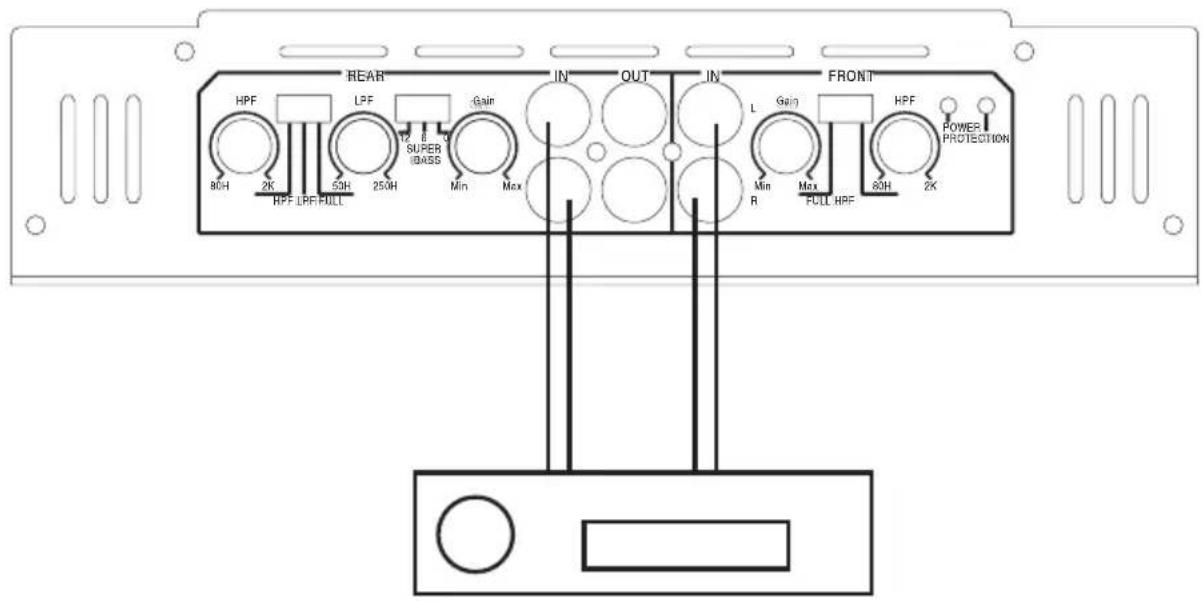
The amplifier is equipped with 6 RCA inputs to be connected to the car radio.
Car radios with RCA outputs can be directly connected to the input sockets. If your car radio is only equipped with loudspeaker outputs, a suitable audio frequency adapter is to be used for the connection.

For the connection of the RCA inputs, only use suitable shielded RCA cables. The use of other cables might cause interferences.
Keep the length of the RCA cables as short as possible.
Do not install the RCA cables close to other cables. This way, you can avoid interferences in the amplifier input.
To avoid distortions or mismatches that could damage the amplifier, the RCA inputs must only be connected to source devices equipped with RCA outputs. Also note the information under „Specifications“.
- Connect the RCA outputs of you car radio to the RCA inputs of the amplifier.
Rear outputs > REAR IN connection (6)
L = left input
R = right input
Front outputs > FRONT IN connection (8)
L = left input
R = right input
- If your car radio does not have 4 RCA outputs, please use a Y adapter.
10. Connecting the amplifier outputs
a) Connecting the speaker inputs
The car amplifier is equipped with for 4 loudspeaker outputs.
2 loudspeaker outputs each can also be used in mono-bridge mode to supply one loudspeaker. This, however, significantly increases the power output.
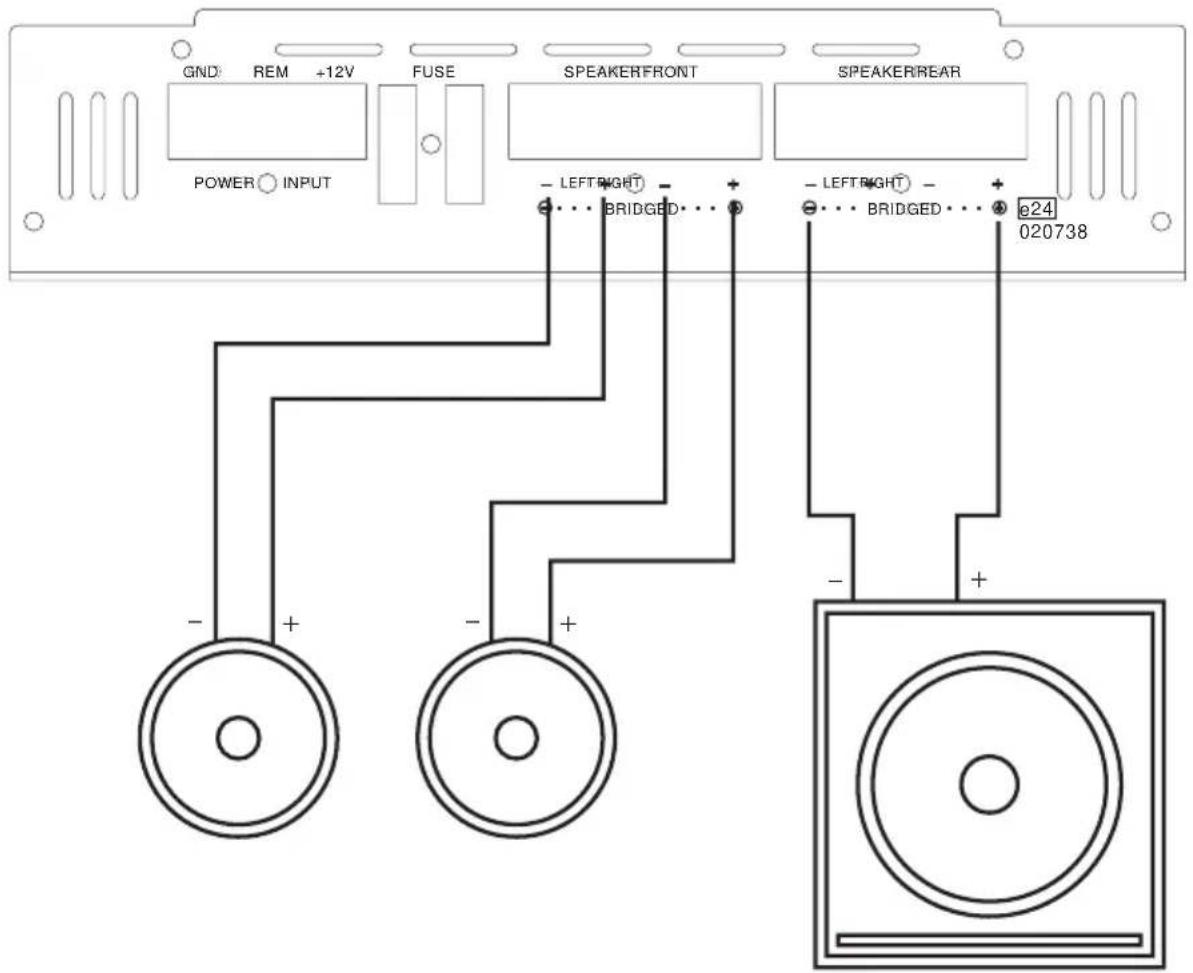
The satellite loudspeakers are connected in stereo mode, the subwoofer in mono-bridge mode (3-channel mode).

The loudspeakers must be connected using two-core cables. Insulate the bare wires at the connecting terminals. Make sure no cables are damaged by sharp edges.
Only use loudspeakers with sufficient capacity (see „Specifications“).
Make sure that the loudspeakers are connected with the correct polarity, i.e. plus and minus signs match!
The amplifier is designed for a loudspeaker impedance of at least 2 ohms (stereo mode) or 4 ohms (mono-bridge mode). Never connect loudspeakers with lower impedance.
- Connect the loudspeaker connections of the satellite loudspeakers to the SEAKER FRONT connection (16) on the amplifier.
Positive terminal of the left satellite loudspeaker > LEFT+ connection
Negative terminal of the left satellite loudspeaker > LEFT- connection
Positive terminal of the right satellite loudspeaker > RIGHT+ connection
Negative terminal of the right satellite loudspeaker > RIGHT- connection
- Connect the loudspeaker connection of the subwoofer to the SPEAKER REAR (17) connection on the amplifier.
Connection (+) of the subwoofer (red terminal) > BRIDGED+ connection
Connection (-) of the subwoofer (black terminal) > BRIDGED- connection
b) Connecting the RCA outputs
In addition to the loudspeaker outputs, the amplifier is equipped with RCA outputs to loop through the input signal to other components of the car hi-fi system without using adapters.
- Connect the REAR OUT (7) connection to the input of the downstream component.
Upper RCA socket > left input
Lower RCA socket > right input
11. Operation
a) The active switch of the amplifier
The amplifier is equipped with an active switch which allows you to switch a high-pass or a low-pass filter for the rear channels. One high-pass filter is provided for the front channels.
The separation frequencies can be adjusted continuously.
The REAR frequency crossover switch (2) influences the active switch for the rear loudspeaker outputs:
•FULL
If the active switch is switched off, the amplifier plays the complete frequency range.
• HPF
If the high-pass filter is switched on, the amplifier only plays the frequency range above the frequency set by the REAR HPF control (1).
• LPF
If the low-pass filter is switched on, the amplifier only plays the frequency range below the frequency set by the REAR LPF (3) control.
The FRONT frequency crossover switch (10) influences the active switch for the front loudspeaker outputs:
• FULL
If the active switch is switched off, the amplifier plays the complete frequency range.
• HPF
If the high-pass filter is switched on, the amplifier only plays the frequency range above the frequency set by the FRONT HPF control (11).
b) The bass boost switch of the amplifier
The amplifier is also equipped with a bass-boost switch for the rear channels to amplify the low-bass frequencies in two stages.
This option is especially useful to make smaller bass loudspeakers or subwoofers a little more voluminous in the low-bass range.
The SUPER BASS switch (4) controls low-bass amplification:
- Position „0“
Low-bass amplifier is switched off
- Position „6“
Low bass is amplified by 6 dB
- Position „12“
Low bass is amplified by 12 dB
c) Setting up the device
After connecting and checking the connections, you can start using the Raveland Power Package 2.
- When you have checked the cable connections, reconnect the negative terminal of the battery.
- Turn the REAR GAIN (5) and FRONT GAIN (9) controls anti-clockwise to minimum.
- Set the REAR frequency crossover switch (2) to LPF and put the REAR LPF control (3) in centre position. This way, the required deep-pass filter for the subwoofer is set.
- Set the FRONT frequency crossover switch (2) to HPF and set the FRONT HPF control (11) to about 100 Hz. This way, the required high-pass filter for the satellite loudspeakers is set.
- Set the SUPER BASS switch (4) to 0dB.
- Switch on your car radio. The POWER indicator (12) lights up. If the PROTECTION indicator (13) lights up, an error has occurred and the amplifier has to be switched off immediately. If this is the case, check all the connections and loudspeakers. If you cannot find the error, please consult a specialist.
- If the POWER indicator (12) lights up, set the volume of the car radio to about 75% of the maximum volume.
-
Now, use the FRONT GAIN control (9) to adjust the maximum volume of the satellite loudspeakers to a value acceptable to you. If you use several amplifiers, adjust the volumes of the various amplifiers to each other. Keep in mind that the maximum volume depends on the capacity of the loudspeakers and amplifier. Excessive volume can damage the loudspeakers and the amplifier. Overamplification can easily be heard by distortion.
-
Use the REAR GAIN control (5) to adjust the volume of the subwoofer to the volume of the satellite loudspeakers. The subwoofer should not blast or be audible separately. It should merely support the satellite loudspeakers in the deep-bass range. The volume ratio between the subwoofer and satellite loudspeakers can also be controlled later using the fader control of the car radio, provided that the car radio is equipped with four pre-amplifier outputs.
- Set a medium volume level with the volume control of the car radio. From now on, the total volume is only to be adjusted by the volume control of the car radio.
- For best sound results, you can slightly modify the set separation frequencies using the REAR LPF (3) and FRONT HPF (11) controls. Again, make sure that the bass is played cleanly. Also try swapping the polarity of the loudspeaker cables on the subwoofer. In many cases, swapping the phases can improve the sound of the bass (depending on the place of installation of the subwoofer).
- If the low bass is too weak, use the SUPER BASS switch (4) to activate the two-tier amplifier (see „The super bass switch of the amplifier“).
12. Handling
- If the volume inside your car is too high, you will not be able to hear acoustic warning signals. This constitutes a danger to yourself and other road users. Therefore, make sure the volume is at a suitable level.
- Inattentiveness in traffic may lead to serious accidents. Therefore, only operate the hi-fi system if the traffic situation permits this and if you are not distracted from traffic by operating the system.
- Do not keep any magnetic storage media such as disks, video tapes or similar close to the car loudspeaker as the magnetic field of the loudspeaker may destroy the information stored on the media.
- Do not listen to excessively loud music over an extended period of time. This may damage your hearing.
13. Maintenance
Regularly check the technical safety of the Raveland Power Package 2 e.g. for damage to the cables or the casing.
If it can be assumed that safe operation is no longer possible, the device must be turned off and precautions must be taken to ensure that it is not used unintentionally. Disconnect the on-board supply system!
It can be assumed that safe operation is no longer possible if:
•the devices show visible damage
• the devices no longer function or
• following considerable mechanical stress
Observe the following safety instructions before cleaning or servicing the amplifier:

Live components may be exposed if covers are opened or components are removed.
Before servicing or repairing the amplifier, it must be disconnected from all power sources.
Capacitors inside the device may still carry voltage even though they have been disconnected from all power sources.
Only qualified specialists familiar with the hazards involved and the relevant regulations may perform repairs.
If you have to replace the fuse, ensure that you only use fuses of the specified type and rated current (see „Specifications“).

Do not repair fuses or bridge the fuse holders.
- After disconnecting the power source (by disconnecting the on-board power supply!), carefully remove the fuses (FUSE) (15) from the fuse holders.
- Replace them with fuses of the same type.
- Only then should the amplifier be re-connected to the on-board system and put into operation.
14. Troubleshooting
By purchasing the Raveland Power Package 2, you have acquired a state-of-the-art product which operates reliably. Nevertheless, problems or malfunctions may occur. For this reason, the following is a description of how you can eliminate possible malfunctions yourself.

Please observe the safety instructions!
No function, the POWER indicator (12) does not light up:
• The GND connection of the power terminal (14) is not connected to the car body.
- The REM connection of the power terminal (14) is not connected to the aerial control output of the car radio.
- The connection +12V of the power terminal (14) is not supplied with +12 V.
- The fuses (FUSE) (15) of the amplifier or the fuse in the positive line is defective.
The POWER indicator (12) lights up, but there is no sound:
•The volume control of the car radio is set to minimum.
- The REAR GAIN (5)/FRONT GAIN (9) controls of the amplifier are set to minimum.
- The loudspeakers are not properly connected.
The PROTECTION indicator (13) lights up, but there is no sound:
- The short-circuit protection of the amplifier has been triggered due to a short-circuit at the loudspeaker output.
- The temperature protection of the amplifier has been triggered due to overheating of the amplifier. Allow the device to cool down.
One channel does not function:
- Check connections REAR IN (6)/FRONT IN (8).
- Check the connection of the loudspeakers to connecting terminals SPEAKER OUTPUT (16)/REAR (17).
- The balance control on the car radio is not in centre position.
There is background noise:
- The earthing cable is not connected properly. Remove any rust or paint from the contact surfaces.
- The earthing point of the car radio and of the amplifier are not on the same potential, try different earthing points.
- The cables of the amplifier are positioned too close to the cables for the ignition system of the vehicle.
- The ignition system is not shielded.
- The cables of the amplifier input are installed too close to the power supply cables.
The amplifier switches on and off during operation:
- The earthing cable does not have proper contact. The cable or the battery terminal might be corroded.
- The voltage supplied at the +12V connection of the power terminal (14) is too low, the cable or the battery terminal is corroded, the battery is weak.
- Loose contact of the remote cable, REM connection of power terminal (14) has a loose contact or is corroded.
No bass is audible:
• One loudspeaker is connected with reverse polarity.
- The bass control on the car radio is set to minimum.
- The active switch is not set correctly.
Mid-high-ranges are not played:
•The active switch is not set correctly.
- The high-range control of the car radio is set to minimum.

Repairs other than those described above should only be carried out by an authorised specialist.
15. Disposal

At the end of its service life, dispose of the product according to the relevant statutory regulations.
16. Specifications
Amplifier
Operating voltage: 12 V=
Fuses: 2 x 20A car flat fuse
Output power: 4 x 250 W max.
Frequency response: 10 - 50,000Hz
Separation frequencies: Low-pass 50 - 250 Hz
High-pass 80 - 2,000 Hz
Bass boost: 0 / 6 / 12 dB
Dimensions: 240 x 50 x 320 mm
Subwoofer
Load capacity: 500 W max.
Impedance: 4 ohm
Frequency range: 22 - 160 Hz
Acoustic pressure: 95 dB
Dimensions: 360 x 385 x 345 mm
Satellite loudspeakers
Load capacity: 200 W max.
Impedance: 4 ohm
Frequency range: 60 - 2,000 Hz
Acoustic pressure: 91 dB
Installation bolt circle: 156 mm
Installation depth: 58 mm
natural_image
Technical diagram of a mechanical or electrical component with suspended parts and mounting holes (no text or symbols)natural_image
Technical diagram of a mechanical or electrical component with suspended parts and mounting holes (no text or symbols)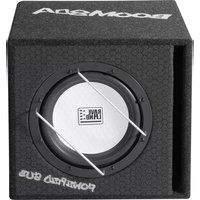

- CONRAD IM INTERNET http://www.conrad.com
- Impressum
- Legal notice
- Information légales
- Colofon
- Raveland Power Package 2
- Table of contents GB
- Page
- Introduction
- Intended use
- Explanation of symbols
- Safety instructions
- Product description
- Amplifier
- Subwoofer
- Satellite loudspeaker system
- Connections and control elements
- Mechanical installation
- a) Amplifier
- b) Subwoofer
- c) Satellite loudspeakers
- Connecting the power supply
- Connecting the amplifier inputs
- Connecting the amplifier outputs
- a) Connecting the speaker inputs
- b) Connecting the RCA outputs
- Operation
- a) The active switch of the amplifier
- b) The bass boost switch of the amplifier
- c) Setting up the device
- Handling
- Maintenance
- Troubleshooting
- Please observe the safety instructions!
- No function, the POWER indicator (12) does not light up:
- The POWER indicator (12) lights up, but there is no sound:
- The PROTECTION indicator (13) lights up, but there is no sound:
- One channel does not function:
- There is background noise:
- The amplifier switches on and off during operation:
- No bass is audible:
- Mid-high-ranges are not played:
- Disposal
- Specifications
- Satellite loudspeakers
Brand : Raveland
Model : Green Force II
Category : Car radio