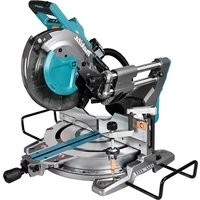
LS004G - Electric saw MAKITA - Free user manual and instructions
Find the device manual for free LS004G MAKITA in PDF.




| Product Type | Cordless compound miter saw |
| Brand | Makita |
| Model | LS004G |
| Blade diameter (Europe) | 260 mm |
| Blade diameter (outside Europe) | 255 mm - 260 mm |
| Arbor diameter (Europe) | 30 mm |
| Max. kerf thickness | 3.2 mm |
| Max. miter angle | 60° left and right |
| Max. bevel angle | 48° left and right |
| No load speed | 3,600 rpm |
| Dimensions (L x W x H) | 805 mm x 644 mm x 660 mm |
| Rated voltage | 36 V - 40 V DC max. |
| Net weight | 26.6 - 27.8 kg |
| Compatible battery | BL4020 / BL4025 / BL4040 / BL4040F / BL4050F / BL4080F |
| Compatible charger | DC40RA / DC40RB / DC40RC / DC40WA / BCC01 / BCC02 |
| Main functions | Press cut, sliding cut (push), miter cut, bevel cut, compound cut, molding cut |
| Standard equipment | Blade guard, upper and lower guides, vertical vise, support bars, dust bag, hex wrench |
| Electronic functions | Electric brake, constant speed control, soft start, LED light |
| Safety | Blade guard, lock-off brake, arbor lock, battery protection system (overload, overheating, discharge) |
| Maintenance and cleaning | Clean the blade guard and LED light lens regularly with a damp cloth; lubricate sliding parts with machine oil |
| Spare parts and repairability | Use only genuine Makita parts; any repair must be carried out by a Makita authorized service center |
| General information | Saw designed for wood, aluminum and similar materials; professional use; quality manufacturing |
Frequently Asked Questions - LS004G MAKITA
User questions about LS004G MAKITA
0 question about this device. Answer the ones you know or ask your own.
Ask a new question about this device
Download the instructions for your Electric saw in PDF format for free! Find your manual LS004G - MAKITA and take your electronic device back in hand. On this page are published all the documents necessary for the use of your device. LS004G by MAKITA.
USER MANUAL LS004G MAKITA
natural_image
Technical line drawing of a mechanical surveying instrument with no visible text or symbols
natural_image
Technical illustration of a mechanical device with hands operating it, featuring a no-smoking symbol (no text or labels present)




natural_image
Mechanical assembly diagram showing a rotating component with labeled parts (no text or symbols beyond label)

natural_image
Mechanical assembly diagram showing a clamping mechanism with directional arrows (no text or symbols)




natural_image
Mechanical assembly diagram showing a rotating component with a circular motion arrow, labeled Fig.28 (no text or symbols on the diagram itself)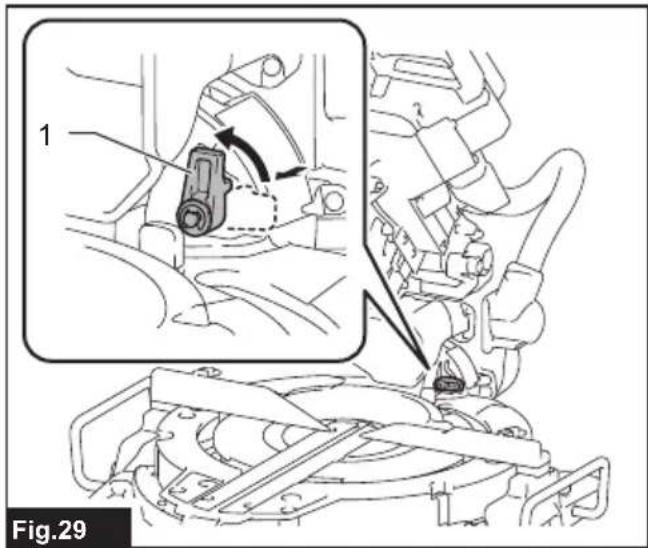




natural_image
Technical line drawing of a mechanical assembly with no visible text or symbols




natural_image
Technical line drawing of a cylindrical object with a ruler and directional arrow, labeled Fig.47 (no text or symbols on the object itself)
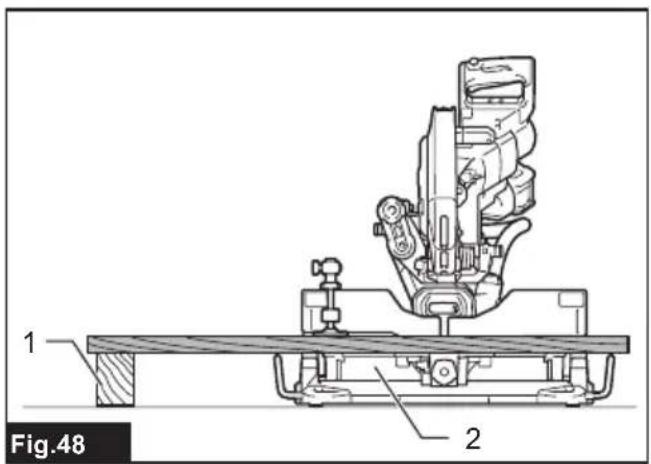

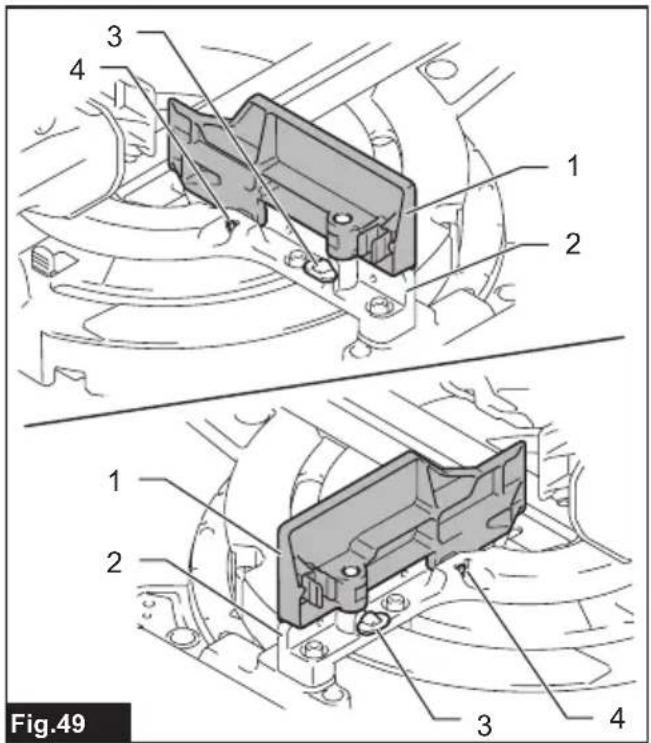


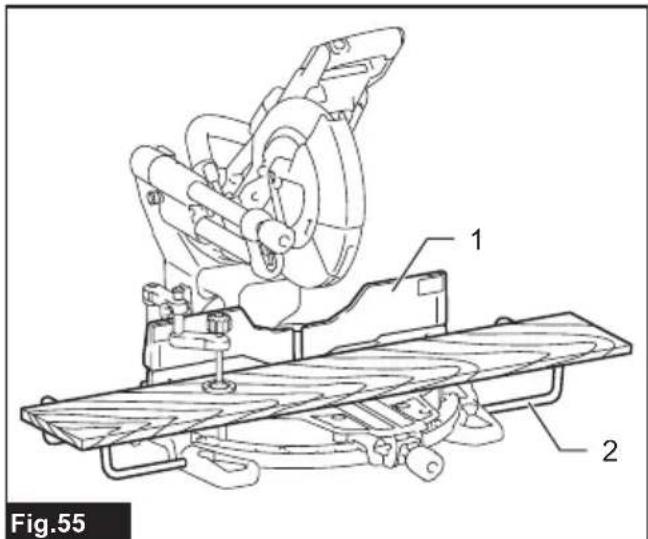

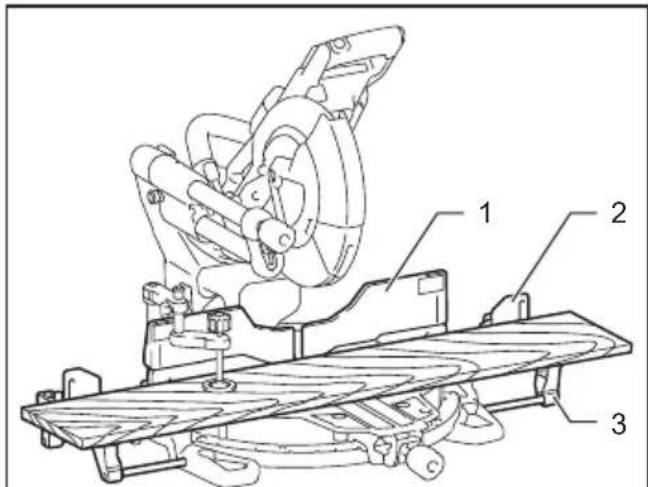
Fig.57
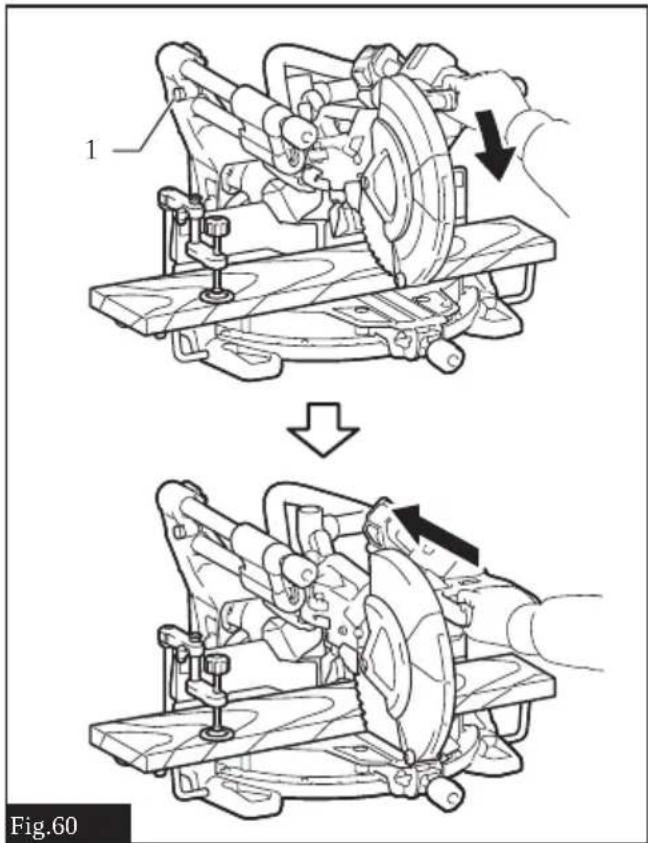

Fig.58

natural_image
Mechanical assembly diagram showing a hand operating a motor with a gear shift indicator (no text or symbols present)
Fig.59


natural_image
Diagram of a structural cross-section with layered material and water flow, labeled 'Fig.68' (no text or symbols within the diagram itself)
natural_image
Technical line drawing of a mechanical assembly with two circular insets showing internal components (no text or symbols)
natural_image
Diagram of a hand operating a vacuum cleaner connected to a mechanical device, showing motion lines (no text or symbols)
natural_image
Technical line drawing of a mechanical component with an arrow indicating rotation or assembly (no text or symbols present)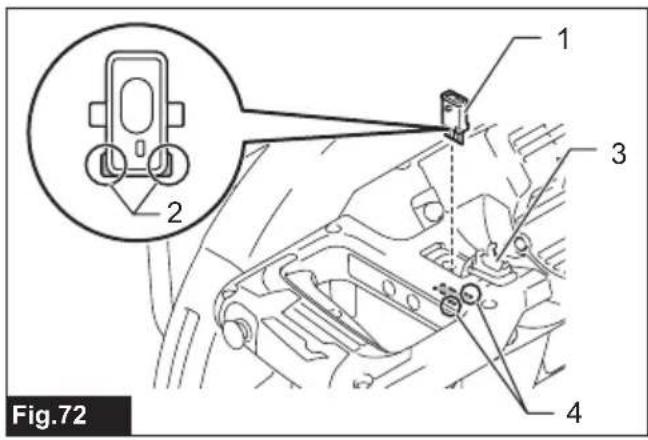
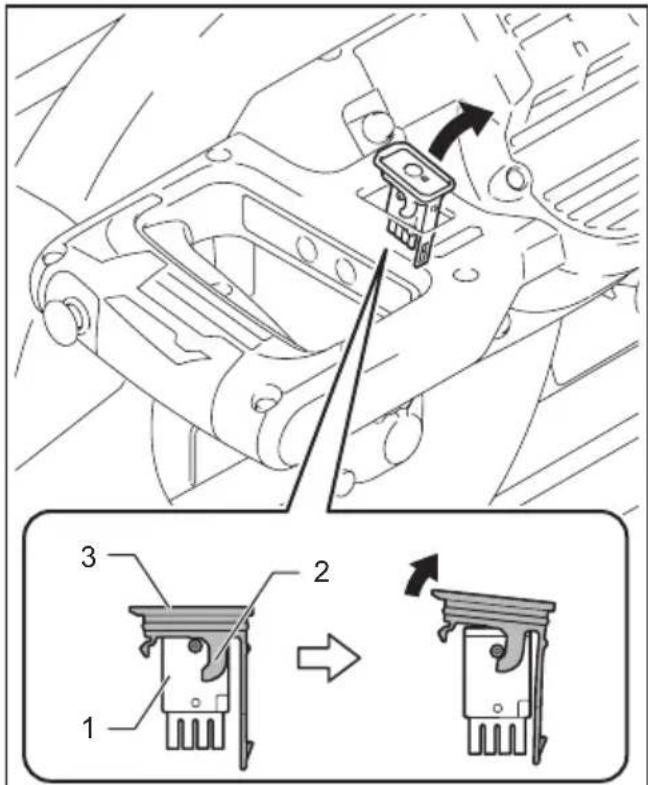
Fig.73


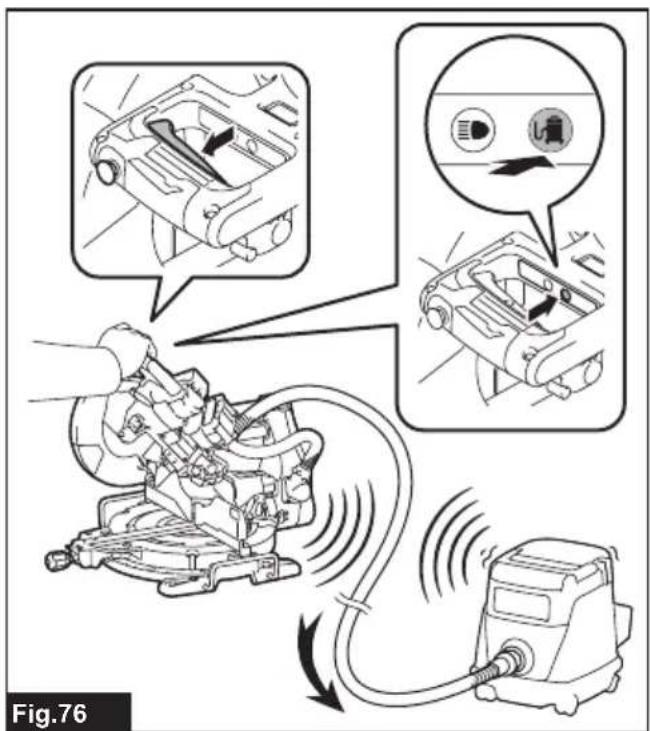



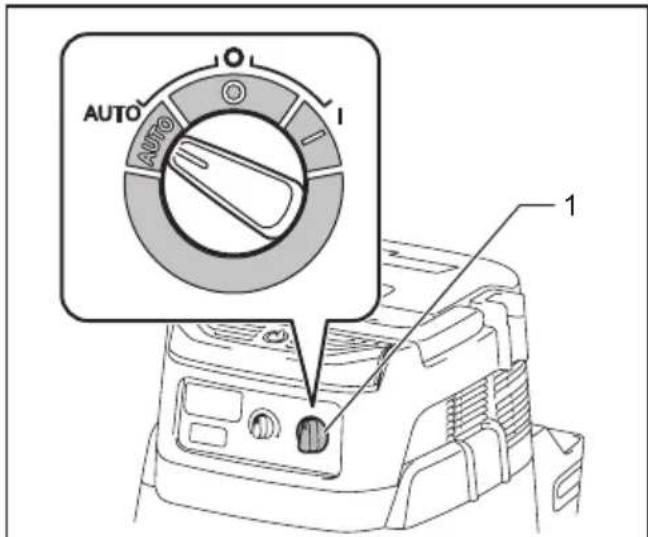
Fig.81

Fig.84
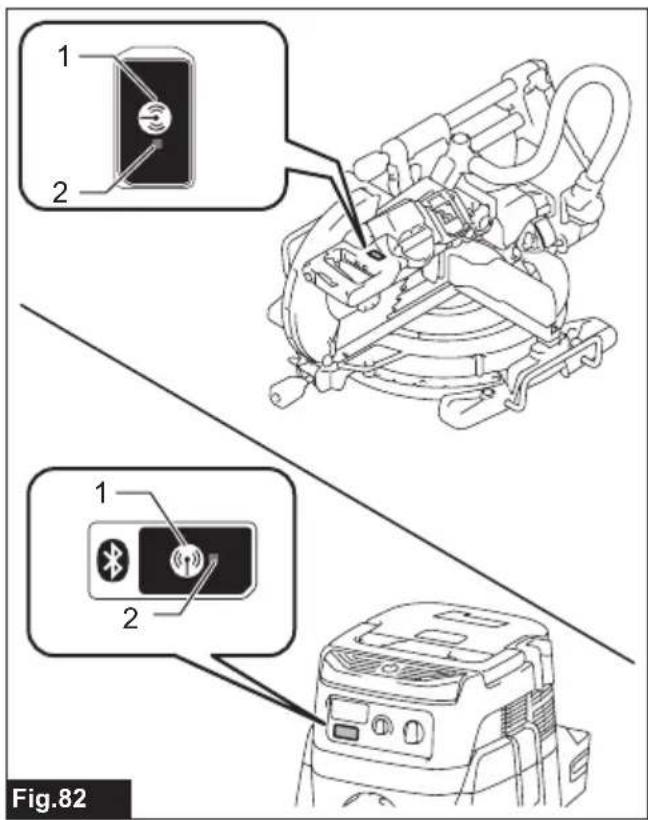

Fig.85

Fig.83

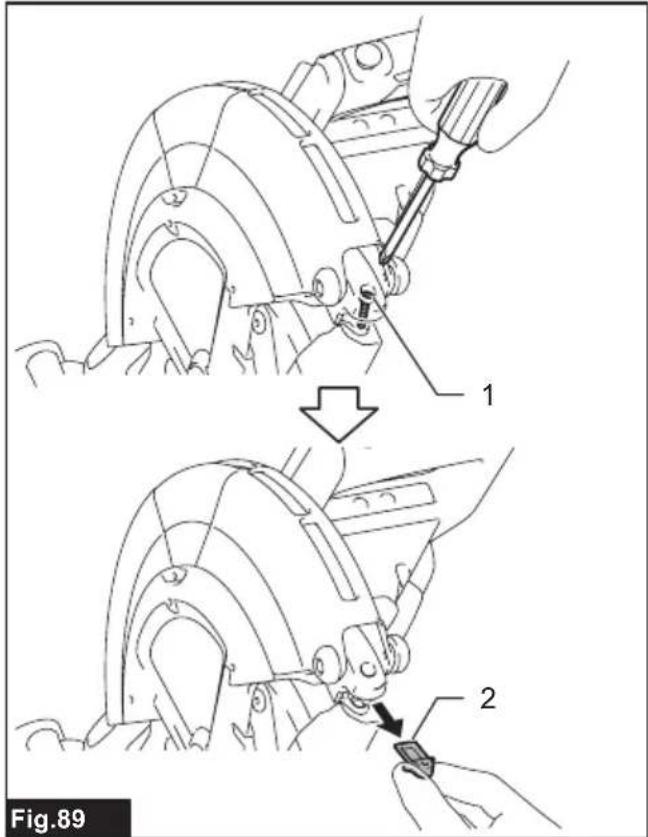
Fig.86


SPECIFICATIONS
| Model: LS004G | ||
| Blade diameter European countries | es 260 mm | |
| Countries other than Europe 255 | mm - 260 mm | |
| Hole diameter European countries | es 30 mm | |
| Countries other than Europe (country specific) | 15.88 mm / 25.4 mm / 30 mm | |
| Max. kerf thickness of the saw blade 3.2 mm | ||
| Max. miter angle Right 60°, Left 60° | ||
| Max. bevel angle Right 48°, Left 48° | ||
| No load speed (RPM) 3,600 min | -1 | |
| Dimensions (L x W x H) 805 mm x 644 mm x 660 mm | ||
| Rated voltage D.C. 36 V - 40 V max | ||
| Net weight 26.6 - 27.8 kg | ||
Cutting capacities (H x W)
| Miter angle | Bevel angle | ||
| 45° (left) | 0° | 45° (right) | |
| 0° | 42 mm x 310 mm58 mm x 279 mm | 68 mm x 310 mm91 mm x 279 mm | 29 mm x 310 mm43 mm x 279 mm |
| 45° (right and left) | 42 mm x 218 mm58 mm x 197 mm | 68 mm x 218 mm91 mm x 197 mm | 29 mm x 218 mm43 mm x 197 mm |
| 60° (right and left) | - | 68 mm x 155 mm91 mm x 139 mm | - |
Cutting capacities for special cuttings
| Type of cutting | Cutting capacity |
| Crown molding 45° type(with crown molding stopper used) | 168 mm |
| Base board(with horizontal vise used) | 133 mm |
• Due to our continuing program of research and development, the specifications herein are subject to change without notice.
• Specifications may differ from country to country.
- The net weight value includes the lightest and heaviest combination of the attachment(s) for normal and safe use and battery cartridge(s) which are specified in the instruction manual.
Applicable battery cartridge and charger
| Battery cartridge | BL4020 / BL4025 / BL4040* / BL4040F* / BL4050F* / BL4080F* * : Recommended battery |
| Charger DC40RA / DC40RB / DC40RC / DC40WA / BCC01 / BCC02 |
• Some of the battery cartridges and chargers listed above may not be available depending on your region of residence.

WARNING: Only use the battery cartridges and chargers listed above. Use of any other battery cartridges and chargers may cause injury and/or fire.
Symbols
The followings show the symbols which may be used for the equipment. Be sure that you understand their meaning before use.

Read instruction manual.
 | Wear eye protection. |
 | To avoid injury from flying debris, keep holding the saw head down, after making cuts, until the blade has come to a complete stop. |
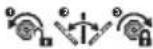 | When performing bevel cut, first turn the knob counterclockwise and then tilt the carriage. After that, turn the knob clockwise to tighten. |
 | When performing slide cut, first pull car-riage fully and press down handle, then push carriage toward the guide fence. |
 | Hold down the releasing button when tilting the carriage to the right. |
 | Engage the stopper lever when cutting a base board in 45° miter angle. |
 | Do not place hand or fingers close to the blade. |
 | Do not stare at operating lamp. |
 | A: Blade diameterB: Hole diameter |
 | Do not install the horizontal vise to the same direction as the miter cutting. (This symbol is applied on the horizontal vise) |
 Ni-MHLi-Ion Ni-MHLi-Ion | Only for EU countriesDue to the presence of hazardous com-ponents in the equipment, waste electrical and electronic equipment, accumulators and batteries may have a negative impact on the environment and human health.Do not dispose of electrical and electronic appliances or batteries with household waste!In accordance with the European Directive on waste electrical and electronic equip-ment and on accumulators and batteries and waste accumulators and batteries, as well as their adaptation to national law, waste electrical equipment, batteries and accumulators should be stored separately and delivered to a separate collection point for municipal waste, operating in accor-dance with the regulations on environmen-tal protection.This is indicated by the symbol of the crossed-out wheeled bin placed on the equipment. |
Intended use
The tool is intended for accurate straight and miter cutting in wood. With appropriate saw blades, aluminum can also be sawed.
Do not use the saw to cut other than wood, aluminum or similar materials.
Noise
The typical A-weighted noise level determined according to EN62841-3-9:
Sound pressure level ( LpA ): 91 dB (A)
Sound power level ( LWA ): 100 dB (A)
Uncertainty (K) : 3 dB (A)
NOTE: The declared noise emission value(s) has been measured in accordance with a standard test method and may be used for comparing one tool with another.
NOTE: The declared noise emission value(s) can also be used in a preliminary assessment of exposure.
WARNING: Wear ear protection.
⚠ WARNING: The noise emission during actual use of the power tool can differ from the declared total value(s) depending on the ways in which the tool is used.
⚠ WARNING: Be sure to identify safety measures to protect the operator that are based on an estimation of exposure in the actual conditions of use (taking account of all parts of the operating cycle such as the times when the tool is switched off and when it is running idle in addition to the trigger time).
Declarations of Conformity
For European countries only
The EU Declaration of Conformity can be accessed from the following URL.

https://support.makita.biz/doc/doc_index.html
For the UK
The Declaration of conformity is included in Annex A to this instruction manual.
SAFETY WARNINGS
General power tool safety warnings
⚠ WARNING Read all safety warnings, instructions, illustrations and specifications provided with this power tool. Failure to follow all instructions listed below may result in electric shock, fire and/or serious injury.
Save all warnings and instructions for future reference.
The term "power tool" in the warnings refers to your mains-operated (corded) power tool or battery-operated (cordless) power tool.
Safety instructions for mitre saws
- Mitre saws are intended to cut wood or wood-like products, they cannot be used with abrasive cut-off wheels for cutting ferrous material
such as bars, rods, studs, etc. Abrasive dust causes moving parts such as the lower guard to jam. Sparks from abrasive cutting will burn the lower guard, the kerf insert and other plastic parts.
- Use clamps to support the workpiece whenever possible. If supporting the workpiece by hand, you must always keep your hand at least 100 mm from either side of the saw blade. Do not use this saw to cut pieces that are too small to be securely clamped or held by hand. If your hand is placed too close to the saw blade, there is an increased risk of injury from blade contact.
- The workpiece must be stationary and clamped or held against both the fence and the table. Do not feed the workpiece into the blade or cut "freehand" in any way. Unrestrained or moving workpieces could be thrown at high speeds, causing injury.
- Push the saw through the workpiece. Do not pull the saw through the workpiece. To make a cut, raise the saw head and pull it out over the workpiece without cutting, start the motor, press the saw head down and push the saw through the workpiece. Cutting on the pull stroke is likely to cause the saw blade to climb on top of the workpiece and violently throw the blade assembly towards the operator.
- Never cross your hand over the intended line of cutting either in front or behind the saw blade. Supporting the workpiece "cross handed" i.e. holding the workpiece to the right of the saw blade with your left hand or vice versa is very dangerous.
▶ Fig.1
- Do not reach behind the fence with either hand closer than 100 mm from either side of the saw blade, to remove wood scraps, or for any other reason while the blade is spinning. The proximity of the spinning saw blade to your hand may not be obvious and you may be seriously injured.
- Inspect your workpiece before cutting. If the workpiece is bowed or warped, clamp it with the outside bowed face toward the fence. Always make certain that there is no gap between the workpiece, fence and table along the line of the cut. Bent or warped workpieces can twist or shift and may cause binding on the spinning saw blade while cutting. There should be no nails or foreign objects in the workpiece.
- Do not use the saw until the table is clear of all tools, wood scraps, etc., except for the work-piece. Small debris or loose pieces of wood or other objects that contact the revolving blade can be thrown with high speed.
- Cut only one workpiece at a time. Stacked multiple workpieces cannot be adequately clamped or braced and may bind on the blade or shift during cutting.
- Ensure the mitre saw is mounted or placed on a level, firm work surface before use. A level and firm work surface reduces the risk of the mitre saw becoming unstable.
- Plan your work. Every time you change the bevel or mitre angle setting, make sure the
adjustable fence is set correctly to support the workpiece and will not interfere with the blade or the guarding system. Without turning the tool "ON" and with no workpiece on the table, move the saw blade through a complete simulated cut to assure there will be no interference or danger of cutting the fence.
- Provide adequate support such as table extensions, saw horses, etc. for a workpiece that is wider or longer than the table top. Workpieces longer or wider than the mitre saw table can tip if not securely supported. If the cut-off piece or workpiece tips, it can lift the lower guard or be thrown by the spinning blade.
- Do not use another person as a substitute for a table extension or as additional support. Unstable support for the workpiece can cause the blade to bind or the workpiece to shift during the cutting operation pulling you and the helper into the spinning blade.
- The cut-off piece must not be jammed or pressed by any means against the spinning saw blade. If confined, i.e. using length stops, the cut-off piece could get wedged against the blade and thrown violently.
- Always use a clamp or a fixture designed to properly support round material such as rods or tubing. Rods have a tendency to roll while being cut, causing the blade to "bite" and pull the work with your hand into the blade.
- Let the blade reach full speed before contacting the workpiece. This will reduce the risk of the workpiece being thrown.
- If the workpiece or blade becomes jammed, turn the mitre saw off. Wait for all moving parts to stop and disconnect the plug from the power source and/or remove the battery pack. Then work to free the jammed material. Continued sawing with a jammed workpiece could cause loss of control or damage to the mitre saw.
- After finishing the cut, release the switch, hold the saw head down and wait for the blade to stop before removing the cut-off piece. Reaching with your hand near the coasting blade is dangerous.
- Hold the handle firmly when making an incomplete cut or when releasing the switch before the saw head is completely in the down position. The braking action of the saw may cause the saw head to be suddenly pulled downward, causing a risk of injury.
- Only use the saw blade with the diameter that is marked on the tool or specified in the manual. Use of an incorrectly sized blade may affect the proper guarding of the blade or guard operation which could result in serious personal injury.
- Only use the saw blades that are marked with a speed equal or higher than the speed marked on the tool.
- Do not use the saw to cut other than wood, aluminum or similar materials.
- (For European countries only) Always use the blade which conforms to EN847-1.
Additional instructions
-
Make workshop kid proof with padlocks.
-
Never stand on the tool. Serious injury could occur if the tool is tipped or if the cutting tool is unintentionally contacted.
-
Never leave the tool running unattended. Turn the power off. Do not leave tool until it comes to a complete stop.
-
Do not operate saw without guards in place. Check blade guard for proper closing before each use. Do not operate saw if blade guard does not move freely and close instantly. Never clamp or tie the blade guard into the open position.
-
Keep hands out of path of saw blade. Avoid contact with any coasting blade. It can still cause severe injury.
-
To reduce the risk of injury, return carriage to the full rear position after each crosscut operation.
-
Always secure all moving portions before carrying the tool.
-
Stopper pin or stopper lever which locks the saw head down is for carrying and storage purposes only and not for any cutting operations.
-
Check the blade carefully for cracks or damage before operation. Replace cracked or damaged blade immediately. Gum and wood pitch hardened on blades slows saw and increases potential for kickback. Keep blade clean by first removing it from tool, then cleaning it with gum and pitch remover, hot water or kerosene. Never use gasoline to clean blade.
-
While making a slide cut, KICKBACK can occur. KICKBACK occurs when the blade binds in the workpiece during a cutting operation and the saw blade is driven rapidly towards the operator. Loss of control and serious personal injury can result. If blade begins to bind during a cutting operation, do not continue to cut and release switch immediately.
-
Use only flanges specified for this tool.
-
Be careful not to damage the arbor, flanges (especially the installing surface) or bolt. Damage to these parts could result in blade breakage.
-
Make sure that the turn base is properly secured so it will not move during operation. Use the holes in the base to fasten the saw to a stable work platform or bench. NEVER use tool where operator positioning would be awkward.
-
Make sure the shaft lock is released before the switch is turned on.
-
Be sure that the blade does not contact the turn base in the lowest position.
-
Hold the handle firmly. Be aware that the saw moves up or down slightly during start-up and stopping.
-
Make sure the blade is not contacting the workpiece before the switch is turned on.
-
Before using the tool on an actual workpiece, let it run for a while. Watch for vibration or wobbling that could indicate poor installation or a poorly balanced blade.
-
Stop operation immediately if you notice anything abnormal.
-
Do not attempt to lock the trigger in the "ON" position.
-
Always use accessories recommended in this manual. Use of improper accessories such as abrasive wheels may cause an injury.
-
Some material contains chemicals which may be toxic. Take caution to prevent dust inhalation and skin contact. Follow material supplier safety data.
-
Do not use a corded power supply with this tool.
Additional safety rules for operating lamp
- Do not look in the light or see the source of light directly.
SAVE THESE INSTRUCTIONS.
WARNING: DO NOT let comfort or familiarity with product (gained from repeated use) replace strict adherence to safety rules for the subject product. MISUSE or failure to follow the safety rules stated in this instruction manual may cause serious personal injury.
Important safety instructions for battery cartridge
-
Before using battery cartridge, read all instructions and cautionary markings on (1) battery charger, (2) battery, and (3) product using battery.
-
Do not disassemble or tamper with the battery cartridge. It may result in a fire, excessive heat, or explosion.
-
If operating time has become excessively shorter, stop operating immediately. It may result in a risk of overheating, possible burns and even an explosion.
-
If electrolyte gets into your eyes, rinse them out with clear water and seek medical attention right away. It may result in loss of your eyesight.
-
Do not short the battery cartridge:
(1) Do not touch the terminals with any conductive material.
(2) Avoid storing battery cartridge in a container with other metal objects such as nails, coins, etc.
(3) Do not expose battery cartridge to water or rain.
A battery short can cause a large current flow, overheating, possible burns and even a breakdown.
- Do not store and use the tool and battery cartridge in locations where the temperature may reach or exceed 50 °C (122 °F).
- Do not incinerate the battery cartridge even if it is severely damaged or is completely worn out. The battery cartridge can explode in a fire.
- Do not nail, cut, crush, throw, drop the battery cartridge, or hit against a hard object to the battery cartridge. Such conduct may result in a
fire, excessive heat, or explosion.
-
Do not use a damaged battery.
-
The contained lithium-ion batteries are subject to the Dangerous Goods Legislation requirements.
For commercial transports e.g. by third parties, forwarding agents, special requirement on packaging and labeling must be observed.
For preparation of the item being shipped, consulting an expert for hazardous material is required.
Please also observe possibly more detailed national regulations.
Tape or mask off open contacts and pack up the battery in such a manner that it cannot move around in the packaging.
-
When disposing the battery cartridge, remove it from the tool and dispose of it in a safe place. Follow your local regulations relating to disposal of battery.
-
Use the batteries only with the products specified by Makita. Installing the batteries to non-compliant products may result in a fire, excessive heat, explosion, or leak of electrolyte.
-
If the tool is not used for a long period of time, the battery must be removed from the tool.
-
During and after use, the battery cartridge may take on heat which can cause burns or low temperature burns. Pay attention to the handling of hot battery cartridges.
-
Do not touch the terminal of the tool immediately after use as it may get hot enough to cause burns.
-
Do not allow chips, dust, or soil stuck into the terminals, holes, and grooves of the battery cartridge. It may cause heating, catching fire, burst and malfunction of the tool or battery cartridge, resulting in burns or personal injury.
-
Unless the tool supports the use near high-voltage electrical power lines, do not use the battery cartridge near high-voltage electrical power lines. It may result in a malfunction or breakdown of the tool or battery cartridge.
-
Keep the battery away from children.
SAVE THESE INSTRUCTIONS.
⚠️CAUTION: Only use genuine Makita batteries. Use of non-genuine Makita batteries, or batteries that have been altered, may result in the battery bursting causing fires, personal injury and damage. It will also void the Makita warranty for the Makita tool and charger.
NOTICE: Makita is not responsible for any accidents resulting from the use of non-genuine Makita batteries or batteries that have been modified. Genuine Makita batteries have been rigorously evaluated for compatibility with Makita tools and chargers, in line with applicable legislation and safety standards.
Tips for maintaining maximum battery life
- Charge the battery cartridge before completely discharged. Always stop tool operation and charge the battery cartridge when you notice
less tool power.
- Never recharge a fully charged battery cartridge. Overcharging shortens the battery service life.
- Charge the battery cartridge with room temperature at 10\ °C - 40\ °C ( 50\ °F - 104\ °F ). Let a hot battery cartridge cool down before charging it.
- When not using the battery cartridge, remove it from the tool or the charger.
- Charge the battery cartridge if you do not use it for a long period (more than six months).
Important safety instructions for wireless unit
- Do not disassemble or tamper with the wireless unit.
- Keep the wireless unit away from young children. If accidentally swallowed, seek medical attention immediately.
- Use the wireless unit only with Makita tools.
- Do not expose the wireless unit to rain or wet conditions.
- Do not use the wireless unit in places where the temperature exceeds 50\ °C ( 122\ °F ).
- Do not operate the wireless unit in places where medical instruments, such as heart pace makers are nearby.
- Do not operate the wireless unit in places where automated devices are nearby. If operated, automated devices may develop malfunction or error.
- Do not operate the wireless unit in places under high temperature or places where static electricity or electrical noise could be generated.
- The wireless unit can produce electromagnetic fields (EMF) but they are not harmful to the user.
- The wireless unit is an accurate instrument. Be careful not to drop or strike the wireless unit.
- Avoid touching the terminal of the wireless unit with bare hands or metallic materials.
- Always remove the battery on the product when installing the wireless unit into it.
- When opening the lid of the slot, avoid the place where dust and water may come into the slot. Always keep the inlet of the slot clean.
- Always insert the wireless unit in the correct direction.
- Do not press the wireless activation button on the wireless unit too hard and/or press the button with an object with a sharp edge.
- Always close the lid of the slot when operating.
- Do not remove the wireless unit from the slot while the power is being supplied to the tool. Doing so may cause a malfunction of the wireless unit.
- Do not remove the sticker on the wireless unit.
- Do not put any sticker on the wireless unit.
- Do not leave the wireless unit in a place where
static electricity or electrical noise could be generated.
- Do not leave the wireless unit in a place subject to high heat, such as a car sitting in the sun.
- Do not leave the wireless unit in a dusty or powdery place or in a place corrosive gas could be generated.
- Sudden change of the temperature may be dew the wireless unit. Do not use the wireless unit until the dew is completely dried.
-
When cleaning the wireless unit, gently wipe with a dry soft cloth. Do not use benzine, thinner, conductive grease or the like.
-
When storing the wireless unit, keep it in the supplied case or a static-free container.
- Do not insert any devices other than Makita wireless unit into the slot on the tool.
- Do not use the tool with the lid of the slot damaged. Water, dust, and dirt come into the slot may cause malfunction.
- Do not pull and/or twist the lid of the slot more than necessary. Restore the lid if it comes off from the tool.
- Replace the lid of the slot if it is lost or damaged.
SAVE THESE INSTRUCTIONS.
PARTS DESCRIPTION
▶ Fig.2
| 1 | Knob (for bevel angle) | 2 | Hex wrench | 3 | Adjusting screw (for lower limit position) | 4 | Adjusting bolt (for maximum cutting capacity) |
| 5 | Stopper arm | 6 | Lock-off button | 7 | Switch trigger | 8 | Lid (for wireless unit) |
| 9 | Hole for padlock 10 Wireless activation button | 11 | Wireless activation lamp 12 | Lamp button | |||
| 13 | Vacuum button | 14 | Blade case | 15 | Blade guard | 16 | Holder |
| 17 | Lock lever (for turn base) | 18 | Releasing lever (for turn base) | 19 | Grip (for turn base) | 20 | Kerf board |
| 21 | Miter angle scale | 22 | Pointer (for miter angle) | 23 | Turn base | 24 | Releasing button (for right side bevel angle) |
| 25 | Vertical vise | 26 | Stopper pin (for carriage sliding) | 27 | Slide pole | - | - |
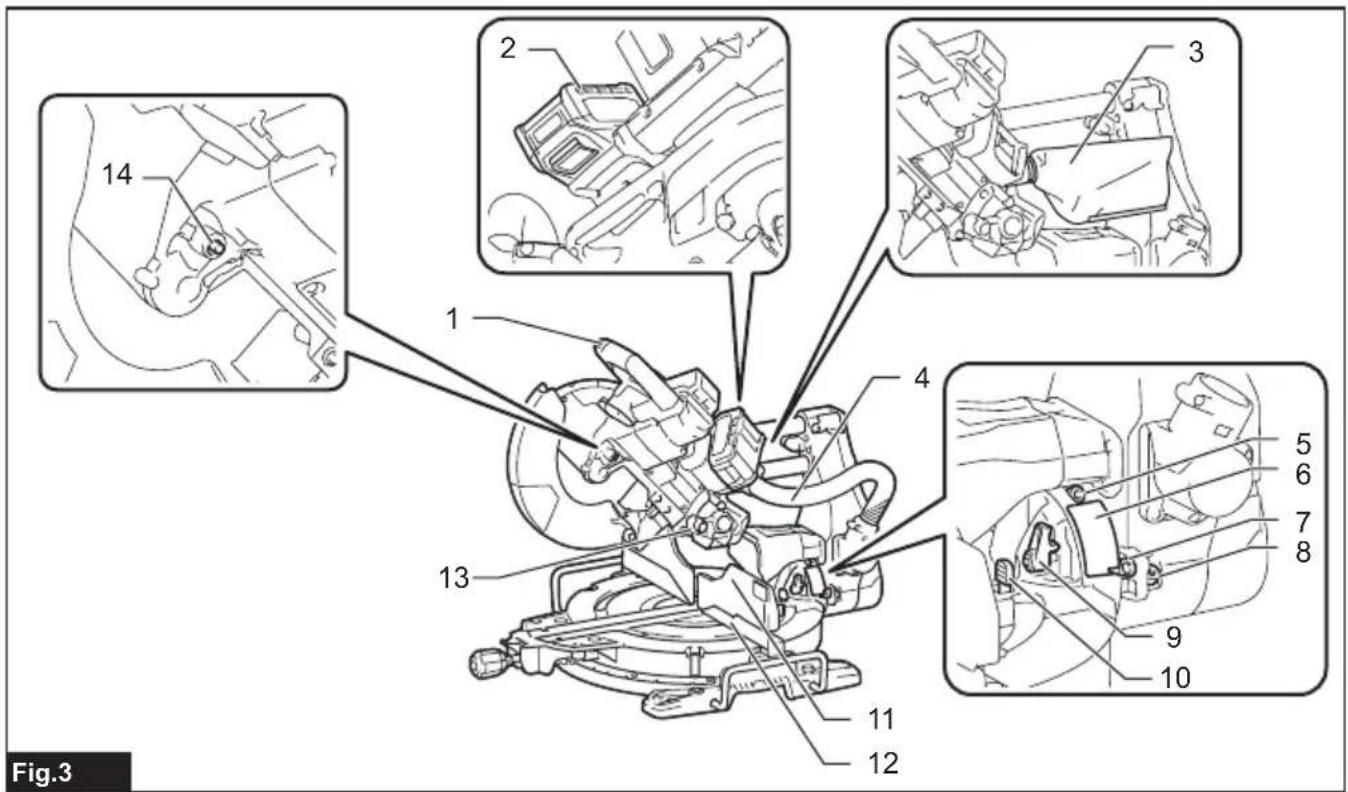
▶ Fig.3
| 1 | Handle | 2 | Battery cartridge | 3 | Dust bag (when replaced with dust extraction hose) | 4 Hose (for dust extraction) | |
| 5 0° | adjusting bolt (for bevel angle) | 6 | Bevel angle scale | 7 | Pointer (for bevel angle) | 8 | 45° adjusting bolt (for bevel angle) |
| 9 Latch lever (for bevel angle) | 10 Releasing lever (for 48° bevel angle) | 11 Guide fence (upper fence) | 12 Guide fence (lower fence) | ||||
| 13 Stopper pin (for carriage elevation) | 14 | Shaft lock | - | - | - | - | |
INSTALLATION
Installing the grip
Screw the threaded shaft of the grip into the turn base.
▶ Fig.4: 1. Grip 2. Turn base
Installing and removing dust extraction hose
Attach the hose elbow to the upper port with the lock button facing upwards. Insert the sleeve of the hose into the lower port, pressing and aligning the stopper buttons on the sleeve with the guide notches on the port. Make sure that the elbow and sleeve fit properly to the ports of the tool.
▶ Fig.5: 1. Dust extraction hose 2. Elbow 3. Lock button 4. Sleeve 5. Upper Port 6. Lower Port
To remove the hose elbow from the port, pull the elbow while pressing down the lock button.
▶ Fig.6: 1. Lock button 2. Elbow
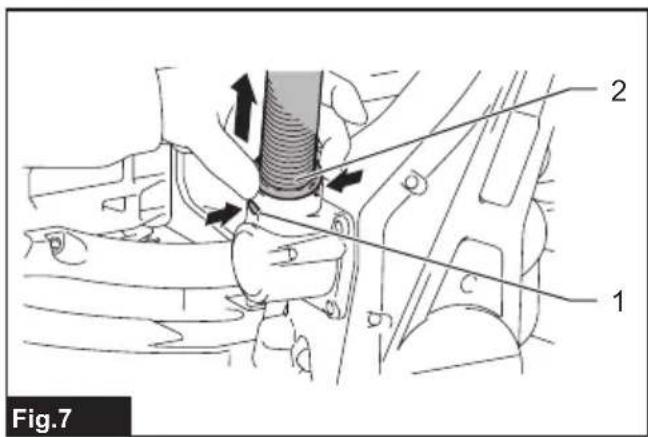
To remove the sleeve of the hose from the port, pull the sleeve while pressing the stopper buttons on both sides of the port.
▶ Fig.7: 1. Stopper button 2. Sleeve
Bench mounting
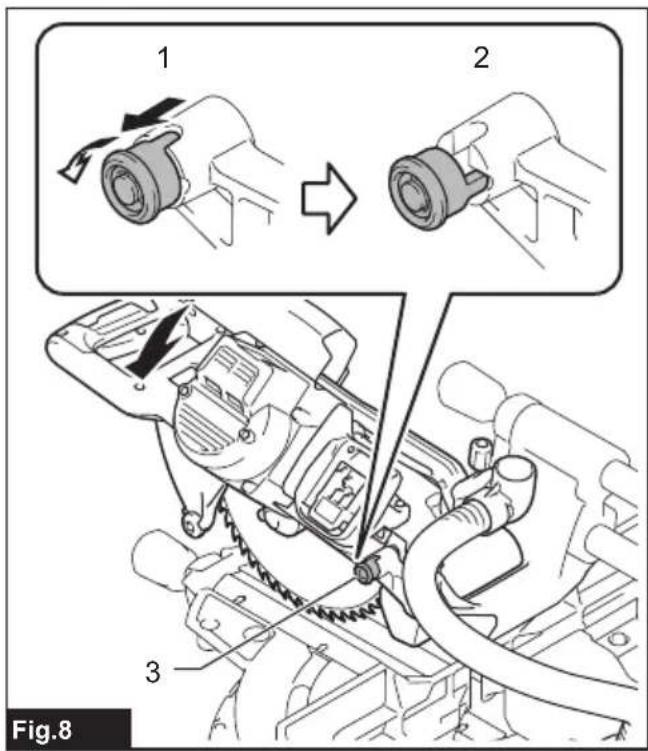
When the tool is shipped, the handle is locked in the lowered position by the stopper pin. While lowering the handle slightly, pull the stopper pin and rotate it 90°.
▶ Fig.8: 1. Locked position 2. Unlocked position 3. Stopper pin
This tool should be bolted with four bolts to a level and stable surface using the bolt holes provided in the tool's base. This will help prevent tipping and possible injury.
▶ Fig.9: 1. Bolts
⚠ WARNING: Ensure that the tool will not move on the supporting surface. Movement of the miter saw on the supporting surface while cutting may result in loss of control and serious personal injury.
FUNCTIONAL DESCRIPTION
⚠ WARNING: Always be sure that the tool is switched off and the battery cartridge is removed before adjusting or checking the functions on the tool. Failure to switch off and remove the battery cartridge may result in serious personal injury from accidental start-up.
Installing or removing battery cartridge
⚠️CAUTION: Always switch off the tool before installing or removing of the battery cartridge.
⚠️CAUTION: Hold the tool and the battery cartridge firmly when installing or removing battery cartridge. Failure to hold the tool and the battery cartridge firmly may cause them to slip off your hands and result in damage to the tool and battery cartridge and a personal injury.
To install the battery cartridge, align the tongue on the battery cartridge with the groove in the housing and slip it into place. Insert it all the way until it locks in place with a little click. If you can see the red indicator as shown in the figure, it is not locked completely.
To remove the battery cartridge, slide it from the tool while sliding the button on the front of the cartridge.
▶ Fig.10: 1. Red indicator 2. Button 3. Battery cartridge
⚠️CAUTION: Always install the battery cartridge fully until the red indicator cannot be seen. If not, it may accidentally fall out of the tool, causing injury to you or someone around you.
⚠️CAUTION: Do not install the battery cartridge forcibly. If the cartridge does not slide in easily, it is not being inserted correctly.
Tool / battery protection system
The tool is equipped with a tool/battery protection system. This system automatically cuts off power to the motor to extend tool and battery life. The tool will automatically stop during operation if the tool or battery is placed under one of the following conditions.
Overload protection
When the tool/battery is operated in a manner that causes it to draw an abnormally high current, the tool automatically stops. In this situation, turn the tool off and stop the application that caused the tool to become overloaded. Then turn the tool on to restart.
Overheat protection
When the tool/battery is overheated, the tool stops automatically and the lamp will blink. In this situation, let the tool cool down before turning the tool on again.
Overdischarge protection
When the battery capacity becomes low, the tool stops automatically. If the tool does not run along with the switch operation, remove the battery from the tool and charge it.
Indicating the remaining battery capacity
Press the check button on the battery cartridge to indicate the remaining battery capacity. The indicator lamps light up for a few seconds.
▶ Fig.11: 1. Indicator lamps 2. Check button
| Indicator lamps Remaining | capacity | ||
| Lighted Off | Blinking | ||
| 75% to 100% | |||
| 50% to 75% | |||
| 25% to 50% | |||
| 0% to 25% | |||
| Charge the battery. | |||
| The battery may have malfunctioned. | |||
NOTE: Depending on the conditions of use and the ambient temperature, the indication may differ slightly from the actual capacity.
NOTE: The first (far left) indicator lamp will blink when the battery protection system works.
Handle lock
CAUTION: Always hold the handle when releasing the stopper pin. Otherwise the handle springs up and it may result in personal injury.
The handle can be locked either in the lowered position or raised position with the stopper pin. Lower or raise the handle fully and then pull and rotate the stopper pin in a locked position. To unlock the handle, pull the
stopper pin and rotate it 90irc in an unlocked position while lowering the handle slightly.
▶ Fig.12: 1. Locked position 2. Unlocked position 3. Stopper pin
Slide lock
Pull the stopper pin and turn it 90irc in an unlocked position to allow free movement of the carriage. To lock the sliding movement of the carriage, push the carriage toward the arm until it stops, and then return the stopper pin in a locked position.
▶ Fig.13: 1. Locked position 2. Unlocked position 3. Stopper pin 4. Arm
Blade guard
WARNING: Never defeat or remove the blade guard or the spring which attaches to the guard. An exposed blade as a result of defeated guarding may result in serious personal injury during operation.
WARNING: Never use the tool if the blade guard or spring are damaged, faulty or removed. Operation of the tool with a damaged, faulty or removed guard may result in serious personal injury.
⚠️CAUTION: Always maintain the blade guard in good condition for safe operation. Stop the operation immediately if there are any irregularity of the blade guard. Check to assure spring loaded return action of guard.
When lowering the handle, the blade guard raises automatically. The guard is spring loaded so it returns to its original position when the cut is completed and the handle is raised.
▶ Fig.14: 1. Blade guard
Cleaning
If the transparent blade guard becomes dirty, or saw-dust adheres to it in such a way that the blade and/or workpiece is no longer easily visible, remove the battery cartridge and clean the guard carefully with a damp cloth. Do not use solvents or any petroleum-based cleaners on the plastic guard because this may cause damage to the guard.
Follow the step-by-step instructions listed on how to prepare for cleaning.
- Make sure that the tool is switched off and the battery cartridge is removed.
- Turn the hex bolt counterclockwise using the supplied hex wrench while holding the center cover.
- Raise the blade guard and center cover.
- When cleaning is complete, return the center cover and tighten the hex bolt by performing the steps above in reverse.
- Make sure to return the circular saw blade and center cover to their original positions and tighten the hex bolt.
▶ Fig.15: 1. Hex wrench 2. Hex bolt 3. Center cover 4. Blade guard
WARNING: Do not remove spring holding blade guard. If guard becomes damaged in course of time or UV light exposure, contact a Makita service center for replacement. DO NOT DEFEAT OR REMOVE GUARD.
Positioning kerf board
This tool is provided with the kerf boards in the turn base to minimize tearing on the exit side of a cut. The kerf boards are factory adjusted so that the circular saw blade does not contact the kerf boards. Before use, adjust the kerf boards as follows:
- Make sure to remove the battery cartridge. Then, loosen all the screws (two each on left and right) securing the kerf boards.
▶ Fig.16: 1. Kerf board 2. Screws
NOTE: The rear screws can easily be loosened and tightened by turning the turn base at an angle. Make sure to raise the handle fully when turning the turn base.
- Re-tighten them only to the extent that the kerf boards can still be easily moved by hand.
- Lower the handle fully, then pull and turn the stopper pin to lock the handle in the lowered position.
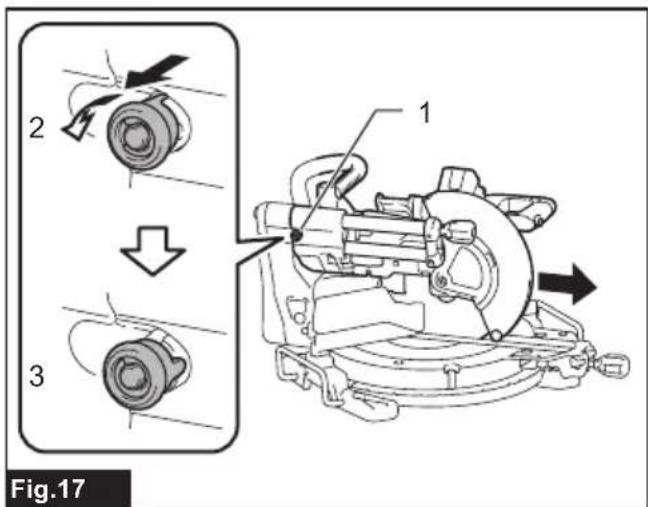
- Pull and turn the stopper pin on the slide pole to allow the carriage sliding.
▶ Fig.17: 1. Stopper pin 2. Locked position 3. Unlocked position
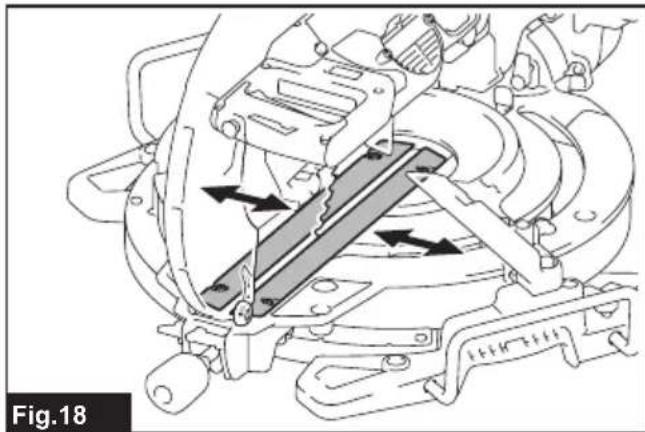
- Pull the carriage toward you fully.
- Adjust the kerf boards so that they just contact the sides of the blade teeth.
▶ Fig.18
▶ Fig.19: 1. Saw blade 2. Blade teeth 3. Kerf board 4. Left bevel cut 5. Straight cut 6. Right bevel cut
NOTICE: When changing bevel angles, be sure to reposition the kerf boards appropriately.
NOTICE: Always remove the upper guide fences and vertical vise before positioning the kerf boards for left or right bevel cut.
- Tighten the front screws (do not tighten firmly).
- Push the carriage toward the guide fences fully and then adjust the kerf boards so that they just contact the sides of the blade teeth.
- Tighten the rear screws (do not tighten firmly).
- After adjusting the kerf boards, release the stopper pin for handle lock and raise the handle. Then tighten all the screws securely.
NOTICE: After setting the bevel angle, ensure that the kerf boards are adjusted properly. Correct adjustment of the kerf boards helps to provide proper support of the workpiece and minimizing workpiece tear out.
Maintaining maximum cutting capacity
This tool is factory adjusted to provide the maximum cutting capacity for a 260 mm saw blade.
When installing a new circular saw blade, always check the lower limit position of the circular saw blade, and if necessary, adjust it as follows:
- Remove the battery cartridge. Then turn the stopper lever to engaged position.
▶ Fig.20: 1. Stopper lever
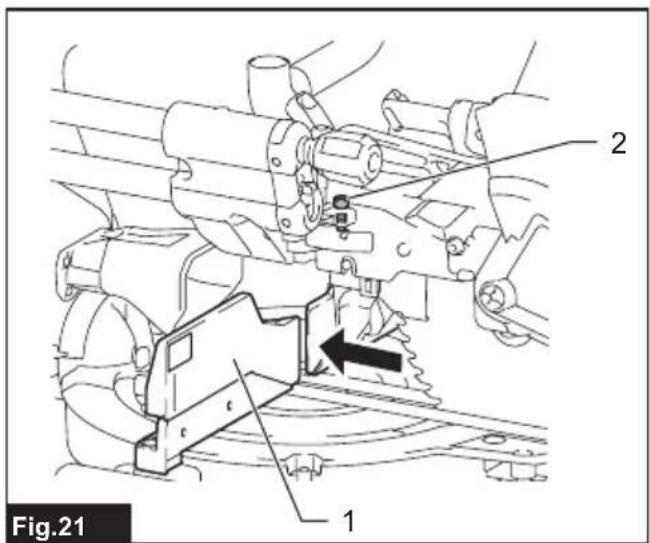
- Push the carriage toward the guide fences fully and lower the handle completely.
▶ Fig.21: 1. Guide fence 2. Adjusting bolt
- Use the hex wrench to turn the adjusting bolt until the circular saw blade comes slightly below the cross section of the guide fences and the top surface of the turn base.
▶ Fig.22: 1. Top surface of turn base 2. Guide fence
- Rotate the blade by hand while holding the handle all the way down to be sure that the circular saw blade does not contact any part of the lower base. Re-adjust slightly, if necessary.
WARNING: After installing a new circular saw blade and with the battery cartridge removed, always be sure that the circular saw blade does not contact any part of the lower base when the handle is lowered completely. If a circular saw blade makes contact with the base, it may cause kickback and result in serious personal injury.
▶ Fig.23
⚠️CAUTION: Always return the stopper lever to the original position after adjustment.
Stopper arm
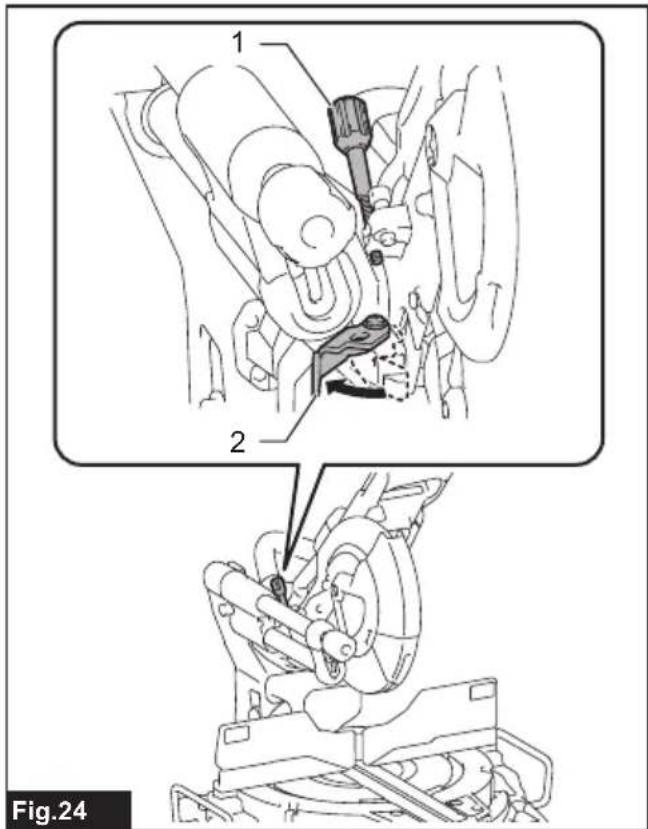
The lower limit position of the circular saw blade can be easily adjusted with the stopper arm. To adjust it, move the stopper arm in the direction of the arrow as shown in the figure. Turn the adjusting screw so that the circular saw blade stops at the desired position when lowering the handle fully.
▶ Fig.24: 1. Adjusting screw 2. Stopper arm
⚠️CAUTION: Always hold the handle firmly when adjusting. Failure to do so may cause the carriage to jump up and result in injury.
Adjusting the miter angle
⚠️CAUTION: After changing the miter angle, always secure the turn base by returning the lock/releasing lever to a locked position and tightening the grip firmly.
NOTICE: When turning the turn base, be sure to raise the handle fully.
-
Rotate the grip counterclockwise. Then press and hold down the lock lever into an unlocked position.
-
Hold and swing the grip from side to side to turn the turn base.
- Align the pointer with your desired angle on the miter angle scale.
- Release the lock lever and tighten the grip.
▶ Fig.25: 1. Grip 2. Lock lever 3. Pointer 4. Miter angle scale
Positive stop function
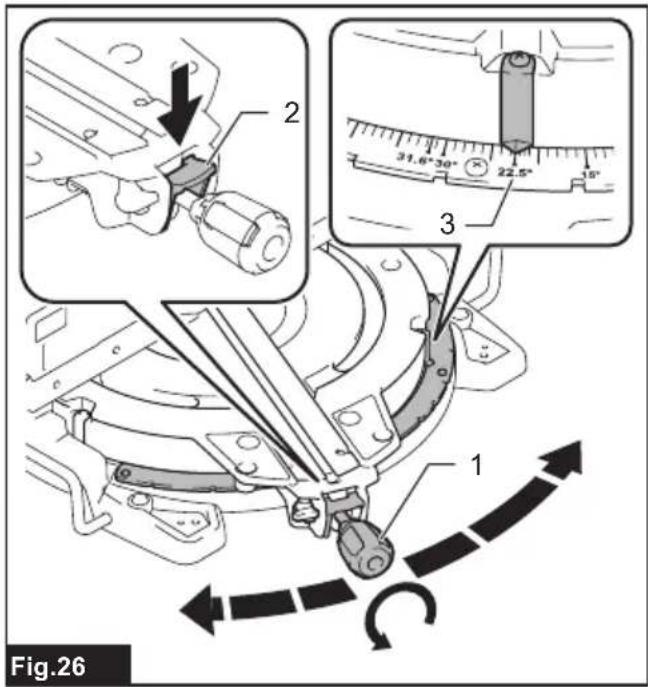
This miter saw employs positive stop function. You can set 0irc , 15irc , 22.5irc , 31.6irc , 45irc , and 60irc right/left miter angle quickly.
- Rotate the grip counterclockwise
- Press and hold down the lock lever in an unlocked position.
-
Turn the turn base close to your desired positive stop angle and release the lock lever.
-
Turn the turn base at your desired positive stop angle until it is secured.
-
Tighten the grip.
▶ Fig.26: 1. Grip 2. Lock lever 3. Positive stop angle
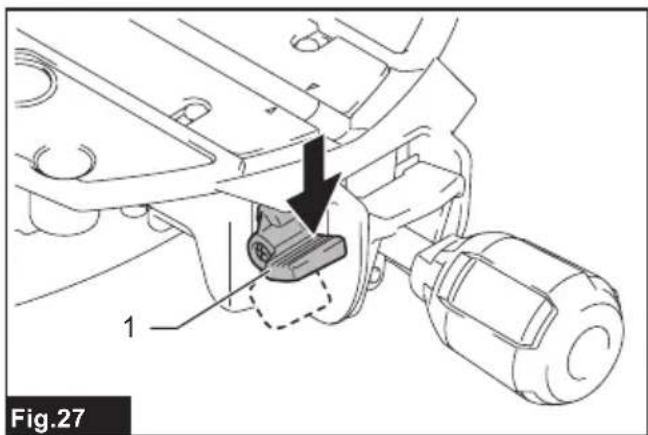
NOTE: To set the turn base free from the positive stop function, press down the releasing lever. The turn base can be moved freely without holding down the lock lever. Swing the grip to turn the turn base to your desired angle, and then tighten the grip.
▶ Fig.27: 1. Releasing lever
Adjusting the bevel angle
CAUTION: After changing the bevel angle, always secure the arm by tightening the knob on the slide pole clockwise.
NOTICE: Always remove the upper guide fences and vertical vise before adjusting the bevel angle.
NOTICE: When tilting the circular saw blade, be sure that the carriage is fully raised.
NOTICE: When changing bevel angles, be sure to reposition the kerf boards appropriately as explained in the section for positioning kerf boards.
NOTICE: Do not tighten the knob on the slide pole too hard. Doing so may cause malfunction of the locking mechanism of the bevel angle.
Tilting the circular saw blade to the left
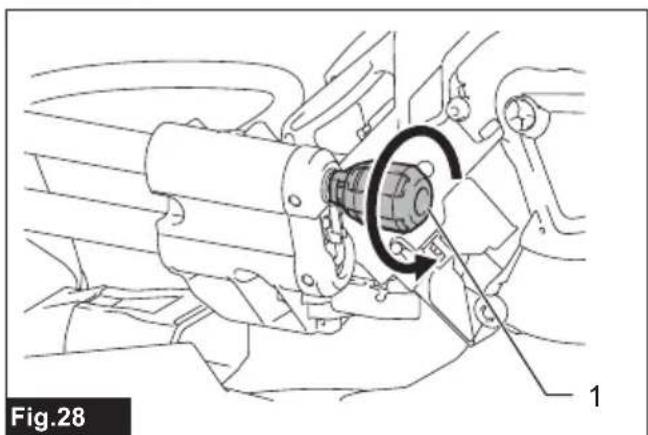
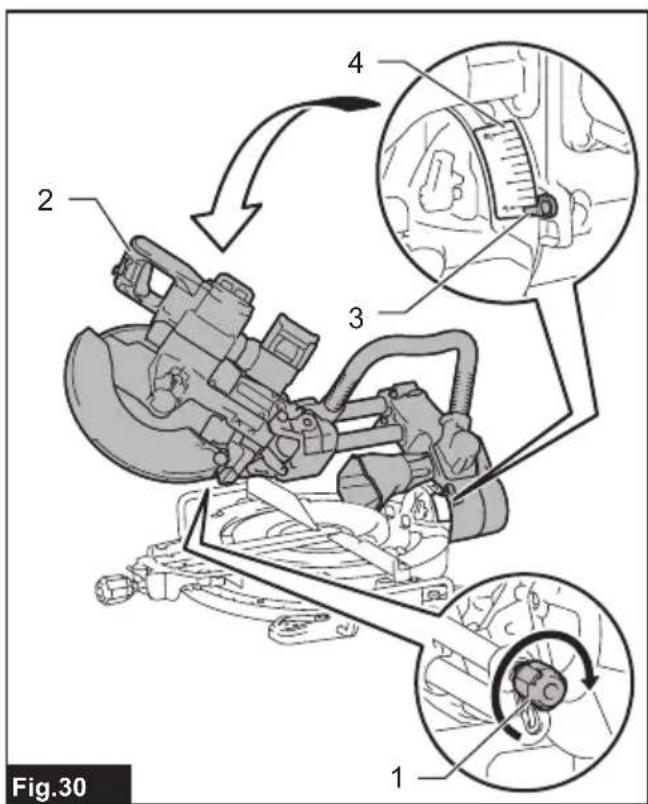
- Rotate the knob on the slide pole counterclockwise.
▶ Fig.28: 1. Knob - Pull and raise the latch lever up to allow free movement of the carriage arm.
▶ Fig.29: 1. Latch lever - Hold the handle and tilt the carriage to the left.
-
Align the pointer with your desired angle on the bevel angle scale.
-
Tighten the knob clockwise to secure the carriage arm.
▶ Fig.30: 1. Knob 2. Handle 3. Pointer 4. Bevel angle scale
Tilting the circular saw blade to the right
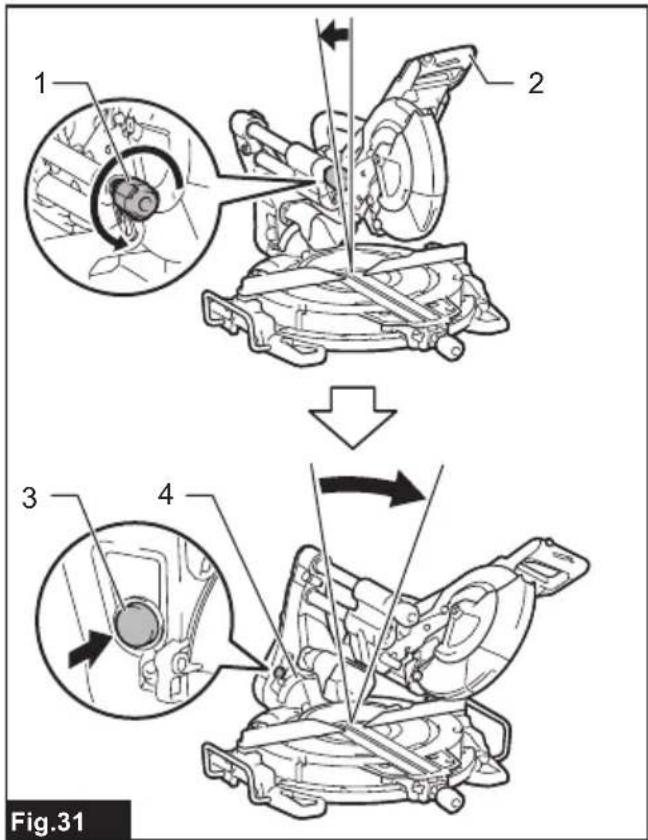
- Rotate the knob on the slide pole counterclockwise.
- Hold the handle and tilt the carriage to the left slightly.
- Tilt the carriage to the right while pressing the releasing button for right side bevel angle.
- Align the pointer with your desired angle on the bevel angle scale.
- Tighten the knob clockwise to secure the carriage arm.
▶ Fig.31: 1. Knob 2. Handle 3. Releasing button for right side bevel angle 4. Bevel angle scale
Tilting the circular saw blade using positive stop function
This miter saw employs positive stop function. You can set 22.5irc and 33.9irc angle to both right and left quickly.
- Rotate the knob on the slide pole counterclockwise.
- Tilt the carriage close to your desired positive stop angle while raising the latch lever up.
- Set the latch lever in a horizontal position.
- Tilt the carriage at your desired positive stop angle until it is secured.
- To change the angle, pull the latch lever towards the front of the tool, and then re-tilt the carriage.
- Tighten the knob clockwise to secure the carriage arm.
▶ Fig.32: 1. Knob 2. Latch lever
Tilting the circular saw blade beyond the range 0irc - 45irc
- Rotate the knob on the slide pole counterclockwise.
- Hold the handle and tilt the carriage through 45irc either to the left or right.
- Pull the carriage back slightly and slide the releasing lever for 48irc bevel angle towards the front of the tool.
- Tilt the carriage further to the left or right while keeping the lever released.
- Tighten the knob clockwise to secure the carriage arm.
▶ Fig.33: 1. Knob 2. Handle 3. Releasing lever for 48° bevel angle
Switch action
WARNING: Before installing the battery cartridge(s) into the tool, always check to see that the switch trigger actuates properly and returns to the "OFF" position when released. Do not pull the switch trigger hard without pressing in the lock-off button. This can cause switch breakage. Operating a tool with a switch that does not actuate properly can lead to loss of control and serious personal injury.
WARNING: NEVER use tool without a fully operative switch trigger. Any tool with an inoperative switch is HIGHLY DANGEROUS and must be repaired before further usage or serious personal injury may occur.
⚠ WARNING: NEVER defeat the lock-off button by taping down or some other means. A switch with a negated lock-off button may result in unintentional operation and serious personal injury.
WARNING: NEVER use the tool if it runs when you simply pull the switch trigger without pressing the lock-off button. A switch in need of repair may result in unintentional operation and serious personal injury. Return tool to a Makita service center for proper repairs BEFORE further usage.
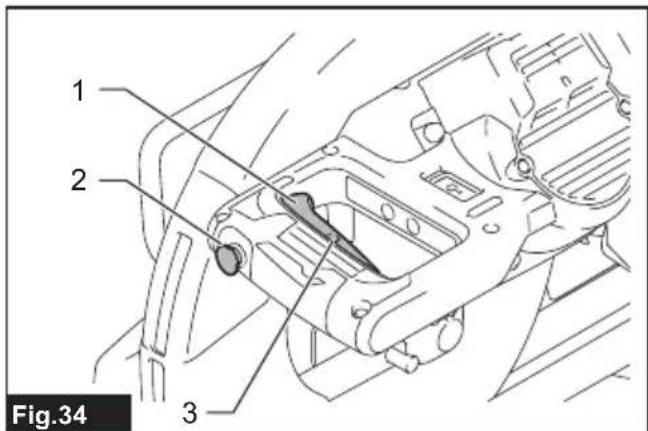
▶ Fig.34: 1. Switch trigger 2. Lock-off button 3. Hole for padlock
To prevent the switch trigger from being accidentally pulled, a lock-off button is provided. To start the tool, press in the lock-off button and pull the switch trigger. Release the switch trigger to stop.
A hole is provided in the switch trigger for insertion of a padlock to lock the tool off.
WARNING: Do not use a lock with a shank or cable any smaller than 6.35 mm in diameter. A smaller shank or cable may not properly lock the tool in the off position and unintentional operation may occur resulting in serious personal injury.
Casting a cutting line
CAUTION: The lamp is not a rainproof. Do not wash the lamp in water or use it in a rain or a wet area. Such a conduct can cause an electric shock and fume.
⚠️ CAUTION: Do not touch the lens of the lamp as it is very hot while it is lighted or shortly after it is turned off. This may cause burns.
⚠️ CAUTION: Do not apply impact to the lamp, which may cause damage or shorted service time to it.
⚠️ CAUTION: Do not look in the light or see the source of light directly.
The LED lamp casts a light over the circular saw blade, and a shadow of the blade falls onto a workpiece serving as a calibration-free cutting line indicator. Press the lamp button to shed a light. A line appears in which the blade will meet the surface of the workpiece, becoming deepened as the blade gets lowered.
▶ Fig.35: 1. Lamp button 2. Lamp 3. Cutting line
The indicator helps cut through an existing cut-off line penciled on a workpiece.
- Hold the handle and lower the circular saw blade so a dense shadow of the blade is thrown against a workpiece.
- Align a cut-off line drawn on the workpiece with the shadowed cutting line.
- Adjust the miter angles and bevel angles if necessary.
NOTE: Be sure to turn off the lamp switch after use because turning on the light consumes the battery power.
NOTE: The light automatically goes off 5 minutes after you cease operation.
Electronic function
Electric brake
This tool is equipped with an electric blade brake. If the tool consistently fails to quickly cease to function after the switch trigger is released, have the tool serviced at a Makita service center.
CAUTION: The blade brake system is not a substitute for the blade guard. Never use tool without a functioning blade guard. An unguarded blade may result in serious personal injury.
Constant speed control
The tool is provided with an electronic speed control which helps maintain a constant blade rotation speed even under load. A constant blade rotation speed will result in a very smooth cut.
Soft start feature
This function allows the smooth start-up of the tool by limiting the start-up torque.
ASSEMBLY
WARNING: Always be sure that the tool is switched off and the battery cartridge is removed before working on the tool. Failure to switch off and remove the battery cartridge may result in serious personal injury.
Hex wrench storage
When not in use, store the hex wrench as shown in the figure to keep it from being lost.
▶ Fig.36: 1. Hex wrench
Removing and installing saw blade
WARNING: Always be sure that the tool is switched off and the battery cartridge is removed before removing and installing the circular saw blade. Accidental start up of the tool may result in serious personal injury.
WARNING: Use only the Makita wrench provided to remove and install the circular saw blade. Failure to use the wrench may result in overtightening or insufficient tightening of the hex socket bolt and serious personal injury.
WARNING: Never use or substitute the parts which are not supplied with this tool. Using such parts can cause serious personal injury.
WARNING: After installing the circular saw blade, always make sure that it is securely installed. Loose attachment of the circular saw blade can cause serious personal injury.
Removing the blade
To remove the circular saw blade, perform the following steps:
- Lock the carriage in the raised position by pulling and turning the stopper pin in a locked position.
▶ Fig.37: 1. Stopper pin 2. Unlocked position 3. Locked position - Use the hex wrench to loosen the hex bolt holding the center cover. Then, raise the blade guard and center cover.
▶ Fig.38: 1. Hex wrench 2. Hex bolt 3. Center cover 4. Blade guard - Press the shaft lock to lock the spindle and use the hex wrench to loosen the hex socket bolt clockwise. Then remove the hex socket bolt, outer flange and circular saw blade.
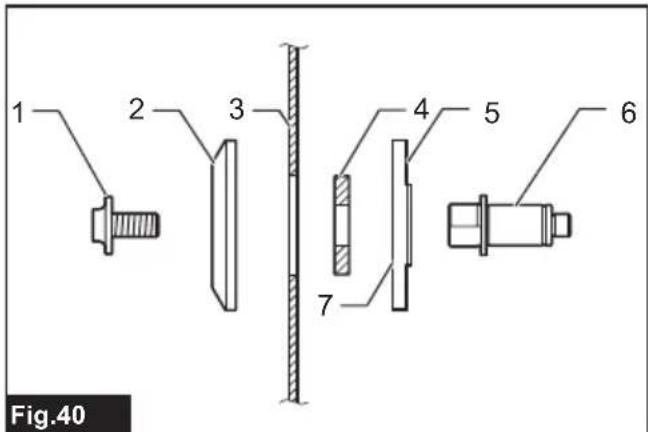
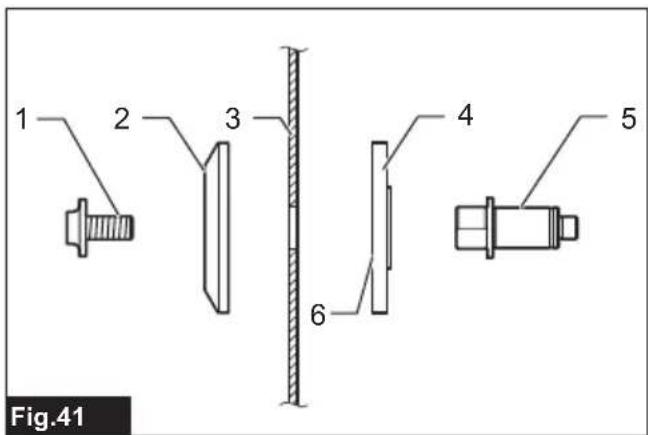
▶ Fig.39: 1. Hex socket bolt (left-handed) 2. Outer flange 3. Shaft lock - If the inner flange is removed, install it on the spindle with its recessed side facing the circular saw blade. If the flange is installed incorrectly the flange will rub against the machine.
For tool with ring
(Country specific)
▶ Fig.40: 1. Hex socket bolt (left-handed) 2. Outer flange 3. Circular saw blade 4. Ring 5. Inner flange 6. Spindle 7. Recessed side
For tool without ring
(Country specific)
▶ Fig.41: 1. Hex socket bolt (left-handed) 2. Outer flange 3. Circular saw blade 4. Inner flange 5. Spindle 6. Recessed side
Installing the blade
WARNING: Before mounting the blade onto the spindle, always be sure that the correct ring for the blade's arbor hole you intend to use is installed between the inner and the outer flanges. Use of the incorrect arbor hole ring may result in the improper mounting of the blade causing blade movement and severe vibration resulting in possible loss of control during operation and in serious personal injury.
⚠CAUTION: Make sure to install the circular saw blade so that the direction of the arrow on the blade matches that on the blade case. Failure to do so may result in personal injury and cause damage to the tool and/or the workpiece.
Arbor hole diameters of circular saw blade may differ depending on your region of residence. Use a correctly sized ring to secure the circular saw blade to the spindle when the hole diameter exceeds the spindle diameter. To install the circular saw blade, perform the following steps:
- Mount the circular saw blade carefully onto the inner flange. Make sure that the direction of the arrow on the circular saw blade matches the direction of the arrow on the blade case.
▶ Fig.42: 1. Arrow on blade case 2. Arrow on circular saw blade - Install the outer flange and hex socket bolt, and then use the hex wrench to tighten the hex socket bolt counterclockwise securely while pressing the shaft lock.
For tool with ring
(Country specific)
▶ Fig.43: 1. Hex socket bolt (left-handed) 2. Outer flange 3. Circular saw blade 4. Ring 5. Inner flange 6. Spindle 7. Recessed side
For tool without ring
(Country specific)
▶ Fig.44: 1. Hex socket bolt (left-handed) 2. Outer flange 3. Circular saw blade 4. Inner flange 5. Spindle 6. Recessed side
- Return the blade guard and center cover to its original position. Then tighten the hex bolt clockwise to secure the center cover.
- Pull and turn the stopper pin in an unlocked position to release the carriage from the raised position. Lower the carriage and check that the blade guard moves properly.
⚠️CAUTION: Make sure shaft lock has released spindle before making cut.
Dust
WARNING: Depending on the material being worked on and the accessory used, the dust created by use of the tool can be harmful. The user is recommended to use an appropriate dust extractor to reduce exposure.
See the "OPTIONAL ACCESSORIES" section in this instruction manual for all optional dust extractor attachments available.
Additional Warnings:
- To prevent dust inhalation, it is recommended to also wear an FFP2 dust mask or P2 respirator.
- Read the “MAINTENANCE” section of the instruction manual of the connected dust extractor to keep the dust collection effective.
- Follow all applicable regulatory requirements for dust control in the country where the work is being conducted.
- Do not use a dust extractor for metalworking with power tools. Metal particles produced during metalworking can ignite accumulated dust and damage the dust filter inside dust extractors, posing a serious fire hazard.
- For European countries only The user is recommended to use an M or H dust class extractor (as defined in EN 60335-2-69).
For help and support regarding dust extractors, please contact your local Makita Service Center.
Connecting with a dust extractor
When you wish to perform clean cutting operation, connect a Makita vacuum cleaner to the elbow (upper dust port) using a front cuff 24 (optional accessory).
The inner diameter of the elbow for the hose connection is 36 mm.
▶ Fig.45: 1. Front cuff 24 2. Hose 3. Vacuum cleaner
Dust bag
⚠️ CAUTION: When performing a cutting, always attach the dust bag or connect a vacuum cleaner to prevent dust-related hazards.
The use of the dust bag makes cutting operations clean and dust collection easy. To attach the dust bag, remove the dust extraction hose from the tool and connect the dust bag to the dust nozzle (upper dust port).
▶ Fig.46: 1. Dust extraction hose 2. Dust bag 3. Dust nozzle (upper dust port)
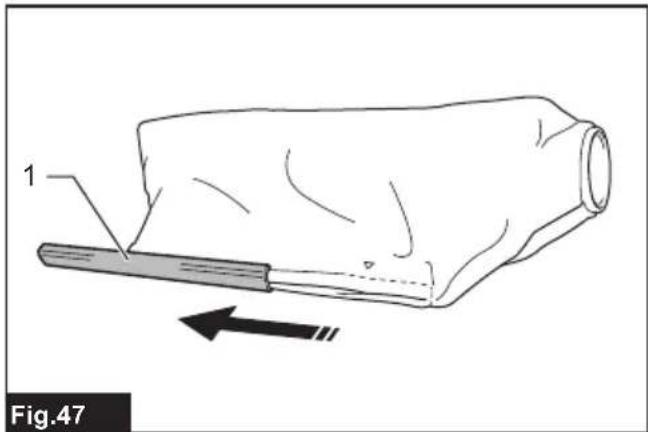
When the dust bag is about half full, remove the dust bag from the tool and pull the fastener out. Empty the dust bag of its contents, tapping it lightly so as to remove particles adhering to the insides which might hamper further collection.
▶ Fig.47: 1. Fastener
Securing workpiece
WARNING: It is extremely important to always secure the workpiece correctly with the proper type of vise or crown molding stoppers. Failure to do so may result in serious personal injury and cause damage to the tool and/or the workpiece.
WARNING: When cutting a workpiece that is longer than the support base of the miter saw, support the entire length of the material beyond the support base keeping the material level.
Proper workpiece support helps to avoid blade pinch and possible kickback which may result in serious personal injury. Do not rely solely on the vertical vise and/or horizontal vise to secure the workpiece. Thin material tends to sag. Support workpiece over its entire length to avoid blade pinch and possible KICKBACK.
▶ Fig.48: 1. Support 2. Turn base
Guide fences
WARNING: Before operating the tool, make sure that the upper fence is secured firmly.
WARNING: Before bevel-cutting, make sure that no part of the tool, especially the saw blade, contacts the upper and lower fences when fully lowering and raising the handle in any position and while moving the carriage through its full range of travel. If the tool or blade makes contact with the fence, this may result in kickback or unexpected movement of the material and serious personal injury.
Use upper fences to support the material higher than the lower fences. Insert the upper fence into the hole on the lower fence and tighten the clamping screw.
▶ Fig.49: 1. Upper fence 2. Lower fence 3. Clamping screw 4. Adjusting screw
NOTICE: The lower fences are fixed to the base in the factory. Do not remove the lower fences.
NOTICE: If the upper fence is still loose after tightening the clamping screw, turn the adjusting screw to close a gap. The adjusting screw is factory adjusted. You don't need to use it unless needed.
When not using the upper fence, you can store it onto the holder. Use the clip on the upper fence to hold it on the holder.
▶ Fig.50: 1. Holder 2. Upper fence 3. Clip
Vertical vise
WARNING: The workpiece must be secured firmly against the turn base and guide fences with the vise during all operations. If the workpiece is not properly secured against the fences, the material may move during the cutting operation causing possible damage to the circular saw blade, causing the material to be thrown and loss of control resulting in serious personal injury.
right side of the base. Insert the vise rod into the hole in the base.
▶ Fig.51: 1. Vertical vise 2. Hole for vertical vise 3. Base
▶ Fig.52: 1. Vise arm 2. Vise rod 3. Clamping screw 4. Vise knob
Position the vise arm according to the thickness and shape of the workpiece and secure the vise arm by tightening the screw. If the clamping screw contacts the carriage, install the vertical vise into the opposite side of the base. Make sure that no part of the tool contacts the vise when lowering the handle all the way. If some part contacts the vise, re-position the vise.
Press the workpiece flat against the guide fences and the turn base. Position the workpiece at the desired cutting position and secure it firmly by tightening the vise knob.
NOTE: For a quick setting of workpiece, turning the vise knob to 90irc counterclockwise allows the vise knob to be moved up and down. To secure the workpiece after setting, turn the vise knob clockwise.
Horizontal vise
Optional accessory
WARNING: Always rotate the vise nut clockwise until the workpiece is properly secured. If the workpiece is not properly secured, the material may move during the cutting operation causing possible damage to the circular saw blade, causing the material to be thrown and loss of control resulting in serious personal injury.
⚠ WARNING: When cutting a thin workpiece, such as base boards, against the fence, always use the horizontal vise.
⚠️ CAUTION: When cutting the workpiece of the thickness 20 mm or thinner, make sure to use a spacer block to secure the workpiece.
The horizontal vise can be installed in either the left or right side of the base. When performing 22.5irc or greater miter cuts, install the horizontal vise in the side opposed to the direction in which the turn base is to be turned.
▶ Fig.53: 1. Vise plate 2. Vise nut 3. Vise knob
By flipping the vise nut counterclockwise, the vise is released, and rapidly moves in and out. To grip the workpiece, push the vise knob forward until the vise plate contacts the workpiece and flip the vise nut clockwise. Then turn the vise knob clockwise to secure the workpiece.
NOTE: The maximum width of workpiece which can be secured by the horizontal vise is 228 mm.
Holders
WARNING: Always support a long workpiece so it is level with the top surface of the turn base for an accurate cut and to prevent dangerous loss of tool control. Proper workpiece support will help avoid blade pinch and possible kickback which may result in serious personal injury.
WARNING: Before the cutting operation, always be sure that the holders are secured by the screws.
To hold long workpieces horizontally, holders are provided on both sides of the tool. Loosen the screws and extend the holders to the appropriate length for holding the workpiece. Then tighten the screws.
▶ Fig.54: 1. Holder 2. Screw
When cutting, place the workpiece flat against the guide fences.
▶ Fig.55: 1. Guide fence 2. Holder
Sub base
Optional accessory
WARNING: Always support a long workpiece so it is level with the top surface of the turn base for an accurate cut and to prevent dangerous loss of tool control. Proper workpiece support will help avoid blade pinch and possible kickback which may result in serious personal injury.
WARNING: Before the cutting operation, always be sure that a sub base is secured by the screw.
NOTE: For details on installation, follow the instructions provided with an optional sub base.
Install an optional sub base in the base to hold long workpieces more securely. Loosen the screw and extend the sub base to the appropriate length for holding the workpiece. Then tighten the screw.
▶ Fig.56: 1. Sub base 2. Screw
When cutting, place the workpiece flat against the guide fence and the sub fence on the sub base.
▶ Fig.57: 1. Guide fence 2. Sub fence 3. Sub base
Adjusting sub fence
Adjust the sub fence on the sub base if it is not aligned with guide fence.
- Loosen the bolts securing the sub fence using the hex wrench.
- Place a straight rigid bar, such as a square steel member, flat against the guide fence.
- While the bar is flat against the guide fence, reposition the sub fence so that the face of the sub fence becomes flat against the bar. After that, tighten the bolts.
▶ Fig.58: 1. Bolt 2. Sub fence 3. Guide fence 4. Rigid bar
OPERATION
This tool is intended to cut wood products. With appropriate Makita genuine saw blades, following materials can also be sawed :
— Aluminum products
Refer to our website or contact your local Makita dealer for the correct circular saw blades to be used for the material to be cut.
WARNING: Make sure the saw blade is not contacting the workpiece, etc. before the switch is turned on. Turning the tool on with the blade in contact with the workpiece may result in kickback and serious personal injury.
WARNING: After a cutting operation, do not raise the saw blade until it has come to a complete stop. The raising of a coasting blade may result in serious personal injury and damage to the workpiece.
WARNING: Do not perform any adjustment such as turning grip, knob, and levers on the tool while the saw blade is rotating. Adjustment while the blade is rotating may result in serious personal injury.
CAUTION: Do not release the saw head uncontrolled from the fully down position. Uncontrolled saw head may hit you and it will result in personal injury.
NOTICE: Before use, be sure to unlock the stop-per pin and release the handle from the lowered position.
NOTICE: Do not apply excessive pressure on the handle when cutting. Too much force may result in overload of the motor and/or decreased cutting efficiency. Press down handle with only as much force as necessary for smooth cutting and without significant decrease in blade speed.
NOTICE: Gently press down the handle to perform the cut. If the handle is pressed down with force or if lateral force is applied, the blade may vibrate and leave a mark (saw mark) in the workpiece and the precision of the cut may be impaired.
NOTICE: During a slide cut, gently push the carriage toward the guide fence without stopping. If the carriage movement is stopped during the cut, a mark will be left in the workpiece and the precision of the cut will be impaired.
Press cutting
WARNING: Always lock the sliding movement of the carriage when performing a press cutting. Cutting without lock may cause possible kickback which may result in serious personal injury.
Workpieces up to 68 mm high and 160 mm wide can be cut in the following manner.
▶ Fig.59: 1. Stopper pin
- Push the carriage toward the guide fence until it
stops and lock it with the stopper pin.
- Secure the workpiece with the proper type of vise.
- Switch on the tool without the circular saw blade making any contact and wait until the circular saw blade attains full speed before lowering.
- Gently lower the handle to the fully lowered position to cut the workpiece.
- When the cut is completed, switch off the tool and wait until the circular saw blade has come to a complete stop before returning the circular saw blade to its fully elevated position.
Slide (push) cutting (cutting wide workpieces)
WARNING: Whenever performing a slide cut, first pull the carriage full towards you and press the handle all the way down, then push the carriage toward the guide fence. Never start the cut with the carriage not pulled fully toward you. If you perform the slide cut without the carriage pulled fully toward you, unexpected kickback may occur and serious personal injury may result.
WARNING: Never attempt to perform a slide cut by pulling the carriage towards you. Pulling the carriage towards you while cutting may cause unexpected kickback resulting in possible serious personal injury.
WARNING: Never perform the slide cut with the handle locked in the lowered position.
▶ Fig.60: 1. Stopper pin
- Unlock the stopper pin so that the carriage can slide freely.
- Secure the workpiece with the proper type of vise.
- Pull the carriage toward you fully.
- Switch on the tool without the saw blade making any contact and wait until the saw blade attains full speed.
- Press the handle down and push the carriage toward the guide fence and through the workpiece.
- When the cut is completed, switch off the tool and wait until the saw blade has come to a complete stop before returning the blade to its fully elevated position.
Miter cutting
Refer to the section for adjusting the miter angle.
Bevel cutting
WARNING: After setting the blade for a bevel cut, ensure that the carriage and saw blade will have free travel throughout the entire range of the intended cut before operating the tool. Interruption of the carriage or blade travel during the cutting operation may result in kickback and serious personal injury.
WARNING: While making a bevel cut, keep hands out of the path of the saw blade. The angle of the blade may confuse the operator as to the actual blade path while cutting and contact with the blade will result in serious personal injury.
WARNING: The saw blade should not be raised until it has come to a complete stop. During a bevel cut, the piece cut off may come to rest against the saw blade. If the blade is raised while it is rotating, the cut-off piece may be ejected by the blade causing the material to fragment which may result in serious personal injury.
NOTICE: When pressing down the handle, apply pressure in parallel with the blade. If a force is applied perpendicularly to the turn base or if the pressure direction is changed during a cut, the precision of the cut will be impaired.
▶ Fig.61
- Remove the upper fence on the side that you are going to tilt the carriage.
- Unlock the stopper pin.
- Adjust the bevel angle according to the procedure explained in the section for bevel angle adjustment. Then tighten the knob.
- Secure the workpiece with a vise.
- Pull the carriage toward you fully.
- Switch on the tool without the blade making any contact and wait until the blade attains full speed.
- Gently lower the handle to the fully lowered position while applying pressure in parallel with the blade and push the carriage toward the guide fence to cut the workpiece.
- When the cut is completed, switch off the tool and wait until the blade has come to a complete stop before returning the blade to its fully elevated position.
Compound cutting
Compound cutting is the process in which a bevel angle is made at the same time in which a miter angle is being cut on a workpiece. Compound cutting can be performed at the angle shown in the table.
| Miter angle Bevel angle | |
| Left and Right 0° - 45° Left | and Right 0° - 45° |
When performing compound cutting, refer to the section for press cutting, slide (push) cutting, miter cutting and bevel cut.
Cutting crown and cove moldings
Crown and cove moldings can be cut on a compound miter saw with the moldings laid flat on the turn base. There are two common types of crown moldings and one type of cove moldings; 52/38° wall angle crown molding, 45° wall angle crown molding and 45° wall angle cove molding.
▶ Fig.62: 1. 52/38° type crown molding 2. 45° type crown molding 3. 45° type cove molding
There are crown and cove molding joints which are made to fit "Inside" 90° corners ((a) and (b) in the figure) and "Outside" 90° corners ((c) and (d) in the figure.)
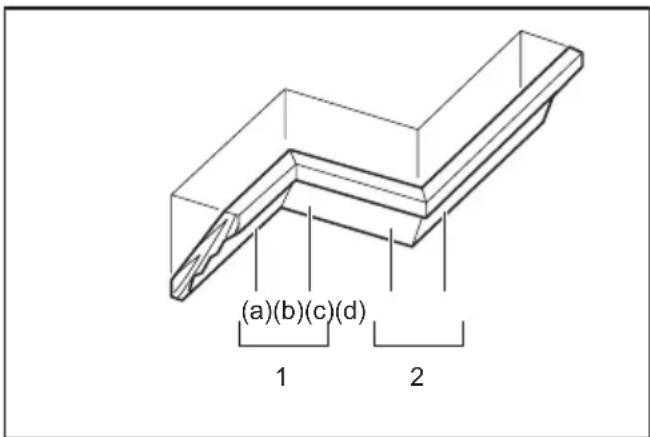
- Inside corner 2. Outside corner

flowchart
graph TD
    A["1"] --> B["(a)"]
    A --> C["(b)"]
    A --> D["(c)"]
    A --> E["(d)"]
    F["2"] --> G["(a)"]
    F --> H["(b)"]
    F --> I["(c)"]
    F --> J["(d)"]
    style A fill:#f9f,stroke:#333
    style F fill:#f9f,stroke:#333
- Inside corner 2. Outside corner
Measuring
Measure the wall width, and adjust the width of the workpiece according to it. Always make sure that width of the workpiece's wall contact edge is the same as wall length.
▶ Fig.63: 1. Workpiece 2. Wall width 3. Width of the workpiece 4. Wall contact edge
Always use several pieces for test cuts to check the saw angles.
When cutting crown and cove moldings, set the bevel angle and miter angle as indicated in the table (A) and position the moldings on the top surface of the saw base as indicated in the table (B).
In the case of left bevel cut

- Inside corner 2. Outside corner
Table (A)
| - Molding | position in the figure | Bevel angle Miter angle | |||
| 52/38° type | 45° type | 52/38° type | 45° type | ||
| For inside corner | (a) Left | 33.9° | Left 30° | Right 31.6° | Right 35.3° |
| (b) Left | 31.6° | Left 35.3° | |||
| For outside corner | (c) | 31.6° | Right 35.3° | ||
| (d) Right | |||||
Table (B)
| - Molding position in the figure | Molding edge against guide fence | Finished piece | |
| For inside corner | (a) Ceiling | contact edge should be against guide fence. | Finished piece will be on the Left side of blade. |
| (b) Wall | contact edge should be against guide fence. | ||
| For outside corner | (c) Finished | piece will be on the Right side of blade.(c) | |
| contact edge should be against guide fence. | |||
Example:
In the case of cutting 52/38° type crown molding for position (a) in the above figure:
• Tilt and secure bevel angle setting to 33.9° LEFT.
- Adjust and secure miter angle setting to 31.6° RIGHT.
- Lay crown molding with its broad back (hidden) surface down on the turn base with its CEILING CONTACT EDGE against the guide fence on the saw.
- The finished piece to be used will always be on the LEFT side of the blade after the cut has been made.
In the case of right bevel cut

- Inside corner 2. Outside corner
Table (A)
| - Molding position in the figure | Bevel angle Miter angle | ||||
| 52/38° type | 45° type | 52/38° type | 45° type | ||
| For inside corner | (a) Right | 33.9° | Right 30° | Right 31.6° | Right 35.3° |
| (b) Left | 31.6° | Left 35.3° | |||
| For outside corner | (c) | ||||
| (d) Right | 31.6° | Right 35.3° | |||
Table (B)
| - Molding | position in the figure | Molding edge against guide fence | Finished piece |
| For inside corner | (a) Wall | contact edge should be against guide fence. | Finished piece will be on the Right side of blade. |
| (b) Ceiling | contact edge should be against guide fence. | ||
| For outside corner | (c) Finished | piece will be on the Left side of blade. | |
| (d) Wall | contact edge should be against guide fence. |
Example:
In the case of cutting 52/38° type crown molding for position (a) in the above figure:
- Tilt and secure bevel angle setting to 33.9irc RIGHT.
- Adjust and secure miter angle setting to 31.6° RIGHT.
- Lay crown molding with its broad back (hidden) surface down on the turn base with its WALL CONTACT EDGE against the guide fence on the saw.
- The finished piece to be used will always be on the RIGHT side of the blade after the cut has been made.
Crown molding stopper
Optional accessory
Crown molding stoppers allow easier cuts of crown molding without tilting the saw blade. Install them on the turn base as shown in the figures.
At right 45° miter angle
▶ Fig.64: 1. Crown molding stopper L 2. Crown molding stopper R 3. Turn base 4. Guide fence
At left 45° miter angle
▶ Fig.65: 1. Crown molding stopper L 2. Crown molding stopper R 3. Turn base 4. Guide fence
Position crown molding with its WALL CONTACT EDGE against the guide fence and its CEILING CONTACT EDGE against the crown molding stoppers as shown in the figure. Adjust the crown molding stoppers according to the size of the crown molding. Tighten the screws to secure the crown molding stoppers. Refer to the table (C) for the miter angle.
▶ Fig.66: 1. Guide fence 2. Crown molding stopper

- Inside corner 2. Outside corner
Table (C)
| - Molding | position in the figure | Miter angle | Finished piece |
| For inside corner | (a) | Right 45° | Save the right side of blade |
| (b) | Left 45° | Save the left side of blade | |
| For outside corner | (c) Save the right | side of blade | |
| (d) | Right 45° | Save the left side of blade | |
Cutting aluminum extrusion
▶ Fig.67: 1. Vise 2. Spacer block 3. Guide fence 4. Aluminum extrusion 5. Spacer block
When securing aluminum extrusions, use spacer blocks or pieces of scrap as shown in the figure to prevent deformation of the aluminum. Use a cutting lubricant when cutting the aluminum extrusion to prevent build-up of the aluminum material on the circular saw blade.
WARNING: Never attempt to cut thick or round aluminum extrusions. Thick or round aluminum extrusions can be difficult to secure and the work may loosen during the cutting operation which may result in loss of control and serious personal injury.
Groove cutting
⚠ WARNING: Do not attempt to perform this type of cut by using a wider type blade or dado blade. Attempting to make a groove cut with a wider blade or dado blade could lead to unexpected cutting results and kickback which may result in serious personal injury.
WARNING: Be sure to return the stopper arm to the original position when performing other than groove cutting. Attempting to make cuts with the stopper arm in the incorrect position could lead to unexpected cutting results and kickback which may result in serious personal injury.
For a dado type cut, perform as follows:
- Adjust the lower limit position of the circular saw blade using the adjusting screw and the stopper arm to limit the cutting depth of the circular saw blade. Refer to the section for stopper arm.
- After adjusting the lower limit position of the circular saw blade, cut parallel grooves across the width of the workpiece using a slide (push) cut.
▶ Fig.68: 1. Cut grooves with blade - Remove the workpiece material between the grooves with a chisel.
Carrying tool
Before carrying the tool, be sure to remove the battery cartridge and all movable parts of the miter saw are secured. Always check the following:
- The battery cartridge is removed.
- The carriage is at 0irc bevel angle position and secured.
• The carriage is lowered and locked. - The carriage is fully slid to the guide fences and locked.
- The turn base is at the full right miter angle position and secured.
- The holders are stored and secured.
Carry the tool by holding both sides of the tool base.
▶ Fig.69
WARNING: Stopper pin for carriage elevation is for carrying and storage purposes only and not for any cutting operations. The use of the stopper pin for cutting operations may cause unexpected movement of the circular saw blade resulting in kickback and serious personal injury.
⚠️ CAUTION: Always secure all moving portions before carrying the tool. If portions of the tool move or slide while being carried, loss of control or balance may occur and result in personal injury.
CAUTION: Be sure that the carriage elevation is properly locked at its bottom by the stopper pin. If the stopper pin is not engaged properly, the carriage may jump up suddenly and cause personal injury.
WIRELESS ACTIVATION FUNCTION
What you can do with the wireless activation function
The wireless activation function enables clean and comfortable operation. By connecting a supported vacuum cleaner to the tool, you can run the vacuum cleaner automatically along with the switch operation of the tool.
▶ Fig.70
To use the wireless activation function, prepare following items:
• A wireless unit (optional accessory)
- A vacuum cleaner which supports the wireless activation function
The overview of the wireless activation function setting is as follows. Refer to each section for detail procedures.
- Installing the wireless unit
- Tool registration for the vacuum cleaner
- Starting the wireless activation function
Installing the wireless unit
Optional accessory
⚠️ CAUTION: Place the tool on a flat and stable surface when installing the wireless unit.
NOTICE: Clean the dust and dirt on the tool before installing the wireless unit. Dust or dirt may cause malfunction if it comes into the slot of the wireless unit.
NOTICE: To prevent the malfunction caused by static, touch a static discharging material, such as a metal part of the tool, before picking up the wireless unit.
NOTICE: When installing the wireless unit, always be sure that the wireless unit is inserted in the correct direction and the lid is completely closed.
- Open the lid on the tool as shown in the figure.
▶ Fig.71: 1. Lid - Insert the wireless unit to the slot and then close the lid.
When inserting the wireless unit, align the projections with the recessed portions on the slot.
▶ Fig.72: 1. Wireless unit 2. Projection 3. Lid 4. Recessed portion
When removing the wireless unit, open the lid slowly. The hooks on the back of the lid will lift the wireless unit as you pull up the lid.
▶ Fig.73: 1. Wireless unit 2. Hook 3. Lid
After removing the wireless unit, keep it in the supplied case or a static-free container.
NOTICE: Always use the hooks on the back of the lid when removing the wireless unit. If the hooks do not catch the wireless unit, close the lid completely and open it slowly again.
Tool registration for the vacuum cleaner
NOTE: A Makita vacuum cleaner supporting the wireless activation function is required for the tool registration.
NOTE: Finish installing the wireless unit to the tool before starting the tool registration.
NOTE: Avoid turning the following switches on during tool registration:
- switch trigger on the tool
• vacuum switch on the tool
• power switch on the vacuum cleaner
NOTE: Refer to the instruction manual of the vacuum cleaner, too.
If you wish to activate the vacuum cleaner along with the switch operation of the tool, finish the tool registration beforehand.
- Install the batteries to the vacuum cleaner and the tool.
- Set the stand-by switch on the vacuum cleaner to "AUTO".
▶ Fig.74: 1. Stand-by switch
- Press the wireless activation button on the vacuum cleaner for 3 seconds until the wireless activation lamp blinks in green. And then press the wireless activation button on the tool in the same way.
▶ Fig.75: 1. Wireless activation button 2. Wireless activation lamp
If the vacuum cleaner and the tool are linked successfully, the wireless activation lamps will light up in green for 2 seconds and start blinking in blue.
NOTE: The wireless activation lamps finish blinking in green after 20 seconds elapsed. Press the wireless activation button on the tool while the wireless activation lamp on the cleaner is blinking. If the wireless activation lamp does not blink in green, push the wireless activation button briefly and hold it down again.
NOTE: When performing two or more tool registrations for one vacuum cleaner, finish the tool registration one by one.
Starting the wireless activation function
NOTE: Finish the tool registration for the vacuum cleaner prior to the wireless activation.
NOTE: Refer to the instruction manual of the vacuum cleaner, too.
After registering a tool to the vacuum cleaner, the vacuum cleaner will automatically runs along with the switch operation of the tool. Pull the switch trigger on the tool to function the vacuum cleaner during operation. The vacuum cleaner also starts to function by pressing the vacuum button on the tool out of any cutting operation.
▶ Fig.76
- Install the wireless unit to the tool.
- Connect the hose of the vacuum cleaner with the tool.
▶ Fig.77 - Set the stand-by switch on the vacuum cleaner to "AUTO".
▶ Fig.78: 1. Stand-by switch
- Push the wireless activation button on the tool briefly. The wireless activation lamp will blink in blue.
▶ Fig.79: 1. Wireless activation button 2. Wireless activation lamp
-
Pull the switch trigger of the tool. Check if the vacuum cleaner runs while the switch trigger is being pulled.
-
Press the vacuum button to function the vacuum cleaner. Check if the wireless activation lamp lights up in blue and the cleaner keeps running until you press the button again.
-
To cease vacuum operation, either release the switch trigger or press the vacuum button again. The vacuum cleaner stops running a few seconds after the switch operation, and then the lamp turns to blink in blue.
NOTE: Switch status (turning the cleaner on/off) can be learned in the wireless activation lamp. For details, refer to the section for description of the wireless activation lamp status.
- To stop the wireless activation of the vacuum cleaner, push the wireless activation button on the tool.
NOTE: The wireless activation lamp on the tool will stop blinking in blue when there is no operation for 2 hours. In this case, set the stand-by switch on the vacuum cleaner to "AUTO" and push the wireless activation button on the tool again.
NOTE: The vacuum cleaner starts/stops with a delay. There is a time lag when the vacuum cleaner detects a switch operation of the tool.
NOTE: The transmission distance of the wireless unit may vary depending on the location and surrounding circumstances.
NOTE: When two or more tools are registered to one vacuum cleaner, the vacuum cleaner may start running even if you do not pull the switch trigger or turn on the vacuum button because another user is using the wireless activation function.
Description of the wireless activation lamp status
▶ Fig.80: 1. Wireless activation lamp
The wireless activation lamp shows the status of the wireless activation function. Refer to the table below for the meaning of the lamp status.
| Status Wireless activation lamp Description | |||||
| Standby Blue | On | Blinking | Duration | ||
| 2 hours The wireless activation of the vacuum cleaner is available. The lamp will automatically turn off when no operation is performed for 2 hours. | |||||
| When the tool is running. | The wireless activation of the vacuum cleaner is available and the tool is running. | ||||
| Tool registration | Green | ☐ | 20 seconds Ready for the tool registration. Waiting for the registration by the vacuum cleaner. | ||
| ☐ | 2 seconds The tool registration has been finished. The wireless activation lamp will start blinking in blue. | ||||
| Cancelling tool registration | Red | ☐ | 20 seconds Ready for the cancellation of the tool registration. Waiting for the cancellation by the vacuum cleaner. | ||
| ☐ | 2 seconds The cancellation of the tool registration has been finished. The wireless activation lamp will start blinking in blue. | ||||
| Others Red | ☐ | 3 seconds The power is supplied to the wireless unit and the wireless activation function is starting up. | |||
| Off | - | - | The wireless activation of the vacuum cleaner is stopped. | ||
Cancelling tool registration for the vacuum cleaner
Perform the following procedure when cancelling the tool registration for the vacuum cleaner.
- Install the batteries to the vacuum cleaner and the tool.
- Set the stand-by switch on the vacuum cleaner to "AUTO".
▶ Fig.81: 1. Stand-by switch
- Press the wireless activation button on the vacuum cleaner for 6 seconds. The wireless activation lamp blinks in green and then become red. After that,
press the wireless activation button on the tool in the same way.
▶ Fig.82: 1. Wireless activation button 2. Wireless activation lamp
If the cancellation is performed successfully, the wireless activation lamps will light up in red for 2 seconds and start blinking in blue.
NOTE: The wireless activation lamps finish blinking in red after 20 seconds elapsed. Press the wireless activation button on the tool while the wireless activation lamp on the cleaner is blinking. If the wireless activation lamp does not blink in red, push the wireless activation button briefly and hold it down again.
Troubleshooting for wireless activation function
Before asking for repairs, conduct your own inspection first. If you find a problem that is not explained in the manual, do not attempt to dismantle the tool. Instead, ask Makita Authorized Service Centers, always using Makita
replacement parts for repairs.
| State of abnormality Probable cause | (malfunction) Remedy | |
| The wireless activation lamp does not light/blink. | The wireless unit is not installed into the tool.The wireless unit is improperly installed into the tool. | Install the wireless unit correctly. |
| The terminal of the wireless unit and/or the slot is dirty. | Gently wipe off dust and dirt on the terminal of the wireless unit and clean the slot. | |
| The wireless activation button on the tool has not been pushed. | Push the wireless activation button on the tool briefly. | |
| The stand-by switch on the vacuum cleaner is not set to "AUTO". | Set the stand-by switch on the vacuum cleaner to "AUTO". | |
| No power supply Supply the power to the | tool and the vacuum cleaner. | |
| Cannot finish tool registration / cancelling tool registration successfully. | The wireless unit is not installed into the tool.The wireless unit is improperly installed into the tool. | Install the wireless unit correctly. |
| The terminal of the wireless unit and/or the slot is dirty. | Gently wipe off dust and dirt on the terminal of the wireless unit and clean the slot. | |
| The stand-by switch on the vacuum cleaner is not set to "AUTO". | Set the stand-by switch on the vacuum cleaner to "AUTO". | |
| No power supply Supply the power to the | tool and the vacuum cleaner. | |
| Incorrect operation Push the wireless activ | ivation button briefly and perform the tool registration/cancellation procedures again. | |
| The tool and vacuum cleaner are away from each other (out of the transmission range). | Get the tool and vacuum cleaner closer to each other. The maximum transmission distance is approximately 10 m however it may vary according to the circumstances. | |
| Before finishing the tool registration/cancellation;- the switch trigger on the tool is pulled or;- the vacuuming button on the tool is turned on or;- the power button on the vacuum cleaner is turned on. | Push the wireless activation button briefly and perform the tool registration/cancellation procedures again. | |
| The tool registration procedures for the tool or vacuum cleaner have not finished. | Perform the tool registration procedures for both the tool and the vacuum cleaner at the same timing. | |
| Radio disturbance by other appliances which generate high-intensity radio waves. | Keep the tool and vacuum cleaner away from the appliances such as Wi-Fi devices and microwave ovens. | |
| The vacuum cleaner does not run along with the switch operation of the tool. | The wireless unit is not installed into the tool.The wireless unit is improperly installed into the tool. | Install the wireless unit correctly. |
| The terminal of the wireless unit and/or the slot is dirty. | Gently wipe off dust and dirt on the terminal of the wireless unit and clean the slot. | |
| The wireless activation button on the tool has not been pushed. | Push the wireless activation button briefly and make sure that the wireless activation lamp is blinking in blue. | |
| The stand-by switch on the vacuum cleaner is not set to "AUTO". | Set the stand-by switch on the vacuum cleaner to "AUTO". | |
| More than 10 tools are registered to the vacuum cleaner. | Perform the tool registration again.If more than 10 tools are registered to the vacuum cleaner, the tool registered earliest will be cancelled automatically. | |
| The vacuum cleaner has failed to register tools successfully. | Renew tool registrations. | |
| The vacuum cleaner erased all tool registrations. | Perform the tool registration again. | |
| No power supply Supply the power to the | tool and the vacuum cleaner. | |
| The tool and vacuum cleaner are away from each other (out of the transmission range). | Get the tool and vacuum cleaner closer each other.The maximum transmission distance is approximately 10 m however it may vary according to the circumstances. | |
| Radio disturbance by other appliances which generate high-intensity radio waves. | Keep the tool and vacuum cleaner away from the appliances such as Wi-Fi devices and microwave ovens. | |
| The vacuum cleaner runs while no switches for the tool are in operation. | Other users are using the wireless activation of the vacuum cleaner with their tools. | Turn off the wireless activation button of the other tools or cancel the tool registration of the other tools. |
MAINTENANCE
WARNING: Always be sure that the tool is switched off and the battery cartridge is removed before attempting to perform inspection or maintenance. Failure to removing the battery cartridge and switch off the tool may result in accidental start up of the tool which may result in serious personal injury.
WARNING: Always be sure that the circular saw blade is sharp and clean for the best and safest performance. Attempting a cut with a dull and/or dirty blade may cause kickback and result in a serious personal injury.
⚠️CAUTION: Always be sure that the blade guard is being closed in the original position before attempting to perform inspection or maintenance. Never clamp or tie the blade guard into the open position during cleaning operations. An exposed blade may result in personal injury.
NOTICE: Never use gasoline, benzine, thinner, alcohol or the like. Discoloration, deformation or cracks may result.
To maintain product SAFETY and RELIABILITY, repairs, any other maintenance or adjustment should be performed by Makita Authorized or Factory Service Centers, always using Makita replacement parts.
Adjusting the cutting angle
This tool is carefully adjusted and aligned at the factory, but rough handling may have affected the alignment. If your tool is not aligned properly, perform the following:
Miter angle
Lower the handle fully and lock it in the lowered position with the stopper pin. Push the carriage towards the guide fence.
Rotate the grip counterclockwise and have the turn base ready for the positive stop function using the lock lever.
Then loosen the screws which secure the pointer and miter angle scale.
▶ Fig.83: 1. Grip 2. Lock lever 3. Screw on pointer 4. Screws on miter angle scale 5. Miter angle scale
Set the turn base to the 0irc position using the positive stop function. Square the side of the circular saw blade with the face of the guide fence using a triangular rule or try-square. While keeping the square, tighten the screws on the miter angle scale. After that, align the pointers (both right and left) with the 0irc position in the miter angle scale and then tighten the screw on the pointer.
▶ Fig.84: 1. Triangular rule 2. Pointer
Bevel angle
0° bevel angle
Push the carriage towards the guide fences and lock the sliding movement with the stopper pin. Lower the carriage fully and lock it in the lowered position with the stopper pin. Rotate the knob counterclockwise, and then turn the 0irc adjusting bolt through two or three revolutions counterclockwise to tilt the circular saw blade to the right.
▶ Fig.85: 1. Knob 2. 0° Adjusting bolt 3. Screw on the pointer
Carefully square the side of the circular saw blade with the top surface of the turn base using the triangular rule, try-square, etc. by turning the 0irc adjusting bolt clockwise. Then tighten the knob firmly to secure the 0irc angle you have set.
▶ Fig.86: 1. Triangular rule 2. Saw blade 3. Top surface of turn base
Check if the side of the circular saw blade squares with the turn base surface once again. Loosen the screw on the pointer. Align the pointer with 0irc position in the bevel angle scale and then tighten the screw.
45° bevel angle
NOTICE: Before adjusting the 45irc bevel angle, finish 0irc bevel angle adjustment.
Loosen the knob and fully tilt the carriage to the side that you want to check. Check if the pointer indicates the 45irc position in the bevel angle scale.
▶ Fig.87: 1. Knob
If the pointer does not indicate the 45irc position, align it with the 45irc position by turning the adjusting bolt in the bevel angle scale on the opposite side of the base.
▶ Fig.88: 1. Left 45° adjusting bolt 2. Right 45° adjusting bolt
Cleaning lamp lens

CAUTION: Always remove the circular saw de before cleaning the lamp lens.
NOTICE: Do not remove the screw which secures the lens. If the lens does not come out, loosen the screw further.
NOTICE: Use a dry cloth to wipe the dirt off the lens of the lamp. Be careful not to scratch the lens of lamp, or it may lower the illumination.
NOTICE: Do not use solvents or any petroleum-based cleaners on the lens.
The LED light becomes hard to see as the lens for the light gets dirty. Clean the lens at regular intervals. Remove the battery cartridge. Loosen the screw and pull out the lens. Clean the lens gently with a damp soft cloth.
▶ Fig.89: 1. Screw 2. Lens
After use
After use, wipe off chips and dust adhering to the tool with a cloth or the like. Keep the blade guard clean
according to the directions in the previously covered section titled "Blade guard". Lubricate the sliding portions with machine oil to prevent rust.
OPTIONAL ACCESSORIES
WARNING: These Makita accessories or attachments are recommended for use with your Makita tool specified in this manual. The use of any other accessories or attachments may result in serious personal injury.
WARNING: Only use the Makita accessory or attachment for its stated purpose. Misuse of an accessory or attachment may result in serious personal injury.
If you need any assistance for more details regarding these accessories, ask your local Makita Service Center.
• Carbide-tipped saw blades
- Vertical vise
- Horizontal vise
• Crown molding stopper set
- Dust bag
- Triangular rule
- Hex wrench
- Wireless unit
- Stand set
- Sub base
- Makita genuine battery and charger
NOTE: Some items in the list may be included in the tool package as standard accessories. They may differ from country to country.
SPÉCIFICATIONS
▶ Fig.71: 1. Couvercle
▶ Abb.36: 1. Inbusschlüssel
▶ Abb.38: 1. Inbusschlüssel
⚠ WAARSCHUWING: Draag gehoorbescherming.
VEILIGHEIDSWAAR- SCHUWINGEN
▶ Fig.54: 1. Steunstang 2. Schroef
▶ Fig.89: 1. Schroef 2. Lens
Na het gebruik
OPTIONELE ACCESSOIRES
▶ Fig.36: 1. Llave hexagonal
▶ Fig.36: 1. Chave hexagonal
▶ Fig.7: 1. Stopknap 2. Muffe
Montering på bænk
natural_image
Isometric line drawing of a structural bracket with visible grain and supports (no text or symbols)(a)(b)(c)(d)
1
2
natural_image
Technical line drawing of a structural bracket with fluted ends and diagonal braces (no text or symbols)natural_image
Technical line drawing of a structural corner detail (no text or symbols)
- Symbols
- Intended use
- Noise
- WARNING: Wear ear protection.
- Declarations of Conformity
- For European countries only
- For the UK
- SAFETY WARNINGS
- General power tool safety warnings
- Save all warnings and instructions for future reference.
- Safety instructions for mitre saws
- ▶ Fig.1
- SAVE THESE INSTRUCTIONS.
- Important safety instructions for battery cartridge
- Tips for maintaining maximum battery life
- Important safety instructions for wireless unit
- PARTS DESCRIPTION
- INSTALLATION
- Installing the grip
- Installing and removing dust extraction hose
- Bench mounting
- FUNCTIONAL DESCRIPTION
- Installing or removing battery cartridge
- Tool / battery protection system
- Overload protection
- Overheat protection
- Overdischarge protection
- Indicating the remaining battery capacity
- Handle lock
- Slide lock
- Blade guard
- Cleaning
- Positioning kerf board
- Maintaining maximum cutting capacity
- Stopper arm
- Adjusting the miter angle
- Positive stop function
- Adjusting the bevel angle
- Tilting the circular saw blade to the left
- Tilting the circular saw blade to the right
- Tilting the circular saw blade using positive stop function
- Tilting the circular saw blade beyond the range 0irc - 45irc
- Switch action
- Casting a cutting line
- Electronic function
- Electric brake
- Constant speed control
- Soft start feature
- ASSEMBLY
- Hex wrench storage
- Removing and installing saw blade
- Removing the blade
- For tool with ring
- For tool without ring
- Installing the blade
- Dust
- Connecting with a dust extractor
- Dust bag
- Securing workpiece
- Guide fences
- Vertical vise
- Horizontal vise
- Optional accessory
- Holders
- Sub base
- Adjusting sub fence
- OPERATION
- Press cutting
- Slide (push) cutting (cutting wide workpieces)
- ▶ Fig.60: 1. Stopper pin
- Miter cutting
- Bevel cutting
- ▶ Fig.61
- Compound cutting
- Cutting crown and cove moldings
- Measuring
- In the case of left bevel cut
- In the case of right bevel cut
- Example:
- Crown molding stopper
- At right 45° miter angle
- At left 45° miter angle
- Cutting aluminum extrusion
- Groove cutting
- Carrying tool
- WIRELESS ACTIVATION FUNCTION
- What you can do with the wireless activation function
- Installing the wireless unit
- Tool registration for the vacuum cleaner
- Starting the wireless activation function
- Description of the wireless activation lamp status
- ▶ Fig.80: 1. Wireless activation lamp
- Cancelling tool registration for the vacuum cleaner
- Troubleshooting for wireless activation function
- MAINTENANCE
- Adjusting the cutting angle
- Miter angle
- Bevel angle
- 0° bevel angle
- 45° bevel angle
- Cleaning lamp lens
- After use
- OPTIONAL ACCESSORIES
- VEILIGHEIDSWAAR- SCHUWINGEN
- Na het gebruik
- OPTIONELE ACCESSOIRES
- Montering på bænk
Brand : MAKITA
Model : LS004G
Category : Electric saw