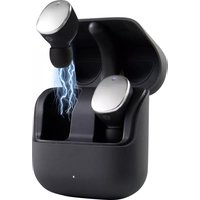
RF-TWS-500 - Earplug Renkforce - Free user manual and instructions
Find the device manual for free RF-TWS-500 Renkforce in PDF.



| Product type | True Wireless (TWS) in-ear headphones |
| Brand | Renkforce |
| Model | RF-TWS-500 |
| Bluetooth version | 5.0 |
| Bluetooth profiles | AVRCP, A2DP, HFP, HSP, SPP |
| Bluetooth range | Up to 10 m (without obstacles) |
| Earbud battery | Lithium polymer 3.7 V, 50 mAh |
| Charging case battery | Lithium polymer 3.7 V, 500 mAh |
| Battery life (music/call) | Approximately 5 / 3.5 hours (depending on volume) |
| Charging time earbuds | Approximately 2 hours |
| Charging time case | Approximately 2.5 hours |
| Wireless charging | Yes (Qi compatible) |
| Charging port | USB-C™ |
| Case dimensions | 62.1 × 53.3 × 27.3 mm |
| Earbud dimensions | 26 × 24 × 16 mm |
| Total weight (earbuds) | 9.2 g (both) |
| Case weight | 46 g |
| Transmission power | -6 dBm to +4 dBm |
| Speaker frequency response | 20 - 20,000 Hz |
| Input impedance | 32 Ω |
| Sound pressure level | 113 dB |
| Cleaning | Dry lint-free cloth, avoid liquids |
| Operating temperature | -10 to +55 °C |
| Storage temperature | -20 to +60 °C |
Frequently Asked Questions - RF-TWS-500 Renkforce
User questions about RF-TWS-500 Renkforce
0 question about this device. Answer the ones you know or ask your own.
Ask a new question about this device
Download the instructions for your Earplug in PDF format for free! Find your manual RF-TWS-500 - Renkforce and take your electronic device back in hand. On this page are published all the documents necessary for the use of your device. RF-TWS-500 by Renkforce.
USER MANUAL RF-TWS-500 Renkforce
natural_image
Close-up of two metallic cylindrical objects with labeled parts (3 and 5), no visible text or symbols on the objects themselves.GB Operating instructions
True wireless in-ear headphones RF-TWS-500
Item no. 2238077
Intended use
This product is designed to play audio from a Bluetooth device. You can also use the headphones to answer calls from a connected audio device (mobile device). You can connect a Bluetooth-enabled mobile device to the in-ear headphones. This product is operated by means of a lithium-polymer rechargeable battery. The battery can be recharged with the charging case, which also has an in-built battery.
This product is intended for indoor use only. Do not use it outdoors. Contact with moisture (e.g. in a bathroom) must be avoided under all circumstances.
For safety and approval purposes, do not rebuild and/or modify this product. Using the product for purposes other than those described above may damage the product. In addition, improper use can cause hazards such as a short circuit or fire. Read the operating instructions carefully and store them in a safe place. Only make this product available to third parties together with its operating instructions.
This product complies with statutory, national and European regulations. All company and product names contained herein are trademarks of their respective owners. All rights reserved.
Delivery content
• In-ear headphones
- 2x pairs of ear buds
- Operating instructions
- Charging case
- USB-C™ cable
Up-to-date operating instructions
Download the latest operating instructions at www.conrad.com/downloads or scan the QR code shown. Follow the instructions on the website.

Explanation of symbols

The symbol with an exclamation mark in a triangle is used to highlight important information in these operating instructions. Always read this information carefully.

The arrow symbol indicates special information and tips on how to use the product.
Safety information

Read the operating instructions and safety information carefully. If you do not follow the safety information and information on proper handling in these operating instructions, we will assume no liability for any resulting personal injury or damage to property. Such cases will invalidate the warranty/guarantee.
a) General information
• The device is not a toy. Keep it out of the reach of children and pets.
- Do not leave packaging material lying around carelessly. It may become a dangerous plaything for children.
- Protect the product from extreme temperatures, direct sunlight, strong jolts, high humidity, moisture, flammable gases, vapours and solvents.
- Do not place the product under any mechanical stress.
- If it is no longer possible to operate the product safely, stop using it and prevent unauthorised use. Safe operation can no longer be guaranteed if the product:
- is visibly damaged,
- is no longer working properly,
- has been stored for extended periods in poor ambient conditions or
- has been subjected to any serious transport-related stresses.
- Handle the product carefully. Jolts, impacts or a fall even from a low height may damage the product.
- Consult a technician if you are not sure how to use or connect the product, or if you have concerns about safety.
- Maintenance, modifications and repairs must be carried out by a technician or a specialist repair centre.
- If you have any questions that are not answered in these operating instructions, please contact our technical customer service or other professionals.
b) Connected devices
• Always observe the safety information and operating instructions of any other devices which are connected to the product.

c) Persons and product
- Never pour liquids over electrical devices or place objects filled with liquid next to the device. Discontinue use and take the product to a specialist repair centre.
- Never use the product immediately after it has been brought from a cold room into a warm one. This may cause condensation to form, which can destroy the product. Allow the product to reach room temperature before connecting it and putting it into use. This may take several hours.
- Do not listen to excessively loud music over an extended period of time. This may damage your hearing.
- Do not wear the in-ear headphones when asleep. This could damage them or result in personal injury
d) Rechargeable batteries
- The rechargeable battery is permanently built into the product and cannot be replaced.
- Never damage the rechargeable battery. Damaging the casing of rechargeable batteries may cause an explosion or a fire! Unlike conventional batteries/rechargeable batteries (e.g. AA or AAA batteries), the casing of the Li-Po rechargeable battery is not made of a thin metal sheet, but only of a sensitive plastic film.
- Never short-circuit the contacts of the rechargeable battery. Do not throw the battery or the product into fire. There is a danger of fire and explosion!
- Charge the rechargeable battery regularly, even if you are not using the product.
- Due to the rechargeable battery technology being used, you do not need to discharge the rechargeable battery first.
- Never leave the battery unattended when it is charging.
- Place the product on a heat-resistant surface before charging the rechargeable battery. It is normal for a certain amount of heat to be generated during charging.
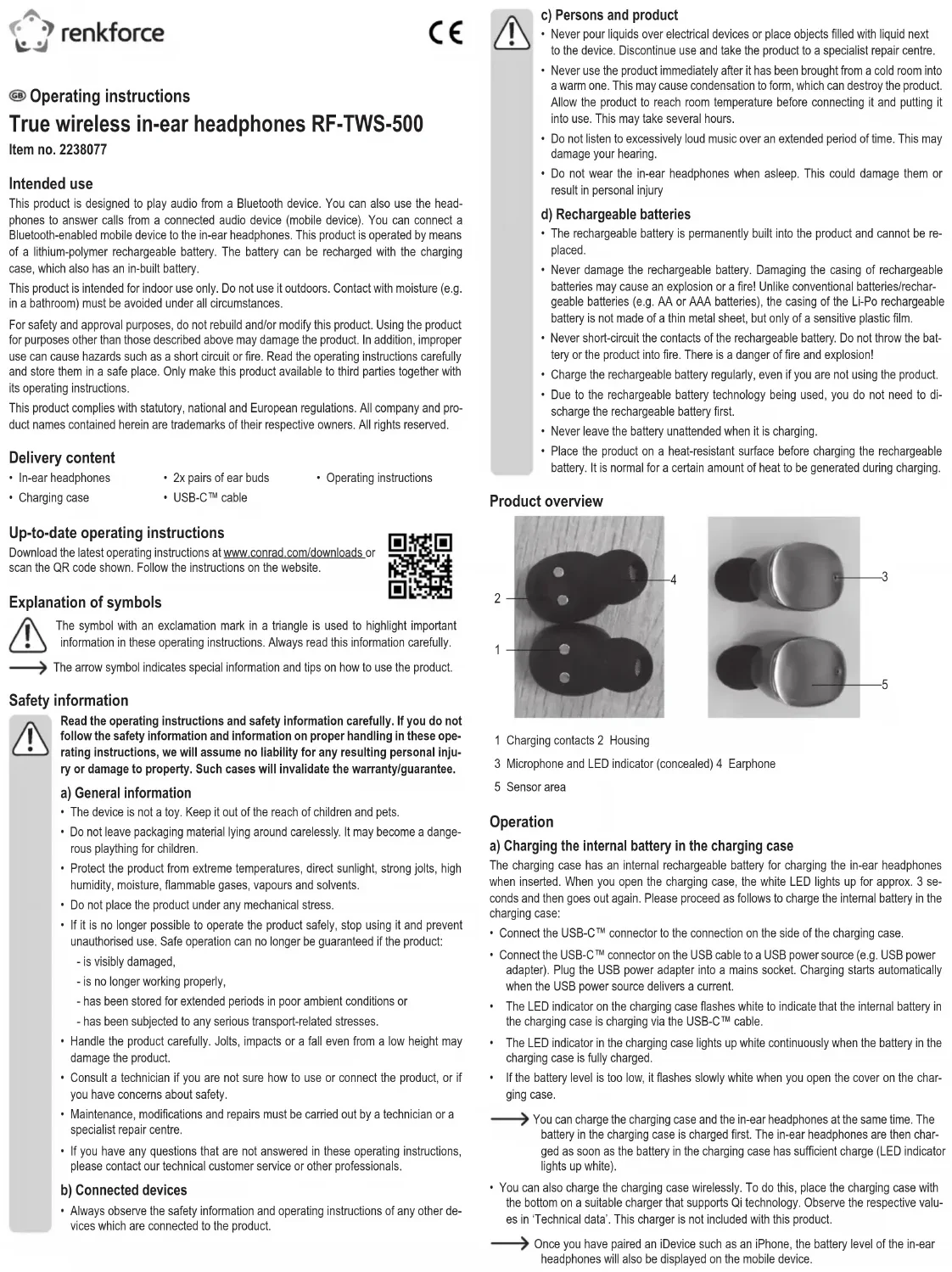
Product overview
natural_image
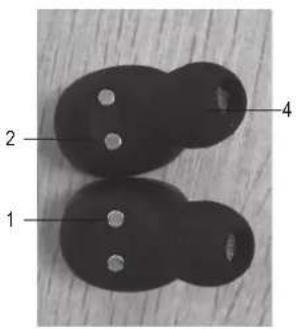
Two metallic cylindrical objects with labeled parts, no visible text or symbols1 Charging contacts 2 Housing
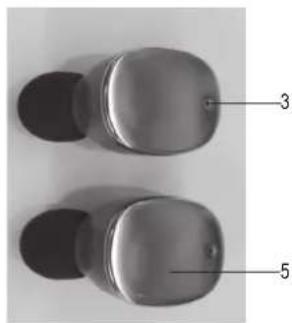
3 Microphone and LED indicator (concealed) 4 Earphone
5 Sensor area
Operation
a) Charging the internal battery in the charging case
The charging case has an internal rechargeable battery for charging the in-ear headphones when inserted. When you open the charging case, the white LED lights up for approx. 3 seconds and then goes out again. Please proceed as follows to charge the internal battery in the charging case:
- Connect the USB-C™ connector to the connection on the side of the charging case.
- Connect the USB-C™ connector on the USB cable to a USB power source (e.g. USB power adapter). Plug the USB power adapter into a mains socket. Charging starts automatically when the USB power source delivers a current.
- The LED indicator on the charging case flashes white to indicate that the internal battery in the charging case is charging via the USB-C™ cable.
- The LED indicator in the charging case lights up white continuously when the battery in the charging case is fully charged.
- If the battery level is too low, it flashes slowly while when you open the cover on the charging case.
→ You can charge the charging case and the in-ear headphones at the same time. The battery in the charging case is charged first. The in-ear headphones are then charged as soon as the battery in the charging case has sufficient charge (LED indicator lights up white).
- You can also charge the charging case wirelessly. To do this, place the charging case with the bottom on a suitable charger that supports Qi technology. Observe the respective values in 'Technical data'. This charger is not included with this product.
Once you have paired an iDevice such as an iPhone, the battery level of the in-ear headphones will also be displayed on the mobile device.
b) Charging the internal batteries in the in-ear headphones
- Charge the batteries fully before using the product for the first time.
- Recharge the internal battery if the charge level of the battery is too low. The in-ear headphones warn the user when the battery is too low. The LED indicator (3) flashes red every 5 seconds to indicate that the internal battery level is too low. An acoustic alarm sounds every 5 minutes until the battery is fully depleted.
- Open the cover of on the charging case
- To charge, place the in-ear headphones individually into the charging bays in the charging case with the charging contacts (1) correctly oriented.
- The LED indicator lights up blue to indicate that the battery in the in-ear headphones is charging.
- The blue LED indicator goes out when the battery is fully charged.
• After charging, remove the in-ear headphones from the charging bays in the charging case. - Disconnect the charging case from the USB power adapter or other USB power source, if applicable.
c) Using the in-ear headphones
- Select the most suitable ear bud from the 2 supplied sizes and place it over the sound outlet on the earphone (4). Place both in-ear headphones into your ears. Observe the markings 'L' and 'R', with 'L' for the left ear and 'R' for the right ear.
• The microphones (3) on the headphones must point downwards towards your mouth. - The area next to the microphone is a sensor area (5). This sensor area acts as a touch button for controlling different functions of the in-ear headphones. A light press is all that is required to use it.
d) Switching on the in-ear headphones and stereo pairing
- The in-ear headphones are designed for stereo pairing (TWS). To pair the in-ear headphones after charging, insert them into the charging bays in the charging case and remove them again after a short time. After removal, the headphones switch on automatically and stereo pairing begins. A confirmation tone confirms that the headphones have been paired successfully.
- If stereo pairing of the right and left earphones is not successful within 3 minutes, the headphones switch off automatically. Start another pairing attempt by briefly inserting the headphones into the charging bays in the charging case.
e) Pairing the in-ear headphones with a Bluetooth device
Automatically pairing the in-ear headphones
Both devices must be paired before wireless transmission between your Bluetooth device (audio device) and the product (in-ear headphones) is possible. This process is also called 'pairing'.
- Place the in-ear headphones and your Bluetooth audio device at a distance of approximately 1 m from one another and avoid interference that may affect signal transmission (for example, do not place the devices near strong electromagnetic fields or metal objects or behind reinforced concrete walls). If necessary, switch off other interfering Bluetooth devices.
- Ensure that the Bluetooth function is switched on and that your Bluetooth device has all of the necessary Bluetooth drivers installed. Visit the manufacturer's website to download and install the latest drivers.
- Switch the Bluetooth device on and enable pairing mode.
- Follow the instructions for your Bluetooth device to pair it. These may vary depending on the manufacturer and design. The device now searches for Bluetooth devices within reception range.
- To enter pairing mode, remove the in-ear headphones from the charging case. If necessary, insert them briefly into the charging case for activation, then remove again. Stereo pairing begins automatically.
- The LED indicator on both in-ear headphones (5) flashes red and blue alternately to indicate that pairing mode is active. A sound indicates that stereo pairing has been successful.
→ You can also remove only one headphone from the charging case and pair it with the mobile device individually. In that case, stereo sound will not available as stereo pairing will not have been completed.
- Select the device ID of the in-ear headphones ('RF-TWS-500') in the list of available Bluetooth devices on your audio device (e.g. mobile phone, laptop) to pair the in-ear headphones with the device. You will hear a brief confirmation sound once pairing has been successful.
- If the devices do not pair, insert the in-ear headphones into the charging case and try pairing the devices again.
If you move your mobile device and in-ear headphones out of range, you will hear a warning sound. The product then tries to connect to the mobile device again. If these connection attempts remain unsuccessful for 3 minutes, the in-ear headphones switch off automatically.
Manually pairing the in-ear headphones (True Wireless Stereo)
- Ensure that the cover on the charging case is closed.
- To enter pairing mode on the in-ear headphones, briefly touch the sensor area (5) of the right and left headphones twice at the same time. Stereo pairing begins. The red and blue LEDs flash.
- As soon as the right and left headphones are connected, open the charging case to pair a mobile device with the in-ear headphones via Bluetooth. The red and blue LEDs of both headphones begin to flash alternately. Use your mobile device to search for the in-ear head-
phones (ID 'RF-TWS-500') and pair them with the device. A confirmation sound indicates that pairing was successful.
If you delete the paired in-ear headphones from the list of paired devices on your mobile device, you must also complete stereo pairing again. Otherwise, you will only hear audio from one in-ear headphone.
f) Control with your mobile device
→ You can control all functions, such as playback and other functions, using the controls on your audio device (mobile device). See the operating instructions for your device.
g) Music playback
- Connect the in-ear headphones to an audio playback device via Bluetooth.
- Start playback on your audio device.
• You can select the volume and track (skip to the next/previous track) with your audio device. - While playing a track, briefly touch the sensor area (5) of one of the headphones twice to pause the track. Press again twice to resume the track/audio file.
h) Answering/ending phone calls and dialling
When the products is paired with a mobile phone via Bluetooth and you receive an incoming call, the current track is paused and the speaker plays a ringtone.
- To answer an incoming call, briefly touch the sensor area (5) of the right or left headphone twice. You will hear a beep.
- To end the call, briefly touch the sensor area (5) of the right or left headphone twice. You will hear a beep. The call is terminated.
- To cancel dialling, briefly touch the sensor area (5) of the right or left headphone twice. You will hear a beep. The dialling attempt is aborted.
- To reject a call, use the controls on your mobile device.
- Use the usual controls on your mobile device to answer your calls, such as redialling the last number that you dialled, etc.
→ If possible, speak in the direction of the microphone (3) when making a call and ensure that the microphone is not obstructed.
i) Changing the volume
→ You can adjust the volume settings using the controls on your audio device.
j) Troubleshooting
Problem description Possible cause Solution
| The headphones cannot be switched on. | The batteries are flat. Insert the headphones into the charging case. (If the charging case no longer has power, charge the case with the charger first). | |
| The headphones cannot be charged. | The charging contacts on the headphones are not properly connected with the pins in the charging case. | Remove your headphones, adjust the charging contacts slightly and insert the headphones back into the charging case.Ensure that the charging contacts are properly connected with the pins in the charging case. |
| The headphones cannot be switched off. | The software requires a restart due to improper operation. | Insert the earphones into the charging case to reset them. |
| The headphones cannot be found or pairing fails. | The headphones do not enter pairing mode. | Activate the headphones to enter pairing mode. Refer to the section ‘e) Pairing the in-ear headphones with a Bluetooth device'. |
| The Bluetooth function on the device being paired is deactivated. | Activate the Bluetooth function on your device to pair the mobile device with the in-ear headphones again. | |
→ Keep the in-ear headphones away from credit cards and magnetic storage media. Data on these devices could be lost due to demagnetisation.
- Ensure that all of the latest Bluetooth drivers are installed on the device that you want to pair.
- Please note that the control functions on the in-ear headphones are not supported by all audio devices (e.g. smartphones). Visit the website of your smartphone manufacturer and check the list of functions for your device (the AVRCP protocol must be supported). Updating your device may help to resolve the issue.
- If there is no audio in the in-ear headphones, try increasing the volume. If the issue persists, re-establish the Bluetooth connection or pair the devices again.
- If you hear crackling and noise, ensure that the audio device and in-ear headphones are within 10 metres of one another. Exclude other interference from the wireless reception.
Care and cleaning
- To preserve the battery life, we recommend charging the battery in the in-ear headphones at least once a month.
- Disconnect the product from the mains before cleaning.
- Never use aggressive detergents, rubbing alcohol or other chemical solutions, as these may damage the enclosure or cause the product to malfunction.
- Use a dry, lint-free cloth to clean the product.
- Do not immerse the product in water.
Declaration of Conformity (DOC)
Conrad Electronic SE, Klaus-Conrad-Straße 1, D-92240 Hirschau hereby declares that this product conforms to Directive 2014/53/EU.

Click on the following link to read the full text of the EU Declaration of Conformity: www.conrad.com/downloads
Select a language by clicking on the corresponding flag symbol, and then enter the product order number in the search box. The EU Declaration of Conformity is available for download in PDF format.
Disposal

Electronic devices are recyclable waste and must not be placed in household waste. At the end of its service life, dispose of the product in accordance with applicable regulatory guidelines.
You thus fulfil your statutory obligations and contribute to environmental protection.
Technical data
Input voltage/current.....5 V/DC, 500 mA (charging case)
Rechargeable battery .... 3.7 V/DC, 50 mAh lithium-polymer battery (in-ear headphones), 500 mAh (charging case)
Power consumption....max. 7.5 mW
Charging port....USB-C™
Audio ...... Stereo
Antenna Ceramic
Frequency range 2.402 - 2.480 GHz
Transmission power....-6 dBm to +4 dBm
Channel spacing....1 MHz
Supports......All Bluetooth devices
Bluetooth profile....AVRCP, A2DP, HFP (Hands-Free Profile), HSP (Headset Profile), SPP (Serial Port Profile)
Bluetooth transmission range ..... max. 10 m (with no obstructions)
Speaker frequency range ...... 20 - 20000 Hz
Sound pressure 113 dB
Input impedance (microphone).....200 Ω @ 1 kHz
Sensitivity (microphone) ...... -44 dB, ±3 dB, 500 Ω
Diameter of the drivers ....∅ 6 x 4.5 mm
Input impedance 32 Ω
Battery charging time.... approx. 2 hours (in-ear headphones) approx. 2.5 hours (charging case)
Standby 70 hours
Battery life.... approx. 3.5/5 hours telephone/music (depending on the volume)
Supported OS......Android™: 5.0.2 to 10, iOS: 10.3.3 to 13.4.1
Operating conditions....-10 to +55 °C, 25 - 60 % relative humidity (non-condensing)
Storage conditions....-20 to +60 °C, 0 - 90 % relative humidity (non-condensing)
Dimensions (L x W x H) ...... 62.1 x 53.3 x 27.3 mm (charging case) 26 x 24 x 16 mm (headphones)
Weight 9.2 g (both headphones) 46 g (charging case)
F Mode d'emploi
natural_image
Close-up of two metallic cylindrical objects with labeled parts (3 and 5), no visible text or symbols on the objects themselves.Copyright 2020 by Conrad Electronic SE.
*2238077_v2_0720_02_DS_m_4L_(1)
natural_image
Close-up of two metallic cylindrical objects with labeled parts (3 and 5), no visible text or symbols on the objects themselves.


- GB Operating instructions
- True wireless in-ear headphones RF-TWS-500
- Intended use
- Delivery content
- Up-to-date operating instructions
- Explanation of symbols
- Safety information
- a) General information
- b) Connected devices
- c) Persons and product
- d) Rechargeable batteries
- Operation
- a) Charging the internal battery in the charging case
- b) Charging the internal batteries in the in-ear headphones
- c) Using the in-ear headphones
- d) Switching on the in-ear headphones and stereo pairing
- e) Pairing the in-ear headphones with a Bluetooth device
- Automatically pairing the in-ear headphones
- Manually pairing the in-ear headphones (True Wireless Stereo)
- f) Control with your mobile device
- g) Music playback
- h) Answering/ending phone calls and dialling
- i) Changing the volume
- j) Troubleshooting
- Care and cleaning
- Declaration of Conformity (DOC)
- Disposal
- Technical data
- F Mode d'emploi
Brand : Renkforce
Model : RF-TWS-500
Category : Earplug