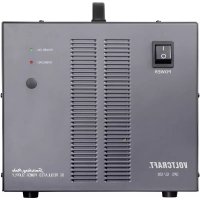
SPS12120 - Power bank VOLTCRAFT - Free user manual and instructions
Find the device manual for free SPS12120 VOLTCRAFT in PDF.



User questions about SPS12120 VOLTCRAFT
0 question about this device. Answer the ones you know or ask your own.
Ask a new question about this device
Download the instructions for your Power bank in PDF format for free! Find your manual SPS12120 - VOLTCRAFT and take your electronic device back in hand. On this page are published all the documents necessary for the use of your device. SPS12120 by VOLTCRAFT.
USER MANUAL SPS12120 VOLTCRAFT
GB Operating Instructions
High Current Switching Power Supply SPS12/120
Item No. 511100 Page 13 - 23
F Mode d'emploi
- Introduction....14
- Explanation of symbols....14
- Intended use....15
- Delivery content....15
- Features and functions ...... 16
- Safety instructions ....17
a) General information....17
b) Connected devices....18
- Operating elements ...... 19
- Start-up 20
a) General information....20
b) Connecting the power cable....20
c) Setting the desired output voltage....20
d) Connecting a consumer....20
-
"SENSE" function....21
-
Troubleshooting....22
- Care and cleaning....22
- Disposal....23
- Technical data....23
1. Introduction
Dear customer,
Thank you for purchasing this product.
This product complies with the statutory national and European requirements.
To maintain this status and to ensure safe operation, you as the user must observe these operating instructions!

These operating instructions are part of this product. They contain important notes on commissioning and handling. Also consider this if you pass on the product to any third party. Therefore, retain these operating instructions for reference!
If there are any technical questions, please contact: www.conrad.com/contact
2. Explanation of symbols
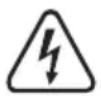
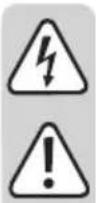
The symbol with the lightning in the triangle is used if there is a risk to your health, e.g. due to an electric shock.

The symbol with the exclamation mark in the triangle is used to indicate important information in these operating instructions. Always read this information carefully.

The arrow symbol indicates special information and advice on operation.

Only to be used in dry indoor areas.

This product has been CE-tested and meets the required European guidelines.
3. Intended use
The power supply unit is designed to connect and operate low voltage consumers with an operating voltage of 13.8 V DC. The voltage is taken from the two high current screw-type jacks on the back.
The power supply unit supplies a current of up to 120 amperes. The power consumption of a connected consumer may not exceed this limit.
To compensate for line losses, a "SENSE" cable must always be connected. The output is short-circuit protected and resets the output power in case of a short circuit.
The DC connection cables must have a large enough conductor cross-section for the corresponding current consumption. If the conductor cross-section is too small, there is a risk of fire. For the rated current (120 A), the cross-section of the conductor must be 35 mm ^4 .
The switching power supply is designed in compliance with Protection Class 1. It is only approved for connection to sockets with protective earthing contact and an alternating current of 230 V\~/50 Hz, commonly used in households.
Operation in unfavourable ambient conditions is not permitted. Unfavourable ambient conditions include the following:
- Excessive moisture or humidity
- Dust and combustible gases, vapours or solvents
- Electrical storms or stormy conditions resulting in strong electrostatic fields, etc.
It is intended for indoor use only. Do not use it outdoors. Contact with moisture, e.g. in bathrooms, must be avoided under all circumstances.
For safety and approval purposes, you must not rebuild and/or modify this product. If you use the product for purposes other than those described above, the product may be damaged. In addition, improper use can result in short circuits, fires, electric shocks or other hazards. Read the instructions carefully and store them in a safe place. Make this product available to third parties only together with its operating instructions.
All company names and product names are trademarks of their respective owners. All rights reserved.
4. Delivery content
• High current switching power supply
- Operating instructions
Up-to-date Operating Instructions
Download the latest operating instructions at www.conrad.com/downloads or scan the QR code shown. Follow the instructions on the website.

5. Features and functions
- The high current power supply 12/120 is based on switching power supply technology, which has the advantage of reducing the weight and size of the device. Switching power supply units use chopped power supplies and return a broad spectrum of harmonic waves to the mains power line, which may cause interference in other devices. To suppress these harmonic waves, a PFC (Power Factor Correction) has been installed.
- The direct voltage output is electrically isolated and features a protective function that disconnects it from the mains voltage.
- The output voltage is preset to 13.8 V and can be reset using the control (4) from 12.6 V to 14.8 V DC. A. Limiting the current is not possible.
- Two coloured high current terminals with 4 mm measuring jacks on the back of the device are used for the secondary DC connection.
- The power supply unit is cooled by two temperature-controlled fans. For this reason, make sure there is adequate air circulation and ample distance from other objects.
- The power supply unit is equipped with an overload protection switch. This is activated when the maximum permissible current is exceeded due to an overload or short circuit. A red display light indicates an overload. When this lights up, the consumer and its current consumption must be checked.
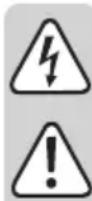
Read the operating instructions carefully and especially observe the safety information. If you do not follow the safety instructions and information on proper handling in this manual, we assume no liability for any resulting personal injury or damage to property. Such cases will invalidate the warranty/guarantee.
a) General information
- The device is not a toy. Keep it out of the reach of children and pets.
- Do not leave packaging material lying around carelessly. This may become dangerous playing material for children.
- Protect the appliance from extreme temperatures, direct sunlight, strong jolts, high humidity, moisture, flammable gases, steam and solvents.
- Do not place the product under any mechanical stress.
-
If it is no longer possible to operate the product safely, take it out of operation and protect it from any accidental use. Safe operation can no longer be guaranteed if the product:
-
is visibly damaged,
- is no longer working properly,
- has been stored for extended periods in poor ambient conditions or
- has been subjected to any serious transport-related stresses.
- Please handle the product carefully. Jolts, impacts or a fall even from a low height can damage the product.
- In commercial institutions, the accident prevention regulations for electrical systems and operating materials of the Employer's Liability Insurance Association are to be observed.
- In schools and training centres as well as in hobby and DIY workshops, the use of power supply units must be supervised by adequately trained personnel in a responsible manner.
- Never touch the power supply unit or the mains plug with wet or moist hands. There is a risk of electrocution.
- Live components may be exposed if covers are opened or parts are removed (unless this can be done without tools).
- Before opening it, the device must be disconnected from all power sources.
- Capacitors in the device may still be charged, even if the device has been disconnected from all power sources.
- Never switch the switching power supply on immediately after it has been taken from a cold to a warm environment. The resulting condensation could destroy the device under unfavourable conditions. Allow the device to reach room temperature before switching it on.
- The switching power supply generates heat during operation. Make sure it is adequately ventilated. Do not cover the ventilation slots on the device.
- Do not leave mains power supplies and any connected consumers unattended while in operation.
- Only use fuses of the specified type and rating. It is not permitted to use repaired fuses.
- Avoid the use of uninsulated metallic cables.
- It is not permitted to connect several switching power supplies in series or parallel.
• Power supply units are not to be used on human beings or animals.
- Consult an expert when in doubt about the operation, safety or connection of the appliance.
- Maintenance, modifications and repairs must only be completed by a technician or an authorised repair centre.
- If you have questions which remain unanswered by these operating instructions, contact our technical support service or other technical personnel.
b) Connected devices
- Also observe the safety and operating instructions of any other devices which are connected to the product.
7. Operating elements
text_image
POWER POWER ON OVERLOAD 2 3 4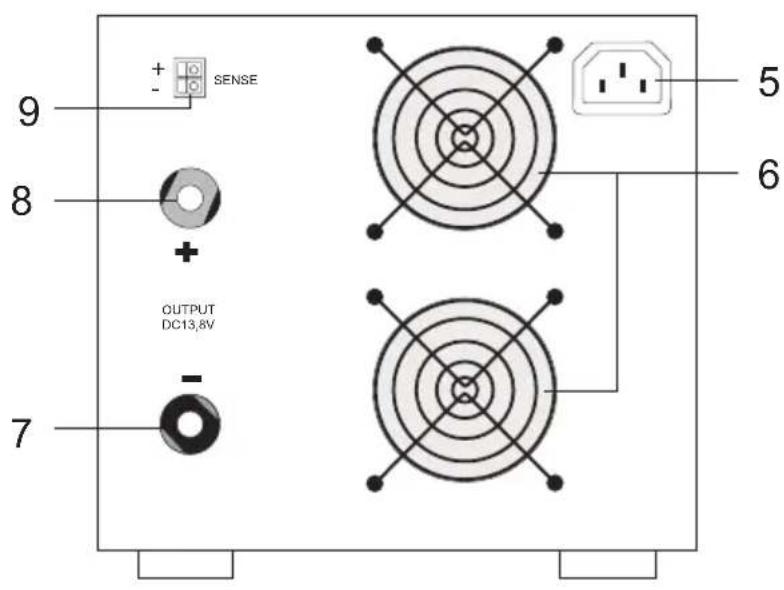
text_image
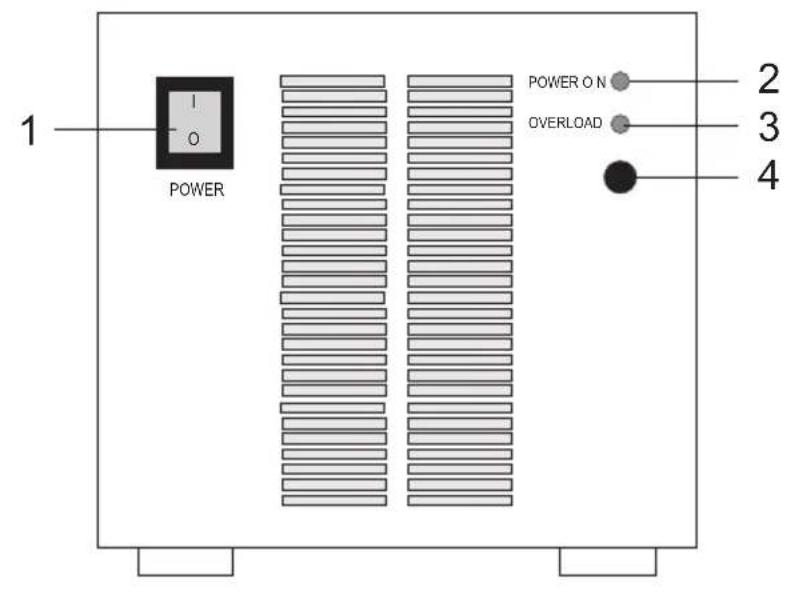
9 + - SENSE 8 + OUTPUT DC13.8V 7 5 61 Power switch to start the device (I = ON / O = OFF)
2 Green display indicating operating mode
3 Red display indicating an overload
4 Control with cover to set the DC output voltage
5 Inlet connector with earthing contact for cooling apparatus
6 Fan opening for cooling the device
7 Screw-type jack for high current output, "negative pole"
8 Screw-type jack for high current output, "positive pole"
9 "SENSE" connection for automatic correction of the voltage at the high current output
8. Start-up
a) General information
The switching power supply is not a charger. To charge batteries, use suitable chargers with charging cut-off.
b) Connecting the power cable
- Connect the power cable with earthing contact provided to the power supply jack (5) on the power supply. Make sure it is plugged in securely.
- Connect the power cable to a mains socket with earthing contact.
c) Setting the desired output voltage
- Make sure that there are no consumers connected to the mains power supply.
- Switch on the power supply at the power switch (1). The power indicator (2) should light up.
- Check the output voltage with a voltmeter. If the preset voltage is not the desired voltage, it can be reset in the range of 12.6 V to 14.8 V.
- Gently remove the plastic cover (4) with a flat-tip screwdriver.
- With a suitable screwdriver, set the desired output voltage and check the voltage with a voltmeter.
- Carefully replace the cover.
d) Connecting a consumer
- Make sure the consumer is switched off.
- Check that the output voltage is correct.
- Connect the positive pole (+) of the consumer to the red terminal “+” (8) and the negative pole (-) of the consumer to the black terminal “-” (7).
- 4 mm standard connectors could be used for this purpose but we strongly recommend using terminal screws for currents over 20 A (the jack heads can be screwed on).

Make sure that the consumers are switched off when being connected to the switching power supply. Sparks may be generated when a consumer which is switched on is connected to the jacks. This may damage the screw terminals as well as the connected cables.
- Always connect the "SENSE" measuring cables, as well. See next chapter.
9. "SENSE" function
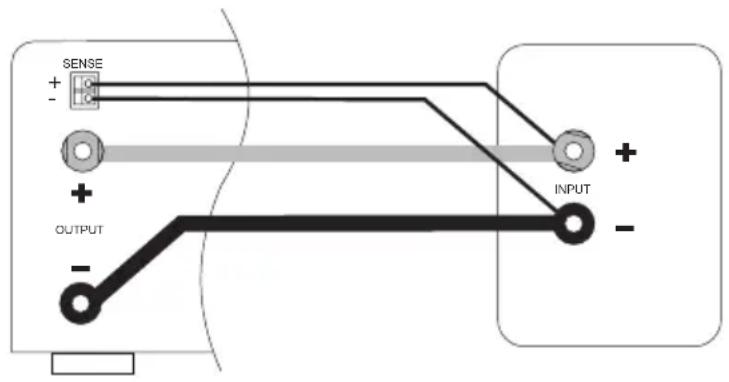
The switching power supply features an automatic voltage control for the high-current output. For this, two separate measuring cables are connected parallel to the connecting cables. The potential drop which occurs on the connecting cables is measured on these two measuring cables. The switching power supply compensates for this potential drop automatically so that the voltage on the consumer remains as set.
Proceed as follows for connection:
- Always connect the DC connection cables from the power supply to the consumer first. Ensure the polarity is correct.
- Press the terminals on the "SENSE" connection (9) inwards with a small screwdriver and insert the cables into the terminal openings. Check that they are plugged in firmly.
- Now connect the two "SENSE" cables to the consumer observing the correct polarity. The conductor cross-section for the "SENSE" cables must be at least 0.34 mm^2 (= 22 AWG).
- Always remove the connections in the reverse order (first of all "SENSE" cables and then the DC connection cables).

Ensure that the "SENSE" cables are contacting as close as possible to the connecting point of the consumer.
hort the "SENSE" cables.
text_image
SENSE + - OUTPUT - INPUT +10. Troubleshooting
By purchasing this switching power supply, you have acquired a product that is reliable and operationally safe.
Problems and malfunctions, however, may still arise.
For this reason we want to describe how to troubleshoot potential malfunctions yourself:

Always adhere to the safety instructions.
| Fault Possible cause | |
| The power supply does not work Does the operating mode indicator (2) light up on the power supply?Check the mains power supply.(if necessary, mains fuse in the device or electric cut-out). | |
| Connected consumers are not functioning. Is the polarity correct?Are the “SENSE” cables connected?Is power supply overloaded (display 3)?Check the technical data for the consumers. | |
Regularly check the technical safety of the device, e.g. check for damage to the housing.

A Other repair work must always be carried out by a specialist familiar with the hazards involved and with the relevant regulations. The guarantee will lapse if unauthorised modifications and repairs on or inside the device are made.
11. Care and cleaning

Do not use any aggressive cleaning agents, rubbing alcohol or other chemical solutions as they can cause damage to the housing and malfunctioning.
- Apart from occasional cleaning, this switching power supply is maintenance-free.
- Disconnect the product from the mains before each cleaning.
- Clean the product with a dry, fibre-free cloth.
12. Disposal
Product

Electronic devices are recyclable waste and must not be disposed of in the household waste. At the end of its service life, dispose of the product in accordance with applicable regulatory guidelines.
We thus fulfill your statutory obligations and contribute to the protection of the environment.
13. Technical data
Input voltage....230 V/AC, 50 Hz
Current consumption 8.5 A
Output voltage 13.8 V DC preset (can be reset to between 12.6 and 14.8 V)
Nominal output current 120 A
Residual ripple....<200 mV pp
Control response 0.1% + 5 mV (at 100% change of load)
0.05% + 5 mV (at +/-10% change in mains)
Efficiency ≥85%
Dynamic PFC ≥0.97 at nominal load
Device ventilation ......temperature-controlled system fans
Operating conditions....0 to +40 °C, max. 85 % relative humidity (non-condensing)
Dimensions (W x H x D) 235 x 218 x 345 mm
Weight 11 kg
Table des matières
Page
France (email): technique@conrad-france.fr
This is a publication by Conrad Electronic SE, Klaus-Conrad-Str. 1, D-92240 Hirschau (www.conrad.com).
All rights including translation reserved. Reproduction by any method, e.g. photocopy, microfilming, or the capture in electronic data processing systems require the prior written approval by the editor. Reprinting, also in part, is prohibited. This publication represents the technical status at the time of printing.
Copyright 2021 by Conrad Electronic SE.
Copyright 2021 by Conrad Electronic SE.