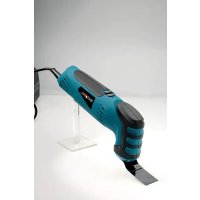
ZZ9506 - Hand tool Batavia - Free user manual and instructions
Find the device manual for free ZZ9506 Batavia in PDF.


User questions about ZZ9506 Batavia
0 question about this device. Answer the ones you know or ask your own.
Ask a new question about this device
Download the instructions for your Hand tool in PDF format for free! Find your manual ZZ9506 - Batavia and take your electronic device back in hand. On this page are published all the documents necessary for the use of your device. ZZ9506 by Batavia.
USER MANUAL ZZ9506 Batavia
natural_image
Teal and purple electric shaver with 'BATAVIA' branding, no visible text or symbols on body7050248 + 7050768
| Safety Notes | 8 | |||
| Before First Use | Mounting the Saw Blade resp. the Scraper | 9 | ||
| Mounting the Sanding Pad Holder | Attaching the Sanding Paper Pad to the Sanding Pad Holder | 9 | ||
| Attaching the Dust Extractor | ON/OFF Switch | 9 | ||
| Speed Controller | Accessories | 10 | ||
| Maintenance and Cleaning | Technical Data | Disposal | 11 | |
| EC-Declaration of Conformity | 16 | |||
français
natural_image
Two views of a blue and black mechanical device with a central knob, shown from top and side (no text or symbols visible)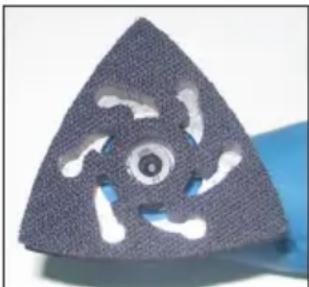
natural_image
Triangular textured object with cutouts, possibly a mechanical component or tool (no visible text or symbols)This manual contains important information on operating and handling the device. Keep these operating instructions for further reference. Please pass it on along with the unit if it is handed over to a third party!
Please read the safety instructions! These instructions will make it easier for you to handle the device and help prevent misunderstandings and possible damage or injury.
! Please note the included General Safety Notes and the following safety notes to avoid malfunctions, damage or physical injury:
- Make sure the voltage corresponds to the type label on the unit. - Persons with limited physical, sensorial or mental abilities or lack of know-how are not allowed to use the unit, unless they are supervised for their safety by a qualified person or are briefed by the responsible person how to use the unit.
- The multitool may be used with the included sanding paper pads for dry sanding work only.
- The multitool may be used with the included saw blades for cutting wood and plastics only.
- Hold the multitool with both hands and make sure you stand firmly. The multi-function tool can be operated much safer with both hands.
- Secure the work piece. A work piece can be machined much safer when it is secured by clamps or in a vice rather than with your hand.
- Keep your working area clean. Messy mixes of material are especially dangerous. Aluminium dust is explosive.
- Do not machine material which contains asbestos. Asbestos may cause cancer.
• Take protective measures when working with materials, which may form hazardous, flammable or explosive dust. For example: Some dusts may cause cancer. Wear a dust mask and use a dust extractor whenever possible. Wear ear protection and protective goggles.
- Please note that poisonous dust may be emitted while removing paint. Use suitable inhalation protection and ensure adequate ventilation.
- If you connect a vacuum cleaner on the multitool, make sure the parts are connected and used correctly. Using such equipment reduces hazards from dust.

- Do not use the multitool with damaged power cable. Do not touch the damaged cable and pull out the power plug if the cable becomes damaged during operation. Damaged cables increase the risk of an electric shock.
- Wear protective gloves when changing the tool bits. Tool attachments become very hot during use.
- Use the multitool only for dry sanding and for cutting dry wood and plastics. Water entering the housing of the electric tool greatly increases the danger of an electric stroke.
- Keep your hands away from the saw blade. Do not reach under the work piece. Touching the saw blade may cause injury.
- Use suitable devices to locate hidden cables or pipes. Contact with an electric cable may cause an electric stroke. Damaging a gas pipe may cause a fire or explosion. Damaging a water pipe may cause extensive damage and electric stroke.
- Unit and tools warm up when using them for a long time. Do not overload the multitool and allow to cool down between the individual operational steps.
- Do not open the unit and do not try to repair it yourself. Please contact a professional or our customer service. Only use original replacement parts.
USING
BEFORE FIRST USE
Remove the multitool and all accessories out of the packaging and check all parts for damage in transit. Keep packaging materials out of reach of children. There is risk of suffocation!
The multitool may only be used for dry sanding work. The tool is also suitable for working on wood, metal, plaster, plastic and filler surfaces. The sanding paper pads can also be used for removing rust, old paint and intermediate sanding.
The large and the small saw blades are suitable for cutting wood and plastics.
Before undertaking any work on the machine, pull out the power plug!
MOUNTING THE SAW BLADE RESP. THE SCRAPER
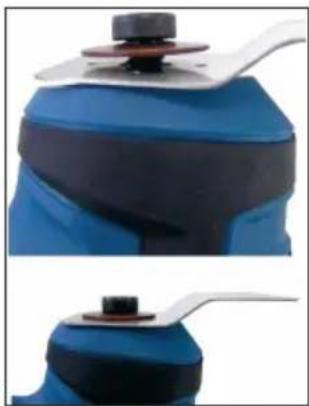
- Attach the tool (saw blade or scraper) to the tool holder. The tool can be attached in any desired position, e.g. in line with the housing or on the right or left side of the housing.
- Attach the tool with the flange (|6) and the tool socket screw (|7). Make sure to place the flange with the convex side upwards (see figure).
MOUNTING THE SANDING PAD HOLDER
- Attach the sanding pad holder (8) to the tool holder. Fasten the sanding pad holder with the socket screw on the tool holder. By doing this, the flange applies pressure on the sanding pad holder.
- Tighten the socket screw with the included Allen spanner (15) and make sure to hand-tight only.
ATTACHING THE SANDING PAPER PAD TO THE SANDING PAD HOLDER
The sanding pad holder is equipped with a hook and loop pad, so you can easily and conveniently change the sanding paper pads (14).
Keep the adhesive fabric of the sanding pad holder free from dirt and dust, so the adhesive fabric will work as desired.
- Position one corner of the sanding paper pad to the pad holder and press it firmly down. To achieve optimal extraction of dust, make sure the holes in the sanding paper pad and in the sanding pad holder line up.
- To remove the sanding paper pad, grasp one edge and pull it off the sanding pad holder.
ATTACHING THE DUST EXTRACTOR
Always attach a dust extracting device when using the multitool for sanding.
- Attach the dust extracting adaptor (3) into the provided opening on the housing.
- Connect the suction hose to the dust extracting adaptor.
ON/OFF SWITCH
- To switch on the multitool, push the ON/OFF switch (1) forwards.
- To switch off the tool, pull back the ON/OFF switch.
natural_image
Two views of a blue and black mechanical device with a white handle (no text or symbols visible)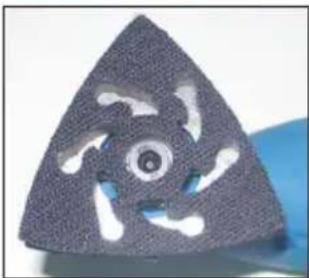
natural_image
Close-up of a triangular mechanical component with cutouts and central hole (no text or symbols visible)SPEED CONTROLLER
With the speed controller (|2) you can adjust the speed according to application. Select the appropriate speed setting and make sure the multitool does not become overloaded and stops running.
For increasing the speed setting, turn the speed controller (12) to the desired setting. The controller can be adjusted from 1–6. The speed rate can also be changed during operation.
The required speed rate for cutting resp. sanding a workpiece depends on the material that has to be machined. For best performance, make some practical tests.
| TOOL MATERIAL PURPOSE | ||
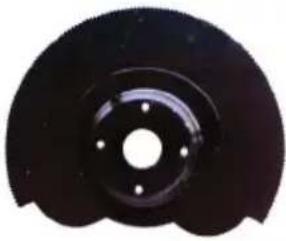 | Timber Products Cross Plastics Drop Cuts | CutsClose Cutse. g. Cutting-back Door Frames |
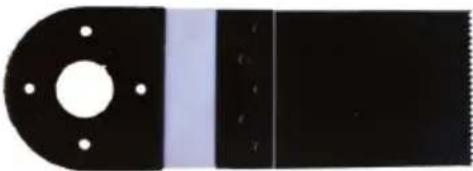 | Timber Products Cross Plastics Drop Cuts | CutsClose Cutse. g. Cutting-back Door Frames |
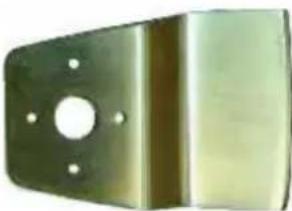 | Timber Products Scraping and CleaningPlastics Surfaces, RemovingVarnish and coatings remaining Adhesives and Remaining adhesive Coatings | |
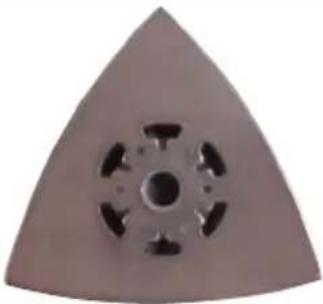 | Timber Products Sanding Work, due itsPlastics size also suitable forVarnish and coatings CornersMetals | |
MAINTENANCE AND CLEANING
- The machine does not require special maintenance. Do not disassemble it and do not try to repair it yourself.
- Use a moist cloth to clean the machine. Do not use aggressive chemicals or abrasives.
- Keep the ventilation louvers clean and free from debris.
- If the machine becomes damaged, have it repaired by a professional or turn to our customer support department. If the carbon brushes require replacement, have the replaced by a professional or turn to our customer support.
TECHNICAL DATA
Multitool
Type / Model ZZ9506
Rated Voltage 230 V\~50 Hz
Rated Power 250 W
Sound Pressure Level 88.1 dB (A)
Sound Power Level 99.1 dB (A)
Hand Arm Vibration 3.5 m/s2
Protection Class II
Dimensions 280 mm x 100 mm x 70 mm
Weight 1.4 kg
DISPOSAL
Dear Customer, please help avoid waste materials.
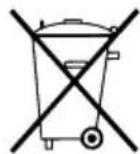
If you at some point intend to dispose of this article, then please keep in mind that many of its components consist of valuable materials, which can be recycled. Please do not discharge it in the rubbish bin, but check with your local council for recycling facilities in your area.
CONSIGNES DE SÉCURITÉ
natural_image
Close-up of a blue and black mechanical component with a metallic lever, shown from top and side views (no text or symbols visible)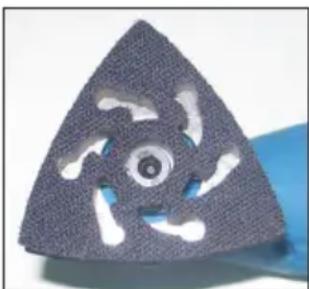
natural_image
Close-up of a triangular mechanical component with cutouts and a central hole (no text or symbols visible)EC-DECLARATION OF CONFORMITY GB
We, the Batavia GmbH, Blankenstein 230-1b, NL-7943PG Meppel, declare by our own responsibility that the product Multitool, ZZ9506, Item-No 7050248/7050768 is according to the basic requirements, which are defined in the European Directives 2004/108/EC Electromagnetic Compatibility (EMC), 2006/42/EC Machinery and their amendments. For the evaluation of conformity, the following harmonized standards were consulted: EN 60745-1:2006, EN 60745-2-4:2003+A11, EN 55014-1:2006, EN 55014-2:1997+A1, EN 61000-3-2:2006, EN 61000-3-3:1995+A1+A2.
Meppel, 14th of August 2009
text_image
(Meino Seinen, QA)(Meino Seinen, QA Representative)
DIESES PRODUKT HAT
2 JAHRE GARANTIE
THIS PRODUCT HAS GOT A 2 YEAR WARRANTY
DIT PRODUCT HEEFT 2 JAAR GARANTIE
CE PRODUIT A 2 ANS DE GARANTIE
Dear Client, if for any reason this product is not working, please ensure you contact our Client Service Centre. Ensure you have your original receipt of purchase. This warranty covers all defects in workmanship or materials in this Batavia product for a two year period from the date of purchase. The warranty does not cover any malfunction, or defect resulting from misuse, neglect, alteration, or repair.
Other European countries | Customer Services Monday till Friday from 8am until 4pm

00800 66477400