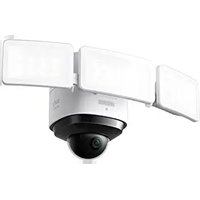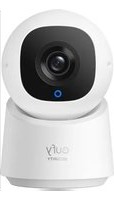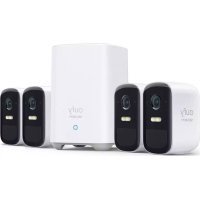
EufyCam C2 Pro - Surveillance Camera eufy - Free user manual and instructions
Find the device manual for free EufyCam C2 Pro eufy in PDF.

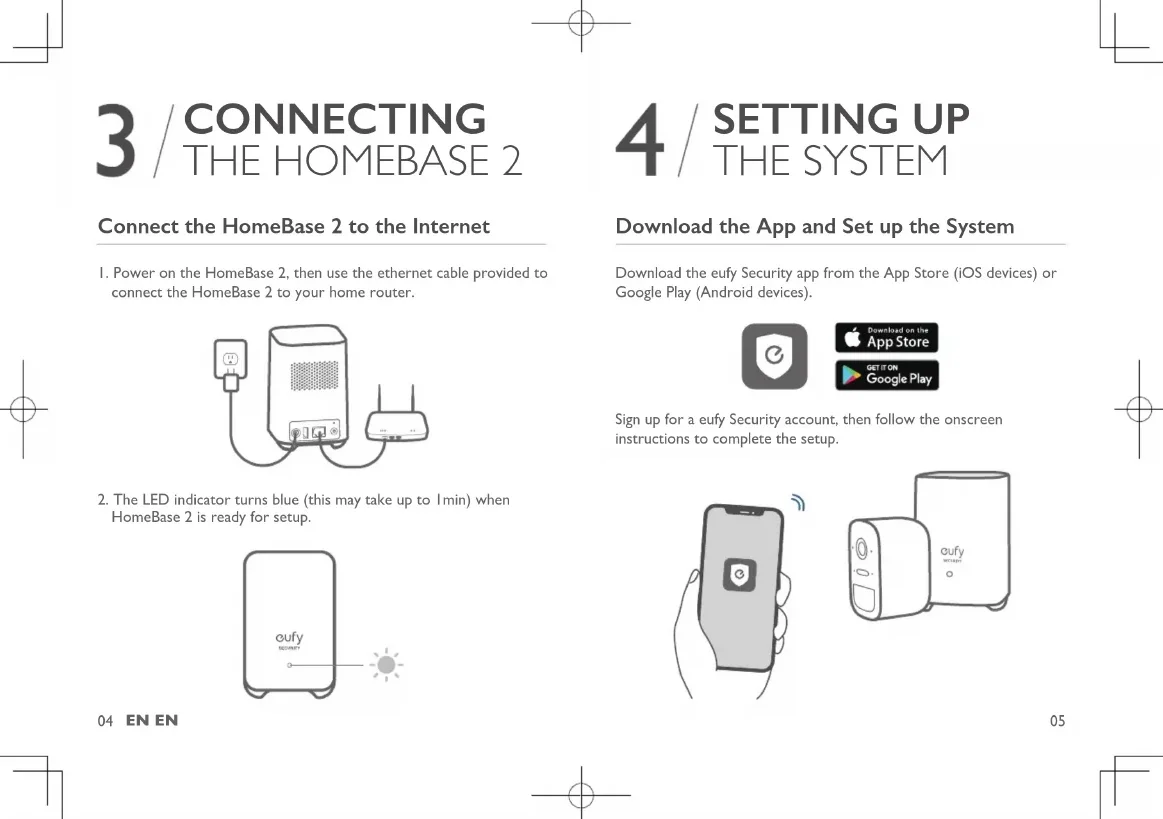


| Product Type | Wireless Security Camera |
| Brand | eufy |
| Model | EufyCam C2 Pro |
| Power Supply | Rechargeable Lithium-ion battery, charges via micro-USB (5V) |
| Charging Time | About 5 hours |
| Connectivity | Wi-Fi via HomeBase 2 |
| Base Station | HomeBase 2 (T8010) with Ethernet port |
| Night Vision | Yes, with LED floodlights |
| Motion Detection | PIR sensor, range up to 10 m |
| Audio | Built-in microphone and speaker (two-way audio) |
| Mounting | Wall mount included, recommended height 2-3 m |
| Usage | Indoor and outdoor |
| Max number of cameras | 16 per HomeBase 2 |
| App | eufy Security (iOS and Android) |
| Package Contents | Varies by pack (camera, HomeBase 2, cables, mounts, screws) |
| Certification | Compliant with Industry Canada CNR, IC RF (distance 20 cm) |
| Status LED | Solid blue (charging), off (fully charged) |
| Buttons | SYNC, ALARM OFF (HomeBase), reset |
Frequently Asked Questions - EufyCam C2 Pro eufy
User questions about EufyCam C2 Pro eufy
0 question about this device. Answer the ones you know or ask your own.
Ask a new question about this device
Download the instructions for your Surveillance Camera in PDF format for free! Find your manual EufyCam C2 Pro - eufy and take your electronic device back in hand. On this page are published all the documents necessary for the use of your device. EufyCam C2 Pro by eufy.
USER MANUAL EufyCam C2 Pro eufy
natural_image
Line drawing of two connected eufy Security devices (no text or symbols on the devices themselves)Anker Innovations Limited. All rights reserved, eufy Security and eufy Security Logo are
Trademarks of Anker Innovations Limited, registered in the United States and other
countries. All other trademarks are the property of their respective owners.
51005002324 Y01
English
Deutsch
Español
Français
Italiano
Nederlands
Portuguese
لعرية
73
TABLE OF
CONTENTS
Getting Started
Product Overview
Connecting the Homebase 2
Setting Up the System
02
03
04
05
06
10
Mounting the Camera
11
Safety Statement
EN 01
| / GETTING STARTED
For HomeBase 2 installation
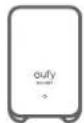
HomeBase 2 (T8010)
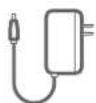
Power Adapter for HomeBase 2
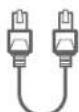
Ethernet Cable

Metal Pin for Resetting
For eufyCam 2C Pro installation

eufyCam 2C Pro (T8142)

Micro-USB
Charging Cable

Mounting Bracket

Mounting Screws and Anchors
- Camera quantity and accessories vary by bundle package.
- HomeBase 2 power adapter varies by region.
02 EN EN
2 / PRODUCT OVERVIEW
HomeBase 2
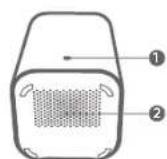
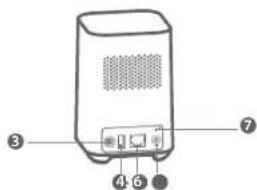
- Status LED 5. Ethernet port
- Speaker 6. SYNC/ALARM OFF button
- Power port 7. Reset button
- USB port
eufyCam 2C Pro
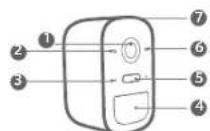
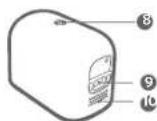
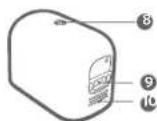
- Lens 5. Spotlight 9. Charging port
- Light sensor 6. Status LED 10. Speaker
- Microphone 7. SYNC button
- Motion sensor 8. Mounting hole
3 / CONNECTING THE HOMEBASE 2
Connect the HomeBase 2 to the Internet
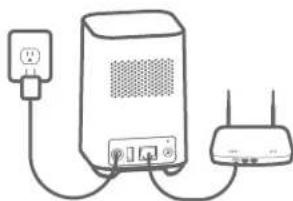
- Power on the HomeBase 2, then use the ethernet cable provided to connect the HomeBase 2 to your home router.
natural_image
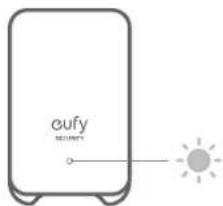
Line drawing of a portable electronic device connected to a wireless router (no text or symbols)- The LED indicator turns blue (this may take up to 1min) when HomeBase 2 is ready for setup.
04 EN EN
4 / SETTING UP THE SYSTEM
Download the App and Set up the System
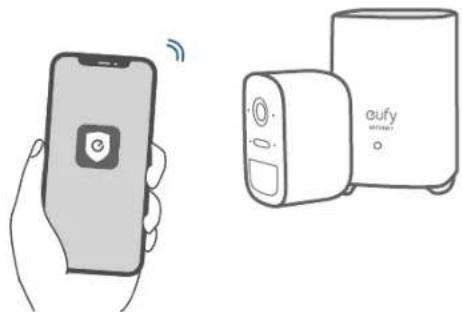
Download the eufy Security app from the App Store (iOS devices) or Google Play (Android devices).


Sign up for a eufy Security account, then follow the onscreen instructions to complete the setup.
natural_image
Illustration of a hand holding a smartphone and a connected eufy device (no text or symbols present)05
5 / MOUNTING THE CAMERA
Find a Good Mounting Spot
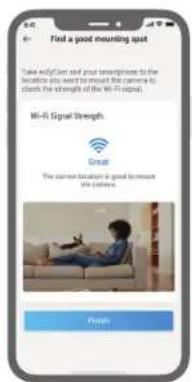
To find a spot to mount eufyCam 2C Pro, you need to test wireless signal strength.
① Open the eufy Security app, go to Camera Settings > Mounting Guide.
② To test the wireless signal strength, take your camera and phone to the location where you want to mount the camera.
③ Move the camera as close to the HomeBase 2 as possible if the wireless.
06 EN EN
Select Height and Location
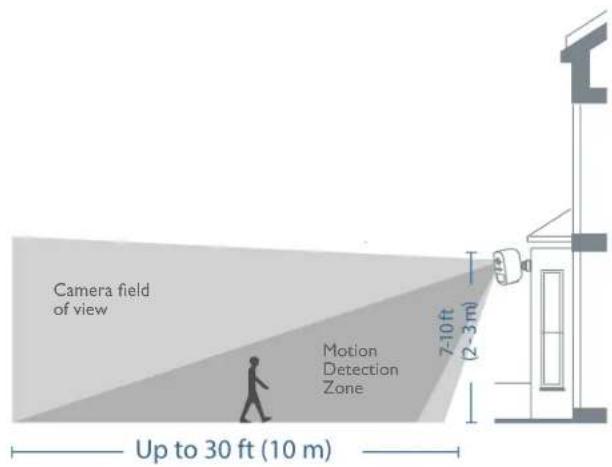
Hang eufyCam 2C Pro 7-10 ft (2-3 m) above the ground. This height maximizes the detection range of the motion sensor of eufyCam 2C Pro. Avoid placing eufyCam 2C Pro under direct sunlight.
07
Mount the camera
The camera can be mounted both indoors and outdoors.
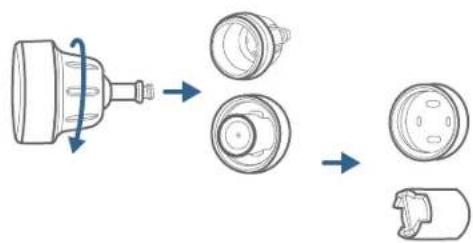
- Turn the knob of the mounting bracket clockwise to loosen and disassemble it.
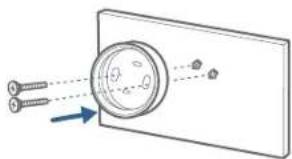
- Drill holes with a 15/64 inch (5.95mm) drill bit, then insert the anchors into the holes; anchors are necessary for walls that are made out of hard materials such as concrete, brick, or stucco.
natural_image
Diagram showing a magnified circular object with arrows pointing to it, surrounded by screw-like components (no text or symbols)08 EN EN
Mount the camera
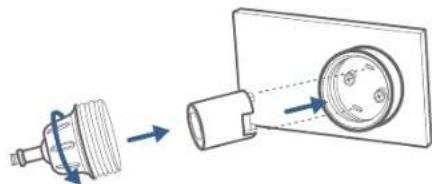
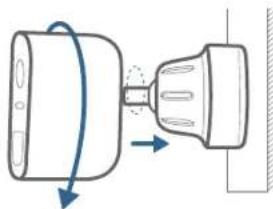
- Firmly screw the base of the mounting bracket onto the wall. Fasten the ball knob of the bracket to the base of the bracket.
natural_image
Diagram showing a mechanical component transforming into a housing with arrows indicating direction (no text or symbols)- Tighten eufyCam 2C Pro to the mounting bracket and adjust the viewing angle by checking the live stream feed in the eufy Security app.
natural_image
Diagram of a mechanical component with directional arrows indicating motion (no text or symbols)Tips: 1. The Homebase 2 pairs up to 16 cameras, you can repeat the steps mentioned above to add more eufyCam 2C Pro cameras to meet different needs of use. 2. For troubleshooting, check Help on the eufy Security App. Refer to App page for LED indicator status.
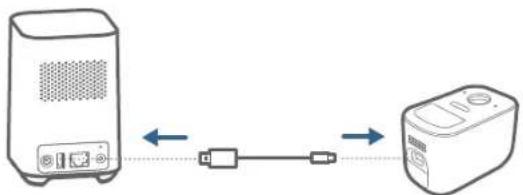
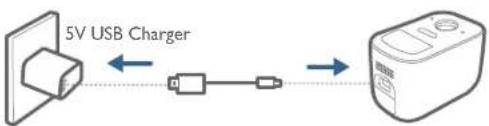
6 / CHARGING EufyCam 2C PRO
Charge eufyCam 2C Pro
Method I
flowchart
graph LR
    A["Device 1"] -->|USB| B["Device 2"]
    B -->|USB| C["Device 3"]
Method 2
flowchart
graph LR
    A["5V USB Charger"] --> B["Wireless Cable"]
    B --> C["Device"]
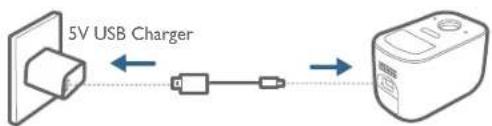
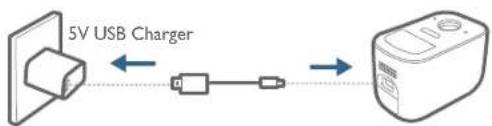
| LED indication | Charging: Steady blue |
| Fully charged: Off | |
| Charging time 5 hours | |
10 EN EN
7/NOTICE
FCC Statement
This device complies with Part. 15 of the FCC Rules. Operation is subject to the following two conditions: (1) this device may not cause harmful interference, and (2) this device must accept any interference received, including interference that may cause undesired operation.
Warning: Changes or modifications not expressly approved by the party responsible for compliance could void the user's authority to operate the equipment.
Note: This equipment has been tested and found to comply with the limits for a Class B digital device, pursuant to Part 15 of the FCC Rules. These limits are designed to provide reasonable protection against harmful interference in a residential installation.
This equipment generates uses and can radiate radio frequency energy and, if not installed and used in accordance with the instructions, may cause harmful interference to radio communications. However, there is no guarantee that interference will not occur in a particular installation. If this equipment does cause harmful interference to radio or television reception, which can be determined by turning the equipment off and on, the user is encouraged to try to correct the interference by one or more of the following measures: (1) Reorient or relocate the receiving antenna; (2) Increase the separation between the equipment and receiver; (3) Connect the equipment into an outlet on a circuit different from that to which the receiver is connected; (4) Consult the dealer or an experienced radio/TV technician for help.
FCC Radio Frequency Exposure
Statement
The device has been evaluated to meet general RF exposure requirements. The device can be used in fixed/mobile exposure condition. The min separation distance is 30cm.
Notice: Shielded cables
All connections to other computing devices must be made using shielded cables to maintain compliance with FCC regulations.
The following importer is the responsible party Company Name: POWER MOBILE LIFE, LLC Address: 400 108th Ave NE Ste 400, Bellevue, WA 9800-5541 Telephone: 1-800-988-7973
CE This product complies with the radio interference requirements of the European Community.
Declaration of Conformity
Hereby, Anker Innovations Limited declares that this device is in compliance with the essential requirements and other relevant provisions of Directive 2014/53/EU. For the declaration of conformity, visit the Web site www.eufyife.com Due to the used enclosure material, the product shall only be connected to a USB Interface of version 2.0 or higher.
The adapter shall be installed near the equipment and shall be easily accessible. Do not use the Device in the environment at too high or too low temperature, never expose the Device under strong sunshine or too well environment.
The suitable temperature for HomeBase 2 and
accessories s -10°C-45°C.
The suitable temperature for earlyCam 2C Proc and accessories is -20°C-50°C.
When charging, please place the device in an environment that has a normal room temperature and good ventilation.
It is recommended to charge the device in an environment with a temperature that ranges from 5°C\~25°C.
Please ensure to use only the charger offered by the manufacturer. Using unauthorized charger may cause danger and violate the authorization of the device and the guarantee article. This charger is for indoor use only.
The charger type is A5SA67W-120200, output voltage/current is 12Voc/2A. The plug considered as disconnect device of adapter RF exposure information: The Maximum Permissible Exposure (MPE) level has been calculated based on a distance of d=20 cm between the device and the human body. To maintain compliance with RF exposure requirement, use product that maintains a 20cm distance between the device and human body.
CAUTION RISK OF EXPLOSION IF BATTERY IS REPLACED BY AN INCORRECT TYPE. DISPOSE OF USED BATTERIES ACCORDING TO THE INSTRUCTIONS.
Wi-Fi Operating Frequency Range: 2412\~2472MHz; Wi-Fi Max OutputPower: 17.13 dBm (ERIP for T8010), 17.9 dBm (ERIP for T8142) SUB-IG Frequency range: 866\~866.8MHz; SUB-IG Output Power: 5.492 dBm (ERIP for T8010)
The following importer is the responsible party (contact for EU matters only)
Importer Anker Technology (UK) Ltd Importer Address: Suite B, Fairgate House, 205 Kings Road, Tyseley, Birmingham, B11 2AA, United Kingdom.

This product is designed and manufactured
EN
with high quality materials and components, which can be recycled and reused.

This symbol means the product must not be discarded as household waste, and should be delivered to an appropriate collection facility for recycling. Proper disposal and recycling helps protect natural resources, human health and the environment. For more information on disposal and recycling of this product, contact your local municipality, disposal service, or the shop where you bought this product.
IC Statement
This device complies with Industry Canada licence-exempt RSS standard(s). Operation is subject to the following two conditions:
(1) this device may not cause interference, and (2) this device must accept any interference, including interference that may cause undesired operation of the device."
This Class B digital apparatus complies with Canadian ICES-003.
When using the product, maintain a distance of 20cm from the body to ensure compliance with RF exposure requirements.
natural_image
Line drawing of a portable electronic device connected to a wireless router (no text or symbols)natural_image
Illustration of a hand holding a smartphone and a device labeled 'eufy' (no text or symbols on the devices themselves)17
18 DE DE
natural_image
Diagram showing a magnified circular object with screw-like attachments, connected by dashed lines to a rectangular plate (no text or symbols)20 DE DE
Kamera montieren
natural_image
Diagram showing a mechanical component being processed into a housing, with arrows indicating direction (no text or symbols present)natural_image
Diagram of a mechanical component with directional arrows indicating motion (no text or symbols)Tipps:
natural_image
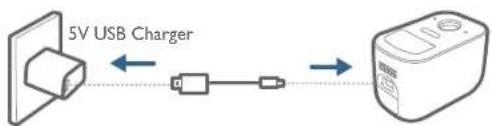
Diagram showing two devices connected by a cable, one with ports and the other with a device (no text or symbols present)Methode 2
flowchart
graph LR
    A["5V USB Charger"] <--> B["Switch"]
    B --> C["Device"]
natural_image
Line drawing of a portable electronic device connected to a wireless router (no text or symbols)26 ES ES
natural_image
Illustration of a hand holding a smartphone and a connected device (no text or symbols present)27
5 / MONTAJE DE LA CÁMARA
28 ES ES
natural_image
Diagram showing a magnified circular object with arrows pointing to it, surrounded by screws (no text or symbols)30 ES ES
natural_image
Diagram showing a mechanical component being processed into a housing, with arrows indicating direction of motion (no text or symbols present)natural_image
Diagram showing a mechanical component with arrows indicating motion, no text or symbols presentConsejos:
natural_image
Diagram showing two devices connected by a cable, one with ports and the other with a device (no text or symbols present)Método 2
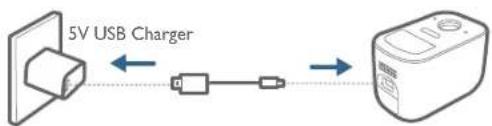
flowchart
graph LR
    A["5V USB Charger"] <--> B["Switch"]
    B --> C["Device"]
natural_image
Line drawing of a portable electronic device connected to a wireless router (no text or symbols)36 FR FR
natural_image
Illustration of a hand holding a smartphone and a connected device (no text or symbols present)37
5 / MONTAGE DE LA CAMÉRA
38 FR FR
natural_image
Diagram showing a magnified circular object with arrows pointing to it, surrounded by screw-like components (no text or symbols)40 FR FR
natural_image
Diagram showing a mechanical component being processed into a housing, with arrows indicating direction of motion (no text or symbols present)natural_image
Diagram showing a mechanical component with directional arrows indicating motion (no text or symbols)Consells:
natural_image
Diagram showing two devices connected by a cable, one with a speaker icon and the other with a device (no text or symbols present)Méthode 2
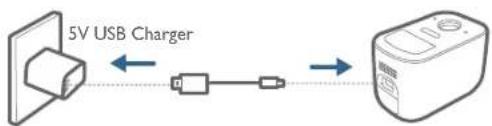
flowchart
graph LR
    A["5V USB Charger"] <--> B["Switch"]
    B --> C["Device"]
natural_image
Line drawing of a portable electronic device connected to a wireless router (no text or symbols)46 IT IT
natural_image
Illustration of a hand holding a smartphone and a connected eufy device (no text or symbols present)47
5 / MONTAGGIO DELLA TELECAMERA
48 IT IT
natural_image
Diagram showing a magnified circular object with arrows pointing to it, connected to two screws (no text or symbols present)50 IT IT
natural_image
Diagram showing a mechanical component being processed into a housing, with arrows indicating direction (no text or symbols present)natural_image
Diagram of a mechanical component with directional arrows indicating motion (no text or symbols)Suggerimenti:
natural_image
Diagram showing two devices connected by a cable, one with a speaker icon and the other with a device (no text or symbols present)Metodo 2
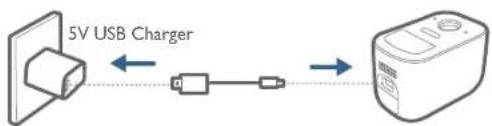
flowchart
graph LR
    A["5V USB Charger"] <--> B["Switch"]
    B --> C["Device"]
- Status-LED 5. Ethernetpoort
- Luidspreker 6. SYNC/ÄLARM OFF-knop
- Voedingspoort7. Resetknop
- USB-poort
eufyCam 2C Pro
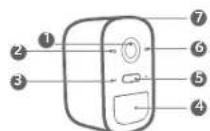
- Lens 5. Spot 9. Oplaadpoort
- Lichtsensor 6. Status-LED 10. Luidspreker
- Microfoon 7. SYNC-knop
- Bewegingssensor 8. Montagegat
3 / DE HOMEBASE 2 AANSLUITEN
natural_image
Line drawing of a portable electronic device connected to a wireless router (no text or symbols)56 NL NL
natural_image
Illustration of a hand holding a smartphone and a device with earphones (no text or symbols present)57
5 / DE CAMERA MONTEREN
58 NL NL
natural_image
Diagram showing a magnified view of a circular object with screw-like attachments, connected by an arrow (no text or symbols present)60 NL NL
De camera monteren
natural_image
Diagram showing a mechanical component being processed into a housing, with arrows indicating direction (no text or symbols present)natural_image
Diagram showing a mechanical component with arrows indicating motion, no text or symbols presentTips:
natural_image
Diagram showing two devices connected by a cable, one with a speaker icon and the other with a device (no text or symbols present)Methode 2
flowchart
graph LR
    A["5V USB Charger"] <--> B["Switch"]
    B --> C["Device"]
natural_image
Line drawing of a portable electronic device connected to a wireless router (no text or symbols)natural_image
Illustration of a hand holding a smartphone and a connected device (no text or symbols present)67
5 / INSTALAR A CÂMARA
68 PT PT
natural_image
Diagram showing a magnified circular object with arrows pointing to it, surrounded by screw-like components (no text or symbols)70 PT PT
Instale a câmara
natural_image
Diagram showing a mechanical component being processed into a housing, with arrows indicating direction of motion (no text or symbols present)natural_image
Diagram showing a mechanical component with arrows indicating motion, no text or symbols presentSugestões:
natural_image
Diagram showing two devices connected by a cable, one with ports and the other with a device (no text or symbols present)Método 2
flowchart
graph LR
    A["5V USB Charger"] <--> B["Switch"]
    B --> C["Device"]
natural_image
Line drawing of a network device with two connected components (no text or symbols)76 AR AR
/ 4 إعداد النظام
natural_image
Illustration of a hand holding a smartphone and a device with 'oufy' branding (no text or symbols on devices)77
تركيب الكاميرا / 5
78 AR AR
79
تركيب الكاميرا
natural_image
Diagram showing a magnified circular object with arrows pointing to it, surrounded by screw-like components (no text or symbols)تركيب dikاميرا
natural_image
Diagram showing a mechanical component being inserted into a housing, with arrows indicating direction (no text or symbols present)natural_image
Diagram of a mechanical component with directional arrows indicating motion (no text or symbols)撰撰:
flowchart
graph TD
    A["Appard with device"] -->|1.25| B["Remote device"]
    B -->|2.5| C["Remote device"]
    D["5V USB Charger"] -->|2.5| E["Remote device"]
12-month limited warranty
United States +1 (800) 988 7973 Mon-Fri 9AM-5PM (PT)
United Kingdom 144 (0) 1604 936 200 Mon-Fr 6AM-11AM (GMT)
Germany +49 (0) 69 9579 7960 Mon-Fri 6:00-11:00
Email Us
Senden Sie uns eine E-Mail | Contacto por correo electrónico | Par e-mail | E-mail
Customer Support: support@eufylife.com
Anker Innovations Limited
Room 1318-19, Hollywood Plaza, 610 Nathan Road, Mongkok Kowloon, Hong Kong

@EufyOfficial @EufyOfficial @EufyOfficial