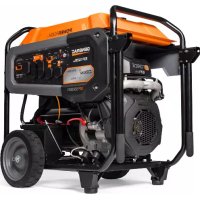
GP15500EFI - Generator Generac - Free user manual and instructions
Find the device manual for free GP15500EFI Generac in PDF.



| Product Type | Portable Generator |
| Brand | Generac |
| Model | GP15500EFI |
| Rated Power | 15.5 kW (at high temperatures) / 18.0 kW (at 25 °C) |
| Peak Power | 19.3 / 22.5 kVA |
| Output Voltage | 120/240 V AC single phase |
| Frequency | 60 Hz |
| Fuel Tank Capacity | 54.0 L (14.2 US gal) |
| Runtime at 50% Load | 9 h (18 kW) / 11 h (15.5 kW) |
| Engine | 4-stroke, 816 cc |
| Starting System | Electric (key) |
| Recommended Engine Oil | SAE 30 for break-in, then according to climate (see manual) |
| Engine Oil Capacity | 2.1 L (with filter) / 1.95 L (without filter) |
| Net Weight | 190.5 to 199.1 kg depending on configuration |
| Power Outlets | 1x GFCI 120 V 20 A (NEMA 5-20R), 1x L5-30R 120 V 30 A, 1x L14-30R 120/240 V 30 A, 1x NEMA 14-50R 120/240 V 50 A |
| Electrical Protection | Individual circuit breakers per outlet, 10 A and 15 A fuses |
| Safety | COsense (CO detection and automatic shutoff), low oil pressure shutdown, GFCI protection |
| Hour Meter | Yes, with maintenance indicator (SVC) every 200 hours |
| Grounding | Grounding lug in compliance with NEC |
| Maintenance and Cleaning | Regular cleaning of cooling openings, oil change, air filter replacement, spark plug, spark arrester |
| Spare Parts and Reparability | Replacement parts available from Generac customer service (1-888-GENERAC) |
| General Information | 92-page user manual in PDF format, available for download |
| Warranty | Limited warranty included (see manual for details) |
Frequently Asked Questions - GP15500EFI Generac
User questions about GP15500EFI Generac
0 question about this device. Answer the ones you know or ask your own.
Ask a new question about this device
Download the instructions for your Generator in PDF format for free! Find your manual GP15500EFI - Generac and take your electronic device back in hand. On this page are published all the documents necessary for the use of your device. GP15500EFI by Generac.
USER MANUAL GP15500EFI Generac
GP Series Portable Generator
Owner's Manual
MODEL:
SERIAL:
DATE PURCHASED:

WARNING
Loss of life. This product is not intended to be used in a critical life support application. Failure to adhere to this warning could result in death or serious injury. (000209b)
Register your Generac product at:
wwwgenerac.com
1-888-GENERAC
(1-888-436-3722)
SAVE THIS MANUAL FOR FUTURE REFERENCE
Section 1 Introduction and Safety 1
Introduction 1
Safety Rules 1
Safety Symbols and Meanings 1
Exhaust and Location Hazards 2
Electrical Hazards 3
Fire Hazards 3
Standards Index 4
Replacement Hazard Labels 4
Section 2 General Information and Setup 5
Know Your Generator 6
Emissions 6
Hour Meter 7
Connection Plugs 7
120/240 VAC, 50 Amp receptacle ... 7
Malfunction Indicator Lamp (MIL) .... 8
COsense® 9
Remove Contents from Carton .... 10
Assembly 11
Battery Cable Connection 12
Add Engine Oil 12
Fuel 13
Section 3 Operation 14
Operation and Use Questions 14
Before Starting Engine 14
Prepare Generator for Use 14
Grounding the Generator When Used as a Portable 14
Know Generator Limits 15
Transporting/Tipping of the Unit ....15
Starting Electric Start Engines 16
Low Oil Pressure Shutdown System . 16
Section 4 Maintenance and
Troubleshooting 17
Maintenance 17
Maintenance Schedule 17
Preventive Maintenance 17
Engine Maintenance 17
Battery Replacement (if applicable) 19
Inspect Muffler and Spark Arrester 20
Storage 20
Troubleshooting 21
Wiring Diagram 23
Notes 24
CALIFORNIA WARNING
Can expose you to benzene, a carcinogen and reproductive toxicant www.P65Warnings.ca.gov.
(000759a)
Section 1 Introduction and Safety
Introduction
Read This Manual Thoroughly

WARNING
Consult Manual. Read and understand manual completely before using product. Failure to completely understand manual and product could result in death or serious injury. (000100a)
If any section of this manual is not understood, contact the nearest Independent Authorized Service Dealer (IASD) or Generac Customer Service at 1-888-436-3722 (1-888-GENERAC), or visit wwwgenerac.com for starting, operating, and servicing procedures. The owner is responsible for proper maintenance and safe use of the unit.
SAVE THESE INSTRUCTIONS for future reference. This manual contains important instructions that must be followed during placement, operation, and maintenance of the unit and its components. Always supply this manual to any individual that will use this unit, and instruct them on how to correctly start, operate, and stop the unit in case of emergency.
The information in this manual is accurate based on products produced at the time of publication. The manufacturer reserves the right to make technical updates, corrections, and product revisions at any time without notice.
Safety Rules
The manufacturer cannot anticipate every possible circumstance that might involve a hazard. The alerts in this manual, and on tags and decals affixed to the unit, are not all inclusive. If using a procedure, work method, or operating technique that the manufacturer does not specifically recommend, verify that it is safe for others and does not render the equipment unsafe.
Throughout this publication, and on tags and decals affixed to the unit, DANGER, WARNING, CAUTION, and NOTE blocks are used to alert personnel to special instructions about a particular operation that may be hazardous if performed incorrectly or carelessly. Observe them carefully. Alert definitions are as follows:
DANGER
Indicates a hazardous situation which, if not avoided, will result in death or serious injury.
(000001)
WARNING
Indicates a hazardous situation which, if not avoided, could result in death or serious injury.
(000002)
CAUTION
Indicates a hazardous situation which, if not avoided, could result in minor or moderate injury.
(000003)
NOTE: Notes contain additional information important to a procedure and will be found within the regular text of this manual.
These safety alerts cannot eliminate the hazards that they indicate. Common sense and strict compliance with the special instructions while performing the action or service are essential to preventing accidents.
Safety Symbols and Meanings
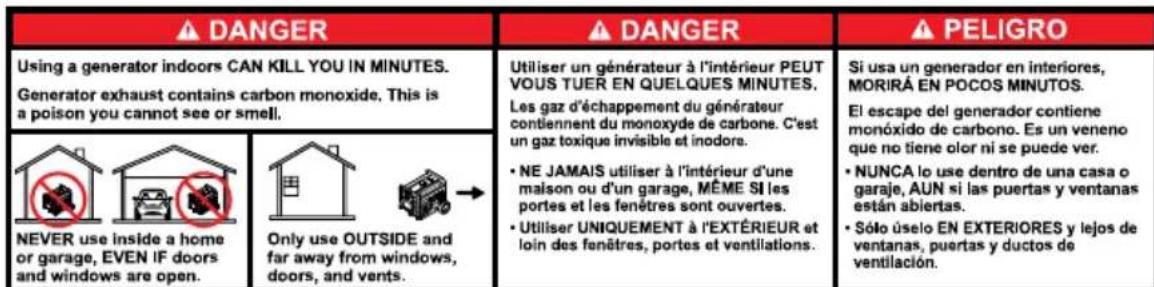
DANGER
Using a generator indoors CAN KILL YOU IN MINUTES.
Generator exhaust contains carbon monoxide. This is a poison you cannot see or smell.
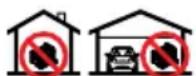
NEVER use inside a home or garage, EVEN IF doors and windows are open.

Only use OUTSIDE and far away from windows, doors, and vents.
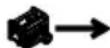
000657

DANGER
Asphyxiation. Running engines produce carbon monoxide, a colorless, odorless, poisonous gas.
Carbon monoxide, if not avoided, will result in death or serious injury. (000103)

DANGER
Asphyxiation. The exhaust system must be properly maintained. Do not alter or modify the exhaust system as to render it unsafe or make it noncompliant with local codes and/or standards. Failure to do so will result in death or serious injury. (000179b)
If you start to feel sick, dizzy, or weak after the generator has been running, move to fresh air IMMEDIATELY. See a doctor, as you could have carbon monoxide poisoning.

DANGER
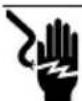
Electrocution. Water contact with a power source, if not avoided, will result in death or serious injury.
(000104)
DANGER
Electrocution. Turn utility and emergency power supplies to OFF before connecting power source and load lines. Failure to do so will result in death or serious injury. (000116)
WARNING Equipment and property damage. Do not alter construction of, installation, or block ventilation for generator. Failure to do so could result in unsafe operation or damage to the generator. (000146)

AWARNING
Asphyxiation. Always use a battery operated carbon monoxide alarm indoors and installed according to the manufacturer's instructions. Failure to do so could result in death or serious injury.
(000178a)

WARNING
Moving Parts. Keep clothing, hair, and appendages away from moving parts. Failure to do so could result in death or serious injury.
(000111)

WARNING
Hot Surfaces. When operating machine, do not touch hot surfaces. Keep machine away from combustables during use. Hot surfaces could result in severe burns or fire. (000108)
WARNING Personal injury. Do not insert any object through the air cooling slots. Generator can start at any time and could result in death, serious injury, and unit damage. (000142a)
Risk of injury. Do not operate or service this machine if not fully alert. Fatigue can impair the ability to operate or service this equipment and could result in death or serious injury. (000215a)
WARNING
AWARNING
Injury and equipment damage. Do not use generator as a step. Doing so could result in falling, damaged parts, unsafe equipment operation, and could result in death or serious injury. (000216)
WARNING
Equipment damage. Do not attempt to start or operate a unit in need of repair or scheduled maintenance. Doing so could result in serious injury, death, or equipment failure or damage. (000291)
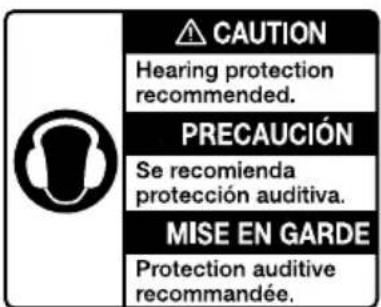
000406
- For safety reasons, it is recommended that the maintenance of this equipment be performed by an IASD. Inspect the generator regularly, and contact the nearest IASD for parts needing repair or replacement.
Exhaust and Location Hazards

DANGER
Asphyxiation. Running engines produce carbon monoxide, a colorless, odorless, poisonous gas. Carbon monoxide, if not avoided, will result in death or serious injury. (000103)

DANGER
Asphyxiation. The exhaust system must be properly maintained. Do not alter or modify the exhaust system as to render it unsafe or make it noncompliant with local codes and/or standards. Failure to do so will result in death or serious injury. (000179b)
WARNING
Equipment and property damage. Do not alter construction of, installation, or block ventilation for generator. Failure to do so could result in unsafe operation or damage to the generator. (000146)

WARNING
Asphyxiation. Always use a battery operated carbon monoxide alarm indoors and installed according to the manufacturer's instructions. Failure to do so could result in death or serious injury.
(000178a)

AWARNING
Risk of fire. Hot engine exhaust can ignite combustible materials. Maintain at least 5 ft (1.5 m) clearance on all sides of unit, including overhead. Failure to do so could cause serious injury or property damage.
(000590a)
If you start to feel sick, dizzy, or weak after the generator has been running, move to fresh air IMMEDIATELY. See a doctor, as you could have carbon monoxide poisoning.
- NEVER run a generator indoors or in a partly enclosed area such as garages.
- ONLY use outdoors and far away from windows, doors, vents, crawlspaces and in an area where adequate ventilation is available and will not accumulate deadly exhaust gas.
- Point muffler exhaust away from people and occupied buildings.
- Using a fan or opening a door will not provide sufficient ventilation.
Electrical Hazards

DANGER
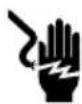
Electrocution. Contact with bare wires, terminals, and connections while generator is running will result in death or serious injury.
(000144)
DANGER
Electrocution. Water contact with a power source, if not avoided, will result in death or serious injury.
(000104)
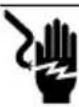
DANGER
Electrocution. In the event of electrical accident, immediately shut power OFF. Use non-conductive implements to free victim from live conductor. Apply first aid and get medical help. Failure to do so will result in death or serious injury. (000145)
WARNING
Accidental Start-up. Disconnect the negative battery cable, then the positive battery cable when working on unit. Failure to do so could result in death or serious injury. (000130)
- The National Electric Code (NEC) requires the frame and external electrically conductive parts of the generator be properly connected to an approved earth ground. Local electrical codes may also require proper grounding of the generator. Consult with a local electrician for grounding requirements in the area.
- Use a ground fault circuit interrupter in any damp or highly conductive area (such as metal decking or steel work).
Fire Hazards

ADANGER
Explosion and Fire. Fuel and vapors are extremely flammable and explosive. Add fuel in a well ventilated area. Keep fire and spark away. Failure to do so will result in death or serious injury. (000105)

DANGER
Explosion and Fire. Do not overfill fuel tank. Fill to 1/2 inch from top of tank to allow for fuel expansion. Overfilling may cause fuel to spill onto engine causing fire or explosion, which will result in death or serious injury. (000168b)

DANGER
Risk of fire. Allow fuel spills to completely dry before starting engine. Failure to do so will result in death or serious injury. (000174)

WARNING
Fire risk. Fuel and vapors are extremely flammable. Do not operate indoors. Doing so could result in death, serious injury, or property or equipment damage. (000281)

WARNING
Explosion and fire risk. Do not smoke near unit. Keep fire and spark away. Failure to do so could result in death, serious injury, or property or equipment damage. (000282)

WARNING
Explosion and Fire. Do not smoke while refueling unit. Failure to do so could result in death, serious injury, or property or equipment damage. (000284a)

WARNING
Risk of fire. Hot engine exhaust can ignite combustible materials. Maintain at least 5 ft (1.5 m) clearance on all sides of unit, including overhead. Failure to do so could cause serious injury or property damage.
(000590a)
- Wipe up any fuel or oil spills immediately. Verify that no combustible materials are left on or near the generator. Keep the area surrounding the generator clean and free from debris and keep a clearance of five (5) feet on all sides to allow for proper ventilation of the generator and to reduce the risk of fire. Do not use in an enclosed or partially enclosed structure.
- Do not operate the generator if connected electrical devices overheat, if electrical output is lost, if engine or generator sparks or if flames or smoke are observed while unit is running.
- Keep a fire extinguisher near the generator at all times.
Standards Index
- National Fire Protection Association (NFPA) 70: The NATIONAL ELECTRIC CODE (NEC) available from www.nfpa.org
- National Fire Protection Association (NFPA) 5000: BUILDING CONSTRUCTION AND SAFETY CODE available from www.nfpa.org
- International Building Code available from www.iccsafe.org
- Agricultural Wiring Handbook available from www.ERC.org, Rural Electricity Resource Council P.O. Box 309 Wilmington, OH 45177-0309
- ASAE EP-364.2 Installation and Maintenance of Farm Standby Electric Power available from www.asabe.org, American Society of Agricultural & Biological Engineers 2950 Niles Road, St. Joseph, MI 49085
- CSA C22.2 100-14 Electric motors and generators for installation and use, in accordance with the Rules of the Canadian Electrical Code
- ANSI/PGMA G300 Safety and Performance of Portable Generators. Portable Generator Manufacturer's Association, www.pgmaonline.com
IMPORTANT NOTE: This list is not all inclusive. Check with the Authority Having Jurisdiction (AHJ) for any local codes or standards which may be applicable to your jurisdiction.
Replacement Hazard Labels
The following replacement hazard labels are available free from Generac:
- 0H4635C (PGMA Safety Decal)
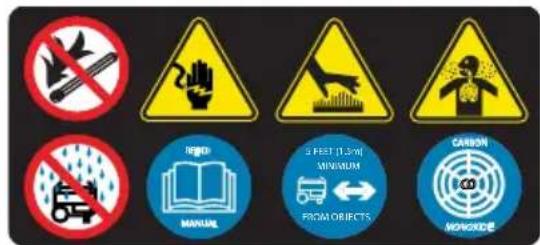
10000003425 (Fuel Fill Level Decal)
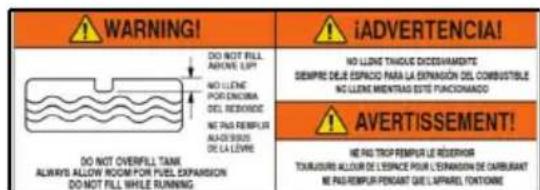
10000033027 (Exhaust Direction User Action Label)
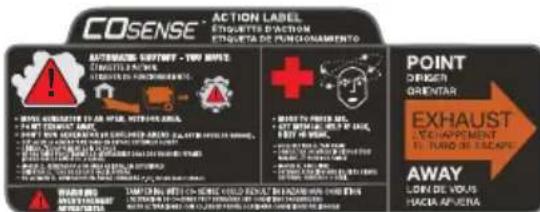
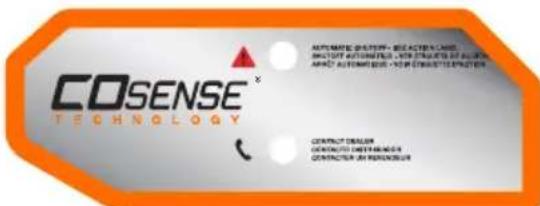
A0001642218 (COsense® Technology)
- 0H8250B (CO Warning Decal)
- 0H0116B (Hot Exhaust Warning Decal)

Section 2 General Information and Setup
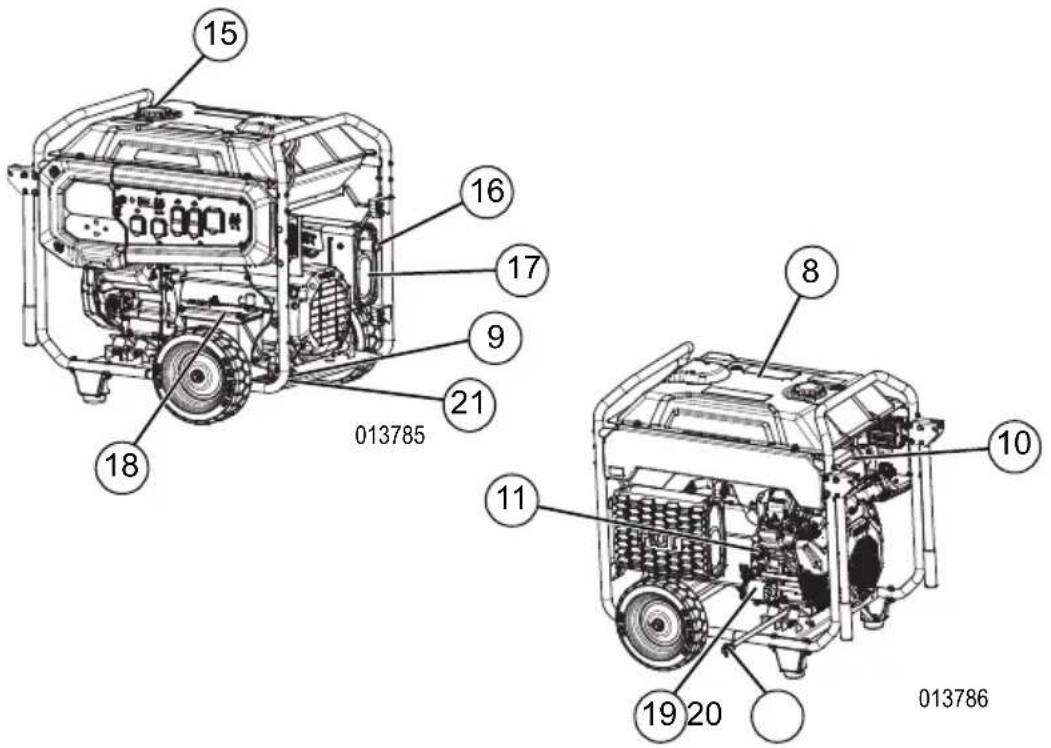
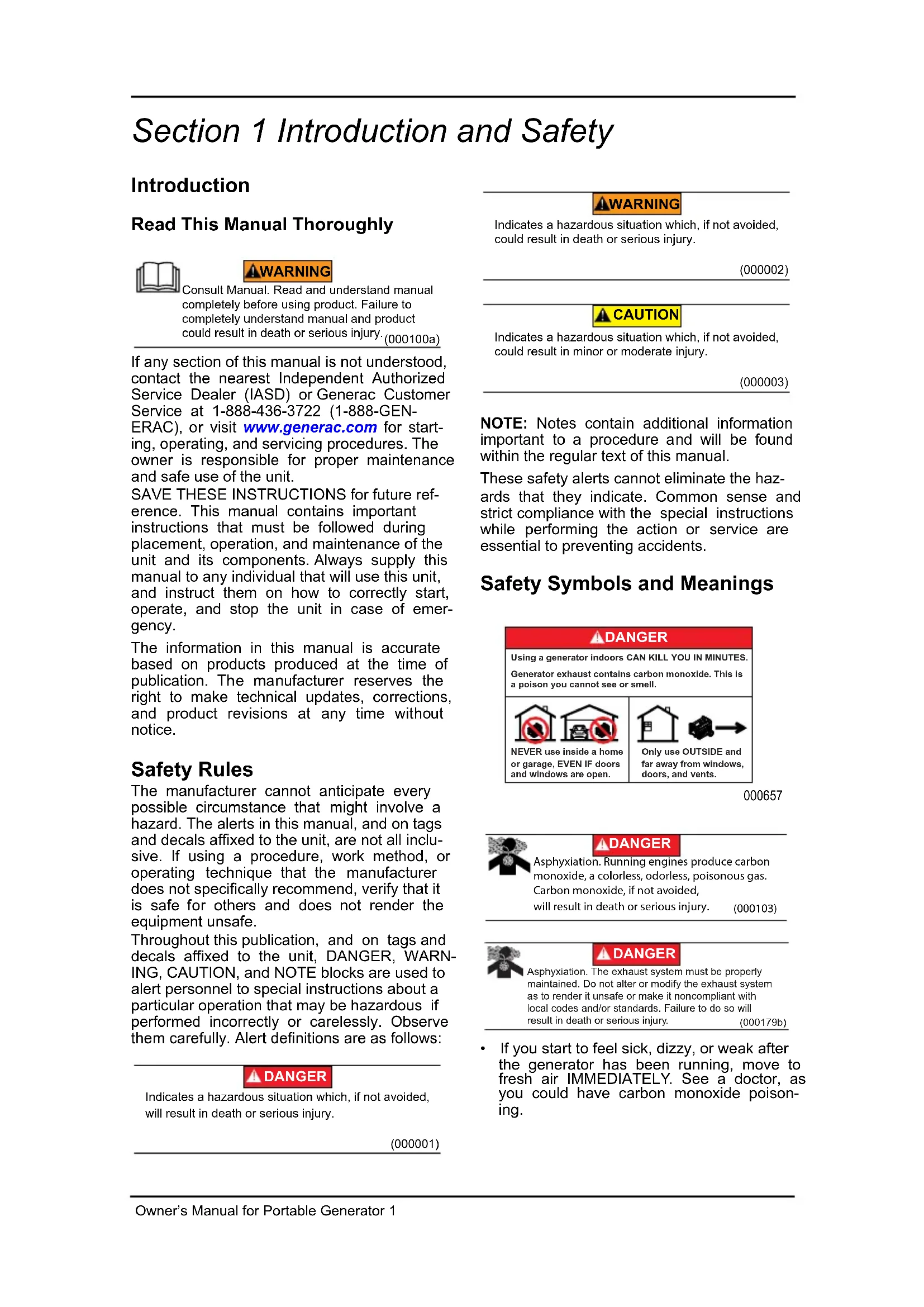
Figure 2-1. Features and Controls
Generator Components
1 120 Volt AC, 20 Amp, GFCI Duplex Receptacle (NEMA 5-20R)
2 120 Volt AC, 30 Amp Locking Receptacle (NEMA L5-30R)
3 120/240 Volt AC, 30 Amp Locking Receptacle (NEMA L14-30R)
4 120/240 Volt AC, 50 Amp Receptacle (NEMA 14-50R)
5 Circuit Breakers (AC)
6 Hour Meter
7 START/RUN/STOP Key Switch
8 Fuel Tank
9 Grounding Lug
10 Air Cleaner
11 Oil Fill
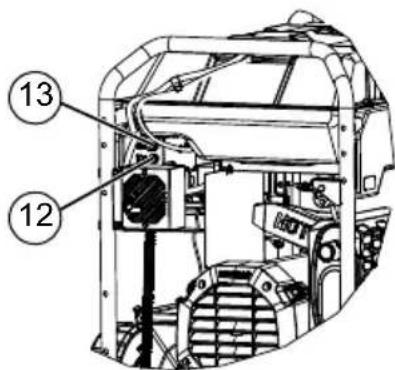
12 10 Amp Fuse (side of control panel)
13 15 Amp Fuse (side of control panel)
14 Malfunction Indicator Lamp (MIL)
15 Fuel Cap
16 Spark Arrestor
17 Muffler
18 Battery
19 Oil Filter
20 Oil Drain
21 Model Data Decal
22 COsense RED (Hazard)
23 COsense YELLOW (Fault)
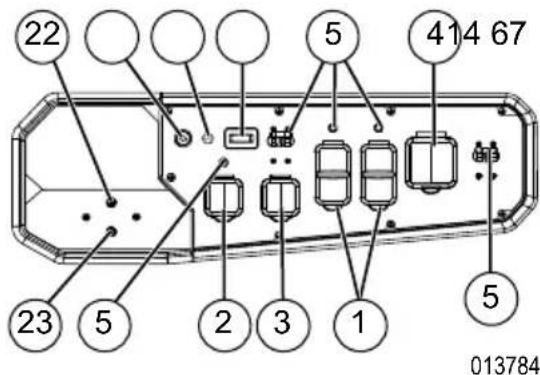
Figure 2-2. Control Panel
013999
Figure 2-3. Fuses
Emissions
The United States Environmental Protection Agency (US EPA) (and California Air Resources Board (CARB), for engines/equipment certified to California standards) requires this engine/equipment to comply with exhaust and evaporative emissions standards. Locate the emissions compliance decal on the engine to determine applicable standards. See the included emissions warranty for emissions warranty information. Follow the maintenance specifications in this manual to ensure the engine complies with applicable emissions standards for the duration of the product's life.
Know Your Generator

WARNING
Consult Manual. Read and understand manual completely before using product. Failure to completely understand manual and product could result in death or serious injury. (000100a)
Replacement owner's manuals are available at wwwgenerac.com.
Product Specifications
| Generator Specifications | |
| Rated Power 15.5 / 18.0 kW** | |
| Surge Power 19.3 / 22.5 kVA | |
| Rated AC Voltage 120/240 | |
| Rated AC Load Current @ 240V Current @ 120V | 64.5 / 75.0 Amps** 129.1 / 150.0 Amps** |
| Rated Frequency 60 Hz @ 3600 RPM | |
| Phase Single Phase | |
| Product Weight (Dry) | 420 / 439 lbs. (190.5 / 199.1 kg) |
| ** Operating Temperature Range: -18 deg. C (0 deg. F) to 40 Deg. C (104 Deg. F). When operated above 25 deg. C (77 deg. F) there may be a decrease in power. ** Maximum wattage and current are subject to, and limited by, such factors as fuel Btu content, ambient temperature, altitude, engine condition, etc.. Maximum power decreases about 3.5% for each 1,000 feet above sea level; and will also decrease about 1% for each 6° C (10° F) above 16° C (60° F) ambient temperature. | |
| Engine Specifications | |
| Displacement | 816 cc |
| Spark Plug Type | Champion RC14YC or Equivalent |
| Spark Plug Part No. | 0G0767B |
| Spark Plug Gap | 0.040 inch or (1.016 mm) |
| Gasoline Capacity | 54.0 L (14.2 U.S. gallons) |
| Oil Type | See Chart in the Add Engine Oil Section |
| OllCapacity With filter change Without filter change | 2.1 L (2.2 qt.) 1.95 L (2.0 qt.) |
| Run Time at 50% Load | 9 Hours (18kW) 11 Hours (15.5kW) |
| * Go to wwwgenerac.com or contact an IASD for replacement parts. | |
Hour Meter
See Figure 2-4. The Hour Meter tracks hours of operation for scheduled maintenance.
- The SVC display will illuminate one hour before and one hour after each 200 hour interval providing a two hour window to perform service.
When the hour meter is in flash alert mode, the maintenance message will alternate with elapsed time in hours and tenths. The hours will flash four times, then alternate with the maintenance message four times until the meter automatically resets.
- 200 hours - SVC — Change oil, oil filter, air filter, fuel filter, and spark plug. Clean spark arrestor screen. (Every 200 hrs)
NOTE: The hour glass icon will flash when the engine is running. This signifies the meter is recording hours of operation.
See Figure 2-5. The 120 Volt outlet is overload protected by a 20 Amp push-to-reset circuit breaker. Each receptacle will power 120 Volt AC, single phase, 60Hz electrical loads requiring up to 2400 watts (2.4kW) or 20 Amps of current. Use only high quality, well-insulated, 3-wire grounded cord sets rated for 125 Volts at 20 Amps (or greater). It also provides protection with a Ground Fault Circuit Interruptions with a press to TEST and RESET button.
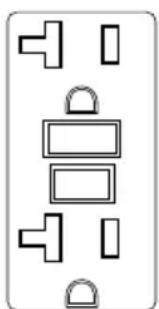
Figure 2-5. 120 VAC, 20 Amp, GFCI Duplex Receptacle NEMA 5-20R
120/240 VAC, 30 Amp Receptacle
See Figure 2-6. Use a NEMA L14-30 plug with this receptacle (rotate to lock/unlock). Connect a suitable 4-wire grounded cord set to plug and desired load. The cord set should be rated 250 Volts AC at 30 Amps (or greater).
Use this receptacle to operate 120 Volt AC, 60 Hz, single phase loads requiring up to 3600 watts (3.6 kW) of power at 30 Amps or 240 Volt AC, 60 Hz, single phase loads requiring up to 7200 watts (7.2 kW) of power at 30 Amps. The outlet is protected by a 30 Amp 2-pole circuit breaker.

000204
Figure 2-6. 120/240 VAC, 30 Amp Receptacle NEMA L14-30R
120 VAC, 30 Amp Receptacle
See Figure 2-7. Use a NEMA L5-30R plug with this receptacle (rotate to lock/unlock). Connect a suitable 3-wire cord set to the plug and to desired load. The cord set should be rated for 125 Volts AC at 30 Amps (or greater).
Use this receptacle to operate 120 Volt AC, 60Hz single phase loads requiring up to 3600 watts (3.6kW) of power at 30 Amps. The outlet is protected by a 30 Amp push-to-reset circuit breaker.

000844
Figure 2-7. 120 VAC, 30 Amp Receptacle NEMA L5-30R
120/240 VAC, 50 Amp receptacle
See Figure 2-8. Use a NEMA 14-50 plug with this receptacle. Connect a 4-wire cord set rated for 250 Volts AC at 50 Amps to plug.
Use this receptacle to operate 120/240 Volt AC, 60Hz electrical loads requiring up to 12,000 watts (12.0kW) of power. This receptacle is protected by a 50 Amp 2-pole circuit breaker.
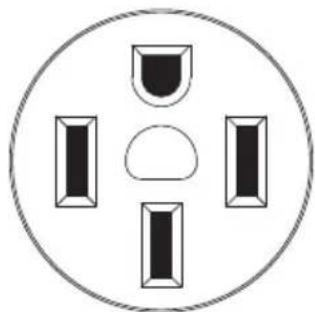
Figure 2-8. 120/240 VAC, 50 Amp Receptacle NEMA 14-50
000924
Malfunction Indicator Lamp (MIL)
The MIL, located on the control panel (see Generator Components), is used to indicate when there is a fault in the engine system. The fault lamp displays a 2-digit code by flashing a sequence of long and short flashes. Long flashes are 1.2 seconds, and short flashes are 0.25 second.
MIL Icons
See Figure 2-9.
Condition 1: MIL is not lit, engine and key are OFF.
Condition 2: MIL is dimly illuminated, constant on (not flashing). This indicates the engine control system is running properly (i.e. no fault) (A).
Condition 3: MIL is brightly illuminated and flashing. This indicates there is a fault with the engine control system. (B) See Troubleshooting.
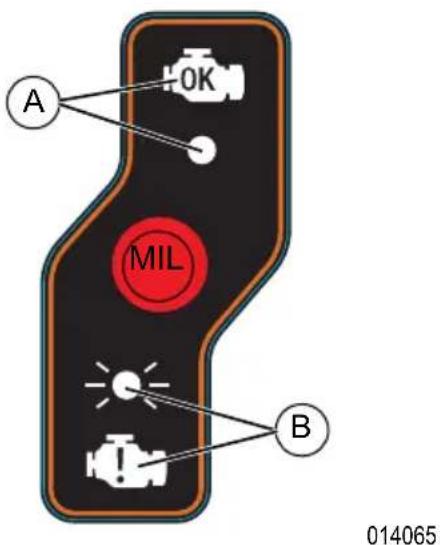
Figure 2-9. MIL Icons
MIL Operation
- When the key is switched ON, the MIL will illuminate for 0.5 second (this does not indicate a fault).
- If multiple failures have been detected, the MIL will pause for two (2) seconds between fault codes.
- Once the MIL has flashed all failure codes, the MIL will pause for five (5) seconds and then repeat the codes. The lamp will continue to repeat the codes until they are no longer active or the key is switched OFF.
- Once the fault(s) have been resolved, the codes will be saved in the Engine Control Module's (ECM) fault history memory.
Active Fault Codes - Shutdown
If a fault has been detected that requires stopping the unit, the engine will automatically stop (or will not start) and the lamp will flash the active fault code. Before the unit can be started, the key must be first turned to the OFF position to clear the active fault. The fault code will be saved in the fault history memory when the key is switched off.
Active Fault Code - Warning
If a fault has been detected, but does not require stopping the unit, the MIL will flash the fault code as long as the fault is present. If the fault is no longer present, the lamp will stop flashing and the fault code will be saved in the fault history memory.
Fault History Memory
The ECM will store a list of faults for three (3) ON-OFF key cycles. To view previous faults, turn the key to the ON position, do not start engine. After 30 seconds, the MIL will flash previous faults stored in memory. The fault codes will be displayed with a flashing sequence similar to active faults. When the list is completed it will restart at the beginning. To stop the sequence, either switch key OFF or start engine.
Fault Code Example
Fault code 6-1 is displayed by: 6 long blinks = 6 , one second pause, 1 short blink = 1
| Fault Code | Cause | Condition | Correction |
| 1-1 | CO Monitor | 1. Carbon Monoxide above limit. 2. Input voltage to module below normal range. | 1. Move generator outside. 2. Contact IASD. |
| 1-2 | Battery Voltage | 1. Battery voltage above nor-mal operating range. | 1. Contact IASD. |
| 1-3 | Battery Voltage | 1. Battery voltage below nor-mal operating range. | 1. Charge battery to correct level. |
| 5-2 | Engine Speed | 1. No or low fuel. 2. Engine speed below nor-mal operating range. | 1. Fill fuel tank. 2. Contact IASD. |
| 6-1 | Engine Oil Pressure | 1. Low oil pressure. 2. Switch voltage not detected. | 1. Fill crankcase to correct level. 2. Contact IASD. |
| Other | Multiple | 1. Multiple | 1. Contact IASD. |
| Contact an IASD for full list of fault codes. | |||
COsense®
Carbon Monoxide (CO) Detection and Shut-off System (if equipped)
The COsense module monitors for the accumulation of poisonous CO gas found in engine exhaust when the generator is running. If COsense detects increasing levels of CO gas, it automatically shuts off the engine. COsense only monitors when the engine is running. Generators are intended to be used outdoors, far from occupied buildings and the exhaust pointed away from personnel and buildings. However, if mis-used and operated in a location that results in the accumulation of CO, like indoors or in a partially enclosed area, COsense shuts off the engine, notifies the user of what has happened and directs the user to read the instruction action label for steps to take. See Figure 2-10. COsense is not a substitute for an indoor carbon monoxide alarm.
See Figure 2-11. After a shut-off, a blinking RED light in the COsense badge on the side of the generator provides notification that the generator was shut off due to an accumulating CO hazard. The RED light will blink for at least five minutes after a CO shut-off. Move the generator to an open, outdoor area and point the exhaust away from people and occupied buildings. Once relocated to a safe area, the generator can be restarted and the proper electrical connections made to supply electrical power. The RED light will stop blinking automatically upon engine re-start. Introduce fresh air and ventilate the location where the generator had shut down.
See Figure 2-11. If a COsense system fault has occurred and no longer provides protection, the portable generator is shut off automatically and the YELLOW light will blink for at least five minutes in the COsense badge to notify the user of the fault. The COsense module can only be diagnosed and repaired by a trained technician at the dealer. The generator can be re-started, but may continue to shut-off.
COsense will detect the accumulation of Carbon Monoxide from other fuel burning sources such as engine powered tools or propane heaters used in the area of operation. For example, if another generator is used and the exhaust is pointed at a COsense equipped generator, COsense may initiate a shut-off due to rising CO levels. This is not an error. Hazardous Carbon Monoxide has been detected. The user must take action to move and re-direct these devices to better dissipate Carbon Monoxide far away from personnel and occupied buildings.
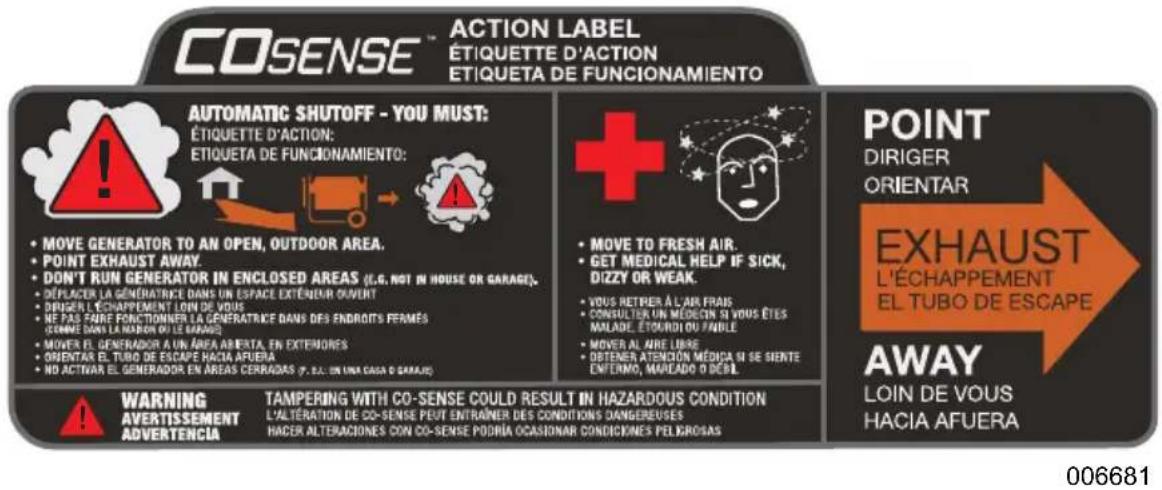
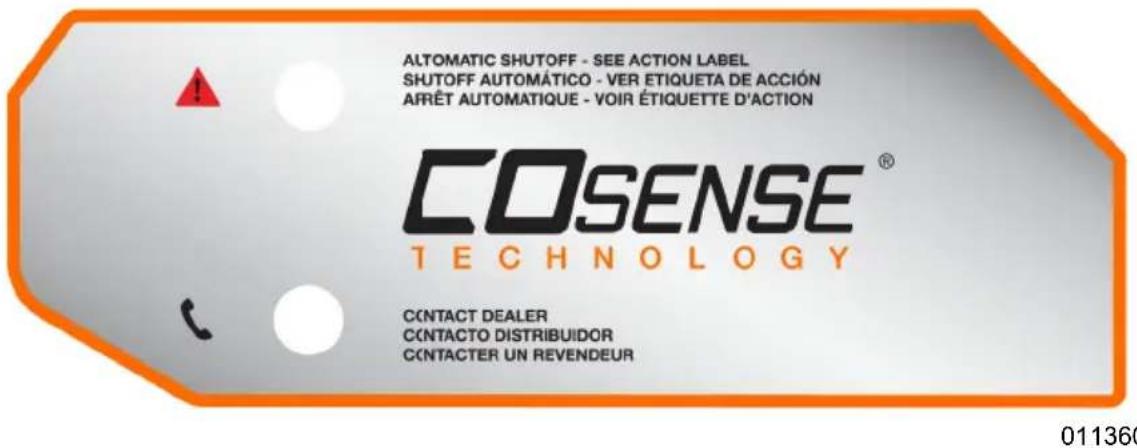
Figure 2-10. Instruction Action Label
Figure 2-11. Instruction Badge
Remove Contents from Carton
- Open carton completely by cutting the shipping bands and lifting the carton off the pallet.
- Remove and verify carton contents prior to assembly. Carton contents should contain the following:
Accessories
| Item Qty. | |
| Main Unit 1 | |
| Owner's Manual 1 | |
| Liter Oil SAE 30 2 | |
| Handle (A) 2 | |
| Never-flat Wheel (B) 2 | |
| Axle (C) 1 | |
| Service Warranty | 1 |
| Emissions Warranty | 1 |
| Keys (set of 2) | 1 |
| Foot Bracket (D) | 2 |
| Foot Support Bracket (E) | 2 |
| Hardware Bag | Qty. |
| Cotter Pin (F) | 2 |
| Large Washer (G) | 4 |
| Hex Head Bolt (M8-1.25 x 16) (H) | 2 |
| Flat Washer (J) | 2 |
| Hex Head Bolt (M8-1.25 x 30) (K) | 2 |
| Hex Head Bolt (M8-1.25 x 45) (L) | 10 |
| Flange Hex Nut (M8-1.25) (M) | 8 |
| Rubber Vibe Mount (N) | 2 |
| Snap-in Button (P) | 2 |
| Nylok Nut (M8-1.25) (Q) | 2 |
- Call Generac Customer Service 1-888-GENERAC (1-888-436-3722) with the unit model and serial number for any missing carton contents.
- Record model, serial number, and date of purchase on front cover of this manual.
Assembly

WARNING
Consult Manual. Read and understand manual completely before using product. Failure to completely understand manual and product could result in death or serious injury. (000100a)
Call Generac Customer Service at 1-888-GENERAC (1-888-436-3722) for any assembly issues or concerns. Please have model and serial number available.
The following tools are required to install the accessory kit.
13mm wrenches (2)
- Plyers
NOTE: The wheels are not intended for overthe-road use.
See Figure 2-12.
Install wheels and axle as follows:
-
Insert axle (C) through axle bracket holes on frame.
-
Slide washer (G) on both ends of axle.
-
Place wheel (B) onto axle (C). Slide on washer (G) and secure with a cotter pin (F). Use plyers to secure cotter pins. Assemble vibration mount (N) to foot bracket (D) as follows:
-
Install washer (J), vibe mount (N), foot bracket (D) and support bracket (E) onto bolt (K).
- Install nut (M) and finger-tighten.
Assemble feet to frame as follows:
- Align foot bracket assembly with the predrilled holes under the frame.
- Secure with bolt (L), nut (M) and 13mm wrenches.
- Attach support bracket (E) to frame with bolt (H) and nut (M). Tighten nuts on support bracket (E) with 13mm wrenches.
Install handle as follows:
- Install snap button (P) into handle tube (A) so the button snaps into the hole in the tube.
- Install handle tube (A) to handle bracket on frame. The snap button should snap into the lower hole of the bracket. Secure with M8 x 45 bolt (L) through the upper middle hole and secure with nylok nut (Q).
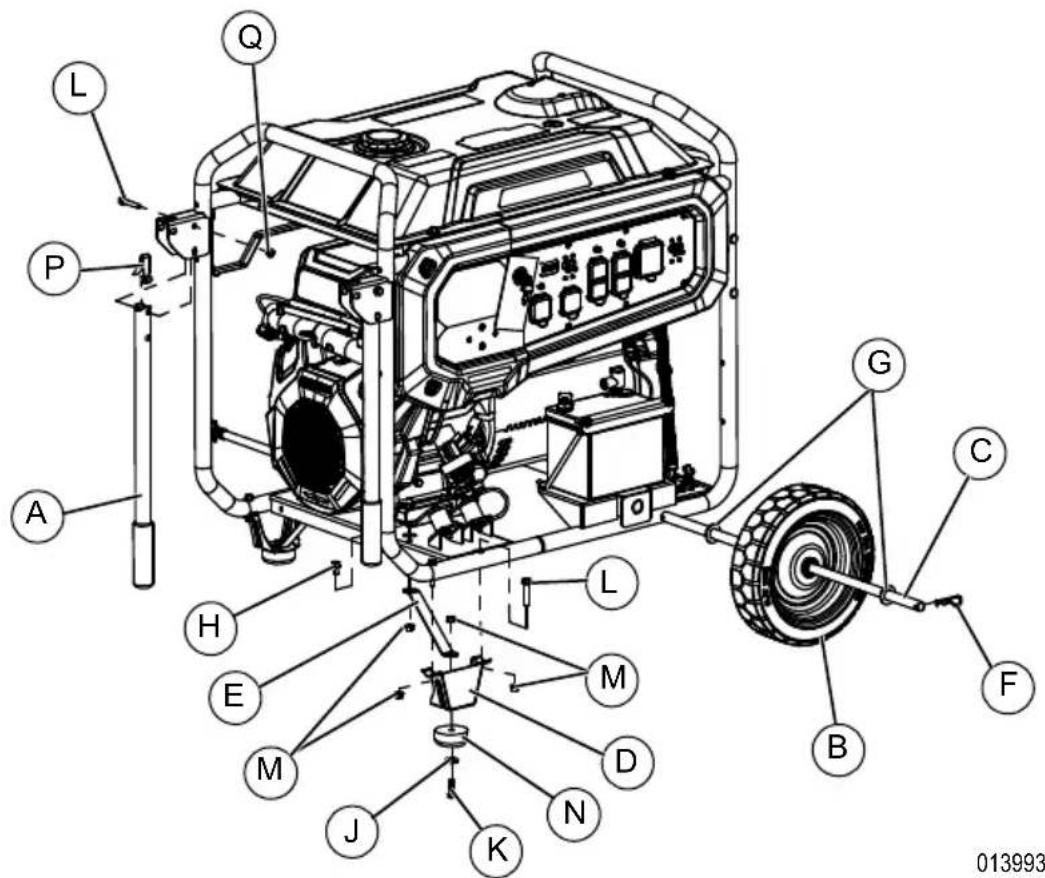
Figure 2-12. Wheel and Handle Assembly
Battery Cable Connection

CAUTION
Equipment damage. Do not make battery connections in reverse. Doing so will result in equipment damage.
(000167a)
The battery shipped with the generator has been provided fully charged. Caution must be taken when connecting battery.
NOTE: A battery may lose some of its charge when not in use for prolonged periods of time.
Two 7/16" box wrenches are needed to connect battery cables.
- Cut tie wrap cable holding the RED and BLACK battery cables to the stator.
- See Figure 2-13. Connect RED battery cable (A) to battery Positive terminal (+). Make sure connection is tight and slip rubber boot over terminal.
- Connect BLACK battery cable (B) to battery Negative terminal (-). Make sure connection is tight.
- See Figure 2-13. Install battery post cover (included).
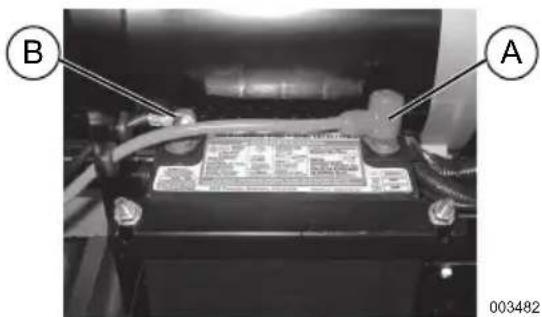
Figure 2-13. Battery Connection
Add Engine Oil
CAUTION
Engine damage. Verify proper type and quantity of engine oil prior to starting engine. Failure to do so could result in engine damage.
(000135)
- Place generator on a level surface.
- See Figure 2-14. Remove dipstick and wipe clean.
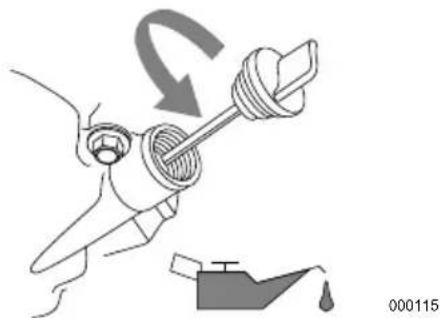
Figure 2-14. Remove Dipstick
- See Figure 2-15. Insert dipstick and remove again to check oil level. Oil level is checked with dipstick fully installed.
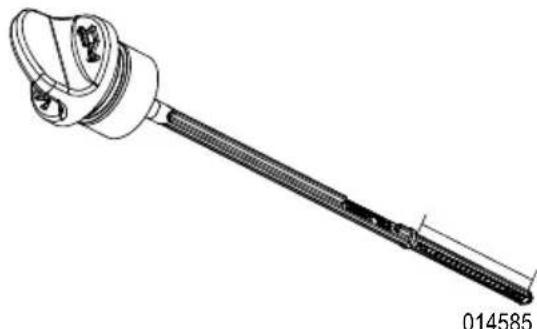
Figure 2-15. Safe Operating Range
- See Figure 2-14. Clean area around oil fill. Remove oil fill cap.
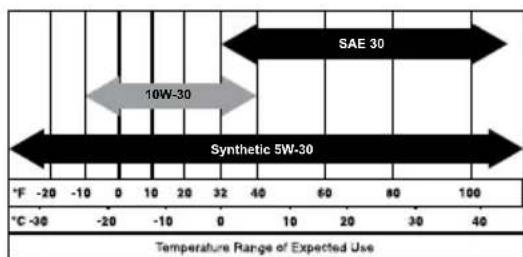
- Add recommended engine oil. Climate determines proper engine oil viscosity. See chart to select correct viscosity.
NOTE: Use petroleum based oil (supplied) for engine break-in before using synthetic oil.
NOTE: Verify oil level often during filling process to ensure overfilling does not occur.
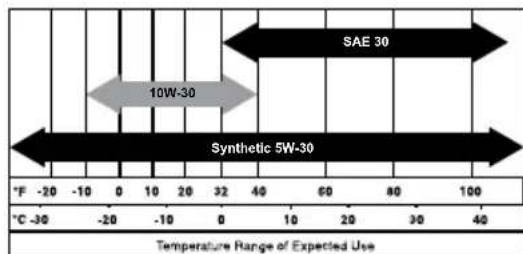
000399
NOTE: Some units have more than one oil fill location. It is only necessary to use one oil fill point.
- See Figure 2-15. Remove dipstick and verify oil level is within safe operating range.
- Install dipstick and oil fill cap and hand-tighten.
Fuel

DANGER
Explosion and Fire. Fuel and vapors are extremely flammable and explosive. Add fuel in a well ventilated area. Keep fire and spark away. Failure to do so will result in death or serious injury. (00010)

DANGER
Explosion and Fire. Do not overfill fuel tank. Fill to 1/2 inch from top of tank to allow for fuel expansion. Overfilling may cause fuel to spill onto engine causing fire or explosion, which will result in death or serious injury. (000166b)
Fuel requirements are as follows:
- Clean, fresh, unleaded gasoline.
Minimum rating of 87 octane/87 AKI (91 RON). - Up to 10% ethanol (gasohol) is acceptable (where available; non-ethanol fuel is recommended).
DO NOT use E85.
DO NOT use a gas oil mix. - DO NOT modify engine to run on alternate fuels. Stabilize fuel prior to storage.
- Verify unit is OFF and cooled for a minimum of two minutes prior to fueling.
- Place unit on level ground in a well ventilated area.
- Clean area around fuel cap and remove cap slowly.
- See Figure 2-16. Slowly add recommended fuel (A). Do not overfill (B).
- Install fuel cap.
Figure 2-16. Add Recommended Fuel
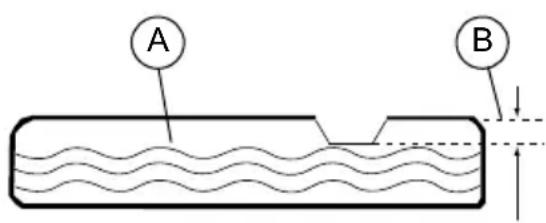
000400
NOTE: Allow spilled fuel to evaporate before starting unit.
IMPORTANT NOTE: It is important to prevent gum deposits from forming in fuel system parts such as the fuel injectors, fuel hose or tank during storage. Alcoholblended fuels (called gasohol, ethanol or methanol) can attract moisture, which leads to separation and formation of acids during storage. Acidic gas can damage the fuel system of an engine while in storage. To avoid engine problems, the fuel system should be emptied before storage of 30 days or longer. See the Storage section.
Never use engine or carburetor cleaner products in the fuel tank as permanent damage may occur.
Section 3 Operation
Operation and Use Questions
Call Generac customer service at 1-888-GENERAC (1-888-436-3722) with questions or concerns about equipment operation and maintenance.
Before Starting Engine
- Verify engine oil level is correct.
- Verify fuel level is correct.
- Verify unit is secure on level ground, with proper clearance and is in a well ventilated area.
Prepare Generator for Use

DANGER
Asphyxiation. Running engines produce carbon monoxide, a colorless, odorless, poisonous gas. Carbon monoxide, if not avoided, will result in death or serious injury. (2001)
(000103)

DANGER
Asphyxiation. The exhaust system must be properly maintained. Do not alter or modify the exhaust system as to render it unsafe or make it noncompliant with local codes and/or standards. Failure to do so will result in death or serious injury. (00017)

AWARNING
Asphyxiation. Always use a battery operated carbon monoxide alarm indoors and installed according to the manufacturer's instructions. Failure to do so could result in death or serious injury.
(000178a)

WARNING
Risk of fire. Do not use generator without spark arrester installed. Failure to do so could result in death or serious injury.
(000118a)

WARNING
Risk of Fire. Hot surfaces could ignite combustibles, resulting in fire. Fire could result in death or serious injury.
(000110)

WARNING
Hot Surfaces. When operating machine, do not touch hot surfaces. Keep machine away from combustibles during use. Hot surfaces could result in severe burns or fire. (000108)
(000108)
CAUTION
Equipment and property damage. Disconnect electrical loads prior to starting or stopping unit. Failure to do so could result in equipment and property damage. (000136)
Grounding the Generator When Used as a Portable
The generator is equipped with a terminal for the connection of a grounding electrode system. Article 250.34 (A) does not require the frame of the generator to be connected to a grounding electrode system when the generator only supplies power to cord and plug connected equipment through the receptacles on the generator.
See Figure 3-1. When the generator supplies power to a 3-pole manual transfer switch or distribution panel boards for temporary power, a grounding electrode system shall be installed and connected to the grounding electrode terminal on the generator. See NEC 250.30, 250.34 and 250.52 for clarification.
- NEUTRAL BONDED TO FRAME
- THERE IS A PERMANENT CONDUCTOR BETWEEN THE GENERATOR (STATOR WINDING) AND FRAME
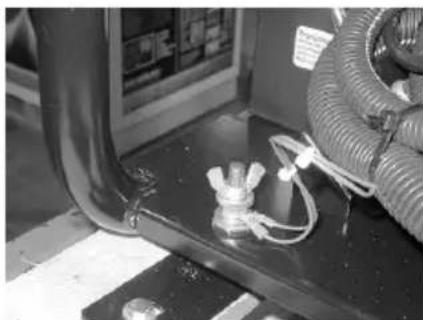
Figure 3-1.Grounding the Generator
000928
Special Requirements
Review all Federal or State Occupational Safety and Health Administration (OSHA) regulations, local codes, or ordinances that apply to the intended use of the generator.
Consult a qualified electrician, electrical inspector, or the local agency having jurisdiction:
- In some areas, generators are required to be registered with local utility companies.
- If the generator is used at a construction site, there may be additional regulations which must be observed.
Connecting the Generator to a Building Electrical System
It is recommended to use a manual transfer switch when connecting directly to a building electrical system to prevent hazardous backfeeding and avoid injuring utility line workers. When connecting a portable generator to a building electrical system, a transfer switch must isolate the generator power from the util
ity power at all times. Failure to comply will result in a hazardous condition. Installation is to be made in strict compliance with all national and local electrical codes and laws, and be completed by a qualified electrician.
Know Generator Limits
Overloading a generator can result in damage to the generator and connected electrical devices. Observe the following to prevent overload:
- Add the total wattage of all electrical devices to be connected at one time. This total should NOT be greater than the generator's wattage capacity.
- The rated wattage of lights can be taken from light bulbs. The rated wattage of tools, appliances, and motors can be found on a data label or decal affixed to the device.
- If the appliance, tool, or motor does not give wattage, multiply volts times ampere rating to determine watts (volts x amps = watts).
- Some electric motors, such as induction types, require approximately three times more watts of power for starting than for running. This surge of power lasts only a few seconds when starting such motors. Make sure to allow for high starting wattage when selecting electrical devices to connect to the generator:
- Calculate the watts needed to start the largest motor.
- Add to that figure the running watts of all other connected loads.
The Wattage Reference Guide is provided to assist in determining how many items the generator can operate at one time.
NOTE: All figures are approximate. See data label on appliance for wattage requirements.
IMPORTANT NOTE: Wattage Reference Guide
| Device | Running Watts |
| *Air Conditioner (12,000 Btu) | 1700 |
| *Air Conditioner (24,000 Btu) | 3800 |
| *Air Conditioner (40,000 Btu) | 6000 |
| Battery Charger (20 Amp) | 500 |
| Belt Sander (3") | 1000 |
| Chain Saw | 1200 |
| Circular Saw (7-1/4") | 1250 to 1400 |
| *Clothes Dryer (Electric) | 5750 |
| *Clothes Dryer (Gas) | 700 |
| *Clothes Washer | 1150 |
| Coffee Maker | 1750 |
| *Compressor (1 HP) | 2000 |
| *Compressor (3/4 HP) | 1800 |
| *Compressor (1/2 HP) | 1400 |
| Curling Iron | 700 |
| *Dehumidifier | 650 |
| Disc Sander (9") | 1200 |
| Edge Trimmer | 500 |
| Electric Blanket | 400 |
| Electric Nail Gun | 1200 |
| Electric Range (per element) | 1500 |
| Electric Skillet | 1250 |
| *Freezer | 700 |
| *Furnace Fan (3/5 HP) | 875 |
| *Garage Door Opener | 500 to 750 |
| Hair Dryer | 1200 |
| Hand Drill | 250 to 1100 |
| Hedge Trimmer | 450 |
| Impact Wrench | 500 |
| Iron | 1200 |
| *Jet Pump | 800 |
| Lawn Mower | 1200 |
| Light Bulb (Incandescent) | 100 |
| Microwave Oven | 700 to 1000 |
| *Milk cooler | 1100 |
| Oil Burner on Furnace | 300 |
| Oil Fired Space Heater (140,000 Btu) | 400 |
| Oil Fired Space Heater (85,000 Btu) | 225 |
| Oil Fired Space Heater (30,000 Btu) | 150 |
| *Paint Sprayer, Airless (1/3 HP) | 600 |
| Paint Sprayer, Airless (hand-held) | 150 |
| Radio | 50 to 200 |
| *Refrigerator | 700 |
| Slow Cooker | 200 |
| *Submersible Pump (1-1/2 HP) | 2800 |
| *Submersible Pump (1 HP) | 2000 |
| *Submersible Pump (1/2 HP) | 1500 |
| *Sump Pump | 800 to 1050 |
| *Table Saw (10") | 1750 to 2000 |
| Television | 50 to 300 |
| Toaster | 1000 to 1650 |
| Weed Trimmer | 500 |
| *Allow 3 times the listed watts for starting these devices. | |
Transporting/Tipping of the Unit
Do not store or transport the unit at an angle greater than 15 degrees.
Starting Electric Start Engines
CAUTION
Equipment and property damage. Disconnect electrical loads prior to starting or stopping unit.
Failure to do so could result in equipment and property damage.
(000136)
- Unplug all electrical loads from the unit's receptacles before starting the engine.
- Place generator on a level surface.
- Turn key to the START position.
- Release the key to the RUN position. IMPORTANT NOTE: Do not overload the generator. Also, do not overload individual panel receptacles. These outlets are protected against overload with push-to-reset type circuit breakers. If amperage rating of any circuit breaker is exceeded, that breaker opens and electrical output to that receptacle is lost. Read Know Generator Limits carefully.
Generator Shut Down
CAUTION
Equipment and property damage. Disconnect electrical loads prior to starting or stopping unit. Failure to do so could result in equipment and property damage.
(000136)
- Shut off all loads and unplug electrical loads from generator panel receptacles.
- Let engine run at no-load for several minutes to stabilize internal temperatures of engine and generator.
- Move START/RUN/STOP key to STOP.
Low Oil Pressure Shutdown System
The engine is equipped with a low oil pressure sensor to shut down the engine automatically when the oil pressure drops below a specified level. The engine will not run until the oil has been filled to the proper level.
IMPORTANT NOTE: Verify proper engine oil and fuel levels before use.
NOTE: The MIL on the control panel will flash a 6-1 code (six (6) long flashes followed by one (1) short flash) to indicate the engine has shut down for a low oil pressure fault.
Section 4 Maintenance and Troubleshooting
Maintenance
Regular maintenance will improve performance and extend engine/equipment life. Generac Power Systems, Inc. recommends that all maintenance work be performed by an Independent Authorized Service Dealer (IASD). Regular maintenance, replacement, or repair of the emissions control devices and systems may be performed by any repair shop or person of the owner's choosing. To obtain emissions control warranty service free of charge, the work must be performed by an IASD. See the emissions warranty.
NOTE: Call 1-888-GENERAC (1-888-436-3722) with questions about component replacement.
Maintenance Schedule
Follow maintenance schedule intervals, whichever occurs first according to use.
NOTE: Adverse conditions will require more frequent service.
NOTE: All required service and adjustments should be each season as detailed in the following chart.
| At Each Use |
| Check engine oil level |
| Every 100 Hours or Every Year |
| Inspect/clean spark arrester |
| Every 200 Hours or Every Year |
| Replace spark plug |
| Change oil and oil filter ‡* |
| Torque exhaust clamp bolts to 10 ft-lbs |
| Every 500 Hours or Every Year |
| Inspect/clean air filter** |
| € Change oil after first 25 hours of operation, then every season.* Change oil and oil filter every month when operating under heavy load or in high temperatures.** Clean more often under dirty or dusty oper-ating conditions. Replace air filter parts if they cannot be adequately cleaned. |
Preventive Maintenance
WARNING
Personal injury. Do not insert any object through the air cooling slots. Generator can start at any time and could result in death, serious injury, and unit damage.
(000142a)
Dirt or debris can cause improper operation and equipment damage. Clean generator daily or before each use. Keep area around and behind muffler free from combustible debris. Inspect all cooling air openings on generator.
- Use a damp cloth to wipe exterior surfaces clean.
- Use a soft bristle brush to loosen caked on dirt, oil, etc.
- Use a vacuum to pick up loose dirt and debris.
- Low pressure air (not to exceed 25 psi) may be used to blow away dirt. Inspect cooling air slots and openings on generator. These openings must be kept clean and unobstructed.
NOTE: DO NOT use a garden hose to clean generator. Water can enter engine fuel system and cause problems. If water enters generator through cooling air slots, some water will be retained in voids and crevices of rotor and stator winding insulation. Water and dirt buildup on generator internal windings will decrease insulation resistance of windings.
Engine Maintenance
WARNING
Accidental start-up. Disconnect spark plug wires when working on unit. Failure to do so could result in death or serious injury.
(000141)
Engine Oil Recommendations
To maintain the product warranty, the engine oil should be serviced in accordance with the recommendations of this manual. For your convenience, maintenance kits designed and intended for use on this product are available from the manufacturer that include engine oil, oil filter, air filter, spark plug(s), a shop towel and funnel. These kits can be obtained from an Independent Authorized Service Dealer (IASD).
000399
Inspect Engine Oil Level

AWARNING
Risk of burns. Allow engine to cool before draining oil or coolant. Failure to do so could result in death or serious injury.
(000139)
Inspect engine oil level prior to each use, and after every eight (8) hours of operation.
- Place generator on a level surface.
- See Figure 4-1. Remove dipstick and wipe clean.
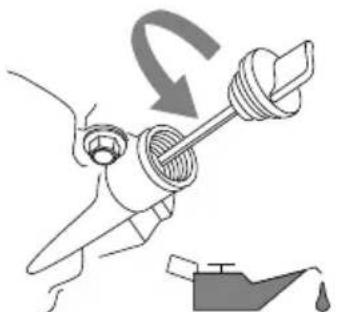
Figure 4-1. Remove Dipstick
000115
- See Figure 4-2. Insert dipstick and remove again to check oil level. Oil level is checked with dipstick fully installed.
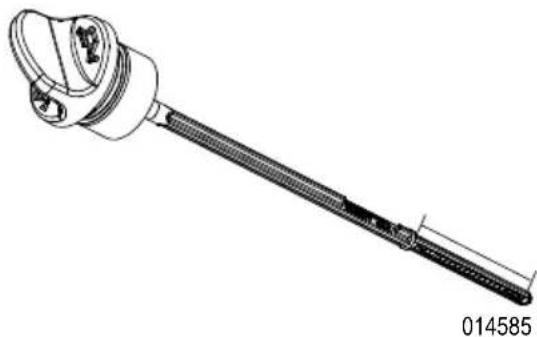
Figure 4-2. Safe Operating Range
- Clean area around oil fill. Remove oil fill cap.
- Add recommended engine oil as necessary.
-
Remove dipstick and verify oil level is within safe operating range.
-
Install dipstick and oil fill cap and hand-tighten.
NOTE: Some units have more than one oil fill location. It is only necessary to use one oil fill point.
Change Engine Oil
WARNING
Accidental start-up. Disconnect spark plug wires when working on unit. Failure to do so could result in death or serious injury.
(000141)
When using generator under extreme, dirty, dusty conditions, or in extremely hot weather, change oil more frequently.
NOTE: Don't pollute. Conserve resources. Return used oil to collection centers.
Change oil while engine is still warm from running, as follows:
- Place generator on a level surface.
- Disconnect the spark plug wire from the spark plug and place the wire where it cannot contact spark plug.
- Clean area around oil fill, and oil drain plug.
- Remove oil fill cap.
- Remove oil drain plug and drain oil completely into a suitable container.
- Install oil drain plug and tighten securely.
- Coat gasket of new filter with clean engine oil and install.
- Slowly pour oil into oil fill opening until oil level is between L and H marks on dipstick. DO NOT overfill.
- Install dipstick and oil fill cap, and hand-tighten.
- Wipe up any spilled oil.
- Properly dispose of oil in accordance with all applicable regulations.
Air Filter
Engine will not run properly and may be damaged if run with a dirty air filter. Service air filter more frequently in dirty or dusty conditions. To service air filter:
- See Figure 4-3. Release latches (A) and remove air filter cover (B).
- Remove filter (C). Gently tap filter on a solid surface. Replace if necessary.
- Clean air filter cover before installation.
NOTE: To order a new air filter, contact the nearest authorized service center at 1-888-436-3722.
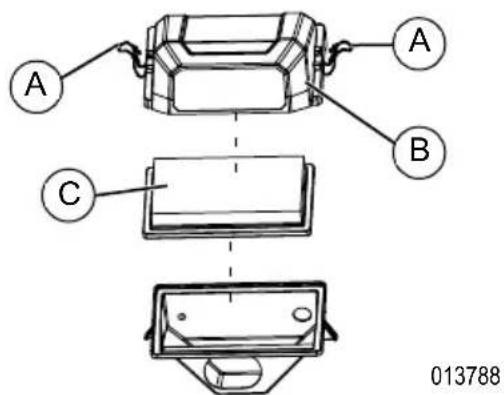
Figure 4-3. Air Filter Assembly
Service Spark Plug
To service spark plug:
- See Figure 4-5. Remove bolts (A) on control panel cover using a 10mm wrench.
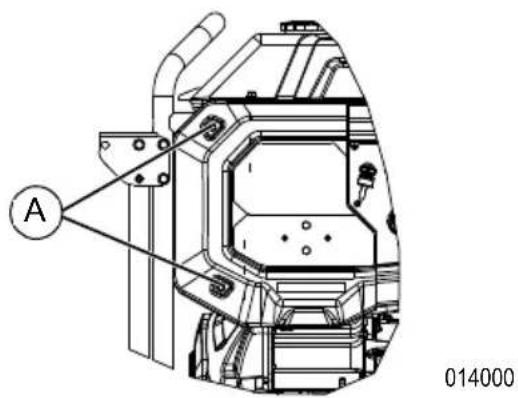
Figure 4-4. Remove Screws
- See Figure 4-5. Slide cover left and remove to reveal the spark plug access hole. (Do not disconnect any wires from control panel cover.)

Figure 4-5. Spark Plug Access
- Clean area around spark plug.
- Remove and inspect spark plug.
- See Figure 4-6. Inspect electrode gap with wire feeler gauge and reset spark plug gap to 0.04 in (1.01 mm).
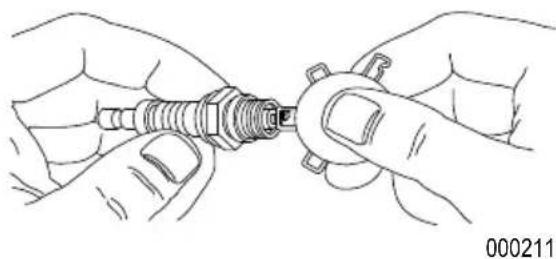
Figure 4-6. Spark Plug
NOTE: Replace spark plug if electrodes are pitted, burned or porcelain is cracked. Use ONLY recommended replacement plug. See Specifications.
6. Install spark plug finger tight, and tighten an additional 3/8 to 1/2 turn using spark plug wrench.
Battery Replacement (if applicable)
WARNING
Accidental Start-up. Disconnect the negative battery cable, then the positive battery cable when working on unit. Failure to do so could result in death or serious injury. (000130)
WARNING
Environmental Hazard. Always recycle batteries at an official recycling center in accordance with all local laws and regulations. Failure to do so could result in environmental damage, death, or serious injury. (000228)
NOTE: The battery shipped with the generator has been fully charged. A battery may lose some charge when not in use for prolonged periods of time.
See Figure 4-7.
- Disconnect negative (-) battery terminal FIRST (B).
- Disconnect positive (+) battery terminal SECOND (A).
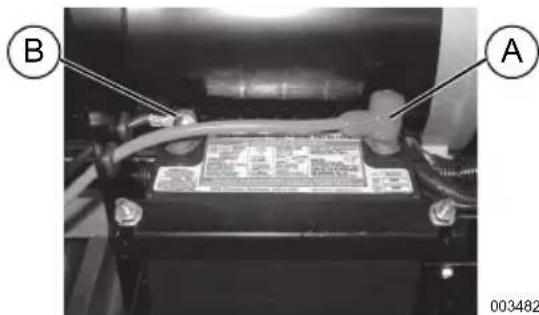
Figure 4-7. Battery Connection
- Install new battery. Install hold down bracket and tighten.
-
Connect positive (+) battery terminal (A) FIRST. Slide rubber boot over connection hardware.
-
Connect negative (-) battery terminal (B) SECOND.
- Slide rubber boot over connection hardware.
Inspect Muffler and Spark Arrester
NOTE: It is a violation of California Public Resource Code, Section 4442, to use or operate the engine on any forest-covered, brush-covered, or grass-covered land unless the exhaust system is equipped with a spark arrester, as defined in Section 4442, maintained in effective working order. Other states or federal jurisdictions may have similar laws.
Contact original equipment manufacturer, retailer, or dealer to obtain a spark arrester designed for exhaust system installed on this engine.
NOTE: Use ONLY original equipment replacement parts.
Inspect muffler for cracks, corrosion, or other damage. Remove spark arrester, if equipped, inspect for damage or carbon blockage.
Replace parts or clear carbon from screen as required.
Inspect Spark Arrester Screen

WARNING
Hot Surfaces. When operating machine, do not touch hot surfaces. Keep machine away from combustibles during use. Hot surfaces could result in severe burns or fire. (000108)
- See Figure 4-8. Remove screw (A) and retaining bracket (B).
- Remove screen (C) and replace if torn, perforated or otherwise damaged. If screen is not damaged, clean with commercial solvent.
- Replace screen and secure with bracket and screw.
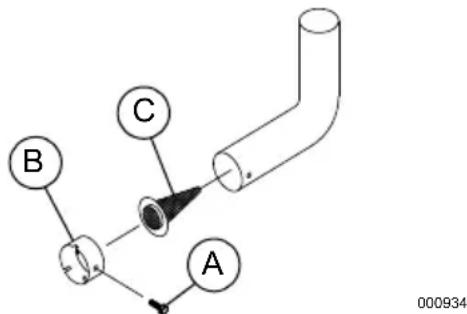
Figure 4-8. Spark Arrestor Screen
Storage
General

DANGER
Explosion and Fire. Fuel and vapors are extremely flammable and explosive. Store fuel in a well ventilated area. Keep fire and spark away. Failure to do so will result in death or serious injury.
(000143)

WARNING
Risk of Fire. Verify machine has properly cooled before installing cover and storing machine. Hot surfaces could result in fire.
(000109)
It is recommended to start and run the generator for 30 minutes, every 30 days. If this is not possible, refer to the following list to prepare unit for storage.
DO NOT place a storage cover on a hot generator. Allow unit to cool to room temperature before storage.
DO NOT store fuel from one season to another unless properly treated.
- Replace fuel container if rust is present. Rust in fuel will cause fuel system problems.
- Cover unit with a suitable protective, moisture resistant cover.
- Store unit in a clean and dry area.
Always store generator and fuel away from heat and ignition sources.
Prepare Fuel System for Storage

WARNING
Vision Loss. Eye protection is required to avoid spray from spark plug hole when cranking engine. Failure to do so could result in vision loss. (00)
(000181)
Fuel stored over 30 days can go bad and damage fuel system components. Keep fuel fresh, use fuel stabilizer.
If fuel stabilizer is added to fuel system, prepare and run engine for long term storage. Run engine for 10-15 minutes to circulate stabilizer throughout fuel system. Adequately prepared fuel can be stored up to 24 months.
NOTE: If fuel has not been treated with fuel stabilizer, it must be drained into an approved container. Run engine until it stops from lack of fuel. Use of fuel stabilizer in fuel storage container is recommended to keep fuel fresh.
- Change engine oil.
- Remove spark plug.
- Pour tablespoon (5-10cc) of clean engine oil or spray a suitable fogging agent into cylinder.
- Turn key switch to distribute oil in cylinder.
- Install spark plug.
Change Oil
Change engine oil before storage. See Change Engine Oil.
Torque Exhaust Clamp Bolts

AWARNING
Hot Surfaces. When operating machine, do not touch hot surfaces. Keep machine away from combustibles during use. Hot surfaces could result in severe burns or fire. (000108)
See Figure 4-9. Torque exhaust clamp bolts (A and B) to 10 ft-lbs using a 13mm socket.
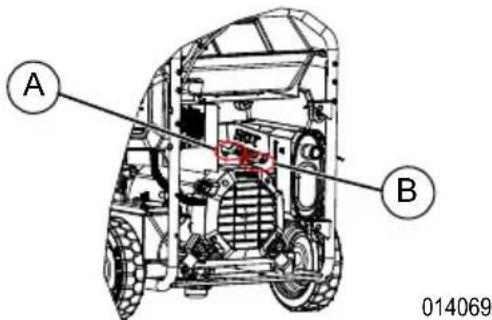
Figure 4-9. Torque Exhaust Clamp Bolts
Troubleshooting
| PROBLEM CAUSE CORRECTION | ||
| Engine is running, but AC output is not available. | 1. Circuit breaker OPEN. 2. Poor connection or defective cord set. 3. Connected device is bad. 4. Fault in generator. 5. GFCI receptacle is OPEN (if equipped). | 1. Reset circuit breaker. 2. Check and repair. 3. Connect another device that is in good condition. 4. Contact IASD. 5. Correct ground fault and press reset button on GFCI receptacle (if equipped). |
| Engine runs well at no-load, but bogs when load is applied. | 1. Short circuit in a connected load. 2. Generator is overloaded. 3. Engine speed is too slow. 4. Shorted generator circuit. | 1. Disconnect shorted electrical load. 2. See Know Generator Limits. 3. Contact IASD. 4. Contact IASD. |
| Engine will not crank. 1. 10 | Amp or 15 Amp fuse has melted open. 2. Battery weak or dead. | 1. Replace fuse. 2. Charge or replace battery. |
| Engine will not start; or starts and runs rough. | 1. Dirty air filter. 2. Out of fuel. 3. Stale fuel. 4. Spark plug wire not connected to spark plug. 5. Bad spark plug. 6. Water in fuel. 7. Low oil level. 8. Excessive rich fuel mixture. 9. Excessive lean fuel mixture. 10. Intake valve stuck open or closed. 11. Engine lost compression. 12. Engine fault code present. | 1. Clean or replace air filter. 2. Fill fuel tank. 3. Drain fuel tank and fill with fresh fuel. 4. Connect wire to spark plug. 5. Replace spark plug. 6. Drain fuel tank; fill with fresh fuel. 7. Fill crankcase to correct level. 8. Contact IASD. 9. Contact IASD. 10. Contact IASD. 11. Contact IASD. 12. See Fault Code Example or contact IASD. |
| Engine shuts down during operation. | 1. Out of fuel. 2. Low oil level. 3. Engine fault code present. | 1. Fill fuel tank. 2. Fill crankcase to correct level. 3. See Fault Code Example or contact IASD. |
| Engine lacks power. 1. Load is too high. 2. Dirty air filter. 3. Engine needs to be serviced. | 1. Reduce load (see Know Generator Limit) 2. Clean or replace air filter. 3. Contact IASD. | |
| No battery charge DC output. | 1. Battery posts corroded. 2. Bad battery cable. 3. Defective battery. 4. Bad receptacle. | 1. Clean battery posts. 2. Replace cable. 3. Check battery condition. Replace if defective. 4. Contact IASD. |
| MIL codes are flashing. 1. | Multiple. | 1. See Fault Code Example or contact IASD. |
| Engine starts and shuts off right away. | 1. COsense shut-off due to accumulating carbon monoxide if a red light blinks on the side panel badge. 2. COsense shut-off due to a system fault if a yellow light blinks on the side panel badge. 3. Engine fault code present. | 1. Follow all safety instructions and relocate generator to an open area outside, far away from windows, doors and vents. 2. Start to confirm yellow light blinks when/if generator shuts-off. If COsense continues to fault and shut-off, contact IASD. 3. See Fault Code Example or contact IASD. |
Wiring Diagram
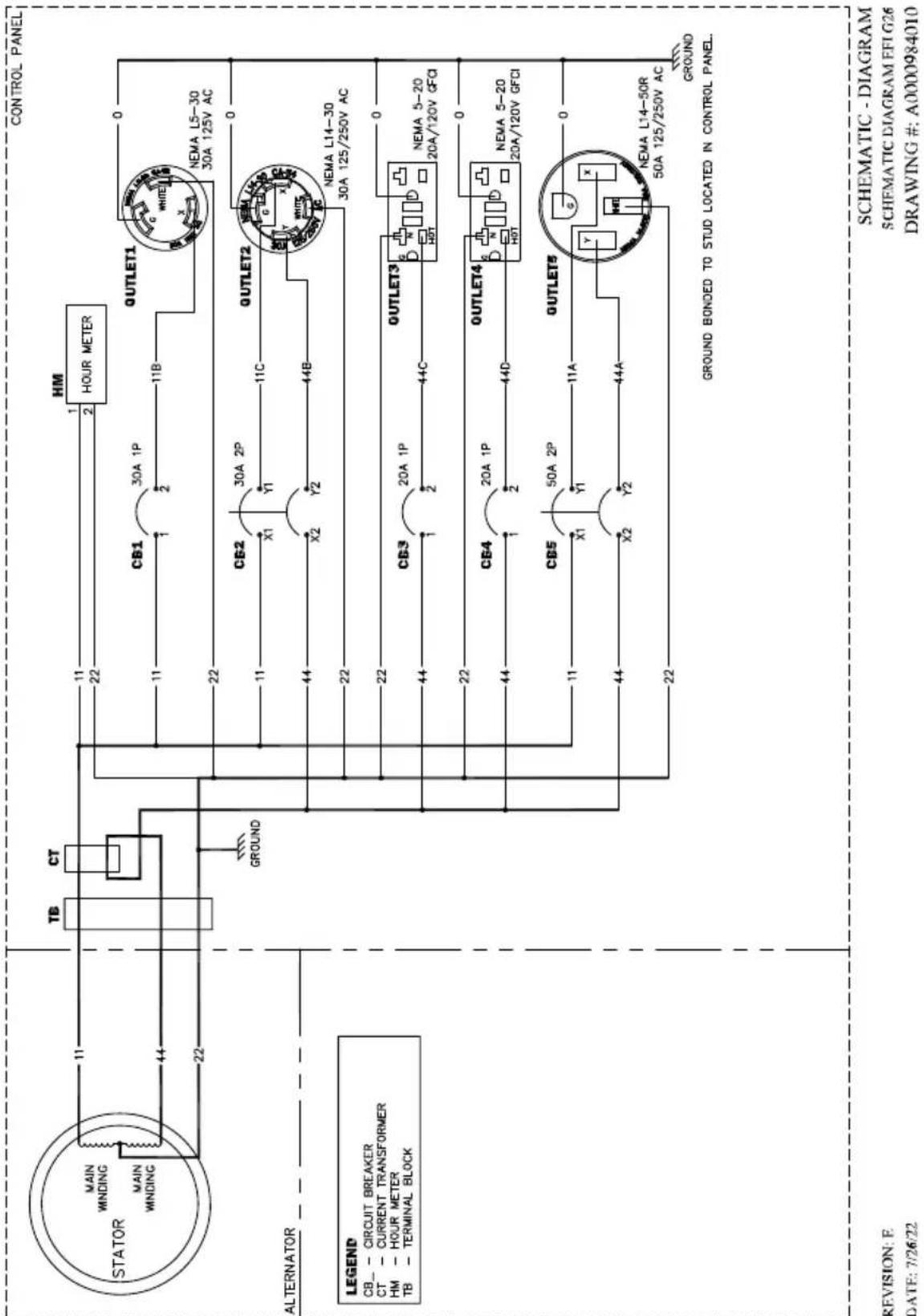
SCHEMATIC DIAGRAM
Notes
Part No. A0000244500 Rev. A 10/03/2022
©2022 Generac Power Systems, Inc.
All rights reserved
Specifications are subject to change without notice.
No reproduction allowed in any form without prior
written consent from Generac Power Systems, Inc.
GENERAC
Generac Power Systems, Inc.
S45 W29290 Hwy. 59
Waukesha, WI 53189
1-888-GENERAC (1-888-436-3722)
wwwgenerac.com
©2022 Generac Power Systems, Inc.
Hearing protection recommended.
PRECAUCION
Protection auditive recommende.
000406
©2022 Generac Power Systems, Inc.