GG3000 - Air purifier GermGuardian - Free user manual and instructions
Find the device manual for free GG3000 GermGuardian in PDF.


| Product Type | Air purifier with UV-C lamp and charcoal filter |
| Model | GG3000 |
| Brand | GermGuardian |
| Power Supply | 120 V AC, 60 Hz |
| Rated Power | Approximately 25 W (fan + 9 W UV-C lamp) |
| Dimensions (approx.) | 21.6 x 21.6 x 36.8 cm (8.5 x 8.5 x 14.5 inches) |
| Weight (approx.) | 2.3 kg (5 lb) |
| Recommended Coverage Area | Up to 15.5 m² (167 ft²) |
| Purification Technology | UV-C lamp (9 W) + activated charcoal filter + fan |
| Fan Speed | 2 speeds (adjustable by push button) |
| Filter Type | Activated charcoal filter (model EV9LBL) |
| UV-C Lamp Life | Approximately 6,000 hours (recommended to replace once a year) |
| Filter Replacement | Every 8 to 10 months depending on usage |
| Warranty | Limited 1-year warranty (except UV-C lamp excluded) |
| Replaceable Parts | UV-C lamp (9 W) and charcoal filter |
| Maintenance | Clean the lamp and cylinder with a dry, soft cloth; do not use water |
| Safety | Automatic shutoff if cap removed? (Not specified, but polarized plug, UV-C warnings) |
| Usage | Indoor only |
| Additional Features | Blue light ring indicating operation |
| Power Consumption | Low power consumption (typically 25 W) |
Frequently Asked Questions - GG3000 GermGuardian
User questions about GG3000 GermGuardian
0 question about this device. Answer the ones you know or ask your own.
Ask a new question about this device
Download the instructions for your Air purifier in PDF format for free! Find your manual GG3000 - GermGuardian and take your electronic device back in hand. On this page are published all the documents necessary for the use of your device. GG3000 by GermGuardian.
USER MANUAL GG3000 GermGuardian
To the consumer, Guardian Technologies LLC warrants this product to be free of defects in materials or workmanship commencing upon the date of the original purchase. In order to be eligible for this Limited Warranty, an original sales receipt or comparable substitute proof of purchase bearing the date of original purchase is required. Refer to the original product carton or specific product/model page on the Guardian Technologies website for warranty length for your particular model. This warranty applies only to the original purchaser of this product from the original date of purchase. This warranty covers product purchased from authorized distributors only.
This warranty applies to repair or replacement of product found to be defective in materials or workmanship. This warranty does not apply to damage resulting from unusual wear, commercial, abusive, unreasonable use or supplemental damage. This warranty does not cover damage from unauthorized repairs or from any use not in accordance with the instruction manual. Defects that are the result of normal wear and tear will not be considered manufacturing defects under this warranty.
If this product should become defective within the warranty period, we will repair or replace any defective parts free of charge. All warranty repairs must be completed by Guardian Technologies LLC. This warranty gives you specific legal rights and you may also have other rights (other rights may vary from state to state in the U.S.A.)
To submit product under warranty the complete machine must be delivered pre-paid to Guardian Technologies LLC. Please include complete information including: the problem, the model number of the product, the day of purchase, and a copy of the original sales receipt along with your name, address, and telephone (email optional). Address returns to the attention of: Customer Service, at the address below. Additional questions or comments can be made toll free to the number listed below.
USA and Canada
Guardian Technologies LLC
26251 Bluestone Blvd.
Euclid, Ohio 44132
1.866.603.5900
www.guardiantechnologies.com
Please go to www.guardiantechnologies.com to register your product. We consider the registration process important to ensuring superior service to our customers, however submitting the warranty registration is optional and does not affect your rights to utilize this warranty according to the conditions stated above.
Additional copies of the instruction manual can be obtained by accessing and printing directly from our website or calling customer service.
IMPORTANT
The UV-C bulb is specifically excluded from this warranty. Use only a Guardian Technologies replacement bulb. See the section under the heading "Replacing and Cleaning the UV-C Bulb and Filter."
The GermGuardian contains no serviceable parts. Due to the unique technology of the GermGuardian, all repairs must be performed by Guardian Technologies authorized service centers. Any unauthorized repair or tampering with the GermGuardian VOIDS this warranty. This warranty does not cover misuse or abuse.

MERCURY NOTICE
This device contains mercury in the sealed ultraviolet bulbs. Do not place your used bulb(s) in the trash. Dispose of property.
BROKEN BULB CLEAN UP
Do not use a household vacuum. Sweep debris (phosphoriglass) into a plastic bag and dispose of property. It is recommended that the UV-C bulbs are recycled or taken to a household-hazardous- waste collection center. Call your county recycling coordinator to find the recycling center nearest you.

guardian technologies™
USE & CARE INSTRUCTIONS
natural_image
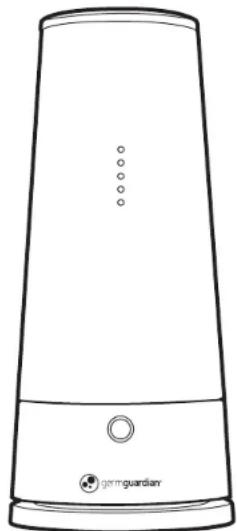
Line drawing of a tall, conical device with a circular button and 'gerguardian' logo at the bottom (no text or symbols on body)
germguardian®
UV-C Air Sanitizer & Deodorizer
Model No. GG3000B
1-Year Limited Warranty
www.guardiantechnologies.com
1.866.603.5900
REV0318
English E-1
French F - 1
Spanish S - 1
REPLACEMENT PART INFORMATION
Model No: EV9LBL Filter + Bulb
To Order Contact Customer Service
1.866.603.5900 or log on to www.guardiantechnologies.com Replace every 8-10 months depending on use.
Date Purchased
month ____
year ____
PLEASE READ AND SAVE ALL INSTRUCTIONS BEFORE USING THIS APPLIANCE

DANGER: Electrical Shock
- Use this product only as described in this manual.
- Operate this product on 120V AC, 60HZ only.
- IMPORTANT SAFETY INSTRUCTIONS - This portable luminaire has a polarized plug (one blade is wider than the other) as a feature to reduce the risk of electric shock. This plug will fit into a polarized outlet only one way. If the plug does not fit fully into the outlet, reverse plug. If it still does not fit, contact a qualified electrician. Never use an extension cord unless plug can be fully inserted. Do not alter the plug.
- Do not operate this product with a damaged cord or if there is any physical damage to the unit.
• This product is for indoor use only. - Do not operate this product in any area where there is a risk of the unit falling into or being exposed to water.

WARNING: Electrical Shock
TO REDUCE THE RISK OF INJURY
• Always unplug the unit before servicing.
• Children cannot recognize the hazards associated with the usage of electrical appliances.
For this reason, always supervise children when they are near the device.
- Do not carry this unit by the cord or use the cord as a handle.
- Do not handle the unit or plug with wet hands.
- Keep the cord away from heated surfaces.
- Do not unplug the unit by pulling on the cord. Grasp the plug itself, when unplugging from an outlet.
- Do not put any objects into the openings or block the airflow to the unit.
- Do not operate without cover in place.
- Do not defeat interlock switch.
- Do not operate with an extension cord.
- Opening windows or doors while operating this device may affect performance.
• This device should not be used in the presence of oxygen or any flammable liquid or gases
WARNING: The cords, wires and/or cables supplied with this product contain chemicals, including lead or lead compounds, known to the state of California to cause cancer and birth defects or other reproductive harm. Wash hands after using. (California code of regulations Proposition 65)

ULTRAVIOLET-C LIGHT IS EMITTED FROM THE BULB WHEN THE UNIT IS ELECTRIFIED. SEVERE EYE INJURY OR SKIN IRRITATION COULD RESULT. DO NOT OPERATE THE UNIT IF THE ENCLOSURE IS DAMAGED. DO NOT EXPOSE SKIN OR EYES TO WITHIN 3-INCHES OF THE AIR INTAKE OR OUTPUT FOR A PERIOD OF 3 HOURS OR MORE. SKIN OR EYE IRRITATION COULD RESULT.
How It Works
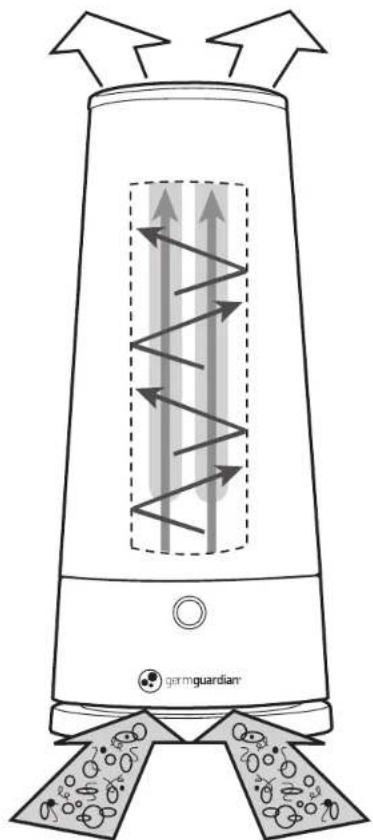
The GermGuardian's powerful fan moves air through the center chamber where germs are exposed to ultraviolet-C light. The highly reflective chamber maximizes the germ-killing power of the UV-C light and the microorganisms passing through it are destroyed. Sanitized air then flows back into the room.
natural_image
Diagram of a germ-guardian electric heater with airflow arrows and sensor array (no text labels)NOTE: It is recommended to run the GG3000B continuously. Opening doors and/or windows may effect the performance of this device.
UV-C Light Bulb & Filter
Ultraviolet light technology, the same technology used in hospitals and commercial settings for sanitizing, is capable of eradicating microorganisms, mold spores and viral contaminants from the air.
It is recommended that you leave the GermGuardian UV-C Air Sanitizer running continuously. A replaceable 9-watt UV-C light bulb should last approximately 6,000 hours, this number could vary in some circumstances. A filter that helps reduce odors is also in the product and should be replaced once a year. Over time, with use, the 9-watt UV-C bulb will lose some intensity (about 15% at 9,000 hours), therefore it is suggested that the light bulb be replaced once every year. You will know when to change the 9-watt light bulb when it continuously flickers or changes color. The replacement bulb and filter come in one package.

WARNING: Electrical Shock
UNDER NO CIRCUMSTANCES SHOULD YOU CLEAN THE BULB, BULB HOLDER OR CYLINDER WITH WATER OR WET SOLUTIONS. THIS COULD CAUSE ELECTRICAL SHOCK.
Use of the GermGuardian Unit
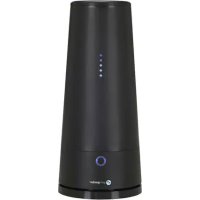
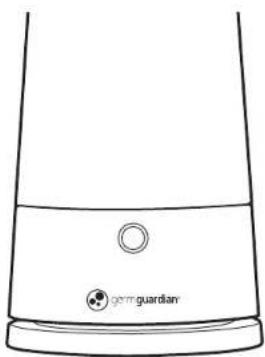
When the GermGuardian is turned on you will see five dots of blue light that let you know it is working. Depending on dust conditions and build-up, you may need to occasionally clean the bulb and cylinder with a soft, dry cloth. This product is safe for use around children and pets, and is cool to the touch.
Directions for Use
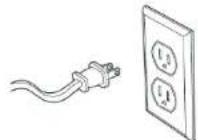
- Plug unit into a 120V AC electric outlet.
- Press the power button. The ring will illuminate around the button.
- Press the power button to adjust the fan speed. (Bright blue is HIGH, Light blue is LOW).
- For best results continuous operation is recommended.
- To turn off the unit press and hold power button for five seconds.
NOTE: THE GERMGUARDIAN UNIT CONTAINS NO SERVICEABLE PARTS EXCEPT ITS UV-C BULB AND FILTER. THE BULB AND FILTER MAY BE REMOVED FOR REPLACEMENT.
natural_image
Line drawing of a portable electronic device with a circular button and 'gem guardian' logo at the base (no text or symbols on the device itself)IMPORTANT SAFETY INSTRUCTIONS

WARNING: Electrical Shock
ALWAYS UNPLUG THE GERMGUARDIAN UNIT FROM ELECTRICAL OUTLET WHEN SERVICING.
Replacing and Cleaning the UV-C Bulb & Filter
- Tum off the unit and unplug it from the electrical outlet.
- Using a small phillips head screwdriver, loosen and remove the phillips screw located at the top of the unit, above the power cord.
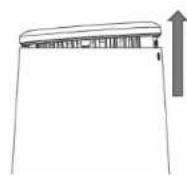
- Remove the top cap by lifting its side near the screw hole, then gently push the cap in the opposite direction.
-
As the cap loosens, you may lift it off.
-
Remove the (2) phillips screws located on each side of the bulb holder and remove the filter.
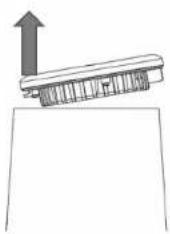
natural_image
Simple line drawing of a mechanical component with an upward arrow, no text or symbols present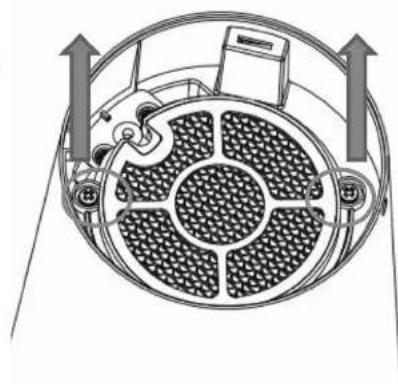
natural_image
Diagram of a circular device with internal components and directional arrows, no text or symbols presentReplacing and Cleaning the UV-C Bulb & Filter
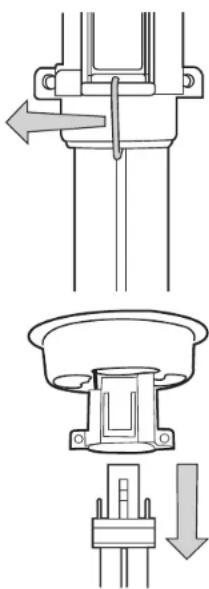
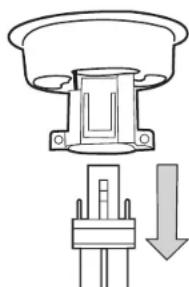
- Lift bulb holder from cylinder. Do not touch bulb. If cleaning, insert soft, dry cloth into cylinder and remove. Repeat if necessary. Do not touch bulb with bare hands. Fingerprints may result in reduced performance unless they are removed with an alcohol pad. Use a soft cloth as a barrier against contact.
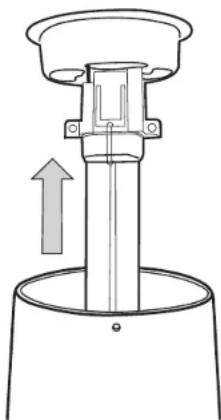
natural_image
Technical line drawing of a mechanical component with an upward arrow indicating motion (no text or symbols)- If NOT replacing the bulb for the first time go to step 8. If replacing the bulb for the first time, flip bulbholder over so light bulb faces up. There will be a spring located between the bulb cylinders. Pull the spring away from the base of the bulb and pull out through the bulb. Discard spring. Spring is used for shipping purposes only and does not need to be replaced.
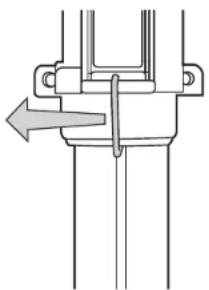
natural_image
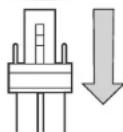
Pure mechanical assembly diagram showing a lever mechanism without any text or symbols- Grasp the metal collar on the bulb and pull firmly until bulb unplugs from the bulb holder. When inserting new bulb, make sure the bulb snaps and is locked firmly in place. Reassemble by reversing steps 1-8.
natural_image
Diagram of a mechanical component with a downward arrow indicating force or direction (no text or symbols present)TROUBLESHOOTING GUIDE
| PROBLEM | SOLUTION |
| Unit doesn't operate. | Check that the unit is plugged in.Call Customer Service at 1.866.603.5900. |
| Light flickers. | Bulb burnt out. See replacingUV-C Bulb section of manual. |
| Fan runs but no light. | Bulb burnt out. See replacingUV-C Bulb section of manual. |
| Low air flow. | Check fan setting. Press the power button untilthe ring is blue. Replace filter. See ReplacingUV-C Bulb and Filter section of manual. |

WARNING:
ULTRAVIOLET-C LIGHT IS EMITTED FROM THE BULB WHEN THE UNIT IS ELECTRIFIED, SEVERE EYE INJURY OR IRRITATION COULD RESULT, UNPLUG THE UNIT WHEN SERVICING THE BULB TO AVOID EXPOSURE OF EYES AND SKIN TO THE ULTRAVIOLET-C LIGHT.
- Discard the old bulb by following the recommended disposal procedure for a used fluorescent bulb.
- The bulb should only be used in the GemGuardian unit and all instructions for use must be followed.

WARNING:
MISAPPLYING OR MISUSING THE UV-C BULB COULD CAUSE INJURY TO THE EYES OR SKIN. NEVER USE THE BULB WITHOUT INSTALLING IT IN THE UNIT AS INSTRUCTED. NEVER OPERATE THE UNIT WITHOUT THE CAP IN PLACE.
This product can be serviced or maintained only by changing the UV-C bulb. The bulb contains no serviceable parts. All parts, except the UV-C bulb, are warranted for one year from date of purchase. See the Limited Warranty. Use of any bulb other than the appropriate GermGuardian bulb will void the warranty.
You may purchase bulbs directly from Guardian Technologies LLC, or we can provide the names of retailers who stock our products.

Intertek
The health aspects associated with this product and its ability to aid in the disinfection of environmental air have not been investigated by UL.
The purchase of a GermGuardian unit does not prevent illness. The GermGuardian unit is designed to kill over 99% of bacteria.
GermGuardian is a registered trademark of Guardian Technologies LLC.
GARANTIE LIMITÉE
Guardian Technologies LLC
26251 Bluestone Blvd.
Euclid, Ohio 44132
1 866 603-5900
www.guardiantechnologies.com
natural_image
Line drawing of a tall, conical device with a circular button and 'Orriguardian' logo at the base (no text or symbols on the device itself)
germguardian®
DONNÉES RELATIVES AUX PIÈCES DE RECHANGE
natural_image
Diagram of a thermosuppressor with airflow arrows and base components (no text labels)natural_image
Line drawing of a portable device with a circular button and 'germ guardian' label (no other text or symbols)CONSIGNES DE SÉCURITÉ IMPORTANTES

natural_image
Diagram of a circular device with internal components and directional arrows indicating motion (no text or symbols)natural_image
Technical line drawing of a mechanical component with an upward arrow indicating motion (no text or symbols)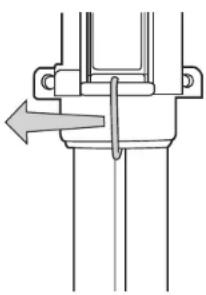
natural_image
Pure mechanical assembly diagram showing a lever and pivot point without any text or symbols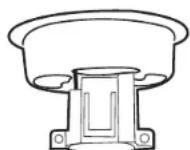
GUIDE DE DÉPANNAGE
Guardian Technologies LLC
26251 Bluestone Blvd.
Euclid, Ohio 44132
1.866.603.5900
www.guardiantechnologies.com
natural_image
Line drawing of a tall, conical device with a circular button and 'Orriguardian' logo at the base (no text or symbols on the device itself)
germguardian®
natural_image
Diagram of a germ-guardian electric heater with airflow arrows and sensor array (no text labels)natural_image
Line drawing of a portable electronic device with a circular button and 'germ guardian' label (no other text or symbols)natural_image
Diagram of a circular device with internal components and directional arrows, no text or symbols presentnatural_image
Technical line drawing of a mechanical component with an upward arrow indicating motion (no text or symbols)