
UKEY - Musical instrument MAX - Free user manual and instructions
Find the device manual for free UKEY MAX in PDF.


| Product type | Chromatic tuner |
| Brand | MAX |
| Model | UKEY |
| Power supply | 1 CR2032 battery (included) |
| Tuning modes | Chromatic, Guitar, Bass |
| Display | Screen with backlight (green/blue) |
| Auto power-off | After 3 minutes of inactivity |
| Attachment | Clip for attaching to instrument |
| Operating temperature | 5°C to 35°C (indoor) |
| Cleaning | Soft, dry cloth |
| Safety | Do not modify the device; repairs by authorized technician |
| Package contents | Tuner, CR2032 battery, user manual |
| Warranty | Void if modified or used improperly |
Frequently Asked Questions - UKEY MAX
User questions about UKEY MAX
0 question about this device. Answer the ones you know or ask your own.
Ask a new question about this device
Download the instructions for your Musical instrument in PDF format for free! Find your manual UKEY - MAX and take your electronic device back in hand. On this page are published all the documents necessary for the use of your device. UKEY by MAX.
USER MANUAL UKEY MAX
Ref. nr.: 173.180, 173.182, 173.184

natural_image
Red and beige acoustic guitar with visible grille and fretboard (no text or symbols)INSTRUCTION MANUAL GEBRUIKSAANWIJZING BEDIENUNGSANLEITUNG MANUAL DE INSTRUCCIONES MANUEL D'INSTRUCTIONS INSTRUKCJA OBSŁUGI NÁVOD K POUŽITÍ
Congratulations to the purchase of this Max product. Please read this manual thoroughly prior to using the product in order to benefit fully from all features.
Please read this manual before using the product. Follow the instructions or your warranty may be void. Always take all safety precautions. It is also advisable to leave repairs/modifications etc. to qualified personnel. Keep this manual for future reference.
- When using a shoulder strap, make sure the shoulder strap is securely attached to the guitar.
- Do not place your face close to the instrument when changing or adjusting the strings.
- After changing the strings, cut off the leftover string ends.
- The guitar has been properly adjusted before being shipped from the factory. In For those adjustments that can be performed by the owner, please closely follow the instructions given in the Owner's Manual for the procedure.
- Broken guitar necks are mostly the result of accidents such as dropping the guitar, the guitar falling over, or from shocks occurred during transport. When the guitar is not being used, make sure it is kept on a sturdy stand where it won't fall over, or place it in its case.
- Do not treat the instrument in a rough manner like swinging it around, throwing objects at the instrument, dropping the instrument, etc. And do not put excessive force on the switches or control knobs, etc.
- When cleaning the instrument, use a soft, dry cloth. Also, do not spray insecticides close to the instrument. And when cleaning the headstock, be careful not to injure yourself on the sharp string ends.

This mark attracts the attention of the user to important instructions that are contained in the manual and that he should read and adhere to.

The product has been certified CE. It is prohibited to make any changes to the product. They would invalidate the CE certificate and their guarantee!
NOTE: To make sure that the unit will function normally, it must be used in rooms with a temperature between 5^ C/41°F and 35^ C/95°F.

Electric products must not be put into household waste. Please bring them to a recycling centre. Ask your local authorities or your dealer about the way to proceed. The specifications are typical. The actual values can slightly change from one unit to the other. Specifications can be changed without prior notice.
Do not attempt to make any repairs yourself. This would invalid your warranty. Do not make any changes to the product. This would also invalid your warranty. The warranty is not applicable in case of accidents or damages caused by inappropriate use or disrespect of the warnings contained in this manual. Max cannot be held responsible for personal injuries caused by a disrespect of the safety recommendations and warnings. This is also applicable to all damages in whatever form.
CAUTION! Carefully unpack the carton, check the contents to ensure that all parts are present, and have been received in good condition. Notify the shipper immediately and retain packing material for inspection if any parts appear damage from shipping or the package itself shows signs of mishandling. Save the package and all packing materials. In the event that the product must be returned to the factory, it is important that the product be returned in the original factory box and packing.
STORE THE GUITAR
- Do not keep the instrument close to a fire or flame, and keep it on a low, stable surface.
- Do not leave the instrument leaning against the wall, etc., in the vicinity of children.
- Long-term storage in the hard case may have an adverse effect on the guitar. Open the case occasionally to let air circulate in the case.
-
If the instrument is not going to be used for an extended period of time, keep the instrument in a place other than those listed below.
-
Locations subject to direct sunlight.
- Locations subject to extremely high or low temperatures.
- Locations subject to high humidity, dust, or vibration.
During the summer season, temperatures inside of a car can become extremely hot. Do not leave the instrument inside of a car.
TUNING MACHINE TENSION ADJUSTMENT
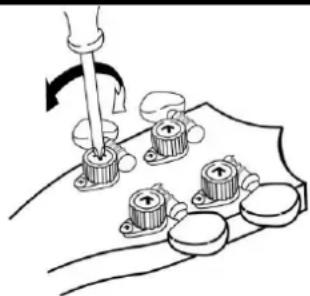
The tuning machines have spring-loaded mechanisms which automatically take up wear, preventing backlash. However, it is possible to adjust the amount of pressure required to turn the machines. Each mechanism has a tension adjustment screw, as illustrated.
Clockwise screw rotation tightens the mechanism. The tuning machines should be adjusted to the extent that they are firm, but can turn smoothly. This adjustment is normally unnecessary, and excessive tightening can lead to premature tuning machine wear.
natural_image
Diagram of a hand using a tool to adjust or install a mechanical component with multiple circular parts (no text or symbols visible)CHANGE THE STRINGS
- Unwind the old string at the tuning machine at the top of the neck (it is recommended to change 1 string at a time).
- Pull the old string through the body of the guitar through the hole in the bridge. Unfasten the knotted string at the bridge.
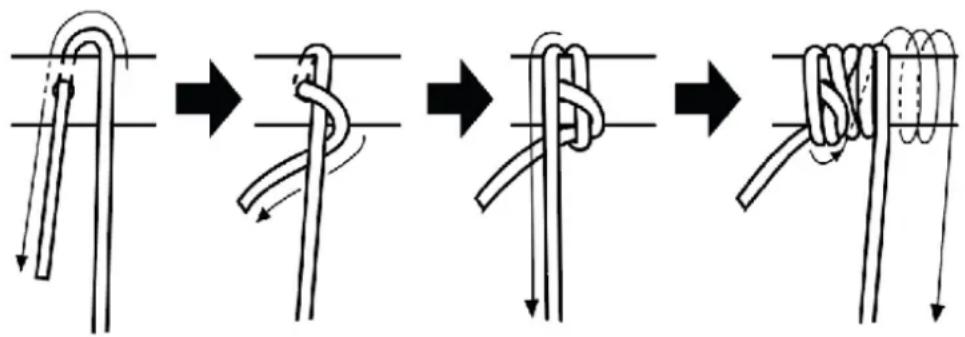
- Insert a new string through the corresponding hole in the bridge (compare the thickness of the new string to the old string to make sure it is the correct string). The string inserts into the hole from the body side of the bridge, then comes over the top of the bridge and is tied in a double or triple-loop knot along the top surface of the bridge. Simply feed the free end of the string three times into the knot that you are making. Just remember to leave a little bit of the string out to secure it by tucking it under the next string.
- Run the string over the bridge and along the neck.
- Feed the string through the hole in the tuning machine post.
- Bend the string around the post and wind the string using a tuning peg. After the string is through its tuning peg hole, you can begin to wind up the string. Remember, if you are stringing the side that will face the ceiling as you play, you will wind it counter clockwise. Wind it clockwise for the side that will face the floor. Just be careful not to over-tighten the strings to the point that they snap.
flowchart
graph TD
    A["Step 1: Rip rope knot"] --> B["Step 2: Rolling knot"]
    B --> C["Step 3: Retraction"]
    C --> D["Step 4: Rolling knot with coiled cord"]
-
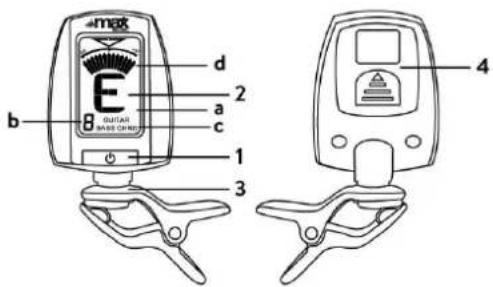
Power / Mode button
-
Display
a. Note name
b. String number
c. Chromatic / Guitar / Bass
d. Measuring range
-
Clip
-
Battery compartment
Inserting the battery
Press on the battery compartment cover as marked on the back of the device. Open the compartment and insert a fresh CR2032 battery, paying close attention to the polarity. The life of the battery depends on the conditions of use.
Note: If the device does not work as described in this manual, and you do not solve the problem by switching it off and on again, remove the battery and reinstall it to possibly solve the problem.
Operating
- Attach the device to your instrument via the clip.
- Press and hold the button for 2 seconds to turn the unit on.
- Select the tuning. Press the button repeatedly to select 'Chromatic', 'Guitar' or 'Bass' as the tuning.
- If you select 'Chromatic', the display will show the note name.
If you select 'Guitar' or 'Bass', the display will show the string number and the note name.
-
Play a single note on your instrument, the note name or string number is displayed. The backlight changes and the measuring range is displayed.
-
If the backlight turns green and the gauge is centered, the note is in tune correctly.
■ If the backlight turns blue and the indicator is pointing to the left, the tuning is too low. -
If the backlight turns blue and the display is pointing to the right, the tuning is too high.
-
If the unit does not detect any signal for 3 minutes after switching it on, it will switch off automatically.
natural_image
Diagram of a mechanical assembly with gears and a tool, no text or symbols presentSNAREN VERWISSELEN
natural_image
Diagram of a mechanical assembly with multiple circular components and a tool, no visible text or symbolsAUSWECHSELN VON SAITEN
natural_image
Diagram of a mechanical assembly with rotating components and a hand holding a tool (no text or symbols)CAMBIAR LAS CUERDAS
flowchart
graph TD
    A["Step 1: Rip rope knot"] --> B["Step 2: Rolling knot"]
    B --> C["Step 3: Retraction"]
    C --> D["Step 4: Rolling knot with coiled cord"]
Insertar la batería
natural_image
Diagram of a mechanical assembly with rotating components and a hand holding a tool (no text or symbols)REPLACEMENT DES CORDES
flowchart
graph TD
    A["Step 1: Rip rope knot"] --> B["Step 2: Rolling knot"]
    B --> C["Step 3: Retraction"]
    C --> D["Step 4: Rolling knot with coiled cord"]
-
Bouton "Power / Mode
-
Afficher
Inserting the battery
Press on the battery compartment cover as marked on the back of the device. Open the compartment and insert a fresh CR2032 battery, paying close attention to the polarity. The life of the battery depends on the conditions of use.
Note: If the device does not work as described in this manual, and you do not solve the problem by switching it off and on again, remove the battery and reinstall it to possibly solve the problem.
natural_image
Diagram of a mechanical assembly with rotating components and a hand holding a tool (no text or symbols)ZMIENIĆ STRUNY
flowchart
graph TD
    A["Step 1: Rip rope knot"] --> B["Step 2: Rolling knot"]
    B --> C["Step 3: Retraction"]
    C --> D["Step 4: Rolling knot with coiled cord"]
Wkładanie baterii
natural_image
Diagram of a mechanical assembly with rotating components and a hand holding a tool (no text or symbols)ZMĚNIT ŘETĚZCE
The products referred to in this manual conform to the European Community Directives to which they are subject:
European Union
Tronios B.V.,
7602KR Almelo, The Netherlands
2014/35/EU
2014/30/EU
2011/65/EC
2014/53/EU

United Kingdom
Tronios Ltd.,
130 Harley Street,
London W1G 7JU, United Kingdom
S.I. 2016:1101
S.I. 2016:1091
S.I. 2012:3032
S.I. 2017:1206

Specifications and design are subject to change without prior notice.
www.tronios.com
Copyright © 2024 by Tronios The Netherlands