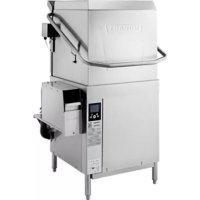
AM16SCBX - Dishwasher Hobart - Free user manual and instructions
Find the device manual for free AM16SCBX Hobart in PDF.



| Product type | Professional dishwasher |
| Brand | Hobart |
| Model | AM16SCBX |
| Category | Chemical sanitization |
| Power supply | 208-240 V / 60 Hz / 1 phase |
| Total power | ~7.2 kW (heater 4.3 kW + pump 2 HP) |
| Minimum wash temperature | 49 °C (120 °F) |
| Minimum rinse temperature | 49 °C (120 °F) |
| Wash tank capacity | 37.9 L (10.5 gallons) |
| Rinse flow rate | 15.1 L/min (4.02 gal/min) |
| Wash pump | 2 HP with thermal protection |
| Booster heater | Electric 4.3 kW |
| Integrated dispensers | Hobart chemical pumps for detergent, rinse aid, and sanitizer |
| Cycle durations | 1, 2, 4 or 6 minutes (wash) + rinse + condensation |
| Water supply | Hot water (32-49 °C recommended), pressure 15-65 psig |
| Dimensions (W x D x H) approx. | 762 x 762 x 1486 mm |
| Weight approx. | 250 kg |
| Material | Stainless steel |
| Safety | Door lock (VL models), overheat protection, water level, chemical lock |
| Programming | Manager menu with code 1001, chemical settings, descaling |
| Maintenance | Daily cleaning, periodic descaling, check arms and filters |
Frequently Asked Questions - AM16SCBX Hobart
User questions about AM16SCBX Hobart
0 question about this device. Answer the ones you know or ask your own.
Ask a new question about this device
Download the instructions for your Dishwasher in PDF format for free! Find your manual AM16SCBX - Hobart and take your electronic device back in hand. On this page are published all the documents necessary for the use of your device. AM16SCBX by Hobart.
USER MANUAL AM16SCBX Hobart
AM16X DISHWASHERS

MODELS
AM16 - BASX
AM16T - BASX
AM16VL - BASX
AM16VLT - BASX
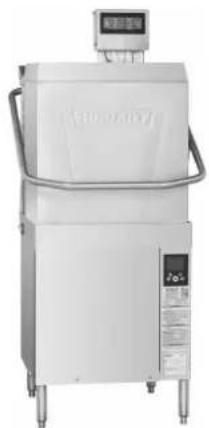
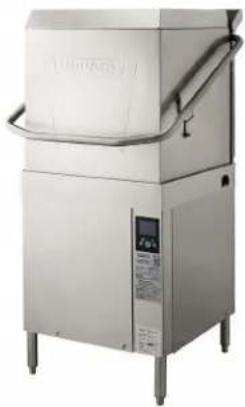
AM16SCBX
AM16VLSCBX
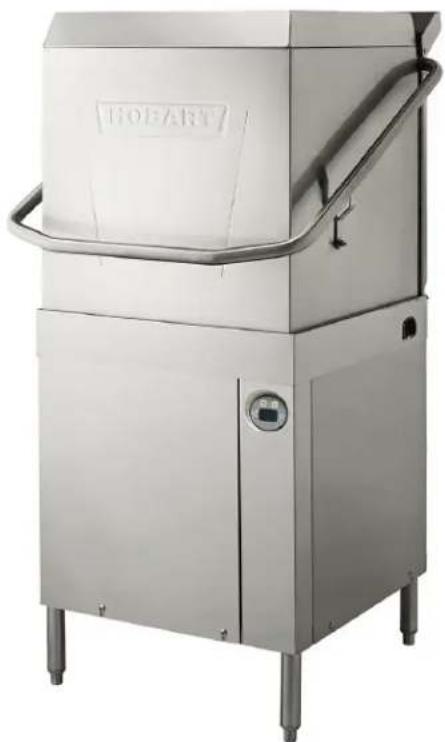
natural_image
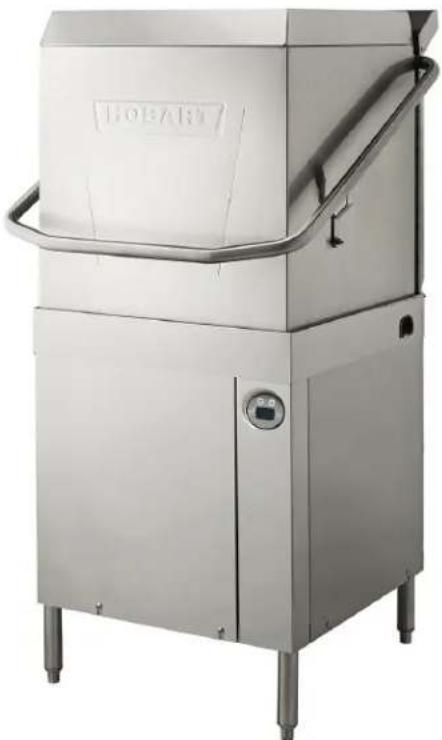
Exterior view of a stainless steel industrial machine labeled 'HOFART' (no additional text or symbols visible)HOBART
701 S. RIDGE AVENUE
TROY, OHIO 45374-0001
937 332-3000
www.hobartcorp.com
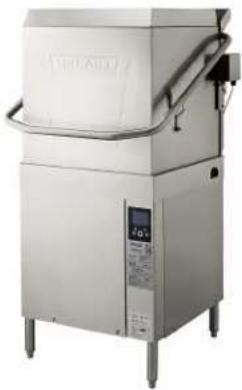
Model AM16-BASX Model AM16T-BASX
natural_image
Exterior view of a stainless steel industrial machine with control panel and side legs (no visible text or symbols)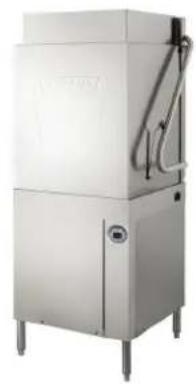
natural_image
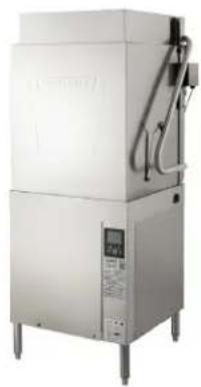
Exterior view of a stainless steel industrial machine with control panel and side legs (no visible text or symbols)Model AM16VL-BASX
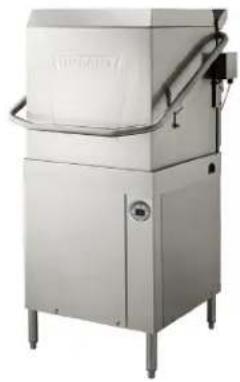
natural_image
Exterior view of a stainless steel industrial machine with control panel and piping (no visible text or symbols)Model AM16VLT-BASX
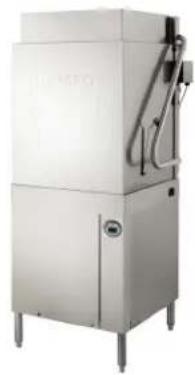
natural_image
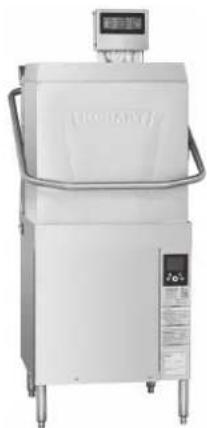
Exterior view of a stainless steel industrial machine with control panel and piping (no visible text or symbols)Model AM16SCBX
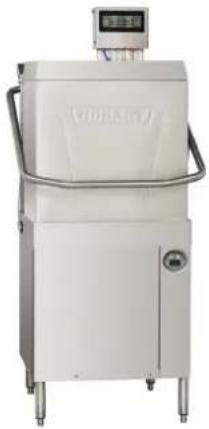
natural_image
Exterior view of a white industrial machine with control panel and side legs (no visible text or symbols)TABLE OF CONTENTS
GENERAL....4
INSTALLATION 5
Unpacking....5
Installation Codes....5
Location 5
Corner Installation 6
Plumbing Connections 8
Water Requirements 8
Water Supply Connection 8
Drain Connection....9
Venting Requirements 10
Rate of Exhaust Flow Calculations 10
Table A: Heat Dissipation 11
Electrical Connections 11
Voltage Adjustment (380 - 415 Volt Machines Only)....13
Motor Rotation (480-Volt & 50-Hertz Machines Only)....13
Equipment Connections 14
Vent Fan Control 14
Hobart Supplied Detergent, Rinse Aid, and Sanitizer Dispenser Installation 14
Chemical Pump Programming (For Machines Equipped with Hobart Chemical Pumps) ..... 14
Chemical Pump Priming 14
Testing Sanitizer (Chemical Sanitizing Machines)....15
Detergent and Rinse Aid Dispensers (For Machines with Chemical Pumps Supplied by Others) . . . . 15
Tubing Installation 15
Detergent Dispenser 15
Rinse Aid Dispenser 16
Detergent and Rinse Aid Dispensers — Equipment Connections 16
Detergent Dispenser 16
Rinse Aid Dispenser 17
OPERATION....18
Preparation....18
Dishwashing....19
Recommended Condense Time (Based on Incoming Water Temp.) 20
CLEANING 22
Dos and Don'ts for Your New Hobart Warewasher. 22
PROGRAMMING 24
Manager Menu 24
Manager Menu Parameters 24
MAINTENANCE 27
Wash Arms 27
Motor(s) 27
Chemical Pumps 27
Delime Instructions....27
Delime Process 27
Delime Lockout 28
Delime Lockout Cycle Limit 28
Cleaning Baffles on AM16VLT-BASX Models. 28
TROUBLESHOOTING 30
Diagnostic / Error Messages 30
Communication Module 32
SERVICE 34
AM16X Expendable Parts 34
Installation, Operation and Care Of AM16X DISHWASHERS SAVE THESE INSTRUCTIONS
GENERAL
All AM16X models are shipped from the factory for a straight through configuration and can be easily converted to a corner operation.
The AM16-BASX, AM16T-BASX, AM16VL-BASX and AM16VLT-BASX dishwashers are designed to operate in hot water sanitizing mode only. Designated by the NSF temperature requirements of 150^ F Wash and 180^ F Rinse. These temperatures can be found on the label located under the controls on the lower part of the machine.
The AM16SCBX and AM16VLSCBX dishwashers are designed to operate in chemical sanitizing mode only. Designated by the NSF temperature requirements of 120^ F Wash and 120^ F Rinse. These temperatures can be found on the label located under the controls on the lower part of the machine.
The serial number can be found on the machine data label located at the bottom of the front right corner of the machine.
Hobart supplied chemical pumps ship standard with all AM16SCBX and AM16VLSCBX models. Chemical pumps are available as an accessory kit (field installed) for all other models or contact your chemical representative for a chemical feeder system to be supplied and installed by others.
The wash pump motor is rated 2 H.P. and has thermal overload protection.
The fill line incorporates an air gap on all models to prevent any reverse flow of water from the dishwasher into the potable water supply. The unit, once turned on, fills the wash tank to the appropriate level and automatically stops filling once the level is reached. A pressure transducer reads the water level in the wash tank and shuts off the heat supply if the water level becomes too low. When the water returns to the proper level, the heating circuit becomes operational again.
An automatic pumped drain and pumped rinse system are standard on all models.
A frame mounted 7.1kW electric booster water heater is equipped on all hot water sanitizing models. The booster water heater is designed to maintain a minimum final rinse temperature of 180^ F provided the incoming water is at least 110^ F. For ventless models AM16VL-BASX and AM16VLT-BASX, the booster water heater is designed to maintain a minimum final rinse temperature of 180^ F with cold incoming water of at least 55^ F.
Models AM16SCBX and AM16VLSCBX are provided with a 4.3kW electric booster water heater. The booster water heater is designed to maintain a minimum final rinse temperature of 120^ F provided the incoming water is at least 90^ F ( 120^ F recommended).
Ventless models AM16VL-BASX, AM16VLT-BASX, and AM16VLSCBX do not require a vent hood. They use an internal condensing system to minimize the water vapor escaping from the unit during loading and unloading. High-temperature AM16-BASX and AM16T-BASX models typically require a hood or vent over the dishwasher to meet local codes. Low-temperature chemical sanitizing machines or low usage electric heat dishwashers may not require individual venting of the machine if the room is amply exhausted. Refer to pages 10 - 11 for venting and hood requirements. Verify with local code officials for final determination.
INSTALLATION
UNPACKING
Immediately after unpacking the dishwasher, check for possible shipping damage. If this machine is found to be damaged, save the packaging material and contact the carrier within 5 days of delivery.
NOTE: Use caution when using a forklift to remove machine from skid. DO NOT use door lift handle to move machine, as it will cause door lift issues.
Prior to installation, test the electrical service to ensure it agrees with the specifications on the machine data plate. The dishwasher data plate is located at the lower right hand corner of the machine.
INSTALLATION CODES
Installation must be in accordance with state and local codes and the National Electrical Code ANSI/NFPA70 (latest edition). In Canada, the installation code is CSA 22.1 (latest edition).
LOCATION
Before finalizing the location, make sure that consideration has been given for the electrical conduit, water supply, drain connection, venting (if applicable), tabling (if needed), chemical feeder replenishment (if applicable) and adequate clearance for opening the door.
The dishwasher must be level before any connections are made. Turn the threaded feet (Fig. 1) as required to level the machine and adjust to the desired height.
The edge of dish table that overhangs the AM16 wash tank should be turned down and fitted over the top of the dishwasher tank (Fig. 2). Apply an NSF approved sealant between the overhang of the dish table and the inner wall of the wash tank to prevent leakage (Fig. 2). Fasten the dish tables to the inner wall of the wash tank with non-rusting truss head screws or rivets (Fig. 2).
For straight-through installations, 30" clearance at the front and 20" clearance at the right side by 29-1/2" clearance above the finished floor must be provided for service.
NOTE: For 480-volt units, 20" clearance required at left side.
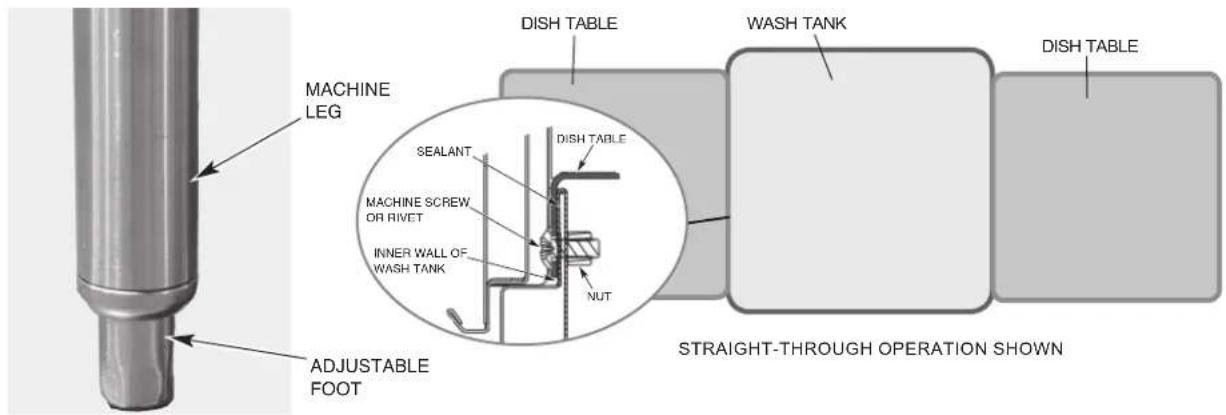
Fig. 1
Fig. 2
Based on dish table design, rear table brackets (Fig. 3) may need to be adjusted or removed. Loosen the two bolts and nuts and adjust or remove as required.
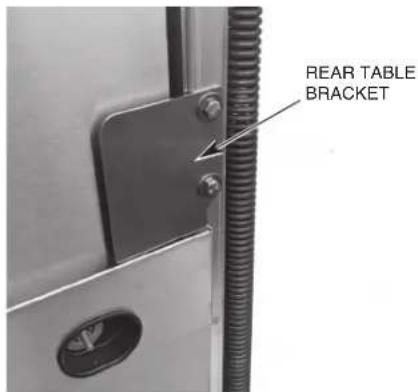
Fig. 3
CORNER INSTALLATION
Before placing the dishwasher in its operating location, check machine configuration. If the machine is being installed in a corner (Figs. 4, 5), clearances of 30" out from the dishwasher under the left-hand tabling by 29-1/2" above the finished floor and 15 inches out from the dishwasher at the right side by 29-1/2" above the finished floor must be provided for servicing. For proper installation of a corner machine, the control and display should be positioned at the front corner for operator access (Fig. 5).
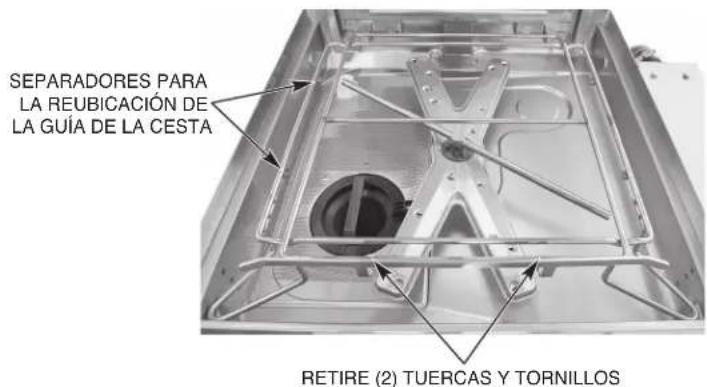
For corner installations, reposition the rack guide to the left side of the rack track using the following procedure (Fig. 6).
- Remove two nuts and bolts securing front rack guide to rack track and remove rack guide.
- Position rack guide on left side of rack track aligning holes in rack guide to spacers on rack track.
- Secure using hardware removed in Step 1. Note: Nuts should be installed on the inside of the rack track.
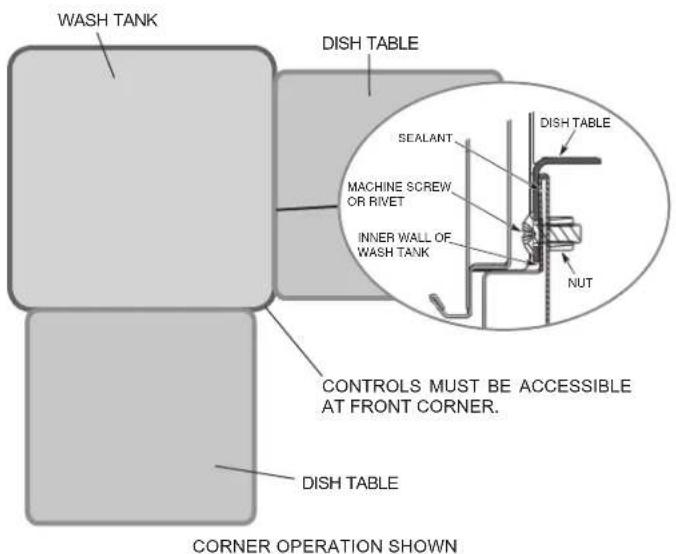
Fig. 4
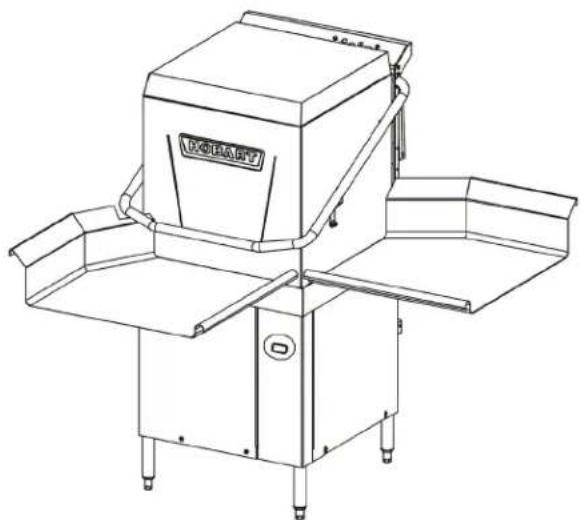
natural_image
Line drawing of a mechanical device with no visible text or symbolsFig. 5
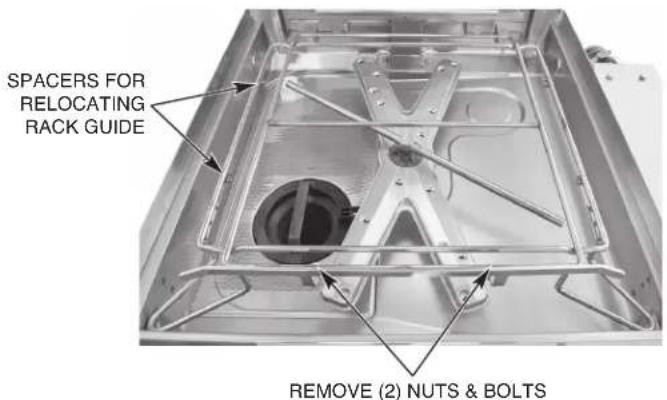
Fig. 6
A splash shield kit is available (at extra cost) for corner installations to prevent excessive splashing on wall. Order sales accessory CORNER-INST-AM16 or service kit part number 00-562156-00001. For installation, refer to 0F-45885 installation instructions supplied with kit.
For corner installations, tabling with backsplashes over 5-1/2" high require that a notch be provided to prevent interference with the door handle (Fig. 7).
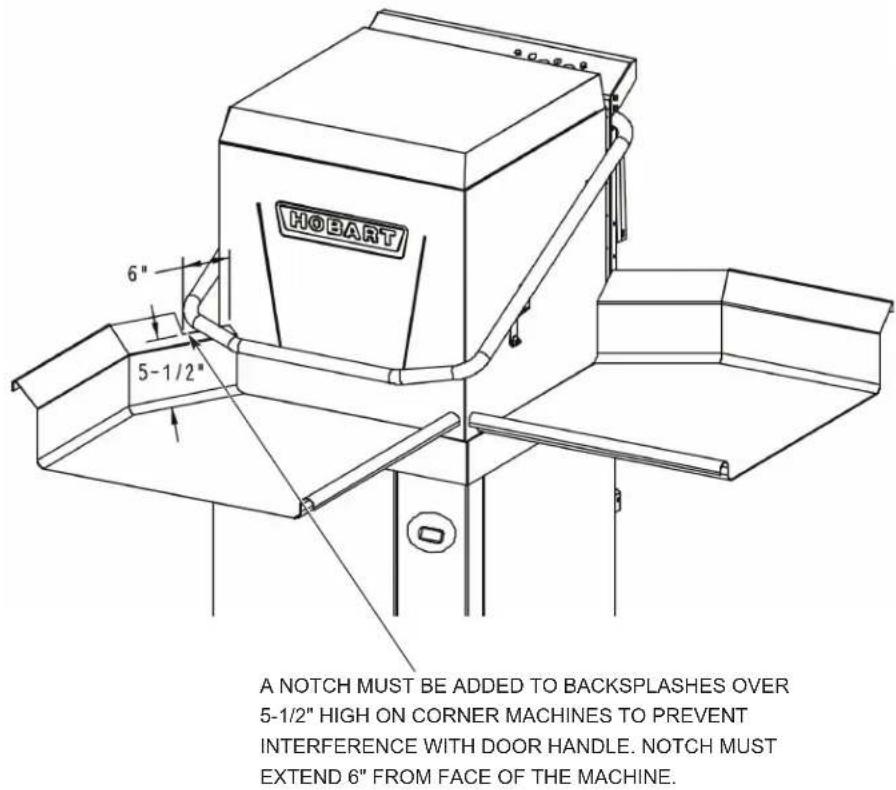
Fig. 7
⚠ WARNING Plumbing connections must comply with applicable sanitary, safety and plumbing codes.
Water Requirements
Proper water quality can improve ware washing performance by reducing spotting, enhancing effectiveness of labor and extending equipment life. Water conditions vary from one location to another. The recommended proper water treatment for effective and efficient use of this equipment will also vary depending on the local water conditions. Ask your municipal water supplier for details about local water conditions prior to installation.
Recommended water hardness is 3 grains of hardness per gallon or less. Higher hardness may cause excessive formation of lime scale. Water hardness above 3 grains per gallon requires water treatment. Water treatment has been shown to reduce costs associated with machine cleaning, reduce deliming of the dishwasher and reduce detergent usage in the dishwasher. Chlorides must not exceed 50 ppm.
NOTICE High iron levels in the water supply can cause staining and may require an iron filter. High chloride levels in the water supply can cause pitting and may require a chloride removal system. Contact your local water treatment professional for proper water treatment.
Sediment may require a particulate filter. Dissolved solids may require water treatment such as a water softener, reverse osmosis system, etc. Contact your local water treatment professional for proper water treatment.
If an inspection of the dishwasher or booster heater reveals lime build-up after the equipment has been in service, water treatment is recommended. If a water softener is already in place, ensure there is a sufficient level of salt. Contact your Hobart Service office for specific recommendations.
Water Supply Connection
The plumber connecting this machine is responsible for making certain that water lines are THOROUGHLY FLUSHED OUT BEFORE connecting to the dishwasher. This "flush-out" is necessary to remove all foreign matter, such as chips (resulting from cutting or threading of pipes) pipe joint compound from the lines; or, if soldered fittings are used, bits of solder or cuttings from the tubing. Debris, if not removed, may lodge in the dishwasher's plumbing components and render them inoperative. Manual valves or solenoid valves fouled by foreign matter and any expenses resulting from this fouling are NOT the responsibility of the manufacturer and associated repair costs are not covered under warranty. Water supply requirements are as follows:
WATER SUPPLY REQUIREMENTS
| Model | Sanitizing Mode | Connection | Water Supply | ||
| Minimum M | Maximum Rec | ommended | |||
| AM16-BASX AM16T-BASX | Hot Water Sanitizing | Hot Water | 110°F (43°C) | N/A | 140°F (60°C) |
| AM16VL-BASX AM16VLT-BASX | Hot Water Sanitizing | Cold Water | 55°F (13°C) | 90°F (32°C) | 65°F (18°C) |
| AM16SCBX | Chemical Sanitizing | Hot Water | 90°F (32°C) | N/A | 120°F (49°C) |
| AM16VLSCBX | Chemical Sanitizing | Hot Water | 90°F (32°C) | N/A | 120°F (49°C) |
| Cold Water | 55°F (13°C) | 90°F (32°C) | 65°F (18°C) | ||
AM16VLSCBX models require both a cold water supply and a hot water supply.
NOTICE On AM16VL-BASX, AM16VLT-BASX and AM16VLSCBX installations, the cold water supply must not exceed 90°F (32°C) for proper operation. Optimal results are obtained when cold water supply temperature is below 65°F (18°C). For best results, it may be necessary to use 1/2" pipe for cold water pipe size and minimize the distance between the dishwasher and the entrance into the building. Pipe insulation will also improve results.
If cold water supply temperature is consistently above 90^ F ( 32^ C) or if excessive water vapor or steam is entering the dish room after the condensing cycle is complete, contact Hobart Service to increase condensing time.
Required flowing water pressure to the dishmachine is 15 – 65 PSIG. If flowing pressures higher than 65 PSIG are present, a pressure regulating valve must be installed in the water line to the dishmachine (by others). If flowing pressure is less than 15 psi, improper machine operation may result. All AM16X models are equipped with a pumped rinse system; therefore, a water pressure gauge is not required and is not supplied with the machine.
NOTICE The water pressure regulator must have a relief bypass. Failure to use the proper type of pressure regulator may result in damage to the unit.
A manual shutoff valve (not supplied) should be installed upstream of the fill hose to accommodate servicing the machine. It is recommended that a line strainer (not supplied) be installed in the supply line between the manual shutoff valve (not supplied) and the connection point on the machine.
All machines ship standard with a 96" long stainless steel braided fill hose with a 3/4" female garden hose fitting. A second fill hose is shipped for machines equipped with both hot and cold water connections. Make plumbing connections with 1/2" minimum copper piping OD (3/4" recommended), with a 3/4" male garden hose fitting (not supplied).
Drain Connection
A drain hose, 5/8" inside diameter and 6' long, is provided with machine. This should be securely plumbed into a drain. Use care not to kink the hose. Drain must have a minimum flow capacity of 18.5 gallons per minute. The drain hose height cannot exceed 40" above finished floor.
If a grease trap is required by code, it should have a minimum flow capacity of 18.5 gallons per minute.
For -BASX and VL-BASX models, pumped drain air gap kit is available through sales using accessory code PUMPDRN-AIRGAP or service kit part # 00-562492.
VENTING REQUIREMENTS
NOTE: Any listed and labeled factory-built commercial exhaust hood tested in accordance with UL Standard 710 by a nationally recognized testing laboratory, must be installed according to the terms of its listing and the manufacturer's installation instructions.
Rate of Exhaust Flow Calculations
Based on the 2018 International Mechanical Code.
The minimum net airflow for Type II hoods used for dishwashing appliances shall be 100 cfm per linear foot of hood length. The net quantity of exhaust air shall be calculated by subtracting any airflow supplied directly to a hood cavity from the total exhaust flow rate of a hood.
Ventless models AM16VL-BASX, AM16VLT-BASX and AM16VLSCBX do not require a Type II vent hood. According to 507.3 of the 2018 IMC, Type II hoods are not required where the heat and moisture load is incorporated into the HVAC system design. See Table A (page 11) for heat dissipation or heat gain to space.
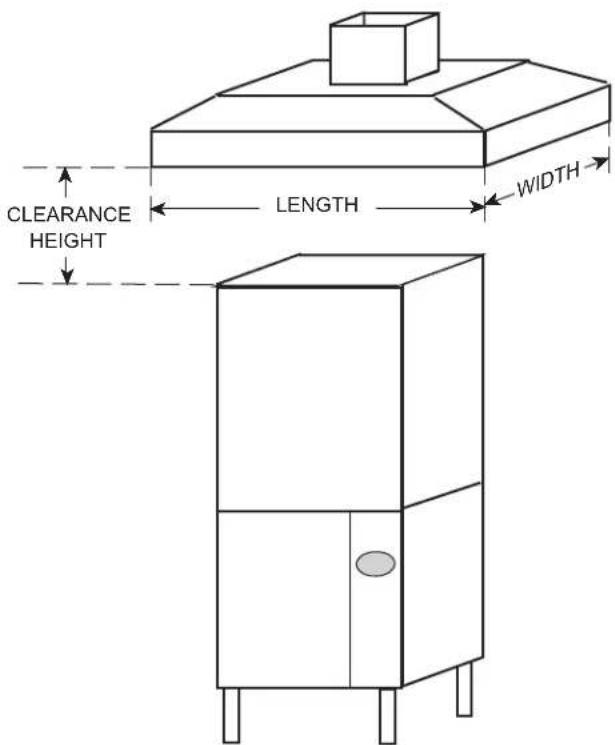
Fig. 8
TABLE A: HEAT DISSIPATION
| Model | Electric Heat | Electric Booster | Latent Heat (BTU/HR) | Sensible Heat (BTU/HR) | ||
| Hot Water Sanitizing | AM16-BASX X X | 7,80 0 4,000 | ||||
| AM16T-BASX X X | 12,300 5,700 | |||||
| AM16VL-BASX X X | 4,300 3,500 | |||||
| AM16VLT-BASX | X | X | 6,800 | 5,000 | ||
| Chemical Sanitizing | AM16SCBX | X | X | 3,570 | 6,700 | |
| AM16VLSCBX | X | X | 3,600 | 4,200 | ||
Assumptions: 1. Machines operate 70% of each hour while in use.
2. Values shown are heat that enters room.
3. 70% of heat output is latent, 30% is sensible.
ELECTRICAL CONNECTIONS
⚠ WARNING Electrical and grounding connections must comply with the applicable portions of the National Electrical Code, NFPA 70 (latest edition) and / or other local electrical codes.
⚠ WARNING Disconnect the electrical power to the machine (both dishwasher and booster if applicable) and follow lockout / tagout procedures. Be sure all circuits are disconnected.
Refer to the wiring diagram attached inside the right hand trim panel and to the machine data plate for service size requirements when connecting the dishwasher. Also, refer to Electrical Data, shown below.
To access the controls area, remove the right side panel and open the control panel door. The dishwasher electrical service connection can be made at the 3/4" or 1" trade size knock out hole located on the right side at the rear of the machine.
ELECTRICAL DATA
| Models | Volts / Hz / Ph | Tank Heat | Minimum Circuit Ampacity Maximum Protective Device AMPS | ||
| TB1 | TB2 | Standard Single Point Electrical Connection Dishwasher and Booster (3 Phase Only) | |||
| AM16-BASX, AM16T-BASX, AM16VL-BASX, AM16VLT-BASX | 208 - 240 / 60 / 1 | Electric | 50 | 50 | |
| 208 - 240 / 60 / 3 | Electric | 30 | 30 | 60 | |
| AM16-BASX, AM16T-BASX, AM16VL-BASX, AM16VLT-BASX | 480 / 60 / 3 | Electric | 15 | 15 | 30 |
| AM16-BASX, AM16T-BASX | 200 - 240 / 50 / 3 | Electric | 30 | 30 | 60 |
| 380 - 415 / 50 / 3 | Electric | 20 | 20 | 30 | |
| Standard Single Point Electrical Connection with 4.3 KW Electric Booster | |||||
| AM16SCBX, AM16VLSCBX | 208 / 240 / 60 / 1 | Electric | 30 - 40 / 35 - 45 | ||
Compiled in accordance with the national electrical code, NFPA 70 (latest edition).
A fused disconnect switch or circuit breaker (customer supplied) must be installed in the electrical service line(s) supplying this dishwasher and should meet the requirements of your local electrical code.
All AM16X models, except for the AM16SCBX and AM16VLSCBX models, ship standard with a 3-phase voltage supply and a single point electric configuration. The standard single point electric supply connects to terminal block TB1 in the controls area (Fig. 9). The machine must be grounded according to electrical code(s); a grounding lug is provided.
The AM16SCBX and AM16VLSCBX models ship standard with a single-phase voltage supply and a single point electric configuration. The standard single point electric supply connects to terminal block TB1 in the controls area (Fig. 9). The machine must be grounded according to electrical code(s); a grounding lug is provided.
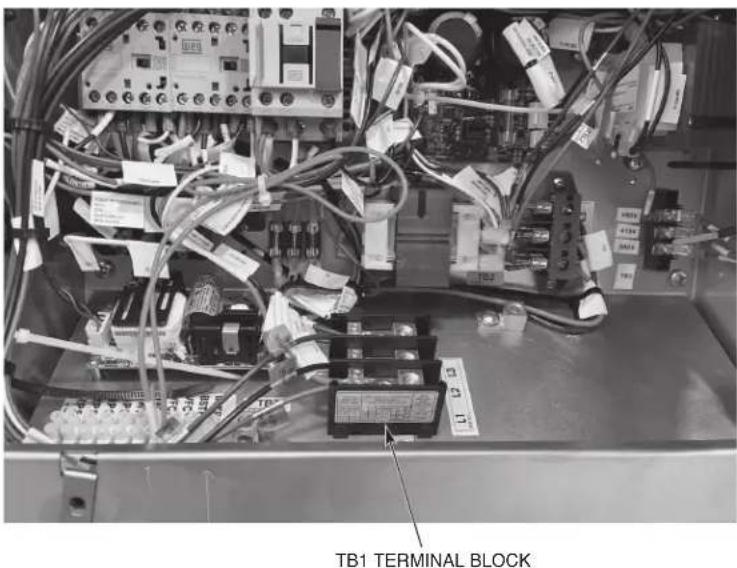
Fig. 9
To convert an AM16X model to a dual point electric configuration or to convert from 3-phase to single phase, refer to F-45845 instructions attached inside right hand trim panel of machine.
NOTE: AM16SCBX and AM16VLSCBX models cannot be field converted to a dual point configuration. These models can only be installed with a single-phase, single point electric connection configuration.
Voltage Adjustment (380 - 415 Volt Machines Only)
This adjustment procedure applies to all AM16X dishwashers rated at 380 to 415 volts, 50 Hz, 3 phase. All other AM16X dishwasher voltages are preset at the factory and do not require this adjustment procedure.
THIS PROCEDURE MUST BE DONE ONLY BY A QUALIFIED ELECTRICIAN.
If the supply voltage to the machine is 415 volts, no change is necessary. The control circuit transformer [T2] should already be set to operate at 415 volts.
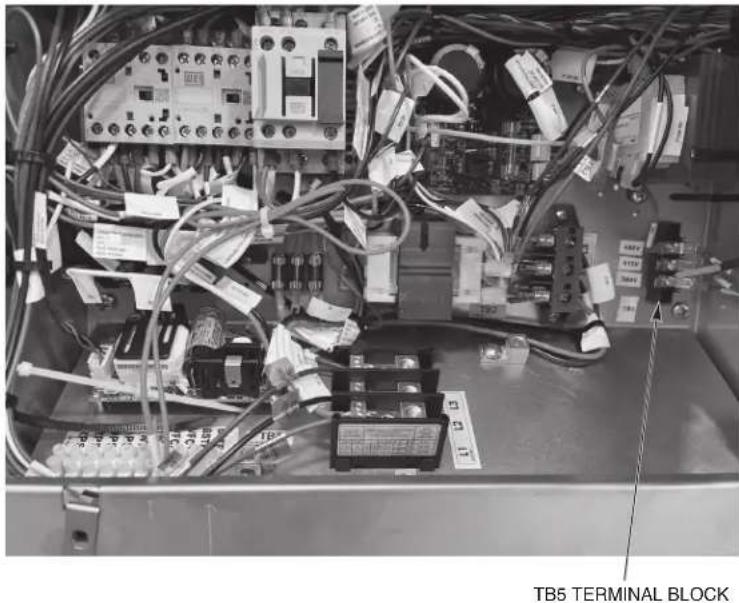
If the supply voltage to the machine is 380 volts, the control circuit transformer [T2] must be changed to operate at 380 volts. To change the tap, relocate the red wire on TB5 terminal block from the 415V tap to the 380V tap.
NOTE: TB5 is located on the controls baseplate located at the lower right side of the machine (Fig. 10).
natural_image
Interior view of an electrical control panel with visible wiring, circuit breakers, and terminal blocks (no readable text or symbols)Fig. 10
Motor Rotation (480-Volt & 50-Hertz Machines Only)
Before placing machine into service, check wash pump motor for correct rotation by observing motor direction. If pump motor does not rotate in the correct direction, DISCONNECT ELECTRICAL POWER SUPPLY and interchange any two of the incoming power supply leads. Reconnect the power supply and verify correct rotation.
EQUIPMENT CONNECTIONS
⚠ WARNING Electrical and grounding connections must comply with the applicable portions of the National Electrical Code, NFPA 70 (latest edition) and / or other local electrical codes.
⚠ WARNING Disconnect the electrical power to the machine (both dishwasher and booster if applicable) and follow lockout / tagout procedures. Be sure all circuits are disconnected.
Vent Fan Control
The vent fan control feature is standard on all non-ventless AM16X models. The vent fan control relay provides switch contacts only and does not provide power to the vent fan motor. The rating for the vent fan control relay connected to terminals VFC1 and VFC2 is 1.5 amps at nameplate supply voltage. When the dishwasher is connected to the vent fan, the vent fan is switched on when the dishwasher is on and off when the dishwasher is off.
HOBART SUPPLIED DETERGENT, RINSE AID AND SANITIZER DISPENSER INSTALLATION
All AM16SCBX and AM16VLSCBX models ship standard with chemical pumps. Chemical pumps are available as an accessory kit for all other models. For standard height machines, order sales accessory code CHEMPUMP-STD-AM16X or service part #00-563068-00004. For tall machines, order sales accessory code CHEMPUMP-HTS-AM16X or service part #00-563069-00005. For installation instructions on the standard height accessory kit, refer to F-45893. For installation instructions on the tall height accessory kit, refer to F-45904.
Chemical Pump Programming (For Machines Equipped with Hobart Chemical Pumps)
The Chemical Dispensing Module is factory preset. The adjustment procedure is to verify or alter settings if chemical dosing changes are required to achieve proper concentrations. Refer to Manager Menu Programming (pages 24 - 26) to adjust chemical settings.
Chemical Pump Priming
All machines equipped with Hobart chemical pumps will prime automatically. If manual priming is required, follow the steps below.
- Power on the dishwasher. Display shows Ready screen when fill cycle has completed.
- Press 'Menu' button.
- With the ‘>’ symbol next to ‘Manager Menu’, press the ‘Enter’ button. The ‘Enter Security Code’ screen will be displayed.
- The default manager code is 1001. Use the arrow buttons to change the value and then press the 'Enter' button to select the value and toggle to the next digit until the code is entered.
- After pressing 'Enter' for the last digit, use the down arrow and scroll until the '>' symbol is next to 'Prime Chem Pumps'. Press Enter and the 'Chem Pump Menu' will be displayed.
- If a chemical(s) is not being detected, 'Replace' will be displayed next to the corresponding chemical(s). With the '>' symbol next to 'Start Prime', press the 'Enter' button. Once the 'Enter' button is pressed, the chemical pump(s) will begin to prime for 90 seconds or until the chemical is detected. If chemical(s) is being detected, 'Ok' will be displayed next to the corresponding chemical(s).
- To exit the menu once all chemicals are detected, with the >^ symbol next to 'Exit', press the 'Enter' button. Repeat this procedure until the 'Ready' screen is displayed.
Testing Sanitizer (Chemical Sanitizing Machines)
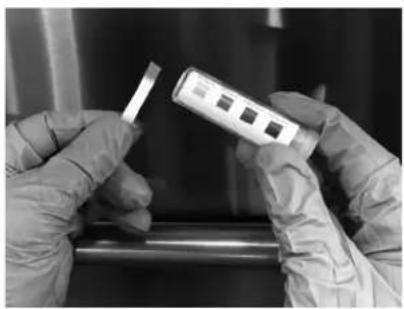
- Place a serving bowl or mixing bowl upside down on a rack and run it through a cycle.
- After cycle, dip a sanitizer test strip into the water collected on the surface of the bowl.
- Compare the test strip to the test scale provided with your testing kit (Fig. 11). If the sanitizer level is out of limits (i.e. below 50 ppm or above 100 ppm), adjust the dosing. Refer to Chemical Pump Programming (page 14), for adjustment instructions, or contact your chemical provider.
natural_image
Close-up of gloved hands holding a small electronic device with three ports, next to a metallic rod (no visible text or symbols)Fig. 11
DETERGENT AND RINSE AID DISPENSERS (FOR MACHINES WITH CHEMICAL PUMPS SUPPLIED BY OTHERS)
Tubing Installation
Detergent and rinse aid dispensers not provided by Hobart must have all connections sealed against leakage.
The AM16X Series dishwashers use 0.67 gallons of rinse water per rack at a flow rate of 4.02 gallons per minute. This information is used when setting the detergent and rinse aid pumps.
NOTE: All AM16X models utilize a pumped rinse system; pressure gauge is not required.
Detergent Dispenser
The dishwasher has three 7/8" diameter plugged holes; two on the rear upper tank side walls (one left side, one right side, Fig. 12) and one on the lower front part of the tank (Fig. 13). With the tank empty, remove both plugs to install the detergent dispenser.
- The upper tank holes are for installation of the detergent feeder tube (use left or right side location).
- The lower tank hole is used for installation of the detergent sensor.
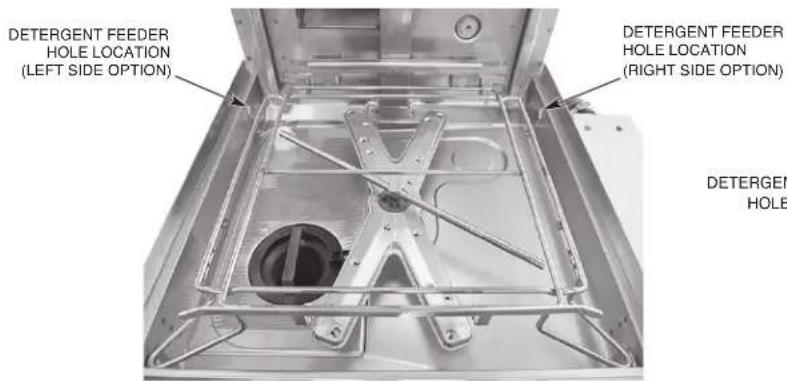
Fig. 12
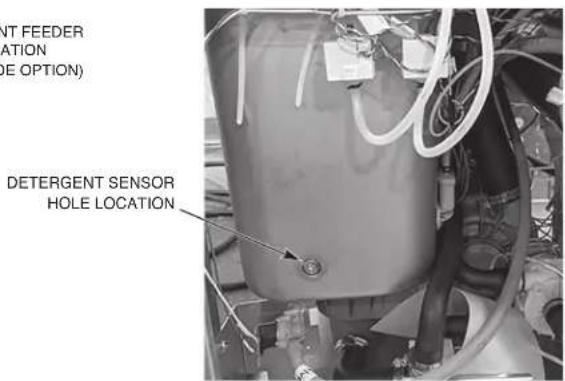
Fig. 13
Rinse Aid Dispenser
Remove the 1/8" NPT plug (Fig. 14 for standard height units, Fig. 15 for tall units) for installation of the rinse aid dispenser tube.
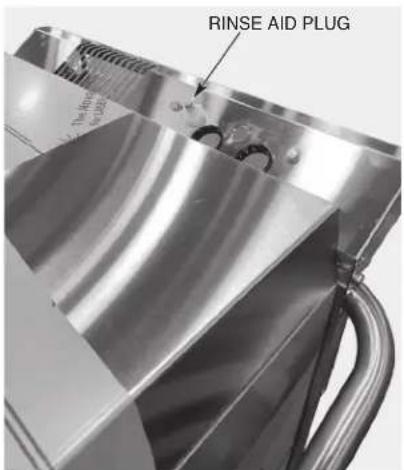
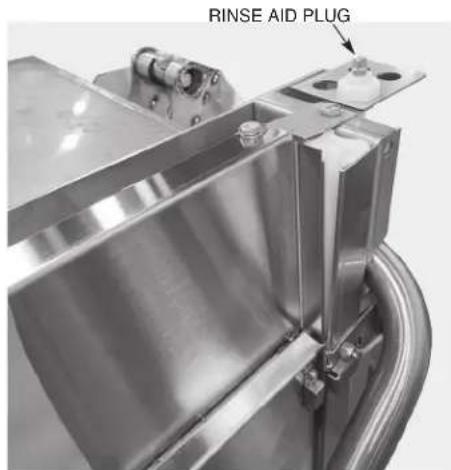
Fig. 15Fig. 14
DETERGENT AND RINSE AID DISPENSERS — EQUIPMENT CONNECTIONS
⚠ WARNING Electrical and grounding connections must comply with the applicable portions of the National Electrical Code, NFPA 70 (latest edition) and / or other local electrical codes.
⚠ WARNING Disconnect the electrical power to the machine (both dishwasher and booster if applicable) and follow lockout / tagout procedures. Be sure all circuits are disconnected.
This machine must be operated with an automatic detergent feeder including a visual means to verify that detergents are delivered or a visual or audible alarm to signal if detergents are not available for delivery to the respective washing and sanitizing systems. Refer to the installation section of this manual and to the chemical feeder equipment manual(s).
Detergent Dispenser
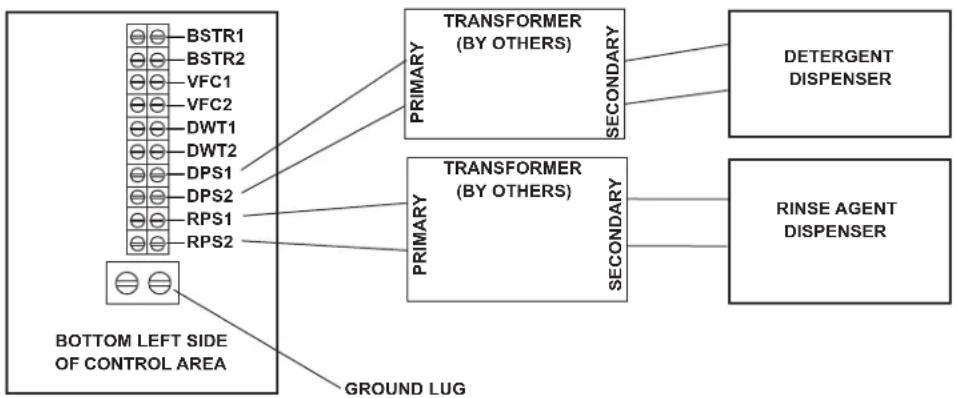
Terminals DPS1 and DPS2 (Fig. 16) are supplied with controlled machine line voltage. They are ON during the wash cycle and OFF between cycles, when machine is in delime cycle, or when the machine power supply is OFF. Maximum rating for detergent dispenser connected to DPS1 and DPS2 is 1.5 amps at line voltage. Check the machine supply voltage and use corresponding feeder transformer voltage. Use UL Listed 600 volt minimum insulated wire for the connections. Do not use bell wire, lamp cord or similar type wire. Splice connections, if required, must be made in the feeder transformer junction box (supplied by others) — not in the main controls enclosure. Use 7/8" diameter hole located at right rear corner of machine for 1/2" trade size conduit fitting. Remove the right side panel. Strain relief fittings must be provided for all wiring.
flowchart
graph LR
    A["BSTR1"] --> B["TRANSFORMER (BY OTHERS)"]
    C["BSTR2"] --> B
    D["VFC1"] --> B
    E["VFC2"] --> B
    F["DWT1"] --> B
    G["DWT2"] --> B
    H["DPS1"] --> B
    I["DPS2"] --> B
    J["RPS1"] --> K["TRANSFORMER (BY OTHERS)"]
    L["RPS2"] --> K
    M["BOTTOM LEFT SIDE OF CONTROL AREA"] --> N["PRIMARY"]
    N --> O["SECONDARY"]
    P["DETERGENT DISPENSER"] --> Q["TRANSFORMER (BY OTHERS)"]
    R["RINSE AGENT DISPENSER"] --> S["TRANSFORMER (BY OTHERS)"]
    T["GROUND LUG"] --> U["TRANSFORMER (BY OTHERS)"]
    V["Ground Lug"] --> W["TRANSFORMER (BY OTHERS)"]
Fig. 16
Rinse Aid Dispenser
Terminals RPS1 and RPS2 (Fig. 16) are supplied with controlled machine line voltage. They are ON during the rinse cycle and OFF between cycles, when machine is in delime cycle, or when the machine power supply is OFF. Maximum rating for rinse aid dispenser connected to RPS1 and RPS2 is 1.5 amps at line voltage. Check the machine supply voltage and use corresponding feeder transformer voltage. Use UL Listed 600 volt minimum insulated wire for the connections. Do not use bell wire, lamp cord or similar type wire. Splice connections, if required, must be made in the feeder transformer junction box (supplied by others) — not in the main controls enclosure. Use 7/8" diameter hole located at right rear corner of machine for 1/2" trade size conduit fitting. Strain relief fittings must be provided for all wiring.
OPERATION
PREPARATION
The standpipe must be in its proper location below the strainer basket (Fig. 17). Place the strainer pan and the strainer basket in their proper positions (Fig. 18).
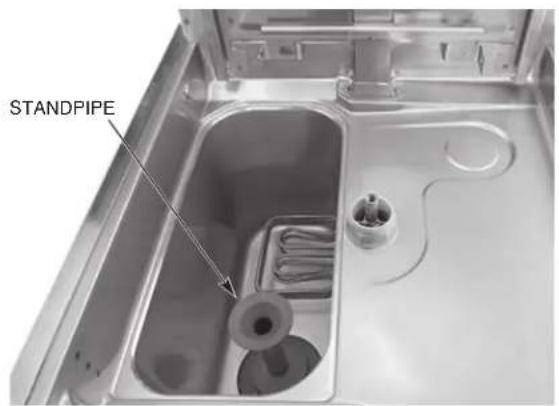
Fig. 17
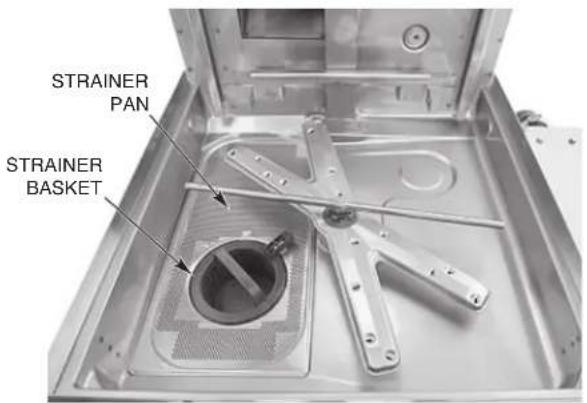
Fig. 18
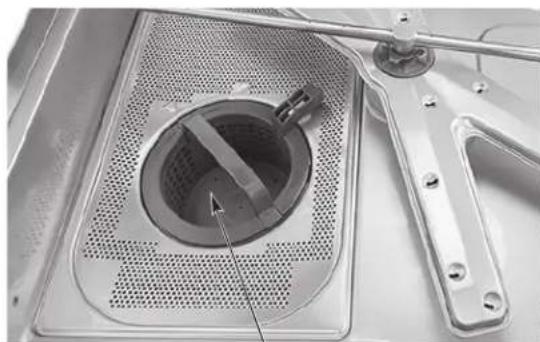
NOTE: When installing the strainer basket, ensure the basket is in the 'locked' position (Fig. 19).
natural_image
Close-up of a mechanical device with a circular component and metal bracket (no visible text or symbols)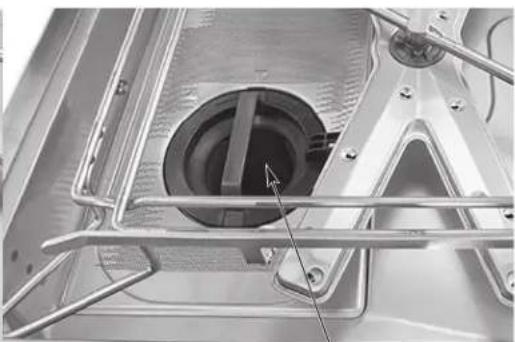
natural_image
Close-up of a metallic mechanical component with internal cavities and structural supports (no visible text or symbols)STRAINER BASKET IN UNLOCKED POSITION STRAINER BASKET IN LOCKED POSITION
Fig. 19
If machine is not equipped with Hobart built-in chemical pumps, an automatic detergent dispenser is required. Closely follow supplier's instructions.
Close the door. Press the POWER button to turn the power on (Fig. 20). If the machine's door is closed and no water is in the tank, the fill cycle will begin automatically. If water is detected in the tank, the machine will drain the water out prior to filling with fresh water. During the fill cycle, the word FILL is displayed along with an image of a faucet. Throughout the fill cycle, the machine will toggle between the fill mode and a preheating mode. During the preheating mode, WARM UP is displayed along with an image of a thermometer.
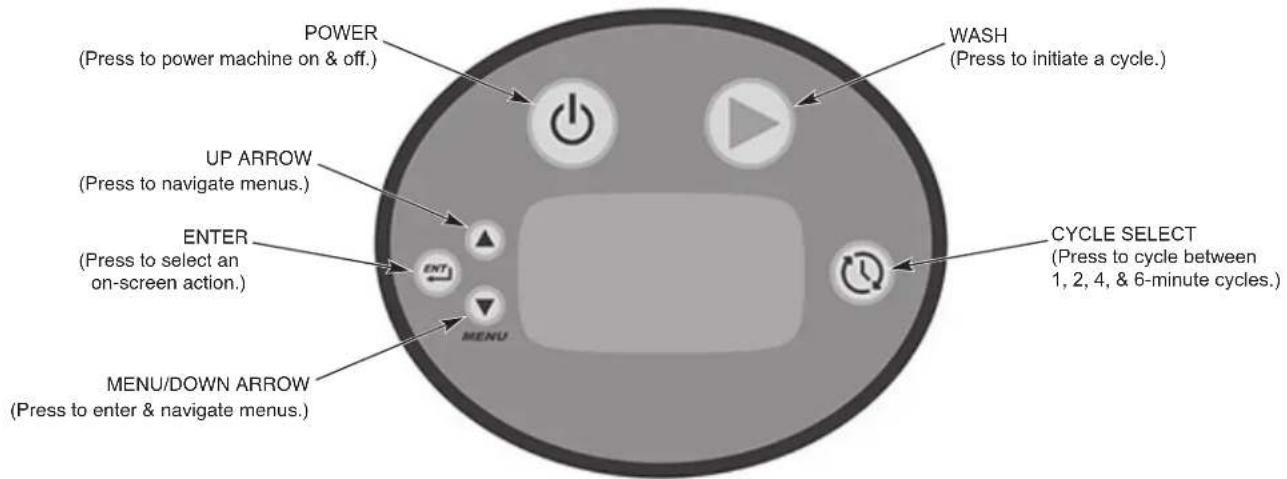
Fig. 20
NOTE: On machines equipped with the energy recovery feature, it may take up to 20 minutes to complete the fill process.
DISHWASHING
Scrape the dishes to remove large particles of food and debris. Never use steel wool on ware to be loaded into the dishmachine.
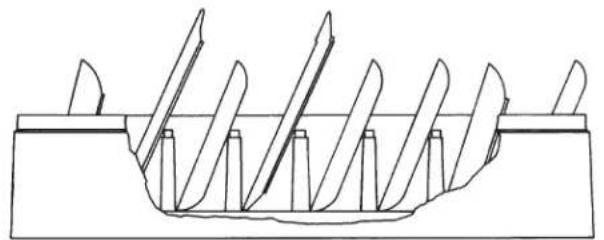
Arrange the dishes in a rack. Do not stack dishes one on top of another, as water must have free access to all sides of every dish. Stand plates and dishes up edgewise in a peg-type rack (Fig. 21). Cups, glasses and bowls should be inverted in an open-type or compartment-type rack (Fig. 21). Silverware and other small pieces may be scattered loosely over the bottom of a flat bottom rack.
natural_image
Technical line drawing of a mechanical component with multiple blades and a central base (no text or symbols)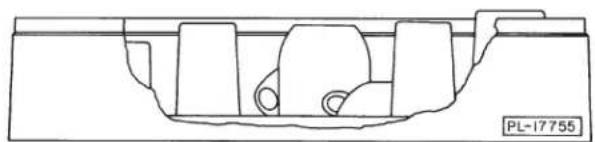
natural_image
Technical line drawing of a mechanical component with no visible text or symbolsFig. 21
Do not allow foreign objects to enter the unit, especially metallic contaminants.
Select the wash cycle: 1 for normal serving ware, 2, 4 or 6 for pots and pans.
After filling a rack, open the door, slide rack into the dishwasher and close the door.
Throughout the wash cycle, the tank water temperature is displayed along with the word WASH. During the rinse cycle, the rinse water temperature is displayed, along with the word RINSE and an icon. When the rinse cycle is completed, the readout displays READY and the tank water temperature.
For ventless models, the door must remain closed until the condensing cycle is complete. All ventless models include a lock to prevent the door from opening until the cycle is complete. A condensing progress indicator is displayed during the condensing cycle. Failure to follow these instructions will result in excess steam and water vapor in the dish room.
When the display reads READY, open the door, remove the clean dishes, slide in another rack and close the door.
This dish machine is not meant to be opened until a cycle has completed, but if a dish must be added after the wash cycle has started, open the door slowly, until the pump stops. Wait 10 seconds to allow the wash arm to coast down and to avoid water splashing before opening the door fully.
Operating temperatures for all models are as follows:
| Sanitizing Mode | Wash Temperature Minimum Wash | Rinse Temperature Minimum Rinse |
| Hot Water 150°F (66°C) | 180°F (82°C) | |
| Chemical 120°F (49°C) | 120°F (49°C) |
For "VL" models only – If excessive amounts of steam or water vapor exit the machine after cycle is complete and door is opened, incoming cold water temperature may be too high. Contact Hobart Service to adjust the rinse and condense times according to the adjustment table shown below. Increasing cycle time will increase water consumption and decrease the racks per hour, but should reduce the steam and water vapor entering the dish room.
RECOMMENDED CONDENSE TIME (Based on Incoming Water Temp.)
AM16VL-BASX
| Incoming Water Temp. °F (°C) | Condense Time (Sec.) | Rinse Time (Sec.) | Racks per Hour Base Ventless (1 min cycle) |
| 60 (16) 20 10 45 | |||
| 80 (27) 33 11 38 | |||
| 85+ (29+) | 36 12 36 |
AM16VLT-BASX
| Incoming Water Temp. °F (°C) | Condense Time (Sec.) | Rinse Time (Sec.) | Racks per Hour Base Ventless (1 min cycle) |
| 60 (16) | 30 | 10 | 40 |
| 65 (18) | 33 | 11 | 38 |
| 70 (21) | 36 | 12 | 36 |
| 75 (24) | 39 | 13 | 35 |
| 80 (27) | 42 | 14 | 33 |
| 85+ (29+) | 45 | 15 | 32 |
For AM16SCBX models only – Wash will not start if wash tank temperature is not up to 120^ F ( 49^ C) or if booster temperature is not up to 120^ F ( 49^ C). During this time, HEATING is shown on the display until wash and rinse temperatures reach 120^ F ( 49^ C). If the final rinse temperature does not reach 120^ F ( 49^ C), "Rinse Temperature Too Low! Press Power Button To Start Draining" will be displayed and the machine will remain locked until it is drained and refilled.
If sanitizer supply is empty after 3 cycles, "SANITIZER SUPPLY EMPTY, Replace Sanitizer And Press Enter" will be displayed and the machine is inoperable. Replace sanitizer supply and press Enter to prime. Pump will prime for 90 seconds or until sanitizer is detected. If no chemical is sensed, press Enter again.
If detergent supply is empty after 3 cycles, "DETERGENT SUPPLY EMPTY, Replace Detergent And Press Enter" will be displayed and the machine is inoperable. Replace detergent supply and press Enter to prime. Pump will prime for 90 seconds or until detergent is detected. If no chemical is sensed, press Enter again.
CLEANING
The machine must be thoroughly cleaned at the end of each working shift or at least daily. Never use steel wool to clean warewasher surfaces. Use only products formulated to be safe on stainless steel.
- Press the Power button to drain the machine and power off.
- Once the display has powered off, open the machine door.
- Thoroughly cleanse and flush the dishwasher interior. Remove remaining soil with a soft cloth or brush and mild cleanser. Rinse again.
- Remove and empty the strainer basket, pan and standpipe. Wash and rinse thoroughly.
- Clean tank bottom. Do not allow food soil to accumulate on the tank bottom or to enter the drain.
- Ensure upper and lower wash and rinse arms (Figs. 22, 23) rotate freely and are free of any obstructions. If not, remove arms and clear out any obstructions. Refer to Maintenance, page 27.
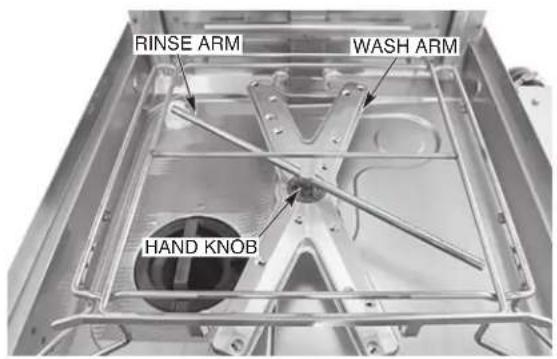
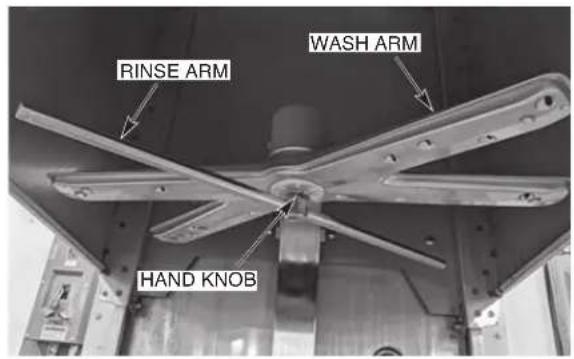
Fig. 23Fig. 22
NOTICE Do not bang wash arms or rinse arms to clean.
- Replace all removed parts. Leave machine door open to allow interior to air out and dry.
DOS AND DON'TS FOR YOUR NEW HOBART WAREWASHER
DO assure proper water hardness (3 grains or less per gallon is recommended).
DO pre-scrap dishes thoroughly.
DO use only detergents recommended by your chemical professional.
DO at the end of the day, thoroughly cleanse the machine, rinse and dry (leave door open).
DO closely follow your chemical professional's prescribed deliming schedule.
DO use only products formulated to be safe on stainless steel.
DO NOT use detergents formulated for residential dishwashers.
DO NOT allow food soil to accumulate on the tank bottom.
DO NOT exceed chemical manufacturer's recommended concentrations for detergent, sanitizer, rinse aid or lime scale remover.
DO NOT use steel wool to clean ware or warewasher surfaces.
DO NOT allow foreign objects to enter the unit, especially metallic contaminants such as paper clips, retainers, etc.
NOTE: Failure to follow use, care and maintenance instructions may void your Hobart warewasher warranty.
PROGRAMMING
MANAGER MENU
The AM16X dish machines allow customization options for machine operation. To activate or change these features, enter the Manager Menu using the following procedure.
- Power on dishwasher. Display shows Ready screen when fill cycle has completed.
- Press 'Menu' button.
- With the ‘>’ symbol next to ‘Manager Menu’, press the ‘Enter’ button. The ‘Enter Security Code’ screen will be displayed.
- The default manager code is 1001. Use the arrow buttons to change the value and then press the 'Enter' button to select the value and toggle to the next digit until the code is entered.
- Use the Up and Down Arrows to toggle thru the Manager Menu.
a. Once the ‘>’ symbol is next to the desired selection, press the Enter button.
b. For selections that are editable, use the Up and Down arrows to change the value.
c. Once the required value is displayed, press the 'Enter' button to save the selection.
- To exit the programming, use the Up and Down Arrows to scroll thru the parameters until the '>' symbol is next to 'Exit Menu' and press the Enter button. Repeat this procedure until the Ready screen is displayed.
MANAGER MENU PARAMETERS
| EDIT PARAMETERS | |||||
| Parameter Name | Applicable Models Description | Possible Values | Default Value | ||
| Detergent pump | AM16SCBX AM16VLSCBX | Hobart provided detergent pump operation. | Disabled/ Enabled | Enabled | |
| AM16(T)-BASX AM16VL(T)-BASX | Disabled | ||||
| Detergent Flow Rate | AM16SCBX AM16VLSCBX | Detergent flow rate measured in mL per cycle. | OFF to 22.6 mL | 6.3 mL | |
| AM16(T)-BASX AM16VL(T)-BASX | OFF | ||||
| Rinse Aid Pump | AM16SCBX AM16VLSCBX | Hobart provided rinse aid pump operation. | Disabled/ Enabled | Enabled | |
| AM16(T)-BASX AM16VL(T)-BASX | Disabled | ||||
| Rinse Aid Flow Rate | AM16SCBX AM16VLSCBX | Rinse aid flow rate measured in mL per cycle. | OFF to 9.1 mL | 3.0 mL | |
| AM16(T)-BASX AM16VL(T)-BASX | OFF | ||||
| Sanitizer Flow Rate | AM16SCBX AM16VLSCBX | N/A | Sanitizer flow rate measured in % duty cycle per cycle. | 0-100% (by 10's) | 50% |
| Delime | AM16SCBX AM16VLSCBX | AM16(T)-BASX AM16VL(T)-BASX | Enables or disables the alert to delime option. | Enabled/ Disabled | Enabled |
| Delime Lockout | AM16SCBX AM16VLSCBX | AM16(T)-BASX AM16VL(T)-BASX | Machine no longer runs after cycles per delime is reached. | No/Yes No | |
| Delime Cycle Limit | AM16SCBX AM16VLSCBX | AM16(T)-BASX AM16VL(T)-BASX | Number of times machine power can be cycled before locked out if delime cycle has not been run. | 1-10 (by 1's) | 10 |
| Temperature Units | AM16SCBX AM16VLSCBX | AM16(T)-BASX AM16VL(T)-BASX | Sets the display units to either Fahrenheit or Celsius. | Fahrenheit/ Celsius | Fahrenheit |
| Energy Saver Mode | AM16SCBX AM16VLSCBX | AM16(T)-BASX AM16VL(T)-BASX | This setting will control when the machine turns the heaters off in order to save energy when not in use. | Disabled/ 1Hour/ 2Hours/ 3Hours | 2 Hours |
| Language | AM16SCBX AM16VLSCBX | AM16(T)-BASX AM16VL(T)-BASX | Sets the language on the display. | English/ French/ Spanish | English |
| Wash Program | AM16SCBX AM16VLSCBX | AM16(T)-BASX AM16VL(T)-BASX | Sets the wash cycle time. | 1 min, 2 min, 4 min, 6 min | 1 min |
| Door Locked Indic. | AM16VLSCBX AM16SCBX AM16VLSCBX | AM16VL(T)-BASX 16(T)-BASX Disabled | Indicates when door lock is engaged. | Disabled/ Enabled | Enabled |
| Power Down Confirm | AM16SCBX AM16VLSCBX | AM16(T)-BASX AM16VL(T)-BASX | Enables or disables confirmation screen to shut off. | No/Yes No | |
| Detergent Monitor | AM16SCBX AM16VLSCBX | Enables notification or lockout based on if detergent chemical is sensed. | Disabled/ Enabled/ Lockout Enabled | Lockout Enabled | |
| AM16(T)-BASX AM16VL(T)-BASX | Disabled | ||||
| Chemical Pump Loc. | AM16SCBX AM16VLSCBX | Specifies the location of the chemical pumps. Internal for Hobart provided chemical pumps and external for other chemical pumps. | Internal/ External | Internal | |
| AM16(T)-BASX AM16VL(T)-BASX | External | ||||
| Sanitizer Monitor | AM16SCBX AM16VLSCBX | N/A | Enables notification or lockout based on if sanitizer chemical is sensed. | Enabled/ Disabled/ Lockout Enabled | Lockout Enabled |
| Rapid Fill AM | 16SCBX | AM16(T)-BASX AM16VL(T)-BASX | Enables or disables the rapid fill function. Note: Requires installation of an optional rapid fill kit. | Enabled/ Disabled | Disabled |
| Rinse Temp Lockout | AM16SCBX AM16VLSCBX | Locks out machine if minimum final rinse temperature is not reached. | Lockout/ Disabled/ Alert Only | Lockout | |
| AM16(T)-BASX AM16VL(T)-BASX | Disabled | ||||
| Modbus | AM16SCBX AM16VLSCBX | AM16(T)-BASX AM16VL(T)-BASX | Enables or disables 3rd party register readout of machine. Note: Machine must be equipped with monitoring equipment in order for register readout to take place. | Enabled/ Disabled | Enabled |
| Wash Tank Temp Delay | AM16SCBX AM16VLSCBX | Delays the wash cycle from starting until the minimum NSF temperature has been reached. | Enabled/ Disabled | Enabled | |
| AM16(T)-BASX AM16VL(T)-BASX | Disabled | ||||
| Strainer Basket | AM16SCBX AM16VLSCBX | AM16(T)-BASX AM16VL(T)-BASX | Sets the machine to ignore, alert, or lockout the user if the strainer basket is not in place. | Ignore/Alert/ Lockout | Lockout |
| Exit Menu | |||||
| DELIME NOW | |||||
| Parameter Name | Applicable Models Description | Possible Values | Default Value | ||
| Delime Now | AM16SCBX AM16VLSCBX | AM16(T)-BASX AM16VL(T)-BASX | Delime Recommended Would you like to delime now? DELIME INITIATED 1. Remove, clean, and replace strainer. 2. Press enter. | Yes/No No | |
| PRIME CHEM PUMPS | |||||
| Parameter Name | Applicable Models Description | Possible Values | |||
| Pump Menu | AM16SCBX AM16VLSCBX | N/A | Automatically Primes Sanitizer | Sanitizer Replace/OK | |
| AM16(T)-BASX AM16VL(T)-BASX | Automatically Primes Detergent | Detergent Replace/OK | |||
| Automatically Primes Rinse Aid | Rinse Aid Replace/OK | ||||
MAINTENANCE
WARNING
Disconnect the electrical power to the machine (both dishwasher
and booster if applicable) and follow lockout / tagout procedures. Be sure all circuits are disconnected.
WASH ARMS
Upper and lower wash and rinse arms (page 22, Figs. 22, 23) should turn freely and continue turning for a few seconds after being rotated by hand. Remove any obstructions causing improper operation.
If either the strainer pan or the strainer basket is not properly in place, obstructions (such as food particles or bones) may clog the wash arm nozzles. The wash arms are easily removed for cleaning.
To remove the lower wash arm, unscrew the hand knob and lift the rinse arm off (Fig. 22).
The wash arm can be lifted off once the rinse arm is removed.
The upper wash and rinse arms are removed by unscrewing the hand knob (Fig. 23) and lowering both arms together. Be careful not to drop the arms.
MOTOR(S)
The wash pump motor, rinse pump motor, drain pump motor and fan motor ("VL" models only) are equipped with permanently lubricated bearings and require no lubrication maintenance.
CHEMICAL PUMPS
If unit has built-in Hobart chemical pumps, inspect chemical tubes every 6 months and replace as required. Also inspect chemical bottle caps and standpipes to ensure they are not cracked or worn.
DELIME INSTRUCTIONS
To enter the deline cycle without notification, refer to PROG R A MMING (page 24) to access
Manager Menu, Delime Now.
Delime Process
Machine will prompt operator when to deline based on a set number of cycles ran. When prompted, display will read 'DELIME RECOMMENDED. Would you like to delime now?'. If ready to delime, use the arrow buttons to move the '>' symbol next to 'yes' and press the Enter button. Press the Enter button on 'no' to delime machine later. If 'yes' is selected to initiate a delime cycle, follow the steps below.
- Display will prompt 'DELIME INITIATED. 1) Remove, clean and replace strainer,
2) Press Enter'. Open machine door and remove strainer basket and strainer pan.
Clean basket and pan in a sink with a mild detergent and rinse.
-
Replace strainer pan and strainer basket in machine and ensure basket is in the locked position (page 18, Fig. 19).
-
Close machine door and press the 'Enter' button. Machine will drain. Once machine
has drained, the unit will fill with fresh water.
- After the fill cycle is complete, the display will prompt 'ADD DELIME AGENT, 1) Add delime agent, 2) Press enter'. Open machine door and pour the required amount of delime chemical into the wash tank according to the chemical supplier's recommendation for a 10.5-gallon wash tank and close door.
- Once door is closed, press the 'Enter' button. The unit will begin a 10-minute wash cycle.
- After the 10-minute wash cycle, the machine will drain and re-fill with fresh water. Once filled, the unit will begin a 1-minute wash cycle to flush any remaining delime chemical residue.
- After the 1-minute wash cycle, the machine will drain and power down.
Delime Lockout
If the delime lockout feature is enabled in the Manager Proraming and the delime reminder displays, the machine will allow washing for up to 10 power off/on cycles before the wash button is disabled. Refer to Manager Menu Programming, pages 24 - 26.
Delime Lockout Cycle Limit
When the delime lockout is enabled, this sets the number of times the machine will power up before the wash button is disabled. Settings are 1 to 10 power up cycles. Refer to Manager Menu Programming, pages 24 - 26.
CLEANING BAFFLES ON AM16VLT-BASX MODELS
The baffles (upper and lower), located on the back wall of the inside of the machine (Fig. 24), should be cleaned every 6 months or sooner if required.
⚠ WARNING Disconnect the electrical power to the machine (both dishwasher and booster if applicable) and follow lockout/tagout procedures. Be sure all circuits are disconnected.
- Loosen and remove the nuts from each baffle and remove the baffles.
- Debris may collect on surfaces of baffles and should be washed in a sink with a mild detergent and rinsed.
- Replace baffles using nuts removed in Step 1.
- Leave machine door open to allow interior to air out and dry.
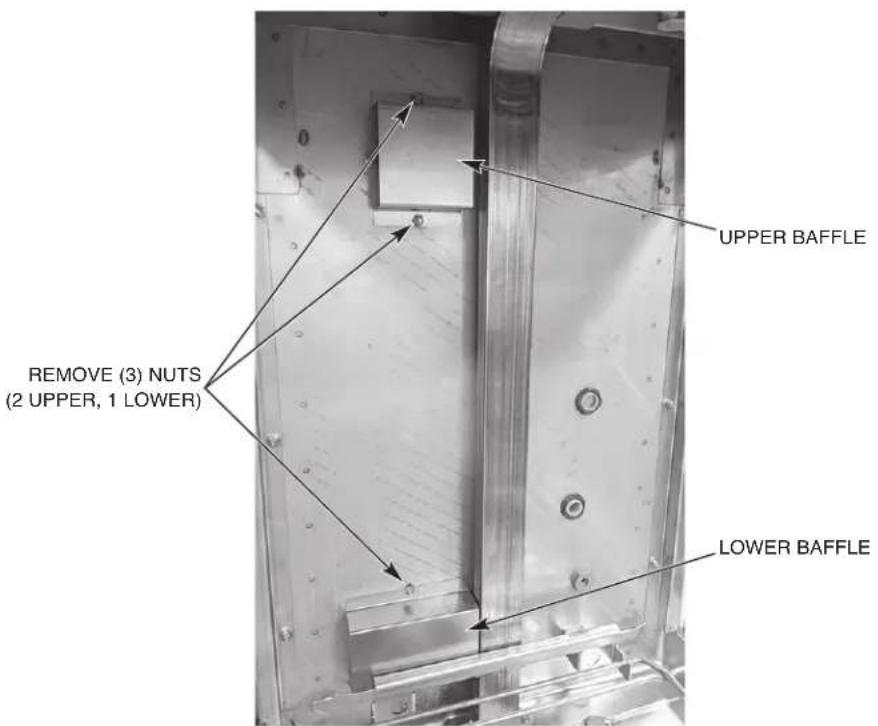
Fig. 24
TROUBLESHOOTING
DIAGNOSTIC / ERROR MESSAGES
| Error Display Description | |||
| Door Open Door Open | Displayed when the door of the machine is opened. | ||
| Wash Thermistor Error | WASH TEMP SENSOR----Error----Service requiredPress Enter |  | Error displayed if wash temperature probe is out of range. The machine will continue to run cycles. |
| Booster Thermistor Error | BOOSTER TEMP SENSOR----Error----Service requiredPress Enter |  | Error displayed if booster temperature probe is out of range. The machine will continue to run cycles. |
| Final Rinse Thermistor Error | RINSE TEMP SENSOR----Error----Service requiredPress Enter |  | Error displayed if final rinse temperature probe is out of range. The machine will continue to run cycles. |
| Drain Error | DRAIN ERROR----Error----Service requiredPress Enter |  | Error displayed if the wash tank water level is above the upper limit 2250 mV. The machine will not operate and will only power down. |
| Sump Level Error | SUMP LEVEL SENSOR----Error----Service requiredPress Enter |  | Error displayed if sump pressure switch is out of range. The machine will not operate and will only allow power down. |
| Sump Level Low Error | SUMP LEVEL LOW----Error----Service RequiredPress Enter | Error displayed if sump level is below 700 mV. | |
| Booster Level Error | BOOSTER LEVEL SENSOR----Error----Service requiredPress Enter |  | Error displayed if booster pressure switch is out of range. The machine will not operate and will only allow power down. |
| Low Water in Booster | FILL ERROR----Error----Service requiredPress Enter |  | Error displayed if the unit times out in 600 seconds before the unit is completely filled. The machine will not operate and will only allow power down. |
| Wash tank temp over-temp tripped | SUMP OVERTEMP----Error----Service requiredPress Enter | Wash tank overtemp has been tripped. Error cannot be cleared until overtemp has been reset. Contact Hobart Service. | |
| Booster temp overtemp tripped | BOOSTER OVERTEMP----Error----Service requiredPress Enter | Booster overtemp has been tripped. Error cannot be cleared until overtemp has been reset. Contact Hobart Service. | |
| Rinse Aid Empty Warning | ADD RINSE AID | Error displayed if machine does not sense rinse aid. Machine will continue to run cycles. | |
| Detergent Empty Warning | ADD DETERGENT | Error displayed if machine does not sense detergent. Machine will continue to run cycles. (Detergent monitor must be enabled.) | |
| Detergent Empty Lockout | DETERGENT SUPPLY EMPTY Replace Detergent And Press Enter | If the detergent is empty for 3 times and detergent lockout is enabled, the error will display. The machine will not run and only allow power down and priming. | |
| Sanitizer Empty Warning | ADD SANITIZER | Error displayed if machine does not sense sanitizer. Machine will continue to run cycles. | |
| Sanitizer Empty Lockout | SANITIZER SUPPLY EMPTY Replace Sanitizer And Press Enter | If the sanitizer is empty for 3 times and sanitizer lockout is enabled, the error will display. The machine will not run and only allow power down and priming. | |
| Low Rinse Temperature Warning | LOW RINSE TEMP | After two consecutive low temperatures, if problem occurs on the third consecutive cycle, the error will display. The machine will continue to run cycles. | |
| Low Rinse Temperature (3 in a row) Lockout | Rinse Temperature Too Low! Press Power Button To Start Draining | If final rinse lockout is enabled, and the final rinse temperature did not reach minimum final rinse temperature after three consecutive cycles, the machine will lock out. | |
| Delime Lockout | DELIME REQUIRED You must now execute a delime cycle! > Delime Now | If delime lockout is enabled, machine will lock out due to delime reminder being ignored 10 times. | |
| Wash Heat Contactor Monitoring | ALERT! Hazardous Condition Contactor Fault Pull Circuit Breaker Contact Service | Wash tank heater remains on while ignoring software command to turn off. Machine is running a fill and drain cycle to protect the heater. This error is not user serviceable. Turn circuit breaker supply off and contact Hobart Service. | |
| Booster Heat Contactor Monitoring | ALERT! Hazardous Condition Contactor Fault Pull Circuit Breaker Contact Service | Booster heater remains on while ignoring software command to turn off. Machine is running a fill and drain cycle to protect the heater. This error is not user serviceable. Turn circuit breaker supply off and contact Hobart Service. | |
| Wash Tank Temp delay | Temperature not reached. Drain and restart machine. Press Power Button. | The wash temperature did not reach the minimum set point required within time out period. | |
| Strainer Basket Error | Ensure strainer basket is locked in place. | The strainer basket is not inserted, or it is not in the locked position. | |
COMMUNICATION MODULE
For AM16SCBX models equipped with the sPod ^® embedded communication module, the unit will automatically connect to a SiteSage ^® gateway and begin transmitting relevant data for remote monitoring at start-up. If problems arise, contact the support group for your communication system supplier.
| SYMPTOM POSSIBLE | CAUSE |
| No machine operation. | 1. Machine off, turn machine on.2. Blown fuse or tripped circuit breaker at power supply. |
| Dishes not clean. | 1. Loss of water pressure due to pump obstruction.WARNING Disconnect electrical power supply (both dishwasher and booster if applicable) and drain tank. Remove strainer and standpipe and check pump & drain intake for obstruction.Incorrect water temperature. Contact Service for adjustment or repair.Excessive mineral deposits throughout wash and rinse system. Deliming may be necessary, refer to page 27.Check wash and rinse arms to ensure there are no obstructions and ensure they rotate properly.Check rear side of wash arms and ensure plastic clean out plugs are in place and secure.Strainers clogged causing inadequate water supply to pump; clean machine according to Cleaning, page 22.Ensure chemical dispenser is operating properly.Excessive soil; scrap dishes before cycleImproper rack loading; refer to Preparation and Dishwashing, pages 18, 19. |
| Spotting silverware, glasses and dishes. | 1. Improperly loaded racks.Incorrect rinse water temperature.Loss of water pressure due to pump obstruction.WARNING Disconnect electrical power supply (both dishwasher and booster if applicable) and drain tank. Check for any obstruction at the pump intake.Excessively hard water.Incorrect detergent for water type.Incorrect rinse additive for water type.Incorrect concentration of detergent, rinse additive and/or sanitizer.Excessive soil; scrap dishes before cycle. Ensure wash tank is drained and cleaned as required. |
| Excessive steam or water vapor after cycle is complete - AM16VL-BASX and AM16VLT-BASX models only. | 1. Incoming cold water too warm. Contact Hobart Service for adjustment of condensing cycle time. |
| Inadequate rinse or rinse water temperature too low. | 1. Excessive mineral deposits throughout wash and rinse system. Deliming may be necessary, refer to page 27.For non-ventless hot machines, incoming water temperature to booster below 110^ . For ventless machines, incoming water temperature to machine below 55^ . Machine will automatically extend wash time until booster heats up.Ensure rinse arms rotate freely. |
| Leaking valve. | 1. If hose connection at valve is leaking, check hose gasket to ensure it is seated properly and not worn or cut.If solenoid valve is malfunctioning (leaking, not opening or not closing), contact Hobart Service. |
| Low / no wash tank heat. | 1. Ensure sufficient water level in tank.Ensure heating element is clean and free of excessive lime scale. |
| No or slow fill. | Note: Fill time could be as high as 25 minutes.1. Water supply may be off; make sure hot water supply valve is open.2. Dirty strainer at fill hose connection causing reduced water flow. Turn off hot water supply, remove fill hose and clean screen. Reassemble. |
| Not dispensing chemicals (on machines equipped with Hobart chemical pumps). | 1. Ensure chemical bottles are full.2. Ensure chemical bottle caps are properly secured.3. Inspect tubing and ensure it is tight to bottle caps.4. Ensure tubes are not bent or kinked.5. Ensure standpipe and tubing are seated fully into the chemical bottle.6. Manually prime chemicals. If unsuccessful, contact Hobart Service. |
SERVICE
AM16X EXPENDABLE PARTS
The below AM16X dish machine parts are expendable by nature and may not be covered by Hobart Product Warranty. To view the Hobart Product Warranty, refer to https://www.hobartservice.com/service-plans/hobart-product-warranty.
AM16X EXPENDABLE PARTS LIST
| Part Number Description Qty. Machine Type | |||
| 00-918049 Lift arm plug 2 All | |||
| 00-893834 Seal, top cover, tall AM 3 Tall | |||
| 00-975055 Hub, wash arm 2 All | |||
| 00-886610 Kit, wash arm plug 1 All | |||
| 00-562078 Retaining ring | 2 All | ||
| 00-13156-00001 | Clamp (spring action hose) | AR | SCBX / VLSCBX |
| 00-949651-00001 | Squeeze tube kit, chemical pump (sanitizer, rinse aid, detergent) (Includes hose clamps) | 3 SCBX / VLSCBX | |
| 00-185105-00002 | Tubing, red, 144", 1/4" | 1 SCBX / VLSCBX | |
| 00-185105-00006 | Tubing, blue, 144", 1/4" | 1 SCBX / VLSCBX | |
| 00-185105-00004 | Tubing, clear, 144", 1/4" | 1 SCBX / VLSCBX | |
| 00-185105-00013 | Tubing, clear, 6" | 2 SCBX / VLSCBX | |
| 00-185105-00024 | Tubing, clear, 66" | 1 SCBX / VLSCBX | |
| 00-562915 Kit, replacement chemical cap | 1 SCBX / VLSCBX | ||
| 00-975024 Assembly, suction strainer | AR SCBX / VLSCBX | ||
| 00-185111-00001 | Clamp #2 | AR | SCBX / VLSCBX |
| 00-463293 Tube, sight | 1 Tall | ||
| 00-185111-00002 | Clamp, hose 7/16" | AR | Tall |
| 00-474800 Rack, 6 | pan AR Tall | ||
| 00-315191 Peg rack | AR All | ||
| 00-315193 Combination rack | AR All | ||
Contact your local Hobart-authorized service office for any repairs or adjustments needed on this equipment. Long-term service contracts are available on this and other Hobart products. Call 1-888-4HOBART for Hobart Service 24 hours a day.
LAVE-VAISSELLE AM16X

MODÈLES
AM16 - BASX
AM16T - BASX
AM16VL - BASX
AM16VLT - BASX
AM16SCBX
AM16VLSCBX
natural_image
Exterior view of a stainless steel industrial machine with control panel and side legs (no visible text or symbols)HOBART
701 S. RIDGE AVENUE
TROY, OHIO 45374-0001
937 332-3000
www.hobartcorp.com
natural_image
Exterior view of a stainless steel industrial machine (no visible text or symbols)
natural_image
Exterior view of a stainless steel industrial machine with control panel and piping (no visible text or symbols)Modèle AM16VL-BASX
natural_image
Exterior view of a stainless steel industrial machine with control panel and side-mounted unit (no visible text or symbols)Modèle AM16VLT-BASX
natural_image
Exterior view of a stainless steel industrial machine with control panel and side-mounted arm (no visible text or symbols)Modèle AM16SCBX
natural_image
Exterior view of a modern stainless steel industrial machine (no visible text or symbols)TABLE DES MATIÈRES
GÉNÉRAL....4
INSTALLATION....5
Déballage 5
natural_image
Line drawing of a mechanical device with no visible text or symbolsFig. 5
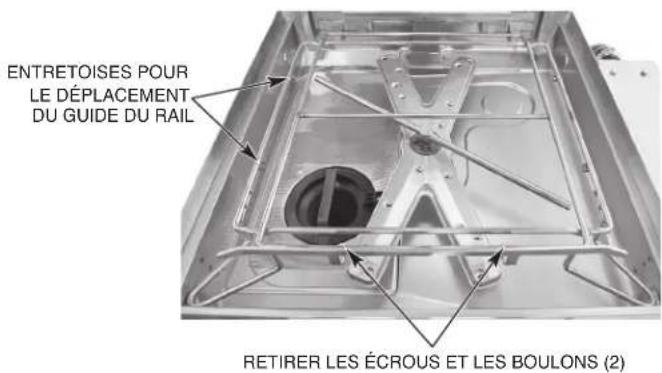
Fig. 6
UNE ENOCHE DOIT ÊTRE AJOUTÉE POUR LES DOSSERETS DE PLUS DE 14 CM (5-1/2 PO) DE HAUTEUR POUR LES MACHINES EN ANGLE, AFIN D'ÉVITER TOUTE INTERFÉRENCE AVEC LA POIGNÉE DE LA PORTE. L'ENOCHE DOIT DÉPASSER DE 15 CM (6 PO) LA PARTIE FRONTALE DE LA MACHINE.
Fig. 7
RACCORDS DE PLOMBERIE
natural_image
Interior view of an electronic equipment cabinet with visible wiring and components, labeled 'BORNIER TB5 BLOC' (no readable text beyond label)Fig. 10
natural_image
Close-up of gloved hands holding a small electronic device with three ports, against a metallic background (no visible text or symbols)Fig. 11
DISTRIBUTEURS DE DÉTERGENT ET DE PRODUIT DE RINÇAGE (POUR LES MACHINES ÉQUIPÉES DE POMPES CHIMIQUES FOURNIES PAR DES TIERS)
Installation des tubes
natural_image
Close-up of a mechanical component with a circular component and textured base (no visible text or symbols)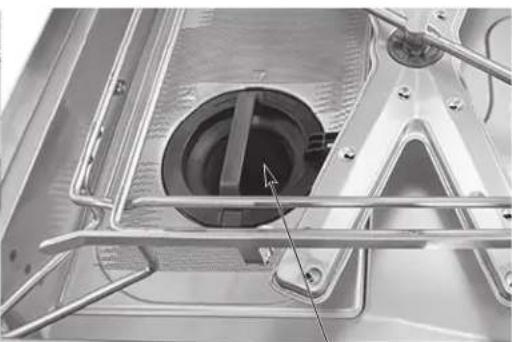
natural_image
Close-up of a metallic mechanical component with internal components and structural supports (no visible text or symbols)PANIER DU FILTRE EN POSITION DÉVERROUILLÉE PANIER DU FILTRE EN POSITION VERROUILLÉE
Fig. 19
natural_image
Technical line drawing of a mechanical component with multiple blades and a central base (no text or symbols)
natural_image
Technical line drawing of a mechanical component with no visible text or symbolsFig. 21
natural_image
Exterior view of a stainless steel industrial machine with control panel and side legs (no visible text or symbols)HOBART
701 S. RIDGE AVENUE
TROY, OHIO 45374-0001
937 332-3000
www.hobartcorp.com
FORM 41173 (Junio 2022)
Modelo AM16-BASX Modelo AM16T-BASX
natural_image
Exterior view of a stainless steel industrial machine with control panel and digital display (no visible text or symbols)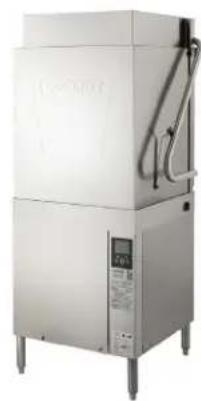
natural_image
Exterior view of a stainless steel industrial machine with control panel and piping (no visible text or symbols)Modelo AM16VL-BASX
natural_image
Exterior view of a stainless steel industrial machine with control panel and digital display (no visible text or symbols)Modelo AM16VLT-BASX
natural_image
Exterior view of a stainless steel industrial machine with control panel and digital display (no visible text or symbols)Modelo AM16SCBX
natural_image
Exterior view of a modern industrial machine with control panel and digital display (no visible text or symbols)ÍNDICE
GENERAL....4
INSTALACIÓN ....5
Desembalaje....5
natural_image
Line drawing of a mechanical device with no visible text or symbolsFig. 5
natural_image
Interior view of an electronic control panel with visible wiring and components (no readable text or symbols)Fig. 10
natural_image
Close-up of gloved hands holding a small electronic device with three ports, against a metallic background (no visible text or symbols)Fig. 11
natural_image
Interior view of a large industrial tank with visible wiring and components (no text or symbols)Fig. 13
natural_image
Close-up of a mechanical device with a circular component and a tool inserted, no visible text or symbols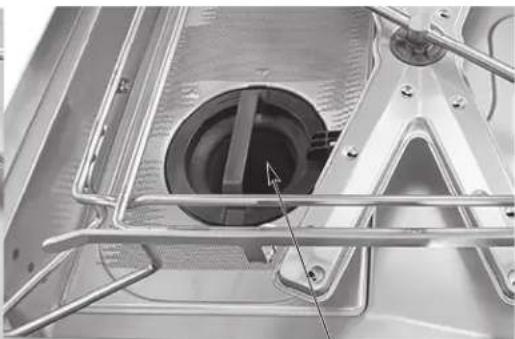
natural_image
Close-up of a metallic mechanical component with internal structural elements and a central circular feature (no visible text or symbols)natural_image
Technical line drawing of a mechanical component with multiple blades and a central base (no text or symbols)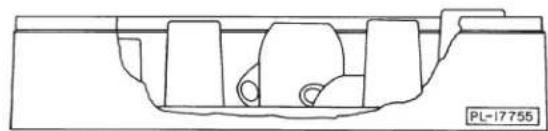
natural_image
Pure technical line drawing of a mechanical component without any text, numbers, or symbolsFig. 21

- AM16X DISHWASHERS
- HOBART
- TABLE OF CONTENTS
- GENERAL....4
- INSTALLATION 5
- Water Supply Connection 8
- Vent Fan Control 14
- Chemical Pump Priming 14
- OPERATION....18
- Recommended Condense Time (Based on Incoming Water Temp.) 20
- CLEANING 22
- PROGRAMMING 24
- MAINTENANCE 27
- TROUBLESHOOTING 30
- SERVICE 34
- AM16X Expendable Parts 34
- Installation, Operation and Care Of AM16X DISHWASHERS SAVE THESE INSTRUCTIONS
- GENERAL
- INSTALLATION
- UNPACKING
- INSTALLATION CODES
- LOCATION
- CORNER INSTALLATION
- Water Requirements
- Water Supply Connection
- Drain Connection
- VENTING REQUIREMENTS
- Rate of Exhaust Flow Calculations
- ELECTRICAL CONNECTIONS
- Voltage Adjustment (380 - 415 Volt Machines Only)
- THIS PROCEDURE MUST BE DONE ONLY BY A QUALIFIED ELECTRICIAN.
- Motor Rotation (480-Volt & 50-Hertz Machines Only)
- EQUIPMENT CONNECTIONS
- Vent Fan Control
- HOBART SUPPLIED DETERGENT, RINSE AID AND SANITIZER DISPENSER INSTALLATION
- Chemical Pump Programming (For Machines Equipped with Hobart Chemical Pumps)
- Chemical Pump Priming
- Testing Sanitizer (Chemical Sanitizing Machines)
- DETERGENT AND RINSE AID DISPENSERS (FOR MACHINES WITH CHEMICAL PUMPS SUPPLIED BY OTHERS)
- Tubing Installation
- Detergent Dispenser
- Rinse Aid Dispenser
- DETERGENT AND RINSE AID DISPENSERS — EQUIPMENT CONNECTIONS
- OPERATION
- PREPARATION
- DISHWASHING
- RECOMMENDED CONDENSE TIME (Based on Incoming Water Temp.)
- CLEANING
- NOTICE Do not bang wash arms or rinse arms to clean.
- DOS AND DON'TS FOR YOUR NEW HOBART WAREWASHER
- PROGRAMMING
- MANAGER MENU
- MAINTENANCE
- WARNING
- WASH ARMS
- MOTOR(S)
- CHEMICAL PUMPS
- DELIME INSTRUCTIONS
- Delime Process
- Delime Lockout
- Delime Lockout Cycle Limit
- CLEANING BAFFLES ON AM16VLT-BASX MODELS
- TROUBLESHOOTING
- COMMUNICATION MODULE
- SERVICE
- AM16X EXPENDABLE PARTS
- LAVE-VAISSELLE AM16X
- TABLE DES MATIÈRES
- GÉNÉRAL....4
- INSTALLATION....5
- RACCORDS DE PLOMBERIE
- DISTRIBUTEURS DE DÉTERGENT ET DE PRODUIT DE RINÇAGE (POUR LES MACHINES ÉQUIPÉES DE POMPES CHIMIQUES FOURNIES PAR DES TIERS)
- Installation des tubes
- ÍNDICE
- INSTALACIÓN ....5
Brand : Hobart
Model : AM16SCBX
Category : Dishwasher