
VLS 096A RF SDD - Refrigerator VESTFROST - Free user manual and instructions
Find the device manual for free VLS 096A RF SDD VESTFROST in PDF.
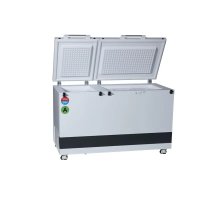



| Product type | Solar vaccine refrigerator-freezer |
| Usage | Storage of vaccines (+2°C to +8°C) and freezing of water containers |
| Power supply | Solar panels (18V, 360W nominal) via MC4 connectors |
| Vaccine compartment capacity | Basket included, do not load above the handle |
| Ambient temperature range | +5°C to +43°C |
| Climate class | 0,1,2,3,4,6,8 (32°C) and 5,7 (43°C) |
| Refrigerant | R600a (0.063 kg), flammable hydrocarbon |
| Freezer compartment | For water containers, manual defrosting required |
| Controller | Factory set, do not modify by unauthorized personnel |
| Temperature display | Digital thermometer with external sensor |
| Drainage | Automatic via evaporation tray on the compressor |
| Maintenance | Monthly cleaning of the grille, defrost when frost >4-5 mm |
| Safety | Warnings for flammable refrigerant, do not block ventilation openings |
| Warranty | 2 years (solar panels: 25 years performance warranty) |
| Standards | Compliant with WHO PQS (code E003), UL/TÜV certifications |
| Insulation materials | Polyurethane foam with cyclopentane (flammable blowing agent) |
Frequently Asked Questions - VLS 096A RF SDD VESTFROST
User questions about VLS 096A RF SDD VESTFROST
0 question about this device. Answer the ones you know or ask your own.
Ask a new question about this device
Download the instructions for your Refrigerator in PDF format for free! Find your manual VLS 096A RF SDD - VESTFROST and take your electronic device back in hand. On this page are published all the documents necessary for the use of your device. VLS 096A RF SDD by VESTFROST.
USER MANUAL VLS 096A RF SDD VESTFROST
12
RESPONSIBLE
CONSUMPTION
AND PRODUCTION

Vestfrost Solutions is working towards reaching the UN - Global Sustainable Development Goals by 2030.
The Sustainable Development Goals are the blueprint to achieve a better and more sustainable future for all.
In order to implement Goal no 12 "Responsible Consumption and Production", this manual has been printed on recycled paper.


VLS 096A RF SDD
GB Instructions for use
As the appliance contains flammable refrigerant, as stated on nameplate, it is essential to ensure that the refrigerant pipes are not damaged.
The quantity and type of the refrigerant used in your appliance is indicated on the rating plate.
Standard EN378 specifies that the room in which you install your appliance must have a volume of 1 m³ per 8 g of hydrocarbon refrigerant used in the appliances. This is to avoid the formation of flammable gas/air mixtures in the room where the appliance is located in the event of a leak in the refrigerant circuit.
WARNING:
Ventilation openings in the appliance or in built-in structures must be kept clear.
WARNING:
Do not use other mechanical devices or means to accelerate the defrosting process or to remove rime other than those recommended by the manufacturer.
WARNING:
Do not damage the refrigerant system.
WARNING:
The appliance may not be exposed to rain.
WARNING:
This appliance is not intended for use by persons (including children) with reduced physical, sensory or mental capabilities, or lack experience and knowledge, unless they have been given supervision or instructions concerning use of the appliance by a person responsible for their safety. Children should be supervised to ensure that they do not play with the appliance.
WARNING:
Children must not play with, on, or around the appliance.
WARNING:
Children must not clean the appliance or carry out general maintenance unless they are at least 8 years old and are being supervised.
WARNING:
Always keep the keys in a separate place and out of reach of children.
WARNING:
Before servicing or cleaning the appliance, switch off circuit breaker.
WARNING:
Cleaning and user maintenance shall not be made by children without supervision.

WARNING:
Danger: risk of fire or explosion. Flammable refrigerant used, as stated on nameplate. To be repaired only by trained personnel.
WARNING:
Do not store explosive substances such as aerosol cans with a flammable propellant in this appliance.
WARNING:
When positioning the appliance, ensure the supply cord is not trapped or damaged.
WARNING:
Do not locate multiple portable socket-outlets or portable power supplies at the rear of the appliance.
WARNING:
Appliance uses flammable insulation blowing gas.
For information about safe disposal, please contact your local disposal service.
See section for Disposal.
Contents
WARNING 2
Introduction 5
Operational guidelines ....5
Get to know your VLS096A RF SDD ......6
HIGHLY IMPORTANT! 7
Placing the Fridge-tag® 8
Placing and unpacking 9
Installation and start up ....10
Loading the appliance ....11
Control panel for refrigerator 12
Solar panels 13
Maintenance and cleaning ....14
Defrosting 15
Drain 16
Trouble-shooting 17
Warranty, spare parts and service .....18
Disposal 19
Introduction
The philosophy behind the VLS 096A RF SDD system is:
- Simplicity
- Safety
- Robustness
- Reliability
The VLS 096A RF SDD system is composed of:
• Vaccine refrigerator and Waterpack freezer - Solar panels • Installation equipment for the solar panels - Wires from the solar panels to the VLS 096A RF SDD.
The VLS 096A RF SDD is a vaccine refrigerator and a waterpack freezer. It has one compartment for vaccine storage (+2°C to +8°C) equipped with 1 basket and one compartment for storing and freezing waterpacks.
With correct installation and by following a few maintenance routines, the system will work trouble-free for many years.
Operational guidelines
The compressor requires that the solar panels are able to deliver a power above a certain threshold in order to start. When started, the compressor is able to operate at lower power consumption than the starting threshold. The compressor may need a couple of starting attempts to get running. So be patient!
During days with changing weather conditions, the compressor may start and stop several times.
The noise coming from the appliance is low, and primarily comes from a fan cooling the compressor.
The compressor is almost noiseless. The fan starts a moment before the compressor and stops a moment after the compressor.
The controller is factory set and should be adjusted only by authorized personnel.
Basket is included when the appliance is supplied and is proposed to be used for arranging vaccine storage.
| PQS Code | Model PQS Performance | specificationsSpecification reference: | PQS Independent type-testing protocolProduct verification protocol: |
| E003/ | VLS 096A RF SDD | E003/RF05.4 E003/RF05 | -VP.4 |
Get to know your VLS096A RF SDD

WARNING!
HIGHLY IMPORTANT!
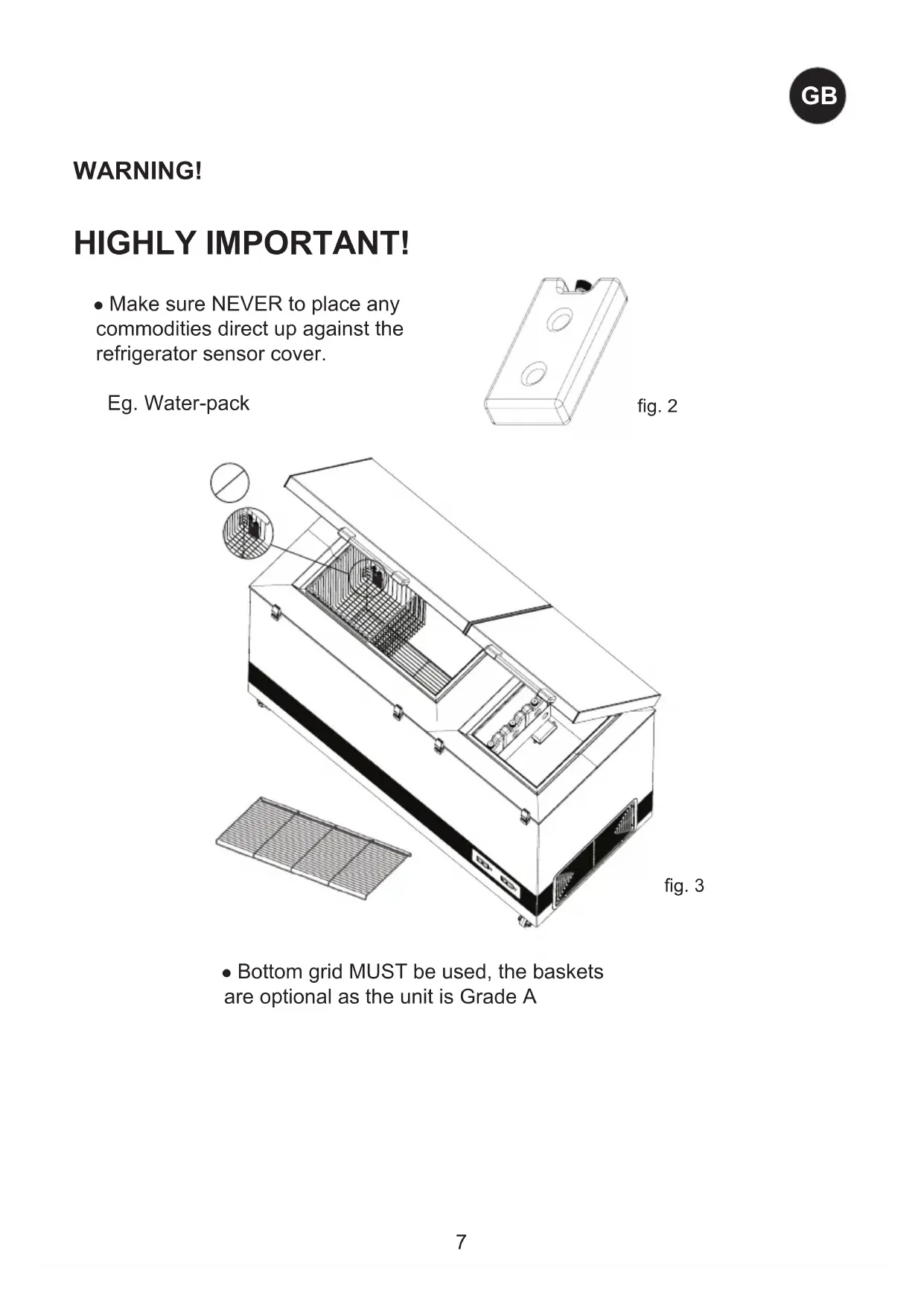
- Make sure NEVER to place any commodities direct up against the refrigerator sensor cover.
Eg. Water-pack
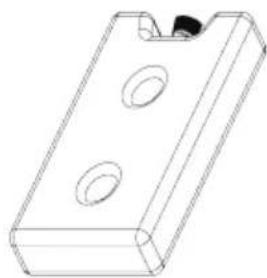
fig. 2
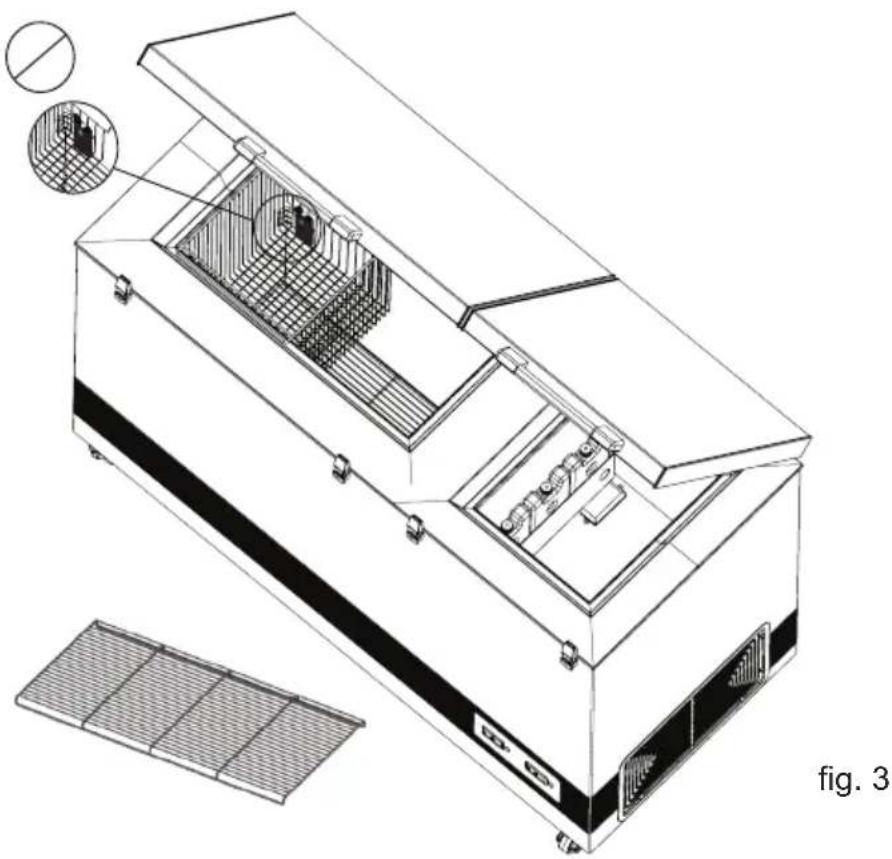
- Bottom grid MUST be used, the baskets are optional as the unit is Grade A
Placing the Fridge-tag®
The activated Fridge-tag must be placed immediately in its predetermined location. It is recommended and important to place the device in the centre of the refrigerator for an optimal temperature observation.
External sensor
Two hours before activating the device the external sensor must be placed in its predetermined location. It is recommended and important to place the external sensor in the centre of the refrigerator for an optimal temperature observation and to avoid any incorrect measurements when starting the device
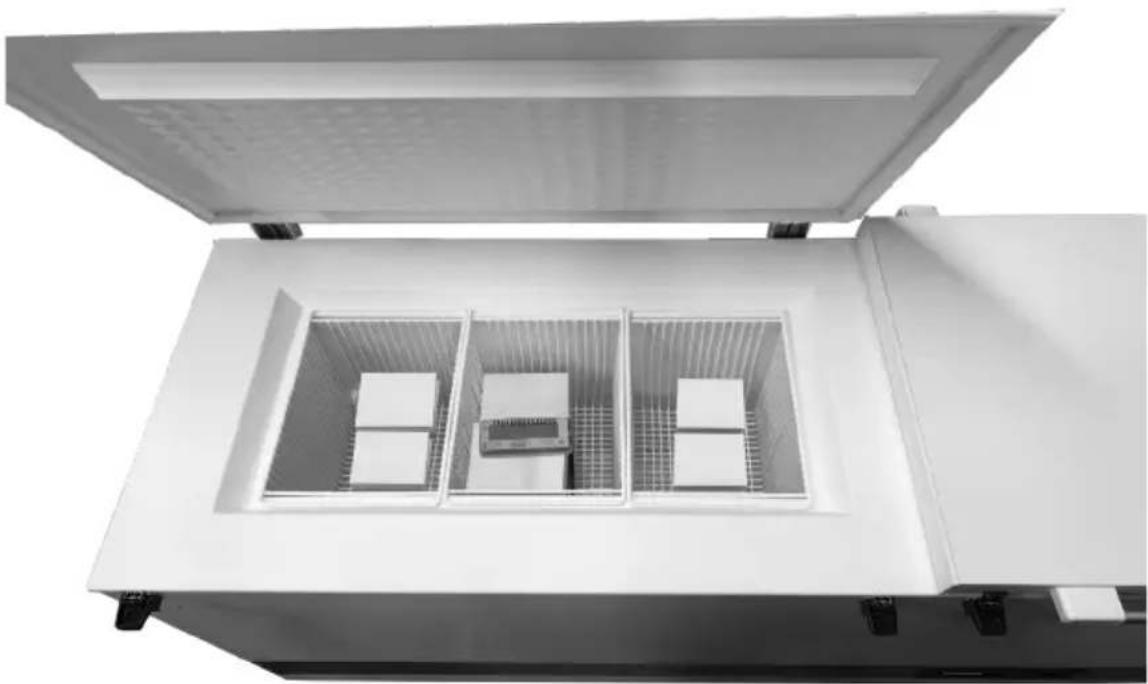
fig. 4
Fridge-tag Support
Placing and unpacking
Unpacking
Unpack the appliance and check that it has not been damaged. If you observe any damage, please inform your supervisor.
Placing
Install the appliance in a dry and well ventilated place. Avoid installation near heat sources or in direct sunlight.
Place the appliance on the floor and make sure that it is level.
Adjustable feet
Once the appliance is positioned in the exact spot of operation, the anti-vibration foot is lowered, and the caster wheel is lifted off the ground, making the equipment completely stationary.
When your equipment needs to be moved out of the way, just raise the anti-vibration foot, and push it easily to a new location.

fig. 5
Room temperature
The appliance is designed and adjusted to produce an optimum temperature level in the vaccine compartment at a minimum/maximum ambient temperature of +5°C to +43°C.
NOTE: The appliance must not be placed in ambient temperatures below +5°C.
NOTE: Updated WHO PQS specifications: The temperature specifications of the vaccine storage refrigerator allow brief deviations from the general target of +2°C to +8°C.
The Climate Class is indicated on the rating plate.
Climate class:
0, 1, 2, 3, 4, 6, 8 = ambient 32°C
Climate class
5 and 7 = ambient 43°C
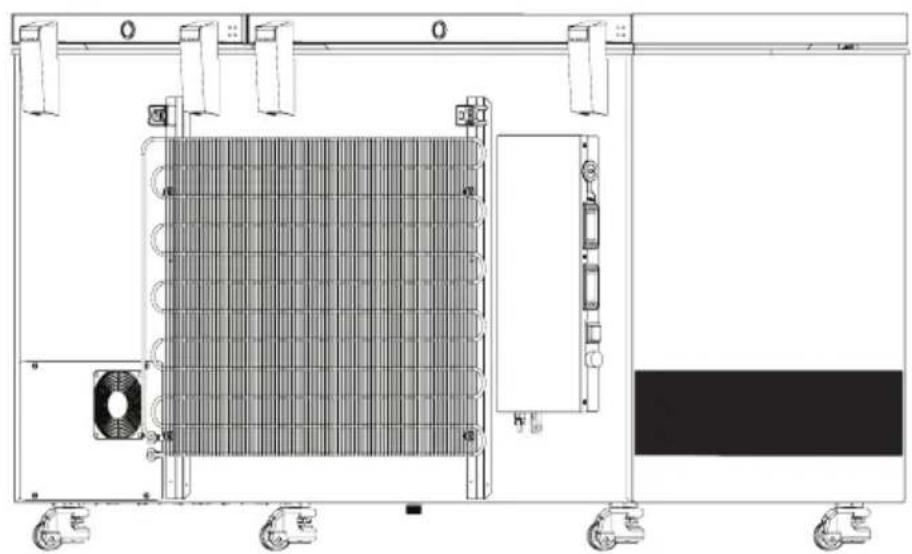
NOTE: There must be free access to the ventilation grille (on the backside).
Important:
Do not use open fire or cigarettes in the proximity of the appliance.
Ventilation
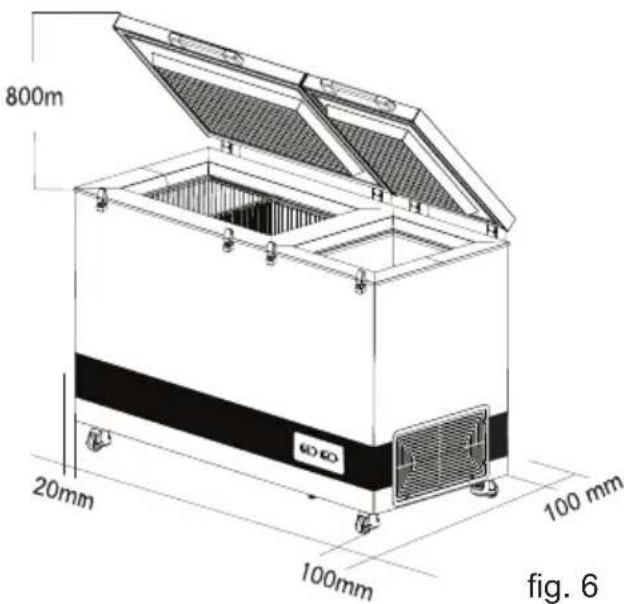
It is important that the appliance is placed well ventilated, so that air can circulate unhindered above, below, and around the appliance. Fig. 6 illustrates how the necessary air circulation can be ensured. There must be at least 30 mm clearance between the base of the appliance and the floor.
Ventilation openings in the appliance or in built-in structures must be kept clear.
Installation and start up
Connect the appliance to the solar panels according to table 1, which states the lengths and sizes of the wires used for connecting the appliances.
Standard supplied cable size and length will be 6 mm² and 20 m.
The screened cables coming from the PV panels are fitted with male/female MC4 compatible connectors. The connections are then to be mounted to the prefixed male/female MC4 compatible connectors placed at the back of the appliance - See fig. 7
The connections are of plug and play type and can only be fitted correctly - male to female/female to male.
Clean the appliance thoroughly before start up.
| Size: | Max. length: | ||
| Cross section | AWG | ||
| [mm2] | [Gauge] | [m] | [ft] |
| 2,5 | 12 | 8 | 26 |
| 4 | 12 | 13 | 42 |
| 6 | 10 | 20 | 65 |
| 10 | 8 | 32 | 105 |
Table 1
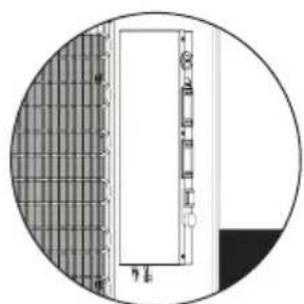
fig. 7

fig. 8
Start up
Before the appliance is loaded with vaccine, the ice pack ballast must be frozen. The cool-down time in an ambient temperature of 43°C will be approx. 6 days.
When the temperature on the display of the thermometer is approx. +4°C in the morning, the appliance is ready for loading vaccine. Check the temperature in the basket. The temperature must be between +2°C and +8°C.
The vaccines must be placed and arranged as shown on page 11.
The temperature in the vaccine compartment must always be monitored on the thermometer and be between +2°C and +8°C. The controller is factory set and should not be adjusted by unauthorized personnel.
Loading the appliance
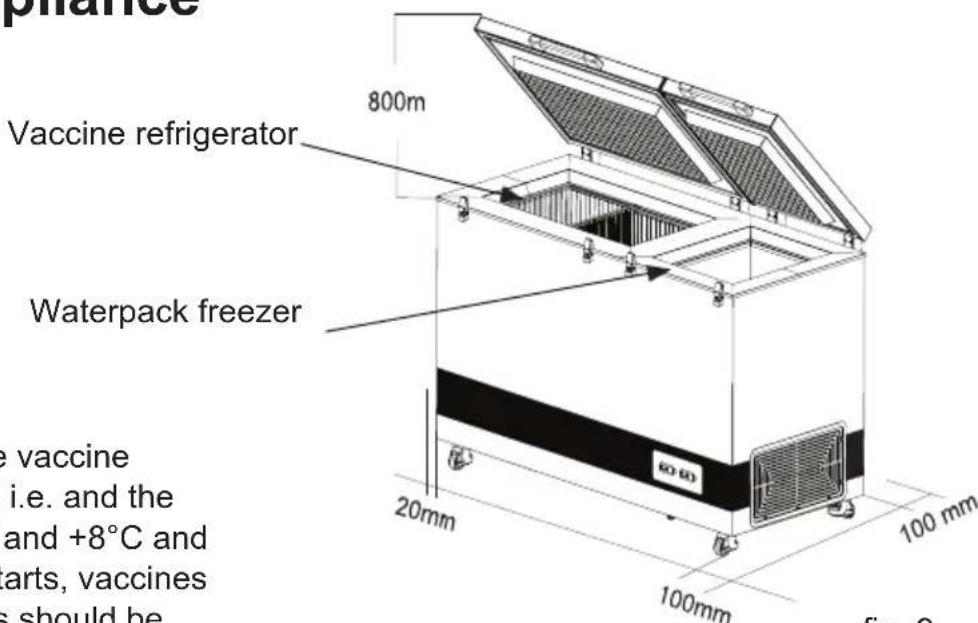
fig. 9
Do not load the vaccine above top of the basket

Freezing waterpack:
Fig. 10
Fig. 11
Control panel for refrigerator

The indicator light indicates that the compressor is running.
Controller
The appliance has a controller that controls the temperature in the vaccine compartment. The controller is factory adjusted to a default setpoint, which in most ambient environments will keep the vaccine compartment within desired thresholds of 2°C to 8°C.
If the cooler is not used for a longer period of time, it is recommended to use the
ON/OFF switch to turn the cooler OFF. This disconnects the power from mains.

Fig. 13
In case the cooler is turned OFF, make sure the vaccine compartment is cleaned and dried thoroughly afterwards, to prevent problems with odors or mold. To prevent odors taking hold, it is highly recommended to keep the lid slightly open.

Fig. 14
Solar panels
Placing
Solar panels are always to be placed on a stable roof or bar, which is safe and easily accessible (not for the public).
The solar panels are always to be fitted according to the supplier's instructions and with the screws and fittings included or recommended by the manufacturer.
Do not place the solar panels in the shadows of buildings, trees, etc. The surfaces of the solar panels are to be turned directly towards the sun.
Specifications
The specifications which the solar panels are to observe are available in table 2.
| Type : Type 2 according E003/PV01 direkt drive | |
| Nominal voltage: 18V | |
| Nominal power: 2 x 360W (standard test conditions) | |
| Number of parallel connected modules per array: | 2 parallel arrays4 parallel modules pr array |
| Warranty: Min. 2 years | |
| Performance guarantee: | 25 years (to 80% of original value) |
| Certificates: UL, TÜV | or compliance with the requirements of IEC 61215 |
Table 2
Maintenance and cleaning
Maintenance of the appliance
Daily maintenance:
The temperature in the vaccine compartment must always be monitored on the thermometer every morning and evening. Please note that the vaccine in the appliance may not freeze. The temperature is factory set, and should not be adjusted by unauthorized personnel.
Check that the lid is properly closed and fits tightly to the cabinet of the appliance.
Monthly maintenance:
Clean the grille on the back side of the refrigerator once each month.
Yearly maintenance:
Electric connections and components are to be checked and cleaned once a year or more if necessary.
Maintenance of the solar panels Weekly maintenance:
The solar panels are to be cleaned for dust once each week – or as required. Cleaning must be carried out with water using a soft cloth or wash rag.
Monthly maintenance:
Avoid shading
It should be regularly monitored that shades do not come up such as new towering trees, as this will decrease the amount of energy produced by the system.
Yearly maintenance:
Electric connections and components are to be checked and cleaned at least once a year or more often if required. Because of risk of fire, it is necessary to remove dust and dirt. Check that PV panels are clean, free of fractures, scratches, corrosion, moisture penetration and browning.
Cabling should be checked to ensure it is secure.
Check the mounting hardware to ensure it is in good condition and ensure the earth connection is continuous.
Check junction boxes to ensure there is no water accumulation and that the integrity of lid seals, connections and clamping devices is intact.
All bolts and nuts are to be re-tightened 2 weeks after installation, and then once a year.
Cleaning
Disconnect the power supply before cleaning by using the on/off switch placed at the junction box at the rear of the appliance. The best way to clean the appliance is by using lukewarm water with a small amount of unscented detergent. Never use cleaning agents that scour. Use a soft cloth. Rinse with clean water and dry thoroughly. It is important to prevent water from running into the control panel.
The sealing strip around the lid must be cleaned regularly to prevent discolouration and prolong service life. Use clean water. After cleaning the sealing strip, check that it continues to provide a tight seal.
If the appliance is not being used for any period of time, switch the appliance off, disconnect the power supply, empty the appliance, clean the inside, and leave the lid open to allow air circulation and prevent smells.
Defrosting
The water-packs stored and the humidity of the air gradually causes frost and ice to form in the freezer compartment. A thin layer of frost or ice does not affect freezer performance, but a thick layer could cause the freezer not to cool water-packs satisfactorily. Small amounts of loose frost can be removed using a plastic scraper.
Never use electrical apparatus or sharp implements as these may damage the inside of the appliance.
When the layer of frost and ice exceeds 4-5 mm, the freezer should be completely defrosted.
Defrosting should be performed in the morning between 7am to 9am, just before the solar radiation again is powerful enough to start the compressor and run the refrigeration system.
Proceed as follows:
- Disconnect the power supply by switching off the ON/OFF button. Important! ONLY switch off the power supply of the freezer compartment.
- Remove all water-packs from the freezer compartment. Place them in an empty coldbox or wrap them up to keep them as cold as possible.
- Keep the freezer lid open.
- Unscrew the drain plug placed on the front right-hand side underneath the appliance.
- Place a tray under the defrost water drain.
- Place a bowl of hot (but not boiling) water in the freezer, close the lid and wait approx. 30 minutes before removing loose frost with the plastic scraper.
- To prevent water from damaging the floor during defrosting, it is advisable to check the defrost water tray from time to time and to cover the floor around the defrost water drain to protect against ice and splashes. When all the frost and ice have melted, clean the inside cabinet, as well as the lid, lid gasket, and outside of the cabinet using water with a mild, perfume-free detergent. Dry the freezer with a soft cloth, and make sure no moisture is remaining after cleaning.
- Reinsert the internal and external drainage plugs, and check that the lid gasket is not faulty.
- Important! Screw back in position the drain plug, and turn on again the power supply with the ON/OFF button.
- Check waterpacks are not leaking before returning them to the freezer compartment. Place waterpacks according instructions, approx. 5 minutes after having switched it on. Close the lid.
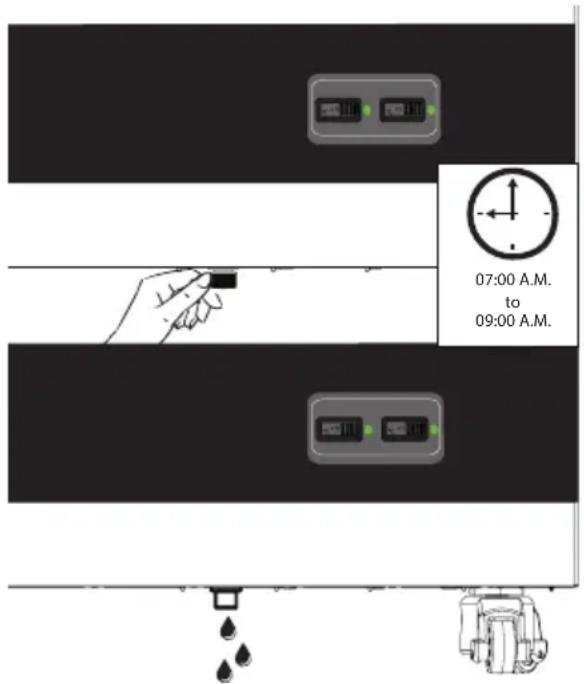
fig. 15
Drain
The appliance is equipped with an auto-drainage function, with a drain hole at the bottom of the vaccine compartment.
The drain is collecting the water droplets generated by the unavoidable condensation that at some point will be created on the inner linings of the vaccine compartment, due to the fact of warm air hitting the cold surface of the wall.
This condensation eventually will run down the sides to the bottom, and water then flows down the drain tube into a drip tray located on top of the compressor which evaporates the liquid as it warms.
If the appliance drain becomes blocked by any objects, the water can't drain away as it should from the vaccine compartment, which will result in water accumulating, which further could result in creating issues with the stored vaccine vials, stickers, cardboard boxes, etc.
This is why it is an important SOP procedure, to regularly ensure that the drain filter is clean and free from dirt and waste.
To do the cleaning, use lukewarm water with a mild cleaning agent on a soft cloth, and wipe off the filter along with the surrounding bottom.
Finish off with a dry dishtowel or similar, to ensure all objects are removed and the bottom is dry.
This is why it is an important SOP procedure, to regularly ensure that the drain filter fig.17 is clean and free from dirt and waste.

fig.16

fig.17
fig.18
Trouble-shooting
| Fault Possible cause Remedy | ||
| Compressor is not running, and the ice packs are not cold | Be patient, it is most likely that the compressor will start within a few minutes. | If this is not the case, check the following:- Check that power is connected and that the wire from the solar panel to the appliance is intact.- Check the fuse and replace it if necessary.- If the above is OK, call technical supervisor. |
| Compressor is running, and the temperature is too high | The ventilation grill is blocked.The lid is not closed properly.The fan in the compressor compartment is blocked or defective.The temperature in the room in which the appliance is installed is too high. | Ensure unhindered air circulation.Ensure that the lid is closed properly.Check that the fan is running, if not it should be replaced.Shield the appliance against direct sun light and ensure more ventilation to the room. |
| Temperature in VLS 096A RF SDD is too low | To low set point on digital controller Contact technical supervisor for adjustment. | |
| No temperature is displayed | There is not enough light for the solar sensor. | Turn on the light. |
| No light in green diode during day time | Switch is turned OFFFuse is burnedDiode is defect | Turn on the switchReplace the fuse.Replace diode. |
Table 3
Warranty, spare parts and service
Warranty disclaimer
Faults and damage caused directly or indirectly by incorrect operation, misuse, insufficient maintenance, incorrect building, installation or mains connection. Fire, accident, lightening, voltage variation or other electrical interference, including defective fuses or faults in mains installations are not covered by the warranty.
Repairs performed by others than approved service centres and any other faults and damage that the manufacturer can substantiate are caused by reasons other than manufacturing or material faults are not covered by the warranty.
Please note that changes to the construction of the appliance or changes to the component equipment of the appliance will invalidate warranty and product liability, and the appliance cannot be used lawfully. The approval stated on rating plate will also be invalidated.
Transport damage discovered by the buyer is primarily a matter to be settled between the buyer and the distributor, i.e. the distributor must ensure that such complaints are resolved to the buyer's satisfaction.
Before calling for technical assistance, please check whether you are able to rectify the fault yourself. If your request for assistance is unwarranted, e.g. if the appliance has failed as a result of a blown fuse or incorrect operation, you will be charged the costs incurred by your call for technical assistance.
Spare parts
When ordering spare parts, please state the type, serial and product numbers of your appliance. This information is given on the rating plate. The rating plate contains various technical information, including type and serial numbers.

fig. 19
Disposal
Information for Users on Collection and Disposal of Old Equipment and used Batteries
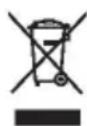
These symbols on the products, packaging, and/or accompanying documents mean that used electrical and electronic products and batteries should not be mixed with general household waste. For proper treatment, recovery and recycling of old products and used batteries, please take them to applicable collection points, in accordance with your national legislation and the Directives 2012/19/EU and 2006/66/EC.
By disposing of these products and batteries correctly, you will help to save valuable resources and prevent any potential negative effects on human health and the environment which could otherwise arise from inappropriate waste handling.
For more information about collection and recycling of old products and batteries, please contact your local municipality, your waste disposal service or the point of sale where you purchased the items.
Penalties may be applicable for incorrect disposal of this waste, in accordance with national legislation.

For business users in the European Union.
If you wish to discard electrical and electronic equipment, please contact your dealer or supplier for further information.
Information on Disposal in other Countries outside the European Union
These symbols are only valid in the European Union. If you wish to discard this product, please contact your local authorities or dealer and ask for the correct method of disposal.
WARNING
WARNING:
- Make sure NEVER to place any commodities direct up against the refrigerator sensor cover.
Eg. Water-pack

fig. 2
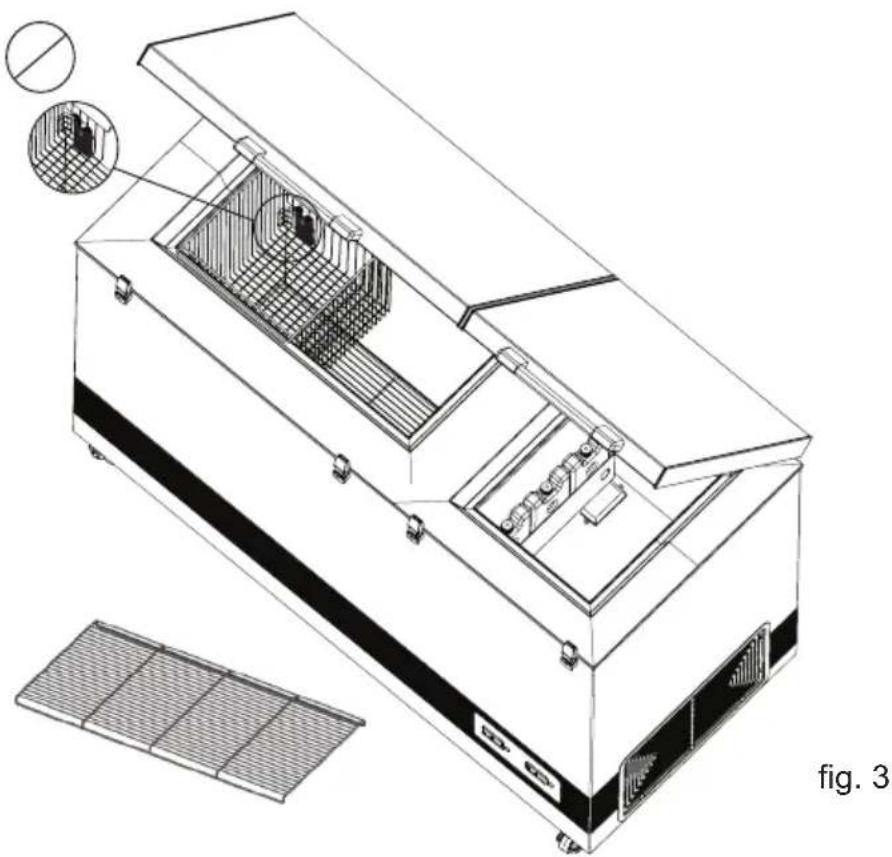
- Bottom grid MUST be used, the baskets are optional as the unit is Grade A
fig. 4
Fridge-tag Support
fig. 5
fig. 6
Ventilation
fig. 7
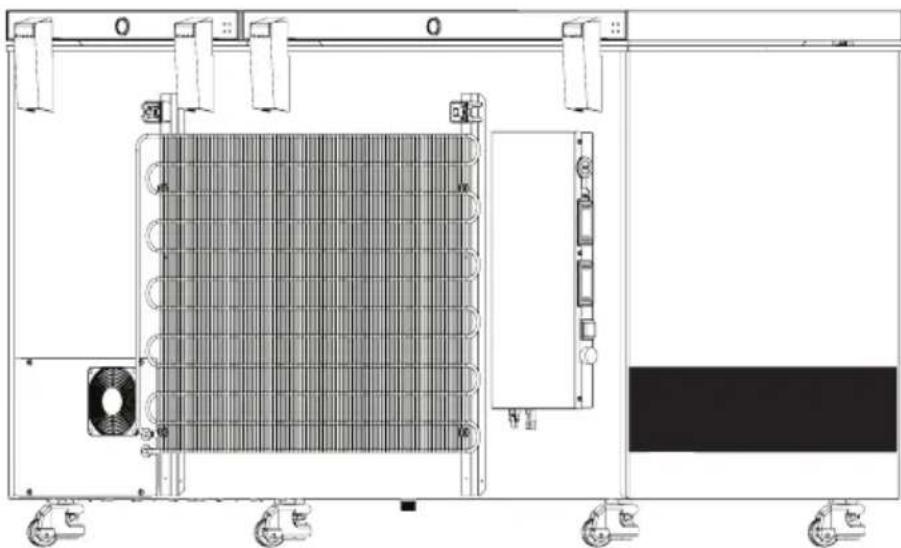
fig. 8
fig. 11
Control panel
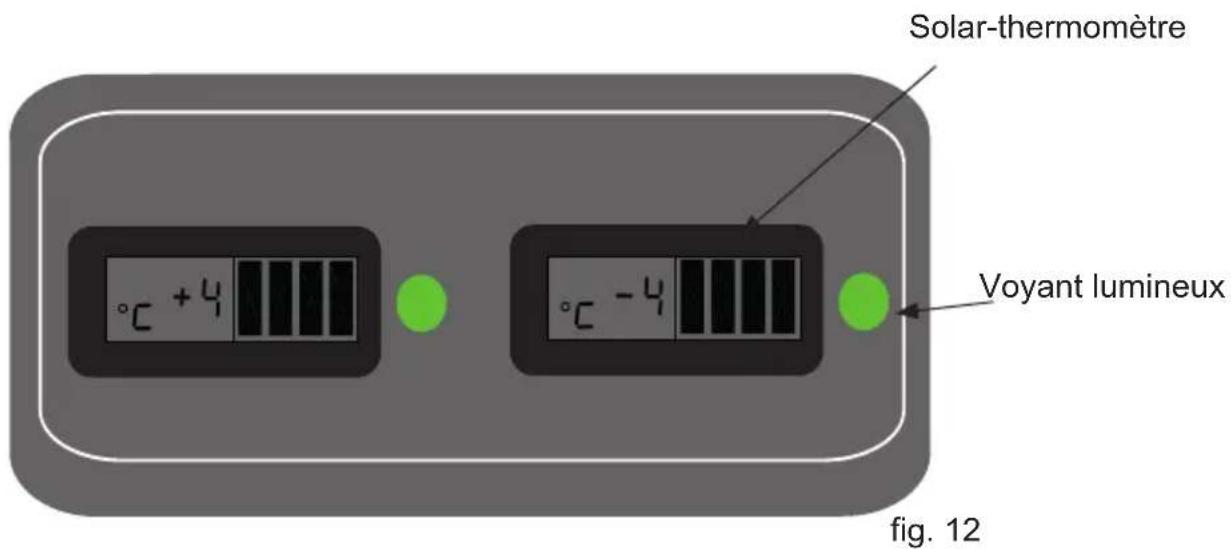
fig. 14
Solar panels
Location
fig. 16

fig. 17
fig. 18
Fault identification
WARNING:
figure 2
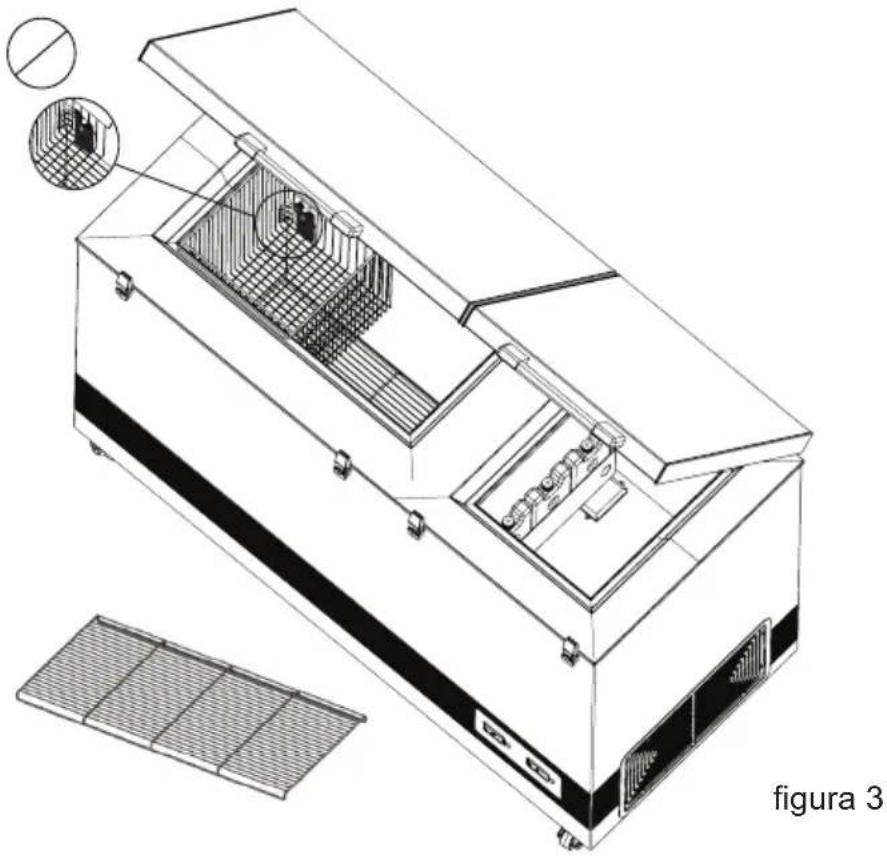
figure 4
Fridge-tag
Support
figure 5
Ambient temperature
figure 6
figure 7
Start-up
Loading the appliance
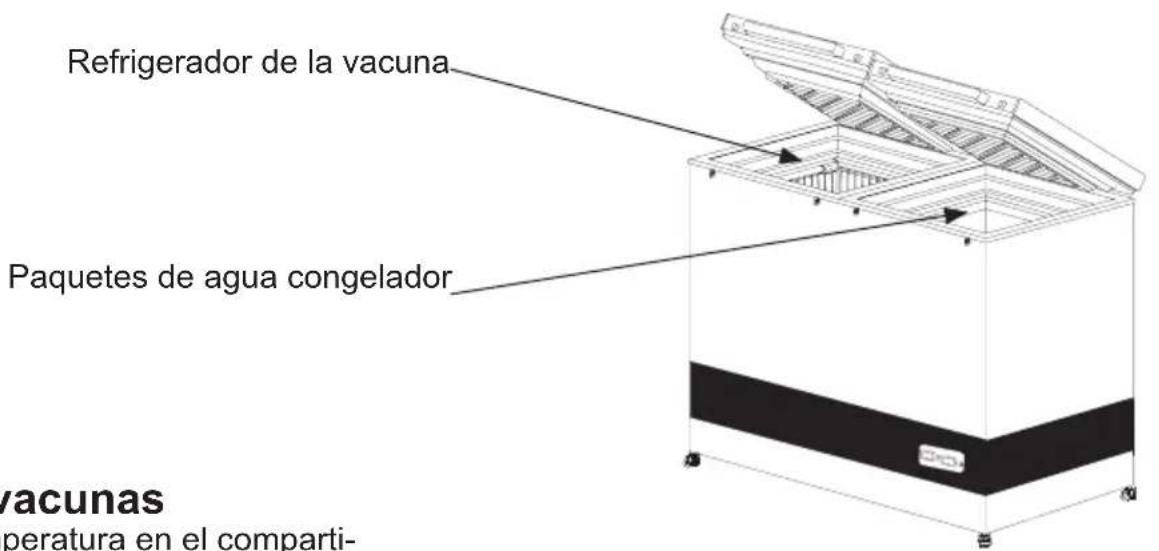
figure 11
Control panel
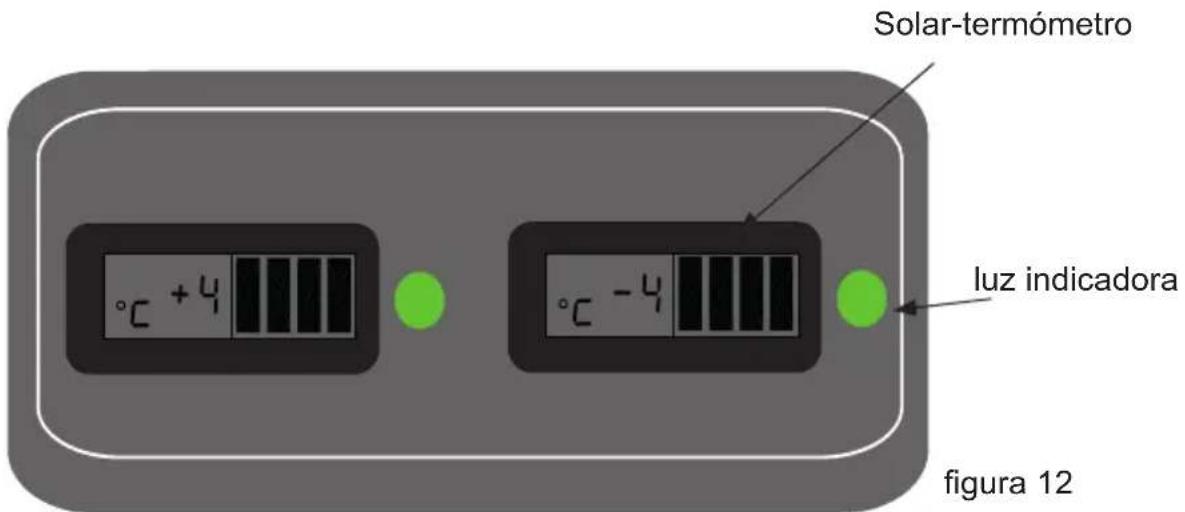
figure 14
figure 15
Drainage
Figure 16
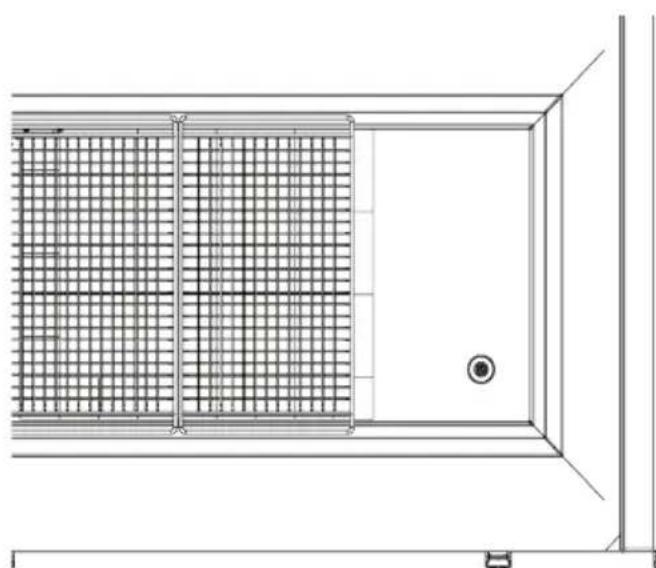
Figure 17
Figure 18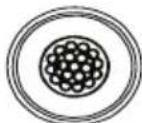
CAUTION:
Fig. 2
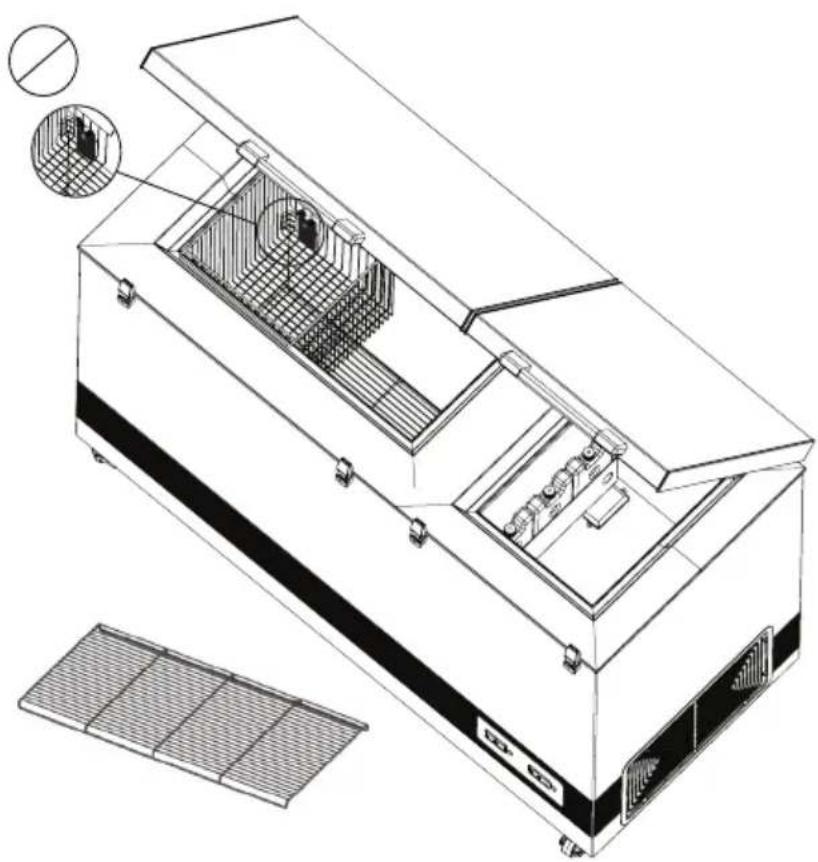
Fig. 3
Fig. 4
Fridge-tag Support
Fig. 5
Fig. 6
Fig. 9
Vaccine loading
Fig. 11
Control panel
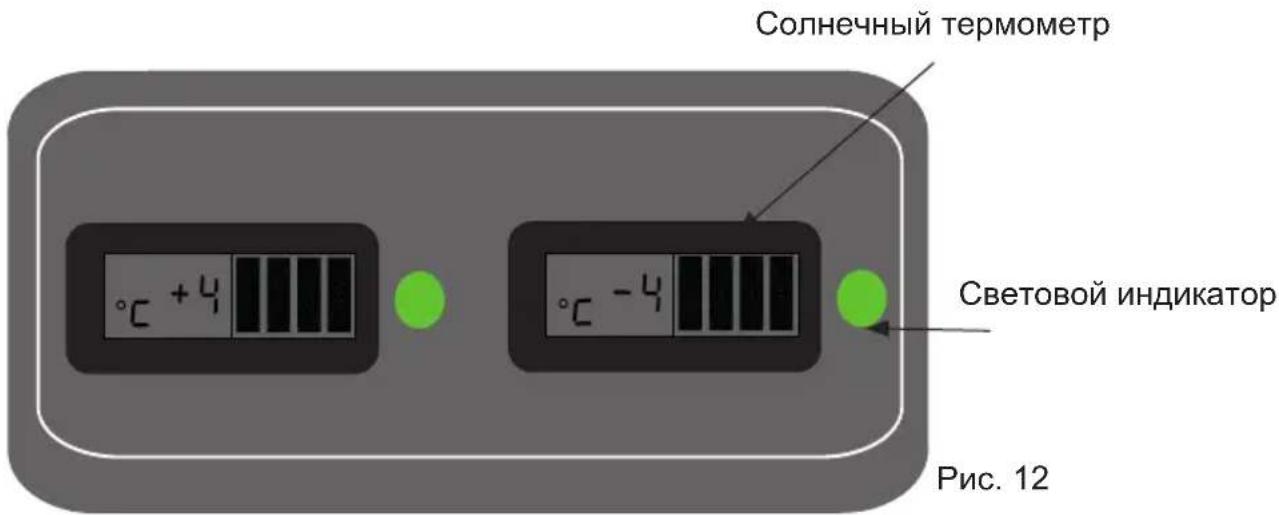
Fig. 14
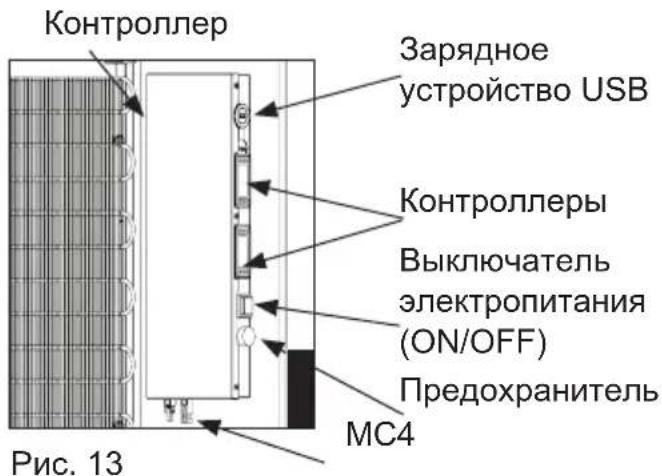
Fig. 15
Condensate drain
Fig. 16
Fig. 17
Fig. 18
Fig. 2

Fig. 3
Fig. 4
Fridge-tag Support
Packaging and unpacking
Placement
Fig. 5
Air circulation
Fig. 7
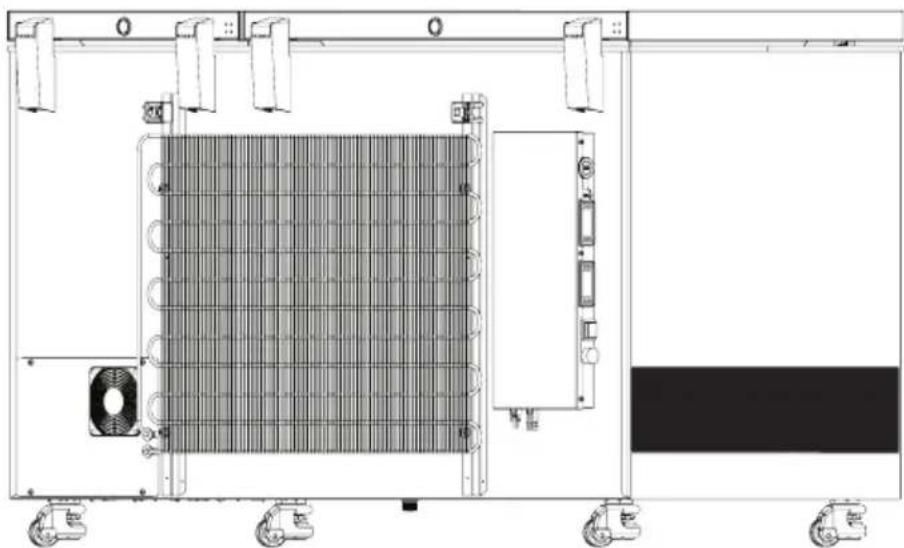
Figure 8
Loading equipment
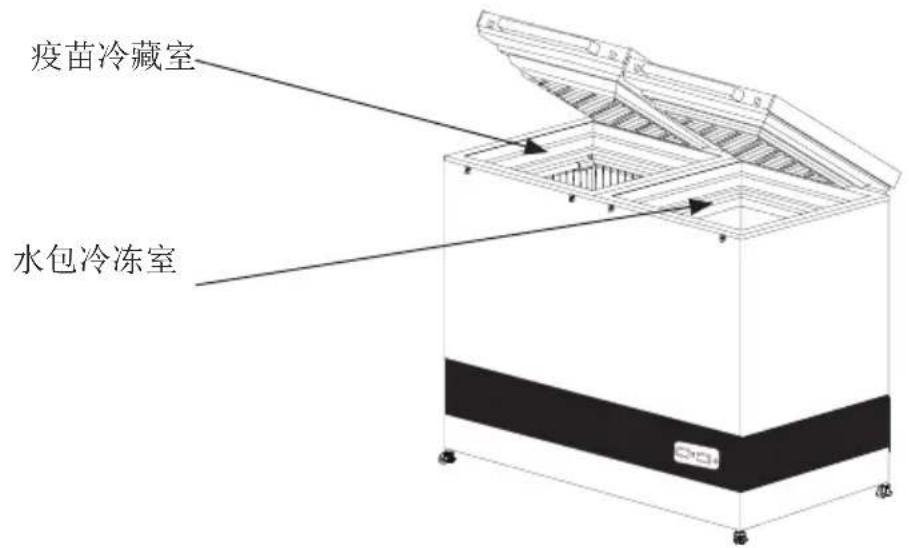
Figure 14 Figure 13
Solar panel
Placement
Figure 15
Drain pipe
Figure 16
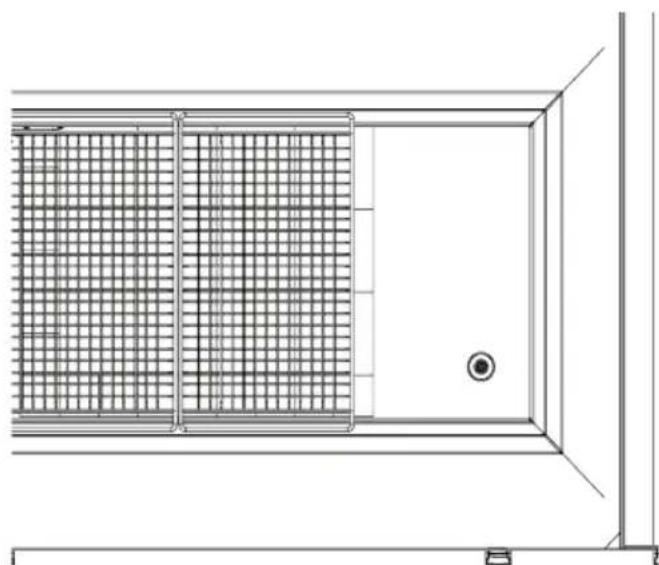
Figure 17
Figure 18
Troubleshooting
Figure 17

Figure 17
Figure 18
Figure 14
Figure 9
Figure
Figure 5
Room temperature
Figure 4
Fridge-tag Support
Important for the forest!
Figure 2

Figure 3
Warning:
Do not bend the cooling system
Warning:


VLS 096A RF SDD
- WARNING
- CONTENTS
- INTRODUCTION
- OPERATIONAL GUIDELINES
- GET TO KNOW YOUR VLS096A RF SDD
- HIGHLY IMPORTANT
- PLACING THE FRIDGE-TAG®
- EXTERNAL SENSOR
- PLACING AND UNPACKING
- UNPACKING
- PLACING
- ADJUSTABLE FEET
- ROOM TEMPERATURE
- CLIMATE CLASS
- IMPORTANT
- VENTILATION
- INSTALLATION AND START UP
- START UP
- LOADING THE APPLIANCE
- FREEZING WATERPACK
- CONTROL PANEL FOR REFRIGERATOR
- CONTROLLER
- SOLAR PANELS
- SPECIFICATIONS
- MAINTENANCE AND CLEANING
- MAINTENANCE OF THE APPLIANCE
- DAILY MAINTENANCE
- MONTHLY MAINTENANCE
- YEARLY MAINTENANCE
- MAINTENANCE OF THE SOLAR PANELS WEEKLY MAINTENANCE
- CLEANING
- DEFROSTING
- PROCEED AS FOLLOWS
- DRAIN
- WARRANTY, SPARE PARTS AND SERVICE
- WARRANTY DISCLAIMER
- SPARE PARTS
- DISPOSAL
- INFORMATION ON DISPOSAL IN OTHER COUNTRIES OUTSIDE THE EUROPEAN UNION
- CONTROL PANEL
- LOCATION
- FAULT IDENTIFICATION
- AMBIENT TEMPERATURE
- START-UP
- DRAINAGE
- CAUTION
- VACCINE LOADING
- CONDENSATE DRAIN
- PACKAGING AND UNPACKING
- PLACEMENT
- AIR CIRCULATION
- LOADING EQUIPMENT
- SOLAR PANEL
- DRAIN PIPE
- IMPORTANT FOR THE FOREST
Brand : VESTFROST
Model : VLS 096A RF SDD
Category : Refrigerator