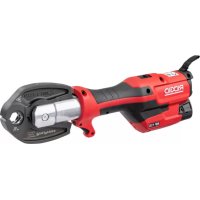
RP 115 - Hand tool RIDGID - Free user manual and instructions
Find the device manual for free RP 115 RIDGID in PDF.

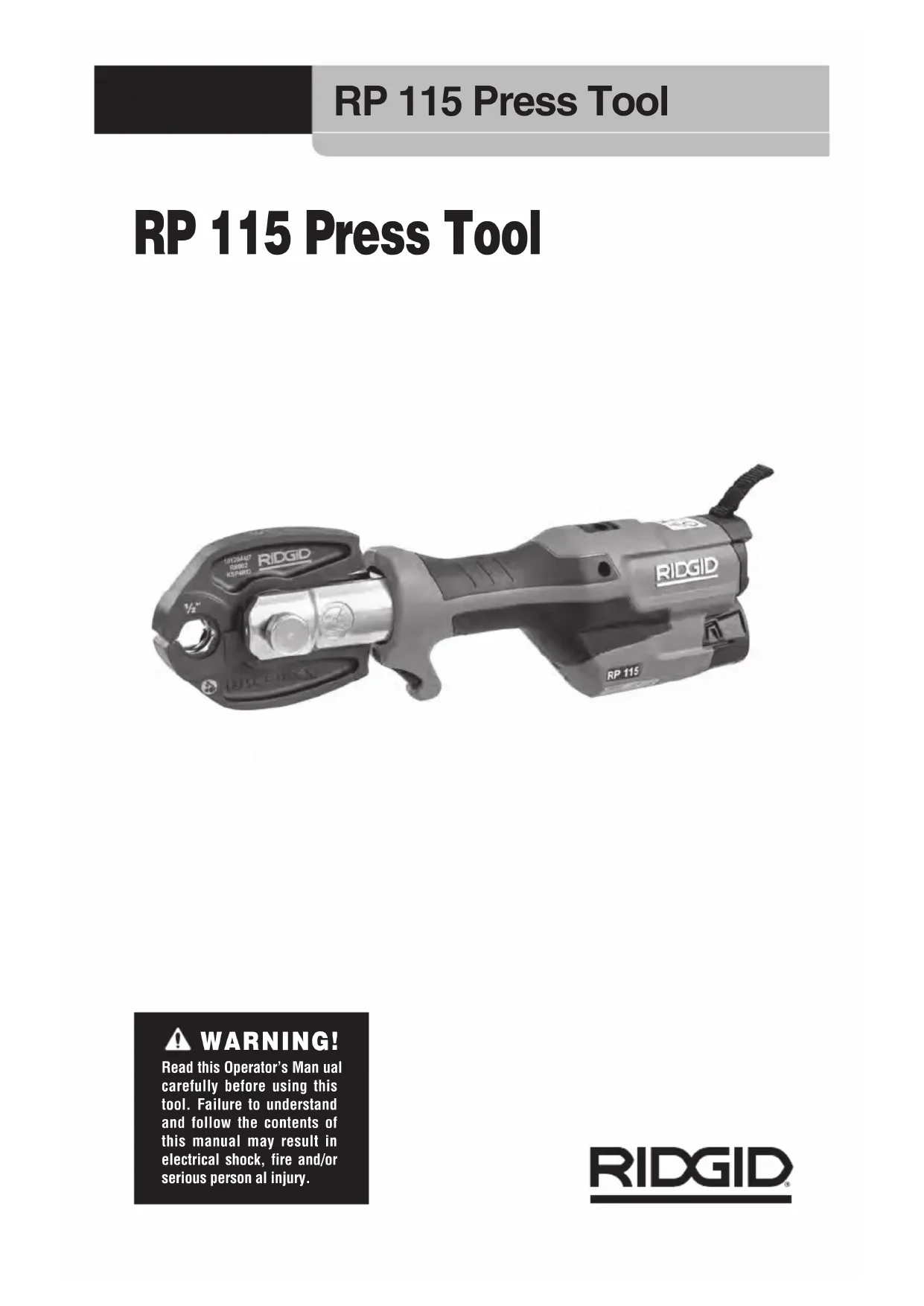


| Product Type | Hand tool, hydraulic crimping tool |
| Brand | RIDGID |
| Model | RP 115 |
| Dimensions (without battery/accessory) | 330 mm x 114 mm x 63 mm |
| Weight (without battery/accessory) | 1.3 kg |
| Power Supply | Rechargeable Li-ion 12 V battery pack (RIDGID RB-1200 series) |
| Piston Force | 15 kN (3,400 lbs) |
| Piston Stroke | 32 mm (1.26 in) |
| Crimping Time | Approximately 3 seconds |
| Head Rotation | 210° |
| Duty Cycle | 3 presses per minute |
| Compatible Accessories | RIDGID Mini series jaws |
| Work Light | Yes, with on/off function |
| Operating Temperature Range | -10 °C to 40 °C |
| Storage Temperature | 0 °C to 45 °C |
| Sound Pressure | < 70 dB(A) |
| Vibration Level | < 2.5 m/s² |
| Maintenance and Cleaning | Wipe with a dry cloth; lubricate mounting pin and pivot points with light oil; clean crimping profile with a Scotch-Brite® pad |
| Safety | Mandatory wearing of safety glasses; keep fingers away from jaws; use only approved RIDGID accessories |
| Spare Parts and Repairability | Service and repairs exclusively by a RIDGID authorized service center; tool and battery contain no user-serviceable parts |
| Warranty | Full Lifetime Warranty |
Frequently Asked Questions - RP 115 RIDGID
User questions about RP 115 RIDGID
0 question about this device. Answer the ones you know or ask your own.
Ask a new question about this device
Download the instructions for your Hand tool in PDF format for free! Find your manual RP 115 - RIDGID and take your electronic device back in hand. On this page are published all the documents necessary for the use of your device. RP 115 by RIDGID.
USER MANUAL RP 115 RIDGID
Table of Contents
Safety Symbols....2
General Power Tool Safety Warnings*
Work Area Safety 2
Electrical Safety 2
Personal Safety....3
Power Tool Use And Care 3
Battery Tool Use And Care 4
Service....4
Specific Safety Information
Press Tool Safety 4
RIDGID® Contact Information....5
Description....5
Specifications 6
Standard Equipment 7
Pre-Operation Inspection....7
Set-Up and Operation....8
Removing/Installing Attachment....8
Preparing Connection 9
Pressing A Fitting 9
Inspecting The Pressed Connection 10
Work Light Disable/Enable....10
Storage 10
Maintenance Instructions
Cleaning And Lubrication....10
Pressing Attachments 11
Required Maintenance At RIDGID Authorized Independent Service Center ..... 11
Troubleshooting....11-12
Service And Repair 12
Optional Equipment
Jaws....12
Battery Pack....12
Chargers and Cords....13
Disposal....13
Clearance Requirements....13
Electromagnetic Compatibility (EMC) 14
FCC Statement....Inside Back Cover
EC Declaration of Conformity....Inside Back Cover
Lifetime Warranty....Back Cover
*Original Instructions - English
RP 115 Press Tool

WARNING!
Read this Operator's Manual carefully before using this tool. Failure to understand and follow the contents of this manual may result in electrical shock, fire and/or serious personal injury.
Safety Symbols
In this operator's manual and on the product, safety symbols and signal words are used to communicate important safety information. This section is provided to improve understanding of these signal words and symbols.
DANGER
DANGER indicates a hazardous situation which, if not avoided, will result in death or serious injury.
WARNING
WARNING indicates a hazardous situation which, if not avoided, could result in death or serious injury.
CAUTION
CAUTION indicates a hazardous situation which, if not avoided, could result in minor or moderate injury.
NOTICE
NOTICE indicates information that relates to the protection of property.

This symbol means read the operator's manual carefully before using the equipment. The operator's manual contains ant information on the safe and proper ion of the equipment.

This symbol means always wear safety glasses with side shields or goggles while using this equipment to reduce the risk of injury.

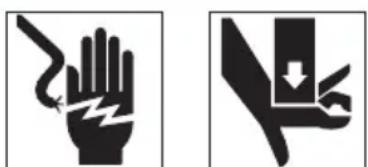
This symbol indicates the risk of hands, fingers or other body parts being crushed.

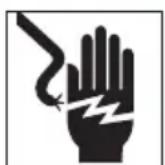
This symbol indicates the risk of electrical shock.

This symbol indicates this electrical equipment meets the requirements of the applicable EC directives.
This symbol indicates this is electrical equipment that should not be disposed of with household waste. See "Disposal" section.

This symbol indicates that the product is Class II equipment.

This symbol indicates that the product is For Indoor Use Only.
General Power Tool Safety Warnings*
WARNING
Read all safety warnings, instructions, illustrations and specifications provided with this power tool. Failure to follow all instructions listed below may result in electric shock, fire and/or serious injury.
SAVE ALL WARNINGS AND INSTRUCTIONS FOR FUTURE REFERENCE!
The term “power tool” in the warnings refers to your mains-operated (corded) power tool or battery-operated (cordless) power tool.
Work Area Safety
- Keep work area clean and well lit. Cluttered or dark areas invite accidents.
- Do not operate power tools in explosive atmospheres, such as in the presence of flammable liquids, gases or dust.
Power tools create sparks which may ignite the dust or fumes.
- Keep children and bystanders away while operating a power tool. Distractions can cause you to lose control.
Electrical Safety
- Power tool plugs must match the outlet. Never modify the plug in any way. Do not use any adapter plugs with earthed (grounded) power tools. Unmodified plugs and matching outlets will reduce risk of electric shock.
- Avoid body contact with earthed or grounded surfaces, such as pipes, radiators, ranges and refrigerators. There is an increased risk of electric shock if your body is earthed or grounded.
- Do not expose power tools to rain or wet conditions. Water entering a power tool will increase the risk of electric shock.
- Do not abuse the cord. Never use the cord for carrying, pulling or unplugging
the power tool. Keep cord away from heat, oil, sharp edges or moving parts. Damaged or entangled cords increase the risk of electric shock.
- When operating a power tool outdoors, use an extension cord suitable for outdoor use. Use of a cord suitable for outdoor use reduces the risk of electric shock.
- If operating a power tool in a damp location is unavoidable, use a Ground Fault Circuit Interrupter (GFCI) protected supply. Use of a GFCI reduces the risk of electric shock.
- If operating a power tool in a damp location is unavoidable, use a Residual Current Device (RCD) protected supply. Use of a RCD reduces the risk of electric shock.
- It is recommended that the tool always be supplied via a Residual Current Device having a residual current of 30mA or less.
Personal Safety
- Stay alert, watch what you are doing and use common sense when operating a power tool. Do not use a power tool while you are tired or under the influence of drugs, alcohol or medication. A moment of inattention while operating power tools may result in serious personal injury.
- Use personal protective equipment. Always wear eye protection. Protective equipment such as dust mask, non-skid safety shoes, hard hat, or hearing protection used for appropriate conditions will reduce personal injuries.
- Prevent unintentional starting. Ensure the switch is in the OFF-position before connecting to power source and/or battery pack, picking up or carrying the tool. Carrying power tools with your finger on the switch or energizing power tools that have the switch ON invites accidents.
- Remove any adjusting key or wrench before turning the power tool ON. A wrench or a key left attached to a rotating part of the power tool may result in personal injury.
- Do not overreach. Keep proper footing and balance at all times. This enables
better control of the power tool in unexpected situations.
- Dress properly. Do not wear loose clothing or jewelry. Keep your hair, clothing and gloves away from moving parts. Loose clothes, jewelry or long hair can be caught in moving parts.
- If devices are provided for the connection of dust extraction and collection facilities, ensure these are connected and properly used. Use of dust collection can reduce dust-related hazards.
- Do not let familiarity gained from frequent use of tools allow you to become complacent and ignore tool safety principles. A careless action can cause severe injury within a fraction of a second.
Power Tool Use And Care
- Do not force the power tool. Use the correct power tool for your application. The correct power tool will do the job better and safer at the rate for which it was designed.
- Do not use the power tool if the switch does not turn it ON and OFF. Any power tool that cannot be controlled with the switch is dangerous and must be repaired.
- Disconnect the plug from the power source and/or remove the battery pack, if detachable, from the power tool before making any adjustments, changing accessories, or storing power tools. Such preventive safety measures reduce the risk of starting the power tool accidentally.
- Store idle power tools out of the reach of children and do not allow persons unfamiliar with the power tool or these instructions to operate the power tool. Power tools are dangerous in the hands of untrained users.
- Maintain power tools and accessories. Check for misalignment or binding of moving parts, breakage of parts and any other condition that may affect the power tool's operation. If damaged, have the power tool repaired before use. Many accidents are caused by poorly maintained power tools.
-
Keep cutting tools sharp and clean. Properly maintained cutting tools with sharp cutting edges are less likely to bind and are easier to control.
-
Use the power tool, accessories and tool bits etc. in accordance with these instructions, taking into account the working conditions and the work to be performed. Use of the power tool for operations different from those intended could result in a hazardous situation.
- Keep handles and grasping surfaces dry, clean and free from oil and grease. Slippery handles and grasping surfaces do not allow for safe handling and control of the tool in unexpected situations.
Battery Tool Use And Care
- Recharge only with the charger specified by the manufacturer. A charger that is suitable for one type of battery pack may create a risk of fire when used with another battery pack.
- Use power tools only with specifically designated battery packs. Use of any other battery packs may create a risk of injury and fire.
- When battery pack is not in use, keep it away from other metal objects, like paper clips, coins, keys, nails, screws or other small metal objects that can make a connection from one terminal to another. Shorting the battery terminals together may cause burns or a fire.
- Under abusive conditions, liquid may be ejected from the battery; avoid contact. If contact accidentally occurs, flush with water. If liquid contacts eyes, additionally seek medical help. Liquid ejected from the battery may cause irritation or burns.
- Do not use a battery pack or tool that is damaged or modified. Damaged or modified batteries may exhibit unpredictable behavior resulting in fire, explosion or risk of injury.
- Do not expose a battery pack or tool to fire or excessive temperature. Exposure to fire or temperature above 265°F (130°C) may cause explosion.
- Follow all charging instructions and do not charge the battery pack or tool outside the temperature range specified in the instructions. Charging improperly or at temperatures outside the specified range may damage the battery and increase the risk of fire.
Service
- Have your power tool serviced by a qualified repair person using only identical replacement parts. This will ensure that the safety of the power tool is maintained.
- Never service damaged battery packs. Service of battery packs should only be performed by the manufacturer or authorized service providers.
Specific Safety Information
WARNING
This section contains important safety information that is specific to this tool.
Read these precautions carefully before using the press tools to reduce the risk of electrical shock, or other serious injury.
SAVE ALL WARNINGS AND INSTRUCTIONS FOR FUTURE REFERENCE!
A compartment in the tool carrying case is included to keep this manual with the tool for use by the operator.
Press Tool Safety
- Keep your fingers and hands away from pressing attachments during press cycle. Your fingers or hands can be crushed, fractured or amputated if they become caught between the attachment or between these components and any other object.
- Never attempt to repair damaged pressing attachments. Discard the entire damaged attachment. An attachment that has been welded, ground, drilled or modified in any manner can shatter during pressing resulting in serious injury. Failure to replace the entire pressing attachment may result in component failure and serious injury.
- Large forces are generated during product use that can break or throw parts and cause injury. Stand clear during use and wear appropriate protective equipment, including eye protection.
- Only use RIDGID® Press Tools with appropriate RIDGID or RIDGID approved Pressing attachments. Other uses or modifying the Press Tools for other applica-
tions may damage the press tool, damage the attachments and/or cause personal injury.
- Use proper tool, attachment and fitting combinations. Improper combinations can result in an incomplete joint, which increase the risk of leaks, equipment damage and injury.
- Do not modify tool. Modifying the tool in any manner may result in personal injury and voidance of the tool's warranty.
- Before operating a RIDGID® Press Tool, read and understand:
- This operator's manual
– The battery/charger manual
- The fitting manufacturer's installation instructions
– The instructions for any other equipment or material used with this tool
Failure to follow all instructions and warnings may result in property damage and/or serious injury.
RIDGID Contact Information
If you have any question concerning this RIDGID® product:
- Contact your local RIDGID distributor.
- Visit RIDGID.com to find your local RIDGID contact point.
- Contact Ridge Tool Technical Service Departmentatrtctechservices@emer son.com, or in the U.S. and Canada call (800) 519-3456.
Description
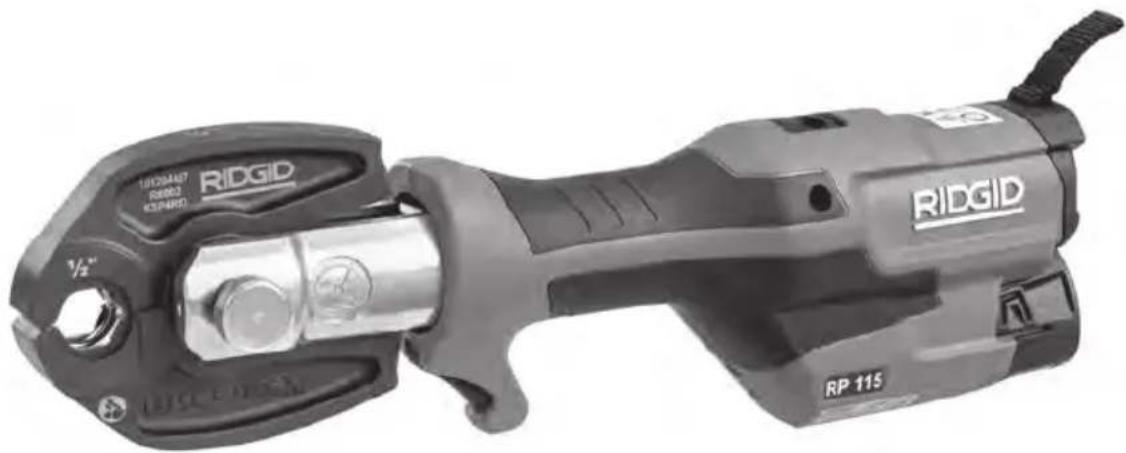
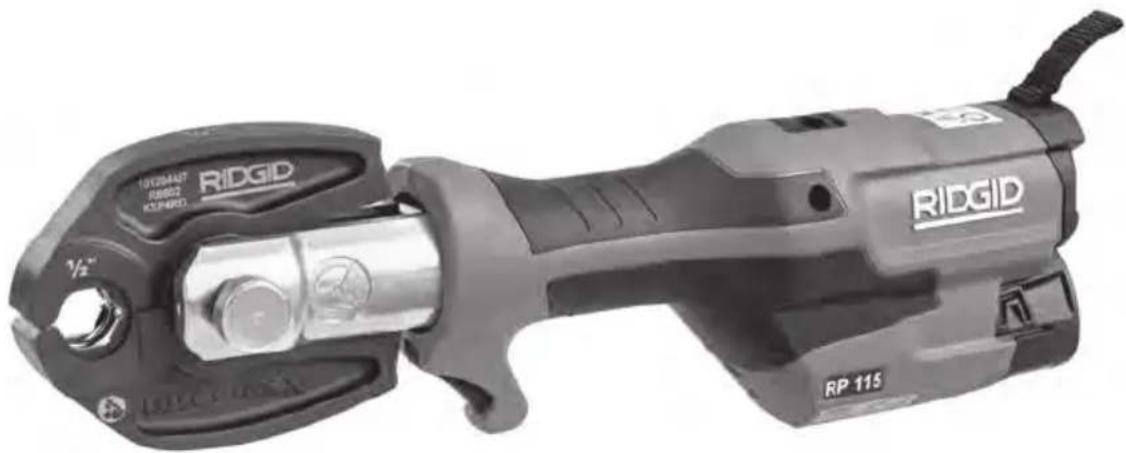
The RIDGID ® RP 115 Press Tool is designed to be used with RIDGID Mini Series Attachments. Mini Series Jaws are available to mechanically press PureFlow ® Fittings for ViegaPEX ™ and FostaPEX ™ tubing and ProPress fittings for copper and SS tubing. An individual jaw set is required for each size and type of tubing. Jaw sets and press tool must be used perpendicular to the fitting/tube being pressed.
When the run switch on the press tool is depressed, an internal electric motor powers a hydraulic pump which sends fluid into the cylinder of the tool, moving the ram forward and applying force to the attachment, pressing the fitting. The press cycle takes approximately 3 seconds.
A work light turns ON when the trigger/run switch is depressed to illuminate the work area. The head can be rotated 270° for better access in tight spaces.
The tools are supplied with fabric loops that can be used with appropriate attachments such as shoulder straps or tie off lines.
ViegaPEX ™ and FostaPEX ™ are trademarks of Viega®. PureFlow ® and ProPress ® are registered trademarks of Viega®. Viega ® is a registered trademark of Franz Viegener II GmbH & Company.
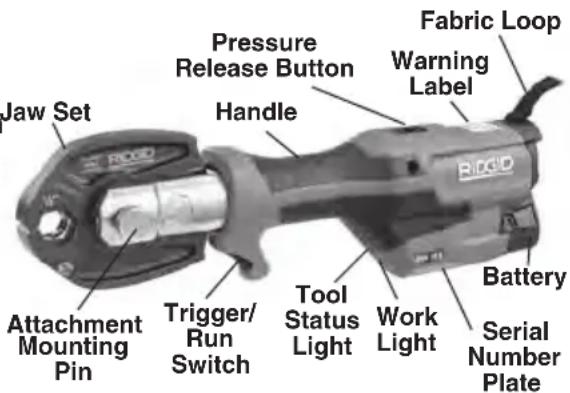
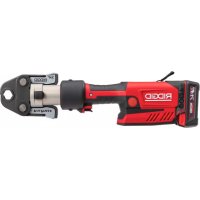
Figure 1 – RIDGID RP 115 Press Tool with Jaw
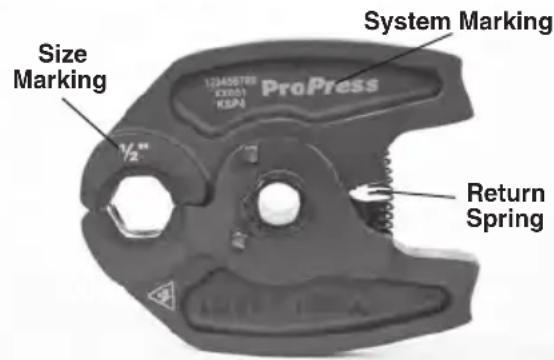
Figure 2 – RIDGID Mini Series Jaw Set
The date code label is located under the battery mounting area. The date code is re-
presented as below:
Example:
Batch# 304711
Date Code, P = 2020, R = April
Tool# 142
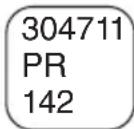
Figure 3 – Date Code Label
Date code:
| Year | Code | Month | Code | Month | Code |
| 2018 | M | Jan | N | Jul | V |
| 2019 | N | Feb | P | Aug | W |
| 2020 | P | Mar | Q | Sep | X |
| 2021 | Q | Apr | R | Oct | Y |
| 2022 | R | May | S | Nov | Z |
| 2023 | S | Jun | T | Dec | 1 |
Specifications#
Attachments ..... RIDGID Mini Series (see Optional Equipment section)
Stroke Length.... 1.26" (32 mm)
Ram Force .....3,400 lbs (15kN)
Motor
Voltage ...... 12V DC Rated
Amperage.....2.0 A
Power 24 Watts
Head Rotation ... 210°
Duty Cycle..... 3 Press /min.
Power Supply .... 12V Li-ion Rechargeable
Battery Pack (RIDGID
RB-1200 Series)
Permissible
Humidity ...... 80%maximum
Operating Temperature
Range..... 15° F to 104° F
(-10°C to 40°C)
Storage
Temperature..... 32° F to 113° F
(0°C to 45°C)
Weight (no battery/
Attachment)...... 2.9 lbs. (1.3 kg)
Dimensions (no battery/
Attachment)...... 13" x 4.5" x 2.5"
(330 mm x 114 mm x 63 mm)
Sound Pressure
(LPA)* ....<70 dB(A), K=3 dB(A)
Vibration*......<2.5 m/s 2 , K=1.5
* Sound and Vibration measurements are measured in accordance with a standardized test per Standard EN 62481-1.
- Vibration levels may be used for comparison with other tools and for preliminary assessment of exposure.
| Control | Marking | Description |
| Trigger/Run Switch | — | Main tool power switch. Depress to start press cycle/release to stop press cycle. Tool ram will not retract until press cycle is complete. Work light turns on when run switch is depressed and turns off 10 second after switch is released. Work light can be disabled. See Work Light Disable/Enable section. |
| Pressure Release Button |  | Allows tool to be released without completing press. If used, press connection is not complete and must be repeated |
| Attachment Mounting Pin |  | Holds attachment to tool. Must be fully inserted for tool to operate |
Figure 4 – Controls Chart
| Light Status Description | |
| Battery is inserted, tool undergoes Self Check. Tool is ready to operate.2 x | Battery low. Tool will not operate. Recharge battery/Insert fully charged battery. |
| 20 sec | Tool and/or battery out of Specification temperature range. Tool will not operate. Bring the tool and battery to correct operating temperature range. |
| 20 sec/5Hz | Indicates service interval approaching. Starts after 18,000 cycles, which is 2,000 cycles before completing service interval (20,000 cycles) |
| 20 sec Tool is locked. Tool has completed service interval (20,000 cycles) and requires service. Tool has malfunctioned. Remove and reinsert battery. If still ON, have tool serviced.20 sec/2Hz | |
Figure 5 – Tool Status Lights
- Sound and vibration emissions may vary due to your location and specific use of these tools.
- Daily exposure levels for sound and vibration need to be evaluated for each application and appropriate safety measures taken when needed. Evaluation of exposure levels should consider the time a tool is switched OFF and not in use. This may significantly reduce the exposure level over the total working period.
# All specifications are nominal and may change as design improvements occur.
Standard Equipment
Refer to the RIDGID catalog for details on equipment supplied with specific tool catalog numbers.
▲WARNING Only use RIDGID Press Tools and RIDGID press tool attachments when specified by the fitting manufacturer for use with their system. Use of incorrect press tools and/or attachments for a system can cause system leaks, damage the press tool or attachment, void warranties or cause severe personal injury.
NOTICE Selection of a appropriate materials and joining methods is the responsibility of the system designer and/or installer. Before any installation is attempted, careful evaluation of the specific service environment, including chemical environment and service temperature, should be completed. Consult Press Fitting System manufacturer for selection information.
Contact the fitting manufacturer for specific information on their system, including compatible tubing, materials, installation instructions, minimum distance between fittings, seal material, inspection, testing, etc. Incorrect installation can cause system leaks and extensive property damage.
Pre-Operation Inspection
WARNING
Daily before use, inspect your press tool and attachments. Correct any problems to reduce the risk of serious injury from electric shock, crushing injures, attachment failure and other causes, and prevent tool damage.
-
Remove battery from tool.
-
Clean any oil, grease or dirt from the equipment, especially the handles and controls. This aids inspection and helps to prevent the tool or controls from slipping from your grip.
- Inspect the press tool for:
- Proper assembly, maintenance and completeness.
- Any broken, worn, missing, misaligned or binding parts. Confirm fabric loops are in good condition.
- Smooth movement of attachment mounting pin between the fully open and fully closed position. Pin should lock into each position. Confirm that the run switch moves freely and does not bind or stick.
- Presence and readability of warning label (Figure 1 or 6).
- Any other condition which may prevent safe and normal operation.
Do not use the press tool until problems have been repaired.
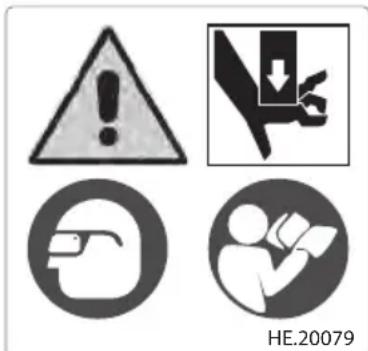
Figure 6 – Warning Label
- Inspect the attachments:
- Closely inspect all attachments for any cracked, broken, worn, missing, misaligned or binding parts or any other sign of damage that may prevent proper and safe operation. Damaged parts can cause the attachment to make incorrect pressed connections or fail during use and cause serious injury or property damage. If any damage is found, the attachment should be discarded and replaced.
Always ⬆ WARNING com-
plete pressing attachment. Never replace individual components or exchange parts between assemblies. Failure to replace the entire assembly may result in component failure and serious injury.
Do not modify pressing attachments or use modified attachments. A pressing attachment component that has been welded, ground, drilled or modified in any manner can shatter during pressing, resulting in sharp flying objects, severe injury or death. Discard and replace damaged pressing attachments.
- Inspect the attachment markings to make sure that it is clearly marked as to the system and size that it is appropriate for. Do not use an attachment that is not clearly marked.
- Inspect the press profile of the attachment. If it is rusty, dirty or if there is a buildup of fitting material, clean as described in the Maintenance section. It is important to keep the press profile clean to prevent the formation of burrs during pressing process, prevent the attachment from sticking to the fitting and making sure that a proper press connection is made.
- Make sure that springs are intact and bias the attachment in the closed direction. Attachment should cycle freely from the fully open to fully closed position. If needed, lubricate pivot points with a light lubricating oil. Wipe any excess oil from the attachment.
- Inspect and maintain any other equipment being used per its instructions to make sure it is functioning properly.
Set-Up and Operation
WARNING

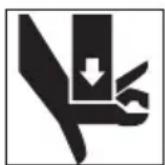
Keep your fingers and hands away from the tool attachment during the press cycle. Your fingers or hands can be crushed, fractured or amputated in the attachment, tool, between the tool and attachment, work piece and other objects.
Large forces are generated during product use that can break or throw parts and cause injury. Stand clear during use and wear appropriate protective equipment, including eye protection.
Use proper tool, attachment and fitting
combinations. Improper combinations can result in an incomplete press connection, which increases the risk of leaks, equipment damage and injury.
Follow Set-up and Operation to reduce the risk of injury from crushing and other causes and to prevent tool damage.
-
Confirm appropriate work area (See General Power Tool Safety Warnings). Operate in a clear, level, stable, dry location. Do not use tool while standing in water.
-
Inspect the work to be done and determine the correct RIDGID tool and RIDGID attachment for the application per their specifications. Using incorrect equipment for an application can cause injury, damage the tool and make incomplete connections.
-
Confirm all equipment has been inspected and set up as directed in their instructions.
Removing/Installing Attachment
a. Remove battery from tool.
b. Open the attachment mounting pin:
- Slightly push the attachment mounting pin.
- Twist counterclockwise by about 45° to open.
c. Remove/insert the appropriate attachment (Figure 7).
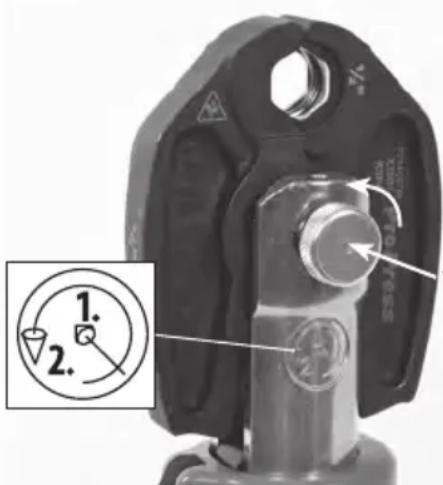
- Twist counterclockwise by about 45°
- Slightly Push
Figure 7 – Opening The Attachment Mounting Pin
d. Push to fully close the attachment mounting pin until it locks into the closed position. Attachment mounting pin must be
fully closed to prevent tool damage during use.
NOTE: Do not operate tool without the attachment in place, this can damage the tool.
Preparing Connection
NOTICE These instructions are generalized practices for several types of press tool attachments. Always follow the specific instructions for the press tool attachment being used and the fitting manufacturers' specific installation instructions to reduce the risk of improper press connections and extensive property damage.
-
Prepare the press connection according to the fitting manufacturer's instructions..
-
With dry hands, insert a fully charged battery into tool.
Pressing A Fitting
- Squeeze jaw arms to open jaws.
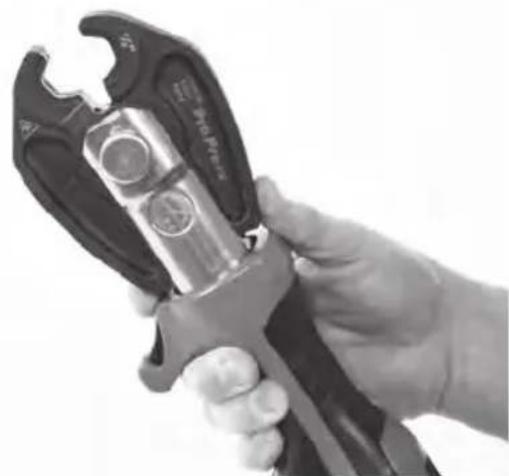
Figure 8 – Opening Jaw
- Place open jaws around fitting (Figure 9). Properly align jaw press profile with contour of the fitting as specified in Fitting Manufacturer's Installation Instructions. Release jaw arms to close jaws around fitting. Do not hang jaw set from fitting. Tool could unexpectedly drop and cause serious injury or death.
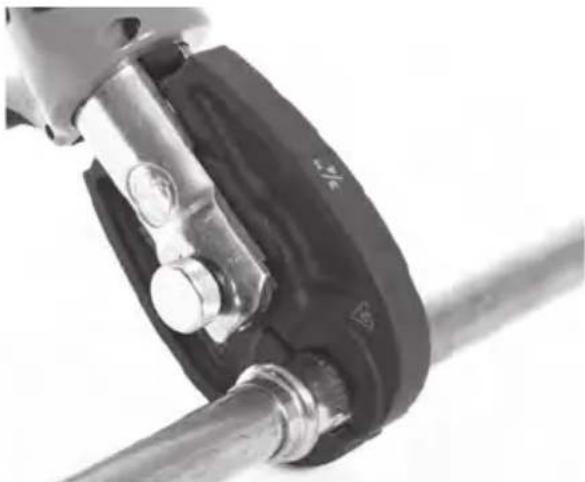
Figure 9 – Placing Jaws Around Fitting
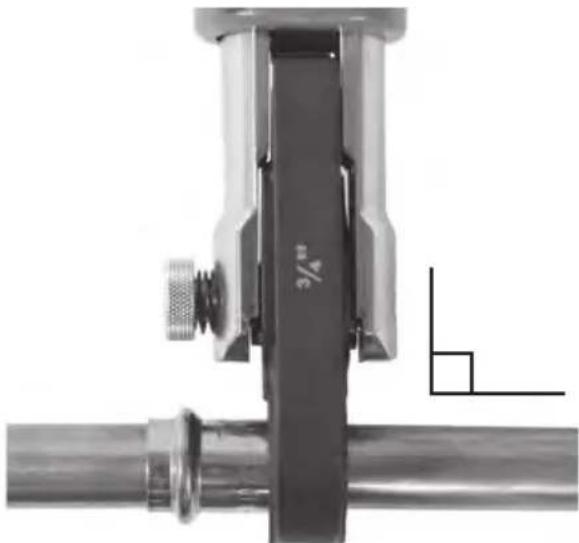
Figure 10 – Jaws Square to Fitting
- Confirm jaw is appropriately placed and square to fitting. Keep fingers and hands away from the jaws to avoid crushing injuries in jaws or between jaws and surroundings.
Depress the trigger/run switch. The tool cycle begins and the rollers contact the jaw arms and complete the cycle. Continue to press the trigger/run switch until the ram automatically retracts. Automatic ram retraction indicates that the tool has reached the appropriate force and the cycle is complete. This is required to ensure the complete connection.
If tool must be removed before a connection is completed, release the trigger/run switch, depress the pressure release button (Figure 1). Any time release button is depressed, press is NOT complete and the connection must be pressed again to ensure completion. If the tool malfunctions during operation, use this procedure.
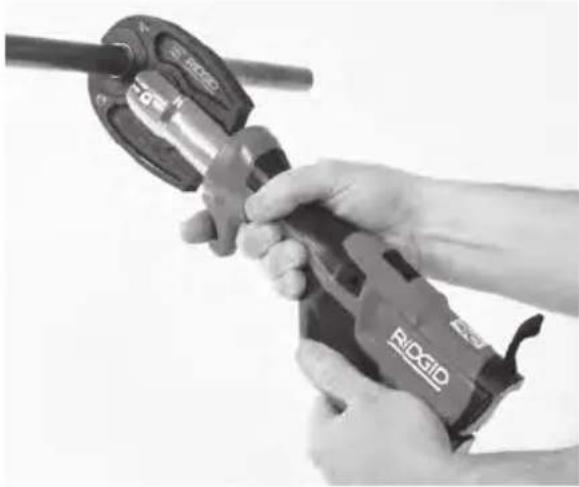
Figure 11 – Pressing the Fitting
- Release the trigger/run switch.
- Squeeze jaw arms to open jaws.
- Remove jaw from fitting. Avoid sharp edges that may have formed on fitting during pressing operation.
- When operation is complete, remove battery from tool.
Inspecting The Pressed Connection
- Inspect the pressed fitting for:
• Full insertion of tube into fitting.
- Excessive misalignment of the tubes. A slight amount of misalignment at a press connection is considered normal.
- Incorrect attachment alignment with the fitting contour. Distorted or deformed fitting.
- Any other issues per the fitting manufacturer. This could include the removal of a control ring or decal (used to indicate the connection has not yet been pressed).
If any issues are found, remove fitting and install a new press connection.
- If inspecting ProPress fittings, check and confirm the presence of the ProPress witness mark in one of the hex flats (See Figure 12). This unique mark confirms that the proper RIDGID Jaw set, designed specifically for the ProPress Fitting System was used to make the pressed connection. This witness mark is a trademark of the Ridge Tool Company. Absence of the witness mark may invalidate the system manufacturer's warranty.
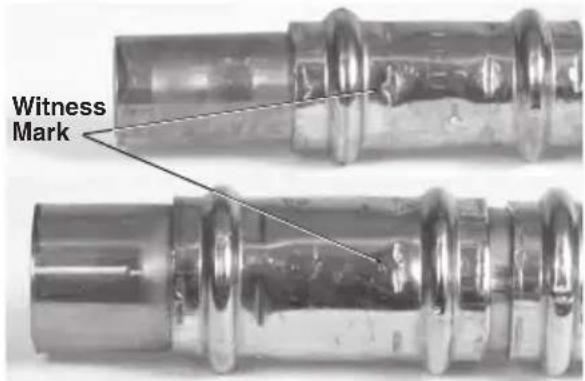
Figure 12 – ProPress Witness Mark
- Test the press connection in accordance with connector manufacturer instructions, normal practice and applicable codes.
Work Light Disable/Enable
- To disable work light, depress run switch and remove battery from tool.
- To enable work light, with the battery removed, depress run switch and insert battery into tool.
Storage
Remove battery from the press tool. Store press tool, attachments and battery in case. Avoid storing in extreme heat or cold. The tool will not turn ON if the tool is outside the specification range.
WARNING Store tool in a dry, secured, locked area that is out of reach of children and people unfamiliar with the press tool. The tool is dangerous in the hands of untrained users.
Maintenance Instructions

WARNING
Make sure the battery is removed from tool before performing maintenance or making any adjustment.
Do not open the tool or battery. It contains no user-serviceable parts.
Cleaning And Lubrication
- Wipe the tool clean daily with a clean dry cloth.
- Inspect the attachment mounting pin and lubricate the pin with silicone lubricant as needed.
Pressing Attachments
- Inspect the press profile daily (Figure 13). If rusty, dirty or if there is evidence of fitting material building up on the inside diameter, clean with fine grade Scotch-Brite® (Scotch-Brite® is a registered trademark of 3M Company) metal polishing pads (or equivalent), steel wool or a steel bristle wire brush.
NOTICE Do not clean pressing profile with aggressive abrasive materials or methods, such as emery cloth, sandpaper, grinding wheels or rotary files. These methods may alter critical pressing profile dimensions and cause improper pressed connections that can lead to extensive property damage.
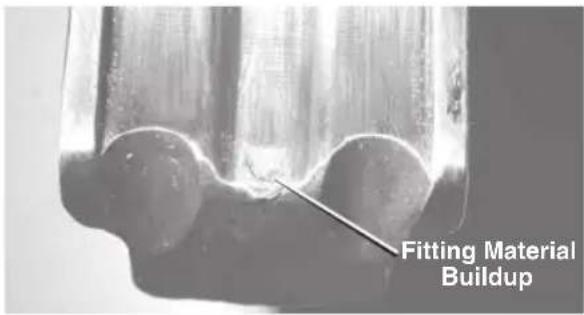
Figure 13 – Fitting Material Build-Up Requiring Jaw Cleaning
- Pivot pins and moving points should be cleaned and lubricated at least once a month with a lightweight general purpose lubricating oil.
- Check return springs with each use. Jaws should open and close freely with only moderate finger effort required.
Required Maintenance At RIDGID Authorized Independent Service Center
After 18,000 cycles, the status light will start blinking to indicate that it is time for maintenance and recalibration. The tool will not run if it is not serviced within 2,000 more cycles (20,000 total) after the status light starts blinking.
Troubleshooting
| PROBLEM POSSIBLE REASON SOLUTION | ||
| Tool will not turn ON when trigger/run switch is pressed. | Battery is completely discharged or battery has failed. | Insert fully charged battery/replace battery. |
| Battery not properly inserted into handle of tool. | Check to assure battery is fully inserted. | |
| Attachment is locked onto fitting. | Press connection was not successfully completed. | Push pressure release button to remove jaws from fitting. Inspect and re-press fitting. |
| The pressed connections produced are not complete. | Used wrong jaw for the tube size or material. | Install the correct attachment. |
| The tool was not square to the tube. | Redo the press connection with new fitting and new tube. Make sure that the tool is square to the tube. | |
| Attachment press contour was not aligned with the fitting contour. | Redo the joint with new tube and new fitting. Make sure the attachment press contour is aligned with the fitting contour.. | |
| Tool is in need of repair. | See Contact Information for nearest RIDGID Authorized Independent Service center. | |
| Excessively large or sharp fins present at press joint parting line where jaw tips come together. | Fitting material build up in the con-toured profile area near jaw tips. | Clean jaw in the contoured area using metal polishing pads such as Scotch-Brite®. Refer to Maintenance Section for instructions. |
| Excessively worn or damaged jaws. | Discard jaws and replace with new RIDGID jaw set. | |
| Jaws stick to fitting excessively after com-pleting press joint. | Fitting material build up in the con-toured profile area near jaw tips. | Clean jaw in the contoured area using metal polishing pads such as Scotch-Brite®. Refer to Maintenance Section for instructions. |
| Oil leaks from tool. | Seal or mechanical problems. | |
| Motor runs but tool will not complete a cycle. | Oil level low | See Contact Information for near-est RIDGID Authorized Independent Service center. |
| Tool stops during operation. | Oil level low. | |
| See Figure 5 for Tool Status Lights. | ||
Service And Repair
WARNING
Improper service or repair can make machine unsafe to operate.
Service and repair on the RP 115 Press Tool must be performed by a RIDGID Authorized Independent Press Tool Service Center.
For information on your nearest RIDGID Authorized Independent Press Tool Service Center or any service or repair questions see Contact Information section in this manual.
Optional Equipment
WARNING
To reduce the risk of injury, only use equipment specifically designed and recommended for use with the RP 115 Press Tool, such as listed below.
| Catalog No. | Description |
| 75338 | Carry Case, RP 115 |
Jaws
| Catalog No. | Description | Weight | |
| 72563 | 1/2" Mini PureFlow Jaw | 2.2 lbs. (1 kg) | |
| 72568 | 3/4" Mini PureFlow Jaw | 2.2 lbs. (1 kg) | |
| 72578 | 1/2" Mini ProPress Jaw | 2.2 lbs. (1 kg) | |
| 72583 | 3/4" Mini ProPress Jaw | 2.2 lbs. (1 kg) | |
Battery Pack
| Catalog No. | Description | Capacity |
| 55183 | RB-1225R | 10.8V (2.5Ah) |
Battery will work with any catalog number RBC-121 Battery Charger.
Chargers and Cords
| Catalog No. | Description | Region Type | Plug |
| 55193 | Charger USA, | Canada and Mexico A | |
| 55198 | Charger | Europe | C |
| 55203 | Charger | China | A |
| 55208 | Charger Australia & Latin America I | ||
| 55213 | Charger | Japan | A |
| 55218 | Charger | United Kingdom G | |
| 44798 | Charger Cord | North America A | |
| 44808 | Charger Cord | Europe | C |
| 44803 | Charger Cord | China | A |
| 44813 | Charger Cord | Australia & LA | I |
| 44818 | Charger Cord | Japan | A |
| 44828 | Charger Cord | United Kingdom | G |
For a complete listing of RIDGID® optional equipment available for this tool, see the Ridge Tool Catalog online at RIDGID.com or see Contact Information.
Disposal
Parts of these tools contain valuable materials and can be recycled. There are companies that specialize in recycling that may be found locally. Dispose of the components in compliance with all applicable regulations. Contact your local waste management authority for more information
For EC Countries: Do not dispose of electrical equipment with household waste!
According to the European Guideline 2012/19/EU for Waste Electrical and Electronic Equipment and its implementation into national legislation, electrical equipment that is no longer usable must be collected separately and disposed of in an environmentally correct manner.
Clearance Requirements
The following figures illustrate the clearance requirements for the jaws and fittings.
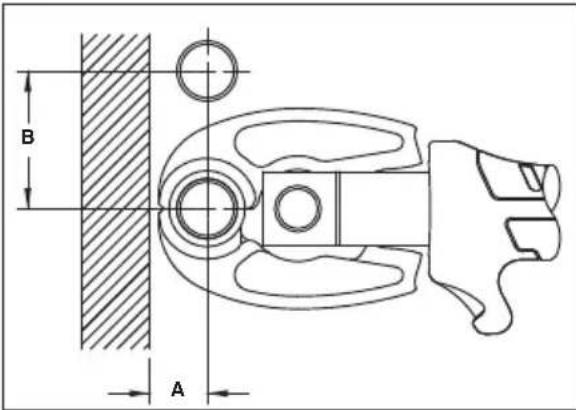
| System | Tube Dia. | A (min.) | B (min.) | ||
| Inches | mm | Inches | mm | ||
| ProPress | 1/2'' | 7/8 | 23 | 21/8 | 54 |
| 3/4'' | 1 | 26 | 21/2 | 64 | |
| PureFlow | 1/2'' | 3/4 | 19 | 2 | 51 |
| 3/4'' | 11/8 | 29 | 21/4 | 57 | |
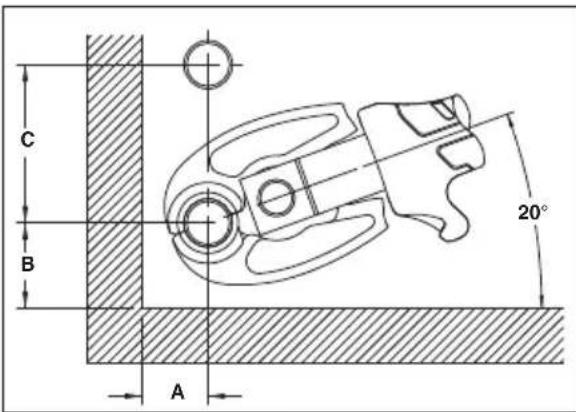
| System | Tube Dia. | A (min.) | B (min.) | C (min.) | |||
| Inches | mm | Inches | mm | Inches | mm | ||
| ProPress | 1/2" | 7/8 | 23 | 15/8 | 41 | 23/4 | 70 |
| 3/4" | 11/8 | 29 | 23/4 | 45 | 27/8 | 73 | |
| PureFlow | 1/2" | 7/8 | 23 | 15/8 | 41 | 21/2 | 64 |
| 3/4" | 11/4 | 32 | 13/4 | 45 | 23/4 | 70 | |
Electromagnetic Compatibility (EMC)
The term electromagnetic compatibility is taken to mean the capability of the product to function smoothly in an environment where electromagnetic radiation and electrostatic discharges are present and without causing electromagnetic interference to other equipment.
NOTICE These tools conform to all applicable EMC standards. However, the possibility of them causing interference in other devices cannot be precluded. All EMC related standards that have been tested are called out in the tool's technical document.
Outil de sertissage RP 115

AVERTISSEMENT!
Code de date, P = 2020,
R = Avril
Outil n° 142
304711
PR
142
ADVERTENCIA!
| Año | Código | Mes | Código | Mes Código | |
| 2018 | M | Ene | N Jul V | ||
| 2019 | N | Feb P Ago W | |||
| 2020 | P | Mar Q Sep X | |||
| 2021 | Q | Abr R Oct Y | |||
| 2022 | R | May S Nov Z | |||
| 2023 | S | Jun T Dec 1 |
Especificaciones*
Figura 11 – Selladura del acoplamiento
This equipment has been tested and found to comply with the limits for a Class A digital device, pursuant to part 15 of the FCC Rules. These limits are designed to provide reasonable protection against harmful interference when the equipment is operated in a commercial environment. This equipment generates, uses, and can radiate radio frequency energy and, if not installed and used in accordance with the instruction manual, may cause harmful interference to radio communications. Operation of this equipment in a residential area is likely to cause harmful interference in which case the user will be required to correct the interference at his own expense.
RIDGID® RP 115 Press Tool
MANUFACTURER AUTHORIZED REPRESENTATIVE
RIDGE TOOL COMPANY Ridge Tool Europe NV
RIDGID® tools are warranted to be free of defects in workmanship and material.
How long coverage lasts
This warranty lasts for the lifetime of the RIDGID ® tool. Warranty coverage ends when the product becomes unusable for reasons other than defects in workmanship or material.
How you can get service
To obtain the benefit of this warranty, deliver via prepaid transportation the complete product to RIDGE TOOL COMPANY, Elyria, Ohio, or any RIDGID® AUTHORIZED INDEPENDENT SERVICE CENTER. Pipe wrenches and other hand tools should be returned to the place of purchase.
What we will do to correct problems
Warranted products will be repaired or replaced. at RIDGE TOOL'S option, and returned at no charge; or, if after three attempts to repair or replace during the warranty period the product is still defective, you can elect to receive a full refund of your purchase price.
What is not covered
Failures due to misuse, abuse or normal wear and tear are not covered by this warranty. RIDGE TOOL shall not be responsible for any incidental or consequential damages.
How local law relates to the warranty
Some states do not allow the exclusion or limitation of incidental or consequential damages, so the above limitation or exclusion may not apply to you. This warranty gives you specific rights, and you may also have other rights, which vary, from state to state, province to province, or country to country.
No other express warranty applies
This FULL LIFETIME WARRANTY is the sole and exclusive warranty for RIDGID ® products. No employee, agent, dealer, or other person is authorized to alter this warranty or make any other warranty on behalf of the RIDGE TOOL COMPANY.

Parts are available online at Store.RIDGID.com
Ce qui est couvert
Elyria, Ohio 44035-6001
U.S.A.
©2022 Ridge Tool Company
Printed 7/22 999-995-408.10DGID and the Emerson logo are registered trademarks of Emerson Electric Co. or its subsidiaries in the US and other countries.
ECN001044REV.A
Any other trademarks belong to their respective holders.

- TABLE OF CONTENTS
- GENERAL POWER TOOL SAFETY WARNINGS
- SPECIFIC SAFETY INFORMATION
- MAINTENANCE INSTRUCTIONS
- OPTIONAL EQUIPMENT
- RP 115 PRESS TOOL
- WARNING
- SAFETY SYMBOLS
- DANGER
- CAUTION
- NOTICE
- SAVE ALL WARNINGS AND INSTRUCTIONS FOR FUTURE REFERENCE
- WORK AREA SAFETY
- ELECTRICAL SAFETY
- PERSONAL SAFETY
- POWER TOOL USE AND CARE
- BATTERY TOOL USE AND CARE
- SERVICE
- PRESS TOOL SAFETY
- RIDGID CONTACT INFORMATION
- DESCRIPTION
- SPECIFICATIONS
- MOTOR
- STANDARD EQUIPMENT
- PRE-OPERATION INSPECTION
- SET-UP AND OPERATION
- REMOVING/INSTALLING ATTACHMENT
- PREPARING CONNECTION
- PRESSING A FITTING
- INSPECTING THE PRESSED CONNECTION
- WORK LIGHT DISABLE/ENABLE
- STORAGE
- CLEANING AND LUBRICATION
- PRESSING ATTACHMENTS
- REQUIRED MAINTENANCE AT RIDGID AUTHORIZED INDEPENDENT SERVICE CENTER
- SERVICE AND REPAIR
- DISPOSAL
- CLEARANCE REQUIREMENTS
- ELECTROMAGNETIC COMPATIBILITY (EMC)
- OUTIL DE SERTISSAGE RP 115
- AVERTISSEMENT
- ADVERTENCIA
- ESPECIFICACIONES
- RIDGID® RP 115 PRESS TOOL
- MANUFACTURER AUTHORIZED REPRESENTATIVE
- HOW LONG COVERAGE LASTS
- HOW YOU CAN GET SERVICE
- WHAT WE WILL DO TO CORRECT PROBLEMS
- WHAT IS NOT COVERED
- HOW LOCAL LAW RELATES TO THE WARRANTY
- NO OTHER EXPRESS WARRANTY APPLIES
- CE QUI EST COUVERT
Brand : RIDGID
Model : RP 115
Category : Hand tool